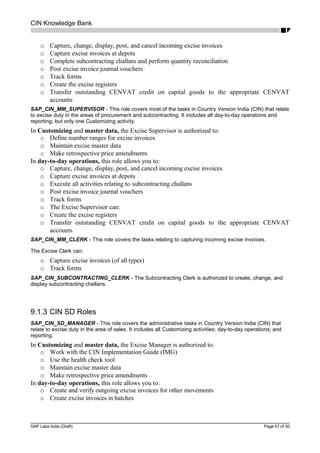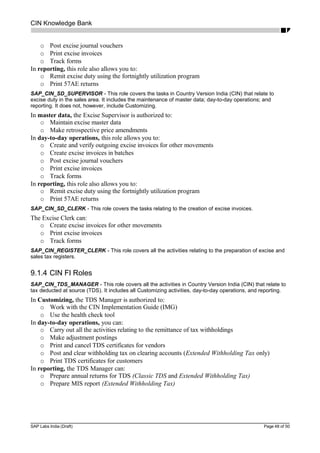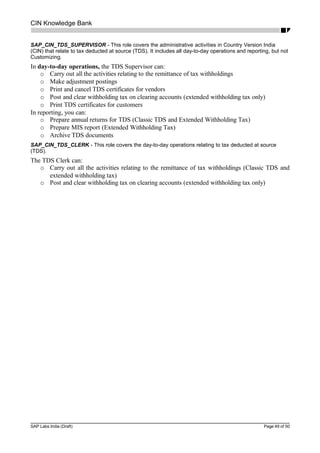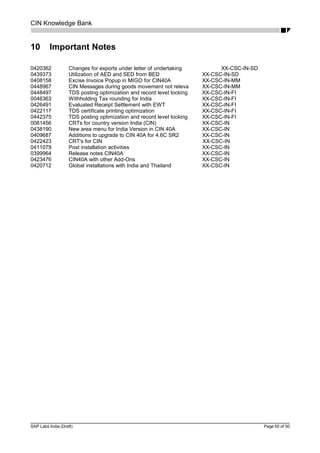
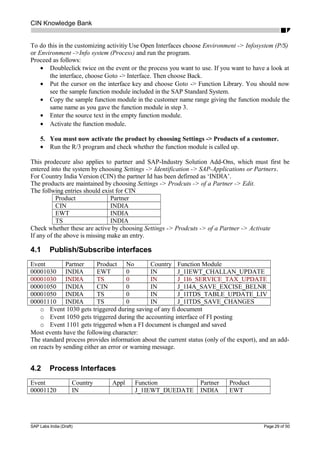
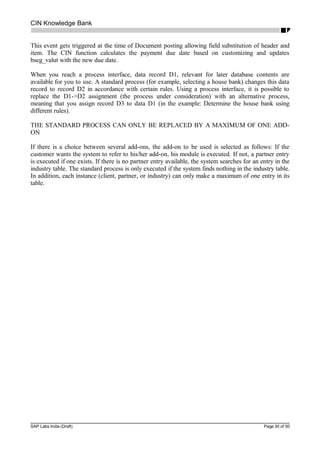
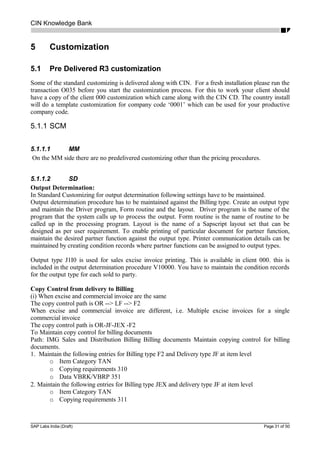
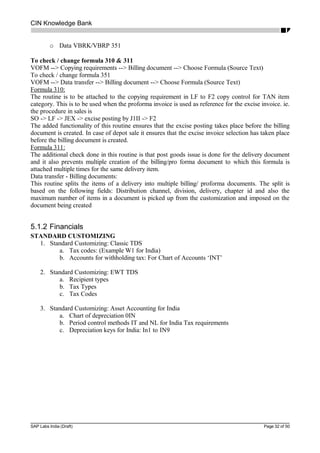
CIN Knowledge Bank
SAP Labs India (Draft) Page 1 of 50
CIN – Knowledge Bank
A Handbook for quick implementation
CIN Knowledge Bank
Copyright
Copyright © 2001 SAP Labs India. All rights reserved.
Neither this document nor any part of it may be copied or reproduced in any form or by any means
without the prior written consent of SAP Labs India.
The information contained in this document is subject to change or revision without prior notice.
Original Document
The original version of this document is saved under the heading CIN Knowledge Bank in
inblr102SAPALLInternational_Development
History
Version 1.0 STATUS: Draft 20.11.2001
Author(s)
NAME OF AUTHORs Uma Rani SAP Labs India Pvt Ltd.
Arun Subramanian SAP Labs India Pvt Ltd
Sameer Ghare SAP Labs India Pvt Ltd
Rakesh Agarwal SAP Labs India Pvt Ltd
Binu John SAP Labs India Pvt Ltd
Mahesh Telagavi SAP Labs India Pvt Ltd
Prashant Baliga SAP Labs India Pvt Ltd
Neelakantans Padmanabhan SAP Labs India Pvt Ltd
SAP Labs India (Draft) Page 2 of 50
CIN Knowledge Bank
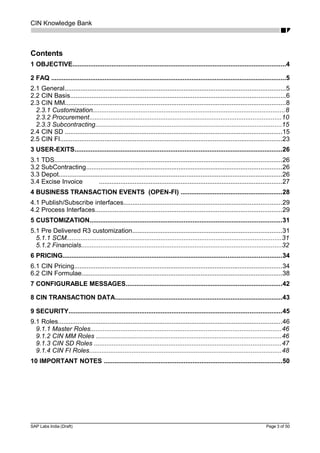
Contents
1 OBJECTIVE........................................................................................................................4
2 FAQ ....................................................................................................................................5
2.1 General............................................................................................................................5
2.2 CIN Basis.........................................................................................................................6
2.3 CIN MM............................................................................................................................8
2.3.1 Customization............................................................................................................8
2.3.2 Procurement............................................................................................................10
2.3.3 Subcontracting.........................................................................................................15
2.4 CIN SD ..........................................................................................................................15
2.5 CIN FI.............................................................................................................................23
3 USER-EXITS.....................................................................................................................26
3.1 TDS................................................................................................................................26
3.2 SubContracting..............................................................................................................26
3.3 Depot..............................................................................................................................26
3.4 Excise Invoice .......................................................................................................27
4 BUSINESS TRANSACTION EVENTS (OPEN-FI) .........................................................28
4.1 Publish/Subscribe interfaces.........................................................................................29
4.2 Process Interfaces.........................................................................................................29
5 CUSTOMIZATION............................................................................................................31
5.1 Pre Delivered R3 customization....................................................................................31
5.1.1 SCM.........................................................................................................................31
5.1.2 Financials.................................................................................................................32
6 PRICING...........................................................................................................................34
6.1 CIN Pricing.....................................................................................................................34
6.2 CIN Formulae.................................................................................................................38
7 CONFIGURABLE MESSAGES........................................................................................42
8 CIN TRANSACTION DATA..............................................................................................43
9 SECURITY........................................................................................................................45
9.1 Roles..............................................................................................................................46
9.1.1 Master Roles...........................................................................................................46
9.1.2 CIN MM Roles ........................................................................................................46
9.1.3 CIN SD Roles .........................................................................................................47
9.1.4 CIN FI Roles............................................................................................................48
10 IMPORTANT NOTES ....................................................................................................50
SAP Labs India (Draft) Page 3 of 50
CIN Knowledge Bank
1 Objective
The objective of this document is to make available on paper some of the critical features of CIN so
as to make CIN implementation easy. This document is beyond a user manual and is intended only
for people who would be implementing CIN in any customer location. All the sections are applicable
only for CIN 40A, which has been released in June 2001.
We have collated and put together some of the frequently asked questions on CIN.
SAP Labs India (Draft) Page 4 of 50
CIN Knowledge Bank
2 FAQ
2.1 General
o How do I know whether CIN is installed?
Run the function module SE37- test j_1bsa_component_check with component as ‘IN’ and youRun the function module SE37- test j_1bsa_component_check with component as ‘IN’ and you
should get a return code ‘0’ and no exceptions. Before you can check this you should have appliedshould get a return code ‘0’ and no exceptions. Before you can check this you should have applied
SAP note 411079.SAP note 411079.
o How do I invoke CIN transactions?
Best way to invoke CIN transactions is to attach the pre delivered CIN roles to user profiles.Best way to invoke CIN transactions is to attach the pre delivered CIN roles to user profiles.
o What are the roles available in CIN?
Please see the section below of the knowledge bank. Alternatively in an R3 system with CINPlease see the section below of the knowledge bank. Alternatively in an R3 system with CIN
you can use the transaction PFCG (Profile Generator) and look for entries SAP_CIN*you can use the transaction PFCG (Profile Generator) and look for entries SAP_CIN*
o Where can I get the CIN user manual?
CIN user manual is now available as a CD and can be installed centrally and accessed byCIN user manual is now available as a CD and can be installed centrally and accessed by
any user. It is also available in SAP’s help portal at help.sap.com/additional components/any user. It is also available in SAP’s help portal at help.sap.com/additional components/
Country version IndiaCountry version India
o What will the country install program do?
The country install program (invoked using O035 transaction code) does pre customizationThe country install program (invoked using O035 transaction code) does pre customization
of company code ‘0001’ so that you have some customization to start with which you canof company code ‘0001’ so that you have some customization to start with which you can
build further.build further.
o Is there any pre customization available for CIN?
There is some customization available for CIN as a part of country install and otherThere is some customization available for CIN as a part of country install and other
components are mentioned in the knowledge bank. There is no pre configured client forcomponents are mentioned in the knowledge bank. There is no pre configured client for
CIN.CIN.
o Must I always run country install after an upgrade?
You should run Country install program only if it is a fresh installation with noYou should run Country install program only if it is a fresh installation with no
customization. If you have already started building the org structure and other processcustomization. If you have already started building the org structure and other process
mapping then you must not run country install program.mapping then you must not run country install program.
o Is there an area menu for CIN?
From R3 46B the concept of area menus are not much used in SAP. So it is preferable to useFrom R3 46B the concept of area menus are not much used in SAP. So it is preferable to use
roles for accessing the CIN transactions. You can also use the area menu J1ILN if youroles for accessing the CIN transactions. You can also use the area menu J1ILN if you
need.( Older versions of CIN had area menu J1IL)need.( Older versions of CIN had area menu J1IL)
o Where can I get all the transaction codes for CIN?
There is no need to know all the transaction codes with in CIN. What is more important is toThere is no need to know all the transaction codes with in CIN. What is more important is to
look at the CIN roles and how this can be used.look at the CIN roles and how this can be used.
o How do I know all the authorizations given with CIN?
Using Profile generator you can generate a authorization profiels for a given role. You canUsing Profile generator you can generate a authorization profiels for a given role. You can
use existing roles or build new roles also based on individual requirements.use existing roles or build new roles also based on individual requirements.
o How do I upload the CIN related legacy data at the time of initial upload?
There is no standard tool or methodology for uploading CIN master or transaction data atThere is no standard tool or methodology for uploading CIN master or transaction data at
the moment.the moment.
o What support does CIN provide for budget?
CIN product is designed in such away that changes can be done very easily.CIN product is designed in such away that changes can be done very easily.
o What do I do if the rates change after a budget?
Excise rates are maintained as master data in CIN. You just need to put in new rates in CINExcise rates are maintained as master data in CIN. You just need to put in new rates in CIN
master data to change it with the new validity. But if sales tax rates are being changed thenmaster data to change it with the new validity. But if sales tax rates are being changed then
you cannot change the tax codes. You should define new tax codes with new rates and useyou cannot change the tax codes. You should define new tax codes with new rates and use
SAP Labs India (Draft) Page 5 of 50
CIN Knowledge Bank
them. Changes to income tax rates have to be handled by defining new withholding taxthem. Changes to income tax rates have to be handled by defining new withholding tax
codes.codes.
o What do I do if the CENVAT process changes?
CIN team follows the budget related changes and releases correction notes if there areCIN team follows the budget related changes and releases correction notes if there are
changes to any of the CIN transactions or reports. You need to check SAPNET and applychanges to any of the CIN transactions or reports. You need to check SAPNET and apply
the notes after the budget.the notes after the budget.
o Where do I get CIN release notes?
o How to access the CIN release notes in the system?
o What can I do if I need to submit few new reports?
Check SAPNET whether there are notes existing already. You can post a message to SAPCheck SAPNET whether there are notes existing already. You can post a message to SAP
support, who can tell ou whether some thing would be made available in the short term.support, who can tell ou whether some thing would be made available in the short term.
SAP support can also be contacted using the email support.India@sap.comSAP support can also be contacted using the email support.India@sap.com
o How do I know whether a new lgal requirement is being considered for development by
SAP?
You can do a search on SAPNET front end or contactYou can do a search on SAPNET front end or contact support.India@sap.comsupport.India@sap.com
2.2 CIN Basis
o Can I have CIN as well as other Add-ons in one box?
You can have multiple add-ons technically in one box from 46C on wards. But before doingYou can have multiple add-ons technically in one box from 46C on wards. But before doing
this you need to contact SAP support who can guide for the necessary precautions.this you need to contact SAP support who can guide for the necessary precautions.
o Is it possible for me to have multiple country versions in one client? Are there any
installations with multiple country versions in one client?
There are installations with multiple country versions in one client. From 46C onwards CINThere are installations with multiple country versions in one client. From 46C onwards CIN
is technically conflict free and can exist with other country versions. However theis technically conflict free and can exist with other country versions. However the
installation process of multiple add-ons is not stright forward and you must contact preinstallation process of multiple add-ons is not stright forward and you must contact pre
sales before taking up a similar project.sales before taking up a similar project.
o How do I know which support pack I should move onto?
It is always beneficial to move to the latest support pack which is supported by CIN. ThisIt is always beneficial to move to the latest support pack which is supported by CIN. This
will ensure that all the known errors until that point is solved. For knowing which is thewill ensure that all the known errors until that point is solved. For knowing which is the
approved level for India please look into note 81456. This note gets updated whenever thereapproved level for India please look into note 81456. This note gets updated whenever there
is a new add-on patch for CIN. You can look at the existing support packs at the serviceis a new add-on patch for CIN. You can look at the existing support packs at the service
marketplace.marketplace.
o After importing support packs will the functionality change?
Support packs are collections of notes and should not change the basic functionality. TheySupport packs are collections of notes and should not change the basic functionality. They
are mainly bug fixes. The support pack gives a list of notes for which the corrections areare mainly bug fixes. The support pack gives a list of notes for which the corrections are
included.included.
o Do I need to do an integration test after CIN support pack import?
Some testing is required for the critical processes after a support pack implementation. ItSome testing is required for the critical processes after a support pack implementation. It
would also be a good practice to keep some CATTs to be done after every SP import.would also be a good practice to keep some CATTs to be done after every SP import.
o What is a CRT?
CRT stands for Conlfict Resolution transport. Some add-ons change the core R3 code. SoCRT stands for Conlfict Resolution transport. Some add-ons change the core R3 code. So
when R3 comes up with Support packages there can be situations when the add-on modifiedwhen R3 comes up with Support packages there can be situations when the add-on modified
code gets over written. In such scenarios the add-on will have to provide a Conflictcode gets over written. In such scenarios the add-on will have to provide a Conflict
resolution transport after merging the new R3 source with add-on corrections. As aresolution transport after merging the new R3 source with add-on corrections. As a
customer what needs to be kept in mind is that if there is a CRT for a SP then both needs tocustomer what needs to be kept in mind is that if there is a CRT for a SP then both needs to
be applied together. This is handled by the SAP Patch manager tool SPAM.be applied together. This is handled by the SAP Patch manager tool SPAM.
o Will I get a CRT in CIN40A?
SAP Labs India (Draft) Page 6 of 50
CIN Knowledge Bank
CIN40A does not carry any modifications to R3 core. So you will not get any CRT’s inCIN40A does not carry any modifications to R3 core. So you will not get any CRT’s in
CIN40A. However you will get Add-on patches in CIN40A which are collections of CINCIN40A. However you will get Add-on patches in CIN40A which are collections of CIN
notes bundled together. They need so specific Support pack level of R3 for technicalnotes bundled together. They need so specific Support pack level of R3 for technical
reasons.reasons.
o Can I run Internet sales with excise taxes?
You need to have separate pricing procedure to make this possible. It would be best toYou need to have separate pricing procedure to make this possible. It would be best to
contact SAP product management group on this.contact SAP product management group on this.
o When I upgrade will I lose my customization?
Upgrades will put the new customization only to client 000. No customization is imported toUpgrades will put the new customization only to client 000. No customization is imported to
any other clients. In case you need to use any of the new customization you need to copyany other clients. In case you need to use any of the new customization you need to copy
them from client 000. The productive operation will in no way be affected.them from client 000. The productive operation will in no way be affected.
o How do I copy the customization from client 000 to my production client?
You can use the customizing cross system viewer to compare the customizing across clients.You can use the customizing cross system viewer to compare the customizing across clients.
The customizing transfer assistant can be used to copy the entries.The customizing transfer assistant can be used to copy the entries.
o When I change CIN objects should I register?
CIN objects do not require you to register it with SAP support.CIN objects do not require you to register it with SAP support.
o Is there an object key for CIN objects?
CIN objects do not need an object key. This is because the name range is considered asCIN objects do not need an object key. This is because the name range is considered as
add-on.add-on.
o When I try to create a new object of CIN which came through note, the system says that the
name range cannot be used. What should I do?
Check if the name space entries are available using transaction se03. Also check whetherCheck if the name space entries are available using transaction se03. Also check whether
the name space is modifiable.the name space is modifiable.
o What are CIN name spaces?
/0SJ1I/ and /0SJ2I//0SJ1I/ and /0SJ2I/
o Is there any partner project for CIN?
For creating new objects in CIN name range you need to maintain the partner project idsFor creating new objects in CIN name range you need to maintain the partner project ids
‘1I’ and ‘2I’ in tables RESP and RESPT using transaction SM30.‘1I’ and ‘2I’ in tables RESP and RESPT using transaction SM30.
o Can I make a client copy excluding CIN?
It is not possible to exclude CIN data while making a client copy.It is not possible to exclude CIN data while making a client copy.
o When I maintain some of the CIN master data system is asking for a transport request. How
do I avoid it?
This has been rectified. If it is still a problem please report in SAP support. Also pleaseThis has been rectified. If it is still a problem please report in SAP support. Also please
check the following. Go into SE11. Enter the table name for which the maintenance ischeck the following. Go into SE11. Enter the table name for which the maintenance is
giving a problem. Display the table. Take the option – Utilities – table maintenancegiving a problem. Display the table. Take the option – Utilities – table maintenance
generator. Check the recording routing. It should be no, or user recording routine.generator. Check the recording routing. It should be no, or user recording routine.
o Which are the R3 versions on which CIN is available?
CIN is available in R3 40B 46B and 46C only.CIN is available in R3 40B 46B and 46C only.
o Are there any language versions for CIN?
No CIN is available only in English.No CIN is available only in English.
o Are there any code page restrictions for CIN while using with other language versions?
No there are no code page restrictions for CIN. CIN does not need a code page by itself. SoNo there are no code page restrictions for CIN. CIN does not need a code page by itself. So
it can be put with other languages.it can be put with other languages.
o I have a system with R3 and CIN. Can I upgrade R3 alone leaving CIN?
You cannot upgrade CIN alone. If you opt to ignore CIN and continue with the upgrade ofYou cannot upgrade CIN alone. If you opt to ignore CIN and continue with the upgrade of
R3 alone then the CIN objects get deactivated in the system and it is not usable any more. AR3 alone then the CIN objects get deactivated in the system and it is not usable any more. A
re install might lead to problems and loss of data.re install might lead to problems and loss of data.
o Even after CIN is installed when I try to run any CIN program system is saying CIN is not
installed. Why?
You need to apply note 411079You need to apply note 411079
SAP Labs India (Draft) Page 7 of 50
CIN Knowledge Bank
o How do I restrict access to the various options under j1id ot j1it?
CIN has pre delivered authorization groups j1it and j1id. You can attach this group to theCIN has pre delivered authorization groups j1it and j1id. You can attach this group to the
table using transaction sucu.table using transaction sucu.
o How do I create new authorization groups?
You have to run a report RKSCUS09. Enter the authorization objects as S_TABU_DIS andYou have to run a report RKSCUS09. Enter the authorization objects as S_TABU_DIS and
then you can maintain new authorization groups under this.then you can maintain new authorization groups under this.
o When should I install CIN?
You can install CIN after the R3 upgrade is over at any time. It is recommended that you doYou can install CIN after the R3 upgrade is over at any time. It is recommended that you do
it along with the R3 upgrade.it along with the R3 upgrade.
o How long is each version of CIN supported?
Current supported versions of CIN are CIN22B on R3 40B until June 2003, CIN30A on R3Current supported versions of CIN are CIN22B on R3 40B until June 2003, CIN30A on R3
46B until June 2003 and CIN40A on R3 46C until 2005.46B until June 2003 and CIN40A on R3 46C until 2005.
o If I am already in a higher Support pack than is required by the add-on how do I proceed?
For CIN40A the limit is only on the minimum Support pack level. If you already above that,For CIN40A the limit is only on the minimum Support pack level. If you already above that,
then this does not cause any problem.then this does not cause any problem.
o If another add-on is already installed then can I install CIN on top of it?
You need to take permission from the other add-on for this process. Contact SAP support.You need to take permission from the other add-on for this process. Contact SAP support.
o How long does a CIN installation take?
The time depends on the hardware that is available. If 4 processors and 2 GB RAM isThe time depends on the hardware that is available. If 4 processors and 2 GB RAM is
allocated to that instance then it takes about 40 minutes. The maximum time is about 1.5 hrsallocated to that instance then it takes about 40 minutes. The maximum time is about 1.5 hrs
o How long does it take to upgarde CIN?
This will typically depend on the databse size. But this is rolled into the R3 upgrade andThis will typically depend on the databse size. But this is rolled into the R3 upgrade and
CIN composite upgrade will not add additional down time to the R3 upgrade.CIN composite upgrade will not add additional down time to the R3 upgrade.
o Multiple users are not able to use j1id at the same time. How do I resolve this?
Master data in CIN is maintained using default table maintenance views. This poses aMaster data in CIN is maintained using default table maintenance views. This poses a
restriction that only one user can change the data at any given time. This is because of therestriction that only one user can change the data at any given time. This is because of the
table level lock.table level lock.
2.3 CIN MM
2.3.1 Customization
o How do I configure the system for partial credit functionality? (80:20 or 95:5 for
Cenvatable: Inventorisable)
The relevant tax code should be configured with the required ratios for deductible and non-The relevant tax code should be configured with the required ratios for deductible and non-
deductible tax components (JMO1 and JMO2 respectively).deductible tax components (JMO1 and JMO2 respectively).
The partial credit indicator at the excise registration ID level should also be marked.The partial credit indicator at the excise registration ID level should also be marked.
o What are the settings involved to run the stock transport orders through the GRPO
route?
For a receiving plant a customer has to be created.For a receiving plant a customer has to be created.
SAP Labs India (Draft) Page 8 of 50
CIN Knowledge Bank
For an issuing plant a customer and a vendor has to be created and this vendor is to beFor an issuing plant a customer and a vendor has to be created and this vendor is to be
linked to this customer.linked to this customer.
Both the customers have to be assigned to the plant in the Stock Transport Order settings.Both the customers have to be assigned to the plant in the Stock Transport Order settings.
(Transaction:OMGN)(Transaction:OMGN)
o How do I change the debit account that is proposed in Excise JVs?
In the company settings of CIN IMG select the indicator “Debit Account Overwrite” for theIn the company settings of CIN IMG select the indicator “Debit Account Overwrite” for the
required company code.required company code.
o What is the difference between the ‘Depot’ indicator at the plant and the same at the
excise group level?
At excise group level: It indicates that for the particular combination of the excise groupAt excise group level: It indicates that for the particular combination of the excise group
and the plant, the plant will function as a depot.and the plant, the plant will function as a depot.
At plant level: Irrespective of the plant being attached to any excise group, the plantAt plant level: Irrespective of the plant being attached to any excise group, the plant
attached to all the excise groups will function as a depot.attached to all the excise groups will function as a depot.
The setting at the plant level takes precedence over that at the excise group level.The setting at the plant level takes precedence over that at the excise group level.
o Can I change the non-cenvatable condition types that have been delivered?
No. The delivered non-cenvatable condition types (e.g. JMO2 etc.) are to be used as theyNo. The delivered non-cenvatable condition types (e.g. JMO2 etc.) are to be used as they
are.are.
o Can the excise popup be made to appear for any movement type?
The excise popup will appear for all those movement types that have been delivered for CIN,The excise popup will appear for all those movement types that have been delivered for CIN,
provided these movement types are maintained in the CIN IMG settings.provided these movement types are maintained in the CIN IMG settings.
Note:Note: The users can create a copy of these standard movement types (delivered for CIN),The users can create a copy of these standard movement types (delivered for CIN),
and maintain the entry in the CIN IMG for the popup.and maintain the entry in the CIN IMG for the popup.
o Can I segregate different actions and reference documents combinations for incoming
excise invoice transaction (J1IEX)?
Yes. The user has two broad options for the combinations of the actions and referenceYes. The user has two broad options for the combinations of the actions and reference
documents for the incoming excise invoice transaction.documents for the incoming excise invoice transaction.
Define processing modes per transaction:Define processing modes per transaction:
Here the user can decide the processing modes associated with the transactions. For e.g. forHere the user can decide the processing modes associated with the transactions. For e.g. for
J1IEX capture, post, change, display and cancel options are available, while for J1IEX_CJ1IEX capture, post, change, display and cancel options are available, while for J1IEX_C
only capture and display options are available. The user has the freedom to change theonly capture and display options are available. The user has the freedom to change the
delivered settings.delivered settings.
Define Reference Documents Per Transaction:Define Reference Documents Per Transaction:
Here the user can decide the combination of the processing modes with the referenceHere the user can decide the combination of the processing modes with the reference
documents. For e.g. for the processing mode “Capture Excise Invoice” one can choosedocuments. For e.g. for the processing mode “Capture Excise Invoice” one can choose
reference documents such as PO, GR, STO etc.reference documents such as PO, GR, STO etc.
The user has the freedom to change the delivered settings.The user has the freedom to change the delivered settings.
o Where will I change the input/output attribute of a field of the incoming excise invoice
transaction?
In CIN IMG, under the Incoming Excise Invoices node the user can change the attributes ofIn CIN IMG, under the Incoming Excise Invoices node the user can change the attributes of
certain fields.certain fields.
The user cannot add any additional fields other than the delivered ones.The user cannot add any additional fields other than the delivered ones.
SAP Labs India (Draft) Page 9 of 50
CIN Knowledge Bank
o In the subcontracting attributes (CIN IMG) what is the difference between Movement
Type Group Issues and Movement Type Group Receipts?
Movement types that issue material from the plant to the subcontractor are grouped underMovement types that issue material from the plant to the subcontractor are grouped under
the movement type group issues. Similarly, the movement types that consume the materialsthe movement type group issues. Similarly, the movement types that consume the materials
when the processed goods are received into a plant are grouped under the movement typewhen the processed goods are received into a plant are grouped under the movement type
group receipts.group receipts.
o In the Subcontracting Challan, How should I maintain number ranges for each series
group?
Subcontracting Challan number ranges should not overlap between series group. For e.g itSubcontracting Challan number ranges should not overlap between series group. For e.g it
should NOT be as follows:should NOT be as follows:
Series Group S1Series Group S1 : 000010000: 000010000 to 000050000to 000050000
Series Group S2Series Group S2 : 000020000: 000020000 to 000050000to 000050000
o Which are the Number range objects for which number ranges needs to be
maintained?
Internal Document - J_1IINTNUMInternal Document - J_1IINTNUM
RG23A Part1 and Part2 for all excise groups - J_1IRG23A1 & J_1IRG23A2RG23A Part1 and Part2 for all excise groups - J_1IRG23A1 & J_1IRG23A2
RG23C Part1 and Part2 for all excise groups - J_1IRG23C1 & J_1IRG23C2RG23C Part1 and Part2 for all excise groups - J_1IRG23C1 & J_1IRG23C2
PLA Part2 for all excise groups – J_1IPLA2PLA Part2 for all excise groups – J_1IPLA2
RG1 for all excise groups – J_1IRG1RG1 for all excise groups – J_1IRG1
RG23D Folio Number Generation – J_1IRG23DRG23D Folio Number Generation – J_1IRG23D
Outgoing Excise Invoices against all series groups - J_1IEXCLOC & J_1IEXCEXPOutgoing Excise Invoices against all series groups - J_1IEXCLOC & J_1IEXCEXP
Depot Excise invoice number – J_1IDEPINVDepot Excise invoice number – J_1IDEPINV
Dispatch Register Serial number – J_1IINTPR2Dispatch Register Serial number – J_1IINTPR2
Subcontracting Challan against all series group – J_1I57FCSubcontracting Challan against all series group – J_1I57FC
2.3.2 Procurement
o How is the “GRs per EI setting” (at the excise group level in CIN IMG) decided?
CIN provide three options to avail CENVAT credit based on this setting.CIN provide three options to avail CENVAT credit based on this setting.
Multiple GR against single excise invoice, single credit:Multiple GR against single excise invoice, single credit:
The excise invoice can refer to multiple goods receipts, but the credit can be availed for theThe excise invoice can refer to multiple goods receipts, but the credit can be availed for the
entire excise invoice in one shot.entire excise invoice in one shot.
Multiple GR against single excise invoice, multiple credit:Multiple GR against single excise invoice, multiple credit:
The excise invoice can refer to multiple goods receipts, and the credit can be availedThe excise invoice can refer to multiple goods receipts, and the credit can be availed
individually for each goods receipt.individually for each goods receipt.
If none of the options mentioned above are chosen:If none of the options mentioned above are chosen:
The excise invoice can refer to a single goods receipt, and the credit can be availed for theThe excise invoice can refer to a single goods receipt, and the credit can be availed for the
entire excise invoice in one shot.entire excise invoice in one shot.
The user can decide the option based on the business requirement in the implementationThe user can decide the option based on the business requirement in the implementation
phase. It is advised that the setting is not changed subsequently.phase. It is advised that the setting is not changed subsequently.
Note:Note: This setting no longer exists at the plant level.This setting no longer exists at the plant level.
o Can I have multiple accounts for the same process?
Yes. This is possible by using the option of subtransaction type in association with theYes. This is possible by using the option of subtransaction type in association with the
transaction type.transaction type.
SAP Labs India (Draft) Page 10 of 50
CIN Knowledge Bank
o What will transaction type do?
CIN uses transaction type as a way of differentiating between the various excise relatedCIN uses transaction type as a way of differentiating between the various excise related
processes. They are:processes. They are:
GRPO – Goods receipt for purchase order in Plant. Also used in Depot for a POGRPO – Goods receipt for purchase order in Plant. Also used in Depot for a PO
and material documentand material document
EWPO – Excise invoice without purchase orderEWPO – Excise invoice without purchase order
57FC57FC - Subcontracting Challan- Subcontracting Challan
57NR – Reversal and Recredit for Subcontracting Challan57NR – Reversal and Recredit for Subcontracting Challan
CAPE- Capital Goods credit accountsCAPE- Capital Goods credit accounts
OTHR- Excise Invoice for Other MovementsOTHR- Excise Invoice for Other Movements
DLFC- Factory Sale and Stock Transfer via SDDLFC- Factory Sale and Stock Transfer via SD
CEIV- Cancellation of Generated Excise InvoiceCEIV- Cancellation of Generated Excise Invoice
DIEX- Differential Excise Invoice CreditDIEX- Differential Excise Invoice Credit
MRDY- Excise Duty reversal without referenceMRDY- Excise Duty reversal without reference
MRRD- Excise Duty reversal if material used for non-productionMRRD- Excise Duty reversal if material used for non-production
MRWO- Excise Duty Reversal for Write off CasesMRWO- Excise Duty Reversal for Write off Cases
TR6C - PLA account adjustment through TR6 ChallanTR6C - PLA account adjustment through TR6 Challan
UTLZ- is used for determining the accounts when a JV is posted with an option ofUTLZ- is used for determining the accounts when a JV is posted with an option of
fortnightly paymentfortnightly payment
The Transaction type that are not used : 57CM, 57GR, CAGI, CAGR, GRTR.The Transaction type that are not used : 57CM, 57GR, CAGI, CAGR, GRTR.
o Can I have my own transaction types?
No. Various transaction types are used by CIN and are predelivered.No. Various transaction types are used by CIN and are predelivered.
o Does the system determine the modvat clearing account during invoice verification?
Yes, provided the purchase order has deductible excise duty.Yes, provided the purchase order has deductible excise duty.
o What is EWPO? When do you use it?
EWPO stands for excise invoice without purchase order. For e.g. Excise invoice of freeEWPO stands for excise invoice without purchase order. For e.g. Excise invoice of free
samples are captured in the system using EWPO.samples are captured in the system using EWPO.
o What is the functionality of the rejection code/reason code?
For some reasons if the user wants to withhold the availement of CENVAT credit, he can doFor some reasons if the user wants to withhold the availement of CENVAT credit, he can do
so by posting the excise invoice with a reason code. This reason code will post the creditso by posting the excise invoice with a reason code. This reason code will post the credit
amount to an ONHOLD account. The user can later post this ONHOLD amount to theamount to an ONHOLD account. The user can later post this ONHOLD amount to the
CENVAT accounts. There is an indicator associated with the reason code in CIN IMG,CENVAT accounts. There is an indicator associated with the reason code in CIN IMG,
which will decide the posting of the credit amount to ONHOLD.which will decide the posting of the credit amount to ONHOLD.
NoteNote: It is recommended that separate GL accounts for ON-HOLD account for transaction: It is recommended that separate GL accounts for ON-HOLD account for transaction
type GRPO and CAPE. Account at GRPO will be used by Rejection code and the one attype GRPO and CAPE. Account at GRPO will be used by Rejection code and the one at
CAPE will be used for subsequent credit of capital goods.CAPE will be used for subsequent credit of capital goods.
During Excise Invoice cancellation, reason code can be used.During Excise Invoice cancellation, reason code can be used.
SAP Labs India (Draft) Page 11 of 50
CIN Knowledge Bank
o After the transaction J1IEX has been executed, what is the significance of the status
popup?
The status popup is a way to give information to the user of the various excise entries thatThe status popup is a way to give information to the user of the various excise entries that
happen during the course of running the transaction. For e.g. the status Part1 number: N.A.happen during the course of running the transaction. For e.g. the status Part1 number: N.A.
means that no part1 number was generated during the course of running the transactions.means that no part1 number was generated during the course of running the transactions.
o What does the ‘Restore Defaults’ checkbox on the Duty Values item tabstrip of J1IEX
do?
Restore defaults option restores the material type, duty rates, quantities, duty values for thatRestore defaults option restores the material type, duty rates, quantities, duty values for that
line item to the original values that were defaulted the time when the transaction is run.line item to the original values that were defaulted the time when the transaction is run.
o I always get the Item ok in J1IEX transaction as selected, how do I avoid that in case I
don’t need the Item ok selected by default?
Mark the User Parameter ID ‘J4X’ with ‘X’ for a User ID.Mark the User Parameter ID ‘J4X’ with ‘X’ for a User ID.
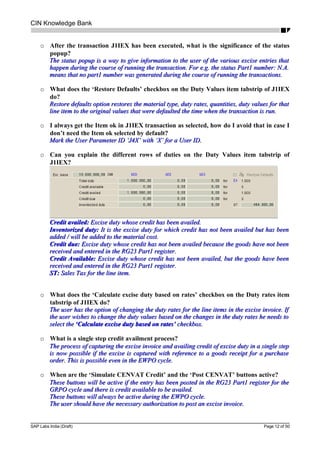
o Can you explain the different rows of duties on the Duty Values item tabstrip of
J1IEX?
Credit availed:Credit availed: Excise duty whose credit has been availed.Excise duty whose credit has been availed.
Inventorized duty:Inventorized duty: It is the excise duty for which credit has not been availed but has beenIt is the excise duty for which credit has not been availed but has been
added / will be added to the material cost.added / will be added to the material cost.
Credit due:Credit due: Excise duty whose credit has not been availed because the goods have not beenExcise duty whose credit has not been availed because the goods have not been
received and entered in the RG23 Part1 register.received and entered in the RG23 Part1 register.
Credit Available:Credit Available: Excise duty whose credit has not been availed, but the goods have beenExcise duty whose credit has not been availed, but the goods have been
received and entered in the RG23 Part1 register.received and entered in the RG23 Part1 register.
ST:ST: Sales Tax for the line item.Sales Tax for the line item.
o What does the ‘Calculate excise duty based on rates’ checkbox on the Duty rates item
tabstrip of J1IEX do?
The user has the option of changing the duty rates for the line items in the excise invoice. IfThe user has the option of changing the duty rates for the line items in the excise invoice. If
the user wishes to change the duty values based on the changes in the duty rates he needs tothe user wishes to change the duty values based on the changes in the duty rates he needs to
select theselect the ‘Calculate excise duty based on rates’‘Calculate excise duty based on rates’ checkbox.checkbox.
o What is a single step credit availment process?
The process of capturing the excise invoice and availing credit of excise duty in a single stepThe process of capturing the excise invoice and availing credit of excise duty in a single step
is now possible if the excise is captured with reference to a goods receipt for a purchaseis now possible if the excise is captured with reference to a goods receipt for a purchase
order. This is possible even in the EWPO cycle.order. This is possible even in the EWPO cycle.
o When are the ‘Simulate CENVAT Credit’ and the ‘Post CENVAT’ buttons active?
These buttons will be active if the entry has been posted in the RG23 Part1 register for theThese buttons will be active if the entry has been posted in the RG23 Part1 register for the
GRPO cycle and there is credit available to be availed.GRPO cycle and there is credit available to be availed.
These buttons will always be active during the EWPO cycle.These buttons will always be active during the EWPO cycle.
The user should have the necessary authorization to post an excise invoice.The user should have the necessary authorization to post an excise invoice.
SAP Labs India (Draft) Page 12 of 50
CIN Knowledge Bank
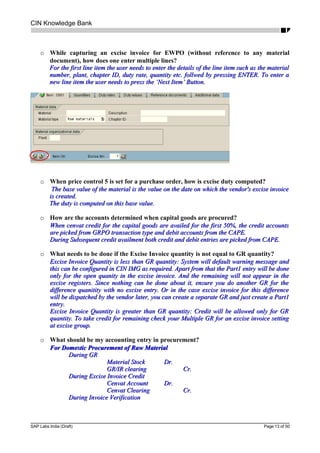
o While capturing an excise invoice for EWPO (without reference to any material
document), how does one enter multiple lines?
For the first line item the user needs to enter the details of the line item such as the materialFor the first line item the user needs to enter the details of the line item such as the material
number, plant, chapter ID, duty rate, quantity etc. follwed by pressing ENTER. To enter anumber, plant, chapter ID, duty rate, quantity etc. follwed by pressing ENTER. To enter a
new line item the user needs to press the ‘Next Item’ Button.new line item the user needs to press the ‘Next Item’ Button.
o When price control 5 is set for a purchase order, how is excise duty computed?
The base value of the material is the value on the date on which the vendor's excise invoiceThe base value of the material is the value on the date on which the vendor's excise invoice
is created.is created.
The duty is computed on this base value.The duty is computed on this base value.
o How are the accounts determined when capital goods are procured?
When cenvat credit for the capital goods are availed for the first 50%, the credit accountsWhen cenvat credit for the capital goods are availed for the first 50%, the credit accounts
are picked from GRPO transaction type and debit accounts from the CAPE.are picked from GRPO transaction type and debit accounts from the CAPE.
During Subsequent credit availment both credit and debit entries are picked from CAPE.During Subsequent credit availment both credit and debit entries are picked from CAPE.
o What needs to be done if the Excise Invoice quantity is not equal to GR quantity?
Excise Invoice Quantity is less than GR quantity: System will default warning message andExcise Invoice Quantity is less than GR quantity: System will default warning message and
this can be configured in CIN IMG as required. Apart from that the Part1 entry will be donethis can be configured in CIN IMG as required. Apart from that the Part1 entry will be done
only for the open quanity in the excise invoice. And the remaining will not appear in theonly for the open quanity in the excise invoice. And the remaining will not appear in the
excise registers. Since nothing can be done about it, ensure you do another GR for theexcise registers. Since nothing can be done about it, ensure you do another GR for the
difference quanitity with no excise entry. Or in the case excise invoice for this differencedifference quanitity with no excise entry. Or in the case excise invoice for this difference
will be dispatched by the vendor later, you can create a separate GR and just create a Part1will be dispatched by the vendor later, you can create a separate GR and just create a Part1
entry.entry.
Excise Invoice Quantity is greater than GR quantity: Credit will be allowed only for GRExcise Invoice Quantity is greater than GR quantity: Credit will be allowed only for GR
quantity. To take credit for remaining check your Multiple GR for an excise invoice settingquantity. To take credit for remaining check your Multiple GR for an excise invoice setting
at excise group.at excise group.
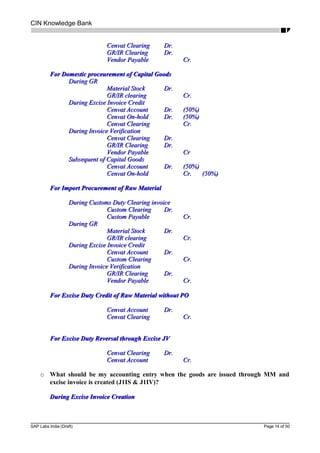
o What should be my accounting entry in procurement?
For Domestic Procurement of Raw MaterialFor Domestic Procurement of Raw Material
During GRDuring GR
Material StockMaterial Stock Dr.Dr.
GR/IR clearingGR/IR clearing Cr.Cr.
During Excise Invoice CreditDuring Excise Invoice Credit
Cenvat AccountCenvat Account Dr.Dr.
Cenvat ClearingCenvat Clearing Cr.Cr.
During Invoice VerificationDuring Invoice Verification
SAP Labs India (Draft) Page 13 of 50
CIN Knowledge Bank
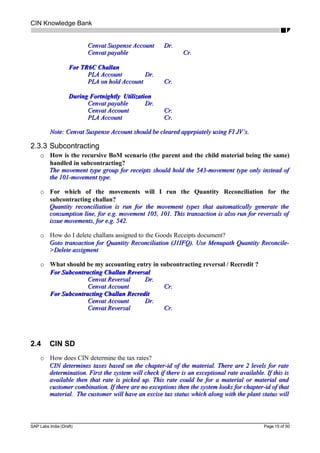
Cenvat ClearingCenvat Clearing Dr.Dr.
GR/IR ClearingGR/IR Clearing Dr.Dr.
Vendor PayableVendor Payable Cr.Cr.
For Domestic proceurement of Capital GoodsFor Domestic proceurement of Capital Goods
During GRDuring GR
Material StockMaterial Stock Dr.Dr.
GR/IR clearingGR/IR clearing Cr.Cr.
During Excise Invoice CreditDuring Excise Invoice Credit
Cenvat AccountCenvat Account Dr.Dr. (50%)(50%)
Cenvat On-holdCenvat On-hold Dr.Dr. (50%)(50%)
Cenvat ClearingCenvat Clearing Cr.Cr.
During Invoice VerificationDuring Invoice Verification
Cenvat ClearingCenvat Clearing Dr.Dr.
GR/IR ClearingGR/IR Clearing Dr.Dr.
Vendor PayableVendor Payable CrCr
Subsequent of Capital GoodsSubsequent of Capital Goods
Cenvat AccountCenvat Account Dr.Dr. (50%)(50%)
Cenvat On-holdCenvat On-hold Cr.Cr. (50%)(50%)
For Import Procurement of Raw MaterialFor Import Procurement of Raw Material
During Customs Duty Clearing invoiceDuring Customs Duty Clearing invoice
Custom ClearingCustom Clearing Dr.Dr.
Custom PayableCustom Payable Cr.Cr.
During GRDuring GR
Material StockMaterial Stock Dr.Dr.
GR/IR clearingGR/IR clearing Cr.Cr.
During Excise Invoice CreditDuring Excise Invoice Credit
Cenvat AccountCenvat Account Dr.Dr.
Custom ClearingCustom Clearing Cr.Cr.
During Invoice VerificationDuring Invoice Verification
GR/IR ClearingGR/IR Clearing Dr.Dr.
Vendor PayableVendor Payable Cr.Cr.
For Excise Duty Credit of Raw Material without POFor Excise Duty Credit of Raw Material without PO
Cenvat AccountCenvat Account Dr.Dr.
Cenvat ClearingCenvat Clearing Cr.Cr.
For Excise Duty Reversal through Excise JVFor Excise Duty Reversal through Excise JV
Cenvat ClearingCenvat Clearing Dr.Dr.
Cenvat AccountCenvat Account Cr.Cr.
o What should be my accounting entry when the goods are issued through MM and
excise invoice is created (J1IS & J1IV)?
During Excise Invoice CreationDuring Excise Invoice Creation
SAP Labs India (Draft) Page 14 of 50
CIN Knowledge Bank
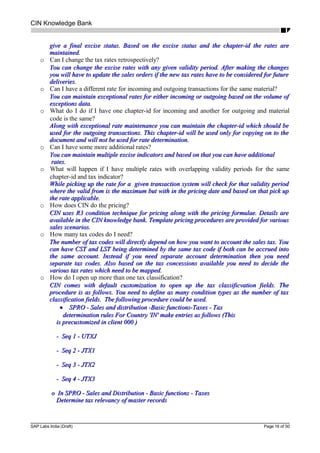
Cenvat Suspense AccountCenvat Suspense Account Dr.Dr.
Cenvat payableCenvat payable Cr.Cr.
For TR6C ChallanFor TR6C Challan
PLA AccountPLA Account Dr.Dr.
PLA on hold AccountPLA on hold Account Cr.Cr.
During Fortnightly UtilizationDuring Fortnightly Utilization
Cenvat payableCenvat payable Dr.Dr.
Cenvat AccountCenvat Account Cr.Cr.
PLA AccountPLA Account Cr.Cr.
Note: Cenvat Suspense Account should be cleared apprpiately using FI JV’s.Note: Cenvat Suspense Account should be cleared apprpiately using FI JV’s.
2.3.3 Subcontracting
o How is the recursive BoM scenario (the parent and the child material being the same)
handled in subcontracting?
The movement type group for receipts should hold the 543-movement type only instead ofThe movement type group for receipts should hold the 543-movement type only instead of
the 101-movement type.the 101-movement type.
o For which of the movements will I run the Quantity Reconciliation for the
subcontracting challan?
Quantity reconciliation is run for the movement types that automatically generate theQuantity reconciliation is run for the movement types that automatically generate the
consumption line, for e.g. movement 105, 101. This transaction is also run for reversals ofconsumption line, for e.g. movement 105, 101. This transaction is also run for reversals of
issue movements, for e.g. 542.issue movements, for e.g. 542.
o How do I delete challans assigned to the Goods Receipts document?
Goto transaction for Quantity Reconciliation (J1IFQ). Use Menupath Quantity Reconcile-Goto transaction for Quantity Reconciliation (J1IFQ). Use Menupath Quantity Reconcile-
>Delete assigment>Delete assigment
o What should be my accounting entry in subcontracting reversal / Recredit ?
For Subcontracting Challan ReversalFor Subcontracting Challan Reversal
Cenvat ReversalCenvat Reversal Dr.Dr.
Cenvat AccountCenvat Account Cr.Cr.
For Subcontracting Challan RecreditFor Subcontracting Challan Recredit
Cenvat AccountCenvat Account Dr.Dr.
Cenvat ReversalCenvat Reversal Cr.Cr.
2.4 CIN SD
o How does CIN determine the tax rates?
CIN determines taxes based on the chapter-id of the material. There are 2 levels for rateCIN determines taxes based on the chapter-id of the material. There are 2 levels for rate
determination. First the system will check if there is an exceptional rate available. If this isdetermination. First the system will check if there is an exceptional rate available. If this is
available then that rate is picked up. This rate could be for a material or material andavailable then that rate is picked up. This rate could be for a material or material and
customer combination. If there are no exceptions then the system looks for chapter-id of thatcustomer combination. If there are no exceptions then the system looks for chapter-id of that
material. The customer will have an excise tax status which along with the plant status willmaterial. The customer will have an excise tax status which along with the plant status will
SAP Labs India (Draft) Page 15 of 50
CIN Knowledge Bank
give a final excise status. Based on the excise status and the chapter-id the rates aregive a final excise status. Based on the excise status and the chapter-id the rates are
maintained.maintained.
o Can I change the tax rates retrospectively?
You can change the excise rates with any given validity period. After making the changesYou can change the excise rates with any given validity period. After making the changes
you will have to update the sales orders if the new tax rates have to be considered for futureyou will have to update the sales orders if the new tax rates have to be considered for future
deliveries.deliveries.
o Can I have a different rate for incoming and outgoing transactions for the same material?
You can maintain exceptional rates for either incoming or outgoing based on the volume ofYou can maintain exceptional rates for either incoming or outgoing based on the volume of
exceptions data.exceptions data.
o What do I do if I have one chapter-id for incoming and another for outgoing and material
code is the same?
Along with exceptional rate maintenance you can maintain the chapter-id which should beAlong with exceptional rate maintenance you can maintain the chapter-id which should be
used for the outgoing transactions. This chapter-id will be used only for copying on to theused for the outgoing transactions. This chapter-id will be used only for copying on to the
document and will not be used for rate determination.document and will not be used for rate determination.
o Can I have some more additional rates?
You can maintain multiple excise indicators and based on that you can have additionalYou can maintain multiple excise indicators and based on that you can have additional
rates.rates.
o What will happen if I have multiple rates with overlapping validity periods for the same
chapter-id and tax indicator?
While picking up the rate for a given transaction system will check for that validity periodWhile picking up the rate for a given transaction system will check for that validity period
where the valid from is the maximum but with in the pricing date and based on that pick upwhere the valid from is the maximum but with in the pricing date and based on that pick up
the rate applicable.the rate applicable.
o How does CIN do the pricing?
CIN uses R3 condition technique for pricing along with the pricing formulae. Details areCIN uses R3 condition technique for pricing along with the pricing formulae. Details are
available in the CIN knowledge bank. Template pricing procedures are provided for variousavailable in the CIN knowledge bank. Template pricing procedures are provided for various
sales scenarios.sales scenarios.
o How many tax codes do I need?
The number of tax codes will directly depend on how you want to account the sales tax. YouThe number of tax codes will directly depend on how you want to account the sales tax. You
can have CST and LST being determined by the same tax code if both can be accrued intocan have CST and LST being determined by the same tax code if both can be accrued into
the same account. Instead if you need separate account determination then you needthe same account. Instead if you need separate account determination then you need
separate tax codes. Also based on the tax concessions available you need to decide theseparate tax codes. Also based on the tax concessions available you need to decide the
various tax rates which need to be mapped.various tax rates which need to be mapped.
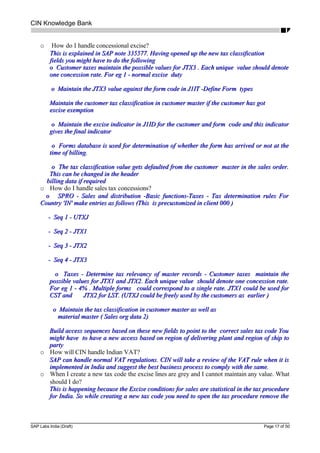
o How do I open up more than one tax classification?
CIN comes with default customization to open up the tax classificvation fields. TheCIN comes with default customization to open up the tax classificvation fields. The
procedure is as follows. You need to define as many condition types as the number of taxprocedure is as follows. You need to define as many condition types as the number of tax
classification fields. Tbe following procedure could be used.classification fields. Tbe following procedure could be used.
•• SPRO - Sales and distribution -Basic functions-Taxes - TaxSPRO - Sales and distribution -Basic functions-Taxes - Tax
determination rules For Country 'IN' make entries as follows (Thisdetermination rules For Country 'IN' make entries as follows (This
is precustomized in client 000 )is precustomized in client 000 )
- Seq 1 - UTXJ- Seq 1 - UTXJ
- Seq 2 - JTX1- Seq 2 - JTX1
- Seq 3 - JTX2- Seq 3 - JTX2
- Seq 4 - JTX3- Seq 4 - JTX3
o In SPRO - Sales and Distribution - Basic functions - Taxeso In SPRO - Sales and Distribution - Basic functions - Taxes
Determine tax relevancy of master recordsDetermine tax relevancy of master records
SAP Labs India (Draft) Page 16 of 50
CIN Knowledge Bank
o How do I handle concessional excise?
This is explained in SAP note 335577. Having opened up the new tax classificationThis is explained in SAP note 335577. Having opened up the new tax classification
fields you might have to do the followingfields you might have to do the following
o Customer taxes maintain the possible values for JTX3 . Each unique value should denoteo Customer taxes maintain the possible values for JTX3 . Each unique value should denote
one concession rate. For eg 1 - normal excise dutyone concession rate. For eg 1 - normal excise duty
o Maintain the JTX3 value against the form code in J1IT -Define Form typeso Maintain the JTX3 value against the form code in J1IT -Define Form types
Maintain the customer tax classification in customer master if the customer has gotMaintain the customer tax classification in customer master if the customer has got
excise exemptionexcise exemption
o Maintain the excise indicator in J1ID for the customer and form code and this indicatoro Maintain the excise indicator in J1ID for the customer and form code and this indicator
gives the final indicatorgives the final indicator
o Forms database is used for determination of whether the form has arrived or not at theo Forms database is used for determination of whether the form has arrived or not at the
time of billing.time of billing.
o The tax classification value gets defaulted from the customer master in the sales order.o The tax classification value gets defaulted from the customer master in the sales order.
This can be changed in the headerThis can be changed in the header
billing data if requiredbilling data if required
o How do I handle sales tax concessions?
o SPRO - Sales and distribution -Basic functions-Taxes - Tax determination rules Foro SPRO - Sales and distribution -Basic functions-Taxes - Tax determination rules For
Country 'IN' make entries as follows (This is precustomized in client 000 )Country 'IN' make entries as follows (This is precustomized in client 000 )
- Seq 1 - UTXJ- Seq 1 - UTXJ
- Seq 2 - JTX1- Seq 2 - JTX1
- Seq 3 - JTX2- Seq 3 - JTX2
- Seq 4 - JTX3- Seq 4 - JTX3
o Taxes - Determine tax relevancy of master records - Customer taxes maintain theo Taxes - Determine tax relevancy of master records - Customer taxes maintain the
possible values for JTX1 and JTX2. Each unique value should denote one concession rate.possible values for JTX1 and JTX2. Each unique value should denote one concession rate.
For eg 1 - 4% . Multiple forms could correspond to a single rate. JTX1 could be used forFor eg 1 - 4% . Multiple forms could correspond to a single rate. JTX1 could be used for
CST and JTX2 for LST. (UTXJ could be freely used by the customers as earlier )CST and JTX2 for LST. (UTXJ could be freely used by the customers as earlier )
o Maintain the tax classification in customer master as well aso Maintain the tax classification in customer master as well as
material master ( Sales org data 2)material master ( Sales org data 2)
Build access sequences based on these new fields to point to the correct sales tax code YouBuild access sequences based on these new fields to point to the correct sales tax code You
might have to have a new access based on region of delivering plant and region of ship tomight have to have a new access based on region of delivering plant and region of ship to
partyparty
o How will CIN handle Indian VAT?
SAP can handle normal VAT regulations. CIN will take a review of the VAT rule when it isSAP can handle normal VAT regulations. CIN will take a review of the VAT rule when it is
implemented in India and suggest the best business process to comply with the same.implemented in India and suggest the best business process to comply with the same.
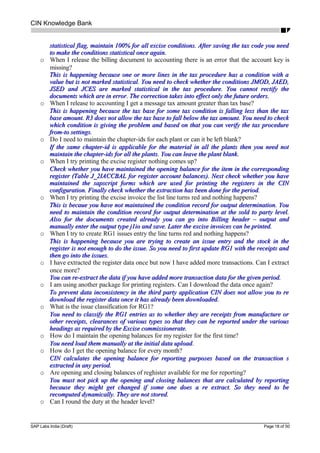
o When I create a new tax code the excise lines are grey and I cannot maintain any value. What
should I do?
This is happening because the Excise conditions for sales are statistical in the tax procedureThis is happening because the Excise conditions for sales are statistical in the tax procedure
for India. So while creating a new tax code you need to open the tax procedure remove thefor India. So while creating a new tax code you need to open the tax procedure remove the
SAP Labs India (Draft) Page 17 of 50
CIN Knowledge Bank
statistical flag, maintain 100% for all excise conditions. After saving the tax code you needstatistical flag, maintain 100% for all excise conditions. After saving the tax code you need
to make the conditions statistical once again.to make the conditions statistical once again.
o When I release the billing document to accounting there is an error that the account key is
missing?
This is happening because one or more lines in the tax procedure has a condition with aThis is happening because one or more lines in the tax procedure has a condition with a
value but is not marked statistical. You need to check whether the conditions JMOD, JAED,value but is not marked statistical. You need to check whether the conditions JMOD, JAED,
JSED and JCES are marked statistical in the tax procedure. You cannot rectify theJSED and JCES are marked statistical in the tax procedure. You cannot rectify the
documents which are in error. The correction takes into effect only the future orders.documents which are in error. The correction takes into effect only the future orders.
o When I release to accounting I get a message tax amount greater than tax base?
This is happening because the tax base for some tax condition is falling less than the taxThis is happening because the tax base for some tax condition is falling less than the tax
base amount. R3 does not allow the tax base to fall below the tax amount. You need to checkbase amount. R3 does not allow the tax base to fall below the tax amount. You need to check
which condition is giving the problem and based on that you can verify the tax procedurewhich condition is giving the problem and based on that you can verify the tax procedure
from-to settings.from-to settings.
o Do I need to maintain the chapter-ids for each plant or can it be left blank?
If the same chapter-id is applicable for the material in all the plants then you need notIf the same chapter-id is applicable for the material in all the plants then you need not
maintain the chapter-ids for all the plants. You can leave the plant blank.maintain the chapter-ids for all the plants. You can leave the plant blank.
o When I try printing the excise register nothing comes up?
Check whether you have maintained the opening balance for the item in the correspondingCheck whether you have maintained the opening balance for the item in the corresponding
register (Table J_2IACCBAL for register account balances). Next check whether you haveregister (Table J_2IACCBAL for register account balances). Next check whether you have
maintained the sapscript forms which are used for printing the registers in the CINmaintained the sapscript forms which are used for printing the registers in the CIN
configuration. Finally check whether the extraction has been done for the period.configuration. Finally check whether the extraction has been done for the period.
o When I try printing the excise invoice the list line turns red and nothing happens?
This is becaue you have not maintained the condition record for output determination. YouThis is becaue you have not maintained the condition record for output determination. You
need to maintain the condition record for output determination at the sold to party level.need to maintain the condition record for output determination at the sold to party level.
Also for the documents created already you can go into Billing header – output andAlso for the documents created already you can go into Billing header – output and
manually enter the output type j1io and save. Later the excise invoices can be printed.manually enter the output type j1io and save. Later the excise invoices can be printed.
o When I try to create RG1 issues entry the line turns red and nothing happens?
This is happening because you are trying to create an issue entry and the stock in theThis is happening because you are trying to create an issue entry and the stock in the
register is not enough to do the issue. So you need to first update RG1 with the receipts andregister is not enough to do the issue. So you need to first update RG1 with the receipts and
then go into the issues.then go into the issues.
o I have extracted the register data once but now I have added more transactions. Can I extract
once more?
You can re-extract the data if you have added more transaction data for the given period.You can re-extract the data if you have added more transaction data for the given period.
o I am using another package for printing registers. Can I download the data once again?
To prevent data inconsistency in the third party application CIN does not allow you to reTo prevent data inconsistency in the third party application CIN does not allow you to re
download the register data once it has already been downloaded.download the register data once it has already been downloaded.
o What is the issue classification for RG1?
You need to classify the RG1 entries as to whether they are receipts from manufacture orYou need to classify the RG1 entries as to whether they are receipts from manufacture or
other receipts, clearances of various types so that they can be reported under the variousother receipts, clearances of various types so that they can be reported under the various
headings as required by the Excise commissionerate.headings as required by the Excise commissionerate.
o How do I maintain the opening balances for my register for the first time?
You need load them manually at the initial data uploadYou need load them manually at the initial data upload..
o How do I get the opening balance for every month?
CIN calculates the opening balance for reporting purposes based on the transaction sCIN calculates the opening balance for reporting purposes based on the transaction s
extracted in any period.extracted in any period.
o Are opening and closing balances of reghister available for me for reporting?
You must not pick up the opening and closing balances that are calculated by reportingYou must not pick up the opening and closing balances that are calculated by reporting
because they might get changed if some one does a re extract. So they need to bebecause they might get changed if some one does a re extract. So they need to be
recomputed dynamically. They are not stored.recomputed dynamically. They are not stored.
o Can I round the duty at the header level?
SAP Labs India (Draft) Page 18 of 50
CIN Knowledge Bank
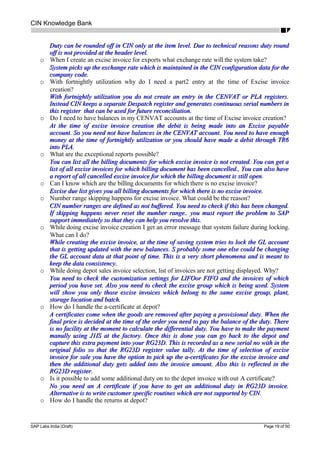
Duty can be rounded off in CIN only at the item level. Due to technical reasons duty roundDuty can be rounded off in CIN only at the item level. Due to technical reasons duty round
off is not provided at the header level.off is not provided at the header level.
o When I create an excise invoice for exports what exchange rate will the system take?
System picks up the exchange rate which is maintained in the CIN configuration data for theSystem picks up the exchange rate which is maintained in the CIN configuration data for the
company code.company code.
o With fortnightly utilization why do I need a part2 entry at the time of Excise invoice
creation?
With fortnightly utilization you do not create an entry in the CENVAT or PLA registers.With fortnightly utilization you do not create an entry in the CENVAT or PLA registers.
Instead CIN keeps a separate Despatch register and generates continuous serial numbers inInstead CIN keeps a separate Despatch register and generates continuous serial numbers in
this register that can be used for future reconciliation.this register that can be used for future reconciliation.
o Do I need to have balances in my CENVAT accounts at the time of Excise invoice creation?
At the time of excise invoice creation the debit is being made into an Excise payableAt the time of excise invoice creation the debit is being made into an Excise payable
account. So you need not have balances in the CENVAT account. You need to have enoughaccount. So you need not have balances in the CENVAT account. You need to have enough
money at the time of fortnightly utilization or you should have made a debit through TR6money at the time of fortnightly utilization or you should have made a debit through TR6
into PLA.into PLA.
o What are the exceptional reports possible?
You can list all the billing documents for which excise invoice is not created. You can get aYou can list all the billing documents for which excise invoice is not created. You can get a
list of all excise invoices for which billing document has been cancelled., You can also havelist of all excise invoices for which billing document has been cancelled., You can also have
a report of all cancelled excise invoice for which the billing document is still opena report of all cancelled excise invoice for which the billing document is still open.
o Can I know which are the billing documents for which there is no excise invoice?
Excise due list gives you all billing documents for which there is no excise invoice.Excise due list gives you all billing documents for which there is no excise invoice.
o Number range skipping happens for excise invoice. What could be the reason?
CIN number ranges are defined as not buffered. You need to check if this has been changed.CIN number ranges are defined as not buffered. You need to check if this has been changed.
If skipping happens never reset the number range.. you must report the problem to SAPIf skipping happens never reset the number range.. you must report the problem to SAP
support immediately so that they can help you resolve this.support immediately so that they can help you resolve this.
o While doing excise invoice creation I get an error message that system failure during locking.
What can I do?
While creating the excise invoice, at the time of saving system tries to lock the GL accountWhile creating the excise invoice, at the time of saving system tries to lock the GL account
that is getting updated with the new balances. S probably some one else could be changingthat is getting updated with the new balances. S probably some one else could be changing
the GL account data at that point of time. This is a very short phenomena and is meant tothe GL account data at that point of time. This is a very short phenomena and is meant to
keep the data consistency.keep the data consistency.
o While doing depot sales invoice selection, list of invoices are not getting displayed. Why?
You need to check the customization settings for LIFOor FIFO and the invoices of whichYou need to check the customization settings for LIFOor FIFO and the invoices of which
period you have set. Also you need to check the excise group which is being used. Systemperiod you have set. Also you need to check the excise group which is being used. System
will show you only those excise invoices which belong to the same excise group, plant,will show you only those excise invoices which belong to the same excise group, plant,
storage location and batch.storage location and batch.
o How do I handle the a-certificate at depot?
A certificates come when the goods are removed after paying a provisional duty. When theA certificates come when the goods are removed after paying a provisional duty. When the
final price is decided at the time of the order you need to pay the balance of the duty. Therefinal price is decided at the time of the order you need to pay the balance of the duty. There
is no facility at the moment to calculate the differential duty. You have to make the paymentis no facility at the moment to calculate the differential duty. You have to make the payment
manully using J1IS at the factory. Once this is done you can go back to the depot andmanully using J1IS at the factory. Once this is done you can go back to the depot and
capture this extra payment into your RG23D. This is recorded as a new serial no with in thecapture this extra payment into your RG23D. This is recorded as a new serial no with in the
original folio so that the RG23D register value tally. At the time of selection of exciseoriginal folio so that the RG23D register value tally. At the time of selection of excise
invoice for sale you have the option to pick up the a-certificates for the excise invoice andinvoice for sale you have the option to pick up the a-certificates for the excise invoice and
then the additional duty gets added into the invoice amount. Also this is reflected in thethen the additional duty gets added into the invoice amount. Also this is reflected in the
RG23D register.RG23D register.
o Is it possible to add some additional duty on to the depot invoice with out A certificate?
No you need an A certificate if you have to get an additional duty in RG23D invoice.No you need an A certificate if you have to get an additional duty in RG23D invoice.
Alternative is to write customer specific routines which are not supported by CIN.Alternative is to write customer specific routines which are not supported by CIN.
o How do I handle the returns at depot?
SAP Labs India (Draft) Page 19 of 50
CIN Knowledge Bank
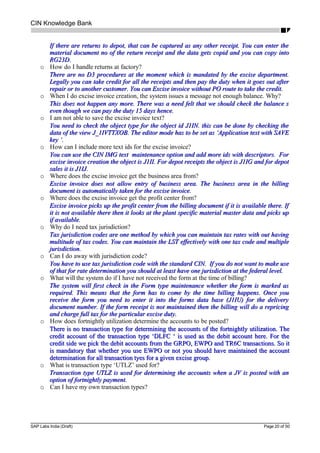
If there are returns to depot, that can be captured as any other receipt. You can enter theIf there are returns to depot, that can be captured as any other receipt. You can enter the
material document no of the return receipt and the data gets copid and you can copy intomaterial document no of the return receipt and the data gets copid and you can copy into
RG23D.RG23D.
o How do I handle returns at factory?
There are no D3 procedures at the moment which is mandated by the excise department.There are no D3 procedures at the moment which is mandated by the excise department.
Legally you can take credit for all the receipts and then pay the duty when it goes out afterLegally you can take credit for all the receipts and then pay the duty when it goes out after
repair or to another customer. You can Excise invoice without PO route to take the credit.repair or to another customer. You can Excise invoice without PO route to take the credit.
o When I do excise invoice creation, the system issues a message not enough balance. Why?
This does not happen any more. There was a need felt that we should check the balance sThis does not happen any more. There was a need felt that we should check the balance s
even though we can pay the duty 15 days hence.even though we can pay the duty 15 days hence.
o I am not able to save the excise invoice text?
You need to check the object type for the object id J1IN. this can be done by checking theYou need to check the object type for the object id J1IN. this can be done by checking the
data of the view J_1IVTTXOB. The editor mode has to be set as ‘Application text with SAVEdata of the view J_1IVTTXOB. The editor mode has to be set as ‘Application text with SAVE
key ‘.key ‘.
o How can I include more text ids for the excise invoice?
You can use the CIN IMG text maintenance option and add more ids with descriptors. ForYou can use the CIN IMG text maintenance option and add more ids with descriptors. For
excise invoice creation the object is J1II. For depot receipts the object is J1IG and for depotexcise invoice creation the object is J1II. For depot receipts the object is J1IG and for depot
sales it is J1IJ.sales it is J1IJ.
o Where does the excise invoice get the business area from?
Excise invoice does not allow entry of business area. The business area in the billingExcise invoice does not allow entry of business area. The business area in the billing
document is automatically taken for the excise invoice.document is automatically taken for the excise invoice.
o Where does the excise invoice get the profit center from?
Excise invoice picks up the profit center from the billing document if it is available there. IfExcise invoice picks up the profit center from the billing document if it is available there. If
it is not available there then it looks at the plant specific material master data and picks upit is not available there then it looks at the plant specific material master data and picks up
if available.if available.
o Why do I need tax jurisdiction?
Tax jurisdiction codes are one method by which you can maintain tax rates with out havingTax jurisdiction codes are one method by which you can maintain tax rates with out having
multitude of tax codes. You can maintain the LST effectively with one tax code and multiplemultitude of tax codes. You can maintain the LST effectively with one tax code and multiple
jurisdiction.jurisdiction.
o Can I do away with jurisdiction code?
You have to use tax jurisdiction code with the standard CIN. If you do not want to make useYou have to use tax jurisdiction code with the standard CIN. If you do not want to make use
of that for rate determination you should at least have one jurisdiction at the federal level.of that for rate determination you should at least have one jurisdiction at the federal level.
o What will the system do if I have not received the form at the time of billing?
The system will first check in the Form type maintenance whether the form is marked asThe system will first check in the Form type maintenance whether the form is marked as
required. This means that the form has to come by the time billing happens. Once yourequired. This means that the form has to come by the time billing happens. Once you
receive the form you need to enter it into the forms data base (J1IU) for the deliveryreceive the form you need to enter it into the forms data base (J1IU) for the delivery
document number. If the form receipt is not maintained then the billing will do a repricingdocument number. If the form receipt is not maintained then the billing will do a repricing
and charge full tax for the particular excise duty.and charge full tax for the particular excise duty.
o How does fortnightly utilization determine the accounts to be posted?
There is no transaction type for determining the accounts of the fortnightly utilization. TheThere is no transaction type for determining the accounts of the fortnightly utilization. The
credit account of the transaction type ‘DLFC ‘ is used as the debit account here. For thecredit account of the transaction type ‘DLFC ‘ is used as the debit account here. For the
credit side we pick the debit accounts from the GRPO, EWPO and TR6C transactions. So itcredit side we pick the debit accounts from the GRPO, EWPO and TR6C transactions. So it
is mandatory that whether you use EWPO or not you should have maintained the accountis mandatory that whether you use EWPO or not you should have maintained the account
determination for all transaction tyes for a given excise group.determination for all transaction tyes for a given excise group.
o What is transaction type ‘UTLZ’ used for?
Transaction type UTLZ is used for determining the accounts when a JV is posted with anTransaction type UTLZ is used for determining the accounts when a JV is posted with an
option of fortnightly payment.option of fortnightly payment.
o Can I have my own transaction types?
SAP Labs India (Draft) Page 20 of 50
CIN Knowledge Bank
Transaction types are used internally by CIN for various pruposes. So you cannot defineTransaction types are used internally by CIN for various pruposes. So you cannot define
your wn transaction types. Alternate account assignments can be done using sub transactionyour wn transaction types. Alternate account assignments can be done using sub transaction
types.types.
o Where does RG1 get the data of packed/loose material ?
Initially when you upload the balance in RG1 you need to mention the material form. LaterInitially when you upload the balance in RG1 you need to mention the material form. Later
the system assumes the same for for the same material code. If you need to dynamicallythe system assumes the same for for the same material code. If you need to dynamically
change this then you can make use of the user-exit. A material can be marked either aschange this then you can make use of the user-exit. A material can be marked either as
packed or loose but not both.packed or loose but not both.
o What will batch utilization of modvat do?
Batch utilization is just an interface that helps you to complete the utilization of a set ofBatch utilization is just an interface that helps you to complete the utilization of a set of
documents in one step. This simply triggers individual utilization as a BDC so that the userdocuments in one step. This simply triggers individual utilization as a BDC so that the user
interaction can be minimizedinteraction can be minimized.
o What is the number range used for export excise invoice?
Export invoices uses the number range object j_1iexcexp where as the local invoices usesExport invoices uses the number range object j_1iexcexp where as the local invoices uses
the number range j_1iexcloc. Even though customers are free to use the same number seriesthe number range j_1iexcloc. Even though customers are free to use the same number series
now there is no bar from using separate series.now there is no bar from using separate series.
o Can I create a zero duty excise invoice?
Zero duty invoices can be created both from sales as wellas using excise invoice otherZero duty invoices can be created both from sales as wellas using excise invoice other
movements based on the business requirement. These invoices do not generate anmovements based on the business requirement. These invoices do not generate an
accounting document.accounting document.
o Is it possible to cancel an excise invoice with zero duty?
There is no problem in canceling a zero duty excise invoice.There is no problem in canceling a zero duty excise invoice.
o Where does the billing document get the account for excise duty payable?
The account determination rules of R3 billing is used for determining the account for theThe account determination rules of R3 billing is used for determining the account for the
excise posting line in a billing document. The CIN customization has no role to play here.excise posting line in a billing document. The CIN customization has no role to play here.
o How does the stock transfer get the assessable value from?
This is got using the condition base value formula. For this to happen you should haveThis is got using the condition base value formula. For this to happen you should have
maintained the assessable value in CIN master data.maintained the assessable value in CIN master data.
o How do I know whether SD route or mm route is followed for stock transfer?
You need to check in SPRO – Materials Management – Purchasing – Set up Stock transportYou need to check in SPRO – Materials Management – Purchasing – Set up Stock transport
order – Assign delivery type/checking. For SD order this will be marked ‘A’order – Assign delivery type/checking. For SD order this will be marked ‘A’
o Based on the route followed how do I create an excise invoice?
If SD route is followed for stock transfer then you can use J1IIN to create excise invoice. IfIf SD route is followed for stock transfer then you can use J1IIN to create excise invoice. If
MM route is used for creating stock transport order then you need to use J1IS for creationMM route is used for creating stock transport order then you need to use J1IS for creation
of Excise invoiceof Excise invoice.
o How to configure stock transport order?
Stock transport order is set up in SPRO- Materials management – Purchasing – Set up stockStock transport order is set up in SPRO- Materials management – Purchasing – Set up stock
transport order. Here first you have to define the sales area and the default customer code.transport order. Here first you have to define the sales area and the default customer code.
You have ato assign the order type to the checking rule. Finally you need to maintain theYou have ato assign the order type to the checking rule. Finally you need to maintain the
delivery type for the order type.delivery type for the order type.
o I cannot create a proforma billing document for a replenishment delivery. What has gone
wrong?
Normal R3 setting does not allow a billing document to be created for a delivery type NL.Normal R3 setting does not allow a billing document to be created for a delivery type NL.
You need to change the customization settings of the item category type NLN so that itYou need to change the customization settings of the item category type NLN so that it
becomes relevant for billing.becomes relevant for billing.
o When I do a receipt at the depot from my factory how do I give the excise invoice number?
If the excise invoice already exists in the R3 system then in the detail screen of RG23DIf the excise invoice already exists in the R3 system then in the detail screen of RG23D
receipt you can directly enter the internal document number of the excise invoice. This willreceipt you can directly enter the internal document number of the excise invoice. This will
automatically allow the entrie challan details to be copied.automatically allow the entrie challan details to be copied.
o Should I receive the full quantity at depot or transit loss is allowed?
SAP Labs India (Draft) Page 21 of 50
CIN Knowledge Bank
You can receive some goods in the depot which is less than the dispatched. You have theYou can receive some goods in the depot which is less than the dispatched. You have the
option to enter the receipt quantity as well as the challan quantity at the time of RG23Doption to enter the receipt quantity as well as the challan quantity at the time of RG23D
receipt.receipt.
o I want to calculate the excise duties at the time of export sales. What should I do?
There is a calculate tax button on the utilization screen of Excise invoice creation.. ThisThere is a calculate tax button on the utilization screen of Excise invoice creation.. This
option will calculate the taxes for an export invoice.option will calculate the taxes for an export invoice.
o Can I use my own layout for printing sales excise invoice?
Yes. If you are using your own layout then you need ot maintain this in the outputYes. If you are using your own layout then you need ot maintain this in the output
determination procedure of billing documents for the output type j1i0.determination procedure of billing documents for the output type j1i0.
o Can I use my own layout for printing Excise invoice other movements?
Excise invoice other movements picks up the report layout from the output type ZEXC whichExcise invoice other movements picks up the report layout from the output type ZEXC which
has been maintained against the SD output determination – Sales documents. You canhas been maintained against the SD output determination – Sales documents. You can
maintain your own layouts here and then they will be used for printing.maintain your own layouts here and then they will be used for printing.
o Can I use my own layouts for register printing?
Yes you can have your own layouts. You need to maintain the same in the CIN customizationYes you can have your own layouts. You need to maintain the same in the CIN customization
against the sap script form maintenance.against the sap script form maintenance.
o Can I change the posting date at the time of fort nightly utilization?
You can enter the posting date as per which you want the system to do the fortnightlyYou can enter the posting date as per which you want the system to do the fortnightly
posting.posting.
o Should I keep the fi/mm period open at the time of posting fort nightly utilization?
The current period alone should be open at the time of fortnightly utilization. It is alsoThe current period alone should be open at the time of fortnightly utilization. It is also
required that both MM as well as FI periods need to be open.required that both MM as well as FI periods need to be open.
o When I run fortnightly utilization the system is showing zero balance even though there is
some balance in the GL account?
The balances for utilization are picked up in CIN only when the MM period closing is doneThe balances for utilization are picked up in CIN only when the MM period closing is done
for the previous period. For eg. If you r posting date is 5for the previous period. For eg. If you r posting date is 5thth
Dec and the November period isDec and the November period is
still open system will show zero balance.still open system will show zero balance.
o Can I change the document type for the accounting document created at the time of excise
invoice creation?
Document type for excise invoice utilization is defined with in CIN customization at theDocument type for excise invoice utilization is defined with in CIN customization at the
company code level. You can use your own document type.company code level. You can use your own document type.
o Can I post the fort nightly utilization for individual excise invoices?
You can post the fortnightly utilization for individual invoices also. System give a messageYou can post the fortnightly utilization for individual invoices also. System give a message
that the CENVAT utilization is already doen. But this is configurable and could be made athat the CENVAT utilization is already doen. But this is configurable and could be made a
warning.warning.
o Can I reverse the fortnightly utilization done?
No you cannot reverse the posting doen with fortnightly utilization. Simulate option isNo you cannot reverse the posting doen with fortnightly utilization. Simulate option is
provided in this option for the user to check whether things are ok so that the chances ofprovided in this option for the user to check whether things are ok so that the chances of
error are minimal in the actual run.error are minimal in the actual run.
o Can I have excise rates more than 100%?
Yes you can have excise rates higher than 100% since some of the tobacco items carryYes you can have excise rates higher than 100% since some of the tobacco items carry
higher excise rates.higher excise rates.
o How do I map the tax classification to form types?
You can maintain it along with Form type definitions in CIN IMG.You can maintain it along with Form type definitions in CIN IMG.
o Can I decide not to generate folio numbers at the time of RG23D creation?
Yes you can keep the customization option at the Excise group level blank and also you canYes you can keep the customization option at the Excise group level blank and also you can
leave the user-exit open.leave the user-exit open.
o What will happen when I cancel a RG23D selection for sales already made?
SAP Labs India (Draft) Page 22 of 50
CIN Knowledge Bank
If you are canceling a selection before posting then the RG23D register the record will beIf you are canceling a selection before posting then the RG23D register the record will be
removed. But if you have already done the posting then the RG23D record is markedremoved. But if you have already done the posting then the RG23D record is marked
cancelled and the balance in the original invoice is inflated by an equivalent amount.cancelled and the balance in the original invoice is inflated by an equivalent amount.
o Why there is no transaction type for J2IU?
Transaction type is used for account determination by CIN . This is an internal entity forTransaction type is used for account determination by CIN . This is an internal entity for
CIN and has no relevance to the business process. Since there is no account determinationCIN and has no relevance to the business process. Since there is no account determination
need for J2IU there is no transaction typeneed for J2IU there is no transaction type.
o What should be my accounting entry in SD ?
For Factory SaleFor Factory Sale
During Billing DocumentDuring Billing Document
Customer AccountCustomer Account Dr.Dr.
Sales AccountSales Account Cr.Cr.
Cenvat Suspense AccountCenvat Suspense Account Cr.Cr.
During Excise Invoice CreationDuring Excise Invoice Creation
Cenvat Suspense AccountCenvat Suspense Account Dr.Dr.
Cenvat payableCenvat payable Cr.Cr.
For TR6C ChallanFor TR6C Challan
PLA AccountPLA Account Dr.Dr.
PLA on hold AccountPLA on hold Account Cr.Cr.
During Fortnightly UtilizationDuring Fortnightly Utilization
Cenvat payableCenvat payable Dr.Dr.
Cenvat AccountCenvat Account Cr.Cr.
PLA AccountPLA Account Cr.Cr.
For Stock Transfer through SDFor Stock Transfer through SD
No Accounting entries for Performa Billing DocumentNo Accounting entries for Performa Billing Document
During Excise Invoice CreationDuring Excise Invoice Creation
Cenvat Suspense AccountCenvat Suspense Account Dr.Dr.
Cenvat payableCenvat payable Cr.Cr.
For TR6C ChallanFor TR6C Challan
PLA AccountPLA Account Dr.Dr.
PLA on hold AccountPLA on hold Account Cr.Cr.
During Fortnightly UtilizationDuring Fortnightly Utilization
Cenvat payableCenvat payable Dr.Dr.
Cenvat AccountCenvat Account Cr.Cr.
PLA AccountPLA Account Cr.Cr.
Note: Cenvat Suspense Account should be cleared apprpiately using FI JV’s.Note: Cenvat Suspense Account should be cleared apprpiately using FI JV’s.
2.5 CIN FI
SAP Labs India (Draft) Page 23 of 50
CIN Knowledge Bank
o What is the main difference between classic TDS and Extended Withholding tax (EWT)?
Classic TDS and EWT TDS refer to the two methods of handling Tax Deducted at SourceClassic TDS and EWT TDS refer to the two methods of handling Tax Deducted at Source
transactions (referred to as “Withholding tax” in SAP terminology). You may use either oftransactions (referred to as “Withholding tax” in SAP terminology). You may use either of
these to handle your TDS related transactions. While EWT allows you to create the tax linethese to handle your TDS related transactions. While EWT allows you to create the tax line
both at the time of invoice receipt and payments, classic TDS allows you to create the taxboth at the time of invoice receipt and payments, classic TDS allows you to create the tax
line only at the time of payment. In case of invoices, the tax line is generated using anotherline only at the time of payment. In case of invoices, the tax line is generated using another
transaction (J1INC).transaction (J1INC).
o Can I have TDS on invoices as well as payments?
Yes, you can have TDS on both invoices and payments. However, you need to be using theYes, you can have TDS on both invoices and payments. However, you need to be using the
EWT functionality to recognize TDS at the time of invoice receipt.EWT functionality to recognize TDS at the time of invoice receipt.
o How do I determine the TDS payment due date?
You determine the payment due date in CIN customizing.You determine the payment due date in CIN customizing.
In case you use the EWT functionality, this can be done by customizing the following link:In case you use the EWT functionality, this can be done by customizing the following link:
J1ITJ1IT  Tax Deducted at SourceTax Deducted at Source  Extended Withholding TaxExtended Withholding Tax  Determination of TaxDetermination of Tax
Due DatesDue Dates  Maintain Tax Due Dates for Tax TypesMaintain Tax Due Dates for Tax Types
In case of the classic functionality, you may customize the following link: J1ITIn case of the classic functionality, you may customize the following link: J1IT  TaxTax
Deducted at SourceDeducted at Source  Payment Due Date MaintenancePayment Due Date Maintenance
You maintain the details of payment due dates for the TDS section and Recipient type. YouYou maintain the details of payment due dates for the TDS section and Recipient type. You
may enter the number of days from the date of transaction for the section if it is meant to bemay enter the number of days from the date of transaction for the section if it is meant to be
maintained that way. In case the payment due date falls on the 7maintained that way. In case the payment due date falls on the 7thth
of the next month, youof the next month, you
may enter ‘777’.may enter ‘777’.
o Can I have multiple TAN nos and still be able to use Classic TDS?
There are no standard customizing available in Classic TDS, the TAN No. can be enteredThere are no standard customizing available in Classic TDS, the TAN No. can be entered
during challan update and Annual Return.during challan update and Annual Return.
o Can I handle works contacts tax requirements using CIN?
No. CIN does not support transactions that fall under the Works Contract Act.No. CIN does not support transactions that fall under the Works Contract Act.
o Where do Vendor PAN numbers get stored in Classic and EWT?
In classic TDS, vendor PAN numbers are stored in the vendor masterIn classic TDS, vendor PAN numbers are stored in the vendor master  extrasextras  textstexts
In EWT TDS, they are stored in the table J_1IMOVENDEWT under the field J_1IPANNO inIn EWT TDS, they are stored in the table J_1IMOVENDEWT under the field J_1IPANNO in
in the vendor masterin the vendor master  CIN Details .CIN Details .
o How do we represent type of deductor in Annual return? (The type could be Advertiser /
Contractor)
J1ITJ1IT  Classic Tax Deducted at SourceClassic Tax Deducted at Source TDS Section - Tax Code Relationship, specifyTDS Section - Tax Code Relationship, specify
the type for taxcode & section.the type for taxcode & section.
o Can I Post TDS document into Special posting periods?
YesYes
o Can I modify the Certificate layout w/o altering the program?
Yes, you may change the layout of the certificate without modifying the programYes, you may change the layout of the certificate without modifying the program
SAP Labs India (Draft) Page 24 of 50
CIN Knowledge Bank
o How do I put Business Place information when I am running the Customer interest post
program?
The customer interest post transaction is run as a batch session. When you run the batchThe customer interest post transaction is run as a batch session. When you run the batch
session, run it in the foreground mode and enter the business place details.session, run it in the foreground mode and enter the business place details.
o What are the conditions for reversing the tax at the time of downpayment clearing?
If the Invoice against which the down payment clearing has already been challan updatedIf the Invoice against which the down payment clearing has already been challan updated
(remitted the tax to govt) then it’s not possible to reverse the tax.(remitted the tax to govt) then it’s not possible to reverse the tax.
o What do I do when tax rates change
Classic:Classic:
o With prospective effect and retrospective effect
Challan update all the old documents with the old tax rate and then, the taxcode rate in theChallan update all the old documents with the old tax rate and then, the taxcode rate in the
IMG should be changed and all the documents that are processed for challan update willIMG should be changed and all the documents that are processed for challan update will
have the new tax rate.have the new tax rate.
EWT:EWT:
o With prospective effect
The taxcode rate in the IMG should be changed and all the documents that are processedThe taxcode rate in the IMG should be changed and all the documents that are processed
for challan update will have the new tax rate.for challan update will have the new tax rate.
o With retrospective effect
All documents for which the tax has been deducted as per the old rate has to be modifiedAll documents for which the tax has been deducted as per the old rate has to be modified
using the JV (J1INJV) .using the JV (J1INJV) .
o Which are the Number range objects for which number ranges needs to be
maintained?
TDS Certificate Printing - J_1ICERTTDS Certificate Printing - J_1ICERT
Internal number range for challan – J_1ICHLNNOInternal number range for challan – J_1ICHLNNO
SAP Labs India (Draft) Page 25 of 50
CIN Knowledge Bank
3 User-Exits
This section gives a list of all available user-exits and how they can be used. We also give some
insight into what can be done and what should not be done in the user-exit. All these user-exits have
been implemented as function modules. When a new exit is added into the user-exit list the following
Support pack will import the complete user-exit function group j1i7. So it is recommended that you
take a back up of the j1i7 function group before importing a new Support pack.
3.1 TDS
User Exits for Classic TDS
• J_1I7_USEREXIT1 - User exit in the TDS posting program - before any processing
• J_1I7_USEREXIT_ADDRESS - User exit to get the address and TDS circle and range
• J_1I7_USEREXIT_CALID - User exit to pass calid and ind to calculate the next/prev wkg
day
• J_1I7_USEREXIT_CERTIFICATE - User exit for Certificate layout
•
• J_1I7_USEREXIT_NUMKI - User exit for number key in certificate numbering
• J_1I7_USEREXIT_ONETIME_PAN - User exit for getting PAN and GIR of One time
vendor
• J_1I7_USEREXIT_TDS - User exit in the TDS posting program - before any processing
User Exits for EWT TDS
• J_1I7_USEREXIT_BANK_ANN_RETURN - User exit to retrieve Bank details in annual
returns.
• J_1I7_USEREXIT_BP_MIGRATION- Derive Business Place for Migration of Down
Payments
• J_1I7_USEREXIT_TANNO - Userexit to get the TAN no.
• J_1I7_USEREXIT_CLR_MIGRATION - User Exit for Additional Clearing Documents
Program J_1IEWT_MIGRATE used in migration from classic to EWT .
• J_1I7_USEREXIT_DP_MIGRATION - User Exit for Migration of Down Payments
(Program J_1IEWT_MIGRATE used in migration from classic to EWT ).
3.2 SubContracting
• J_1I7_USEREXIT_57F4_REVERSE - User Exit during Reversal of Subcontracting
Challans
3.3 Depot
• J_1I7_USEREXIT_DEPOT_BEF_SAVE - User exit after the excise header and details are
written
SAP Labs India (Draft) Page 26 of 50
CIN Knowledge Bank
• J_1I7_USEREXIT_DEPOT_SELECTION- Userexit for changing selection of excise
invoice in depot
• J_1I7_USEREXIT_EXGRP_DETERM User exit for determining the excise group
• J_1I7_USEREXIT_EXINV_ADDL_DATA User exit for Excise Invoice Additional Data
in J1IS and J1IG
• J_1I7_USEREXIT_ITEM_ADDL_DATA User exit for Excise Invoice Additional Data
in J1IG
• J_1I7_USEREXIT_SERGRP_DETERM User exit for determining the sereis group in
Depot outbound
• J_1I7_USEREXIT_UNIT_CONVERSION - Unit conversion during inbound movement
at depot
3.4 Excise Invoice
• J_1I7_USEREXIT_EXCISE_BEF_SAVE User exit after the excise header and details are
written and they can changed in J1IS , J1IIN and Automatic creation of Excise Invoice.
• J_1I7_USEREXIT_EXINV_ADDL_DATA User exit for Excise Invoice Additional Data
in J1IS and J1IG
• J_1I7_USEREXIT_J1I5_MATFORM User exit for J1I5 material form changes
• J_1I7_USEREXIT_J1I5_VALIDATE User exit for subsequent J1I5 data validation
• J_1I7_USEREXIT_J1IEX_BEF_SAVE User exit for J1IEX before the data is saved
• J_1I7_USEREXIT_J1IEX_CHANGE User exit for changing data before display
• J_1I7_USEREXIT_J1IS_BASE_VALUE User exit to Change base value in J1IS
SAP Labs India (Draft) Page 27 of 50
CIN Knowledge Bank
4 Business Transaction Events (Open-FI)
Open FI interface is an enhancement methodology given by SAP that can be used for ADD-on or
customer developments. In this architecture there are two kinds of business transaction interfaces:
one is to publish data from the actual transaction so that an additional component can trigger further
actions (Publish&Subscribe Interfaces). The other kind of interfaces is provided to allow
substituting processes in standard transactions (Process Interfaces). One precaution for using this is
that there can be multiple functions attached to a single event. The individual entries can be called at
random and so there should not be any dependency on any other entry.
If you want to use the Publish&Subcribe Interfaces and the Process Interfaces included in the SAP
Standard System, you access the Implementation Guide (IMG) and follow the menu path Financial
Accounting -> Financial Accounting Global Settings -> Use Open Interfaces (or choose transaction
fibf). It is there that all customizing settings for the use of business transaction events are made.
Add-Ons such as ‘CIN’ or your own function modules or products by an external Software Vendor
are linked to the R/3 System as follows:
1. You identify which interfaces the R/3 System offers:
To do this in the customizing activitiy Use Open Interfaces choose Environment -> Infosystem (P/S)
or Environment -> Infosystem (Processes) and enter „A“ as the attribute type.
You can also select:
Which events are found in different SAP Application Components
A certain number of events by entering intervals
Which interfaces are used in active products
Which interfaces are used within a certain country version or a certain industry solution
Which interfaces are used within a particular customer product
If you run the program, you see a list of all events you have at your disposal:
2. You enter the name of the product.
To do this in the customizing activitiy Use Open Interfaces choose Settings -> Products of a
customer. A product consists of a number of function modules, which can be called up from different
points in a program (business transaction events) from the R/3 Standard System.
A product can also be an external software component.
If the product is in an external system, you must enter an RFC-Destination. If the product is in the
same system, you do not need to make an entry.
Activate the product in step 5.
3. You enter your own function module.
To do this in the customizing activitiy Use Open Interfaces choose Settings -> P/S-Function Module
of customer or Process-Function Module of customer.
Enter the following data:
The key of the interface
Name of the product
The function module to be assigned to the product
You can assign several function modules to a product.
Caution: The function module must lie within the customer name range. It must begin with
the letter Z.
Leave the fields for country and application blank, unless you want to enhance or replace a particular
country version or SAP industry solution instead of the Standard System process.
4. You enter the source text of the function module and activate it.
SAP Labs India (Draft) Page 28 of 50
CIN Knowledge Bank
To do this in the customizing activitiy Use Open Interfaces choose Environment -> Infosystem (P/S)
or Environment ->Info system (Process) and run the program.
Proceed as follows:
• Doubleclick twice on the event or the process you want to use. If you want to have a look at
the interface, choose Goto -> Interface. Then choose Back.
• Put the cursor on the interface key and choose Goto -> Function Library. You should now
see the sample function module included in the SAP Standard System.
• Copy the sample function module in the customer name range giving the function module the
same name as you gave the function module in step 3.
• Enter the source text in the empty function module.
• Activate the function module.
5. You must now activate the product by choosing Settings -> Products of a customer.
• Run the R/3 program and check whether the function module is called up.
This prodecure also applies to partner and SAP-Industry Solution Add-Ons, which must first be
entered into the system by choosing Settings -> Identification -> SAP-Applications or Partners.
For Country India Version (CIN) the partner Id has been defirned as ‘INDIA’.
The products are maintained by choosing Settings -> Prodcuts -> of a Partner -> Edit.
The follwing entries should exist for CIN
Product Partner
CIN INDIA
EWT INDIA
TS INDIA
Check whether these are active by choosing Settings -> Prodcuts -> of a Partner -> Activate
If any of the above is missing make an entry.
4.1 Publish/Subscribe interfaces
Event Partner Product No Country Function Module
00001030 INDIA EWT 0 IN J_1IEWT_CHALLAN_UPDATE
00001030 INDIA TS 0 IN J_1I6_SERVICE_TAX_UPDATE
00001050 INDIA CIN 0 IN J_1I4A_SAVE_EXCISE_BELNR
00001050 INDIA TS 0 IN J_1ITDS_TABLE_UPDATE_LIV
00001110 INDIA TS 0 IN J_1ITDS_SAVE_CHANGES
o Event 1030 gets triggered during saving of any fi document
o Event 1050 gets triggered during the accounting interface of FI posting
o Event 1101 gets triggered when a FI document is changed and saved
Most events have the following character:
The standard process provides information about the current status (only of the export), and an add-
on reacts by sending either an error or warning message.
4.2 Process Interfaces
Event Country Appl Function Partner Product
00001120 IN J_1IEWT_DUEDATE INDIA EWT
SAP Labs India (Draft) Page 29 of 50
CIN Knowledge Bank
This event gets triggered at the time of Document posting allowing field substitution of header and
item. The CIN function calculates the payment due date based on customizing and updates
bseg_valut with the new due date.
When you reach a process interface, data record D1, relevant for later database contents are
available for you to use. A standard process (for example, selecting a house bank) changes this data
record to record D2 in accordance with certain rules. Using a process interface, it is possible to
replace the D1->D2 assignment (the process under consideration) with an alternative process,
meaning that you assign record D3 to data D1 (in the example: Determine the house bank using
different rules).
THE STANDARD PROCESS CAN ONLY BE REPLACED BY A MAXIMUM OF ONE ADD-
ON
If there is a choice between several add-ons, the add-on to be used is selected as follows: If the
customer wants the system to refer to his/her add-on, his module is executed. If not, a partner entry
is executed if one exists. If there is no partner entry available, the system searches for an entry in the
industry table. The standard process is only executed if the system finds nothing in the industry table.
In addition, each instance (client, partner, or industry) can only make a maximum of one entry in its
table.
SAP Labs India (Draft) Page 30 of 50
CIN Knowledge Bank
5 Customization
5.1 Pre Delivered R3 customization
Some of the standard customizing is delivered along with CIN. For a fresh installation please run the
transaction O035 before you start the customization process. For this to work your client should
have a copy of the client 000 customization which came along with the CIN CD. The country install
will do a template customization for company code ‘0001’ which can be used for your productive
company code.
5.1.1 SCM
5.1.1.1 MM
On the MM side there are no predelivered customizing other than the pricing procedures.
5.1.1.2 SD
Output Determination:
In Standard Customizing for output determination following settings have to be maintained.
Output determination procedure has to be maintained against the Billing type. Create an output type
and maintain the Driver program, Form routine and the layout. Driver program is the name of the
program that the system calls up to process the output. Form routine is the name of routine to be
called up in the processing program. Layout is the name of a Sapscript layout set that can be
designed as per user requirement. To enable printing of particular document for partner function,
maintain the desired partner function against the output type. Printer communication details can be
maintained by creating condition records where partner functions can be assigned to output types.
Output type J1I0 is used for sales excise invoice printing. This is available in client 000. this is
included in the output determination procedure V10000. You have to maintain the condition records
for the output type for each sold to party.
Copy Control from delivery to Billing
(i) When excise and commercial invoice are the same
The copy control path is OR --> LF --> F2
When excise and commercial invoice are different, i.e. Multiple excise invoices for a single
commercial invoice
The copy control path is OR-JF-JEX -F2
To Maintain copy control for billing documents
Path: IMG Sales and Distribution Billing Billing documents Maintain copying control for billing
documents.
1. Maintain the following entries for Billing type F2 and Delivery type JF at item level
o Item Category TAN
o Copying requirements 310
o Data VBRK/VBRP 351
2. Maintain the following entries for Billing type JEX and delivery type JF at item level
o Item Category TAN
o Copying requirements 311
SAP Labs India (Draft) Page 31 of 50
CIN Knowledge Bank
o Data VBRK/VBRP 351
To check / change formula 310 & 311
VOFM --> Copying requirements --> Billing document --> Choose Formula (Source Text)
To check / change formula 351
VOFM --> Data transfer --> Billing document --> Choose Formula (Source Text)
Formula 310:
The routine is to be attached to the copying requirement in LF to F2 copy control for TAN item
category. This is to be used when the proforma invoice is used as reference for the excise invoice. ie.
the procedure in sales is
SO -> LF -> JEX -> excise posting by J1II -> F2
The added functionality of this routine ensures that the excise posting takes place before the billing
document is created. In case of depot sale it ensures that the excise invoice selection has taken place
before the billing document is created.
Formula 311:
The additional check done in this routine is that post goods issue is done for the delivery document
and it also prevents multiple creation of the billing/pro forma document to which this formula is
attached multiple times for the same delivery item.
Data transfer - Billing documents:
This routine splits the items of a delivery into multiple billing/ proforma documents. The split is
based on the following fields: Distribution channel, division, delivery, chapter id and also the
maximum number of items in a document is picked up from the customization and imposed on the
document being created
5.1.2 Financials
STANDARD CUSTOMIZING
1. Standard Customizing: Classic TDS
a. Tax codes: (Example W1 for India)
b. Accounts for withholding tax: For Chart of Accounts ‘INT’
2. Standard Customizing: EWT TDS
a. Recipient types
b. Tax Types
c. Tax Codes
3. Standard Customizing: Asset Accounting for India
a. Chart of depreciation 0IN
b. Period control methods IT and NL for India Tax requirements
c. Depreciation keys for India: In1 to IN9
SAP Labs India (Draft) Page 32 of 50
CIN Knowledge Bank
CIN CUSTOMIZING
1. CIN Customizing: Classic TDS: No customizing provided
2. CIN Customizing: EWT TDS
i. Business Place: IN01 – IN03
SAP Labs India (Draft) Page 33 of 50
CIN Knowledge Bank
6 Pricing
6.1 CIN Pricing
CIN delivers one tax procedure that can be used universally for India. 4 SD pricing procedures and 1
MM procedure are also provided.
Tax procedure - TAXINJ
Step CTyp From To Man. Reqt SubTo Stat AltCTy AltCBV ActKy Description
100 BASB 362 Base Amount
110 100 X 352 Calculated Call
120 X Sub total
200 JMO1 120 354 IN: A/P BED setoff
205 JAO1 120 364 IN: A/P AED setoff
207 JSO1 120 368 IN: A/P BED setoff
210 JMO2 120 362 NVV IN: A/P BED setoff
212 JAO2 120 365 NVV IN A/P AED inventory
214 JSO2 120 369 NVV IN: A/P BED setoff
215 100 214 X BASE+all duties
217 JIP3 215 370 363 NVV IN Sales tax setoff
220 JIP1 215 363 NVV IN C Sales tax inv.
230 JIP2 215 371 363 NVV IN L Sales tax inv.
250 JSER 100 ESA IN: Service tax cred
260 JSVD 250 ESE IN: Service tax debi
510 JMOD 120 X 363 IN: A/R BED
512 JAED 120 X 366 IN: A/R AED
513 JSED 120 X 360 IN: A/R SED
514 JCES 120 X 367 IN: A/R Cess
515 X sub total
520 JIN1 515 MWS IN: A/R CST
530 JIN2 515 MW3 IN: AR LST
540 JIN4 520 520 MWS IN: A/R CST Surcharg
550 JIN5 530 530 MW3 IN: AR LST Surcharg
The standard procedure with all excise conditions and Sales conditions is pre delivered. All tax
calculations happen within TAXINJ. From the pricing procedure the net price gets transferred to the
BASB condition of tax procedure. A/R Excise duty conditions are statistical in TAXINJ. These get
copied to the SD pricing procedure and get posted from there. From release 46C it is mandatory that
all tax conditions of the tax procedure be available in SD pricing also. The posting for the A/P excise
duty as well as Sales taxes in both input and output happens from the FI tax procedure.
Consequently during incoming cycle, all restrictions for a tax apply to Excise duty also.
The determination of sales tax rate is using tax codes only. So you need to have as many tax codes
as the number of taxes. Even when the rate for a tax code changes you should not delete the tax
codes since this can create problems for the old documents. So rate changes have to be addressed by
maintaining separate tax codes.
SD pricing
SAP Labs India (Draft) Page 34 of 50
CIN Knowledge Bank
CIN come s pre delivered with 4 pricing procedures for Indian customers.
You need to define the same condition types in the FI taxes as well as SD pricing. But at the same
time we need new set of condition types which have been configured as discount surcharge
conditions.
Thre pre delivered condition types are as follows
JAED A/R Add. Excise duty Taxes Percentage
JCED A/R Cess Discount or surcharge Percentage
JCES A/R Cess Taxes Percentage
JEX2 A/R Basic Excise Discount or surcharge Percentage
JEXA A/R AED Discount or surcharge Percentage
JEXS A/R sED Discount or surcharge Percentage
JFCG Free - 100% discount Discount or surcharge Percentage
JFRE Frieght India Discount or surcharge Gross weight
JHAC Handling charges Discount or surcharge Quantity
JIN1 Central sales tax Taxes Percentage
JIN2 Local sales tax Taxes Percentage
JIN4 CST surcharge Taxes Percentage
JIN5 LST surcharge Taxes Percentage
JINS Insurance (India) Discount or surcharge Percentage
JMAN Manual Excise Taxes Percentage
JMOD A/R Basic Excise Taxes Percentage
JOC1 Octroi accural Discount or surcharge Percentage
JOC2 Octroi Discount or surcharge Percentage
JSED A/R Special Exc.duty Taxes Percentage
JTRD Trade discount Discount or surcharge Percentage
JTX1 Tax class 2 Taxes Percentage
JTX2 Tax class 3 Taxes Percentage
JTX3 Tax class 4 Taxes Percentage
CIN also give 2 standard access sequences. JIND is used for accessing condition UTXJ.
This condition is used for determining the tax code. JDUM is the access sequence that is used for
excise condition types.
JFACT is a template of pricing procedure for Sales from Factory. JMAN is a manual condition for
Excise. When manual override is required for the calculated excise value it could be given for the
condition JMAN. The condition value formula 355 checks and copies this on to the Basic Excise
duty value. UTXJ is the condition in JFACT which triggers the calculated call of tax procedure
TAXINJ. Condition records need to be maintained for UTXJ with the appropriate tax code. Access
sequence JIND has been assigned to the condition UTXJ. Base value for calculation of excise
derived from the condition base value formula 351. This ensures that if an assessable value is
maintained for the material through Excise rate maintenance (J1ID) then that will be used as basis for
excise calculation. In the absence of an assessable value the selling price will be used for excise
calculation.
JMOD is a FI Tax condition which gets the Basic Excise duty from calculation formula 352. JEX2 is
a copy of JMOD and is a Sales pricing condition. The value of JEX2 gets posted for Excise account
key. This ensures that the cost accounting of excise value paid is done correctly. In cases where
commercial invoice is created after utilization the condition value formula 353 ensures that the actual
CENVAT utilized is accounted as excise. Similarly JAED is a FI Tax condition which gets the
SAP Labs India (Draft) Page 35 of 50
CIN Knowledge Bank
Additional Excise duty from calculation formula 352. JEXA is a copy of JAED and is a Sales pricing
condition. The accounting is done for the value of JEXA. JSED is a FI Tax condition which gets the
Special Excise duty from calculation formula 352. JEXS is a copy of JSED and is a Sales pricing
condition. The accounting is done for the value of JEXS. JCES is a FI Tax condition which gets the
CESS from calculation formula 352. JCED is a copy of JCES and is a Sales pricing condition. The
accounting is done for the value of JCED.
Sales Tax - Identification of Central or Local Sales tax.
Both CST and LST rates can be maintained in one tax code in the same jurisdiction. (Refer Tax code
V8 ). The rates are maintained at the tax code level. But then the formula 352 eliminates one of them
based on the region of ship-to party and region of delivering plant. You can also have separate tax
codes for LST and CST.
Step CTyp From To Man. SubTo Stat AltCTy AltCBV ActKy Print Mdt Description
100 PR00 1 ERL X X Price
200 JMAN 100 190 X X Manual Excise
300 UTXJ 100 190 X 352 351 Tax Jurisdict.Code
350 JMOD 200 X D X 355 A/R Basic Excise
375 100 190 X Base Prices
400 JEX2 350 2 353 EXD X A/R Basic Excise
450 JAED 100 190 X G X 366 A/R Add. Excise duty
475 375 400 X Base prices + BED
500 JEXA 450 5 353 EXD X A/R AED
520 JSED 100 190 X F X 360 A/R Special Exc.duty
525 475 500 X Base Price + BED + AED
540 JEXS 520 4 353 EXD X A/R sED
550 JCES 100 190 X H X 367 A/R Cess
575 525 540 X Base Price +BED+AED+SED
600 JCED 550 6 353 EXD X A/R Cess
625 575 600 X Base Price+ BED+AED+SED+Cess
700 JTRD 625 ERS X Trade discount
720 JIN1 625 X X X Central sales tax
740 JIN2 625 X X X Local sales tax
760 JIN4 625 X X X CST surcharge
775 625 770 X Base Price+Excise+ST+Discount
780 JOC2 775 X ERF X Octroi
790 625 700 X Base Price+Excise+Discount
800 JFCG 780 790 X X Free - 100% discount
Export Sales Pricing Procedure - JEXPOR
There is no Excise condition in the Exports pricing. But excise can be calculated at MODVAT
utilization.
Step CTyp From To Man. Reqt SubTo Stat AltCTy AltCBV ActKy Print Mdt Description
100 PR00 1 ERL X X Price
500 UTXJ 100 200 010 352 Tax Jurisdict.Code
600 JFRE ERF X Frieght India
700 JINS ERF X Insurance (India)
Depot Pricing Procedure - JDEPOT
SAP Labs India (Draft) Page 36 of 50
CIN Knowledge Bank
Depot pricing procedure is exactly similar to the Factory pricing procedure with the exception that
the condition value formula attached to the excise condition is 356. This ensures that the excise value
from the referred excise invoices for the delivery is picked up and used by the commercial invoice.
Step CTyp From To Man. SubTo Stat AltCTy ActKy Print Mdt Description
100 PR00 1 ERL X X Price
200 JMAN 100 190 X X X Manual Excise
300 UTXJ 100 190 352 Tax Jurisdict.Code
350 JMOD 200 X D X 355 A/R Basic Excise
375 100 190 X Base Prices
400 JEX2 350 2 356 EXD X A/R Basic Excise
450 JAED 100 190 X G X 366 A/R Add. Excise duty
475 375 400 X Base prices + BED
500 JEXA 450 5 356 EXD X A/R AED
520 JSED 100 190 X F X 360 A/R Special Exc.duty
525 475 500 X Base Price + BED + AED
540 JEXS 520 4 356 EXD X A/R sED
550 JCES 100 190 X H X 367 A/R Cess
575 525 540 X Base Price +BED+AED+SED
600 JCED 550 6 EXD X A/R Cess
625 575 600 X Base Price+ BED+AED+SED+Cess
700 JTRD 625 ERS X Trade discount
720 JIN1 625 X X X Central sales tax
740 JIN2 625 X X X Local sales tax
760 JIN4 625 X X X CST surcharge
775 625 770 X Base Price+Excise+ST+Discount
780 JOC2 775 X ERF X Octroi
790 625 700 X Base Price+Excise+Discount
800 JFCG 780 790 X X X Free - 100% discount
Stock Transfer Pricing Procedure - JSTKTR
Stock transfer pricing has only excise conditions as it is used only for the calculation of excise value.
Step CTyp From To Man. SubTo Stat AltCTy AltCBV ActKy Print Mdt Description
100 PR00 1 ERL X X Price
200 JMAN 100 190 X X X Manual Excise
300 UTXJ 100 190 352 351 Tax Jurisdict.Code
350 JMOD 200 X D X 355 A/R Basic Excise
375 100 190 X Base Prices
400 JEX2 350 2 X 356 X A/R Basic Excise
450 JAED 100 190 X G X 366 A/R Add. Excise duty
475 375 400 X Base prices + BED
500 JEXA 450 5 X 353 X A/R AED
520 JSED 100 190 X F X 360 A/R Special Exc.duty
525 475 500 X Base Price + BED + AED
540 JEXS 520 4 X 353 X A/R sED
550 JCES 100 190 X H X 367 A/R Cess
575 525 540 X Base Price +BED+AED+SED
600 JCED 550 6 X X A/R Cess
SAP Labs India (Draft) Page 37 of 50
CIN Knowledge Bank
625 575 600 X Base Price+ BED+AED+SED+Cess
780 JOC1 625 ERF X Octroi accural
MM Pricing
CIN provides a customized procedure for import processing J_IMP
Step Cntr CTyp From To Man. Reqt SubTo Stat Accrls Print Description
001 01 P000 1 X Gross Price
001 02 P001 005 1 X Gross Price
005 00 001 002 9 Gross value
010 01 R000 001 X X Discount % on Gross
010 02 R001 X X Discount/Quantity
010 03 R002 X X Absolute discount
010 04 KR00 X X Header Disc.(Value)
010 05 K000 X Contrct HeaderDisc %
010 06 R003 X X Discount % on Net
016 00 X Net incl. disc.
017 00 JEXC 5 X Manual Excise Value
019 00 016 X Net incl. disc.- 2
021 01 NAVS 019 X Non-Deductible Tax
022 00 019 021 3 Net incl. tax
024 00 JCDB 022 FR3 X Basic customs duty
025 00 JCV1 022 024 ` FR3 X CVD Percentage
026 00 JCDS 022 025 FR3 X Special customs duty
028 00 FRB1 FR1 X Freight (Value)
035 01 SKTO 019 017 X Cash Discount
040 00 2 Actual Value
070 00 GRWR 019 008 C X Statistical Value
All the customs duty conditions have been configured as delivery cost conditions with separate
accounting keys.
6.2 CIN Formulae
6.2.1.1 CONDITION BASE VALUE
Formula Where is it When is it
called
What does it do
351 SD pricing
procedure
SO, Billing
(once for
each item]
• Checks if assessable value or NDP is maintained for the
item in CIN
• Set Assessable value or NDP in that sequence as the base
value
361 MM pricing
procedure
PO, IV if
delivery
cost exists
[once for
each item]
Calls the function J_1I4_GET_DEDUC_TAX_FOR_OCTROI
[This function takes the condition value of NAVS plus the
globally stored setoff value.
Setoff value = deductible BED + AED + SED + sales-tax setoff]
362 FI tax
procedure
All txns
with tax
To be used only if you need second Base Value
• Gets the value stored in sub-total6 if item no exists
SAP Labs India (Draft) Page 38 of 50
CIN Knowledge Bank
code • If Invoice verification is being done, then gets sub-total6 if
plant is depot.
• If tax type is input then base value = base value – sub-
total6
363 FI tax
procedure
All txns
with tax
code
To be used only if you need Second Base Value and has to be
used along with Formula 362
• Get the value stored in sub-total6 if item no exists
• If tax type is input then base value = base value + sub-
total6
6.2.1.2 CONDITION VALUE
Formula Where is
it
When is
it called
What does it do
351 FI tax
procedure
Obsolete Should not be used in CIN. Substituted by 352
352 FI tax
procedure
All txns with
tax code
BED setoff
j_1itaxam1
BED inv.
j_1itaxam2
BED Sales
j_1itaxam3
AED set off
j_1itaxam4
AED inv.
j_1itaxam5
AED Sales
j_1itaxam6
Cess -
j_1itaxam7
SED set off
j_1itaxam8
SED inv.
j_1itaxam9
SED Sales
j_1itaxam0
• If ERS (tcode – MRRS) get item info calling
j_1i4a_get_ers_data
• Calculates exceptional duty using
J_1I6_CALCULATE_EXCP_EXCISE
• Check exceptions for SD based on tax classification. Uses
mapping of tax classification to get the form type
• If no exemption and material code is enetered, calls
J_1I6_DETERMINE_EXCISE_RATE to calculate duty
• If input tax then call J_1I4_GET_MANUAL_EXCISE as well as
• J_1I4_GET_EXCISE_AT_IV to get changes
• Check if AED and SED are applicable and default values
• Store the calculated values in structure j_1itaxvar
• Based on input-output determination decide whether setoff or
inventory by checking if the o/p material has AED or SED
• If output tax eliminate CST or LST based on the region of ship-
to-party and region of delivering plant
• Call J_1I4_STORE_DED_TAX_FOR_OCTROI for storing base
value for octroi
• Based on customization round off the duty
353 SD
pricing
procedure
SO and
Billing
If Billing get the excise invoice value from CIN data based on
delivery document and item
354 FI tax
procedure
All txns
with tax
code
• Read value from j_1itaxvar-taxam1
• If partial credit indicator is set assign value only based on tax
code %
• If MRHR call j_1i4_get_actual_duty_in_iv
• If MIRO call j_1i4_get_actual_duty_in_liv
355 SD
pricing
procedure
SO and
Billing
Get base value from condition UTXJ
If Manual excise condition JMAN exists copy the value or else copy
j_!itaxvar-taxam3
356 SD
pricing
procedure
SO and
Billing
• Valid only for billing
• Read RG23D table for the given delivery and item
• Sum all the serial no lines for a given delivery no and item to
give excise value (there co uld be multiple RG23D serial nos for
a given item)
357 SD
pricing
SO and
Billing
• If sales order copy j_1itaxam3
• If billing, then check whether any excise lines exists for the
SAP Labs India (Draft) Page 39 of 50
CIN Knowledge Bank
358 SD
pricing
SO and
Billing
• If sales order copy j_1itaxam6
• If billing, then check whether any excise lines exists for the
delivery and item. If so get the duty from CIN excise data.
359 SD
pricing
SO and
billing
• If sales order copy j_1itaxam7
• If billing, then check whether any excise lines exists for the
delivery and item. If so get the duty from excise detail.
360 FI tax
procedure
All txns
with tax
code
Copy j_1itaxvar-taxam0
361 FI tax
procedure
All txns
with tax
code
Copy j_1itaxvar-taxam1
362 FI tax
procedure
All txns
with tax
code
(Gets A/P
BED
inventory)
• Read value from j_1itaxvar-taxam2
• If partial credit indicator is set assign value only based on tax
code %
• If total tax rate > 100% give error
• Call j_1i4_ded_exc_inv_for_octroi
• If MRHR call j_1i4_get_actual_duty_in_iv
• If MIRO call j_1i4_get_actual_duty_in_liv
363 FI tax
procedure
All txns
with tax
code
Copy j_1itaxvar-taxam3
364 FI tax
procedure
All txns
with tax
code
• Get registration id
• Read value from j_1itaxvar-taxam4
• If partial credit indicator is set assign value only based on tax
code %
• If MRHR call j_1i4_get_actual_duty_in_iv
• If MIRO call j_1i4_get_actual_duty_in_liv
365 FI tax
procedure
All txns
with tax
code
(AED
Inventory)
• Get registration id
• Read value from j_1itaxvar-taxam2
• If partial credit indicator is set assign value only based on tax
code %
• If total tax rate > 100% give error
• Call j_1i4_ded_exc_inv_for_octroi
• If MRHR call j_1i4_get_actual_duty_in_iv
• If MIRO call j_1i4_get_actual_duty_in_liv
366 FI tax
procedure
All txns
with tax
code
Copy j_1itaxvar-taxam6
367 FI tax
procedure
All txns
with tax
code
Copy j_1itaxvar-taxam7
368 FI tax
procedure
All txns
with tax
code
• Read value from j_1itaxvar-taxam4
• If partial credit indicator is set assign value only based on tax
code %
• If MRHR call j_1i4_get_actual_duty_in_iv
• If MIRO call j_1i4_get_actual_duty_in_liv
369 FI tax
procedure
All txns
with tax
code
• Read value from j_1itaxvar-taxam9
• If partial credit indicator is set assign value only based on tax
code %
• If total tax rate > 100% give error
• Call j_1i4_ded_exc_inv_for_octroi
• If MRHR call j_1i4_get_actual_duty_in_iv
If MIRO call j_1i4_get_actual_duty_in_liv
SAP Labs India (Draft) Page 40 of 50
CIN Knowledge Bank
370 FI tax
procedure
All txns
with tax
code
Picks the setoff rate from j_1istrate
Call J_1I4_ADD_ST_SETOFF_FOR_OCTROI
371 FI tax
procedure
All txns
with tax
code
If setoff is maintained then recalculate the ST rate
6.2.1.3 DATA TRANSFER
Formula Where is it When is it
called
What does it do
351 Copy delivery to
Billing in data
transfer routine for
required item
categories
Creation of
billing
• Get regid for the delivering plant
• Get no of items from regid customizing
• Get the chapter-id for the material
• Enhance ‘ZUK’ structure for splitting with 2 and 3
above
6.2.1.4 COPYING REQUIREMENTS
Formula Where is it When is it
called
What does it do
310 Copy delivery to
Billing in copy
rules for required
item categories
Creation of
billing
Factory – Ensure that J1II is done after JEX before
F2
• Check for chapter-id and only then proceed
• If proforma document continue.
• If invoice then get proforma document
• Check if the document type is the CIN reference
• Check for excise invoice for the proforma
billing
Depot – Ensure that J1IJ is done before F2
Check in RG23D for the delivery document. Proceed
only if it exists
311 Copy delivery to
Billing in copy
rules for required
item categories
Creation of
billing
Relevant only for factory- Ensures that GI is done
before – JEX (Proforma billing). Stops multiple JEX
from being created
• Check if PGI is done and give error
• Check in VBFA whether proforma documents
already exist and give error
(Proforma document- doc type from CIN
customizing)
SAP Labs India (Draft) Page 41 of 50
CIN Knowledge Bank
7 Configurable Messages
Some of the messages in CIN are configurable. This means that you can decide whether it should be
a warning or an error. A message does not become configurable automatically. It should have been
provided for already. It is possible that the same message is being used by multiple transactions. So
you can configure only for a particular transaction. You can also configure for a particular user.
Application
Area
Message
No TCode User
Message
Type
4F 122 W
4F 153 E
4F 167 E
4F 168 W
4F 176 E
4F 180 W
4F 181 W
4F 194 W
8I 103 J1IIN W
8I 184 W
8I 257 J1IFN W
8I 295 J1IB W
8I 312 J2IU W
8I 339 J1IIN W
8i 448 J1IH W
8I 464 J1IA W
8I 477 W
8I 478 MIRO E
8I 542 J1IA W
8I 560 J1IA W
8I 570 W
8I 575 W
8I 576 W
8I 577 W
8I 595 J1IS W
8I 606 J2IU W
8I 607 J2IU W
8I 628 W
8I 634 J1IIN W
8I 640 J1IS W
8I 652 J1II W
8I 695 J1IG W
8I 894 J1IJ W
SAP Labs India (Draft) Page 42 of 50
CIN Knowledge Bank
8 CIN Transaction Data
J_1IEXCHDR
Excise data is stored as header and detail. All documents relevant for excise are generated with a
unique internal number irrespective of the transaction type, company code or plant. This is used only
for internal purposes only. The Excise data is stored in Excise header (J_1IEXCHDR). The excise
group maintained in the excise header is used as the entity for reporting and all duty debit purposes.
The status of the document is recorded in the header status. . The vendor excise number or
alternatively factory-generated number is stored in these tables
J_1IEXCDTL
This contains the detail data at line item level for a given excise invoice. For each header record
normally there is a detail records except under one situation. When an excise JV is created by filling
only the amount with out any item data then there is no detail record. This carries the reference
documents from which the excise invoice is created except for the incoming invoice.
J_1IGRXREF
When there are multiple/single Goods receipts for the same excise invoice the cross references are
stored in J_1IGRXREF. This table is relevant only for the incoming excise invoices under
transaction type ‘GRPO’.
J_1IGRXSUB
All the Subcontracting challan that are referred in the GR / Migo Popup and reconciled later are
captured in this table.
J_1IPART1
All the stock receipts and issues that are relevant for reporting are captured in this. Part1 number
gets generated based on the number range object j_1irg23a1 or j_1irg23C1 based on whether it is an
input or capital goods. You can create entries automatically at the time of receipt transactions.
Alternatively you can run a report and create entries here.
J_1IPART2
This is table contains the value details for CENVAT credit. The entries here can be of 4 types.
RG23A, RG23C, PLA or Despatch register. Despatch register entries gets created only at the time
of outgoing excise invoice creation. R23A, RG23C and PLA entries get generated based on the
register into which the debit needs to take place.
J_1IRG1
RG1 entries are created here. The number range used for generation of unique number is J_1IRG1.
J_1IRGSUM
This table keeps the cumulative receipts and cumulative issues for a material and excise group.
J_1IRG23D
The receipts and issues into RG23D is recorded into this table. The receipts have the reference of the
material document from which it was created. Folio number is generated from the number range
J_1IRG23D. A new folio number is generated for each line of Goods receipt. Serial numbers are
generated by simpy incrementing the last number. Folio and serial numbers are generated only if the
SAP Labs India (Draft) Page 43 of 50
CIN Knowledge Bank
customization is set for the same. Depot invoice number is generated from the number range
J_1IDEPINV. This is generated only at the time of posting of the RG23D selection.
J_1ITDS
This is the reference table for Classic TDS transactions. In this table the TDS related entries get
locked for Classic TDS. When ever a document relevant for TDS deduction gets triggered in R3 an
entry is put into this table. When TDS posting is done all entries that are not yet posted are picked
up from here and processed. The status is then updated in this table.
SAP Labs India (Draft) Page 44 of 50
CIN Knowledge Bank
9 Security
The list of authorization objects used with in CIN are as attached.
J_1IEXC_JV Authorization object for Excise JV transaction
J_1IEWPOVP Authorization object for Excise without PO – Verify
J_1IFAC_SL Authorization object for Factory sales transaction
J_1IUTZLTN Authorization object for Fortnightly payment
J_1IFRTPYM Authorization object for Fortnightly payment transaction
J_1I_IMG Authorization object for IMG
J_1IEXC_OT Authorization object for Other Excise Invoice Create
J_1IPLA_FC Authorization object for PLA forecast
J_1IREGS Authorization object for RG23 issues and RG1
J_1IARE_ME Authorization object for area menu transaction
J_1ICAP_GD Authorization object for capital goods transaction
J_1IDEP_SL Authorization object for depot sale transaction
J_1IEXC_IV Authorization object for excise invoice posting transaction
J_1IREGEXT Authorization object for excise registers extraction
J_1IEXC_RT Authorization object for maintain excise rate transaction
J_1IEXPRN Authorization object for printing excise invoice
J_1IUTZL Autorization object for Fortnightly payment
J_1IEX_PST Autorization object for posting Other Excise invoice
J_1IFAC_S1 Enhanced Factory sales authorization
J_1IIEXCP Exceptions for sales Excise invoices
J_1IEXCJV1 Excise Invoice
J_1IEWPOCR Excise invoice without PO create
J_1ICWIZ Health Check
J_1IINEX Incoming Excise Invoice
J_1IFACSL1 Out going excise invoice - authorizations
J_1IFACT1 Out going excise invoice - authorizations
SAP Labs India (Draft) Page 45 of 50
CIN Knowledge Bank
CIN FI - Authorization objects:
Auth. Object Description
Classic TDS
J_1ITDSCHL Authorization for TDS Challan
J_1ITDSCER Authorization check for Certificate Print Program
J_1ITDS Authorization object for TDS transaction J1IN
J_1ITAX_DS Authorization object for tax deduction at source transaction
EWT TDS
J_1IEWT_AR Authorisation Object for Annual Returns - Ext. With. Tax
J_1IEWTMIS Authorisation for MIS Report
J_1IEWTCHL Authorization Object for Challan Updation-EWT
J_1IEWTCER Authorization check for Certificate Printing- EWT
J_1IEWTJV Authorization check for JV
J_1IEWTPR Authorization check for SR/IR Provisions- EWT
J_1ITDSARC TDS Archiving
J_1IEWT_HC Health check for Migration to EWT
From 46B onwards it is not required to know the exact objects for authorization. You can build the
roles menus using the given transactions or by copying existing CIN roles. Once the role is finalized
you can generate an authorization profile from this. This profile can be edited at the customer site to
modify the authorization values which you want to provide. Finally this can be attached to the user
masters.
.
9.1 Roles
9.1.1 Master Roles
SAP_CIN - This role covers all of the tasks associated with Country Version India (CIN), including
Customizing, day-to-day operations, and reporting.
SAP_CIN_SUPER_USER - This role covers all the Customizing activities relating to Country Version India
(CIN), in all applications. It also covers the maintenance of excise master data.
9.1.2 CIN MM Roles
SAP_CIN_MM_MANAGER - This role covers all administrative tasks in Country Version India (CIN) that
relate to excise duty in the areas of procurement and subcontracting. It includes Customizing activities; all
day-to-day operations; and reporting.
In Customizing and master data, the Excise Manager is authorized to:
o Work with the CIN Implementation Guide (IMG)
o Use the health check tool
o Define number ranges for excise invoices
o Maintain excise master data
o Make retrospective price amendments
This role will also allow
SAP Labs India (Draft) Page 46 of 50
CIN Knowledge Bank
o Capture, change, display, post, and cancel incoming excise invoices
o Capture excise invoices at depots
o Complete subcontracting challans and perform quantity reconciliation
o Post excise invoice journal vouchers
o Track forms
o Create the excise registers
o Transfer outstanding CENVAT credit on capital goods to the appropriate CENVAT
accounts
SAP_CIN_MM_SUPERVISOR - This role covers most of the tasks in Country Version India (CIN) that relate
to excise duty in the areas of procurement and subcontracting. It includes all day-to-day operations and
reporting, but only one Customizing activity.
In Customizing and master data, the Excise Supervisor is authorized to:
o Define number ranges for excise invoices
o Maintain excise master data
o Make retrospective price amendments
In day-to-day operations, this role allows you to:
o Capture, change, display, post, and cancel incoming excise invoices
o Capture excise invoices at depots
o Execute all activities relating to subcontracting challans
o Post excise invoice journal vouchers
o Track forms
o The Excise Supervisor can:
o Create the excise registers
o Transfer outstanding CENVAT credit on capital goods to the appropriate CENVAT
accounts
SAP_CIN_MM_CLERK - This role covers the tasks relating to capturing incoming excise invoices.
The Excise Clerk can:
o Capture excise invoices (of all types)
o Track forms
SAP_CIN_SUBCONTRACTING_CLERK - The Subcontracting Clerk is authorized to create, change, and
display subcontracting challans.
9.1.3 CIN SD Roles
SAP_CIN_SD_MANAGER - This role covers the administrative tasks in Country Version India (CIN) that
relate to excise duty in the area of sales. It includes all Customizing activities; day-to-day operations; and
reporting.
In Customizing and master data, the Excise Manager is authorized to:
o Work with the CIN Implementation Guide (IMG)
o Use the health check tool
o Maintain excise master data
o Make retrospective price amendments
In day-to-day operations, this role allows you to:
o Create and verify outgoing excise invoices for other movements
o Create excise invoices in batches
SAP Labs India (Draft) Page 47 of 50
CIN Knowledge Bank
o Post excise journal vouchers
o Print excise invoices
o Track forms
In reporting, this role also allows you to:
o Remit excise duty using the fortnightly utilization program
o Print 57AE returns
SAP_CIN_SD_SUPERVISOR - This role covers the tasks in Country Version India (CIN) that relate to
excise duty in the sales area. It includes the maintenance of master data; day-to-day operations; and
reporting. It does not, however, include Customizing.
In master data, the Excise Supervisor is authorized to:
o Maintain excise master data
o Make retrospective price amendments
In day-to-day operations, this role allows you to:
o Create and verify outgoing excise invoices for other movements
o Create excise invoices in batches
o Post excise journal vouchers
o Print excise invoices
o Track forms
In reporting, this role also allows you to:
o Remit excise duty using the fortnightly utilization program
o Print 57AE returns
SAP_CIN_SD_CLERK - This role covers the tasks relating to the creation of excise invoices.
The Excise Clerk can:
o Create excise invoices for other movements
o Print excise invoices
o Track forms
SAP_CIN_REGISTER_CLERK - This role covers all the activities relating to the preparation of excise and
sales tax registers.
9.1.4 CIN FI Roles
SAP_CIN_TDS_MANAGER - This role covers all the activities in Country Version India (CIN) that relate to
tax deducted at source (TDS). It includes all Customizing activities, day-to-day operations, and reporting.
In Customizing, the TDS Manager is authorized to:
o Work with the CIN Implementation Guide (IMG)
o Use the health check tool
In day-to-day operations, you can:
o Carry out all the activities relating to the remittance of tax withholdings
o Make adjustment postings
o Print and cancel TDS certificates for vendors
o Post and clear withholding tax on clearing accounts (Extended Withholding Tax only)
o Print TDS certificates for customers
In reporting, the TDS Manager can:
o Prepare annual returns for TDS (Classic TDS and Extended Withholding Tax)
o Prepare MIS report (Extended Withholding Tax)
SAP Labs India (Draft) Page 48 of 50
CIN Knowledge Bank
SAP_CIN_TDS_SUPERVISOR - This role covers the administrative activities in Country Version India
(CIN) that relate to tax deducted at source (TDS). It includes all day-to-day operations and reporting, but not
Customizing.
In day-to-day operations, the TDS Supervisor can:
o Carry out all the activities relating to the remittance of tax withholdings
o Make adjustment postings
o Print and cancel TDS certificates for vendors
o Post and clear withholding tax on clearing accounts (extended withholding tax only)
o Print TDS certificates for customers
In reporting, you can:
o Prepare annual returns for TDS (Classic TDS and Extended Withholding Tax)
o Prepare MIS report (Extended Withholding Tax)
o Archive TDS documents
SAP_CIN_TDS_CLERK - This role covers the day-to-day operations relating to tax deducted at source
(TDS).
The TDS Clerk can:
o Carry out all the activities relating to the remittance of tax withholdings (Classic TDS and
extended withholding tax)
o Post and clear withholding tax on clearing accounts (extended withholding tax only)
SAP Labs India (Draft) Page 49 of 50
CIN Knowledge Bank
10 Important Notes
0420362 Changes for exports under letter of undertaking XX-CSC-IN-SD
0439373 Utilization of AED and SED from BED XX-CSC-IN-SD
0408158 Excise Invoice Popup in MIGO for CIN40A XX-CSC-IN-MM
0448967 CIN Messages during goods movement not releva XX-CSC-IN-MM
0448497 TDS posting optimization and record level locking XX-CSC-IN-FI
0046363 Withholding Tax rounding for India XX-CSC-IN-FI
0426491 Evaluated Receipt Settlement with EWT XX-CSC-IN-FI
0422117 TDS certificate printing optimization XX-CSC-IN-FI
0442375 TDS posting optimization and record level locking XX-CSC-IN-FI
0081456 CRTs for country version India (CIN) XX-CSC-IN
0438190 New area menu for India Version in CIN 40A XX-CSC-IN
0409687 Additions to upgrade to CIN 40A for 4.6C SR2 XX-CSC-IN
0422423 CRT's for CIN XX-CSC-IN
0411079 Post installation activities XX-CSC-IN
0399964 Release notes CIN40A XX-CSC-IN
0423476 CIN40A with other Add-Ons XX-CSC-IN
0420712 Global installations with India and Thailand XX-CSC-IN
SAP Labs India (Draft) Page 50 of 50

CIN knowledge bank

  • 1.
    CIN Knowledge Bank SAPLabs India (Draft) Page 1 of 50 CIN – Knowledge Bank A Handbook for quick implementation
  • 2.
    CIN Knowledge Bank Copyright Copyright© 2001 SAP Labs India. All rights reserved. Neither this document nor any part of it may be copied or reproduced in any form or by any means without the prior written consent of SAP Labs India. The information contained in this document is subject to change or revision without prior notice. Original Document The original version of this document is saved under the heading CIN Knowledge Bank in inblr102SAPALLInternational_Development History Version 1.0 STATUS: Draft 20.11.2001 Author(s) NAME OF AUTHORs Uma Rani SAP Labs India Pvt Ltd. Arun Subramanian SAP Labs India Pvt Ltd Sameer Ghare SAP Labs India Pvt Ltd Rakesh Agarwal SAP Labs India Pvt Ltd Binu John SAP Labs India Pvt Ltd Mahesh Telagavi SAP Labs India Pvt Ltd Prashant Baliga SAP Labs India Pvt Ltd Neelakantans Padmanabhan SAP Labs India Pvt Ltd SAP Labs India (Draft) Page 2 of 50
  • 3.
    CIN Knowledge Bank Contents 1OBJECTIVE........................................................................................................................4 2 FAQ ....................................................................................................................................5 2.1 General............................................................................................................................5 2.2 CIN Basis.........................................................................................................................6 2.3 CIN MM............................................................................................................................8 2.3.1 Customization............................................................................................................8 2.3.2 Procurement............................................................................................................10 2.3.3 Subcontracting.........................................................................................................15 2.4 CIN SD ..........................................................................................................................15 2.5 CIN FI.............................................................................................................................23 3 USER-EXITS.....................................................................................................................26 3.1 TDS................................................................................................................................26 3.2 SubContracting..............................................................................................................26 3.3 Depot..............................................................................................................................26 3.4 Excise Invoice .......................................................................................................27 4 BUSINESS TRANSACTION EVENTS (OPEN-FI) .........................................................28 4.1 Publish/Subscribe interfaces.........................................................................................29 4.2 Process Interfaces.........................................................................................................29 5 CUSTOMIZATION............................................................................................................31 5.1 Pre Delivered R3 customization....................................................................................31 5.1.1 SCM.........................................................................................................................31 5.1.2 Financials.................................................................................................................32 6 PRICING...........................................................................................................................34 6.1 CIN Pricing.....................................................................................................................34 6.2 CIN Formulae.................................................................................................................38 7 CONFIGURABLE MESSAGES........................................................................................42 8 CIN TRANSACTION DATA..............................................................................................43 9 SECURITY........................................................................................................................45 9.1 Roles..............................................................................................................................46 9.1.1 Master Roles...........................................................................................................46 9.1.2 CIN MM Roles ........................................................................................................46 9.1.3 CIN SD Roles .........................................................................................................47 9.1.4 CIN FI Roles............................................................................................................48 10 IMPORTANT NOTES ....................................................................................................50 SAP Labs India (Draft) Page 3 of 50
  • 4.
    CIN Knowledge Bank 1Objective The objective of this document is to make available on paper some of the critical features of CIN so as to make CIN implementation easy. This document is beyond a user manual and is intended only for people who would be implementing CIN in any customer location. All the sections are applicable only for CIN 40A, which has been released in June 2001. We have collated and put together some of the frequently asked questions on CIN. SAP Labs India (Draft) Page 4 of 50
  • 5.
    CIN Knowledge Bank 2FAQ 2.1 General o How do I know whether CIN is installed? Run the function module SE37- test j_1bsa_component_check with component as ‘IN’ and youRun the function module SE37- test j_1bsa_component_check with component as ‘IN’ and you should get a return code ‘0’ and no exceptions. Before you can check this you should have appliedshould get a return code ‘0’ and no exceptions. Before you can check this you should have applied SAP note 411079.SAP note 411079. o How do I invoke CIN transactions? Best way to invoke CIN transactions is to attach the pre delivered CIN roles to user profiles.Best way to invoke CIN transactions is to attach the pre delivered CIN roles to user profiles. o What are the roles available in CIN? Please see the section below of the knowledge bank. Alternatively in an R3 system with CINPlease see the section below of the knowledge bank. Alternatively in an R3 system with CIN you can use the transaction PFCG (Profile Generator) and look for entries SAP_CIN*you can use the transaction PFCG (Profile Generator) and look for entries SAP_CIN* o Where can I get the CIN user manual? CIN user manual is now available as a CD and can be installed centrally and accessed byCIN user manual is now available as a CD and can be installed centrally and accessed by any user. It is also available in SAP’s help portal at help.sap.com/additional components/any user. It is also available in SAP’s help portal at help.sap.com/additional components/ Country version IndiaCountry version India o What will the country install program do? The country install program (invoked using O035 transaction code) does pre customizationThe country install program (invoked using O035 transaction code) does pre customization of company code ‘0001’ so that you have some customization to start with which you canof company code ‘0001’ so that you have some customization to start with which you can build further.build further. o Is there any pre customization available for CIN? There is some customization available for CIN as a part of country install and otherThere is some customization available for CIN as a part of country install and other components are mentioned in the knowledge bank. There is no pre configured client forcomponents are mentioned in the knowledge bank. There is no pre configured client for CIN.CIN. o Must I always run country install after an upgrade? You should run Country install program only if it is a fresh installation with noYou should run Country install program only if it is a fresh installation with no customization. If you have already started building the org structure and other processcustomization. If you have already started building the org structure and other process mapping then you must not run country install program.mapping then you must not run country install program. o Is there an area menu for CIN? From R3 46B the concept of area menus are not much used in SAP. So it is preferable to useFrom R3 46B the concept of area menus are not much used in SAP. So it is preferable to use roles for accessing the CIN transactions. You can also use the area menu J1ILN if youroles for accessing the CIN transactions. You can also use the area menu J1ILN if you need.( Older versions of CIN had area menu J1IL)need.( Older versions of CIN had area menu J1IL) o Where can I get all the transaction codes for CIN? There is no need to know all the transaction codes with in CIN. What is more important is toThere is no need to know all the transaction codes with in CIN. What is more important is to look at the CIN roles and how this can be used.look at the CIN roles and how this can be used. o How do I know all the authorizations given with CIN? Using Profile generator you can generate a authorization profiels for a given role. You canUsing Profile generator you can generate a authorization profiels for a given role. You can use existing roles or build new roles also based on individual requirements.use existing roles or build new roles also based on individual requirements. o How do I upload the CIN related legacy data at the time of initial upload? There is no standard tool or methodology for uploading CIN master or transaction data atThere is no standard tool or methodology for uploading CIN master or transaction data at the moment.the moment. o What support does CIN provide for budget? CIN product is designed in such away that changes can be done very easily.CIN product is designed in such away that changes can be done very easily. o What do I do if the rates change after a budget? Excise rates are maintained as master data in CIN. You just need to put in new rates in CINExcise rates are maintained as master data in CIN. You just need to put in new rates in CIN master data to change it with the new validity. But if sales tax rates are being changed thenmaster data to change it with the new validity. But if sales tax rates are being changed then you cannot change the tax codes. You should define new tax codes with new rates and useyou cannot change the tax codes. You should define new tax codes with new rates and use SAP Labs India (Draft) Page 5 of 50
  • 6.
    CIN Knowledge Bank them.Changes to income tax rates have to be handled by defining new withholding taxthem. Changes to income tax rates have to be handled by defining new withholding tax codes.codes. o What do I do if the CENVAT process changes? CIN team follows the budget related changes and releases correction notes if there areCIN team follows the budget related changes and releases correction notes if there are changes to any of the CIN transactions or reports. You need to check SAPNET and applychanges to any of the CIN transactions or reports. You need to check SAPNET and apply the notes after the budget.the notes after the budget. o Where do I get CIN release notes? o How to access the CIN release notes in the system? o What can I do if I need to submit few new reports? Check SAPNET whether there are notes existing already. You can post a message to SAPCheck SAPNET whether there are notes existing already. You can post a message to SAP support, who can tell ou whether some thing would be made available in the short term.support, who can tell ou whether some thing would be made available in the short term. SAP support can also be contacted using the email support.India@sap.comSAP support can also be contacted using the email support.India@sap.com o How do I know whether a new lgal requirement is being considered for development by SAP? You can do a search on SAPNET front end or contactYou can do a search on SAPNET front end or contact support.India@sap.comsupport.India@sap.com 2.2 CIN Basis o Can I have CIN as well as other Add-ons in one box? You can have multiple add-ons technically in one box from 46C on wards. But before doingYou can have multiple add-ons technically in one box from 46C on wards. But before doing this you need to contact SAP support who can guide for the necessary precautions.this you need to contact SAP support who can guide for the necessary precautions. o Is it possible for me to have multiple country versions in one client? Are there any installations with multiple country versions in one client? There are installations with multiple country versions in one client. From 46C onwards CINThere are installations with multiple country versions in one client. From 46C onwards CIN is technically conflict free and can exist with other country versions. However theis technically conflict free and can exist with other country versions. However the installation process of multiple add-ons is not stright forward and you must contact preinstallation process of multiple add-ons is not stright forward and you must contact pre sales before taking up a similar project.sales before taking up a similar project. o How do I know which support pack I should move onto? It is always beneficial to move to the latest support pack which is supported by CIN. ThisIt is always beneficial to move to the latest support pack which is supported by CIN. This will ensure that all the known errors until that point is solved. For knowing which is thewill ensure that all the known errors until that point is solved. For knowing which is the approved level for India please look into note 81456. This note gets updated whenever thereapproved level for India please look into note 81456. This note gets updated whenever there is a new add-on patch for CIN. You can look at the existing support packs at the serviceis a new add-on patch for CIN. You can look at the existing support packs at the service marketplace.marketplace. o After importing support packs will the functionality change? Support packs are collections of notes and should not change the basic functionality. TheySupport packs are collections of notes and should not change the basic functionality. They are mainly bug fixes. The support pack gives a list of notes for which the corrections areare mainly bug fixes. The support pack gives a list of notes for which the corrections are included.included. o Do I need to do an integration test after CIN support pack import? Some testing is required for the critical processes after a support pack implementation. ItSome testing is required for the critical processes after a support pack implementation. It would also be a good practice to keep some CATTs to be done after every SP import.would also be a good practice to keep some CATTs to be done after every SP import. o What is a CRT? CRT stands for Conlfict Resolution transport. Some add-ons change the core R3 code. SoCRT stands for Conlfict Resolution transport. Some add-ons change the core R3 code. So when R3 comes up with Support packages there can be situations when the add-on modifiedwhen R3 comes up with Support packages there can be situations when the add-on modified code gets over written. In such scenarios the add-on will have to provide a Conflictcode gets over written. In such scenarios the add-on will have to provide a Conflict resolution transport after merging the new R3 source with add-on corrections. As aresolution transport after merging the new R3 source with add-on corrections. As a customer what needs to be kept in mind is that if there is a CRT for a SP then both needs tocustomer what needs to be kept in mind is that if there is a CRT for a SP then both needs to be applied together. This is handled by the SAP Patch manager tool SPAM.be applied together. This is handled by the SAP Patch manager tool SPAM. o Will I get a CRT in CIN40A? SAP Labs India (Draft) Page 6 of 50
  • 7.
    CIN Knowledge Bank CIN40Adoes not carry any modifications to R3 core. So you will not get any CRT’s inCIN40A does not carry any modifications to R3 core. So you will not get any CRT’s in CIN40A. However you will get Add-on patches in CIN40A which are collections of CINCIN40A. However you will get Add-on patches in CIN40A which are collections of CIN notes bundled together. They need so specific Support pack level of R3 for technicalnotes bundled together. They need so specific Support pack level of R3 for technical reasons.reasons. o Can I run Internet sales with excise taxes? You need to have separate pricing procedure to make this possible. It would be best toYou need to have separate pricing procedure to make this possible. It would be best to contact SAP product management group on this.contact SAP product management group on this. o When I upgrade will I lose my customization? Upgrades will put the new customization only to client 000. No customization is imported toUpgrades will put the new customization only to client 000. No customization is imported to any other clients. In case you need to use any of the new customization you need to copyany other clients. In case you need to use any of the new customization you need to copy them from client 000. The productive operation will in no way be affected.them from client 000. The productive operation will in no way be affected. o How do I copy the customization from client 000 to my production client? You can use the customizing cross system viewer to compare the customizing across clients.You can use the customizing cross system viewer to compare the customizing across clients. The customizing transfer assistant can be used to copy the entries.The customizing transfer assistant can be used to copy the entries. o When I change CIN objects should I register? CIN objects do not require you to register it with SAP support.CIN objects do not require you to register it with SAP support. o Is there an object key for CIN objects? CIN objects do not need an object key. This is because the name range is considered asCIN objects do not need an object key. This is because the name range is considered as add-on.add-on. o When I try to create a new object of CIN which came through note, the system says that the name range cannot be used. What should I do? Check if the name space entries are available using transaction se03. Also check whetherCheck if the name space entries are available using transaction se03. Also check whether the name space is modifiable.the name space is modifiable. o What are CIN name spaces? /0SJ1I/ and /0SJ2I//0SJ1I/ and /0SJ2I/ o Is there any partner project for CIN? For creating new objects in CIN name range you need to maintain the partner project idsFor creating new objects in CIN name range you need to maintain the partner project ids ‘1I’ and ‘2I’ in tables RESP and RESPT using transaction SM30.‘1I’ and ‘2I’ in tables RESP and RESPT using transaction SM30. o Can I make a client copy excluding CIN? It is not possible to exclude CIN data while making a client copy.It is not possible to exclude CIN data while making a client copy. o When I maintain some of the CIN master data system is asking for a transport request. How do I avoid it? This has been rectified. If it is still a problem please report in SAP support. Also pleaseThis has been rectified. If it is still a problem please report in SAP support. Also please check the following. Go into SE11. Enter the table name for which the maintenance ischeck the following. Go into SE11. Enter the table name for which the maintenance is giving a problem. Display the table. Take the option – Utilities – table maintenancegiving a problem. Display the table. Take the option – Utilities – table maintenance generator. Check the recording routing. It should be no, or user recording routine.generator. Check the recording routing. It should be no, or user recording routine. o Which are the R3 versions on which CIN is available? CIN is available in R3 40B 46B and 46C only.CIN is available in R3 40B 46B and 46C only. o Are there any language versions for CIN? No CIN is available only in English.No CIN is available only in English. o Are there any code page restrictions for CIN while using with other language versions? No there are no code page restrictions for CIN. CIN does not need a code page by itself. SoNo there are no code page restrictions for CIN. CIN does not need a code page by itself. So it can be put with other languages.it can be put with other languages. o I have a system with R3 and CIN. Can I upgrade R3 alone leaving CIN? You cannot upgrade CIN alone. If you opt to ignore CIN and continue with the upgrade ofYou cannot upgrade CIN alone. If you opt to ignore CIN and continue with the upgrade of R3 alone then the CIN objects get deactivated in the system and it is not usable any more. AR3 alone then the CIN objects get deactivated in the system and it is not usable any more. A re install might lead to problems and loss of data.re install might lead to problems and loss of data. o Even after CIN is installed when I try to run any CIN program system is saying CIN is not installed. Why? You need to apply note 411079You need to apply note 411079 SAP Labs India (Draft) Page 7 of 50
  • 8.
    CIN Knowledge Bank oHow do I restrict access to the various options under j1id ot j1it? CIN has pre delivered authorization groups j1it and j1id. You can attach this group to theCIN has pre delivered authorization groups j1it and j1id. You can attach this group to the table using transaction sucu.table using transaction sucu. o How do I create new authorization groups? You have to run a report RKSCUS09. Enter the authorization objects as S_TABU_DIS andYou have to run a report RKSCUS09. Enter the authorization objects as S_TABU_DIS and then you can maintain new authorization groups under this.then you can maintain new authorization groups under this. o When should I install CIN? You can install CIN after the R3 upgrade is over at any time. It is recommended that you doYou can install CIN after the R3 upgrade is over at any time. It is recommended that you do it along with the R3 upgrade.it along with the R3 upgrade. o How long is each version of CIN supported? Current supported versions of CIN are CIN22B on R3 40B until June 2003, CIN30A on R3Current supported versions of CIN are CIN22B on R3 40B until June 2003, CIN30A on R3 46B until June 2003 and CIN40A on R3 46C until 2005.46B until June 2003 and CIN40A on R3 46C until 2005. o If I am already in a higher Support pack than is required by the add-on how do I proceed? For CIN40A the limit is only on the minimum Support pack level. If you already above that,For CIN40A the limit is only on the minimum Support pack level. If you already above that, then this does not cause any problem.then this does not cause any problem. o If another add-on is already installed then can I install CIN on top of it? You need to take permission from the other add-on for this process. Contact SAP support.You need to take permission from the other add-on for this process. Contact SAP support. o How long does a CIN installation take? The time depends on the hardware that is available. If 4 processors and 2 GB RAM isThe time depends on the hardware that is available. If 4 processors and 2 GB RAM is allocated to that instance then it takes about 40 minutes. The maximum time is about 1.5 hrsallocated to that instance then it takes about 40 minutes. The maximum time is about 1.5 hrs o How long does it take to upgarde CIN? This will typically depend on the databse size. But this is rolled into the R3 upgrade andThis will typically depend on the databse size. But this is rolled into the R3 upgrade and CIN composite upgrade will not add additional down time to the R3 upgrade.CIN composite upgrade will not add additional down time to the R3 upgrade. o Multiple users are not able to use j1id at the same time. How do I resolve this? Master data in CIN is maintained using default table maintenance views. This poses aMaster data in CIN is maintained using default table maintenance views. This poses a restriction that only one user can change the data at any given time. This is because of therestriction that only one user can change the data at any given time. This is because of the table level lock.table level lock. 2.3 CIN MM 2.3.1 Customization o How do I configure the system for partial credit functionality? (80:20 or 95:5 for Cenvatable: Inventorisable) The relevant tax code should be configured with the required ratios for deductible and non-The relevant tax code should be configured with the required ratios for deductible and non- deductible tax components (JMO1 and JMO2 respectively).deductible tax components (JMO1 and JMO2 respectively). The partial credit indicator at the excise registration ID level should also be marked.The partial credit indicator at the excise registration ID level should also be marked. o What are the settings involved to run the stock transport orders through the GRPO route? For a receiving plant a customer has to be created.For a receiving plant a customer has to be created. SAP Labs India (Draft) Page 8 of 50
  • 9.
    CIN Knowledge Bank Foran issuing plant a customer and a vendor has to be created and this vendor is to beFor an issuing plant a customer and a vendor has to be created and this vendor is to be linked to this customer.linked to this customer. Both the customers have to be assigned to the plant in the Stock Transport Order settings.Both the customers have to be assigned to the plant in the Stock Transport Order settings. (Transaction:OMGN)(Transaction:OMGN) o How do I change the debit account that is proposed in Excise JVs? In the company settings of CIN IMG select the indicator “Debit Account Overwrite” for theIn the company settings of CIN IMG select the indicator “Debit Account Overwrite” for the required company code.required company code. o What is the difference between the ‘Depot’ indicator at the plant and the same at the excise group level? At excise group level: It indicates that for the particular combination of the excise groupAt excise group level: It indicates that for the particular combination of the excise group and the plant, the plant will function as a depot.and the plant, the plant will function as a depot. At plant level: Irrespective of the plant being attached to any excise group, the plantAt plant level: Irrespective of the plant being attached to any excise group, the plant attached to all the excise groups will function as a depot.attached to all the excise groups will function as a depot. The setting at the plant level takes precedence over that at the excise group level.The setting at the plant level takes precedence over that at the excise group level. o Can I change the non-cenvatable condition types that have been delivered? No. The delivered non-cenvatable condition types (e.g. JMO2 etc.) are to be used as theyNo. The delivered non-cenvatable condition types (e.g. JMO2 etc.) are to be used as they are.are. o Can the excise popup be made to appear for any movement type? The excise popup will appear for all those movement types that have been delivered for CIN,The excise popup will appear for all those movement types that have been delivered for CIN, provided these movement types are maintained in the CIN IMG settings.provided these movement types are maintained in the CIN IMG settings. Note:Note: The users can create a copy of these standard movement types (delivered for CIN),The users can create a copy of these standard movement types (delivered for CIN), and maintain the entry in the CIN IMG for the popup.and maintain the entry in the CIN IMG for the popup. o Can I segregate different actions and reference documents combinations for incoming excise invoice transaction (J1IEX)? Yes. The user has two broad options for the combinations of the actions and referenceYes. The user has two broad options for the combinations of the actions and reference documents for the incoming excise invoice transaction.documents for the incoming excise invoice transaction. Define processing modes per transaction:Define processing modes per transaction: Here the user can decide the processing modes associated with the transactions. For e.g. forHere the user can decide the processing modes associated with the transactions. For e.g. for J1IEX capture, post, change, display and cancel options are available, while for J1IEX_CJ1IEX capture, post, change, display and cancel options are available, while for J1IEX_C only capture and display options are available. The user has the freedom to change theonly capture and display options are available. The user has the freedom to change the delivered settings.delivered settings. Define Reference Documents Per Transaction:Define Reference Documents Per Transaction: Here the user can decide the combination of the processing modes with the referenceHere the user can decide the combination of the processing modes with the reference documents. For e.g. for the processing mode “Capture Excise Invoice” one can choosedocuments. For e.g. for the processing mode “Capture Excise Invoice” one can choose reference documents such as PO, GR, STO etc.reference documents such as PO, GR, STO etc. The user has the freedom to change the delivered settings.The user has the freedom to change the delivered settings. o Where will I change the input/output attribute of a field of the incoming excise invoice transaction? In CIN IMG, under the Incoming Excise Invoices node the user can change the attributes ofIn CIN IMG, under the Incoming Excise Invoices node the user can change the attributes of certain fields.certain fields. The user cannot add any additional fields other than the delivered ones.The user cannot add any additional fields other than the delivered ones. SAP Labs India (Draft) Page 9 of 50
  • 10.
    CIN Knowledge Bank oIn the subcontracting attributes (CIN IMG) what is the difference between Movement Type Group Issues and Movement Type Group Receipts? Movement types that issue material from the plant to the subcontractor are grouped underMovement types that issue material from the plant to the subcontractor are grouped under the movement type group issues. Similarly, the movement types that consume the materialsthe movement type group issues. Similarly, the movement types that consume the materials when the processed goods are received into a plant are grouped under the movement typewhen the processed goods are received into a plant are grouped under the movement type group receipts.group receipts. o In the Subcontracting Challan, How should I maintain number ranges for each series group? Subcontracting Challan number ranges should not overlap between series group. For e.g itSubcontracting Challan number ranges should not overlap between series group. For e.g it should NOT be as follows:should NOT be as follows: Series Group S1Series Group S1 : 000010000: 000010000 to 000050000to 000050000 Series Group S2Series Group S2 : 000020000: 000020000 to 000050000to 000050000 o Which are the Number range objects for which number ranges needs to be maintained? Internal Document - J_1IINTNUMInternal Document - J_1IINTNUM RG23A Part1 and Part2 for all excise groups - J_1IRG23A1 & J_1IRG23A2RG23A Part1 and Part2 for all excise groups - J_1IRG23A1 & J_1IRG23A2 RG23C Part1 and Part2 for all excise groups - J_1IRG23C1 & J_1IRG23C2RG23C Part1 and Part2 for all excise groups - J_1IRG23C1 & J_1IRG23C2 PLA Part2 for all excise groups – J_1IPLA2PLA Part2 for all excise groups – J_1IPLA2 RG1 for all excise groups – J_1IRG1RG1 for all excise groups – J_1IRG1 RG23D Folio Number Generation – J_1IRG23DRG23D Folio Number Generation – J_1IRG23D Outgoing Excise Invoices against all series groups - J_1IEXCLOC & J_1IEXCEXPOutgoing Excise Invoices against all series groups - J_1IEXCLOC & J_1IEXCEXP Depot Excise invoice number – J_1IDEPINVDepot Excise invoice number – J_1IDEPINV Dispatch Register Serial number – J_1IINTPR2Dispatch Register Serial number – J_1IINTPR2 Subcontracting Challan against all series group – J_1I57FCSubcontracting Challan against all series group – J_1I57FC 2.3.2 Procurement o How is the “GRs per EI setting” (at the excise group level in CIN IMG) decided? CIN provide three options to avail CENVAT credit based on this setting.CIN provide three options to avail CENVAT credit based on this setting. Multiple GR against single excise invoice, single credit:Multiple GR against single excise invoice, single credit: The excise invoice can refer to multiple goods receipts, but the credit can be availed for theThe excise invoice can refer to multiple goods receipts, but the credit can be availed for the entire excise invoice in one shot.entire excise invoice in one shot. Multiple GR against single excise invoice, multiple credit:Multiple GR against single excise invoice, multiple credit: The excise invoice can refer to multiple goods receipts, and the credit can be availedThe excise invoice can refer to multiple goods receipts, and the credit can be availed individually for each goods receipt.individually for each goods receipt. If none of the options mentioned above are chosen:If none of the options mentioned above are chosen: The excise invoice can refer to a single goods receipt, and the credit can be availed for theThe excise invoice can refer to a single goods receipt, and the credit can be availed for the entire excise invoice in one shot.entire excise invoice in one shot. The user can decide the option based on the business requirement in the implementationThe user can decide the option based on the business requirement in the implementation phase. It is advised that the setting is not changed subsequently.phase. It is advised that the setting is not changed subsequently. Note:Note: This setting no longer exists at the plant level.This setting no longer exists at the plant level. o Can I have multiple accounts for the same process? Yes. This is possible by using the option of subtransaction type in association with theYes. This is possible by using the option of subtransaction type in association with the transaction type.transaction type. SAP Labs India (Draft) Page 10 of 50
  • 11.
    CIN Knowledge Bank oWhat will transaction type do? CIN uses transaction type as a way of differentiating between the various excise relatedCIN uses transaction type as a way of differentiating between the various excise related processes. They are:processes. They are: GRPO – Goods receipt for purchase order in Plant. Also used in Depot for a POGRPO – Goods receipt for purchase order in Plant. Also used in Depot for a PO and material documentand material document EWPO – Excise invoice without purchase orderEWPO – Excise invoice without purchase order 57FC57FC - Subcontracting Challan- Subcontracting Challan 57NR – Reversal and Recredit for Subcontracting Challan57NR – Reversal and Recredit for Subcontracting Challan CAPE- Capital Goods credit accountsCAPE- Capital Goods credit accounts OTHR- Excise Invoice for Other MovementsOTHR- Excise Invoice for Other Movements DLFC- Factory Sale and Stock Transfer via SDDLFC- Factory Sale and Stock Transfer via SD CEIV- Cancellation of Generated Excise InvoiceCEIV- Cancellation of Generated Excise Invoice DIEX- Differential Excise Invoice CreditDIEX- Differential Excise Invoice Credit MRDY- Excise Duty reversal without referenceMRDY- Excise Duty reversal without reference MRRD- Excise Duty reversal if material used for non-productionMRRD- Excise Duty reversal if material used for non-production MRWO- Excise Duty Reversal for Write off CasesMRWO- Excise Duty Reversal for Write off Cases TR6C - PLA account adjustment through TR6 ChallanTR6C - PLA account adjustment through TR6 Challan UTLZ- is used for determining the accounts when a JV is posted with an option ofUTLZ- is used for determining the accounts when a JV is posted with an option of fortnightly paymentfortnightly payment The Transaction type that are not used : 57CM, 57GR, CAGI, CAGR, GRTR.The Transaction type that are not used : 57CM, 57GR, CAGI, CAGR, GRTR. o Can I have my own transaction types? No. Various transaction types are used by CIN and are predelivered.No. Various transaction types are used by CIN and are predelivered. o Does the system determine the modvat clearing account during invoice verification? Yes, provided the purchase order has deductible excise duty.Yes, provided the purchase order has deductible excise duty. o What is EWPO? When do you use it? EWPO stands for excise invoice without purchase order. For e.g. Excise invoice of freeEWPO stands for excise invoice without purchase order. For e.g. Excise invoice of free samples are captured in the system using EWPO.samples are captured in the system using EWPO. o What is the functionality of the rejection code/reason code? For some reasons if the user wants to withhold the availement of CENVAT credit, he can doFor some reasons if the user wants to withhold the availement of CENVAT credit, he can do so by posting the excise invoice with a reason code. This reason code will post the creditso by posting the excise invoice with a reason code. This reason code will post the credit amount to an ONHOLD account. The user can later post this ONHOLD amount to theamount to an ONHOLD account. The user can later post this ONHOLD amount to the CENVAT accounts. There is an indicator associated with the reason code in CIN IMG,CENVAT accounts. There is an indicator associated with the reason code in CIN IMG, which will decide the posting of the credit amount to ONHOLD.which will decide the posting of the credit amount to ONHOLD. NoteNote: It is recommended that separate GL accounts for ON-HOLD account for transaction: It is recommended that separate GL accounts for ON-HOLD account for transaction type GRPO and CAPE. Account at GRPO will be used by Rejection code and the one attype GRPO and CAPE. Account at GRPO will be used by Rejection code and the one at CAPE will be used for subsequent credit of capital goods.CAPE will be used for subsequent credit of capital goods. During Excise Invoice cancellation, reason code can be used.During Excise Invoice cancellation, reason code can be used. SAP Labs India (Draft) Page 11 of 50
  • 12.
    CIN Knowledge Bank oAfter the transaction J1IEX has been executed, what is the significance of the status popup? The status popup is a way to give information to the user of the various excise entries thatThe status popup is a way to give information to the user of the various excise entries that happen during the course of running the transaction. For e.g. the status Part1 number: N.A.happen during the course of running the transaction. For e.g. the status Part1 number: N.A. means that no part1 number was generated during the course of running the transactions.means that no part1 number was generated during the course of running the transactions. o What does the ‘Restore Defaults’ checkbox on the Duty Values item tabstrip of J1IEX do? Restore defaults option restores the material type, duty rates, quantities, duty values for thatRestore defaults option restores the material type, duty rates, quantities, duty values for that line item to the original values that were defaulted the time when the transaction is run.line item to the original values that were defaulted the time when the transaction is run. o I always get the Item ok in J1IEX transaction as selected, how do I avoid that in case I don’t need the Item ok selected by default? Mark the User Parameter ID ‘J4X’ with ‘X’ for a User ID.Mark the User Parameter ID ‘J4X’ with ‘X’ for a User ID. o Can you explain the different rows of duties on the Duty Values item tabstrip of J1IEX? Credit availed:Credit availed: Excise duty whose credit has been availed.Excise duty whose credit has been availed. Inventorized duty:Inventorized duty: It is the excise duty for which credit has not been availed but has beenIt is the excise duty for which credit has not been availed but has been added / will be added to the material cost.added / will be added to the material cost. Credit due:Credit due: Excise duty whose credit has not been availed because the goods have not beenExcise duty whose credit has not been availed because the goods have not been received and entered in the RG23 Part1 register.received and entered in the RG23 Part1 register. Credit Available:Credit Available: Excise duty whose credit has not been availed, but the goods have beenExcise duty whose credit has not been availed, but the goods have been received and entered in the RG23 Part1 register.received and entered in the RG23 Part1 register. ST:ST: Sales Tax for the line item.Sales Tax for the line item. o What does the ‘Calculate excise duty based on rates’ checkbox on the Duty rates item tabstrip of J1IEX do? The user has the option of changing the duty rates for the line items in the excise invoice. IfThe user has the option of changing the duty rates for the line items in the excise invoice. If the user wishes to change the duty values based on the changes in the duty rates he needs tothe user wishes to change the duty values based on the changes in the duty rates he needs to select theselect the ‘Calculate excise duty based on rates’‘Calculate excise duty based on rates’ checkbox.checkbox. o What is a single step credit availment process? The process of capturing the excise invoice and availing credit of excise duty in a single stepThe process of capturing the excise invoice and availing credit of excise duty in a single step is now possible if the excise is captured with reference to a goods receipt for a purchaseis now possible if the excise is captured with reference to a goods receipt for a purchase order. This is possible even in the EWPO cycle.order. This is possible even in the EWPO cycle. o When are the ‘Simulate CENVAT Credit’ and the ‘Post CENVAT’ buttons active? These buttons will be active if the entry has been posted in the RG23 Part1 register for theThese buttons will be active if the entry has been posted in the RG23 Part1 register for the GRPO cycle and there is credit available to be availed.GRPO cycle and there is credit available to be availed. These buttons will always be active during the EWPO cycle.These buttons will always be active during the EWPO cycle. The user should have the necessary authorization to post an excise invoice.The user should have the necessary authorization to post an excise invoice. SAP Labs India (Draft) Page 12 of 50
  • 13.
    CIN Knowledge Bank oWhile capturing an excise invoice for EWPO (without reference to any material document), how does one enter multiple lines? For the first line item the user needs to enter the details of the line item such as the materialFor the first line item the user needs to enter the details of the line item such as the material number, plant, chapter ID, duty rate, quantity etc. follwed by pressing ENTER. To enter anumber, plant, chapter ID, duty rate, quantity etc. follwed by pressing ENTER. To enter a new line item the user needs to press the ‘Next Item’ Button.new line item the user needs to press the ‘Next Item’ Button. o When price control 5 is set for a purchase order, how is excise duty computed? The base value of the material is the value on the date on which the vendor's excise invoiceThe base value of the material is the value on the date on which the vendor's excise invoice is created.is created. The duty is computed on this base value.The duty is computed on this base value. o How are the accounts determined when capital goods are procured? When cenvat credit for the capital goods are availed for the first 50%, the credit accountsWhen cenvat credit for the capital goods are availed for the first 50%, the credit accounts are picked from GRPO transaction type and debit accounts from the CAPE.are picked from GRPO transaction type and debit accounts from the CAPE. During Subsequent credit availment both credit and debit entries are picked from CAPE.During Subsequent credit availment both credit and debit entries are picked from CAPE. o What needs to be done if the Excise Invoice quantity is not equal to GR quantity? Excise Invoice Quantity is less than GR quantity: System will default warning message andExcise Invoice Quantity is less than GR quantity: System will default warning message and this can be configured in CIN IMG as required. Apart from that the Part1 entry will be donethis can be configured in CIN IMG as required. Apart from that the Part1 entry will be done only for the open quanity in the excise invoice. And the remaining will not appear in theonly for the open quanity in the excise invoice. And the remaining will not appear in the excise registers. Since nothing can be done about it, ensure you do another GR for theexcise registers. Since nothing can be done about it, ensure you do another GR for the difference quanitity with no excise entry. Or in the case excise invoice for this differencedifference quanitity with no excise entry. Or in the case excise invoice for this difference will be dispatched by the vendor later, you can create a separate GR and just create a Part1will be dispatched by the vendor later, you can create a separate GR and just create a Part1 entry.entry. Excise Invoice Quantity is greater than GR quantity: Credit will be allowed only for GRExcise Invoice Quantity is greater than GR quantity: Credit will be allowed only for GR quantity. To take credit for remaining check your Multiple GR for an excise invoice settingquantity. To take credit for remaining check your Multiple GR for an excise invoice setting at excise group.at excise group. o What should be my accounting entry in procurement? For Domestic Procurement of Raw MaterialFor Domestic Procurement of Raw Material During GRDuring GR Material StockMaterial Stock Dr.Dr. GR/IR clearingGR/IR clearing Cr.Cr. During Excise Invoice CreditDuring Excise Invoice Credit Cenvat AccountCenvat Account Dr.Dr. Cenvat ClearingCenvat Clearing Cr.Cr. During Invoice VerificationDuring Invoice Verification SAP Labs India (Draft) Page 13 of 50
  • 14.
    CIN Knowledge Bank CenvatClearingCenvat Clearing Dr.Dr. GR/IR ClearingGR/IR Clearing Dr.Dr. Vendor PayableVendor Payable Cr.Cr. For Domestic proceurement of Capital GoodsFor Domestic proceurement of Capital Goods During GRDuring GR Material StockMaterial Stock Dr.Dr. GR/IR clearingGR/IR clearing Cr.Cr. During Excise Invoice CreditDuring Excise Invoice Credit Cenvat AccountCenvat Account Dr.Dr. (50%)(50%) Cenvat On-holdCenvat On-hold Dr.Dr. (50%)(50%) Cenvat ClearingCenvat Clearing Cr.Cr. During Invoice VerificationDuring Invoice Verification Cenvat ClearingCenvat Clearing Dr.Dr. GR/IR ClearingGR/IR Clearing Dr.Dr. Vendor PayableVendor Payable CrCr Subsequent of Capital GoodsSubsequent of Capital Goods Cenvat AccountCenvat Account Dr.Dr. (50%)(50%) Cenvat On-holdCenvat On-hold Cr.Cr. (50%)(50%) For Import Procurement of Raw MaterialFor Import Procurement of Raw Material During Customs Duty Clearing invoiceDuring Customs Duty Clearing invoice Custom ClearingCustom Clearing Dr.Dr. Custom PayableCustom Payable Cr.Cr. During GRDuring GR Material StockMaterial Stock Dr.Dr. GR/IR clearingGR/IR clearing Cr.Cr. During Excise Invoice CreditDuring Excise Invoice Credit Cenvat AccountCenvat Account Dr.Dr. Custom ClearingCustom Clearing Cr.Cr. During Invoice VerificationDuring Invoice Verification GR/IR ClearingGR/IR Clearing Dr.Dr. Vendor PayableVendor Payable Cr.Cr. For Excise Duty Credit of Raw Material without POFor Excise Duty Credit of Raw Material without PO Cenvat AccountCenvat Account Dr.Dr. Cenvat ClearingCenvat Clearing Cr.Cr. For Excise Duty Reversal through Excise JVFor Excise Duty Reversal through Excise JV Cenvat ClearingCenvat Clearing Dr.Dr. Cenvat AccountCenvat Account Cr.Cr. o What should be my accounting entry when the goods are issued through MM and excise invoice is created (J1IS & J1IV)? During Excise Invoice CreationDuring Excise Invoice Creation SAP Labs India (Draft) Page 14 of 50
  • 15.
    CIN Knowledge Bank CenvatSuspense AccountCenvat Suspense Account Dr.Dr. Cenvat payableCenvat payable Cr.Cr. For TR6C ChallanFor TR6C Challan PLA AccountPLA Account Dr.Dr. PLA on hold AccountPLA on hold Account Cr.Cr. During Fortnightly UtilizationDuring Fortnightly Utilization Cenvat payableCenvat payable Dr.Dr. Cenvat AccountCenvat Account Cr.Cr. PLA AccountPLA Account Cr.Cr. Note: Cenvat Suspense Account should be cleared apprpiately using FI JV’s.Note: Cenvat Suspense Account should be cleared apprpiately using FI JV’s. 2.3.3 Subcontracting o How is the recursive BoM scenario (the parent and the child material being the same) handled in subcontracting? The movement type group for receipts should hold the 543-movement type only instead ofThe movement type group for receipts should hold the 543-movement type only instead of the 101-movement type.the 101-movement type. o For which of the movements will I run the Quantity Reconciliation for the subcontracting challan? Quantity reconciliation is run for the movement types that automatically generate theQuantity reconciliation is run for the movement types that automatically generate the consumption line, for e.g. movement 105, 101. This transaction is also run for reversals ofconsumption line, for e.g. movement 105, 101. This transaction is also run for reversals of issue movements, for e.g. 542.issue movements, for e.g. 542. o How do I delete challans assigned to the Goods Receipts document? Goto transaction for Quantity Reconciliation (J1IFQ). Use Menupath Quantity Reconcile-Goto transaction for Quantity Reconciliation (J1IFQ). Use Menupath Quantity Reconcile- >Delete assigment>Delete assigment o What should be my accounting entry in subcontracting reversal / Recredit ? For Subcontracting Challan ReversalFor Subcontracting Challan Reversal Cenvat ReversalCenvat Reversal Dr.Dr. Cenvat AccountCenvat Account Cr.Cr. For Subcontracting Challan RecreditFor Subcontracting Challan Recredit Cenvat AccountCenvat Account Dr.Dr. Cenvat ReversalCenvat Reversal Cr.Cr. 2.4 CIN SD o How does CIN determine the tax rates? CIN determines taxes based on the chapter-id of the material. There are 2 levels for rateCIN determines taxes based on the chapter-id of the material. There are 2 levels for rate determination. First the system will check if there is an exceptional rate available. If this isdetermination. First the system will check if there is an exceptional rate available. If this is available then that rate is picked up. This rate could be for a material or material andavailable then that rate is picked up. This rate could be for a material or material and customer combination. If there are no exceptions then the system looks for chapter-id of thatcustomer combination. If there are no exceptions then the system looks for chapter-id of that material. The customer will have an excise tax status which along with the plant status willmaterial. The customer will have an excise tax status which along with the plant status will SAP Labs India (Draft) Page 15 of 50
  • 16.
    CIN Knowledge Bank givea final excise status. Based on the excise status and the chapter-id the rates aregive a final excise status. Based on the excise status and the chapter-id the rates are maintained.maintained. o Can I change the tax rates retrospectively? You can change the excise rates with any given validity period. After making the changesYou can change the excise rates with any given validity period. After making the changes you will have to update the sales orders if the new tax rates have to be considered for futureyou will have to update the sales orders if the new tax rates have to be considered for future deliveries.deliveries. o Can I have a different rate for incoming and outgoing transactions for the same material? You can maintain exceptional rates for either incoming or outgoing based on the volume ofYou can maintain exceptional rates for either incoming or outgoing based on the volume of exceptions data.exceptions data. o What do I do if I have one chapter-id for incoming and another for outgoing and material code is the same? Along with exceptional rate maintenance you can maintain the chapter-id which should beAlong with exceptional rate maintenance you can maintain the chapter-id which should be used for the outgoing transactions. This chapter-id will be used only for copying on to theused for the outgoing transactions. This chapter-id will be used only for copying on to the document and will not be used for rate determination.document and will not be used for rate determination. o Can I have some more additional rates? You can maintain multiple excise indicators and based on that you can have additionalYou can maintain multiple excise indicators and based on that you can have additional rates.rates. o What will happen if I have multiple rates with overlapping validity periods for the same chapter-id and tax indicator? While picking up the rate for a given transaction system will check for that validity periodWhile picking up the rate for a given transaction system will check for that validity period where the valid from is the maximum but with in the pricing date and based on that pick upwhere the valid from is the maximum but with in the pricing date and based on that pick up the rate applicable.the rate applicable. o How does CIN do the pricing? CIN uses R3 condition technique for pricing along with the pricing formulae. Details areCIN uses R3 condition technique for pricing along with the pricing formulae. Details are available in the CIN knowledge bank. Template pricing procedures are provided for variousavailable in the CIN knowledge bank. Template pricing procedures are provided for various sales scenarios.sales scenarios. o How many tax codes do I need? The number of tax codes will directly depend on how you want to account the sales tax. YouThe number of tax codes will directly depend on how you want to account the sales tax. You can have CST and LST being determined by the same tax code if both can be accrued intocan have CST and LST being determined by the same tax code if both can be accrued into the same account. Instead if you need separate account determination then you needthe same account. Instead if you need separate account determination then you need separate tax codes. Also based on the tax concessions available you need to decide theseparate tax codes. Also based on the tax concessions available you need to decide the various tax rates which need to be mapped.various tax rates which need to be mapped. o How do I open up more than one tax classification? CIN comes with default customization to open up the tax classificvation fields. TheCIN comes with default customization to open up the tax classificvation fields. The procedure is as follows. You need to define as many condition types as the number of taxprocedure is as follows. You need to define as many condition types as the number of tax classification fields. Tbe following procedure could be used.classification fields. Tbe following procedure could be used. •• SPRO - Sales and distribution -Basic functions-Taxes - TaxSPRO - Sales and distribution -Basic functions-Taxes - Tax determination rules For Country 'IN' make entries as follows (Thisdetermination rules For Country 'IN' make entries as follows (This is precustomized in client 000 )is precustomized in client 000 ) - Seq 1 - UTXJ- Seq 1 - UTXJ - Seq 2 - JTX1- Seq 2 - JTX1 - Seq 3 - JTX2- Seq 3 - JTX2 - Seq 4 - JTX3- Seq 4 - JTX3 o In SPRO - Sales and Distribution - Basic functions - Taxeso In SPRO - Sales and Distribution - Basic functions - Taxes Determine tax relevancy of master recordsDetermine tax relevancy of master records SAP Labs India (Draft) Page 16 of 50
  • 17.
    CIN Knowledge Bank oHow do I handle concessional excise? This is explained in SAP note 335577. Having opened up the new tax classificationThis is explained in SAP note 335577. Having opened up the new tax classification fields you might have to do the followingfields you might have to do the following o Customer taxes maintain the possible values for JTX3 . Each unique value should denoteo Customer taxes maintain the possible values for JTX3 . Each unique value should denote one concession rate. For eg 1 - normal excise dutyone concession rate. For eg 1 - normal excise duty o Maintain the JTX3 value against the form code in J1IT -Define Form typeso Maintain the JTX3 value against the form code in J1IT -Define Form types Maintain the customer tax classification in customer master if the customer has gotMaintain the customer tax classification in customer master if the customer has got excise exemptionexcise exemption o Maintain the excise indicator in J1ID for the customer and form code and this indicatoro Maintain the excise indicator in J1ID for the customer and form code and this indicator gives the final indicatorgives the final indicator o Forms database is used for determination of whether the form has arrived or not at theo Forms database is used for determination of whether the form has arrived or not at the time of billing.time of billing. o The tax classification value gets defaulted from the customer master in the sales order.o The tax classification value gets defaulted from the customer master in the sales order. This can be changed in the headerThis can be changed in the header billing data if requiredbilling data if required o How do I handle sales tax concessions? o SPRO - Sales and distribution -Basic functions-Taxes - Tax determination rules Foro SPRO - Sales and distribution -Basic functions-Taxes - Tax determination rules For Country 'IN' make entries as follows (This is precustomized in client 000 )Country 'IN' make entries as follows (This is precustomized in client 000 ) - Seq 1 - UTXJ- Seq 1 - UTXJ - Seq 2 - JTX1- Seq 2 - JTX1 - Seq 3 - JTX2- Seq 3 - JTX2 - Seq 4 - JTX3- Seq 4 - JTX3 o Taxes - Determine tax relevancy of master records - Customer taxes maintain theo Taxes - Determine tax relevancy of master records - Customer taxes maintain the possible values for JTX1 and JTX2. Each unique value should denote one concession rate.possible values for JTX1 and JTX2. Each unique value should denote one concession rate. For eg 1 - 4% . Multiple forms could correspond to a single rate. JTX1 could be used forFor eg 1 - 4% . Multiple forms could correspond to a single rate. JTX1 could be used for CST and JTX2 for LST. (UTXJ could be freely used by the customers as earlier )CST and JTX2 for LST. (UTXJ could be freely used by the customers as earlier ) o Maintain the tax classification in customer master as well aso Maintain the tax classification in customer master as well as material master ( Sales org data 2)material master ( Sales org data 2) Build access sequences based on these new fields to point to the correct sales tax code YouBuild access sequences based on these new fields to point to the correct sales tax code You might have to have a new access based on region of delivering plant and region of ship tomight have to have a new access based on region of delivering plant and region of ship to partyparty o How will CIN handle Indian VAT? SAP can handle normal VAT regulations. CIN will take a review of the VAT rule when it isSAP can handle normal VAT regulations. CIN will take a review of the VAT rule when it is implemented in India and suggest the best business process to comply with the same.implemented in India and suggest the best business process to comply with the same. o When I create a new tax code the excise lines are grey and I cannot maintain any value. What should I do? This is happening because the Excise conditions for sales are statistical in the tax procedureThis is happening because the Excise conditions for sales are statistical in the tax procedure for India. So while creating a new tax code you need to open the tax procedure remove thefor India. So while creating a new tax code you need to open the tax procedure remove the SAP Labs India (Draft) Page 17 of 50
  • 18.
    CIN Knowledge Bank statisticalflag, maintain 100% for all excise conditions. After saving the tax code you needstatistical flag, maintain 100% for all excise conditions. After saving the tax code you need to make the conditions statistical once again.to make the conditions statistical once again. o When I release the billing document to accounting there is an error that the account key is missing? This is happening because one or more lines in the tax procedure has a condition with aThis is happening because one or more lines in the tax procedure has a condition with a value but is not marked statistical. You need to check whether the conditions JMOD, JAED,value but is not marked statistical. You need to check whether the conditions JMOD, JAED, JSED and JCES are marked statistical in the tax procedure. You cannot rectify theJSED and JCES are marked statistical in the tax procedure. You cannot rectify the documents which are in error. The correction takes into effect only the future orders.documents which are in error. The correction takes into effect only the future orders. o When I release to accounting I get a message tax amount greater than tax base? This is happening because the tax base for some tax condition is falling less than the taxThis is happening because the tax base for some tax condition is falling less than the tax base amount. R3 does not allow the tax base to fall below the tax amount. You need to checkbase amount. R3 does not allow the tax base to fall below the tax amount. You need to check which condition is giving the problem and based on that you can verify the tax procedurewhich condition is giving the problem and based on that you can verify the tax procedure from-to settings.from-to settings. o Do I need to maintain the chapter-ids for each plant or can it be left blank? If the same chapter-id is applicable for the material in all the plants then you need notIf the same chapter-id is applicable for the material in all the plants then you need not maintain the chapter-ids for all the plants. You can leave the plant blank.maintain the chapter-ids for all the plants. You can leave the plant blank. o When I try printing the excise register nothing comes up? Check whether you have maintained the opening balance for the item in the correspondingCheck whether you have maintained the opening balance for the item in the corresponding register (Table J_2IACCBAL for register account balances). Next check whether you haveregister (Table J_2IACCBAL for register account balances). Next check whether you have maintained the sapscript forms which are used for printing the registers in the CINmaintained the sapscript forms which are used for printing the registers in the CIN configuration. Finally check whether the extraction has been done for the period.configuration. Finally check whether the extraction has been done for the period. o When I try printing the excise invoice the list line turns red and nothing happens? This is becaue you have not maintained the condition record for output determination. YouThis is becaue you have not maintained the condition record for output determination. You need to maintain the condition record for output determination at the sold to party level.need to maintain the condition record for output determination at the sold to party level. Also for the documents created already you can go into Billing header – output andAlso for the documents created already you can go into Billing header – output and manually enter the output type j1io and save. Later the excise invoices can be printed.manually enter the output type j1io and save. Later the excise invoices can be printed. o When I try to create RG1 issues entry the line turns red and nothing happens? This is happening because you are trying to create an issue entry and the stock in theThis is happening because you are trying to create an issue entry and the stock in the register is not enough to do the issue. So you need to first update RG1 with the receipts andregister is not enough to do the issue. So you need to first update RG1 with the receipts and then go into the issues.then go into the issues. o I have extracted the register data once but now I have added more transactions. Can I extract once more? You can re-extract the data if you have added more transaction data for the given period.You can re-extract the data if you have added more transaction data for the given period. o I am using another package for printing registers. Can I download the data once again? To prevent data inconsistency in the third party application CIN does not allow you to reTo prevent data inconsistency in the third party application CIN does not allow you to re download the register data once it has already been downloaded.download the register data once it has already been downloaded. o What is the issue classification for RG1? You need to classify the RG1 entries as to whether they are receipts from manufacture orYou need to classify the RG1 entries as to whether they are receipts from manufacture or other receipts, clearances of various types so that they can be reported under the variousother receipts, clearances of various types so that they can be reported under the various headings as required by the Excise commissionerate.headings as required by the Excise commissionerate. o How do I maintain the opening balances for my register for the first time? You need load them manually at the initial data uploadYou need load them manually at the initial data upload.. o How do I get the opening balance for every month? CIN calculates the opening balance for reporting purposes based on the transaction sCIN calculates the opening balance for reporting purposes based on the transaction s extracted in any period.extracted in any period. o Are opening and closing balances of reghister available for me for reporting? You must not pick up the opening and closing balances that are calculated by reportingYou must not pick up the opening and closing balances that are calculated by reporting because they might get changed if some one does a re extract. So they need to bebecause they might get changed if some one does a re extract. So they need to be recomputed dynamically. They are not stored.recomputed dynamically. They are not stored. o Can I round the duty at the header level? SAP Labs India (Draft) Page 18 of 50
  • 19.
    CIN Knowledge Bank Dutycan be rounded off in CIN only at the item level. Due to technical reasons duty roundDuty can be rounded off in CIN only at the item level. Due to technical reasons duty round off is not provided at the header level.off is not provided at the header level. o When I create an excise invoice for exports what exchange rate will the system take? System picks up the exchange rate which is maintained in the CIN configuration data for theSystem picks up the exchange rate which is maintained in the CIN configuration data for the company code.company code. o With fortnightly utilization why do I need a part2 entry at the time of Excise invoice creation? With fortnightly utilization you do not create an entry in the CENVAT or PLA registers.With fortnightly utilization you do not create an entry in the CENVAT or PLA registers. Instead CIN keeps a separate Despatch register and generates continuous serial numbers inInstead CIN keeps a separate Despatch register and generates continuous serial numbers in this register that can be used for future reconciliation.this register that can be used for future reconciliation. o Do I need to have balances in my CENVAT accounts at the time of Excise invoice creation? At the time of excise invoice creation the debit is being made into an Excise payableAt the time of excise invoice creation the debit is being made into an Excise payable account. So you need not have balances in the CENVAT account. You need to have enoughaccount. So you need not have balances in the CENVAT account. You need to have enough money at the time of fortnightly utilization or you should have made a debit through TR6money at the time of fortnightly utilization or you should have made a debit through TR6 into PLA.into PLA. o What are the exceptional reports possible? You can list all the billing documents for which excise invoice is not created. You can get aYou can list all the billing documents for which excise invoice is not created. You can get a list of all excise invoices for which billing document has been cancelled., You can also havelist of all excise invoices for which billing document has been cancelled., You can also have a report of all cancelled excise invoice for which the billing document is still opena report of all cancelled excise invoice for which the billing document is still open. o Can I know which are the billing documents for which there is no excise invoice? Excise due list gives you all billing documents for which there is no excise invoice.Excise due list gives you all billing documents for which there is no excise invoice. o Number range skipping happens for excise invoice. What could be the reason? CIN number ranges are defined as not buffered. You need to check if this has been changed.CIN number ranges are defined as not buffered. You need to check if this has been changed. If skipping happens never reset the number range.. you must report the problem to SAPIf skipping happens never reset the number range.. you must report the problem to SAP support immediately so that they can help you resolve this.support immediately so that they can help you resolve this. o While doing excise invoice creation I get an error message that system failure during locking. What can I do? While creating the excise invoice, at the time of saving system tries to lock the GL accountWhile creating the excise invoice, at the time of saving system tries to lock the GL account that is getting updated with the new balances. S probably some one else could be changingthat is getting updated with the new balances. S probably some one else could be changing the GL account data at that point of time. This is a very short phenomena and is meant tothe GL account data at that point of time. This is a very short phenomena and is meant to keep the data consistency.keep the data consistency. o While doing depot sales invoice selection, list of invoices are not getting displayed. Why? You need to check the customization settings for LIFOor FIFO and the invoices of whichYou need to check the customization settings for LIFOor FIFO and the invoices of which period you have set. Also you need to check the excise group which is being used. Systemperiod you have set. Also you need to check the excise group which is being used. System will show you only those excise invoices which belong to the same excise group, plant,will show you only those excise invoices which belong to the same excise group, plant, storage location and batch.storage location and batch. o How do I handle the a-certificate at depot? A certificates come when the goods are removed after paying a provisional duty. When theA certificates come when the goods are removed after paying a provisional duty. When the final price is decided at the time of the order you need to pay the balance of the duty. Therefinal price is decided at the time of the order you need to pay the balance of the duty. There is no facility at the moment to calculate the differential duty. You have to make the paymentis no facility at the moment to calculate the differential duty. You have to make the payment manully using J1IS at the factory. Once this is done you can go back to the depot andmanully using J1IS at the factory. Once this is done you can go back to the depot and capture this extra payment into your RG23D. This is recorded as a new serial no with in thecapture this extra payment into your RG23D. This is recorded as a new serial no with in the original folio so that the RG23D register value tally. At the time of selection of exciseoriginal folio so that the RG23D register value tally. At the time of selection of excise invoice for sale you have the option to pick up the a-certificates for the excise invoice andinvoice for sale you have the option to pick up the a-certificates for the excise invoice and then the additional duty gets added into the invoice amount. Also this is reflected in thethen the additional duty gets added into the invoice amount. Also this is reflected in the RG23D register.RG23D register. o Is it possible to add some additional duty on to the depot invoice with out A certificate? No you need an A certificate if you have to get an additional duty in RG23D invoice.No you need an A certificate if you have to get an additional duty in RG23D invoice. Alternative is to write customer specific routines which are not supported by CIN.Alternative is to write customer specific routines which are not supported by CIN. o How do I handle the returns at depot? SAP Labs India (Draft) Page 19 of 50
  • 20.
    CIN Knowledge Bank Ifthere are returns to depot, that can be captured as any other receipt. You can enter theIf there are returns to depot, that can be captured as any other receipt. You can enter the material document no of the return receipt and the data gets copid and you can copy intomaterial document no of the return receipt and the data gets copid and you can copy into RG23D.RG23D. o How do I handle returns at factory? There are no D3 procedures at the moment which is mandated by the excise department.There are no D3 procedures at the moment which is mandated by the excise department. Legally you can take credit for all the receipts and then pay the duty when it goes out afterLegally you can take credit for all the receipts and then pay the duty when it goes out after repair or to another customer. You can Excise invoice without PO route to take the credit.repair or to another customer. You can Excise invoice without PO route to take the credit. o When I do excise invoice creation, the system issues a message not enough balance. Why? This does not happen any more. There was a need felt that we should check the balance sThis does not happen any more. There was a need felt that we should check the balance s even though we can pay the duty 15 days hence.even though we can pay the duty 15 days hence. o I am not able to save the excise invoice text? You need to check the object type for the object id J1IN. this can be done by checking theYou need to check the object type for the object id J1IN. this can be done by checking the data of the view J_1IVTTXOB. The editor mode has to be set as ‘Application text with SAVEdata of the view J_1IVTTXOB. The editor mode has to be set as ‘Application text with SAVE key ‘.key ‘. o How can I include more text ids for the excise invoice? You can use the CIN IMG text maintenance option and add more ids with descriptors. ForYou can use the CIN IMG text maintenance option and add more ids with descriptors. For excise invoice creation the object is J1II. For depot receipts the object is J1IG and for depotexcise invoice creation the object is J1II. For depot receipts the object is J1IG and for depot sales it is J1IJ.sales it is J1IJ. o Where does the excise invoice get the business area from? Excise invoice does not allow entry of business area. The business area in the billingExcise invoice does not allow entry of business area. The business area in the billing document is automatically taken for the excise invoice.document is automatically taken for the excise invoice. o Where does the excise invoice get the profit center from? Excise invoice picks up the profit center from the billing document if it is available there. IfExcise invoice picks up the profit center from the billing document if it is available there. If it is not available there then it looks at the plant specific material master data and picks upit is not available there then it looks at the plant specific material master data and picks up if available.if available. o Why do I need tax jurisdiction? Tax jurisdiction codes are one method by which you can maintain tax rates with out havingTax jurisdiction codes are one method by which you can maintain tax rates with out having multitude of tax codes. You can maintain the LST effectively with one tax code and multiplemultitude of tax codes. You can maintain the LST effectively with one tax code and multiple jurisdiction.jurisdiction. o Can I do away with jurisdiction code? You have to use tax jurisdiction code with the standard CIN. If you do not want to make useYou have to use tax jurisdiction code with the standard CIN. If you do not want to make use of that for rate determination you should at least have one jurisdiction at the federal level.of that for rate determination you should at least have one jurisdiction at the federal level. o What will the system do if I have not received the form at the time of billing? The system will first check in the Form type maintenance whether the form is marked asThe system will first check in the Form type maintenance whether the form is marked as required. This means that the form has to come by the time billing happens. Once yourequired. This means that the form has to come by the time billing happens. Once you receive the form you need to enter it into the forms data base (J1IU) for the deliveryreceive the form you need to enter it into the forms data base (J1IU) for the delivery document number. If the form receipt is not maintained then the billing will do a repricingdocument number. If the form receipt is not maintained then the billing will do a repricing and charge full tax for the particular excise duty.and charge full tax for the particular excise duty. o How does fortnightly utilization determine the accounts to be posted? There is no transaction type for determining the accounts of the fortnightly utilization. TheThere is no transaction type for determining the accounts of the fortnightly utilization. The credit account of the transaction type ‘DLFC ‘ is used as the debit account here. For thecredit account of the transaction type ‘DLFC ‘ is used as the debit account here. For the credit side we pick the debit accounts from the GRPO, EWPO and TR6C transactions. So itcredit side we pick the debit accounts from the GRPO, EWPO and TR6C transactions. So it is mandatory that whether you use EWPO or not you should have maintained the accountis mandatory that whether you use EWPO or not you should have maintained the account determination for all transaction tyes for a given excise group.determination for all transaction tyes for a given excise group. o What is transaction type ‘UTLZ’ used for? Transaction type UTLZ is used for determining the accounts when a JV is posted with anTransaction type UTLZ is used for determining the accounts when a JV is posted with an option of fortnightly payment.option of fortnightly payment. o Can I have my own transaction types? SAP Labs India (Draft) Page 20 of 50
  • 21.
    CIN Knowledge Bank Transactiontypes are used internally by CIN for various pruposes. So you cannot defineTransaction types are used internally by CIN for various pruposes. So you cannot define your wn transaction types. Alternate account assignments can be done using sub transactionyour wn transaction types. Alternate account assignments can be done using sub transaction types.types. o Where does RG1 get the data of packed/loose material ? Initially when you upload the balance in RG1 you need to mention the material form. LaterInitially when you upload the balance in RG1 you need to mention the material form. Later the system assumes the same for for the same material code. If you need to dynamicallythe system assumes the same for for the same material code. If you need to dynamically change this then you can make use of the user-exit. A material can be marked either aschange this then you can make use of the user-exit. A material can be marked either as packed or loose but not both.packed or loose but not both. o What will batch utilization of modvat do? Batch utilization is just an interface that helps you to complete the utilization of a set ofBatch utilization is just an interface that helps you to complete the utilization of a set of documents in one step. This simply triggers individual utilization as a BDC so that the userdocuments in one step. This simply triggers individual utilization as a BDC so that the user interaction can be minimizedinteraction can be minimized. o What is the number range used for export excise invoice? Export invoices uses the number range object j_1iexcexp where as the local invoices usesExport invoices uses the number range object j_1iexcexp where as the local invoices uses the number range j_1iexcloc. Even though customers are free to use the same number seriesthe number range j_1iexcloc. Even though customers are free to use the same number series now there is no bar from using separate series.now there is no bar from using separate series. o Can I create a zero duty excise invoice? Zero duty invoices can be created both from sales as wellas using excise invoice otherZero duty invoices can be created both from sales as wellas using excise invoice other movements based on the business requirement. These invoices do not generate anmovements based on the business requirement. These invoices do not generate an accounting document.accounting document. o Is it possible to cancel an excise invoice with zero duty? There is no problem in canceling a zero duty excise invoice.There is no problem in canceling a zero duty excise invoice. o Where does the billing document get the account for excise duty payable? The account determination rules of R3 billing is used for determining the account for theThe account determination rules of R3 billing is used for determining the account for the excise posting line in a billing document. The CIN customization has no role to play here.excise posting line in a billing document. The CIN customization has no role to play here. o How does the stock transfer get the assessable value from? This is got using the condition base value formula. For this to happen you should haveThis is got using the condition base value formula. For this to happen you should have maintained the assessable value in CIN master data.maintained the assessable value in CIN master data. o How do I know whether SD route or mm route is followed for stock transfer? You need to check in SPRO – Materials Management – Purchasing – Set up Stock transportYou need to check in SPRO – Materials Management – Purchasing – Set up Stock transport order – Assign delivery type/checking. For SD order this will be marked ‘A’order – Assign delivery type/checking. For SD order this will be marked ‘A’ o Based on the route followed how do I create an excise invoice? If SD route is followed for stock transfer then you can use J1IIN to create excise invoice. IfIf SD route is followed for stock transfer then you can use J1IIN to create excise invoice. If MM route is used for creating stock transport order then you need to use J1IS for creationMM route is used for creating stock transport order then you need to use J1IS for creation of Excise invoiceof Excise invoice. o How to configure stock transport order? Stock transport order is set up in SPRO- Materials management – Purchasing – Set up stockStock transport order is set up in SPRO- Materials management – Purchasing – Set up stock transport order. Here first you have to define the sales area and the default customer code.transport order. Here first you have to define the sales area and the default customer code. You have ato assign the order type to the checking rule. Finally you need to maintain theYou have ato assign the order type to the checking rule. Finally you need to maintain the delivery type for the order type.delivery type for the order type. o I cannot create a proforma billing document for a replenishment delivery. What has gone wrong? Normal R3 setting does not allow a billing document to be created for a delivery type NL.Normal R3 setting does not allow a billing document to be created for a delivery type NL. You need to change the customization settings of the item category type NLN so that itYou need to change the customization settings of the item category type NLN so that it becomes relevant for billing.becomes relevant for billing. o When I do a receipt at the depot from my factory how do I give the excise invoice number? If the excise invoice already exists in the R3 system then in the detail screen of RG23DIf the excise invoice already exists in the R3 system then in the detail screen of RG23D receipt you can directly enter the internal document number of the excise invoice. This willreceipt you can directly enter the internal document number of the excise invoice. This will automatically allow the entrie challan details to be copied.automatically allow the entrie challan details to be copied. o Should I receive the full quantity at depot or transit loss is allowed? SAP Labs India (Draft) Page 21 of 50
  • 22.
    CIN Knowledge Bank Youcan receive some goods in the depot which is less than the dispatched. You have theYou can receive some goods in the depot which is less than the dispatched. You have the option to enter the receipt quantity as well as the challan quantity at the time of RG23Doption to enter the receipt quantity as well as the challan quantity at the time of RG23D receipt.receipt. o I want to calculate the excise duties at the time of export sales. What should I do? There is a calculate tax button on the utilization screen of Excise invoice creation.. ThisThere is a calculate tax button on the utilization screen of Excise invoice creation.. This option will calculate the taxes for an export invoice.option will calculate the taxes for an export invoice. o Can I use my own layout for printing sales excise invoice? Yes. If you are using your own layout then you need ot maintain this in the outputYes. If you are using your own layout then you need ot maintain this in the output determination procedure of billing documents for the output type j1i0.determination procedure of billing documents for the output type j1i0. o Can I use my own layout for printing Excise invoice other movements? Excise invoice other movements picks up the report layout from the output type ZEXC whichExcise invoice other movements picks up the report layout from the output type ZEXC which has been maintained against the SD output determination – Sales documents. You canhas been maintained against the SD output determination – Sales documents. You can maintain your own layouts here and then they will be used for printing.maintain your own layouts here and then they will be used for printing. o Can I use my own layouts for register printing? Yes you can have your own layouts. You need to maintain the same in the CIN customizationYes you can have your own layouts. You need to maintain the same in the CIN customization against the sap script form maintenance.against the sap script form maintenance. o Can I change the posting date at the time of fort nightly utilization? You can enter the posting date as per which you want the system to do the fortnightlyYou can enter the posting date as per which you want the system to do the fortnightly posting.posting. o Should I keep the fi/mm period open at the time of posting fort nightly utilization? The current period alone should be open at the time of fortnightly utilization. It is alsoThe current period alone should be open at the time of fortnightly utilization. It is also required that both MM as well as FI periods need to be open.required that both MM as well as FI periods need to be open. o When I run fortnightly utilization the system is showing zero balance even though there is some balance in the GL account? The balances for utilization are picked up in CIN only when the MM period closing is doneThe balances for utilization are picked up in CIN only when the MM period closing is done for the previous period. For eg. If you r posting date is 5for the previous period. For eg. If you r posting date is 5thth Dec and the November period isDec and the November period is still open system will show zero balance.still open system will show zero balance. o Can I change the document type for the accounting document created at the time of excise invoice creation? Document type for excise invoice utilization is defined with in CIN customization at theDocument type for excise invoice utilization is defined with in CIN customization at the company code level. You can use your own document type.company code level. You can use your own document type. o Can I post the fort nightly utilization for individual excise invoices? You can post the fortnightly utilization for individual invoices also. System give a messageYou can post the fortnightly utilization for individual invoices also. System give a message that the CENVAT utilization is already doen. But this is configurable and could be made athat the CENVAT utilization is already doen. But this is configurable and could be made a warning.warning. o Can I reverse the fortnightly utilization done? No you cannot reverse the posting doen with fortnightly utilization. Simulate option isNo you cannot reverse the posting doen with fortnightly utilization. Simulate option is provided in this option for the user to check whether things are ok so that the chances ofprovided in this option for the user to check whether things are ok so that the chances of error are minimal in the actual run.error are minimal in the actual run. o Can I have excise rates more than 100%? Yes you can have excise rates higher than 100% since some of the tobacco items carryYes you can have excise rates higher than 100% since some of the tobacco items carry higher excise rates.higher excise rates. o How do I map the tax classification to form types? You can maintain it along with Form type definitions in CIN IMG.You can maintain it along with Form type definitions in CIN IMG. o Can I decide not to generate folio numbers at the time of RG23D creation? Yes you can keep the customization option at the Excise group level blank and also you canYes you can keep the customization option at the Excise group level blank and also you can leave the user-exit open.leave the user-exit open. o What will happen when I cancel a RG23D selection for sales already made? SAP Labs India (Draft) Page 22 of 50
  • 23.
    CIN Knowledge Bank Ifyou are canceling a selection before posting then the RG23D register the record will beIf you are canceling a selection before posting then the RG23D register the record will be removed. But if you have already done the posting then the RG23D record is markedremoved. But if you have already done the posting then the RG23D record is marked cancelled and the balance in the original invoice is inflated by an equivalent amount.cancelled and the balance in the original invoice is inflated by an equivalent amount. o Why there is no transaction type for J2IU? Transaction type is used for account determination by CIN . This is an internal entity forTransaction type is used for account determination by CIN . This is an internal entity for CIN and has no relevance to the business process. Since there is no account determinationCIN and has no relevance to the business process. Since there is no account determination need for J2IU there is no transaction typeneed for J2IU there is no transaction type. o What should be my accounting entry in SD ? For Factory SaleFor Factory Sale During Billing DocumentDuring Billing Document Customer AccountCustomer Account Dr.Dr. Sales AccountSales Account Cr.Cr. Cenvat Suspense AccountCenvat Suspense Account Cr.Cr. During Excise Invoice CreationDuring Excise Invoice Creation Cenvat Suspense AccountCenvat Suspense Account Dr.Dr. Cenvat payableCenvat payable Cr.Cr. For TR6C ChallanFor TR6C Challan PLA AccountPLA Account Dr.Dr. PLA on hold AccountPLA on hold Account Cr.Cr. During Fortnightly UtilizationDuring Fortnightly Utilization Cenvat payableCenvat payable Dr.Dr. Cenvat AccountCenvat Account Cr.Cr. PLA AccountPLA Account Cr.Cr. For Stock Transfer through SDFor Stock Transfer through SD No Accounting entries for Performa Billing DocumentNo Accounting entries for Performa Billing Document During Excise Invoice CreationDuring Excise Invoice Creation Cenvat Suspense AccountCenvat Suspense Account Dr.Dr. Cenvat payableCenvat payable Cr.Cr. For TR6C ChallanFor TR6C Challan PLA AccountPLA Account Dr.Dr. PLA on hold AccountPLA on hold Account Cr.Cr. During Fortnightly UtilizationDuring Fortnightly Utilization Cenvat payableCenvat payable Dr.Dr. Cenvat AccountCenvat Account Cr.Cr. PLA AccountPLA Account Cr.Cr. Note: Cenvat Suspense Account should be cleared apprpiately using FI JV’s.Note: Cenvat Suspense Account should be cleared apprpiately using FI JV’s. 2.5 CIN FI SAP Labs India (Draft) Page 23 of 50
  • 24.
    CIN Knowledge Bank oWhat is the main difference between classic TDS and Extended Withholding tax (EWT)? Classic TDS and EWT TDS refer to the two methods of handling Tax Deducted at SourceClassic TDS and EWT TDS refer to the two methods of handling Tax Deducted at Source transactions (referred to as “Withholding tax” in SAP terminology). You may use either oftransactions (referred to as “Withholding tax” in SAP terminology). You may use either of these to handle your TDS related transactions. While EWT allows you to create the tax linethese to handle your TDS related transactions. While EWT allows you to create the tax line both at the time of invoice receipt and payments, classic TDS allows you to create the taxboth at the time of invoice receipt and payments, classic TDS allows you to create the tax line only at the time of payment. In case of invoices, the tax line is generated using anotherline only at the time of payment. In case of invoices, the tax line is generated using another transaction (J1INC).transaction (J1INC). o Can I have TDS on invoices as well as payments? Yes, you can have TDS on both invoices and payments. However, you need to be using theYes, you can have TDS on both invoices and payments. However, you need to be using the EWT functionality to recognize TDS at the time of invoice receipt.EWT functionality to recognize TDS at the time of invoice receipt. o How do I determine the TDS payment due date? You determine the payment due date in CIN customizing.You determine the payment due date in CIN customizing. In case you use the EWT functionality, this can be done by customizing the following link:In case you use the EWT functionality, this can be done by customizing the following link: J1ITJ1IT  Tax Deducted at SourceTax Deducted at Source  Extended Withholding TaxExtended Withholding Tax  Determination of TaxDetermination of Tax Due DatesDue Dates  Maintain Tax Due Dates for Tax TypesMaintain Tax Due Dates for Tax Types In case of the classic functionality, you may customize the following link: J1ITIn case of the classic functionality, you may customize the following link: J1IT  TaxTax Deducted at SourceDeducted at Source  Payment Due Date MaintenancePayment Due Date Maintenance You maintain the details of payment due dates for the TDS section and Recipient type. YouYou maintain the details of payment due dates for the TDS section and Recipient type. You may enter the number of days from the date of transaction for the section if it is meant to bemay enter the number of days from the date of transaction for the section if it is meant to be maintained that way. In case the payment due date falls on the 7maintained that way. In case the payment due date falls on the 7thth of the next month, youof the next month, you may enter ‘777’.may enter ‘777’. o Can I have multiple TAN nos and still be able to use Classic TDS? There are no standard customizing available in Classic TDS, the TAN No. can be enteredThere are no standard customizing available in Classic TDS, the TAN No. can be entered during challan update and Annual Return.during challan update and Annual Return. o Can I handle works contacts tax requirements using CIN? No. CIN does not support transactions that fall under the Works Contract Act.No. CIN does not support transactions that fall under the Works Contract Act. o Where do Vendor PAN numbers get stored in Classic and EWT? In classic TDS, vendor PAN numbers are stored in the vendor masterIn classic TDS, vendor PAN numbers are stored in the vendor master  extrasextras  textstexts In EWT TDS, they are stored in the table J_1IMOVENDEWT under the field J_1IPANNO inIn EWT TDS, they are stored in the table J_1IMOVENDEWT under the field J_1IPANNO in in the vendor masterin the vendor master  CIN Details .CIN Details . o How do we represent type of deductor in Annual return? (The type could be Advertiser / Contractor) J1ITJ1IT  Classic Tax Deducted at SourceClassic Tax Deducted at Source TDS Section - Tax Code Relationship, specifyTDS Section - Tax Code Relationship, specify the type for taxcode & section.the type for taxcode & section. o Can I Post TDS document into Special posting periods? YesYes o Can I modify the Certificate layout w/o altering the program? Yes, you may change the layout of the certificate without modifying the programYes, you may change the layout of the certificate without modifying the program SAP Labs India (Draft) Page 24 of 50
  • 25.
    CIN Knowledge Bank oHow do I put Business Place information when I am running the Customer interest post program? The customer interest post transaction is run as a batch session. When you run the batchThe customer interest post transaction is run as a batch session. When you run the batch session, run it in the foreground mode and enter the business place details.session, run it in the foreground mode and enter the business place details. o What are the conditions for reversing the tax at the time of downpayment clearing? If the Invoice against which the down payment clearing has already been challan updatedIf the Invoice against which the down payment clearing has already been challan updated (remitted the tax to govt) then it’s not possible to reverse the tax.(remitted the tax to govt) then it’s not possible to reverse the tax. o What do I do when tax rates change Classic:Classic: o With prospective effect and retrospective effect Challan update all the old documents with the old tax rate and then, the taxcode rate in theChallan update all the old documents with the old tax rate and then, the taxcode rate in the IMG should be changed and all the documents that are processed for challan update willIMG should be changed and all the documents that are processed for challan update will have the new tax rate.have the new tax rate. EWT:EWT: o With prospective effect The taxcode rate in the IMG should be changed and all the documents that are processedThe taxcode rate in the IMG should be changed and all the documents that are processed for challan update will have the new tax rate.for challan update will have the new tax rate. o With retrospective effect All documents for which the tax has been deducted as per the old rate has to be modifiedAll documents for which the tax has been deducted as per the old rate has to be modified using the JV (J1INJV) .using the JV (J1INJV) . o Which are the Number range objects for which number ranges needs to be maintained? TDS Certificate Printing - J_1ICERTTDS Certificate Printing - J_1ICERT Internal number range for challan – J_1ICHLNNOInternal number range for challan – J_1ICHLNNO SAP Labs India (Draft) Page 25 of 50
  • 26.
    CIN Knowledge Bank 3User-Exits This section gives a list of all available user-exits and how they can be used. We also give some insight into what can be done and what should not be done in the user-exit. All these user-exits have been implemented as function modules. When a new exit is added into the user-exit list the following Support pack will import the complete user-exit function group j1i7. So it is recommended that you take a back up of the j1i7 function group before importing a new Support pack. 3.1 TDS User Exits for Classic TDS • J_1I7_USEREXIT1 - User exit in the TDS posting program - before any processing • J_1I7_USEREXIT_ADDRESS - User exit to get the address and TDS circle and range • J_1I7_USEREXIT_CALID - User exit to pass calid and ind to calculate the next/prev wkg day • J_1I7_USEREXIT_CERTIFICATE - User exit for Certificate layout • • J_1I7_USEREXIT_NUMKI - User exit for number key in certificate numbering • J_1I7_USEREXIT_ONETIME_PAN - User exit for getting PAN and GIR of One time vendor • J_1I7_USEREXIT_TDS - User exit in the TDS posting program - before any processing User Exits for EWT TDS • J_1I7_USEREXIT_BANK_ANN_RETURN - User exit to retrieve Bank details in annual returns. • J_1I7_USEREXIT_BP_MIGRATION- Derive Business Place for Migration of Down Payments • J_1I7_USEREXIT_TANNO - Userexit to get the TAN no. • J_1I7_USEREXIT_CLR_MIGRATION - User Exit for Additional Clearing Documents Program J_1IEWT_MIGRATE used in migration from classic to EWT . • J_1I7_USEREXIT_DP_MIGRATION - User Exit for Migration of Down Payments (Program J_1IEWT_MIGRATE used in migration from classic to EWT ). 3.2 SubContracting • J_1I7_USEREXIT_57F4_REVERSE - User Exit during Reversal of Subcontracting Challans 3.3 Depot • J_1I7_USEREXIT_DEPOT_BEF_SAVE - User exit after the excise header and details are written SAP Labs India (Draft) Page 26 of 50
  • 27.
    CIN Knowledge Bank •J_1I7_USEREXIT_DEPOT_SELECTION- Userexit for changing selection of excise invoice in depot • J_1I7_USEREXIT_EXGRP_DETERM User exit for determining the excise group • J_1I7_USEREXIT_EXINV_ADDL_DATA User exit for Excise Invoice Additional Data in J1IS and J1IG • J_1I7_USEREXIT_ITEM_ADDL_DATA User exit for Excise Invoice Additional Data in J1IG • J_1I7_USEREXIT_SERGRP_DETERM User exit for determining the sereis group in Depot outbound • J_1I7_USEREXIT_UNIT_CONVERSION - Unit conversion during inbound movement at depot 3.4 Excise Invoice • J_1I7_USEREXIT_EXCISE_BEF_SAVE User exit after the excise header and details are written and they can changed in J1IS , J1IIN and Automatic creation of Excise Invoice. • J_1I7_USEREXIT_EXINV_ADDL_DATA User exit for Excise Invoice Additional Data in J1IS and J1IG • J_1I7_USEREXIT_J1I5_MATFORM User exit for J1I5 material form changes • J_1I7_USEREXIT_J1I5_VALIDATE User exit for subsequent J1I5 data validation • J_1I7_USEREXIT_J1IEX_BEF_SAVE User exit for J1IEX before the data is saved • J_1I7_USEREXIT_J1IEX_CHANGE User exit for changing data before display • J_1I7_USEREXIT_J1IS_BASE_VALUE User exit to Change base value in J1IS SAP Labs India (Draft) Page 27 of 50
  • 28.
    CIN Knowledge Bank 4Business Transaction Events (Open-FI) Open FI interface is an enhancement methodology given by SAP that can be used for ADD-on or customer developments. In this architecture there are two kinds of business transaction interfaces: one is to publish data from the actual transaction so that an additional component can trigger further actions (Publish&Subscribe Interfaces). The other kind of interfaces is provided to allow substituting processes in standard transactions (Process Interfaces). One precaution for using this is that there can be multiple functions attached to a single event. The individual entries can be called at random and so there should not be any dependency on any other entry. If you want to use the Publish&Subcribe Interfaces and the Process Interfaces included in the SAP Standard System, you access the Implementation Guide (IMG) and follow the menu path Financial Accounting -> Financial Accounting Global Settings -> Use Open Interfaces (or choose transaction fibf). It is there that all customizing settings for the use of business transaction events are made. Add-Ons such as ‘CIN’ or your own function modules or products by an external Software Vendor are linked to the R/3 System as follows: 1. You identify which interfaces the R/3 System offers: To do this in the customizing activitiy Use Open Interfaces choose Environment -> Infosystem (P/S) or Environment -> Infosystem (Processes) and enter „A“ as the attribute type. You can also select: Which events are found in different SAP Application Components A certain number of events by entering intervals Which interfaces are used in active products Which interfaces are used within a certain country version or a certain industry solution Which interfaces are used within a particular customer product If you run the program, you see a list of all events you have at your disposal: 2. You enter the name of the product. To do this in the customizing activitiy Use Open Interfaces choose Settings -> Products of a customer. A product consists of a number of function modules, which can be called up from different points in a program (business transaction events) from the R/3 Standard System. A product can also be an external software component. If the product is in an external system, you must enter an RFC-Destination. If the product is in the same system, you do not need to make an entry. Activate the product in step 5. 3. You enter your own function module. To do this in the customizing activitiy Use Open Interfaces choose Settings -> P/S-Function Module of customer or Process-Function Module of customer. Enter the following data: The key of the interface Name of the product The function module to be assigned to the product You can assign several function modules to a product. Caution: The function module must lie within the customer name range. It must begin with the letter Z. Leave the fields for country and application blank, unless you want to enhance or replace a particular country version or SAP industry solution instead of the Standard System process. 4. You enter the source text of the function module and activate it. SAP Labs India (Draft) Page 28 of 50
  • 29.
    CIN Knowledge Bank Todo this in the customizing activitiy Use Open Interfaces choose Environment -> Infosystem (P/S) or Environment ->Info system (Process) and run the program. Proceed as follows: • Doubleclick twice on the event or the process you want to use. If you want to have a look at the interface, choose Goto -> Interface. Then choose Back. • Put the cursor on the interface key and choose Goto -> Function Library. You should now see the sample function module included in the SAP Standard System. • Copy the sample function module in the customer name range giving the function module the same name as you gave the function module in step 3. • Enter the source text in the empty function module. • Activate the function module. 5. You must now activate the product by choosing Settings -> Products of a customer. • Run the R/3 program and check whether the function module is called up. This prodecure also applies to partner and SAP-Industry Solution Add-Ons, which must first be entered into the system by choosing Settings -> Identification -> SAP-Applications or Partners. For Country India Version (CIN) the partner Id has been defirned as ‘INDIA’. The products are maintained by choosing Settings -> Prodcuts -> of a Partner -> Edit. The follwing entries should exist for CIN Product Partner CIN INDIA EWT INDIA TS INDIA Check whether these are active by choosing Settings -> Prodcuts -> of a Partner -> Activate If any of the above is missing make an entry. 4.1 Publish/Subscribe interfaces Event Partner Product No Country Function Module 00001030 INDIA EWT 0 IN J_1IEWT_CHALLAN_UPDATE 00001030 INDIA TS 0 IN J_1I6_SERVICE_TAX_UPDATE 00001050 INDIA CIN 0 IN J_1I4A_SAVE_EXCISE_BELNR 00001050 INDIA TS 0 IN J_1ITDS_TABLE_UPDATE_LIV 00001110 INDIA TS 0 IN J_1ITDS_SAVE_CHANGES o Event 1030 gets triggered during saving of any fi document o Event 1050 gets triggered during the accounting interface of FI posting o Event 1101 gets triggered when a FI document is changed and saved Most events have the following character: The standard process provides information about the current status (only of the export), and an add- on reacts by sending either an error or warning message. 4.2 Process Interfaces Event Country Appl Function Partner Product 00001120 IN J_1IEWT_DUEDATE INDIA EWT SAP Labs India (Draft) Page 29 of 50
  • 30.
    CIN Knowledge Bank Thisevent gets triggered at the time of Document posting allowing field substitution of header and item. The CIN function calculates the payment due date based on customizing and updates bseg_valut with the new due date. When you reach a process interface, data record D1, relevant for later database contents are available for you to use. A standard process (for example, selecting a house bank) changes this data record to record D2 in accordance with certain rules. Using a process interface, it is possible to replace the D1->D2 assignment (the process under consideration) with an alternative process, meaning that you assign record D3 to data D1 (in the example: Determine the house bank using different rules). THE STANDARD PROCESS CAN ONLY BE REPLACED BY A MAXIMUM OF ONE ADD- ON If there is a choice between several add-ons, the add-on to be used is selected as follows: If the customer wants the system to refer to his/her add-on, his module is executed. If not, a partner entry is executed if one exists. If there is no partner entry available, the system searches for an entry in the industry table. The standard process is only executed if the system finds nothing in the industry table. In addition, each instance (client, partner, or industry) can only make a maximum of one entry in its table. SAP Labs India (Draft) Page 30 of 50
  • 31.
    CIN Knowledge Bank 5Customization 5.1 Pre Delivered R3 customization Some of the standard customizing is delivered along with CIN. For a fresh installation please run the transaction O035 before you start the customization process. For this to work your client should have a copy of the client 000 customization which came along with the CIN CD. The country install will do a template customization for company code ‘0001’ which can be used for your productive company code. 5.1.1 SCM 5.1.1.1 MM On the MM side there are no predelivered customizing other than the pricing procedures. 5.1.1.2 SD Output Determination: In Standard Customizing for output determination following settings have to be maintained. Output determination procedure has to be maintained against the Billing type. Create an output type and maintain the Driver program, Form routine and the layout. Driver program is the name of the program that the system calls up to process the output. Form routine is the name of routine to be called up in the processing program. Layout is the name of a Sapscript layout set that can be designed as per user requirement. To enable printing of particular document for partner function, maintain the desired partner function against the output type. Printer communication details can be maintained by creating condition records where partner functions can be assigned to output types. Output type J1I0 is used for sales excise invoice printing. This is available in client 000. this is included in the output determination procedure V10000. You have to maintain the condition records for the output type for each sold to party. Copy Control from delivery to Billing (i) When excise and commercial invoice are the same The copy control path is OR --> LF --> F2 When excise and commercial invoice are different, i.e. Multiple excise invoices for a single commercial invoice The copy control path is OR-JF-JEX -F2 To Maintain copy control for billing documents Path: IMG Sales and Distribution Billing Billing documents Maintain copying control for billing documents. 1. Maintain the following entries for Billing type F2 and Delivery type JF at item level o Item Category TAN o Copying requirements 310 o Data VBRK/VBRP 351 2. Maintain the following entries for Billing type JEX and delivery type JF at item level o Item Category TAN o Copying requirements 311 SAP Labs India (Draft) Page 31 of 50
  • 32.
    CIN Knowledge Bank oData VBRK/VBRP 351 To check / change formula 310 & 311 VOFM --> Copying requirements --> Billing document --> Choose Formula (Source Text) To check / change formula 351 VOFM --> Data transfer --> Billing document --> Choose Formula (Source Text) Formula 310: The routine is to be attached to the copying requirement in LF to F2 copy control for TAN item category. This is to be used when the proforma invoice is used as reference for the excise invoice. ie. the procedure in sales is SO -> LF -> JEX -> excise posting by J1II -> F2 The added functionality of this routine ensures that the excise posting takes place before the billing document is created. In case of depot sale it ensures that the excise invoice selection has taken place before the billing document is created. Formula 311: The additional check done in this routine is that post goods issue is done for the delivery document and it also prevents multiple creation of the billing/pro forma document to which this formula is attached multiple times for the same delivery item. Data transfer - Billing documents: This routine splits the items of a delivery into multiple billing/ proforma documents. The split is based on the following fields: Distribution channel, division, delivery, chapter id and also the maximum number of items in a document is picked up from the customization and imposed on the document being created 5.1.2 Financials STANDARD CUSTOMIZING 1. Standard Customizing: Classic TDS a. Tax codes: (Example W1 for India) b. Accounts for withholding tax: For Chart of Accounts ‘INT’ 2. Standard Customizing: EWT TDS a. Recipient types b. Tax Types c. Tax Codes 3. Standard Customizing: Asset Accounting for India a. Chart of depreciation 0IN b. Period control methods IT and NL for India Tax requirements c. Depreciation keys for India: In1 to IN9 SAP Labs India (Draft) Page 32 of 50
  • 33.
    CIN Knowledge Bank CINCUSTOMIZING 1. CIN Customizing: Classic TDS: No customizing provided 2. CIN Customizing: EWT TDS i. Business Place: IN01 – IN03 SAP Labs India (Draft) Page 33 of 50
  • 34.
    CIN Knowledge Bank 6Pricing 6.1 CIN Pricing CIN delivers one tax procedure that can be used universally for India. 4 SD pricing procedures and 1 MM procedure are also provided. Tax procedure - TAXINJ Step CTyp From To Man. Reqt SubTo Stat AltCTy AltCBV ActKy Description 100 BASB 362 Base Amount 110 100 X 352 Calculated Call 120 X Sub total 200 JMO1 120 354 IN: A/P BED setoff 205 JAO1 120 364 IN: A/P AED setoff 207 JSO1 120 368 IN: A/P BED setoff 210 JMO2 120 362 NVV IN: A/P BED setoff 212 JAO2 120 365 NVV IN A/P AED inventory 214 JSO2 120 369 NVV IN: A/P BED setoff 215 100 214 X BASE+all duties 217 JIP3 215 370 363 NVV IN Sales tax setoff 220 JIP1 215 363 NVV IN C Sales tax inv. 230 JIP2 215 371 363 NVV IN L Sales tax inv. 250 JSER 100 ESA IN: Service tax cred 260 JSVD 250 ESE IN: Service tax debi 510 JMOD 120 X 363 IN: A/R BED 512 JAED 120 X 366 IN: A/R AED 513 JSED 120 X 360 IN: A/R SED 514 JCES 120 X 367 IN: A/R Cess 515 X sub total 520 JIN1 515 MWS IN: A/R CST 530 JIN2 515 MW3 IN: AR LST 540 JIN4 520 520 MWS IN: A/R CST Surcharg 550 JIN5 530 530 MW3 IN: AR LST Surcharg The standard procedure with all excise conditions and Sales conditions is pre delivered. All tax calculations happen within TAXINJ. From the pricing procedure the net price gets transferred to the BASB condition of tax procedure. A/R Excise duty conditions are statistical in TAXINJ. These get copied to the SD pricing procedure and get posted from there. From release 46C it is mandatory that all tax conditions of the tax procedure be available in SD pricing also. The posting for the A/P excise duty as well as Sales taxes in both input and output happens from the FI tax procedure. Consequently during incoming cycle, all restrictions for a tax apply to Excise duty also. The determination of sales tax rate is using tax codes only. So you need to have as many tax codes as the number of taxes. Even when the rate for a tax code changes you should not delete the tax codes since this can create problems for the old documents. So rate changes have to be addressed by maintaining separate tax codes. SD pricing SAP Labs India (Draft) Page 34 of 50
  • 35.
    CIN Knowledge Bank CINcome s pre delivered with 4 pricing procedures for Indian customers. You need to define the same condition types in the FI taxes as well as SD pricing. But at the same time we need new set of condition types which have been configured as discount surcharge conditions. Thre pre delivered condition types are as follows JAED A/R Add. Excise duty Taxes Percentage JCED A/R Cess Discount or surcharge Percentage JCES A/R Cess Taxes Percentage JEX2 A/R Basic Excise Discount or surcharge Percentage JEXA A/R AED Discount or surcharge Percentage JEXS A/R sED Discount or surcharge Percentage JFCG Free - 100% discount Discount or surcharge Percentage JFRE Frieght India Discount or surcharge Gross weight JHAC Handling charges Discount or surcharge Quantity JIN1 Central sales tax Taxes Percentage JIN2 Local sales tax Taxes Percentage JIN4 CST surcharge Taxes Percentage JIN5 LST surcharge Taxes Percentage JINS Insurance (India) Discount or surcharge Percentage JMAN Manual Excise Taxes Percentage JMOD A/R Basic Excise Taxes Percentage JOC1 Octroi accural Discount or surcharge Percentage JOC2 Octroi Discount or surcharge Percentage JSED A/R Special Exc.duty Taxes Percentage JTRD Trade discount Discount or surcharge Percentage JTX1 Tax class 2 Taxes Percentage JTX2 Tax class 3 Taxes Percentage JTX3 Tax class 4 Taxes Percentage CIN also give 2 standard access sequences. JIND is used for accessing condition UTXJ. This condition is used for determining the tax code. JDUM is the access sequence that is used for excise condition types. JFACT is a template of pricing procedure for Sales from Factory. JMAN is a manual condition for Excise. When manual override is required for the calculated excise value it could be given for the condition JMAN. The condition value formula 355 checks and copies this on to the Basic Excise duty value. UTXJ is the condition in JFACT which triggers the calculated call of tax procedure TAXINJ. Condition records need to be maintained for UTXJ with the appropriate tax code. Access sequence JIND has been assigned to the condition UTXJ. Base value for calculation of excise derived from the condition base value formula 351. This ensures that if an assessable value is maintained for the material through Excise rate maintenance (J1ID) then that will be used as basis for excise calculation. In the absence of an assessable value the selling price will be used for excise calculation. JMOD is a FI Tax condition which gets the Basic Excise duty from calculation formula 352. JEX2 is a copy of JMOD and is a Sales pricing condition. The value of JEX2 gets posted for Excise account key. This ensures that the cost accounting of excise value paid is done correctly. In cases where commercial invoice is created after utilization the condition value formula 353 ensures that the actual CENVAT utilized is accounted as excise. Similarly JAED is a FI Tax condition which gets the SAP Labs India (Draft) Page 35 of 50
  • 36.
    CIN Knowledge Bank AdditionalExcise duty from calculation formula 352. JEXA is a copy of JAED and is a Sales pricing condition. The accounting is done for the value of JEXA. JSED is a FI Tax condition which gets the Special Excise duty from calculation formula 352. JEXS is a copy of JSED and is a Sales pricing condition. The accounting is done for the value of JEXS. JCES is a FI Tax condition which gets the CESS from calculation formula 352. JCED is a copy of JCES and is a Sales pricing condition. The accounting is done for the value of JCED. Sales Tax - Identification of Central or Local Sales tax. Both CST and LST rates can be maintained in one tax code in the same jurisdiction. (Refer Tax code V8 ). The rates are maintained at the tax code level. But then the formula 352 eliminates one of them based on the region of ship-to party and region of delivering plant. You can also have separate tax codes for LST and CST. Step CTyp From To Man. SubTo Stat AltCTy AltCBV ActKy Print Mdt Description 100 PR00 1 ERL X X Price 200 JMAN 100 190 X X Manual Excise 300 UTXJ 100 190 X 352 351 Tax Jurisdict.Code 350 JMOD 200 X D X 355 A/R Basic Excise 375 100 190 X Base Prices 400 JEX2 350 2 353 EXD X A/R Basic Excise 450 JAED 100 190 X G X 366 A/R Add. Excise duty 475 375 400 X Base prices + BED 500 JEXA 450 5 353 EXD X A/R AED 520 JSED 100 190 X F X 360 A/R Special Exc.duty 525 475 500 X Base Price + BED + AED 540 JEXS 520 4 353 EXD X A/R sED 550 JCES 100 190 X H X 367 A/R Cess 575 525 540 X Base Price +BED+AED+SED 600 JCED 550 6 353 EXD X A/R Cess 625 575 600 X Base Price+ BED+AED+SED+Cess 700 JTRD 625 ERS X Trade discount 720 JIN1 625 X X X Central sales tax 740 JIN2 625 X X X Local sales tax 760 JIN4 625 X X X CST surcharge 775 625 770 X Base Price+Excise+ST+Discount 780 JOC2 775 X ERF X Octroi 790 625 700 X Base Price+Excise+Discount 800 JFCG 780 790 X X Free - 100% discount Export Sales Pricing Procedure - JEXPOR There is no Excise condition in the Exports pricing. But excise can be calculated at MODVAT utilization. Step CTyp From To Man. Reqt SubTo Stat AltCTy AltCBV ActKy Print Mdt Description 100 PR00 1 ERL X X Price 500 UTXJ 100 200 010 352 Tax Jurisdict.Code 600 JFRE ERF X Frieght India 700 JINS ERF X Insurance (India) Depot Pricing Procedure - JDEPOT SAP Labs India (Draft) Page 36 of 50
  • 37.
    CIN Knowledge Bank Depotpricing procedure is exactly similar to the Factory pricing procedure with the exception that the condition value formula attached to the excise condition is 356. This ensures that the excise value from the referred excise invoices for the delivery is picked up and used by the commercial invoice. Step CTyp From To Man. SubTo Stat AltCTy ActKy Print Mdt Description 100 PR00 1 ERL X X Price 200 JMAN 100 190 X X X Manual Excise 300 UTXJ 100 190 352 Tax Jurisdict.Code 350 JMOD 200 X D X 355 A/R Basic Excise 375 100 190 X Base Prices 400 JEX2 350 2 356 EXD X A/R Basic Excise 450 JAED 100 190 X G X 366 A/R Add. Excise duty 475 375 400 X Base prices + BED 500 JEXA 450 5 356 EXD X A/R AED 520 JSED 100 190 X F X 360 A/R Special Exc.duty 525 475 500 X Base Price + BED + AED 540 JEXS 520 4 356 EXD X A/R sED 550 JCES 100 190 X H X 367 A/R Cess 575 525 540 X Base Price +BED+AED+SED 600 JCED 550 6 EXD X A/R Cess 625 575 600 X Base Price+ BED+AED+SED+Cess 700 JTRD 625 ERS X Trade discount 720 JIN1 625 X X X Central sales tax 740 JIN2 625 X X X Local sales tax 760 JIN4 625 X X X CST surcharge 775 625 770 X Base Price+Excise+ST+Discount 780 JOC2 775 X ERF X Octroi 790 625 700 X Base Price+Excise+Discount 800 JFCG 780 790 X X X Free - 100% discount Stock Transfer Pricing Procedure - JSTKTR Stock transfer pricing has only excise conditions as it is used only for the calculation of excise value. Step CTyp From To Man. SubTo Stat AltCTy AltCBV ActKy Print Mdt Description 100 PR00 1 ERL X X Price 200 JMAN 100 190 X X X Manual Excise 300 UTXJ 100 190 352 351 Tax Jurisdict.Code 350 JMOD 200 X D X 355 A/R Basic Excise 375 100 190 X Base Prices 400 JEX2 350 2 X 356 X A/R Basic Excise 450 JAED 100 190 X G X 366 A/R Add. Excise duty 475 375 400 X Base prices + BED 500 JEXA 450 5 X 353 X A/R AED 520 JSED 100 190 X F X 360 A/R Special Exc.duty 525 475 500 X Base Price + BED + AED 540 JEXS 520 4 X 353 X A/R sED 550 JCES 100 190 X H X 367 A/R Cess 575 525 540 X Base Price +BED+AED+SED 600 JCED 550 6 X X A/R Cess SAP Labs India (Draft) Page 37 of 50
  • 38.
    CIN Knowledge Bank 625575 600 X Base Price+ BED+AED+SED+Cess 780 JOC1 625 ERF X Octroi accural MM Pricing CIN provides a customized procedure for import processing J_IMP Step Cntr CTyp From To Man. Reqt SubTo Stat Accrls Print Description 001 01 P000 1 X Gross Price 001 02 P001 005 1 X Gross Price 005 00 001 002 9 Gross value 010 01 R000 001 X X Discount % on Gross 010 02 R001 X X Discount/Quantity 010 03 R002 X X Absolute discount 010 04 KR00 X X Header Disc.(Value) 010 05 K000 X Contrct HeaderDisc % 010 06 R003 X X Discount % on Net 016 00 X Net incl. disc. 017 00 JEXC 5 X Manual Excise Value 019 00 016 X Net incl. disc.- 2 021 01 NAVS 019 X Non-Deductible Tax 022 00 019 021 3 Net incl. tax 024 00 JCDB 022 FR3 X Basic customs duty 025 00 JCV1 022 024 ` FR3 X CVD Percentage 026 00 JCDS 022 025 FR3 X Special customs duty 028 00 FRB1 FR1 X Freight (Value) 035 01 SKTO 019 017 X Cash Discount 040 00 2 Actual Value 070 00 GRWR 019 008 C X Statistical Value All the customs duty conditions have been configured as delivery cost conditions with separate accounting keys. 6.2 CIN Formulae 6.2.1.1 CONDITION BASE VALUE Formula Where is it When is it called What does it do 351 SD pricing procedure SO, Billing (once for each item] • Checks if assessable value or NDP is maintained for the item in CIN • Set Assessable value or NDP in that sequence as the base value 361 MM pricing procedure PO, IV if delivery cost exists [once for each item] Calls the function J_1I4_GET_DEDUC_TAX_FOR_OCTROI [This function takes the condition value of NAVS plus the globally stored setoff value. Setoff value = deductible BED + AED + SED + sales-tax setoff] 362 FI tax procedure All txns with tax To be used only if you need second Base Value • Gets the value stored in sub-total6 if item no exists SAP Labs India (Draft) Page 38 of 50
  • 39.
    CIN Knowledge Bank code• If Invoice verification is being done, then gets sub-total6 if plant is depot. • If tax type is input then base value = base value – sub- total6 363 FI tax procedure All txns with tax code To be used only if you need Second Base Value and has to be used along with Formula 362 • Get the value stored in sub-total6 if item no exists • If tax type is input then base value = base value + sub- total6 6.2.1.2 CONDITION VALUE Formula Where is it When is it called What does it do 351 FI tax procedure Obsolete Should not be used in CIN. Substituted by 352 352 FI tax procedure All txns with tax code BED setoff j_1itaxam1 BED inv. j_1itaxam2 BED Sales j_1itaxam3 AED set off j_1itaxam4 AED inv. j_1itaxam5 AED Sales j_1itaxam6 Cess - j_1itaxam7 SED set off j_1itaxam8 SED inv. j_1itaxam9 SED Sales j_1itaxam0 • If ERS (tcode – MRRS) get item info calling j_1i4a_get_ers_data • Calculates exceptional duty using J_1I6_CALCULATE_EXCP_EXCISE • Check exceptions for SD based on tax classification. Uses mapping of tax classification to get the form type • If no exemption and material code is enetered, calls J_1I6_DETERMINE_EXCISE_RATE to calculate duty • If input tax then call J_1I4_GET_MANUAL_EXCISE as well as • J_1I4_GET_EXCISE_AT_IV to get changes • Check if AED and SED are applicable and default values • Store the calculated values in structure j_1itaxvar • Based on input-output determination decide whether setoff or inventory by checking if the o/p material has AED or SED • If output tax eliminate CST or LST based on the region of ship- to-party and region of delivering plant • Call J_1I4_STORE_DED_TAX_FOR_OCTROI for storing base value for octroi • Based on customization round off the duty 353 SD pricing procedure SO and Billing If Billing get the excise invoice value from CIN data based on delivery document and item 354 FI tax procedure All txns with tax code • Read value from j_1itaxvar-taxam1 • If partial credit indicator is set assign value only based on tax code % • If MRHR call j_1i4_get_actual_duty_in_iv • If MIRO call j_1i4_get_actual_duty_in_liv 355 SD pricing procedure SO and Billing Get base value from condition UTXJ If Manual excise condition JMAN exists copy the value or else copy j_!itaxvar-taxam3 356 SD pricing procedure SO and Billing • Valid only for billing • Read RG23D table for the given delivery and item • Sum all the serial no lines for a given delivery no and item to give excise value (there co uld be multiple RG23D serial nos for a given item) 357 SD pricing SO and Billing • If sales order copy j_1itaxam3 • If billing, then check whether any excise lines exists for the SAP Labs India (Draft) Page 39 of 50
  • 40.
    CIN Knowledge Bank 358SD pricing SO and Billing • If sales order copy j_1itaxam6 • If billing, then check whether any excise lines exists for the delivery and item. If so get the duty from CIN excise data. 359 SD pricing SO and billing • If sales order copy j_1itaxam7 • If billing, then check whether any excise lines exists for the delivery and item. If so get the duty from excise detail. 360 FI tax procedure All txns with tax code Copy j_1itaxvar-taxam0 361 FI tax procedure All txns with tax code Copy j_1itaxvar-taxam1 362 FI tax procedure All txns with tax code (Gets A/P BED inventory) • Read value from j_1itaxvar-taxam2 • If partial credit indicator is set assign value only based on tax code % • If total tax rate > 100% give error • Call j_1i4_ded_exc_inv_for_octroi • If MRHR call j_1i4_get_actual_duty_in_iv • If MIRO call j_1i4_get_actual_duty_in_liv 363 FI tax procedure All txns with tax code Copy j_1itaxvar-taxam3 364 FI tax procedure All txns with tax code • Get registration id • Read value from j_1itaxvar-taxam4 • If partial credit indicator is set assign value only based on tax code % • If MRHR call j_1i4_get_actual_duty_in_iv • If MIRO call j_1i4_get_actual_duty_in_liv 365 FI tax procedure All txns with tax code (AED Inventory) • Get registration id • Read value from j_1itaxvar-taxam2 • If partial credit indicator is set assign value only based on tax code % • If total tax rate > 100% give error • Call j_1i4_ded_exc_inv_for_octroi • If MRHR call j_1i4_get_actual_duty_in_iv • If MIRO call j_1i4_get_actual_duty_in_liv 366 FI tax procedure All txns with tax code Copy j_1itaxvar-taxam6 367 FI tax procedure All txns with tax code Copy j_1itaxvar-taxam7 368 FI tax procedure All txns with tax code • Read value from j_1itaxvar-taxam4 • If partial credit indicator is set assign value only based on tax code % • If MRHR call j_1i4_get_actual_duty_in_iv • If MIRO call j_1i4_get_actual_duty_in_liv 369 FI tax procedure All txns with tax code • Read value from j_1itaxvar-taxam9 • If partial credit indicator is set assign value only based on tax code % • If total tax rate > 100% give error • Call j_1i4_ded_exc_inv_for_octroi • If MRHR call j_1i4_get_actual_duty_in_iv If MIRO call j_1i4_get_actual_duty_in_liv SAP Labs India (Draft) Page 40 of 50
  • 41.
    CIN Knowledge Bank 370FI tax procedure All txns with tax code Picks the setoff rate from j_1istrate Call J_1I4_ADD_ST_SETOFF_FOR_OCTROI 371 FI tax procedure All txns with tax code If setoff is maintained then recalculate the ST rate 6.2.1.3 DATA TRANSFER Formula Where is it When is it called What does it do 351 Copy delivery to Billing in data transfer routine for required item categories Creation of billing • Get regid for the delivering plant • Get no of items from regid customizing • Get the chapter-id for the material • Enhance ‘ZUK’ structure for splitting with 2 and 3 above 6.2.1.4 COPYING REQUIREMENTS Formula Where is it When is it called What does it do 310 Copy delivery to Billing in copy rules for required item categories Creation of billing Factory – Ensure that J1II is done after JEX before F2 • Check for chapter-id and only then proceed • If proforma document continue. • If invoice then get proforma document • Check if the document type is the CIN reference • Check for excise invoice for the proforma billing Depot – Ensure that J1IJ is done before F2 Check in RG23D for the delivery document. Proceed only if it exists 311 Copy delivery to Billing in copy rules for required item categories Creation of billing Relevant only for factory- Ensures that GI is done before – JEX (Proforma billing). Stops multiple JEX from being created • Check if PGI is done and give error • Check in VBFA whether proforma documents already exist and give error (Proforma document- doc type from CIN customizing) SAP Labs India (Draft) Page 41 of 50
  • 42.
    CIN Knowledge Bank 7Configurable Messages Some of the messages in CIN are configurable. This means that you can decide whether it should be a warning or an error. A message does not become configurable automatically. It should have been provided for already. It is possible that the same message is being used by multiple transactions. So you can configure only for a particular transaction. You can also configure for a particular user. Application Area Message No TCode User Message Type 4F 122 W 4F 153 E 4F 167 E 4F 168 W 4F 176 E 4F 180 W 4F 181 W 4F 194 W 8I 103 J1IIN W 8I 184 W 8I 257 J1IFN W 8I 295 J1IB W 8I 312 J2IU W 8I 339 J1IIN W 8i 448 J1IH W 8I 464 J1IA W 8I 477 W 8I 478 MIRO E 8I 542 J1IA W 8I 560 J1IA W 8I 570 W 8I 575 W 8I 576 W 8I 577 W 8I 595 J1IS W 8I 606 J2IU W 8I 607 J2IU W 8I 628 W 8I 634 J1IIN W 8I 640 J1IS W 8I 652 J1II W 8I 695 J1IG W 8I 894 J1IJ W SAP Labs India (Draft) Page 42 of 50
  • 43.
    CIN Knowledge Bank 8CIN Transaction Data J_1IEXCHDR Excise data is stored as header and detail. All documents relevant for excise are generated with a unique internal number irrespective of the transaction type, company code or plant. This is used only for internal purposes only. The Excise data is stored in Excise header (J_1IEXCHDR). The excise group maintained in the excise header is used as the entity for reporting and all duty debit purposes. The status of the document is recorded in the header status. . The vendor excise number or alternatively factory-generated number is stored in these tables J_1IEXCDTL This contains the detail data at line item level for a given excise invoice. For each header record normally there is a detail records except under one situation. When an excise JV is created by filling only the amount with out any item data then there is no detail record. This carries the reference documents from which the excise invoice is created except for the incoming invoice. J_1IGRXREF When there are multiple/single Goods receipts for the same excise invoice the cross references are stored in J_1IGRXREF. This table is relevant only for the incoming excise invoices under transaction type ‘GRPO’. J_1IGRXSUB All the Subcontracting challan that are referred in the GR / Migo Popup and reconciled later are captured in this table. J_1IPART1 All the stock receipts and issues that are relevant for reporting are captured in this. Part1 number gets generated based on the number range object j_1irg23a1 or j_1irg23C1 based on whether it is an input or capital goods. You can create entries automatically at the time of receipt transactions. Alternatively you can run a report and create entries here. J_1IPART2 This is table contains the value details for CENVAT credit. The entries here can be of 4 types. RG23A, RG23C, PLA or Despatch register. Despatch register entries gets created only at the time of outgoing excise invoice creation. R23A, RG23C and PLA entries get generated based on the register into which the debit needs to take place. J_1IRG1 RG1 entries are created here. The number range used for generation of unique number is J_1IRG1. J_1IRGSUM This table keeps the cumulative receipts and cumulative issues for a material and excise group. J_1IRG23D The receipts and issues into RG23D is recorded into this table. The receipts have the reference of the material document from which it was created. Folio number is generated from the number range J_1IRG23D. A new folio number is generated for each line of Goods receipt. Serial numbers are generated by simpy incrementing the last number. Folio and serial numbers are generated only if the SAP Labs India (Draft) Page 43 of 50
  • 44.
    CIN Knowledge Bank customizationis set for the same. Depot invoice number is generated from the number range J_1IDEPINV. This is generated only at the time of posting of the RG23D selection. J_1ITDS This is the reference table for Classic TDS transactions. In this table the TDS related entries get locked for Classic TDS. When ever a document relevant for TDS deduction gets triggered in R3 an entry is put into this table. When TDS posting is done all entries that are not yet posted are picked up from here and processed. The status is then updated in this table. SAP Labs India (Draft) Page 44 of 50
  • 45.
    CIN Knowledge Bank 9Security The list of authorization objects used with in CIN are as attached. J_1IEXC_JV Authorization object for Excise JV transaction J_1IEWPOVP Authorization object for Excise without PO – Verify J_1IFAC_SL Authorization object for Factory sales transaction J_1IUTZLTN Authorization object for Fortnightly payment J_1IFRTPYM Authorization object for Fortnightly payment transaction J_1I_IMG Authorization object for IMG J_1IEXC_OT Authorization object for Other Excise Invoice Create J_1IPLA_FC Authorization object for PLA forecast J_1IREGS Authorization object for RG23 issues and RG1 J_1IARE_ME Authorization object for area menu transaction J_1ICAP_GD Authorization object for capital goods transaction J_1IDEP_SL Authorization object for depot sale transaction J_1IEXC_IV Authorization object for excise invoice posting transaction J_1IREGEXT Authorization object for excise registers extraction J_1IEXC_RT Authorization object for maintain excise rate transaction J_1IEXPRN Authorization object for printing excise invoice J_1IUTZL Autorization object for Fortnightly payment J_1IEX_PST Autorization object for posting Other Excise invoice J_1IFAC_S1 Enhanced Factory sales authorization J_1IIEXCP Exceptions for sales Excise invoices J_1IEXCJV1 Excise Invoice J_1IEWPOCR Excise invoice without PO create J_1ICWIZ Health Check J_1IINEX Incoming Excise Invoice J_1IFACSL1 Out going excise invoice - authorizations J_1IFACT1 Out going excise invoice - authorizations SAP Labs India (Draft) Page 45 of 50
  • 46.
    CIN Knowledge Bank CINFI - Authorization objects: Auth. Object Description Classic TDS J_1ITDSCHL Authorization for TDS Challan J_1ITDSCER Authorization check for Certificate Print Program J_1ITDS Authorization object for TDS transaction J1IN J_1ITAX_DS Authorization object for tax deduction at source transaction EWT TDS J_1IEWT_AR Authorisation Object for Annual Returns - Ext. With. Tax J_1IEWTMIS Authorisation for MIS Report J_1IEWTCHL Authorization Object for Challan Updation-EWT J_1IEWTCER Authorization check for Certificate Printing- EWT J_1IEWTJV Authorization check for JV J_1IEWTPR Authorization check for SR/IR Provisions- EWT J_1ITDSARC TDS Archiving J_1IEWT_HC Health check for Migration to EWT From 46B onwards it is not required to know the exact objects for authorization. You can build the roles menus using the given transactions or by copying existing CIN roles. Once the role is finalized you can generate an authorization profile from this. This profile can be edited at the customer site to modify the authorization values which you want to provide. Finally this can be attached to the user masters. . 9.1 Roles 9.1.1 Master Roles SAP_CIN - This role covers all of the tasks associated with Country Version India (CIN), including Customizing, day-to-day operations, and reporting. SAP_CIN_SUPER_USER - This role covers all the Customizing activities relating to Country Version India (CIN), in all applications. It also covers the maintenance of excise master data. 9.1.2 CIN MM Roles SAP_CIN_MM_MANAGER - This role covers all administrative tasks in Country Version India (CIN) that relate to excise duty in the areas of procurement and subcontracting. It includes Customizing activities; all day-to-day operations; and reporting. In Customizing and master data, the Excise Manager is authorized to: o Work with the CIN Implementation Guide (IMG) o Use the health check tool o Define number ranges for excise invoices o Maintain excise master data o Make retrospective price amendments This role will also allow SAP Labs India (Draft) Page 46 of 50
  • 47.
    CIN Knowledge Bank oCapture, change, display, post, and cancel incoming excise invoices o Capture excise invoices at depots o Complete subcontracting challans and perform quantity reconciliation o Post excise invoice journal vouchers o Track forms o Create the excise registers o Transfer outstanding CENVAT credit on capital goods to the appropriate CENVAT accounts SAP_CIN_MM_SUPERVISOR - This role covers most of the tasks in Country Version India (CIN) that relate to excise duty in the areas of procurement and subcontracting. It includes all day-to-day operations and reporting, but only one Customizing activity. In Customizing and master data, the Excise Supervisor is authorized to: o Define number ranges for excise invoices o Maintain excise master data o Make retrospective price amendments In day-to-day operations, this role allows you to: o Capture, change, display, post, and cancel incoming excise invoices o Capture excise invoices at depots o Execute all activities relating to subcontracting challans o Post excise invoice journal vouchers o Track forms o The Excise Supervisor can: o Create the excise registers o Transfer outstanding CENVAT credit on capital goods to the appropriate CENVAT accounts SAP_CIN_MM_CLERK - This role covers the tasks relating to capturing incoming excise invoices. The Excise Clerk can: o Capture excise invoices (of all types) o Track forms SAP_CIN_SUBCONTRACTING_CLERK - The Subcontracting Clerk is authorized to create, change, and display subcontracting challans. 9.1.3 CIN SD Roles SAP_CIN_SD_MANAGER - This role covers the administrative tasks in Country Version India (CIN) that relate to excise duty in the area of sales. It includes all Customizing activities; day-to-day operations; and reporting. In Customizing and master data, the Excise Manager is authorized to: o Work with the CIN Implementation Guide (IMG) o Use the health check tool o Maintain excise master data o Make retrospective price amendments In day-to-day operations, this role allows you to: o Create and verify outgoing excise invoices for other movements o Create excise invoices in batches SAP Labs India (Draft) Page 47 of 50
  • 48.
    CIN Knowledge Bank oPost excise journal vouchers o Print excise invoices o Track forms In reporting, this role also allows you to: o Remit excise duty using the fortnightly utilization program o Print 57AE returns SAP_CIN_SD_SUPERVISOR - This role covers the tasks in Country Version India (CIN) that relate to excise duty in the sales area. It includes the maintenance of master data; day-to-day operations; and reporting. It does not, however, include Customizing. In master data, the Excise Supervisor is authorized to: o Maintain excise master data o Make retrospective price amendments In day-to-day operations, this role allows you to: o Create and verify outgoing excise invoices for other movements o Create excise invoices in batches o Post excise journal vouchers o Print excise invoices o Track forms In reporting, this role also allows you to: o Remit excise duty using the fortnightly utilization program o Print 57AE returns SAP_CIN_SD_CLERK - This role covers the tasks relating to the creation of excise invoices. The Excise Clerk can: o Create excise invoices for other movements o Print excise invoices o Track forms SAP_CIN_REGISTER_CLERK - This role covers all the activities relating to the preparation of excise and sales tax registers. 9.1.4 CIN FI Roles SAP_CIN_TDS_MANAGER - This role covers all the activities in Country Version India (CIN) that relate to tax deducted at source (TDS). It includes all Customizing activities, day-to-day operations, and reporting. In Customizing, the TDS Manager is authorized to: o Work with the CIN Implementation Guide (IMG) o Use the health check tool In day-to-day operations, you can: o Carry out all the activities relating to the remittance of tax withholdings o Make adjustment postings o Print and cancel TDS certificates for vendors o Post and clear withholding tax on clearing accounts (Extended Withholding Tax only) o Print TDS certificates for customers In reporting, the TDS Manager can: o Prepare annual returns for TDS (Classic TDS and Extended Withholding Tax) o Prepare MIS report (Extended Withholding Tax) SAP Labs India (Draft) Page 48 of 50
  • 49.
    CIN Knowledge Bank SAP_CIN_TDS_SUPERVISOR- This role covers the administrative activities in Country Version India (CIN) that relate to tax deducted at source (TDS). It includes all day-to-day operations and reporting, but not Customizing. In day-to-day operations, the TDS Supervisor can: o Carry out all the activities relating to the remittance of tax withholdings o Make adjustment postings o Print and cancel TDS certificates for vendors o Post and clear withholding tax on clearing accounts (extended withholding tax only) o Print TDS certificates for customers In reporting, you can: o Prepare annual returns for TDS (Classic TDS and Extended Withholding Tax) o Prepare MIS report (Extended Withholding Tax) o Archive TDS documents SAP_CIN_TDS_CLERK - This role covers the day-to-day operations relating to tax deducted at source (TDS). The TDS Clerk can: o Carry out all the activities relating to the remittance of tax withholdings (Classic TDS and extended withholding tax) o Post and clear withholding tax on clearing accounts (extended withholding tax only) SAP Labs India (Draft) Page 49 of 50
  • 50.
    CIN Knowledge Bank 10Important Notes 0420362 Changes for exports under letter of undertaking XX-CSC-IN-SD 0439373 Utilization of AED and SED from BED XX-CSC-IN-SD 0408158 Excise Invoice Popup in MIGO for CIN40A XX-CSC-IN-MM 0448967 CIN Messages during goods movement not releva XX-CSC-IN-MM 0448497 TDS posting optimization and record level locking XX-CSC-IN-FI 0046363 Withholding Tax rounding for India XX-CSC-IN-FI 0426491 Evaluated Receipt Settlement with EWT XX-CSC-IN-FI 0422117 TDS certificate printing optimization XX-CSC-IN-FI 0442375 TDS posting optimization and record level locking XX-CSC-IN-FI 0081456 CRTs for country version India (CIN) XX-CSC-IN 0438190 New area menu for India Version in CIN 40A XX-CSC-IN 0409687 Additions to upgrade to CIN 40A for 4.6C SR2 XX-CSC-IN 0422423 CRT's for CIN XX-CSC-IN 0411079 Post installation activities XX-CSC-IN 0399964 Release notes CIN40A XX-CSC-IN 0423476 CIN40A with other Add-Ons XX-CSC-IN 0420712 Global installations with India and Thailand XX-CSC-IN SAP Labs India (Draft) Page 50 of 50