Cimande 2.0 Quick Start Guide


                                              BAB I
                        CIMANDE 2.0 TOOLS


created by Meruvian Developer (Eng.version)           1
To Ro

The Purpose
  1.    Know and understand the tools are needed to run Cimande 2.0 such as Eclipse IDE,
        M2Eclipse, Subclipse, Apache Tomcat, MySQL Query Browser
Learning Material


1.1 Eclipse IDE
        Eclipse is an IDE (Integrated Development Software) to develop the software and can
run on all platform (platform independent). The following is characters of Eclipse :
    •   Multi Platform
        Supports development and execution on all the major desktop platforms (Windows,
        Mac OS X, Linux, QNX Photon, Pocket PC, HP-UX, AIX, Solaris)


    •   Multi Language
        Eclipse written mostly in Java and can be used to develop applications in Java, but
        Eclipse also support with various programming language like C/C++, Cobol, Phyton,
        Perl and PHP


    •   Multi Role
        Besides as an IDE for application development, Eclipse can be used for activities in the
        software development cycle such as documentation, test software, and web
        development


        Eclipse is one of the favorite IDE due to free and open source. It means that anyone
can view the programming code of this software. Besides, the advantages that make it
populer is the ability to be developed by users with component named plugin. Kinds of plugin
that available in Eclipse :
    – Subversion

    – m2eclipse


created by Meruvian Developer (Eng.version)                                                    2
To Ro

    – Glassfish Integration

    – Jboss Tools

    – STS (SpringSource Tool Suite)

    – EGIT (Git Eclipse Plugin)

    – Mercurial Eclipse (Mercurial Eclipse Plugin)

    – Windows Builder


1.2 m2eclipse
       m2eclipse is a plugin that used if we use Maven as the project management. Maven is
a build tool like Ant but more complex and bigger than Ant. Maven is very good if we build
software that is done by several people


1.3 Subclipse
       Subclipse is a plugin that is used for Eclipse integration     and Subversion Client.
Subversion (SVN) is an opensource software that useful as version control. Basically, there
are two important parts of SVN. They are SVN Client and SVN Repository. SVN Client is a
software used to access user repository. SVN Repository is a server which contain datas on
the management. Any changes to the data recorded by the SVN repository.
        Using this SVN the data in the repository can be copied to the client so that users can
process local data that often called the "Checkout". Then the data at the local when
processed, can be sent back to the repository for version control, and accessible to our
colleagues that usually called "Commit"


created by Meruvian Developer (Eng.version)                                                   3
To Ro

1.4 Apache Tomcat
       Apache Tomcat is a web server that can run on many operating system (Unix, BSD,
Linux, Microsoft Windows) and useful to serve or enable website. Apache has advance
features like error message that can be configured and based authentication database.
Apache also supported by many Graphic User Interface (GUI) that allow easy server handling


1.5 MySQL Query Browser
       A database is a collection of information that is organized so that it can easily be
accessed, managed, and updated. The MySQL Query Browser is a graphical tool provided by
MySQL AB for creating, executing, and optimizing queries in a graphical environment. Where
the http://www.mysql.com/products/administrator/ is designed to administer a MySQL server,
the MySQL Query Browser is designed to help you query and analyze data stored within your
MySQL database


created by Meruvian Developer (Eng.version)                                               4
To Ro


Cimande 2.0 Quick Start Guide


                                              BAB II
                     TOOLS INSTALLATION


created by Meruvian Developer (Eng.version)                5
To Ro

The Purpose
    1. Know and understand how to install the tools are needed to run Cimande 2.0 like how
        to install Eclipse Indigo 3.7, m2eclipse, Subclipse and Apache Tomcat 7.0.16
    2. Know and understand how to make a database on MySQL Query Browser
Learning Material


2.1 Eclipse Indigo 3.7 Installation
        Eclipse Indigo 3.7 is the latest version that just release last June 2011. Follow the
instruction below to install Eclipse Indigo :


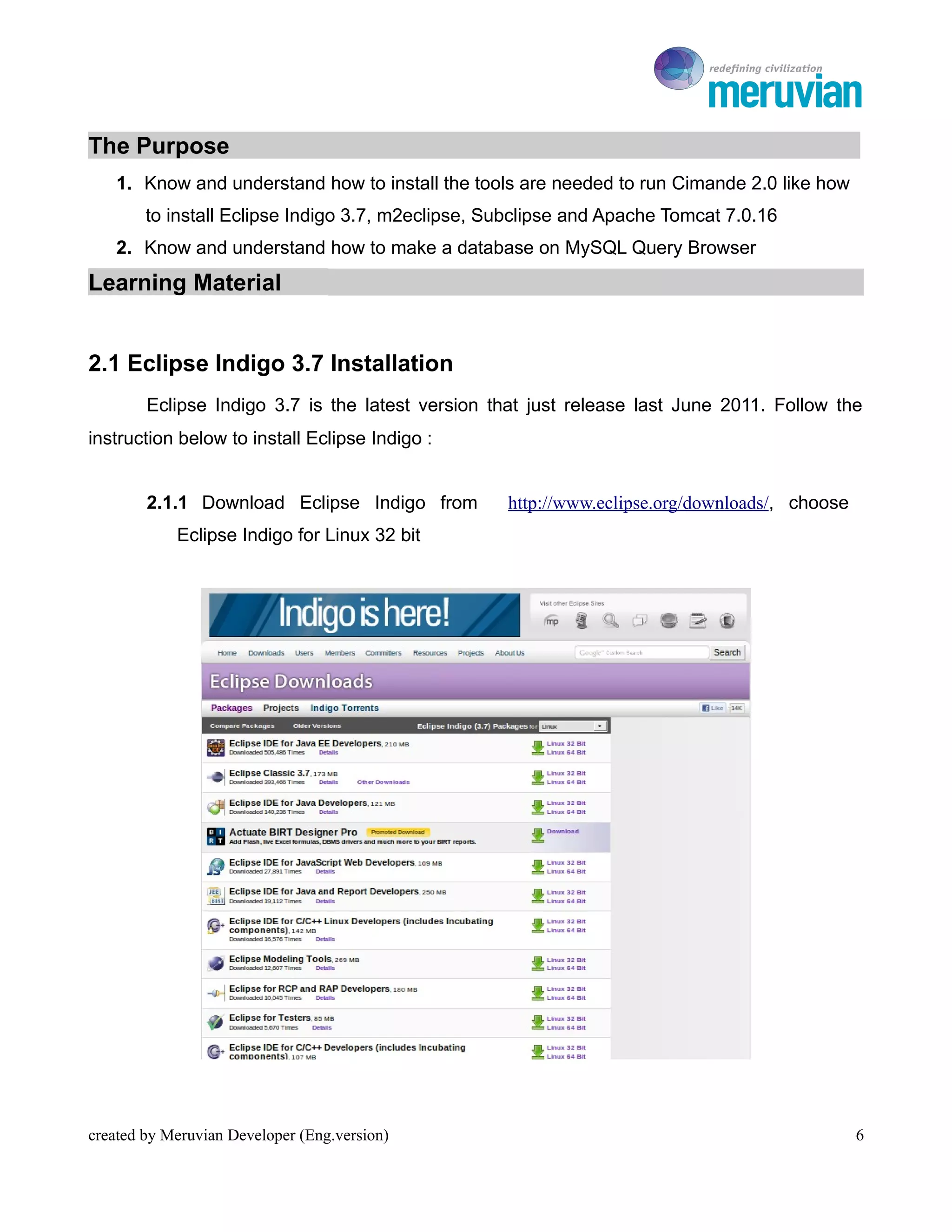
        2.1.1 Download Eclipse Indigo from         http://www.eclipse.org/downloads/, choose
            Eclipse Indigo for Linux 32 bit


created by Meruvian Developer (Eng.version)                                                    6
To Ro

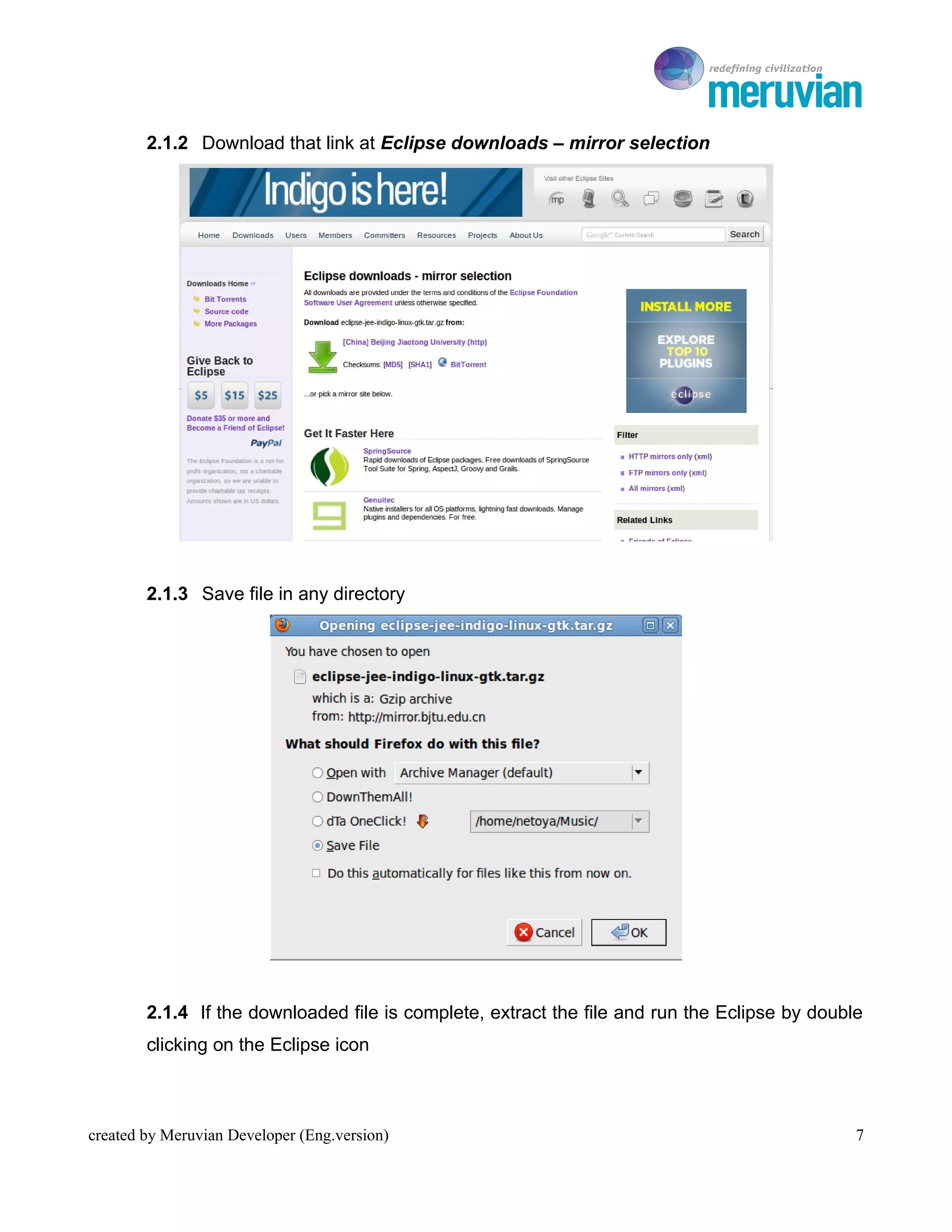
        2.1.2 Download that link at Eclipse downloads – mirror selection


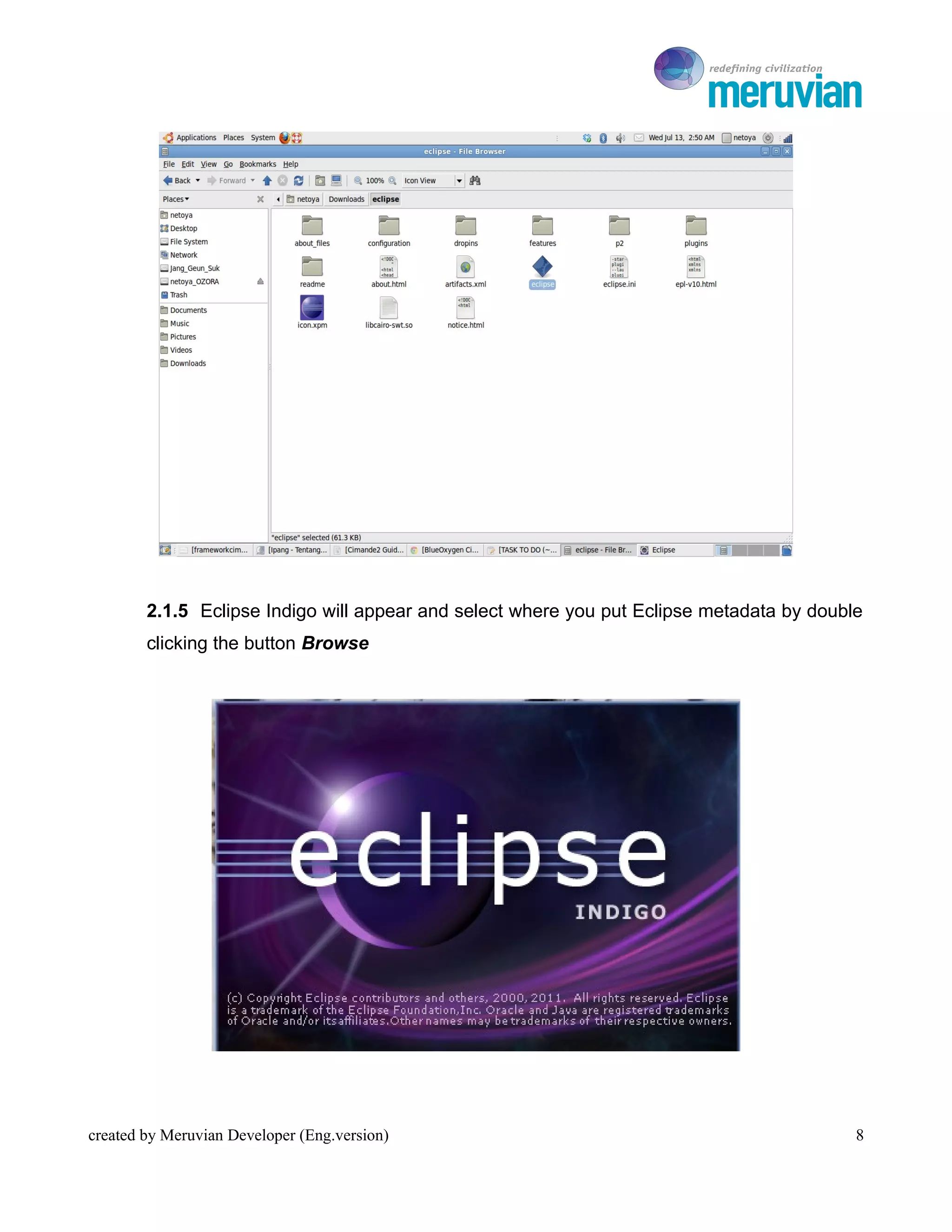
        2.1.3 Save file in any directory


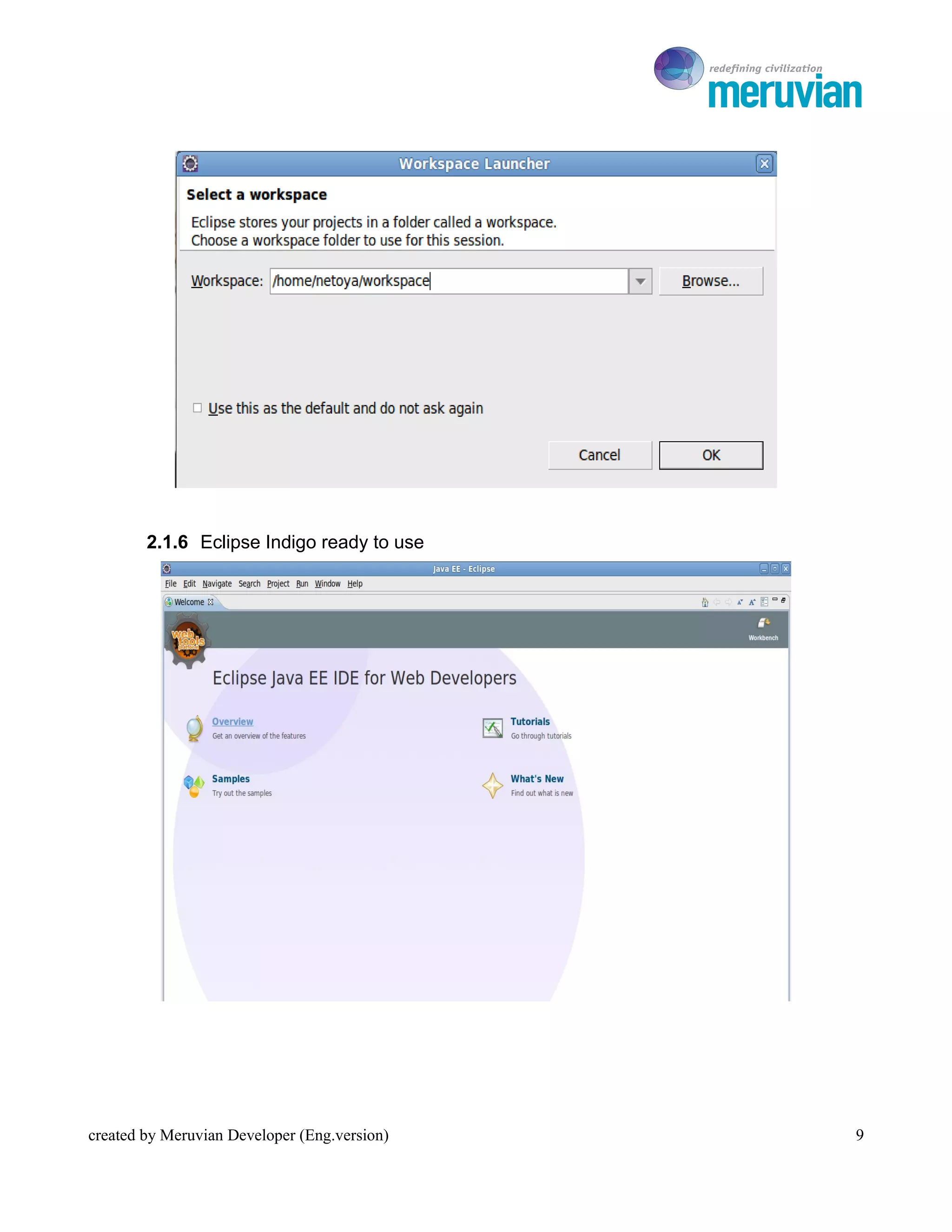
        2.1.4 If the downloaded file is complete, extract the file and run the Eclipse by double
        clicking on the Eclipse icon


created by Meruvian Developer (Eng.version)                                                    7
To Ro


        2.1.5 Eclipse Indigo will appear and select where you put Eclipse metadata by double
        clicking the button Browse


created by Meruvian Developer (Eng.version)                                                8
To Ro


        2.1.6 Eclipse Indigo ready to use


created by Meruvian Developer (Eng.version)       9
To Ro

2.2 M2Eclipse Installation
        If previous Cimande we use Ant as the Build Tool, but in Cimande 2.0 we use Maven.
To run this Maven, the Eclipse must be intalled m2eclipse plugin. Follow the instruction below
to install m2eclipse :


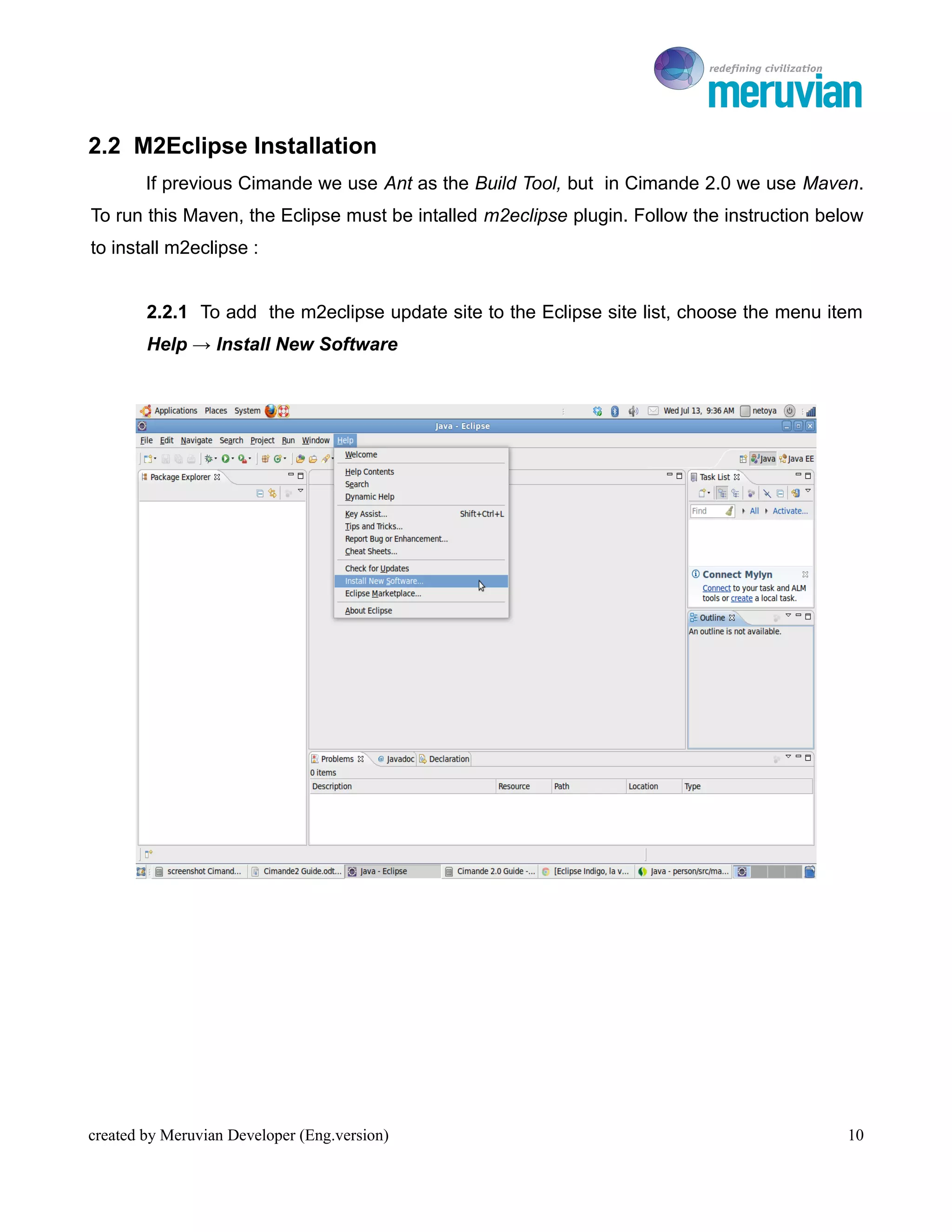
        2.2.1 To add the m2eclipse update site to the Eclipse site list, choose the menu item
        Help → Install New Software


created by Meruvian Developer (Eng.version)                                                 10
To Ro

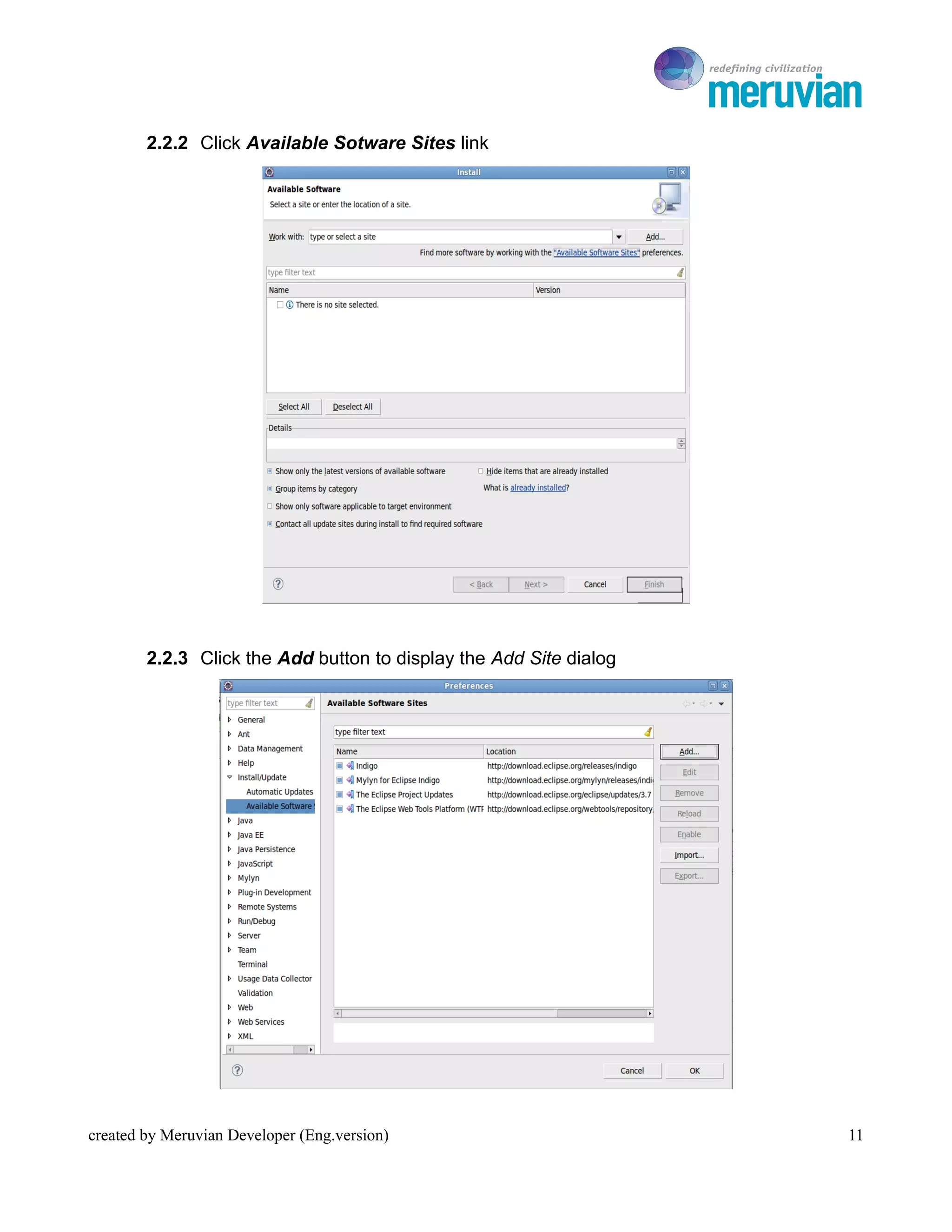
        2.2.2 Click Available Sotware Sites link


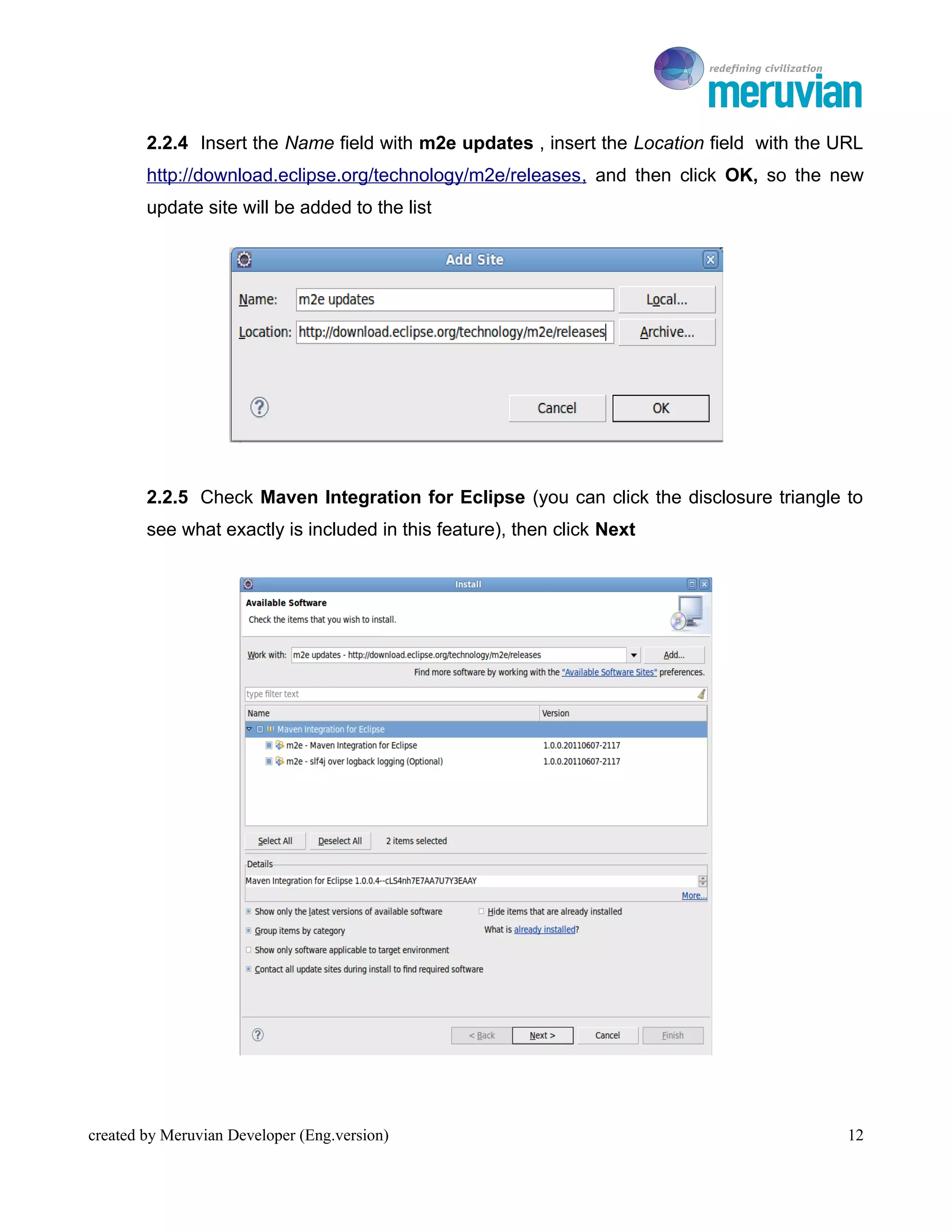
        2.2.3 Click the Add button to display the Add Site dialog


created by Meruvian Developer (Eng.version)                            11
To Ro

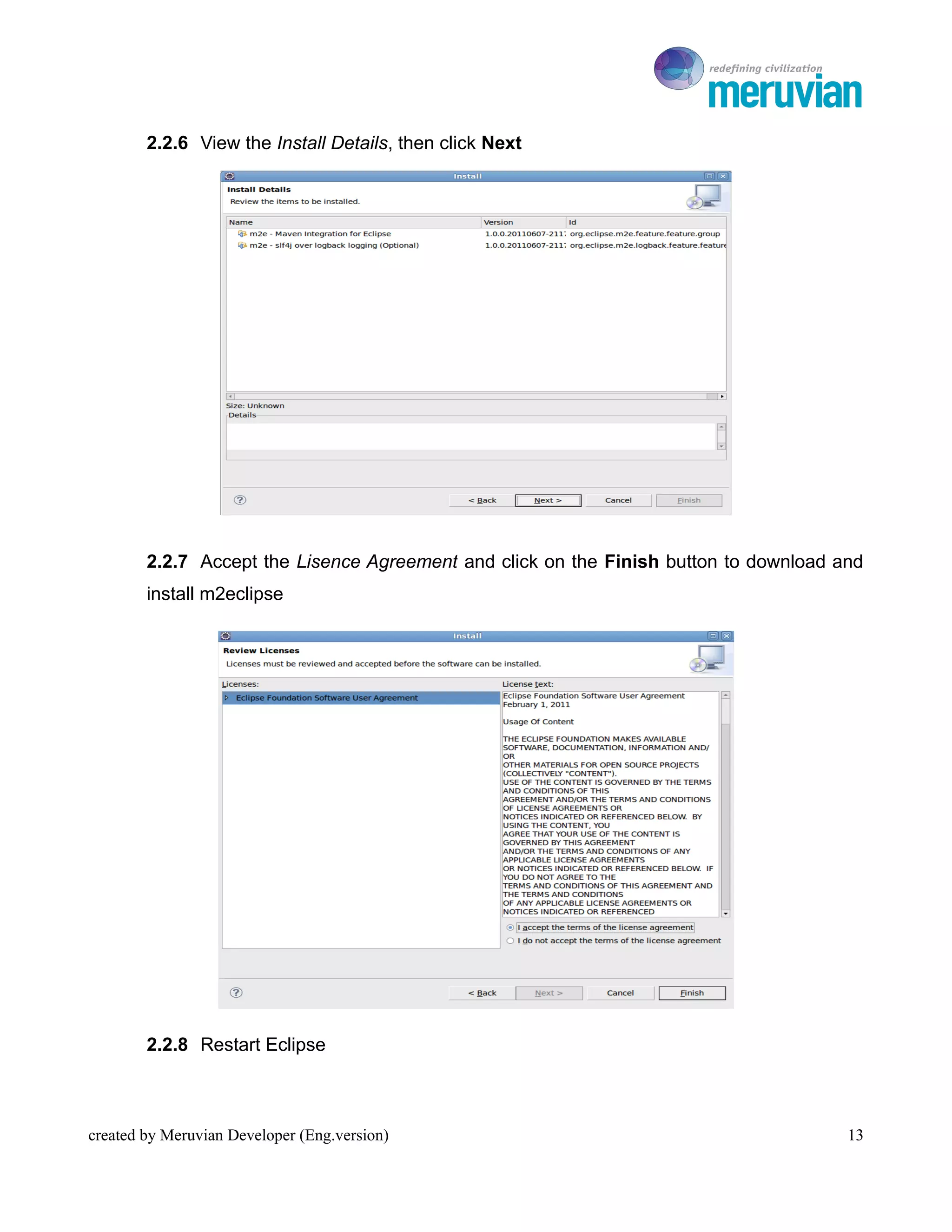
        2.2.4 Insert the Name field with m2e updates , insert the Location field with the URL
        http://download.eclipse.org/technology/m2e/releases , and then click OK, so the new
        update site will be added to the list


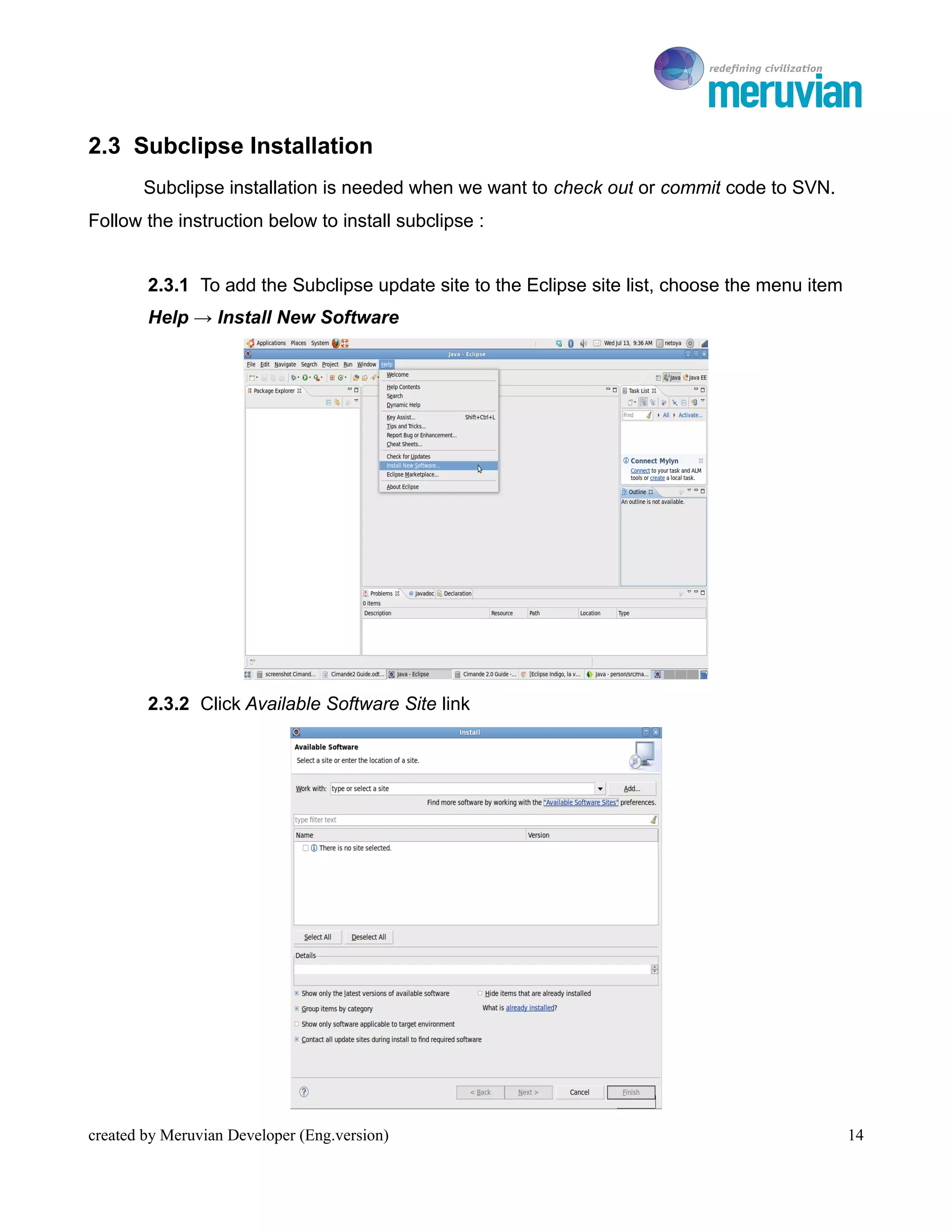
        2.2.5 Check Maven Integration for Eclipse (you can click the disclosure triangle to
        see what exactly is included in this feature), then click Next


created by Meruvian Developer (Eng.version)                                                12
To Ro

        2.2.6 View the Install Details, then click Next


        2.2.7 Accept the Lisence Agreement and click on the Finish button to download and
        install m2eclipse


        2.2.8 Restart Eclipse


created by Meruvian Developer (Eng.version)                                            13
To Ro

2.3 Subclipse Installation
       Subclipse installation is needed when we want to check out or commit code to SVN.
Follow the instruction below to install subclipse :


        2.3.1 To add the Subclipse update site to the Eclipse site list, choose the menu item
        Help → Install New Software


        2.3.2 Click Available Software Site link


created by Meruvian Developer (Eng.version)                                                     14
To Ro

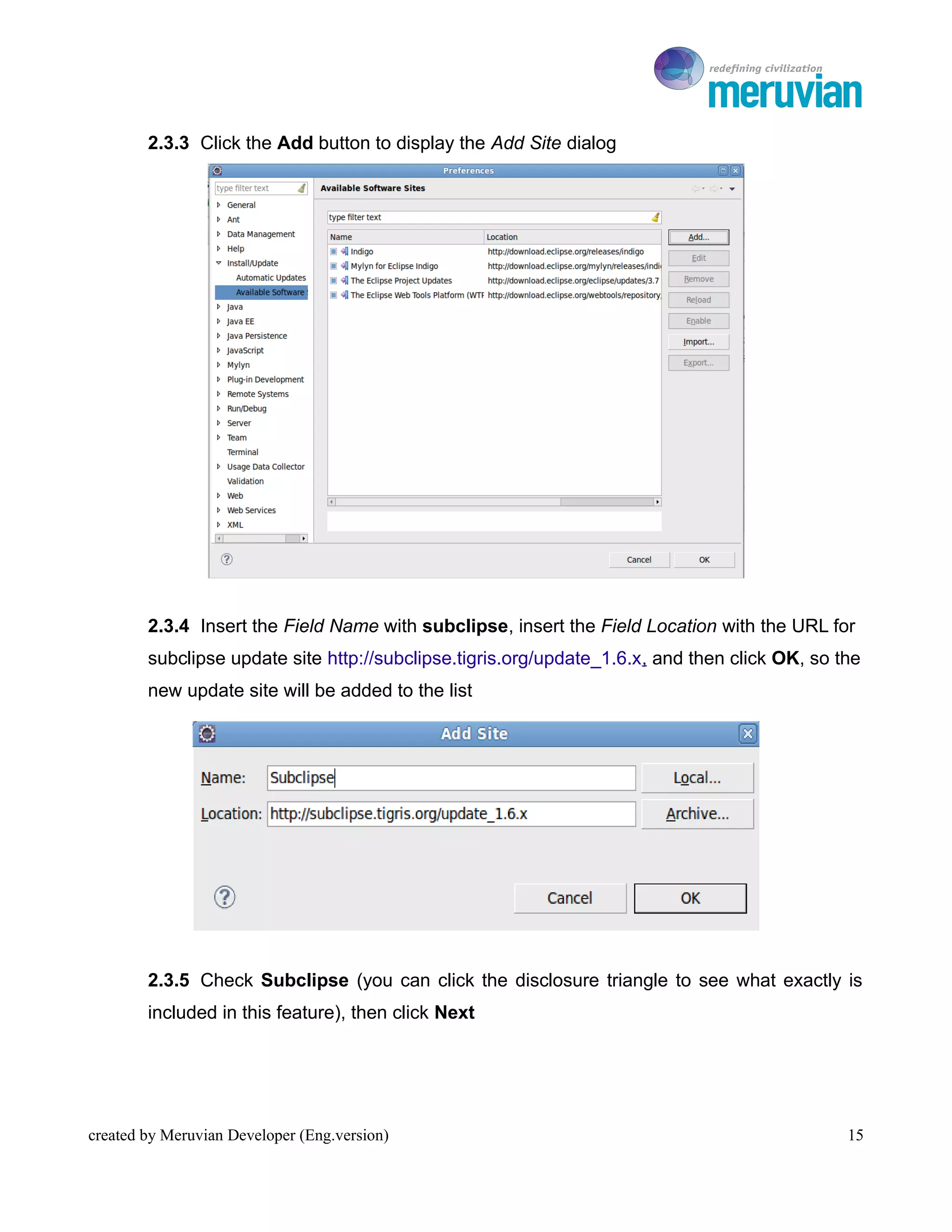
        2.3.3 Click the Add button to display the Add Site dialog


        2.3.4 Insert the Field Name with subclipse, insert the Field Location with the URL for
        subclipse update site http://subclipse.tigris.org/update_1.6.x, and then click OK, so the
        new update site will be added to the list


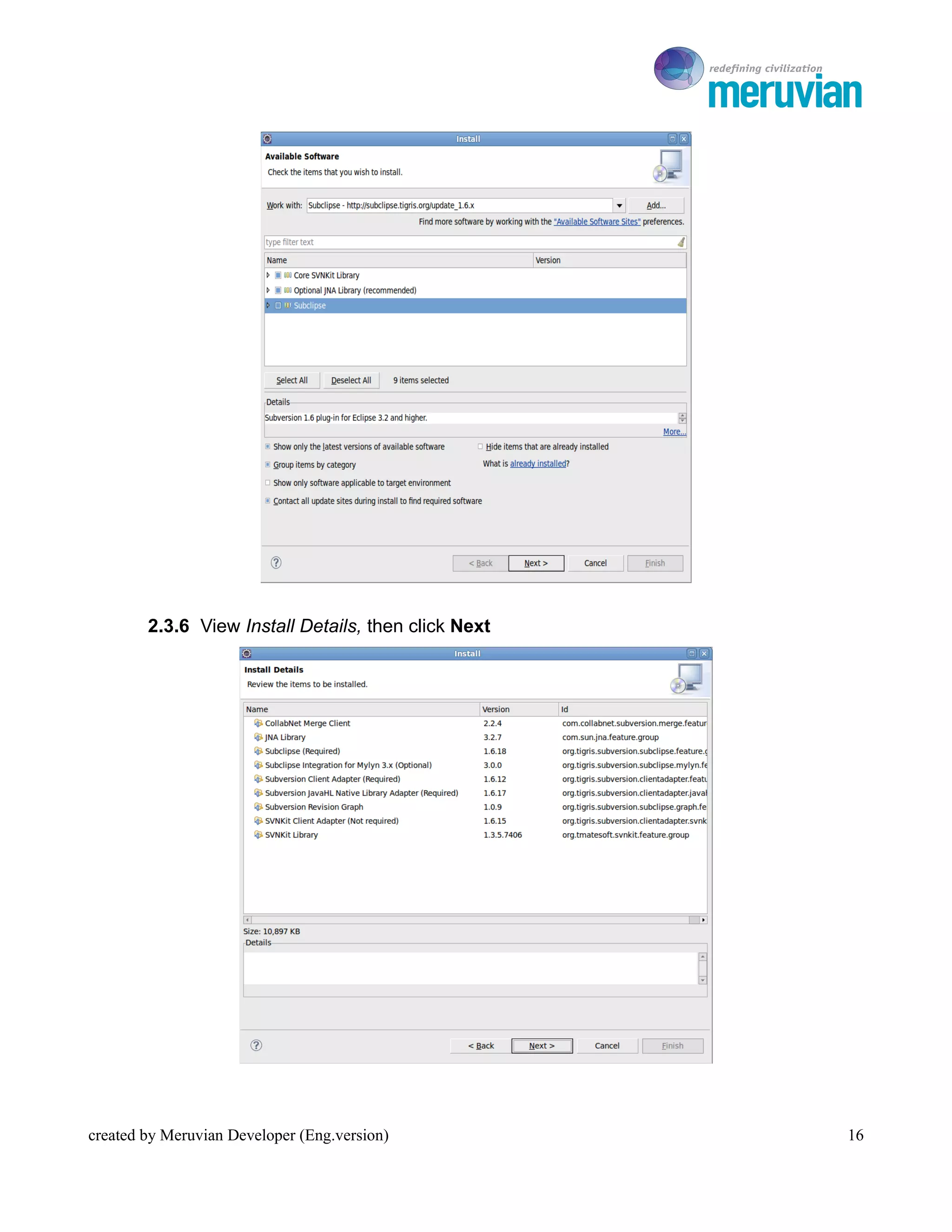
        2.3.5 Check Subclipse (you can click the disclosure triangle to see what exactly is
        included in this feature), then click Next


created by Meruvian Developer (Eng.version)                                                    15
To Ro


        2.3.6 View Install Details, then click Next


created by Meruvian Developer (Eng.version)              16
To Ro

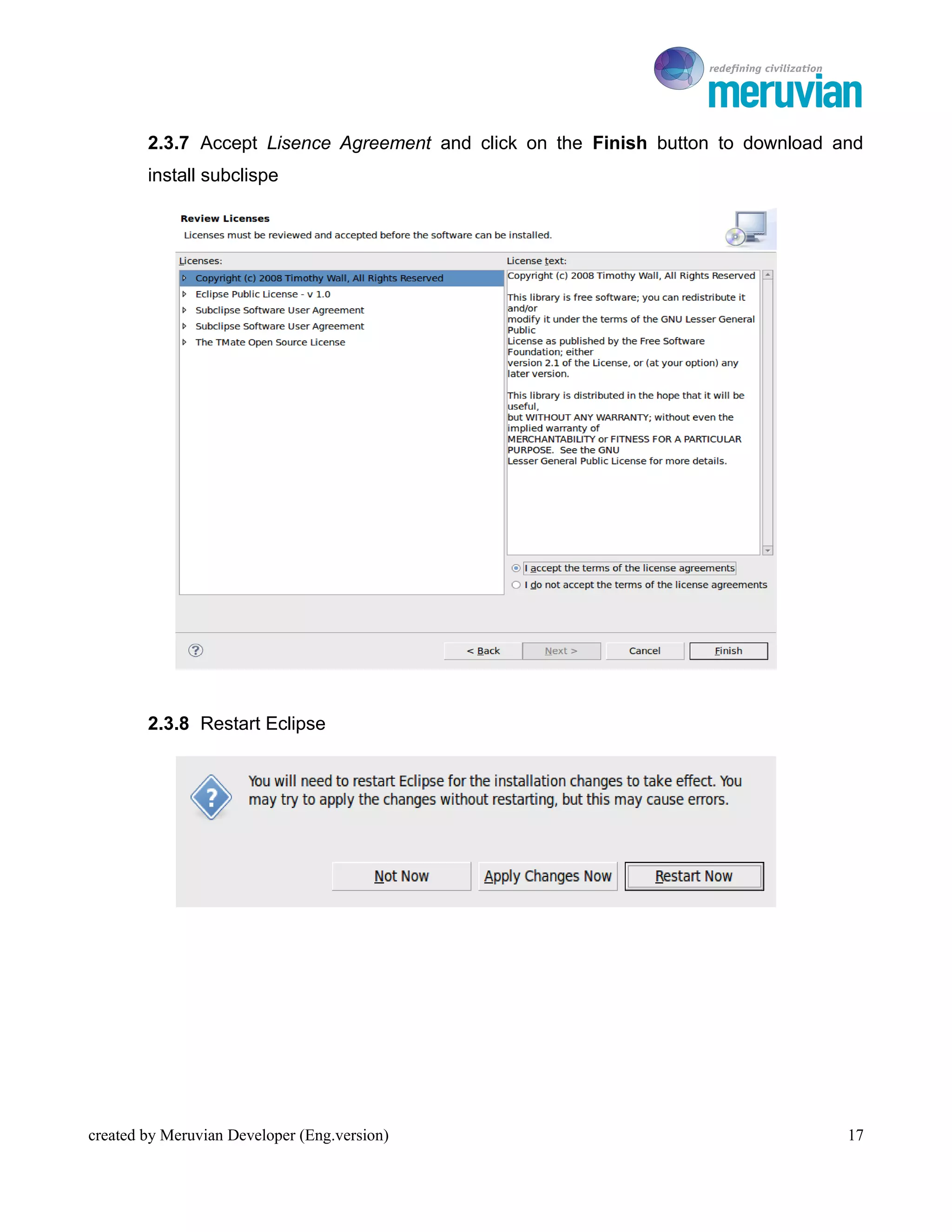
        2.3.7 Accept Lisence Agreement and click on the Finish button to download and
        install subclispe


        2.3.8 Restart Eclipse


created by Meruvian Developer (Eng.version)                                        17
To Ro

2.4 Apache Tomcat 7.0.16 Installation
       To run Cimande 2.0 we need a server. Follow the instruction below to install Apache
Tomcat 7.0.16 :


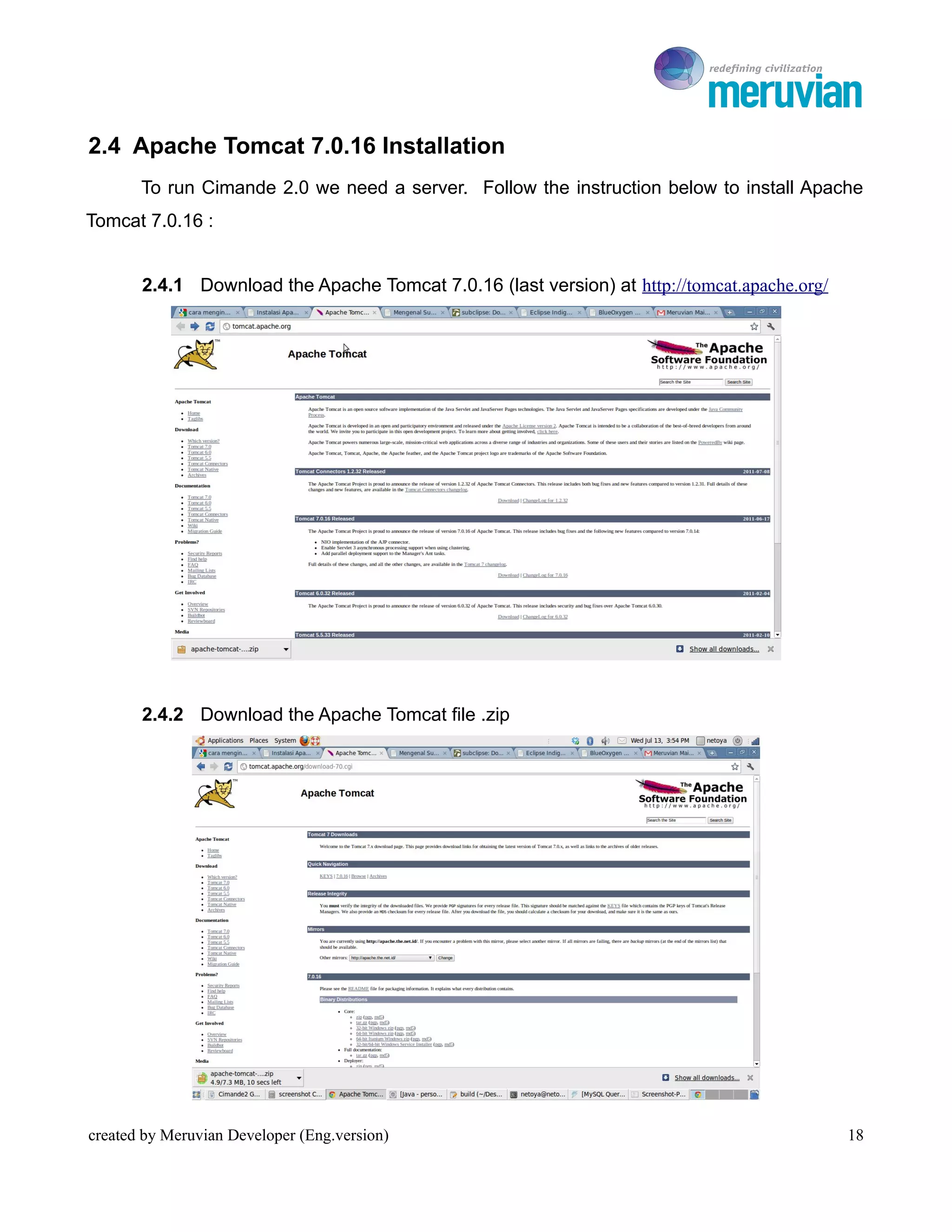
       2.4.1 Download the Apache Tomcat 7.0.16 (last version) at http://tomcat.apache.org/


       2.4.2 Download the Apache Tomcat file .zip


created by Meruvian Developer (Eng.version)                                                  18
To Ro

       2.4.3 Extract the Apache Tomcat 7.0.16 source file to any directory, for example in
       home/netoya


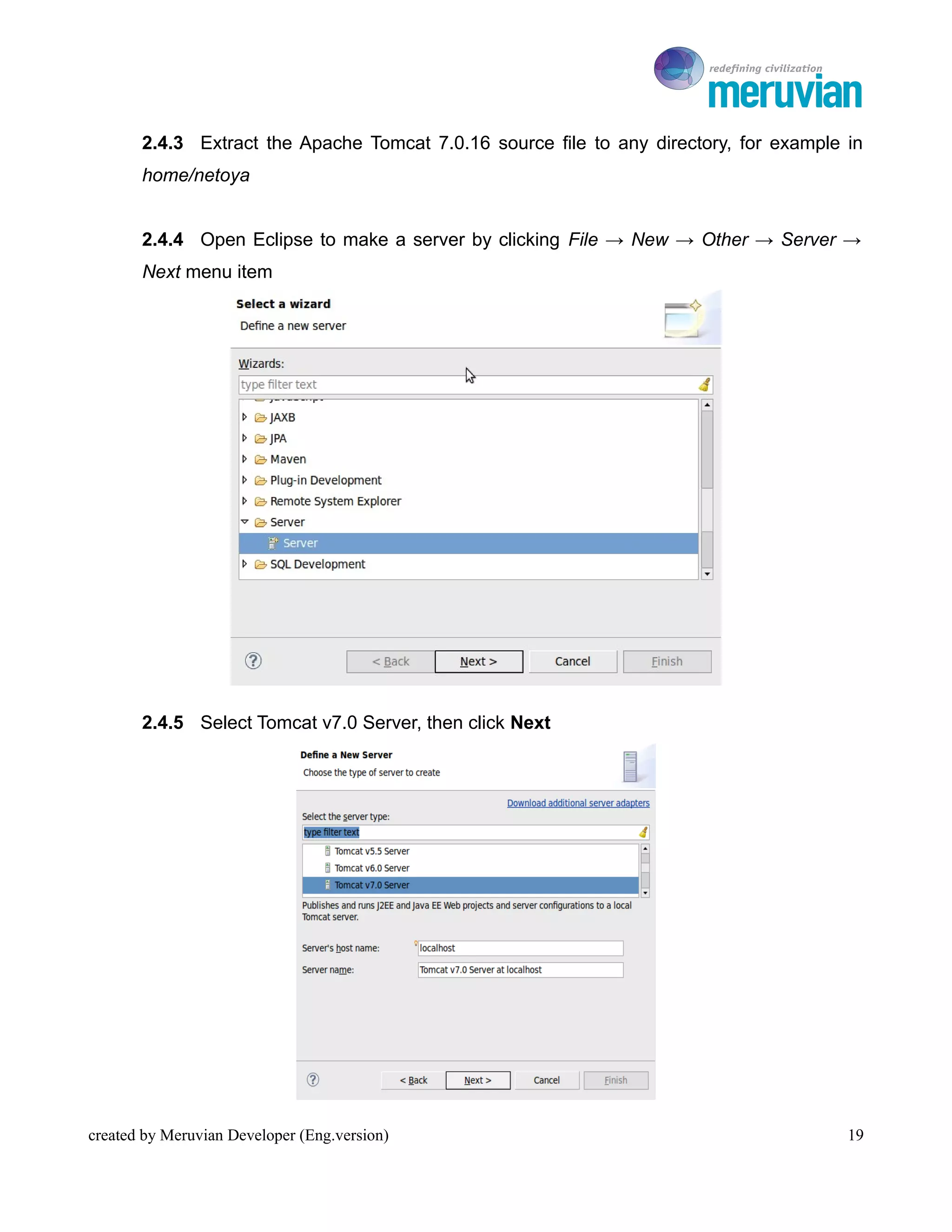
       2.4.4 Open Eclipse to make a server by clicking File → New → Other → Server →
       Next menu item


       2.4.5 Select Tomcat v7.0 Server, then click Next


created by Meruvian Developer (Eng.version)                                             19
To Ro

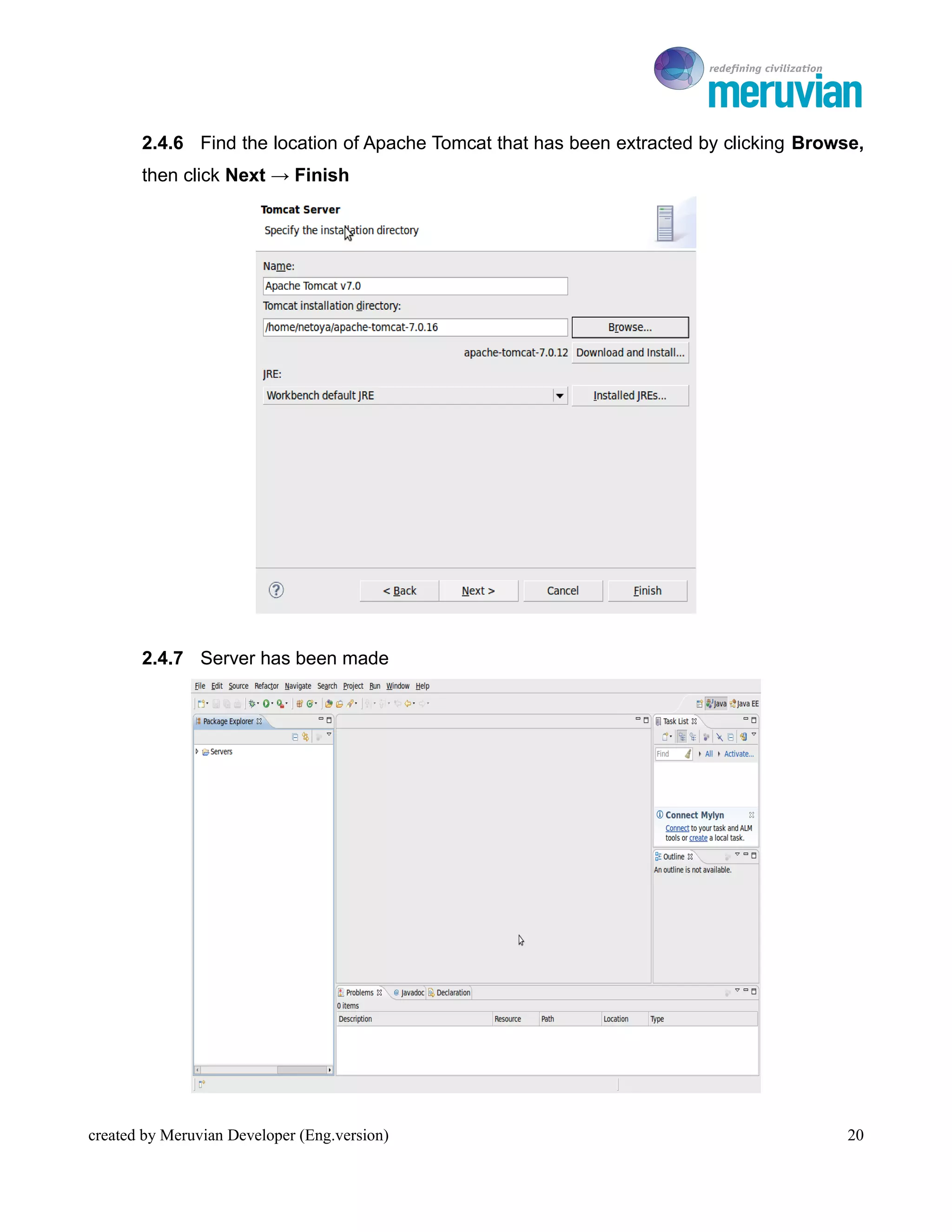
       2.4.6 Find the location of Apache Tomcat that has been extracted by clicking Browse,
       then click Next → Finish


       2.4.7 Server has been made


created by Meruvian Developer (Eng.version)                                              20
To Ro

2.5 Creating Database
       There are several ways to create MySQL database. We can use the command line,
PHP MyAdmin, or use MySQL Query Browser. If we use command line, you must memorize
the syntax to makeaa database. The Syntax is quite simple, CREATE DATABASE
database_name and ends with a semicolon. If you want to use MySQL Query Browser, follow
the instruction how to install and make a database below :


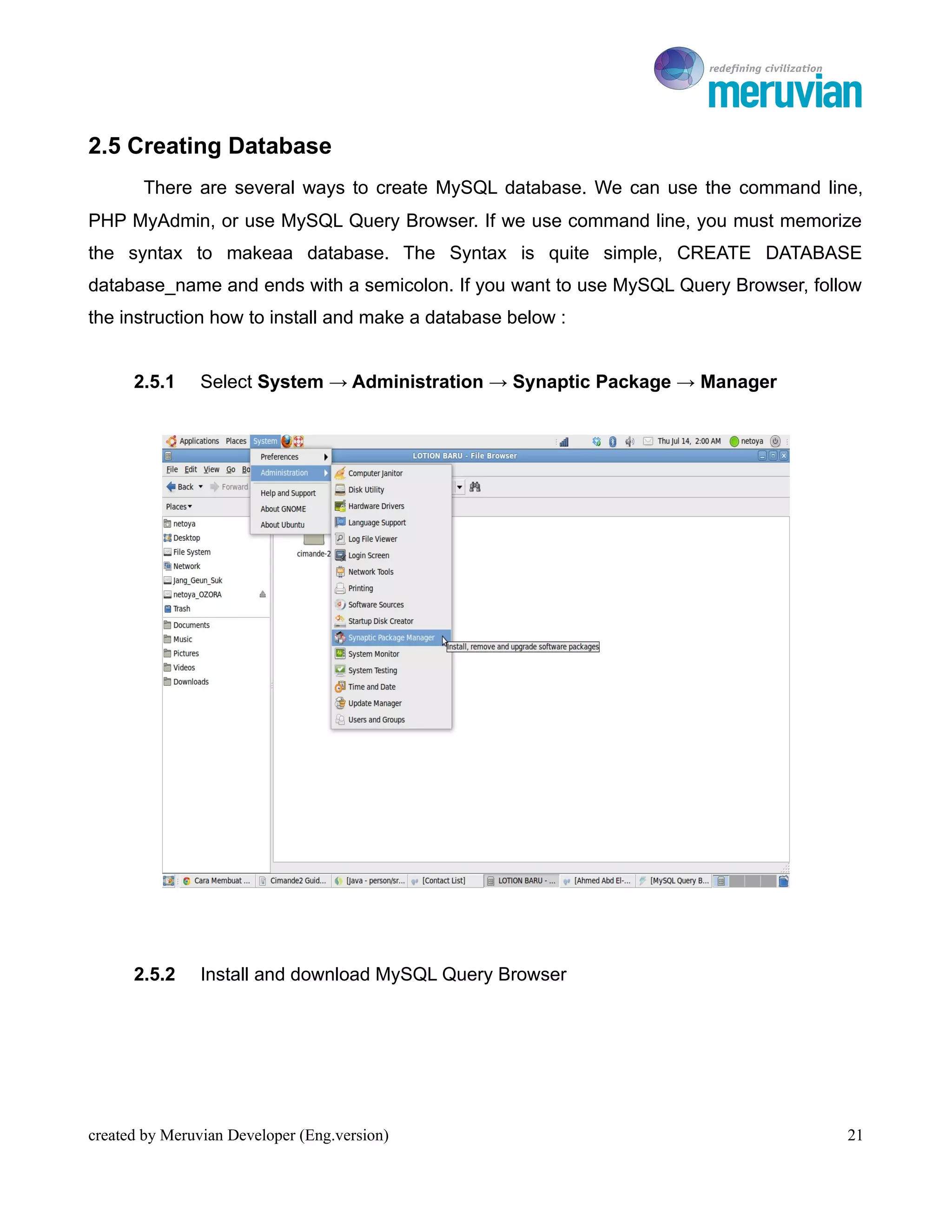
      2.5.1     Select System → Administration → Synaptic Package → Manager


      2.5.2     Install and download MySQL Query Browser


created by Meruvian Developer (Eng.version)                                          21
To Ro


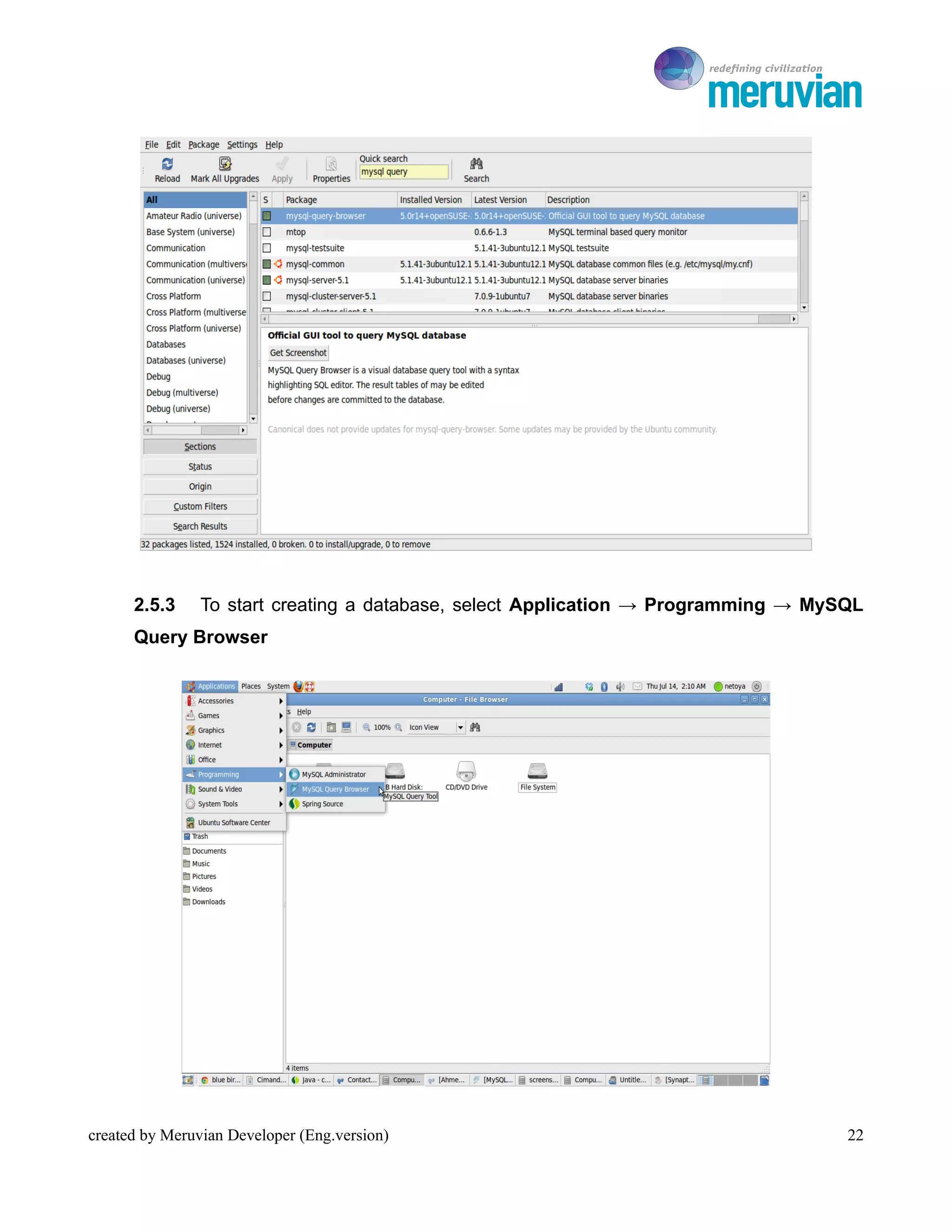
      2.5.3     To start creating a database, select Application → Programming → MySQL
      Query Browser


created by Meruvian Developer (Eng.version)                                         22
To Ro

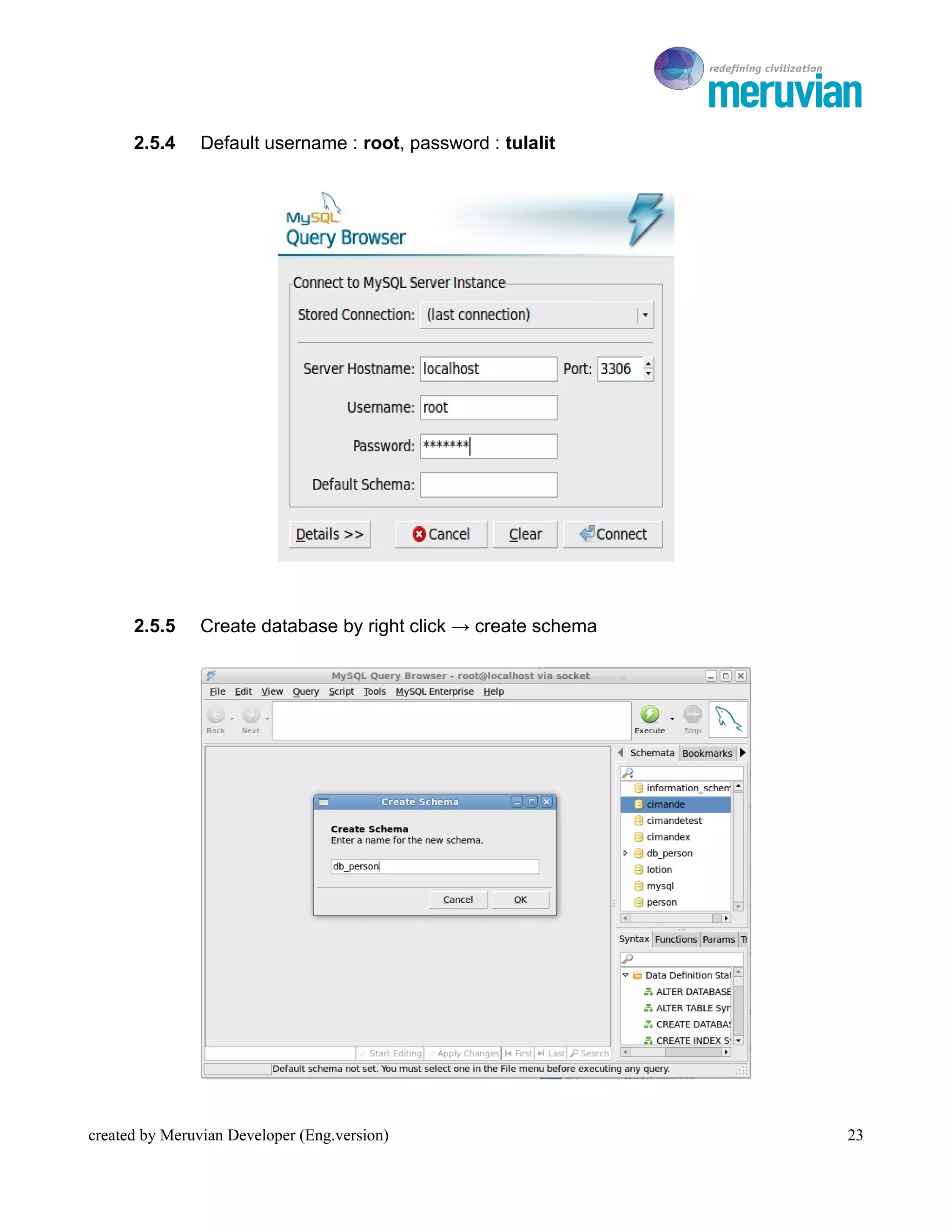
      2.5.4     Default username : root, password : tulalit


      2.5.5     Create database by right click → create schema


created by Meruvian Developer (Eng.version)                         23
To Ro


Cimande 2.0 Quick Start Guide


                                              BAB III
                 Running Cimande Project


created by Meruvian Developer (Eng.version)                24
To Ro

The Purpose
   1. Know and understand how to create Cimande project from Maven Archetype
   2. Know and understand how to generate schema use Maven Build
Learning Material


3.1 Running Cimande Project
      For beginning, we will create Cimande project to display Cimande Admin form. Follow
the instruction below :
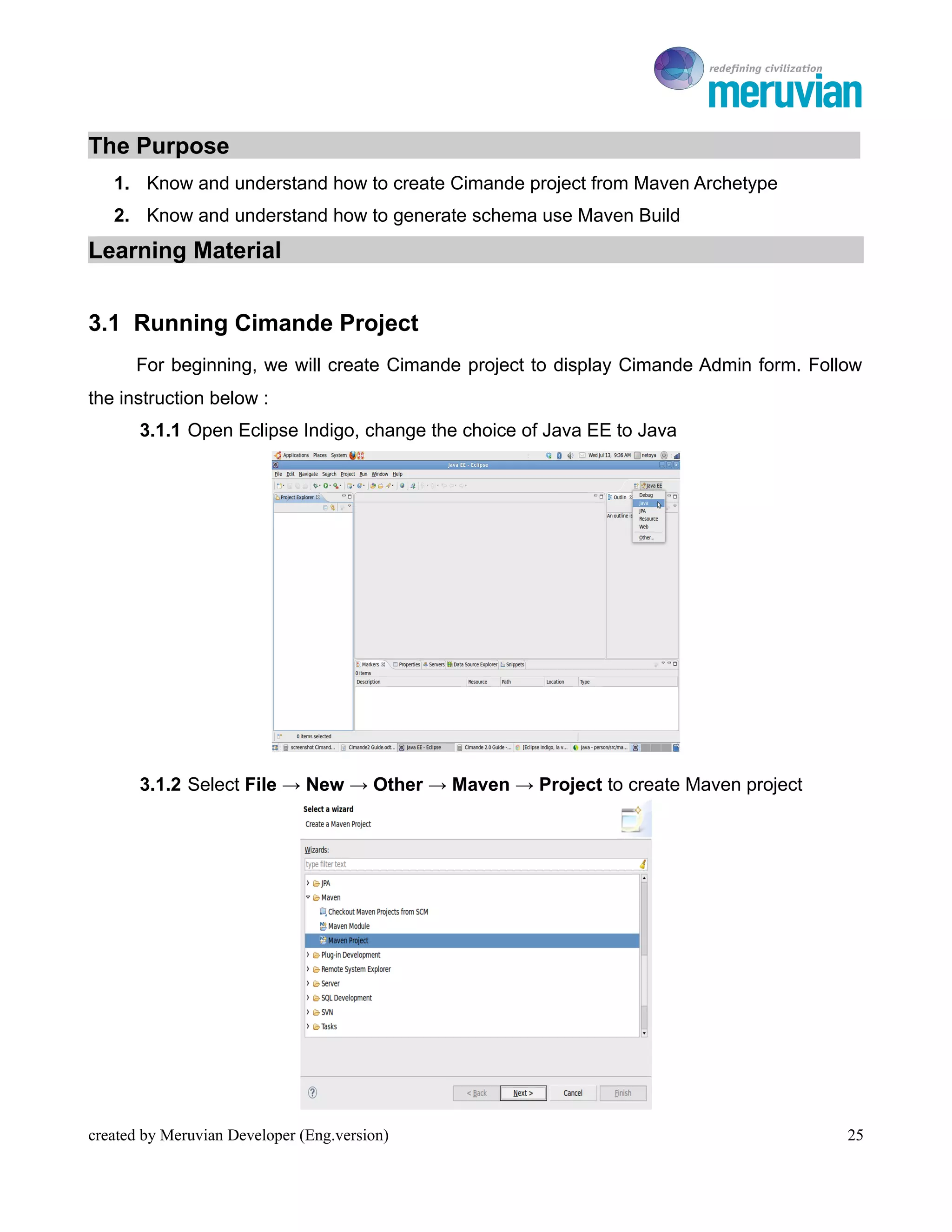
       3.1.1 Open Eclipse Indigo, change the choice of Java EE to Java


       3.1.2 Select File → New → Other → Maven → Project to create Maven project


created by Meruvian Developer (Eng.version)                                            25
To Ro

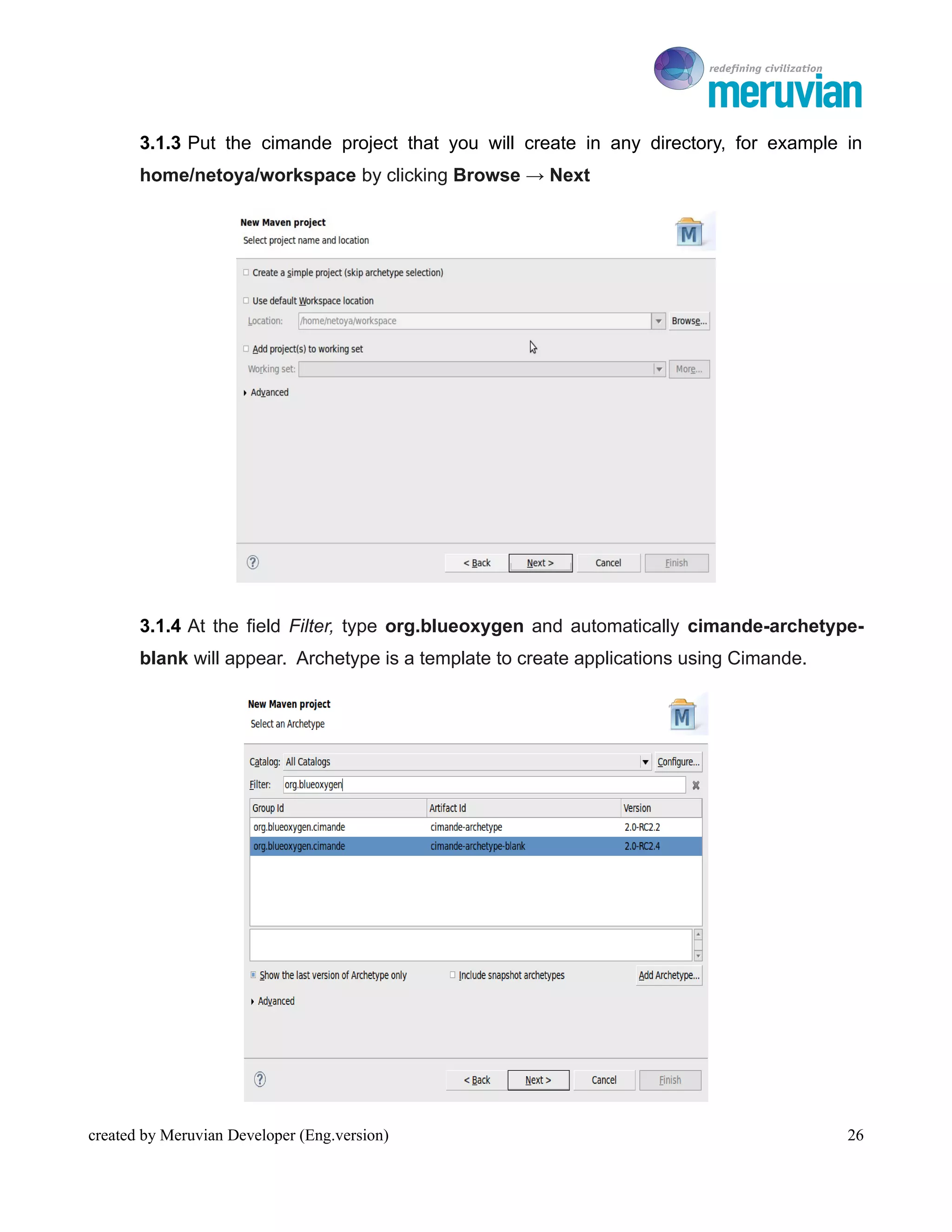
       3.1.3 Put the cimande project that you will create in any directory, for example in
       home/netoya/workspace by clicking Browse → Next


       3.1.4 At the field Filter, type org.blueoxygen and automatically cimande-archetype-
       blank will appear. Archetype is a template to create applications using Cimande.


created by Meruvian Developer (Eng.version)                                                  26
To Ro

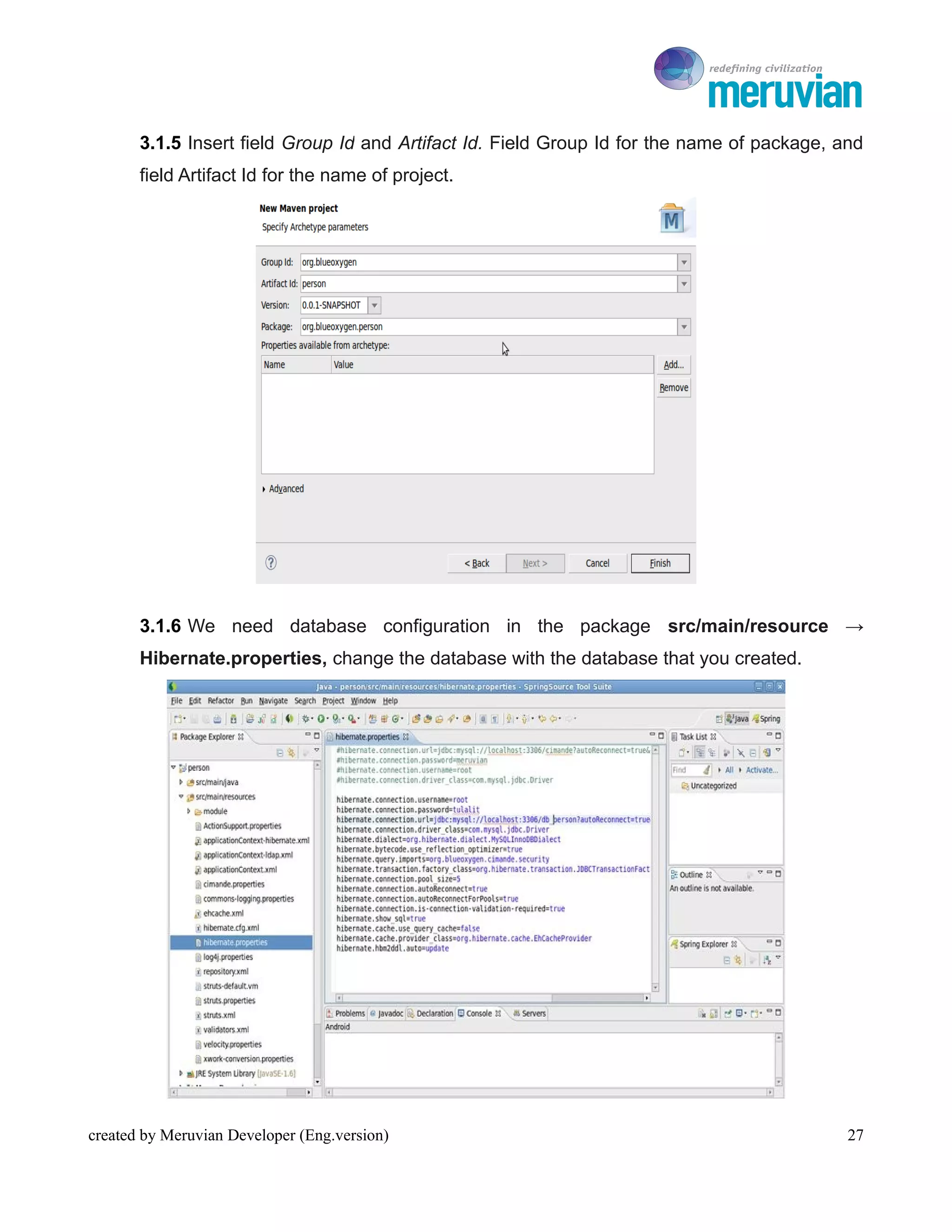
       3.1.5 Insert field Group Id and Artifact Id. Field Group Id for the name of package, and
       field Artifact Id for the name of project.


       3.1.6 We need database configuration in the package src/main/resource →
       Hibernate.properties, change the database with the database that you created.


created by Meruvian Developer (Eng.version)                                                  27
To Ro

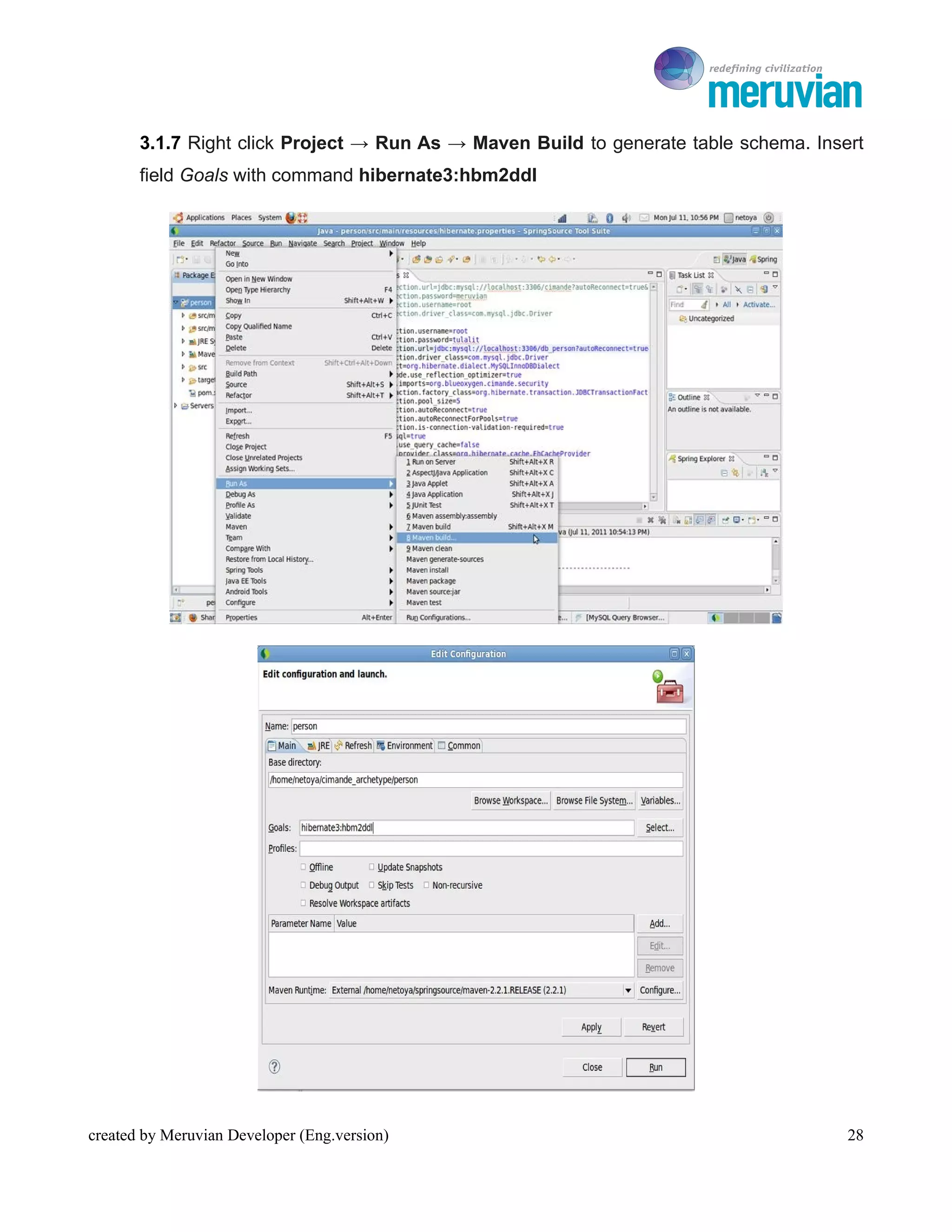
       3.1.7 Right click Project → Run As → Maven Build to generate table schema. Insert
       field Goals with command hibernate3:hbm2ddl


created by Meruvian Developer (Eng.version)                                           28
To Ro

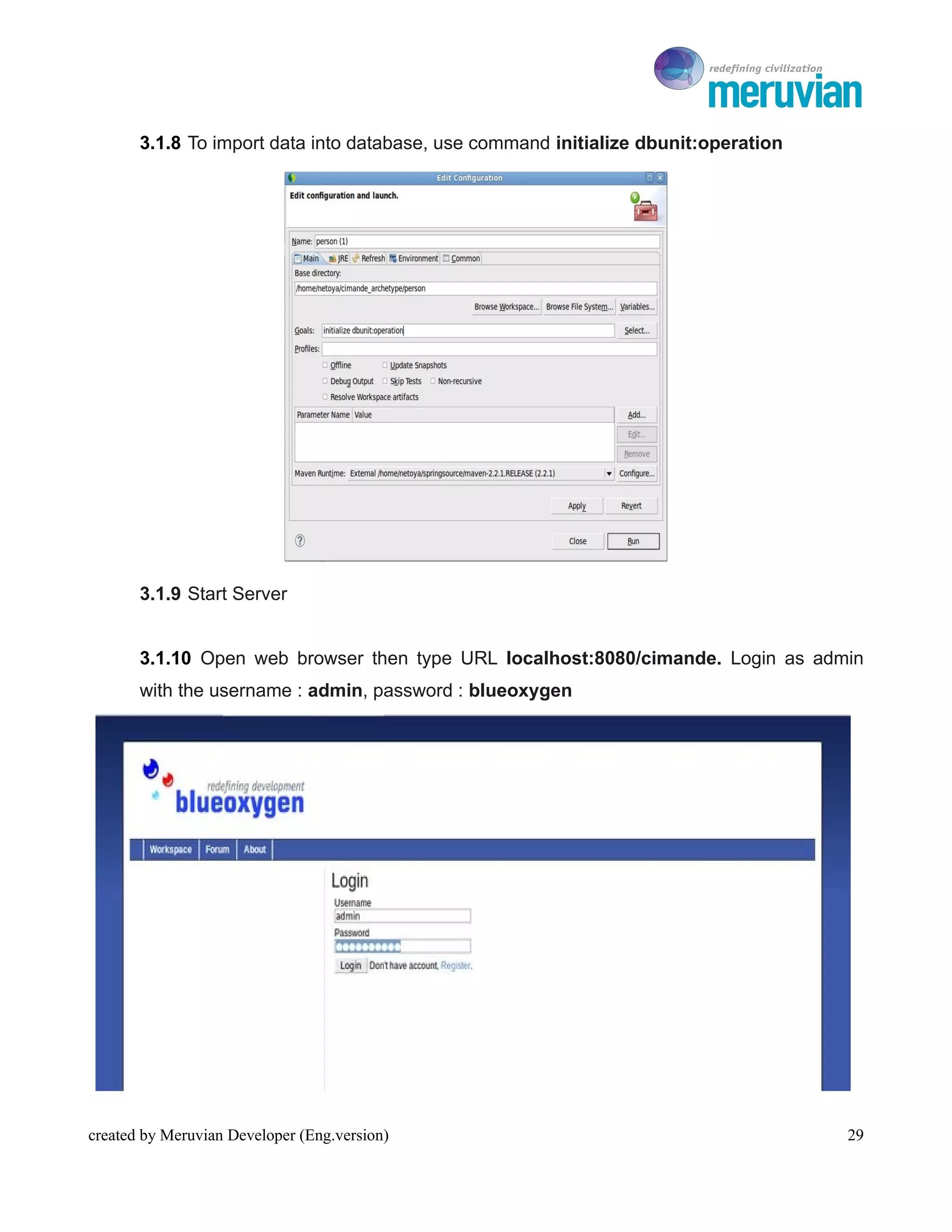
       3.1.8 To import data into database, use command initialize dbunit:operation


       3.1.9 Start Server


       3.1.10 Open web browser then type URL localhost:8080/cimande. Login as admin
       with the username : admin, password : blueoxygen


created by Meruvian Developer (Eng.version)                                             29
To Ro


Cimande 2.0 Quick Start Guide


                                              BAB IV

                             CIMANDE 2.0 CRUD


created by Meruvian Developer (Eng.version)               30
To Ro

The Purpose
    1.     Know and understand how to create Cimande project
    2.     Implement CRUD in Cimande project
Learning Material


4.1 CRUD Overview
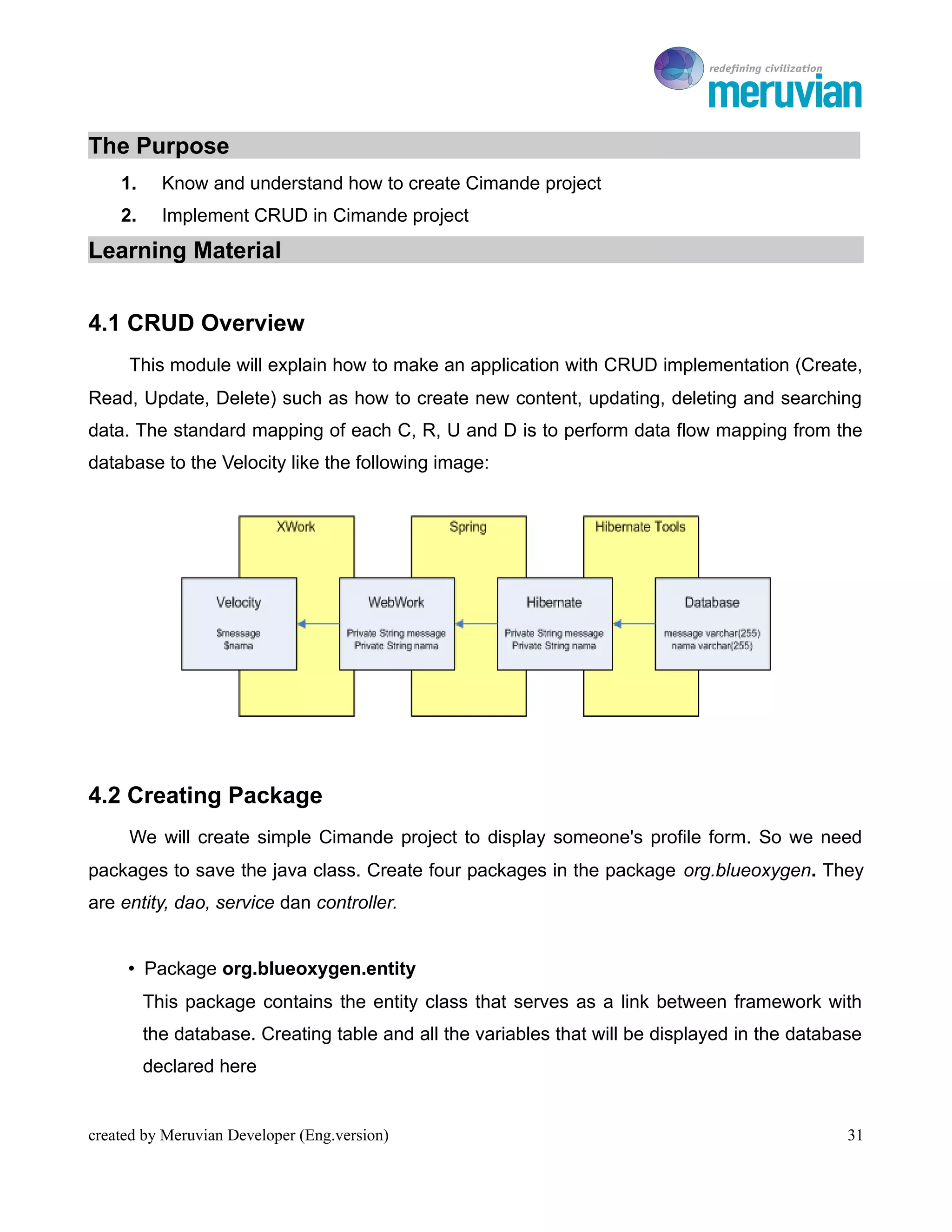
     This module will explain how to make an application with CRUD implementation (Create,
Read, Update, Delete) such as how to create new content, updating, deleting and searching
data. The standard mapping of each C, R, U and D is to perform data flow mapping from the
database to the Velocity like the following image:


4.2 Creating Package
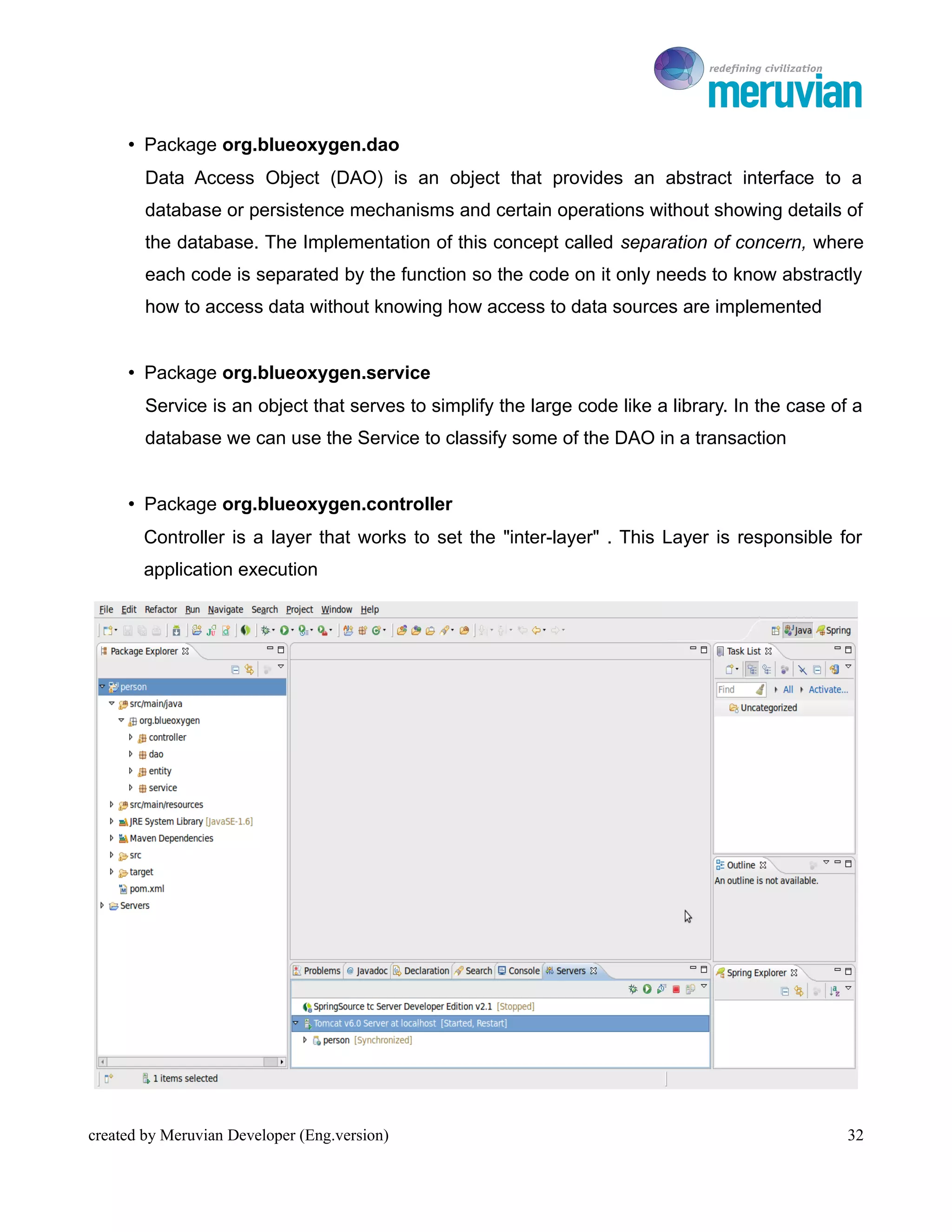
     We will create simple Cimande project to display someone's profile form. So we need
packages to save the java class. Create four packages in the package org.blueoxygen. They
are entity, dao, service dan controller.


     • Package org.blueoxygen.entity
         This package contains the entity class that serves as a link between framework with
         the database. Creating table and all the variables that will be displayed in the database
         declared here


created by Meruvian Developer (Eng.version)                                                     31
To Ro

     • Package org.blueoxygen.dao
        Data Access Object (DAO) is an object that provides an abstract interface to a
        database or persistence mechanisms and certain operations without showing details of
        the database. The Implementation of this concept called separation of concern, where
        each code is separated by the function so the code on it only needs to know abstractly
        how to access data without knowing how access to data sources are implemented


     • Package org.blueoxygen.service
        Service is an object that serves to simplify the large code like a library. In the case of a
        database we can use the Service to classify some of the DAO in a transaction


     • Package org.blueoxygen.controller
       Controller is a layer that works to set the "inter-layer" . This Layer is responsible for
       application execution


created by Meruvian Developer (Eng.version)                                                       32
To Ro

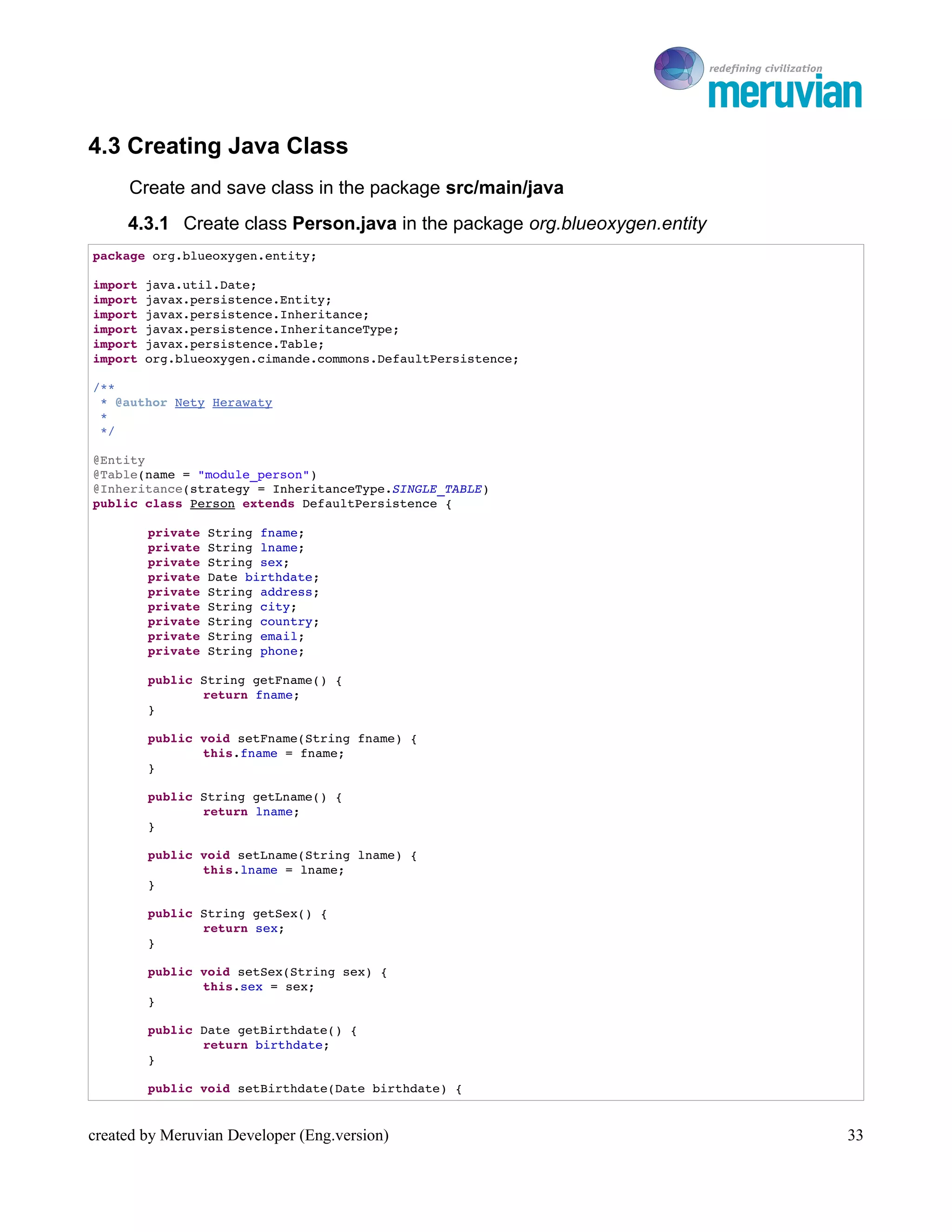
4.3 Creating Java Class
     Create and save class in the package src/main/java
     4.3.1 Create class Person.java in the package org.blueoxygen.entity
package org.blueoxygen.entity;

import java.util.Date;
import javax.persistence.Entity;
import javax.persistence.Inheritance;
import javax.persistence.InheritanceType;
import javax.persistence.Table;
import org.blueoxygen.cimande.commons.DefaultPersistence;

/**
 * @author Nety Herawaty
 * 
 */

@Entity
@Table(name = "module_person")
@Inheritance(strategy = InheritanceType.SINGLE_TABLE)
public class Person extends DefaultPersistence {

        private String fname;
        private String lname;
        private String sex;
        private Date birthdate;
        private String address;
        private String city;
        private String country;
        private String email;
        private String phone;

        public String getFname() {
               return fname;
        }

        public void setFname(String fname) {
               this.fname = fname;
        }

        public String getLname() {
               return lname;
        }

        public void setLname(String lname) {
               this.lname = lname;
        }

        public String getSex() {
               return sex;
        }

        public void setSex(String sex) {
               this.sex = sex;
        }

        public Date getBirthdate() {
               return birthdate;
        }

        public void setBirthdate(Date birthdate) {


created by Meruvian Developer (Eng.version)                                   33
To Ro

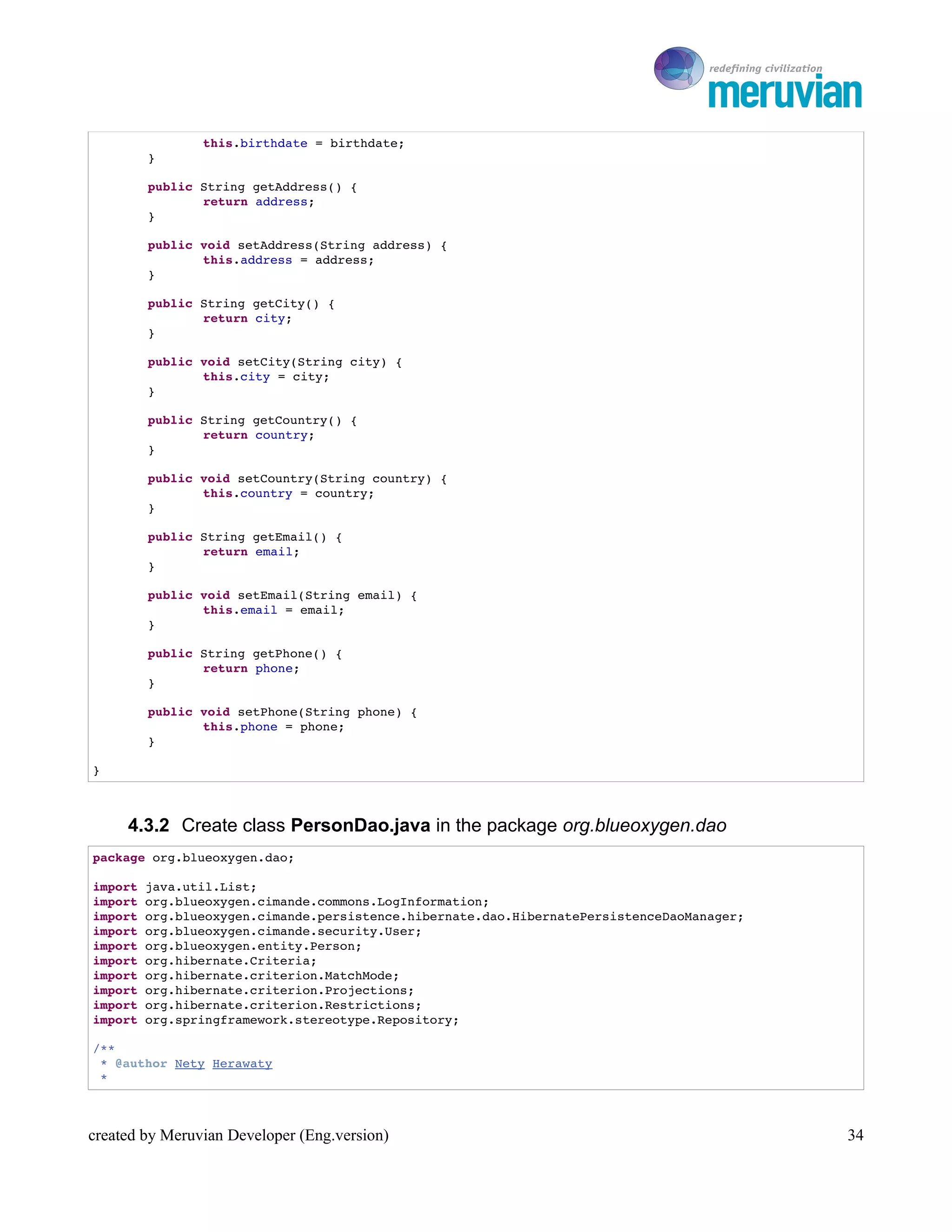
                this.birthdate = birthdate;
        }

        public String getAddress() {
               return address;
        }

        public void setAddress(String address) {
               this.address = address;
        }

        public String getCity() {
               return city;
        }

        public void setCity(String city) {
               this.city = city;
        }

        public String getCountry() {
               return country;
        }

        public void setCountry(String country) {
               this.country = country;
        }

        public String getEmail() {
               return email;
        }

        public void setEmail(String email) {
               this.email = email;
        }

        public String getPhone() {
               return phone;
        }

        public void setPhone(String phone) {
               this.phone = phone;
        }

}


     4.3.2 Create class PersonDao.java in the package org.blueoxygen.dao
package org.blueoxygen.dao;

import java.util.List;
import org.blueoxygen.cimande.commons.LogInformation;
import org.blueoxygen.cimande.persistence.hibernate.dao.HibernatePersistenceDaoManager;
import org.blueoxygen.cimande.security.User;
import org.blueoxygen.entity.Person;
import org.hibernate.Criteria;
import org.hibernate.criterion.MatchMode;
import org.hibernate.criterion.Projections;
import org.hibernate.criterion.Restrictions;
import org.springframework.stereotype.Repository;

/**
 * @author Nety Herawaty
 * 


created by Meruvian Developer (Eng.version)                                                  34
To Ro

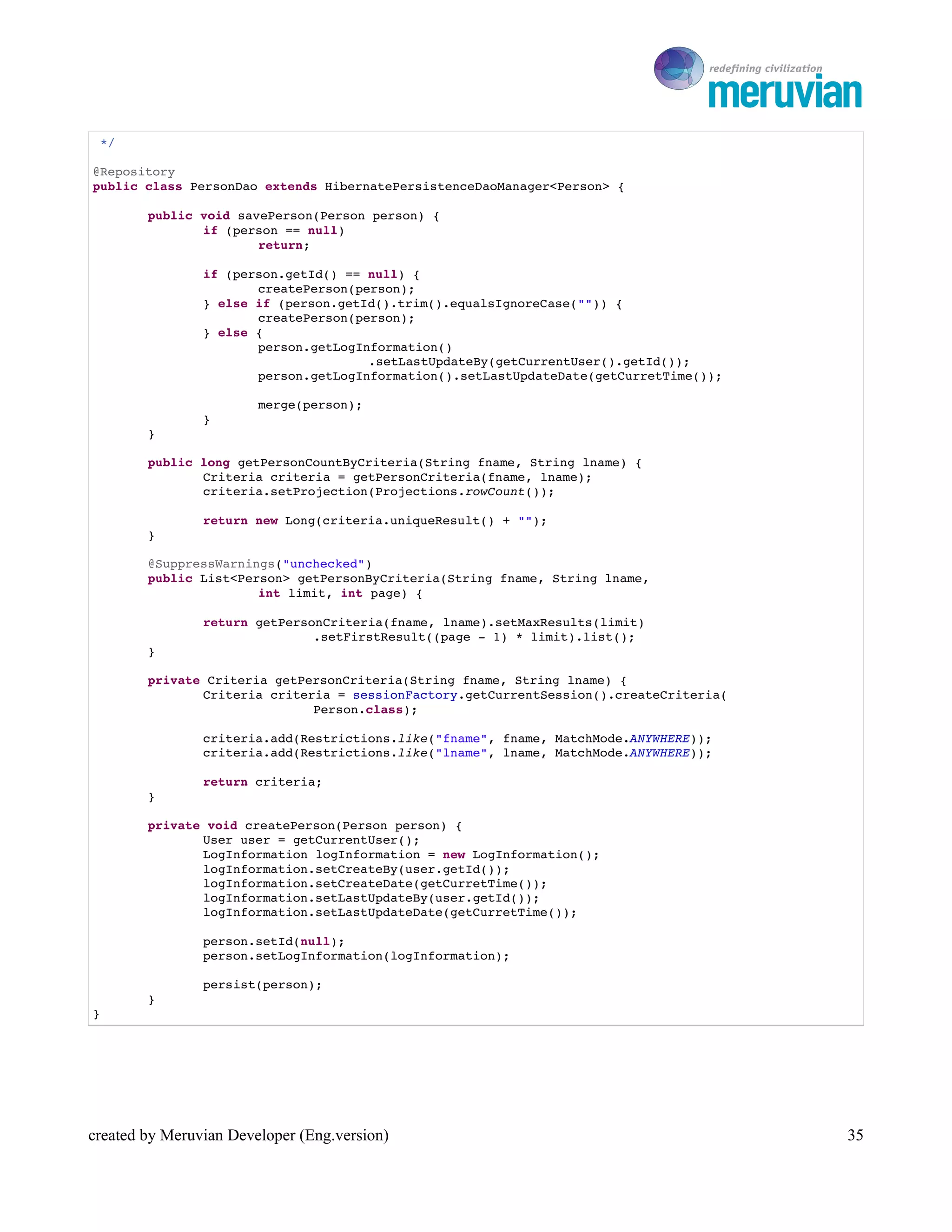
 */

@Repository
public class PersonDao extends HibernatePersistenceDaoManager<Person> {

        public void savePerson(Person person) {
               if (person == null)
                       return;

                if (person.getId() == null) {
                       createPerson(person);
                } else if (person.getId().trim().equalsIgnoreCase("")) {
                       createPerson(person);
                } else {
                       person.getLogInformation()
                                      .setLastUpdateBy(getCurrentUser().getId());
                       person.getLogInformation().setLastUpdateDate(getCurretTime());

                        merge(person);
                }
        }

        public long getPersonCountByCriteria(String fname, String lname) {
               Criteria criteria = getPersonCriteria(fname, lname);
               criteria.setProjection(Projections.rowCount());

                return new Long(criteria.uniqueResult() + "");
        }

        @SuppressWarnings("unchecked")
        public List<Person> getPersonByCriteria(String fname, String lname,
                       int limit, int page) {

                return getPersonCriteria(fname, lname).setMaxResults(limit)
                               .setFirstResult((page ­ 1) * limit).list();
        }

        private Criteria getPersonCriteria(String fname, String lname) {
               Criteria criteria = sessionFactory.getCurrentSession().createCriteria(
                              Person.class);

                criteria.add(Restrictions.like("fname", fname, MatchMode.ANYWHERE));
                criteria.add(Restrictions.like("lname", lname, MatchMode.ANYWHERE));

                return criteria;
        }

        private void createPerson(Person person) {
               User user = getCurrentUser();
               LogInformation logInformation = new LogInformation();
               logInformation.setCreateBy(user.getId());
               logInformation.setCreateDate(getCurretTime());
               logInformation.setLastUpdateBy(user.getId());
               logInformation.setLastUpdateDate(getCurretTime());

                person.setId(null);
                person.setLogInformation(logInformation);

                persist(person);
        }
}


created by Meruvian Developer (Eng.version)                                                35
To Ro

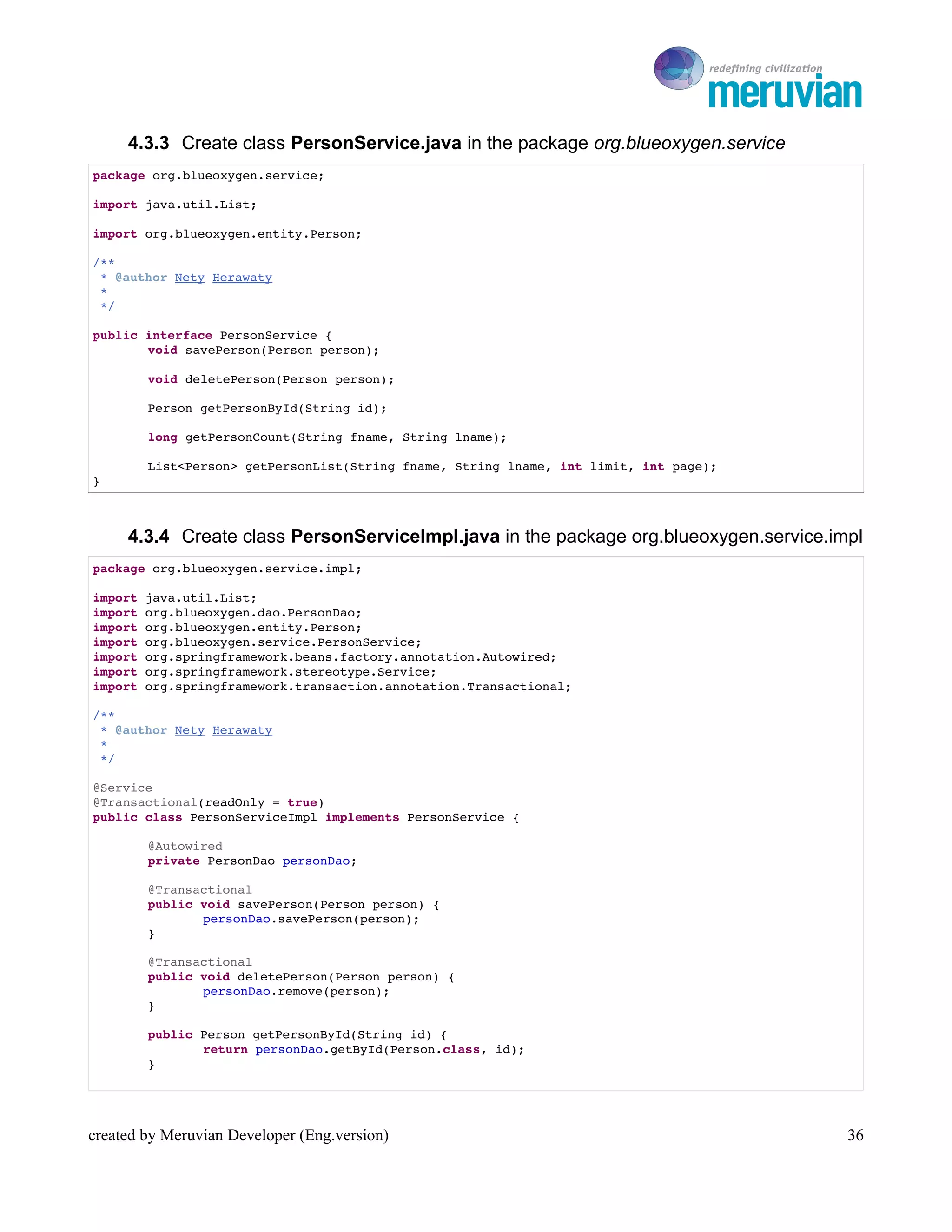
     4.3.3 Create class PersonService.java in the package org.blueoxygen.service
package org.blueoxygen.service;

import java.util.List;

import org.blueoxygen.entity.Person;

/**
 * @author Nety Herawaty
 * 
 */

public interface PersonService {
       void savePerson(Person person);

        void deletePerson(Person person);

        Person getPersonById(String id);

        long getPersonCount(String fname, String lname);

        List<Person> getPersonList(String fname, String lname, int limit, int page);
}


     4.3.4 Create class PersonServiceImpl.java in the package org.blueoxygen.service.impl
package org.blueoxygen.service.impl;

import java.util.List;
import org.blueoxygen.dao.PersonDao;
import org.blueoxygen.entity.Person;
import org.blueoxygen.service.PersonService;
import org.springframework.beans.factory.annotation.Autowired;
import org.springframework.stereotype.Service;
import org.springframework.transaction.annotation.Transactional;

/**
 * @author Nety Herawaty
 * 
 */

@Service
@Transactional(readOnly = true)
public class PersonServiceImpl implements PersonService {

        @Autowired
        private PersonDao personDao;

        @Transactional
        public void savePerson(Person person) {
               personDao.savePerson(person);
        }

        @Transactional
        public void deletePerson(Person person) {
               personDao.remove(person);
        }

        public Person getPersonById(String id) {
               return personDao.getById(Person.class, id);
        }


created by Meruvian Developer (Eng.version)                                               36
To Ro

        public long getPersonCount(String fname, String lname) {
               return personDao.getPersonCountByCriteria(fname, lname);
        }

        @Override
        public List<Person> getPersonList(String fname, String lname, int limit,
                       int page) {

                return personDao.getPersonByCriteria(fname, lname, limit, page);
        }

}


     4.3.5 Create class PersonController.java in the package org.blueoxygen.controller
package org.blueoxygen.controller;

import java.text.ParseException;
import java.text.SimpleDateFormat;
import javax.swing.JOptionPane;
import org.blueoxygen.cimande.commons.CimandeModuleAction;
import org.blueoxygen.entity.Person;
import org.blueoxygen.service.PersonService;
import org.springframework.beans.factory.annotation.Autowired;
import com.opensymphony.xwork2.validator.annotations.RequiredStringValidator;
import com.opensymphony.xwork2.validator.annotations.Validations;

public class PersonController extends CimandeModuleAction {
       @Autowired
       private PersonService personService;

        private Person person = new Person();
        private int limit = 0;
        private int page = 0;

        SimpleDateFormat df = new SimpleDateFormat("dd­MM­yy");

        public PersonController() {
               model.put("person", person);
        }

       // POST /module/person/create
       // POST /module/person/create/{id}
       @Validations(requiredStrings = {
       @RequiredStringValidator(fieldName = "person.fname", message = "First Name cannot be empty", 
trim = true),
       @RequiredStringValidator(fieldName = "person.lname", message = "Last Name cannot be empty", 
trim = true) })

        public String personPost() {

                try {
                       person.setBirthdate(df.parse(model.get("birthdate").toString()));
                } catch (ParseException e) {
                       // TODO Auto­generated catch block
                       e.printStackTrace();
                }
                personService.savePerson(person);

                return SUCCESS;
        }

        // GET /module/person/create
        // GET /module/person/edit/{id}


created by Meruvian Developer (Eng.version)                                                            37
To Ro

        public String personGet() {
               model.put("person", personService.getPersonById(person.getId() + ""));

                // model.put("itemCategorys", itemCategoryService.getAllItemCategory());
                return INPUT;
        }

        // DELETE /module/person/edit/{id}
        public String personDelete() {
               personService.deletePerson(personService.getPersonById(person.getId()));

                return SUCCESS;
        }

        // POST/GET /module/person/filter
        public String filter() {

                try {
                       limit = model.get("rows") == null ? 0 : new Integer(model.get(
                                      "rows").toString());
                       page = model.get("page") == null ? 0 : new Integer(model
                                      .get("page").toString());
                } catch (NumberFormatException e) {
                       e.printStackTrace();
                }

                if (limit == 0 && page == 0) {
                       limit = 10;
                       page = 1;

                }

                model.put("rows", limit);
                model.put("page", page);

                int count = (int) personService.getPersonCount("", "");
                int total = count / limit;
                if (total % limit > 0)
                       total++;

                System.out.println();
                model.put("persons", personService.getPersonList("", "", limit, page));

                if (total == 0)
                       total++;

                model.put("total", total);
                model.put("records", total);

                return SUCCESS;
        }

}


created by Meruvian Developer (Eng.version)                                                   38
To Ro

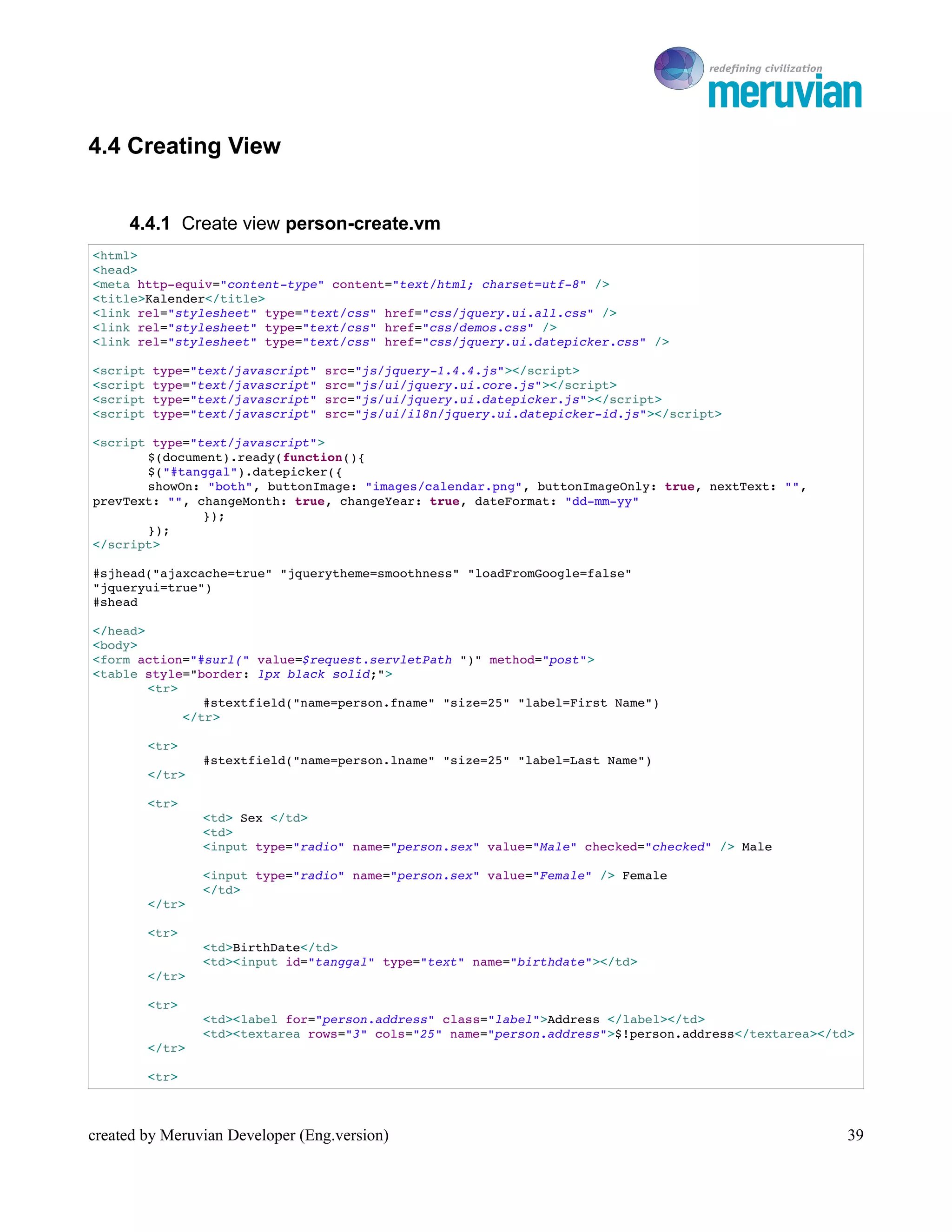
4.4 Creating View


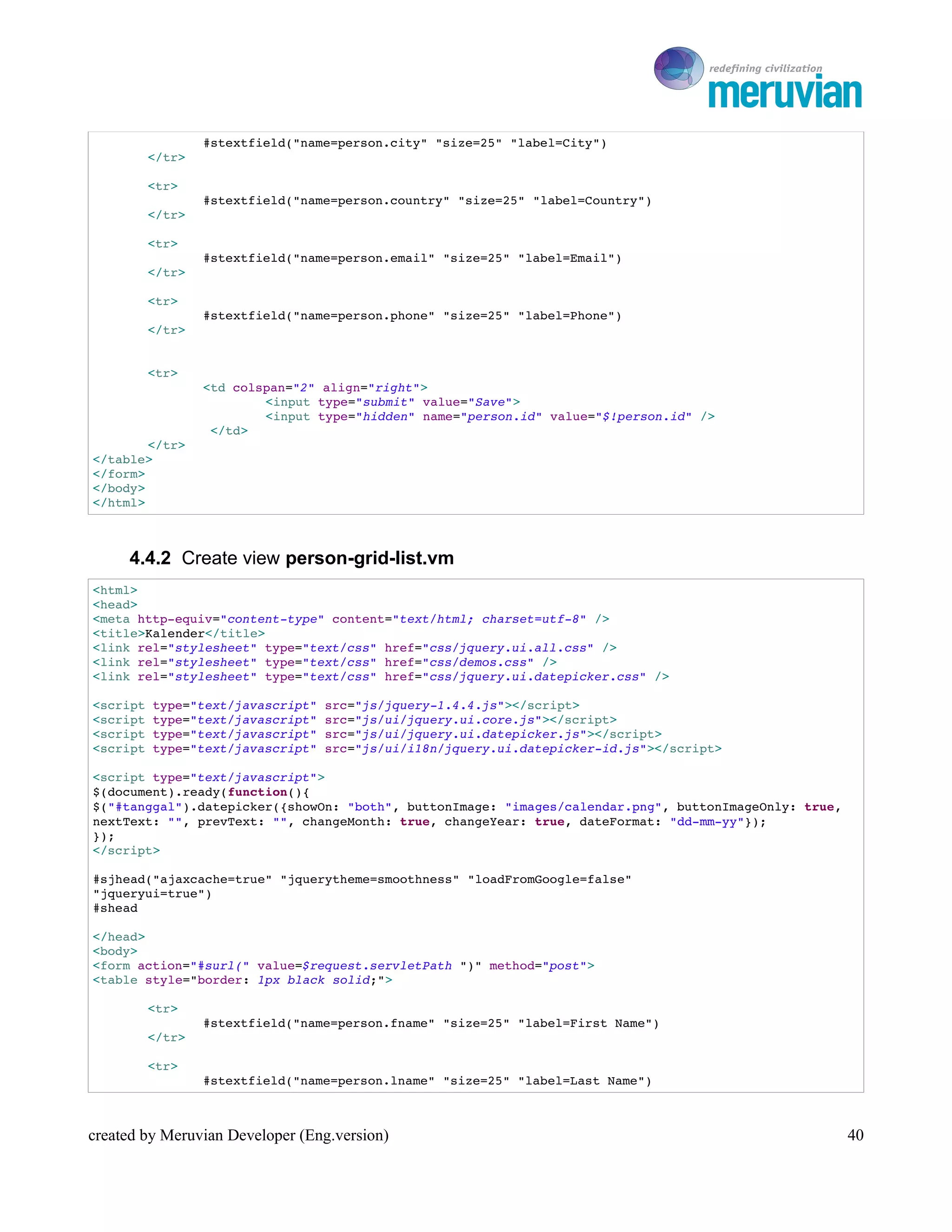
     4.4.1 Create view person-create.vm
<html>
<head>
<meta http­equiv="content­type" content="text/html; charset=utf­8" />
<title>Kalender</title>
<link rel="stylesheet" type="text/css" href="css/jquery.ui.all.css" />
<link rel="stylesheet" type="text/css" href="css/demos.css" />
<link rel="stylesheet" type="text/css" href="css/jquery.ui.datepicker.css" />

<script type="text/javascript" src="js/jquery­1.4.4.js"></script>
<script type="text/javascript" src="js/ui/jquery.ui.core.js"></script>
<script type="text/javascript" src="js/ui/jquery.ui.datepicker.js"></script>
<script type="text/javascript" src="js/ui/i18n/jquery.ui.datepicker­id.js"></script>

<script type="text/javascript">
       $(document).ready(function(){
       $("#tanggal").datepicker({
       showOn: "both", buttonImage: "images/calendar.png", buttonImageOnly: true, nextText: "", 
prevText: "", changeMonth: true, changeYear: true, dateFormat: "dd­mm­yy"
               });
       });
</script>

#sjhead("ajaxcache=true" "jquerytheme=smoothness" "loadFromGoogle=false"
"jqueryui=true") 
#shead

</head>
<body>
<form action="#surl(" value=$request.servletPath ")" method="post">
<table style="border: 1px black solid;">
        <tr>
               #stextfield("name=person.fname" "size=25" "label=First Name")
            </tr>

        <tr>
                #stextfield("name=person.lname" "size=25" "label=Last Name")
        </tr>

        <tr>
                <td> Sex </td>
                <td>
                <input type="radio" name="person.sex" value="Male" checked="checked" /> Male 

                <input type="radio" name="person.sex" value="Female" /> Female
                </td> 
        </tr>

        <tr>
                <td>BirthDate</td>
                <td><input id="tanggal" type="text" name="birthdate"></td>
        </tr>

        <tr>
                <td><label for="person.address" class="label">Address </label></td>
                <td><textarea rows="3" cols="25" name="person.address">$!person.address</textarea></td>
        </tr>

        <tr>


created by Meruvian Developer (Eng.version)                                                           39
To Ro

                #stextfield("name=person.city" "size=25" "label=City")
        </tr>

        <tr>
                #stextfield("name=person.country" "size=25" "label=Country")
        </tr>

        <tr>
                #stextfield("name=person.email" "size=25" "label=Email")
        </tr>

        <tr>
                #stextfield("name=person.phone" "size=25" "label=Phone")
        </tr>


        <tr>
                <td colspan="2" align="right">
                        <input type="submit" value="Save">
                        <input type="hidden" name="person.id" value="$!person.id" />
                 </td>
        </tr>
</table>
</form>
</body>
</html>


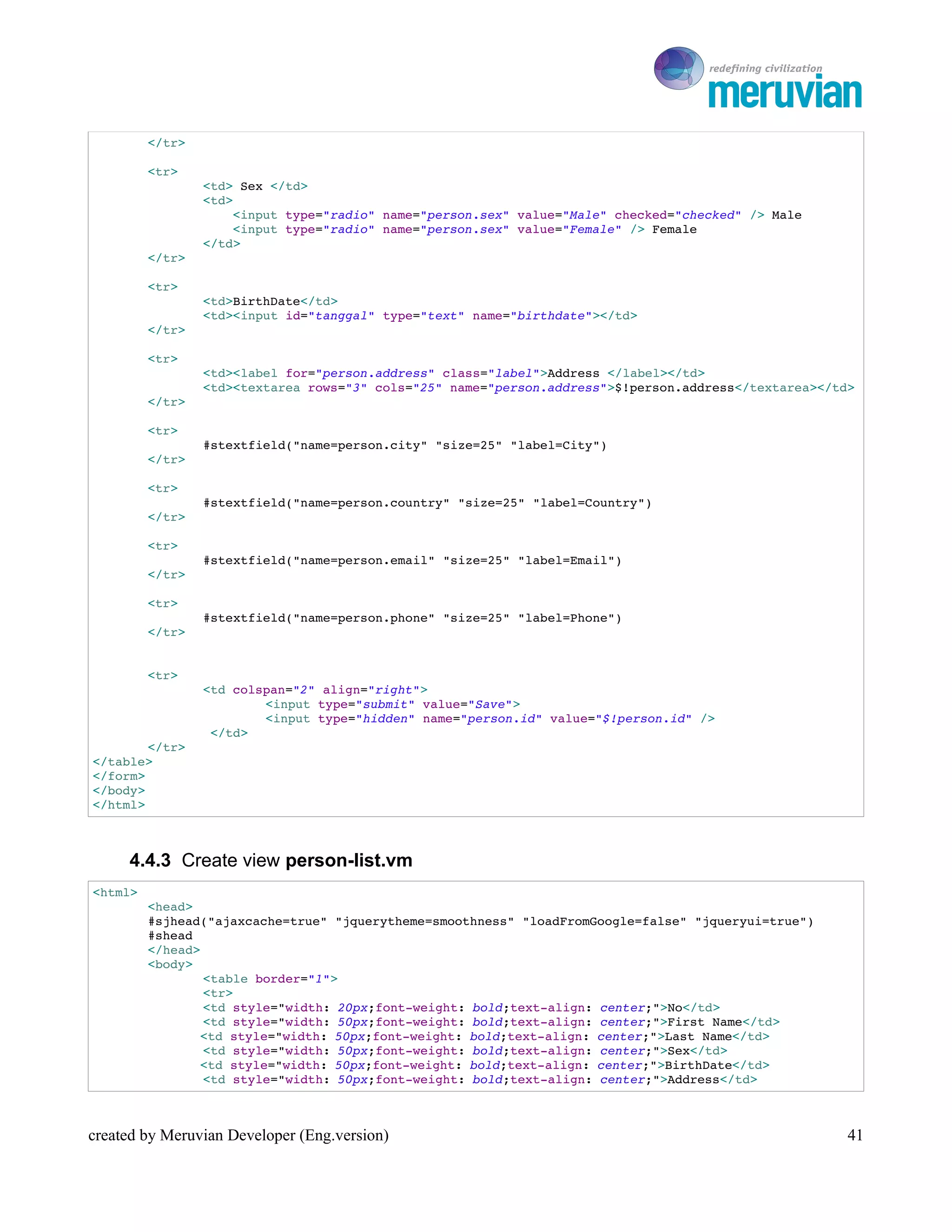
     4.4.2 Create view person-grid-list.vm
<html>
<head>
<meta http­equiv="content­type" content="text/html; charset=utf­8" />
<title>Kalender</title>
<link rel="stylesheet" type="text/css" href="css/jquery.ui.all.css" />
<link rel="stylesheet" type="text/css" href="css/demos.css" />
<link rel="stylesheet" type="text/css" href="css/jquery.ui.datepicker.css" />

<script type="text/javascript" src="js/jquery­1.4.4.js"></script>
<script type="text/javascript" src="js/ui/jquery.ui.core.js"></script>
<script type="text/javascript" src="js/ui/jquery.ui.datepicker.js"></script>
<script type="text/javascript" src="js/ui/i18n/jquery.ui.datepicker­id.js"></script>

<script type="text/javascript">
$(document).ready(function(){
$("#tanggal").datepicker({showOn: "both", buttonImage: "images/calendar.png", buttonImageOnly: true, 
nextText: "", prevText: "", changeMonth: true, changeYear: true, dateFormat: "dd­mm­yy"});
});
</script>

#sjhead("ajaxcache=true" "jquerytheme=smoothness" "loadFromGoogle=false"
"jqueryui=true") 
#shead

</head>
<body>
<form action="#surl(" value=$request.servletPath ")" method="post">
<table style="border: 1px black solid;">

        <tr>
                #stextfield("name=person.fname" "size=25" "label=First Name")
        </tr>

        <tr>
                #stextfield("name=person.lname" "size=25" "label=Last Name")


created by Meruvian Developer (Eng.version)                                                         40
To Ro

         </tr>

         <tr>
                 <td> Sex </td>
                 <td>
                     <input type="radio" name="person.sex" value="Male" checked="checked" /> Male 
                     <input type="radio" name="person.sex" value="Female" /> Female
                 </td> 
         </tr>

         <tr>
                 <td>BirthDate</td>
                 <td><input id="tanggal" type="text" name="birthdate"></td>
         </tr>

         <tr>
                 <td><label for="person.address" class="label">Address </label></td>
                 <td><textarea rows="3" cols="25" name="person.address">$!person.address</textarea></td>
         </tr>

         <tr>
                 #stextfield("name=person.city" "size=25" "label=City")
         </tr>

         <tr>
                 #stextfield("name=person.country" "size=25" "label=Country")
         </tr>

         <tr>
                 #stextfield("name=person.email" "size=25" "label=Email")
         </tr>

         <tr>
                 #stextfield("name=person.phone" "size=25" "label=Phone")
         </tr>


         <tr>
                 <td colspan="2" align="right">
                         <input type="submit" value="Save">
                         <input type="hidden" name="person.id" value="$!person.id" />
                  </td>
        </tr>
</table>
</form>
</body>
</html>


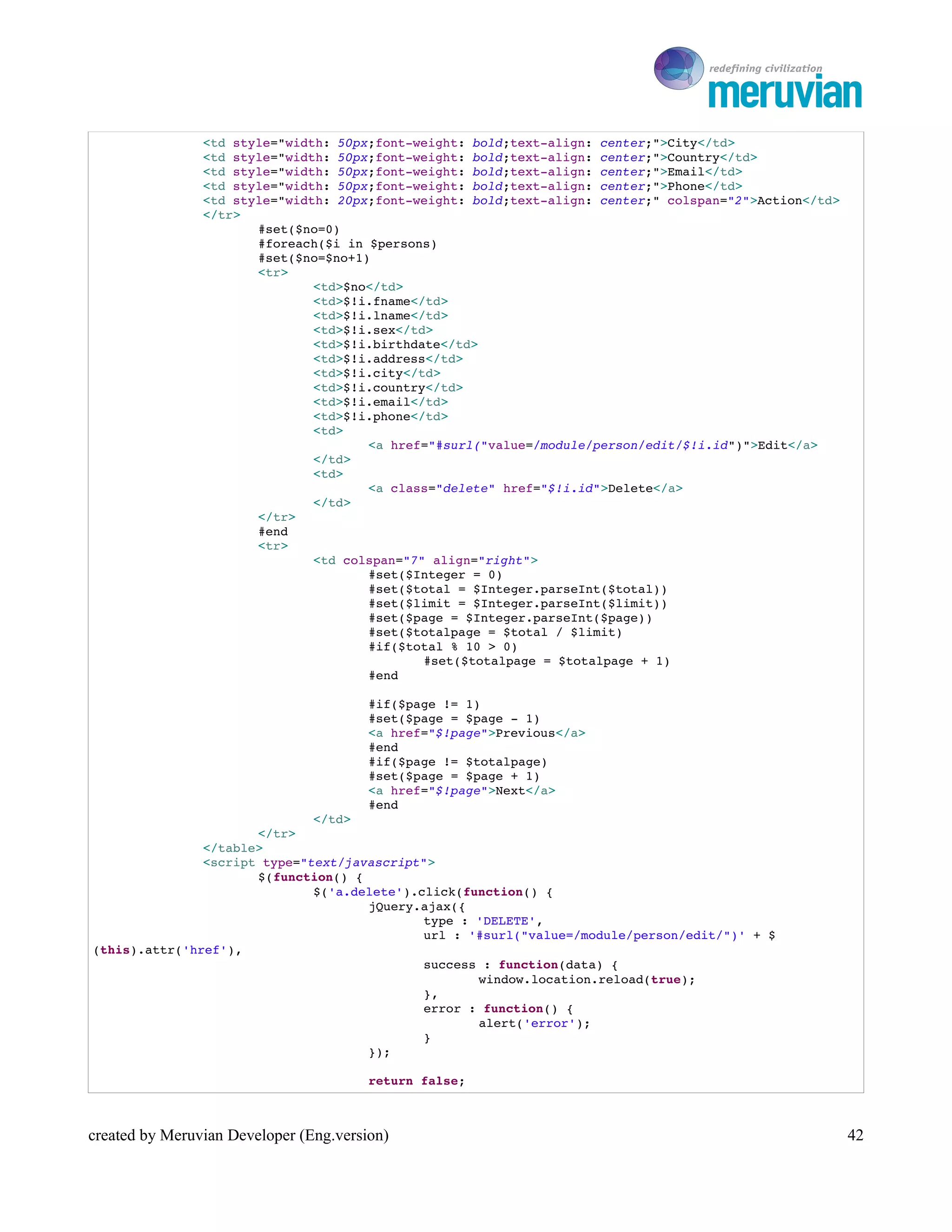
     4.4.3 Create view person-list.vm
<html>
         <head>
         #sjhead("ajaxcache=true" "jquerytheme=smoothness" "loadFromGoogle=false" "jqueryui=true")
         #shead
         </head>
         <body>
                 <table border="1">
                 <tr>
                 <td style="width: 20px;font­weight: bold;text­align: center;">No</td>
                 <td style="width: 50px;font­weight: bold;text­align: center;">First Name</td>
                <td style="width: 50px;font­weight: bold;text­align: center;">Last Name</td>
                 <td style="width: 50px;font­weight: bold;text­align: center;">Sex</td>
                <td style="width: 50px;font­weight: bold;text­align: center;">BirthDate</td>
                 <td style="width: 50px;font­weight: bold;text­align: center;">Address</td>


created by Meruvian Developer (Eng.version)                                                             41
To Ro

                <td style="width: 50px;font­weight: bold;text­align: center;">City</td>
                <td style="width: 50px;font­weight: bold;text­align: center;">Country</td>
                <td style="width: 50px;font­weight: bold;text­align: center;">Email</td>
                <td style="width: 50px;font­weight: bold;text­align: center;">Phone</td>
                <td style="width: 20px;font­weight: bold;text­align: center;" colspan="2">Action</td>
                </tr>
                       #set($no=0)
                       #foreach($i in $persons)
                       #set($no=$no+1)
                       <tr>
                               <td>$no</td>
                               <td>$!i.fname</td>
                               <td>$!i.lname</td>
                               <td>$!i.sex</td>
                               <td>$!i.birthdate</td>
                               <td>$!i.address</td>
                               <td>$!i.city</td>
                               <td>$!i.country</td>
                               <td>$!i.email</td>
                               <td>$!i.phone</td>
                               <td>
                                      <a href="#surl("value=/module/person/edit/$!i.id")">Edit</a>
                               </td>
                               <td>
                                      <a class="delete" href="$!i.id">Delete</a>
                               </td>
                       </tr>
                       #end
                       <tr>
                               <td colspan="7" align="right">
                                      #set($Integer = 0)
                                      #set($total = $Integer.parseInt($total))
                                      #set($limit = $Integer.parseInt($limit))
                                      #set($page = $Integer.parseInt($page))
                                      #set($totalpage = $total / $limit)
                                      #if($total % 10 > 0) 
                                              #set($totalpage = $totalpage + 1) 
                                      #end

                                        #if($page != 1)
                                        #set($page = $page ­ 1)
                                        <a href="$!page">Previous</a>
                                        #end
                                        #if($page != $totalpage)
                                        #set($page = $page + 1)
                                        <a href="$!page">Next</a>
                                        #end
                              </td>
                      </tr>
               </table>
               <script type="text/javascript">
                      $(function() {
                              $('a.delete').click(function() {
                                     jQuery.ajax({
                                             type : 'DELETE',
                                             url : '#surl("value=/module/person/edit/")' + $
(this).attr('href'),
                                             success : function(data) {
                                                    window.location.reload(true);
                                             },
                                             error : function() {
                                                    alert('error');
                                             }
                                     });

                                        return false;


created by Meruvian Developer (Eng.version)                                                             42
To Ro

                                 });
                           });
                    </script>
          </body>
</html>


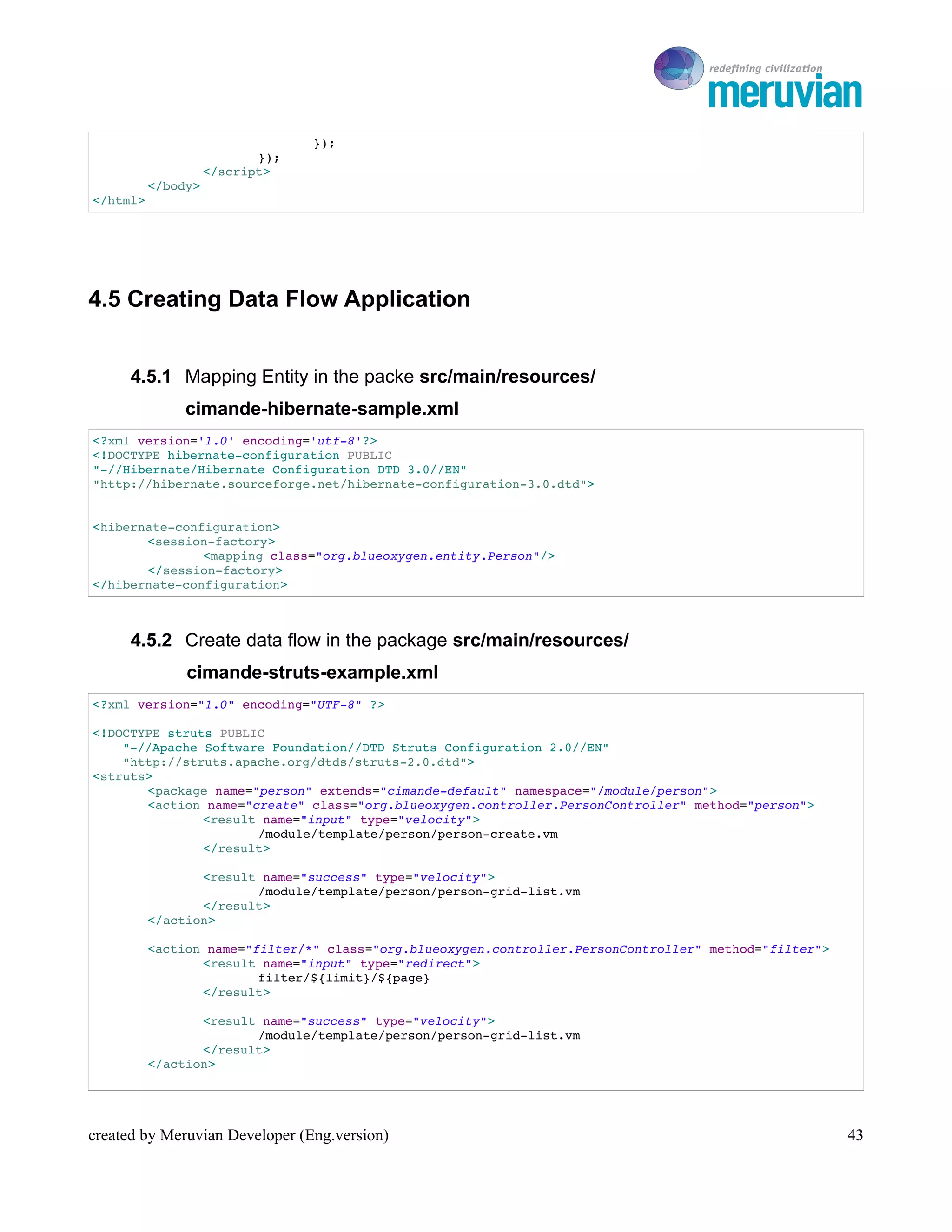
4.5 Creating Data Flow Application


      4.5.1 Mapping Entity in the packe src/main/resources/
               cimande-hibernate-sample.xml
<?xml version='1.0' encoding='utf­8'?>
<!DOCTYPE hibernate­configuration PUBLIC
"­//Hibernate/Hibernate Configuration DTD 3.0//EN"
"http://hibernate.sourceforge.net/hibernate­configuration­3.0.dtd">


<hibernate­configuration>
       <session­factory>
               <mapping class="org.blueoxygen.entity.Person"/>
       </session­factory>
</hibernate­configuration>


      4.5.2 Create data flow in the package src/main/resources/
               cimande-struts-example.xml
<?xml version="1.0" encoding="UTF­8" ?>

<!DOCTYPE struts PUBLIC
    "­//Apache Software Foundation//DTD Struts Configuration 2.0//EN"
    "http://struts.apache.org/dtds/struts­2.0.dtd">
<struts>
       <package name="person" extends="cimande­default" namespace="/module/person">
       <action name="create" class="org.blueoxygen.controller.PersonController" method="person">
               <result name="input" type="velocity">
                      /module/template/person/person­create.vm
               </result>

                 <result name="success" type="velocity">
                        /module/template/person/person­grid­list.vm
                 </result>
          </action>

          <action name="filter/*" class="org.blueoxygen.controller.PersonController" method="filter">
                 <result name="input" type="redirect">
                         filter/${limit}/${page}
                 </result>

                 <result name="success" type="velocity">
                        /module/template/person/person­grid­list.vm
                 </result>
          </action>


created by Meruvian Developer (Eng.version)                                                             43
To Ro

          <action name="edit/*" class="org.blueoxygen.controller.PersonController" method="person">
                 <param name="person.id">{1}</param>
                 <result name="input" type="velocity">
                         /module/template/person/person­create.vm
                 </result>

              <result name="success" type="redirect">
                     /module/person/filter
              </result>
       </action>
       </package>
</struts>


      4.5.3 Start Server


4.6 Cimande BackEnd
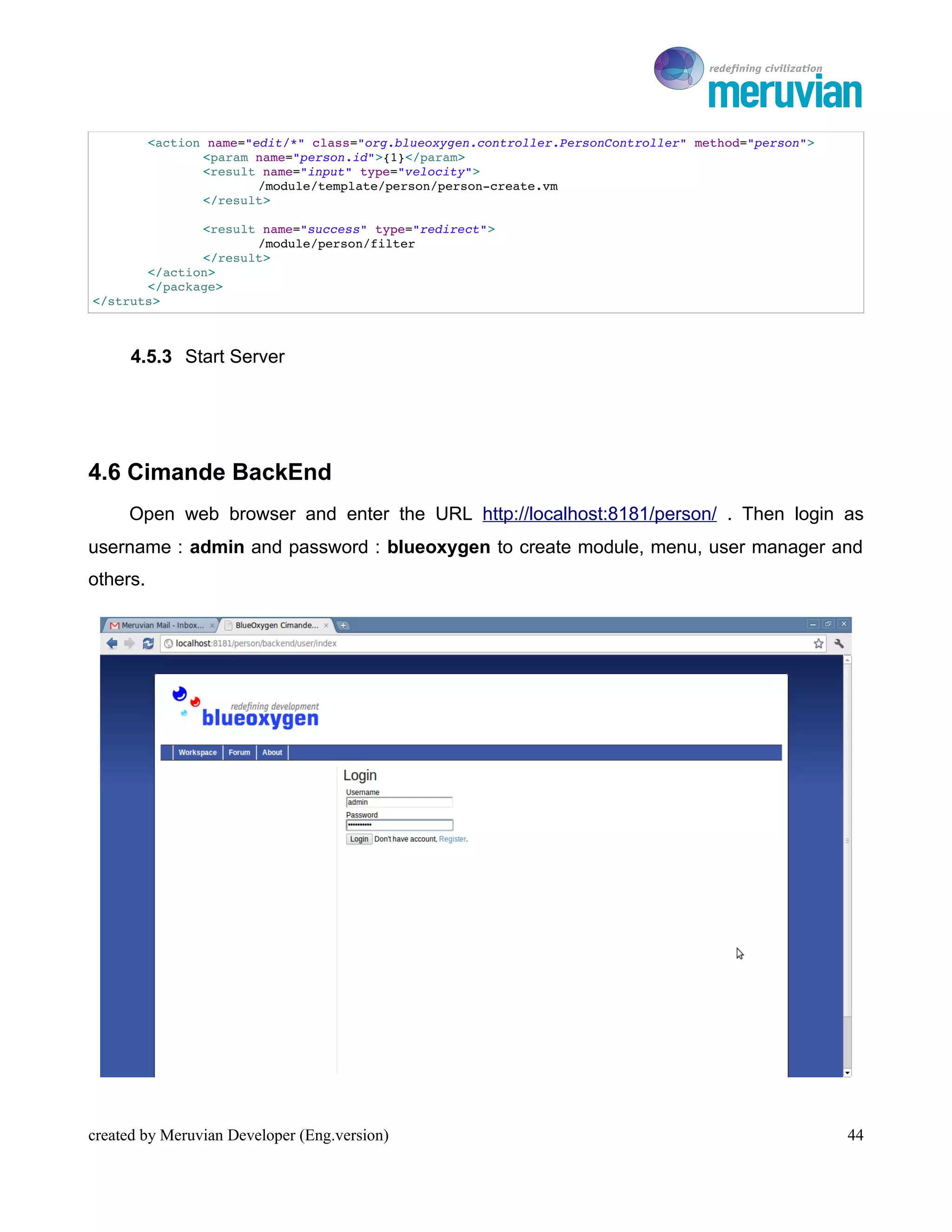
     Open web browser and enter the URL http://localhost:8181/person/ . Then login as
username : admin and password : blueoxygen to create module, menu, user manager and
others.


created by Meruvian Developer (Eng.version)                                                              44
To Ro

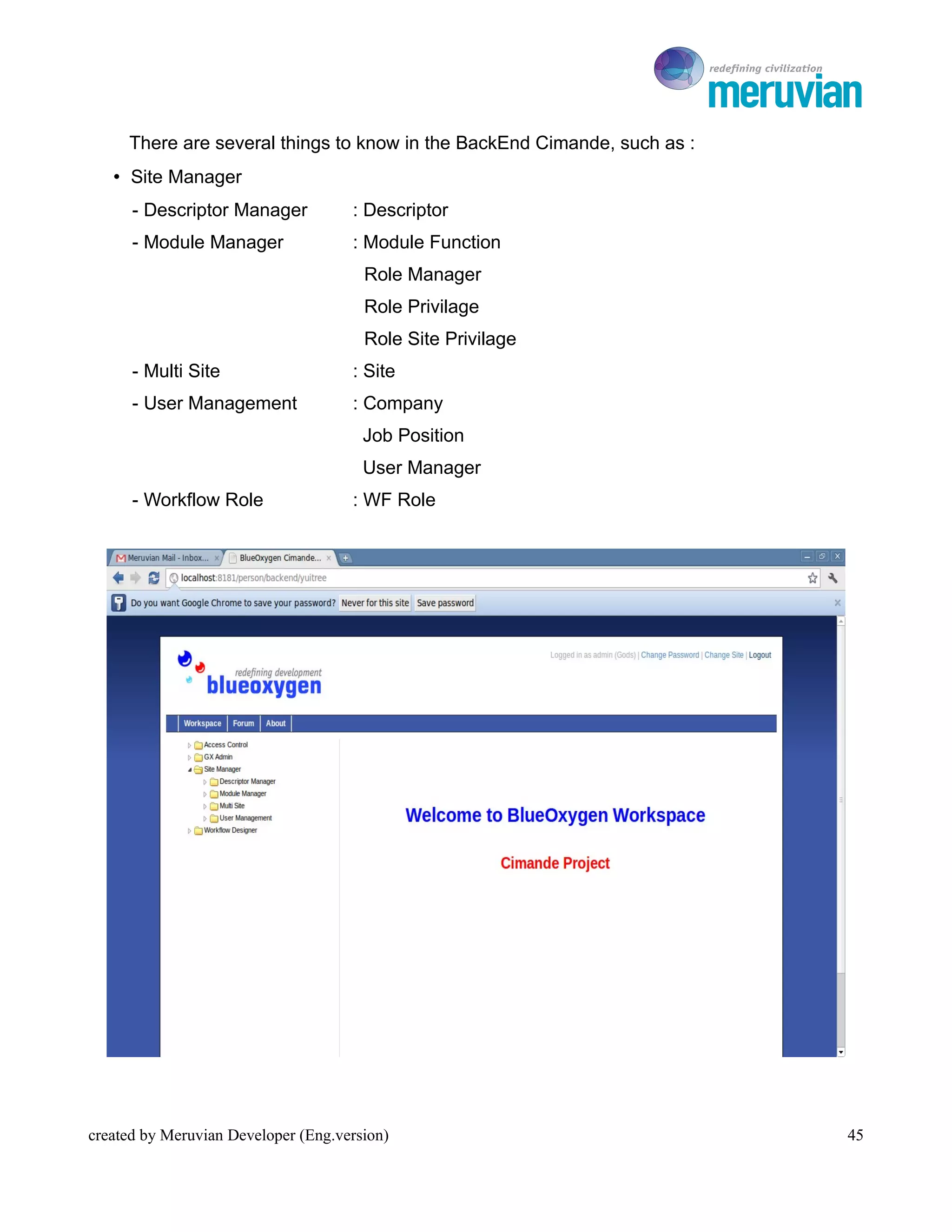
     There are several things to know in the BackEnd Cimande, such as :
   • Site Manager
      - Descriptor Manager           : Descriptor
      - Module Manager               : Module Function
                                       Role Manager
                                       Role Privilage
                                       Role Site Privilage
      - Multi Site                   : Site
      - User Management              : Company
                                       Job Position
                                       User Manager
      - Workflow Role                : WF Role


created by Meruvian Developer (Eng.version)                                  45
To Ro

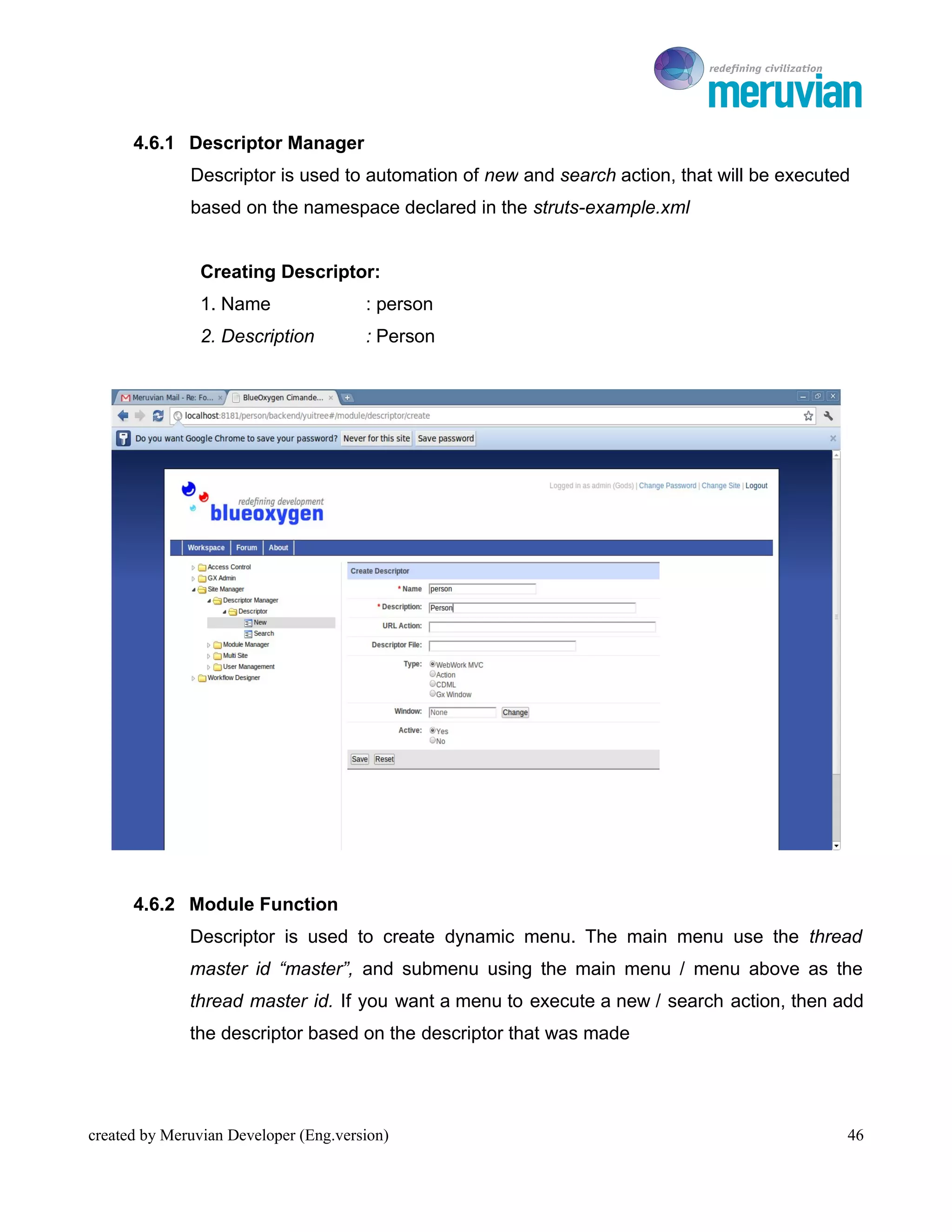
      4.6.1 Descriptor Manager
              Descriptor is used to automation of new and search action, that will be executed
              based on the namespace declared in the struts-example.xml


                Creating Descriptor:
                1. Name                : person
                2. Description         : Person


      4.6.2 Module Function
              Descriptor is used to create dynamic menu. The main menu use the thread
              master id “master”, and submenu using the main menu / menu above as the
              thread master id. If you want a menu to execute a new / search action, then add
              the descriptor based on the descriptor that was made


created by Meruvian Developer (Eng.version)                                                  46
To Ro

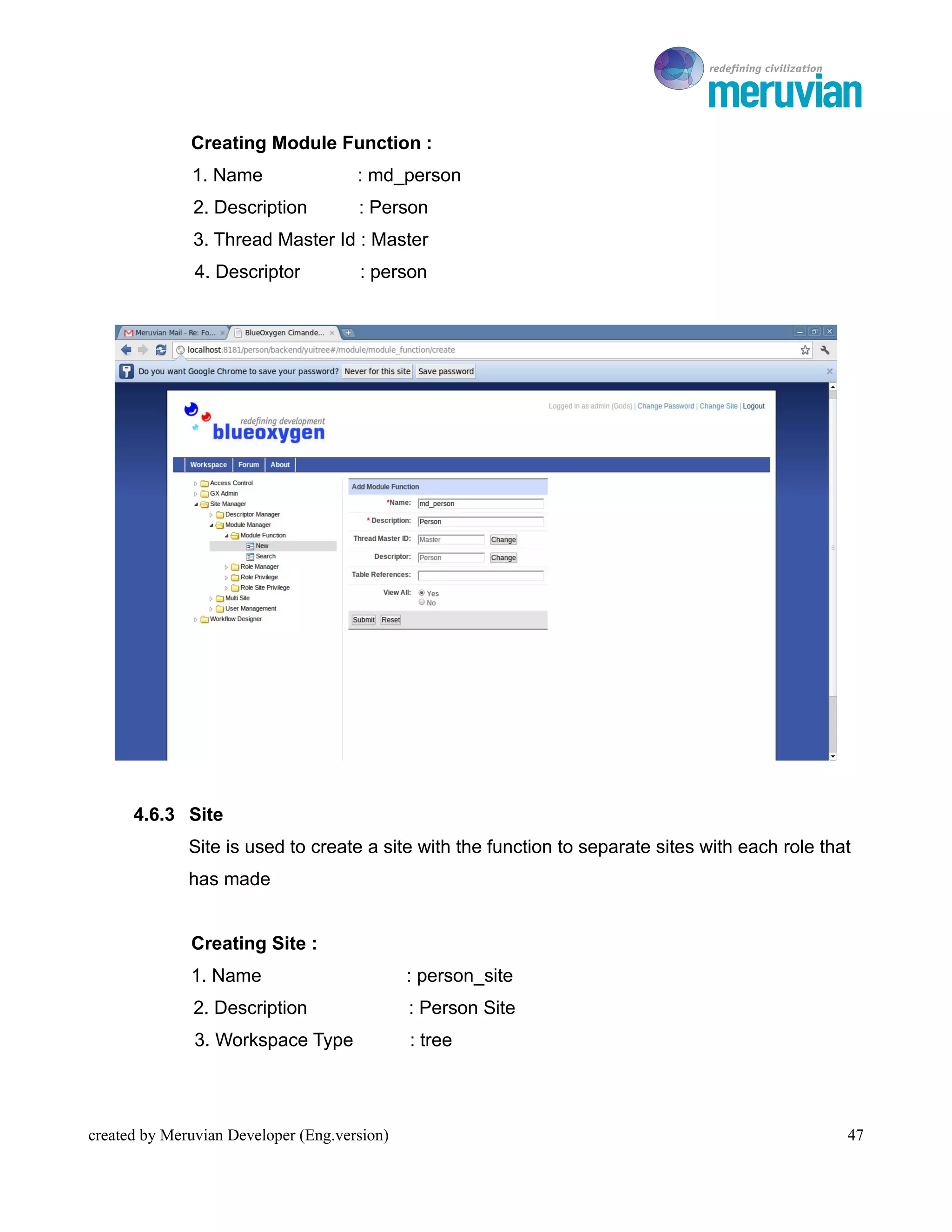
              Creating Module Function :
              1. Name                 : md_person
               2. Description         : Person
               3. Thread Master Id : Master
               4. Descriptor          : person


      4.6.3 Site
              Site is used to create a site with the function to separate sites with each role that
              has made


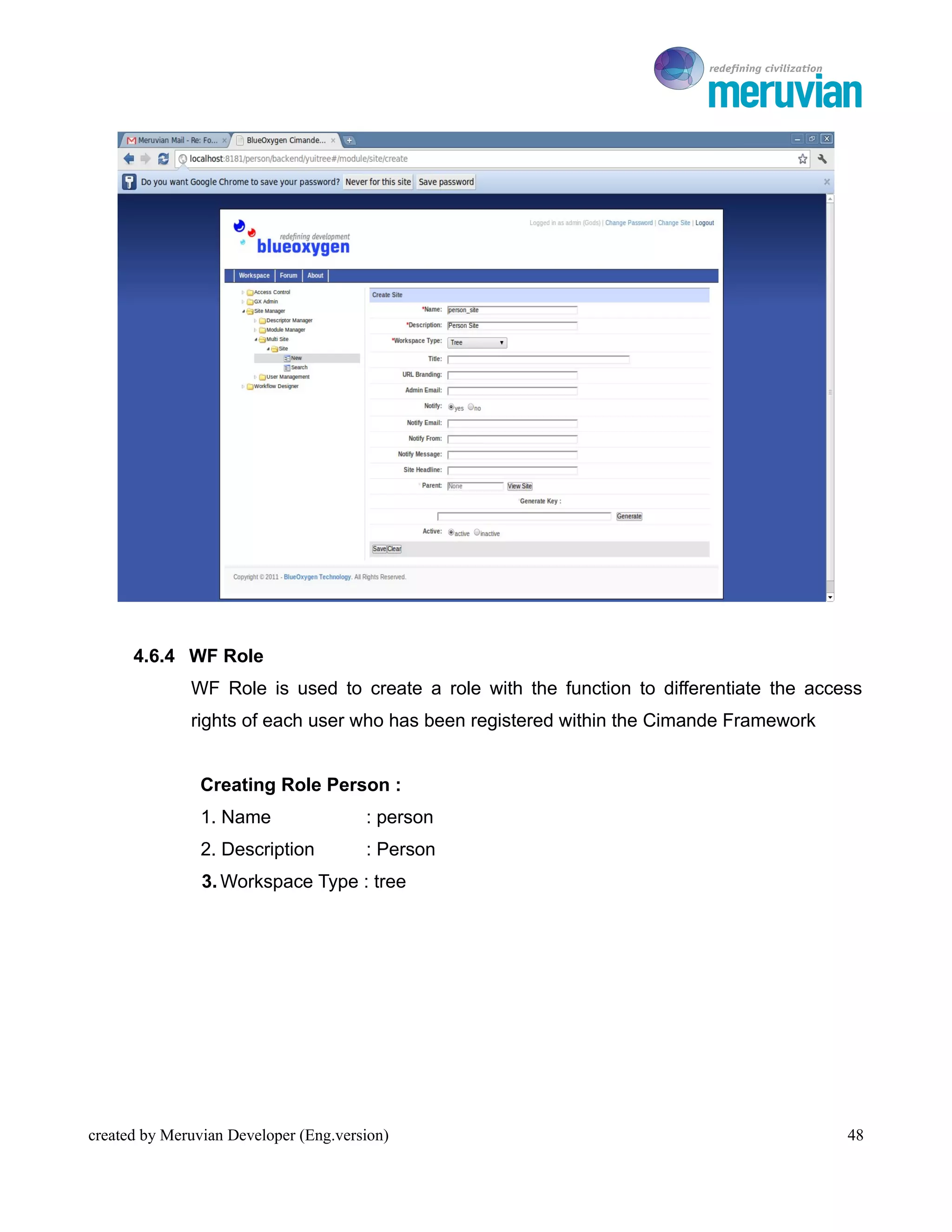
              Creating Site :
              1. Name                         : person_site
               2. Description                 : Person Site
               3. Workspace Type              : tree


created by Meruvian Developer (Eng.version)                                                       47
To Ro


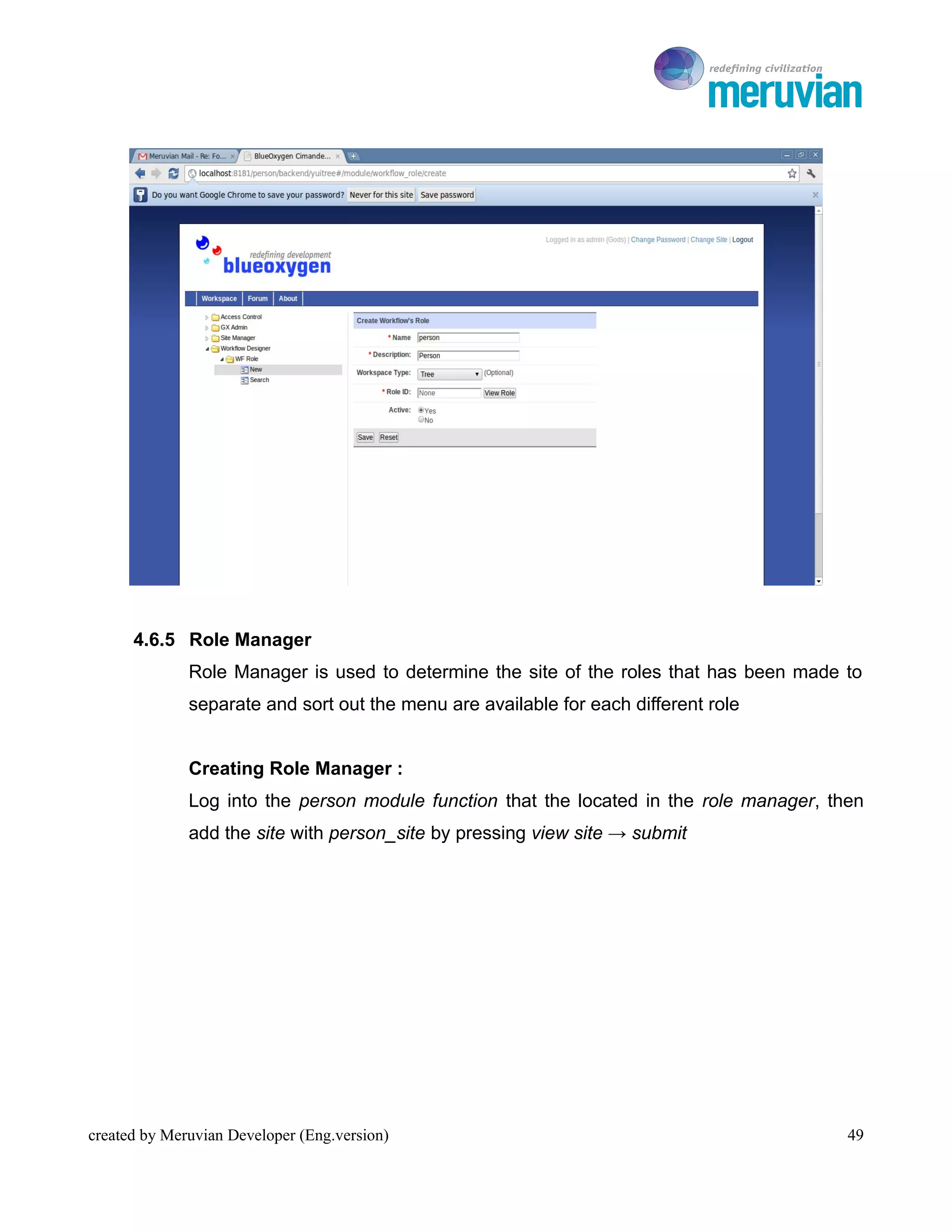
      4.6.4 WF Role
              WF Role is used to create a role with the function to differentiate the access
              rights of each user who has been registered within the Cimande Framework


                Creating Role Person :
                1. Name                : person
                2. Description         : Person
                3. Workspace Type : tree


created by Meruvian Developer (Eng.version)                                                 48
To Ro


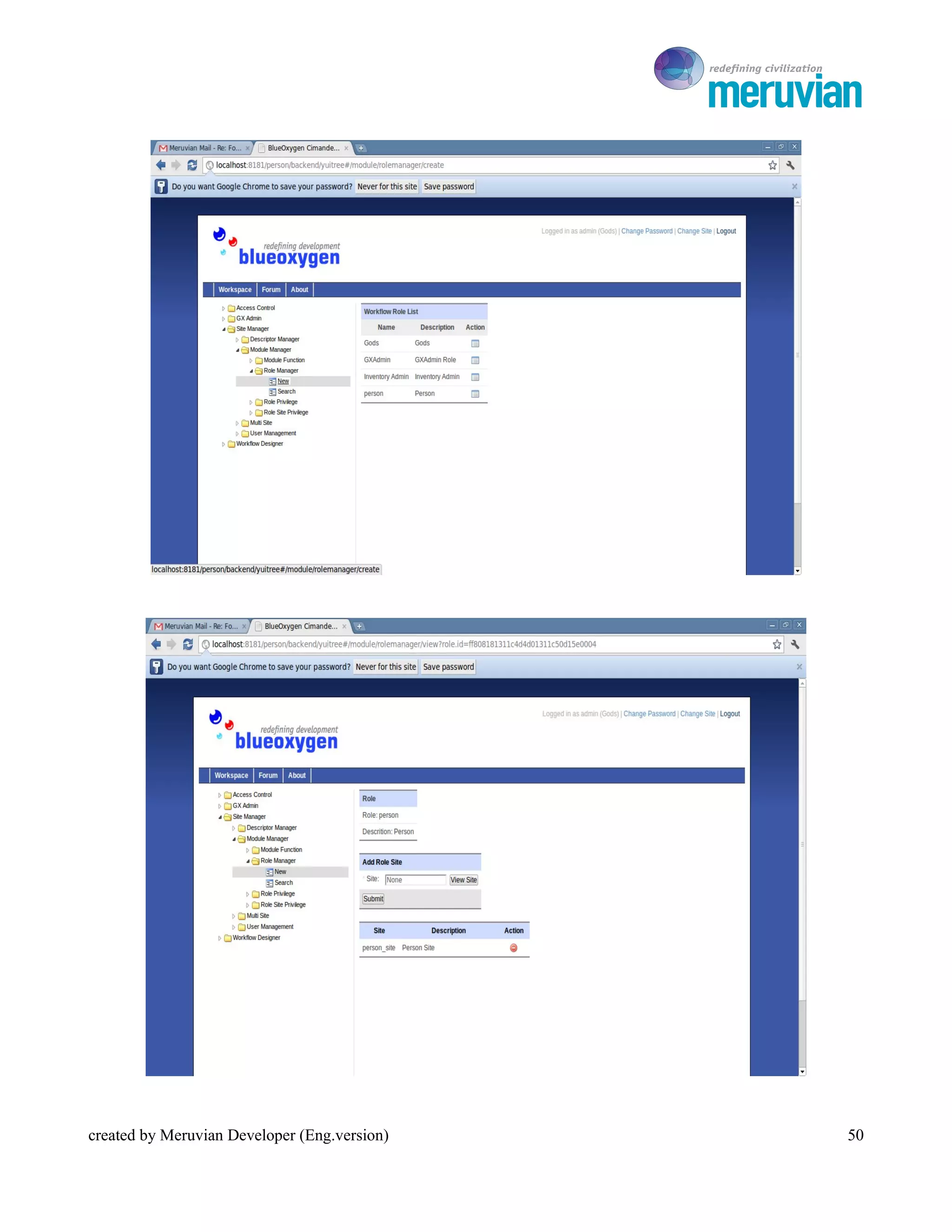
      4.6.5 Role Manager
              Role Manager is used to determine the site of the roles that has been made to
              separate and sort out the menu are available for each different role


              Creating Role Manager :
              Log into the person module function that the located in the role manager, then
              add the site with person_site by pressing view site → submit


created by Meruvian Developer (Eng.version)                                               49
To Ro


created by Meruvian Developer (Eng.version)      50
To Ro

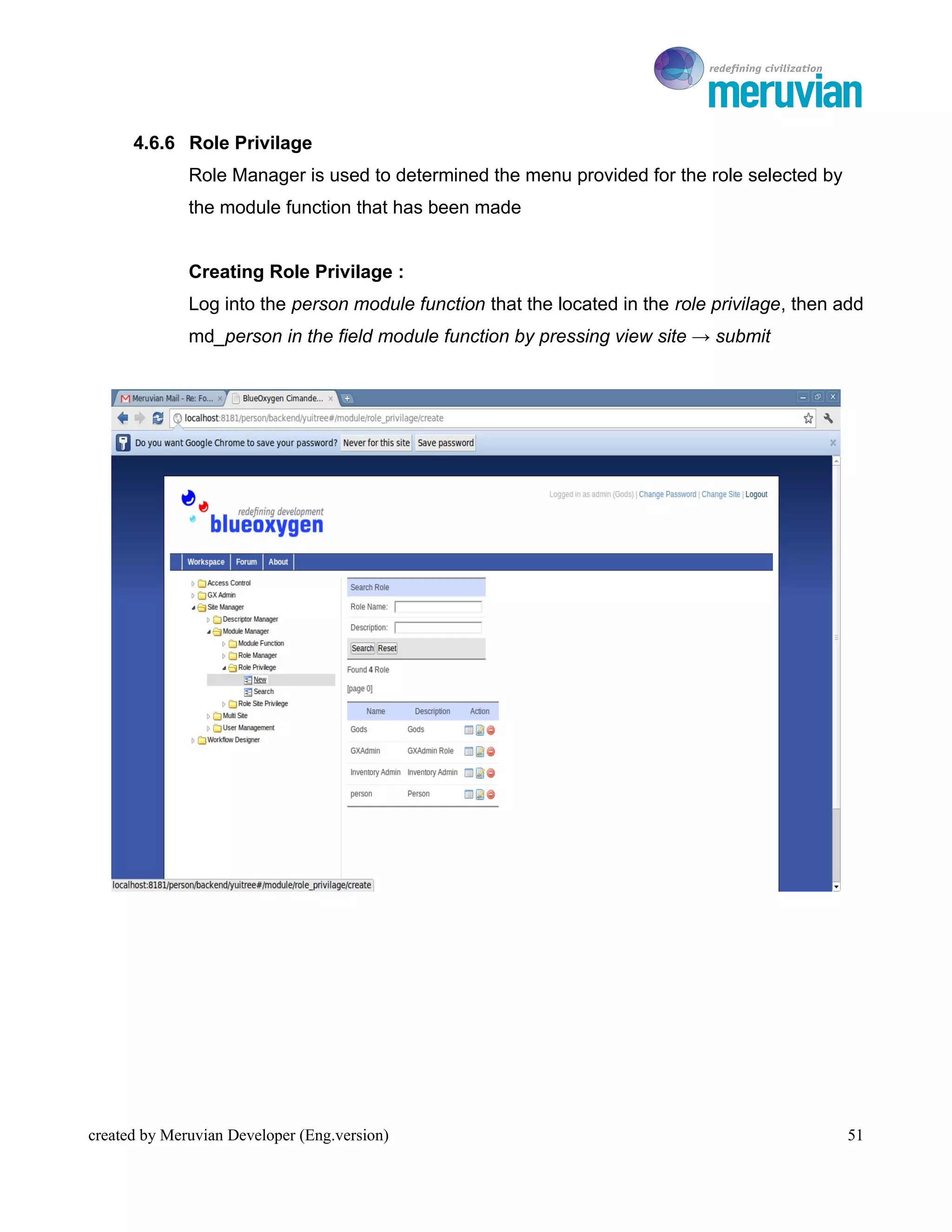
      4.6.6 Role Privilage
              Role Manager is used to determined the menu provided for the role selected by
              the module function that has been made


              Creating Role Privilage :
              Log into the person module function that the located in the role privilage, then add
              md_person in the field module function by pressing view site → submit


created by Meruvian Developer (Eng.version)                                                     51
To Ro


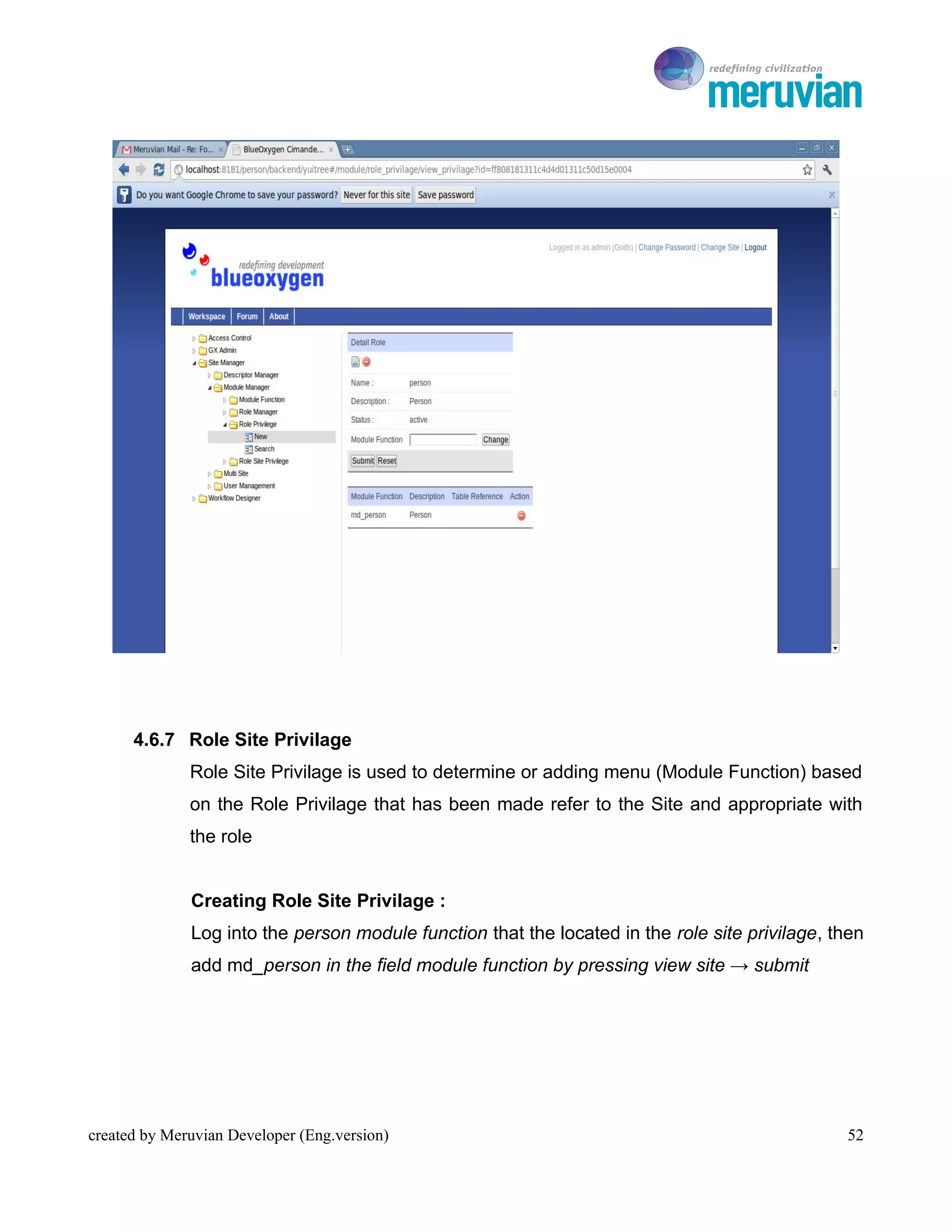
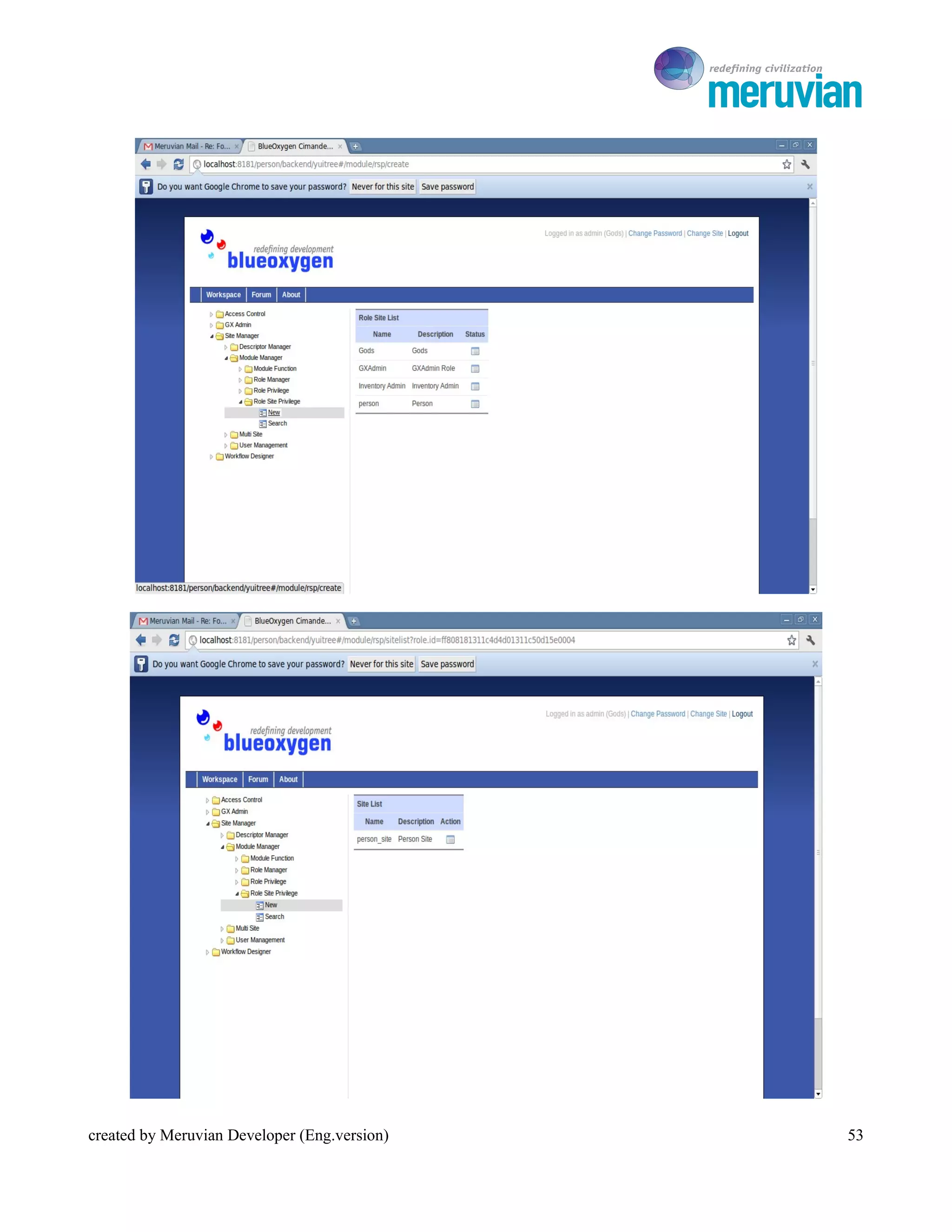
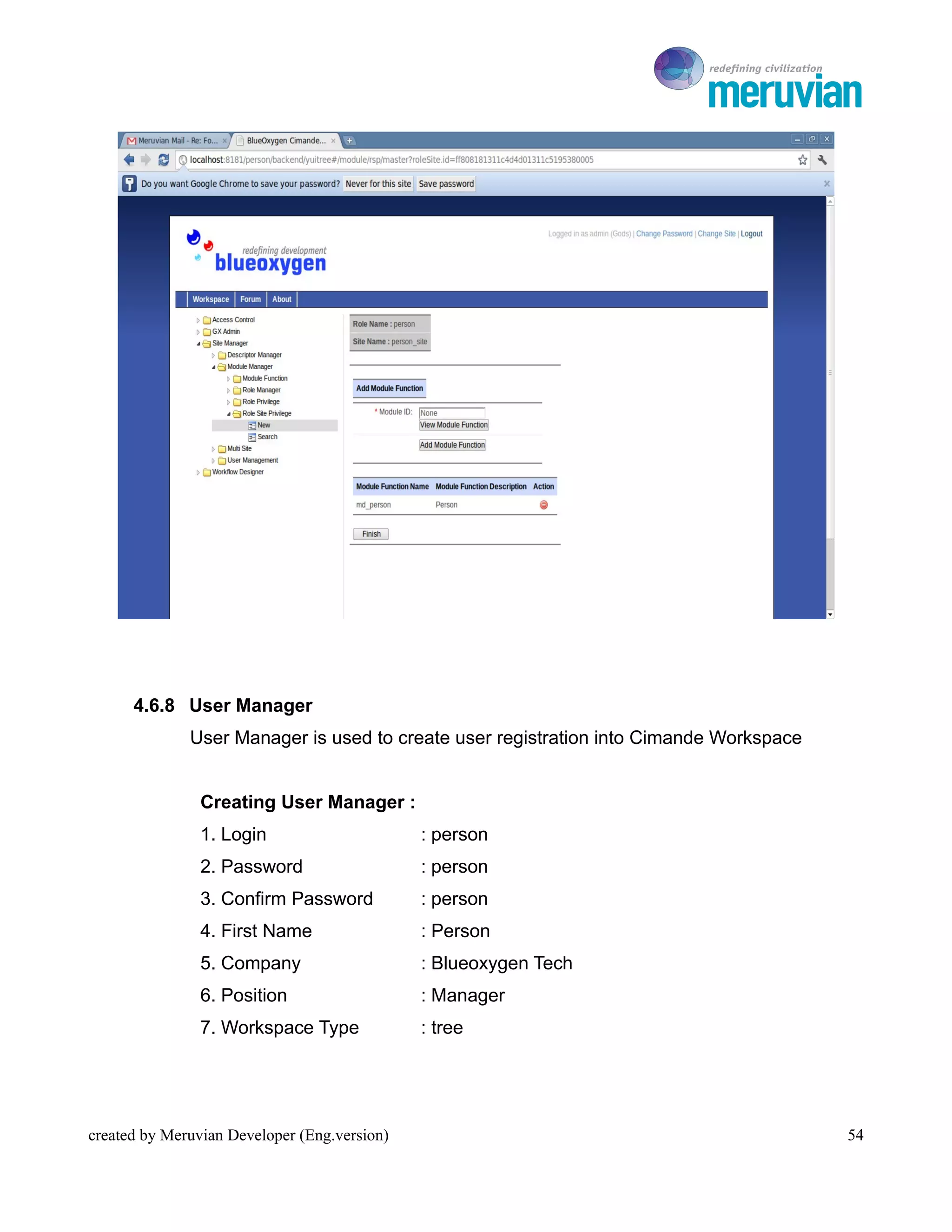
      4.6.7 Role Site Privilage
              Role Site Privilage is used to determine or adding menu (Module Function) based
              on the Role Privilage that has been made refer to the Site and appropriate with
              the role


              Creating Role Site Privilage :
              Log into the person module function that the located in the role site privilage, then
              add md_person in the field module function by pressing view site → submit


created by Meruvian Developer (Eng.version)                                                     52
To Ro


created by Meruvian Developer (Eng.version)      53
To Ro


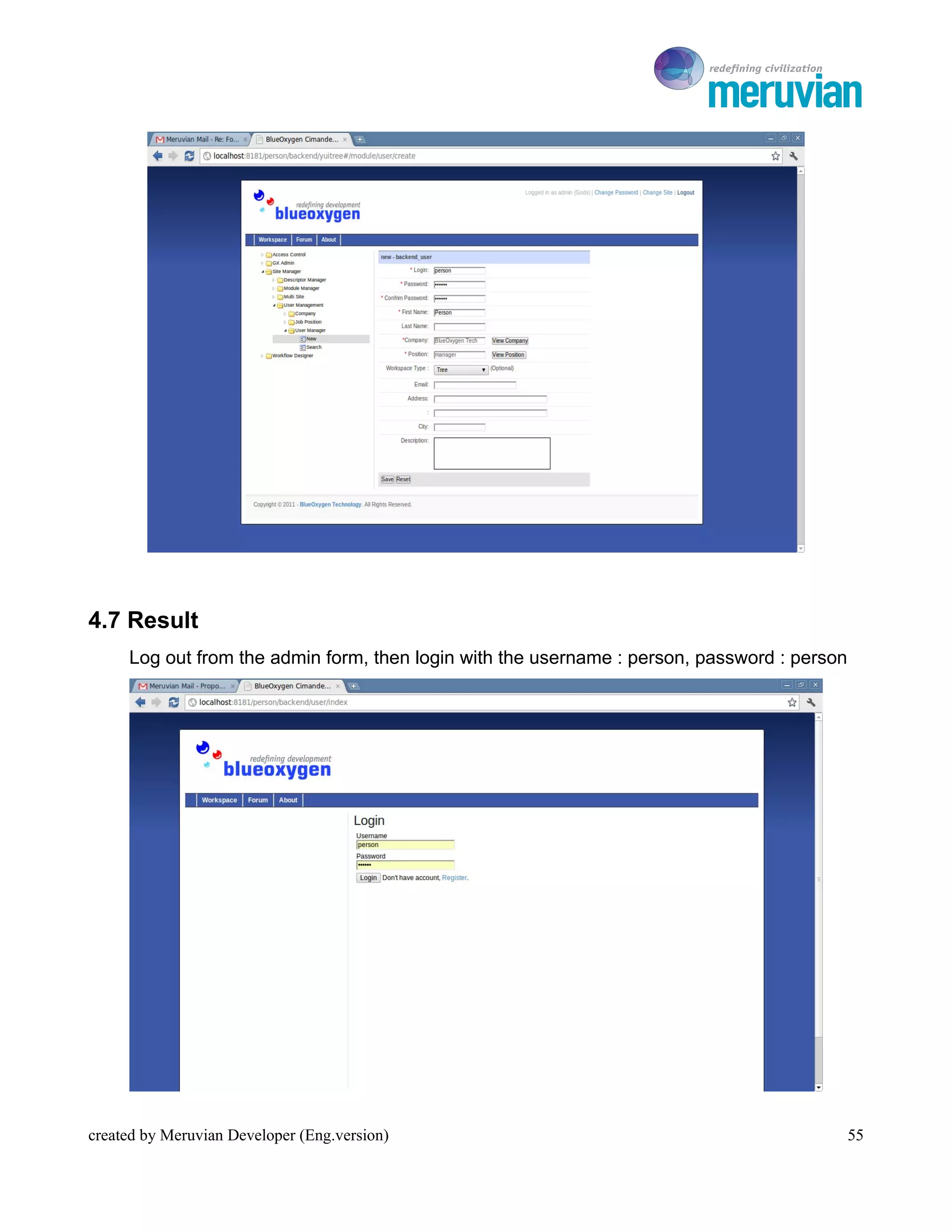
      4.6.8 User Manager
              User Manager is used to create user registration into Cimande Workspace


                Creating User Manager :
                1. Login                      : person
                2. Password                   : person
                3. Confirm Password           : person
                4. First Name                 : Person
                5. Company                    : Blueoxygen Tech
                6. Position                   : Manager
                7. Workspace Type             : tree


created by Meruvian Developer (Eng.version)                                                54
To Ro


4.7 Result
     Log out from the admin form, then login with the username : person, password : person


created by Meruvian Developer (Eng.version)                                                  55
To Ro

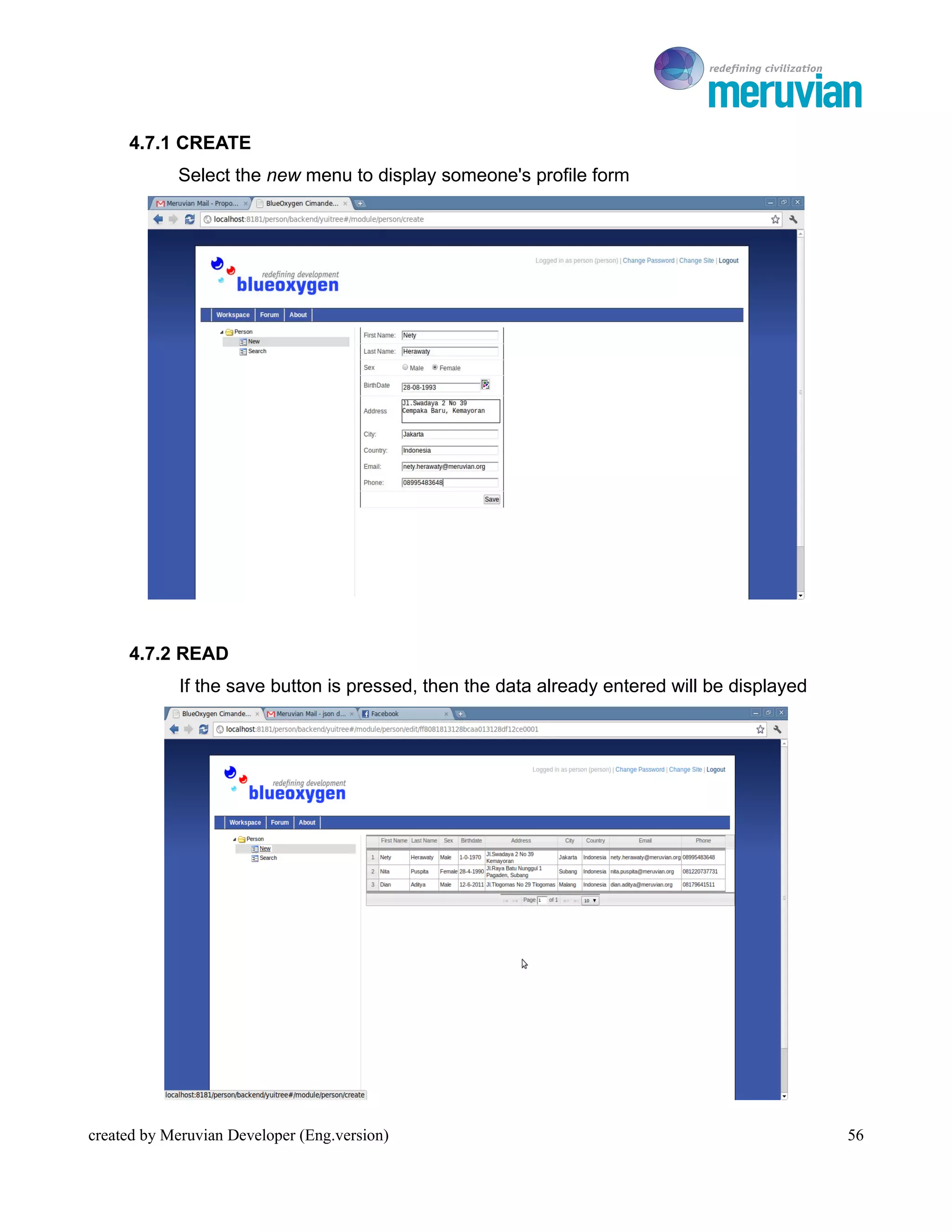
     4.7.1 CREATE
            Select the new menu to display someone's profile form


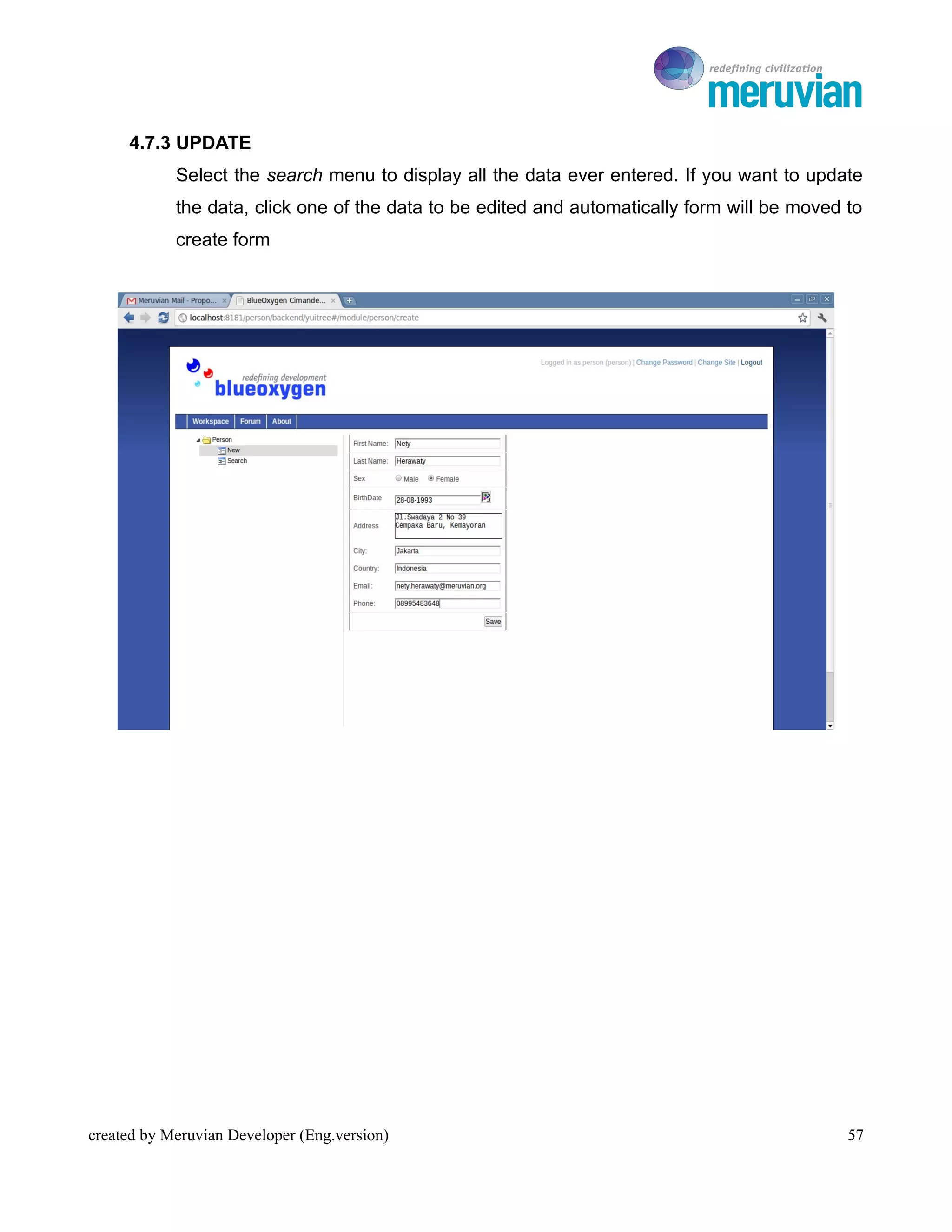
     4.7.2 READ
             If the save button is pressed, then the data already entered will be displayed


created by Meruvian Developer (Eng.version)                                                      56
To Ro

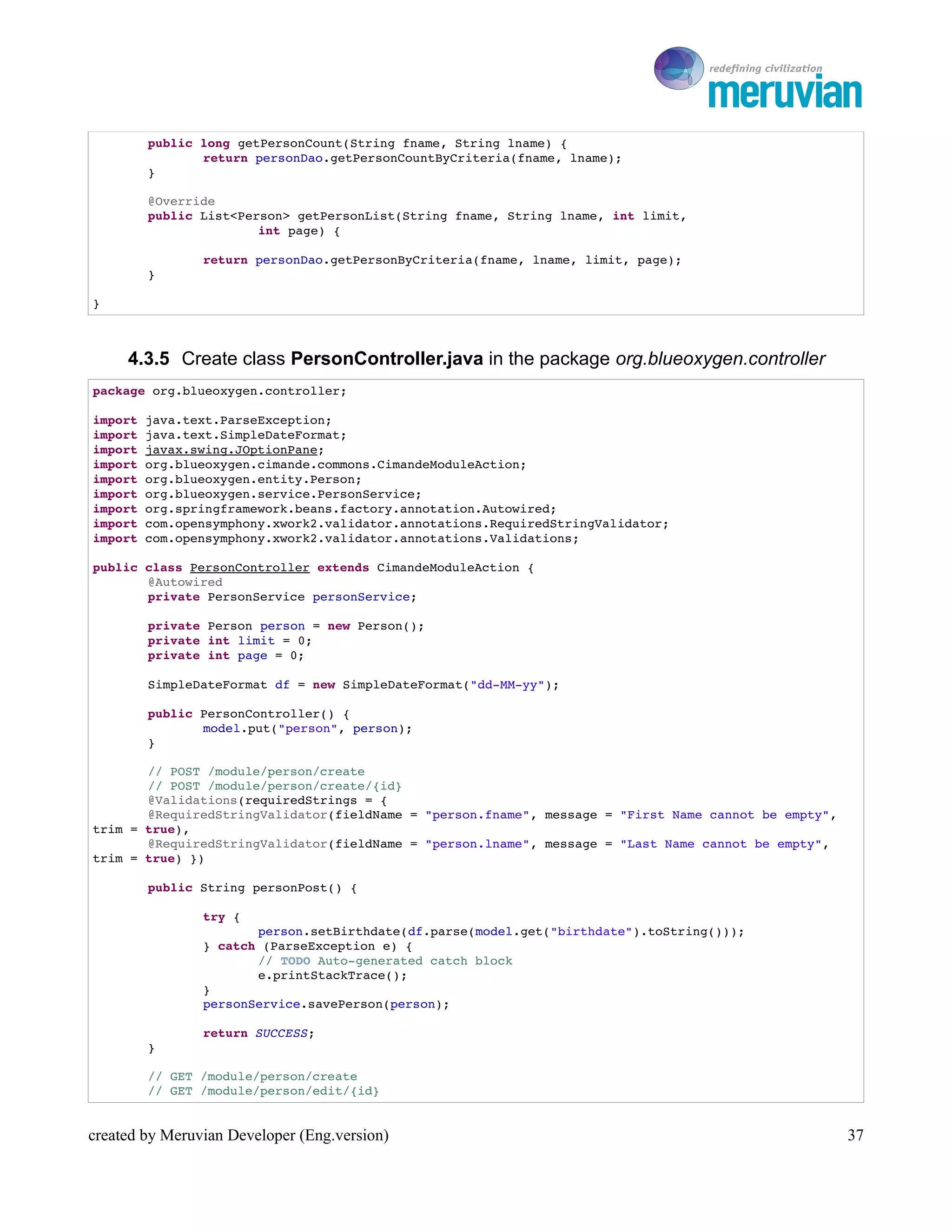
     4.7.3 UPDATE
            Select the search menu to display all the data ever entered. If you want to update
            the data, click one of the data to be edited and automatically form will be moved to
            create form


created by Meruvian Developer (Eng.version)                                                   57

Cimande 2.0 Quick Start english version

  • 1.
    Cimande 2.0 QuickStart Guide BAB I CIMANDE 2.0 TOOLS created by Meruvian Developer (Eng.version) 1
  • 2.
    To Ro The Purpose 1. Know and understand the tools are needed to run Cimande 2.0 such as Eclipse IDE, M2Eclipse, Subclipse, Apache Tomcat, MySQL Query Browser Learning Material 1.1 Eclipse IDE Eclipse is an IDE (Integrated Development Software) to develop the software and can run on all platform (platform independent). The following is characters of Eclipse : • Multi Platform Supports development and execution on all the major desktop platforms (Windows, Mac OS X, Linux, QNX Photon, Pocket PC, HP-UX, AIX, Solaris) • Multi Language Eclipse written mostly in Java and can be used to develop applications in Java, but Eclipse also support with various programming language like C/C++, Cobol, Phyton, Perl and PHP • Multi Role Besides as an IDE for application development, Eclipse can be used for activities in the software development cycle such as documentation, test software, and web development Eclipse is one of the favorite IDE due to free and open source. It means that anyone can view the programming code of this software. Besides, the advantages that make it populer is the ability to be developed by users with component named plugin. Kinds of plugin that available in Eclipse : – Subversion – m2eclipse created by Meruvian Developer (Eng.version) 2
  • 3.
    To Ro – Glassfish Integration – Jboss Tools – STS (SpringSource Tool Suite) – EGIT (Git Eclipse Plugin) – Mercurial Eclipse (Mercurial Eclipse Plugin) – Windows Builder 1.2 m2eclipse m2eclipse is a plugin that used if we use Maven as the project management. Maven is a build tool like Ant but more complex and bigger than Ant. Maven is very good if we build software that is done by several people 1.3 Subclipse Subclipse is a plugin that is used for Eclipse integration and Subversion Client. Subversion (SVN) is an opensource software that useful as version control. Basically, there are two important parts of SVN. They are SVN Client and SVN Repository. SVN Client is a software used to access user repository. SVN Repository is a server which contain datas on the management. Any changes to the data recorded by the SVN repository. Using this SVN the data in the repository can be copied to the client so that users can process local data that often called the "Checkout". Then the data at the local when processed, can be sent back to the repository for version control, and accessible to our colleagues that usually called "Commit" created by Meruvian Developer (Eng.version) 3
  • 4.
    To Ro 1.4 ApacheTomcat Apache Tomcat is a web server that can run on many operating system (Unix, BSD, Linux, Microsoft Windows) and useful to serve or enable website. Apache has advance features like error message that can be configured and based authentication database. Apache also supported by many Graphic User Interface (GUI) that allow easy server handling 1.5 MySQL Query Browser A database is a collection of information that is organized so that it can easily be accessed, managed, and updated. The MySQL Query Browser is a graphical tool provided by MySQL AB for creating, executing, and optimizing queries in a graphical environment. Where the http://www.mysql.com/products/administrator/ is designed to administer a MySQL server, the MySQL Query Browser is designed to help you query and analyze data stored within your MySQL database created by Meruvian Developer (Eng.version) 4
  • 5.
    To Ro Cimande 2.0Quick Start Guide BAB II TOOLS INSTALLATION created by Meruvian Developer (Eng.version) 5
  • 6.
    To Ro The Purpose 1. Know and understand how to install the tools are needed to run Cimande 2.0 like how to install Eclipse Indigo 3.7, m2eclipse, Subclipse and Apache Tomcat 7.0.16 2. Know and understand how to make a database on MySQL Query Browser Learning Material 2.1 Eclipse Indigo 3.7 Installation Eclipse Indigo 3.7 is the latest version that just release last June 2011. Follow the instruction below to install Eclipse Indigo : 2.1.1 Download Eclipse Indigo from http://www.eclipse.org/downloads/, choose Eclipse Indigo for Linux 32 bit created by Meruvian Developer (Eng.version) 6
  • 7.
    To Ro 2.1.2 Download that link at Eclipse downloads – mirror selection 2.1.3 Save file in any directory 2.1.4 If the downloaded file is complete, extract the file and run the Eclipse by double clicking on the Eclipse icon created by Meruvian Developer (Eng.version) 7
  • 8.
    To Ro 2.1.5 Eclipse Indigo will appear and select where you put Eclipse metadata by double clicking the button Browse created by Meruvian Developer (Eng.version) 8
  • 9.
    To Ro 2.1.6 Eclipse Indigo ready to use created by Meruvian Developer (Eng.version) 9
  • 10.
    To Ro 2.2 M2EclipseInstallation If previous Cimande we use Ant as the Build Tool, but in Cimande 2.0 we use Maven. To run this Maven, the Eclipse must be intalled m2eclipse plugin. Follow the instruction below to install m2eclipse : 2.2.1 To add the m2eclipse update site to the Eclipse site list, choose the menu item Help → Install New Software created by Meruvian Developer (Eng.version) 10
  • 11.
    To Ro 2.2.2 Click Available Sotware Sites link 2.2.3 Click the Add button to display the Add Site dialog created by Meruvian Developer (Eng.version) 11
  • 12.
    To Ro 2.2.4 Insert the Name field with m2e updates , insert the Location field with the URL http://download.eclipse.org/technology/m2e/releases , and then click OK, so the new update site will be added to the list 2.2.5 Check Maven Integration for Eclipse (you can click the disclosure triangle to see what exactly is included in this feature), then click Next created by Meruvian Developer (Eng.version) 12
  • 13.
    To Ro 2.2.6 View the Install Details, then click Next 2.2.7 Accept the Lisence Agreement and click on the Finish button to download and install m2eclipse 2.2.8 Restart Eclipse created by Meruvian Developer (Eng.version) 13
  • 14.
    To Ro 2.3 SubclipseInstallation Subclipse installation is needed when we want to check out or commit code to SVN. Follow the instruction below to install subclipse : 2.3.1 To add the Subclipse update site to the Eclipse site list, choose the menu item Help → Install New Software 2.3.2 Click Available Software Site link created by Meruvian Developer (Eng.version) 14
  • 15.
    To Ro 2.3.3 Click the Add button to display the Add Site dialog 2.3.4 Insert the Field Name with subclipse, insert the Field Location with the URL for subclipse update site http://subclipse.tigris.org/update_1.6.x, and then click OK, so the new update site will be added to the list 2.3.5 Check Subclipse (you can click the disclosure triangle to see what exactly is included in this feature), then click Next created by Meruvian Developer (Eng.version) 15
  • 16.
    To Ro 2.3.6 View Install Details, then click Next created by Meruvian Developer (Eng.version) 16
  • 17.
    To Ro 2.3.7 Accept Lisence Agreement and click on the Finish button to download and install subclispe 2.3.8 Restart Eclipse created by Meruvian Developer (Eng.version) 17
  • 18.
    To Ro 2.4 ApacheTomcat 7.0.16 Installation To run Cimande 2.0 we need a server. Follow the instruction below to install Apache Tomcat 7.0.16 : 2.4.1 Download the Apache Tomcat 7.0.16 (last version) at http://tomcat.apache.org/ 2.4.2 Download the Apache Tomcat file .zip created by Meruvian Developer (Eng.version) 18
  • 19.
    To Ro 2.4.3 Extract the Apache Tomcat 7.0.16 source file to any directory, for example in home/netoya 2.4.4 Open Eclipse to make a server by clicking File → New → Other → Server → Next menu item 2.4.5 Select Tomcat v7.0 Server, then click Next created by Meruvian Developer (Eng.version) 19
  • 20.
    To Ro 2.4.6 Find the location of Apache Tomcat that has been extracted by clicking Browse, then click Next → Finish 2.4.7 Server has been made created by Meruvian Developer (Eng.version) 20
  • 21.
    To Ro 2.5 CreatingDatabase There are several ways to create MySQL database. We can use the command line, PHP MyAdmin, or use MySQL Query Browser. If we use command line, you must memorize the syntax to makeaa database. The Syntax is quite simple, CREATE DATABASE database_name and ends with a semicolon. If you want to use MySQL Query Browser, follow the instruction how to install and make a database below : 2.5.1 Select System → Administration → Synaptic Package → Manager 2.5.2 Install and download MySQL Query Browser created by Meruvian Developer (Eng.version) 21
  • 22.
    To Ro 2.5.3 To start creating a database, select Application → Programming → MySQL Query Browser created by Meruvian Developer (Eng.version) 22
  • 23.
    To Ro 2.5.4 Default username : root, password : tulalit 2.5.5 Create database by right click → create schema created by Meruvian Developer (Eng.version) 23
  • 24.
    To Ro Cimande 2.0Quick Start Guide BAB III Running Cimande Project created by Meruvian Developer (Eng.version) 24
  • 25.
    To Ro The Purpose 1. Know and understand how to create Cimande project from Maven Archetype 2. Know and understand how to generate schema use Maven Build Learning Material 3.1 Running Cimande Project For beginning, we will create Cimande project to display Cimande Admin form. Follow the instruction below : 3.1.1 Open Eclipse Indigo, change the choice of Java EE to Java 3.1.2 Select File → New → Other → Maven → Project to create Maven project created by Meruvian Developer (Eng.version) 25
  • 26.
    To Ro 3.1.3 Put the cimande project that you will create in any directory, for example in home/netoya/workspace by clicking Browse → Next 3.1.4 At the field Filter, type org.blueoxygen and automatically cimande-archetype- blank will appear. Archetype is a template to create applications using Cimande. created by Meruvian Developer (Eng.version) 26
  • 27.
    To Ro 3.1.5 Insert field Group Id and Artifact Id. Field Group Id for the name of package, and field Artifact Id for the name of project. 3.1.6 We need database configuration in the package src/main/resource → Hibernate.properties, change the database with the database that you created. created by Meruvian Developer (Eng.version) 27
  • 28.
    To Ro 3.1.7 Right click Project → Run As → Maven Build to generate table schema. Insert field Goals with command hibernate3:hbm2ddl created by Meruvian Developer (Eng.version) 28
  • 29.
    To Ro 3.1.8 To import data into database, use command initialize dbunit:operation 3.1.9 Start Server 3.1.10 Open web browser then type URL localhost:8080/cimande. Login as admin with the username : admin, password : blueoxygen created by Meruvian Developer (Eng.version) 29
  • 30.
    To Ro Cimande 2.0Quick Start Guide BAB IV CIMANDE 2.0 CRUD created by Meruvian Developer (Eng.version) 30
  • 31.
    To Ro The Purpose 1. Know and understand how to create Cimande project 2. Implement CRUD in Cimande project Learning Material 4.1 CRUD Overview This module will explain how to make an application with CRUD implementation (Create, Read, Update, Delete) such as how to create new content, updating, deleting and searching data. The standard mapping of each C, R, U and D is to perform data flow mapping from the database to the Velocity like the following image: 4.2 Creating Package We will create simple Cimande project to display someone's profile form. So we need packages to save the java class. Create four packages in the package org.blueoxygen. They are entity, dao, service dan controller. • Package org.blueoxygen.entity This package contains the entity class that serves as a link between framework with the database. Creating table and all the variables that will be displayed in the database declared here created by Meruvian Developer (Eng.version) 31
  • 32.
    To Ro • Package org.blueoxygen.dao Data Access Object (DAO) is an object that provides an abstract interface to a database or persistence mechanisms and certain operations without showing details of the database. The Implementation of this concept called separation of concern, where each code is separated by the function so the code on it only needs to know abstractly how to access data without knowing how access to data sources are implemented • Package org.blueoxygen.service Service is an object that serves to simplify the large code like a library. In the case of a database we can use the Service to classify some of the DAO in a transaction • Package org.blueoxygen.controller Controller is a layer that works to set the "inter-layer" . This Layer is responsible for application execution created by Meruvian Developer (Eng.version) 32
  • 33.
    To Ro 4.3 CreatingJava Class Create and save class in the package src/main/java 4.3.1 Create class Person.java in the package org.blueoxygen.entity package org.blueoxygen.entity; import java.util.Date; import javax.persistence.Entity; import javax.persistence.Inheritance; import javax.persistence.InheritanceType; import javax.persistence.Table; import org.blueoxygen.cimande.commons.DefaultPersistence; /**  * @author Nety Herawaty  *   */ @Entity @Table(name = "module_person") @Inheritance(strategy = InheritanceType.SINGLE_TABLE) public class Person extends DefaultPersistence { private String fname; private String lname; private String sex; private Date birthdate; private String address; private String city; private String country; private String email; private String phone; public String getFname() { return fname; } public void setFname(String fname) { this.fname = fname; } public String getLname() { return lname; } public void setLname(String lname) { this.lname = lname; } public String getSex() { return sex; } public void setSex(String sex) { this.sex = sex; } public Date getBirthdate() { return birthdate; } public void setBirthdate(Date birthdate) { created by Meruvian Developer (Eng.version) 33
  • 34.
    To Ro this.birthdate = birthdate; } public String getAddress() { return address; } public void setAddress(String address) { this.address = address; } public String getCity() { return city; } public void setCity(String city) { this.city = city; } public String getCountry() { return country; } public void setCountry(String country) { this.country = country; } public String getEmail() { return email; } public void setEmail(String email) { this.email = email; } public String getPhone() { return phone; } public void setPhone(String phone) { this.phone = phone; } } 4.3.2 Create class PersonDao.java in the package org.blueoxygen.dao package org.blueoxygen.dao; import java.util.List; import org.blueoxygen.cimande.commons.LogInformation; import org.blueoxygen.cimande.persistence.hibernate.dao.HibernatePersistenceDaoManager; import org.blueoxygen.cimande.security.User; import org.blueoxygen.entity.Person; import org.hibernate.Criteria; import org.hibernate.criterion.MatchMode; import org.hibernate.criterion.Projections; import org.hibernate.criterion.Restrictions; import org.springframework.stereotype.Repository; /**  * @author Nety Herawaty  *  created by Meruvian Developer (Eng.version) 34
  • 35.
    To Ro  */ @Repository public class PersonDao extends HibernatePersistenceDaoManager<Person> { public void savePerson(Person person) { if (person == null) return; if (person.getId() == null) { createPerson(person); } else if (person.getId().trim().equalsIgnoreCase("")) { createPerson(person); } else { person.getLogInformation() .setLastUpdateBy(getCurrentUser().getId()); person.getLogInformation().setLastUpdateDate(getCurretTime()); merge(person); } } public long getPersonCountByCriteria(String fname, String lname) { Criteria criteria = getPersonCriteria(fname, lname); criteria.setProjection(Projections.rowCount()); return new Long(criteria.uniqueResult() + ""); } @SuppressWarnings("unchecked") public List<Person> getPersonByCriteria(String fname, String lname, int limit, int page) { return getPersonCriteria(fname, lname).setMaxResults(limit) .setFirstResult((page ­ 1) * limit).list(); } private Criteria getPersonCriteria(String fname, String lname) { Criteria criteria = sessionFactory.getCurrentSession().createCriteria( Person.class); criteria.add(Restrictions.like("fname", fname, MatchMode.ANYWHERE)); criteria.add(Restrictions.like("lname", lname, MatchMode.ANYWHERE)); return criteria; } private void createPerson(Person person) { User user = getCurrentUser(); LogInformation logInformation = new LogInformation(); logInformation.setCreateBy(user.getId()); logInformation.setCreateDate(getCurretTime()); logInformation.setLastUpdateBy(user.getId()); logInformation.setLastUpdateDate(getCurretTime()); person.setId(null); person.setLogInformation(logInformation); persist(person); } } created by Meruvian Developer (Eng.version) 35
  • 36.
    To Ro 4.3.3 Create class PersonService.java in the package org.blueoxygen.service package org.blueoxygen.service; import java.util.List; import org.blueoxygen.entity.Person; /**  * @author Nety Herawaty  *   */ public interface PersonService { void savePerson(Person person); void deletePerson(Person person); Person getPersonById(String id); long getPersonCount(String fname, String lname); List<Person> getPersonList(String fname, String lname, int limit, int page); } 4.3.4 Create class PersonServiceImpl.java in the package org.blueoxygen.service.impl package org.blueoxygen.service.impl; import java.util.List; import org.blueoxygen.dao.PersonDao; import org.blueoxygen.entity.Person; import org.blueoxygen.service.PersonService; import org.springframework.beans.factory.annotation.Autowired; import org.springframework.stereotype.Service; import org.springframework.transaction.annotation.Transactional; /**  * @author Nety Herawaty  *   */ @Service @Transactional(readOnly = true) public class PersonServiceImpl implements PersonService { @Autowired private PersonDao personDao; @Transactional public void savePerson(Person person) { personDao.savePerson(person); } @Transactional public void deletePerson(Person person) { personDao.remove(person); } public Person getPersonById(String id) { return personDao.getById(Person.class, id); } created by Meruvian Developer (Eng.version) 36
  • 37.
    To Ro public long getPersonCount(String fname, String lname) { return personDao.getPersonCountByCriteria(fname, lname); } @Override public List<Person> getPersonList(String fname, String lname, int limit, int page) { return personDao.getPersonByCriteria(fname, lname, limit, page); } } 4.3.5 Create class PersonController.java in the package org.blueoxygen.controller package org.blueoxygen.controller; import java.text.ParseException; import java.text.SimpleDateFormat; import javax.swing.JOptionPane; import org.blueoxygen.cimande.commons.CimandeModuleAction; import org.blueoxygen.entity.Person; import org.blueoxygen.service.PersonService; import org.springframework.beans.factory.annotation.Autowired; import com.opensymphony.xwork2.validator.annotations.RequiredStringValidator; import com.opensymphony.xwork2.validator.annotations.Validations; public class PersonController extends CimandeModuleAction { @Autowired private PersonService personService; private Person person = new Person(); private int limit = 0; private int page = 0; SimpleDateFormat df = new SimpleDateFormat("dd­MM­yy"); public PersonController() { model.put("person", person); } // POST /module/person/create // POST /module/person/create/{id} @Validations(requiredStrings = { @RequiredStringValidator(fieldName = "person.fname", message = "First Name cannot be empty",  trim = true), @RequiredStringValidator(fieldName = "person.lname", message = "Last Name cannot be empty",  trim = true) }) public String personPost() { try { person.setBirthdate(df.parse(model.get("birthdate").toString())); } catch (ParseException e) { // TODO Auto­generated catch block e.printStackTrace(); } personService.savePerson(person); return SUCCESS; } // GET /module/person/create // GET /module/person/edit/{id} created by Meruvian Developer (Eng.version) 37
  • 38.
    To Ro public String personGet() { model.put("person", personService.getPersonById(person.getId() + "")); // model.put("itemCategorys", itemCategoryService.getAllItemCategory()); return INPUT; } // DELETE /module/person/edit/{id} public String personDelete() { personService.deletePerson(personService.getPersonById(person.getId())); return SUCCESS; } // POST/GET /module/person/filter public String filter() { try { limit = model.get("rows") == null ? 0 : new Integer(model.get( "rows").toString()); page = model.get("page") == null ? 0 : new Integer(model .get("page").toString()); } catch (NumberFormatException e) { e.printStackTrace(); } if (limit == 0 && page == 0) { limit = 10; page = 1; } model.put("rows", limit); model.put("page", page); int count = (int) personService.getPersonCount("", ""); int total = count / limit; if (total % limit > 0) total++; System.out.println(); model.put("persons", personService.getPersonList("", "", limit, page)); if (total == 0) total++; model.put("total", total); model.put("records", total); return SUCCESS; } } created by Meruvian Developer (Eng.version) 38
  • 39.
    To Ro 4.4 CreatingView 4.4.1 Create view person-create.vm <html> <head> <meta http­equiv="content­type" content="text/html; charset=utf­8" /> <title>Kalender</title> <link rel="stylesheet" type="text/css" href="css/jquery.ui.all.css" /> <link rel="stylesheet" type="text/css" href="css/demos.css" /> <link rel="stylesheet" type="text/css" href="css/jquery.ui.datepicker.css" /> <script type="text/javascript" src="js/jquery­1.4.4.js"></script> <script type="text/javascript" src="js/ui/jquery.ui.core.js"></script> <script type="text/javascript" src="js/ui/jquery.ui.datepicker.js"></script> <script type="text/javascript" src="js/ui/i18n/jquery.ui.datepicker­id.js"></script> <script type="text/javascript"> $(document).ready(function(){ $("#tanggal").datepicker({ showOn: "both", buttonImage: "images/calendar.png", buttonImageOnly: true, nextText: "",  prevText: "", changeMonth: true, changeYear: true, dateFormat: "dd­mm­yy" }); }); </script> #sjhead("ajaxcache=true" "jquerytheme=smoothness" "loadFromGoogle=false" "jqueryui=true")  #shead </head> <body> <form action="#surl(" value=$request.servletPath ")" method="post"> <table style="border: 1px black solid;"> <tr> #stextfield("name=person.fname" "size=25" "label=First Name")             </tr> <tr> #stextfield("name=person.lname" "size=25" "label=Last Name") </tr> <tr> <td> Sex </td> <td> <input type="radio" name="person.sex" value="Male" checked="checked" /> Male  <input type="radio" name="person.sex" value="Female" /> Female </td>  </tr> <tr> <td>BirthDate</td> <td><input id="tanggal" type="text" name="birthdate"></td> </tr> <tr> <td><label for="person.address" class="label">Address </label></td> <td><textarea rows="3" cols="25" name="person.address">$!person.address</textarea></td> </tr> <tr> created by Meruvian Developer (Eng.version) 39
  • 40.
    To Ro #stextfield("name=person.city" "size=25" "label=City") </tr> <tr> #stextfield("name=person.country" "size=25" "label=Country") </tr> <tr> #stextfield("name=person.email" "size=25" "label=Email") </tr> <tr> #stextfield("name=person.phone" "size=25" "label=Phone") </tr> <tr> <td colspan="2" align="right">  <input type="submit" value="Save">  <input type="hidden" name="person.id" value="$!person.id" />  </td> </tr> </table> </form> </body> </html> 4.4.2 Create view person-grid-list.vm <html> <head> <meta http­equiv="content­type" content="text/html; charset=utf­8" /> <title>Kalender</title> <link rel="stylesheet" type="text/css" href="css/jquery.ui.all.css" /> <link rel="stylesheet" type="text/css" href="css/demos.css" /> <link rel="stylesheet" type="text/css" href="css/jquery.ui.datepicker.css" /> <script type="text/javascript" src="js/jquery­1.4.4.js"></script> <script type="text/javascript" src="js/ui/jquery.ui.core.js"></script> <script type="text/javascript" src="js/ui/jquery.ui.datepicker.js"></script> <script type="text/javascript" src="js/ui/i18n/jquery.ui.datepicker­id.js"></script> <script type="text/javascript"> $(document).ready(function(){ $("#tanggal").datepicker({showOn: "both", buttonImage: "images/calendar.png", buttonImageOnly: true,  nextText: "", prevText: "", changeMonth: true, changeYear: true, dateFormat: "dd­mm­yy"}); }); </script> #sjhead("ajaxcache=true" "jquerytheme=smoothness" "loadFromGoogle=false" "jqueryui=true")  #shead </head> <body> <form action="#surl(" value=$request.servletPath ")" method="post"> <table style="border: 1px black solid;"> <tr> #stextfield("name=person.fname" "size=25" "label=First Name") </tr> <tr> #stextfield("name=person.lname" "size=25" "label=Last Name") created by Meruvian Developer (Eng.version) 40
  • 41.
    To Ro </tr> <tr> <td> Sex </td> <td>     <input type="radio" name="person.sex" value="Male" checked="checked" /> Male      <input type="radio" name="person.sex" value="Female" /> Female </td>  </tr> <tr> <td>BirthDate</td> <td><input id="tanggal" type="text" name="birthdate"></td> </tr> <tr> <td><label for="person.address" class="label">Address </label></td> <td><textarea rows="3" cols="25" name="person.address">$!person.address</textarea></td> </tr> <tr> #stextfield("name=person.city" "size=25" "label=City") </tr> <tr> #stextfield("name=person.country" "size=25" "label=Country") </tr> <tr> #stextfield("name=person.email" "size=25" "label=Email") </tr> <tr> #stextfield("name=person.phone" "size=25" "label=Phone") </tr> <tr> <td colspan="2" align="right">  <input type="submit" value="Save">  <input type="hidden" name="person.id" value="$!person.id" />  </td> </tr> </table> </form> </body> </html> 4.4.3 Create view person-list.vm <html> <head> #sjhead("ajaxcache=true" "jquerytheme=smoothness" "loadFromGoogle=false" "jqueryui=true") #shead </head> <body> <table border="1"> <tr> <td style="width: 20px;font­weight: bold;text­align: center;">No</td> <td style="width: 50px;font­weight: bold;text­align: center;">First Name</td>        <td style="width: 50px;font­weight: bold;text­align: center;">Last Name</td> <td style="width: 50px;font­weight: bold;text­align: center;">Sex</td>        <td style="width: 50px;font­weight: bold;text­align: center;">BirthDate</td> <td style="width: 50px;font­weight: bold;text­align: center;">Address</td> created by Meruvian Developer (Eng.version) 41
  • 42.
    To Ro <td style="width: 50px;font­weight: bold;text­align: center;">City</td> <td style="width: 50px;font­weight: bold;text­align: center;">Country</td> <td style="width: 50px;font­weight: bold;text­align: center;">Email</td> <td style="width: 50px;font­weight: bold;text­align: center;">Phone</td> <td style="width: 20px;font­weight: bold;text­align: center;" colspan="2">Action</td> </tr> #set($no=0) #foreach($i in $persons) #set($no=$no+1) <tr> <td>$no</td> <td>$!i.fname</td> <td>$!i.lname</td> <td>$!i.sex</td> <td>$!i.birthdate</td> <td>$!i.address</td> <td>$!i.city</td> <td>$!i.country</td> <td>$!i.email</td> <td>$!i.phone</td> <td> <a href="#surl("value=/module/person/edit/$!i.id")">Edit</a> </td> <td> <a class="delete" href="$!i.id">Delete</a> </td> </tr> #end <tr> <td colspan="7" align="right"> #set($Integer = 0) #set($total = $Integer.parseInt($total)) #set($limit = $Integer.parseInt($limit)) #set($page = $Integer.parseInt($page)) #set($totalpage = $total / $limit) #if($total % 10 > 0)  #set($totalpage = $totalpage + 1)  #end #if($page != 1) #set($page = $page ­ 1) <a href="$!page">Previous</a> #end #if($page != $totalpage) #set($page = $page + 1) <a href="$!page">Next</a> #end </td> </tr> </table> <script type="text/javascript"> $(function() { $('a.delete').click(function() { jQuery.ajax({ type : 'DELETE', url : '#surl("value=/module/person/edit/")' + $ (this).attr('href'), success : function(data) { window.location.reload(true); }, error : function() { alert('error'); } }); return false; created by Meruvian Developer (Eng.version) 42
  • 43.
    To Ro }); }); </script> </body> </html> 4.5 Creating Data Flow Application 4.5.1 Mapping Entity in the packe src/main/resources/ cimande-hibernate-sample.xml <?xml version='1.0' encoding='utf­8'?> <!DOCTYPE hibernate­configuration PUBLIC "­//Hibernate/Hibernate Configuration DTD 3.0//EN" "http://hibernate.sourceforge.net/hibernate­configuration­3.0.dtd"> <hibernate­configuration> <session­factory> <mapping class="org.blueoxygen.entity.Person"/> </session­factory> </hibernate­configuration> 4.5.2 Create data flow in the package src/main/resources/ cimande-struts-example.xml <?xml version="1.0" encoding="UTF­8" ?> <!DOCTYPE struts PUBLIC     "­//Apache Software Foundation//DTD Struts Configuration 2.0//EN"     "http://struts.apache.org/dtds/struts­2.0.dtd"> <struts> <package name="person" extends="cimande­default" namespace="/module/person"> <action name="create" class="org.blueoxygen.controller.PersonController" method="person"> <result name="input" type="velocity"> /module/template/person/person­create.vm </result> <result name="success" type="velocity"> /module/template/person/person­grid­list.vm </result> </action> <action name="filter/*" class="org.blueoxygen.controller.PersonController" method="filter"> <result name="input" type="redirect"> filter/${limit}/${page} </result> <result name="success" type="velocity"> /module/template/person/person­grid­list.vm </result> </action> created by Meruvian Developer (Eng.version) 43
  • 44.
    To Ro <action name="edit/*" class="org.blueoxygen.controller.PersonController" method="person"> <param name="person.id">{1}</param> <result name="input" type="velocity"> /module/template/person/person­create.vm </result> <result name="success" type="redirect"> /module/person/filter </result> </action> </package> </struts> 4.5.3 Start Server 4.6 Cimande BackEnd Open web browser and enter the URL http://localhost:8181/person/ . Then login as username : admin and password : blueoxygen to create module, menu, user manager and others. created by Meruvian Developer (Eng.version) 44
  • 45.
    To Ro There are several things to know in the BackEnd Cimande, such as : • Site Manager - Descriptor Manager : Descriptor - Module Manager : Module Function Role Manager Role Privilage Role Site Privilage - Multi Site : Site - User Management : Company Job Position User Manager - Workflow Role : WF Role created by Meruvian Developer (Eng.version) 45
  • 46.
    To Ro 4.6.1 Descriptor Manager Descriptor is used to automation of new and search action, that will be executed based on the namespace declared in the struts-example.xml Creating Descriptor: 1. Name : person 2. Description : Person 4.6.2 Module Function Descriptor is used to create dynamic menu. The main menu use the thread master id “master”, and submenu using the main menu / menu above as the thread master id. If you want a menu to execute a new / search action, then add the descriptor based on the descriptor that was made created by Meruvian Developer (Eng.version) 46
  • 47.
    To Ro Creating Module Function : 1. Name : md_person 2. Description : Person 3. Thread Master Id : Master 4. Descriptor : person 4.6.3 Site Site is used to create a site with the function to separate sites with each role that has made Creating Site : 1. Name : person_site 2. Description : Person Site 3. Workspace Type : tree created by Meruvian Developer (Eng.version) 47
  • 48.
    To Ro 4.6.4 WF Role WF Role is used to create a role with the function to differentiate the access rights of each user who has been registered within the Cimande Framework Creating Role Person : 1. Name : person 2. Description : Person 3. Workspace Type : tree created by Meruvian Developer (Eng.version) 48
  • 49.
    To Ro 4.6.5 Role Manager Role Manager is used to determine the site of the roles that has been made to separate and sort out the menu are available for each different role Creating Role Manager : Log into the person module function that the located in the role manager, then add the site with person_site by pressing view site → submit created by Meruvian Developer (Eng.version) 49
  • 50.
    To Ro created byMeruvian Developer (Eng.version) 50
  • 51.
    To Ro 4.6.6 Role Privilage Role Manager is used to determined the menu provided for the role selected by the module function that has been made Creating Role Privilage : Log into the person module function that the located in the role privilage, then add md_person in the field module function by pressing view site → submit created by Meruvian Developer (Eng.version) 51
  • 52.
    To Ro 4.6.7 Role Site Privilage Role Site Privilage is used to determine or adding menu (Module Function) based on the Role Privilage that has been made refer to the Site and appropriate with the role Creating Role Site Privilage : Log into the person module function that the located in the role site privilage, then add md_person in the field module function by pressing view site → submit created by Meruvian Developer (Eng.version) 52
  • 53.
    To Ro created byMeruvian Developer (Eng.version) 53
  • 54.
    To Ro 4.6.8 User Manager User Manager is used to create user registration into Cimande Workspace Creating User Manager : 1. Login : person 2. Password : person 3. Confirm Password : person 4. First Name : Person 5. Company : Blueoxygen Tech 6. Position : Manager 7. Workspace Type : tree created by Meruvian Developer (Eng.version) 54
  • 55.
    To Ro 4.7 Result Log out from the admin form, then login with the username : person, password : person created by Meruvian Developer (Eng.version) 55
  • 56.
    To Ro 4.7.1 CREATE Select the new menu to display someone's profile form 4.7.2 READ If the save button is pressed, then the data already entered will be displayed created by Meruvian Developer (Eng.version) 56
  • 57.
    To Ro 4.7.3 UPDATE Select the search menu to display all the data ever entered. If you want to update the data, click one of the data to be edited and automatically form will be moved to create form created by Meruvian Developer (Eng.version) 57