Presentation By:
Mohammadreza Amini
Amir Arsalan
Autumn 2015
IRAN OpenStack Users Group
Docker Installation
Version Modified
Agenda
Docker Installation
Version Modified
| Iran Community OpenStack.ir
●
Install Docker
●
Mac OS X installation (installs both Engine and Compose)
●
Windows installation
●
Ubuntu installation
●
Iran OpenStack Community
Docker Installation
Version Modified
| Iran Community OpenStack.ir
Install Docker
Mac OS X installation (installs both Engine and Compose)
Docker Installation
Version Modified
| Iran Community OpenStack.ir
This release of Docker deprecates the Boot2Docker command line in favor
of Docker Machine. Use the Docker Toolbox to install Docker Machine as
well as the other Docker tools.
You install Docker using Docker Toolbox. Docker Toolbox includes the
following Docker tools.
Requirements
Docker Installation
Version Modified
| Iran Community OpenStack.ir
Your Mac must be running OS X 10.8 “Mountain Lion” or newer to install
the Docker Toolbox.
Installation
If you have VirtualBox running, you must shut it down before
running the installer.
●
Go to the Docker Toolbox page.
●
Click the installer link to download.
●
Install Docker Toolbox by double-clicking the package or by right-
clicking and choosing “Open” from the pop-up menu.
●
The installer launches the “Install Docker Toolbox” dialog.
Docker Installation
Version Modified
| Iran Community OpenStack.ir
Docker Installation
Version Modified
| Iran Community OpenStack.ir
●
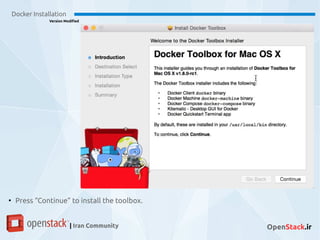
Press “Continue” to install the toolbox.
Docker Installation
Version Modified
| Iran Community OpenStack.ir
Docker Installation
Version Modified
| Iran Community OpenStack.ir
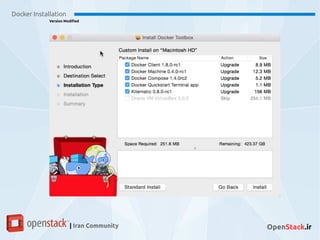
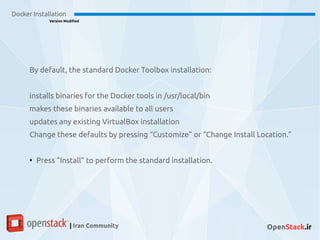
By default, the standard Docker Toolbox installation:
installs binaries for the Docker tools in /usr/local/bin
makes these binaries available to all users
updates any existing VirtualBox installation
Change these defaults by pressing “Customize” or “Change Install Location.”
●
Press “Install” to perform the standard installation.
Docker Installation
Version Modified
| Iran Community OpenStack.ir
●
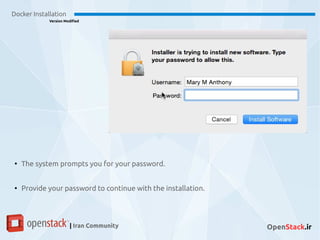
The system prompts you for your password.
●
Provide your password to continue with the installation.
Docker Installation
Version Modified
| Iran Community OpenStack.ir
●
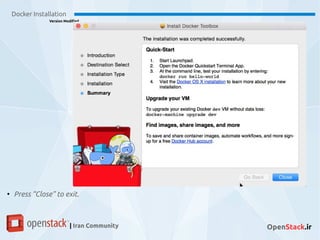
Press “Close” to exit.
Docker Installation
Version Modified
| Iran Community OpenStack.ir
Windows
Docker Installation
Version Modified
| Iran Community OpenStack.ir
Your machine must be running Windows 7.1, 8/8.1 or newer to run
Docker. Windows 10 is not currently supported. To find out what
version of Windows you have:
Requirements
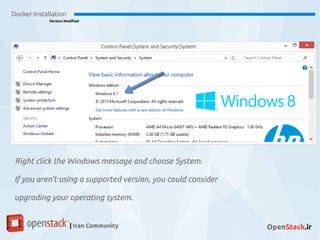
Right click the Windows message and choose System.
If you aren’t using a supported version, you could consider
upgrading your operating system.
Docker Installation
Version Modified
| Iran Community OpenStack.ir
Make sure your Windows system supports Hardware
Virtualization Technology and that virtualization is enabled
If virtualization is not enabled on your system, follow the
manufacturer’s instructions for enabling it.
Docker Installation
Version Modified
| Iran Community OpenStack.ir
Docker Installation
Version Modified
| Iran Community OpenStack.ir
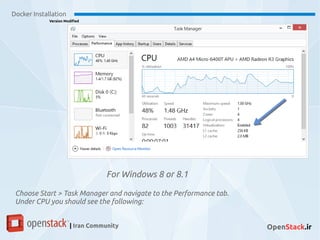
For Windows 8 or 8.1
Choose Start > Task Manager and navigate to the Performance tab.
Under CPU you should see the following:
Docker Installation
Version Modified
| Iran Community OpenStack.ir
Installation
Docker Installation
Version Modified
| Iran Community OpenStack.ir
If you have VirtualBox running, you must shut it down before running
the installer.
●
Go to the Docker Toolbox page.
●
Click the installer link to download.
●
Install Docker Toolbox by double-clicking the installer.
●
The installer launches the “Setup - Docker Toolbox” dialog.
Docker Installation
Version Modified
| Iran Community OpenStack.ir
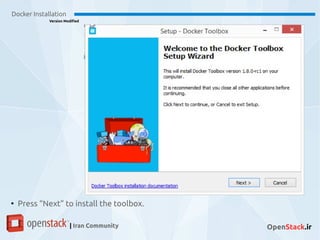
●
Press “Next” to install the toolbox.
Docker Installation
Version Modified
| Iran Community OpenStack.ir
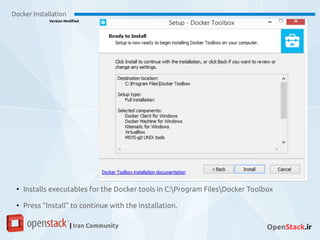
●
Installs executables for the Docker tools in C:Program FilesDocker Toolbox
●
Press “Install” to continue with the installation.
Docker Installation
Version Modified
| Iran Community OpenStack.ir
●
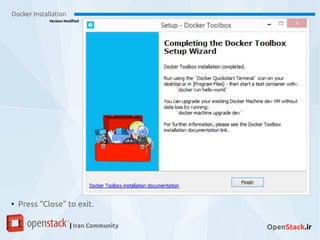
Press “Close” to exit.
Docker Installation
Version Modified
| Iran Community OpenStack.ir
Ubuntu
Docker Installation
Version Modified
| Iran Community OpenStack.ir
Docker is supported on these Ubuntu operating
systems:
Ubuntu Wily 15.10
Ubuntu Vivid 15.04
Ubuntu Trusty 14.04 (LTS)
Ubuntu Precise 12.04 (LTS)
Docker Installation
Version Modified
| Iran Community OpenStack.ir
Prerequisites
Docker Installation
Version Modified
| Iran Community OpenStack.ir
Docker requires a 64-bit installation regardless of your Ubuntu
version. Additionally, your kernel must be 3.10 at minimum. The
latest 3.10 minor version or a newer maintained version are also
acceptable.
Docker Installation
Version Modified
| Iran Community OpenStack.ir
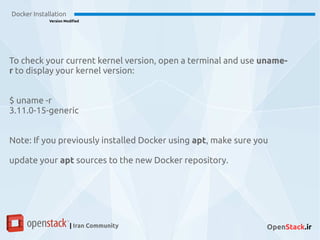
To check your current kernel version, open a terminal and use uname-
r to display your kernel version:
$ uname -r
3.11.0-15-generic
Note: If you previously installed Docker using apt, make sure you
update your apt sources to the new Docker repository.
Docker Installation
Version Modified
| Iran Community OpenStack.ir
Update your apt sources
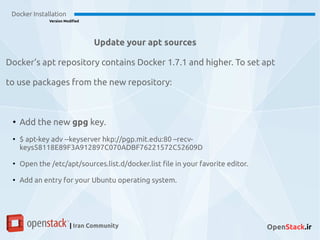
Docker’s apt repository contains Docker 1.7.1 and higher. To set apt
to use packages from the new repository:
●
Add the new gpg key.
●
$ apt-key adv --keyserver hkp://pgp.mit.edu:80 –recv-
keys58118E89F3A912897C070ADBF76221572C52609D
●
Open the /etc/apt/sources.list.d/docker.list file in your favorite editor.
●
Add an entry for your Ubuntu operating system.
Docker Installation
Version Modified
| Iran Community OpenStack.ir
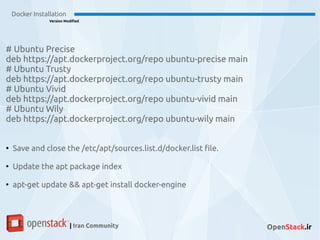
# Ubuntu Precise
deb https://apt.dockerproject.org/repo ubuntu-precise main
# Ubuntu Trusty
deb https://apt.dockerproject.org/repo ubuntu-trusty main
# Ubuntu Vivid
deb https://apt.dockerproject.org/repo ubuntu-vivid main
# Ubuntu Wily
deb https://apt.dockerproject.org/repo ubuntu-wily main
●
Save and close the /etc/apt/sources.list.d/docker.list file.
●
Update the apt package index
●
apt-get update && apt-get install docker-engine
Docker Installation
Version Modified
| Iran Community OpenStack.ir
Stay in Touch and Join Us:
● Home Page: OpenStack.ir
● Meetup age: Meetup.com/IranOpenStack
● Mailing List: OpenStackir@Lists.OpenStack.org
● Twitter: @OpenStackIR , #OpenStackIRAN
● IRC Channel on FreeNode: #OpenStack-ir
Docker Installation
Version Modified
| Iran Community OpenStack.ir
Mohammadreza Amini
Linux Administrator
Mohammadreza@openstack.ir
Amir Arsalan
Python Developer
Arsalan@openstack.ir
Thank You

Docker installation

  • 1.
    Presentation By: Mohammadreza Amini AmirArsalan Autumn 2015 IRAN OpenStack Users Group Docker Installation Version Modified
  • 2.
    Agenda Docker Installation Version Modified |Iran Community OpenStack.ir ● Install Docker ● Mac OS X installation (installs both Engine and Compose) ● Windows installation ● Ubuntu installation ● Iran OpenStack Community
  • 3.
    Docker Installation Version Modified |Iran Community OpenStack.ir Install Docker
  • 4.
    Mac OS Xinstallation (installs both Engine and Compose) Docker Installation Version Modified | Iran Community OpenStack.ir This release of Docker deprecates the Boot2Docker command line in favor of Docker Machine. Use the Docker Toolbox to install Docker Machine as well as the other Docker tools. You install Docker using Docker Toolbox. Docker Toolbox includes the following Docker tools.
  • 5.
    Requirements Docker Installation Version Modified |Iran Community OpenStack.ir Your Mac must be running OS X 10.8 “Mountain Lion” or newer to install the Docker Toolbox.
  • 6.
    Installation If you haveVirtualBox running, you must shut it down before running the installer. ● Go to the Docker Toolbox page. ● Click the installer link to download. ● Install Docker Toolbox by double-clicking the package or by right- clicking and choosing “Open” from the pop-up menu. ● The installer launches the “Install Docker Toolbox” dialog. Docker Installation Version Modified | Iran Community OpenStack.ir
  • 7.
    Docker Installation Version Modified |Iran Community OpenStack.ir ● Press “Continue” to install the toolbox.
  • 8.
    Docker Installation Version Modified |Iran Community OpenStack.ir
  • 9.
    Docker Installation Version Modified |Iran Community OpenStack.ir By default, the standard Docker Toolbox installation: installs binaries for the Docker tools in /usr/local/bin makes these binaries available to all users updates any existing VirtualBox installation Change these defaults by pressing “Customize” or “Change Install Location.” ● Press “Install” to perform the standard installation.
  • 10.
    Docker Installation Version Modified |Iran Community OpenStack.ir ● The system prompts you for your password. ● Provide your password to continue with the installation.
  • 11.
    Docker Installation Version Modified |Iran Community OpenStack.ir ● Press “Close” to exit.
  • 12.
    Docker Installation Version Modified |Iran Community OpenStack.ir Windows
  • 13.
    Docker Installation Version Modified |Iran Community OpenStack.ir Your machine must be running Windows 7.1, 8/8.1 or newer to run Docker. Windows 10 is not currently supported. To find out what version of Windows you have: Requirements
  • 14.
    Right click theWindows message and choose System. If you aren’t using a supported version, you could consider upgrading your operating system. Docker Installation Version Modified | Iran Community OpenStack.ir
  • 15.
    Make sure yourWindows system supports Hardware Virtualization Technology and that virtualization is enabled If virtualization is not enabled on your system, follow the manufacturer’s instructions for enabling it. Docker Installation Version Modified | Iran Community OpenStack.ir
  • 16.
    Docker Installation Version Modified |Iran Community OpenStack.ir For Windows 8 or 8.1 Choose Start > Task Manager and navigate to the Performance tab. Under CPU you should see the following:
  • 17.
    Docker Installation Version Modified |Iran Community OpenStack.ir Installation
  • 18.
    Docker Installation Version Modified |Iran Community OpenStack.ir If you have VirtualBox running, you must shut it down before running the installer. ● Go to the Docker Toolbox page. ● Click the installer link to download. ● Install Docker Toolbox by double-clicking the installer. ● The installer launches the “Setup - Docker Toolbox” dialog.
  • 19.
    Docker Installation Version Modified |Iran Community OpenStack.ir ● Press “Next” to install the toolbox.
  • 20.
    Docker Installation Version Modified |Iran Community OpenStack.ir ● Installs executables for the Docker tools in C:Program FilesDocker Toolbox ● Press “Install” to continue with the installation.
  • 21.
    Docker Installation Version Modified |Iran Community OpenStack.ir ● Press “Close” to exit.
  • 22.
    Docker Installation Version Modified |Iran Community OpenStack.ir Ubuntu
  • 23.
    Docker Installation Version Modified |Iran Community OpenStack.ir Docker is supported on these Ubuntu operating systems: Ubuntu Wily 15.10 Ubuntu Vivid 15.04 Ubuntu Trusty 14.04 (LTS) Ubuntu Precise 12.04 (LTS)
  • 24.
    Docker Installation Version Modified |Iran Community OpenStack.ir Prerequisites
  • 25.
    Docker Installation Version Modified |Iran Community OpenStack.ir Docker requires a 64-bit installation regardless of your Ubuntu version. Additionally, your kernel must be 3.10 at minimum. The latest 3.10 minor version or a newer maintained version are also acceptable.
  • 26.
    Docker Installation Version Modified |Iran Community OpenStack.ir To check your current kernel version, open a terminal and use uname- r to display your kernel version: $ uname -r 3.11.0-15-generic Note: If you previously installed Docker using apt, make sure you update your apt sources to the new Docker repository.
  • 27.
    Docker Installation Version Modified |Iran Community OpenStack.ir Update your apt sources Docker’s apt repository contains Docker 1.7.1 and higher. To set apt to use packages from the new repository: ● Add the new gpg key. ● $ apt-key adv --keyserver hkp://pgp.mit.edu:80 –recv- keys58118E89F3A912897C070ADBF76221572C52609D ● Open the /etc/apt/sources.list.d/docker.list file in your favorite editor. ● Add an entry for your Ubuntu operating system.
  • 28.
    Docker Installation Version Modified |Iran Community OpenStack.ir # Ubuntu Precise deb https://apt.dockerproject.org/repo ubuntu-precise main # Ubuntu Trusty deb https://apt.dockerproject.org/repo ubuntu-trusty main # Ubuntu Vivid deb https://apt.dockerproject.org/repo ubuntu-vivid main # Ubuntu Wily deb https://apt.dockerproject.org/repo ubuntu-wily main ● Save and close the /etc/apt/sources.list.d/docker.list file. ● Update the apt package index ● apt-get update && apt-get install docker-engine
  • 29.
    Docker Installation Version Modified |Iran Community OpenStack.ir Stay in Touch and Join Us: ● Home Page: OpenStack.ir ● Meetup age: Meetup.com/IranOpenStack ● Mailing List: OpenStackir@Lists.OpenStack.org ● Twitter: @OpenStackIR , #OpenStackIRAN ● IRC Channel on FreeNode: #OpenStack-ir
  • 30.
    Docker Installation Version Modified |Iran Community OpenStack.ir Mohammadreza Amini Linux Administrator Mohammadreza@openstack.ir Amir Arsalan Python Developer Arsalan@openstack.ir Thank You