Comparison of
Popular CMS
Platforms
CHOOSING THE RIGHT
CMS FOR YOUR NEEDS
AGENDA
• Introduction
• What is a CMS?
• Popular CMS Platforms
• WordPress
• Drupal
• Joomla
• Comparison Table
• Factors to Consider
• Conclusion
2
INTRODUCTION
Choosing the right CMS is crucial
as it directly impacts the ease of
content management, site
functionality, scalability, and overall
user experience. A well-suited CMS
ensures efficient workflows, better
security, and seamless integration
with other tools, ultimately
contributing to the success of your
online presence.
3
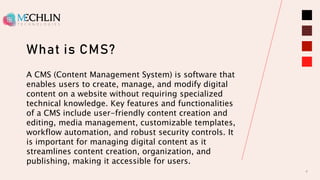
What is CMS?
4
A CMS (Content Management System) is software that
enables users to create, manage, and modify digital
content on a website without requiring specialized
technical knowledge. Key features and functionalities
of a CMS include user-friendly content creation and
editing, media management, customizable templates,
workflow automation, and robust security controls. It
is important for managing digital content as it
streamlines content creation, organization, and
publishing, making it accessible for users.
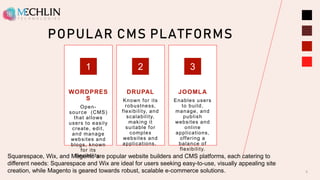
POPULAR CMS PLATFORMS
WORDPRES
S
Open-
source (CMS)
that allows
users to easily
create, edit,
and manage
websites and
blogs, known
for its
flexibility.
1
DRUPAL
Known for its
robustness,
flexibility, and
scalability,
making it
suitable for
complex
websites and
applications.
2
JOOMLA
Enables users
to build,
manage, and
publish
websites and
online
applications,
offering a
balance of
flexibility.
3
5
Squarespace, Wix, and Magento are popular website builders and CMS platforms, each catering to
different needs: Squarespace and Wix are ideal for users seeking easy-to-use, visually appealing site
creation, while Magento is geared towards robust, scalable e-commerce solutions.
WordPress
6
Pros:
○ User-friendly interface
○ Large community and support
○ Extensive plugin and theme ecosystem
Cons:
○ Can be resource-intensive
○ Frequent updates needed for security
Drupal
7
Pros:
○Highly customizable and scalable
○Strong security features
○Ideal for complex and large websites
Cons:
○Steeper learning curve
○Smaller community compared to WordPress
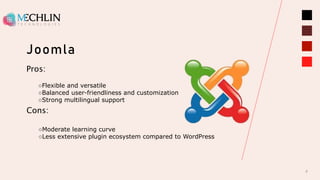
Joomla
8
Pros:
○Flexible and versatile
○Balanced user-friendliness and customization
○Strong multilingual support
Cons:
○Moderate learning curve
○Less extensive plugin ecosystem compared to WordPress
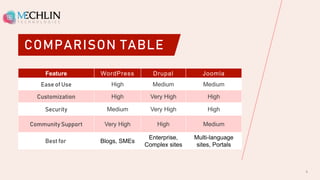
COMPARISON TABLE
Feature WordPress Drupal Joomla
Ease of Use High Medium Medium
Customization High Very High High
Security Medium Very High High
Community Support Very High High Medium
Best for Blogs, SMEs
Enterprise,
Complex sites
Multi-language
sites, Portals
9
Factors to Consider
10
Factors to consider when selecting a CMS
Purpose and Goals:
• What type of website are you building?
• What are your long-term goals?
Technical Skills:
• Your level of technical expertise
• Availability of skilled developers
Customization Needs:
• Extent of customization required
• Specific features or functionalities needed
CONCLUSION
Choosing the right CMS for your needs is
crucial for ensuring efficient content
management, scalability, security, and a
seamless user experience, tailored to your
specific requirements and goals. It involves
assessing factors such as ease of use,
customization options, integration
capabilities, and support resources to align
with your business objectives effectively. By
selecting a CMS that aligns closely with
your needs, you can enhance productivity,
maintain content quality, and foster growth
in your digital presence.
11
THANK YOU
Mechlin Technologies
+1 (805) 776-3451
sales@mechlintech.com
www.mechlintech.com

Choosing the Right CMS for Your Needs.pptx

  • 1.
  • 2.
    AGENDA • Introduction • Whatis a CMS? • Popular CMS Platforms • WordPress • Drupal • Joomla • Comparison Table • Factors to Consider • Conclusion 2
  • 3.
    INTRODUCTION Choosing the rightCMS is crucial as it directly impacts the ease of content management, site functionality, scalability, and overall user experience. A well-suited CMS ensures efficient workflows, better security, and seamless integration with other tools, ultimately contributing to the success of your online presence. 3
  • 4.
    What is CMS? 4 ACMS (Content Management System) is software that enables users to create, manage, and modify digital content on a website without requiring specialized technical knowledge. Key features and functionalities of a CMS include user-friendly content creation and editing, media management, customizable templates, workflow automation, and robust security controls. It is important for managing digital content as it streamlines content creation, organization, and publishing, making it accessible for users.
  • 5.
    POPULAR CMS PLATFORMS WORDPRES S Open- source(CMS) that allows users to easily create, edit, and manage websites and blogs, known for its flexibility. 1 DRUPAL Known for its robustness, flexibility, and scalability, making it suitable for complex websites and applications. 2 JOOMLA Enables users to build, manage, and publish websites and online applications, offering a balance of flexibility. 3 5 Squarespace, Wix, and Magento are popular website builders and CMS platforms, each catering to different needs: Squarespace and Wix are ideal for users seeking easy-to-use, visually appealing site creation, while Magento is geared towards robust, scalable e-commerce solutions.
  • 6.
    WordPress 6 Pros: ○ User-friendly interface ○Large community and support ○ Extensive plugin and theme ecosystem Cons: ○ Can be resource-intensive ○ Frequent updates needed for security
  • 7.
    Drupal 7 Pros: ○Highly customizable andscalable ○Strong security features ○Ideal for complex and large websites Cons: ○Steeper learning curve ○Smaller community compared to WordPress
  • 8.
    Joomla 8 Pros: ○Flexible and versatile ○Balanceduser-friendliness and customization ○Strong multilingual support Cons: ○Moderate learning curve ○Less extensive plugin ecosystem compared to WordPress
  • 9.
    COMPARISON TABLE Feature WordPressDrupal Joomla Ease of Use High Medium Medium Customization High Very High High Security Medium Very High High Community Support Very High High Medium Best for Blogs, SMEs Enterprise, Complex sites Multi-language sites, Portals 9
  • 10.
    Factors to Consider 10 Factorsto consider when selecting a CMS Purpose and Goals: • What type of website are you building? • What are your long-term goals? Technical Skills: • Your level of technical expertise • Availability of skilled developers Customization Needs: • Extent of customization required • Specific features or functionalities needed
  • 11.
    CONCLUSION Choosing the rightCMS for your needs is crucial for ensuring efficient content management, scalability, security, and a seamless user experience, tailored to your specific requirements and goals. It involves assessing factors such as ease of use, customization options, integration capabilities, and support resources to align with your business objectives effectively. By selecting a CMS that aligns closely with your needs, you can enhance productivity, maintain content quality, and foster growth in your digital presence. 11
  • 12.
    THANK YOU Mechlin Technologies +1(805) 776-3451 sales@mechlintech.com www.mechlintech.com