Chess Engine
Major Project Presentation
Presented By:
Guided By:
Dr. Kirti Kumari
Outline 1. Introduction
2. Background and Context
3. Objectives and Scope
4. High Level Flowchart
5. Methodology
6. Technologies Used
7. Current Progress
8. References
Introduction
Ever wondered how a simple modern computer can beat the best of grandmasters in the game
of chess?
In this presentation, I will be discussing :
● the background and context of chess engines,
● the algorithms and techniques used to create them, and
● the evaluation function that is crucial for their success
● What is a Chess Engine?
Chess engine is a computer program that can play or analyse chess.
● When did all this started?
➔ A machine capable of checkmating with a king and rook vs king was created in 1912.
➔ Alan Turing wrote the first chess-playing computer program in 1951.
➔ Chess engine development continued over the next 50 years, with hardware
advancements leading to stronger play.
➔ By 2005, chess engines surpassed the best human players in skill.
Background and Context
● Why is the thing still relevant?
➔ The game hasn’t been solved.
➔ Chess Professionals use it to analyse the positions and prepare for their matches
➔ Provides a valuable platform for testing and developing new algorithms and techniques, and
can serve as a benchmark for measuring the progress of AI research.
● How do Chess Engine work?
Uses algorithms and heuristics to make decisions about the best moves to make in a given
position.
More of it in the coming slides…
Objective
And
Scope
Objective :
● Developing a chess engine of
mid-level intelligence.
● Developing a graphical interface to
interact with the engine.
Scope :
● Limited to standard game of chess
with 8 * 8 cells.
● No time boundation
● Only two players at a time: human and
the computer
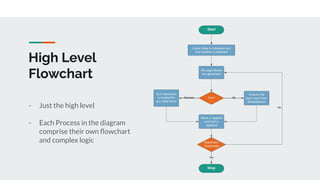
High Level
Flowchart
- Just the high level
- Each Process in the diagram
comprise their own flowchart
and complex logic
Methodology
1. Board representation
2. Move generation
3. Evaluation function
4. Search algorithms (i.e minimax, alpha-beta pruning)
5. Move ordering
6. Transposition table
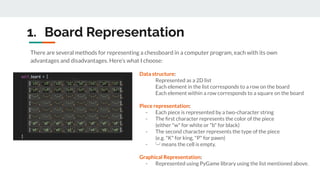
1. Board Representation
There are several methods for representing a chessboard in a computer program, each with its own
advantages and disadvantages. Here’s what I choose:
Data structure:
Represented as a 2D list
Each element in the list corresponds to a row on the board
Each element within a row corresponds to a square on the board
Piece representation:
- Each piece is represented by a two-character string
- The first character represents the color of the piece
(either "w" for white or "b" for black)
- The second character represents the type of the piece
(e.g. "K" for king, "P" for pawn)
- ‘--’ means the cell is empty.
Graphical Representation:
- Represented using PyGame library using the list mentioned above.
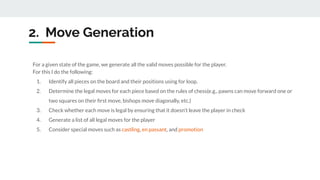
2. Move Generation
For a given state of the game, we generate all the valid moves possible for the player.
For this I do the following:
1. Identify all pieces on the board and their positions using for loop.
2. Determine the legal moves for each piece based on the rules of chess(e.g., pawns can move forward one or
two squares on their first move, bishops move diagonally, etc.)
3. Check whether each move is legal by ensuring that it doesn't leave the player in check
4. Generate a list of all legal moves for the player
5. Consider special moves such as castling, en passant, and promotion
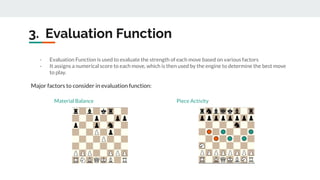
3. Evaluation Function
- Evaluation Function is used to evaluate the strength of each move based on various factors
- It assigns a numerical score to each move, which is then used by the engine to determine the best move
to play.
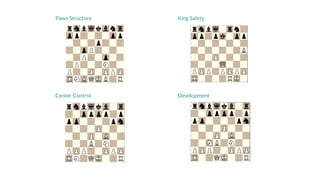
Major factors to consider in evaluation function:
Material Balance
Piece
Activity
Piece Activity
Pawn Structure King Safety
Center Control Development
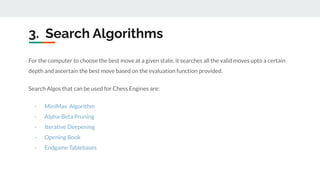
For the computer to choose the best move at a given state, it searches all the valid moves upto a certain
depth and ascertain the best move based on the evaluation function provided.
Search Algos that can be used for Chess Engines are:
- MiniMax Algorithm
- Alpha-Beta Pruning
- Iterative Deepening
- Opening Book
- Endgame Tablebases
3. Search Algorithms
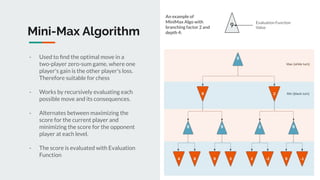
Mini-Max Algorithm
- Used to find the optimal move in a
two-player zero-sum game, where one
player's gain is the other player's loss.
Therefore suitable for chess
- Works by recursively evaluating each
possible move and its consequences.
- Alternates between maximizing the
score for the current player and
minimizing the score for the opponent
player at each level.
- The score is evaluated with Evaluation
Function
9
Evaluation Function
Value
An example of
MiniMax Algo with
branching factor 2 and
depth 4:
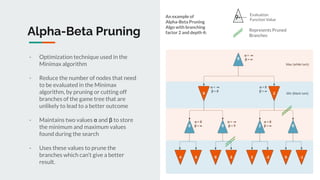
Alpha-Beta Pruning
- Optimization technique used in the
Minimax algorithm
- Reduce the number of nodes that need
to be evaluated in the Minimax
algorithm, by pruning or cutting off
branches of the game tree that are
unlikely to lead to a better outcome
- Maintains two values α and β to store
the minimum and maximum values
found during the search
- Uses these values to prune the
branches which can’t give a better
result.
9
Evaluation
Function Value
An example of
Alpha-Beta Pruning
Algo with branching
factor 2 and depth 4:
Represents Pruned
Branches
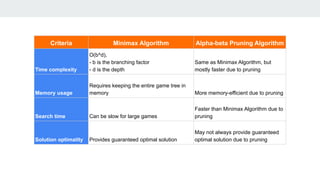
Criteria Minimax Algorithm Alpha-beta Pruning Algorithm
Time complexity
O(b^d),
- b is the branching factor
- d is the depth
Same as Minimax Algorithm, but
mostly faster due to pruning
Memory usage
Requires keeping the entire game tree in
memory More memory-efficient due to pruning
Search time Can be slow for large games
Faster than Minimax Algorithm due to
pruning
Solution optimality Provides guaranteed optimal solution
May not always provide guaranteed
optimal solution due to pruning
Opening Book
and
EndGame Tablebase
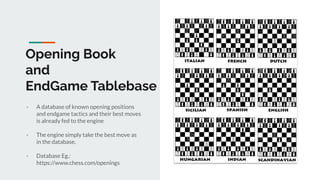
- A database of known opening positions
and endgame tactics and their best moves
is already fed to the engine
- The engine simply take the best move as
in the database.
- Database Eg.:
https://www.chess.com/openings
Technologies Used:
Python 3.8 PyGame 2.2
Current Progress
As of now, the following features are implemented by the
program:
- Board Representation and Graphical Interface.
- Movement of pieces using mouse from the
interface.
- Undo of moves.
- Only valid moves are allowed the system. It checks
for all the valid moves possible and doesn’t admit
illegal moves.
- Special moves such as Castling, Pawn Promotion,
En Passant are also taken care of.
- The computer can play random legal moves.
The following features are to be implemented:
- Strong Moves using Evaluation Function and
Search Algos
- Using Move Ordering and Transposition Table
for better search performance
- Testing the performance of the engine
- Better GUI Logging and Interaction
File System:
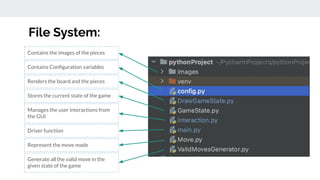
Contains Configuration variables
Renders the board and the pieces
Stores the current state of the game
Manages the user interactions from
the GUI
Driver function
Represent the move made
Generate all the valid move in the
given state of the game
Contains the images of the pieces
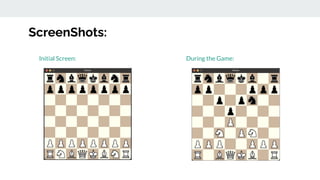
ScreenShots:
Initial Screen: During the Game:
References ● Chess.com Article on chess engine
https://www.chess.com/article/view/computer-chess-engines
● Developing a Chess Engine Thesis:
https://www.theseus.fi/bitstream/handle/10024/502571/Develop
ing%20Chess%20Engine.pdf?sequence=2&isAllowed=y
● Dissecting Stockfish(Chess Engine) Article on Medium:
https://towardsdatascience.com/dissecting-stockfish-part-1-in-de
pth-look-at-a-chess-engine-7fddd1d83579
● Chess Programming Wiki:
https://www.chessprogramming.org/Main_Page
Thank You.

Chess Engine

  • 1.
    Chess Engine Major ProjectPresentation Presented By: Guided By: Dr. Kirti Kumari
  • 2.
    Outline 1. Introduction 2.Background and Context 3. Objectives and Scope 4. High Level Flowchart 5. Methodology 6. Technologies Used 7. Current Progress 8. References
  • 3.
    Introduction Ever wondered howa simple modern computer can beat the best of grandmasters in the game of chess? In this presentation, I will be discussing : ● the background and context of chess engines, ● the algorithms and techniques used to create them, and ● the evaluation function that is crucial for their success
  • 4.
    ● What isa Chess Engine? Chess engine is a computer program that can play or analyse chess. ● When did all this started? ➔ A machine capable of checkmating with a king and rook vs king was created in 1912. ➔ Alan Turing wrote the first chess-playing computer program in 1951. ➔ Chess engine development continued over the next 50 years, with hardware advancements leading to stronger play. ➔ By 2005, chess engines surpassed the best human players in skill. Background and Context
  • 5.
    ● Why isthe thing still relevant? ➔ The game hasn’t been solved. ➔ Chess Professionals use it to analyse the positions and prepare for their matches ➔ Provides a valuable platform for testing and developing new algorithms and techniques, and can serve as a benchmark for measuring the progress of AI research. ● How do Chess Engine work? Uses algorithms and heuristics to make decisions about the best moves to make in a given position. More of it in the coming slides…
  • 6.
    Objective And Scope Objective : ● Developinga chess engine of mid-level intelligence. ● Developing a graphical interface to interact with the engine. Scope : ● Limited to standard game of chess with 8 * 8 cells. ● No time boundation ● Only two players at a time: human and the computer
  • 7.
    High Level Flowchart - Justthe high level - Each Process in the diagram comprise their own flowchart and complex logic
  • 8.
    Methodology 1. Board representation 2.Move generation 3. Evaluation function 4. Search algorithms (i.e minimax, alpha-beta pruning) 5. Move ordering 6. Transposition table
  • 9.
    1. Board Representation Thereare several methods for representing a chessboard in a computer program, each with its own advantages and disadvantages. Here’s what I choose: Data structure: Represented as a 2D list Each element in the list corresponds to a row on the board Each element within a row corresponds to a square on the board Piece representation: - Each piece is represented by a two-character string - The first character represents the color of the piece (either "w" for white or "b" for black) - The second character represents the type of the piece (e.g. "K" for king, "P" for pawn) - ‘--’ means the cell is empty. Graphical Representation: - Represented using PyGame library using the list mentioned above.
  • 10.
    2. Move Generation Fora given state of the game, we generate all the valid moves possible for the player. For this I do the following: 1. Identify all pieces on the board and their positions using for loop. 2. Determine the legal moves for each piece based on the rules of chess(e.g., pawns can move forward one or two squares on their first move, bishops move diagonally, etc.) 3. Check whether each move is legal by ensuring that it doesn't leave the player in check 4. Generate a list of all legal moves for the player 5. Consider special moves such as castling, en passant, and promotion
  • 11.
    3. Evaluation Function -Evaluation Function is used to evaluate the strength of each move based on various factors - It assigns a numerical score to each move, which is then used by the engine to determine the best move to play. Major factors to consider in evaluation function: Material Balance Piece Activity Piece Activity
  • 12.
    Pawn Structure KingSafety Center Control Development
  • 13.
    For the computerto choose the best move at a given state, it searches all the valid moves upto a certain depth and ascertain the best move based on the evaluation function provided. Search Algos that can be used for Chess Engines are: - MiniMax Algorithm - Alpha-Beta Pruning - Iterative Deepening - Opening Book - Endgame Tablebases 3. Search Algorithms
  • 14.
    Mini-Max Algorithm - Usedto find the optimal move in a two-player zero-sum game, where one player's gain is the other player's loss. Therefore suitable for chess - Works by recursively evaluating each possible move and its consequences. - Alternates between maximizing the score for the current player and minimizing the score for the opponent player at each level. - The score is evaluated with Evaluation Function 9 Evaluation Function Value An example of MiniMax Algo with branching factor 2 and depth 4:
  • 15.
    Alpha-Beta Pruning - Optimizationtechnique used in the Minimax algorithm - Reduce the number of nodes that need to be evaluated in the Minimax algorithm, by pruning or cutting off branches of the game tree that are unlikely to lead to a better outcome - Maintains two values α and β to store the minimum and maximum values found during the search - Uses these values to prune the branches which can’t give a better result. 9 Evaluation Function Value An example of Alpha-Beta Pruning Algo with branching factor 2 and depth 4: Represents Pruned Branches
  • 16.
    Criteria Minimax AlgorithmAlpha-beta Pruning Algorithm Time complexity O(b^d), - b is the branching factor - d is the depth Same as Minimax Algorithm, but mostly faster due to pruning Memory usage Requires keeping the entire game tree in memory More memory-efficient due to pruning Search time Can be slow for large games Faster than Minimax Algorithm due to pruning Solution optimality Provides guaranteed optimal solution May not always provide guaranteed optimal solution due to pruning
  • 17.
    Opening Book and EndGame Tablebase -A database of known opening positions and endgame tactics and their best moves is already fed to the engine - The engine simply take the best move as in the database. - Database Eg.: https://www.chess.com/openings
  • 18.
  • 19.
    Current Progress As ofnow, the following features are implemented by the program: - Board Representation and Graphical Interface. - Movement of pieces using mouse from the interface. - Undo of moves. - Only valid moves are allowed the system. It checks for all the valid moves possible and doesn’t admit illegal moves. - Special moves such as Castling, Pawn Promotion, En Passant are also taken care of. - The computer can play random legal moves. The following features are to be implemented: - Strong Moves using Evaluation Function and Search Algos - Using Move Ordering and Transposition Table for better search performance - Testing the performance of the engine - Better GUI Logging and Interaction
  • 20.
    File System: Contains Configurationvariables Renders the board and the pieces Stores the current state of the game Manages the user interactions from the GUI Driver function Represent the move made Generate all the valid move in the given state of the game Contains the images of the pieces
  • 21.
  • 22.
    References ● Chess.comArticle on chess engine https://www.chess.com/article/view/computer-chess-engines ● Developing a Chess Engine Thesis: https://www.theseus.fi/bitstream/handle/10024/502571/Develop ing%20Chess%20Engine.pdf?sequence=2&isAllowed=y ● Dissecting Stockfish(Chess Engine) Article on Medium: https://towardsdatascience.com/dissecting-stockfish-part-1-in-de pth-look-at-a-chess-engine-7fddd1d83579 ● Chess Programming Wiki: https://www.chessprogramming.org/Main_Page
  • 23.