Posted
on
29
Jul
2024
—
The
copyright
holder
is
the
author/funder.
All
rights
reserved.
No
reuse
without
permission.
—
https://doi.org/10.22541/au.172228527.74316529/v1
—
This
is
a
preprint
and
has
not
been
peer-reviewed.
Data
may
be
preliminary.
CHAT APPLICATION THROUGH CLIENT SERVER
MANAGEMENT SYSTEM PROJECT.
Kamal Acharya1
1
Affiliation not available
July 29, 2024
AN
INTERNSHIP REPORT
ON
CHAT APPLICATION THROUGH CLIENT SERVER MANAGEMENT SYSTEM
PROJECT
BY
KAMAL ACHARYA
(Tribhuvan University)
Date: 2023/06/25
ABSTRACT
This project focused on creating a chatting application with communication environment. The objective of
our project is to build a chatting system to facilitate the communication between two or more clients to
obtain an effective channel among the clients themselves. For the application itself, this system can serve as
a link to reach out for all clients. The design of the system depends on socket concept where is a software
endpoint that establishes bidirectional communication between a server program and one or more client
programs. Languages that will be used for the development of this system: Java Development Kit (JDK): is
a development environment for building applications and components using the Java programming language.
The database system we used is MySQL
Chapter 1
Introduction
Important applications in our lives now, with widespread use of the Internet is the chat, because of the use
in many sectors, scientific, educational, training, and social networking. To understand the idea of the chat,
you must understand two main concepts in the work Chatting:
1. Client-server computing or networking
2. Socket
Client-server computing or networking is a distributed application architecture that partitions tasks or
workloads between service providers (servers) and service requesters, called clients. Often clients and servers
operate over a computer network on separate hardware. A server is a high-performance host that is a
registering unit and shares its resources with clients. A client does not share any of its resources, but
1
Posted
on
29
Jul
2024
—
The
copyright
holder
is
the
author/funder.
All
rights
reserved.
No
reuse
without
permission.
—
https://doi.org/10.22541/au.172228527.74316529/v1
—
This
is
a
preprint
and
has
not
been
peer-reviewed.
Data
may
be
preliminary.
requests a server’s content or service function. Clients therefore initiate communication sessions with servers
which await (listen to) incoming requests.
Socket is an IP & port Number, where if it gives you two can be called the socket. Because the availability of
IP and port can contact the remote. That is when there is a server and client must be socket programming
(software) communicate using IP & Port number .The programming of those applications is the type of
programming is called Socket Programming
General Description
2.1 Main goal
The chat application provides a platform for the clients/users to communicate with the other users and it
gives a good user interface.
2.2 General capabilities
Clients have a simple machines on the desktop with which they access remote data and that data is stored
on powerful computers called servers. This whole arrangement is called client-server model.
In this client-server model two process are involved, one on the client machine and one on the server machine.
Communication takes the form of the client process sending a message over the network to the server process,
the client process then waits for the reply message.
When the server process gets the request it performs the requested work or looks up the requested data and
sends back a reply.
Hosted file
image1.emf available at https://authorea.com/users/454994/articles/1211917-chat-application-
through-client-server-management-system-project
2
Posted
on
29
Jul
2024
—
The
copyright
holder
is
the
author/funder.
All
rights
reserved.
No
reuse
without
permission.
—
https://doi.org/10.22541/au.172228527.74316529/v1
—
This
is
a
preprint
and
has
not
been
peer-reviewed.
Data
may
be
preliminary.
Suppose if client1 wants to communicate (send message) to client2,
1. It creates the message and saves locally.
2. This message is then sent to the server, on reception the server sends an acknowledgement
3. When the client1 receives the acknowledgement from server it removes the local copy.
4. If the server is down, it tries to resend the message after a certaintimeout .
5. It tries to send the message until a certain cutout time is reached.
6. Finally if it fails to send the message it will be idle state’
Project Scope
This project can be mainly divided into two modules:
1. Server
2. Client
This project is mainly depended on client/server model. The client requests the server and server responses
by granting the clients request. The proposed system should provide both of the above features along with
the followed ones:
SERVER: The server should be able to perform the following features:
The first and foremost problem is to find the server. We should identify the program in the server which
processes the client’s request. Creating of private room with the password facility to enable private chats
with the users online.
The server is always waiting for clients requests .The clients come and go down but the server remains the
same.
CLIENT: The client should be able to perform the following features:
Should be able to send message to anybody in the room with clients unique chat name created in the server
for chatting purpose. Should be provided with the drawing tools like free hand, rectangle, oval , line and
3
Posted
on
29
Jul
2024
—
The
copyright
holder
is
the
author/funder.
All
rights
reserved.
No
reuse
without
permission.
—
https://doi.org/10.22541/au.172228527.74316529/v1
—
This
is
a
preprint
and
has
not
been
peer-reviewed.
Data
may
be
preliminary.
also sending text message over the room. In all the network applications, we find two sort program where
the first i.e., server sends the information and the second i.e., client receives the information.
The model used for this project is the single server – multiple client models. The following specifications
must be implemented:
1. The server and client are two separate programs.
2. Multiple clients must be able to connect to a single server.
3. All input and output is via I/O Interface (GUI is required)
4. Client:
* Client must be able to choose a name on connection.
* Client must show when another client connects or disconnects with the server.
* Client must be able to send messages to the server before arriving in other client.
* Client must be able to receive messages while writing.
* Client must be able to print out any messages received from the server.
5. Server:
* Server must be able to print information in the event of the following cases: (connect, disconnect, send
and receive messages).
* The server does not allow for more than one client to get the same name.
* Server must be able to return messages again to all clients (including source).
* Client connected and disconnected with the server does not crash the server.
System Requirement
The system requirement can be classified into two categories:
1. Hardware Requirement
2. Software Requirement
Hardware Requirement:
1. CPU 4 processor or higher.
2. Memory 2 GB or higher.
3. Hard disk 160 GB or higher.
4. Windows operating system.
Software Requirement:
The system will be created using Java-Netbeans and MySQL.The reason for using Java as the main program-
ming language is databases and Java has some good API’s (such as JDBC) to handle database connectivity.
Also, Java is an object orientated language which will make it easier for him to create separate interfaces for
each layer and prototype in his design which will mean they do not explicitly rely on each other.
MySQL: It is a database system used on the web. Basically, a MySQL database allows creating a relational
database structure on a web-server somewhere in order to store data or automate procedures.
Java Features:
4
Posted
on
29
Jul
2024
—
The
copyright
holder
is
the
author/funder.
All
rights
reserved.
No
reuse
without
permission.
—
https://doi.org/10.22541/au.172228527.74316529/v1
—
This
is
a
preprint
and
has
not
been
peer-reviewed.
Data
may
be
preliminary.
1. Platform Independent: The Write-Once-Run-Anywhere ideal has not been achieved (tuning for different
platforms usually required), but closer than with other languages.
2. Object Oriented: Java is object oriented throughout i.e. there is no coding outside of class definitions,
including main(). There is an extensive class library available in the core language packages.
3. Robust: Exception handling built-in, strong type checking (that is, all data must be declared an explicit
type), local variables must be initialized.
4. Automatic Memory Management: Automatic garbage collection - memory management handled by JVM
5. Security:
??No memory pointers.
??Programs run inside the virtual machine sandbox.
??Array index limit checking
6. Good Performance: Interpretation of byte codes slowed performance in early versions, but advanced
virtual machines with adaptive and just-in-time compilation and other techniques now typically provide
performance up to 50% to 100% the speed of C++ programs.
7. Dynamic Binding: The linking of data and methods to where they are located is done at run-time.
8. Threading: Lightweight processes, called threads, can easily be spun off to perform multiprocessing.
9. Built-in Networking: Java was designed with networking in mind and comes with many classes to develop
sophisticated Internet communications.
Java Environment:
Java environment includes large number of development tools and hundreds of classes and methods. The
development tools are part of the system known as Java Development Kit (JDK)and the classes and methods
are part of the Java Standard Library (JSL), also known as the Application Programming Interface (API)
Methodology (SDLC)
The Systems Development Life Cycle (SDLC):
Like Nitrogen & Production cycle ± a Software system is just like a cycle which passes the following stages
like:
1. Planning phase.
2. Analysis phase.
3. Design phase.
4. Development phase.
5. Testing Phase.
6. Implementation & Maintenance phase.
The planning phase:
It is the process is to understand why should the system should be built and determine its requirements. It
also includes a feasibility study from the different perspectives and the technical and economic, and feasibility
aspects of the organization. Through our project, has been studying technical requirements of project from
hardware and software.
The analysis phase:
5
Posted
on
29
Jul
2024
—
The
copyright
holder
is
the
author/funder.
All
rights
reserved.
No
reuse
without
permission.
—
https://doi.org/10.22541/au.172228527.74316529/v1
—
This
is
a
preprint
and
has
not
been
peer-reviewed.
Data
may
be
preliminary.
This phase includes activities such determine and analysis problems, and even forecasting potential problems
that may arise in future with regard the system. The deliverables / products of this phase will drive how the
system will be built and guide the developers’ works.The basic requirements for this project can be decided
according to the needs of the users who will use this application. Some basic requirements have been listed
here:
* Access to the project should be protected from unauthorized users. So, any attempt to access the project
must go through some login process.
* The project must provide user interfaces to create a new user and to get Login.
* The project must provide an interface having a list of members of Instant Chat. The application must also
show the online or offline status of the existing users.
The design phase:
It is the most creative and challenging phase of system development. It deals with converting input into
output. It contains output design, input design, file or database design and processing design.
The development phase:
The development phase involves writing the source code based on the required functionality adhering the
coding standards, code optimization, etc. It takes its primary input from the design elements described in
the software design phase. The development of this project involves creating windows forms, class files, and
user controls in Java . The code files are covering: connecting to Mysql Server database, sending requests lo
the server and responses to the clients, executing queries. firing trigger, filtering data, and reflecting changes
in a database.
The Testing Phase:
After the designing and developing phases, the application is tested for any logical flaws and functionality of
all operations. The project is also tested lo ensure that all methods and modules designed and developed are
functioning properly, along with the navigation links provided in all the user interfaces, finally, the project
is tested to ensure that all the requirements listed during the requirements analysis phase are being fulfilled.
The Implementation and Maintenance Phase:
Finally, the project Is Implemented In a distributed environment, where it is used by users logged In from
different computer nodes on a network. The project is maintained thereafter if any requests for changes are
forwarded by the users.
What is a connection-oriented server?
Generally speaking, the job of any server is to provide a centralized service. However, there are many
different ways of providing services, and many different ways to structure the communications.
Chat is roughly described as a connection-oriented service, because a user establishes a connection and
maintains that connection, sending and receiving text for the duration of the session.
This is in contrast to the Web, where the protocol is (at least in theory) transactional – the browser asks
for a page, and the server sends it; the connection is then closed. (In practice, the connection is kept open
and reused, but this is more a speed-optimization than a structuring metaphor.)
We’ll be creating a stripped-down, connection-oriented server. Learning the basic framework will help you
a great deal in creating other connection-oriented servers in the future.
What does the server do?
Before we describe the Listener class, we’ll describe the server. Doing so has a certain chronological elegance,
because in our running system, the server will have to start before any of the clients can connect to it.
6
Posted
on
29
Jul
2024
—
The
copyright
holder
is
the
author/funder.
All
rights
reserved.
No
reuse
without
permission.
—
https://doi.org/10.22541/au.172228527.74316529/v1
—
This
is
a
preprint
and
has
not
been
peer-reviewed.
Data
may
be
preliminary.
Our server will be a stand-alone program – a single Java process running on its own machine. It won’t require
any support software other than a Java virtual machine. And it won’t require a Web server or application
server, although a Web server or application server will likely be used to serve the client applet to the client.
More advanced server systems often embed the server code within a larger framework. This framework
might be used to supply features such as load-balancing, special libraries for handling large numbers of
clients, process migration, and database services. However, our example is going to stand all by itself. It
will take care of all networking responsibilities on its own. As we’ll see, this isn’t very hard.
Listening on a port
The first thing we have to do is to get ready to receive incoming connections. To do this, we must listen on
a port.
A port can be thought of as an address within a single computer. Remember that often a single machine
might serve as a Web server, a chat server, an FTP server, and several other kinds of servers at the same
time. Because of this, a connection to a server needs to specify not only the address of the machine itself,
but also the particular service within the machine.
This internal address is a port and is represented by a single integer between 1 and 65535. Many standard
services have a dedicated port number. For example, telnet uses port 23, FTP uses ports 20 and 21, and
Web servers, by default, use port 80. Since our chat system is not famous (yet), we’re going to have to use
one of the port numbers allocated for general use.
We’ll use port 4444. This means that our server is going tolisten for connections on port 4444. Our clients,
when connecting to our server machine, will specify that they want to connect to port 4444 on our server
machine. This way, our clients and our server will be able to talk.
Sockets
Our communications between client and server will pass through a Java object called a Socket. Sockets are
not at all Java-specific; the term is taken directly from the terminology of general IP (Internet Protocol)
network programming. In Java programs, a Socket object is simply a wrapper around the low-level sockets
that Internet programmers have been using for years. And the abstraction used by the Java language is very
clean, so socket programming in the Java language is much more pleasant than it is.
The most important thing to know about a Socket object is that it contains (among other things) two
Streams. One is for reading data coming in, and the other is for writing data out.
That is to say, a Socket has an InputStream and an OutputStream.
Two of the Java language’s main strengths are networking and multithreading. That is not to say that other
languages don’t support these functions – they do. But the abstractions that the Java language uses to
provide these features are particularly elegant, especially for a commercial language.
A thread is generally defined as a separate line of control within a single process. What this really means
is that a multithreaded program has multiple, semi-autonomous activities going on inside of it at the same
time.
Multithreading is similar to the concepts of a task and multitasking, except that the multiple threads within
a program all share the same data space. This makes it easier for them to share data directly and efficiently
– and it also makes it easier for them to mess each other up.
Why use multithreading?
There are a few reasons why you’d want to use threads in your program, but there is one reason most
pertinent to the construction of a chat server: input/output.
7
Posted
on
29
Jul
2024
—
The
copyright
holder
is
the
author/funder.
All
rights
reserved.
No
reuse
without
permission.
—
https://doi.org/10.22541/au.172228527.74316529/v1
—
This
is
a
preprint
and
has
not
been
peer-reviewed.
Data
may
be
preliminary.
Your chat server is communicating (in a sense) with the users at the client. Users are usually much slower
than servers, which means that your server code is going to spend a lot of time simply waiting for users to
say things. And you never know who is going to say something first. If you have a single thread, and it’s
waiting for user #0 to say something, then it’s not going to know that users #1 through #10 are talking
like crazy.
For this reason, we’re going to create a thread for each user connected to the system. The advantage of
multithreading is that when one thread is listening for a slow user to say.
Every client/server system has a communications protocol, which is nothing more than the format you use
to send the data back and forth. The protocol can be so simple it hardly deserves the title of protocol, or
it can be a sophisticated standard that has been ratified by consortia all over the world. Either way, it’s a
protocol. We’re going to create our own protocol, because in the Java language it’s very easy to do, and
because there’s little for us to gain from using an existing standard. Our protocol will be very simple.
The Java language has a pair of extremely useful classes called DataInputStream and DataOutputStream.
These classes allow you to read and write low-level data objects (like integers and strings) to a stream,
without having to consider the format in which they are written. Because these classes use the same format,
and because this format doesn’t change, you can be sure that an integer written to a DataOutputStream
will be properly read from the DataInputStream at the other end.
So our protocol will be this:
* When a user types something into their chat window, their message will be sent as a string through a
DataOutputStream.
* When the server receives a message, through a DataInputStream, it will send this same message to all
users, again as a string through a DataOutputStream.
* The users will use a DataInputStream to receive the message
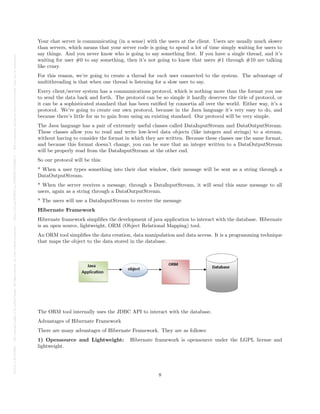
Hibernate Framework
Hibernate framework simplifies the development of java application to interact with the database. Hibernate
is an open source, lightweight, ORM (Object Relational Mapping) tool.
An ORM tool simplifies the data creation, data manipulation and data access. It is a programming technique
that maps the object to the data stored in the database.
The ORM tool internally uses the JDBC API to interact with the database.
Advantages of Hibernate Framework
There are many advantages of Hibernate Framework. They are as follows:
1) Opensource and Lightweight: Hibernate framework is opensource under the LGPL license and
lightweight.
8
Posted
on
29
Jul
2024
—
The
copyright
holder
is
the
author/funder.
All
rights
reserved.
No
reuse
without
permission.
—
https://doi.org/10.22541/au.172228527.74316529/v1
—
This
is
a
preprint
and
has
not
been
peer-reviewed.
Data
may
be
preliminary.
2) Fast performance: The performance of hibernate framework is fast because cache is internally used
in hibernate framework. There are two types of cache in hibernate framework first level cache and second
level cache. First level cache is enabled bydefault.
3) Database Independent query: HQL (Hibernate Query Language) is the object-oriented version of
SQL. It generates the database independent queries. So you don’t need to write database specific queries.
Before Hibernate, If database is changed for the project, we need to change the SQL query as well that leads
to the maintenance problem.
4) Automatic table creation: Hibernate framework provides the facility to create the tables of the
database automatically. So there is no need to create tables in the database manually.
5) Simplifies complex join: To fetch data form multiple tables is easy in hibernate framework.
6) Provides query statistics and database status: Hibernate supports Query cache and provide
statistics about query and database status.
System Analysis
Analyzing the system is very important process. For this purpose there are various tools available in the
market that can be used. The most popular and commonly used tools for data are Data Flow Diagram
(DFD), class diagrams and sequence diagram. The main points to be discussed in system analysis are:
* Specification of what the new system is to accomplish based on the user requirements.
* Functional hierarchy is showing the functions to be performed by the new system and their relationship
with each other.
Requirement Collection
Requirements collection is a necessary part of our project. Understanding completely what a project will
transport is critical to its accomplishment. This may look very easy but common it is needed attention
to this area. Many projects start with the barest headline and list of requirements, only to find later the
problem not been properly understood. The contents of the statement of requirements should be stable or
change relatively slowly. Once we have created our statement of requirements, ensure the user and all others
understand that this and only this will be delivered.
Finally, ensure we have cross-referenced the requirements in the statement of requirements with those in the
project definition report to ensure there is no mismatch.
Interview outline
Interviewing is one of the primary ways to gather information about an information system and a good
system analyst must be good at interviewing therefore no project can be conducted without interviewing.
Some Q & A of interview with users
Q1. What do you know about the chatting system?
I know it is an informal way of communication
Q2. What are the things that you like to see on the chatting system?
I would like to see a chatting system that is stable and fast
Q3. Is the chatting system between students and staff useful?
Yes it could be very useful if staff will allocate time for it just like office hours
Q4. What would you prefer, the traditional communication or the chatting system?
9
Posted
on
29
Jul
2024
—
The
copyright
holder
is
the
author/funder.
All
rights
reserved.
No
reuse
without
permission.
—
https://doi.org/10.22541/au.172228527.74316529/v1
—
This
is
a
preprint
and
has
not
been
peer-reviewed.
Data
may
be
preliminary.
Traditional communication is more formal but chatting system is preferred because it is fast and very
convenient
System Service Request
For this project a System Service Request (SSR) was submitted to develop a software system that request
to search the information into the database.
A Service Request is characterized by the fact that the change can be made under strict, well-defined
procedural control and is therefore (virtually) risk-free. Providing access to services for a new member of
staff and relocating PCs are two typical examples.
A service is provided by the System to its user.
Requirement Studied
When setting a chatting system, many requirements come to mind. These requirements can be divided into
several groups according to their importance:
* Requirements hard (if you break one of these, then an agenda is not applicable):
- Server must be able to manage multiple users at the same time.
- Username through registration must be unique.
- Any registered user will be able to enter the chatting system using own unique username and password.
Once he is in, he will have a list of users who are online and also the list of people he has the conversations
before.
Flow chart
A data flow shows the flow of information from its source to its destination.
* Server Flow chart description
Through flow charts following we will divide operations into three sections
1. Server Listener: This step on the part of the server, which makes him the ability to send and receive data
to clients through a joint Port.
2. Client connection: This step on the part of clients, participants in the send and receive from the server.
3. Services: Which operations are allowed to do during the exchange of data between clients through the
server.
1. Server Listener: Begins the following figure, Configuration the name and port which are common
through sending and receiving data from both sides of the clients. When firing this port the server to
become be able on pass data whether the send and transferred on both sides. It is then the server needs to
array stores the quantity of data coming from clients.
2 . Client Connect
The following figure illustrates of client side for connection on the server of it is needs the name and port
of server, through which can send or receive data from the client side through this server but it will require
accept from server side.
else
yes
Figure: illustrates the client connect of the system.
3 . The Services
10
Posted
on
29
Jul
2024
—
The
copyright
holder
is
the
author/funder.
All
rights
reserved.
No
reuse
without
permission.
—
https://doi.org/10.22541/au.172228527.74316529/v1
—
This
is
a
preprint
and
has
not
been
peer-reviewed.
Data
may
be
preliminary.
Third part where the service is performed by server to receive and send data, and so server can transfer data
on both, needs to fire so called socket. It is a program records the client information sender and receiver
and required data between. And fire the server new socket for each client its private socket continues with
him until end the session.
repeat
Go to preparation
Fig: Illustrates services
System Design
Our project depends on socket concept where is a software endpoint that establishes bidirectional communi-
cation between a server program and one or more client programs. The socket associates the server program
with a specific hardware port on the machine where it runs so any client program anywhere in the network
with a socket associated with that same port can communicate with the server program.
A server program typically provides resources to a network of client programs.
Client programs send requests to the server program, and the server program responds to the request.
One way to handle requests from more than one client is to make the server program multi-threaded. A
multi-threaded server creates a thread for each communication it accepts from a client. A thread is a sequence
of instructions that run independently of the program and of any other threads.
Using threads, a multi-threaded server program can accept a connection from a client, start a thread for
that communication, and continue listening for requests from other clients.
System Models & UML
Use cases and Use case diagram:
Use case name: login
Goal: Authenticate user
Precondition: system is ready
Post condition: User is logged in
Actor: User
Triggering Event: User requests to login
Description:
User supplies user name and password
If the user name and password valid, i.e., the user name and corresponding password are verified in database
and if they exist then user is validated, the User is logged in.
Alternatives
User name is not valid: Retry getting user name up to two times, then report failure ,Record error and wait
one minute before allowing next login
Password is not valid: Retry getting password up to two times, then report failure, record error and wait
one minute before allowing next login
Use case name: Send message
Goal: to send message to other user
11
Posted
on
29
Jul
2024
—
The
copyright
holder
is
the
author/funder.
All
rights
reserved.
No
reuse
without
permission.
—
https://doi.org/10.22541/au.172228527.74316529/v1
—
This
is
a
preprint
and
has
not
been
peer-reviewed.
Data
may
be
preliminary.
Precondition: user logged in
Post condition: message sent
Actor: user
Triggering Event: user types message
Description:
User selects a contact and types the message to be sent and hits send button, so that the message is send to
the corresponding recipient via server
Suppose if the sender is online the message is delivered else it is stored in the server and is delivered when
the user comes online .The time and date of message is also stored along with the message
Alternatives:
Suppose if the server is down ,the message is undelivered, the client resends the message after certain
timeout(say 10 seconds) and it continues until certain cutout(say 120 seconds)
If the client fails to send message after certain cutout it stops sending and stays idle.
Use case name : view received message
Goal: to notify the user from whom the message has been received
Precondition: user logged in
Post condition: message is read
Actor: user
Triggering Event: new message arrival is show in the inbox area
Description:
When the user logs in the message which he has received are shown in the inbox area, where he can choose
a contact and view the received message.
Use case name : Add user
Goal: to Add a user to chat application
Precondition: system is ready
Post condition: user is Added /registered for chat application
Actor: user
Triggering Event: when user selects register option in LOGIN form
Description:
Initially the user has to be registered to start using chat application, i.e., to add a new user to the chat
application.
Whenever the user selects register option in the login form, a new window will be opened and the details
such as First name, Last name, phone, email etc., are acquired by the system and checks weather any user
with the same name is already present and if present it notifies the user to use another username.
Use case name : delete user
Goal: to remove user from chat application
Precondition: system is ready
12
Posted
on
29
Jul
2024
—
The
copyright
holder
is
the
author/funder.
All
rights
reserved.
No
reuse
without
permission.
—
https://doi.org/10.22541/au.172228527.74316529/v1
—
This
is
a
preprint
and
has
not
been
peer-reviewed.
Data
may
be
preliminary.
Post condition: user is removed from chat application
Actor: user
Triggering Event: by clicking delete account button present on chat window
Description:
When the user logs in and if the user wants to delete his account i.e., He /she doesn’t want to continue to
be in chat application he / she can choose delete account option available in the options window of User’s
chat window.
Use case name : Update user details
Goal: to update user details of registered user
Precondition: user is logged in
Post condition: user details are updated
Actor: user
Triggering Event: by clicking update option present in option window of chat window
Description:
1. When the user logs in and if the user wants to update his/her details, he/she can choose the update
option available in option window present in user’s chat window.
2. Once he/she selects the update option it requests to enter the password again and on successful entry
it opens the update form.
3. After updating the details the user has to click update button to update his/her details.
Use case name : Logout
Goal: to close the Application
Precondition: client logged in
Post condition: application is closed
Actor: user
Triggering Event: by clicking logout button present on chat window
Description:
When the user logs in and if the user wants to logout from his account i.e., He /she doesn’t want to continue
to be in chat application he / she can choose logout option available in the options window of User’s chat
window.
Sequence Diagrams:
Authenticate the user to be successful and to establish a session, the client must follow a plan to negotiate
security can involve one or more round trips of the request and response. In each round trip, the server
and client security codes exchange. Exchanging security codes will continue until either the client or the
server determines that the authentication has failed or both sides decide that authentication is complete. If
authentication fails, then the client connection drops, and refers to an error. If authentication is successful,
then it can be ascertained from the application of a protocol to the identity of the participants as much
support authentication protocol can accomplish.
In the graph that follows the sequence, with requests for shares straight line stands for requests that the
client must send. Requests with the dotted line arrows stand for client requests may be sent. Server must
respond to each client’s request that you receive.
13
Posted
on
29
Jul
2024
—
The
copyright
holder
is
the
author/funder.
All
rights
reserved.
No
reuse
without
permission.
—
https://doi.org/10.22541/au.172228527.74316529/v1
—
This
is
a
preprint
and
has
not
been
peer-reviewed.
Data
may
be
preliminary.
The diagram illustrates the sequence of events during protocol negotiation and session establishment process.
After the completion of the initial exchange of commands, you should not be repeated through the exchange
of contact itself, otherwise the client server cut off by closing the underlying transport connection.
Must use the parameters returned in the response when creating new groups during the same connection.
Fig 1: Sequence Scenario for client login
Fig 2: sequence Scenario for User registration
Fig 3: sequence Scenario for send message
Fig 4: sequence Scenario for log out
Reference
Acharya, Kamal. ”STUDENT INFORMATION MANAGEMENT
SYSTEM.” Authorea Preprints (2023).
Acharya, Kamal. ”Library Management System.” Available at SSRN4807104 (2019).
ACHARYA, KAMAL, et al. ”LIBRARY MANAGEMENT SYSTEM.” (2019).
Acharya, Kamal. ”Online bus reservation system project report.” Authorea
Preprints (2024).
Acharya, Kamal. ”Online bus reservation system project report.” (2024).
Acharya, Kamal. “Online Bus Reservation System.” SSRN ElectroNIC ASIA
Journal (2024): n. pag.
Acharya, Kamal. “Student Information Management System Project.” SSRN
ElectroNIC ASIA Journal (2024): n. pag.
Acharya, Kamal. “ATTENDANCE MANAGEMENT SYSTEM.” International
Research Journal of Modernization in Engineering Technology and
Science (2023): n. pag.
Acharya, Kamal. “College Information Management System.” SSRN ElectroNIC
ASIA Journal (2024): n. pag.
Acharya, Kamal, Attendance Management System Project (April 28, 2024).
Available at
SSRN: https://ssrn.com/abstract=4810251 or http://dx.doi.org/10.2139/ssrn.4810251
Acharya, Kamal, Online Food Order System (May 2, 2024). Available at
SSRN: https://ssrn.com/abstract=4814732 or http://dx.doi.org/10.2139/ssrn.4814732
Acharya, Kamal, University management system project. (May 1, 2024). Availableat
SSRN: https://ssrn.com/abstract=4814103 or http://dx.doi.org/10.2139/ssrn.4814103
Acharya, Kamal, Online banking management system. (May 1, 2024). Available at
SSRN: https://ssrn.com/abstract=4813597 or http://dx.doi.org/10.2139/ssrn.4813597
14
Posted
on
29
Jul
2024
—
The
copyright
holder
is
the
author/funder.
All
rights
reserved.
No
reuse
without
permission.
—
https://doi.org/10.22541/au.172228527.74316529/v1
—
This
is
a
preprint
and
has
not
been
peer-reviewed.
Data
may
be
preliminary.
Acharya, Kamal, Online Job Portal Management System (May 5, 2024). Available at
SSRN: https://ssrn.com/abstract=4817534 or http://dx.doi.org/10.2139/ssrn.4817534
Acharya, Kamal, Employee leave management system. (May 7, 2024). Available
at SSRN: https://ssrn.com/abstract=4819626 or http://dx.doi.org/10.2139/ssrn.4819626
Acharya, Kamal, Online electricity billing project report. (May 7, 2024). Available at
SSRN: https://ssrn.com/abstract=4819630 or http://dx.doi.org/10.2139/ssrn.4819630
Acharya, Kamal, POLICY MANAGEMENT SYSTEM PROJECT REPORT. (December 10, 2023). Avail-
able at SSRN: https://ssrn.com/abstract=4831694 or http://dx.doi.org/10.2139/ssrn.4831694
Acharya, Kamal, Online job placement system project report. (January 10, 2023). Available at
SSRN: https://ssrn.com/abstract=4831638 or http://dx.doi.org/10.2139/ssrn.4831638
Acharya, Kamal, Software testing for project report. (May 16, 2023). Available at
SSRN: https://ssrn.com/abstract=4831028 or http://dx.doi.org/10.2139/ssrn.4831028
Acharya, Kamal, ONLINE CRIME REPORTING SYSTEM PROJECT. (August 10, 2022). Available at
SSRN: https://ssrn.com/abstract=4831015 or http://dx.doi.org/10.2139/ssrn.4831015
Acharya, Kamal, Burber ordering system project report. (October 10, 2022). Available at
SSRN: https://ssrn.com/abstract=4832704 or http://dx.doi.org/10.2139/ssrn.4832704
Acharya, Kamal, Teachers Record Management System Project Report (December 10, 2023). Available at
SSRN: https://ssrn.com/abstract=4833821 or http://dx.doi.org/10.2139/ssrn.4833821
Acharya, Kamal, Dairy Management System Project Report (December 20, 2020). Available at
SSRN: https://ssrn.com/abstract=4835231 or http://dx.doi.org/10.2139/ssrn.4835231
Acharya, Kamal, Electrical Shop Management System Project (December 10, 2019). Available at
SSRN: https://ssrn.com/abstract=4835238 or http://dx.doi.org/10.2139/ssrn.4835238
Acharya, Kamal, Online book store management system project report. (Febuary 10, 2020). Available at
SSRN: https://ssrn.com/abstract=4835277 or http://dx.doi.org/10.2139/ssrn.4835277
Acharya, Kamal, Paint shop management system project report. (January 10, 2019). Available at
SSRN: https://ssrn.com/abstract=4835441 or http://dx.doi.org/10.2139/ssrn.4835441
Acharya, Kamal, Supermarket billing system project report. (August 10, 2021). Available at
SSRN: https://ssrn.com/abstract=4835474 or http://dx.doi.org/10.2139/ssrn.4835474
Acharya, Kamal, Online texi booking system project report. (March 10, 2022). Available at
SSRN: https://ssrn.com/abstract=4837729 or http://dx.doi.org/10.2139/ssrn.4837729
Acharya, Kamal, Online car servicing system project report. (March 10, 2023). Available at
SSRN: https://ssrn.com/abstract=4837832 or http://dx.doi.org/10.2139/ssrn.4837832
Acharya, Kamal, School management system project report. (July 10, 2021). Available at
SSRN: https://ssrn.com/abstract=4837837 or http://dx.doi.org/10.2139/ssrn.4837837
Acharya, Kamal, Furniture Showroom Management System Project Report (March 21, 2021). Available at
SSRN: https://ssrn.com/abstract=4839422 or http://dx.doi.org/10.2139/ssrn.4839422
Acharya, Kamal, Online Vehicle Rental System Project Report (March 21, 2019). Available at
SSRN: https://ssrn.com/abstract=4839429 or http://dx.doi.org/10.2139/ssrn.4839429
15

Chat application throught client server project report.pdf

  • 1.
    Posted on 29 Jul 2024 — The copyright holder is the author/funder. All rights reserved. No reuse without permission. — https://doi.org/10.22541/au.172228527.74316529/v1 — This is a preprint and has not been peer-reviewed. Data may be preliminary. CHAT APPLICATION THROUGHCLIENT SERVER MANAGEMENT SYSTEM PROJECT. Kamal Acharya1 1 Affiliation not available July 29, 2024 AN INTERNSHIP REPORT ON CHAT APPLICATION THROUGH CLIENT SERVER MANAGEMENT SYSTEM PROJECT BY KAMAL ACHARYA (Tribhuvan University) Date: 2023/06/25 ABSTRACT This project focused on creating a chatting application with communication environment. The objective of our project is to build a chatting system to facilitate the communication between two or more clients to obtain an effective channel among the clients themselves. For the application itself, this system can serve as a link to reach out for all clients. The design of the system depends on socket concept where is a software endpoint that establishes bidirectional communication between a server program and one or more client programs. Languages that will be used for the development of this system: Java Development Kit (JDK): is a development environment for building applications and components using the Java programming language. The database system we used is MySQL Chapter 1 Introduction Important applications in our lives now, with widespread use of the Internet is the chat, because of the use in many sectors, scientific, educational, training, and social networking. To understand the idea of the chat, you must understand two main concepts in the work Chatting: 1. Client-server computing or networking 2. Socket Client-server computing or networking is a distributed application architecture that partitions tasks or workloads between service providers (servers) and service requesters, called clients. Often clients and servers operate over a computer network on separate hardware. A server is a high-performance host that is a registering unit and shares its resources with clients. A client does not share any of its resources, but 1
  • 2.
    Posted on 29 Jul 2024 — The copyright holder is the author/funder. All rights reserved. No reuse without permission. — https://doi.org/10.22541/au.172228527.74316529/v1 — This is a preprint and has not been peer-reviewed. Data may be preliminary. requests a server’scontent or service function. Clients therefore initiate communication sessions with servers which await (listen to) incoming requests. Socket is an IP & port Number, where if it gives you two can be called the socket. Because the availability of IP and port can contact the remote. That is when there is a server and client must be socket programming (software) communicate using IP & Port number .The programming of those applications is the type of programming is called Socket Programming General Description 2.1 Main goal The chat application provides a platform for the clients/users to communicate with the other users and it gives a good user interface. 2.2 General capabilities Clients have a simple machines on the desktop with which they access remote data and that data is stored on powerful computers called servers. This whole arrangement is called client-server model. In this client-server model two process are involved, one on the client machine and one on the server machine. Communication takes the form of the client process sending a message over the network to the server process, the client process then waits for the reply message. When the server process gets the request it performs the requested work or looks up the requested data and sends back a reply. Hosted file image1.emf available at https://authorea.com/users/454994/articles/1211917-chat-application- through-client-server-management-system-project 2
  • 3.
    Posted on 29 Jul 2024 — The copyright holder is the author/funder. All rights reserved. No reuse without permission. — https://doi.org/10.22541/au.172228527.74316529/v1 — This is a preprint and has not been peer-reviewed. Data may be preliminary. Suppose if client1wants to communicate (send message) to client2, 1. It creates the message and saves locally. 2. This message is then sent to the server, on reception the server sends an acknowledgement 3. When the client1 receives the acknowledgement from server it removes the local copy. 4. If the server is down, it tries to resend the message after a certaintimeout . 5. It tries to send the message until a certain cutout time is reached. 6. Finally if it fails to send the message it will be idle state’ Project Scope This project can be mainly divided into two modules: 1. Server 2. Client This project is mainly depended on client/server model. The client requests the server and server responses by granting the clients request. The proposed system should provide both of the above features along with the followed ones: SERVER: The server should be able to perform the following features: The first and foremost problem is to find the server. We should identify the program in the server which processes the client’s request. Creating of private room with the password facility to enable private chats with the users online. The server is always waiting for clients requests .The clients come and go down but the server remains the same. CLIENT: The client should be able to perform the following features: Should be able to send message to anybody in the room with clients unique chat name created in the server for chatting purpose. Should be provided with the drawing tools like free hand, rectangle, oval , line and 3
  • 4.
    Posted on 29 Jul 2024 — The copyright holder is the author/funder. All rights reserved. No reuse without permission. — https://doi.org/10.22541/au.172228527.74316529/v1 — This is a preprint and has not been peer-reviewed. Data may be preliminary. also sending textmessage over the room. In all the network applications, we find two sort program where the first i.e., server sends the information and the second i.e., client receives the information. The model used for this project is the single server – multiple client models. The following specifications must be implemented: 1. The server and client are two separate programs. 2. Multiple clients must be able to connect to a single server. 3. All input and output is via I/O Interface (GUI is required) 4. Client: * Client must be able to choose a name on connection. * Client must show when another client connects or disconnects with the server. * Client must be able to send messages to the server before arriving in other client. * Client must be able to receive messages while writing. * Client must be able to print out any messages received from the server. 5. Server: * Server must be able to print information in the event of the following cases: (connect, disconnect, send and receive messages). * The server does not allow for more than one client to get the same name. * Server must be able to return messages again to all clients (including source). * Client connected and disconnected with the server does not crash the server. System Requirement The system requirement can be classified into two categories: 1. Hardware Requirement 2. Software Requirement Hardware Requirement: 1. CPU 4 processor or higher. 2. Memory 2 GB or higher. 3. Hard disk 160 GB or higher. 4. Windows operating system. Software Requirement: The system will be created using Java-Netbeans and MySQL.The reason for using Java as the main program- ming language is databases and Java has some good API’s (such as JDBC) to handle database connectivity. Also, Java is an object orientated language which will make it easier for him to create separate interfaces for each layer and prototype in his design which will mean they do not explicitly rely on each other. MySQL: It is a database system used on the web. Basically, a MySQL database allows creating a relational database structure on a web-server somewhere in order to store data or automate procedures. Java Features: 4
  • 5.
    Posted on 29 Jul 2024 — The copyright holder is the author/funder. All rights reserved. No reuse without permission. — https://doi.org/10.22541/au.172228527.74316529/v1 — This is a preprint and has not been peer-reviewed. Data may be preliminary. 1. Platform Independent:The Write-Once-Run-Anywhere ideal has not been achieved (tuning for different platforms usually required), but closer than with other languages. 2. Object Oriented: Java is object oriented throughout i.e. there is no coding outside of class definitions, including main(). There is an extensive class library available in the core language packages. 3. Robust: Exception handling built-in, strong type checking (that is, all data must be declared an explicit type), local variables must be initialized. 4. Automatic Memory Management: Automatic garbage collection - memory management handled by JVM 5. Security: ??No memory pointers. ??Programs run inside the virtual machine sandbox. ??Array index limit checking 6. Good Performance: Interpretation of byte codes slowed performance in early versions, but advanced virtual machines with adaptive and just-in-time compilation and other techniques now typically provide performance up to 50% to 100% the speed of C++ programs. 7. Dynamic Binding: The linking of data and methods to where they are located is done at run-time. 8. Threading: Lightweight processes, called threads, can easily be spun off to perform multiprocessing. 9. Built-in Networking: Java was designed with networking in mind and comes with many classes to develop sophisticated Internet communications. Java Environment: Java environment includes large number of development tools and hundreds of classes and methods. The development tools are part of the system known as Java Development Kit (JDK)and the classes and methods are part of the Java Standard Library (JSL), also known as the Application Programming Interface (API) Methodology (SDLC) The Systems Development Life Cycle (SDLC): Like Nitrogen & Production cycle ± a Software system is just like a cycle which passes the following stages like: 1. Planning phase. 2. Analysis phase. 3. Design phase. 4. Development phase. 5. Testing Phase. 6. Implementation & Maintenance phase. The planning phase: It is the process is to understand why should the system should be built and determine its requirements. It also includes a feasibility study from the different perspectives and the technical and economic, and feasibility aspects of the organization. Through our project, has been studying technical requirements of project from hardware and software. The analysis phase: 5
  • 6.
    Posted on 29 Jul 2024 — The copyright holder is the author/funder. All rights reserved. No reuse without permission. — https://doi.org/10.22541/au.172228527.74316529/v1 — This is a preprint and has not been peer-reviewed. Data may be preliminary. This phase includesactivities such determine and analysis problems, and even forecasting potential problems that may arise in future with regard the system. The deliverables / products of this phase will drive how the system will be built and guide the developers’ works.The basic requirements for this project can be decided according to the needs of the users who will use this application. Some basic requirements have been listed here: * Access to the project should be protected from unauthorized users. So, any attempt to access the project must go through some login process. * The project must provide user interfaces to create a new user and to get Login. * The project must provide an interface having a list of members of Instant Chat. The application must also show the online or offline status of the existing users. The design phase: It is the most creative and challenging phase of system development. It deals with converting input into output. It contains output design, input design, file or database design and processing design. The development phase: The development phase involves writing the source code based on the required functionality adhering the coding standards, code optimization, etc. It takes its primary input from the design elements described in the software design phase. The development of this project involves creating windows forms, class files, and user controls in Java . The code files are covering: connecting to Mysql Server database, sending requests lo the server and responses to the clients, executing queries. firing trigger, filtering data, and reflecting changes in a database. The Testing Phase: After the designing and developing phases, the application is tested for any logical flaws and functionality of all operations. The project is also tested lo ensure that all methods and modules designed and developed are functioning properly, along with the navigation links provided in all the user interfaces, finally, the project is tested to ensure that all the requirements listed during the requirements analysis phase are being fulfilled. The Implementation and Maintenance Phase: Finally, the project Is Implemented In a distributed environment, where it is used by users logged In from different computer nodes on a network. The project is maintained thereafter if any requests for changes are forwarded by the users. What is a connection-oriented server? Generally speaking, the job of any server is to provide a centralized service. However, there are many different ways of providing services, and many different ways to structure the communications. Chat is roughly described as a connection-oriented service, because a user establishes a connection and maintains that connection, sending and receiving text for the duration of the session. This is in contrast to the Web, where the protocol is (at least in theory) transactional – the browser asks for a page, and the server sends it; the connection is then closed. (In practice, the connection is kept open and reused, but this is more a speed-optimization than a structuring metaphor.) We’ll be creating a stripped-down, connection-oriented server. Learning the basic framework will help you a great deal in creating other connection-oriented servers in the future. What does the server do? Before we describe the Listener class, we’ll describe the server. Doing so has a certain chronological elegance, because in our running system, the server will have to start before any of the clients can connect to it. 6
  • 7.
    Posted on 29 Jul 2024 — The copyright holder is the author/funder. All rights reserved. No reuse without permission. — https://doi.org/10.22541/au.172228527.74316529/v1 — This is a preprint and has not been peer-reviewed. Data may be preliminary. Our server willbe a stand-alone program – a single Java process running on its own machine. It won’t require any support software other than a Java virtual machine. And it won’t require a Web server or application server, although a Web server or application server will likely be used to serve the client applet to the client. More advanced server systems often embed the server code within a larger framework. This framework might be used to supply features such as load-balancing, special libraries for handling large numbers of clients, process migration, and database services. However, our example is going to stand all by itself. It will take care of all networking responsibilities on its own. As we’ll see, this isn’t very hard. Listening on a port The first thing we have to do is to get ready to receive incoming connections. To do this, we must listen on a port. A port can be thought of as an address within a single computer. Remember that often a single machine might serve as a Web server, a chat server, an FTP server, and several other kinds of servers at the same time. Because of this, a connection to a server needs to specify not only the address of the machine itself, but also the particular service within the machine. This internal address is a port and is represented by a single integer between 1 and 65535. Many standard services have a dedicated port number. For example, telnet uses port 23, FTP uses ports 20 and 21, and Web servers, by default, use port 80. Since our chat system is not famous (yet), we’re going to have to use one of the port numbers allocated for general use. We’ll use port 4444. This means that our server is going tolisten for connections on port 4444. Our clients, when connecting to our server machine, will specify that they want to connect to port 4444 on our server machine. This way, our clients and our server will be able to talk. Sockets Our communications between client and server will pass through a Java object called a Socket. Sockets are not at all Java-specific; the term is taken directly from the terminology of general IP (Internet Protocol) network programming. In Java programs, a Socket object is simply a wrapper around the low-level sockets that Internet programmers have been using for years. And the abstraction used by the Java language is very clean, so socket programming in the Java language is much more pleasant than it is. The most important thing to know about a Socket object is that it contains (among other things) two Streams. One is for reading data coming in, and the other is for writing data out. That is to say, a Socket has an InputStream and an OutputStream. Two of the Java language’s main strengths are networking and multithreading. That is not to say that other languages don’t support these functions – they do. But the abstractions that the Java language uses to provide these features are particularly elegant, especially for a commercial language. A thread is generally defined as a separate line of control within a single process. What this really means is that a multithreaded program has multiple, semi-autonomous activities going on inside of it at the same time. Multithreading is similar to the concepts of a task and multitasking, except that the multiple threads within a program all share the same data space. This makes it easier for them to share data directly and efficiently – and it also makes it easier for them to mess each other up. Why use multithreading? There are a few reasons why you’d want to use threads in your program, but there is one reason most pertinent to the construction of a chat server: input/output. 7
  • 8.
    Posted on 29 Jul 2024 — The copyright holder is the author/funder. All rights reserved. No reuse without permission. — https://doi.org/10.22541/au.172228527.74316529/v1 — This is a preprint and has not been peer-reviewed. Data may be preliminary. Your chat serveris communicating (in a sense) with the users at the client. Users are usually much slower than servers, which means that your server code is going to spend a lot of time simply waiting for users to say things. And you never know who is going to say something first. If you have a single thread, and it’s waiting for user #0 to say something, then it’s not going to know that users #1 through #10 are talking like crazy. For this reason, we’re going to create a thread for each user connected to the system. The advantage of multithreading is that when one thread is listening for a slow user to say. Every client/server system has a communications protocol, which is nothing more than the format you use to send the data back and forth. The protocol can be so simple it hardly deserves the title of protocol, or it can be a sophisticated standard that has been ratified by consortia all over the world. Either way, it’s a protocol. We’re going to create our own protocol, because in the Java language it’s very easy to do, and because there’s little for us to gain from using an existing standard. Our protocol will be very simple. The Java language has a pair of extremely useful classes called DataInputStream and DataOutputStream. These classes allow you to read and write low-level data objects (like integers and strings) to a stream, without having to consider the format in which they are written. Because these classes use the same format, and because this format doesn’t change, you can be sure that an integer written to a DataOutputStream will be properly read from the DataInputStream at the other end. So our protocol will be this: * When a user types something into their chat window, their message will be sent as a string through a DataOutputStream. * When the server receives a message, through a DataInputStream, it will send this same message to all users, again as a string through a DataOutputStream. * The users will use a DataInputStream to receive the message Hibernate Framework Hibernate framework simplifies the development of java application to interact with the database. Hibernate is an open source, lightweight, ORM (Object Relational Mapping) tool. An ORM tool simplifies the data creation, data manipulation and data access. It is a programming technique that maps the object to the data stored in the database. The ORM tool internally uses the JDBC API to interact with the database. Advantages of Hibernate Framework There are many advantages of Hibernate Framework. They are as follows: 1) Opensource and Lightweight: Hibernate framework is opensource under the LGPL license and lightweight. 8
  • 9.
    Posted on 29 Jul 2024 — The copyright holder is the author/funder. All rights reserved. No reuse without permission. — https://doi.org/10.22541/au.172228527.74316529/v1 — This is a preprint and has not been peer-reviewed. Data may be preliminary. 2) Fast performance:The performance of hibernate framework is fast because cache is internally used in hibernate framework. There are two types of cache in hibernate framework first level cache and second level cache. First level cache is enabled bydefault. 3) Database Independent query: HQL (Hibernate Query Language) is the object-oriented version of SQL. It generates the database independent queries. So you don’t need to write database specific queries. Before Hibernate, If database is changed for the project, we need to change the SQL query as well that leads to the maintenance problem. 4) Automatic table creation: Hibernate framework provides the facility to create the tables of the database automatically. So there is no need to create tables in the database manually. 5) Simplifies complex join: To fetch data form multiple tables is easy in hibernate framework. 6) Provides query statistics and database status: Hibernate supports Query cache and provide statistics about query and database status. System Analysis Analyzing the system is very important process. For this purpose there are various tools available in the market that can be used. The most popular and commonly used tools for data are Data Flow Diagram (DFD), class diagrams and sequence diagram. The main points to be discussed in system analysis are: * Specification of what the new system is to accomplish based on the user requirements. * Functional hierarchy is showing the functions to be performed by the new system and their relationship with each other. Requirement Collection Requirements collection is a necessary part of our project. Understanding completely what a project will transport is critical to its accomplishment. This may look very easy but common it is needed attention to this area. Many projects start with the barest headline and list of requirements, only to find later the problem not been properly understood. The contents of the statement of requirements should be stable or change relatively slowly. Once we have created our statement of requirements, ensure the user and all others understand that this and only this will be delivered. Finally, ensure we have cross-referenced the requirements in the statement of requirements with those in the project definition report to ensure there is no mismatch. Interview outline Interviewing is one of the primary ways to gather information about an information system and a good system analyst must be good at interviewing therefore no project can be conducted without interviewing. Some Q & A of interview with users Q1. What do you know about the chatting system? I know it is an informal way of communication Q2. What are the things that you like to see on the chatting system? I would like to see a chatting system that is stable and fast Q3. Is the chatting system between students and staff useful? Yes it could be very useful if staff will allocate time for it just like office hours Q4. What would you prefer, the traditional communication or the chatting system? 9
  • 10.
    Posted on 29 Jul 2024 — The copyright holder is the author/funder. All rights reserved. No reuse without permission. — https://doi.org/10.22541/au.172228527.74316529/v1 — This is a preprint and has not been peer-reviewed. Data may be preliminary. Traditional communication ismore formal but chatting system is preferred because it is fast and very convenient System Service Request For this project a System Service Request (SSR) was submitted to develop a software system that request to search the information into the database. A Service Request is characterized by the fact that the change can be made under strict, well-defined procedural control and is therefore (virtually) risk-free. Providing access to services for a new member of staff and relocating PCs are two typical examples. A service is provided by the System to its user. Requirement Studied When setting a chatting system, many requirements come to mind. These requirements can be divided into several groups according to their importance: * Requirements hard (if you break one of these, then an agenda is not applicable): - Server must be able to manage multiple users at the same time. - Username through registration must be unique. - Any registered user will be able to enter the chatting system using own unique username and password. Once he is in, he will have a list of users who are online and also the list of people he has the conversations before. Flow chart A data flow shows the flow of information from its source to its destination. * Server Flow chart description Through flow charts following we will divide operations into three sections 1. Server Listener: This step on the part of the server, which makes him the ability to send and receive data to clients through a joint Port. 2. Client connection: This step on the part of clients, participants in the send and receive from the server. 3. Services: Which operations are allowed to do during the exchange of data between clients through the server. 1. Server Listener: Begins the following figure, Configuration the name and port which are common through sending and receiving data from both sides of the clients. When firing this port the server to become be able on pass data whether the send and transferred on both sides. It is then the server needs to array stores the quantity of data coming from clients. 2 . Client Connect The following figure illustrates of client side for connection on the server of it is needs the name and port of server, through which can send or receive data from the client side through this server but it will require accept from server side. else yes Figure: illustrates the client connect of the system. 3 . The Services 10
  • 11.
    Posted on 29 Jul 2024 — The copyright holder is the author/funder. All rights reserved. No reuse without permission. — https://doi.org/10.22541/au.172228527.74316529/v1 — This is a preprint and has not been peer-reviewed. Data may be preliminary. Third part wherethe service is performed by server to receive and send data, and so server can transfer data on both, needs to fire so called socket. It is a program records the client information sender and receiver and required data between. And fire the server new socket for each client its private socket continues with him until end the session. repeat Go to preparation Fig: Illustrates services System Design Our project depends on socket concept where is a software endpoint that establishes bidirectional communi- cation between a server program and one or more client programs. The socket associates the server program with a specific hardware port on the machine where it runs so any client program anywhere in the network with a socket associated with that same port can communicate with the server program. A server program typically provides resources to a network of client programs. Client programs send requests to the server program, and the server program responds to the request. One way to handle requests from more than one client is to make the server program multi-threaded. A multi-threaded server creates a thread for each communication it accepts from a client. A thread is a sequence of instructions that run independently of the program and of any other threads. Using threads, a multi-threaded server program can accept a connection from a client, start a thread for that communication, and continue listening for requests from other clients. System Models & UML Use cases and Use case diagram: Use case name: login Goal: Authenticate user Precondition: system is ready Post condition: User is logged in Actor: User Triggering Event: User requests to login Description: User supplies user name and password If the user name and password valid, i.e., the user name and corresponding password are verified in database and if they exist then user is validated, the User is logged in. Alternatives User name is not valid: Retry getting user name up to two times, then report failure ,Record error and wait one minute before allowing next login Password is not valid: Retry getting password up to two times, then report failure, record error and wait one minute before allowing next login Use case name: Send message Goal: to send message to other user 11
  • 12.
    Posted on 29 Jul 2024 — The copyright holder is the author/funder. All rights reserved. No reuse without permission. — https://doi.org/10.22541/au.172228527.74316529/v1 — This is a preprint and has not been peer-reviewed. Data may be preliminary. Precondition: user loggedin Post condition: message sent Actor: user Triggering Event: user types message Description: User selects a contact and types the message to be sent and hits send button, so that the message is send to the corresponding recipient via server Suppose if the sender is online the message is delivered else it is stored in the server and is delivered when the user comes online .The time and date of message is also stored along with the message Alternatives: Suppose if the server is down ,the message is undelivered, the client resends the message after certain timeout(say 10 seconds) and it continues until certain cutout(say 120 seconds) If the client fails to send message after certain cutout it stops sending and stays idle. Use case name : view received message Goal: to notify the user from whom the message has been received Precondition: user logged in Post condition: message is read Actor: user Triggering Event: new message arrival is show in the inbox area Description: When the user logs in the message which he has received are shown in the inbox area, where he can choose a contact and view the received message. Use case name : Add user Goal: to Add a user to chat application Precondition: system is ready Post condition: user is Added /registered for chat application Actor: user Triggering Event: when user selects register option in LOGIN form Description: Initially the user has to be registered to start using chat application, i.e., to add a new user to the chat application. Whenever the user selects register option in the login form, a new window will be opened and the details such as First name, Last name, phone, email etc., are acquired by the system and checks weather any user with the same name is already present and if present it notifies the user to use another username. Use case name : delete user Goal: to remove user from chat application Precondition: system is ready 12
  • 13.
    Posted on 29 Jul 2024 — The copyright holder is the author/funder. All rights reserved. No reuse without permission. — https://doi.org/10.22541/au.172228527.74316529/v1 — This is a preprint and has not been peer-reviewed. Data may be preliminary. Post condition: useris removed from chat application Actor: user Triggering Event: by clicking delete account button present on chat window Description: When the user logs in and if the user wants to delete his account i.e., He /she doesn’t want to continue to be in chat application he / she can choose delete account option available in the options window of User’s chat window. Use case name : Update user details Goal: to update user details of registered user Precondition: user is logged in Post condition: user details are updated Actor: user Triggering Event: by clicking update option present in option window of chat window Description: 1. When the user logs in and if the user wants to update his/her details, he/she can choose the update option available in option window present in user’s chat window. 2. Once he/she selects the update option it requests to enter the password again and on successful entry it opens the update form. 3. After updating the details the user has to click update button to update his/her details. Use case name : Logout Goal: to close the Application Precondition: client logged in Post condition: application is closed Actor: user Triggering Event: by clicking logout button present on chat window Description: When the user logs in and if the user wants to logout from his account i.e., He /she doesn’t want to continue to be in chat application he / she can choose logout option available in the options window of User’s chat window. Sequence Diagrams: Authenticate the user to be successful and to establish a session, the client must follow a plan to negotiate security can involve one or more round trips of the request and response. In each round trip, the server and client security codes exchange. Exchanging security codes will continue until either the client or the server determines that the authentication has failed or both sides decide that authentication is complete. If authentication fails, then the client connection drops, and refers to an error. If authentication is successful, then it can be ascertained from the application of a protocol to the identity of the participants as much support authentication protocol can accomplish. In the graph that follows the sequence, with requests for shares straight line stands for requests that the client must send. Requests with the dotted line arrows stand for client requests may be sent. Server must respond to each client’s request that you receive. 13
  • 14.
    Posted on 29 Jul 2024 — The copyright holder is the author/funder. All rights reserved. No reuse without permission. — https://doi.org/10.22541/au.172228527.74316529/v1 — This is a preprint and has not been peer-reviewed. Data may be preliminary. The diagram illustratesthe sequence of events during protocol negotiation and session establishment process. After the completion of the initial exchange of commands, you should not be repeated through the exchange of contact itself, otherwise the client server cut off by closing the underlying transport connection. Must use the parameters returned in the response when creating new groups during the same connection. Fig 1: Sequence Scenario for client login Fig 2: sequence Scenario for User registration Fig 3: sequence Scenario for send message Fig 4: sequence Scenario for log out Reference Acharya, Kamal. ”STUDENT INFORMATION MANAGEMENT SYSTEM.” Authorea Preprints (2023). Acharya, Kamal. ”Library Management System.” Available at SSRN4807104 (2019). ACHARYA, KAMAL, et al. ”LIBRARY MANAGEMENT SYSTEM.” (2019). Acharya, Kamal. ”Online bus reservation system project report.” Authorea Preprints (2024). Acharya, Kamal. ”Online bus reservation system project report.” (2024). Acharya, Kamal. “Online Bus Reservation System.” SSRN ElectroNIC ASIA Journal (2024): n. pag. Acharya, Kamal. “Student Information Management System Project.” SSRN ElectroNIC ASIA Journal (2024): n. pag. Acharya, Kamal. “ATTENDANCE MANAGEMENT SYSTEM.” International Research Journal of Modernization in Engineering Technology and Science (2023): n. pag. Acharya, Kamal. “College Information Management System.” SSRN ElectroNIC ASIA Journal (2024): n. pag. Acharya, Kamal, Attendance Management System Project (April 28, 2024). Available at SSRN: https://ssrn.com/abstract=4810251 or http://dx.doi.org/10.2139/ssrn.4810251 Acharya, Kamal, Online Food Order System (May 2, 2024). Available at SSRN: https://ssrn.com/abstract=4814732 or http://dx.doi.org/10.2139/ssrn.4814732 Acharya, Kamal, University management system project. (May 1, 2024). Availableat SSRN: https://ssrn.com/abstract=4814103 or http://dx.doi.org/10.2139/ssrn.4814103 Acharya, Kamal, Online banking management system. (May 1, 2024). Available at SSRN: https://ssrn.com/abstract=4813597 or http://dx.doi.org/10.2139/ssrn.4813597 14
  • 15.
    Posted on 29 Jul 2024 — The copyright holder is the author/funder. All rights reserved. No reuse without permission. — https://doi.org/10.22541/au.172228527.74316529/v1 — This is a preprint and has not been peer-reviewed. Data may be preliminary. Acharya, Kamal, OnlineJob Portal Management System (May 5, 2024). Available at SSRN: https://ssrn.com/abstract=4817534 or http://dx.doi.org/10.2139/ssrn.4817534 Acharya, Kamal, Employee leave management system. (May 7, 2024). Available at SSRN: https://ssrn.com/abstract=4819626 or http://dx.doi.org/10.2139/ssrn.4819626 Acharya, Kamal, Online electricity billing project report. (May 7, 2024). Available at SSRN: https://ssrn.com/abstract=4819630 or http://dx.doi.org/10.2139/ssrn.4819630 Acharya, Kamal, POLICY MANAGEMENT SYSTEM PROJECT REPORT. (December 10, 2023). Avail- able at SSRN: https://ssrn.com/abstract=4831694 or http://dx.doi.org/10.2139/ssrn.4831694 Acharya, Kamal, Online job placement system project report. (January 10, 2023). Available at SSRN: https://ssrn.com/abstract=4831638 or http://dx.doi.org/10.2139/ssrn.4831638 Acharya, Kamal, Software testing for project report. (May 16, 2023). Available at SSRN: https://ssrn.com/abstract=4831028 or http://dx.doi.org/10.2139/ssrn.4831028 Acharya, Kamal, ONLINE CRIME REPORTING SYSTEM PROJECT. (August 10, 2022). Available at SSRN: https://ssrn.com/abstract=4831015 or http://dx.doi.org/10.2139/ssrn.4831015 Acharya, Kamal, Burber ordering system project report. (October 10, 2022). Available at SSRN: https://ssrn.com/abstract=4832704 or http://dx.doi.org/10.2139/ssrn.4832704 Acharya, Kamal, Teachers Record Management System Project Report (December 10, 2023). Available at SSRN: https://ssrn.com/abstract=4833821 or http://dx.doi.org/10.2139/ssrn.4833821 Acharya, Kamal, Dairy Management System Project Report (December 20, 2020). Available at SSRN: https://ssrn.com/abstract=4835231 or http://dx.doi.org/10.2139/ssrn.4835231 Acharya, Kamal, Electrical Shop Management System Project (December 10, 2019). Available at SSRN: https://ssrn.com/abstract=4835238 or http://dx.doi.org/10.2139/ssrn.4835238 Acharya, Kamal, Online book store management system project report. (Febuary 10, 2020). Available at SSRN: https://ssrn.com/abstract=4835277 or http://dx.doi.org/10.2139/ssrn.4835277 Acharya, Kamal, Paint shop management system project report. (January 10, 2019). Available at SSRN: https://ssrn.com/abstract=4835441 or http://dx.doi.org/10.2139/ssrn.4835441 Acharya, Kamal, Supermarket billing system project report. (August 10, 2021). Available at SSRN: https://ssrn.com/abstract=4835474 or http://dx.doi.org/10.2139/ssrn.4835474 Acharya, Kamal, Online texi booking system project report. (March 10, 2022). Available at SSRN: https://ssrn.com/abstract=4837729 or http://dx.doi.org/10.2139/ssrn.4837729 Acharya, Kamal, Online car servicing system project report. (March 10, 2023). Available at SSRN: https://ssrn.com/abstract=4837832 or http://dx.doi.org/10.2139/ssrn.4837832 Acharya, Kamal, School management system project report. (July 10, 2021). Available at SSRN: https://ssrn.com/abstract=4837837 or http://dx.doi.org/10.2139/ssrn.4837837 Acharya, Kamal, Furniture Showroom Management System Project Report (March 21, 2021). Available at SSRN: https://ssrn.com/abstract=4839422 or http://dx.doi.org/10.2139/ssrn.4839422 Acharya, Kamal, Online Vehicle Rental System Project Report (March 21, 2019). Available at SSRN: https://ssrn.com/abstract=4839429 or http://dx.doi.org/10.2139/ssrn.4839429 15