CCNA Security
1
© 2009 Cisco Learning Institute.
Chapter Six
Securing the Local Area Network
Major Concepts
• Describe endpoint vulnerabilities and protection
methods
• Describe basic Catalyst switch vulnerabilities
• Configure and verify switch security features,
2
2
2
© 2009 Cisco Learning Institute.
• Configure and verify switch security features,
including port security and storm control
• Describe the fundamental security
considerations of Wireless, VoIP, and SANs
Lesson Objectives
Upon completion of this lesson, the successful participant
will be able to:
1. Describe endpoint security and the enabling technologies
2. Describe how Cisco IronPort is used to ensure endpoint security
3
3
3
© 2009 Cisco Learning Institute.
3. Describe how Cisco NAC products are used to ensure endpoint
security
4. Describe how the Cisco Security Agent is used to ensure
endpoint security
5. Describe the primary considerations for securing the Layer 2
infrastructure
6. Describe MAC address spoofing attacks and MAC address
spoofing attack mitigation
Lesson Objectives
7. Describe MAC Address table overflow attacks and MAC Address
table overflow attack mitigation
8. Describe STP manipulation attacks and STP manipulation attack
mitigation
9. Describe LAN Storm attacks and LAN Storm attack mitigation
4
4
4
© 2009 Cisco Learning Institute.
10. Describe VLAN attacks and VLAN attack mitigation
11. Describe how to configure port security
12. Describe how to verify port security
13. Describe how to configure and verify BPDU Guard and Root Guard
14. Describe how to configure and verify storm control
15. Describe and configure Cisco SPAN
16. Describe and configure Cisco RSPAN
Lesson Objectives
17. Describe the best practices for Layer 2 security
18. Describe the fundamental aspects of enterprise security for
advanced technologies
19. Describe the fundamental aspects of wireless security and the
enabling technologies
5
5
5
© 2009 Cisco Learning Institute.
20. Describe wireless security solutions
21. Describe the fundamental aspects of VoIP security and the
enabling technologies Reference: CIAG course on VoIP security.
22. Describe VoIP security solutions
23. Describe the fundamental aspects of SAN security and the
enabling technologies
24. Describe SAN security solutions
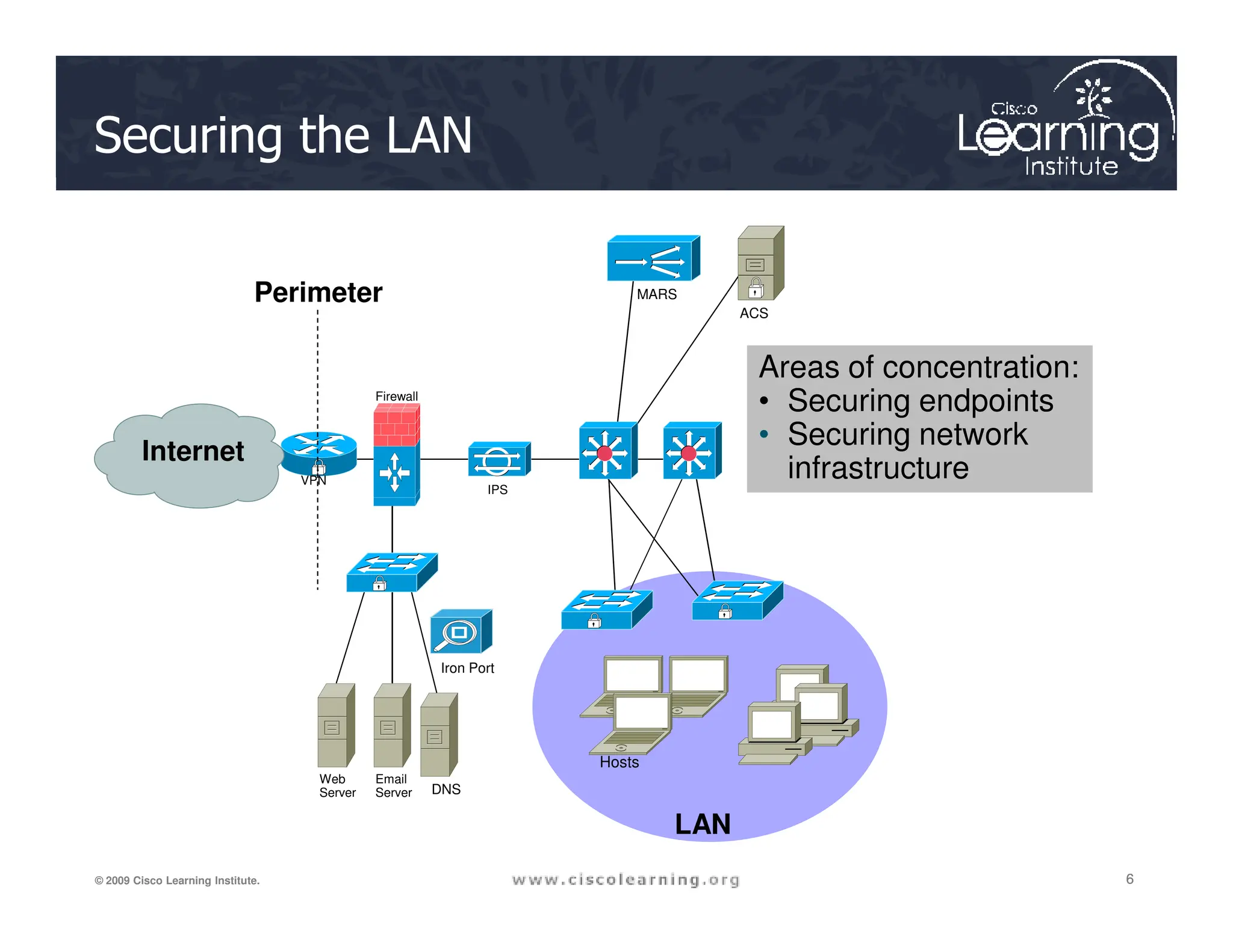
Securing the LAN
MARS
VPN
ACS
Firewall
Perimeter
Internet
Areas of concentration:
• Securing endpoints
• Securing network
infrastructure
6
6
6
© 2009 Cisco Learning Institute.
IPS
VPN
Iron Port
Web
Server
Email
Server DNS
LAN
Hosts
infrastructure
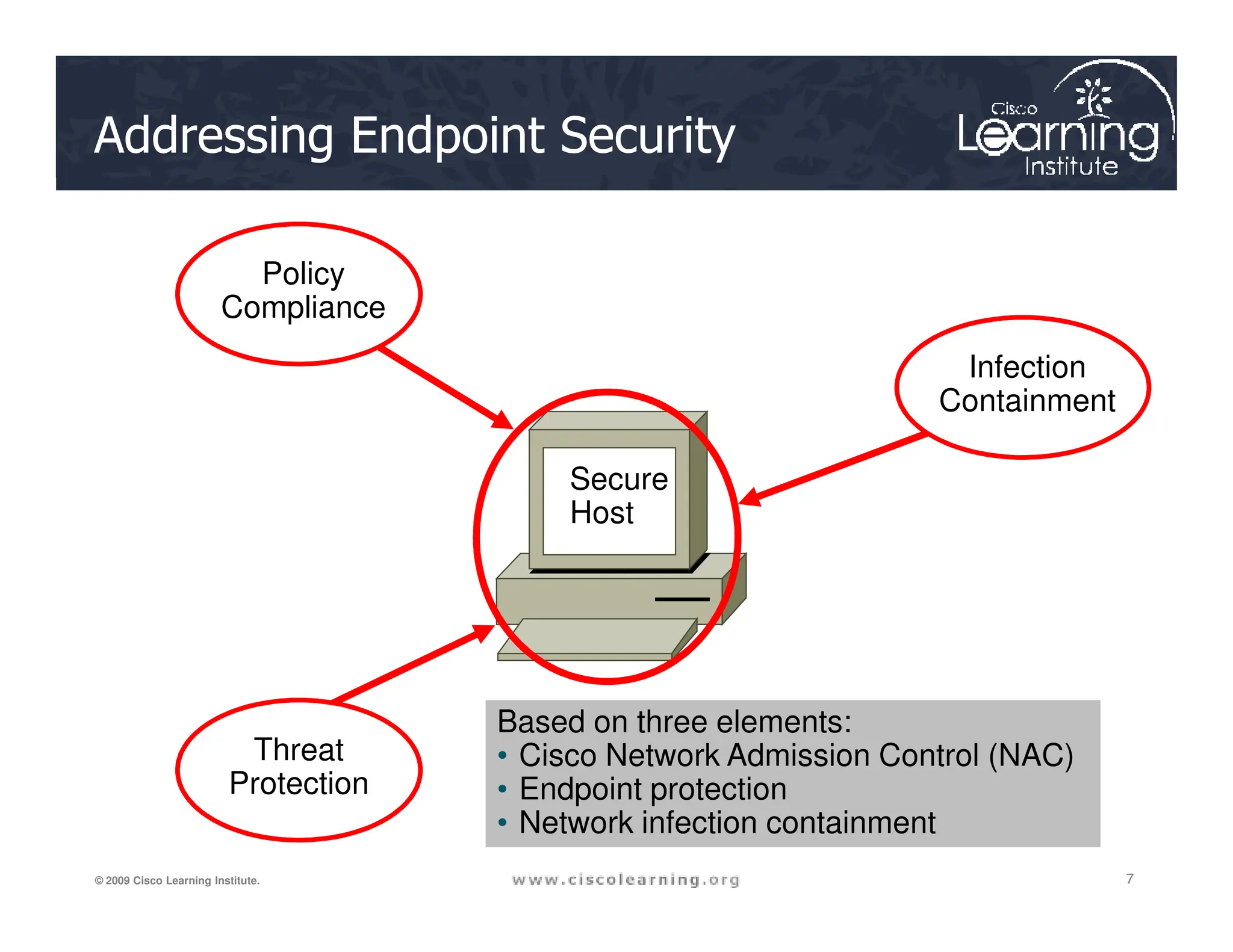
Policy
Compliance
Infection
Containment
Secure
Addressing Endpoint Security
7
7
7
© 2009 Cisco Learning Institute.
Threat
Protection
Secure
Host
Based on three elements:
• Cisco Network Admission Control (NAC)
• Endpoint protection
• Network infection containment
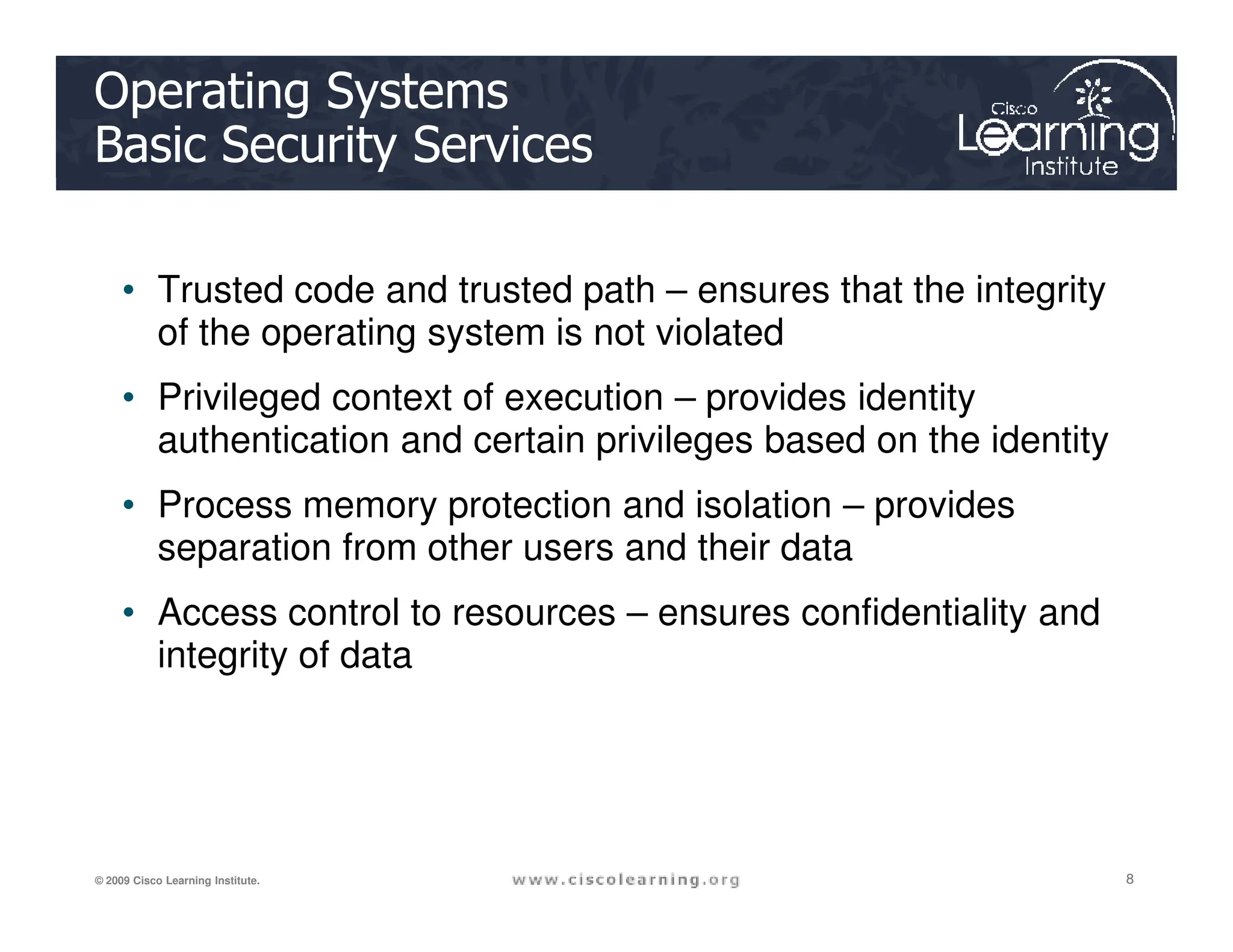
Operating Systems
Basic Security Services
• Trusted code and trusted path – ensures that the integrity
of the operating system is not violated
• Privileged context of execution – provides identity
authentication and certain privileges based on the identity
8
8
8
© 2009 Cisco Learning Institute.
• Process memory protection and isolation – provides
separation from other users and their data
• Access control to resources – ensures confidentiality and
integrity of data
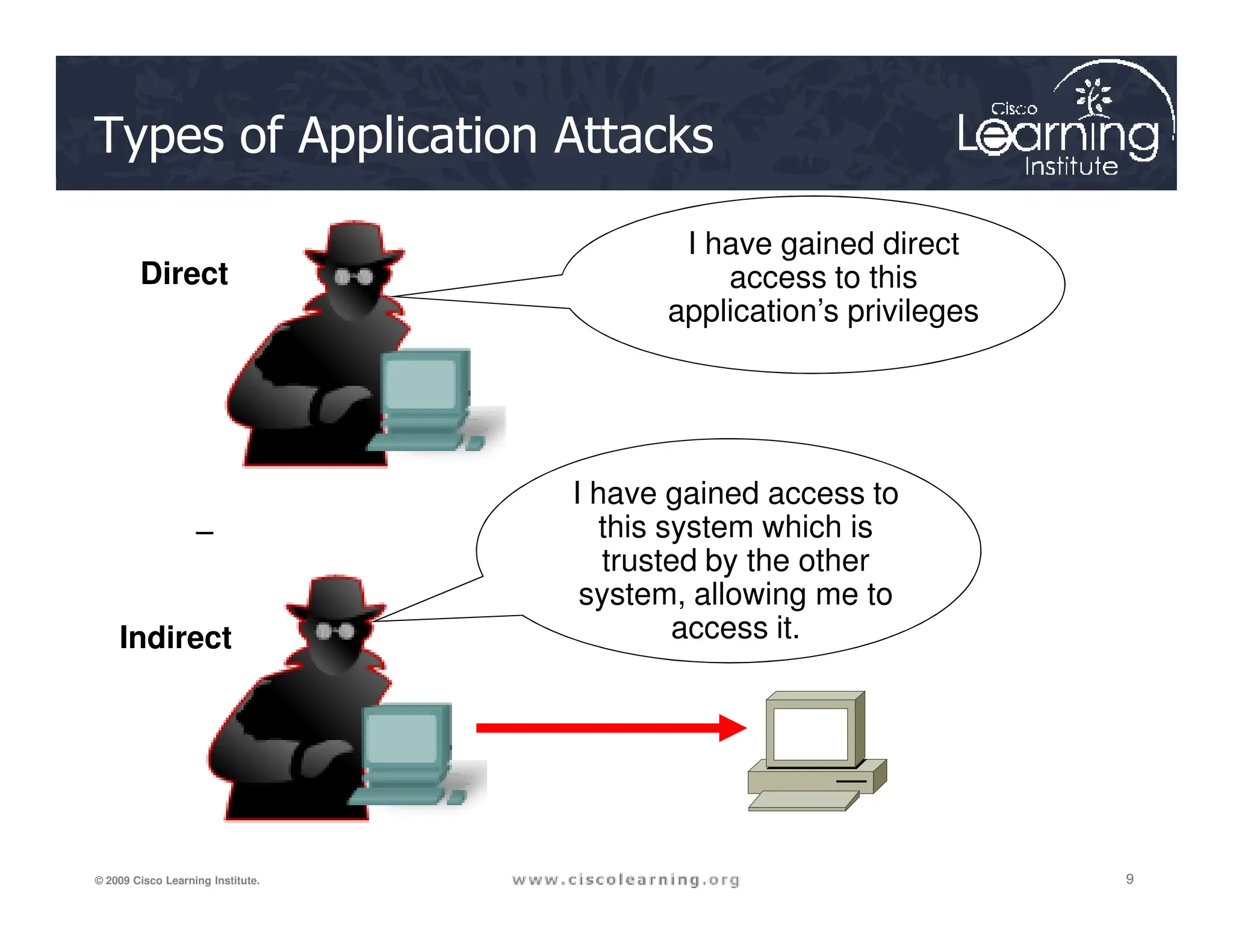
Types of Application Attacks
I have gained direct
access to this
application’s privileges
I have gained access to
Direct
9
9
9
© 2009 Cisco Learning Institute.
I have gained access to
this system which is
trusted by the other
system, allowing me to
access it.
Indirect
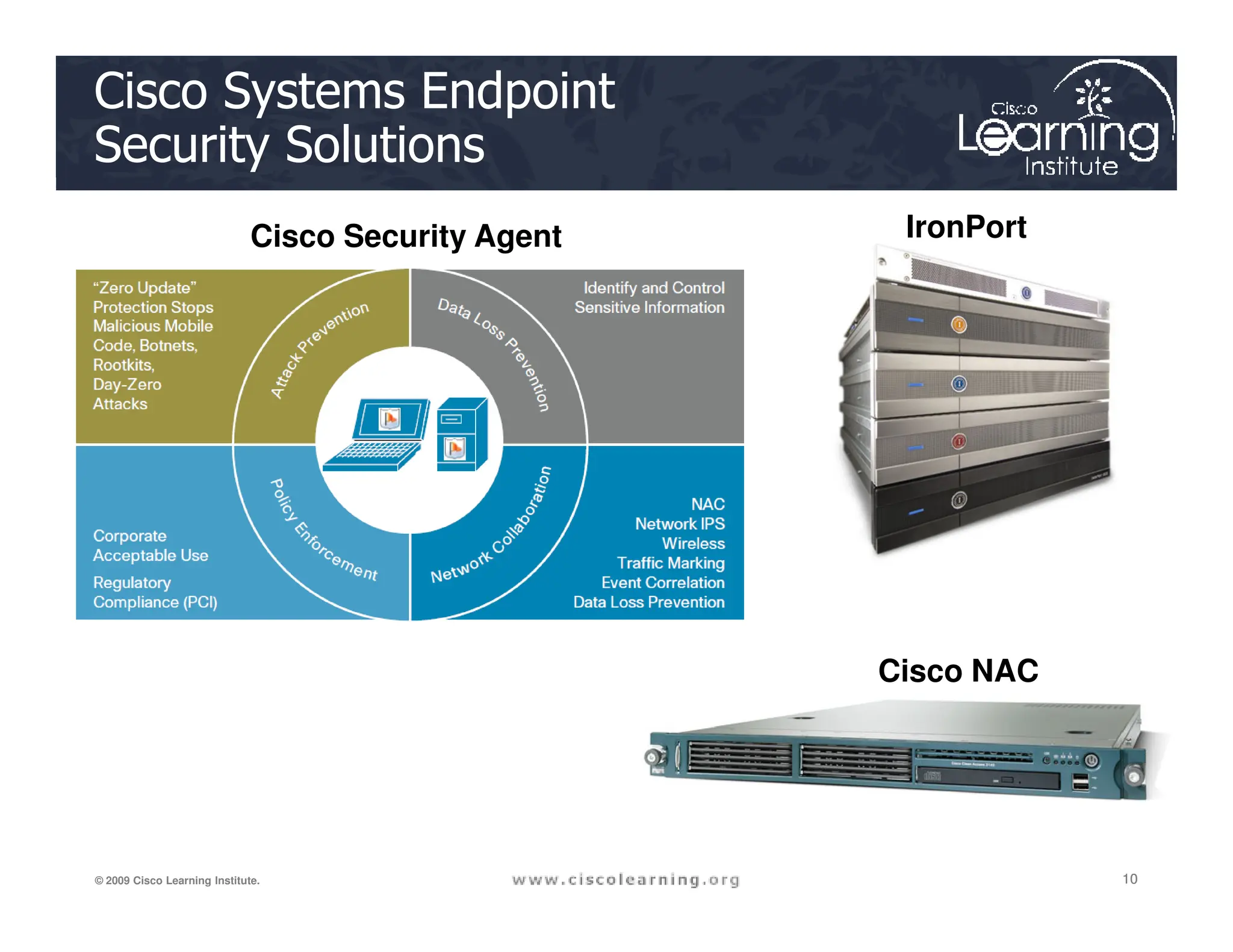
Cisco Systems Endpoint
Security Solutions
IronPort
Cisco Security Agent
10
10
10
© 2009 Cisco Learning Institute.
Cisco NAC
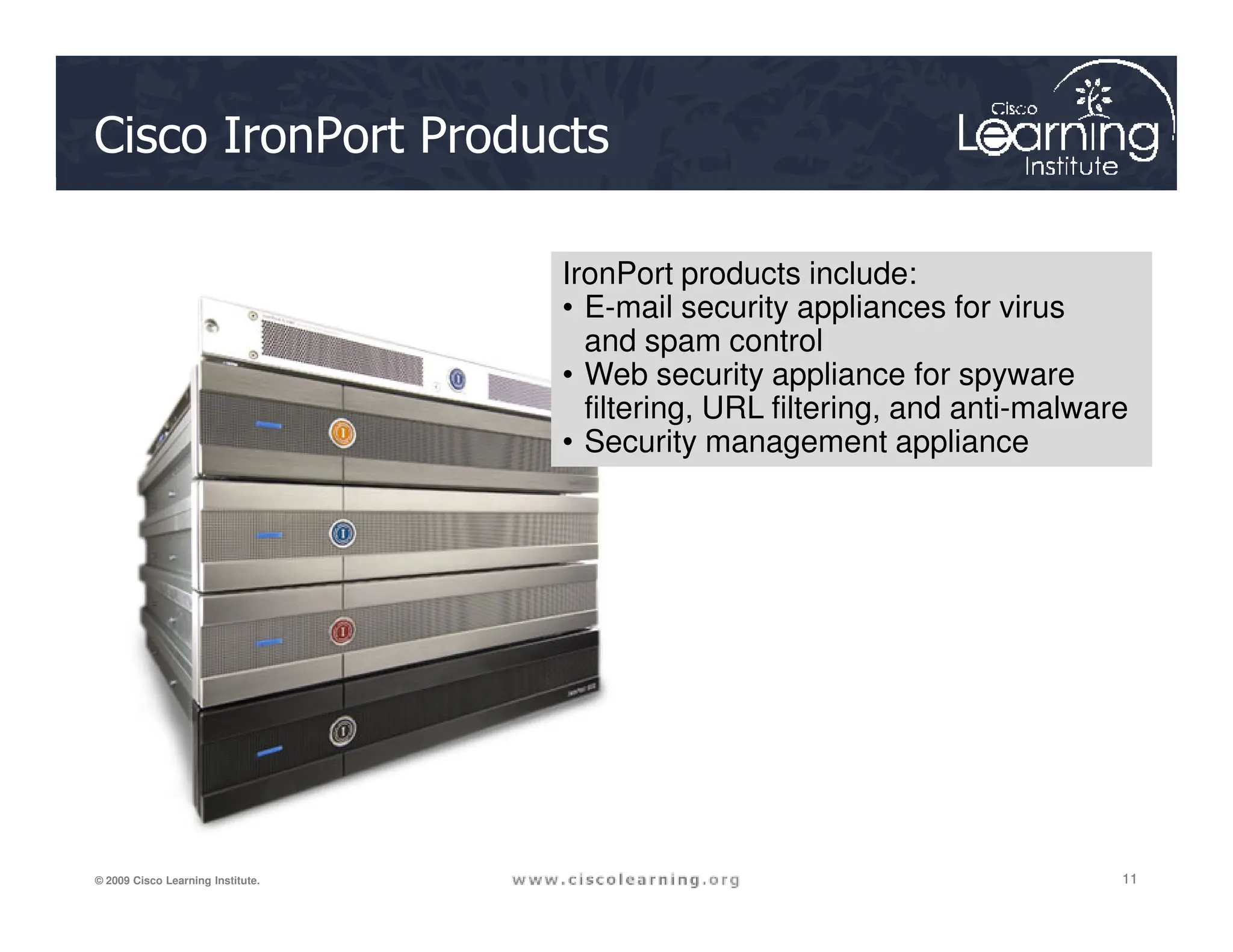
Cisco IronPort Products
IronPort products include:
• E-mail security appliances for virus
and spam control
• Web security appliance for spyware
filtering, URL filtering, and anti-malware
• Security management appliance
11
11
11
© 2009 Cisco Learning Institute.
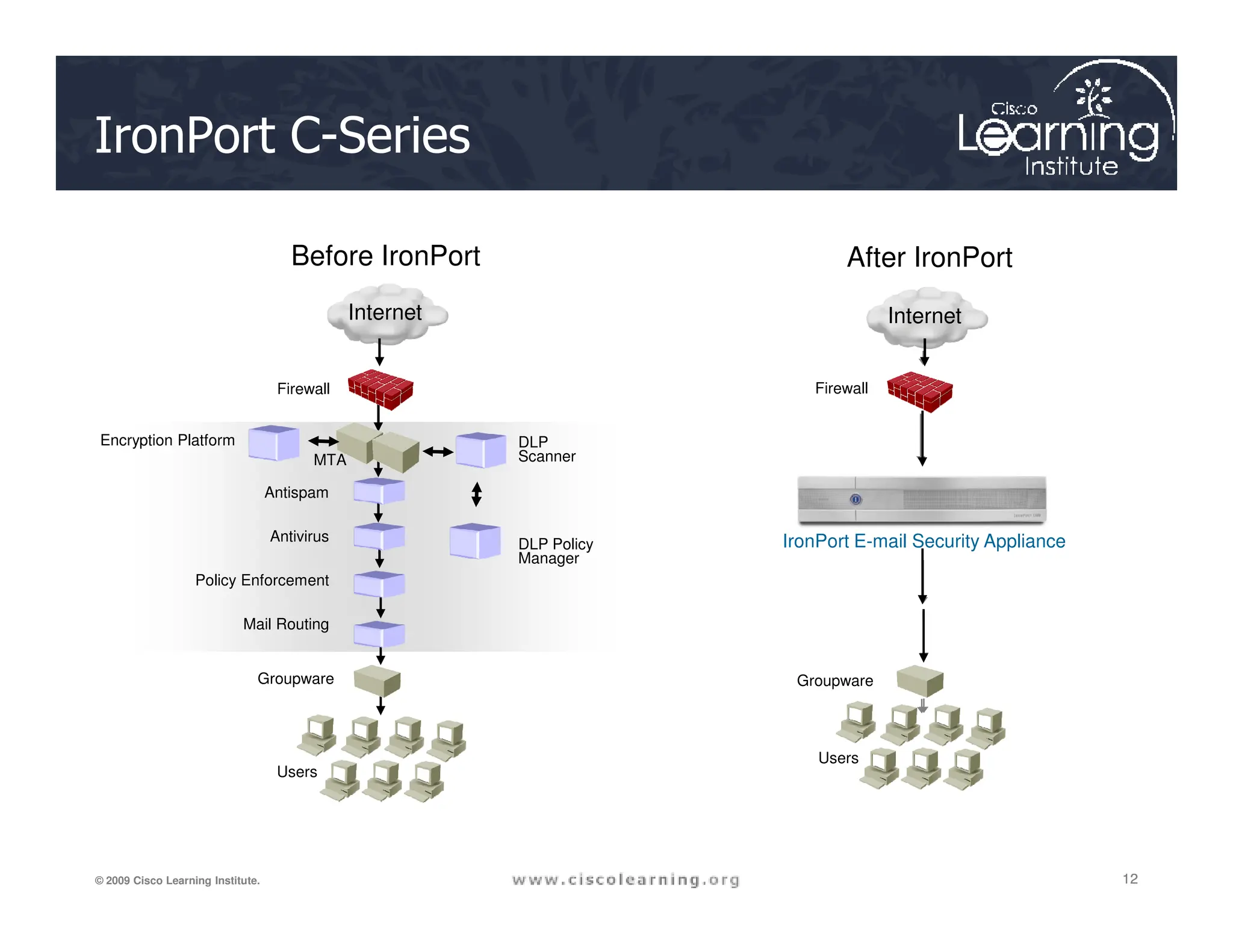
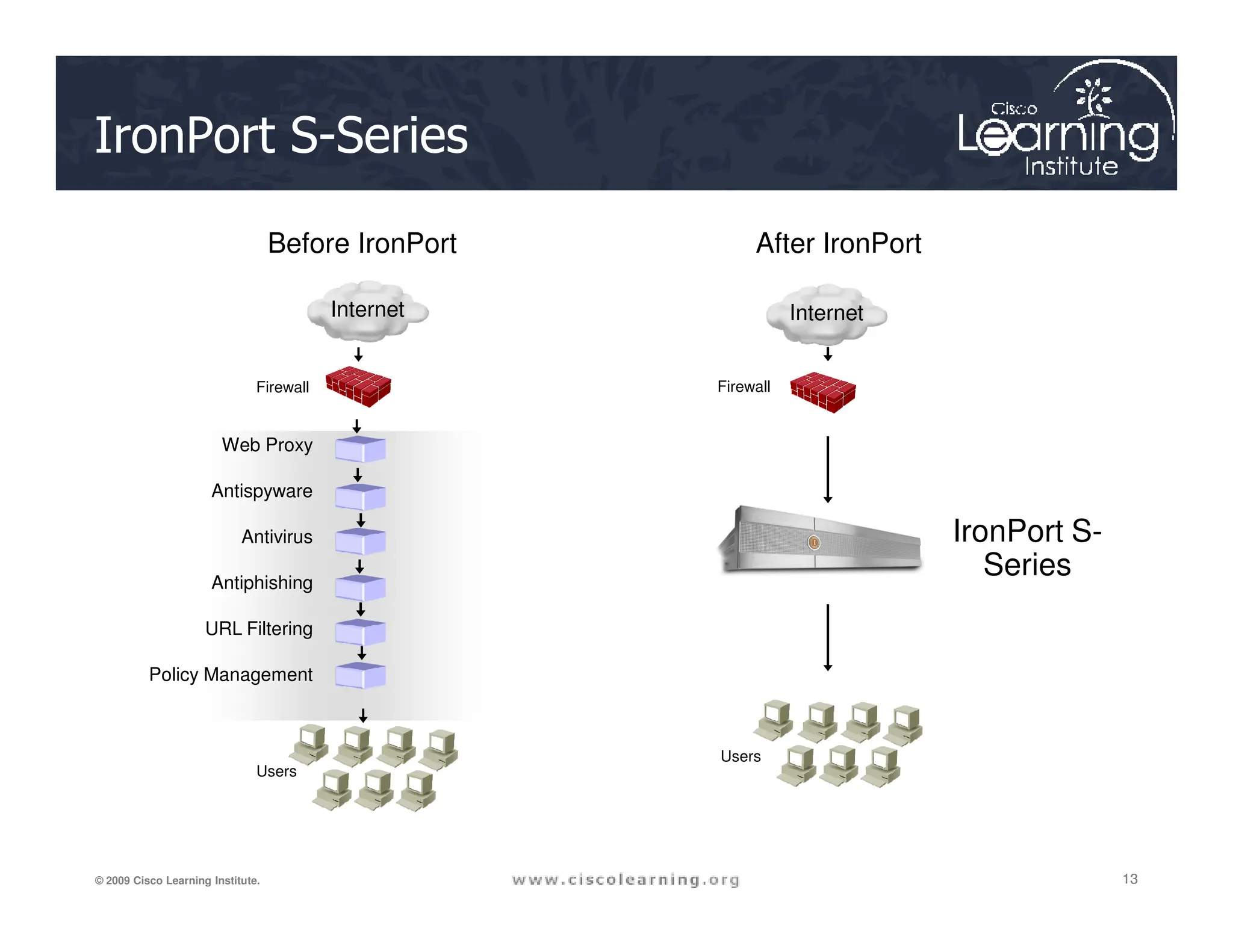
IronPort C-Series
Internet
Internet
Before IronPort
Firewall
After IronPort
Firewall
Encryption Platform
MTA
DLP
Scanner
12
12
12
© 2009 Cisco Learning Institute.
Antispam
Antivirus
Policy Enforcement
Mail Routing
IronPort E-mail Security Appliance
Groupware
Users
Users
Groupware
DLP Policy
Manager
IronPort S-Series
Web Proxy
Firewall Firewall
Before IronPort After IronPort
Internet
Internet
13
13
13
© 2009 Cisco Learning Institute.
Antispyware
Antivirus
Antiphishing
URL Filtering
Policy Management
Users
Users
IronPort S-
Series
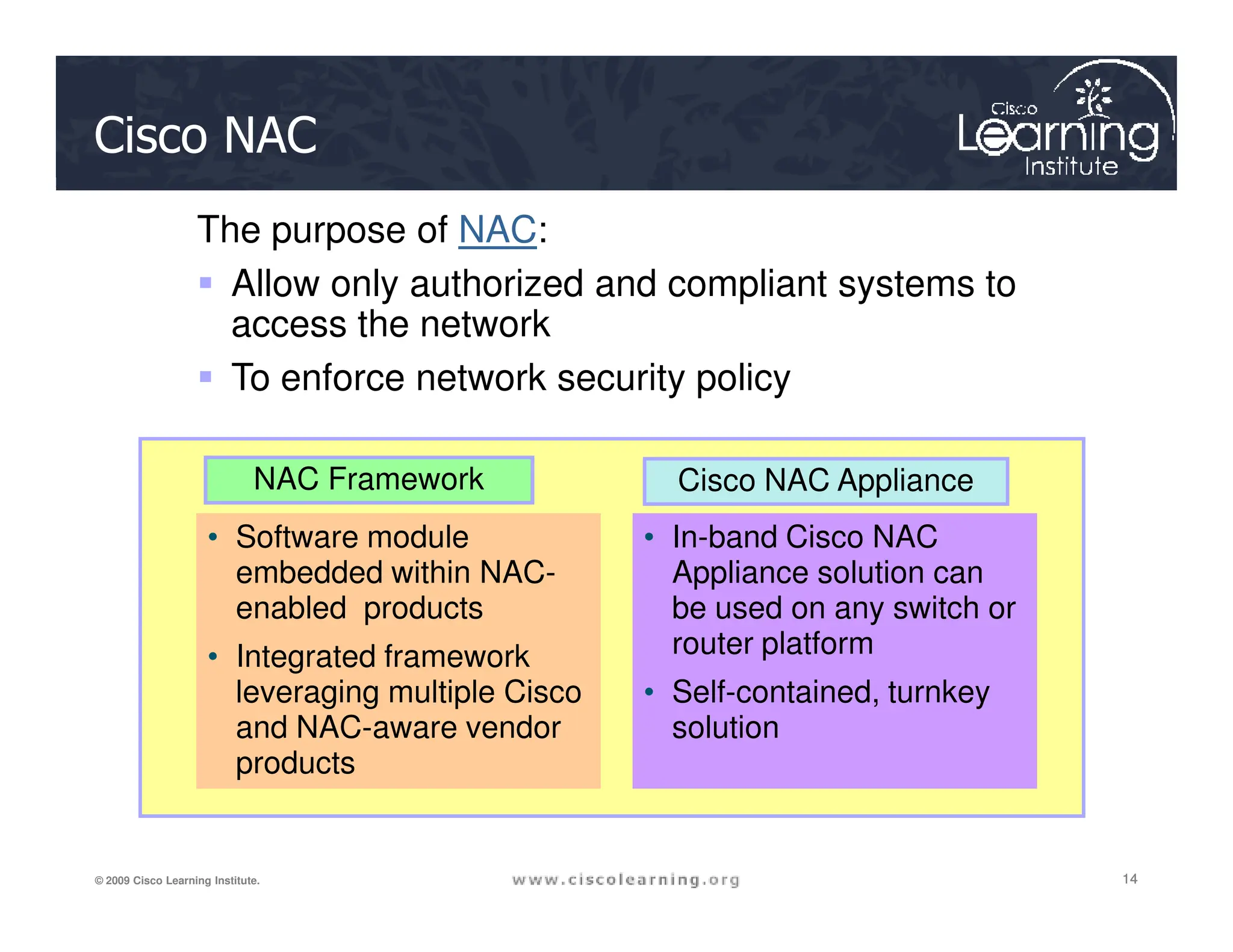
Cisco NAC
NAC Framework
The purpose of NAC:
 Allow only authorized and compliant systems to
access the network
 To enforce network security policy
Cisco NAC Appliance
14
14
14
© 2009 Cisco Learning Institute.
NAC Framework
• Software module
embedded within NAC-
enabled products
• Integrated framework
leveraging multiple Cisco
and NAC-aware vendor
products
• In-band Cisco NAC
Appliance solution can
be used on any switch or
router platform
• Self-contained, turnkey
solution
Cisco NAC Appliance
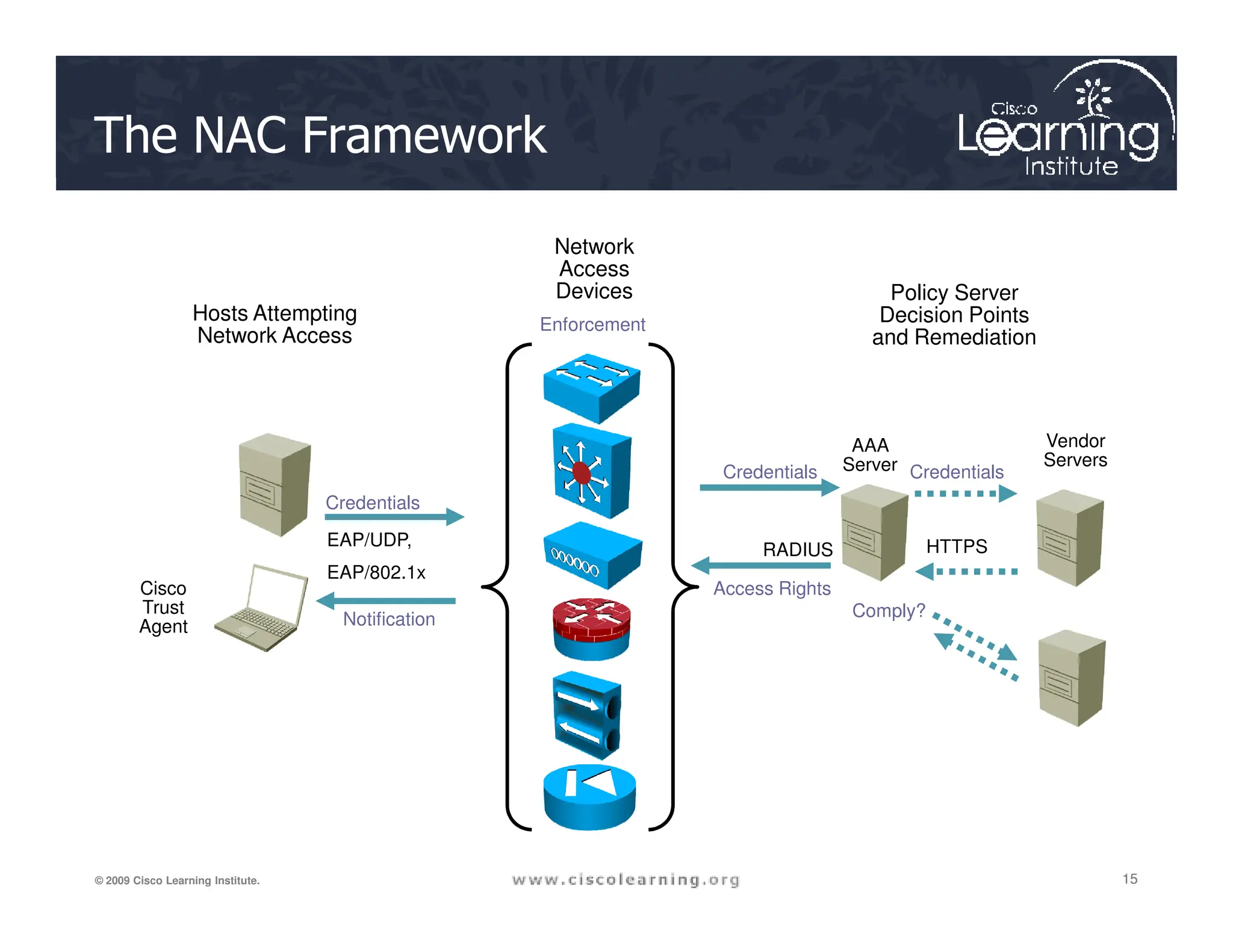
The NAC Framework
AAA
Server
Credentials Credentials
Vendor
Servers
Hosts Attempting
Network Access
Network
Access
Devices Policy Server
Decision Points
and Remediation
Enforcement
15
15
15
© 2009 Cisco Learning Institute.
Credentials
Credentials
EAP/UDP,
EAP/802.1x
RADIUS
Credentials
HTTPS
Access Rights
Notification
Cisco
Trust
Agent
Comply?
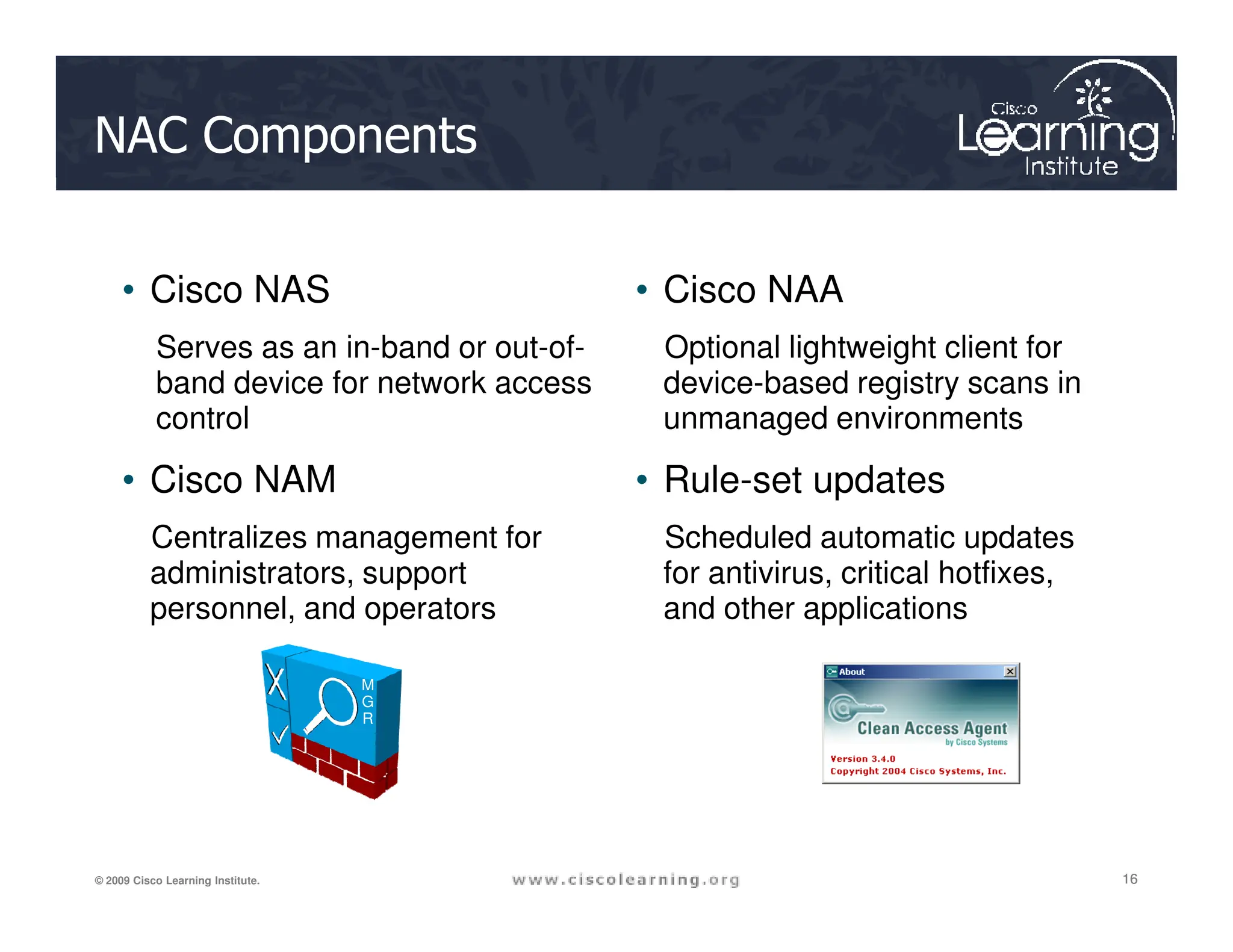
NAC Components
• Cisco NAS
Serves as an in-band or out-of-
band device for network access
control
• Cisco NAM
• Cisco NAA
Optional lightweight client for
device-based registry scans in
unmanaged environments
• Rule-set updates
16
16
16
© 2009 Cisco Learning Institute.
• Cisco NAM
Centralizes management for
administrators, support
personnel, and operators
• Rule-set updates
Scheduled automatic updates
for antivirus, critical hotfixes,
and other applications
M
G
R
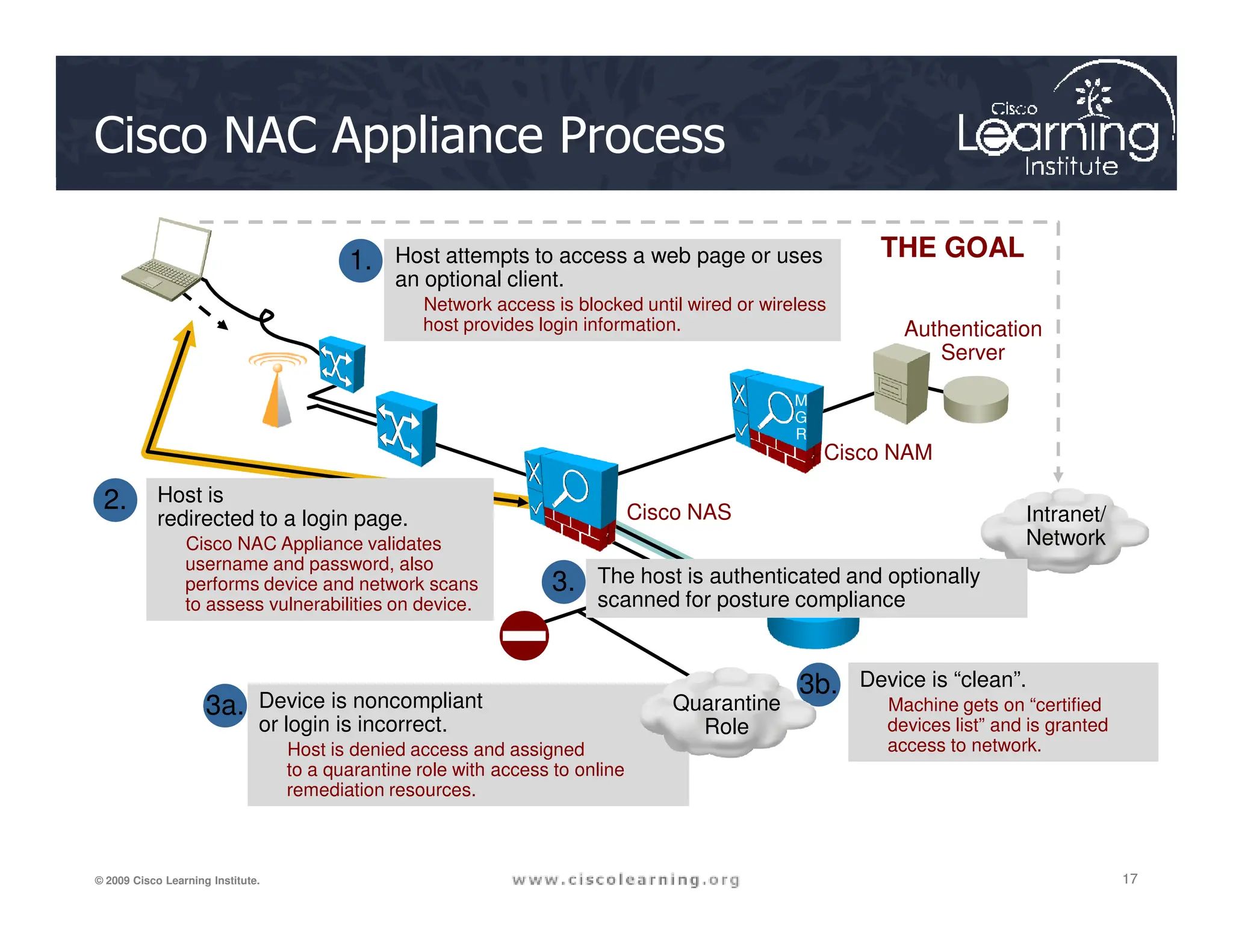
Cisco NAC Appliance Process
THE GOAL
Cisco NAM
1. Host attempts to access a web page or uses
an optional client.
Network access is blocked until wired or wireless
host provides login information. Authentication
Server
M
G
R
17
17
17
© 2009 Cisco Learning Institute.
Intranet/
Network
2. Host is
redirected to a login page.
Cisco NAC Appliance validates
username and password, also
performs device and network scans
to assess vulnerabilities on device.
Device is noncompliant
or login is incorrect.
Host is denied access and assigned
to a quarantine role with access to online
remediation resources.
3a.
3b. Device is “clean”.
Machine gets on “certified
devices list” and is granted
access to network.
Cisco NAS
Quarantine
Role
3. The host is authenticated and optionally
scanned for posture compliance
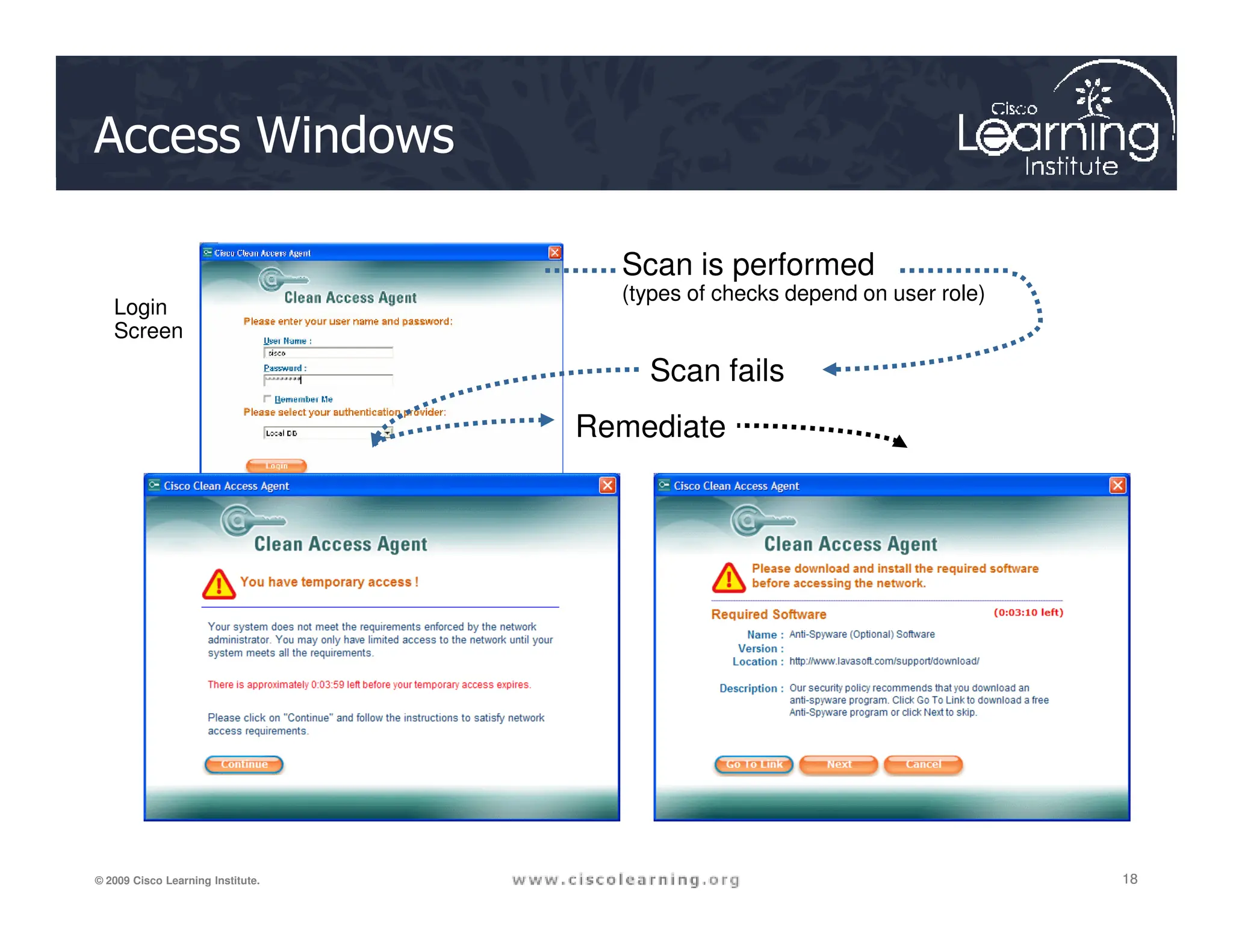
Access Windows
Login
Screen
Scan is performed
(types of checks depend on user role)
Scan fails
Remediate
18
18
18
© 2009 Cisco Learning Institute.
4.
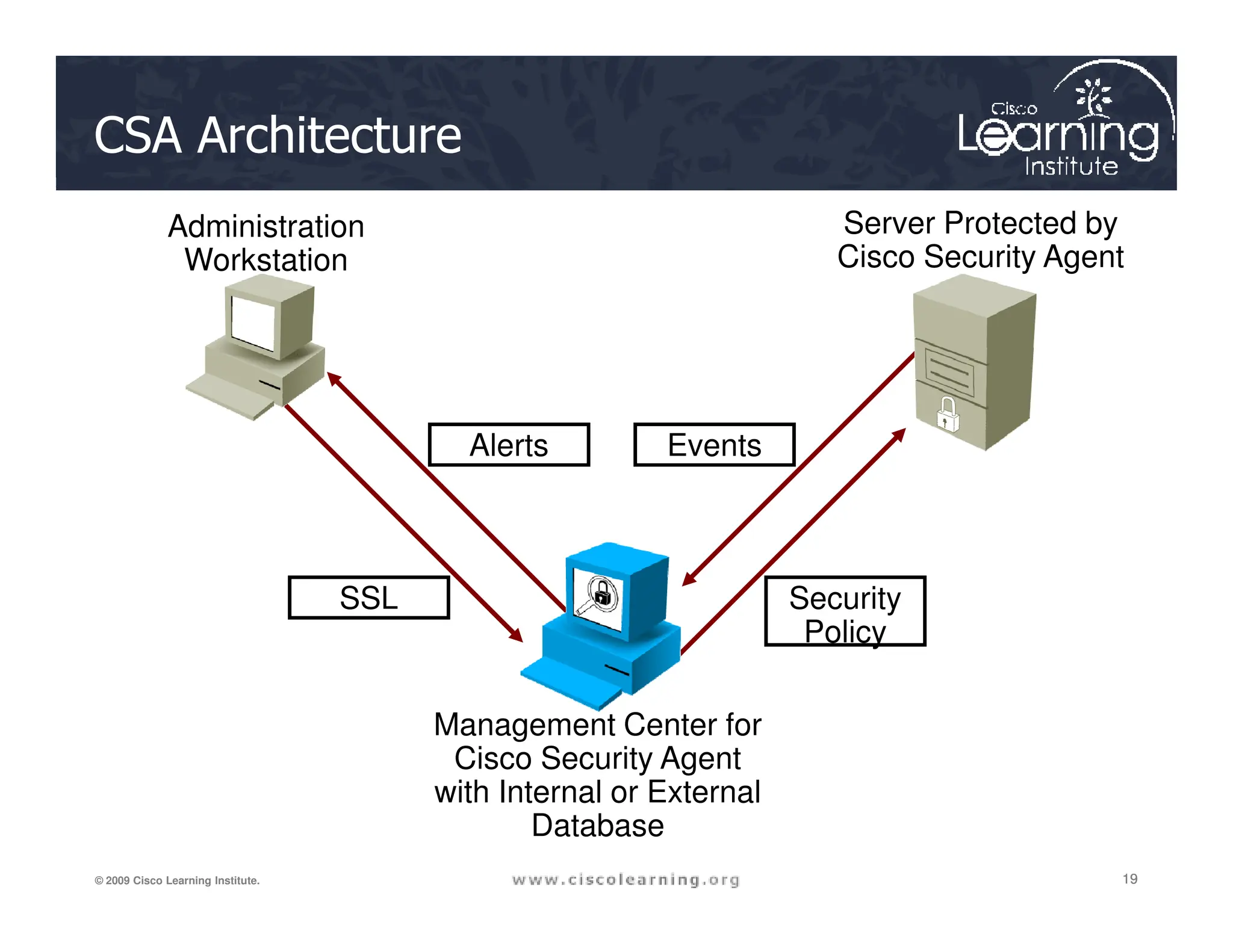
CSA Architecture
Server Protected by
Cisco Security Agent
Administration
Workstation
Events
Alerts
19
19
19
© 2009 Cisco Learning Institute.
Management Center for
Cisco Security Agent
with Internal or External
Database
Security
Policy
SSL
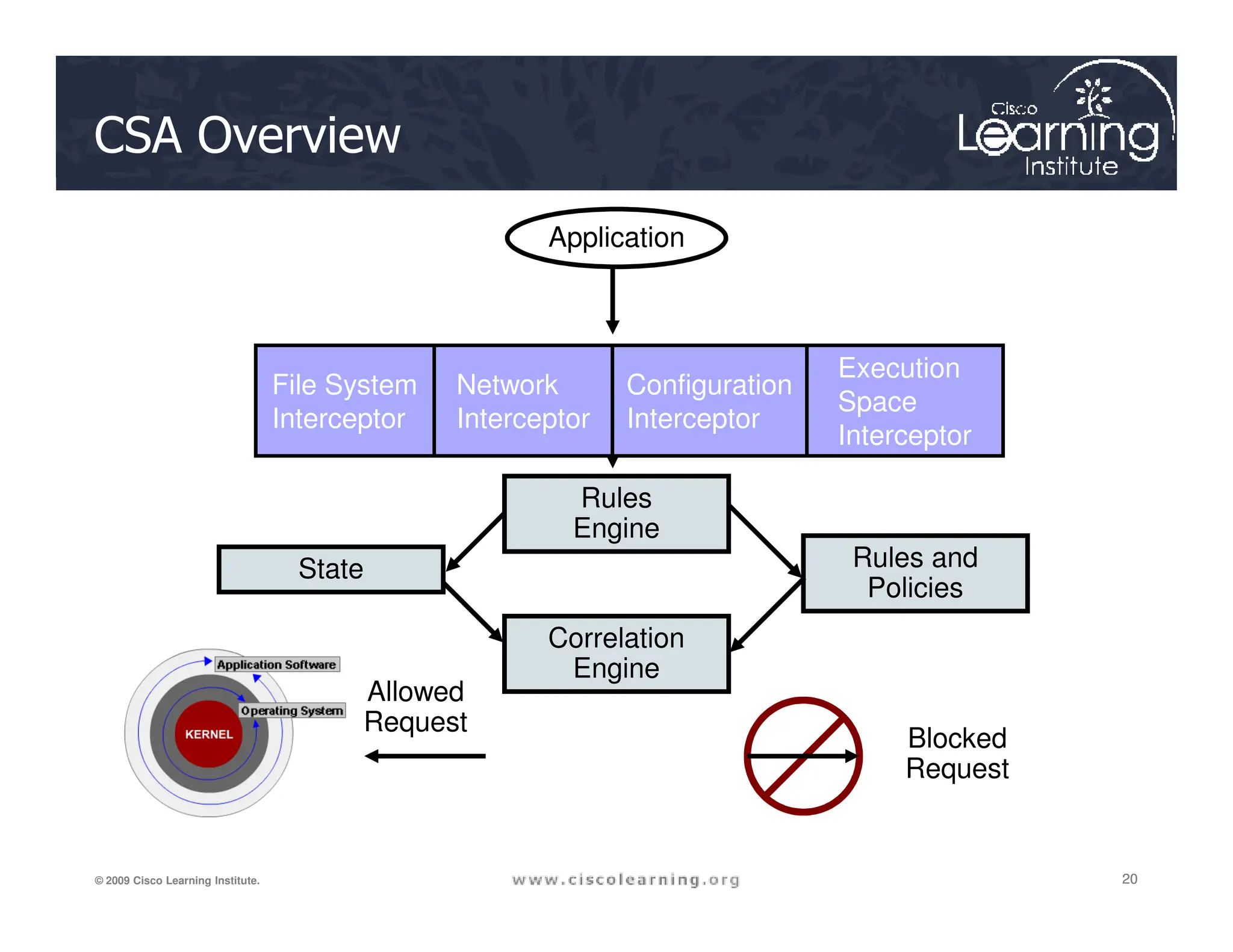
CSA Overview
File System
Interceptor
Network
Interceptor
Configuration
Interceptor
Execution
Space
Interceptor
Application
20
20
20
© 2009 Cisco Learning Institute.
State Rules and
Policies
Rules
Engine
Correlation
Engine
Allowed
Request
Blocked
Request
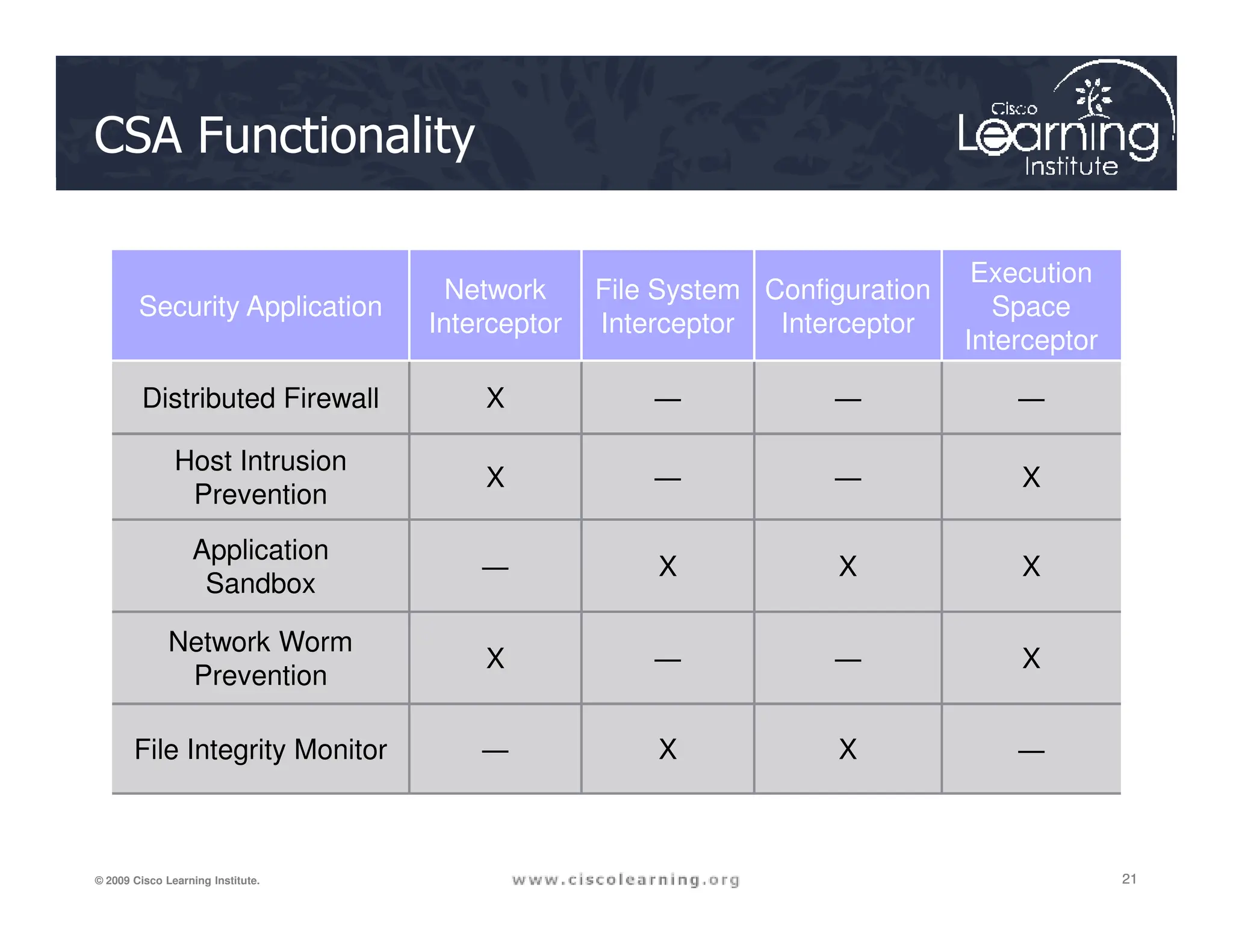
CSA Functionality
Security Application
Network
Interceptor
File System
Interceptor
Configuration
Interceptor
Execution
Space
Interceptor
Distributed Firewall X ― ― ―
Host Intrusion
X ― ― X
21
21
21
© 2009 Cisco Learning Institute.
Host Intrusion
Prevention
X ― ― X
Application
Sandbox
― X X X
Network Worm
Prevention
X ― ― X
File Integrity Monitor ― X X ―
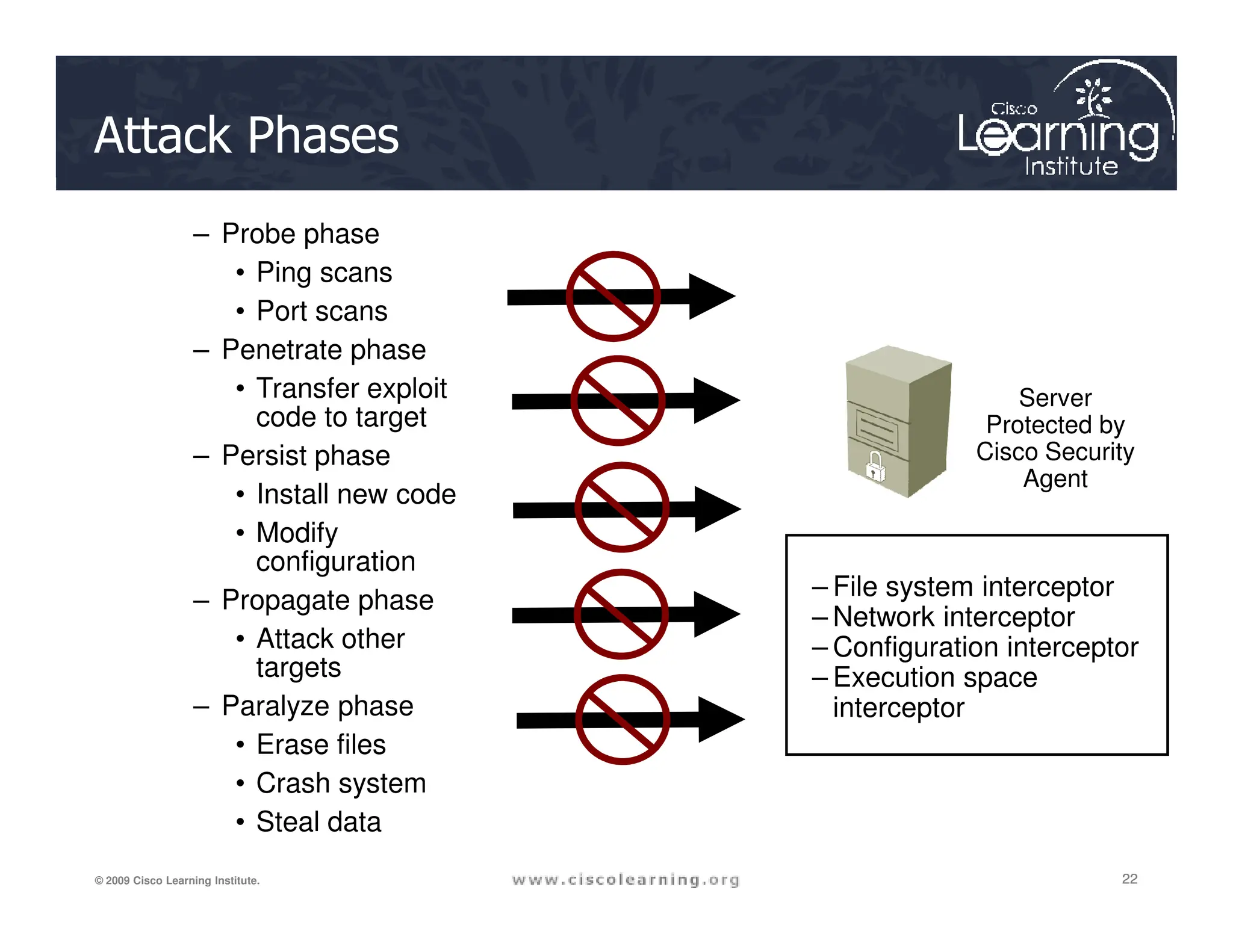
Attack Phases
Server
Protected by
Cisco Security
Agent
– Probe phase
• Ping scans
• Port scans
– Penetrate phase
• Transfer exploit
code to target
– Persist phase
22
22
22
© 2009 Cisco Learning Institute.
– File system interceptor
– Network interceptor
– Configuration interceptor
– Execution space
interceptor
Agent
• Install new code
• Modify
configuration
– Propagate phase
• Attack other
targets
– Paralyze phase
• Erase files
• Crash system
• Steal data
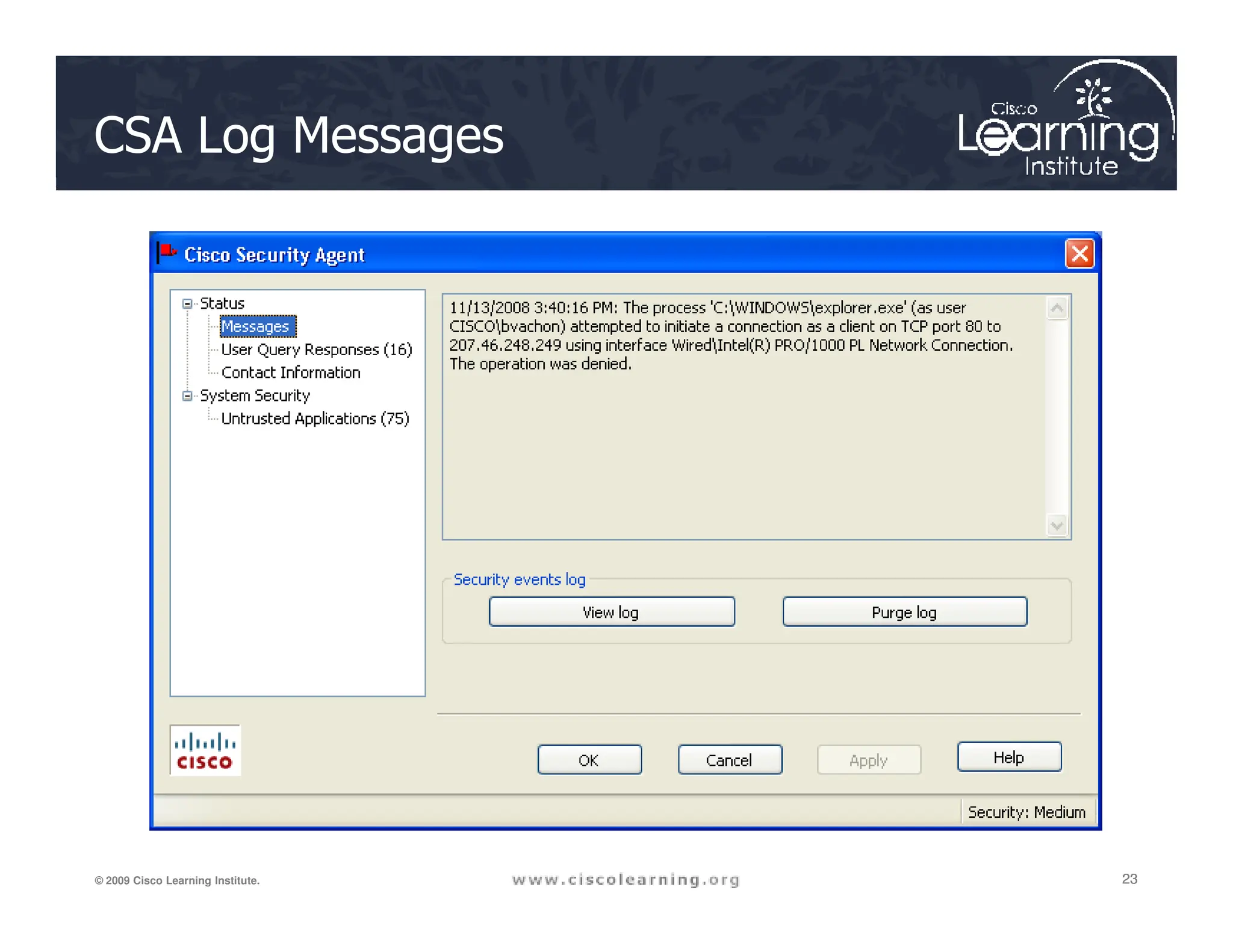
CSA Log Messages
23
23
23
© 2009 Cisco Learning Institute.
MARS
ACS
Firewall
Perimeter
Internet
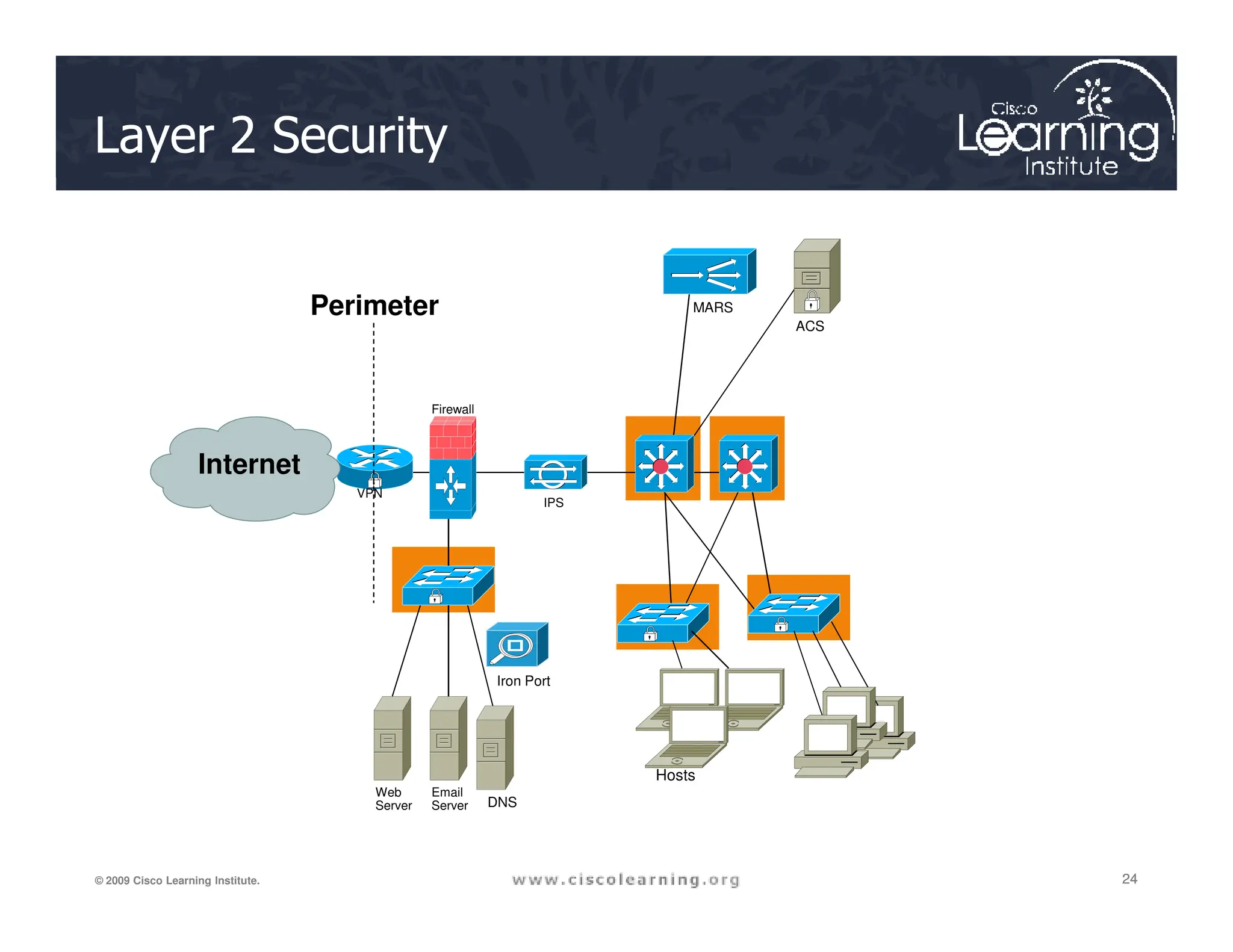
Layer 2 Security
24
24
24
© 2009 Cisco Learning Institute.
IPS
VPN
Iron Port
Web
Server
Email
Server DNS
Hosts
Internet
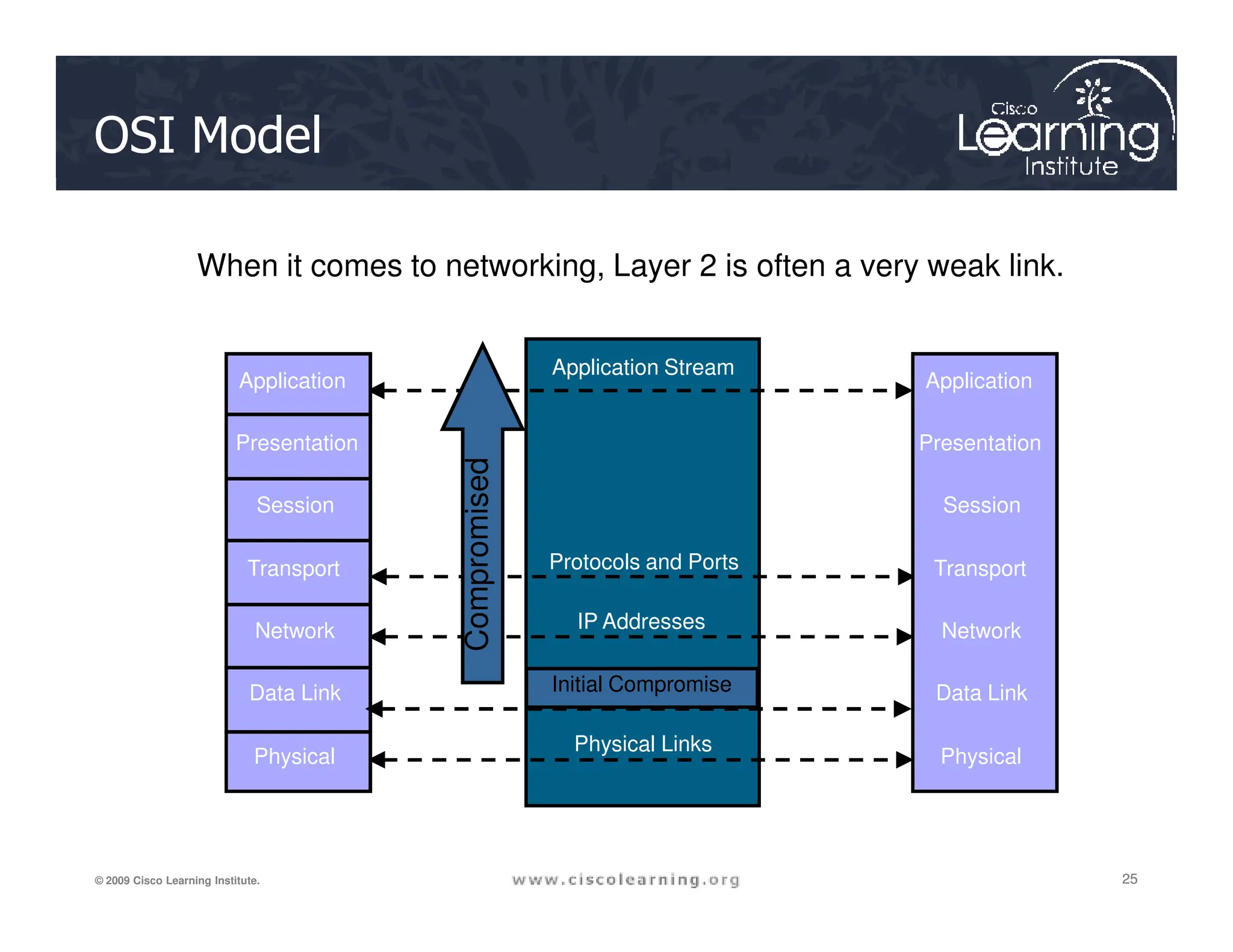
OSI Model
When it comes to networking, Layer 2 is often a very weak link.
Application Stream
Application
Presentation
Compromised
Application
Presentation
25
25
25
© 2009 Cisco Learning Institute.
MAC Addresses
Physical Links
IP Addresses
Protocols and Ports
Session
Transport
Network
Data Link
Physical
Compromised
Session
Transport
Network
Data Link
Physical
Initial Compromise
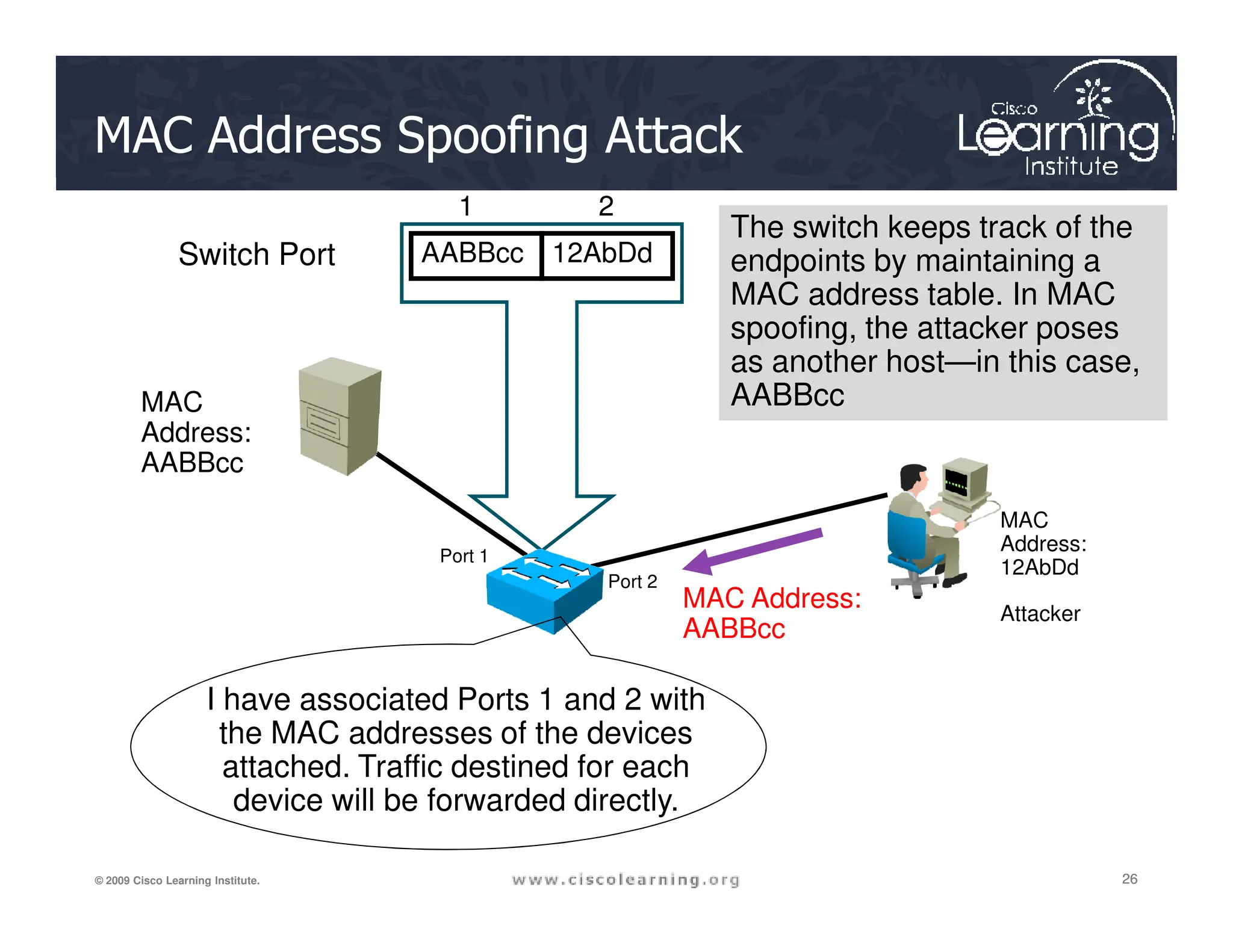
MAC Address Spoofing Attack
MAC
Address:
AABBcc
AABBcc 12AbDd
Switch Port
1 2
The switch keeps track of the
endpoints by maintaining a
MAC address table. In MAC
spoofing, the attacker poses
as another host—in this case,
AABBcc
26
26
26
© 2009 Cisco Learning Institute.
AABBcc
MAC Address:
AABBcc
Attacker
Port 1
Port 2
MAC
Address:
12AbDd
I have associated Ports 1 and 2 with
the MAC addresses of the devices
attached. Traffic destined for each
device will be forwarded directly.
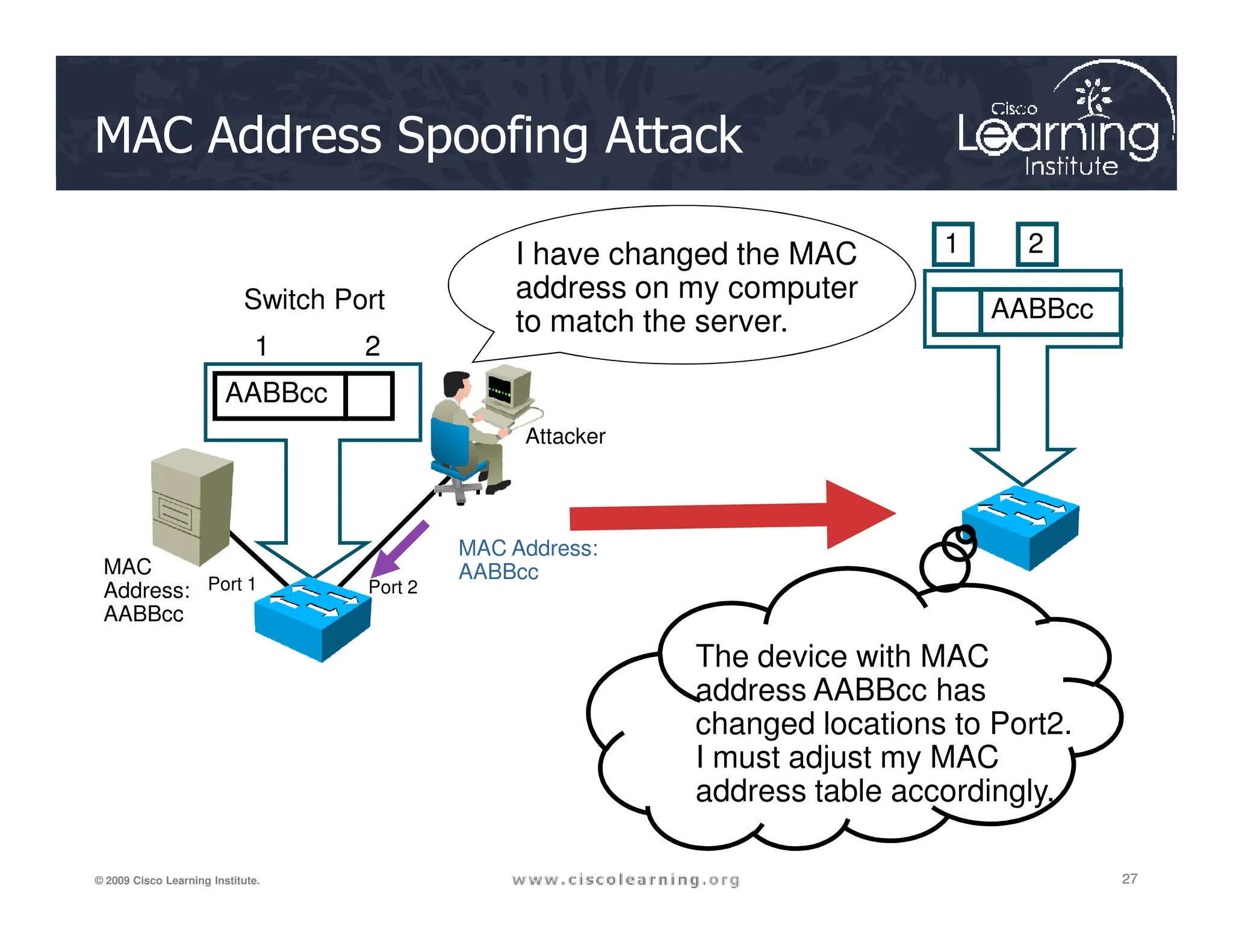
MAC Address Spoofing Attack
AABBcc
Switch Port
1 2
Attacker
AABBcc
1 2
I have changed the MAC
address on my computer
to match the server.
27
27
27
© 2009 Cisco Learning Institute.
MAC
Address:
AABBcc
MAC Address:
AABBcc
Port 1 Port 2
The device with MAC
address AABBcc has
changed locations to Port2.
I must adjust my MAC
address table accordingly.
MAC Address Table Overflow Attack
28
28
28
© 2009 Cisco Learning Institute.
The switch can forward frames between PC1 and PC2 without
flooding because the MAC address table contains port-to-MAC-
address mappings in the MAC address table for these PCs.
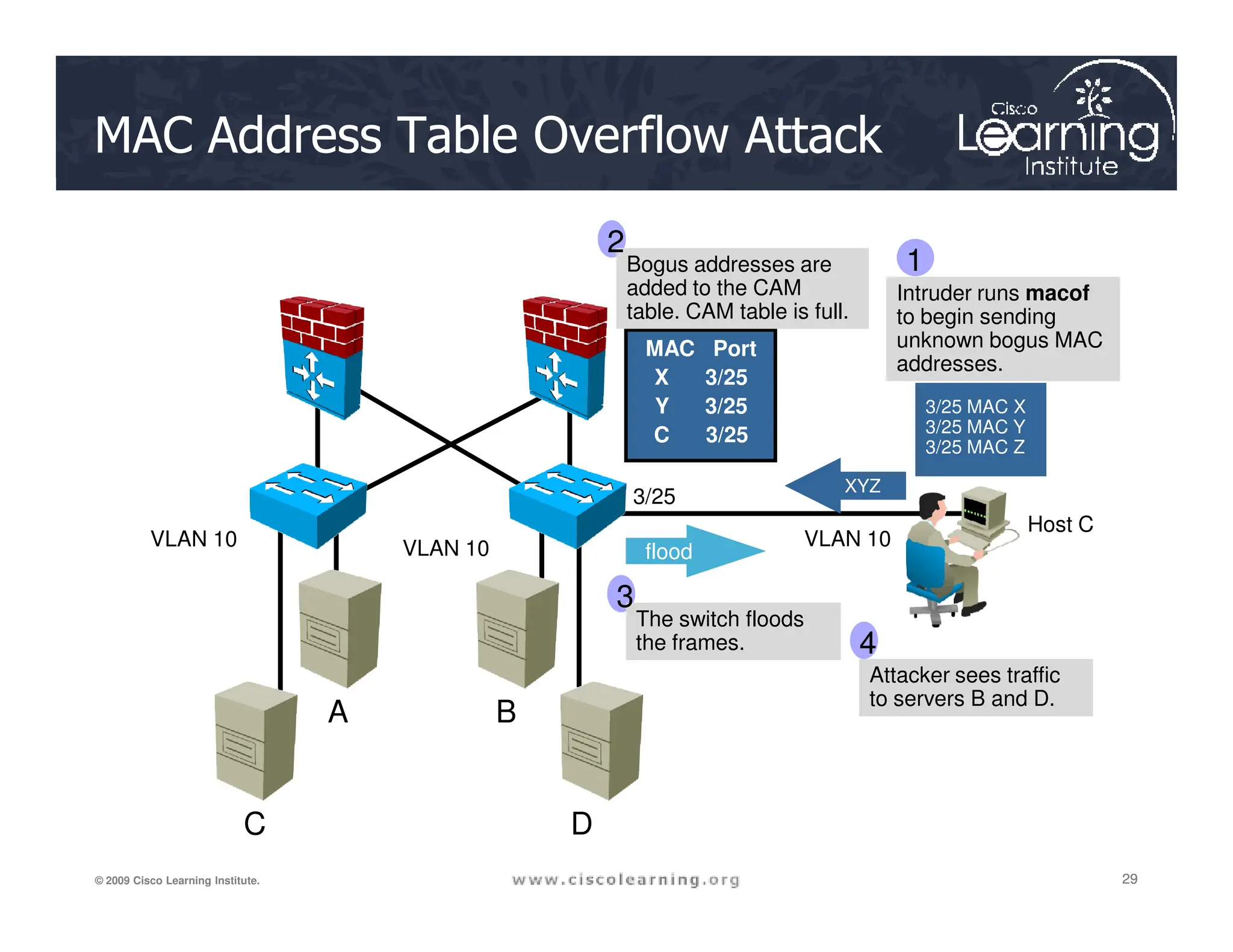
MAC Address Table Overflow Attack
Intruder runs macof
to begin sending
unknown bogus MAC
addresses.
3/25 MAC X
3/25 MAC Y
3/25 MAC Z
XYZ
MAC Port
X 3/25
Y 3/25
C 3/25
Bogus addresses are
added to the CAM
table. CAM table is full.
1
2
29
29
29
© 2009 Cisco Learning Institute.
A B
C D
VLAN 10 VLAN 10
3/25
XYZ
flood
Host C
The switch floods
the frames.
Attacker sees traffic
to servers B and D.
VLAN 10
3
4
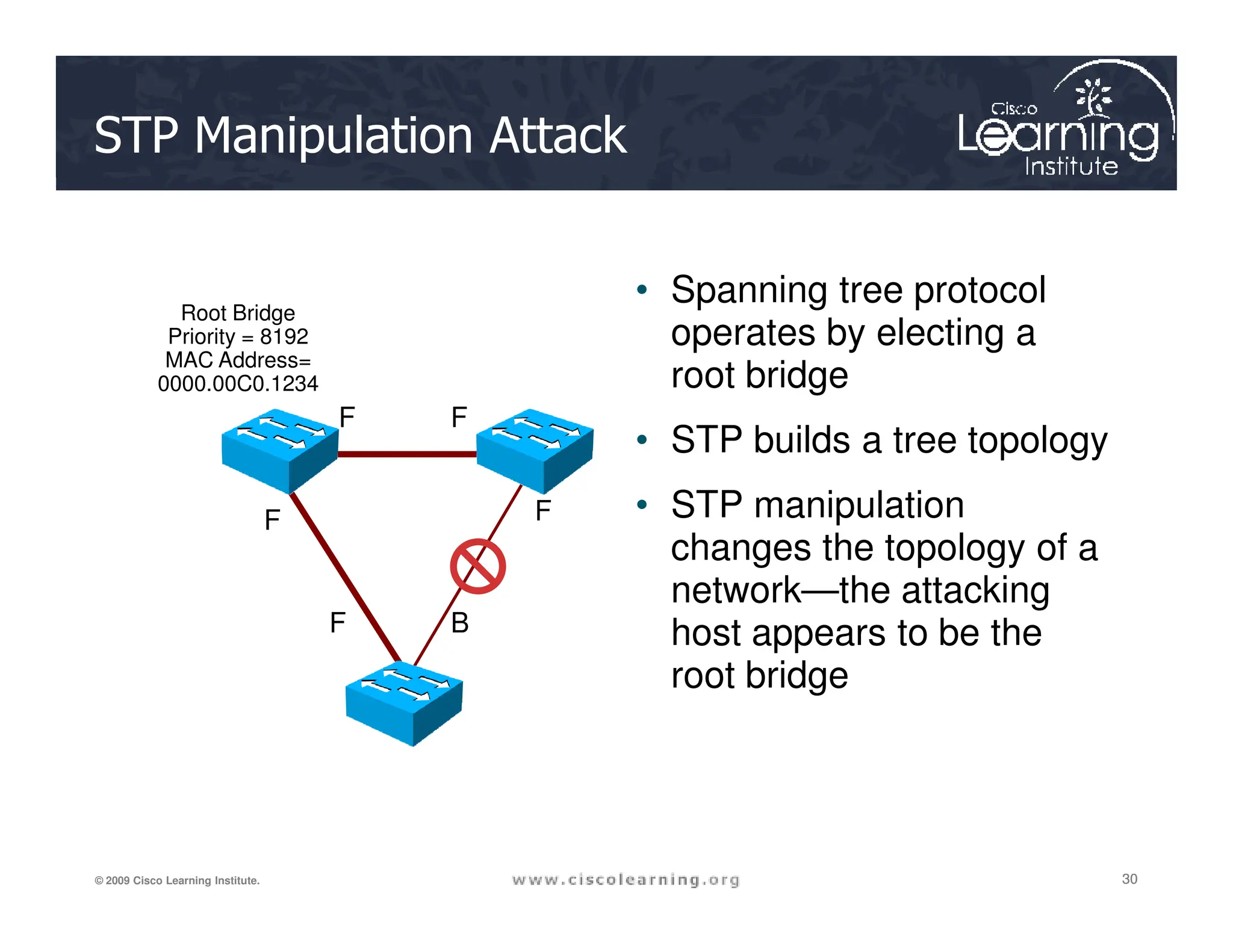
STP Manipulation Attack
• Spanning tree protocol
operates by electing a
root bridge
• STP builds a tree topology
F F
Root Bridge
Priority = 8192
MAC Address=
0000.00C0.1234
30
30
30
© 2009 Cisco Learning Institute.
• STP manipulation
changes the topology of a
network—the attacking
host appears to be the
root bridge
F F
F B
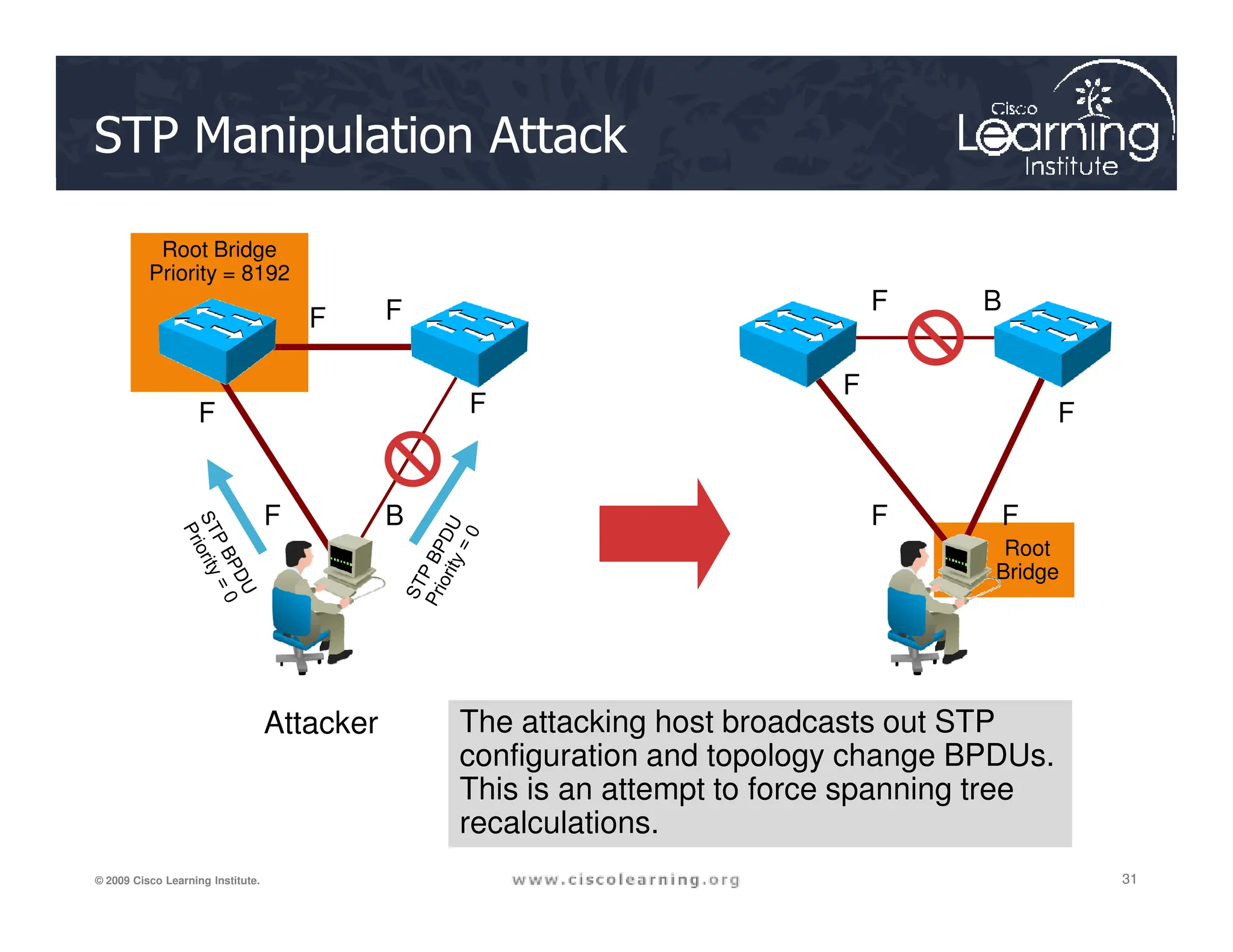
STP Manipulation Attack
Root Bridge
Priority = 8192
F F
F F
F B
F
F
31
31
31
© 2009 Cisco Learning Institute.
Root
Bridge
F B F F
Attacker The attacking host broadcasts out STP
configuration and topology change BPDUs.
This is an attempt to force spanning tree
recalculations.
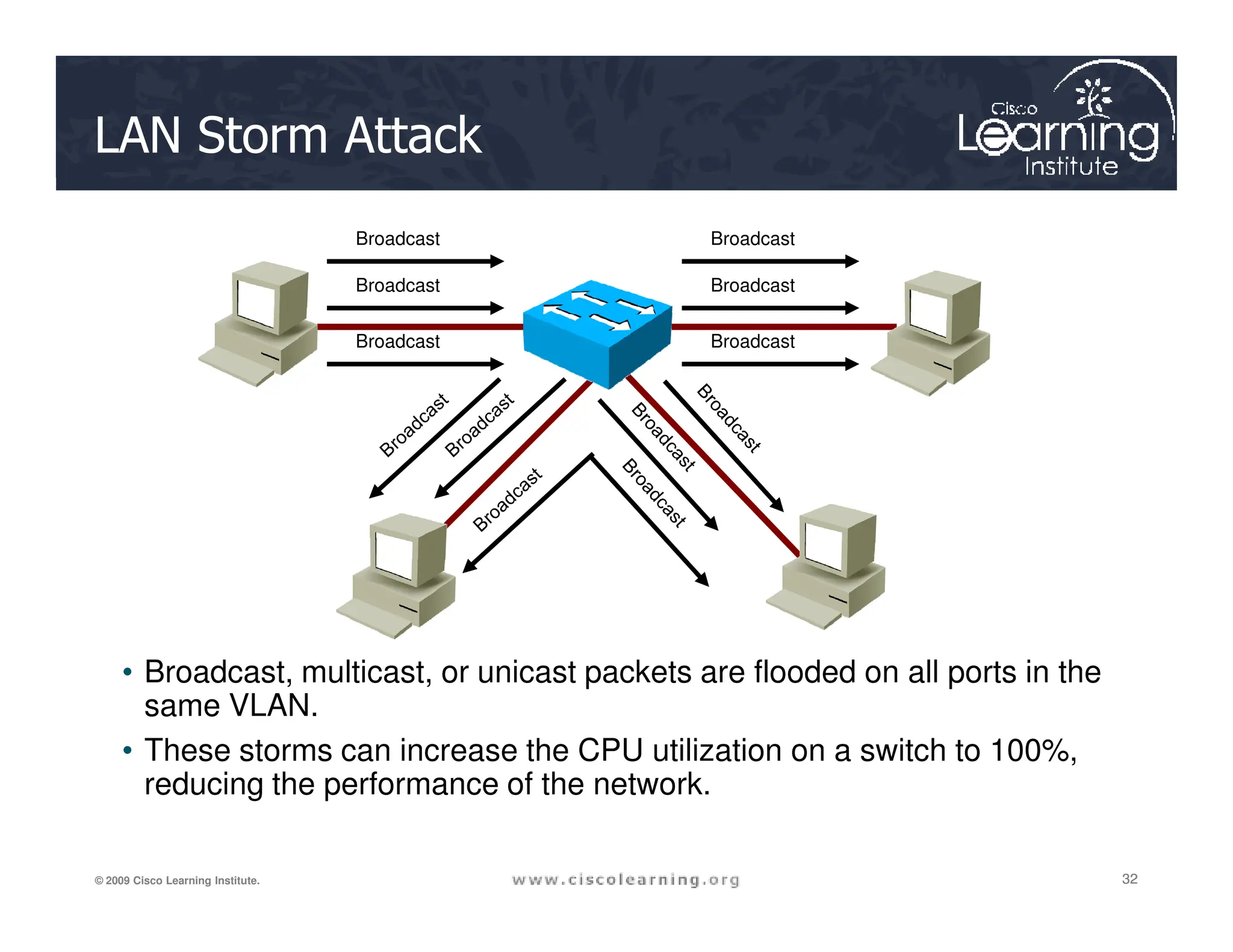
LAN Storm Attack
Broadcast
Broadcast
Broadcast
Broadcast
Broadcast
Broadcast
32
32
32
© 2009 Cisco Learning Institute.
• Broadcast, multicast, or unicast packets are flooded on all ports in the
same VLAN.
• These storms can increase the CPU utilization on a switch to 100%,
reducing the performance of the network.
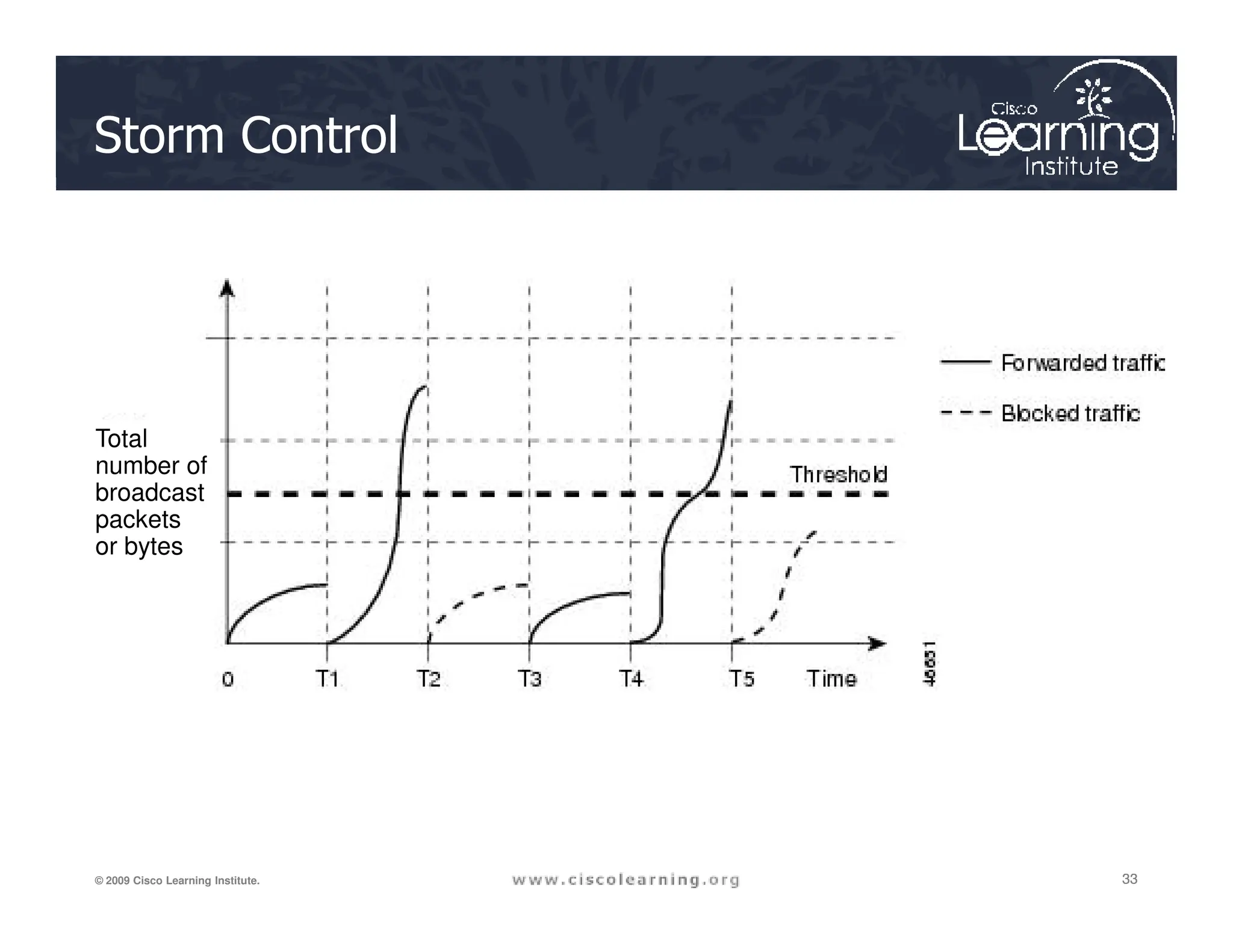
Storm Control
Total
number of
33
33
33
© 2009 Cisco Learning Institute.
number of
broadcast
packets
or bytes
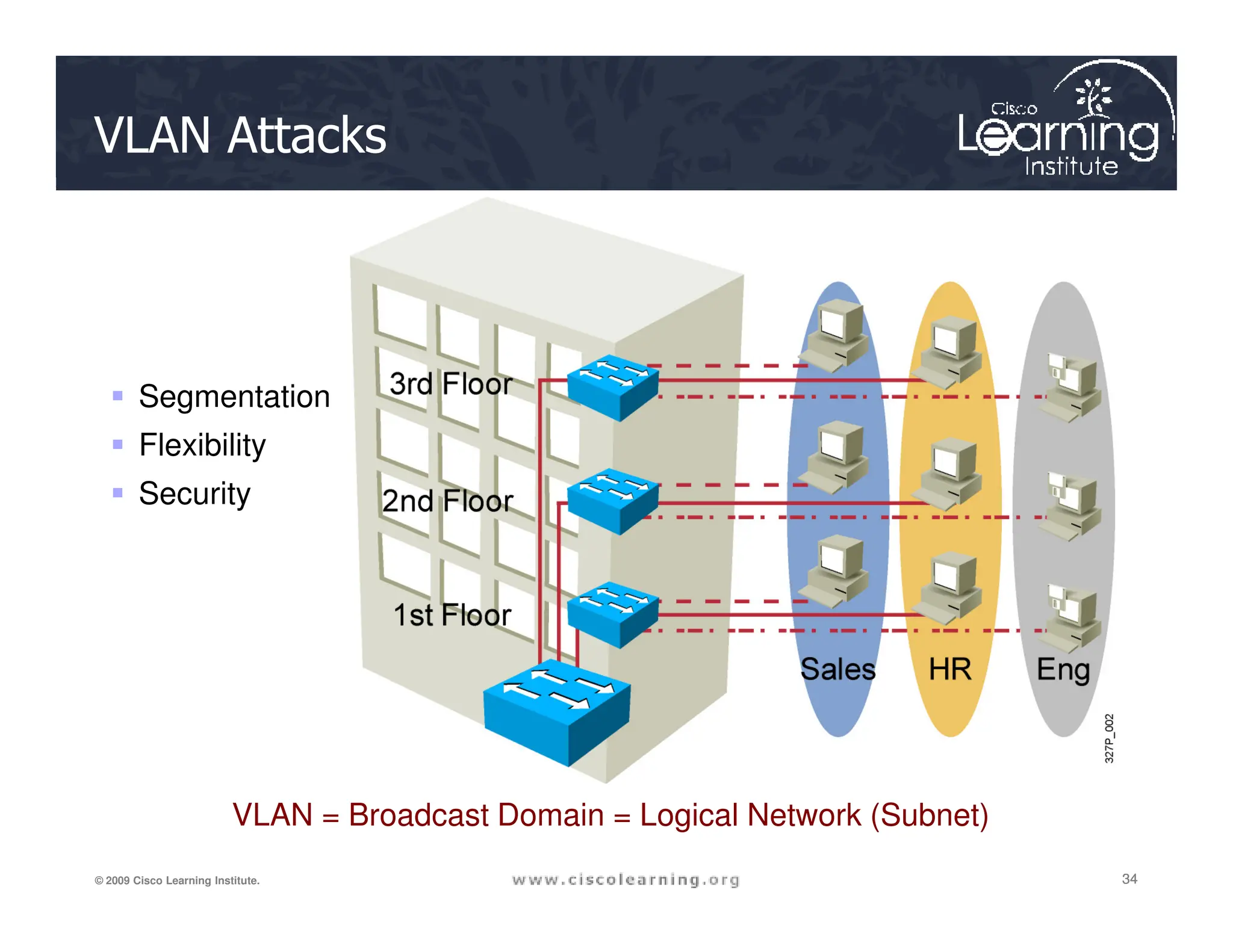
VLAN Attacks
 Segmentation
 Flexibility
34
34
34
© 2009 Cisco Learning Institute.
VLAN = Broadcast Domain = Logical Network (Subnet)
 Security
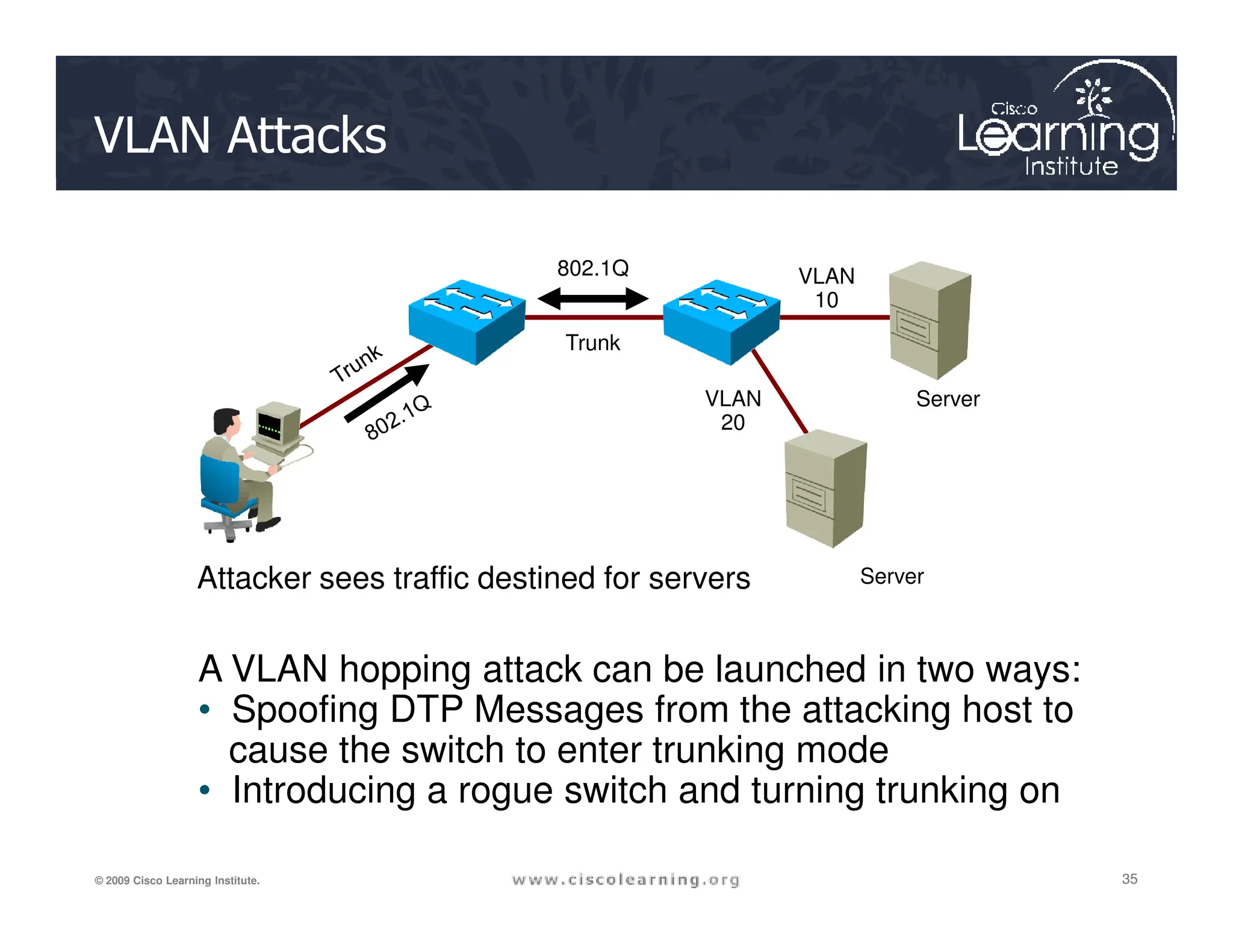
VLAN Attacks
802.1Q
Server
Trunk
VLAN
20
VLAN
10
35
35
35
© 2009 Cisco Learning Institute.
Server
Attacker sees traffic destined for servers
A VLAN hopping attack can be launched in two ways:
• Spoofing DTP Messages from the attacking host to
cause the switch to enter trunking mode
• Introducing a rogue switch and turning trunking on
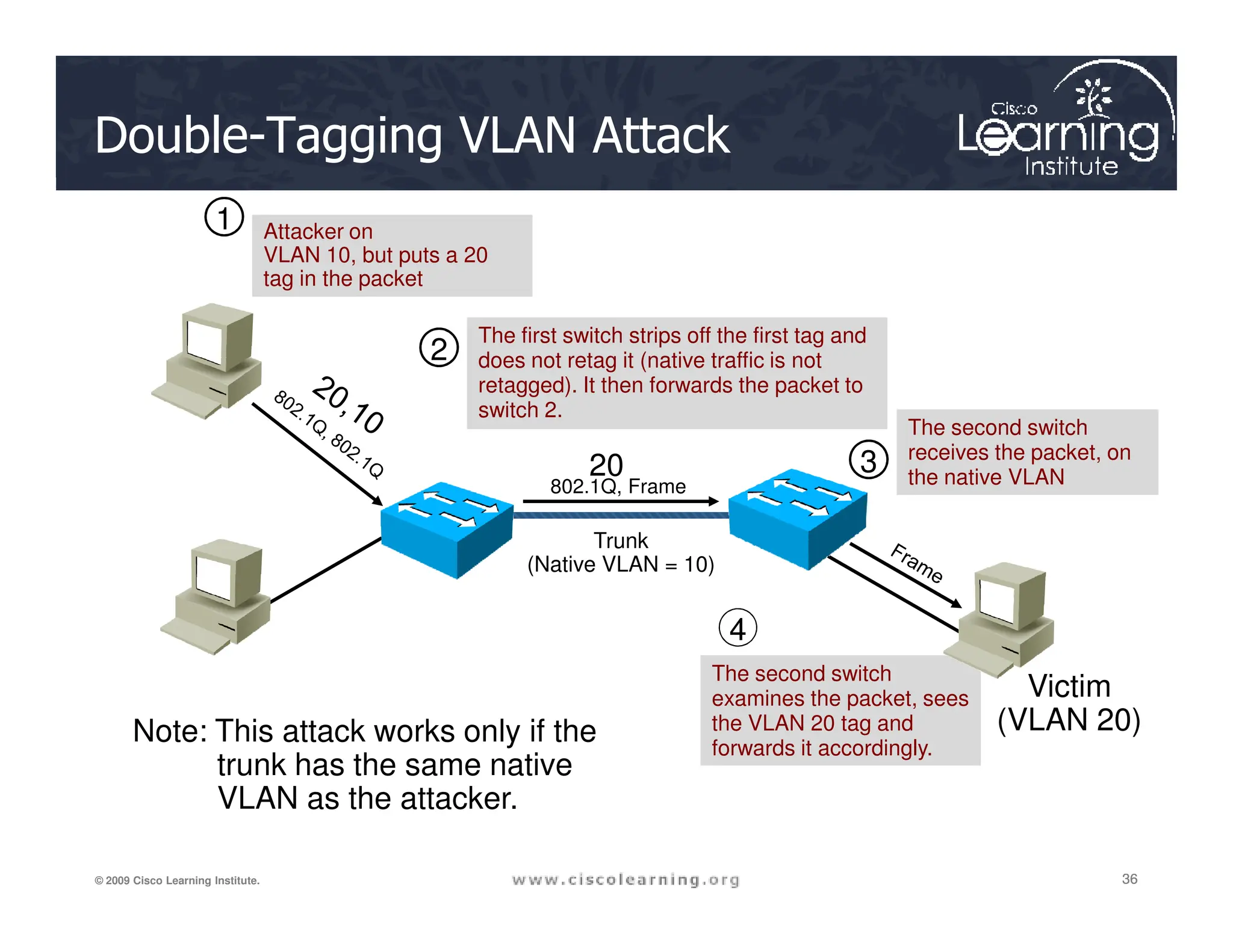
The second switch
receives the packet, on
the native VLAN
Double-Tagging VLAN Attack
Attacker on
VLAN 10, but puts a 20
tag in the packet
The first switch strips off the first tag and
does not retag it (native traffic is not
retagged). It then forwards the packet to
switch 2.
20
802.1Q, Frame
1
2
3
36
36
36
© 2009 Cisco Learning Institute.
the native VLAN
Victim
(VLAN 20)
Note: This attack works only if the
trunk has the same native
VLAN as the attacker.
20
Trunk
(Native VLAN = 10)
802.1Q, Frame
3
4
The second switch
examines the packet, sees
the VLAN 20 tag and
forwards it accordingly.
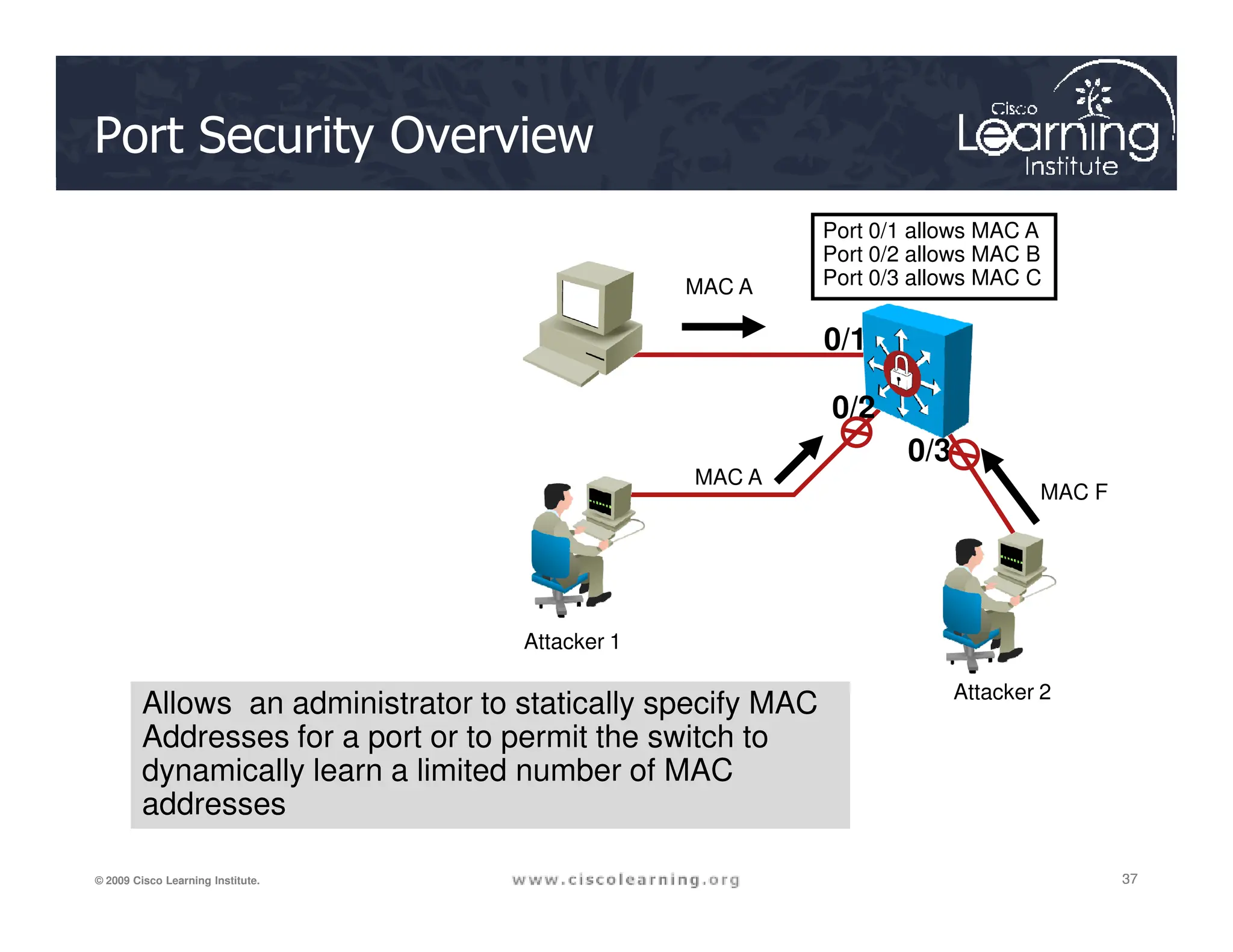
Port Security Overview
MAC A
MAC A
Port 0/1 allows MAC A
Port 0/2 allows MAC B
Port 0/3 allows MAC C
0/1
0/2
0/3
37
37
37
© 2009 Cisco Learning Institute.
MAC A
Attacker 1
Attacker 2
MAC F
Allows an administrator to statically specify MAC
Addresses for a port or to permit the switch to
dynamically learn a limited number of MAC
addresses
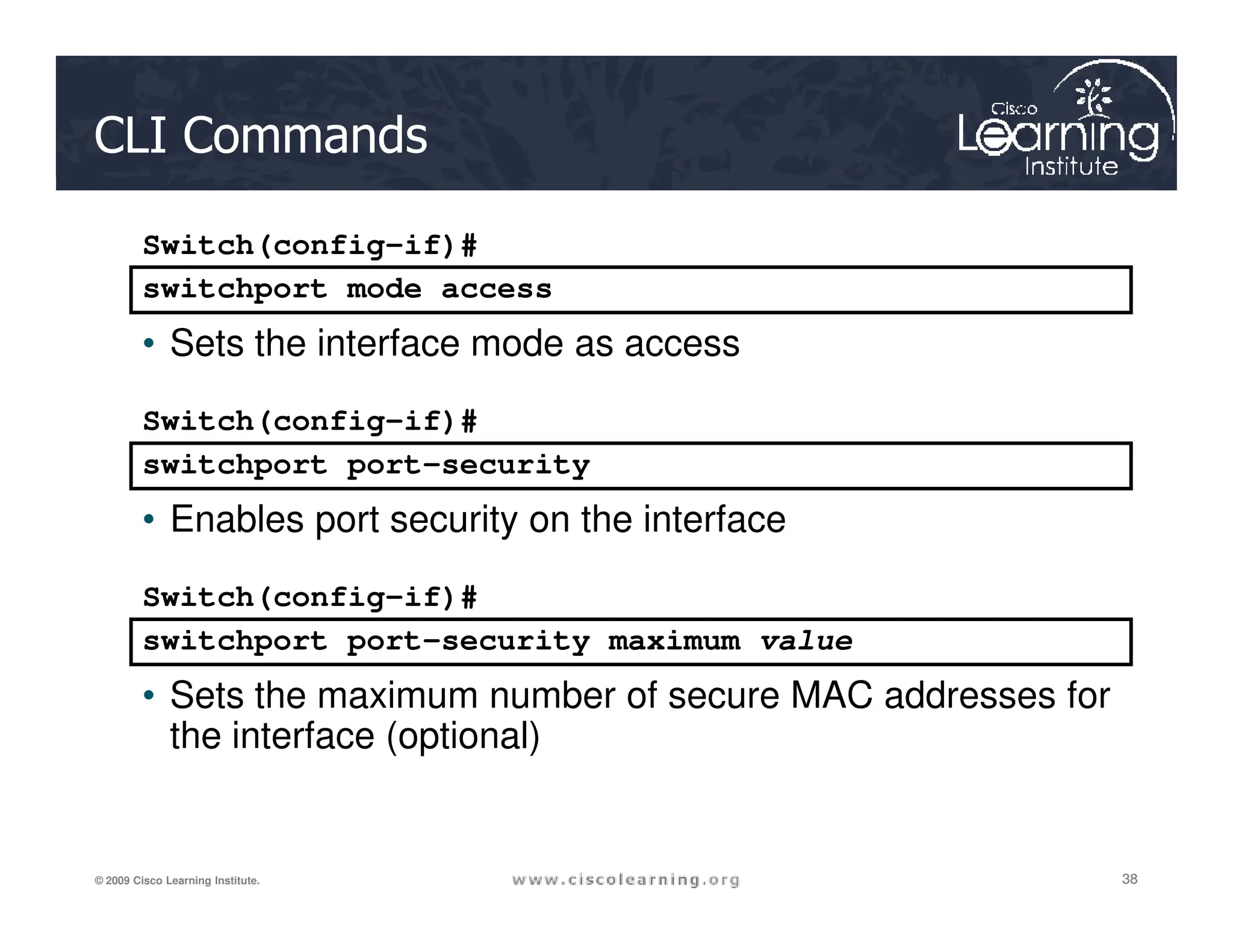
CLI Commands
switchport mode access
Switch(config-if)#
• Sets the interface mode as access
switchport port-security
Switch(config-if)#
38
38
38
© 2009 Cisco Learning Institute.
switchport port-security
• Enables port security on the interface
switchport port-security maximum value
Switch(config-if)#
• Sets the maximum number of secure MAC addresses for
the interface (optional)
Switchport Port-Security Parameters
Parameter Description
mac-address mac-address (Optional) Specify a secure MAC address for the port by entering a 48-bit MAC aaddress. You can add additional
secure MAC addresses up to the maximum value configured.
vlan vlan-id (Optional) On a trunk port only, specify the VLAN ID and the MAC address. If no VLAN ID is specified, the native
VLAN is used.
vlan access (Optional) On an access port only, specify the VLAN as an access VLAN.
vlan voice (Optional) On an access port only, specify the VLAN as a voice VLAN
mac-address sticky (Optional) Enable the interface for sticky learning by entering only the mac-address sticky keywords. When sticky
learning is enabled, the interface adds all secure MAC addresses that are dynamically learned to the running
39
39
39
© 2009 Cisco Learning Institute.
[mac-address] learning is enabled, the interface adds all secure MAC addresses that are dynamically learned to the running
configuration and converts these addresses to sticky secure MAC addresses.
Specify a sticky secure MAC address by entering the mac-address sticky mac-address keywords..
maximum value (Optional) Set the maximum number of secure MAC addresses for the interface. The maximum number of secure
MAC addresses that you can configure on a switch is set by the maximum number of available MAC
addresses allowed in the system. The active Switch Database Management (SDM) template determines this
number. This number represents the total of available MAC addresses, including those used for other Layer 2
functions and any other secure MAC addresses configured on interfaces.
The default setting is 1.
vlan [vlan-list] (Optional) For trunk ports, you can set the maximum number of secure MAC addresses on a VLAN. If the vlan
keyword is not entered, the default value is used.
■ vlan: set a per-VLAN maximum value.
■ vlan vlan-list: set a per-VLAN maximum value on a range of VLANs separated by a hyphen or a series of
VLANs separated by commas. For nonspecified VLANs, the per-VLAN maximum value is used.
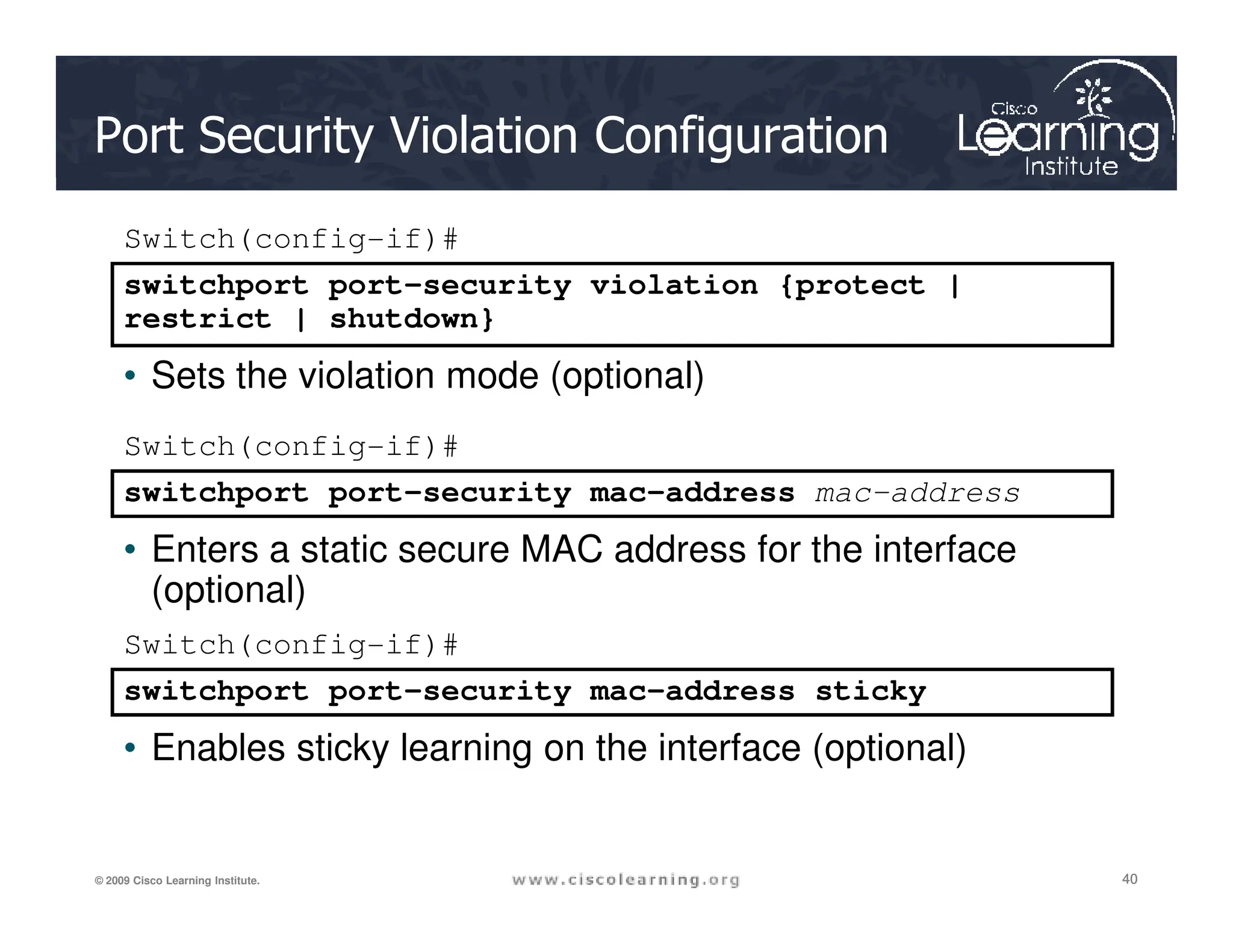
Port Security Violation Configuration
switchport port-security violation {protect |
restrict | shutdown}
Switch(config-if)#
• Sets the violation mode (optional)
switchport port-security mac-address
Switch(config-if)#
40
40
40
© 2009 Cisco Learning Institute.
switchport port-security mac-address sticky
Switch(config-if)#
• Enables sticky learning on the interface (optional)
switchport port-security mac-address mac-address
• Enters a static secure MAC address for the interface
(optional)
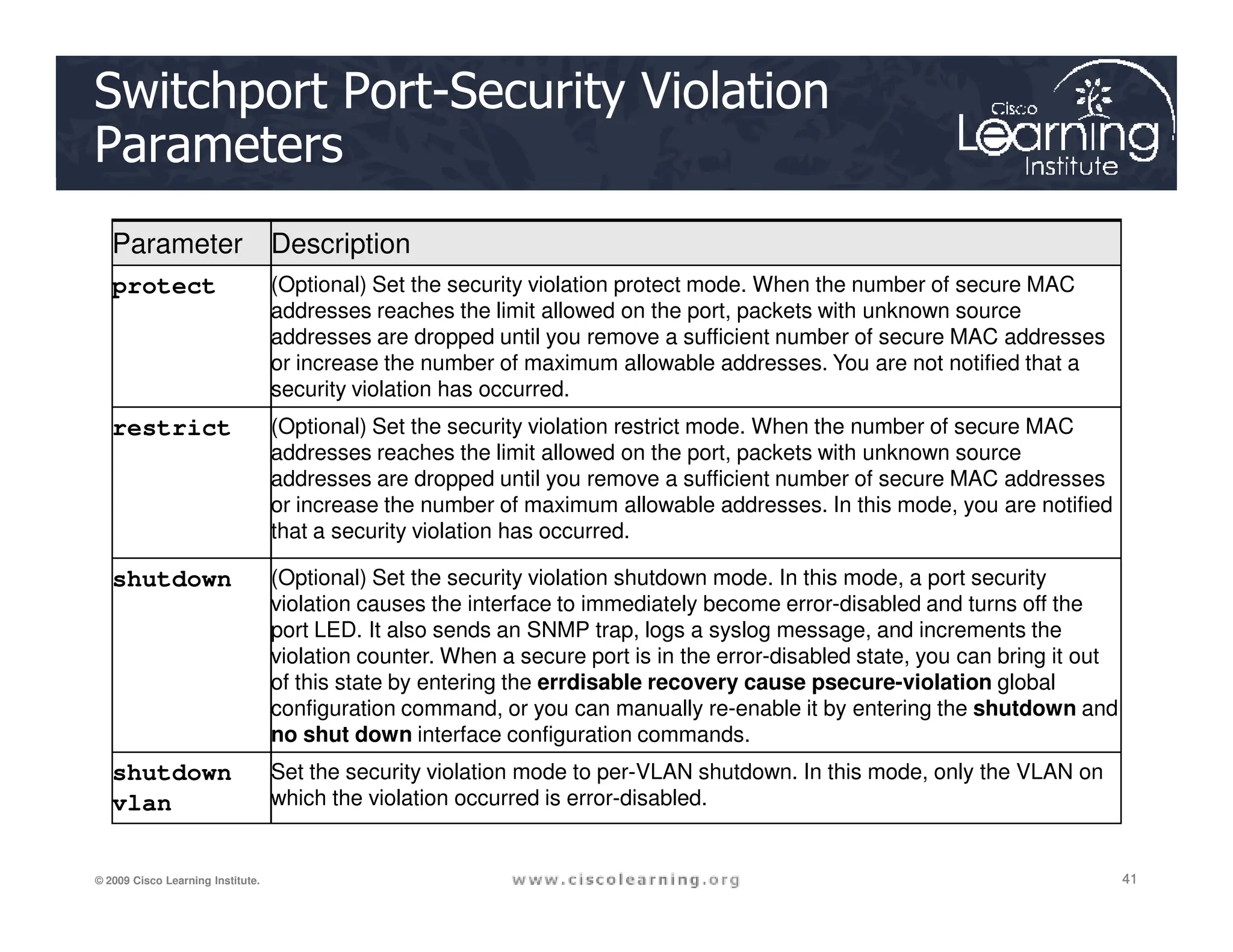
Switchport Port-Security Violation
Parameters
Parameter Description
protect (Optional) Set the security violation protect mode. When the number of secure MAC
addresses reaches the limit allowed on the port, packets with unknown source
addresses are dropped until you remove a sufficient number of secure MAC addresses
or increase the number of maximum allowable addresses. You are not notified that a
security violation has occurred.
restrict (Optional) Set the security violation restrict mode. When the number of secure MAC
addresses reaches the limit allowed on the port, packets with unknown source
addresses are dropped until you remove a sufficient number of secure MAC addresses
41
41
41
© 2009 Cisco Learning Institute.
addresses are dropped until you remove a sufficient number of secure MAC addresses
or increase the number of maximum allowable addresses. In this mode, you are notified
that a security violation has occurred.
shutdown (Optional) Set the security violation shutdown mode. In this mode, a port security
violation causes the interface to immediately become error-disabled and turns off the
port LED. It also sends an SNMP trap, logs a syslog message, and increments the
violation counter. When a secure port is in the error-disabled state, you can bring it out
of this state by entering the errdisable recovery cause psecure-violation global
configuration command, or you can manually re-enable it by entering the shutdown and
no shut down interface configuration commands.
shutdown
vlan
Set the security violation mode to per-VLAN shutdown. In this mode, only the VLAN on
which the violation occurred is error-disabled.
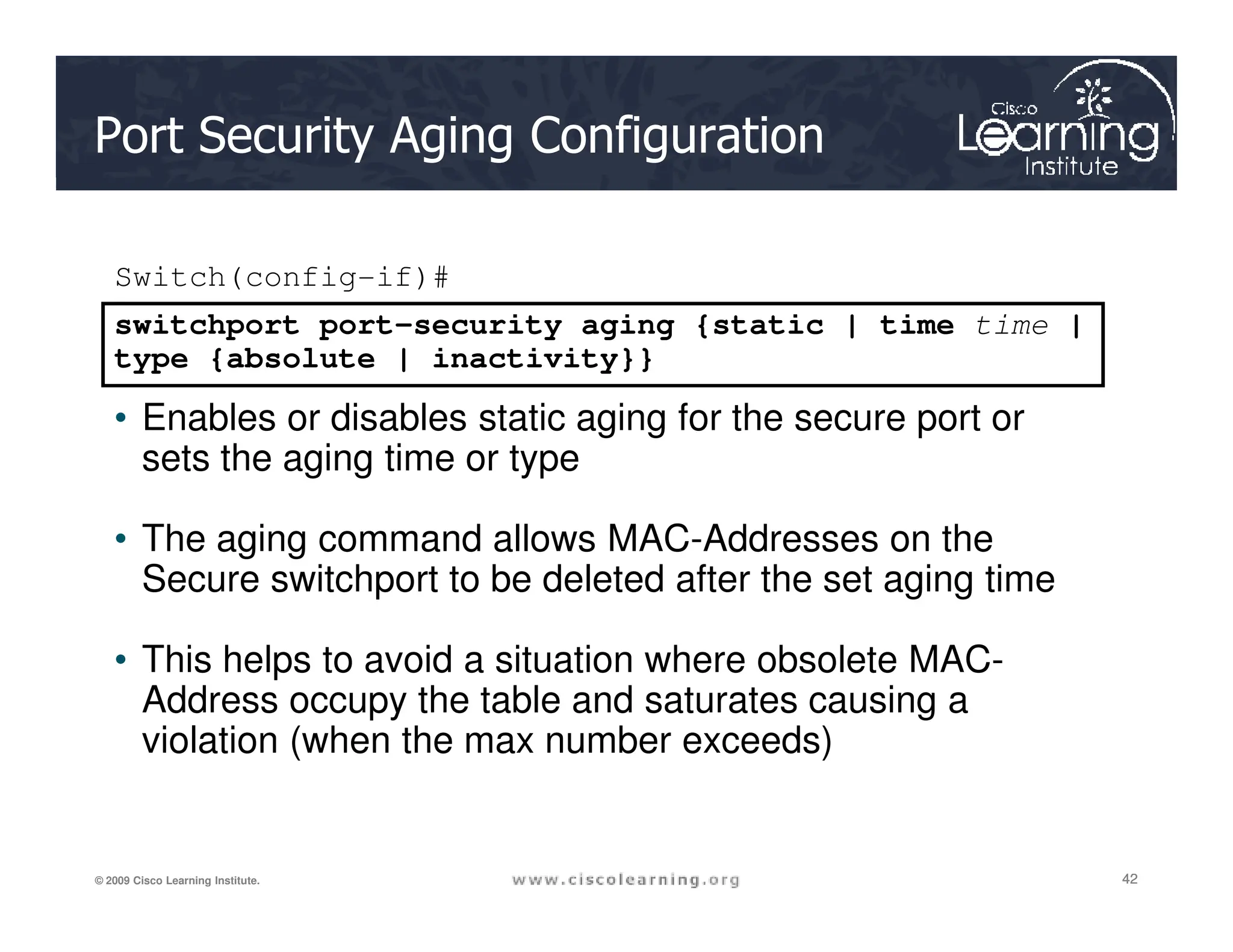
Port Security Aging Configuration
switchport port-security aging {static | time time |
type {absolute | inactivity}}
Switch(config-if)#
• Enables or disables static aging for the secure port or
sets the aging time or type
42
42
42
© 2009 Cisco Learning Institute.
sets the aging time or type
• The aging command allows MAC-Addresses on the
Secure switchport to be deleted after the set aging time
• This helps to avoid a situation where obsolete MAC-
Address occupy the table and saturates causing a
violation (when the max number exceeds)
Switchport Port-Security
Aging Parameters
Parameter Description
static Enable aging for statically configured secure
addresses on this port.
time time Specify the aging time for this port. The range is 0 to
1440 minutes. If the time is 0, aging is disabled for
this port.
43
43
43
© 2009 Cisco Learning Institute.
type absolute Set absolute aging type. All the secure addresses
on this port age out exactly after the time (minutes)
specified and are removed from the secure address
list.
type inactivity Set the inactivity aging type. The secure addresses
on this port age out only if there is no data traffic
from the secure source address for the specified
time period.
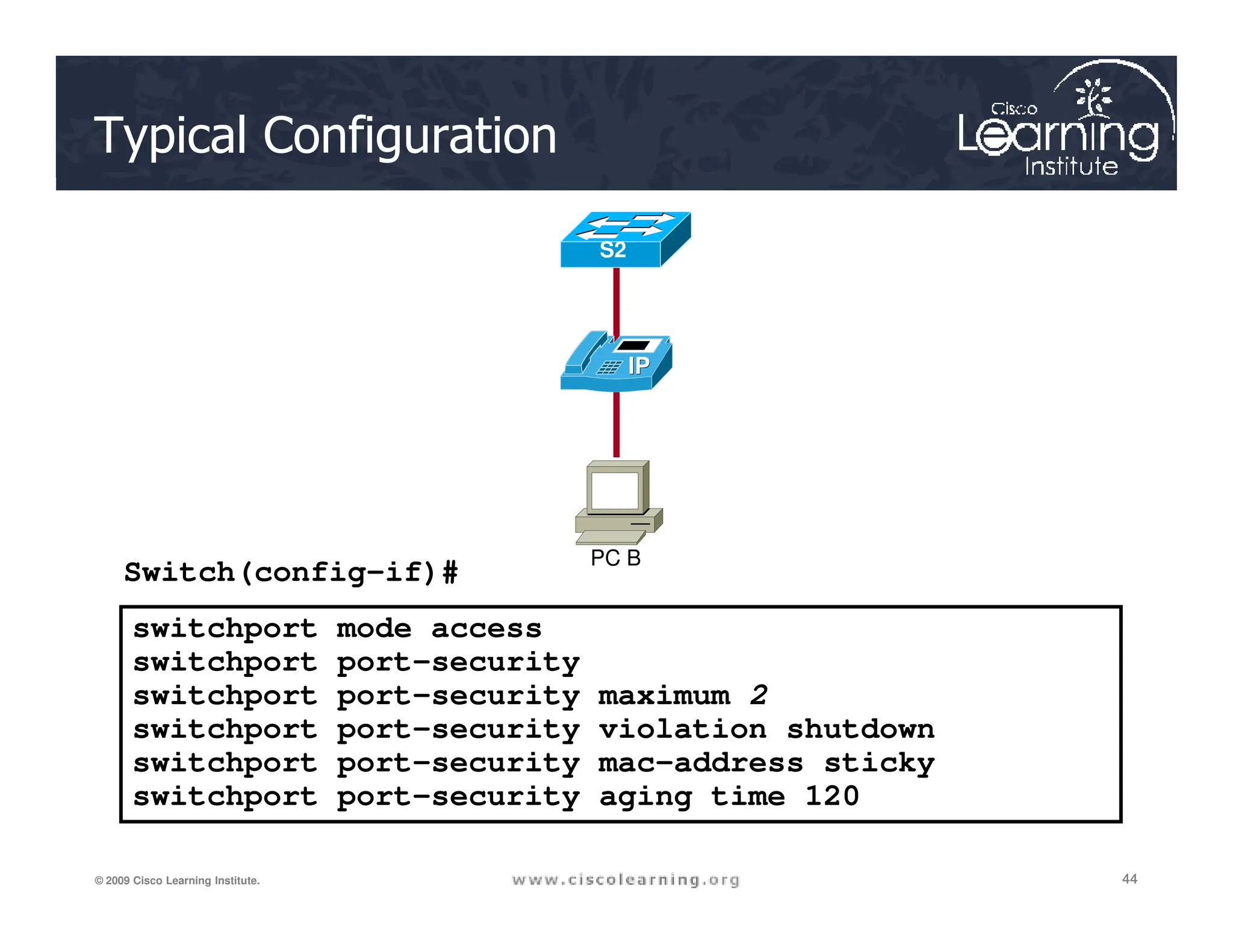
Typical Configuration
S2
44
44
44
© 2009 Cisco Learning Institute.
switchport mode access
switchport port-security
switchport port-security maximum 2
switchport port-security violation shutdown
switchport port-security mac-address sticky
switchport port-security aging time 120
Switch(config-if)# PC B
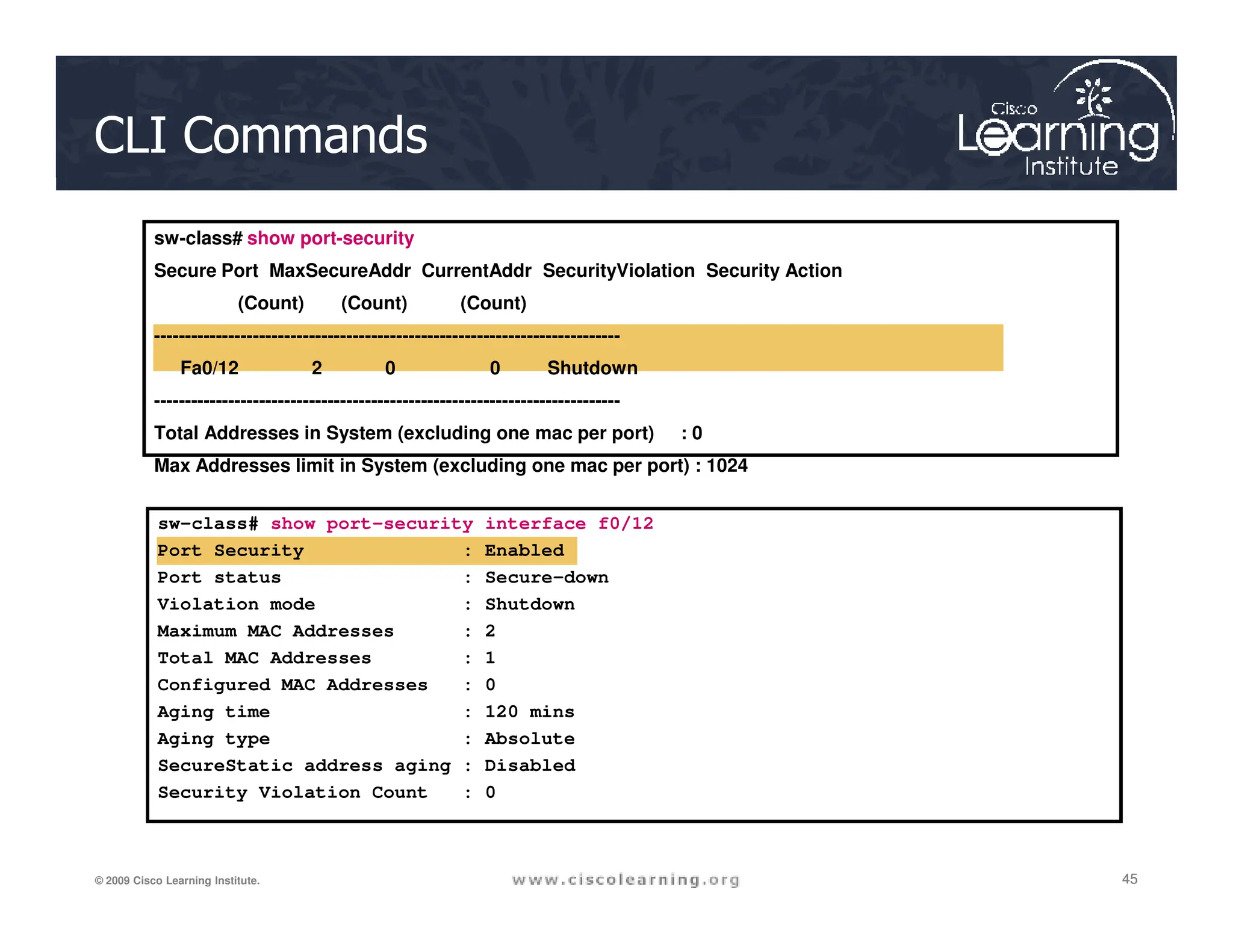
CLI Commands
sw-class# show port-security
Secure Port MaxSecureAddr CurrentAddr SecurityViolation Security Action
(Count) (Count) (Count)
---------------------------------------------------------------------------
Fa0/12 2 0 0 Shutdown
---------------------------------------------------------------------------
Total Addresses in System (excluding one mac per port) : 0
Max Addresses limit in System (excluding one mac per port) : 1024
45
45
45
© 2009 Cisco Learning Institute.
sw-class# show port-security interface f0/12
Port Security : Enabled
Port status : Secure-down
Violation mode : Shutdown
Maximum MAC Addresses : 2
Total MAC Addresses : 1
Configured MAC Addresses : 0
Aging time : 120 mins
Aging type : Absolute
SecureStatic address aging : Disabled
Security Violation Count : 0
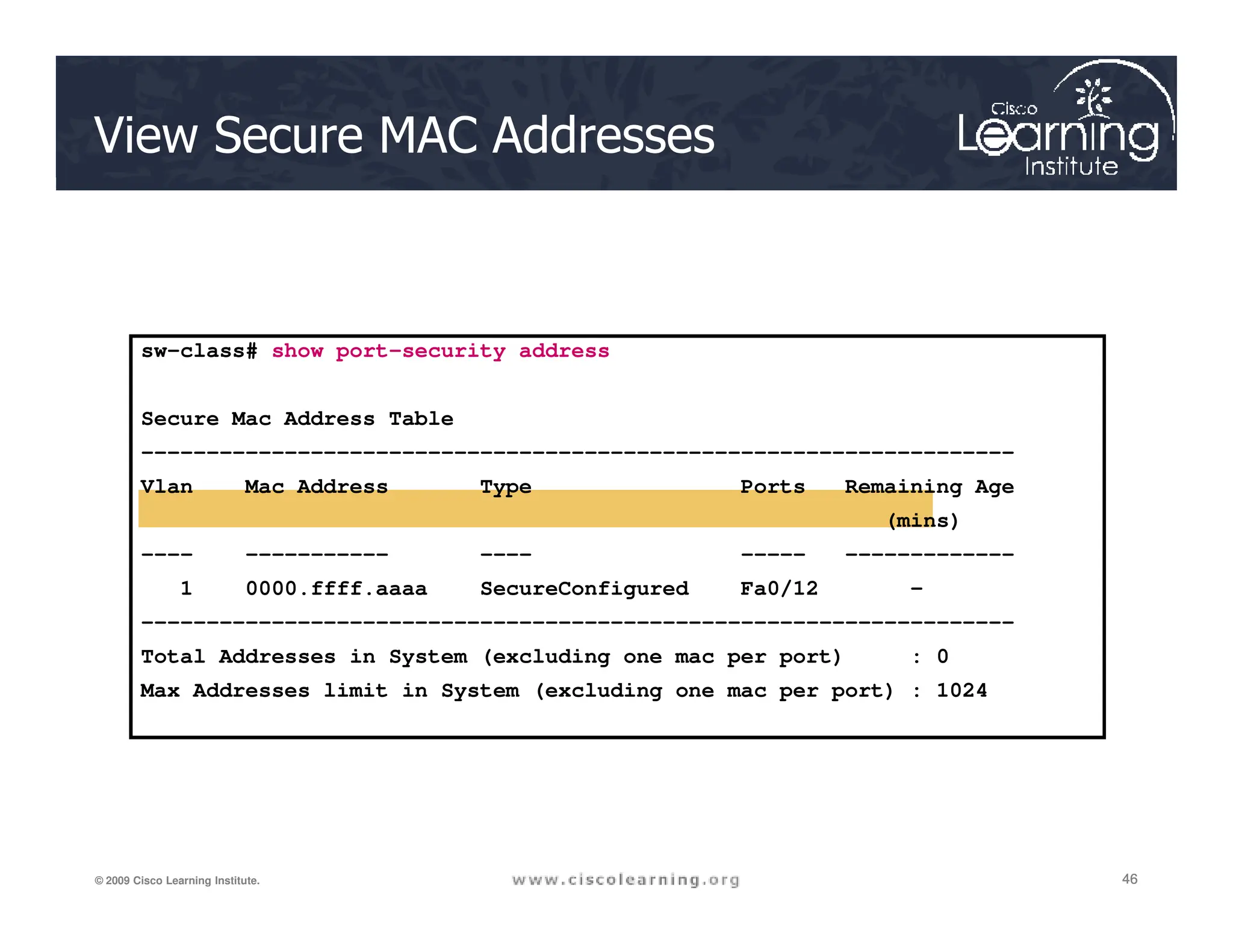
View Secure MAC Addresses
sw-class# show port-security address
Secure Mac Address Table
-------------------------------------------------------------------
Vlan Mac Address Type Ports Remaining Age
46
46
46
© 2009 Cisco Learning Institute.
Vlan Mac Address Type Ports Remaining Age
(mins)
---- ----------- ---- ----- -------------
1 0000.ffff.aaaa SecureConfigured Fa0/12 -
-------------------------------------------------------------------
Total Addresses in System (excluding one mac per port) : 0
Max Addresses limit in System (excluding one mac per port) : 1024
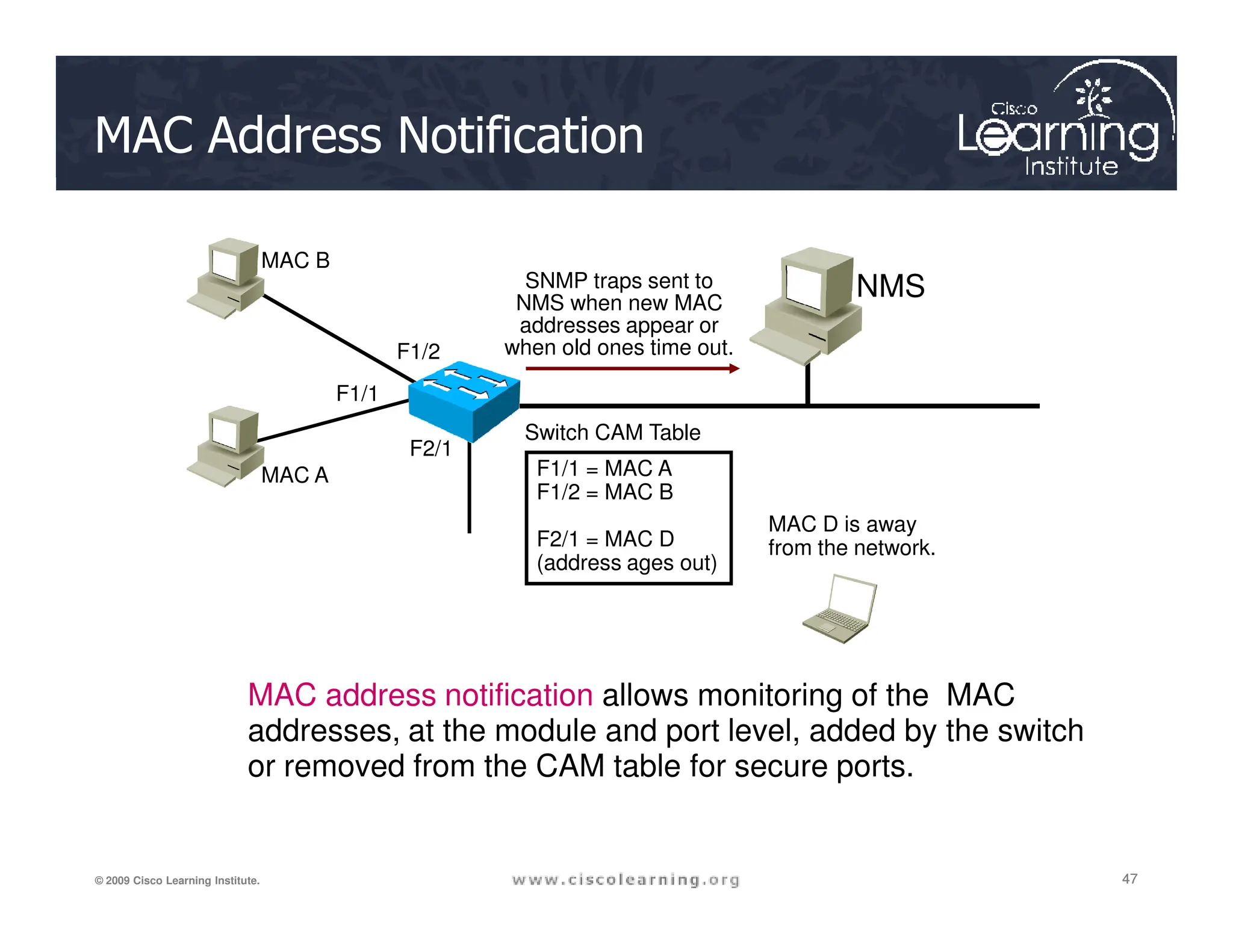
MAC Address Notification
NMS
MAC A
MAC B
F1/1 = MAC A
Switch CAM Table
SNMP traps sent to
NMS when new MAC
addresses appear or
when old ones time out.
F1/2
F1/1
F2/1
47
47
47
© 2009 Cisco Learning Institute.
MAC address notification allows monitoring of the MAC
addresses, at the module and port level, added by the switch
or removed from the CAM table for secure ports.
MAC A F1/1 = MAC A
F1/2 = MAC B
F2/1 = MAC D
(address ages out)
MAC D is away
from the network.
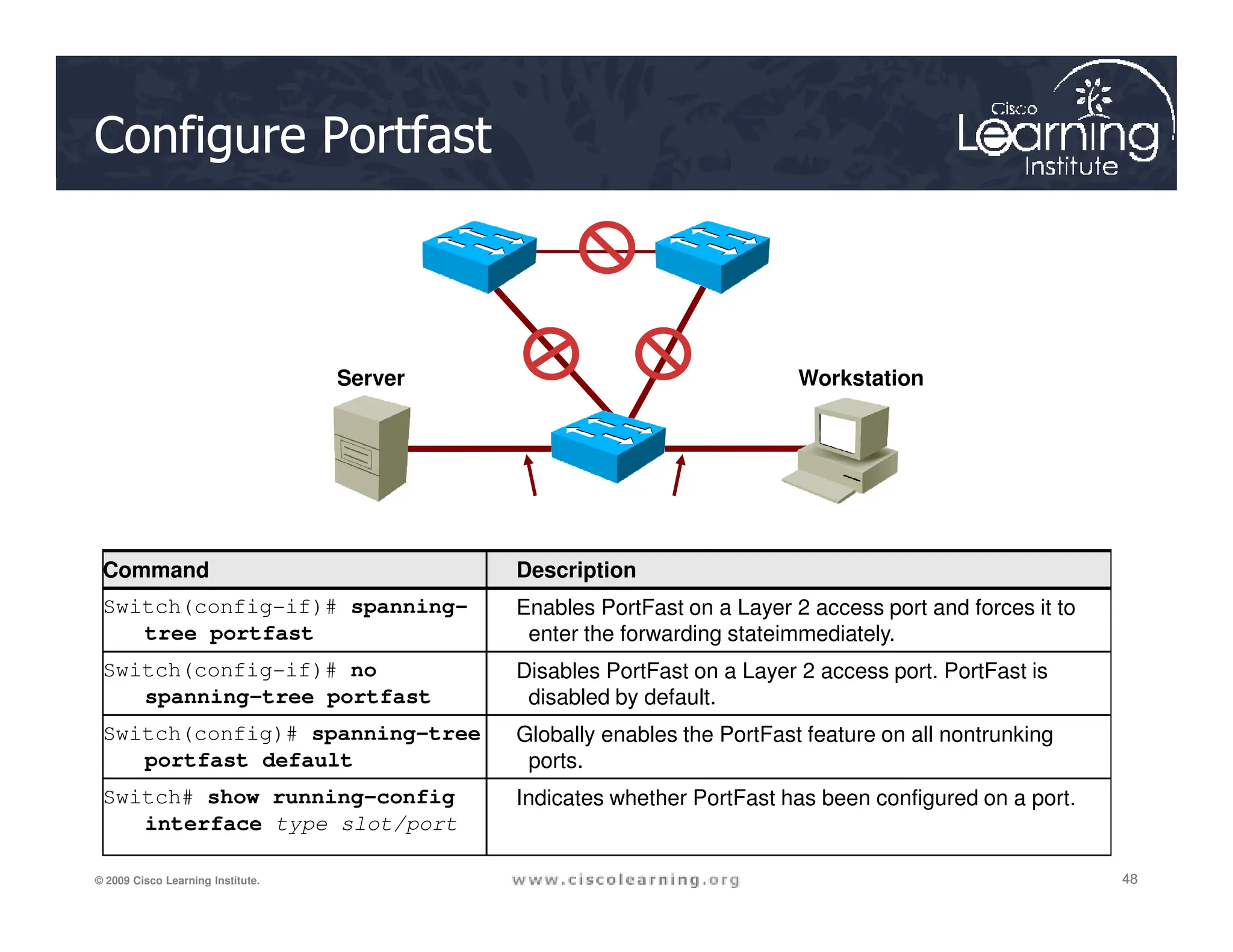
Configure Portfast
Server Workstation
48
48
48
© 2009 Cisco Learning Institute.
Command Description
Switch(config-if)# spanning-
tree portfast
Enables PortFast on a Layer 2 access port and forces it to
enter the forwarding stateimmediately.
Switch(config-if)# no
spanning-tree portfast
Disables PortFast on a Layer 2 access port. PortFast is
disabled by default.
Switch(config)# spanning-tree
portfast default
Globally enables the PortFast feature on all nontrunking
ports.
Switch# show running-config
interface type slot/port
Indicates whether PortFast has been configured on a port.
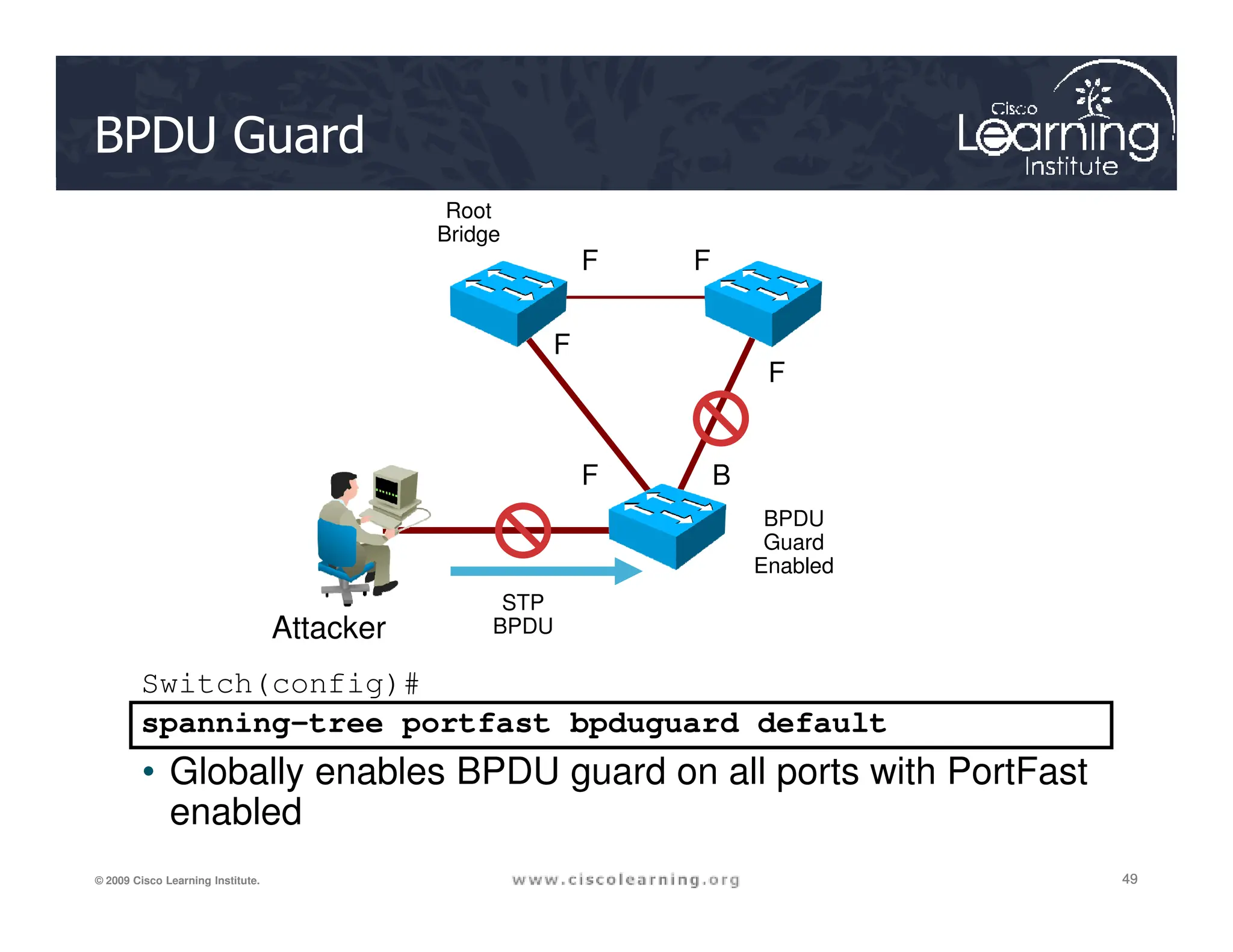
BPDU Guard
F F
F
F
F B
Root
Bridge
49
49
49
© 2009 Cisco Learning Institute.
Switch(config)#
spanning-tree portfast bpduguard default
• Globally enables BPDU guard on all ports with PortFast
enabled
F B
BPDU
Guard
Enabled
Attacker
STP
BPDU
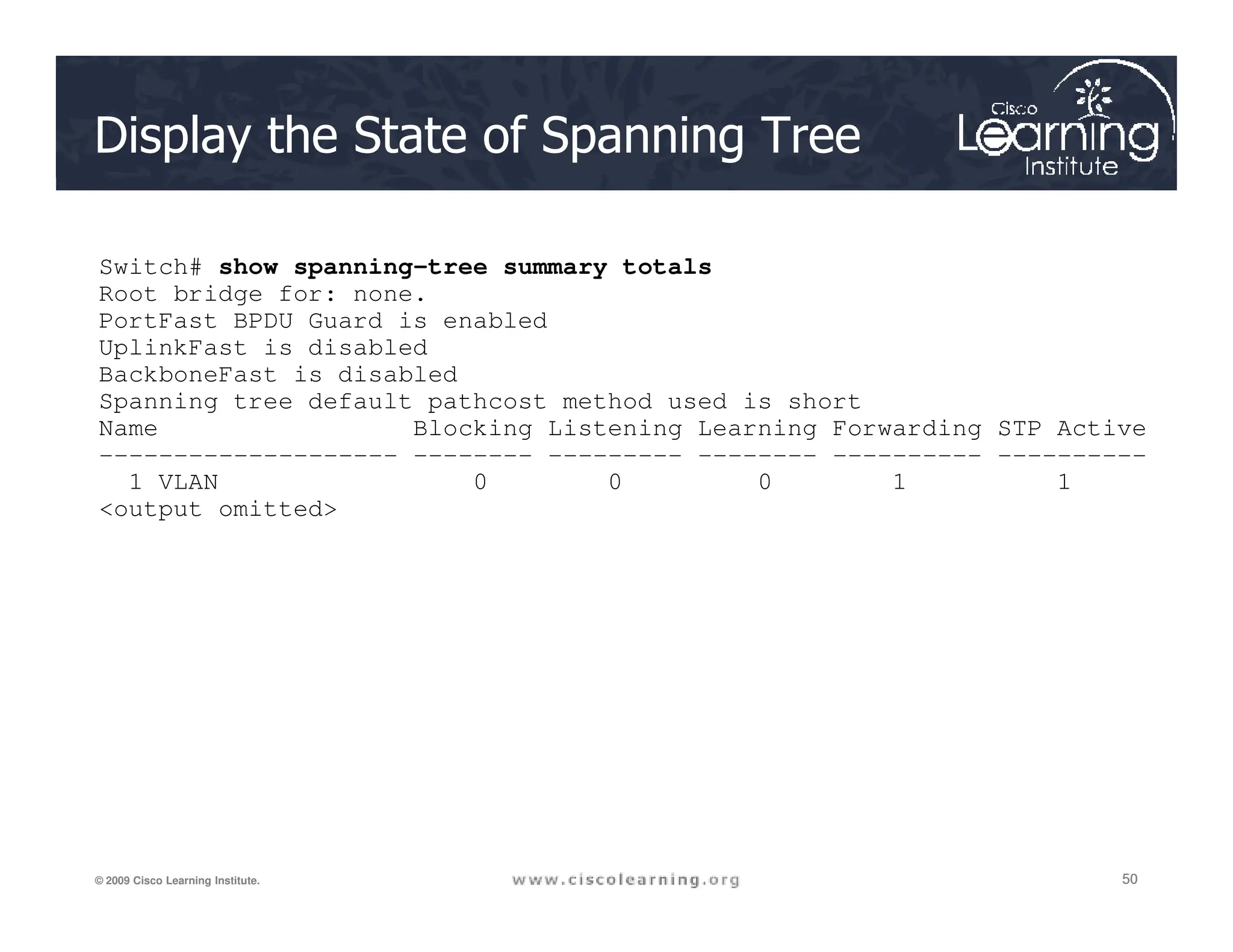
Display the State of Spanning Tree
Switch# show spanning-tree summary totals
Root bridge for: none.
PortFast BPDU Guard is enabled
UplinkFast is disabled
BackboneFast is disabled
Spanning tree default pathcost method used is short
Name Blocking Listening Learning Forwarding STP Active
-------------------- -------- --------- -------- ---------- ----------
1 VLAN 0 0 0 1 1
50
50
50
© 2009 Cisco Learning Institute.
1 VLAN 0 0 0 1 1
output omitted
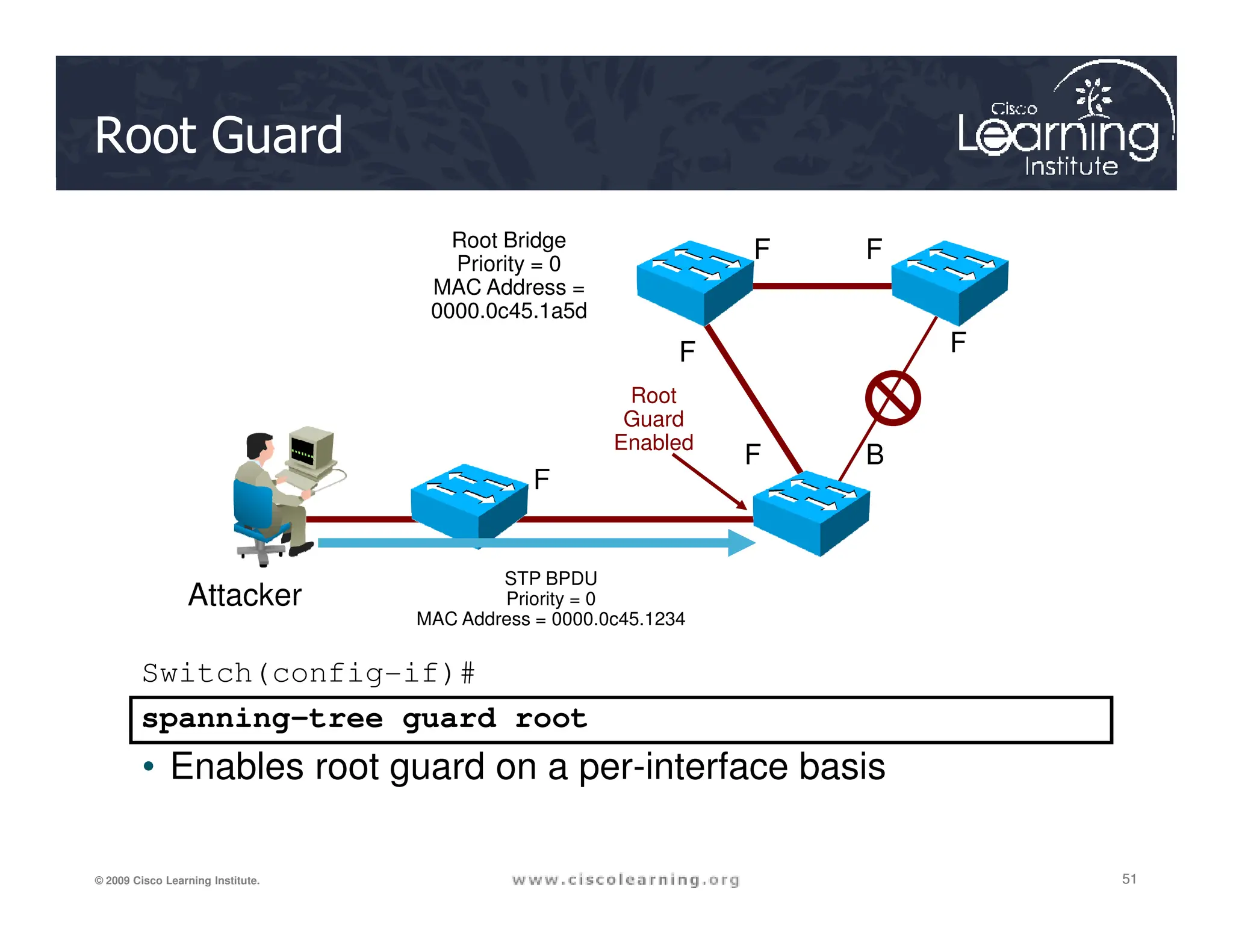
Root Guard
Root Bridge
Priority = 0
MAC Address =
0000.0c45.1a5d
F F
F F
F B
F
Root
Guard
Enabled
51
51
51
© 2009 Cisco Learning Institute.
Switch(config-if)#
spanning-tree guard root
• Enables root guard on a per-interface basis
F
STP BPDU
Priority = 0
MAC Address = 0000.0c45.1234
Attacker
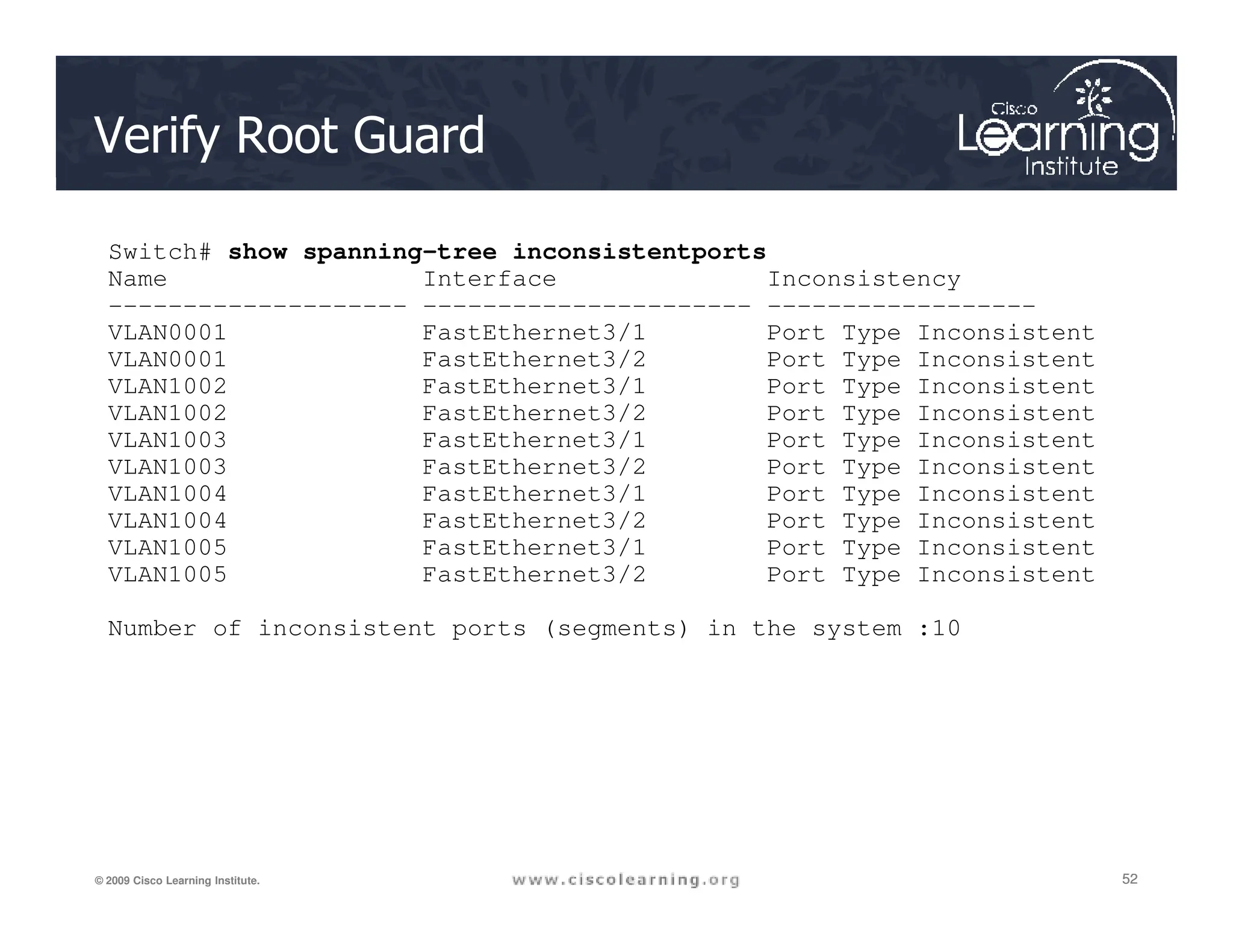
Verify Root Guard
Switch# show spanning-tree inconsistentports
Name Interface Inconsistency
-------------------- ---------------------- ------------------
VLAN0001 FastEthernet3/1 Port Type Inconsistent
VLAN0001 FastEthernet3/2 Port Type Inconsistent
VLAN1002 FastEthernet3/1 Port Type Inconsistent
VLAN1002 FastEthernet3/2 Port Type Inconsistent
VLAN1003 FastEthernet3/1 Port Type Inconsistent
VLAN1003 FastEthernet3/2 Port Type Inconsistent
52
52
52
© 2009 Cisco Learning Institute.
VLAN1003 FastEthernet3/2 Port Type Inconsistent
VLAN1004 FastEthernet3/1 Port Type Inconsistent
VLAN1004 FastEthernet3/2 Port Type Inconsistent
VLAN1005 FastEthernet3/1 Port Type Inconsistent
VLAN1005 FastEthernet3/2 Port Type Inconsistent
Number of inconsistent ports (segments) in the system :10
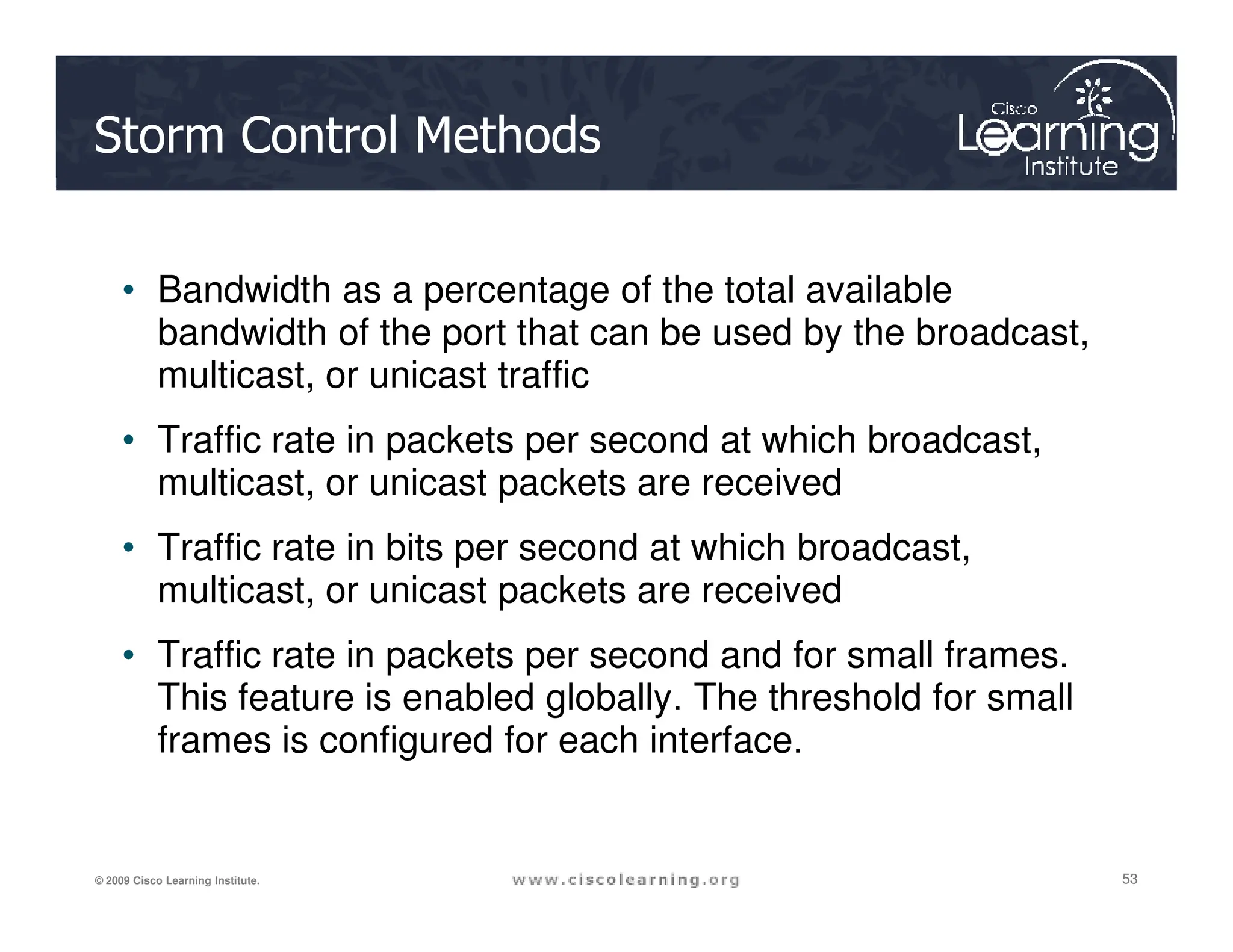
Storm Control Methods
• Bandwidth as a percentage of the total available
bandwidth of the port that can be used by the broadcast,
multicast, or unicast traffic
• Traffic rate in packets per second at which broadcast,
multicast, or unicast packets are received
53
53
53
© 2009 Cisco Learning Institute.
multicast, or unicast packets are received
• Traffic rate in bits per second at which broadcast,
multicast, or unicast packets are received
• Traffic rate in packets per second and for small frames.
This feature is enabled globally. The threshold for small
frames is configured for each interface.
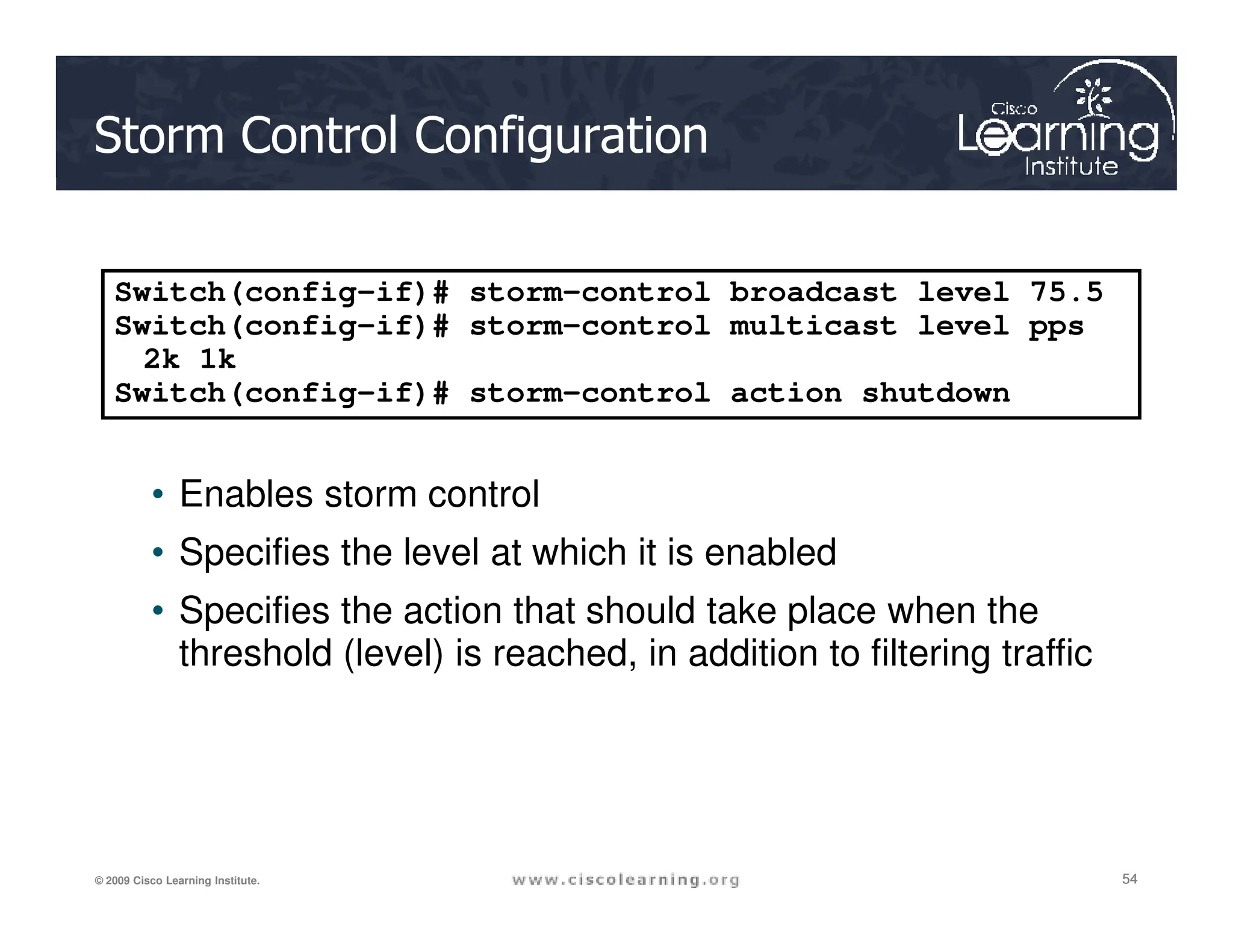
Storm Control Configuration
• Enables storm control
Switch(config-if)# storm-control broadcast level 75.5
Switch(config-if)# storm-control multicast level pps
2k 1k
Switch(config-if)# storm-control action shutdown
54
54
54
© 2009 Cisco Learning Institute.
• Enables storm control
• Specifies the level at which it is enabled
• Specifies the action that should take place when the
threshold (level) is reached, in addition to filtering traffic
Storm Control Parameters
Parameter Description
broadcast This parameter enables broadcast storm control on the interface.
multicast This parameter enables multicast storm control on the interface.
unicast This parameter enables unicast storm control on the interface.
level level [level-low] Rising and falling suppression levels as a percentage of total bandwidth of the port.
• level: Rising suppression level. The range is 0.00 to 100.00. Block the flooding of
storm packets when the value specified for level is reached.
• level-low: (Optional) Falling suppression level, up to two decimal places. This
value must be less than or equal to the rising suppression value.
level bps bps [bps-low] Specify the rising and falling suppression levels as a rate in bits per second at which
55
55
55
© 2009 Cisco Learning Institute.
level bps bps [bps-low] Specify the rising and falling suppression levels as a rate in bits per second at which
traffic is received on the port.
• bps: Rising suppression level. The range is 0.0 to 10000000000.0. Block the
flooding of storm packets when the value specified for bps is reached.
• bps-low: (Optional) Falling suppression level, up to one decimal place. This value
must be equal to or less than the rising suppression value.
level pps pps [pps-low] Specify the rising and falling suppression levels as a rate in packets per second at
which traffic is received on the port.
• pps: Rising suppression level. The range is 0.0 to 10000000000.0. Block the
flooding of storm packets when the value specified for pps is reached.
• pps-low: (Optional) Falling suppression level, up to one decimal place. This value
must be equal to or less than the rising suppression value.
action {shutdown|trap} The action taken when a storm occurs on a port. The default action is to filter traffic
and to not send an SNMP trap.
The keywords have these meanings:
• shutdown: Disables the port during a storm
• trap: Sends an SNMP trap when a storm occurs
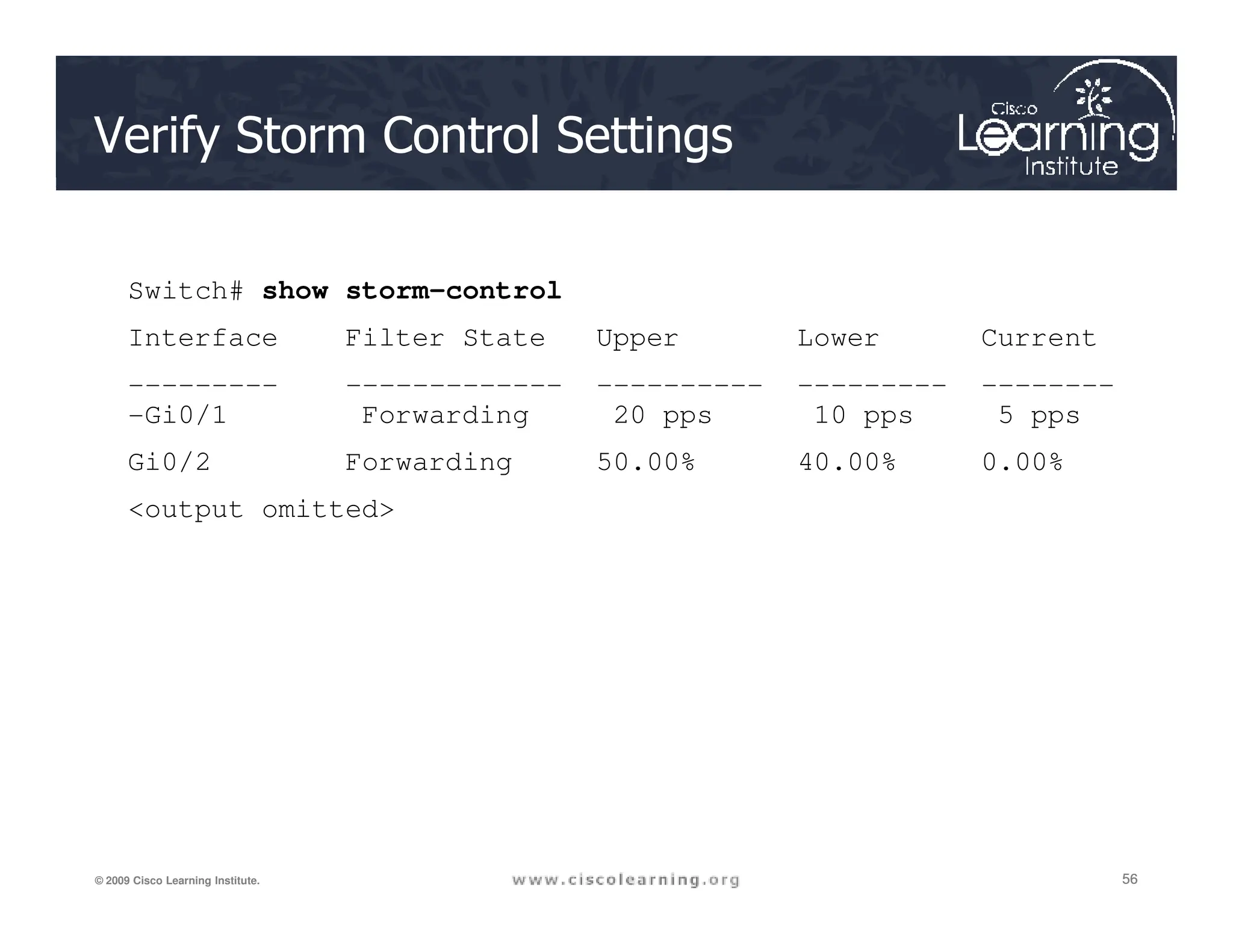
Verify Storm Control Settings
Switch# show storm-control
Interface Filter State Upper Lower Current
--------- ------------- ---------- --------- --------
-Gi0/1 Forwarding 20 pps 10 pps 5 pps
Gi0/2 Forwarding 50.00% 40.00% 0.00%
56
56
56
© 2009 Cisco Learning Institute.
Gi0/2 Forwarding 50.00% 40.00% 0.00%
output omitted
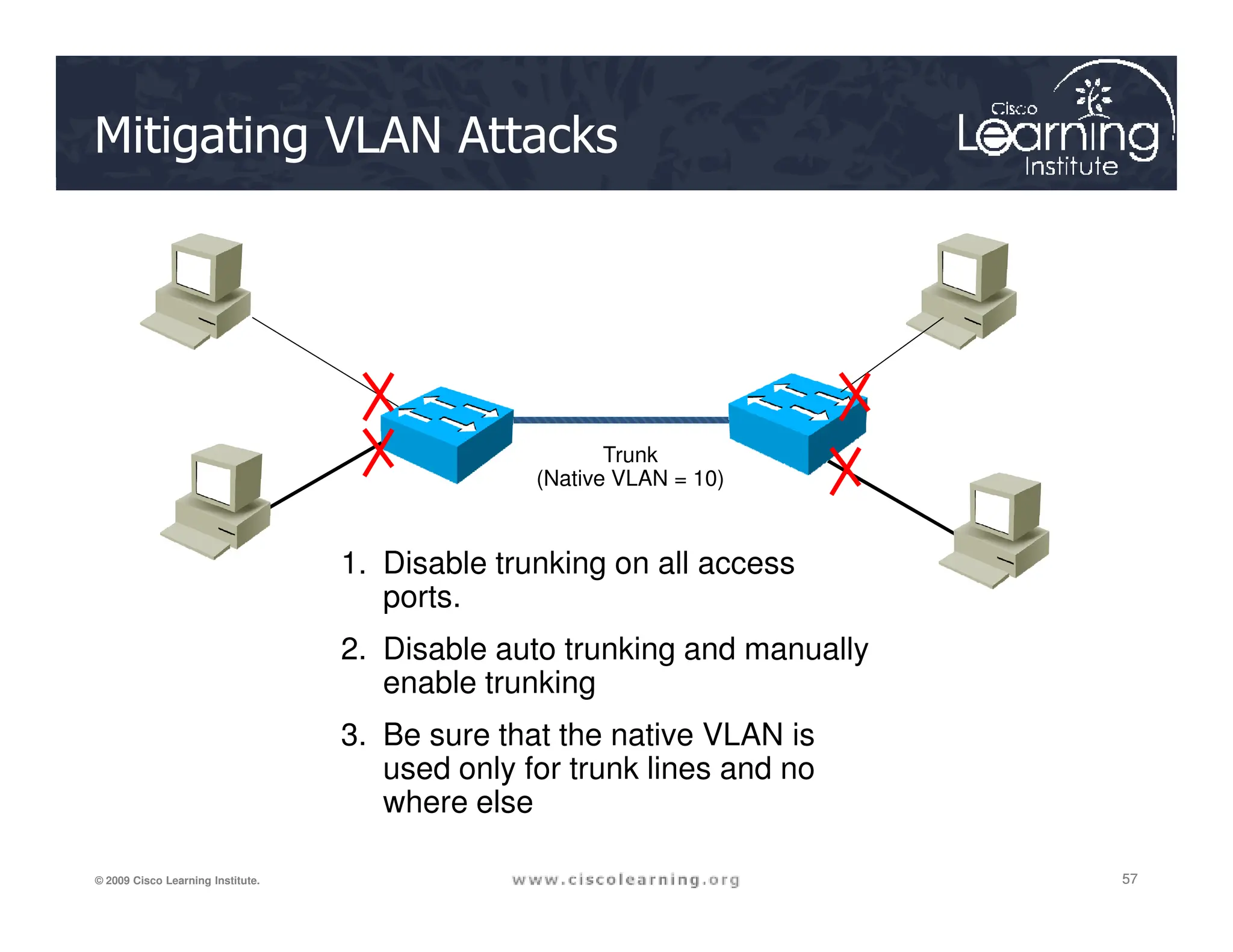
Trunk
(Native VLAN = 10)
Mitigating VLAN Attacks
57
57
57
© 2009 Cisco Learning Institute.
(Native VLAN = 10)
1. Disable trunking on all access
ports.
2. Disable auto trunking and manually
enable trunking
3. Be sure that the native VLAN is
used only for trunk lines and no
where else
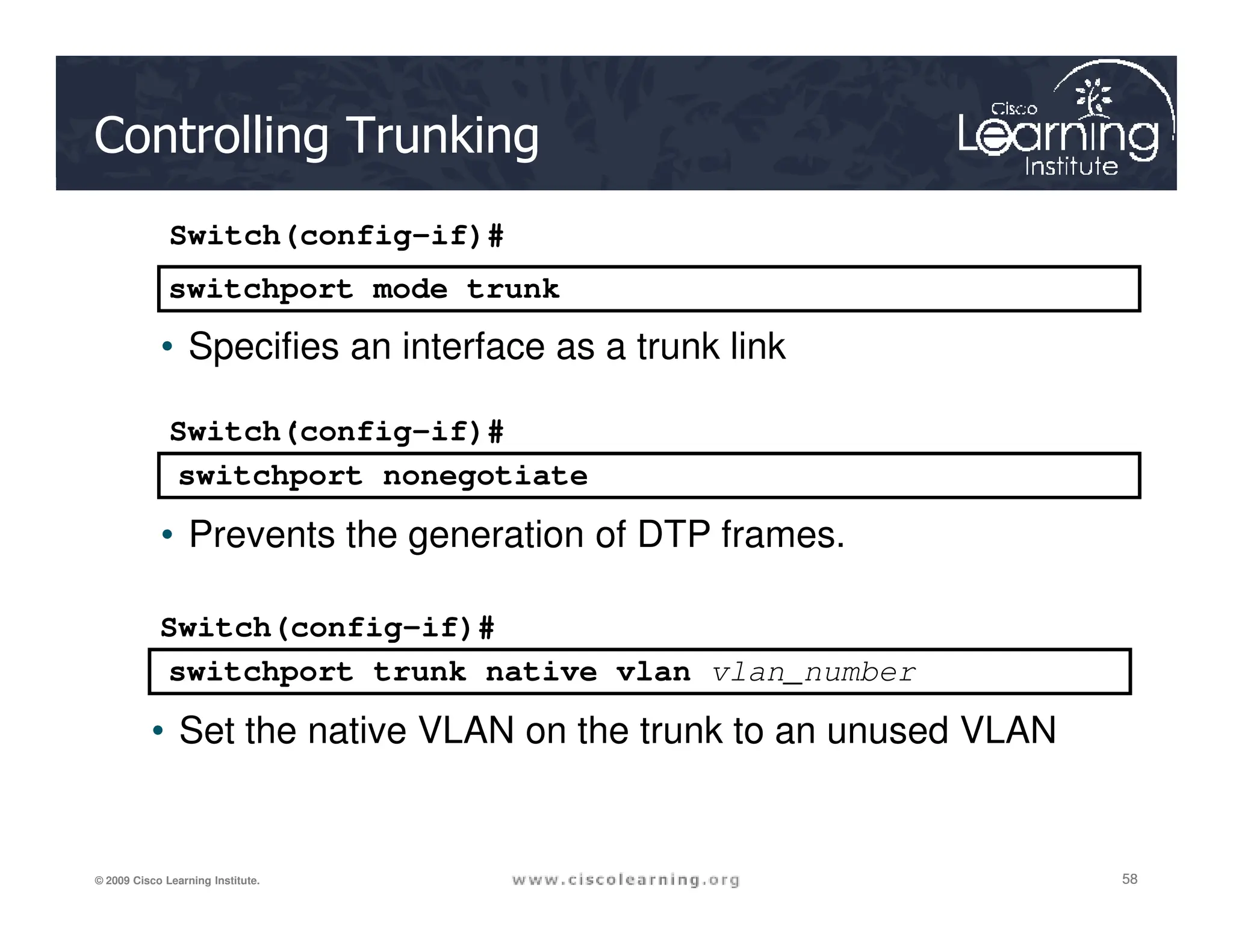
switchport mode trunk
switchport nonegotiate
.
Switch(config-if)#
• Specifies an interface as a trunk link
Switch(config-if)#
Controlling Trunking
58
58
58
© 2009 Cisco Learning Institute.
switchport trunk native vlan vlan_number
switchport nonegotiate
• Prevents the generation of DTP frames.
Switch(config-if)#
• Set the native VLAN on the trunk to an unused VLAN
Traffic Analysis
 A SPAN port mirrors traffic to
another port where a
monitoring device is
connected.
“Intruder
Alert!”
IDS
RMON Probe
Protocol Analyzer
59
59
59
© 2009 Cisco Learning Institute.
connected.
 Without this, it can be difficult
to track hackers after they
have entered the network.
Attacker
CLI Commands
monitor session session_number source {interface
interface-id [, | -] [both | rx | tx]} | {vlan vlan-
id [, | -] [both | rx | tx]}| {remote vlan vlan-id}
Switch(config)#
60
60
60
© 2009 Cisco Learning Institute.
monitor session session_number destination
{interface interface-id [, | -] [encapsulation
replicate] [ingress {dot1q vlan vlan-id | isl |
untagged vlan vlan-id | vlan vlan-id}]} | {remote
vlan vlan-id}
Switch(config)#
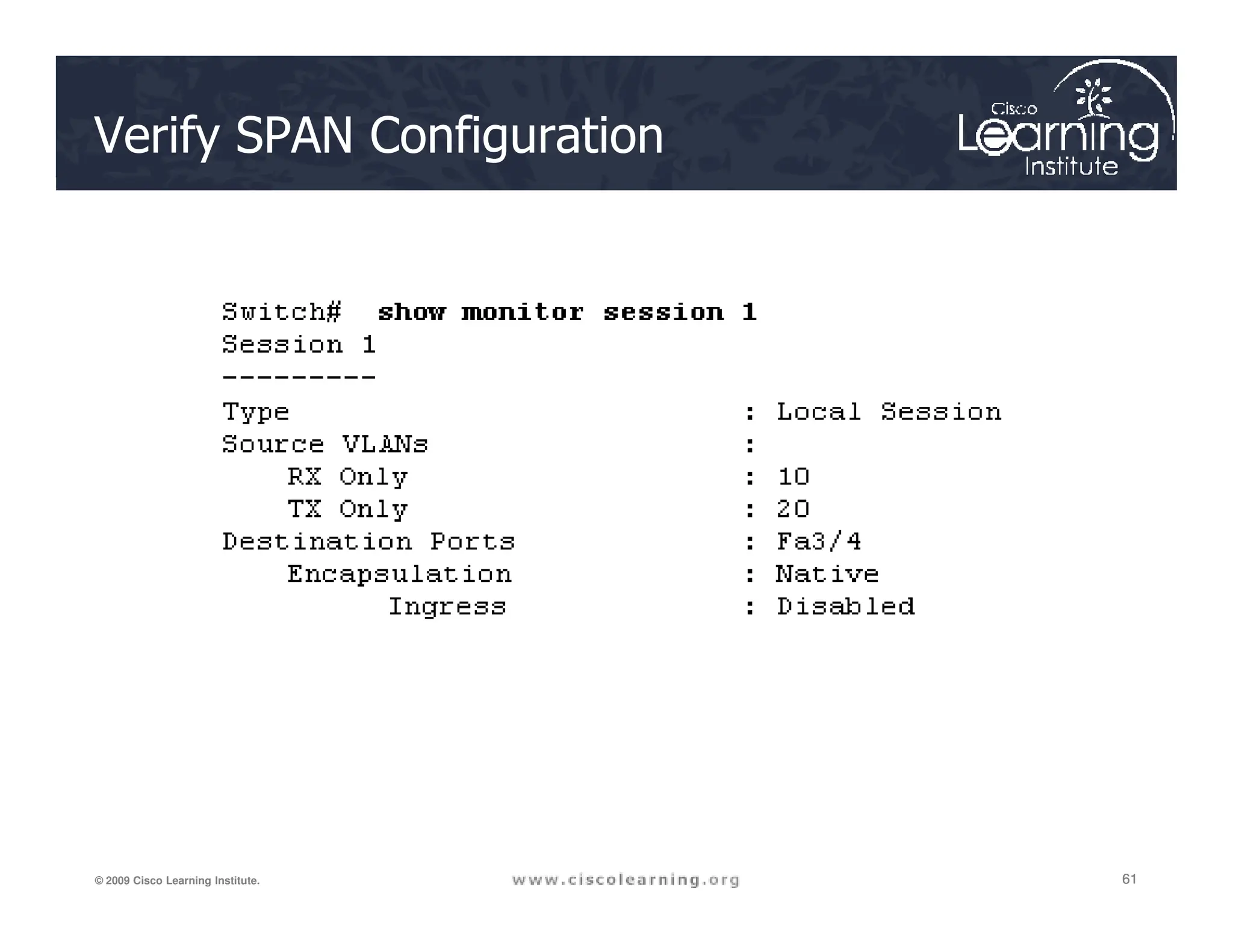
Verify SPAN Configuration
61
61
61
© 2009 Cisco Learning Institute.
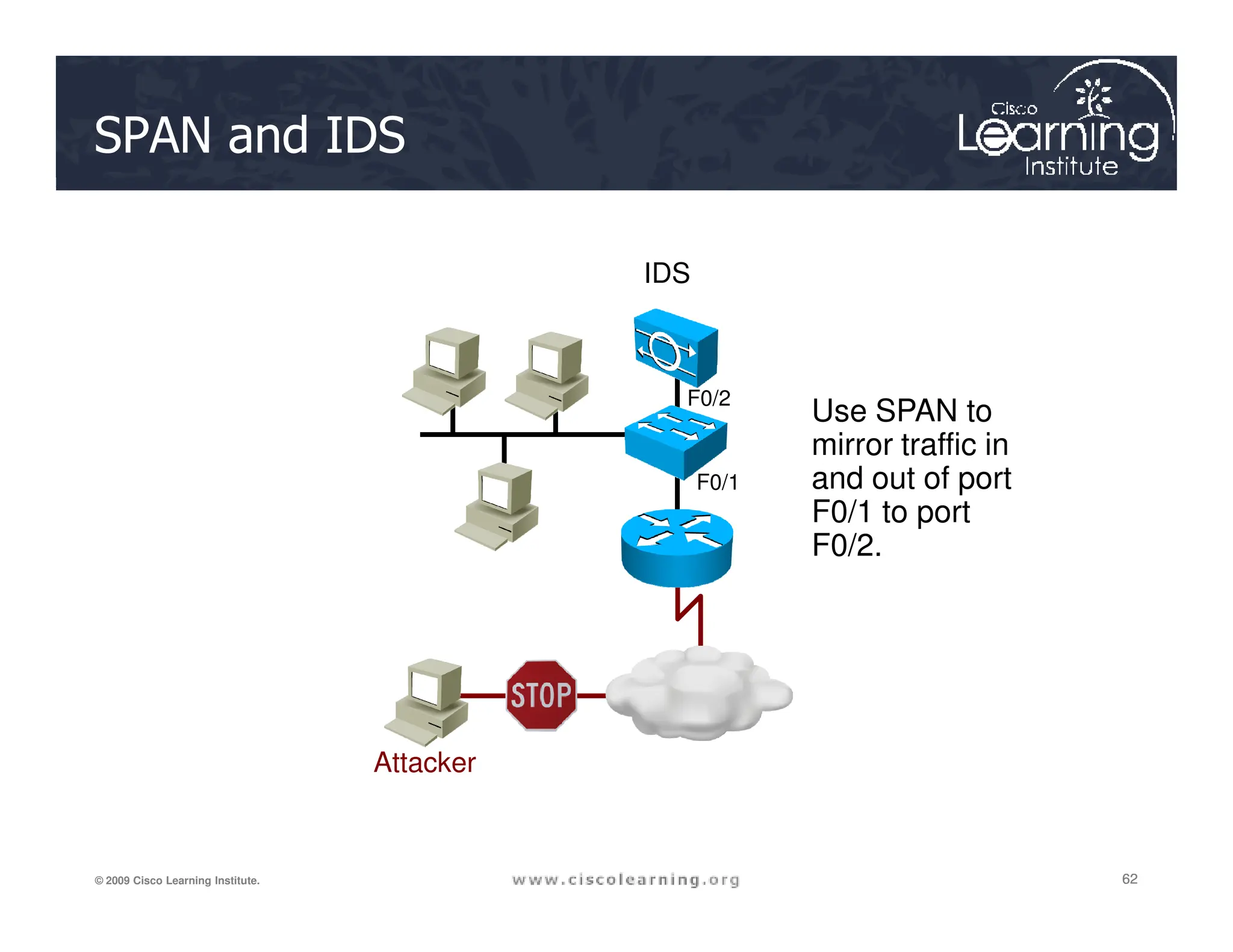
SPAN and IDS
IDS
Use SPAN to
mirror traffic in
and out of port
F0/1
F0/2
62
62
62
© 2009 Cisco Learning Institute.
Attacker
and out of port
F0/1 to port
F0/2.
F0/1
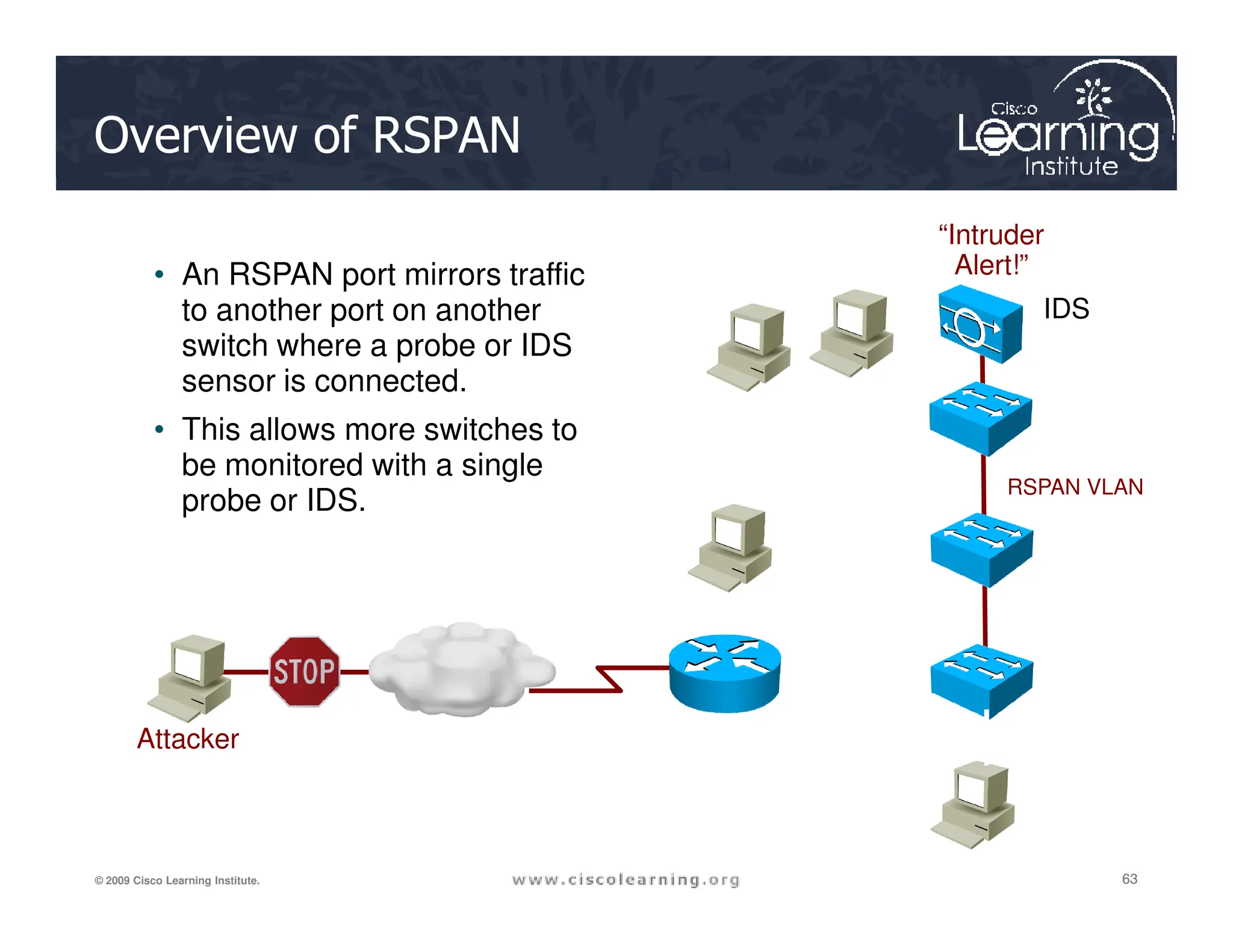
Overview of RSPAN
• An RSPAN port mirrors traffic
to another port on another
switch where a probe or IDS
sensor is connected.
• This allows more switches to
be monitored with a single
“Intruder
Alert!”
IDS
RSPAN VLAN
Source VLAN
63
63
63
© 2009 Cisco Learning Institute.
be monitored with a single
probe or IDS.
Attacker
RSPAN VLAN
Source VLAN
Source VLAN
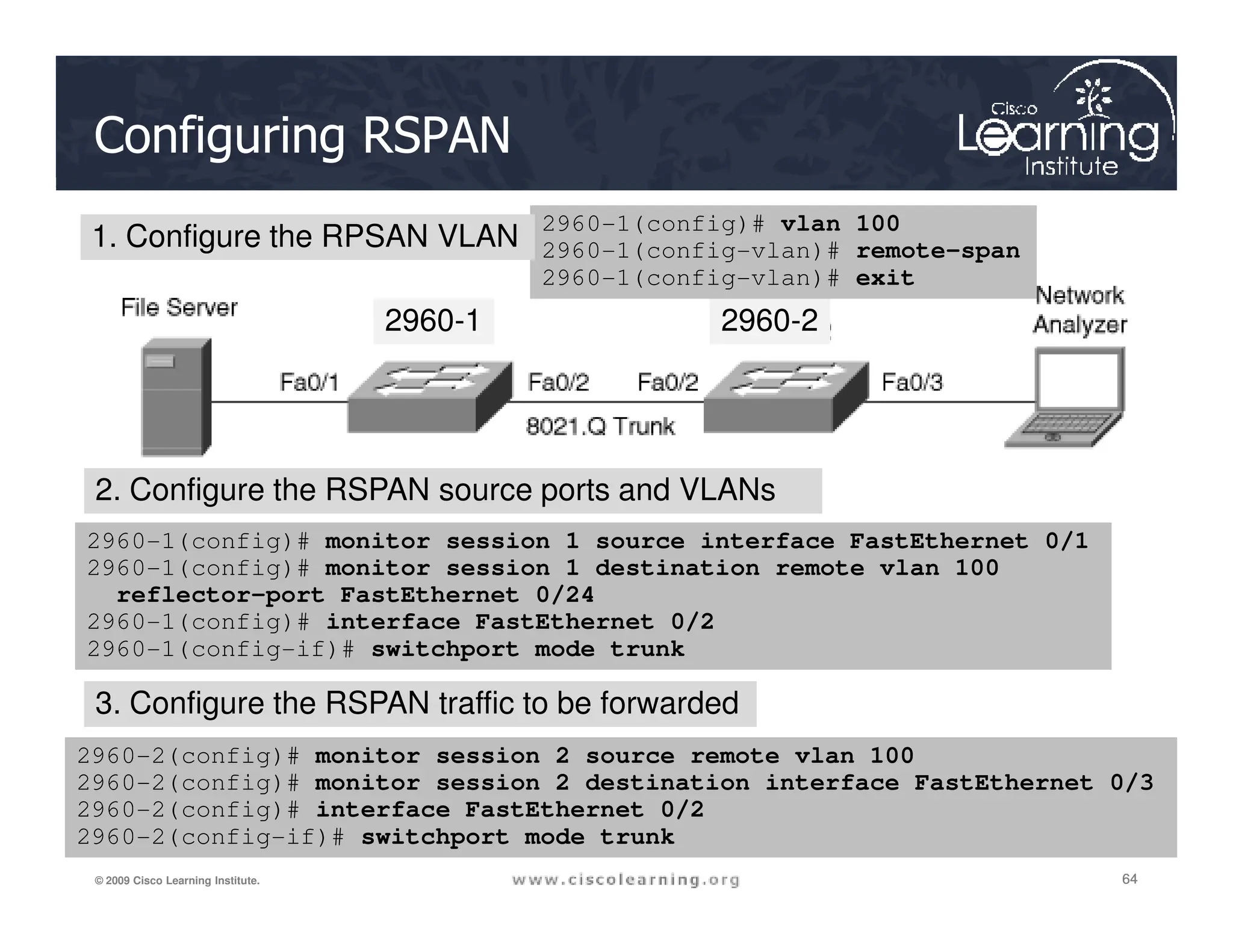
Configuring RSPAN
2960-1 2960-2
2960-1(config)# vlan 100
2960-1(config-vlan)# remote-span
2960-1(config-vlan)# exit
1. Configure the RPSAN VLAN
2. Configure the RSPAN source ports and VLANs
64
64
64
© 2009 Cisco Learning Institute.
2960-1(config)# monitor session 1 source interface FastEthernet 0/1
2960-1(config)# monitor session 1 destination remote vlan 100
reflector-port FastEthernet 0/24
2960-1(config)# interface FastEthernet 0/2
2960-1(config-if)# switchport mode trunk
2960-2(config)# monitor session 2 source remote vlan 100
2960-2(config)# monitor session 2 destination interface FastEthernet 0/3
2960-2(config)# interface FastEthernet 0/2
2960-2(config-if)# switchport mode trunk
2. Configure the RSPAN source ports and VLANs
3. Configure the RSPAN traffic to be forwarded
Verifying RSPAN Configuration
2960-1 2960-2
65
65
65
© 2009 Cisco Learning Institute.
show monitor [session {session_number | all | local
| range list | remote} [detail]] [ | {begin | exclude
| include}expression]
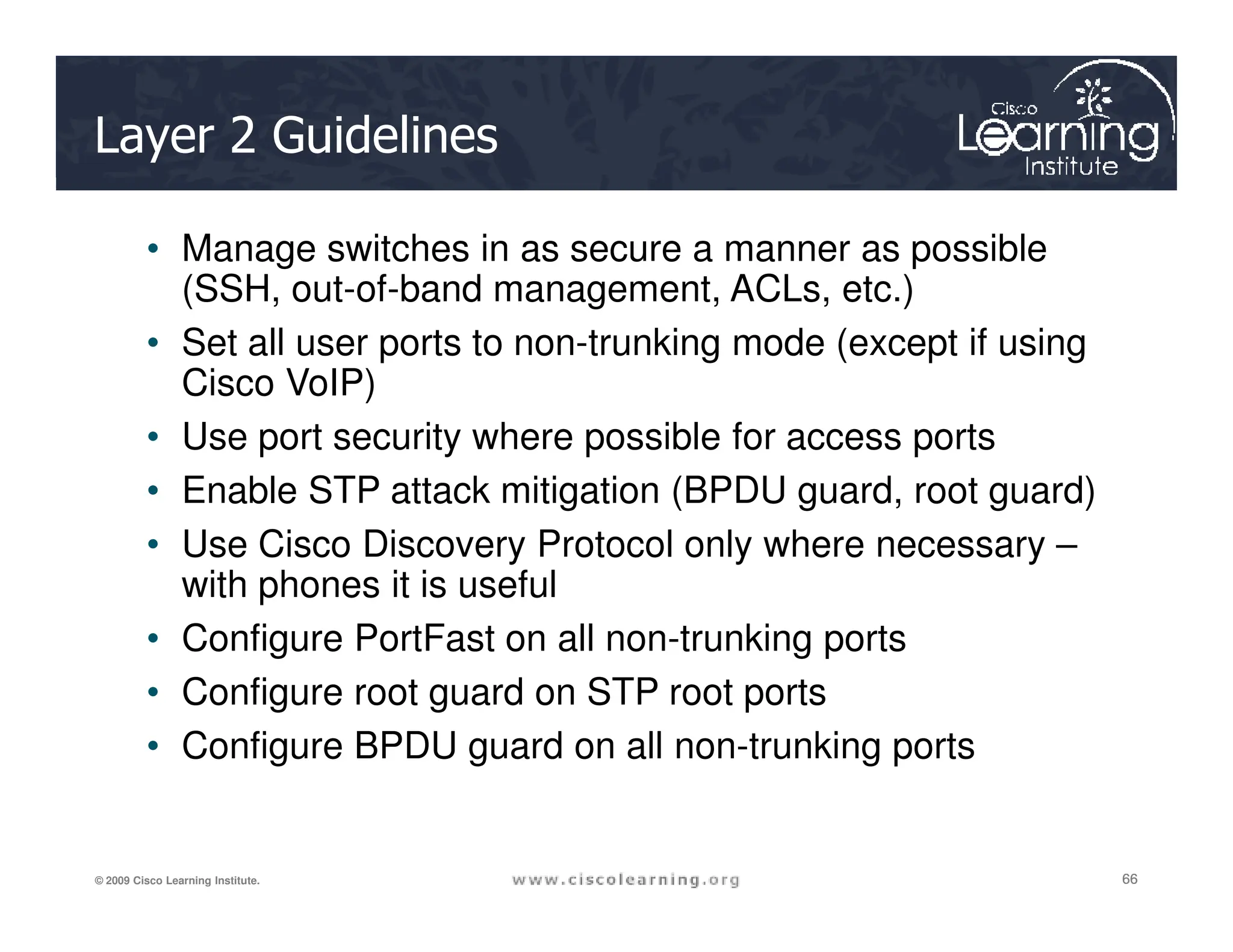
Layer 2 Guidelines
• Manage switches in as secure a manner as possible
(SSH, out-of-band management, ACLs, etc.)
• Set all user ports to non-trunking mode (except if using
Cisco VoIP)
• Use port security where possible for access ports
• Enable STP attack mitigation (BPDU guard, root guard)
66
66
66
© 2009 Cisco Learning Institute.
• Enable STP attack mitigation (BPDU guard, root guard)
• Use Cisco Discovery Protocol only where necessary –
with phones it is useful
• Configure PortFast on all non-trunking ports
• Configure root guard on STP root ports
• Configure BPDU guard on all non-trunking ports
VLAN Practices
• Always use a dedicated, unused native VLAN ID for
trunk ports
• Do not use VLAN 1 for anything
• Disable all unused ports and put them in an unused
VLAN
67
67
67
© 2009 Cisco Learning Institute.
VLAN
• Manually configure all trunk ports and disable DTP on
trunk ports
• Configure all non-trunking ports with switchport mode
access
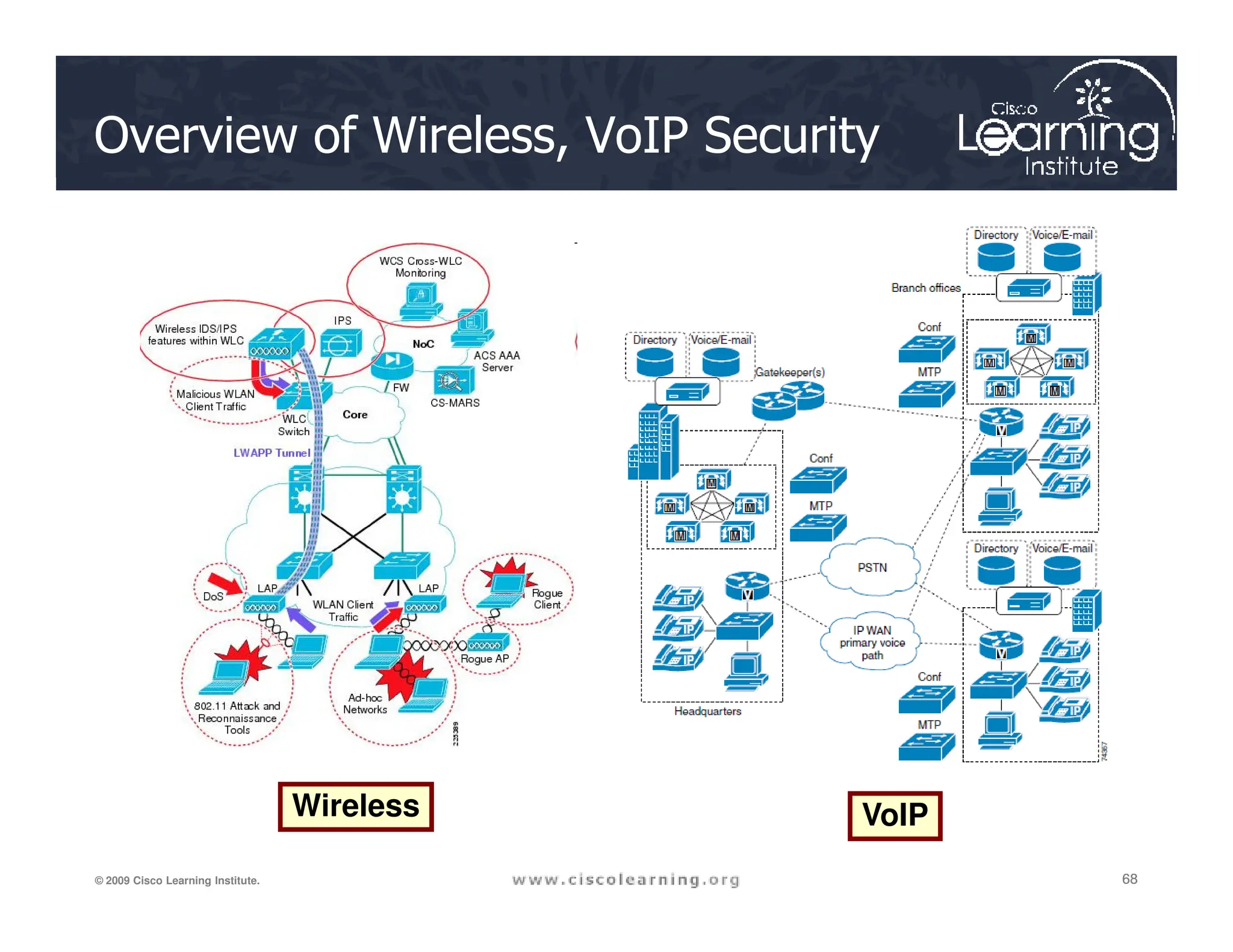
Overview of Wireless, VoIP Security
68
68
68
© 2009 Cisco Learning Institute.
Wireless VoIP
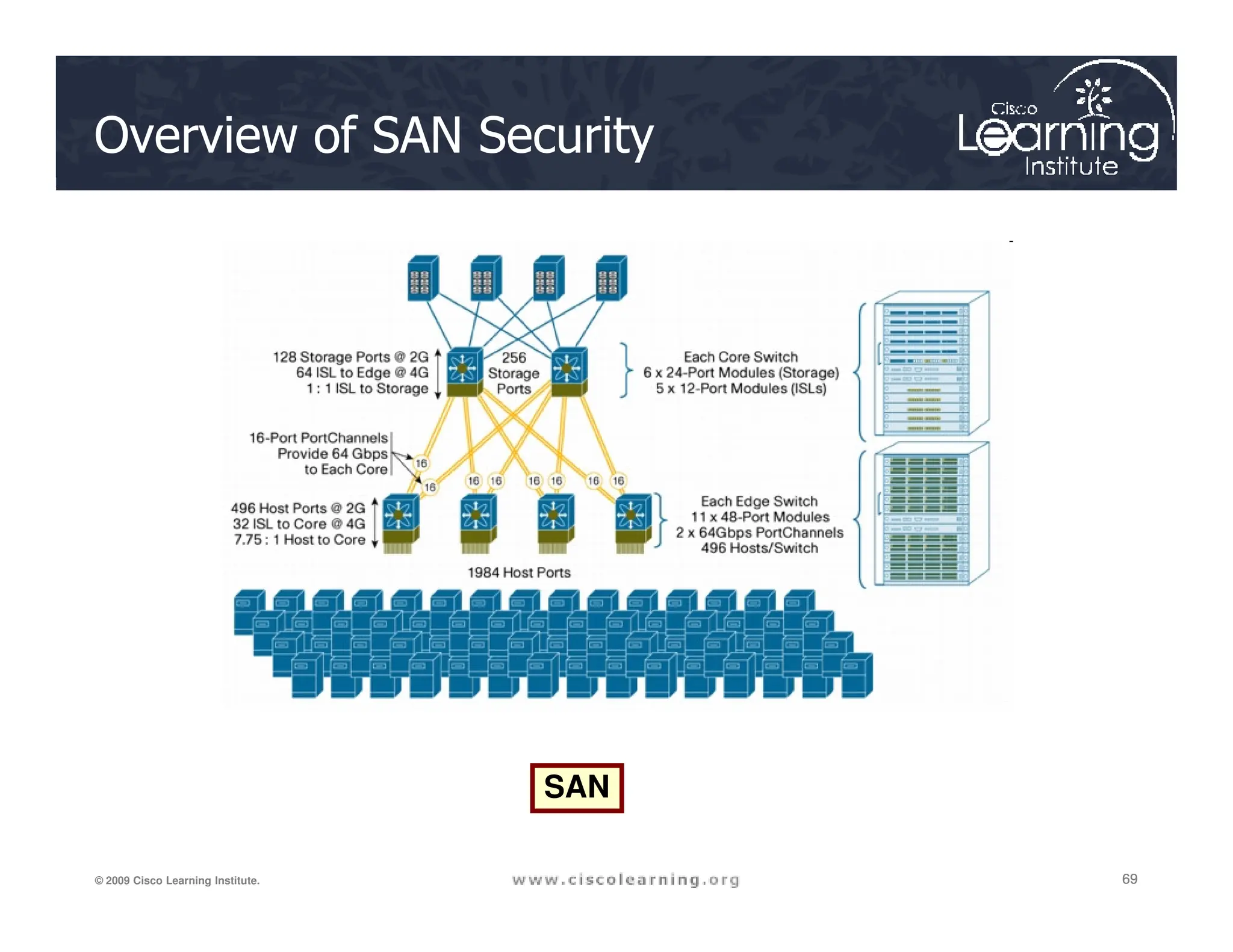
Overview of SAN Security
69
69
69
© 2009 Cisco Learning Institute.
SAN
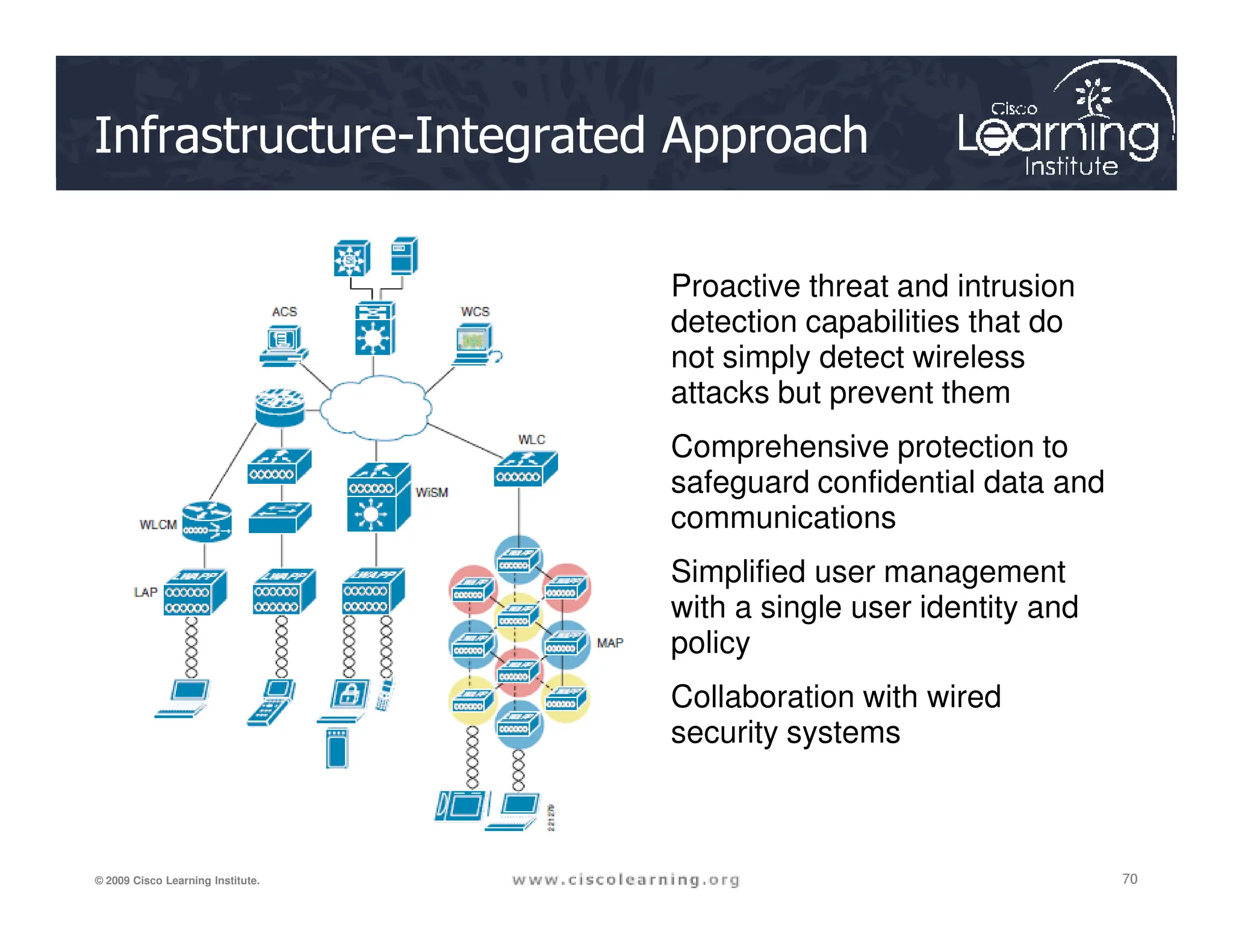
Infrastructure-Integrated Approach
• Proactive threat and intrusion
detection capabilities that do
not simply detect wireless
attacks but prevent them
• Comprehensive protection to
safeguard confidential data and
70
70
70
© 2009 Cisco Learning Institute.
safeguard confidential data and
communications
• Simplified user management
with a single user identity and
policy
• Collaboration with wired
security systems
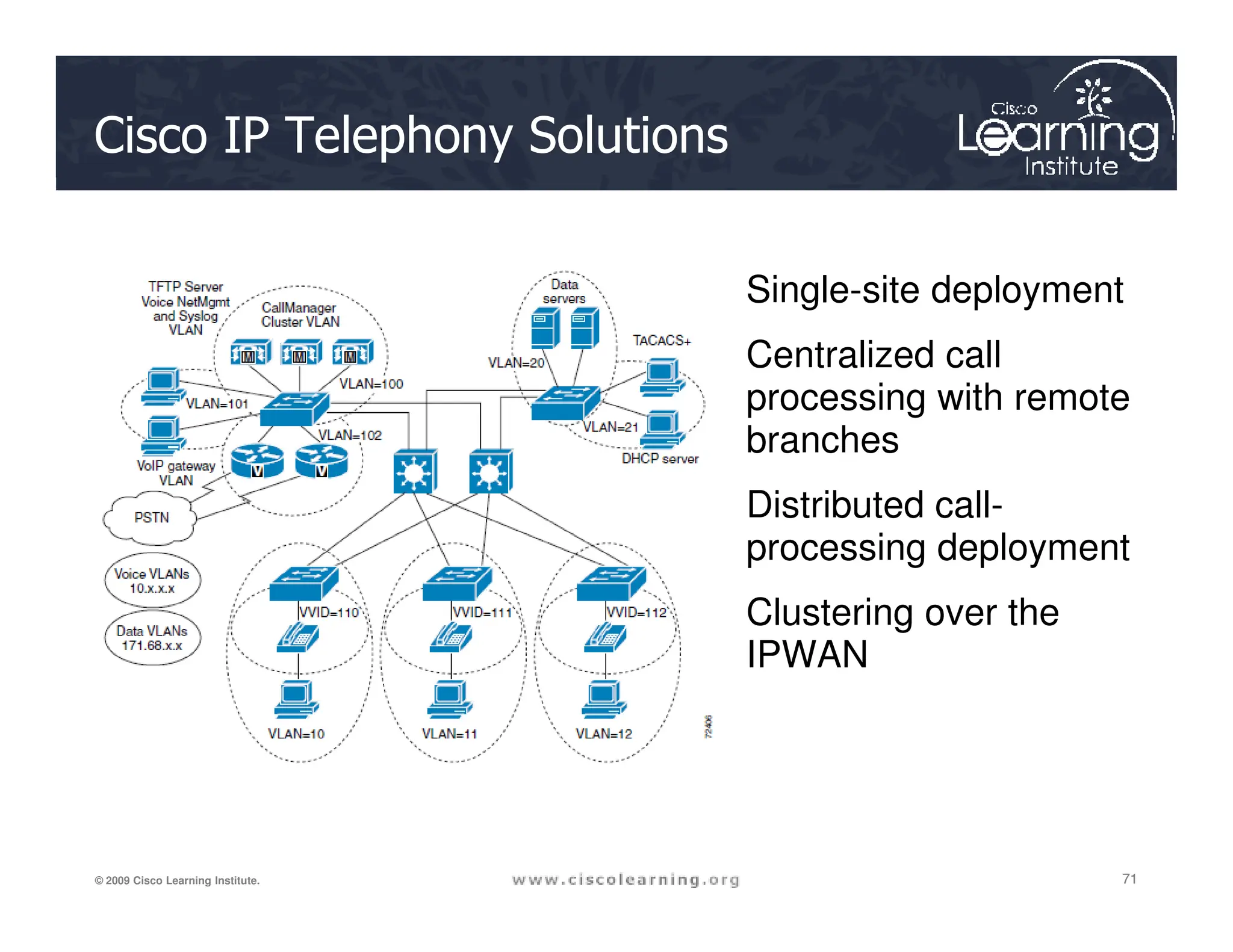
Cisco IP Telephony Solutions
• Single-site deployment
• Centralized call
processing with remote
branches
71
71
71
© 2009 Cisco Learning Institute.
• Distributed call-
processing deployment
• Clustering over the
IPWAN
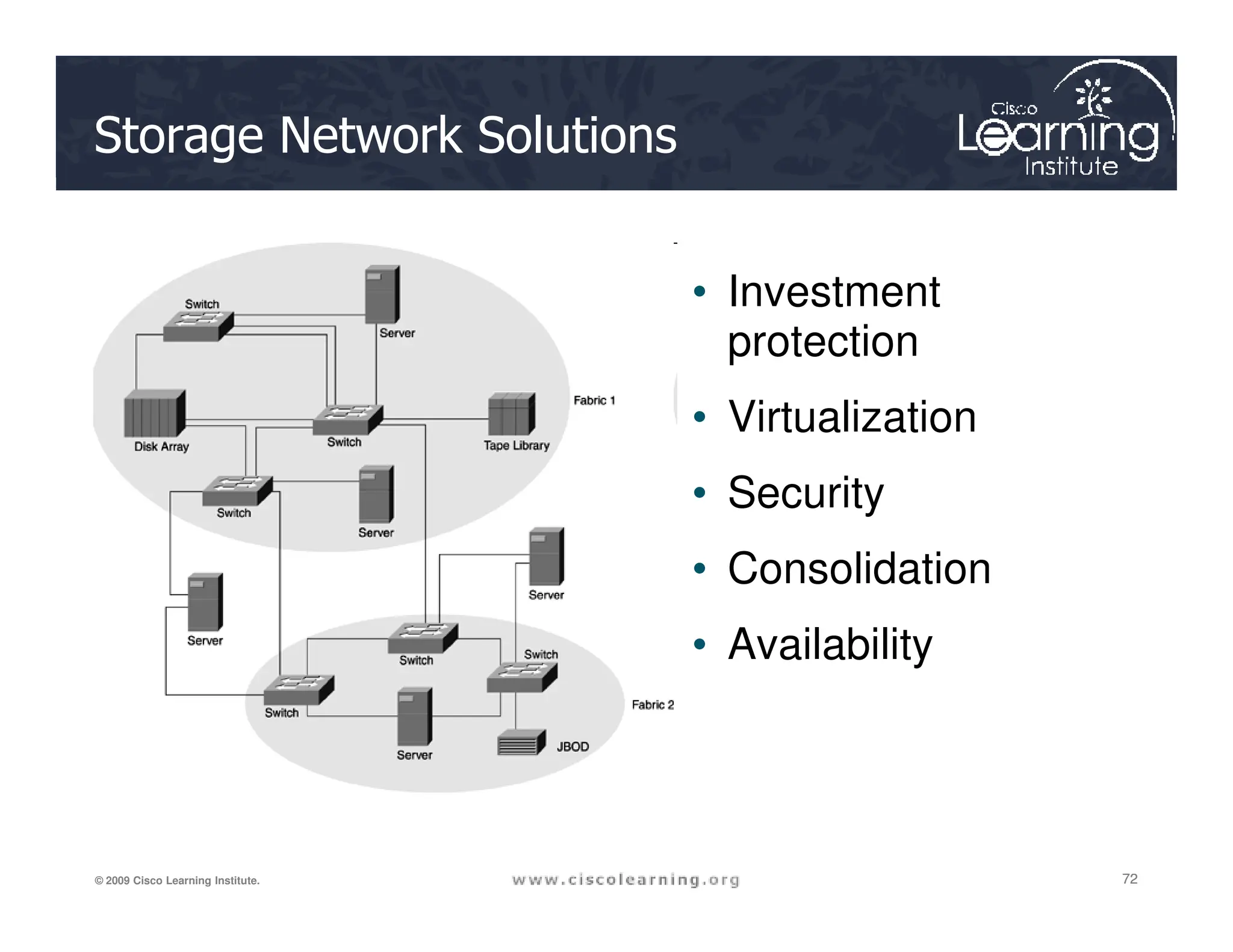
Storage Network Solutions
• Investment
protection
• Virtualization
• Security
72
72
72
© 2009 Cisco Learning Institute.
• Security
• Consolidation
• Availability
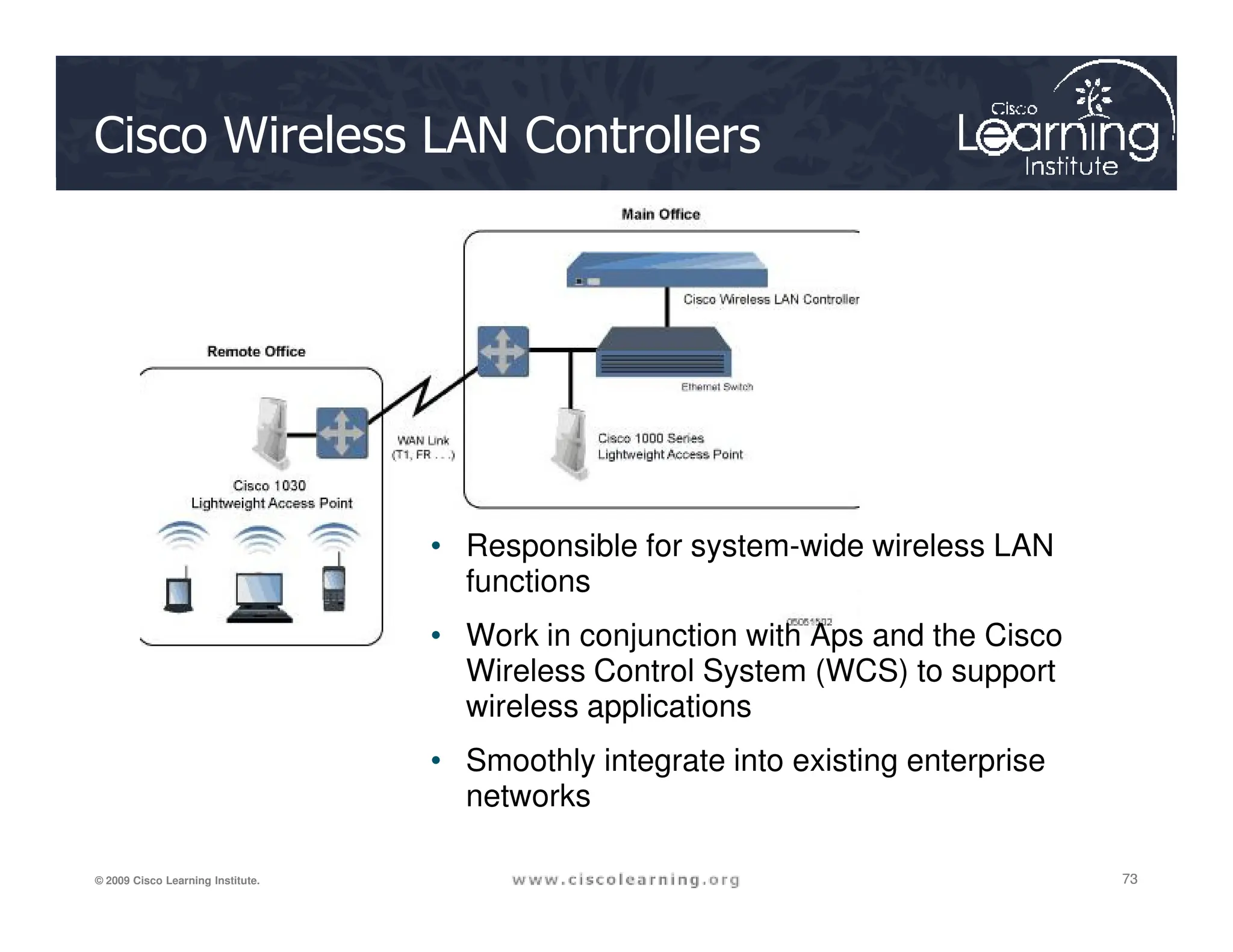
Cisco Wireless LAN Controllers
73
73
73
© 2009 Cisco Learning Institute.
• Responsible for system-wide wireless LAN
functions
• Work in conjunction with Aps and the Cisco
Wireless Control System (WCS) to support
wireless applications
• Smoothly integrate into existing enterprise
networks
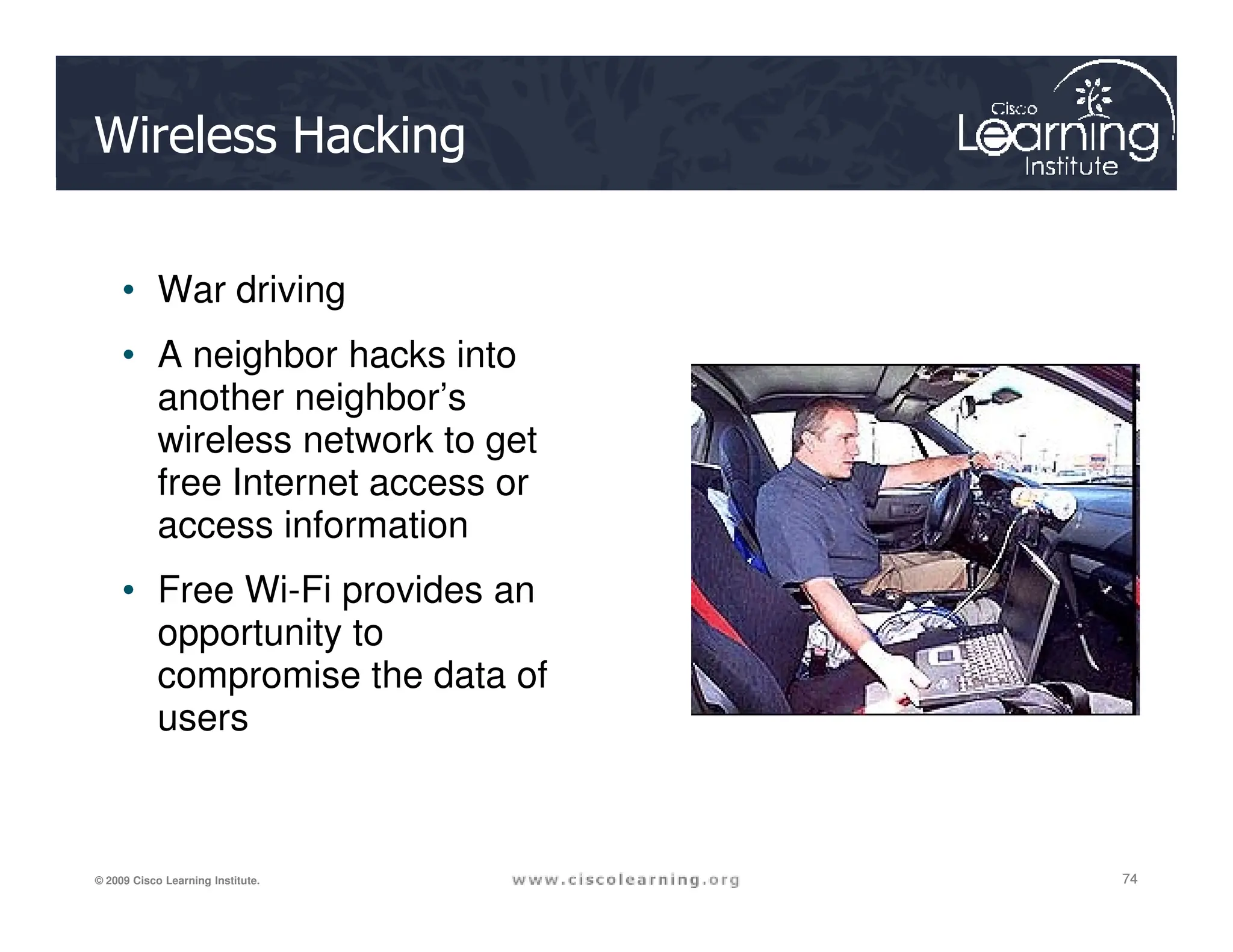
Wireless Hacking
• War driving
• A neighbor hacks into
another neighbor’s
wireless network to get
free Internet access or
74
74
74
© 2009 Cisco Learning Institute.
free Internet access or
access information
• Free Wi-Fi provides an
opportunity to
compromise the data of
users
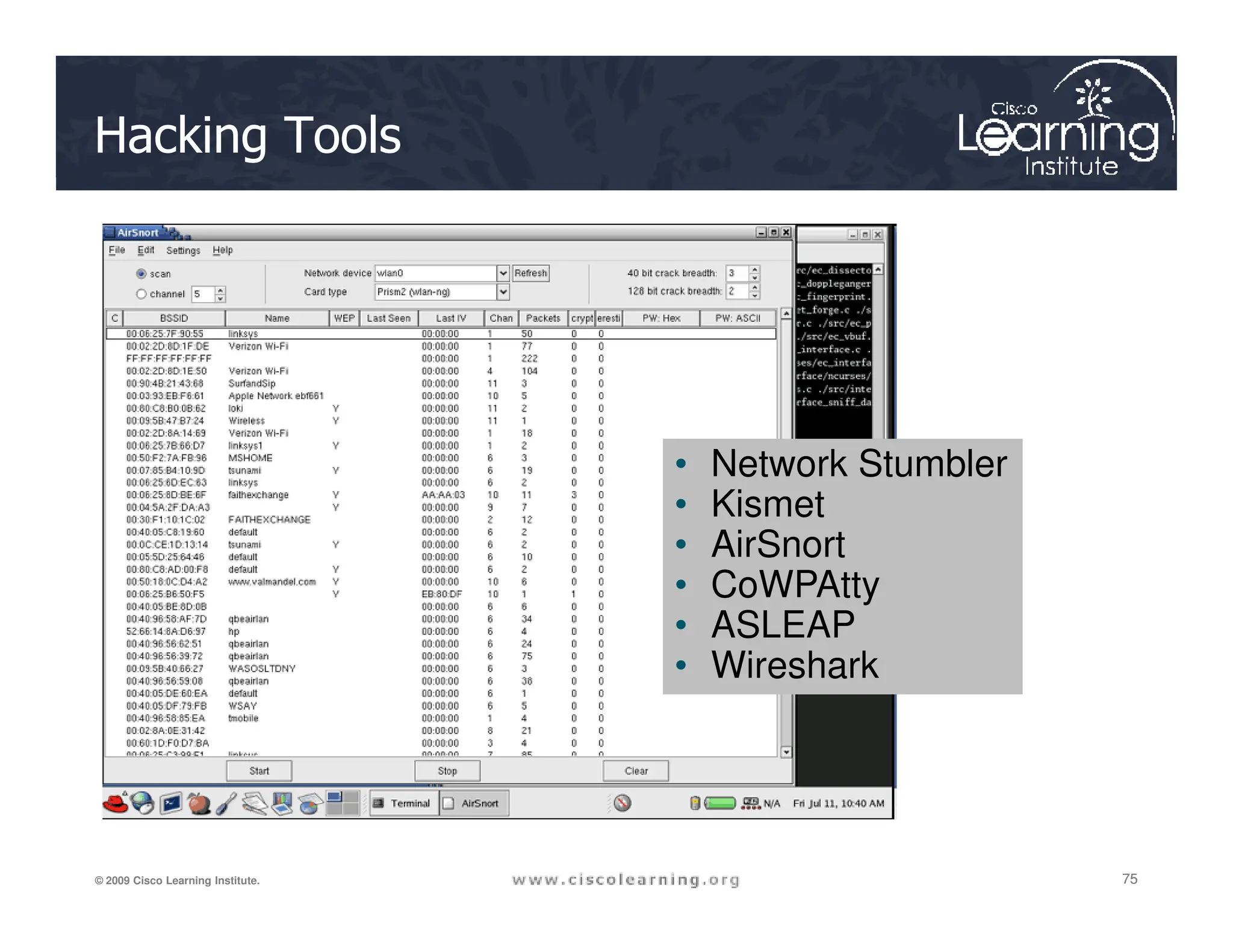
Hacking Tools
• Network Stumbler
75
75
75
© 2009 Cisco Learning Institute.
• Network Stumbler
• Kismet
• AirSnort
• CoWPAtty
• ASLEAP
• Wireshark
Safety Considerations
• Wireless networks using WEP or WPA/TKIP are
not very secure and vulnerable to hacking
attacks.
• Wireless networks using WPA2/AES should
76
76
76
© 2009 Cisco Learning Institute.
• Wireless networks using WPA2/AES should
have a passphrase of at least 21 characters
long.
• If an IPsec VPN is available, use it on any public
wireless LAN.
• If wireless access is not needed, disable the
wireless radio or wireless NIC.
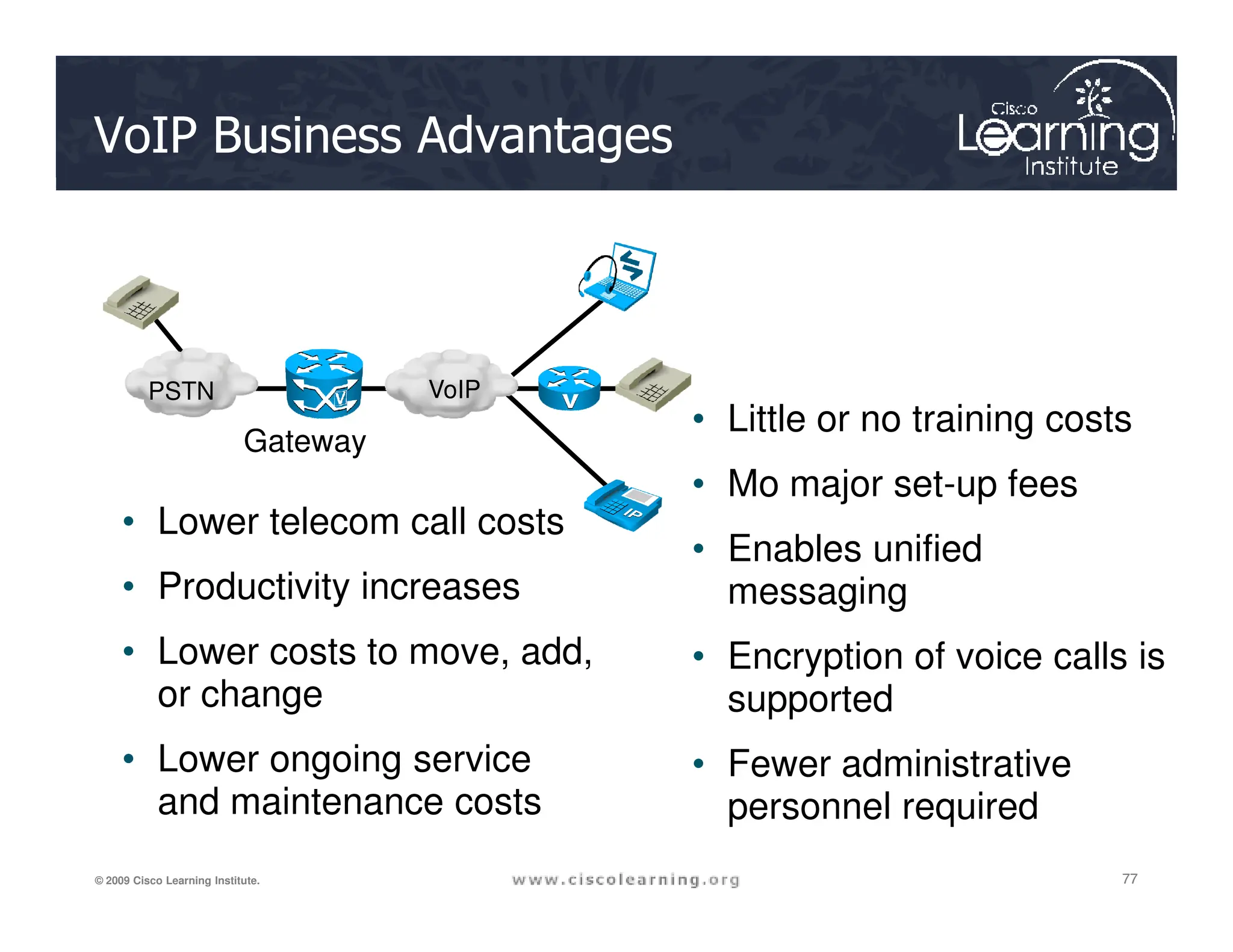
VoIP Business Advantages
• Little or no training costs
• Mo major set-up fees
PSTN VoIP
Gateway
77
77
77
© 2009 Cisco Learning Institute.
• Lower telecom call costs
• Productivity increases
• Lower costs to move, add,
or change
• Lower ongoing service
and maintenance costs
• Mo major set-up fees
• Enables unified
messaging
• Encryption of voice calls is
supported
• Fewer administrative
personnel required
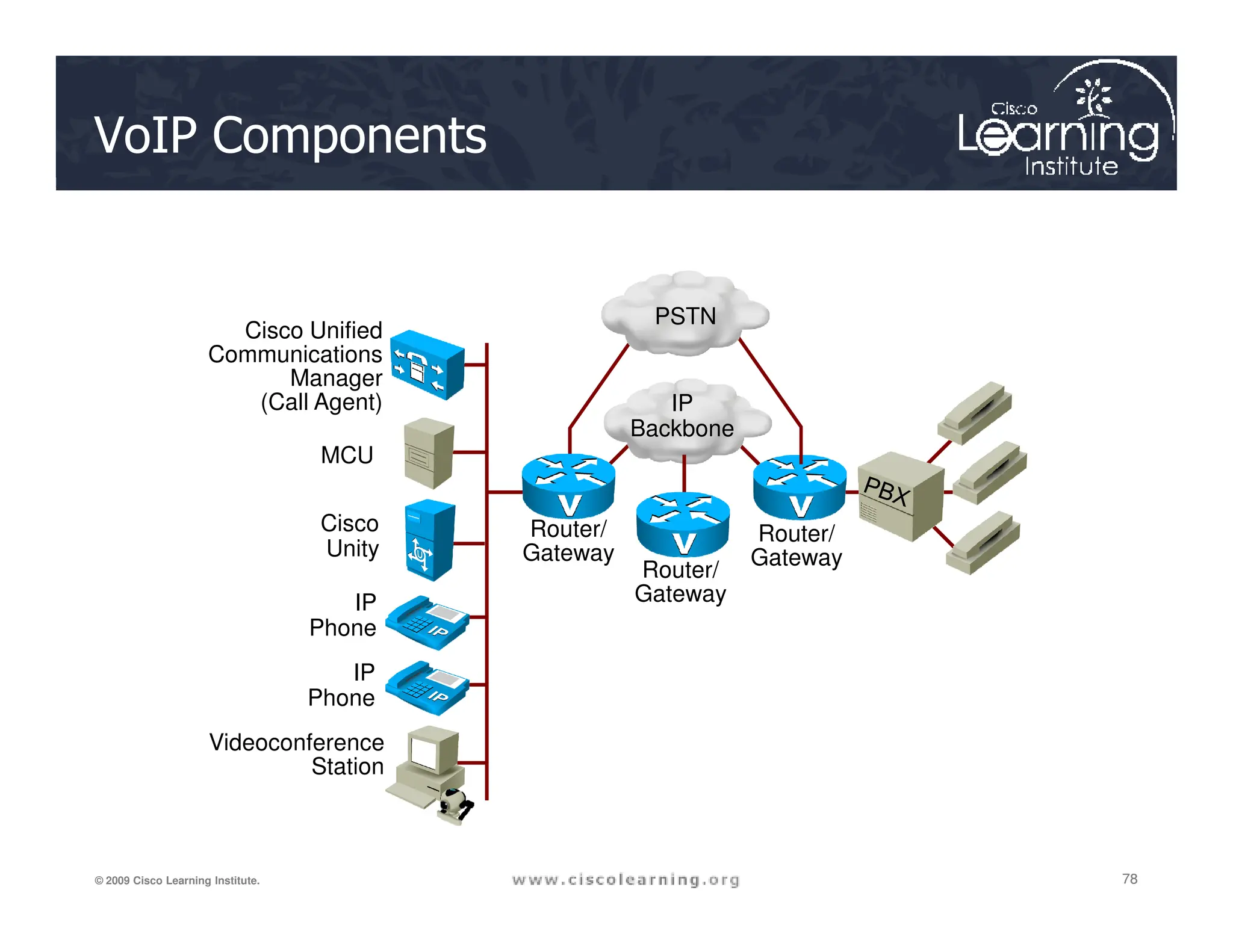
VoIP Components
Cisco Unified
Communications
Manager
(Call Agent)
MCU
IP
Backbone
PSTN
78
78
78
© 2009 Cisco Learning Institute.
Cisco
Unity
IP
Phone
IP
Phone
Videoconference
Station
Router/
Gateway
Router/
Gateway
Router/
Gateway
VoIP Protocols
VoIP Protocol Description
H.323
ITU standard protocol for interactive conferencing; evolved from H.320
ISDN standard; flexible, complex
MGCP Emerging IETF standard for PSTN gateway control; thin device control
Megaco/H.248
Joint IETF and ITU standard for gateway control with support for multiple
gateway types; evolved from MGCP standard
79
79
79
© 2009 Cisco Learning Institute.
SIP
IETF protocol for interactive and noninteractive conferencing; simpler but
less mature than H.323
RTP
ETF standard media-streaming protocol
RTCP
IETF protocol that provides out-of-band control information for an RTP flow
SRTP
IETF protocol that encrypts RTP traffic as it leaves the
voice device
SCCP
Cisco proprietary protocol used between Cisco Unified Communications
Manager and Cisco IP phones
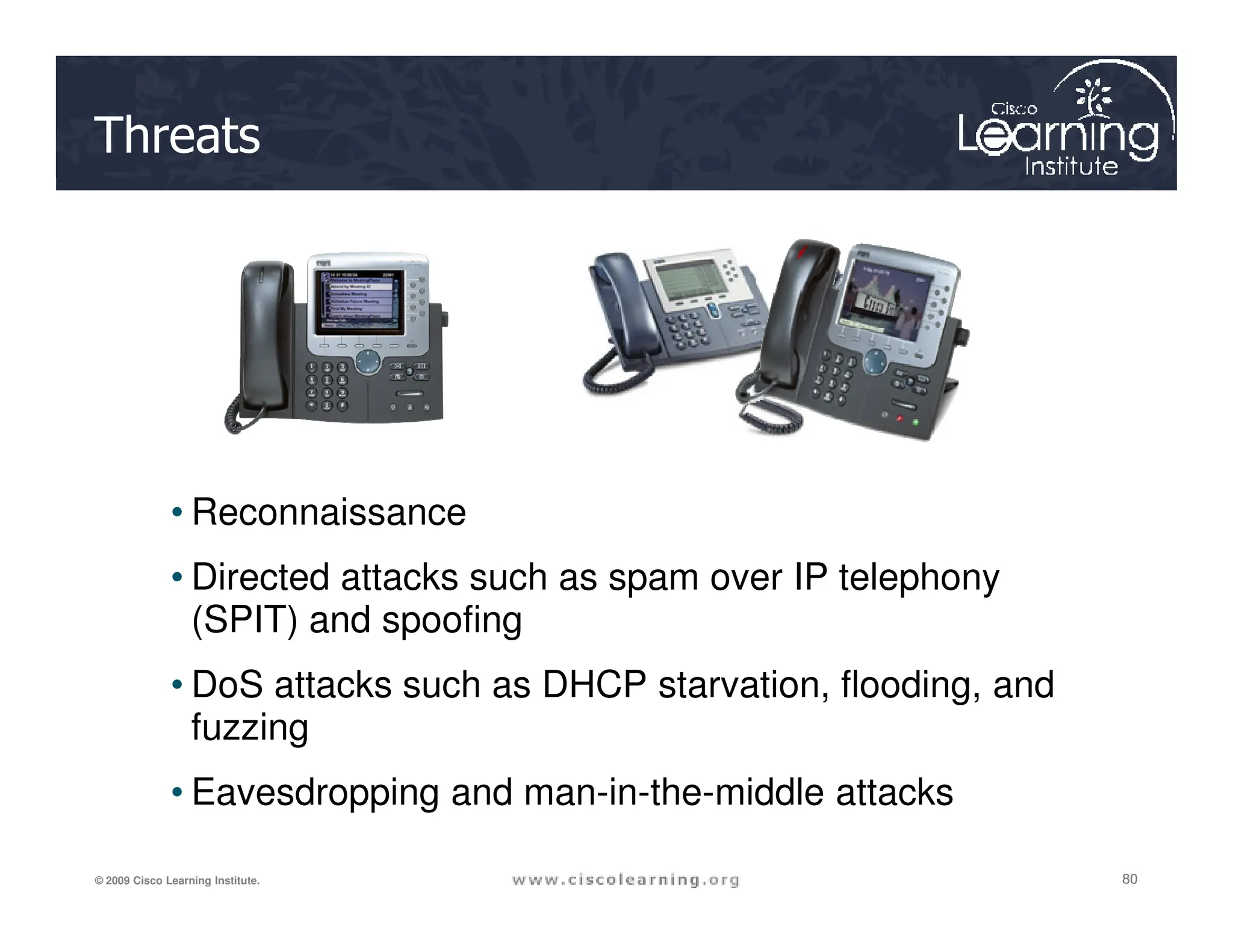
Threats
80
80
80
© 2009 Cisco Learning Institute.
• Reconnaissance
• Directed attacks such as spam over IP telephony
(SPIT) and spoofing
• DoS attacks such as DHCP starvation, flooding, and
fuzzing
• Eavesdropping and man-in-the-middle attacks
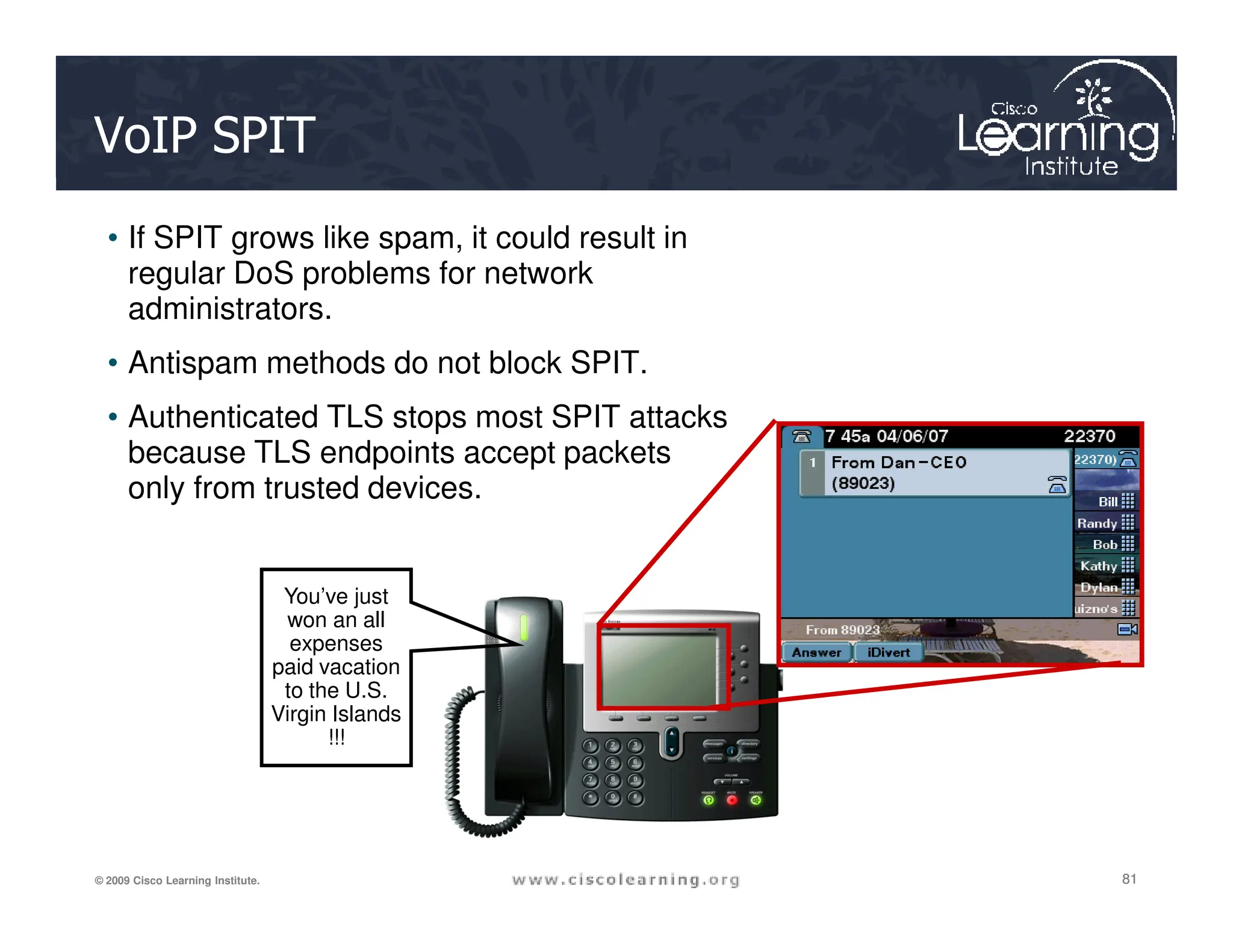
VoIP SPIT
• If SPIT grows like spam, it could result in
regular DoS problems for network
administrators.
• Antispam methods do not block SPIT.
• Authenticated TLS stops most SPIT attacks
because TLS endpoints accept packets
only from trusted devices.
81
81
81
© 2009 Cisco Learning Institute.
only from trusted devices.
You’ve just
won an all
expenses
paid vacation
to the U.S.
Virgin Islands
!!!
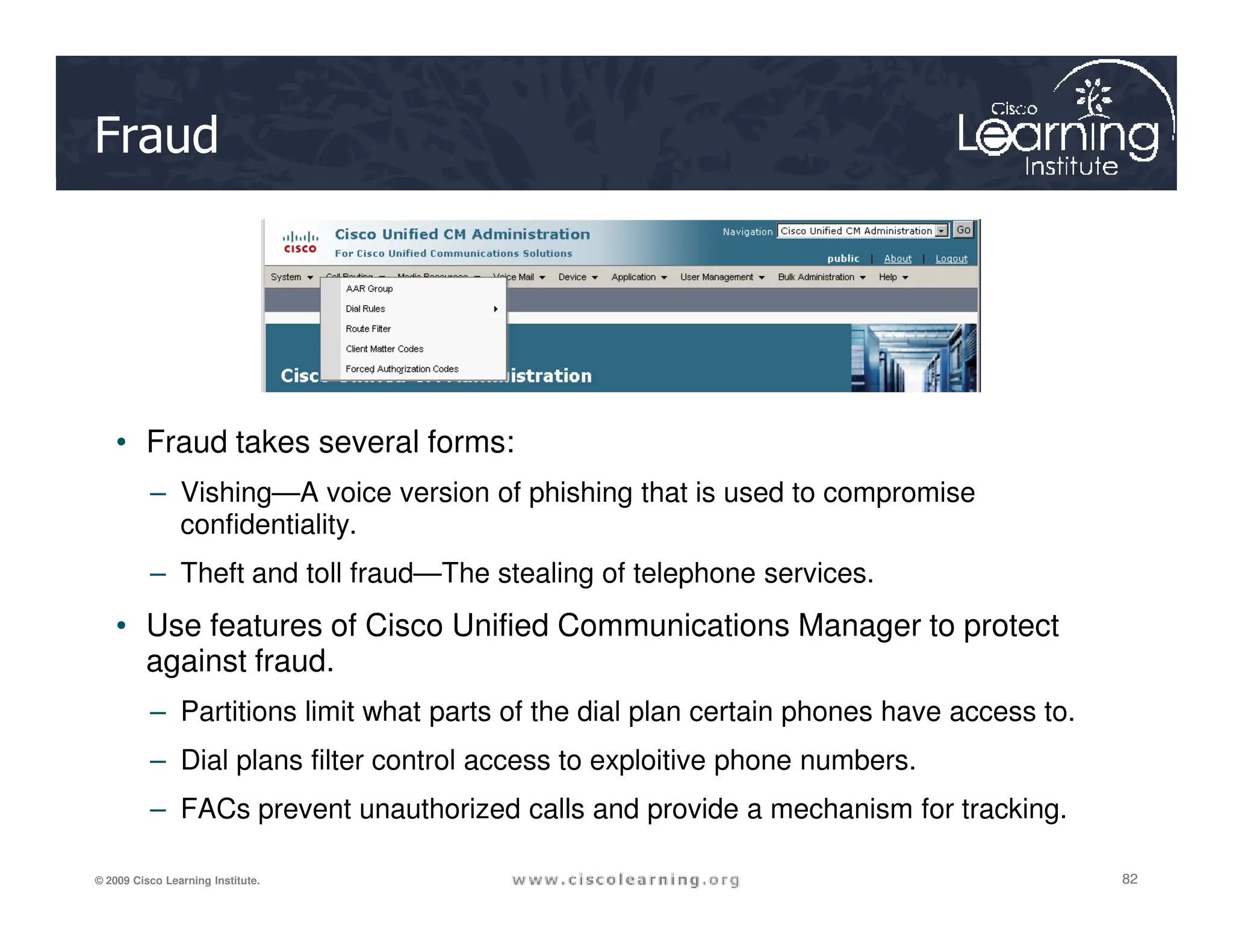
Fraud
• Fraud takes several forms:
82
82
82
© 2009 Cisco Learning Institute.
– Vishing—A voice version of phishing that is used to compromise
confidentiality.
– Theft and toll fraud—The stealing of telephone services.
• Use features of Cisco Unified Communications Manager to protect
against fraud.
– Partitions limit what parts of the dial plan certain phones have access to.
– Dial plans filter control access to exploitive phone numbers.
– FACs prevent unauthorized calls and provide a mechanism for tracking.
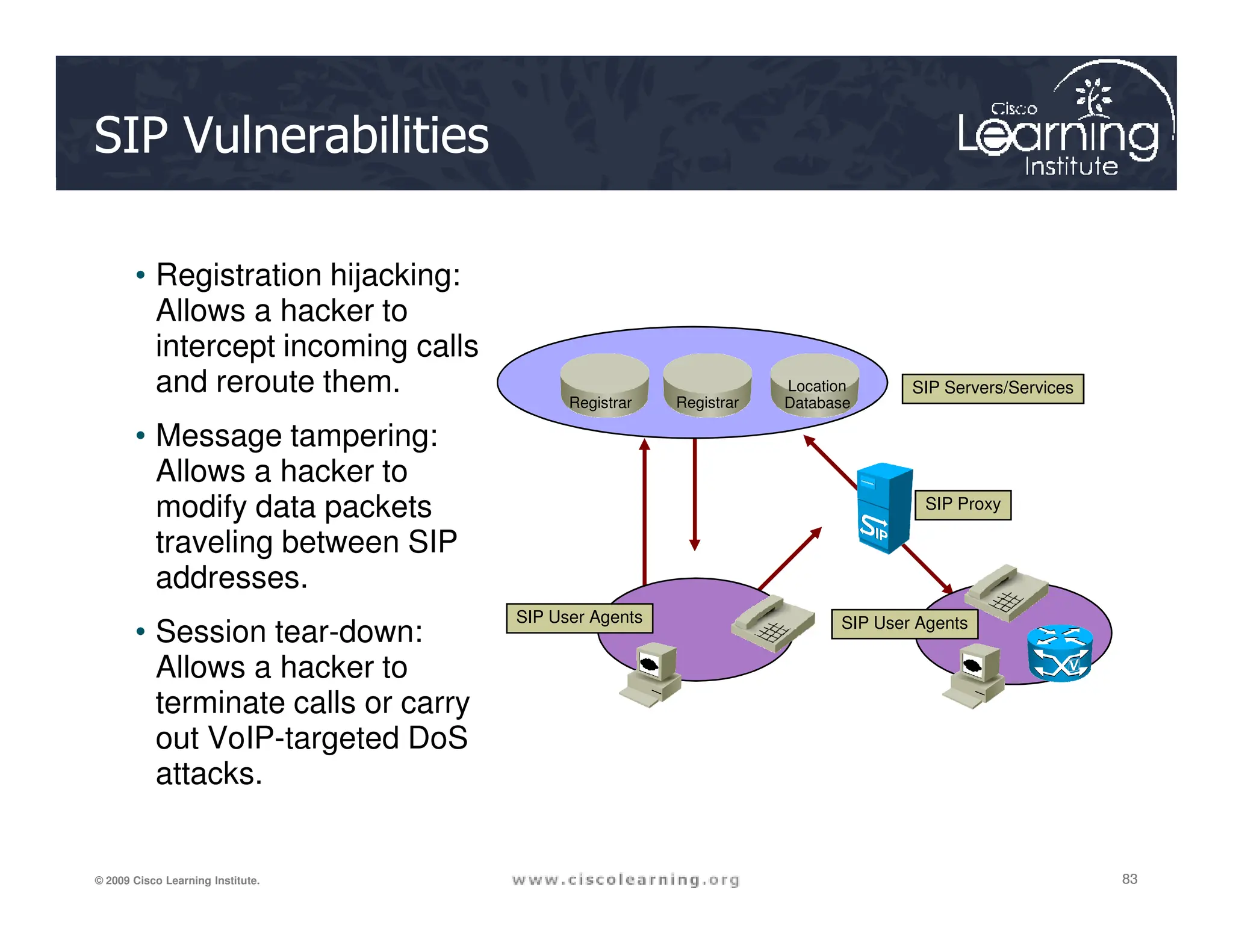
SIP Vulnerabilities
• Registration hijacking:
Allows a hacker to
intercept incoming calls
and reroute them.
• Message tampering:
Allows a hacker to
Registrar Registrar
Location
Database
SIP Servers/Services
83
83
83
© 2009 Cisco Learning Institute.
Allows a hacker to
modify data packets
traveling between SIP
addresses.
• Session tear-down:
Allows a hacker to
terminate calls or carry
out VoIP-targeted DoS
attacks.
SIP Proxy
SIP User Agents SIP User Agents
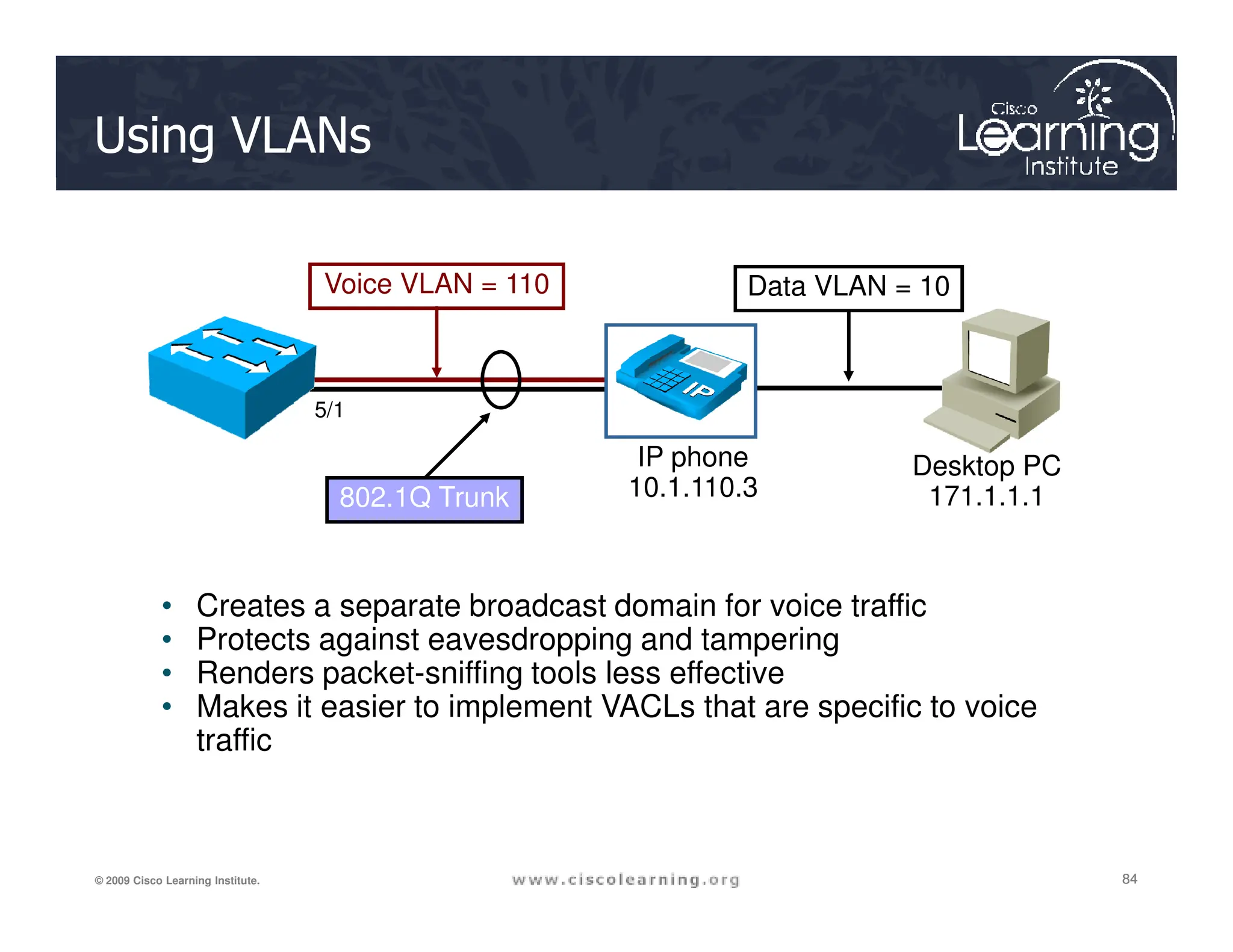
Using VLANs
Voice VLAN = 110 Data VLAN = 10
IP phone
10.1.110.3
Desktop PC
5/1
84
84
84
© 2009 Cisco Learning Institute.
• Creates a separate broadcast domain for voice traffic
• Protects against eavesdropping and tampering
• Renders packet-sniffing tools less effective
• Makes it easier to implement VACLs that are specific to voice
traffic
802.1Q Trunk 10.1.110.3
Desktop PC
171.1.1.1
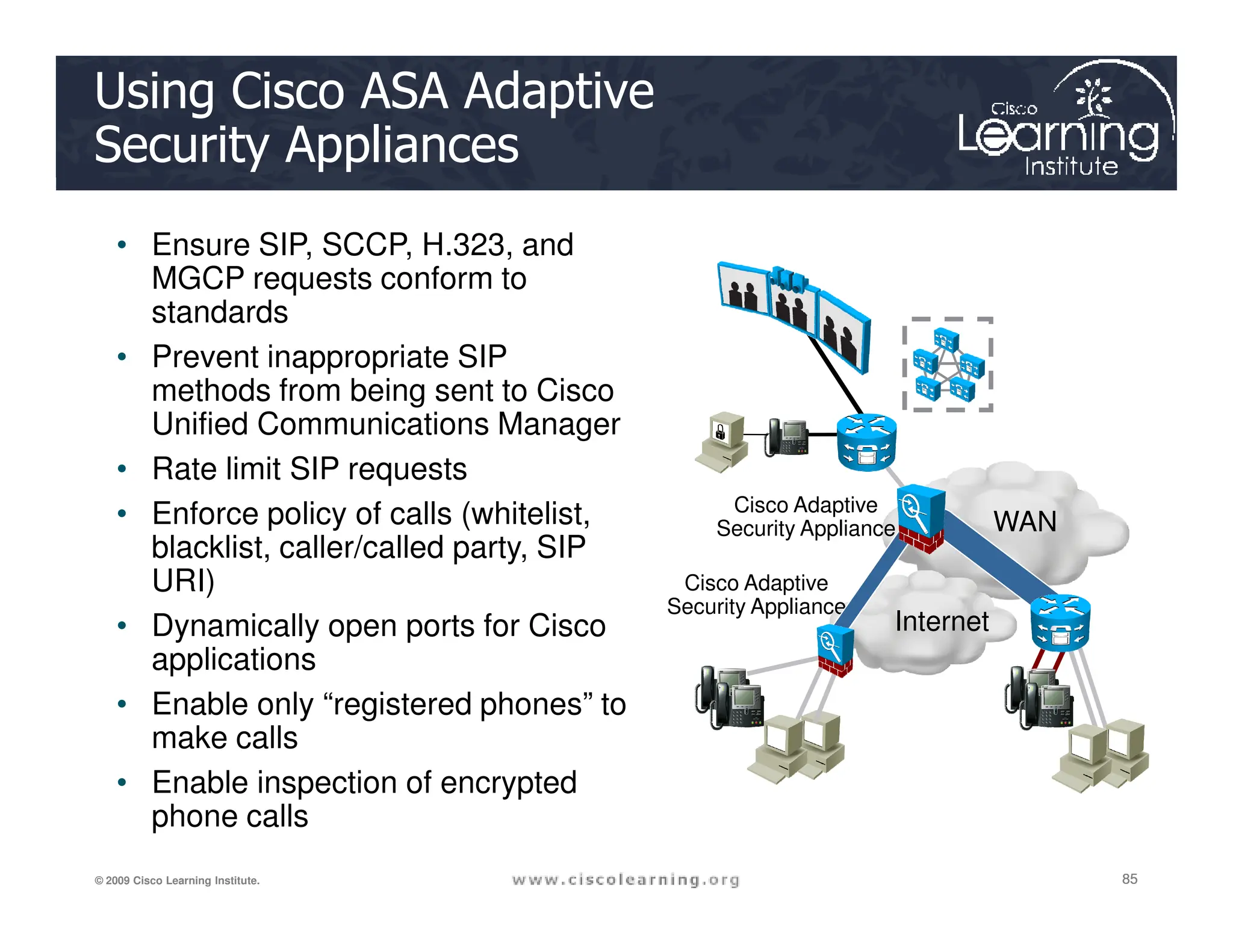
Using Cisco ASA Adaptive
Security Appliances
• Ensure SIP, SCCP, H.323, and
MGCP requests conform to
standards
• Prevent inappropriate SIP
methods from being sent to Cisco
Unified Communications Manager
• Rate limit SIP requests
85
85
85
© 2009 Cisco Learning Institute.
• Rate limit SIP requests
• Enforce policy of calls (whitelist,
blacklist, caller/called party, SIP
URI)
• Dynamically open ports for Cisco
applications
• Enable only “registered phones” to
make calls
• Enable inspection of encrypted
phone calls
Internet
WAN
Cisco Adaptive
Security Appliance
Cisco Adaptive
Security Appliance
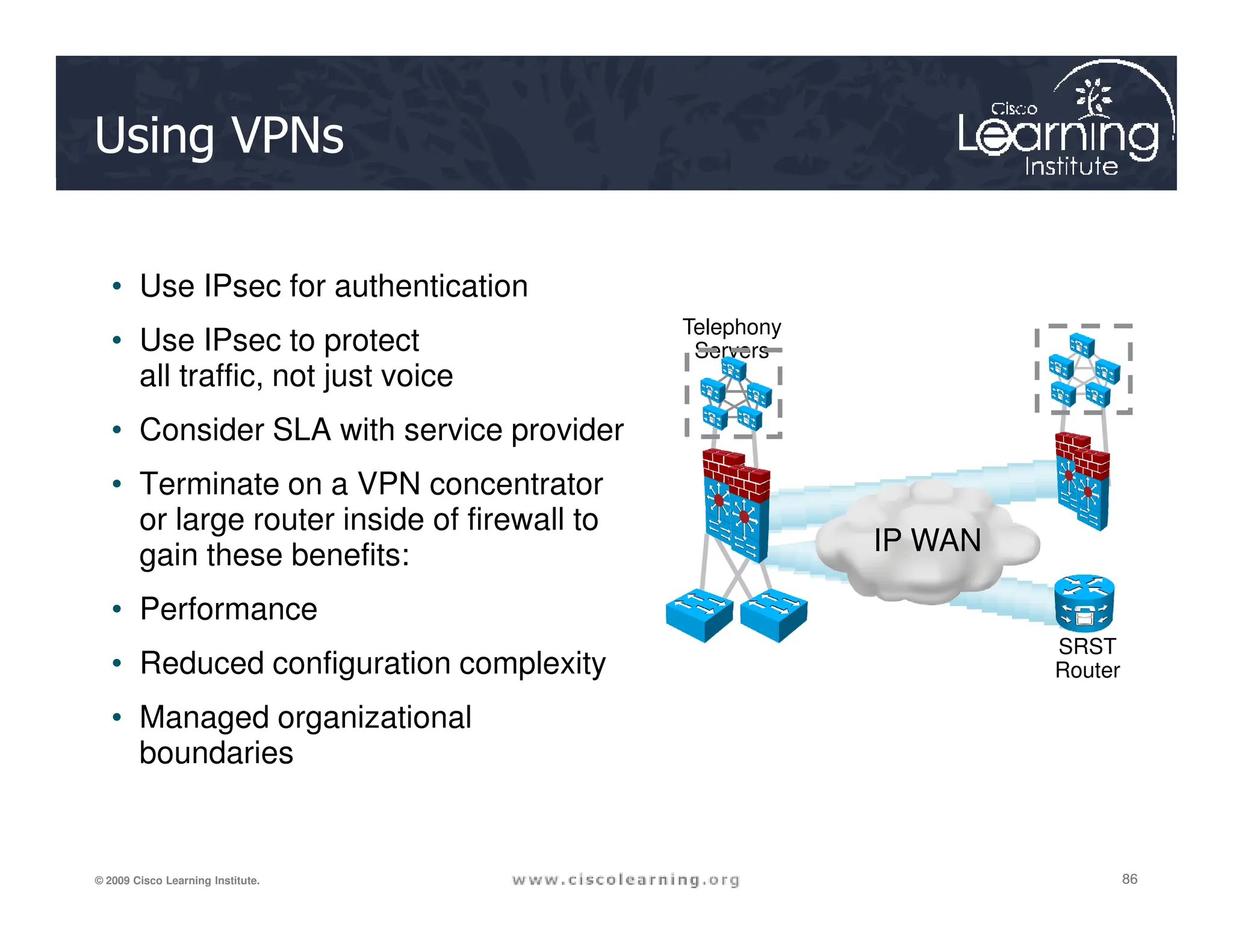
Using VPNs
• Use IPsec for authentication
• Use IPsec to protect
all traffic, not just voice
• Consider SLA with service provider
• Terminate on a VPN concentrator
Telephony
Servers
86
86
86
© 2009 Cisco Learning Institute.
• Terminate on a VPN concentrator
or large router inside of firewall to
gain these benefits:
• Performance
• Reduced configuration complexity
• Managed organizational
boundaries
IP WAN
SRST
Router
Using Cisco Unified Communications
Manager
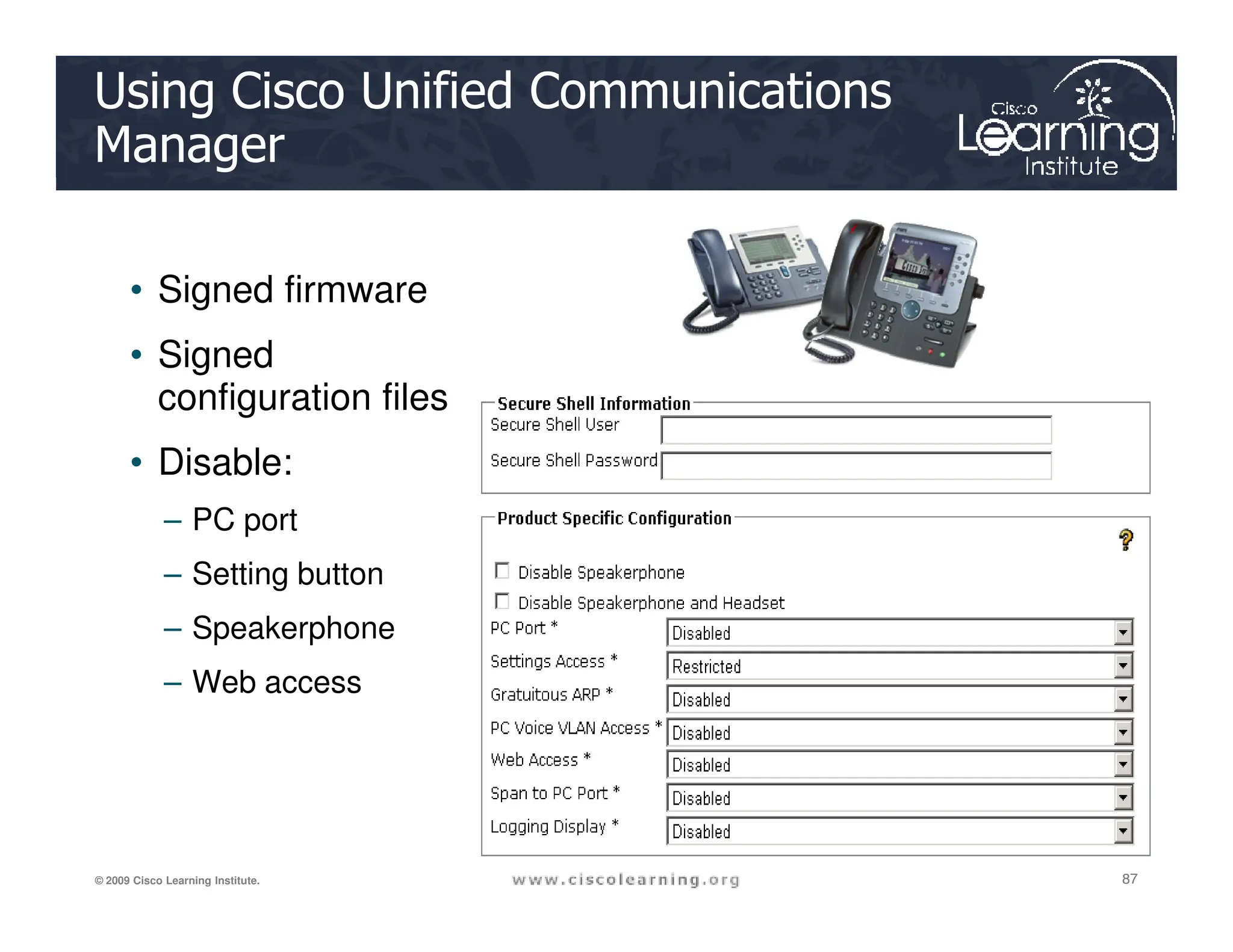
• Signed firmware
• Signed
configuration files
• Disable:
87
87
87
© 2009 Cisco Learning Institute.
• Disable:
– PC port
– Setting button
– Speakerphone
– Web access
SAN Security Considerations
SAN
IP
Network
88
88
88
© 2009 Cisco Learning Institute.
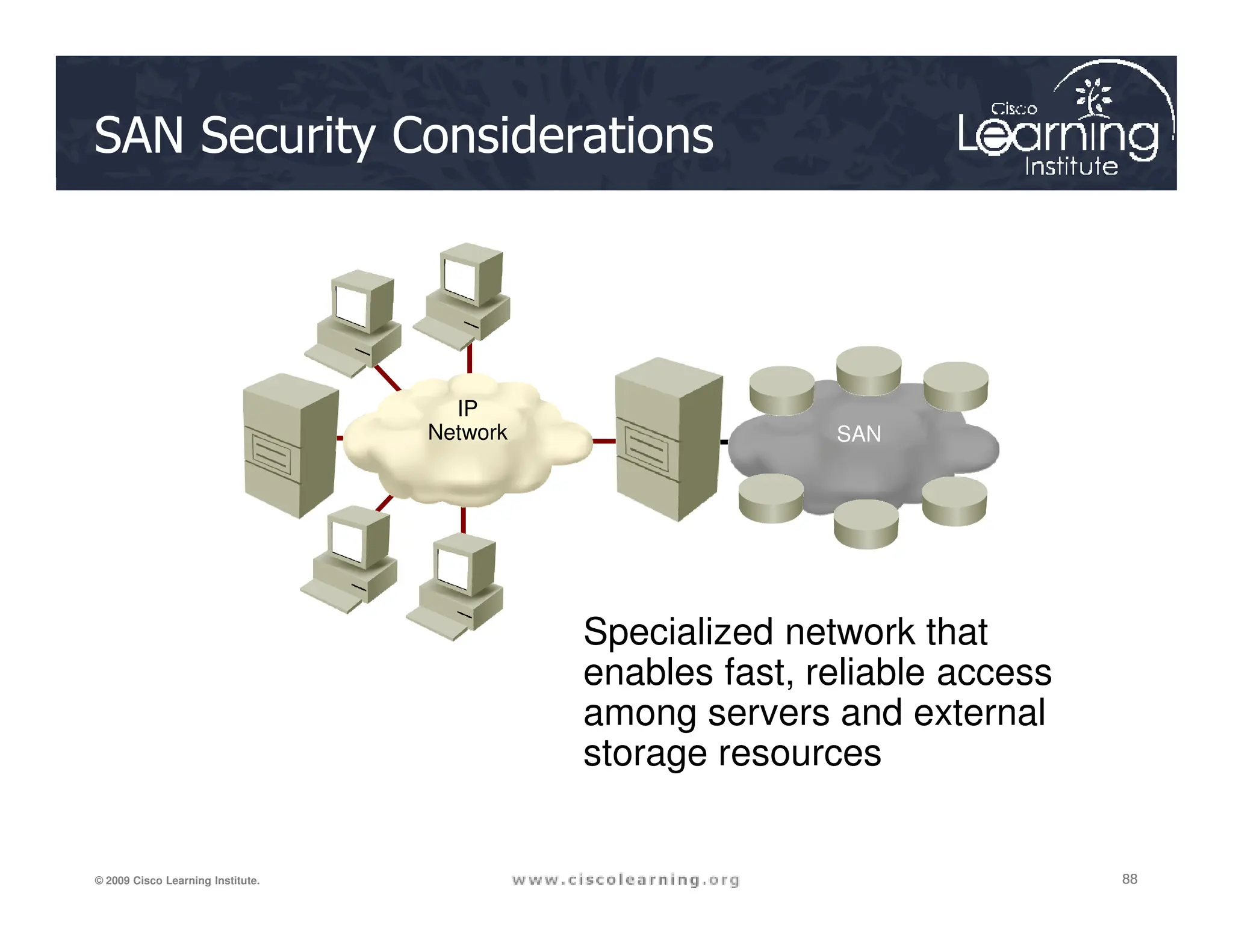
Specialized network that
enables fast, reliable access
among servers and external
storage resources
SAN Transport Technologies
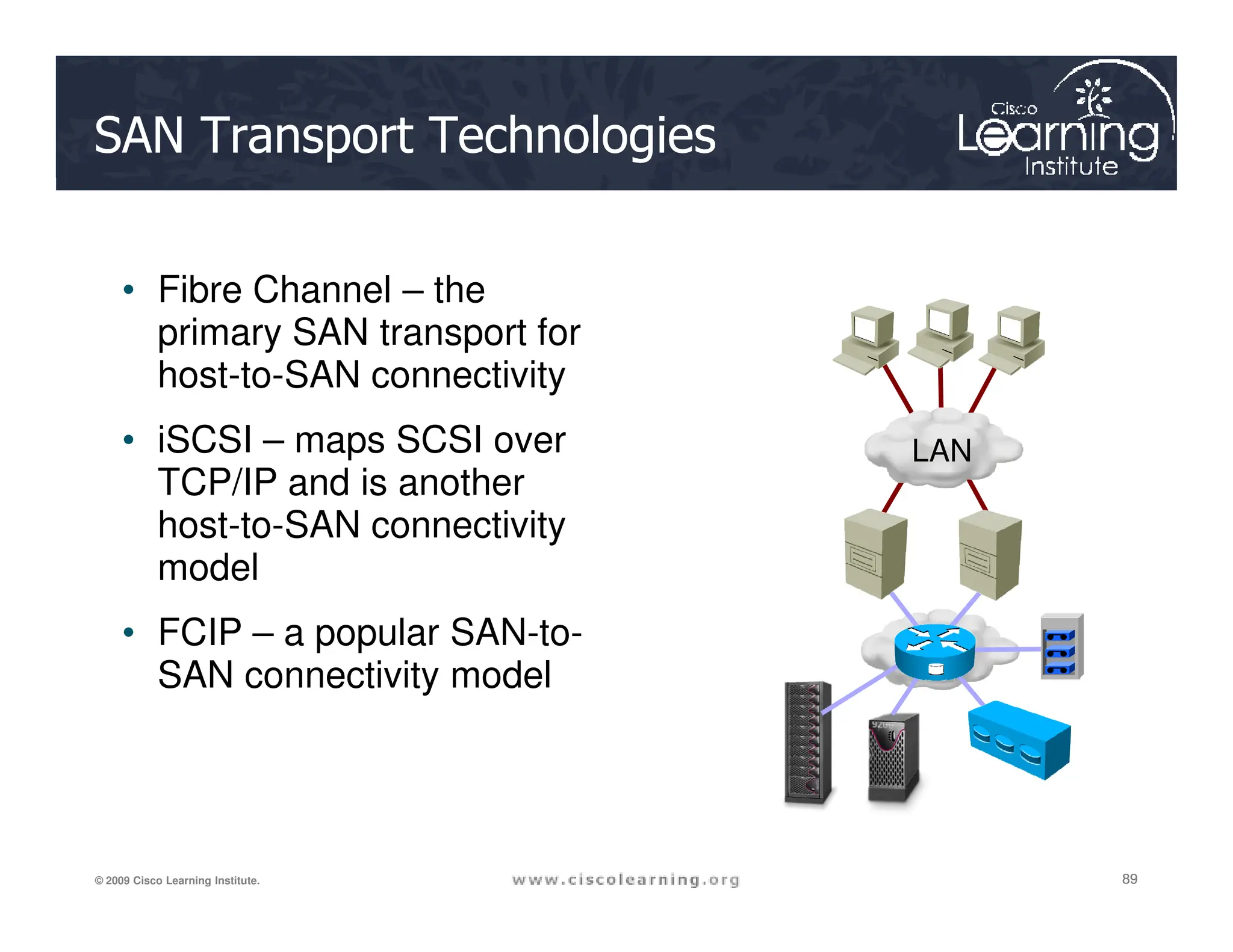
• Fibre Channel – the
primary SAN transport for
host-to-SAN connectivity
• iSCSI – maps SCSI over
TCP/IP and is another
LAN
89
89
89
© 2009 Cisco Learning Institute.
TCP/IP and is another
host-to-SAN connectivity
model
• FCIP – a popular SAN-to-
SAN connectivity model
World Wide Name
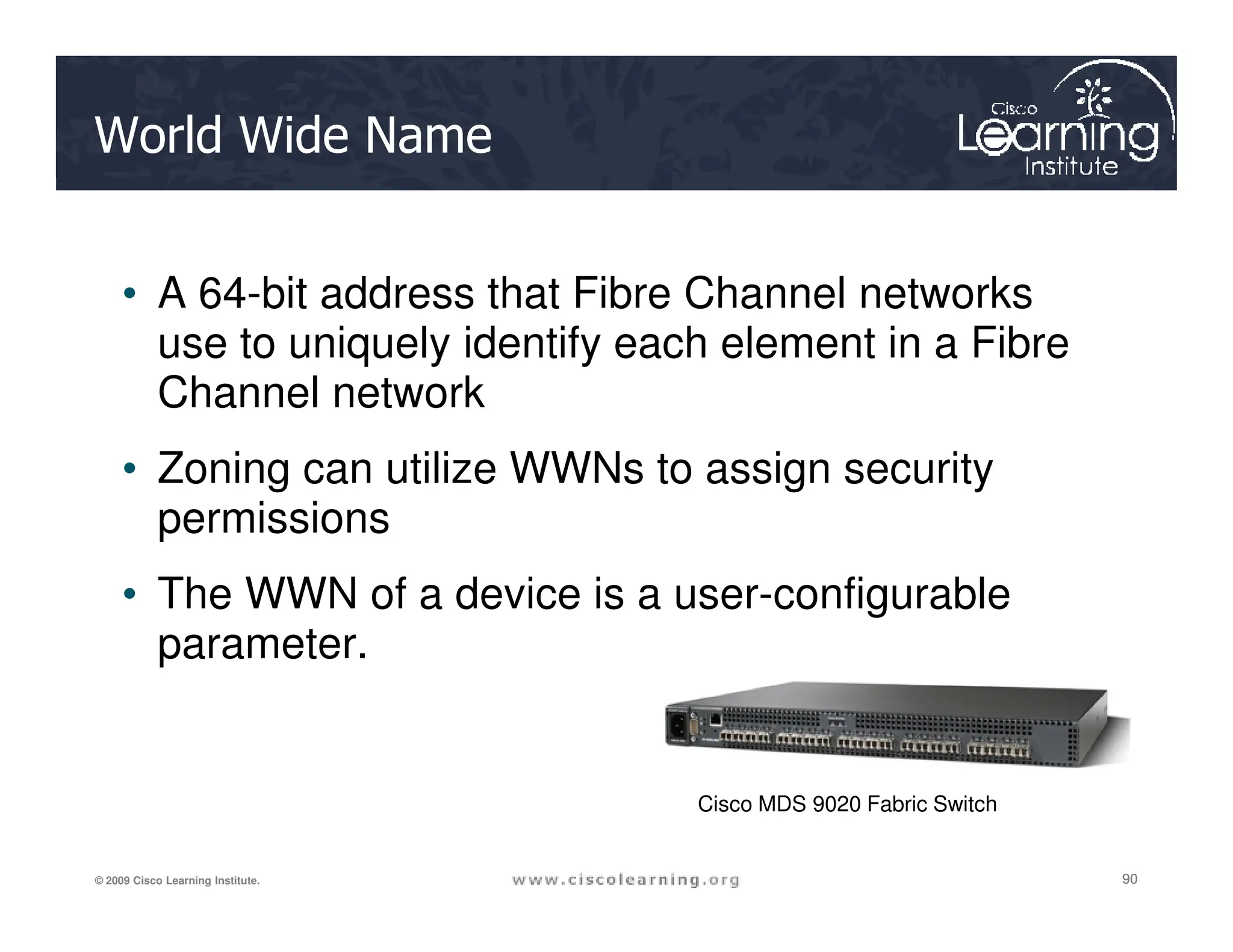
• A 64-bit address that Fibre Channel networks
use to uniquely identify each element in a Fibre
Channel network
• Zoning can utilize WWNs to assign security
90
90
90
© 2009 Cisco Learning Institute.
• Zoning can utilize WWNs to assign security
permissions
• The WWN of a device is a user-configurable
parameter.
Cisco MDS 9020 Fabric Switch
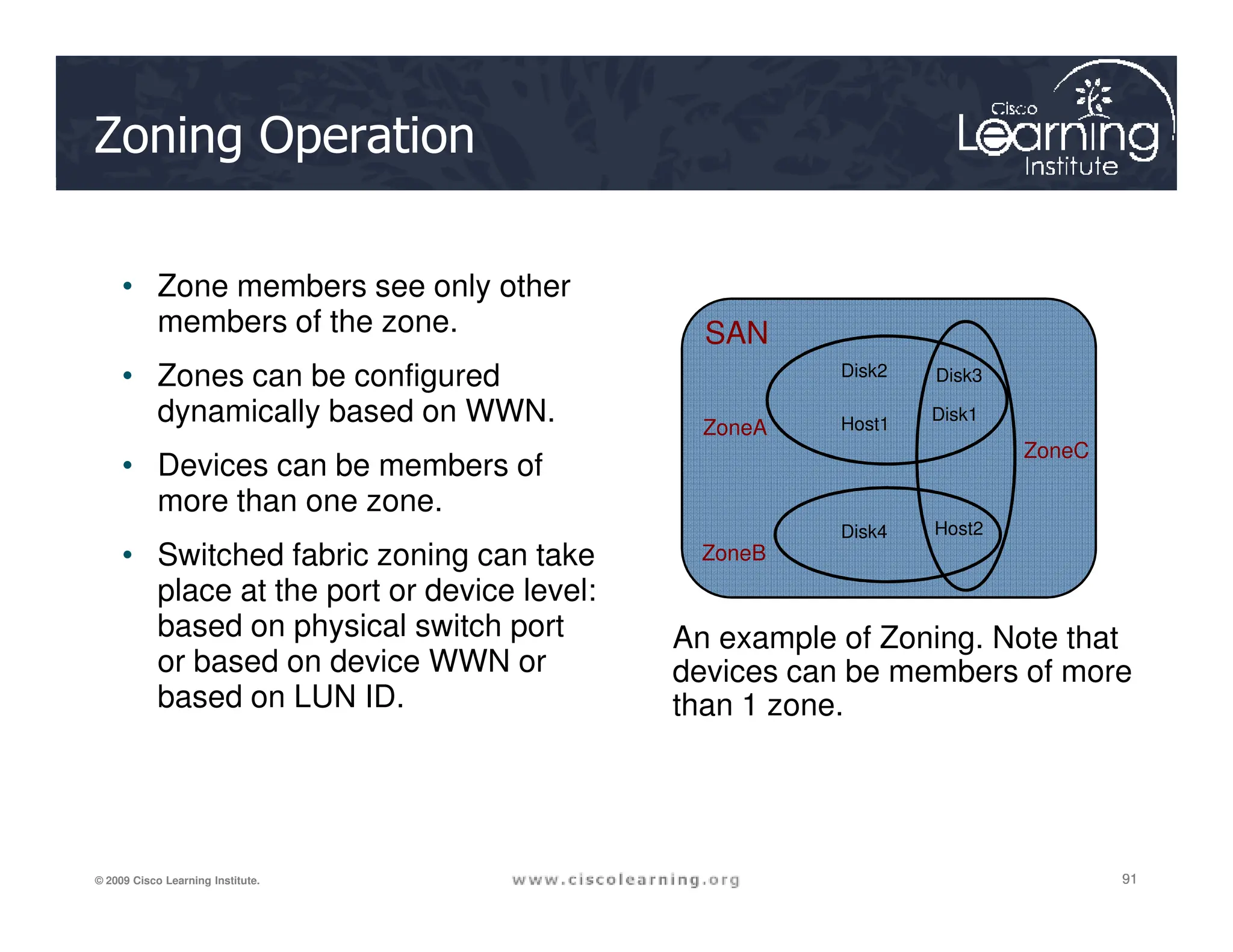
Zoning Operation
• Zone members see only other
members of the zone.
• Zones can be configured
dynamically based on WWN.
• Devices can be members of
SAN
Disk1
Host1
Disk2 Disk3
ZoneA
ZoneC
91
91
91
© 2009 Cisco Learning Institute.
• Devices can be members of
more than one zone.
• Switched fabric zoning can take
place at the port or device level:
based on physical switch port
or based on device WWN or
based on LUN ID.
Host2
Disk4
ZoneB
An example of Zoning. Note that
devices can be members of more
than 1 zone.
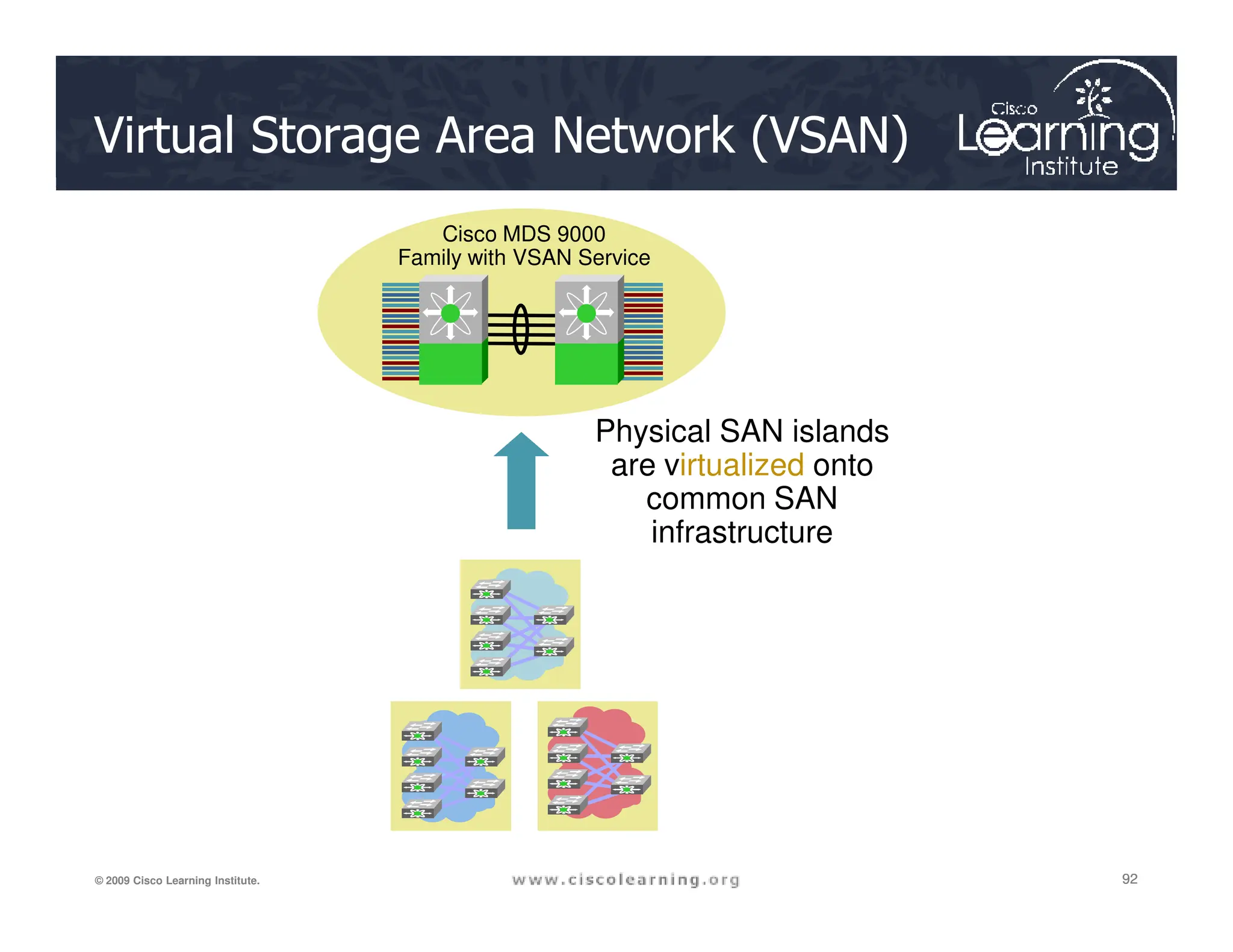
Virtual Storage Area Network (VSAN)
Physical SAN islands
are virtualized onto
Cisco MDS 9000
Family with VSAN Service
92
92
92
© 2009 Cisco Learning Institute.
are virtualized onto
common SAN
infrastructure
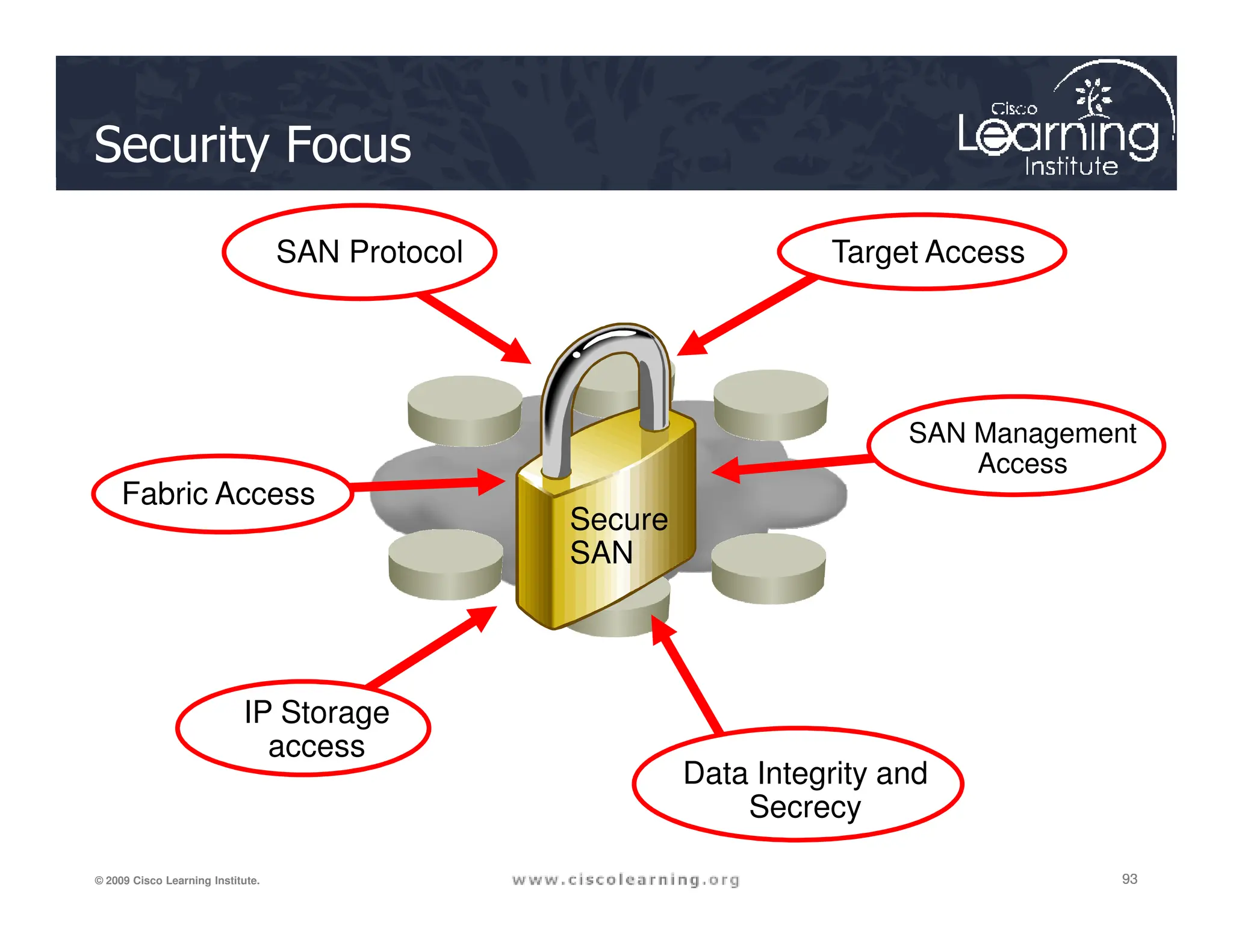
Security Focus
SAN
Target Access
SAN Protocol
SAN Management
Access
93
93
93
© 2009 Cisco Learning Institute.
SAN
Secure
SAN
IP Storage
access
Data Integrity and
Secrecy
Access
Fabric Access
SAN Management
Three main areas of vulnerability:
1. Disruption of switch processing
2. Compromised fabric stability
3. Compromised data integrity and confidentiality
94
94
94
© 2009 Cisco Learning Institute.
3. Compromised data integrity and confidentiality
Fabric and Target Access
Three main areas of focus:
• Application data integrity
• LUN integrity
95
95
95
© 2009 Cisco Learning Institute.
• Application performance
VSANs
Two VSANs each with
multiple zones. Disks and
hosts are dedicated to
VSANs although both hosts
Physical Topology
VSAN 2
Disk1
Host1
Disk2 Disk3
ZoneA
ZoneC
Relationship of VSANs to Zones
96
96
96
© 2009 Cisco Learning Institute.
VSANs although both hosts
and disks can belong to
multiple zones within a
single VSAN. They cannot,
however, span VSANs.
VSAN 3
Host2
Disk4
Disk6
Disk5
Host4
Host3
ZoneB
ZoneA
ZoneD
iSCSI and FCIP
• iSCSI leverages many of the security features inherent in
Ethernet and IP
– ACLs are like Fibre Channel zones
– VLANs are like Fibre Channel VSANs
97
97
97
© 2009 Cisco Learning Institute.
– 802.1X port security is like Fibre Channel port security
• FCIP security leverages many IP security features in
Cisco IOS-based routers:
– IPsec VPN connections through public carriers
– High-speed encryption services in specialized hardware
– Can be run through a firewall
98
98
98
© 2009 Cisco Learning Institute.

Chapter 6-Securing the Local Area Network.pdf

  • 1.
    CCNA Security 1 © 2009Cisco Learning Institute. Chapter Six Securing the Local Area Network
  • 2.
    Major Concepts • Describeendpoint vulnerabilities and protection methods • Describe basic Catalyst switch vulnerabilities • Configure and verify switch security features, 2 2 2 © 2009 Cisco Learning Institute. • Configure and verify switch security features, including port security and storm control • Describe the fundamental security considerations of Wireless, VoIP, and SANs
  • 3.
    Lesson Objectives Upon completionof this lesson, the successful participant will be able to: 1. Describe endpoint security and the enabling technologies 2. Describe how Cisco IronPort is used to ensure endpoint security 3 3 3 © 2009 Cisco Learning Institute. 3. Describe how Cisco NAC products are used to ensure endpoint security 4. Describe how the Cisco Security Agent is used to ensure endpoint security 5. Describe the primary considerations for securing the Layer 2 infrastructure 6. Describe MAC address spoofing attacks and MAC address spoofing attack mitigation
  • 4.
    Lesson Objectives 7. DescribeMAC Address table overflow attacks and MAC Address table overflow attack mitigation 8. Describe STP manipulation attacks and STP manipulation attack mitigation 9. Describe LAN Storm attacks and LAN Storm attack mitigation 4 4 4 © 2009 Cisco Learning Institute. 10. Describe VLAN attacks and VLAN attack mitigation 11. Describe how to configure port security 12. Describe how to verify port security 13. Describe how to configure and verify BPDU Guard and Root Guard 14. Describe how to configure and verify storm control 15. Describe and configure Cisco SPAN 16. Describe and configure Cisco RSPAN
  • 5.
    Lesson Objectives 17. Describethe best practices for Layer 2 security 18. Describe the fundamental aspects of enterprise security for advanced technologies 19. Describe the fundamental aspects of wireless security and the enabling technologies 5 5 5 © 2009 Cisco Learning Institute. 20. Describe wireless security solutions 21. Describe the fundamental aspects of VoIP security and the enabling technologies Reference: CIAG course on VoIP security. 22. Describe VoIP security solutions 23. Describe the fundamental aspects of SAN security and the enabling technologies 24. Describe SAN security solutions
  • 6.
    Securing the LAN MARS VPN ACS Firewall Perimeter Internet Areasof concentration: • Securing endpoints • Securing network infrastructure 6 6 6 © 2009 Cisco Learning Institute. IPS VPN Iron Port Web Server Email Server DNS LAN Hosts infrastructure
  • 7.
    Policy Compliance Infection Containment Secure Addressing Endpoint Security 7 7 7 ©2009 Cisco Learning Institute. Threat Protection Secure Host Based on three elements: • Cisco Network Admission Control (NAC) • Endpoint protection • Network infection containment
  • 8.
    Operating Systems Basic SecurityServices • Trusted code and trusted path – ensures that the integrity of the operating system is not violated • Privileged context of execution – provides identity authentication and certain privileges based on the identity 8 8 8 © 2009 Cisco Learning Institute. • Process memory protection and isolation – provides separation from other users and their data • Access control to resources – ensures confidentiality and integrity of data
  • 9.
    Types of ApplicationAttacks I have gained direct access to this application’s privileges I have gained access to Direct 9 9 9 © 2009 Cisco Learning Institute. I have gained access to this system which is trusted by the other system, allowing me to access it. Indirect
  • 10.
    Cisco Systems Endpoint SecuritySolutions IronPort Cisco Security Agent 10 10 10 © 2009 Cisco Learning Institute. Cisco NAC
  • 11.
    Cisco IronPort Products IronPortproducts include: • E-mail security appliances for virus and spam control • Web security appliance for spyware filtering, URL filtering, and anti-malware • Security management appliance 11 11 11 © 2009 Cisco Learning Institute.
  • 12.
    IronPort C-Series Internet Internet Before IronPort Firewall AfterIronPort Firewall Encryption Platform MTA DLP Scanner 12 12 12 © 2009 Cisco Learning Institute. Antispam Antivirus Policy Enforcement Mail Routing IronPort E-mail Security Appliance Groupware Users Users Groupware DLP Policy Manager
  • 13.
    IronPort S-Series Web Proxy FirewallFirewall Before IronPort After IronPort Internet Internet 13 13 13 © 2009 Cisco Learning Institute. Antispyware Antivirus Antiphishing URL Filtering Policy Management Users Users IronPort S- Series
  • 14.
    Cisco NAC NAC Framework Thepurpose of NAC: Allow only authorized and compliant systems to access the network To enforce network security policy Cisco NAC Appliance 14 14 14 © 2009 Cisco Learning Institute. NAC Framework • Software module embedded within NAC- enabled products • Integrated framework leveraging multiple Cisco and NAC-aware vendor products • In-band Cisco NAC Appliance solution can be used on any switch or router platform • Self-contained, turnkey solution Cisco NAC Appliance
  • 15.
    The NAC Framework AAA Server CredentialsCredentials Vendor Servers Hosts Attempting Network Access Network Access Devices Policy Server Decision Points and Remediation Enforcement 15 15 15 © 2009 Cisco Learning Institute. Credentials Credentials EAP/UDP, EAP/802.1x RADIUS Credentials HTTPS Access Rights Notification Cisco Trust Agent Comply?
  • 16.
    NAC Components • CiscoNAS Serves as an in-band or out-of- band device for network access control • Cisco NAM • Cisco NAA Optional lightweight client for device-based registry scans in unmanaged environments • Rule-set updates 16 16 16 © 2009 Cisco Learning Institute. • Cisco NAM Centralizes management for administrators, support personnel, and operators • Rule-set updates Scheduled automatic updates for antivirus, critical hotfixes, and other applications M G R
  • 17.
    Cisco NAC ApplianceProcess THE GOAL Cisco NAM 1. Host attempts to access a web page or uses an optional client. Network access is blocked until wired or wireless host provides login information. Authentication Server M G R 17 17 17 © 2009 Cisco Learning Institute. Intranet/ Network 2. Host is redirected to a login page. Cisco NAC Appliance validates username and password, also performs device and network scans to assess vulnerabilities on device. Device is noncompliant or login is incorrect. Host is denied access and assigned to a quarantine role with access to online remediation resources. 3a. 3b. Device is “clean”. Machine gets on “certified devices list” and is granted access to network. Cisco NAS Quarantine Role 3. The host is authenticated and optionally scanned for posture compliance
  • 18.
    Access Windows Login Screen Scan isperformed (types of checks depend on user role) Scan fails Remediate 18 18 18 © 2009 Cisco Learning Institute. 4.
  • 19.
    CSA Architecture Server Protectedby Cisco Security Agent Administration Workstation Events Alerts 19 19 19 © 2009 Cisco Learning Institute. Management Center for Cisco Security Agent with Internal or External Database Security Policy SSL
  • 20.
    CSA Overview File System Interceptor Network Interceptor Configuration Interceptor Execution Space Interceptor Application 20 20 20 ©2009 Cisco Learning Institute. State Rules and Policies Rules Engine Correlation Engine Allowed Request Blocked Request
  • 21.
    CSA Functionality Security Application Network Interceptor FileSystem Interceptor Configuration Interceptor Execution Space Interceptor Distributed Firewall X ― ― ― Host Intrusion X ― ― X 21 21 21 © 2009 Cisco Learning Institute. Host Intrusion Prevention X ― ― X Application Sandbox ― X X X Network Worm Prevention X ― ― X File Integrity Monitor ― X X ―
  • 22.
    Attack Phases Server Protected by CiscoSecurity Agent – Probe phase • Ping scans • Port scans – Penetrate phase • Transfer exploit code to target – Persist phase 22 22 22 © 2009 Cisco Learning Institute. – File system interceptor – Network interceptor – Configuration interceptor – Execution space interceptor Agent • Install new code • Modify configuration – Propagate phase • Attack other targets – Paralyze phase • Erase files • Crash system • Steal data
  • 23.
    CSA Log Messages 23 23 23 ©2009 Cisco Learning Institute.
  • 24.
    MARS ACS Firewall Perimeter Internet Layer 2 Security 24 24 24 ©2009 Cisco Learning Institute. IPS VPN Iron Port Web Server Email Server DNS Hosts Internet
  • 25.
    OSI Model When itcomes to networking, Layer 2 is often a very weak link. Application Stream Application Presentation Compromised Application Presentation 25 25 25 © 2009 Cisco Learning Institute. MAC Addresses Physical Links IP Addresses Protocols and Ports Session Transport Network Data Link Physical Compromised Session Transport Network Data Link Physical Initial Compromise
  • 26.
    MAC Address SpoofingAttack MAC Address: AABBcc AABBcc 12AbDd Switch Port 1 2 The switch keeps track of the endpoints by maintaining a MAC address table. In MAC spoofing, the attacker poses as another host—in this case, AABBcc 26 26 26 © 2009 Cisco Learning Institute. AABBcc MAC Address: AABBcc Attacker Port 1 Port 2 MAC Address: 12AbDd I have associated Ports 1 and 2 with the MAC addresses of the devices attached. Traffic destined for each device will be forwarded directly.
  • 27.
    MAC Address SpoofingAttack AABBcc Switch Port 1 2 Attacker AABBcc 1 2 I have changed the MAC address on my computer to match the server. 27 27 27 © 2009 Cisco Learning Institute. MAC Address: AABBcc MAC Address: AABBcc Port 1 Port 2 The device with MAC address AABBcc has changed locations to Port2. I must adjust my MAC address table accordingly.
  • 28.
    MAC Address TableOverflow Attack 28 28 28 © 2009 Cisco Learning Institute. The switch can forward frames between PC1 and PC2 without flooding because the MAC address table contains port-to-MAC- address mappings in the MAC address table for these PCs.
  • 29.
    MAC Address TableOverflow Attack Intruder runs macof to begin sending unknown bogus MAC addresses. 3/25 MAC X 3/25 MAC Y 3/25 MAC Z XYZ MAC Port X 3/25 Y 3/25 C 3/25 Bogus addresses are added to the CAM table. CAM table is full. 1 2 29 29 29 © 2009 Cisco Learning Institute. A B C D VLAN 10 VLAN 10 3/25 XYZ flood Host C The switch floods the frames. Attacker sees traffic to servers B and D. VLAN 10 3 4
  • 30.
    STP Manipulation Attack •Spanning tree protocol operates by electing a root bridge • STP builds a tree topology F F Root Bridge Priority = 8192 MAC Address= 0000.00C0.1234 30 30 30 © 2009 Cisco Learning Institute. • STP manipulation changes the topology of a network—the attacking host appears to be the root bridge F F F B
  • 31.
    STP Manipulation Attack RootBridge Priority = 8192 F F F F F B F F 31 31 31 © 2009 Cisco Learning Institute. Root Bridge F B F F Attacker The attacking host broadcasts out STP configuration and topology change BPDUs. This is an attempt to force spanning tree recalculations.
  • 32.
    LAN Storm Attack Broadcast Broadcast Broadcast Broadcast Broadcast Broadcast 32 32 32 ©2009 Cisco Learning Institute. • Broadcast, multicast, or unicast packets are flooded on all ports in the same VLAN. • These storms can increase the CPU utilization on a switch to 100%, reducing the performance of the network.
  • 33.
    Storm Control Total number of 33 33 33 ©2009 Cisco Learning Institute. number of broadcast packets or bytes
  • 34.
    VLAN Attacks Segmentation Flexibility 34 34 34 © 2009 Cisco Learning Institute. VLAN = Broadcast Domain = Logical Network (Subnet) Security
  • 35.
    VLAN Attacks 802.1Q Server Trunk VLAN 20 VLAN 10 35 35 35 © 2009Cisco Learning Institute. Server Attacker sees traffic destined for servers A VLAN hopping attack can be launched in two ways: • Spoofing DTP Messages from the attacking host to cause the switch to enter trunking mode • Introducing a rogue switch and turning trunking on
  • 36.
    The second switch receivesthe packet, on the native VLAN Double-Tagging VLAN Attack Attacker on VLAN 10, but puts a 20 tag in the packet The first switch strips off the first tag and does not retag it (native traffic is not retagged). It then forwards the packet to switch 2. 20 802.1Q, Frame 1 2 3 36 36 36 © 2009 Cisco Learning Institute. the native VLAN Victim (VLAN 20) Note: This attack works only if the trunk has the same native VLAN as the attacker. 20 Trunk (Native VLAN = 10) 802.1Q, Frame 3 4 The second switch examines the packet, sees the VLAN 20 tag and forwards it accordingly.
  • 37.
    Port Security Overview MACA MAC A Port 0/1 allows MAC A Port 0/2 allows MAC B Port 0/3 allows MAC C 0/1 0/2 0/3 37 37 37 © 2009 Cisco Learning Institute. MAC A Attacker 1 Attacker 2 MAC F Allows an administrator to statically specify MAC Addresses for a port or to permit the switch to dynamically learn a limited number of MAC addresses
  • 38.
    CLI Commands switchport modeaccess Switch(config-if)# • Sets the interface mode as access switchport port-security Switch(config-if)# 38 38 38 © 2009 Cisco Learning Institute. switchport port-security • Enables port security on the interface switchport port-security maximum value Switch(config-if)# • Sets the maximum number of secure MAC addresses for the interface (optional)
  • 39.
    Switchport Port-Security Parameters ParameterDescription mac-address mac-address (Optional) Specify a secure MAC address for the port by entering a 48-bit MAC aaddress. You can add additional secure MAC addresses up to the maximum value configured. vlan vlan-id (Optional) On a trunk port only, specify the VLAN ID and the MAC address. If no VLAN ID is specified, the native VLAN is used. vlan access (Optional) On an access port only, specify the VLAN as an access VLAN. vlan voice (Optional) On an access port only, specify the VLAN as a voice VLAN mac-address sticky (Optional) Enable the interface for sticky learning by entering only the mac-address sticky keywords. When sticky learning is enabled, the interface adds all secure MAC addresses that are dynamically learned to the running 39 39 39 © 2009 Cisco Learning Institute. [mac-address] learning is enabled, the interface adds all secure MAC addresses that are dynamically learned to the running configuration and converts these addresses to sticky secure MAC addresses. Specify a sticky secure MAC address by entering the mac-address sticky mac-address keywords.. maximum value (Optional) Set the maximum number of secure MAC addresses for the interface. The maximum number of secure MAC addresses that you can configure on a switch is set by the maximum number of available MAC addresses allowed in the system. The active Switch Database Management (SDM) template determines this number. This number represents the total of available MAC addresses, including those used for other Layer 2 functions and any other secure MAC addresses configured on interfaces. The default setting is 1. vlan [vlan-list] (Optional) For trunk ports, you can set the maximum number of secure MAC addresses on a VLAN. If the vlan keyword is not entered, the default value is used. ■ vlan: set a per-VLAN maximum value. ■ vlan vlan-list: set a per-VLAN maximum value on a range of VLANs separated by a hyphen or a series of VLANs separated by commas. For nonspecified VLANs, the per-VLAN maximum value is used.
  • 40.
    Port Security ViolationConfiguration switchport port-security violation {protect | restrict | shutdown} Switch(config-if)# • Sets the violation mode (optional) switchport port-security mac-address Switch(config-if)# 40 40 40 © 2009 Cisco Learning Institute. switchport port-security mac-address sticky Switch(config-if)# • Enables sticky learning on the interface (optional) switchport port-security mac-address mac-address • Enters a static secure MAC address for the interface (optional)
  • 41.
    Switchport Port-Security Violation Parameters ParameterDescription protect (Optional) Set the security violation protect mode. When the number of secure MAC addresses reaches the limit allowed on the port, packets with unknown source addresses are dropped until you remove a sufficient number of secure MAC addresses or increase the number of maximum allowable addresses. You are not notified that a security violation has occurred. restrict (Optional) Set the security violation restrict mode. When the number of secure MAC addresses reaches the limit allowed on the port, packets with unknown source addresses are dropped until you remove a sufficient number of secure MAC addresses 41 41 41 © 2009 Cisco Learning Institute. addresses are dropped until you remove a sufficient number of secure MAC addresses or increase the number of maximum allowable addresses. In this mode, you are notified that a security violation has occurred. shutdown (Optional) Set the security violation shutdown mode. In this mode, a port security violation causes the interface to immediately become error-disabled and turns off the port LED. It also sends an SNMP trap, logs a syslog message, and increments the violation counter. When a secure port is in the error-disabled state, you can bring it out of this state by entering the errdisable recovery cause psecure-violation global configuration command, or you can manually re-enable it by entering the shutdown and no shut down interface configuration commands. shutdown vlan Set the security violation mode to per-VLAN shutdown. In this mode, only the VLAN on which the violation occurred is error-disabled.
  • 42.
    Port Security AgingConfiguration switchport port-security aging {static | time time | type {absolute | inactivity}} Switch(config-if)# • Enables or disables static aging for the secure port or sets the aging time or type 42 42 42 © 2009 Cisco Learning Institute. sets the aging time or type • The aging command allows MAC-Addresses on the Secure switchport to be deleted after the set aging time • This helps to avoid a situation where obsolete MAC- Address occupy the table and saturates causing a violation (when the max number exceeds)
  • 43.
    Switchport Port-Security Aging Parameters ParameterDescription static Enable aging for statically configured secure addresses on this port. time time Specify the aging time for this port. The range is 0 to 1440 minutes. If the time is 0, aging is disabled for this port. 43 43 43 © 2009 Cisco Learning Institute. type absolute Set absolute aging type. All the secure addresses on this port age out exactly after the time (minutes) specified and are removed from the secure address list. type inactivity Set the inactivity aging type. The secure addresses on this port age out only if there is no data traffic from the secure source address for the specified time period.
  • 44.
    Typical Configuration S2 44 44 44 © 2009Cisco Learning Institute. switchport mode access switchport port-security switchport port-security maximum 2 switchport port-security violation shutdown switchport port-security mac-address sticky switchport port-security aging time 120 Switch(config-if)# PC B
  • 45.
    CLI Commands sw-class# showport-security Secure Port MaxSecureAddr CurrentAddr SecurityViolation Security Action (Count) (Count) (Count) --------------------------------------------------------------------------- Fa0/12 2 0 0 Shutdown --------------------------------------------------------------------------- Total Addresses in System (excluding one mac per port) : 0 Max Addresses limit in System (excluding one mac per port) : 1024 45 45 45 © 2009 Cisco Learning Institute. sw-class# show port-security interface f0/12 Port Security : Enabled Port status : Secure-down Violation mode : Shutdown Maximum MAC Addresses : 2 Total MAC Addresses : 1 Configured MAC Addresses : 0 Aging time : 120 mins Aging type : Absolute SecureStatic address aging : Disabled Security Violation Count : 0
  • 46.
    View Secure MACAddresses sw-class# show port-security address Secure Mac Address Table ------------------------------------------------------------------- Vlan Mac Address Type Ports Remaining Age 46 46 46 © 2009 Cisco Learning Institute. Vlan Mac Address Type Ports Remaining Age (mins) ---- ----------- ---- ----- ------------- 1 0000.ffff.aaaa SecureConfigured Fa0/12 - ------------------------------------------------------------------- Total Addresses in System (excluding one mac per port) : 0 Max Addresses limit in System (excluding one mac per port) : 1024
  • 47.
    MAC Address Notification NMS MACA MAC B F1/1 = MAC A Switch CAM Table SNMP traps sent to NMS when new MAC addresses appear or when old ones time out. F1/2 F1/1 F2/1 47 47 47 © 2009 Cisco Learning Institute. MAC address notification allows monitoring of the MAC addresses, at the module and port level, added by the switch or removed from the CAM table for secure ports. MAC A F1/1 = MAC A F1/2 = MAC B F2/1 = MAC D (address ages out) MAC D is away from the network.
  • 48.
    Configure Portfast Server Workstation 48 48 48 ©2009 Cisco Learning Institute. Command Description Switch(config-if)# spanning- tree portfast Enables PortFast on a Layer 2 access port and forces it to enter the forwarding stateimmediately. Switch(config-if)# no spanning-tree portfast Disables PortFast on a Layer 2 access port. PortFast is disabled by default. Switch(config)# spanning-tree portfast default Globally enables the PortFast feature on all nontrunking ports. Switch# show running-config interface type slot/port Indicates whether PortFast has been configured on a port.
  • 49.
    BPDU Guard F F F F FB Root Bridge 49 49 49 © 2009 Cisco Learning Institute. Switch(config)# spanning-tree portfast bpduguard default • Globally enables BPDU guard on all ports with PortFast enabled F B BPDU Guard Enabled Attacker STP BPDU
  • 50.
    Display the Stateof Spanning Tree Switch# show spanning-tree summary totals Root bridge for: none. PortFast BPDU Guard is enabled UplinkFast is disabled BackboneFast is disabled Spanning tree default pathcost method used is short Name Blocking Listening Learning Forwarding STP Active -------------------- -------- --------- -------- ---------- ---------- 1 VLAN 0 0 0 1 1 50 50 50 © 2009 Cisco Learning Institute. 1 VLAN 0 0 0 1 1 output omitted
  • 51.
    Root Guard Root Bridge Priority= 0 MAC Address = 0000.0c45.1a5d F F F F F B F Root Guard Enabled 51 51 51 © 2009 Cisco Learning Institute. Switch(config-if)# spanning-tree guard root • Enables root guard on a per-interface basis F STP BPDU Priority = 0 MAC Address = 0000.0c45.1234 Attacker
  • 52.
    Verify Root Guard Switch#show spanning-tree inconsistentports Name Interface Inconsistency -------------------- ---------------------- ------------------ VLAN0001 FastEthernet3/1 Port Type Inconsistent VLAN0001 FastEthernet3/2 Port Type Inconsistent VLAN1002 FastEthernet3/1 Port Type Inconsistent VLAN1002 FastEthernet3/2 Port Type Inconsistent VLAN1003 FastEthernet3/1 Port Type Inconsistent VLAN1003 FastEthernet3/2 Port Type Inconsistent 52 52 52 © 2009 Cisco Learning Institute. VLAN1003 FastEthernet3/2 Port Type Inconsistent VLAN1004 FastEthernet3/1 Port Type Inconsistent VLAN1004 FastEthernet3/2 Port Type Inconsistent VLAN1005 FastEthernet3/1 Port Type Inconsistent VLAN1005 FastEthernet3/2 Port Type Inconsistent Number of inconsistent ports (segments) in the system :10
  • 53.
    Storm Control Methods •Bandwidth as a percentage of the total available bandwidth of the port that can be used by the broadcast, multicast, or unicast traffic • Traffic rate in packets per second at which broadcast, multicast, or unicast packets are received 53 53 53 © 2009 Cisco Learning Institute. multicast, or unicast packets are received • Traffic rate in bits per second at which broadcast, multicast, or unicast packets are received • Traffic rate in packets per second and for small frames. This feature is enabled globally. The threshold for small frames is configured for each interface.
  • 54.
    Storm Control Configuration •Enables storm control Switch(config-if)# storm-control broadcast level 75.5 Switch(config-if)# storm-control multicast level pps 2k 1k Switch(config-if)# storm-control action shutdown 54 54 54 © 2009 Cisco Learning Institute. • Enables storm control • Specifies the level at which it is enabled • Specifies the action that should take place when the threshold (level) is reached, in addition to filtering traffic
  • 55.
    Storm Control Parameters ParameterDescription broadcast This parameter enables broadcast storm control on the interface. multicast This parameter enables multicast storm control on the interface. unicast This parameter enables unicast storm control on the interface. level level [level-low] Rising and falling suppression levels as a percentage of total bandwidth of the port. • level: Rising suppression level. The range is 0.00 to 100.00. Block the flooding of storm packets when the value specified for level is reached. • level-low: (Optional) Falling suppression level, up to two decimal places. This value must be less than or equal to the rising suppression value. level bps bps [bps-low] Specify the rising and falling suppression levels as a rate in bits per second at which 55 55 55 © 2009 Cisco Learning Institute. level bps bps [bps-low] Specify the rising and falling suppression levels as a rate in bits per second at which traffic is received on the port. • bps: Rising suppression level. The range is 0.0 to 10000000000.0. Block the flooding of storm packets when the value specified for bps is reached. • bps-low: (Optional) Falling suppression level, up to one decimal place. This value must be equal to or less than the rising suppression value. level pps pps [pps-low] Specify the rising and falling suppression levels as a rate in packets per second at which traffic is received on the port. • pps: Rising suppression level. The range is 0.0 to 10000000000.0. Block the flooding of storm packets when the value specified for pps is reached. • pps-low: (Optional) Falling suppression level, up to one decimal place. This value must be equal to or less than the rising suppression value. action {shutdown|trap} The action taken when a storm occurs on a port. The default action is to filter traffic and to not send an SNMP trap. The keywords have these meanings: • shutdown: Disables the port during a storm • trap: Sends an SNMP trap when a storm occurs
  • 56.
    Verify Storm ControlSettings Switch# show storm-control Interface Filter State Upper Lower Current --------- ------------- ---------- --------- -------- -Gi0/1 Forwarding 20 pps 10 pps 5 pps Gi0/2 Forwarding 50.00% 40.00% 0.00% 56 56 56 © 2009 Cisco Learning Institute. Gi0/2 Forwarding 50.00% 40.00% 0.00% output omitted
  • 57.
    Trunk (Native VLAN =10) Mitigating VLAN Attacks 57 57 57 © 2009 Cisco Learning Institute. (Native VLAN = 10) 1. Disable trunking on all access ports. 2. Disable auto trunking and manually enable trunking 3. Be sure that the native VLAN is used only for trunk lines and no where else
  • 58.
    switchport mode trunk switchportnonegotiate . Switch(config-if)# • Specifies an interface as a trunk link Switch(config-if)# Controlling Trunking 58 58 58 © 2009 Cisco Learning Institute. switchport trunk native vlan vlan_number switchport nonegotiate • Prevents the generation of DTP frames. Switch(config-if)# • Set the native VLAN on the trunk to an unused VLAN
  • 59.
    Traffic Analysis ASPAN port mirrors traffic to another port where a monitoring device is connected. “Intruder Alert!” IDS RMON Probe Protocol Analyzer 59 59 59 © 2009 Cisco Learning Institute. connected. Without this, it can be difficult to track hackers after they have entered the network. Attacker
  • 60.
    CLI Commands monitor sessionsession_number source {interface interface-id [, | -] [both | rx | tx]} | {vlan vlan- id [, | -] [both | rx | tx]}| {remote vlan vlan-id} Switch(config)# 60 60 60 © 2009 Cisco Learning Institute. monitor session session_number destination {interface interface-id [, | -] [encapsulation replicate] [ingress {dot1q vlan vlan-id | isl | untagged vlan vlan-id | vlan vlan-id}]} | {remote vlan vlan-id} Switch(config)#
  • 61.
    Verify SPAN Configuration 61 61 61 ©2009 Cisco Learning Institute.
  • 62.
    SPAN and IDS IDS UseSPAN to mirror traffic in and out of port F0/1 F0/2 62 62 62 © 2009 Cisco Learning Institute. Attacker and out of port F0/1 to port F0/2. F0/1
  • 63.
    Overview of RSPAN •An RSPAN port mirrors traffic to another port on another switch where a probe or IDS sensor is connected. • This allows more switches to be monitored with a single “Intruder Alert!” IDS RSPAN VLAN Source VLAN 63 63 63 © 2009 Cisco Learning Institute. be monitored with a single probe or IDS. Attacker RSPAN VLAN Source VLAN Source VLAN
  • 64.
    Configuring RSPAN 2960-1 2960-2 2960-1(config)#vlan 100 2960-1(config-vlan)# remote-span 2960-1(config-vlan)# exit 1. Configure the RPSAN VLAN 2. Configure the RSPAN source ports and VLANs 64 64 64 © 2009 Cisco Learning Institute. 2960-1(config)# monitor session 1 source interface FastEthernet 0/1 2960-1(config)# monitor session 1 destination remote vlan 100 reflector-port FastEthernet 0/24 2960-1(config)# interface FastEthernet 0/2 2960-1(config-if)# switchport mode trunk 2960-2(config)# monitor session 2 source remote vlan 100 2960-2(config)# monitor session 2 destination interface FastEthernet 0/3 2960-2(config)# interface FastEthernet 0/2 2960-2(config-if)# switchport mode trunk 2. Configure the RSPAN source ports and VLANs 3. Configure the RSPAN traffic to be forwarded
  • 65.
    Verifying RSPAN Configuration 2960-12960-2 65 65 65 © 2009 Cisco Learning Institute. show monitor [session {session_number | all | local | range list | remote} [detail]] [ | {begin | exclude | include}expression]
  • 66.
    Layer 2 Guidelines •Manage switches in as secure a manner as possible (SSH, out-of-band management, ACLs, etc.) • Set all user ports to non-trunking mode (except if using Cisco VoIP) • Use port security where possible for access ports • Enable STP attack mitigation (BPDU guard, root guard) 66 66 66 © 2009 Cisco Learning Institute. • Enable STP attack mitigation (BPDU guard, root guard) • Use Cisco Discovery Protocol only where necessary – with phones it is useful • Configure PortFast on all non-trunking ports • Configure root guard on STP root ports • Configure BPDU guard on all non-trunking ports
  • 67.
    VLAN Practices • Alwaysuse a dedicated, unused native VLAN ID for trunk ports • Do not use VLAN 1 for anything • Disable all unused ports and put them in an unused VLAN 67 67 67 © 2009 Cisco Learning Institute. VLAN • Manually configure all trunk ports and disable DTP on trunk ports • Configure all non-trunking ports with switchport mode access
  • 68.
    Overview of Wireless,VoIP Security 68 68 68 © 2009 Cisco Learning Institute. Wireless VoIP
  • 69.
    Overview of SANSecurity 69 69 69 © 2009 Cisco Learning Institute. SAN
  • 70.
    Infrastructure-Integrated Approach • Proactivethreat and intrusion detection capabilities that do not simply detect wireless attacks but prevent them • Comprehensive protection to safeguard confidential data and 70 70 70 © 2009 Cisco Learning Institute. safeguard confidential data and communications • Simplified user management with a single user identity and policy • Collaboration with wired security systems
  • 71.
    Cisco IP TelephonySolutions • Single-site deployment • Centralized call processing with remote branches 71 71 71 © 2009 Cisco Learning Institute. • Distributed call- processing deployment • Clustering over the IPWAN
  • 72.
    Storage Network Solutions •Investment protection • Virtualization • Security 72 72 72 © 2009 Cisco Learning Institute. • Security • Consolidation • Availability
  • 73.
    Cisco Wireless LANControllers 73 73 73 © 2009 Cisco Learning Institute. • Responsible for system-wide wireless LAN functions • Work in conjunction with Aps and the Cisco Wireless Control System (WCS) to support wireless applications • Smoothly integrate into existing enterprise networks
  • 74.
    Wireless Hacking • Wardriving • A neighbor hacks into another neighbor’s wireless network to get free Internet access or 74 74 74 © 2009 Cisco Learning Institute. free Internet access or access information • Free Wi-Fi provides an opportunity to compromise the data of users
  • 75.
    Hacking Tools • NetworkStumbler 75 75 75 © 2009 Cisco Learning Institute. • Network Stumbler • Kismet • AirSnort • CoWPAtty • ASLEAP • Wireshark
  • 76.
    Safety Considerations • Wirelessnetworks using WEP or WPA/TKIP are not very secure and vulnerable to hacking attacks. • Wireless networks using WPA2/AES should 76 76 76 © 2009 Cisco Learning Institute. • Wireless networks using WPA2/AES should have a passphrase of at least 21 characters long. • If an IPsec VPN is available, use it on any public wireless LAN. • If wireless access is not needed, disable the wireless radio or wireless NIC.
  • 77.
    VoIP Business Advantages •Little or no training costs • Mo major set-up fees PSTN VoIP Gateway 77 77 77 © 2009 Cisco Learning Institute. • Lower telecom call costs • Productivity increases • Lower costs to move, add, or change • Lower ongoing service and maintenance costs • Mo major set-up fees • Enables unified messaging • Encryption of voice calls is supported • Fewer administrative personnel required
  • 78.
    VoIP Components Cisco Unified Communications Manager (CallAgent) MCU IP Backbone PSTN 78 78 78 © 2009 Cisco Learning Institute. Cisco Unity IP Phone IP Phone Videoconference Station Router/ Gateway Router/ Gateway Router/ Gateway
  • 79.
    VoIP Protocols VoIP ProtocolDescription H.323 ITU standard protocol for interactive conferencing; evolved from H.320 ISDN standard; flexible, complex MGCP Emerging IETF standard for PSTN gateway control; thin device control Megaco/H.248 Joint IETF and ITU standard for gateway control with support for multiple gateway types; evolved from MGCP standard 79 79 79 © 2009 Cisco Learning Institute. SIP IETF protocol for interactive and noninteractive conferencing; simpler but less mature than H.323 RTP ETF standard media-streaming protocol RTCP IETF protocol that provides out-of-band control information for an RTP flow SRTP IETF protocol that encrypts RTP traffic as it leaves the voice device SCCP Cisco proprietary protocol used between Cisco Unified Communications Manager and Cisco IP phones
  • 80.
    Threats 80 80 80 © 2009 CiscoLearning Institute. • Reconnaissance • Directed attacks such as spam over IP telephony (SPIT) and spoofing • DoS attacks such as DHCP starvation, flooding, and fuzzing • Eavesdropping and man-in-the-middle attacks
  • 81.
    VoIP SPIT • IfSPIT grows like spam, it could result in regular DoS problems for network administrators. • Antispam methods do not block SPIT. • Authenticated TLS stops most SPIT attacks because TLS endpoints accept packets only from trusted devices. 81 81 81 © 2009 Cisco Learning Institute. only from trusted devices. You’ve just won an all expenses paid vacation to the U.S. Virgin Islands !!!
  • 82.
    Fraud • Fraud takesseveral forms: 82 82 82 © 2009 Cisco Learning Institute. – Vishing—A voice version of phishing that is used to compromise confidentiality. – Theft and toll fraud—The stealing of telephone services. • Use features of Cisco Unified Communications Manager to protect against fraud. – Partitions limit what parts of the dial plan certain phones have access to. – Dial plans filter control access to exploitive phone numbers. – FACs prevent unauthorized calls and provide a mechanism for tracking.
  • 83.
    SIP Vulnerabilities • Registrationhijacking: Allows a hacker to intercept incoming calls and reroute them. • Message tampering: Allows a hacker to Registrar Registrar Location Database SIP Servers/Services 83 83 83 © 2009 Cisco Learning Institute. Allows a hacker to modify data packets traveling between SIP addresses. • Session tear-down: Allows a hacker to terminate calls or carry out VoIP-targeted DoS attacks. SIP Proxy SIP User Agents SIP User Agents
  • 84.
    Using VLANs Voice VLAN= 110 Data VLAN = 10 IP phone 10.1.110.3 Desktop PC 5/1 84 84 84 © 2009 Cisco Learning Institute. • Creates a separate broadcast domain for voice traffic • Protects against eavesdropping and tampering • Renders packet-sniffing tools less effective • Makes it easier to implement VACLs that are specific to voice traffic 802.1Q Trunk 10.1.110.3 Desktop PC 171.1.1.1
  • 85.
    Using Cisco ASAAdaptive Security Appliances • Ensure SIP, SCCP, H.323, and MGCP requests conform to standards • Prevent inappropriate SIP methods from being sent to Cisco Unified Communications Manager • Rate limit SIP requests 85 85 85 © 2009 Cisco Learning Institute. • Rate limit SIP requests • Enforce policy of calls (whitelist, blacklist, caller/called party, SIP URI) • Dynamically open ports for Cisco applications • Enable only “registered phones” to make calls • Enable inspection of encrypted phone calls Internet WAN Cisco Adaptive Security Appliance Cisco Adaptive Security Appliance
  • 86.
    Using VPNs • UseIPsec for authentication • Use IPsec to protect all traffic, not just voice • Consider SLA with service provider • Terminate on a VPN concentrator Telephony Servers 86 86 86 © 2009 Cisco Learning Institute. • Terminate on a VPN concentrator or large router inside of firewall to gain these benefits: • Performance • Reduced configuration complexity • Managed organizational boundaries IP WAN SRST Router
  • 87.
    Using Cisco UnifiedCommunications Manager • Signed firmware • Signed configuration files • Disable: 87 87 87 © 2009 Cisco Learning Institute. • Disable: – PC port – Setting button – Speakerphone – Web access
  • 88.
    SAN Security Considerations SAN IP Network 88 88 88 ©2009 Cisco Learning Institute. Specialized network that enables fast, reliable access among servers and external storage resources
  • 89.
    SAN Transport Technologies •Fibre Channel – the primary SAN transport for host-to-SAN connectivity • iSCSI – maps SCSI over TCP/IP and is another LAN 89 89 89 © 2009 Cisco Learning Institute. TCP/IP and is another host-to-SAN connectivity model • FCIP – a popular SAN-to- SAN connectivity model
  • 90.
    World Wide Name •A 64-bit address that Fibre Channel networks use to uniquely identify each element in a Fibre Channel network • Zoning can utilize WWNs to assign security 90 90 90 © 2009 Cisco Learning Institute. • Zoning can utilize WWNs to assign security permissions • The WWN of a device is a user-configurable parameter. Cisco MDS 9020 Fabric Switch
  • 91.
    Zoning Operation • Zonemembers see only other members of the zone. • Zones can be configured dynamically based on WWN. • Devices can be members of SAN Disk1 Host1 Disk2 Disk3 ZoneA ZoneC 91 91 91 © 2009 Cisco Learning Institute. • Devices can be members of more than one zone. • Switched fabric zoning can take place at the port or device level: based on physical switch port or based on device WWN or based on LUN ID. Host2 Disk4 ZoneB An example of Zoning. Note that devices can be members of more than 1 zone.
  • 92.
    Virtual Storage AreaNetwork (VSAN) Physical SAN islands are virtualized onto Cisco MDS 9000 Family with VSAN Service 92 92 92 © 2009 Cisco Learning Institute. are virtualized onto common SAN infrastructure
  • 93.
    Security Focus SAN Target Access SANProtocol SAN Management Access 93 93 93 © 2009 Cisco Learning Institute. SAN Secure SAN IP Storage access Data Integrity and Secrecy Access Fabric Access
  • 94.
    SAN Management Three mainareas of vulnerability: 1. Disruption of switch processing 2. Compromised fabric stability 3. Compromised data integrity and confidentiality 94 94 94 © 2009 Cisco Learning Institute. 3. Compromised data integrity and confidentiality
  • 95.
    Fabric and TargetAccess Three main areas of focus: • Application data integrity • LUN integrity 95 95 95 © 2009 Cisco Learning Institute. • Application performance
  • 96.
    VSANs Two VSANs eachwith multiple zones. Disks and hosts are dedicated to VSANs although both hosts Physical Topology VSAN 2 Disk1 Host1 Disk2 Disk3 ZoneA ZoneC Relationship of VSANs to Zones 96 96 96 © 2009 Cisco Learning Institute. VSANs although both hosts and disks can belong to multiple zones within a single VSAN. They cannot, however, span VSANs. VSAN 3 Host2 Disk4 Disk6 Disk5 Host4 Host3 ZoneB ZoneA ZoneD
  • 97.
    iSCSI and FCIP •iSCSI leverages many of the security features inherent in Ethernet and IP – ACLs are like Fibre Channel zones – VLANs are like Fibre Channel VSANs 97 97 97 © 2009 Cisco Learning Institute. – 802.1X port security is like Fibre Channel port security • FCIP security leverages many IP security features in Cisco IOS-based routers: – IPsec VPN connections through public carriers – High-speed encryption services in specialized hardware – Can be run through a firewall
  • 98.
    98 98 98 © 2009 CiscoLearning Institute.