Data Structures &
Algorithms
Chapter 3: Linkedlist
Data Structures
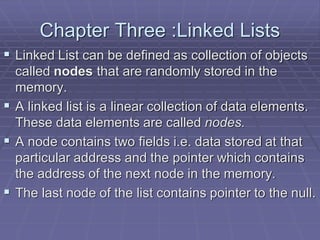
Chapter Three :Linked Lists
 Linked List can be defined as collection of objects
called nodes that are randomly stored in the
memory.
 A linked list is a linear collection of data elements.
These data elements are called nodes.
 A node contains two fields i.e. data stored at that
particular address and the pointer which contains
the address of the next node in the memory.
 The last node of the list contains pointer to the null.
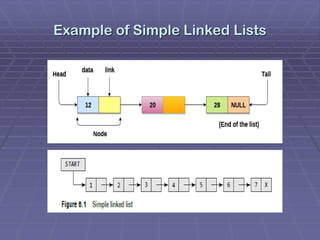
Example of Simple Linked Lists
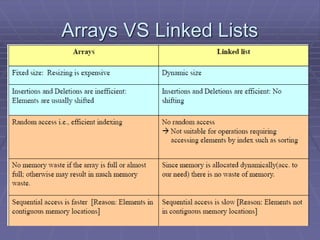
Arrays VS Linked Lists
SINGLY LINKED Lists
A singly linked list is the simplest type of linked
list in which every node contains some data and
a pointer to the next node of the same data
type. By saying that the node contains a pointer
to the next node, we mean that the node stores
the address of the next node in sequence.
A singly linked list allows traversal of data only
in one way.
Operations of SINGLY LINKED Lists
Traversing a Linked List
Searching for a Value in a Linked List
Inserting a New Node in a Linked List
 Case 1: The new node is inserted at the beginning.
 Case 2: The new node is inserted at the end.
 Case 3: The new node is inserted after a given node.
 Case 4: The new node is inserted before a given node.
 Deleting a Node from a Linked List
 Case 1: The first node is deleted.
 Case 2: The last node is deleted.
 Case 3: The node after a given node is deleted.
Traversing a Linked List
Traversing a linked list means accessing the nodes
of the list in order to perform some processing on
them. Remember a linked list always contains a
pointer variable START which stores the address
of the first node of the list. End of the list is marked
by storing NULL or –1 in the NEXT field of the last
node.
For traversing the linked list, we also make use of
another pointer variable PTR which points to the
node that is currently being accessed.
Algorithm for traversing a linked list
 Step 1: [INITIALIZE] SET PTR = START
 Step 2: Repeat Steps 3 and 4 while PTR
!= NULL
 Step 3: Apply Process to PTR DATA
 Step 4: SET PTR = PTR NEXT
 [END OF LOOP]
 Step 5: EXIT
Searching for a Value in a Linked List
Searching a linked list means to find a particular
element in the linked list. As already discussed,
a linked list consists of nodes which are divided
into two parts, the information part and the next
part. So searching means finding whether a
given value is present in the information part of
the node or not. If it is present, the algorithm
returns the address of the node that contains
the value.
Algorithm to search a linked list
 Step 1: [INITIALIZE] SET PTR = START
 Step 2: Repeat Step 3 while PTR != NULL
 Step 3: IF VAL = PTR DATA
 SET POS = PTR
 Go To Step 5
 ELSE
 SET PTR = PTR NEXT
 [END OF IF]
 [END OF LOOP]
 Step 4: SET POS = NULL
 Step 5: EXIT
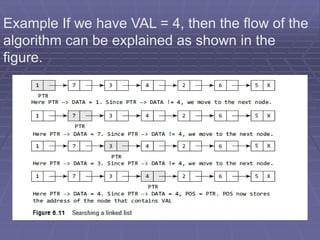
Example If we have VAL = 4, then the flow of the
algorithm can be explained as shown in the
figure.
Inserting a New Node in a Linked List
In this section, we will see how a new node is added
into an already existing linked list. We will
 take four cases and then see how insertion is done
in each case.
 Case 1: The new node is inserted at the beginning.
 Case 2: The new node is inserted at the end.
 Case 3: The new node is inserted after a given
node.
 Case 4: The new node is inserted before a given
node.
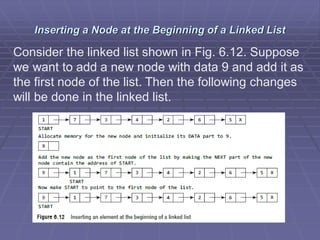
Inserting a Node at the Beginning of a Linked List
Consider the linked list shown in Fig. 6.12. Suppose
we want to add a new node with data 9 and add it as
the first node of the list. Then the following changes
will be done in the linked list.
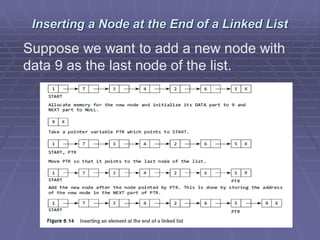
Inserting a Node at the End of a Linked List
Suppose we want to add a new node with
data 9 as the last node of the list.
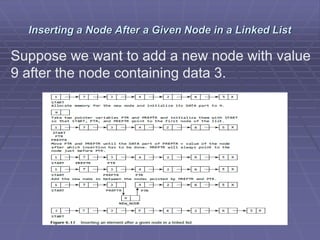
Inserting a Node After a Given Node in a Linked List
Suppose we want to add a new node with value
9 after the node containing data 3.
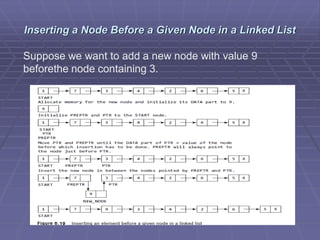
Inserting a Node Before a Given Node in a Linked List
Suppose we want to add a new node with value 9
beforethe node containing 3.
Deleting a Node from a Linked List
In this section, we will discuss how a node
is deleted from an already existing linked
list. We will
 consider three cases and then see how
deletion is done in each case.
 Case 1: The first node is deleted.
 Case 2: The last node is deleted.
 Case 3: The node after a given node is
deleted.
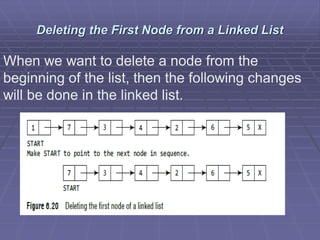
Deleting the First Node from a Linked List
When we want to delete a node from the
beginning of the list, then the following changes
will be done in the linked list.
Algorithm to delete the first Node
 Step 1: IF START = NULL
 Write UNDERFLOW
 Go to Step 5
 [END OF IF]
 Step 2: SET PTR = START
 Step 3: SET START = START NEXT
 Step 4: FREE PTR
 Step 5: EXIT
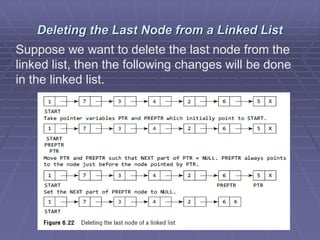
Deleting the Last Node from a Linked List
Suppose we want to delete the last node from the
linked list, then the following changes will be done
in the linked list.
Algorithm to delete the last node
 Step 1: IF START = NULL Write UNDERFLOW
 Go to Step 8
 [END OF IF]
 Step 2: SET PTR = START
 Step 3: Repeat Steps 4 and 5 while PTR NEXT != NULL
 Step 4: SET PREPTR = PTR
 Step 5: SET PTR = PTR NEXT
 [END OF LOOP]
 Step 6: SET PREPTR NEXT = NULL
 Step 7: FREE PTR
 Step 8: EXIT
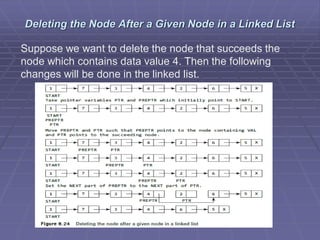
Deleting the Node After a Given Node in a Linked List
Suppose we want to delete the node that succeeds the
node which contains data value 4. Then the following
changes will be done in the linked list.
Algorithm to delete the node after a given node
 Step 1: IF START = NULL
 Write UNDERFLOW
 Go to Step 10
 [END OF IF]
 Step 2: SET PTR = START
 Step 3: SET PREPTR = PTR
 Step 4: Repeat Steps 5 and 6 while PREPTR DATA != NUll
 Step 5: SET PREPTR = PTR
 Step 6: SET PTR = PTR NEXT
 [END OF LOOP]
 Step 7: SET TEMP = PTR
 Step 8: SET PREPTR NEXT = PTR NEXT
 Step 9: FREE TEMP
 Step 10 : EXIT
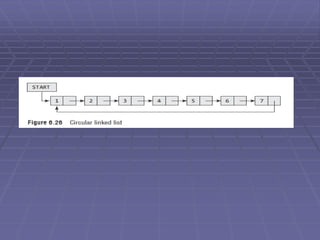
CIRCULAR LINKED LISTS
 CIRCULAR linked list is a linked data structure
that consists of a set of sequentially linked
records called nodes. Each node contains three
fields ::
 One is data part which contain data only.
 Two other field is links part that are point
 or references to the previous or to the next
node in the sequence of nodes.
Inserting a New Node in a Circular Linked List
In this section, we will see how a new node
is added into an already existing linked list.
We will take two cases and then see how
insertion is done in each case.
 Case 1: The new node is inserted at the
beginning of the circular linked list.
 Case 2: The new node is inserted at the
end of the circular linked list.
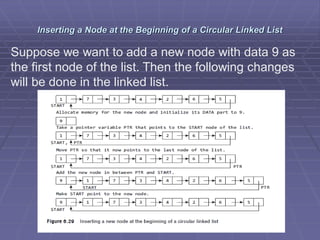
Inserting a Node at the Beginning of a Circular Linked List
Suppose we want to add a new node with data 9 as
the first node of the list. Then the following changes
will be done in the linked list.
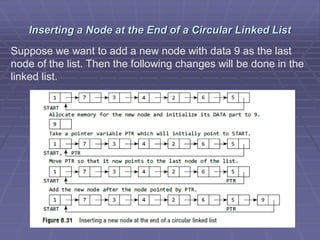
Inserting a Node at the End of a Circular Linked List
Suppose we want to add a new node with data 9 as the last
node of the list. Then the following changes will be done in the
linked list.
Deleting a Node from a Circular Linked List
 In this section, we will discuss how a node is
deleted from an already existing circular linked
list. We will take two cases and then see how
deletion is done in each case. Rest of the cases
of deletion are same as that given for singly
linked lists.
 Case 1: The first node is deleted.
 Case 2: The last node is deleted.
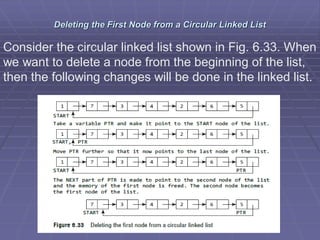
Deleting the First Node from a Circular Linked List
Consider the circular linked list shown in Fig. 6.33. When
we want to delete a node from the beginning of the list,
then the following changes will be done in the linked list.
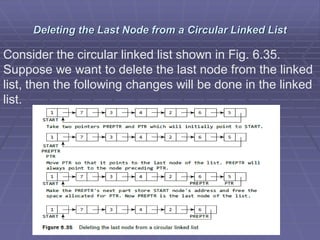
Deleting the Last Node from a Circular Linked List
Consider the circular linked list shown in Fig. 6.35.
Suppose we want to delete the last node from the linked
list, then the following changes will be done in the linked
list.
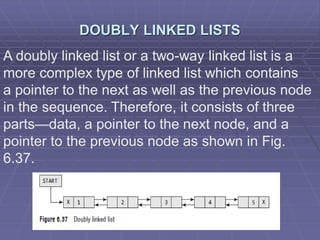
DOUBLY LINKED LISTS
A doubly linked list or a two-way linked list is a
more complex type of linked list which contains
a pointer to the next as well as the previous node
in the sequence. Therefore, it consists of three
parts—data, a pointer to the next node, and a
pointer to the previous node as shown in Fig.
6.37.
Inserting a New Node in a Doubly Linked List
 In this section, we will discuss how a new node
is added into an already existing doubly linked
list. We will take four cases and then see how
insertion is done in each case.
 Case 1: The new node is inserted at the
beginning.
 Case 2: The new node is inserted at the end.
 Case 3: The new node is inserted after a given
node.
 Case 4: The new node is inserted before a
given node.
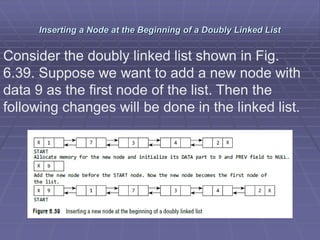
Inserting a Node at the Beginning of a Doubly Linked List
Consider the doubly linked list shown in Fig.
6.39. Suppose we want to add a new node with
data 9 as the first node of the list. Then the
following changes will be done in the linked list.
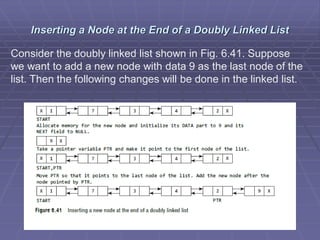
Inserting a Node at the End of a Doubly Linked List
Consider the doubly linked list shown in Fig. 6.41. Suppose
we want to add a new node with data 9 as the last node of the
list. Then the following changes will be done in the linked list.
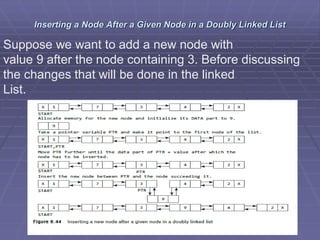
Inserting a Node After a Given Node in a Doubly Linked List
Suppose we want to add a new node with
value 9 after the node containing 3. Before discussing
the changes that will be done in the linked
List.
Inserting a Node Before a Given Node in a Doubly Linked List
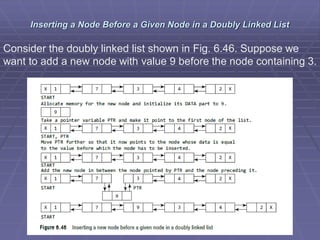
Consider the doubly linked list shown in Fig. 6.46. Suppose we
want to add a new node with value 9 before the node containing 3.
Deleting a Node from a Doubly Linked List
In this section, we will see how a node is
deleted from an already existing doubly linked
list. We will take four cases and then see how
deletion is done in each case.
 Case 1: The first node is deleted.
 Case 2: The last node is deleted.
 Case 3: The node after a given node is deleted.
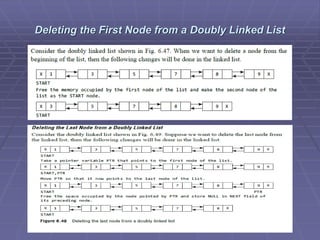
Deleting the First Node from a Doubly Linked List
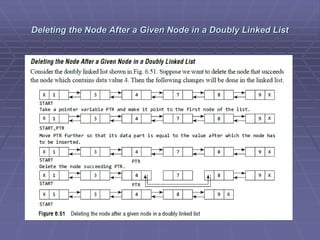
Deleting the Node After a Given Node in a Doubly Linked List
END

Chapter 3 Linkedlist Data Structure .pdf

  • 1.
    Data Structures & Algorithms Chapter3: Linkedlist Data Structures
  • 2.
    Chapter Three :LinkedLists  Linked List can be defined as collection of objects called nodes that are randomly stored in the memory.  A linked list is a linear collection of data elements. These data elements are called nodes.  A node contains two fields i.e. data stored at that particular address and the pointer which contains the address of the next node in the memory.  The last node of the list contains pointer to the null.
  • 3.
    Example of SimpleLinked Lists
  • 4.
  • 5.
    SINGLY LINKED Lists Asingly linked list is the simplest type of linked list in which every node contains some data and a pointer to the next node of the same data type. By saying that the node contains a pointer to the next node, we mean that the node stores the address of the next node in sequence. A singly linked list allows traversal of data only in one way.
  • 6.
    Operations of SINGLYLINKED Lists Traversing a Linked List Searching for a Value in a Linked List Inserting a New Node in a Linked List  Case 1: The new node is inserted at the beginning.  Case 2: The new node is inserted at the end.  Case 3: The new node is inserted after a given node.  Case 4: The new node is inserted before a given node.  Deleting a Node from a Linked List  Case 1: The first node is deleted.  Case 2: The last node is deleted.  Case 3: The node after a given node is deleted.
  • 7.
    Traversing a LinkedList Traversing a linked list means accessing the nodes of the list in order to perform some processing on them. Remember a linked list always contains a pointer variable START which stores the address of the first node of the list. End of the list is marked by storing NULL or –1 in the NEXT field of the last node. For traversing the linked list, we also make use of another pointer variable PTR which points to the node that is currently being accessed.
  • 8.
    Algorithm for traversinga linked list  Step 1: [INITIALIZE] SET PTR = START  Step 2: Repeat Steps 3 and 4 while PTR != NULL  Step 3: Apply Process to PTR DATA  Step 4: SET PTR = PTR NEXT  [END OF LOOP]  Step 5: EXIT
  • 9.
    Searching for aValue in a Linked List Searching a linked list means to find a particular element in the linked list. As already discussed, a linked list consists of nodes which are divided into two parts, the information part and the next part. So searching means finding whether a given value is present in the information part of the node or not. If it is present, the algorithm returns the address of the node that contains the value.
  • 10.
    Algorithm to searcha linked list  Step 1: [INITIALIZE] SET PTR = START  Step 2: Repeat Step 3 while PTR != NULL  Step 3: IF VAL = PTR DATA  SET POS = PTR  Go To Step 5  ELSE  SET PTR = PTR NEXT  [END OF IF]  [END OF LOOP]  Step 4: SET POS = NULL  Step 5: EXIT
  • 11.
    Example If wehave VAL = 4, then the flow of the algorithm can be explained as shown in the figure.
  • 12.
    Inserting a NewNode in a Linked List In this section, we will see how a new node is added into an already existing linked list. We will  take four cases and then see how insertion is done in each case.  Case 1: The new node is inserted at the beginning.  Case 2: The new node is inserted at the end.  Case 3: The new node is inserted after a given node.  Case 4: The new node is inserted before a given node.
  • 13.
    Inserting a Nodeat the Beginning of a Linked List Consider the linked list shown in Fig. 6.12. Suppose we want to add a new node with data 9 and add it as the first node of the list. Then the following changes will be done in the linked list.
  • 14.
    Inserting a Nodeat the End of a Linked List Suppose we want to add a new node with data 9 as the last node of the list.
  • 15.
    Inserting a NodeAfter a Given Node in a Linked List Suppose we want to add a new node with value 9 after the node containing data 3.
  • 16.
    Inserting a NodeBefore a Given Node in a Linked List Suppose we want to add a new node with value 9 beforethe node containing 3.
  • 17.
    Deleting a Nodefrom a Linked List In this section, we will discuss how a node is deleted from an already existing linked list. We will  consider three cases and then see how deletion is done in each case.  Case 1: The first node is deleted.  Case 2: The last node is deleted.  Case 3: The node after a given node is deleted.
  • 18.
    Deleting the FirstNode from a Linked List When we want to delete a node from the beginning of the list, then the following changes will be done in the linked list.
  • 19.
    Algorithm to deletethe first Node  Step 1: IF START = NULL  Write UNDERFLOW  Go to Step 5  [END OF IF]  Step 2: SET PTR = START  Step 3: SET START = START NEXT  Step 4: FREE PTR  Step 5: EXIT
  • 20.
    Deleting the LastNode from a Linked List Suppose we want to delete the last node from the linked list, then the following changes will be done in the linked list.
  • 21.
    Algorithm to deletethe last node  Step 1: IF START = NULL Write UNDERFLOW  Go to Step 8  [END OF IF]  Step 2: SET PTR = START  Step 3: Repeat Steps 4 and 5 while PTR NEXT != NULL  Step 4: SET PREPTR = PTR  Step 5: SET PTR = PTR NEXT  [END OF LOOP]  Step 6: SET PREPTR NEXT = NULL  Step 7: FREE PTR  Step 8: EXIT
  • 22.
    Deleting the NodeAfter a Given Node in a Linked List Suppose we want to delete the node that succeeds the node which contains data value 4. Then the following changes will be done in the linked list.
  • 23.
    Algorithm to deletethe node after a given node  Step 1: IF START = NULL  Write UNDERFLOW  Go to Step 10  [END OF IF]  Step 2: SET PTR = START  Step 3: SET PREPTR = PTR  Step 4: Repeat Steps 5 and 6 while PREPTR DATA != NUll  Step 5: SET PREPTR = PTR  Step 6: SET PTR = PTR NEXT  [END OF LOOP]  Step 7: SET TEMP = PTR  Step 8: SET PREPTR NEXT = PTR NEXT  Step 9: FREE TEMP  Step 10 : EXIT
  • 24.
    CIRCULAR LINKED LISTS CIRCULAR linked list is a linked data structure that consists of a set of sequentially linked records called nodes. Each node contains three fields ::  One is data part which contain data only.  Two other field is links part that are point  or references to the previous or to the next node in the sequence of nodes.
  • 26.
    Inserting a NewNode in a Circular Linked List In this section, we will see how a new node is added into an already existing linked list. We will take two cases and then see how insertion is done in each case.  Case 1: The new node is inserted at the beginning of the circular linked list.  Case 2: The new node is inserted at the end of the circular linked list.
  • 27.
    Inserting a Nodeat the Beginning of a Circular Linked List Suppose we want to add a new node with data 9 as the first node of the list. Then the following changes will be done in the linked list.
  • 28.
    Inserting a Nodeat the End of a Circular Linked List Suppose we want to add a new node with data 9 as the last node of the list. Then the following changes will be done in the linked list.
  • 29.
    Deleting a Nodefrom a Circular Linked List  In this section, we will discuss how a node is deleted from an already existing circular linked list. We will take two cases and then see how deletion is done in each case. Rest of the cases of deletion are same as that given for singly linked lists.  Case 1: The first node is deleted.  Case 2: The last node is deleted.
  • 30.
    Deleting the FirstNode from a Circular Linked List Consider the circular linked list shown in Fig. 6.33. When we want to delete a node from the beginning of the list, then the following changes will be done in the linked list.
  • 31.
    Deleting the LastNode from a Circular Linked List Consider the circular linked list shown in Fig. 6.35. Suppose we want to delete the last node from the linked list, then the following changes will be done in the linked list.
  • 32.
    DOUBLY LINKED LISTS Adoubly linked list or a two-way linked list is a more complex type of linked list which contains a pointer to the next as well as the previous node in the sequence. Therefore, it consists of three parts—data, a pointer to the next node, and a pointer to the previous node as shown in Fig. 6.37.
  • 33.
    Inserting a NewNode in a Doubly Linked List  In this section, we will discuss how a new node is added into an already existing doubly linked list. We will take four cases and then see how insertion is done in each case.  Case 1: The new node is inserted at the beginning.  Case 2: The new node is inserted at the end.  Case 3: The new node is inserted after a given node.  Case 4: The new node is inserted before a given node.
  • 34.
    Inserting a Nodeat the Beginning of a Doubly Linked List Consider the doubly linked list shown in Fig. 6.39. Suppose we want to add a new node with data 9 as the first node of the list. Then the following changes will be done in the linked list.
  • 35.
    Inserting a Nodeat the End of a Doubly Linked List Consider the doubly linked list shown in Fig. 6.41. Suppose we want to add a new node with data 9 as the last node of the list. Then the following changes will be done in the linked list.
  • 36.
    Inserting a NodeAfter a Given Node in a Doubly Linked List Suppose we want to add a new node with value 9 after the node containing 3. Before discussing the changes that will be done in the linked List.
  • 37.
    Inserting a NodeBefore a Given Node in a Doubly Linked List Consider the doubly linked list shown in Fig. 6.46. Suppose we want to add a new node with value 9 before the node containing 3.
  • 38.
    Deleting a Nodefrom a Doubly Linked List In this section, we will see how a node is deleted from an already existing doubly linked list. We will take four cases and then see how deletion is done in each case.  Case 1: The first node is deleted.  Case 2: The last node is deleted.  Case 3: The node after a given node is deleted.
  • 39.
    Deleting the FirstNode from a Doubly Linked List
  • 40.
    Deleting the NodeAfter a Given Node in a Doubly Linked List
  • 41.