Force.com Database Security 
Sujit Kumar 
Zenolocity LLC © 2012 - 2024
Overview 
• Security done more through configuration than 
coding. 
• Profiles and Security Rules 
• The Security Funnel 
• Object Level Security 
• Field Level Security 
• Record Ownership & Record Level Security 
• Organization wide defaults 
• Sharing Rules – Public Groups, Roles
Security Rules 
• Profile: used to group users with common 
data access requirements. 
• Contains a set of permissions for every object 
defined in the organization. 
• Permissions determine authorization to read, 
create, edit and delete records. 
• Profile also has rules for access to fields of an 
object.
Security Rules (contd…) 
• Record-level security further restricts access to 
data based on the concept of record ownership. 
Cannot override object-level security. 
• Organization-wide defaults define the default, 
most restrictive sharing behavior of each object. 
• Sharing reasons create exceptions to this default 
behavior, granting access to specific groups of 
users.
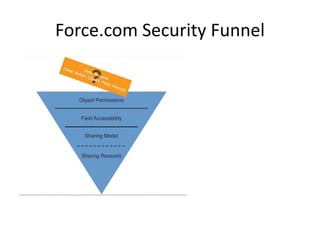
Force.com Security Funnel
Profiles 
• Two Types: Standard and Custom. 
• Standard Profiles cannot be renamed or deleted 
but can be reconfigured. 
• Custom Profiles similar to standard profiles but 
can be renamed. They can be deleted if no users 
are assigned to them. 
• Administrative (Super-user) Permissions: Two 
administrative privileges in a profile trump all 
other security features in Force.com: Modify All 
Data and View All Data. Grant them with care.
Object Permissions 
• Identical for standard and custom objects. 
• Cannot be edited for standard objects. 
• 6 Permissions: Read, Create, Edit, Delete, View 
All, Modify All. 
• View All : exporting data, Modify All : bulk 
data operations like migration and cleansing. 
• View All & Modify All override all other 
security measures.
Object Permissions (contd…) 
• New custom objects initially have all 
permissions disabled for all profiles, except 
those with View All Data or Modify All Data 
permission.
Profiles and Licensing 
• Profiles associated with Licenses. 
• 2 basic licenses – SalesForce and SalesForce 
Platform. 
• SF Platform license lets you use all of 
SalesForce except business domain 
functionalities like CRM.
Field Level Security 
• Determined by a combo of profile and page layout. 
• More restrictive of the two takes precedence. 
• 2 ways to control this : FLS section in the profile or via 
the Field Accessibility feature. 
• Field Accessibility: finer control of fields via a 
combination of page layout and profile. 
The more restrictive of the two settings takes effect. 
• Example: if a page layout defines a field as read-only 
that is defined in the profile as being invisible, the 
profile takes precedence and the field is hidden. 
• Accessibility values: Required, Editable, Read-Only, 
Hidden.
Record Level Security 
• Records (instances of an object) are secured in 3 
ways. 
1. Record Ownership: Owners are individual users 
or groups. Ownership is transferable. 
2. User Groups: can contains users or other 
groups. Hence, hierarchical. 
3. Sharing Model: org-wide defaults or sharing 
reasons. Org-wide defaults apply to all records 
by object and sharing reasons override these 
defaults based on record ownership or other 
criteria.
Record Ownership 
• Creator is owner. Owner has full control over 
record. 
• Owner can read, edit, delete, share and 
transfer ownership of the record. 
• Owners are usually users but can also be a 
queue. 
• Records of child objects of a M-D relationship 
inherit ownership from the parent records.
User Groups 
• Record level sharing works with groups of users and 
NOT individual users. 
• 2 Kinds of groups: Public Groups and Roles 
• Public Group – list of users and other sub-groups. Keep 
membership small to improve performance. 
• Roles are also like groups but are hierarchical. 
• Users in roles inherit the privileges of the roles below 
them in the hierarchy, including record ownership. 
• A user belongs to 1 role at a time. An org has a single 
role hierarchy.
Org-wide defaults on Custom Objects 
• Establish the most restrictive level of access. 
• Private – exceptions are admin level View-All and 
Modify-All. 
• Public Read-Only – exceptions are users with 
admin level privileges. 
• Public Read-Write – default on new objects. 
• Controlled by Parent – available only to child 
objects in a LR. Similar to record-sharing behavior 
of child objects in a M-D relationship.
Sharing Reasons 
• Override the org-wide defaults for records to be 
shared among groups. 
• Groups can be roles or public groups. 
• Sharing between roles results in asymmetric 
privileges. Users in subordinate roles do not 
receive any privileges of their superiors, but 
superiors receive all the privileges of their 
subordinates. 
• Sharing between public groups results in 
symmetric privileges.
4 Types of Sharing Reasons 
• Manual – shared by owner with other users or 
groups. Level of access controlled by owner. 
• Sharing Rules – based on group membership or 
criteria based like roles. 
• Procedural – created programmatically in Apex 
code. 
• Delegated Administration - Profiles with special 
object permission category called Data 
Administration (View All and Modify All 
permissions). Users with this profile are exempt 
from all sharing rules.
How to implement Security Model 
1. Create profiles based on responsibilities. 
2. Configure field accessibility in the profiles. 
3. Set org-wide defaults on each custom object. 
4. Establish role hierarchy. 
5. Add Sharing Rules that override org-wide 
defaults.

SFDC Database Security

  • 1.
    Force.com Database Security Sujit Kumar Zenolocity LLC © 2012 - 2024
  • 2.
    Overview • Securitydone more through configuration than coding. • Profiles and Security Rules • The Security Funnel • Object Level Security • Field Level Security • Record Ownership & Record Level Security • Organization wide defaults • Sharing Rules – Public Groups, Roles
  • 3.
    Security Rules •Profile: used to group users with common data access requirements. • Contains a set of permissions for every object defined in the organization. • Permissions determine authorization to read, create, edit and delete records. • Profile also has rules for access to fields of an object.
  • 4.
    Security Rules (contd…) • Record-level security further restricts access to data based on the concept of record ownership. Cannot override object-level security. • Organization-wide defaults define the default, most restrictive sharing behavior of each object. • Sharing reasons create exceptions to this default behavior, granting access to specific groups of users.
  • 5.
  • 6.
    Profiles • TwoTypes: Standard and Custom. • Standard Profiles cannot be renamed or deleted but can be reconfigured. • Custom Profiles similar to standard profiles but can be renamed. They can be deleted if no users are assigned to them. • Administrative (Super-user) Permissions: Two administrative privileges in a profile trump all other security features in Force.com: Modify All Data and View All Data. Grant them with care.
  • 7.
    Object Permissions •Identical for standard and custom objects. • Cannot be edited for standard objects. • 6 Permissions: Read, Create, Edit, Delete, View All, Modify All. • View All : exporting data, Modify All : bulk data operations like migration and cleansing. • View All & Modify All override all other security measures.
  • 8.
    Object Permissions (contd…) • New custom objects initially have all permissions disabled for all profiles, except those with View All Data or Modify All Data permission.
  • 9.
    Profiles and Licensing • Profiles associated with Licenses. • 2 basic licenses – SalesForce and SalesForce Platform. • SF Platform license lets you use all of SalesForce except business domain functionalities like CRM.
  • 10.
    Field Level Security • Determined by a combo of profile and page layout. • More restrictive of the two takes precedence. • 2 ways to control this : FLS section in the profile or via the Field Accessibility feature. • Field Accessibility: finer control of fields via a combination of page layout and profile. The more restrictive of the two settings takes effect. • Example: if a page layout defines a field as read-only that is defined in the profile as being invisible, the profile takes precedence and the field is hidden. • Accessibility values: Required, Editable, Read-Only, Hidden.
  • 11.
    Record Level Security • Records (instances of an object) are secured in 3 ways. 1. Record Ownership: Owners are individual users or groups. Ownership is transferable. 2. User Groups: can contains users or other groups. Hence, hierarchical. 3. Sharing Model: org-wide defaults or sharing reasons. Org-wide defaults apply to all records by object and sharing reasons override these defaults based on record ownership or other criteria.
  • 12.
    Record Ownership •Creator is owner. Owner has full control over record. • Owner can read, edit, delete, share and transfer ownership of the record. • Owners are usually users but can also be a queue. • Records of child objects of a M-D relationship inherit ownership from the parent records.
  • 13.
    User Groups •Record level sharing works with groups of users and NOT individual users. • 2 Kinds of groups: Public Groups and Roles • Public Group – list of users and other sub-groups. Keep membership small to improve performance. • Roles are also like groups but are hierarchical. • Users in roles inherit the privileges of the roles below them in the hierarchy, including record ownership. • A user belongs to 1 role at a time. An org has a single role hierarchy.
  • 14.
    Org-wide defaults onCustom Objects • Establish the most restrictive level of access. • Private – exceptions are admin level View-All and Modify-All. • Public Read-Only – exceptions are users with admin level privileges. • Public Read-Write – default on new objects. • Controlled by Parent – available only to child objects in a LR. Similar to record-sharing behavior of child objects in a M-D relationship.
  • 15.
    Sharing Reasons •Override the org-wide defaults for records to be shared among groups. • Groups can be roles or public groups. • Sharing between roles results in asymmetric privileges. Users in subordinate roles do not receive any privileges of their superiors, but superiors receive all the privileges of their subordinates. • Sharing between public groups results in symmetric privileges.
  • 16.
    4 Types ofSharing Reasons • Manual – shared by owner with other users or groups. Level of access controlled by owner. • Sharing Rules – based on group membership or criteria based like roles. • Procedural – created programmatically in Apex code. • Delegated Administration - Profiles with special object permission category called Data Administration (View All and Modify All permissions). Users with this profile are exempt from all sharing rules.
  • 17.
    How to implementSecurity Model 1. Create profiles based on responsibilities. 2. Configure field accessibility in the profiles. 3. Set org-wide defaults on each custom object. 4. Establish role hierarchy. 5. Add Sharing Rules that override org-wide defaults.