Presented By: Sunil Kumar
Email id: sunil02kumar@gmail.com
Twitter : @sunil02kumar
Blog: http://sunil02kumar.blogspot.in/
RECORD SHARING MODEL IN
SALESFORCE
Module Agenda
 Overview of record access.
 Record Ownership.
 Organization-wide Defaults.
 Roles and “Group” of Users.
 Sharing.
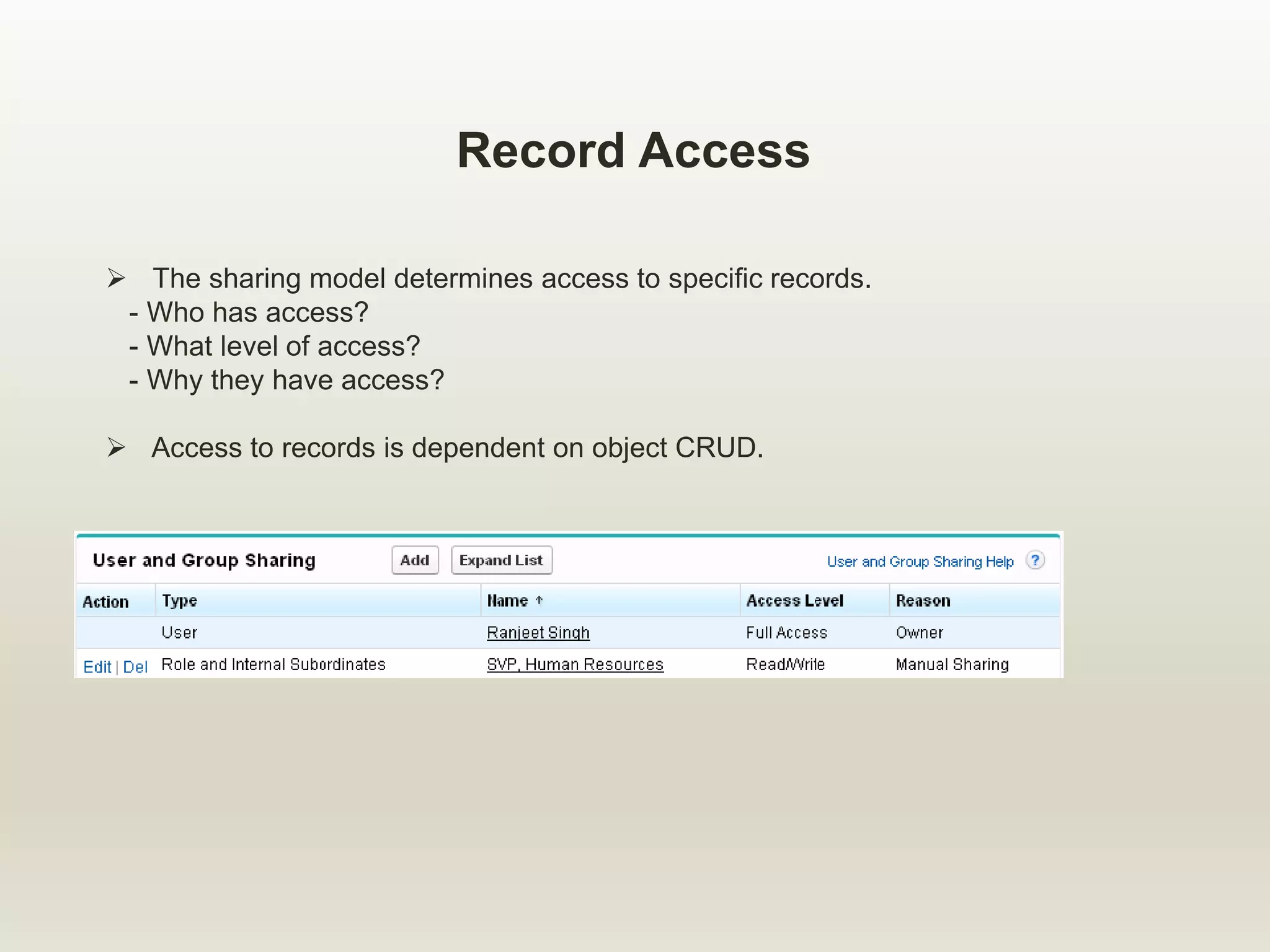
Record Access
 The sharing model determines access to specific records.
- Who has access?
- What level of access?
- Why they have access?
 Access to records is dependent on object CRUD.
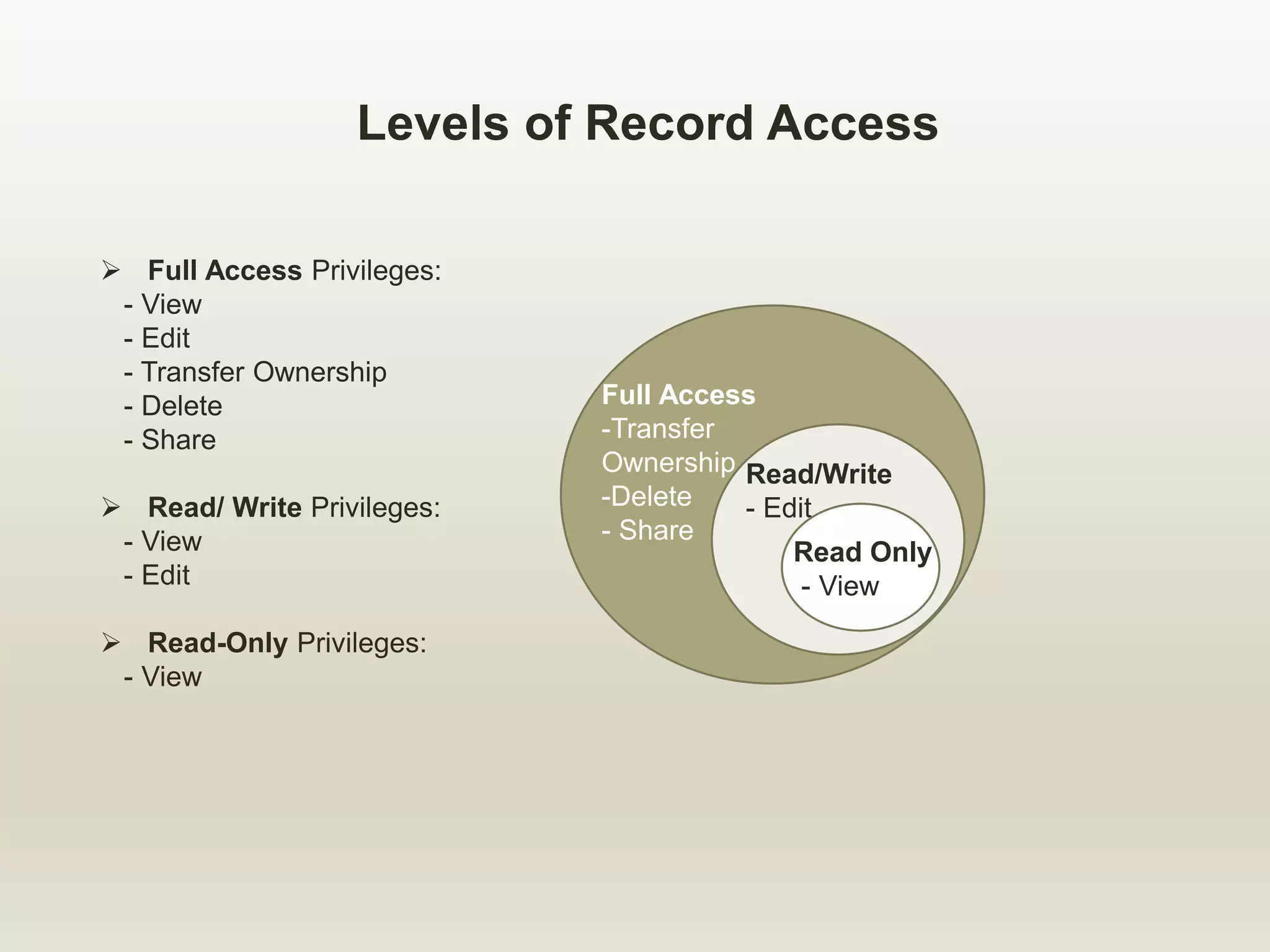
Levels of Record Access
 Full Access Privileges:
- View
- Edit
- Transfer Ownership
- Delete
- Share
 Read/ Write Privileges:
- View
- Edit
 Read-Only Privileges:
- View
Full Access
-Transfer
Ownership
-Delete
- Share
Read/Write
- Edit
Read Only
- View
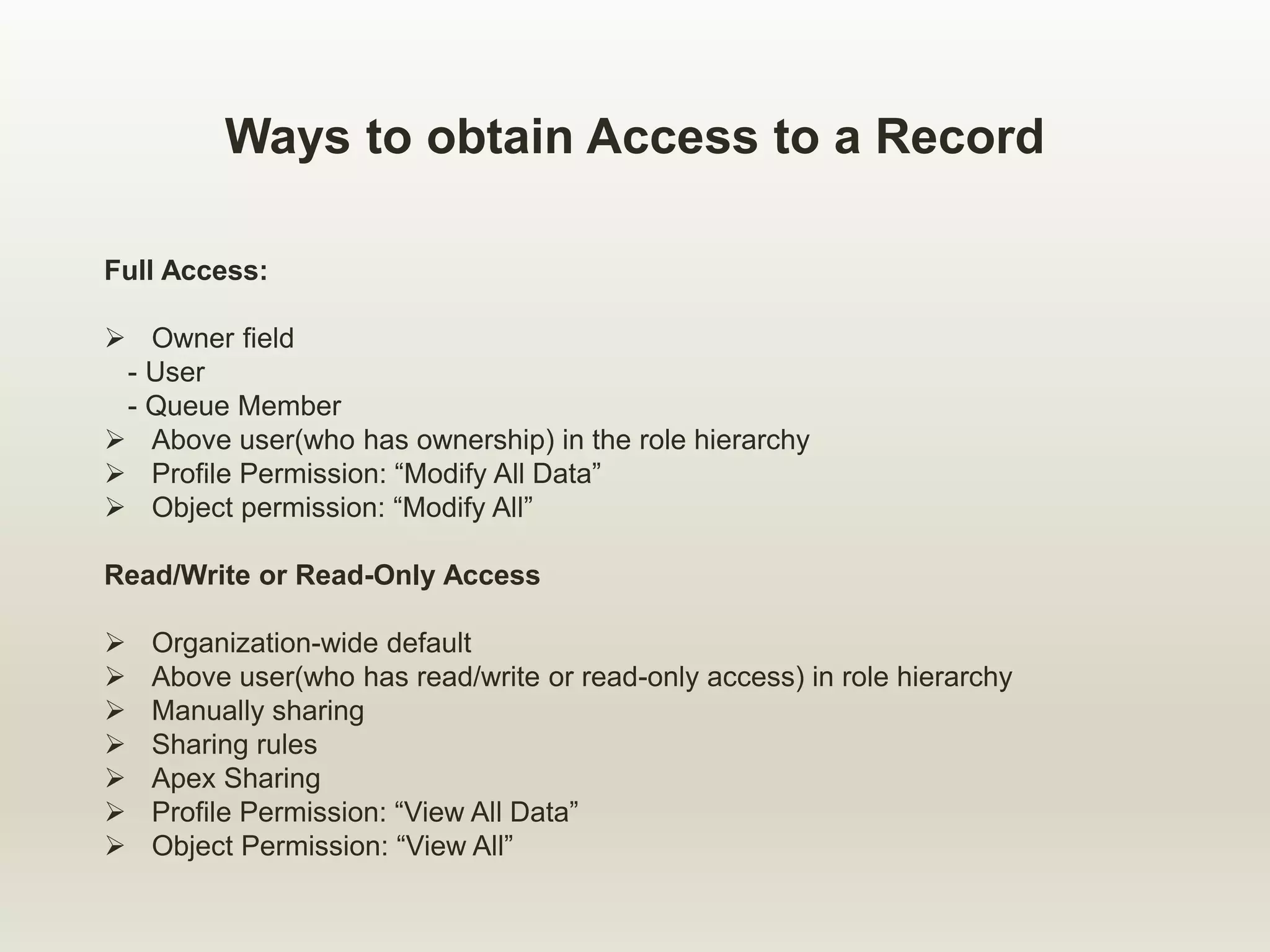
Ways to obtain Access to a Record
Full Access:
 Owner field
- User
- Queue Member
 Above user(who has ownership) in the role hierarchy
 Profile Permission: “Modify All Data”
 Object permission: “Modify All”
Read/Write or Read-Only Access
 Organization-wide default
 Above user(who has read/write or read-only access) in role hierarchy
 Manually sharing
 Sharing rules
 Apex Sharing
 Profile Permission: “View All Data”
 Object Permission: “View All”
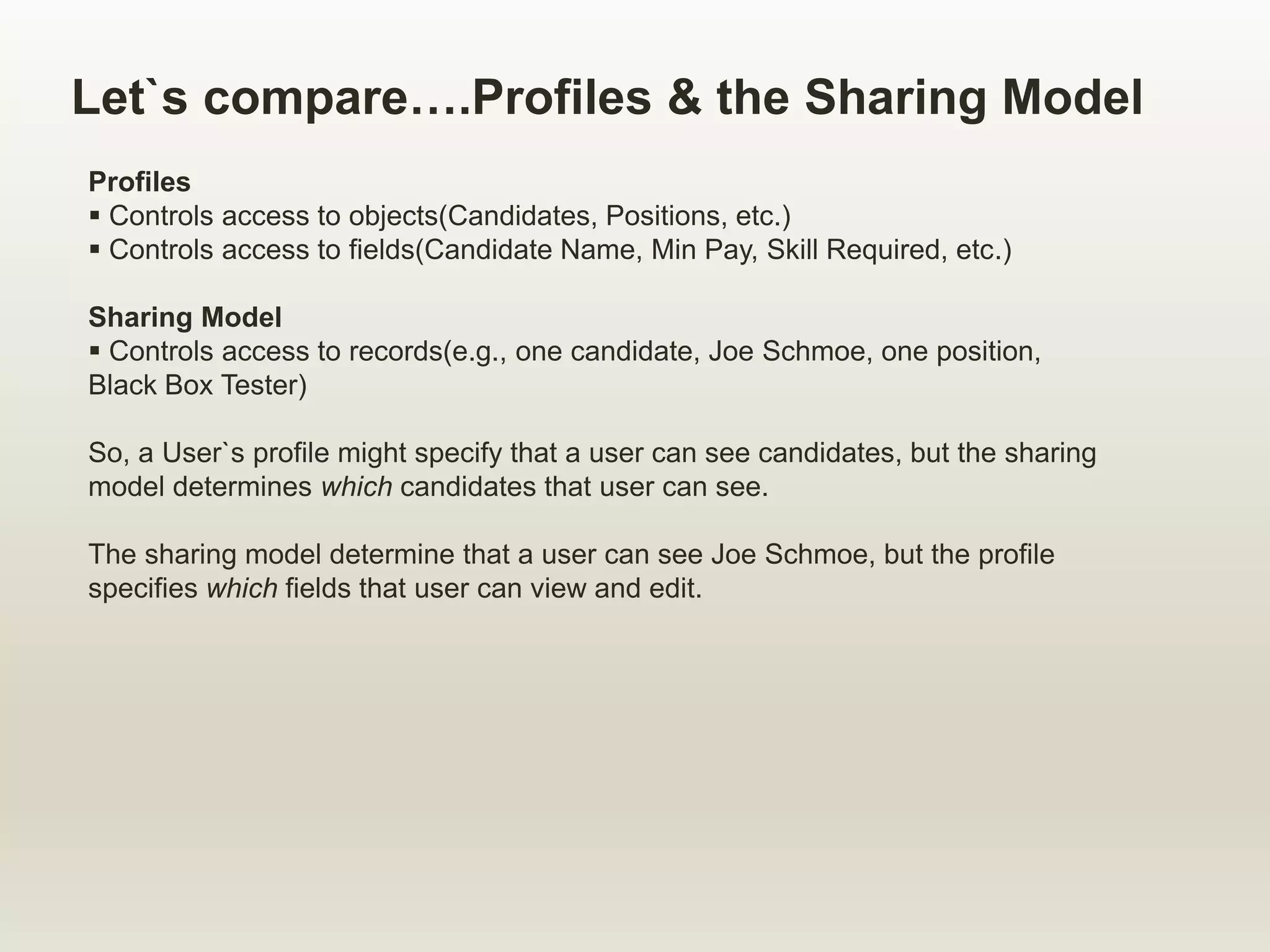
Let`s compare….Profiles & the Sharing Model
Profiles
 Controls access to objects(Candidates, Positions, etc.)
 Controls access to fields(Candidate Name, Min Pay, Skill Required, etc.)
Sharing Model
 Controls access to records(e.g., one candidate, Joe Schmoe, one position,
Black Box Tester)
So, a User`s profile might specify that a user can see candidates, but the sharing
model determines which candidates that user can see.
The sharing model determine that a user can see Joe Schmoe, but the profile
specifies which fields that user can view and edit.
Module Agenda
 Overview of record access.
 Record Ownership.
 Organization-wide Defaults.
 Roles and “Group” of Users.
 Sharing.
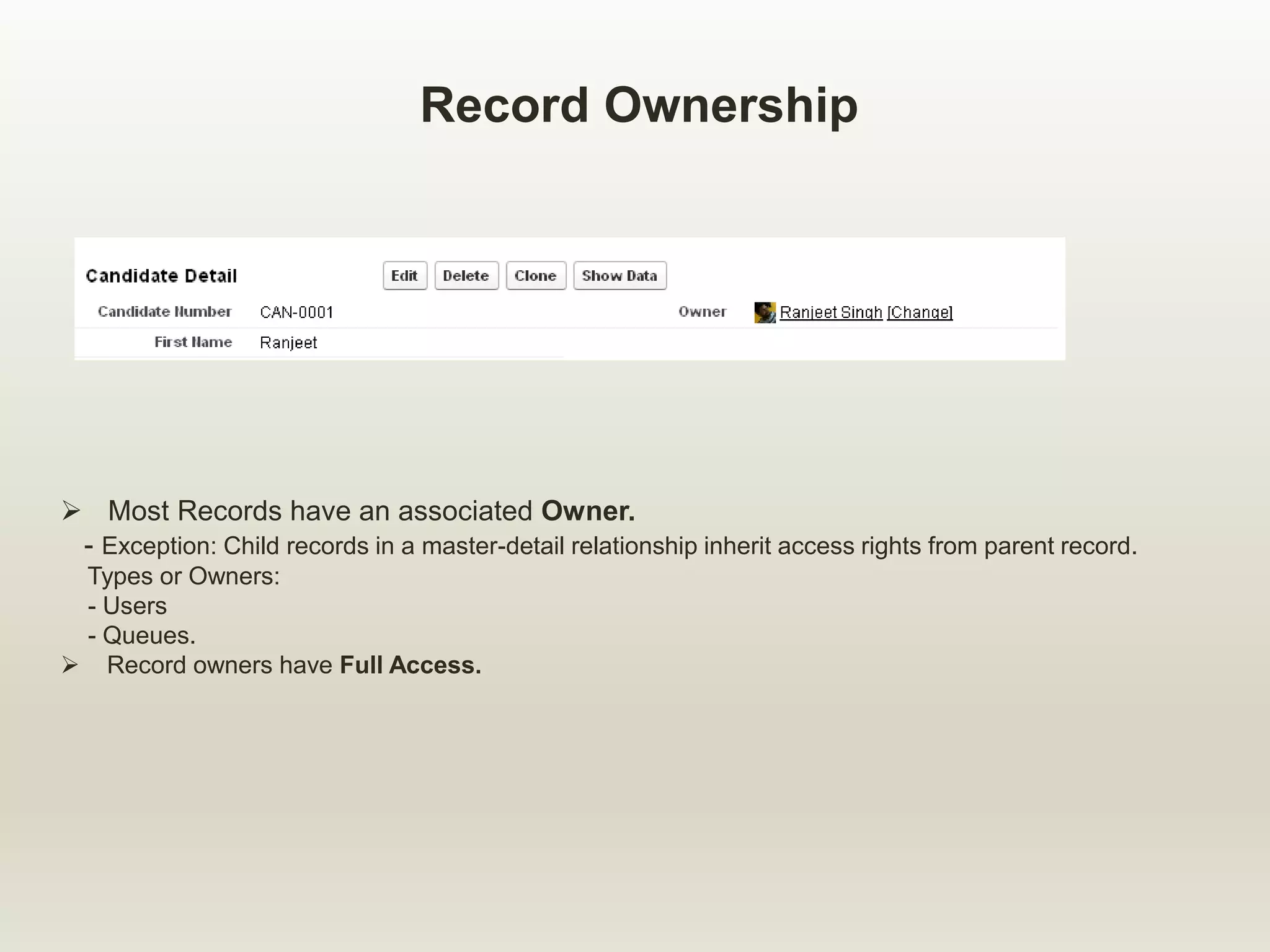
Record Ownership
 Most Records have an associated Owner.
- Exception: Child records in a master-detail relationship inherit access rights from parent record.
Types or Owners:
- Users
- Queues.
 Record owners have Full Access.
Module Agenda
 Overview of record access.
 Record Ownership.
 Organization-wide Defaults.
 Roles and “Group” of Users.
 Sharing.
What are Organization-wide Defaults(OWD)?
 Organization-wide defaults are a security setting that defines the
baseline level of access to data records that you do not own.
 They are the only way to restrict access to data in the sharing
model.
 They can be defined for the custom as well as several standard
objects.
 Access levels:
- Public Read/Write(all users can see and edit every record)
- Public Read- only(all users can see every record)
- Private(users can only see records that they own)
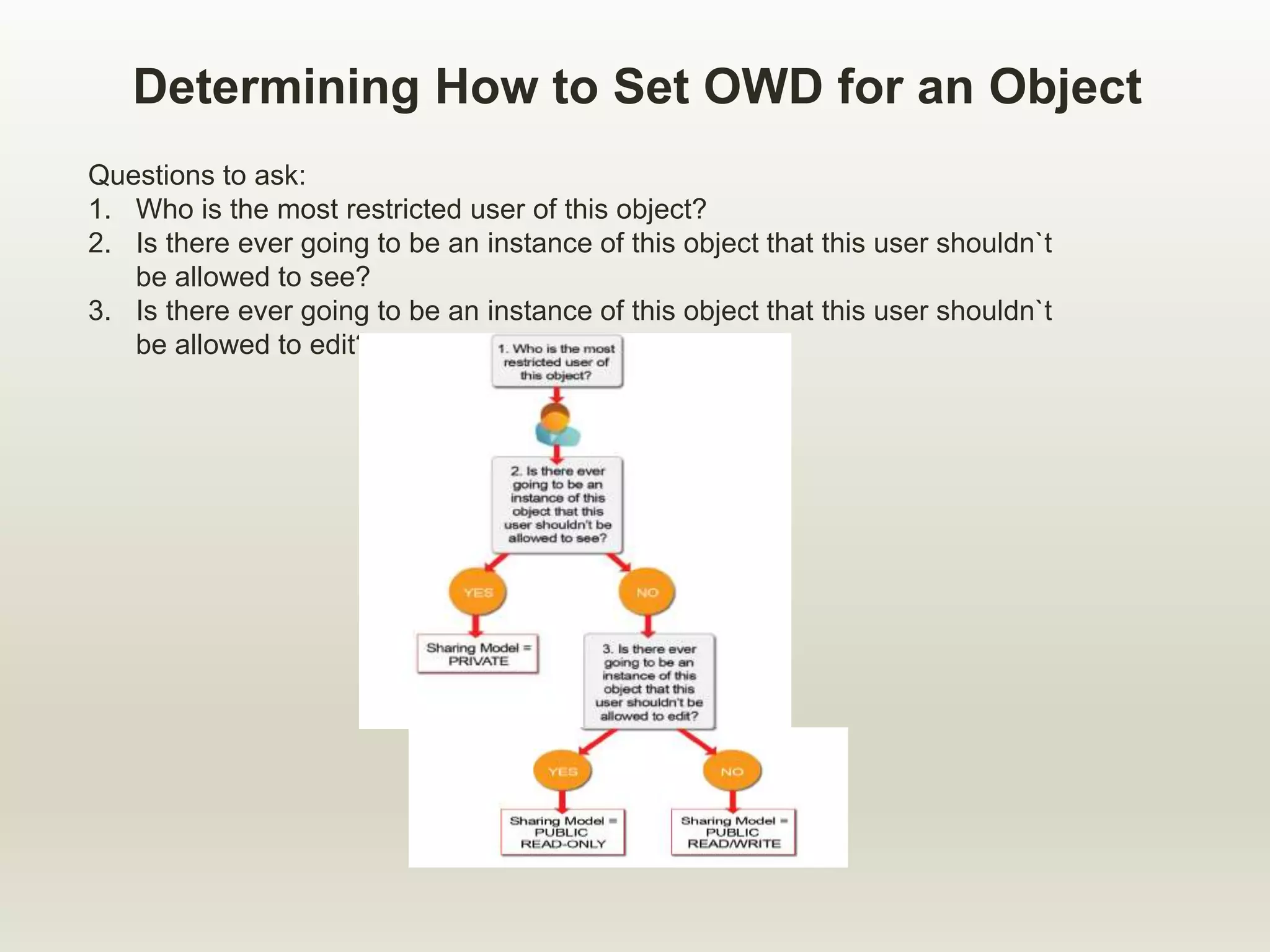
Determining How to Set OWD for an Object
Questions to ask:
1. Who is the most restricted user of this object?
2. Is there ever going to be an instance of this object that this user shouldn`t
be allowed to see?
3. Is there ever going to be an instance of this object that this user shouldn`t
be allowed to edit?
Organization-Wide Defaults Considerations
 Child records in the master-details relationships inherit their organization-wide
defaults from their parents.
 Child records in lookup relationships have independent organization-wide
defaults from their parents.
 Changing organization-wide defaults can produce unintended consequences;
consider your business requirements carefully before setting your
organization-wide defaults.
 Changing organization-wide defaults can potentially delete manual sharing if
that sharing is no longer needed,
- For example, Changing from Private to Public Read/Write.
Module Agenda
 Overview of record access.
 Record Ownership.
 Organization-wide Defaults.
 Roles and “Group” of Users.
 Sharing.
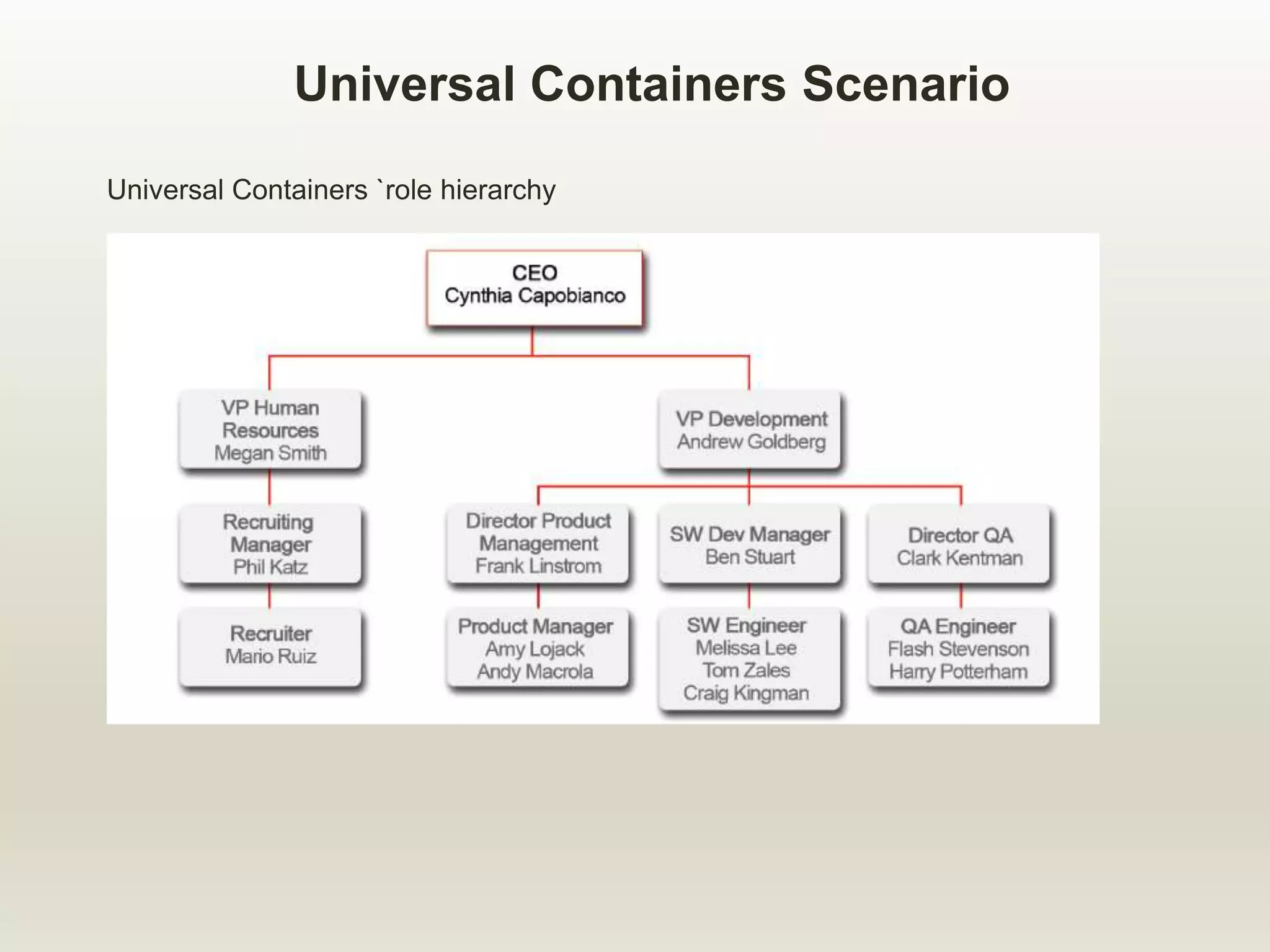
Universal Containers Scenario
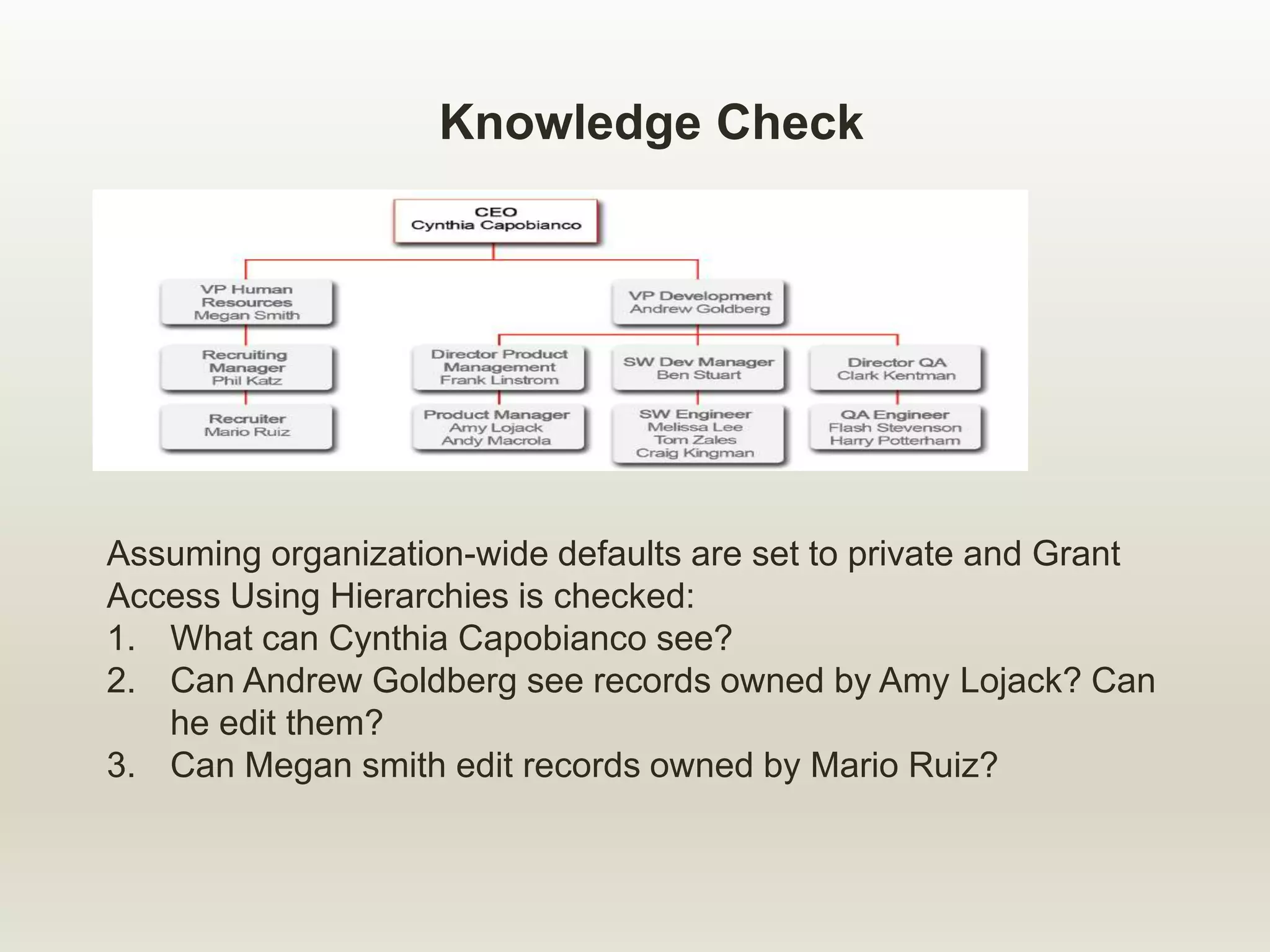
Universal Containers `role hierarchy
What are Roles and Role Hierarchy?
A Role:
 Controls the level of visibility that an organization`s data
 A user may be associated to one role
The Role Hierarchy:
 Controls data visibility roll up for reporting
 User *usually* inherit the special privileges of data
owned by or shared with users below them in the
hierarchy
 Not necessarily the company`s organization chart
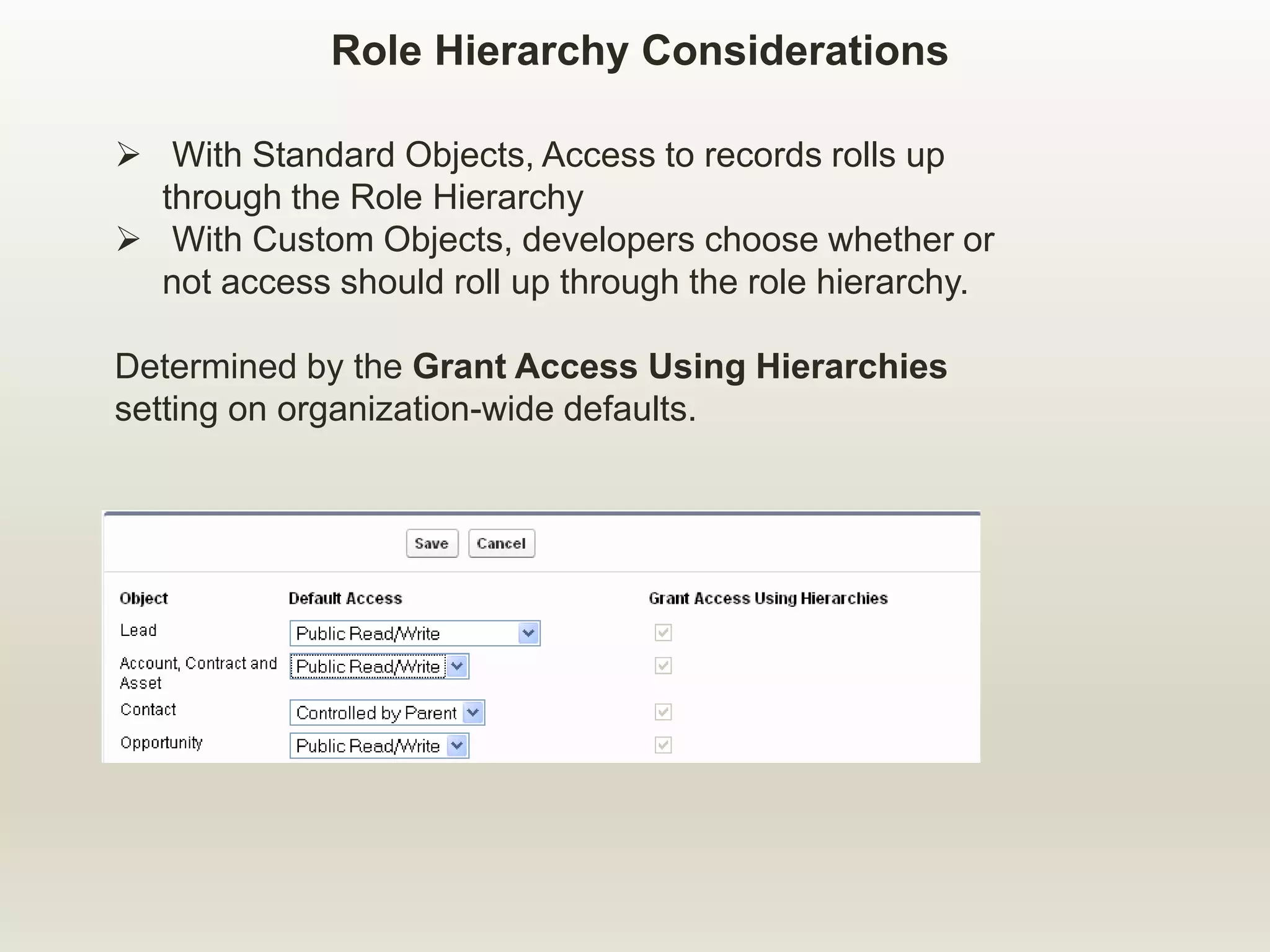
 With Standard Objects, Access to records rolls up
through the Role Hierarchy
 With Custom Objects, developers choose whether or
not access should roll up through the role hierarchy.
Determined by the Grant Access Using Hierarchies
setting on organization-wide defaults.
Role Hierarchy Considerations
Knowledge Check
Assuming organization-wide defaults are set to private and Grant
Access Using Hierarchies is checked:
1. What can Cynthia Capobianco see?
2. Can Andrew Goldberg see records owned by Amy Lojack? Can
he edit them?
3. Can Megan smith edit records owned by Mario Ruiz?
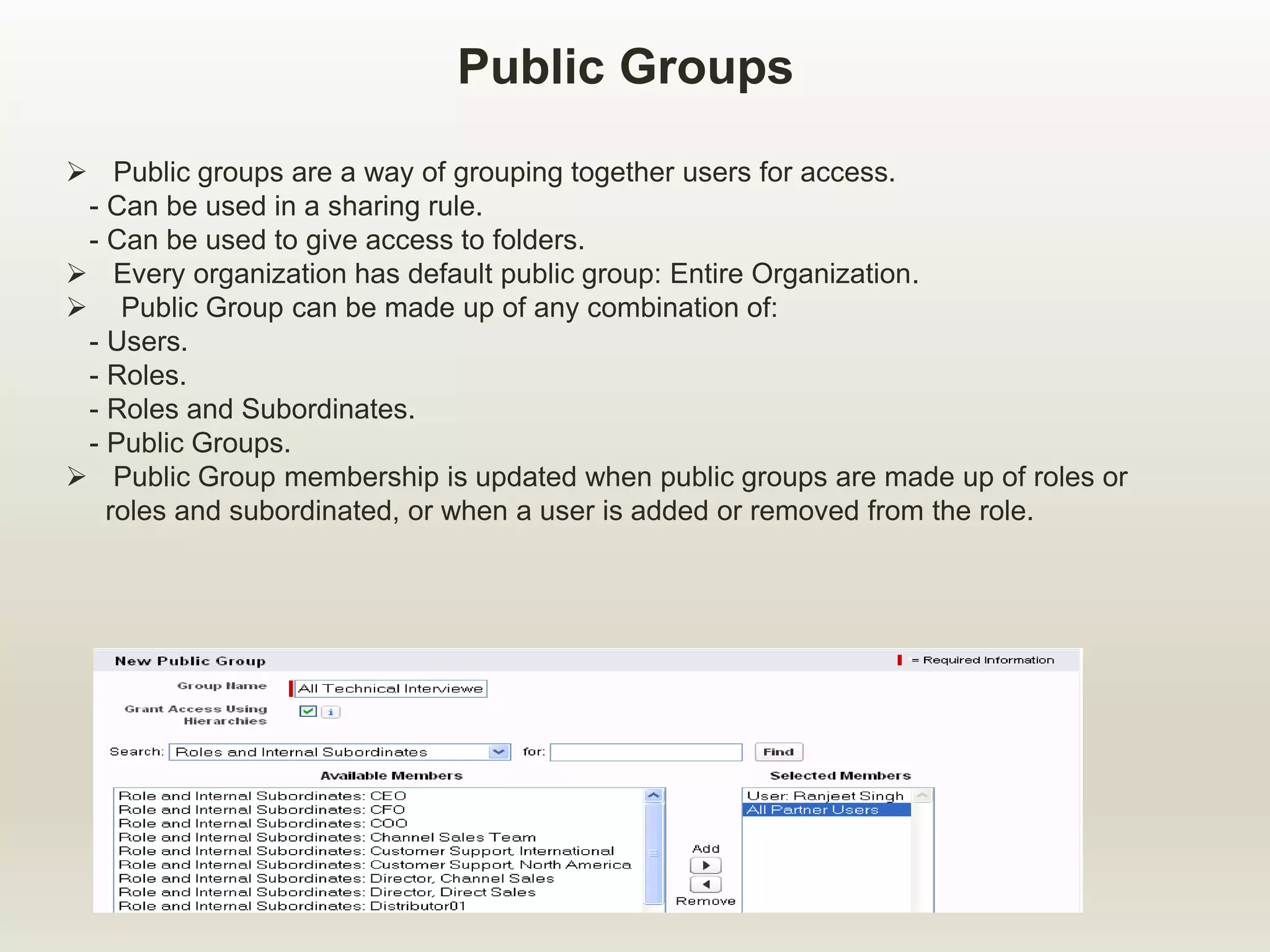
Public Groups
 Public groups are a way of grouping together users for access.
- Can be used in a sharing rule.
- Can be used to give access to folders.
 Every organization has default public group: Entire Organization.
 Public Group can be made up of any combination of:
- Users.
- Roles.
- Roles and Subordinates.
- Public Groups.
 Public Group membership is updated when public groups are made up of roles or
roles and subordinated, or when a user is added or removed from the role.
Module Agenda
 Overview of record access.
 Record Ownership.
 Organization-wide Defaults.
 Roles and “Group” of Users.
 Sharing.
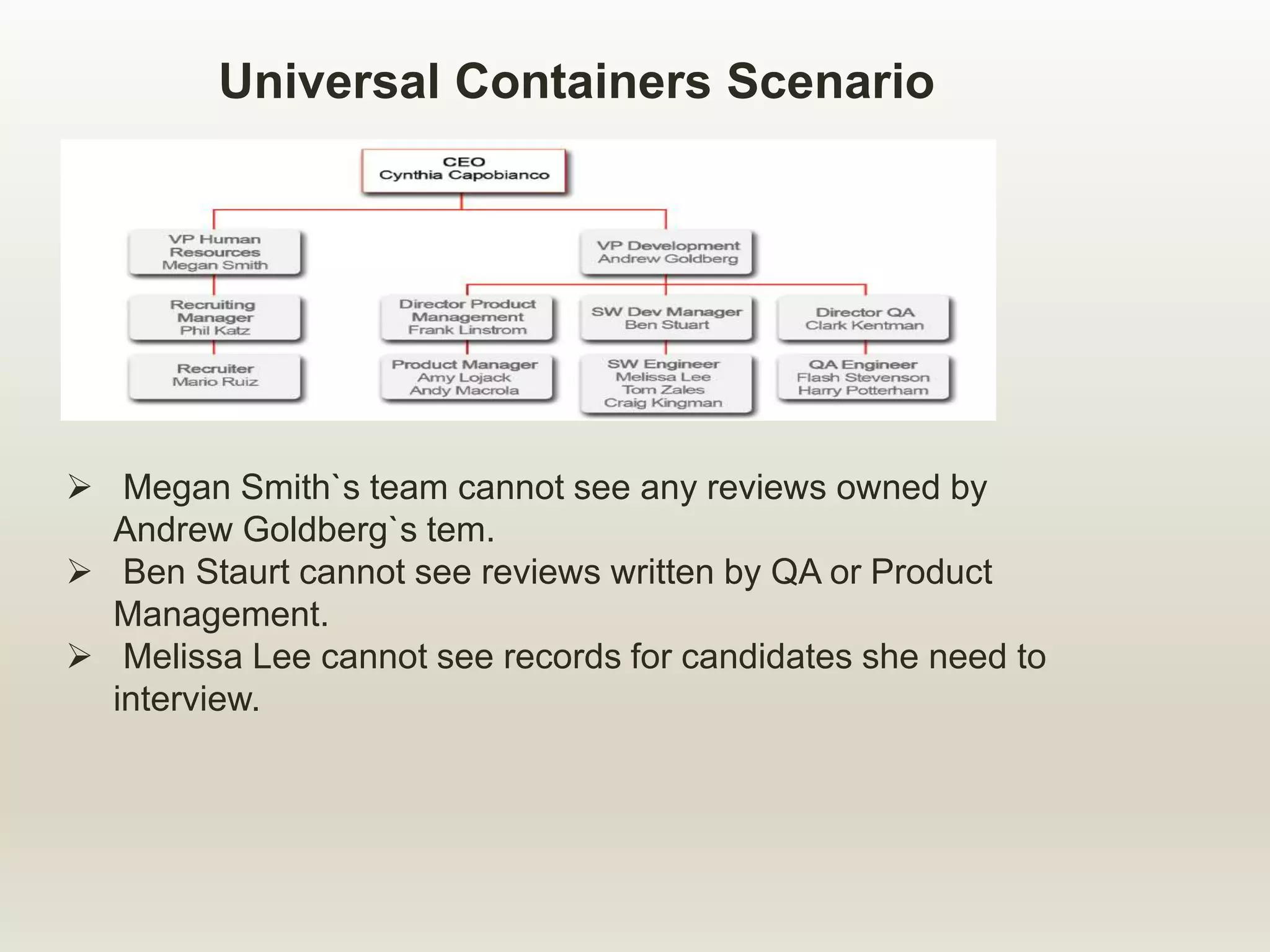
Universal Containers Scenario
 Megan Smith`s team cannot see any reviews owned by
Andrew Goldberg`s tem.
 Ben Staurt cannot see reviews written by QA or Product
Management.
 Melissa Lee cannot see records for candidates she need to
interview.
Sharing Rules and Manual Sharing
 Sharing Rules :
- Automatic exception to organization-wide defaults for
particular group of users.
- Used to open up access to records.
- Never permitted to be more strict than organization-wide
default settings.
- Sharing can be based on record owner or criteria based.
 Manual Sharing:
- Used to open up access to a specific record.
- Granted by owners, anyone above owners in the role
hierarchy, and System Administrators.
Apex Sharing Reasons
 Clicking the Sharing button on a record displays the various reasons
that a user might have access to a record. Examples of sharing
reasons include:
- Administrator.
- Owner
- Custom Object Sharing Rule.
 Establish Apex sharing reasons allows developers to define the
reason that a user or group of users might have access to a record.
 The Apex sharing reasons describe why users can access a record.
Examples might be:
- Open Position(users have access to a position record because that
position is currently open).
- Hiring Manager(User might have access to position because they are
the hiring manager on that position).
 Apex sharing reasons are defined for custom objects only.
 Apex sharing reasons are defined object by object.
.
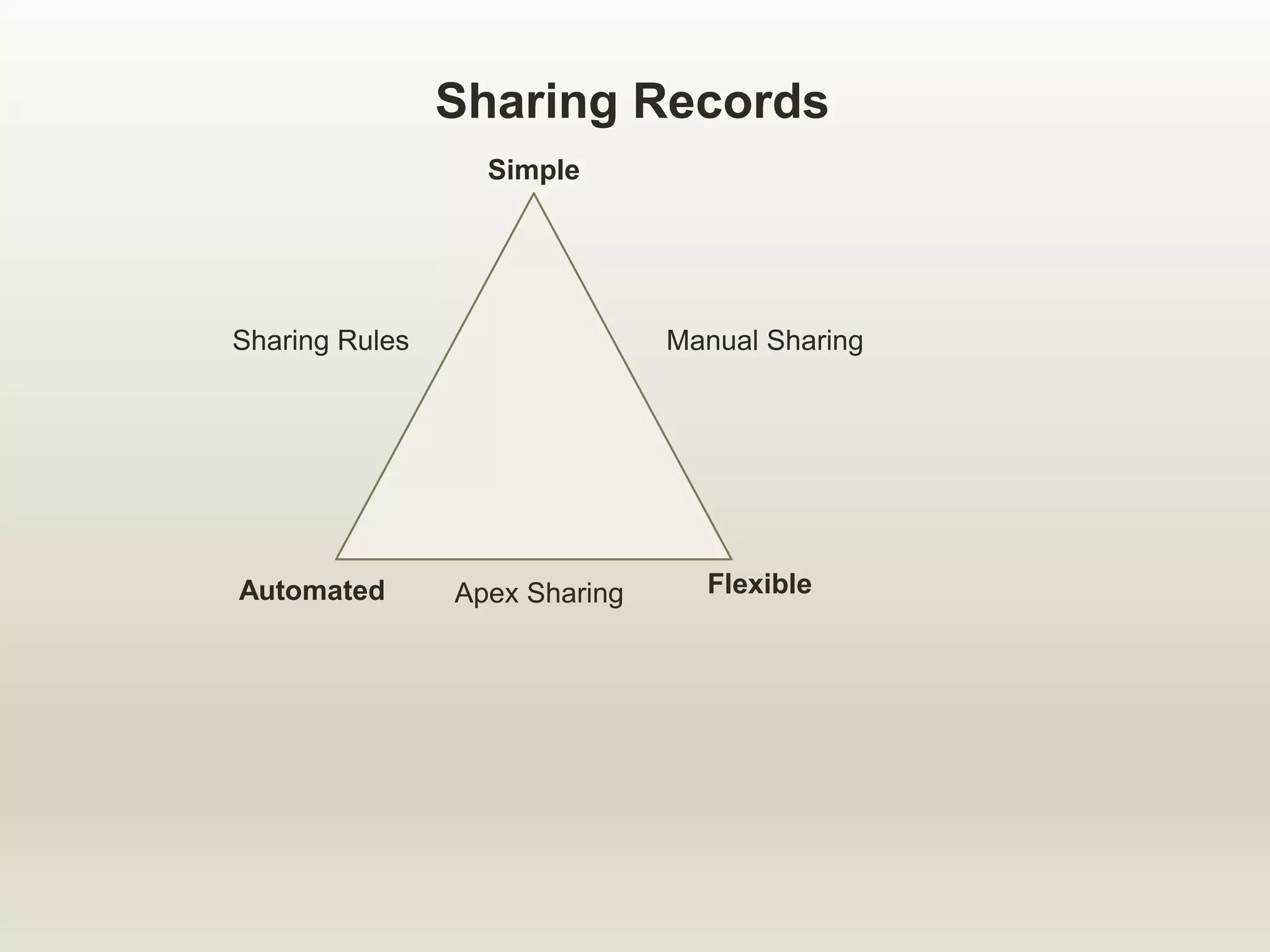
Sharing Records
Simple
Flexible
Automated
Manual Sharing
Sharing Rules
Apex Sharing
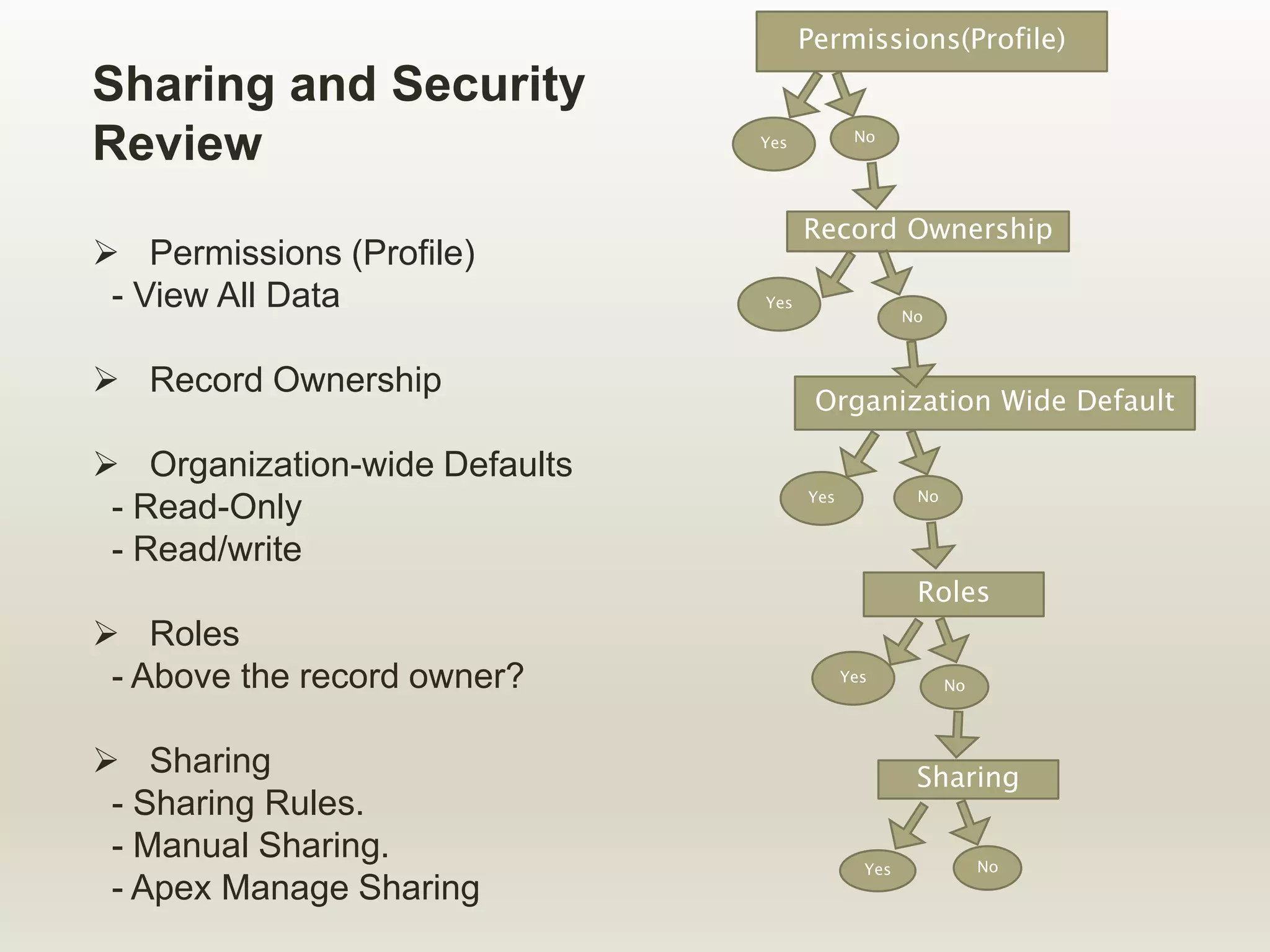
Sharing and Security
Review
 Permissions (Profile)
- View All Data
 Record Ownership
 Organization-wide Defaults
- Read-Only
- Read/write
 Roles
- Above the record owner?
 Sharing
- Sharing Rules.
- Manual Sharing.
- Apex Manage Sharing
Permissions(Profile)
Record Ownership
Organization Wide Default
Roles
Sharing
Yes No
Yes
No
No
No
No
Yes
Yes
Yes
recordsharingmodelinsalesforce-170519074428.pdf

recordsharingmodelinsalesforce-170519074428.pdf

  • 1.
    Presented By: SunilKumar Email id: sunil02kumar@gmail.com Twitter : @sunil02kumar Blog: http://sunil02kumar.blogspot.in/ RECORD SHARING MODEL IN SALESFORCE
  • 2.
    Module Agenda  Overviewof record access.  Record Ownership.  Organization-wide Defaults.  Roles and “Group” of Users.  Sharing.
  • 3.
    Record Access  Thesharing model determines access to specific records. - Who has access? - What level of access? - Why they have access?  Access to records is dependent on object CRUD.
  • 4.
    Levels of RecordAccess  Full Access Privileges: - View - Edit - Transfer Ownership - Delete - Share  Read/ Write Privileges: - View - Edit  Read-Only Privileges: - View Full Access -Transfer Ownership -Delete - Share Read/Write - Edit Read Only - View
  • 5.
    Ways to obtainAccess to a Record Full Access:  Owner field - User - Queue Member  Above user(who has ownership) in the role hierarchy  Profile Permission: “Modify All Data”  Object permission: “Modify All” Read/Write or Read-Only Access  Organization-wide default  Above user(who has read/write or read-only access) in role hierarchy  Manually sharing  Sharing rules  Apex Sharing  Profile Permission: “View All Data”  Object Permission: “View All”
  • 6.
    Let`s compare….Profiles &the Sharing Model Profiles  Controls access to objects(Candidates, Positions, etc.)  Controls access to fields(Candidate Name, Min Pay, Skill Required, etc.) Sharing Model  Controls access to records(e.g., one candidate, Joe Schmoe, one position, Black Box Tester) So, a User`s profile might specify that a user can see candidates, but the sharing model determines which candidates that user can see. The sharing model determine that a user can see Joe Schmoe, but the profile specifies which fields that user can view and edit.
  • 7.
    Module Agenda  Overviewof record access.  Record Ownership.  Organization-wide Defaults.  Roles and “Group” of Users.  Sharing.
  • 8.
    Record Ownership  MostRecords have an associated Owner. - Exception: Child records in a master-detail relationship inherit access rights from parent record. Types or Owners: - Users - Queues.  Record owners have Full Access.
  • 9.
    Module Agenda  Overviewof record access.  Record Ownership.  Organization-wide Defaults.  Roles and “Group” of Users.  Sharing.
  • 10.
    What are Organization-wideDefaults(OWD)?  Organization-wide defaults are a security setting that defines the baseline level of access to data records that you do not own.  They are the only way to restrict access to data in the sharing model.  They can be defined for the custom as well as several standard objects.  Access levels: - Public Read/Write(all users can see and edit every record) - Public Read- only(all users can see every record) - Private(users can only see records that they own)
  • 11.
    Determining How toSet OWD for an Object Questions to ask: 1. Who is the most restricted user of this object? 2. Is there ever going to be an instance of this object that this user shouldn`t be allowed to see? 3. Is there ever going to be an instance of this object that this user shouldn`t be allowed to edit?
  • 12.
    Organization-Wide Defaults Considerations Child records in the master-details relationships inherit their organization-wide defaults from their parents.  Child records in lookup relationships have independent organization-wide defaults from their parents.  Changing organization-wide defaults can produce unintended consequences; consider your business requirements carefully before setting your organization-wide defaults.  Changing organization-wide defaults can potentially delete manual sharing if that sharing is no longer needed, - For example, Changing from Private to Public Read/Write.
  • 13.
    Module Agenda  Overviewof record access.  Record Ownership.  Organization-wide Defaults.  Roles and “Group” of Users.  Sharing.
  • 14.
    Universal Containers Scenario UniversalContainers `role hierarchy
  • 15.
    What are Rolesand Role Hierarchy? A Role:  Controls the level of visibility that an organization`s data  A user may be associated to one role The Role Hierarchy:  Controls data visibility roll up for reporting  User *usually* inherit the special privileges of data owned by or shared with users below them in the hierarchy  Not necessarily the company`s organization chart
  • 16.
     With StandardObjects, Access to records rolls up through the Role Hierarchy  With Custom Objects, developers choose whether or not access should roll up through the role hierarchy. Determined by the Grant Access Using Hierarchies setting on organization-wide defaults. Role Hierarchy Considerations
  • 17.
    Knowledge Check Assuming organization-widedefaults are set to private and Grant Access Using Hierarchies is checked: 1. What can Cynthia Capobianco see? 2. Can Andrew Goldberg see records owned by Amy Lojack? Can he edit them? 3. Can Megan smith edit records owned by Mario Ruiz?
  • 18.
    Public Groups  Publicgroups are a way of grouping together users for access. - Can be used in a sharing rule. - Can be used to give access to folders.  Every organization has default public group: Entire Organization.  Public Group can be made up of any combination of: - Users. - Roles. - Roles and Subordinates. - Public Groups.  Public Group membership is updated when public groups are made up of roles or roles and subordinated, or when a user is added or removed from the role.
  • 19.
    Module Agenda  Overviewof record access.  Record Ownership.  Organization-wide Defaults.  Roles and “Group” of Users.  Sharing.
  • 20.
    Universal Containers Scenario Megan Smith`s team cannot see any reviews owned by Andrew Goldberg`s tem.  Ben Staurt cannot see reviews written by QA or Product Management.  Melissa Lee cannot see records for candidates she need to interview.
  • 21.
    Sharing Rules andManual Sharing  Sharing Rules : - Automatic exception to organization-wide defaults for particular group of users. - Used to open up access to records. - Never permitted to be more strict than organization-wide default settings. - Sharing can be based on record owner or criteria based.  Manual Sharing: - Used to open up access to a specific record. - Granted by owners, anyone above owners in the role hierarchy, and System Administrators.
  • 22.
    Apex Sharing Reasons Clicking the Sharing button on a record displays the various reasons that a user might have access to a record. Examples of sharing reasons include: - Administrator. - Owner - Custom Object Sharing Rule.  Establish Apex sharing reasons allows developers to define the reason that a user or group of users might have access to a record.  The Apex sharing reasons describe why users can access a record. Examples might be: - Open Position(users have access to a position record because that position is currently open). - Hiring Manager(User might have access to position because they are the hiring manager on that position).  Apex sharing reasons are defined for custom objects only.  Apex sharing reasons are defined object by object. .
  • 23.
  • 24.
    Sharing and Security Review Permissions (Profile) - View All Data  Record Ownership  Organization-wide Defaults - Read-Only - Read/write  Roles - Above the record owner?  Sharing - Sharing Rules. - Manual Sharing. - Apex Manage Sharing Permissions(Profile) Record Ownership Organization Wide Default Roles Sharing Yes No Yes No No No No Yes Yes Yes