







© 2006 Cisco Systems, Inc. All rights reserved. Cisco Public 1Version 4.0
Characterizing the
Existing Network
Designing and Supporting Computer Networks – Chapter 3
© 2006 Cisco Systems, Inc. All rights reserved. Cisco Public 2
Objectives
 Diagram and document an existing network to identify
strengths and weaknesses in the design.
 Use CCO to determine the appropriate IOS version to
support network requirements and download and
install the appropriate IOS
 Use CCO to determine the appropriate hardware
features and install the upgrades using safe practices
and procedures
 Perform a wireless site survey
 Organize collected data into a new network design
© 2006 Cisco Systems, Inc. All rights reserved. Cisco Public 3
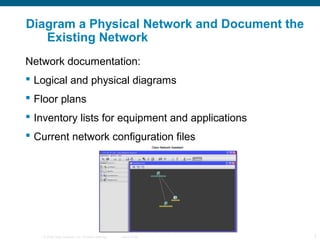
Diagram a Physical Network and Document the
Existing Network
Network documentation:
 Logical and physical diagrams
 Floor plans
 Inventory lists for equipment and applications
 Current network configuration files
© 2006 Cisco Systems, Inc. All rights reserved. Cisco Public 4
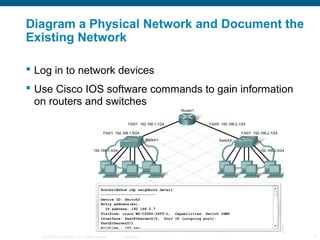
Diagram a Physical Network and Document the
Existing Network
 Log in to network devices
 Use Cisco IOS software commands to gain information
on routers and switches
© 2006 Cisco Systems, Inc. All rights reserved. Cisco Public 5
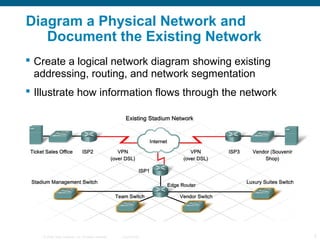
Diagram a Physical Network and
Document the Existing Network
 Create a logical network diagram showing existing
addressing, routing, and network segmentation
 Illustrate how information flows through the network
© 2006 Cisco Systems, Inc. All rights reserved. Cisco Public 6
Diagram a Physical Network and
Document the Existing Network
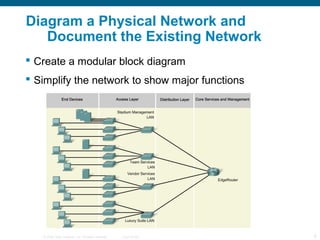
 Create a modular block diagram
 Simplify the network to show major functions
© 2006 Cisco Systems, Inc. All rights reserved. Cisco Public 7
Diagram a Physical Network and
Document the Existing Network
 Identify and document the strengths and weaknesses
of the existing network
 Focus on finding ways to overcome weaknesses
© 2006 Cisco Systems, Inc. All rights reserved. Cisco Public 8
Use CCO to Determine the Appropriate IOS
Version to Support Network Requirements
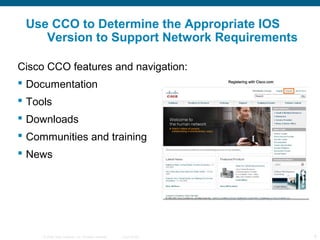
Cisco CCO features and navigation:
 Documentation
 Tools
 Downloads
 Communities and training
 News
© 2006 Cisco Systems, Inc. All rights reserved. Cisco Public 9
Use CCO to Determine the Appropriate IOS
Version to Support Network Requirements
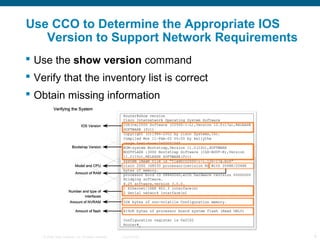
 Use the show version command
 Verify that the inventory list is correct
 Obtain missing information
© 2006 Cisco Systems, Inc. All rights reserved. Cisco Public 10
Use CCO to Determine the Appropriate IOS
Version to Support Network Requirements
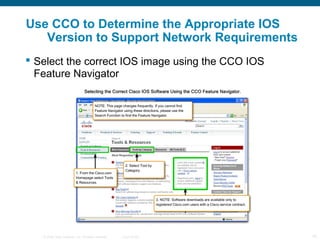
 Select the correct IOS image using the CCO IOS
Feature Navigator
© 2006 Cisco Systems, Inc. All rights reserved. Cisco Public 11
Use CCO to Determine the Appropriate IOS
Version to Support Network Requirements
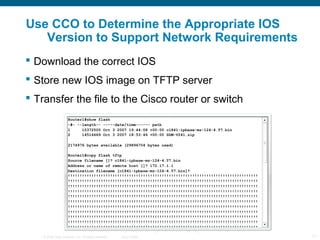
 Download the correct IOS
 Store new IOS image on TFTP server
 Transfer the file to the Cisco router or switch
© 2006 Cisco Systems, Inc. All rights reserved. Cisco Public 12
Use CCO to Determine the Appropriate IOS
Version to Support Network Requirements
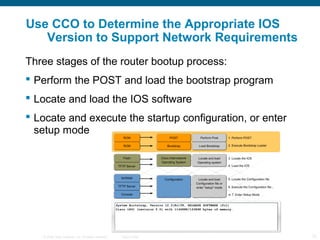
Three stages of the router bootup process:
 Perform the POST and load the bootstrap program
 Locate and load the IOS software
 Locate and execute the startup configuration, or enter
setup mode
© 2006 Cisco Systems, Inc. All rights reserved. Cisco Public 13
Use CCO to Determine the Appropriate
Hardware Features and Install the Upgrades
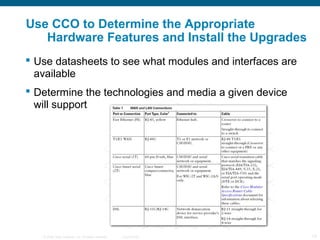
 Use datasheets to see what modules and interfaces are
available
 Determine the technologies and media a given device
will support
© 2006 Cisco Systems, Inc. All rights reserved. Cisco Public 14
Use CCO to Determine the Appropriate
Hardware Features and Install the Upgrades
Installing a new hardware option on a Cisco router or
switch:
 Turn off power
 Remove blank faceplace
 Install option module
 Turn on power and check the new configuration
© 2006 Cisco Systems, Inc. All rights reserved. Cisco Public 15
Perform a Wireless Site Survey
 Preparation
 Site survey
 Security
 Safety guidelines
© 2006 Cisco Systems, Inc. All rights reserved. Cisco Public 16
Perform a Wireless Site Survey
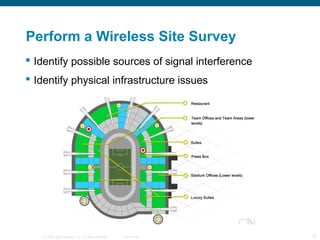
 Identify possible sources of signal interference
 Identify physical infrastructure issues
© 2006 Cisco Systems, Inc. All rights reserved. Cisco Public 17
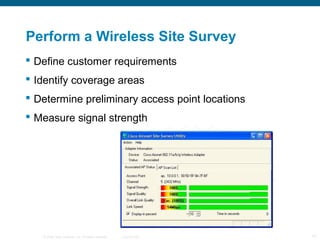
Perform a Wireless Site Survey
 Define customer requirements
 Identify coverage areas
 Determine preliminary access point locations
 Measure signal strength
© 2006 Cisco Systems, Inc. All rights reserved. Cisco Public 18
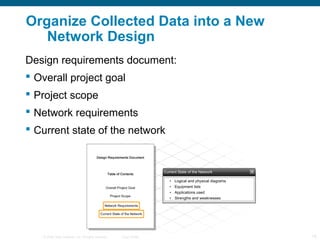
Organize Collected Data into a New
Network Design
Design requirements document:
 Overall project goal
 Project scope
 Network requirements
 Current state of the network
© 2006 Cisco Systems, Inc. All rights reserved. Cisco Public 19
Organize Collected Data into a New
Network Design
 Identify and record the overall goal of the proposed
network design
© 2006 Cisco Systems, Inc. All rights reserved. Cisco Public 20
Organize Collected Data into a New
Network Design
 Identify and record the scope of the proposed network
upgrade
© 2006 Cisco Systems, Inc. All rights reserved. Cisco Public 21
Organize Collected Data into a New
Network Design
 Identify and record the business goals and technical
requirements of the proposed network design
© 2006 Cisco Systems, Inc. All rights reserved. Cisco Public 22
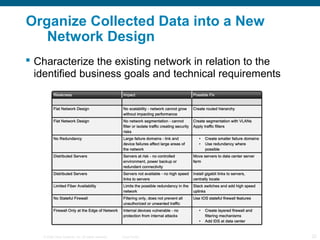
Organize Collected Data into a New
Network Design
 Characterize the existing network in relation to the
identified business goals and technical requirements
© 2006 Cisco Systems, Inc. All rights reserved. Cisco Public 23
Summary
 Ensure that network documentation is accurate and
complete before designing an upgrade
 Gather information using tools like Cisco Network
Assistant
 Organize the current network into a modular block
diagram to identify where the network needs to be
improved.
 The Cisco CCO site provides valuable tools and
documentation for the design process.
 Before producing a wireless network design, it is
usually necessary to do a wireless site survey.
© 2006 Cisco Systems, Inc. All rights reserved. Cisco Public 24

Chapter 3

  • 1.
    © 2006 CiscoSystems, Inc. All rights reserved. Cisco Public 1Version 4.0 Characterizing the Existing Network Designing and Supporting Computer Networks – Chapter 3
  • 2.
    © 2006 CiscoSystems, Inc. All rights reserved. Cisco Public 2 Objectives  Diagram and document an existing network to identify strengths and weaknesses in the design.  Use CCO to determine the appropriate IOS version to support network requirements and download and install the appropriate IOS  Use CCO to determine the appropriate hardware features and install the upgrades using safe practices and procedures  Perform a wireless site survey  Organize collected data into a new network design
  • 3.
    © 2006 CiscoSystems, Inc. All rights reserved. Cisco Public 3 Diagram a Physical Network and Document the Existing Network Network documentation:  Logical and physical diagrams  Floor plans  Inventory lists for equipment and applications  Current network configuration files
  • 4.
    © 2006 CiscoSystems, Inc. All rights reserved. Cisco Public 4 Diagram a Physical Network and Document the Existing Network  Log in to network devices  Use Cisco IOS software commands to gain information on routers and switches
  • 5.
    © 2006 CiscoSystems, Inc. All rights reserved. Cisco Public 5 Diagram a Physical Network and Document the Existing Network  Create a logical network diagram showing existing addressing, routing, and network segmentation  Illustrate how information flows through the network
  • 6.
    © 2006 CiscoSystems, Inc. All rights reserved. Cisco Public 6 Diagram a Physical Network and Document the Existing Network  Create a modular block diagram  Simplify the network to show major functions
  • 7.
    © 2006 CiscoSystems, Inc. All rights reserved. Cisco Public 7 Diagram a Physical Network and Document the Existing Network  Identify and document the strengths and weaknesses of the existing network  Focus on finding ways to overcome weaknesses
  • 8.
    © 2006 CiscoSystems, Inc. All rights reserved. Cisco Public 8 Use CCO to Determine the Appropriate IOS Version to Support Network Requirements Cisco CCO features and navigation:  Documentation  Tools  Downloads  Communities and training  News
  • 9.
    © 2006 CiscoSystems, Inc. All rights reserved. Cisco Public 9 Use CCO to Determine the Appropriate IOS Version to Support Network Requirements  Use the show version command  Verify that the inventory list is correct  Obtain missing information
  • 10.
    © 2006 CiscoSystems, Inc. All rights reserved. Cisco Public 10 Use CCO to Determine the Appropriate IOS Version to Support Network Requirements  Select the correct IOS image using the CCO IOS Feature Navigator
  • 11.
    © 2006 CiscoSystems, Inc. All rights reserved. Cisco Public 11 Use CCO to Determine the Appropriate IOS Version to Support Network Requirements  Download the correct IOS  Store new IOS image on TFTP server  Transfer the file to the Cisco router or switch
  • 12.
    © 2006 CiscoSystems, Inc. All rights reserved. Cisco Public 12 Use CCO to Determine the Appropriate IOS Version to Support Network Requirements Three stages of the router bootup process:  Perform the POST and load the bootstrap program  Locate and load the IOS software  Locate and execute the startup configuration, or enter setup mode
  • 13.
    © 2006 CiscoSystems, Inc. All rights reserved. Cisco Public 13 Use CCO to Determine the Appropriate Hardware Features and Install the Upgrades  Use datasheets to see what modules and interfaces are available  Determine the technologies and media a given device will support
  • 14.
    © 2006 CiscoSystems, Inc. All rights reserved. Cisco Public 14 Use CCO to Determine the Appropriate Hardware Features and Install the Upgrades Installing a new hardware option on a Cisco router or switch:  Turn off power  Remove blank faceplace  Install option module  Turn on power and check the new configuration
  • 15.
    © 2006 CiscoSystems, Inc. All rights reserved. Cisco Public 15 Perform a Wireless Site Survey  Preparation  Site survey  Security  Safety guidelines
  • 16.
    © 2006 CiscoSystems, Inc. All rights reserved. Cisco Public 16 Perform a Wireless Site Survey  Identify possible sources of signal interference  Identify physical infrastructure issues
  • 17.
    © 2006 CiscoSystems, Inc. All rights reserved. Cisco Public 17 Perform a Wireless Site Survey  Define customer requirements  Identify coverage areas  Determine preliminary access point locations  Measure signal strength
  • 18.
    © 2006 CiscoSystems, Inc. All rights reserved. Cisco Public 18 Organize Collected Data into a New Network Design Design requirements document:  Overall project goal  Project scope  Network requirements  Current state of the network
  • 19.
    © 2006 CiscoSystems, Inc. All rights reserved. Cisco Public 19 Organize Collected Data into a New Network Design  Identify and record the overall goal of the proposed network design
  • 20.
    © 2006 CiscoSystems, Inc. All rights reserved. Cisco Public 20 Organize Collected Data into a New Network Design  Identify and record the scope of the proposed network upgrade
  • 21.
    © 2006 CiscoSystems, Inc. All rights reserved. Cisco Public 21 Organize Collected Data into a New Network Design  Identify and record the business goals and technical requirements of the proposed network design
  • 22.
    © 2006 CiscoSystems, Inc. All rights reserved. Cisco Public 22 Organize Collected Data into a New Network Design  Characterize the existing network in relation to the identified business goals and technical requirements
  • 23.
    © 2006 CiscoSystems, Inc. All rights reserved. Cisco Public 23 Summary  Ensure that network documentation is accurate and complete before designing an upgrade  Gather information using tools like Cisco Network Assistant  Organize the current network into a modular block diagram to identify where the network needs to be improved.  The Cisco CCO site provides valuable tools and documentation for the design process.  Before producing a wireless network design, it is usually necessary to do a wireless site survey.
  • 24.
    © 2006 CiscoSystems, Inc. All rights reserved. Cisco Public 24