Multi-Threading in Java
• Multithreading in Java is a process of executing multiple
threads simultaneously.
• A thread is a lightweight sub-process, the smallest unit of
processing. Multiprocessing and multithreading, both are
used to achieve multitasking.
• However, we use multithreading than multiprocessing
because threads use a shared memory area. They don't
allocate separate memory area so saves memory, and
context-switching between the threads takes less time than
process.
• Java Multithreading is mostly used in games, animation, etc.
Advantages of Java Multithreading
• 1) It doesn't block the user because threads
are independent and you can perform
multiple operations at the same time.
• 2) You can perform many operations
together, so it saves time.
• 3) Threads are independent, so it doesn't
affect other threads if an exception occurs in a
single thread.
Multitasking
• Multitasking is a process of executing multiple
tasks simultaneously. We use multitasking to
utilize the CPU. Multitasking can be achieved
in two ways:
• Process-based Multitasking (Multiprocessing)
• Thread-based Multitasking (Multithreading)
1) Process-based Multitasking
(Multiprocessing)
• Each process has an address in memory. In other
words, each process allocates a separate
memory area.
• A process is heavyweight.
• Cost of communication between the process is
high.
• Switching from one process to another requires
some time for saving and loading registers,
memory maps, updating lists, etc.
2) Thread-based Multitasking
(Multithreading)
• Threads share the same address space.
• A thread is lightweight.
• Cost of communication between the thread is
low.
What Is A Thread?
• A thread is a lightweight unit of execution within a
process.
• It has its stack of memory and can run
independently of other threads in the same process.
• Threads share the same process resources, such as
the heap and the code section.
• The Java Virtual Machine allows an application to
have multiple threads of execution running
concurrently.
• Every thread has a priority.
• Threads with higher priority are executed in preference to
threads with lower priority.
• Each thread may or may not also be marked as a daemon.
• When code running in some thread creates a new Thread
object, the new thread has its priority initially set equal to
the priority of the creating thread and is a daemon thread if
and only if the creating thread is a daemon.
• When a Java Virtual Machine starts up, there is usually a
single non-daemon thread (which typically calls the method
named main of some designated class).
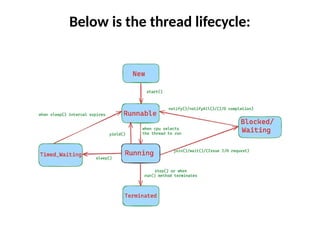
Thread States And LifeCycle
• NEW: A thread that has not yet started is in this state.
• RUNNABLE: A thread executing in the Java virtual machine is
in this state.
• BLOCKED: A thread that is blocked waiting for a monitor lock
is in this state.
• WAITING: A thread that is waiting indefinitely for another
thread to perform a particular action is in this state.
• TIMED_WAITING: A thread that is waiting for another thread
to act for up to a specified waiting time is in this state.
• TERMINATED: A thread that has exited is in this state.
Below is the thread lifecycle:
• New (or Created): A thread is created by instantiating
the Thread class. At this point, it is in the new state.
• Thread myThread = new Thread();
• 2. Runnable (or Ready): After the thread is created, it
moves to the runnable state when the start() method is
called. The start() method internally calls the run()
method, and the thread becomes ready for execution.
• myThread.start(); // Moves the thread to the runnable
state
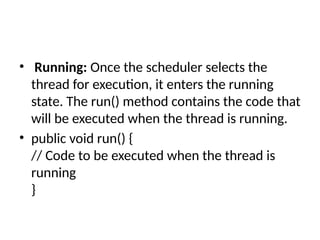
• Running: Once the scheduler selects the
thread for execution, it enters the running
state. The run() method contains the code that
will be executed when the thread is running.
• public void run() {
// Code to be executed when the thread is
running
}
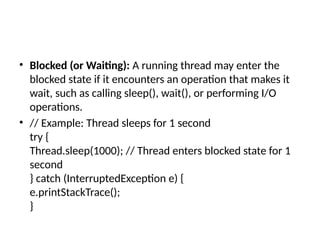
• Blocked (or Waiting): A running thread may enter the
blocked state if it encounters an operation that makes it
wait, such as calling sleep(), wait(), or performing I/O
operations.
• // Example: Thread sleeps for 1 second
try {
Thread.sleep(1000); // Thread enters blocked state for 1
second
} catch (InterruptedException e) {
e.printStackTrace();
}
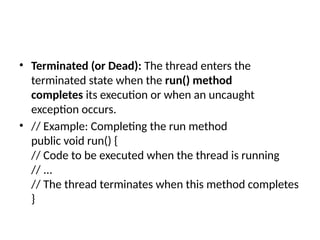
• Terminated (or Dead): The thread enters the
terminated state when the run() method
completes its execution or when an uncaught
exception occurs.
• // Example: Completing the run method
public void run() {
// Code to be executed when the thread is running
// ...
// The thread terminates when this method completes
}
• It’s important to note that the start() method
should be used to initiate the execution of a
thread. The actual code to be executed should be
placed in the run() method. Calling run() directly
won’t create a new thread; it will execute the
run() method in the context of the current thread.
Using start() is essential for multithreading, as it
signals the system to create a new thread and
invoke the run() method in that new thread.
Creating Threads

Multi-Threading in Java power point presenetation

  • 1.
  • 2.
    • Multithreading inJava is a process of executing multiple threads simultaneously. • A thread is a lightweight sub-process, the smallest unit of processing. Multiprocessing and multithreading, both are used to achieve multitasking. • However, we use multithreading than multiprocessing because threads use a shared memory area. They don't allocate separate memory area so saves memory, and context-switching between the threads takes less time than process. • Java Multithreading is mostly used in games, animation, etc.
  • 3.
    Advantages of JavaMultithreading • 1) It doesn't block the user because threads are independent and you can perform multiple operations at the same time. • 2) You can perform many operations together, so it saves time. • 3) Threads are independent, so it doesn't affect other threads if an exception occurs in a single thread.
  • 4.
    Multitasking • Multitasking isa process of executing multiple tasks simultaneously. We use multitasking to utilize the CPU. Multitasking can be achieved in two ways: • Process-based Multitasking (Multiprocessing) • Thread-based Multitasking (Multithreading)
  • 5.
    1) Process-based Multitasking (Multiprocessing) •Each process has an address in memory. In other words, each process allocates a separate memory area. • A process is heavyweight. • Cost of communication between the process is high. • Switching from one process to another requires some time for saving and loading registers, memory maps, updating lists, etc.
  • 6.
    2) Thread-based Multitasking (Multithreading) •Threads share the same address space. • A thread is lightweight. • Cost of communication between the thread is low.
  • 7.
    What Is AThread? • A thread is a lightweight unit of execution within a process. • It has its stack of memory and can run independently of other threads in the same process. • Threads share the same process resources, such as the heap and the code section. • The Java Virtual Machine allows an application to have multiple threads of execution running concurrently.
  • 8.
    • Every threadhas a priority. • Threads with higher priority are executed in preference to threads with lower priority. • Each thread may or may not also be marked as a daemon. • When code running in some thread creates a new Thread object, the new thread has its priority initially set equal to the priority of the creating thread and is a daemon thread if and only if the creating thread is a daemon. • When a Java Virtual Machine starts up, there is usually a single non-daemon thread (which typically calls the method named main of some designated class).
  • 9.
    Thread States AndLifeCycle • NEW: A thread that has not yet started is in this state. • RUNNABLE: A thread executing in the Java virtual machine is in this state. • BLOCKED: A thread that is blocked waiting for a monitor lock is in this state. • WAITING: A thread that is waiting indefinitely for another thread to perform a particular action is in this state. • TIMED_WAITING: A thread that is waiting for another thread to act for up to a specified waiting time is in this state. • TERMINATED: A thread that has exited is in this state.
  • 10.
    Below is thethread lifecycle:
  • 11.
    • New (orCreated): A thread is created by instantiating the Thread class. At this point, it is in the new state. • Thread myThread = new Thread(); • 2. Runnable (or Ready): After the thread is created, it moves to the runnable state when the start() method is called. The start() method internally calls the run() method, and the thread becomes ready for execution. • myThread.start(); // Moves the thread to the runnable state
  • 12.
    • Running: Oncethe scheduler selects the thread for execution, it enters the running state. The run() method contains the code that will be executed when the thread is running. • public void run() { // Code to be executed when the thread is running }
  • 13.
    • Blocked (orWaiting): A running thread may enter the blocked state if it encounters an operation that makes it wait, such as calling sleep(), wait(), or performing I/O operations. • // Example: Thread sleeps for 1 second try { Thread.sleep(1000); // Thread enters blocked state for 1 second } catch (InterruptedException e) { e.printStackTrace(); }
  • 14.
    • Terminated (orDead): The thread enters the terminated state when the run() method completes its execution or when an uncaught exception occurs. • // Example: Completing the run method public void run() { // Code to be executed when the thread is running // ... // The thread terminates when this method completes }
  • 15.
    • It’s importantto note that the start() method should be used to initiate the execution of a thread. The actual code to be executed should be placed in the run() method. Calling run() directly won’t create a new thread; it will execute the run() method in the context of the current thread. Using start() is essential for multithreading, as it signals the system to create a new thread and invoke the run() method in that new thread.
  • 16.