Chapter 12 Developing
Business/IT Solutions
James A. O'Brien, and George Marakas.
Management Information Systems with MISource
2007, 8th
ed. Boston, MA: McGraw-Hill, Inc.,
2007. ISBN: 13 9780073323091
Chapter 12 Developing Business/IT Solutions 2
IS Development
 When the systems approach is applied to
the development of an information systems
solution to business problems, it is called
information systems development or
application development
Chapter 12 Developing Business/IT Solutions 3
The Systems Approach
 A problem solving technique that uses a systems
orientation to define problems and opportunities and
develop appropriate and feasible solutions
 Analyzing a problem and formulating a solution
involves these interrelated activities:
 Recognize and define a problem or opportunity
using systems thinking
 Develop and evaluate alternative system solutions
 Select the solution that best meets your
requirements
 Design the selected system solution
 Implement and evaluate the success of the system
Chapter 12 Developing Business/IT Solutions 4
What is Systems Thinking?
 Seeing the forest and the trees in any situation
Seeing interrelationships among systems
rather than linear cause-and-effect chains
Seeing processes of change among systems
rather than discrete snapshots of change
 See the system in any situation
Find the input, processing, output, feedback
and control components
Chapter 12 Developing Business/IT Solutions 5
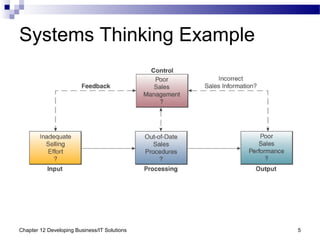
Systems Thinking Example
Chapter 12 Developing Business/IT Solutions 6
Systems Analysis and Design
 SA&D is the overall process by which IS are
designed and implemented
Includes identification of business problems
 Two most common approaches
Object-oriented analysis and design
Life cycle
Chapter 12 Developing Business/IT Solutions 7
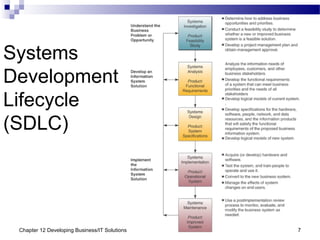
Systems
Development
Lifecycle
(SDLC)
Chapter 12 Developing Business/IT Solutions 8
Systems Development Process
 Systems Investigation
The first step in the systems development
process
May involve consideration of proposals
generated by a business/IT planning process
Also includes the preliminary feasibility study
of proposed information system solutions
Chapter 12 Developing Business/IT Solutions 9
Systems Development Process
 Feasibility Studies: a preliminary study to
determine the
Information needs of prospective users
Resource requirements
Costs
Benefits
Feasibility
 In some cases, a feasibility study is unnecessary
Chapter 12 Developing Business/IT Solutions 10
Operational Feasibility
 How well the proposed system will
Support the business priorities of the
organization
Solve the identified problem
Fit with the existing organizational structure
Chapter 12 Developing Business/IT Solutions 11
Economic Feasibility
 An assessment of
Cost savings
Increased revenue
Decreased investment requirements
Increased profits
Cost/benefit analysis
Chapter 12 Developing Business/IT Solutions 12
Technical Feasibility
 Determine the following can meet the needs of a
proposed system and can be acquired or
developed in the required time
Hardware
Software
Network
Chapter 12 Developing Business/IT Solutions 13
Human Factors Feasibility
 Assess the acceptance level of
Employees
Customers
Suppliers
Management support
 Determine the right people for the various
new or revised roles
Chapter 12 Developing Business/IT Solutions 14
Legal/Political Feasibility
 Assess
Possible patent or copyright violations
Software licensing for developer side only
Governmental restrictions
Changes to existing reporting structure
Chapter 12 Developing Business/IT Solutions 15
Systems Analysis
 An in-depth study of end user information needs
It produces the functional requirements used as
the basis for the design of an IS
 It typically involves a detailed study of the
Information needs of a company and end users
Activities, resources, and products of one or
more of the information systems currently being
used
Information system capabilities required to
meet the information needs of business
stakeholders
Chapter 12 Developing Business/IT Solutions 16
Organizational Analysis
 Study of the organization, including…
Management structure
People
Business activities
Environmental systems
Current information systems
 Input, processing, output, storage, and
control
Chapter 12 Developing Business/IT Solutions 17
Analysis of the Present System
 Before designing a new system, it is important to
study the system to be improved or replaced
Hardware and software
Network
People resources used to convert data
resources into information products
System activities of input, processing,
output, storage, and control
Chapter 12 Developing Business/IT Solutions 18
Logical Analysis
 A logical model is a blueprint of the current
system
It displays what the current system does,
without regard to how it does it
It allows an analyst to understand the
processes, functions, and data associated
with a system without getting bogged down
with hardware and software
Chapter 12 Developing Business/IT Solutions 19
Functional Requirements
 This step of systems analysis is one of the most
difficult
Determine what type of information each
business activity requires
Try to determine the information processing
capabilities required for each system activity
The goal is to identify what should be done,
not how to do it
Chapter 12 Developing Business/IT Solutions 20
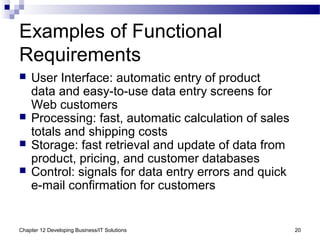
Examples of Functional
Requirements
 User Interface: automatic entry of product
data and easy-to-use data entry screens for
Web customers
 Processing: fast, automatic calculation of sales
totals and shipping costs
 Storage: fast retrieval and update of data from
product, pricing, and customer databases
 Control: signals for data entry errors and quick
e-mail confirmation for customers
Chapter 12 Developing Business/IT Solutions 21
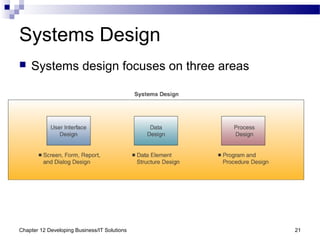
Systems Design
 Systems design focuses on three areas
Chapter 12 Developing Business/IT Solutions 22
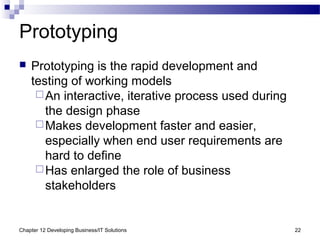
Prototyping
 Prototyping is the rapid development and
testing of working models
An interactive, iterative process used during
the design phase
Makes development faster and easier,
especially when end user requirements are
hard to define
Has enlarged the role of business
stakeholders
Chapter 12 Developing Business/IT Solutions 23
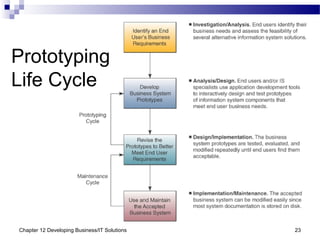
Prototyping
Life Cycle
Chapter 12 Developing Business/IT Solutions 24
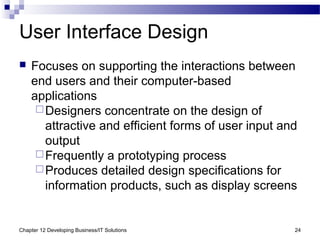
User Interface Design
 Focuses on supporting the interactions between
end users and their computer-based
applications
Designers concentrate on the design of
attractive and efficient forms of user input and
output
Frequently a prototyping process
Produces detailed design specifications for
information products, such as display screens
Chapter 12 Developing Business/IT Solutions 25
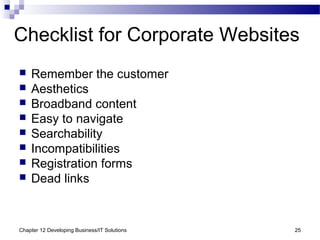
Checklist for Corporate Websites
 Remember the customer
 Aesthetics
 Broadband content
 Easy to navigate
 Searchability
 Incompatibilities
 Registration forms
 Dead links
Chapter 12 Developing Business/IT Solutions 26
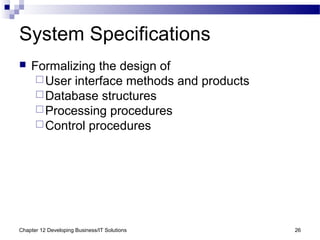
System Specifications
 Formalizing the design of
User interface methods and products
Database structures
Processing procedures
Control procedures
Chapter 12 Developing Business/IT Solutions 27
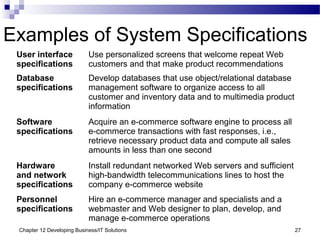
Examples of System Specifications
User interface
specifications
Use personalized screens that welcome repeat Web
customers and that make product recommendations
Database
specifications
Develop databases that use object/relational database
management software to organize access to all
customer and inventory data and to multimedia product
information
Software
specifications
Acquire an e-commerce software engine to process all
e-commerce transactions with fast responses, i.e.,
retrieve necessary product data and compute all sales
amounts in less than one second
Hardware
and network
specifications
Install redundant networked Web servers and sufficient
high-bandwidth telecommunications lines to host the
company e-commerce website
Personnel
specifications
Hire an e-commerce manager and specialists and a
webmaster and Web designer to plan, develop, and
manage e-commerce operations
Chapter 12 Developing Business/IT Solutions 28
End User Development
 IS professionals play a consulting role, while
uses do their own application development
A staff of user consultants may be available
to help with analysis, design, and installation
 Other support
Application package training
Hardware and software advice
Help gaining access to organization
databases
Chapter 12 Developing Business/IT Solutions 29
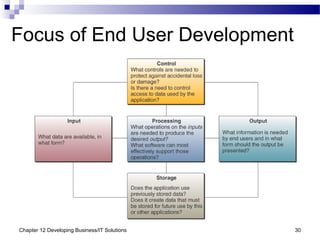
Focus on IS Activities
 End user development should focus on the
fundamental activities of an IS
Input
Processing
Output
Storage
Control
Chapter 12 Developing Business/IT Solutions 30
Focus of End User Development
Chapter 12 Developing Business/IT Solutions 31
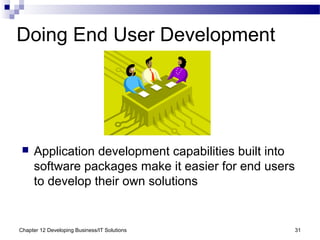
Doing End User Development
 Application development capabilities built into
software packages make it easier for end users
to develop their own solutions
Chapter 12 Developing Business/IT Solutions 32
Encouraging End User Web
Development
 Look for tools that make sense
 Some are more powerful or costly than needed
 Spur creativity
 Consider a competition among departments
 Set some limits
 Limit what parts of a web page or site can be changed and
who can do it
 Give managers responsibility
 Make them personally responsible for content
 Make users comfortable
 Training will make users more confident
 It can save the IT department the trouble of fixing problems
later on
 It can limit the need for continuous support
Chapter 12 Developing Business/IT Solutions 33
Implementing New Systems
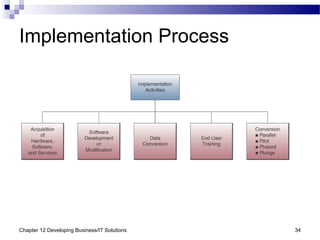
 The systems implementation stage involves
Hardware and software acquisition
Software development
Testing of programs and procedures
Conversion of data resources
Conversion alternatives
Education/training of end users and
specialists who will operate the new system
Chapter 12 Developing Business/IT Solutions 34
Implementation Process
Chapter 12 Developing Business/IT Solutions 35
Project Management
 The skills and knowledge necessary to be
a good project manager will translate into
virtually any project environment
The people who have acquired them
are sought after by most organizations
Chapter 12 Developing Business/IT Solutions 36
What is a Project?
 Every project has
A set of activities with a clear beginning and end
Goals
Objectives
Tasks
Limitations or constraints
A series of steps or phases
 Managing a project effectively requires
Process
Tools
Techniques
Chapter 12 Developing Business/IT Solutions 37
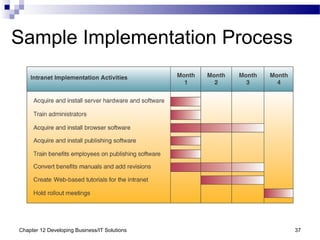
Sample Implementation Process
Chapter 12 Developing Business/IT Solutions 38
Phases of Project Management
 There are five phases in most projects
Initiating/Defining
Planning
Executing
Controlling
Closing
Chapter 12 Developing Business/IT Solutions 39
Initiating/Defining Phase
 Example activities
State the problem(s) and/or goal(s)
Identify the objectives
Secure resources
Explore the costs/benefits in the feasibility
study
Chapter 12 Developing Business/IT Solutions 40
Planning Phase
 Example activities
Identify and sequence activities
Identify the “critical path”
Estimate the time and resources needed for
project completion
Write a detailed project plan
Chapter 12 Developing Business/IT Solutions 41
Execution Phase
 Example activities
Commit resources to specific tasks
Add additional resources and/or personnel
if necessary
Initiate work on the project
Chapter 12 Developing Business/IT Solutions 42
Controlling Phase
 Example activities
Establish reporting obligations
Create reporting tools
Compare actual progress with baseline
Initiate control interventions, if necessary
Chapter 12 Developing Business/IT Solutions 43
Closing Phase
 Example activities
Install all deliverables
Finalize all obligations and commitments
Meet with stakeholders
Release project resources
Document the project
Issue a final report
Chapter 12 Developing Business/IT Solutions 44
Evaluating Hardware, Software,
Services
 Establish minimum physical and performance
characteristics for all hardware and software
Formalize these requirements in an RFP/RFP
 Send RFQ to appropriate vendors
 Evaluate bids when received
All claims must be demonstrated
Obtain recommendations from other users
Search independent sources for evaluations
Benchmark test programs and test data
Chapter 12 Developing Business/IT Solutions 45
Hardware Evaluation Factors
 Major evaluation factors
Performance
Cost
Reliability
Compatibility
Technology
Ergonomics
Connectivity
Scalability
Software
Support
Chapter 12 Developing Business/IT Solutions 46
Software Evaluation Factors
 Hardware evaluation factors apply to software,
as do these
Quality
Efficiency
Flexibility
Security
Connectivity
Maintenance
Documentation
Hardware
Software that is slow,
hard to use, bug-filled,
or poorly documented
is not a good choice
at any price
Chapter 12 Developing Business/IT Solutions 47
Evaluating IS Services
 Examples of IS services
Developing a company website
Installation or conversion of
hardware/software
Employee training
Hardware maintenance
System design and/or integration
Contract programming
Consulting services
Chapter 12 Developing Business/IT Solutions 48
IS Service Evaluation Factors
 IS evaluation factors include
Performance
Systems development
Maintenance
Conversion
Training
Backup facilities and services
Accessibility to sales and support
Business position and financial strength
Hardware selection and compatibility
Software packages offered
Chapter 12 Developing Business/IT Solutions 49
Other Implementation Activities
 The keys to successful implementation of
a new business system
Testing
Data conversion
Documentation
Training
Chapter 12 Developing Business/IT Solutions 50
System Testing
 System testing may involve
Testing and debugging software
Testing website performance
Testing new hardware
Review of prototypes
Chapter 12 Developing Business/IT Solutions 51
Data Conversion
 Data conversion includes
Converting data elements from the old
database to the new database
Correcting data errors
Filtering out unwanted data
Consolidating data from several databases
Organizing data into new data subsets
 Improperly organized and formatted data is a
major cause of implementation failures
Chapter 12 Developing Business/IT Solutions 52
Documentation
 User Documentation
Sample data entry screens, forms, reports
System operating instructions
 Systems Documentation
Method of communication among those
developing, implementing, and maintaining
a computer-based system
Detailed record of the system design
Extremely important when diagnosing
problems and making system changes
Chapter 12 Developing Business/IT Solutions 53
Training
 End users must be trained to operate a new
business system or its implementation will fail
May involve only activities, such as data
entry,
or all aspects of system use
Managers and end users must understand
how the new technology impacts business
operations
 System training should be supplemented with
training related to
Hardware devices
Software packages
Chapter 12 Developing Business/IT Solutions 54
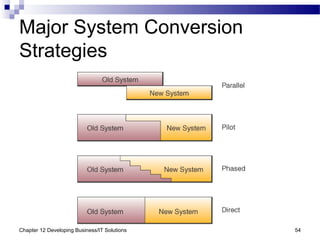
Major System Conversion
Strategies
Chapter 12 Developing Business/IT Solutions 55
Direct Conversion
 Direct conversion
The simplest conversion strategy
The most disruptive to the organization
Sometimes referred to as the slam dunk or
cold-turkey strategy
May be the only viable solution in cases of
emergency implementation or if the old and
new system cannot coexist
Has the highest risk of failure
Involves turning off the old system and turning
on the new one
Chapter 12 Developing Business/IT Solutions 56
Parallel Conversion
 Old and new systems are run simultaneously until
everyone is satisfied that
The new system functions correctly
The old system is no longer needed
 Conversion to new system can be single
cutover or phased cutover
 Has the lowest risk, but the highest cost
Can cost 4 times more than using the old
system
 Best choice where an automated system is
replacing a manual one
Chapter 12 Developing Business/IT Solutions 57
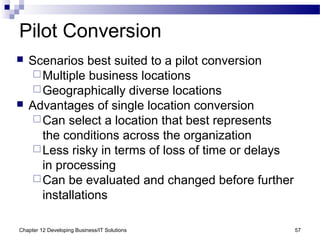
Pilot Conversion
 Scenarios best suited to a pilot conversion
Multiple business locations
Geographically diverse locations
 Advantages of single location conversion
Can select a location that best represents
the conditions across the organization
Less risky in terms of loss of time or delays
in processing
Can be evaluated and changed before further
installations
Chapter 12 Developing Business/IT Solutions 58
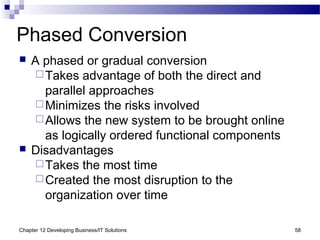
Phased Conversion
 A phased or gradual conversion
Takes advantage of both the direct and
parallel approaches
Minimizes the risks involved
Allows the new system to be brought online
as logically ordered functional components
 Disadvantages
Takes the most time
Created the most disruption to the
organization over time
Chapter 12 Developing Business/IT Solutions 59
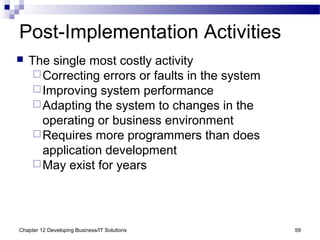
Post-Implementation Activities
 The single most costly activity
Correcting errors or faults in the system
Improving system performance
Adapting the system to changes in the
operating or business environment
Requires more programmers than does
application development
May exist for years
Chapter 12 Developing Business/IT Solutions 60
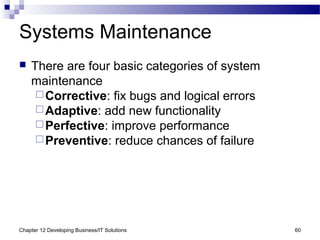
Systems Maintenance
 There are four basic categories of system
maintenance
Corrective: fix bugs and logical errors
Adaptive: add new functionality
Perfective: improve performance
Preventive: reduce chances of failure
Chapter 12 Developing Business/IT Solutions 61
Post-Implementation Review
 Ensures that the newly implemented system
meets the established business objectives
Errors must be corrected by the maintenance
process
Includes a periodic review/audit of the system
as well as continuous monitoring

Chap12 Developing Business/IT Solutions

  • 1.
    Chapter 12 Developing Business/ITSolutions James A. O'Brien, and George Marakas. Management Information Systems with MISource 2007, 8th ed. Boston, MA: McGraw-Hill, Inc., 2007. ISBN: 13 9780073323091
  • 2.
    Chapter 12 DevelopingBusiness/IT Solutions 2 IS Development  When the systems approach is applied to the development of an information systems solution to business problems, it is called information systems development or application development
  • 3.
    Chapter 12 DevelopingBusiness/IT Solutions 3 The Systems Approach  A problem solving technique that uses a systems orientation to define problems and opportunities and develop appropriate and feasible solutions  Analyzing a problem and formulating a solution involves these interrelated activities:  Recognize and define a problem or opportunity using systems thinking  Develop and evaluate alternative system solutions  Select the solution that best meets your requirements  Design the selected system solution  Implement and evaluate the success of the system
  • 4.
    Chapter 12 DevelopingBusiness/IT Solutions 4 What is Systems Thinking?  Seeing the forest and the trees in any situation Seeing interrelationships among systems rather than linear cause-and-effect chains Seeing processes of change among systems rather than discrete snapshots of change  See the system in any situation Find the input, processing, output, feedback and control components
  • 5.
    Chapter 12 DevelopingBusiness/IT Solutions 5 Systems Thinking Example
  • 6.
    Chapter 12 DevelopingBusiness/IT Solutions 6 Systems Analysis and Design  SA&D is the overall process by which IS are designed and implemented Includes identification of business problems  Two most common approaches Object-oriented analysis and design Life cycle
  • 7.
    Chapter 12 DevelopingBusiness/IT Solutions 7 Systems Development Lifecycle (SDLC)
  • 8.
    Chapter 12 DevelopingBusiness/IT Solutions 8 Systems Development Process  Systems Investigation The first step in the systems development process May involve consideration of proposals generated by a business/IT planning process Also includes the preliminary feasibility study of proposed information system solutions
  • 9.
    Chapter 12 DevelopingBusiness/IT Solutions 9 Systems Development Process  Feasibility Studies: a preliminary study to determine the Information needs of prospective users Resource requirements Costs Benefits Feasibility  In some cases, a feasibility study is unnecessary
  • 10.
    Chapter 12 DevelopingBusiness/IT Solutions 10 Operational Feasibility  How well the proposed system will Support the business priorities of the organization Solve the identified problem Fit with the existing organizational structure
  • 11.
    Chapter 12 DevelopingBusiness/IT Solutions 11 Economic Feasibility  An assessment of Cost savings Increased revenue Decreased investment requirements Increased profits Cost/benefit analysis
  • 12.
    Chapter 12 DevelopingBusiness/IT Solutions 12 Technical Feasibility  Determine the following can meet the needs of a proposed system and can be acquired or developed in the required time Hardware Software Network
  • 13.
    Chapter 12 DevelopingBusiness/IT Solutions 13 Human Factors Feasibility  Assess the acceptance level of Employees Customers Suppliers Management support  Determine the right people for the various new or revised roles
  • 14.
    Chapter 12 DevelopingBusiness/IT Solutions 14 Legal/Political Feasibility  Assess Possible patent or copyright violations Software licensing for developer side only Governmental restrictions Changes to existing reporting structure
  • 15.
    Chapter 12 DevelopingBusiness/IT Solutions 15 Systems Analysis  An in-depth study of end user information needs It produces the functional requirements used as the basis for the design of an IS  It typically involves a detailed study of the Information needs of a company and end users Activities, resources, and products of one or more of the information systems currently being used Information system capabilities required to meet the information needs of business stakeholders
  • 16.
    Chapter 12 DevelopingBusiness/IT Solutions 16 Organizational Analysis  Study of the organization, including… Management structure People Business activities Environmental systems Current information systems  Input, processing, output, storage, and control
  • 17.
    Chapter 12 DevelopingBusiness/IT Solutions 17 Analysis of the Present System  Before designing a new system, it is important to study the system to be improved or replaced Hardware and software Network People resources used to convert data resources into information products System activities of input, processing, output, storage, and control
  • 18.
    Chapter 12 DevelopingBusiness/IT Solutions 18 Logical Analysis  A logical model is a blueprint of the current system It displays what the current system does, without regard to how it does it It allows an analyst to understand the processes, functions, and data associated with a system without getting bogged down with hardware and software
  • 19.
    Chapter 12 DevelopingBusiness/IT Solutions 19 Functional Requirements  This step of systems analysis is one of the most difficult Determine what type of information each business activity requires Try to determine the information processing capabilities required for each system activity The goal is to identify what should be done, not how to do it
  • 20.
    Chapter 12 DevelopingBusiness/IT Solutions 20 Examples of Functional Requirements  User Interface: automatic entry of product data and easy-to-use data entry screens for Web customers  Processing: fast, automatic calculation of sales totals and shipping costs  Storage: fast retrieval and update of data from product, pricing, and customer databases  Control: signals for data entry errors and quick e-mail confirmation for customers
  • 21.
    Chapter 12 DevelopingBusiness/IT Solutions 21 Systems Design  Systems design focuses on three areas
  • 22.
    Chapter 12 DevelopingBusiness/IT Solutions 22 Prototyping  Prototyping is the rapid development and testing of working models An interactive, iterative process used during the design phase Makes development faster and easier, especially when end user requirements are hard to define Has enlarged the role of business stakeholders
  • 23.
    Chapter 12 DevelopingBusiness/IT Solutions 23 Prototyping Life Cycle
  • 24.
    Chapter 12 DevelopingBusiness/IT Solutions 24 User Interface Design  Focuses on supporting the interactions between end users and their computer-based applications Designers concentrate on the design of attractive and efficient forms of user input and output Frequently a prototyping process Produces detailed design specifications for information products, such as display screens
  • 25.
    Chapter 12 DevelopingBusiness/IT Solutions 25 Checklist for Corporate Websites  Remember the customer  Aesthetics  Broadband content  Easy to navigate  Searchability  Incompatibilities  Registration forms  Dead links
  • 26.
    Chapter 12 DevelopingBusiness/IT Solutions 26 System Specifications  Formalizing the design of User interface methods and products Database structures Processing procedures Control procedures
  • 27.
    Chapter 12 DevelopingBusiness/IT Solutions 27 Examples of System Specifications User interface specifications Use personalized screens that welcome repeat Web customers and that make product recommendations Database specifications Develop databases that use object/relational database management software to organize access to all customer and inventory data and to multimedia product information Software specifications Acquire an e-commerce software engine to process all e-commerce transactions with fast responses, i.e., retrieve necessary product data and compute all sales amounts in less than one second Hardware and network specifications Install redundant networked Web servers and sufficient high-bandwidth telecommunications lines to host the company e-commerce website Personnel specifications Hire an e-commerce manager and specialists and a webmaster and Web designer to plan, develop, and manage e-commerce operations
  • 28.
    Chapter 12 DevelopingBusiness/IT Solutions 28 End User Development  IS professionals play a consulting role, while uses do their own application development A staff of user consultants may be available to help with analysis, design, and installation  Other support Application package training Hardware and software advice Help gaining access to organization databases
  • 29.
    Chapter 12 DevelopingBusiness/IT Solutions 29 Focus on IS Activities  End user development should focus on the fundamental activities of an IS Input Processing Output Storage Control
  • 30.
    Chapter 12 DevelopingBusiness/IT Solutions 30 Focus of End User Development
  • 31.
    Chapter 12 DevelopingBusiness/IT Solutions 31 Doing End User Development  Application development capabilities built into software packages make it easier for end users to develop their own solutions
  • 32.
    Chapter 12 DevelopingBusiness/IT Solutions 32 Encouraging End User Web Development  Look for tools that make sense  Some are more powerful or costly than needed  Spur creativity  Consider a competition among departments  Set some limits  Limit what parts of a web page or site can be changed and who can do it  Give managers responsibility  Make them personally responsible for content  Make users comfortable  Training will make users more confident  It can save the IT department the trouble of fixing problems later on  It can limit the need for continuous support
  • 33.
    Chapter 12 DevelopingBusiness/IT Solutions 33 Implementing New Systems  The systems implementation stage involves Hardware and software acquisition Software development Testing of programs and procedures Conversion of data resources Conversion alternatives Education/training of end users and specialists who will operate the new system
  • 34.
    Chapter 12 DevelopingBusiness/IT Solutions 34 Implementation Process
  • 35.
    Chapter 12 DevelopingBusiness/IT Solutions 35 Project Management  The skills and knowledge necessary to be a good project manager will translate into virtually any project environment The people who have acquired them are sought after by most organizations
  • 36.
    Chapter 12 DevelopingBusiness/IT Solutions 36 What is a Project?  Every project has A set of activities with a clear beginning and end Goals Objectives Tasks Limitations or constraints A series of steps or phases  Managing a project effectively requires Process Tools Techniques
  • 37.
    Chapter 12 DevelopingBusiness/IT Solutions 37 Sample Implementation Process
  • 38.
    Chapter 12 DevelopingBusiness/IT Solutions 38 Phases of Project Management  There are five phases in most projects Initiating/Defining Planning Executing Controlling Closing
  • 39.
    Chapter 12 DevelopingBusiness/IT Solutions 39 Initiating/Defining Phase  Example activities State the problem(s) and/or goal(s) Identify the objectives Secure resources Explore the costs/benefits in the feasibility study
  • 40.
    Chapter 12 DevelopingBusiness/IT Solutions 40 Planning Phase  Example activities Identify and sequence activities Identify the “critical path” Estimate the time and resources needed for project completion Write a detailed project plan
  • 41.
    Chapter 12 DevelopingBusiness/IT Solutions 41 Execution Phase  Example activities Commit resources to specific tasks Add additional resources and/or personnel if necessary Initiate work on the project
  • 42.
    Chapter 12 DevelopingBusiness/IT Solutions 42 Controlling Phase  Example activities Establish reporting obligations Create reporting tools Compare actual progress with baseline Initiate control interventions, if necessary
  • 43.
    Chapter 12 DevelopingBusiness/IT Solutions 43 Closing Phase  Example activities Install all deliverables Finalize all obligations and commitments Meet with stakeholders Release project resources Document the project Issue a final report
  • 44.
    Chapter 12 DevelopingBusiness/IT Solutions 44 Evaluating Hardware, Software, Services  Establish minimum physical and performance characteristics for all hardware and software Formalize these requirements in an RFP/RFP  Send RFQ to appropriate vendors  Evaluate bids when received All claims must be demonstrated Obtain recommendations from other users Search independent sources for evaluations Benchmark test programs and test data
  • 45.
    Chapter 12 DevelopingBusiness/IT Solutions 45 Hardware Evaluation Factors  Major evaluation factors Performance Cost Reliability Compatibility Technology Ergonomics Connectivity Scalability Software Support
  • 46.
    Chapter 12 DevelopingBusiness/IT Solutions 46 Software Evaluation Factors  Hardware evaluation factors apply to software, as do these Quality Efficiency Flexibility Security Connectivity Maintenance Documentation Hardware Software that is slow, hard to use, bug-filled, or poorly documented is not a good choice at any price
  • 47.
    Chapter 12 DevelopingBusiness/IT Solutions 47 Evaluating IS Services  Examples of IS services Developing a company website Installation or conversion of hardware/software Employee training Hardware maintenance System design and/or integration Contract programming Consulting services
  • 48.
    Chapter 12 DevelopingBusiness/IT Solutions 48 IS Service Evaluation Factors  IS evaluation factors include Performance Systems development Maintenance Conversion Training Backup facilities and services Accessibility to sales and support Business position and financial strength Hardware selection and compatibility Software packages offered
  • 49.
    Chapter 12 DevelopingBusiness/IT Solutions 49 Other Implementation Activities  The keys to successful implementation of a new business system Testing Data conversion Documentation Training
  • 50.
    Chapter 12 DevelopingBusiness/IT Solutions 50 System Testing  System testing may involve Testing and debugging software Testing website performance Testing new hardware Review of prototypes
  • 51.
    Chapter 12 DevelopingBusiness/IT Solutions 51 Data Conversion  Data conversion includes Converting data elements from the old database to the new database Correcting data errors Filtering out unwanted data Consolidating data from several databases Organizing data into new data subsets  Improperly organized and formatted data is a major cause of implementation failures
  • 52.
    Chapter 12 DevelopingBusiness/IT Solutions 52 Documentation  User Documentation Sample data entry screens, forms, reports System operating instructions  Systems Documentation Method of communication among those developing, implementing, and maintaining a computer-based system Detailed record of the system design Extremely important when diagnosing problems and making system changes
  • 53.
    Chapter 12 DevelopingBusiness/IT Solutions 53 Training  End users must be trained to operate a new business system or its implementation will fail May involve only activities, such as data entry, or all aspects of system use Managers and end users must understand how the new technology impacts business operations  System training should be supplemented with training related to Hardware devices Software packages
  • 54.
    Chapter 12 DevelopingBusiness/IT Solutions 54 Major System Conversion Strategies
  • 55.
    Chapter 12 DevelopingBusiness/IT Solutions 55 Direct Conversion  Direct conversion The simplest conversion strategy The most disruptive to the organization Sometimes referred to as the slam dunk or cold-turkey strategy May be the only viable solution in cases of emergency implementation or if the old and new system cannot coexist Has the highest risk of failure Involves turning off the old system and turning on the new one
  • 56.
    Chapter 12 DevelopingBusiness/IT Solutions 56 Parallel Conversion  Old and new systems are run simultaneously until everyone is satisfied that The new system functions correctly The old system is no longer needed  Conversion to new system can be single cutover or phased cutover  Has the lowest risk, but the highest cost Can cost 4 times more than using the old system  Best choice where an automated system is replacing a manual one
  • 57.
    Chapter 12 DevelopingBusiness/IT Solutions 57 Pilot Conversion  Scenarios best suited to a pilot conversion Multiple business locations Geographically diverse locations  Advantages of single location conversion Can select a location that best represents the conditions across the organization Less risky in terms of loss of time or delays in processing Can be evaluated and changed before further installations
  • 58.
    Chapter 12 DevelopingBusiness/IT Solutions 58 Phased Conversion  A phased or gradual conversion Takes advantage of both the direct and parallel approaches Minimizes the risks involved Allows the new system to be brought online as logically ordered functional components  Disadvantages Takes the most time Created the most disruption to the organization over time
  • 59.
    Chapter 12 DevelopingBusiness/IT Solutions 59 Post-Implementation Activities  The single most costly activity Correcting errors or faults in the system Improving system performance Adapting the system to changes in the operating or business environment Requires more programmers than does application development May exist for years
  • 60.
    Chapter 12 DevelopingBusiness/IT Solutions 60 Systems Maintenance  There are four basic categories of system maintenance Corrective: fix bugs and logical errors Adaptive: add new functionality Perfective: improve performance Preventive: reduce chances of failure
  • 61.
    Chapter 12 DevelopingBusiness/IT Solutions 61 Post-Implementation Review  Ensures that the newly implemented system meets the established business objectives Errors must be corrected by the maintenance process Includes a periodic review/audit of the system as well as continuous monitoring