CHAPTER THREE
GENERAL LEDGER
4.1. OVERVIEW
In order to maintain general ledger records,
first chart of accounts should be maintained
for the new company created along with the
respective beginning balances of accounts
(if any)
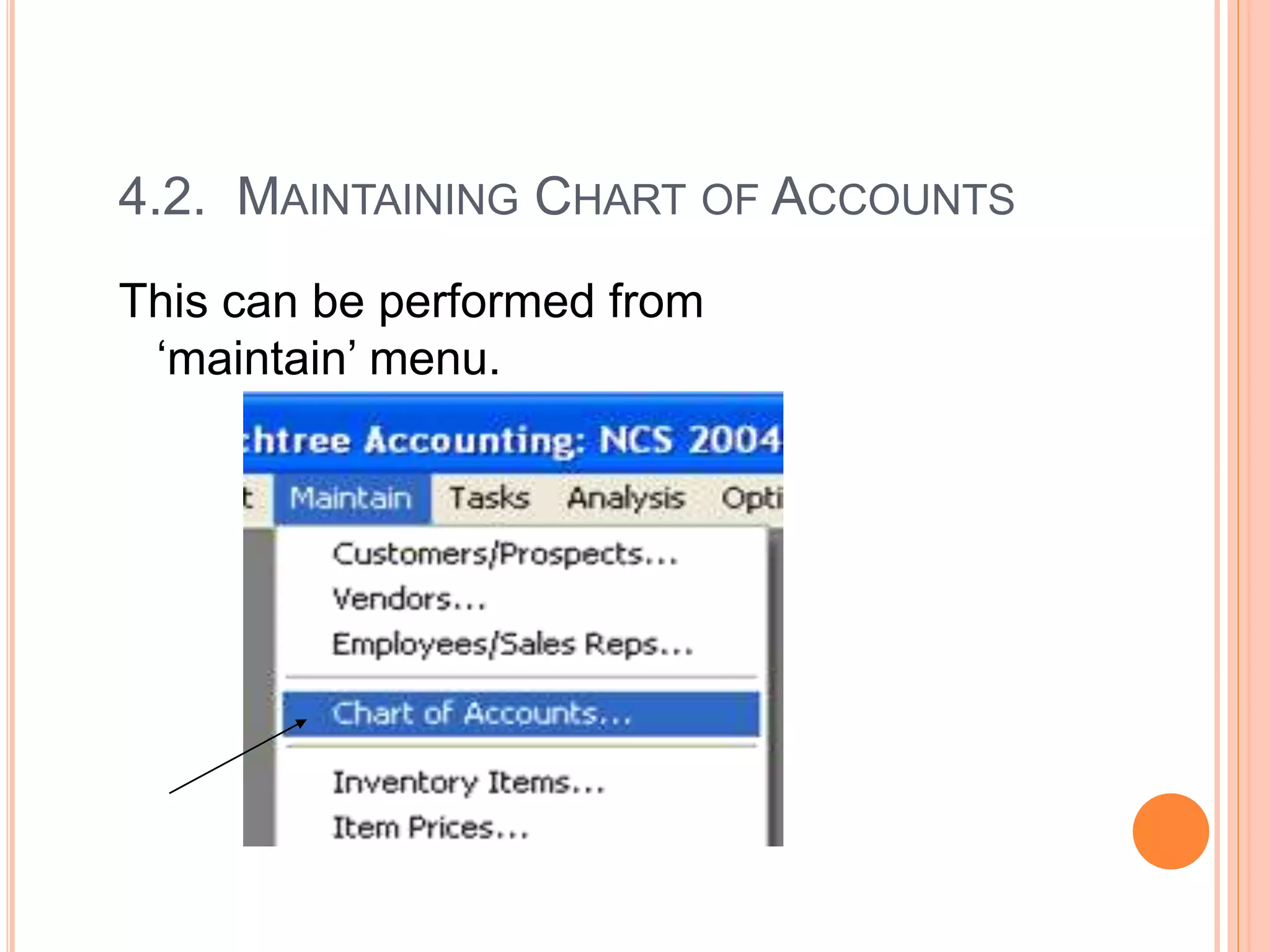
4.2. MAINTAINING CHART OF ACCOUNTS
This can be performed from
‘maintain’ menu.
…CONTINUED
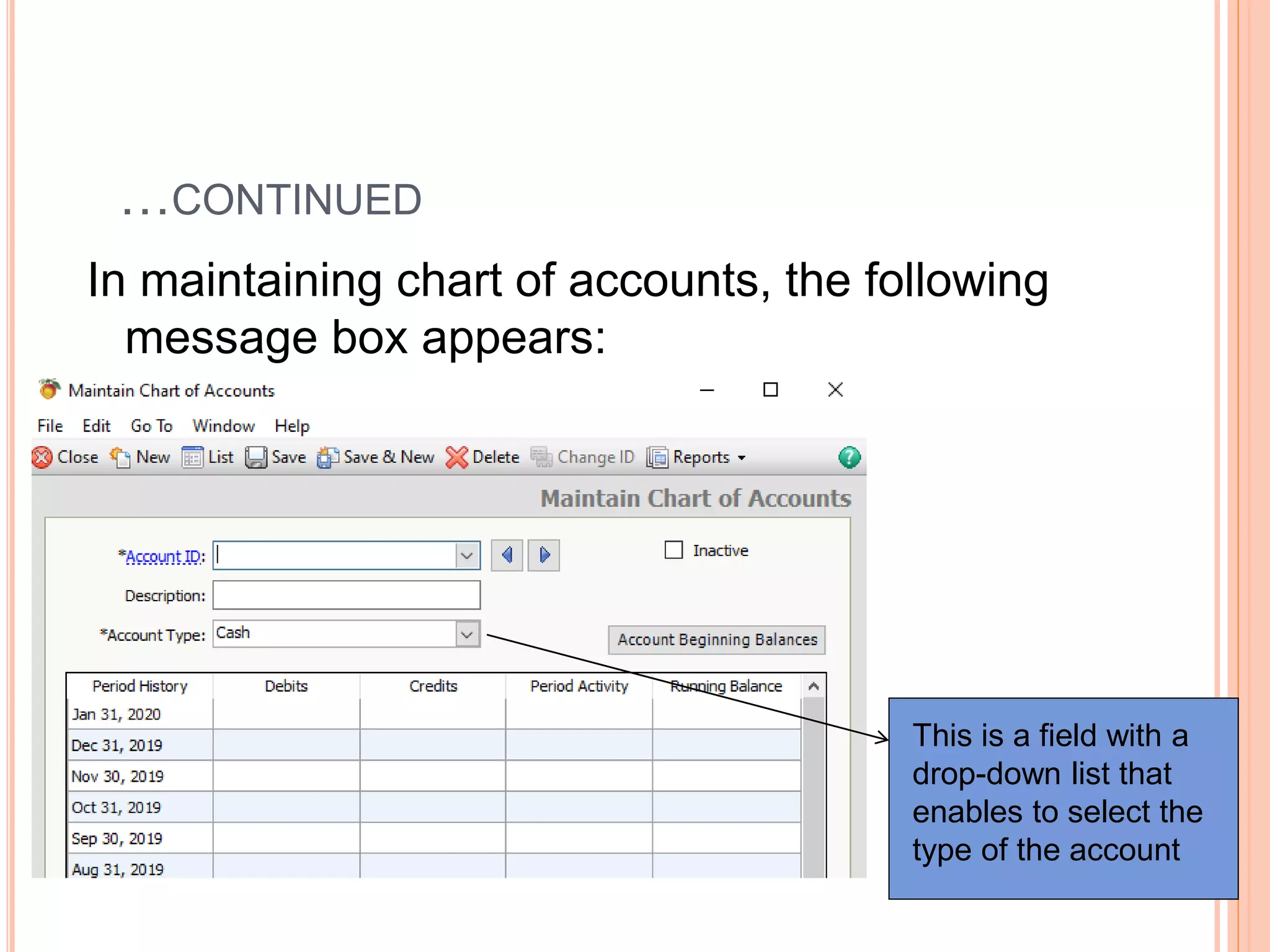
In maintaining chart of accounts, the following
message box appears:
This is a field with a
drop-down list that
enables to select the
type of the account
…CONTINUED
- Account ID (account number);
- Description (account title);
Account numbering
 How you number your chart of accounts is up to
you. However, you should establish a consistent,
logical system that everyone who uses Peachtree
can easily understand.
…CONTINUED
- Account type;
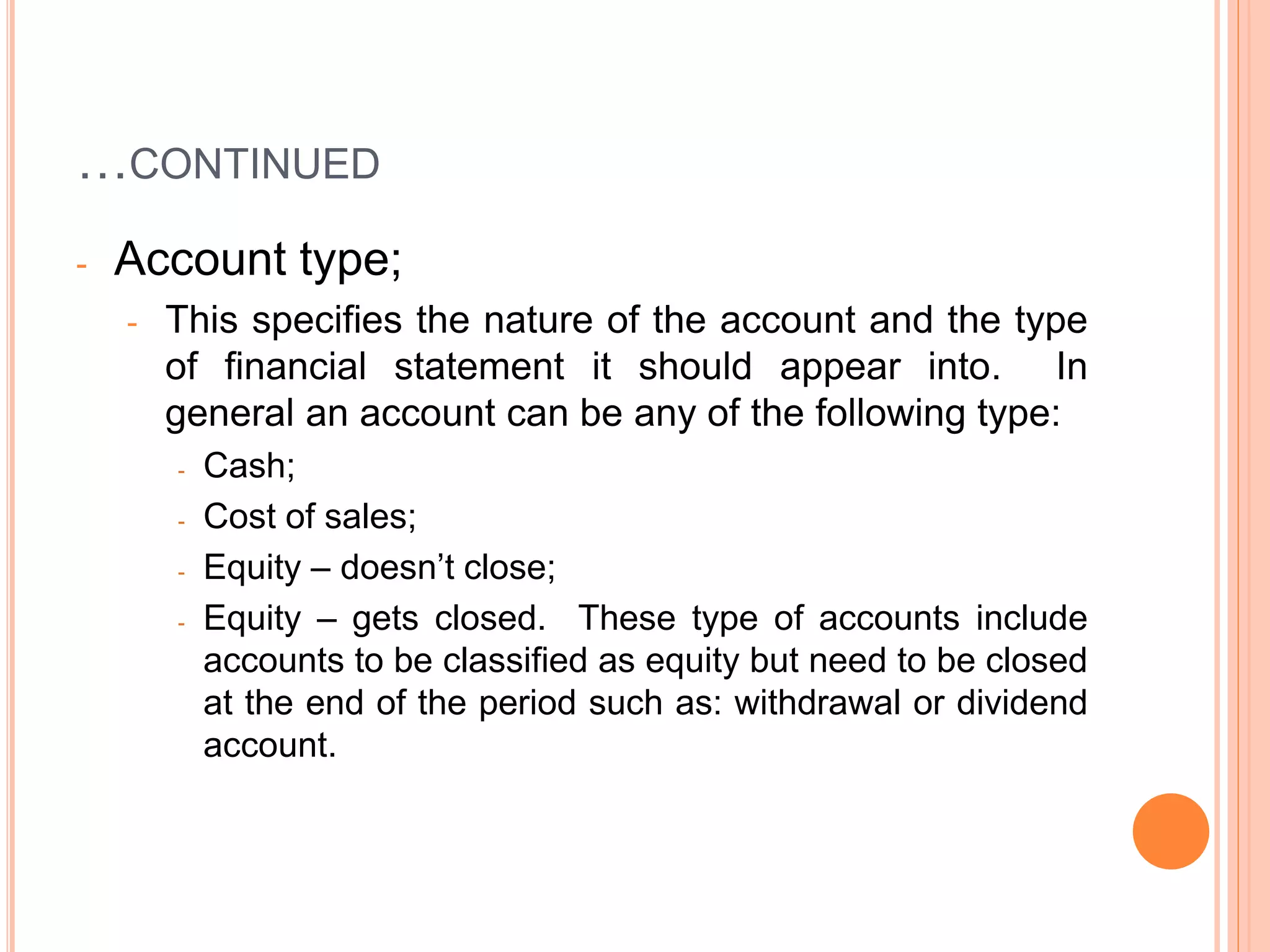
- This specifies the nature of the account and the type
of financial statement it should appear into. In
general an account can be any of the following type:
- Cash;
- Cost of sales;
- Equity – doesn’t close;
- Equity – gets closed. These type of accounts include
accounts to be classified as equity but need to be closed
at the end of the period such as: withdrawal or dividend
account.
…CONTINUED
- Equity retained earnings;
- Expense;
- Income;
- Fixed assets;
- Accumulated depreciation;
- Inventory;
- Long-term liabilities;
- Other assets;
- Accounts receivable;
- Accounts payable;
- Other current assets;
- Other current liabilities.
…CONTINUED
Note:
Only one general ledger account should be created
identified as ‘equity retained earnings’. This is the
account where the effects of the other accounts to be
closed are reflected or transferred at the end of the
period.
4.3. ENTERING BEGINNING BALANCES
Beginning balances of accounts can be entered in
two ways:
(i) To enter beginning balances for each account
when an account is maintained in the chart of
account; or
(ii) By writing a general journal entry to enter the
beginning balances of all the accounts..if by
mistake you post transactions
ENTERING BEGINNING BALANCES FROM
‘MAINTAIN CHART OF ACCOUNTS’ SCREEN
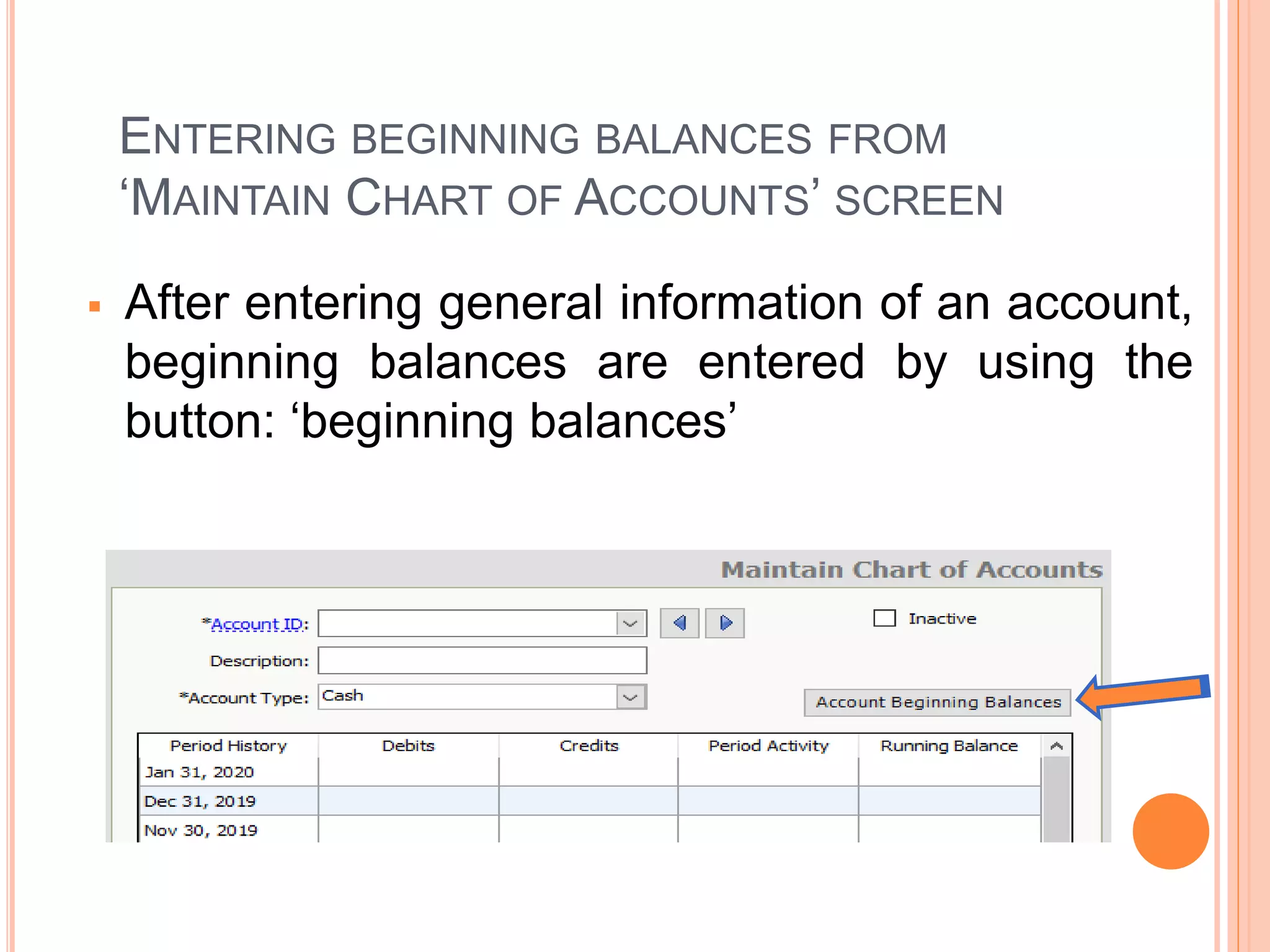
 After entering general information of an account,
beginning balances are entered by using the
button: ‘beginning balances’
…CONTINUED
 Pressing this button inquires for selecting the specific
period for which the beginning balance refers to. In
selecting this period, the last date of the previous fiscal
period (for which the balance indicates to be the ending
balance of the period) should be selected.
…CONTINUED
 For example, if the balance is that of January 1, 2004,
the period to be selected to enter the beginning balance
is: from 12/01/2003 through 12/31/2003.
 This indicates the fact that the balance to be entered is
an opening balance for January 1, 2004.
…CONTINUED
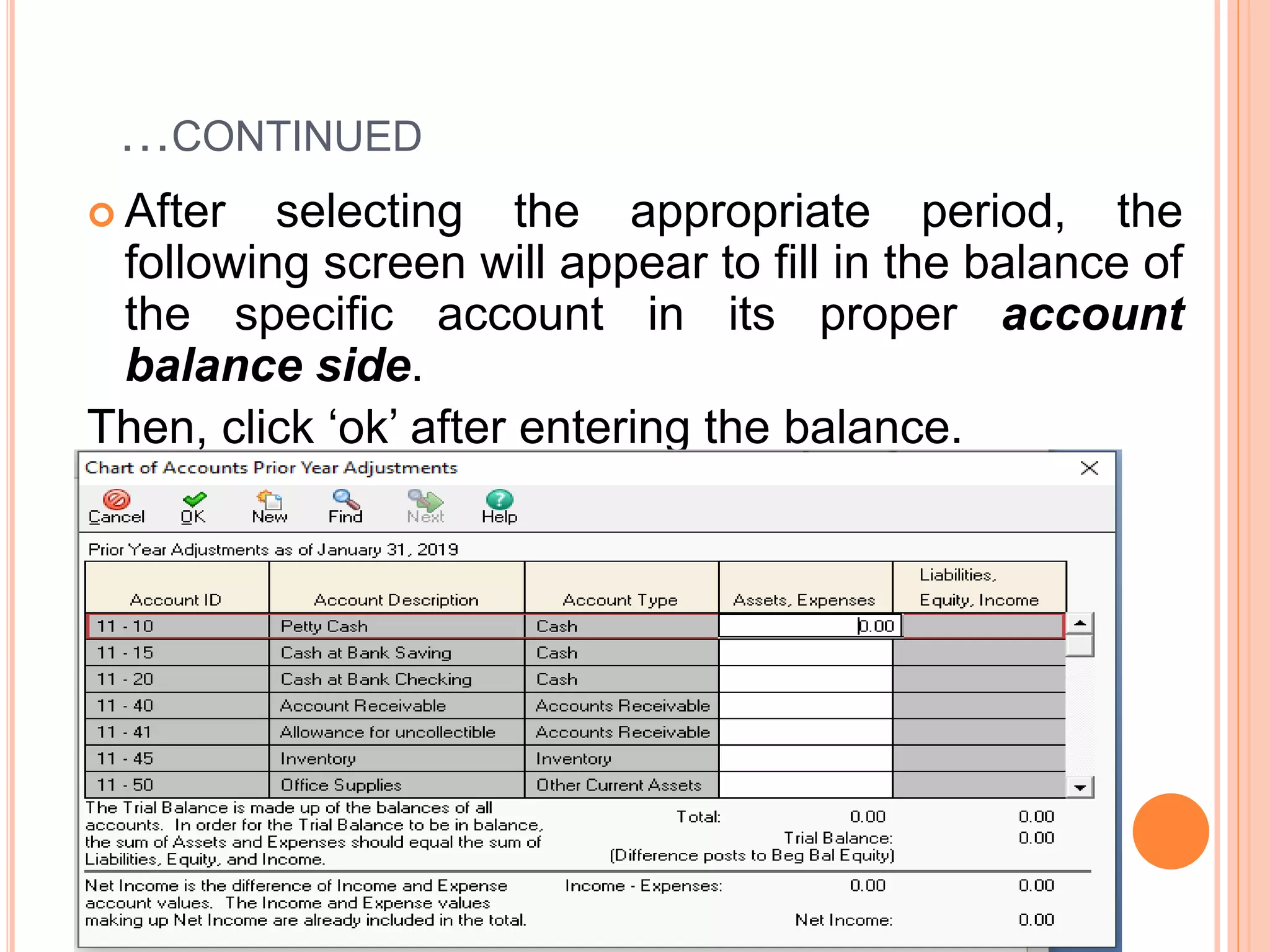
 After selecting the appropriate period, the
following screen will appear to fill in the balance of
the specific account in its proper account
balance side.
Then, click ‘ok’ after entering the balance.
 If you are out of balance, a message will appear
warning you that an equity account will be created
(or updated) to contain the difference or out-of-
balance amount. This account will be named
‘Beginning Balance Equity’, and its type is
Equity—Doesn’t Close. It is a dummy account. If
the trial balance is out-of-balance, try to investigate
the cause (s) of the difference.
…CONTINUED
Note:
 If an account has a negative balance (balance other than
its normal balance side), use negative sign (-) to insert
the beginning balance in the side other than its normal
balance side of the account.
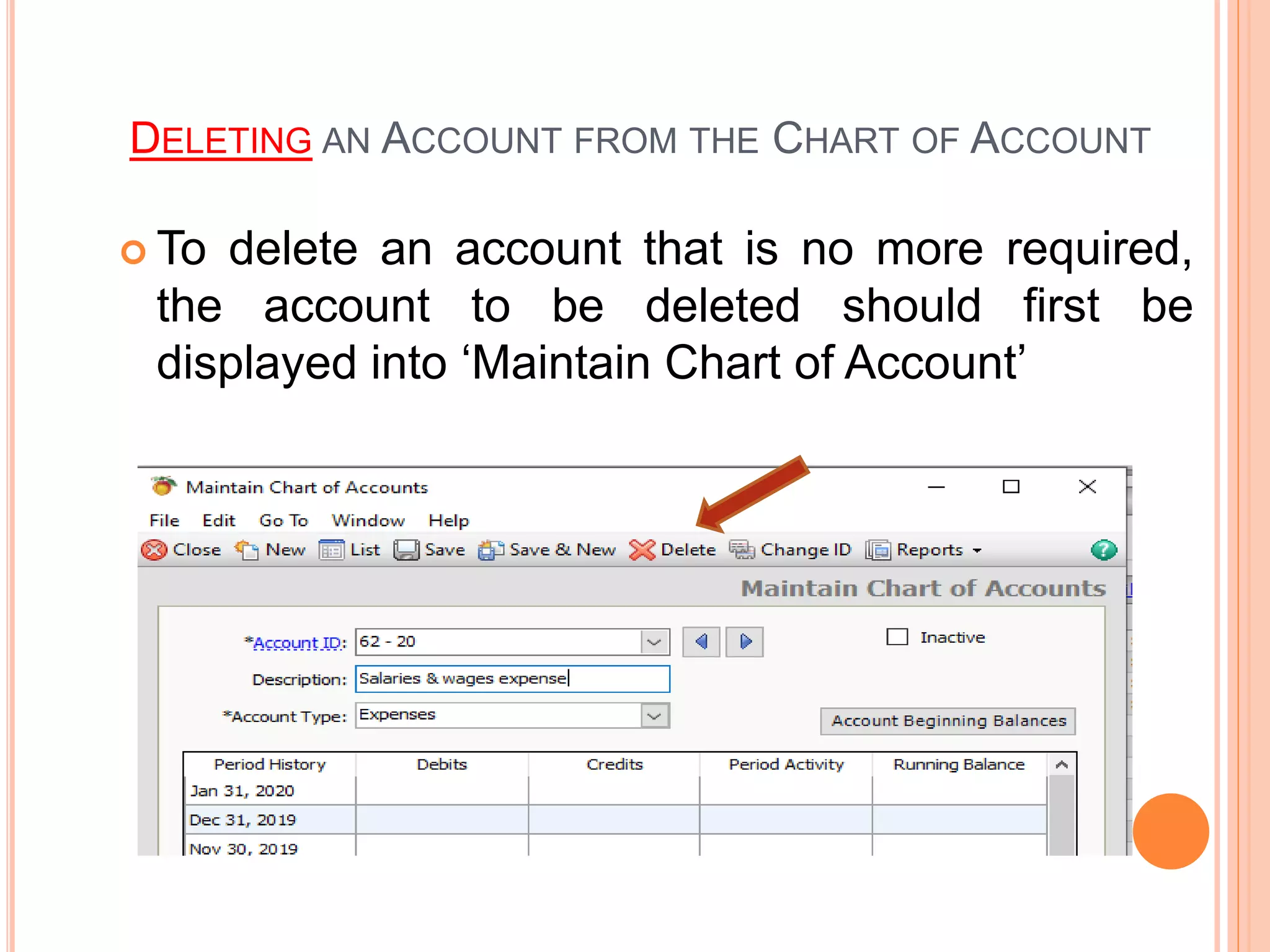
DELETING AN ACCOUNT FROM THE CHART OF ACCOUNT
 To delete an account that is no more required,
the account to be deleted should first be
displayed into ‘Maintain Chart of Account’
SETTING GENERAL LEDGER DEFAULTS
 Setting general ledger defaults refers to selecting
an account from the chart of account into which
approximation of decimals are to be accumulated.
 This is usually selected to be the ‘retained earnings’
account.
…CONTINUED
It can be performed from the ‘maintain’ menu as:
Maintain menu---Default info---General
ledgers.
TO PRINT OR PREVIEW THE CHART OF ACCOUNTS
AND THE BEGINNING TRIAL BALANCE
 All activities performed from ‘maintain’ and ‘task’
menus can be viewed or printed from the ‘reports’
menu.
 Thus, the chart of accounts and trial balance can be
viewed from ‘reports’ menu by clicking on ‘general
ledger’
PRINTING OR PREVIEWING A REPORT WITH A
GIVEN SPECIFICATION
Various specifications may be provided on a
given report; such as:
(i) Date of the report (Which period’s report you
want to have?)
Unless specified, Peachtree accounting
always displays the report at the end of the
first period of the fiscal period (January of a
given year if the fiscal year begins on
January)
…CONTINUED
(ii) Should accounts with zero balances be included
or excluded from the report?
(ii) Which fields to include into the report?
(account number, account description, account
type, etc.)
(iv) Which specific accounts are to be included into
the report?
(v) Etc.

Ch-3 General Ledger.ppt

  • 1.
  • 2.
    4.1. OVERVIEW In orderto maintain general ledger records, first chart of accounts should be maintained for the new company created along with the respective beginning balances of accounts (if any)
  • 3.
    4.2. MAINTAINING CHARTOF ACCOUNTS This can be performed from ‘maintain’ menu.
  • 4.
    …CONTINUED In maintaining chartof accounts, the following message box appears: This is a field with a drop-down list that enables to select the type of the account
  • 5.
    …CONTINUED - Account ID(account number); - Description (account title); Account numbering  How you number your chart of accounts is up to you. However, you should establish a consistent, logical system that everyone who uses Peachtree can easily understand.
  • 6.
    …CONTINUED - Account type; -This specifies the nature of the account and the type of financial statement it should appear into. In general an account can be any of the following type: - Cash; - Cost of sales; - Equity – doesn’t close; - Equity – gets closed. These type of accounts include accounts to be classified as equity but need to be closed at the end of the period such as: withdrawal or dividend account.
  • 7.
    …CONTINUED - Equity retainedearnings; - Expense; - Income; - Fixed assets; - Accumulated depreciation; - Inventory; - Long-term liabilities; - Other assets; - Accounts receivable; - Accounts payable; - Other current assets; - Other current liabilities.
  • 8.
    …CONTINUED Note: Only one generalledger account should be created identified as ‘equity retained earnings’. This is the account where the effects of the other accounts to be closed are reflected or transferred at the end of the period.
  • 9.
    4.3. ENTERING BEGINNINGBALANCES Beginning balances of accounts can be entered in two ways: (i) To enter beginning balances for each account when an account is maintained in the chart of account; or (ii) By writing a general journal entry to enter the beginning balances of all the accounts..if by mistake you post transactions
  • 10.
    ENTERING BEGINNING BALANCESFROM ‘MAINTAIN CHART OF ACCOUNTS’ SCREEN  After entering general information of an account, beginning balances are entered by using the button: ‘beginning balances’
  • 11.
    …CONTINUED  Pressing thisbutton inquires for selecting the specific period for which the beginning balance refers to. In selecting this period, the last date of the previous fiscal period (for which the balance indicates to be the ending balance of the period) should be selected.
  • 12.
    …CONTINUED  For example,if the balance is that of January 1, 2004, the period to be selected to enter the beginning balance is: from 12/01/2003 through 12/31/2003.  This indicates the fact that the balance to be entered is an opening balance for January 1, 2004.
  • 13.
    …CONTINUED  After selectingthe appropriate period, the following screen will appear to fill in the balance of the specific account in its proper account balance side. Then, click ‘ok’ after entering the balance.
  • 14.
     If youare out of balance, a message will appear warning you that an equity account will be created (or updated) to contain the difference or out-of- balance amount. This account will be named ‘Beginning Balance Equity’, and its type is Equity—Doesn’t Close. It is a dummy account. If the trial balance is out-of-balance, try to investigate the cause (s) of the difference.
  • 15.
    …CONTINUED Note:  If anaccount has a negative balance (balance other than its normal balance side), use negative sign (-) to insert the beginning balance in the side other than its normal balance side of the account.
  • 16.
    DELETING AN ACCOUNTFROM THE CHART OF ACCOUNT  To delete an account that is no more required, the account to be deleted should first be displayed into ‘Maintain Chart of Account’
  • 17.
    SETTING GENERAL LEDGERDEFAULTS  Setting general ledger defaults refers to selecting an account from the chart of account into which approximation of decimals are to be accumulated.  This is usually selected to be the ‘retained earnings’ account.
  • 18.
    …CONTINUED It can beperformed from the ‘maintain’ menu as: Maintain menu---Default info---General ledgers.
  • 19.
    TO PRINT ORPREVIEW THE CHART OF ACCOUNTS AND THE BEGINNING TRIAL BALANCE  All activities performed from ‘maintain’ and ‘task’ menus can be viewed or printed from the ‘reports’ menu.  Thus, the chart of accounts and trial balance can be viewed from ‘reports’ menu by clicking on ‘general ledger’
  • 20.
    PRINTING OR PREVIEWINGA REPORT WITH A GIVEN SPECIFICATION Various specifications may be provided on a given report; such as: (i) Date of the report (Which period’s report you want to have?) Unless specified, Peachtree accounting always displays the report at the end of the first period of the fiscal period (January of a given year if the fiscal year begins on January)
  • 21.
    …CONTINUED (ii) Should accountswith zero balances be included or excluded from the report? (ii) Which fields to include into the report? (account number, account description, account type, etc.) (iv) Which specific accounts are to be included into the report? (v) Etc.