Slides for Chapter 12:
Distributed File Systems


From Coulouris, Dollimore, Kindberg and Blair
Distributed Systems:
        Concepts and Design
Edition 5, © Addison-Wesley 2012
Figure 12.1
Storage systems and their properties


                                             Sharing             Persis-           Distributed                     Consistency                 Example
                                                                 tence             cache/replicas                  maintenance

  Main memory                                                                                                              1                   RAM

  File system                                                                                                              1                   UNIX file system
  Distributed file system                                                                                                                      Sun NFS

  Web                                                                                                                                          Web server

  Distributed shared memory                                                                                                                    Ivy (DSM, Ch. 18)

  Remote objects (RMI/ORB)                                                                                                 1                   CORBA

  Persistent object store                                                                                                  1                   CORBA Persistent
                                                                                                                                               Object Service
  Peer-to-peer storage system                                                                                               2                  OceanStore (Ch. 10)

 Types of consistency:
 1: strict one-copy. 3: slightly weaker guarantees. 2: considerably weaker guarantees.


                                Instructor’s Guide for Coulouris, Dollimore, Kindberg and Blair, Distributed Systems: Concepts and Design Edn. 5
                                                                             © Pearson Education 2012
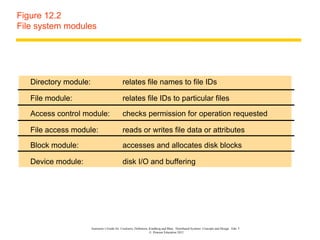
Figure 12.2
File system modules


   Directory module:                          relates file names to file IDs

   File module:                               relates file IDs to particular files
   Access control module:                     checks permission for operation requested

   File access module:                        reads or writes file data or attributes
   Block module:                              accesses and allocates disk blocks

   Device module:                             disk I/O and buffering


                       Instructor’s Guide for Coulouris, Dollimore, Kindberg and Blair, Distributed Systems: Concepts and Design Edn. 5
                                                                    © Pearson Education 2012
Figure 12.3
File attribute record structure


                                           File length
                              Creation timestamp
                                   Read timestamp
                                  Write timestamp
                              Attribute timestamp
                                    Reference count
                                                 Owner
                                               File type
                                    Access control list


                    Instructor’s Guide for Coulouris, Dollimore, Kindberg and Blair, Distributed Systems: Concepts and Design Edn. 5
                                                                 © Pearson Education 2012
Figure 12.4
UNIX file system operations


 filedes = open(name, mode)                    Opens an existing file with the given name.
 filedes = creat(name, mode)                   Creates a new file with the given name.
                                               Both operations deliver a file descriptor referencing the open
                                               file. The mode is read, write or both.
 status = close(filedes)                       Closes the open file filedes.
 count = read(filedes, buffer, n)             Transfers n bytes from the file referenced by filedes to buffer.
 count = write(filedes, buffer, n)            Transfers n bytes to the file referenced by filedes from buffer.
                                              Both operations deliver the number of bytes actually transferred
                                              and advance the read-write pointer.
 pos = lseek(filedes, offset,                  Moves the read-write pointer to offset (relative or absolute,
                       whence)                 depending on whence).
 status = unlink(name)                         Removes the file name from the directory structure. If the file
                                               has no other names, it is deleted.
 status = link(name1, name2)                   Adds a new name (name2) for a file (name1).
 status = stat(name, buffer)                  Gets the file attributes for file name into buffer.


                           Instructor’s Guide for Coulouris, Dollimore, Kindberg and Blair, Distributed Systems: Concepts and Design Edn. 5
                                                                        © Pearson Education 2012
Figure 12.5
File service architecture


          Client computer                                                                                      Server computer


    Application Application                                                                                    Directory
     program     program                                                                                       service


                                                                                                                     Flat file service

           Client module


                       Instructor’s Guide for Coulouris, Dollimore, Kindberg and Blair, Distributed Systems: Concepts and Design Edn. 5
                                                                    © Pearson Education 2012
Figure 12.6
Flat file service operations


 Read(FileId, i, n) -> Data                If 1 ≤ i ≤ Length(File): Reads a sequence of up to n items
 — throws BadPosition                      from a file starting at item i and returns it in Data.
 Write(FileId, i, Data)                    If 1 ≤ i ≤ Length(File)+1: Writes a sequence of Data to a
 — throws BadPosition                      file, starting at item i, extending the file if necessary.
 Create() -> FileId                        Creates a new file of length 0 and delivers a UFID for it.
 Delete(FileId)                            Removes the file from the file store.
 GetAttributes(FileId) -> Attr             Returns the file attributes for the file.
 SetAttributes(FileId, Attr)               Sets the file attributes (only those attributes that are not
                                           shaded in Figure 12.3).


                       Instructor’s Guide for Coulouris, Dollimore, Kindberg and Blair, Distributed Systems: Concepts and Design Edn. 5
                                                                    © Pearson Education 2012
Figure 12.7
Directory service operations


Lookup(Dir, Name) -> FileId                             Locates the text name in the directory and returns the
— throws NotFound                                       relevant UFID. If Name is not in the directory, throws an
                                                        exception.
AddName(Dir, Name, FileId)                             If Name is not in the directory, adds (Name, File) to the
— throws NameDuplicate                                 directory and updates the file’s attribute record.
                                                       If Name is already in the directory: throws an exception.
UnName(Dir, Name)                                       If Name is in the directory: the entry containing Name is
— throws NotFound                                       removed from the directory.
                                                        If Name is not in the directory: throws an exception.
GetNames(Dir, Pattern) -> NameSeq                       Returns all the text names in the directory that match the
                                                        regular expression Pattern.


                       Instructor’s Guide for Coulouris, Dollimore, Kindberg and Blair, Distributed Systems: Concepts and Design Edn. 5
                                                                    © Pearson Education 2012
Figure 12.8
NFS architecture


                      Client computer                                                                                           Server computer


                Application       Application
                 program           program
     UNIX
 system calls
                                                                                   UNIX kernel
 UNIX kernel        Virtual file system                                                                                        Virtual file system
                      Local                          Remote
                              file system


                   UNIX                       NFS                                                                          NFS                 UNIX
                    file                                                                                                                        file
                              Other


                                              client                                                                      server
                  system                                                                                                                      system
                                                                     NFS
                                                                   protocol


                           Instructor’s Guide for Coulouris, Dollimore, Kindberg and Blair, Distributed Systems: Concepts and Design Edn. 5
                                                                        © Pearson Education 2012
Figure 12.9
NFS server operations (simplified) – 1

  lookup(dirfh, name) -> fh, attr                   Returns file handle and attributes for the file name in the directory
                                                    dirfh.
  create(dirfh, name, attr) -                       Creates a new file name in directory dirfh with attributes attr and
  >              newfh, attr                        returns the new file handle and attributes.
 remove(dirfh, name) status                         Removes file name from directory dirfh.
 getattr(fh) -> attr                                Returns file attributes of file fh. (Similar to the UNIX stat system
                                                    call.)
 setattr(fh, attr) -> attr                         Sets the attributes (mode, user id, group id, size, access time and
                                                   modify time of a file). Setting the size to 0 truncates the file.
 read(fh, offset, count) -> attr,                   Returns up to count bytes of data from a file starting at offset.
 data                                               Also returns the latest attributes of the file.
 write(fh, offset, count, data) -> attr             Writes count bytes of data to a file starting at offset. Returns the
                                                    attributes of the file after the write has taken place.
 rename(dirfh, name, todirfh,                       Changes the name of file name in directory dirfh to toname in
 toname)        -> status                           directory to todirfh
                                                                     .
 link(newdirfh, newname, dirfh, name) Creates an entry newname in the directory newdirfh which refers to
                 -> status            file name in the directory dirfh.
  Continues on next slide ...
                                    Instructor’s Guide for Coulouris, Dollimore, Kindberg and Blair, Distributed Systems: Concepts and Design Edn. 5
                                                                                 © Pearson Education 2012
Figure 12.9
NFS server operations (simplified) – 2


  symlink(newdirfh, newname, string)                    Creates an entry newname in the directory newdirfh of type
           -> status                                    symbolic link with the value string. The server does not interpret
                                                        the string but makes a symbolic link file to hold it.
  readlink(fh) -> string                                Returns the string that is associated with the symbolic link file
                                                        identified by fh.
  mkdir(dirfh, name, attr) ->                           Creates a new directory name with attributes attr and returns the
           newfh, attr                                  new file handle and attributes.
  rmdir(dirfh, name) -> status                          Removes the empty directory name from the parent directory dirfh.
                                                        Fails if the directory is not empty.
  readdir(dirfh, cookie, count) ->                      Returns up to count bytes of directory entries from the directory
           entries                                      dirfh. Each entry contains a file name, a file handle, and an opaque
                                                        pointer to the next directory entry, called a cookie. The cookie is
                                                        used in subsequent readdir calls to start reading from the following
                                                        entry. If the value of cookie is 0, reads from the first entry in the
                                                        directory.
  statfs(fh) -> fsstats                                 Returns file system information (such as block size, number of
                                                        free blocks and so on) for the file system containing a file fh.


                                Instructor’s Guide for Coulouris, Dollimore, Kindberg and Blair, Distributed Systems: Concepts and Design Edn. 5
                                                                             © Pearson Education 2012
Figure 12.10
Local and remote file systems accessible on an NFS client


        Server 1                                                         Client                                                                  Server 2
               (root)                                                    (root)                                                                          (root)


         export                                   ...         vmunix                usr                                                               nfs


                              Remote                                                                               Remote
            people                                      students                   x          staff                                               users
                               mount                                                                                mount

    big jon bob         ...                                                                                                                jim ann jane joe


 Note:
  The file system mounted at /usr/students in the client is actually the sub-tree located at /export/people in Server 1;
 the file system mounted at /usr/staff in the client is actually the sub-tree located at /nfs/users in Server 2.


                              Instructor’s Guide for Coulouris, Dollimore, Kindberg and Blair, Distributed Systems: Concepts and Design Edn. 5
                                                                           © Pearson Education 2012
Figure 12.11
Distribution of processes in the Andrew File System

       Workstations                                                                                                                      Servers

       User Venus
       program
                                                                                                                                          Vice
        UNIX kernel

                                                                                                                                 UNIX kernel

            Venus
       User                                                      Network
       program
        UNIX kernel

                                                                                                                                          Vice

            Venus
       User
       program                                                                                                                   UNIX kernel
       UNIX kernel


                      Instructor’s Guide for Coulouris, Dollimore, Kindberg and Blair, Distributed Systems: Concepts and Design Edn. 5
                                                                   © Pearson Education 2012
Figure 12.12
File name space seen by clients of AFS

                 Local                                                                                              Shared
                                         / (root)


   tmp    bin     . . .          vmunix                                                                               cmu


                                                                                                                                       bin


                Symbolic
                links


                    Instructor’s Guide for Coulouris, Dollimore, Kindberg and Blair, Distributed Systems: Concepts and Design Edn. 5
                                                                 © Pearson Education 2012
Figure 12.13
System call interception in AFS

                                                 Workstation


      User                                                                                                                            Venus
    program
                    UNIX file                                               Non-local file
                  system calls                                               operations

                                                UNIX kernel
                                        UNIX file system


                                  Local
                                   disk


                   Instructor’s Guide for Coulouris, Dollimore, Kindberg and Blair, Distributed Systems: Concepts and Design Edn. 5
                                                                © Pearson Education 2012
Figure 12.14
Implementation of file system calls in AFS

               User process                   UNIX kernel                                Venus                  Net                    Vice
           open(FileName,             If FileName refers to a
                mode)                 file in shared file space,
                                      pass the request to        Check list of files in
                                                                 local cache. If not
                                      Venus.                     present or there is no
                                                                 valid callback promise,
                                                                 send a request for the
                                                                 file to the Vice server
                                                                 that is custodian of the
                                                                 volume containing the                                  Transfer a copy of the
                                                                 file.                                                  file and a callback
                                                                                                                        promise to the
                                                                                                                        workstation. Log the
                                                                            Place the copy of the                       callback promise.
                                                                            file in the local file
                                      Open the local file and               system, enter its local
                                      return the file                       name in the local cache
                                      descriptor to the                     list and return the local
                                      application.                          name to UNIX.
           read(FileDescriptor,       Perform a normal
                Buffer, length)       UNIX read operation
                                      on the local copy.
           write(FileDescriptor,      Perform a normal
                Buffer, length)       UNIX write operation
                                      on the local copy.
           close(FileDescriptor) Close the local copy
                                 and notify Venus that
                                 the file has been closed. If the local copy has
                                                           been changed, send a
                                                           copy to the Vice server                                      Replace the file
                                                           that is the custodian of                                     contents and send a
                                                           the file.                                                    callback to all other
                                                                                                                        clients holding callback
                                                                                                                        promises on the file.
                         Instructor’s Guide for Coulouris, Dollimore, Kindberg and Blair, Distributed Systems: Concepts and Design Edn. 5
                                                                      © Pearson Education 2012
Figure 12.15
The main components of the Vice service interface


 Fetch(fid) -> attr, data         Returns the attributes (status) and, optionally, the contents of file
                                  identified by the fid and records a callback promise on it.
 Store(fid, attr, data)           Updates the attributes and (optionally) the contents of a specified
                                  file.
 Create() -> fid                  Creates a new file and records a callback promise on it.
 Remove(fid)                      Deletes the specified file.
 SetLock(fid, mode)               Sets a lock on the specified file or directory. The mode of the
                                  lock may be shared or exclusive. Locks that are not removed
                                  expire after 30 minutes.
 ReleaseLock(fid)                 Unlocks the specified file or directory.
 RemoveCallback(fid)              Informs server that a Venus process has flushed a file from its
                                  cache.
 BreakCallback(fid)               This call is made by a Vice server to a Venus process. It cancels
                                  the callback promise on the relevant file.


                            Instructor’s Guide for Coulouris, Dollimore, Kindberg and Blair, Distributed Systems: Concepts and Design Edn. 5
                                                                         © Pearson Education 2012

Ch12

  • 1.
    Slides for Chapter12: Distributed File Systems From Coulouris, Dollimore, Kindberg and Blair Distributed Systems: Concepts and Design Edition 5, © Addison-Wesley 2012
  • 2.
    Figure 12.1 Storage systemsand their properties Sharing Persis- Distributed Consistency Example tence cache/replicas maintenance Main memory 1 RAM File system 1 UNIX file system Distributed file system Sun NFS Web Web server Distributed shared memory Ivy (DSM, Ch. 18) Remote objects (RMI/ORB) 1 CORBA Persistent object store 1 CORBA Persistent Object Service Peer-to-peer storage system 2 OceanStore (Ch. 10) Types of consistency: 1: strict one-copy. 3: slightly weaker guarantees. 2: considerably weaker guarantees. Instructor’s Guide for Coulouris, Dollimore, Kindberg and Blair, Distributed Systems: Concepts and Design Edn. 5 © Pearson Education 2012
  • 3.
    Figure 12.2 File systemmodules Directory module: relates file names to file IDs File module: relates file IDs to particular files Access control module: checks permission for operation requested File access module: reads or writes file data or attributes Block module: accesses and allocates disk blocks Device module: disk I/O and buffering Instructor’s Guide for Coulouris, Dollimore, Kindberg and Blair, Distributed Systems: Concepts and Design Edn. 5 © Pearson Education 2012
  • 4.
    Figure 12.3 File attributerecord structure File length Creation timestamp Read timestamp Write timestamp Attribute timestamp Reference count Owner File type Access control list Instructor’s Guide for Coulouris, Dollimore, Kindberg and Blair, Distributed Systems: Concepts and Design Edn. 5 © Pearson Education 2012
  • 5.
    Figure 12.4 UNIX filesystem operations filedes = open(name, mode) Opens an existing file with the given name. filedes = creat(name, mode) Creates a new file with the given name. Both operations deliver a file descriptor referencing the open file. The mode is read, write or both. status = close(filedes) Closes the open file filedes. count = read(filedes, buffer, n) Transfers n bytes from the file referenced by filedes to buffer. count = write(filedes, buffer, n) Transfers n bytes to the file referenced by filedes from buffer. Both operations deliver the number of bytes actually transferred and advance the read-write pointer. pos = lseek(filedes, offset, Moves the read-write pointer to offset (relative or absolute, whence) depending on whence). status = unlink(name) Removes the file name from the directory structure. If the file has no other names, it is deleted. status = link(name1, name2) Adds a new name (name2) for a file (name1). status = stat(name, buffer) Gets the file attributes for file name into buffer. Instructor’s Guide for Coulouris, Dollimore, Kindberg and Blair, Distributed Systems: Concepts and Design Edn. 5 © Pearson Education 2012
  • 6.
    Figure 12.5 File servicearchitecture Client computer Server computer Application Application Directory program program service Flat file service Client module Instructor’s Guide for Coulouris, Dollimore, Kindberg and Blair, Distributed Systems: Concepts and Design Edn. 5 © Pearson Education 2012
  • 7.
    Figure 12.6 Flat fileservice operations Read(FileId, i, n) -> Data If 1 ≤ i ≤ Length(File): Reads a sequence of up to n items — throws BadPosition from a file starting at item i and returns it in Data. Write(FileId, i, Data) If 1 ≤ i ≤ Length(File)+1: Writes a sequence of Data to a — throws BadPosition file, starting at item i, extending the file if necessary. Create() -> FileId Creates a new file of length 0 and delivers a UFID for it. Delete(FileId) Removes the file from the file store. GetAttributes(FileId) -> Attr Returns the file attributes for the file. SetAttributes(FileId, Attr) Sets the file attributes (only those attributes that are not shaded in Figure 12.3). Instructor’s Guide for Coulouris, Dollimore, Kindberg and Blair, Distributed Systems: Concepts and Design Edn. 5 © Pearson Education 2012
  • 8.
    Figure 12.7 Directory serviceoperations Lookup(Dir, Name) -> FileId Locates the text name in the directory and returns the — throws NotFound relevant UFID. If Name is not in the directory, throws an exception. AddName(Dir, Name, FileId) If Name is not in the directory, adds (Name, File) to the — throws NameDuplicate directory and updates the file’s attribute record. If Name is already in the directory: throws an exception. UnName(Dir, Name) If Name is in the directory: the entry containing Name is — throws NotFound removed from the directory. If Name is not in the directory: throws an exception. GetNames(Dir, Pattern) -> NameSeq Returns all the text names in the directory that match the regular expression Pattern. Instructor’s Guide for Coulouris, Dollimore, Kindberg and Blair, Distributed Systems: Concepts and Design Edn. 5 © Pearson Education 2012
  • 9.
    Figure 12.8 NFS architecture Client computer Server computer Application Application program program UNIX system calls UNIX kernel UNIX kernel Virtual file system Virtual file system Local Remote file system UNIX NFS NFS UNIX file file Other client server system system NFS protocol Instructor’s Guide for Coulouris, Dollimore, Kindberg and Blair, Distributed Systems: Concepts and Design Edn. 5 © Pearson Education 2012
  • 10.
    Figure 12.9 NFS serveroperations (simplified) – 1 lookup(dirfh, name) -> fh, attr Returns file handle and attributes for the file name in the directory dirfh. create(dirfh, name, attr) - Creates a new file name in directory dirfh with attributes attr and > newfh, attr returns the new file handle and attributes. remove(dirfh, name) status Removes file name from directory dirfh. getattr(fh) -> attr Returns file attributes of file fh. (Similar to the UNIX stat system call.) setattr(fh, attr) -> attr Sets the attributes (mode, user id, group id, size, access time and modify time of a file). Setting the size to 0 truncates the file. read(fh, offset, count) -> attr, Returns up to count bytes of data from a file starting at offset. data Also returns the latest attributes of the file. write(fh, offset, count, data) -> attr Writes count bytes of data to a file starting at offset. Returns the attributes of the file after the write has taken place. rename(dirfh, name, todirfh, Changes the name of file name in directory dirfh to toname in toname) -> status directory to todirfh . link(newdirfh, newname, dirfh, name) Creates an entry newname in the directory newdirfh which refers to -> status file name in the directory dirfh. Continues on next slide ... Instructor’s Guide for Coulouris, Dollimore, Kindberg and Blair, Distributed Systems: Concepts and Design Edn. 5 © Pearson Education 2012
  • 11.
    Figure 12.9 NFS serveroperations (simplified) – 2 symlink(newdirfh, newname, string) Creates an entry newname in the directory newdirfh of type -> status symbolic link with the value string. The server does not interpret the string but makes a symbolic link file to hold it. readlink(fh) -> string Returns the string that is associated with the symbolic link file identified by fh. mkdir(dirfh, name, attr) -> Creates a new directory name with attributes attr and returns the newfh, attr new file handle and attributes. rmdir(dirfh, name) -> status Removes the empty directory name from the parent directory dirfh. Fails if the directory is not empty. readdir(dirfh, cookie, count) -> Returns up to count bytes of directory entries from the directory entries dirfh. Each entry contains a file name, a file handle, and an opaque pointer to the next directory entry, called a cookie. The cookie is used in subsequent readdir calls to start reading from the following entry. If the value of cookie is 0, reads from the first entry in the directory. statfs(fh) -> fsstats Returns file system information (such as block size, number of free blocks and so on) for the file system containing a file fh. Instructor’s Guide for Coulouris, Dollimore, Kindberg and Blair, Distributed Systems: Concepts and Design Edn. 5 © Pearson Education 2012
  • 12.
    Figure 12.10 Local andremote file systems accessible on an NFS client Server 1 Client Server 2 (root) (root) (root) export ... vmunix usr nfs Remote Remote people students x staff users mount mount big jon bob ... jim ann jane joe Note: The file system mounted at /usr/students in the client is actually the sub-tree located at /export/people in Server 1; the file system mounted at /usr/staff in the client is actually the sub-tree located at /nfs/users in Server 2. Instructor’s Guide for Coulouris, Dollimore, Kindberg and Blair, Distributed Systems: Concepts and Design Edn. 5 © Pearson Education 2012
  • 13.
    Figure 12.11 Distribution ofprocesses in the Andrew File System Workstations Servers User Venus program Vice UNIX kernel UNIX kernel Venus User Network program UNIX kernel Vice Venus User program UNIX kernel UNIX kernel Instructor’s Guide for Coulouris, Dollimore, Kindberg and Blair, Distributed Systems: Concepts and Design Edn. 5 © Pearson Education 2012
  • 14.
    Figure 12.12 File namespace seen by clients of AFS Local Shared / (root) tmp bin . . . vmunix cmu bin Symbolic links Instructor’s Guide for Coulouris, Dollimore, Kindberg and Blair, Distributed Systems: Concepts and Design Edn. 5 © Pearson Education 2012
  • 15.
    Figure 12.13 System callinterception in AFS Workstation User Venus program UNIX file Non-local file system calls operations UNIX kernel UNIX file system Local disk Instructor’s Guide for Coulouris, Dollimore, Kindberg and Blair, Distributed Systems: Concepts and Design Edn. 5 © Pearson Education 2012
  • 16.
    Figure 12.14 Implementation offile system calls in AFS User process UNIX kernel Venus Net Vice open(FileName, If FileName refers to a mode) file in shared file space, pass the request to Check list of files in local cache. If not Venus. present or there is no valid callback promise, send a request for the file to the Vice server that is custodian of the volume containing the Transfer a copy of the file. file and a callback promise to the workstation. Log the Place the copy of the callback promise. file in the local file Open the local file and system, enter its local return the file name in the local cache descriptor to the list and return the local application. name to UNIX. read(FileDescriptor, Perform a normal Buffer, length) UNIX read operation on the local copy. write(FileDescriptor, Perform a normal Buffer, length) UNIX write operation on the local copy. close(FileDescriptor) Close the local copy and notify Venus that the file has been closed. If the local copy has been changed, send a copy to the Vice server Replace the file that is the custodian of contents and send a the file. callback to all other clients holding callback promises on the file. Instructor’s Guide for Coulouris, Dollimore, Kindberg and Blair, Distributed Systems: Concepts and Design Edn. 5 © Pearson Education 2012
  • 17.
    Figure 12.15 The maincomponents of the Vice service interface Fetch(fid) -> attr, data Returns the attributes (status) and, optionally, the contents of file identified by the fid and records a callback promise on it. Store(fid, attr, data) Updates the attributes and (optionally) the contents of a specified file. Create() -> fid Creates a new file and records a callback promise on it. Remove(fid) Deletes the specified file. SetLock(fid, mode) Sets a lock on the specified file or directory. The mode of the lock may be shared or exclusive. Locks that are not removed expire after 30 minutes. ReleaseLock(fid) Unlocks the specified file or directory. RemoveCallback(fid) Informs server that a Venus process has flushed a file from its cache. BreakCallback(fid) This call is made by a Vice server to a Venus process. It cancels the callback promise on the relevant file. Instructor’s Guide for Coulouris, Dollimore, Kindberg and Blair, Distributed Systems: Concepts and Design Edn. 5 © Pearson Education 2012