More Related Content

PDF

PPTX
Software Testing Introduction (Part 1) 
PDF
Introduction To Software Testing 2nd Edition Paul Ammann Jeff Offutt 
PDF
Introduction to Software Testing.pdf 
PPTX
Ch09-4-modelBased.pptxhhhhhhhhhhhhhhhhhhhhhhhhhhhhh 
PDF
ConsolidatedSlides (1).pdf 
PPT
Software Testing - Introduction - Program based grammars 
DOC
Testing survey by_directions Similar to Ch09-5-inputs.pptx ccccccccccccccccccccccccccccccccccccccccc

PDF
Software testing: an introduction - 2017 
PDF
Engineering Software Products: 9. testing 
PDF
Testing Slides 1 (Testing Intro+Static Testing).pdf 
PPTX
Cheat sheet BSC computer science 3rd yr.pptx 
PPTX
SE - Lecture 8 - Software Testing State Diagram.pptx 
PPTX
Software Testing from Unit-IV CIC-309 Btech 
PDF
software-testing-yogesh-singh (1).pdf 
PPT
Chapter 6,7 Software coding and Testing.ppt 
PPTX

PPTX

PPT
preliminaries-raytheon.ppt introductione 
PPT
preliminaries-raytheon.ppt introductione 
ODP

PPT

PPT

PDF

PPT
Darius Silingas - From Model Driven Testing to Test Driven Modelling 
PDF
Model-Driven Testing For Agile Teams ![[JS EXPERIENCE 2018] “Who watches the watchmen": Testando nossos testes - Mar...](https://cdn.slidesharecdn.com/ss_thumbnails/11h00-11h40-mariaclarasantana-180706155106-thumbnail.jpg?width=640&height=640&fit=bounds)
PDF
[JS EXPERIENCE 2018] “Who watches the watchmen": Testando nossos testes - Mar... 
PPTX
More from VaibhavSrivastav52

PPTX
python_module_................................................................. 
PPTX
Ch07-3-sourceCode.pptxhhhhhhhhhhhhhhhhhhhhhhhhhhhhhhhhh 
PPTX
RDBMS PARUL UNIVERSITY VADODARA BTECH CSE 
PPTX
advanced database management system by uni 
PPTX
rdbms1-191014080818000000000000000000000000000000000 
PPTX
rdbms3, dbms,dbms,rdbmssssssssssssssssssssssssssssssssss 
PPTX
advanced database management system by uni 
PPTX
dbms ppt parul university dbms course for 
PPTX
S-VYASA dbms111111111111111111111111111111111111111 
PPTX
S-VYASA STQA-1.pptx00000000000000000000000000000000 
PPTX
python_module_4.................................... 
PPTX
PPT-1.pptxpppppppppppppppppppppppppppppppppppppppppppppppppppppppppppppp 
PPTX
PPT-2.pptxpppppppppppppppppppppppppppppppppppp 
PPTX
PPT-3.pptxppppppppppppppppppppppppppppppppppppppppp 
PPTX
rdbms parul university oracle dbms bca mca 
PPTX
python_module_........................................ 
PPTX
python_module_3.................................... Ch09-5-inputs.pptx ccccccccccccccccccccccccccccccccccccccccc
- 1.
- 2.
© Ammann &Offutt 2
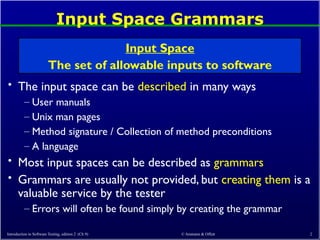
Input Space Grammars
• The input space can be described in many ways
– User manuals
– Unix man pages
– Method signature / Collection of method preconditions
– A language
• Most input spaces can be described as grammars
• Grammars are usually not provided, but creating them is a
valuable service by the tester
– Errors will often be found simply by creating the grammar
Input Space
The set of allowable inputs to software
Introduction to Software Testing, edition 2 (Ch 9)
- 3.
© Ammann &Offutt 3
Using Input Grammars
• Software should reject or handle invalid data
• Programs often do this incorrectly
• Some programs (rashly) assume all input data is correct
• Even if it works today …
– What about after the program goes through some maintenance
changes ?
– What about if the component is reused in a new program ?
• Consequences can be severe …
– The database can be corrupted
– Users are not satisfied
– Many security vulnerabilities are due to unhandled exceptions
… from invalid data
Introduction to Software Testing, edition 2 (Ch 9)
- 4.
© Ammann &Offutt 4
Validating Inputs
• Before starting to process inputs, wisely written programs
check that the inputs are valid
• How should a program recognize invalid inputs ?
• What should a program do with invalid inputs ?
• If the input space is described as a grammar, a parser can
check for validity automatically
– This is very rare
– It is easy to write input checkers—but also easy to make
mistakes
InputValidation
Deciding if input values can be processed by the
software
Introduction to Software Testing, edition 2 (Ch 9)
- 5.
© Ammann &Offutt 5
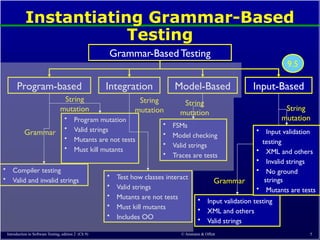
Instantiating Grammar-Based
Testing
Grammar-Based Testing
Program-based Integration Model-Based Input-Based
• Compiler testing
• Valid and invalid strings
Grammar
String
mutation
• Program mutation
• Valid strings
• Mutants are not tests
• Must kill mutants
• Input validation testing
• XML and others
• Valid strings
Grammar
• Test how classes interact
• Valid strings
• Mutants are not tests
• Must kill mutants
• Includes OO
String
mutation
• FSMs
• Model checking
• Valid strings
• Traces are tests
String
mutation
• Input validation
testing
• XML and others
• Invalid strings
• No ground
strings
• Mutants are tests
String
mutation
9.5
Introduction to Software Testing, edition 2 (Ch 9)
- 6.
Input Space BNFGrammars (9.5.1)
• Input spaces can be expressed in many forms
• A common way is to use some form of grammar
• We will look at three grammar-based ways to describe
input spaces
1. Regular expressions
2. BNF grammars
3. XML and Schema
• All are similar and can be used in different contexts
Introduction to Software Testing, edition 2 (Ch 9) © Ammann & Offutt 6
- 7.
© Ammann &Offutt 7
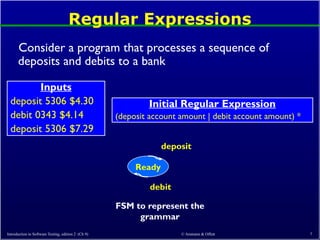
Regular Expressions
Consider a program that processes a sequence of
deposits and debits to a bank
Inputs
deposit 5306 $4.30
debit 0343 $4.14
deposit 5306 $7.29
Initial Regular Expression
(deposit account amount | debit account amount) *
Ready
deposit
debit
FSM to represent the
grammar
Introduction to Software Testing, edition 2 (Ch 9)
- 8.
© Ammann &Offutt 8
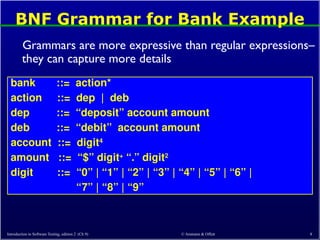
BNF Grammar for Bank Example
Grammars are more expressive than regular expressions–
they can capture more details
bank ::= action*
action ::= dep | deb
dep ::= “deposit” account amount
deb ::= “debit” account amount
account ::= digit4
amount ::= “$” digit+
“.” digit2
digit ::= “0” | “1” | “2” | “3” | “4” | “5” | “6” |
“7” | “8” | “9”
Introduction to Software Testing, edition 2 (Ch 9)
- 9.
© Ammann &Offutt 9
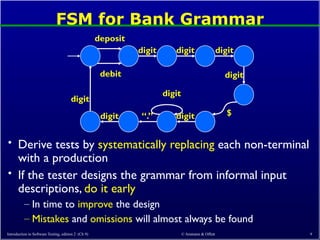
FSM for Bank Grammar
• Derive tests by systematically replacing each non-terminal
with a production
• If the tester designs the grammar from informal input
descriptions, do it early
– In time to improve the design
– Mistakes and omissions will almost always be found
deposit
debit
digit
digit
digit
digit
“.”
digit
digit
digit
$
digit
Introduction to Software Testing, edition 2 (Ch 9)
- 10.
© Ammann &Offutt 10
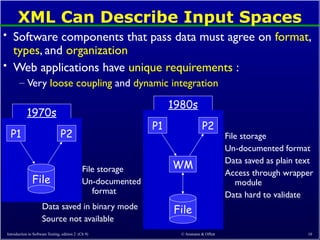
XML Can Describe Input Spaces
• Software components that pass data must agree on format,
types, and organization
• Web applications have unique requirements :
– Very loose coupling and dynamic integration
1970s
style
P1 P2
File
File storage
Un-documented
format
Data saved in binary mode
Source not available
1980s
style
P1 P2
File
WM
File storage
Un-documented format
Data saved as plain text
Access through wrapper
module
Data hard to validate
Introduction to Software Testing, edition 2 (Ch 9)
- 11.
© Ammann &Offutt 11
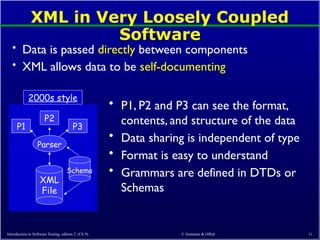
XML in Very Loosely Coupled
Software
• Data is passed directly between components
• XML allows data to be self-documenting
• P1, P2 and P3 can see the format,
contents, and structure of the data
• Data sharing is independent of type
• Format is easy to understand
• Grammars are defined in DTDs or
Schemas
2000s style
Schema
P1
P2
Parser
XML
File
P3
Introduction to Software Testing, edition 2 (Ch 9)
- 12.
© Ammann &Offutt 12
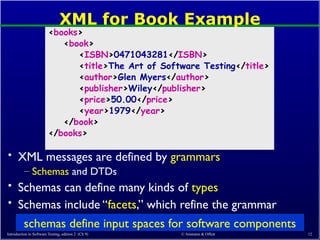
XML for Book Example
• XML messages are defined by grammars
– Schemas and DTDs
• Schemas can define many kinds of types
• Schemas include “facets,” which refine the grammar
<books>
<book>
<ISBN>0471043281</ISBN>
<title>The Art of Software Testing</title>
<author>Glen Myers</author>
<publisher>Wiley</publisher>
<price>50.00</price>
<year>1979</year>
</book>
</books>
Introduction to Software Testing, edition 2 (Ch 9)
schemas define input spaces for software components
- 13.
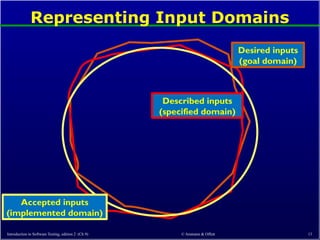
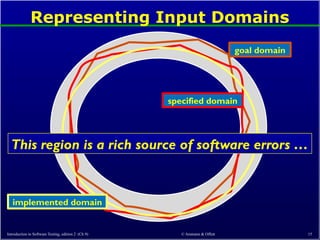
Representing Input Domains
Introductionto Software Testing, edition 2 (Ch 9) © Ammann & Offutt 13
Desired inputs
(goal domain)
Described inputs
(specified domain)
Accepted inputs
(implemented domain)
- 14.
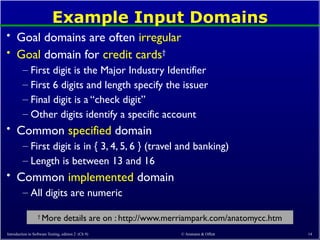
Example Input Domains
•Goal domains are often irregular
• Goal domain for credit cards†
– First digit is the Major Industry Identifier
– First 6 digits and length specify the issuer
– Final digit is a “check digit”
– Other digits identify a specific account
• Common specified domain
– First digit is in { 3, 4, 5, 6 } (travel and banking)
– Length is between 13 and 16
• Common implemented domain
– All digits are numeric
Introduction to Software Testing, edition 2 (Ch 9) © Ammann & Offutt 14
†
More details are on : http://www.merriampark.com/anatomycc.htm
- 15.
Representing Input Domains
Introductionto Software Testing, edition 2 (Ch 9) © Ammann & Offutt 15
goal domain
specified domain
implemented domain
This region is a rich source of software errors …
- 16.
Using Grammars toDesign Tests
• This form of testing allows us to focus on interactions
among the components
– Originally applied toWeb services, which depend on XML
• A formal model of the XML grammar is used
• The grammar is used to create valid as well as invalid
tests
• The grammar is mutated
• The mutated grammar is used to generate new XML
messages
• The XML messages are used as test cases
Introduction to Software Testing, edition 2 (Ch 9) © Ammann & Offutt 16
- 17.
© Ammann &Offutt 17
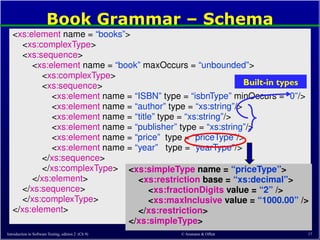
Book Grammar – Schema
<xs:element name = “books”>
<xs:complexType>
<xs:sequence>
<xs:element name = “book” maxOccurs = “unbounded”>
<xs:complexType>
<xs:sequence>
<xs:element name = “ISBN” type = “isbnType” minOccurs = “0”/>
<xs:element name = “author” type = “xs:string”/>
<xs:element name = “title” type = “xs:string”/>
<xs:element name = “publisher” type = “xs:string”/>
<xs:element name = “price” type = “priceType”/>
<xs:element name = “year” type = “yearType”/>
</xs:sequence>
</xs:complexType>
</xs:element>
</xs:sequence>
</xs:complexType>
</xs:element>
<xs:simpleType name = “priceType”>
<xs:restriction base = “xs:decimal”>
<xs:fractionDigits value = “2” />
<xs:maxInclusive value = “1000.00” />
</xs:restriction>
</xs:simpleType>
Introduction to Software Testing, edition 2 (Ch 9)
Built-in types
- 18.
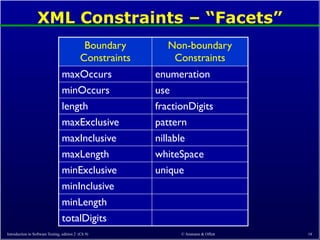
XML Constraints –“Facets”
Introduction to Software Testing, edition 2 (Ch 9) © Ammann & Offutt 18
Boundary
Constraints
Non-boundary
Constraints
maxOccurs enumeration
minOccurs use
length fractionDigits
maxExclusive pattern
maxInclusive nillable
maxLength whiteSpace
minExclusive unique
minInclusive
minLength
totalDigits
- 19.
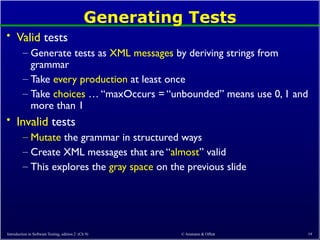
Generating Tests
• Validtests
– Generate tests as XML messages by deriving strings from
grammar
– Take every production at least once
– Take choices … “maxOccurs = “unbounded” means use 0, 1 and
more than 1
• Invalid tests
– Mutate the grammar in structured ways
– Create XML messages that are “almost” valid
– This explores the gray space on the previous slide
Introduction to Software Testing, edition 2 (Ch 9) © Ammann & Offutt 19
- 20.
© Ammann &Offutt 20
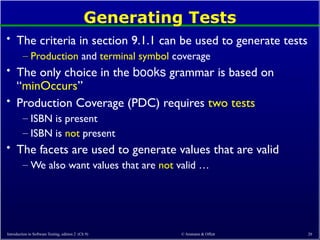
Generating Tests
• The criteria in section 9.1.1 can be used to generate tests
– Production and terminal symbol coverage
• The only choice in the books grammar is based on
“minOccurs”
• Production Coverage (PDC) requires two tests
– ISBN is present
– ISBN is not present
• The facets are used to generate values that are valid
– We also want values that are not valid …
Introduction to Software Testing, edition 2 (Ch 9)
- 21.
© Ammann &Offutt 21
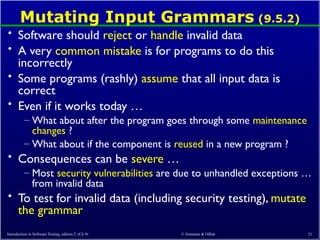
Mutating Input Grammars (9.5.2)
• Software should reject or handle invalid data
• A very common mistake is for programs to do this
incorrectly
• Some programs (rashly) assume that all input data is
correct
• Even if it works today …
– What about after the program goes through some maintenance
changes ?
– What about if the component is reused in a new program ?
• Consequences can be severe …
– Most security vulnerabilities are due to unhandled exceptions …
from invalid data
• To test for invalid data (including security testing), mutate
the grammar
Introduction to Software Testing, edition 2 (Ch 9)
- 22.
© Ammann &Offutt 22
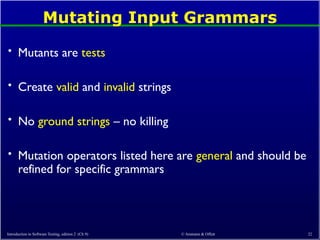
Mutating Input Grammars
• Mutants are tests
• Create valid and invalid strings
• No ground strings – no killing
• Mutation operators listed here are general and should be
refined for specific grammars
Introduction to Software Testing, edition 2 (Ch 9)
- 23.
© Ammann &Offutt 23
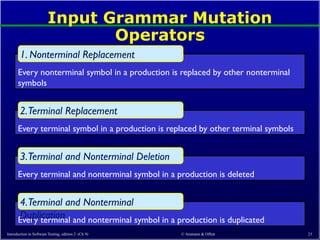
Input Grammar Mutation
Operators
Every nonterminal symbol in a production is replaced by other nonterminal
symbols
1. Nonterminal Replacement
Every terminal symbol in a production is replaced by other terminal symbols
2.Terminal Replacement
Every terminal and nonterminal symbol in a production is deleted
3.Terminal and Nonterminal Deletion
Every terminal and nonterminal symbol in a production is duplicated
4.Terminal and Nonterminal
Duplication
Introduction to Software Testing, edition 2 (Ch 9)
- 24.
© Ammann &Offutt 24
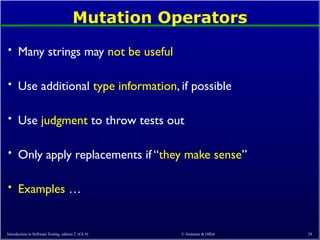
Mutation Operators
• Many strings may not be useful
• Use additional type information, if possible
• Use judgment to throw tests out
• Only apply replacements if “they make sense”
• Examples …
Introduction to Software Testing, edition 2 (Ch 9)
- 25.
© Ammann &Offutt 25
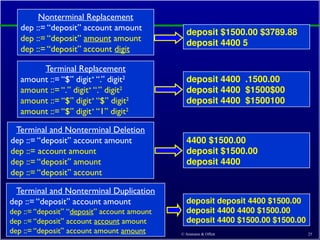
Nonterminal Replacement
dep ::= “deposit” account amount
dep ::= “deposit” amount amount
dep ::= “deposit” account digit
deposit $1500.00 $3789.88
deposit 4400 5
Terminal Replacement
amount ::= “$” digit+
“.” digit2
amount ::= “.” digit+
“.” digit2
amount ::= “$” digit+
“$” digit2
amount ::= “$” digit+
“1” digit2
deposit 4400 .1500.00
deposit 4400 $1500$00
deposit 4400 $1500100
Terminal and Nonterminal Deletion
dep ::= “deposit” account amount
dep ::= account amount
dep ::= “deposit” amount
dep ::= “deposit” account
4400 $1500.00
deposit $1500.00
deposit 4400
deposit deposit 4400 $1500.00
deposit 4400 4400 $1500.00
deposit 4400 $1500.00 $1500.00
Introduction to Software Testing, edition 2 (Ch 9)
Terminal and Nonterminal Duplication
dep ::= “deposit” account amount
dep ::= “deposit” “deposit” account amount
dep ::= “deposit” account account amount
dep ::= “deposit” account amount amount
- 26.
© Ammann &Offutt 26
Notes and Applications
• We have more experience with program-based mutation
than input grammar based mutation
– Operators are less “definitive”
• Applying mutation operators
– Mutate grammar, then derive strings
– Derive strings, mutate a derivation “in-process”
• Some mutants give strings in the original grammar
(equivalent)
– These strings can easily be recognized to be equivalent
Introduction to Software Testing, edition 2 (Ch 9)
- 27.
© Ammann &Offutt 27
Mutating XML
• XML schemas can be mutated
• If a schema does not exist, testers should derive one
– As usual, this will help find problems immediately
• Many programs validate messages against a grammar
– Software may still behave correctly, but testers must verify
• Programs are less likely to check all schema facets
– Mutating facets can lead to very effective tests
Introduction to Software Testing, edition 2 (Ch 9)
- 28.
© Ammann &Offutt 28
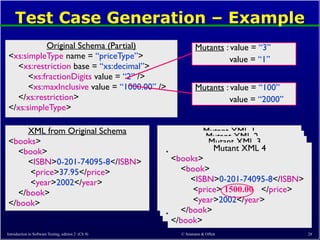
Test Case Generation – Example
Original Schema (Partial)
<xs:simpleType name = “priceType”>
<xs:restriction base = “xs:decimal”>
<xs:fractionDigits value = “2” />
<xs:maxInclusive value = “1000.00” />
</xs:restriction>
</xs:simpleType>
Mutants : value = “3”
value = “1”
Mutants : value = “100”
value = “2000”
XML from Original Schema
<books>
<book>
<ISBN>0-201-74095-8</ISBN>
<price>37.95</price>
<year>2002</year>
</book>
</book>
Mutant XML 1
<books>
<book>
<ISBN>0-201-74095-8</ISBN>
<price>37.95 </price>
<year>2002</year>
</book>
</book>
505
Mutant XML 2
<books>
<book>
<ISBN>0-201-74095-8</ISBN>
<price>37.95</price>
<year>2002</year>
</book>
</book>
5
Mutant XML 3
<books>
<book>
<ISBN>0-201-74095-8</ISBN>
<price>37.95 </price>
<year>2002</year>
</book>
</book>
99.00
Mutant XML 4
<books>
<book>
<ISBN>0-201-74095-8</ISBN>
<price>37.95 </price>
<year>2002</year>
</book>
</book>
1500.00
Introduction to Software Testing, edition 2 (Ch 9)
- 29.
© Ammann &Offutt 29
Input Space Grammars Summary
• This application of mutation is fairly new
• Automated tools do not exist
• Can be used by hand in an “ad-hoc” manner to get
effective tests
• Applications to special-purpose grammars very promising
– XML
– SQL
– HTML
Introduction to Software Testing, edition 2 (Ch 9)