Software Testing
Part I: Preliminaries
Aditya P. Mathur
Purdue University
July 20-24, 1998
@ Raytheon Technical Services Company
Indianapolis.
Graduate Assistants: Joao Cangussu
Sudipto Ghosh
Priya Govindrajan
Last update: July 15, 1998
Software Testing: Preliminaries 2
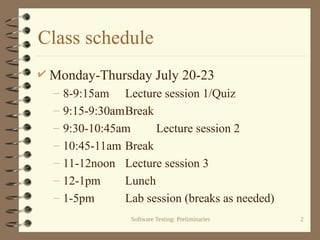
Class schedule
 Monday-Thursday July 20-23
– 8-9:15am Lecture session 1/Quiz
– 9:15-9:30amBreak
– 9:30-10:45am Lecture session 2
– 10:45-11am Break
– 11-12noon Lecture session 3
– 12-1pm Lunch
– 1-5pm Lab session (breaks as needed)
Software Testing: Preliminaries 3
Class schedule-continued
 Friday July 24
– 8-8:30am Review and Q&A
– 8:30-10am Final examination
– 10-10:15am Break
– 10:15-12noon SERT review
– 12-1pm Lunch
Software Testing: Preliminaries 4
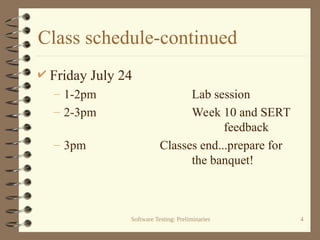
Class schedule-continued
 Friday July 24
– 1-2pm Lab session
– 2-3pm Week 10 and SERT
feedback
– 3pm Classes end...prepare for
the banquet!
Software Testing: Preliminaries 5
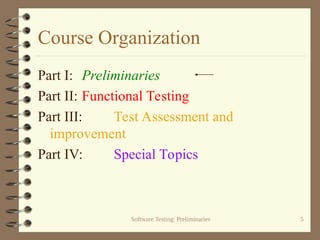
Course Organization
Part I: Preliminaries
Part II: Functional Testing
Part III: Test Assessment and
improvement
Part IV: Special Topics
Software Testing: Preliminaries 6
Text and supplementary reading
 The craft of software testing by Brian
Marick, Prentice Hall, 1995.
 Reading:
– A data-flow oriented program testing strategy,
J. W. Laski and B. Korel, IEEE Transactions on
Software Engineering, VOL. SE-9, NO. 3, May
1983, pp 347-354.
Software Testing: Preliminaries 7
Text and supplementary reading
– The combinatorial approach to automatic test
data generation, D. Cohen et al., IEEE
Software, VOL. 13, NO. 5, September 1996, pp
83-87.
– Comparing the error detection effectiveness of
mutation and data flow testing, in your notes,
part III.
Software Testing: Preliminaries 8
Text and supplementary reading
 Effect of test set minimization on the fault
detection effectiveness of the all-uses
criterion, in your notes, part III.
 Effect of test set size and block coverage on
the fault detection effectiveness, in your
notes, part III.
Software Testing: Preliminaries 9
Evaluation-Lectures
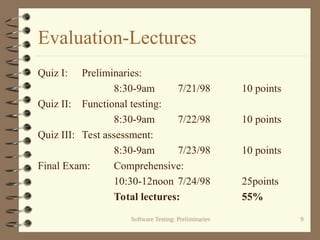
Quiz I: Preliminaries:
8:30-9am 7/21/98 10 points
Quiz II: Functional testing:
8:30-9am 7/22/98 10 points
Quiz III: Test assessment:
8:30-9am 7/23/98 10 points
Final Exam: Comprehensive:
10:30-12noon 7/24/98 25points
Total lectures: 55%
Software Testing: Preliminaries 10
Evaluation-Laboratories
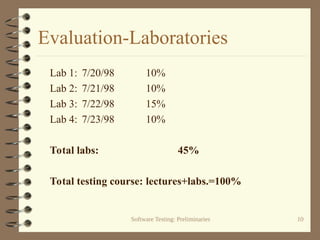
Lab 1: 7/20/98 10%
Lab 2: 7/21/98 10%
Lab 3: 7/22/98 15%
Lab 4: 7/23/98 10%
Total labs: 45%
Total testing course: lectures+labs.=100%
Software Testing: Preliminaries 11
Part I: Preliminaries
Learning Objectives
 What is testing? How does it differ from
verification?
 How and why does testing improve our
confidence in program correctness?
 What is coverage and what role does it play in
testing?
 What are the different types of testing?
Software Testing: Preliminaries 12
Testing: Preliminaries
 What is testing?
– The act of checking if a part or a product
performs as expected.
 Why test?
– Gain confidence in the correctness of a part or a
product.
– Check if there are any errors in a part or a
product.
Software Testing: Preliminaries 13
What to test?
 During software lifecycle several products
are generated.
 Examples:
– Requirements document
– Design document
– Software subsystems
– Software system
Software Testing: Preliminaries 14
Test all!
 Each of these products needs testing.
 Methods for testing various products are
different.
 Examples:
– Test a requirements document using scenario
construction and simulation
– Test a design document using simulation.
– Test a subsystem using functional testing.
Software Testing: Preliminaries 15
What is our focus?
 We focus on testing programs.
 Programs may be subsystems or complete
systems.
 These are written in a formal programming
language.
 There is a large collection of techniques and
tools to test programs.
Software Testing: Preliminaries 16
Few basic terms
 Program:
– A collection of functions, as in C, or a
collection of classes as in java.
 Specification
– Description of requirements for a program. This
might be formal or informal.
Software Testing: Preliminaries 17
Few basic terms-continued
 Test case or test input
– A set of values of input variables of a program.
Values of environment variables are also
included.
 Test set
– Set of test inputs
 Program execution
– Execution of a program on a test input.
Software Testing: Preliminaries 18
Few basic terms-continued
 Oracle
– A function that determines whether or not the
results of executing a program under test is as
per the program’s specifications.
Software Testing: Preliminaries 19
Correctness
 Let P be a program (say, an integer sort
program).
 Let S denote the specification for P.
 For sort let S be:
Software Testing: Preliminaries 20
Sample Specification
– P takes as input an integer N>0 and a sequence
of N integers called elements of the sequence.
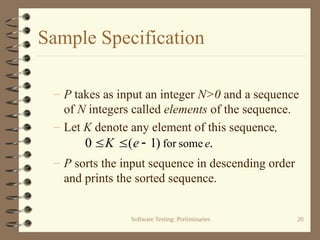
– Let K denote any element of this sequence,
– P sorts the input sequence in descending order
and prints the sorted sequence.
.
)
1
(
0 some
for e
e
K 


Software Testing: Preliminaries 21
Correctness again
 P is considered correct with respect to a
specification S if and only if:
– For each valid input the output of P is in
accordance with the specification S.
Software Testing: Preliminaries 22
Errors, defects, faults
 Error: A mistake made by a programmer
Example: Misunderstood the requirements.
 Defect/fault: Manifestation of an error in a
program.
Example:
Incorrect code: if (a<b) {foo(a,b);}
Correct code: if (a>b) {foo(a,b);}
Software Testing: Preliminaries 23
Failure
 Incorrect program behavior due to a fault in
the program.
 Failure can be determined only with respect
to a set of requirement specifications.
 A necessary condition for a failure to occur is
that execution of the program force the
erroneous portion of the program to be
executed. What is the sufficiency condition?
Software Testing: Preliminaries 24
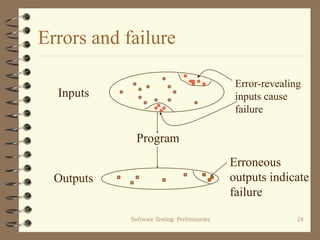
Errors and failure
Program
Inputs
Error-revealing
inputs cause
failure
Outputs
Erroneous
outputs indicate
failure
Software Testing: Preliminaries 25
Debugging
 Suppose that a failure is detected during the
testing of P.
 The process of finding and removing the cause
of this failure is known as debugging.
 The word bug is slang for fault.
 Testing usually leads to debugging
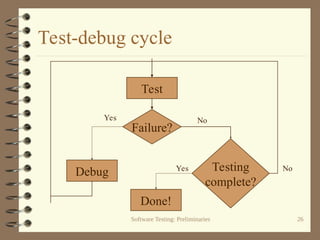
 Testing and debugging usually happen in a
cycle.
Software Testing: Preliminaries 26
Test-debug cycle
Test
Debug
Failure?
Testing
complete?
Done!
Yes No
Yes No
Software Testing: Preliminaries 27
Testing and code inspection
 Code inspection is a technique whereby the
source code is inspected for possible errors.
 Code inspection is generally considered
complementary to testing. Neither is more
important than the other!
 One is not likely to replace testing by code
inspection or by verification.
Software Testing: Preliminaries 28
Testing for correctness?
 Identify the input domain of P.
 Execute P against each element of the input
domain.
 For each execution of P, check if P
generates the correct output as per its
specification S.
Software Testing: Preliminaries 29
What is an input domain ?
 Input domain of a program P is the set of all
valid inputs that P can expect.
 The size of an input domain is the number
of elements in it.
 An input domain could be finite or infinite.
 Finite input domains might be very large!
Software Testing: Preliminaries 30
Identifying the input domain
 For the sort program:
N: size of the sequence, K: each element of
the sequence.
– Example: For N<3, e=3, some sequences in the
input domain are:
[ ]: An empty sequence (N=0).
[0]: A sequence of size 1 (N=1)
[2 1]: A sequence of size 2 (N=2).
Software Testing: Preliminaries 31
Size of an input domain
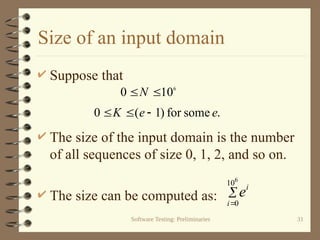
 Suppose that
 The size of the input domain is the number
of all sequences of size 0, 1, 2, and so on.
 The size can be computed as:
6
10
0 
N
.
some
for
)
1
(
0 e
e
K 




6
10
0
i
i
e
Software Testing: Preliminaries 32
Testing for correctness? Sorry!
 To test for correctness P needs to be
executed on all inputs.
 For our example, it will take several light
years to execute a program on all inputs on
the most powerful computers of today!
Software Testing: Preliminaries 33
Exhaustive Testing
 This form of testing is also known as
exhaustive testing as we execute P on all
elements of the input domain.
 For most programs exhaustive testing is not
feasible.
 What is the alternative?
Software Testing: Preliminaries 34
Verification
 Verification for correctness is different
from testing for correctness.
 There are techniques for program
verification which we will not discuss.
Software Testing: Preliminaries 35
Partition Testing
 In this form of testing the input domain is
partitioned into a finite number of sub-
domains.
 P is then executed on a few elements of
each sub-domain.
 Let us go back to the sort program.
Software Testing: Preliminaries 36
Sub-domains
 Suppose that and e=3. The size of
the partitions is :
 We can divide the input
domain into three
sub-domains as shown.
13
3
3
3
3 2
1
0
2
0






i
i
2
0 
N
1
2
3
0

N 2

N
1

N
Software Testing: Preliminaries 37
Fewer test inputs
 Now sort can be tested on one element
selected from each domain.
 For example, one set of three inputs is:
[ ] Empty sequence from sub-domain 1.
[2] Sequence from sub-domain 2.
[2 0] Sequence from sub-domain 3.
 We have thus reduced the number of inputs
used for testing from 13 to 3!
Software Testing: Preliminaries 38
Confidence in your program
 Confidence is a measure of one’s belief in
the correctness of the program.
 Correctness is not measured in binary
terms: a correct or an incorrect program.
 Instead, it is measured as the probability of
correct operation of a program when used in
various scenarios.
Software Testing: Preliminaries 39
Measures of confidence
 Reliability: Probability that a program will
function correctly in a given environment
over a certain number of executions.
We do not plan to cover Reliability.
 Test completeness: The extent to which a
program has been tested and errors found
have been removed.
Software Testing: Preliminaries 40
Example: Increase in Confidence
 We consider a non-programming example
to illustrate what is meant by “increase in
confidence.”
 Example: A rectangular field has been
prepared to certain specifications.
– One item in the specifications is:
“There should be no stones remaining in the field.”
Software Testing: Preliminaries 41
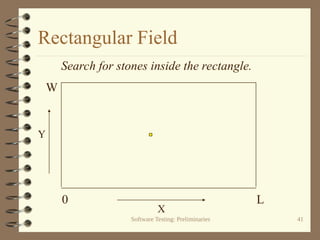
Rectangular Field
X
Y
Search for stones inside the rectangle.
0 L
W
Software Testing: Preliminaries 42
Organizing the search
 We divide the entire field into smaller
search rectangles.
 The length and breadth of each search
rectangle is one half that of the smallest
stone.
Software Testing: Preliminaries 43
Testing the rectangular field
 The field has been prepared and our task is
to test it to make sure that it has no stones.
 How should we organize our search?
Software Testing: Preliminaries 44
Partitioning the field
 We divide the entire field into smaller
search rectangles.
 The length and breadth of each search
rectangle is one half that of the smallest
stone.
Software Testing: Preliminaries 45
Partitioning into search
rectangles
1 2 3 4 5 6 7
1
2
3
4
5
6
7
8
X
Y
Stone
Width
Length
Software Testing: Preliminaries 46
Input domain
 Input domain is the set of all possible inputs
to the search process.
 In our example this is the set of all points in
the field. Thus, the input domain is infinite!
 To reduce the size of the input domain we
partition the field into finite size rectangles.
Software Testing: Preliminaries 47
Rectangle size
 The length and breadth of each search
rectangle is one half that of the smallest
stone.
 This ensures that each stone covers at least
one rectangle. (Is this always true?)
Software Testing: Preliminaries 48
Constraints
 Testing must be completed in less than H
hours.
 Any stone found during testing is removed.
 Upon completion of testing the probability
of finding a stone must be less than p.
Software Testing: Preliminaries 49
Number of search rectangles
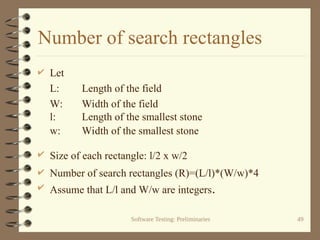
 Let
L: Length of the field
W: Width of the field
l: Length of the smallest stone
w: Width of the smallest stone
 Size of each rectangle: l/2 x w/2
 Number of search rectangles (R)=(L/l)*(W/w)*4
 Assume that L/l and W/w are integers.
Software Testing: Preliminaries 50
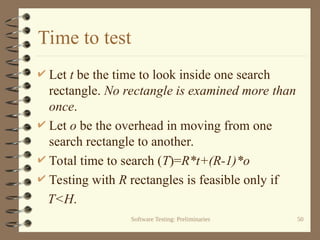
Time to test
 Let t be the time to look inside one search
rectangle. No rectangle is examined more than
once.
 Let o be the overhead in moving from one
search rectangle to another.
 Total time to search (T)=R*t+(R-1)*o
 Testing with R rectangles is feasible only if
T<H.
Software Testing: Preliminaries 51
Partitioning the input domain
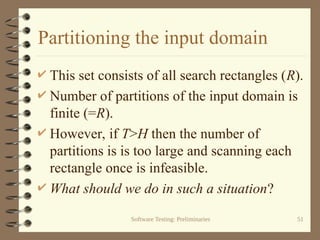
 This set consists of all search rectangles (R).
 Number of partitions of the input domain is
finite (=R).
 However, if T>H then the number of
partitions is is too large and scanning each
rectangle once is infeasible.
 What should we do in such a situation?
Software Testing: Preliminaries 52
Option 1: Do a limited search
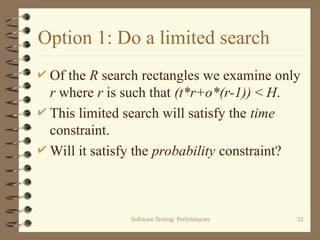
 Of the R search rectangles we examine only
r where r is such that (t*r+o*(r-1)) < H.
 This limited search will satisfy the time
constraint.
 Will it satisfy the probability constraint?
Software Testing: Preliminaries 53
Distribution of stones
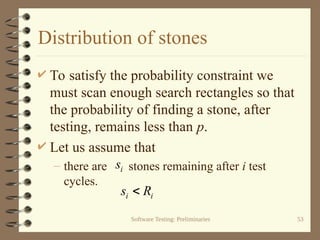
 To satisfy the probability constraint we
must scan enough search rectangles so that
the probability of finding a stone, after
testing, remains less than p.
 Let us assume that
– there are stones remaining after i test
cycles.
i
s
i
i R
s 
Software Testing: Preliminaries 54
Distribution of stones
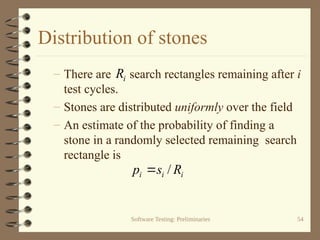
– There are search rectangles remaining after i
test cycles.
– Stones are distributed uniformly over the field
– An estimate of the probability of finding a
stone in a randomly selected remaining search
rectangle is
i
i
i R
s
p /

i
R
Software Testing: Preliminaries 55
Probability constraint
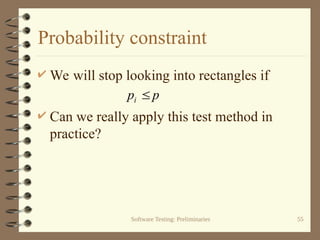
 We will stop looking into rectangles if
 Can we really apply this test method in
practice?
p
pi 
Software Testing: Preliminaries 56
Confidence
 Number of stones in the field is not known in
advance.
 Hence we cannot compute the probability of
finding a stone after a certain number of
rectangles have been examined.
 The best we can do is to scan as many
rectangles as we can and remove the stones
found.
Software Testing: Preliminaries 57
Coverage
 After a rectangle has been scanned for a
stone and any stone found has been
removed, we say that the rectangle has been
covered.
 Suppose that r rectangles have been
scanned from a total of R. Then we say that
the coverage is r/R.
Software Testing: Preliminaries 58
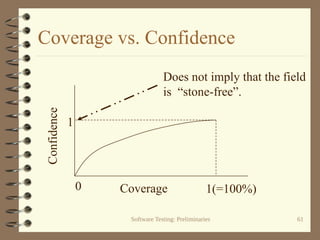
Coverage and confidence
 What happens when coverage increases?
As coverage increases so does our
confidence in a “stone-free” field.
 In this example, when the coverage reaches
100%, all stones have been found and
removed. Can you think of a situation when
this might not be true?
Software Testing: Preliminaries 59
Option 2: Reduce number of partitions
 If the number of rectangles to scan is too
large, we can increase the size of a
rectangle. This reduces the number of
rectangles.
 Increasing the size of a rectangle also
implies that there might be more than one
stone within a rectangle.
Software Testing: Preliminaries 60
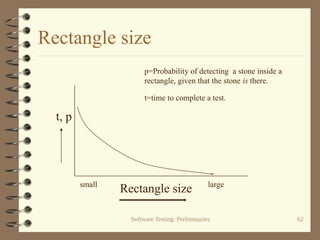
Rectangle size
 As a stone may now be smaller than a
rectangle, detecting a stone inside a
rectangle is not guaranteed.
 Despite this fact our confidence in a “stone-
free” field increases with coverage.
 However, when the coverage reaches100%
we cannot guarantee a “stone-free” field.
Software Testing: Preliminaries 61
Coverage vs. Confidence
Coverage
Confidence
1(=100%)
1
0
Does not imply that the field
is “stone-free”.
Software Testing: Preliminaries 62
Rectangle size
Rectangle size
p=Probability of detecting a stone inside a
rectangle, given that the stone is there.
t=time to complete a test.
small large
t, p
Software Testing: Preliminaries 63
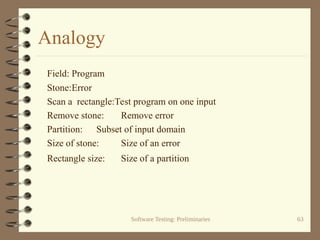
Analogy
Field: Program
Stone:Error
Scan a rectangle:Test program on one input
Remove stone: Remove error
Partition: Subset of input domain
Size of stone: Size of an error
Rectangle size: Size of a partition
Software Testing: Preliminaries 64
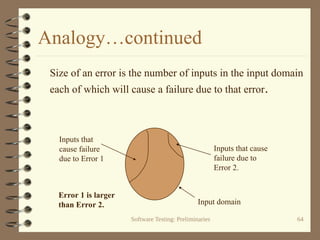
Analogy…continued
Size of an error is the number of inputs in the input domain
each of which will cause a failure due to that error.
Inputs that
cause failure
due to Error 1
Inputs that cause
failure due to
Error 2.
Error 1 is larger
than Error 2. Input domain
Software Testing: Preliminaries 65
Confidence and probability
 Increase in coverage increases our
confidence in a “stone-free” field.
 It might not increase the probability that the
field is “stone-free”.
 Important: Increase in confidence is NOT
justified if detected stones are not
guaranteed to be removed!
Software Testing: Preliminaries 66
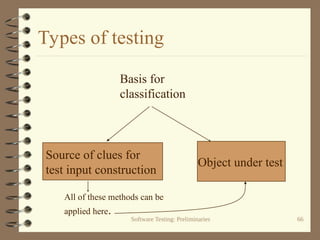
Types of testing
Source of clues for
test input construction
Object under test
Basis for
classification
All of these methods can be
applied here.
Software Testing: Preliminaries 67
Testing: based on source of test inputs
 Functional testing/specification
testing/black-box testing/conformance
testing:
– Clues for test input generation come from
requirements.
 White-box testing/coverage testing/code-
based testing
– Clues come from program text.
Software Testing: Preliminaries 68
Testing: based on source of test inputs
 Stress testing
– Clues come from “load” requirements. For
example, a telephone system must be able to
handle 1000 calls over any 1-minute interval.
What happens when the system is loaded or
overloaded?
Software Testing: Preliminaries 69
Testing: based on source of test inputs
 Performance testing
– Clues come from performance requirements. For
example, each call must be processed in less than
5 seconds. Does the system process each call in
less than 5 seconds?
 Fault- or error- based testing
– Clues come from the faults that are injected into
the program text or are hypothesized to be in the
program.
Software Testing: Preliminaries 70
Testing: based on source of test inputs
 Random testing
– Clues come from requirements. Test are
generated randomly using these clues.
 Robustness testing
– Clues come from requirements. The goal is to
test a program under scenarios not stipulated in
the requirements.
Software Testing: Preliminaries 71
Testing: based on source of test inputs
 OO testing
– Clues come from the requirements and the
design of an OO-program.
 Protocol testing
– Clues come from the specification of a protocol.
As, for example, when testing for a
communication protocol.
Software Testing: Preliminaries 72
Testing: based on item under test
 Unit testing
Testing of a program unit. A unit is the smallest
testable piece of a program. One or more units
form a subsystem.
 Subsystem testing
– Testing of a subsystem. A subsystem is a
collection of units that cooperate to provide a
part of system functionality
Software Testing: Preliminaries 73
Testing: based on item under test
 Integration testing
– Testing of subsystems that are being integrated
to form a larger subsystem or a complete
system.
 System testing
– Testing of a complete system.
Software Testing: Preliminaries 74
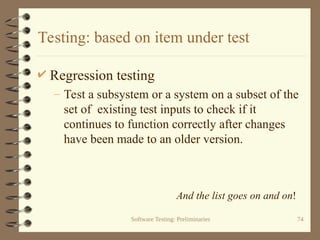
Testing: based on item under test
 Regression testing
– Test a subsystem or a system on a subset of the
set of existing test inputs to check if it
continues to function correctly after changes
have been made to an older version.
And the list goes on and on!
Software Testing: Preliminaries 75
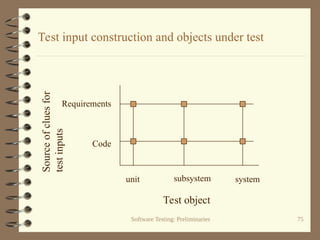
Test input construction and objects under test
Test object
Source
of
clues
for
test
inputs
unit subsystem system
Requirements
Code
Software Testing: Preliminaries 76
Summary: Terms
 Testing and debugging
 Specification
 Correctness
 Input domain
 Exhaustive testing
 Confidence
Software Testing: Preliminaries 77
Summary: Terms
 Reliability
 Coverage
 Error, defect, fault, failure
 Debugging, test-debug cycle
 Types of testing, basis for classification
Software Testing: Preliminaries 78
Summary: Questions
 What is the effect of reducing the partition
size on probability of finding errors?
 How does coverage effect our confidence in
program correctness?
 Does 100% coverage imply that a program
is fault-free?
 What decides the type of testing?
preliminaries-raytheon.ppt introductione

  • 1.
    Software Testing Part I:Preliminaries Aditya P. Mathur Purdue University July 20-24, 1998 @ Raytheon Technical Services Company Indianapolis. Graduate Assistants: Joao Cangussu Sudipto Ghosh Priya Govindrajan Last update: July 15, 1998
  • 2.
    Software Testing: Preliminaries2 Class schedule  Monday-Thursday July 20-23 – 8-9:15am Lecture session 1/Quiz – 9:15-9:30amBreak – 9:30-10:45am Lecture session 2 – 10:45-11am Break – 11-12noon Lecture session 3 – 12-1pm Lunch – 1-5pm Lab session (breaks as needed)
  • 3.
    Software Testing: Preliminaries3 Class schedule-continued  Friday July 24 – 8-8:30am Review and Q&A – 8:30-10am Final examination – 10-10:15am Break – 10:15-12noon SERT review – 12-1pm Lunch
  • 4.
    Software Testing: Preliminaries4 Class schedule-continued  Friday July 24 – 1-2pm Lab session – 2-3pm Week 10 and SERT feedback – 3pm Classes end...prepare for the banquet!
  • 5.
    Software Testing: Preliminaries5 Course Organization Part I: Preliminaries Part II: Functional Testing Part III: Test Assessment and improvement Part IV: Special Topics
  • 6.
    Software Testing: Preliminaries6 Text and supplementary reading  The craft of software testing by Brian Marick, Prentice Hall, 1995.  Reading: – A data-flow oriented program testing strategy, J. W. Laski and B. Korel, IEEE Transactions on Software Engineering, VOL. SE-9, NO. 3, May 1983, pp 347-354.
  • 7.
    Software Testing: Preliminaries7 Text and supplementary reading – The combinatorial approach to automatic test data generation, D. Cohen et al., IEEE Software, VOL. 13, NO. 5, September 1996, pp 83-87. – Comparing the error detection effectiveness of mutation and data flow testing, in your notes, part III.
  • 8.
    Software Testing: Preliminaries8 Text and supplementary reading  Effect of test set minimization on the fault detection effectiveness of the all-uses criterion, in your notes, part III.  Effect of test set size and block coverage on the fault detection effectiveness, in your notes, part III.
  • 9.
    Software Testing: Preliminaries9 Evaluation-Lectures Quiz I: Preliminaries: 8:30-9am 7/21/98 10 points Quiz II: Functional testing: 8:30-9am 7/22/98 10 points Quiz III: Test assessment: 8:30-9am 7/23/98 10 points Final Exam: Comprehensive: 10:30-12noon 7/24/98 25points Total lectures: 55%
  • 10.
    Software Testing: Preliminaries10 Evaluation-Laboratories Lab 1: 7/20/98 10% Lab 2: 7/21/98 10% Lab 3: 7/22/98 15% Lab 4: 7/23/98 10% Total labs: 45% Total testing course: lectures+labs.=100%
  • 11.
    Software Testing: Preliminaries11 Part I: Preliminaries Learning Objectives  What is testing? How does it differ from verification?  How and why does testing improve our confidence in program correctness?  What is coverage and what role does it play in testing?  What are the different types of testing?
  • 12.
    Software Testing: Preliminaries12 Testing: Preliminaries  What is testing? – The act of checking if a part or a product performs as expected.  Why test? – Gain confidence in the correctness of a part or a product. – Check if there are any errors in a part or a product.
  • 13.
    Software Testing: Preliminaries13 What to test?  During software lifecycle several products are generated.  Examples: – Requirements document – Design document – Software subsystems – Software system
  • 14.
    Software Testing: Preliminaries14 Test all!  Each of these products needs testing.  Methods for testing various products are different.  Examples: – Test a requirements document using scenario construction and simulation – Test a design document using simulation. – Test a subsystem using functional testing.
  • 15.
    Software Testing: Preliminaries15 What is our focus?  We focus on testing programs.  Programs may be subsystems or complete systems.  These are written in a formal programming language.  There is a large collection of techniques and tools to test programs.
  • 16.
    Software Testing: Preliminaries16 Few basic terms  Program: – A collection of functions, as in C, or a collection of classes as in java.  Specification – Description of requirements for a program. This might be formal or informal.
  • 17.
    Software Testing: Preliminaries17 Few basic terms-continued  Test case or test input – A set of values of input variables of a program. Values of environment variables are also included.  Test set – Set of test inputs  Program execution – Execution of a program on a test input.
  • 18.
    Software Testing: Preliminaries18 Few basic terms-continued  Oracle – A function that determines whether or not the results of executing a program under test is as per the program’s specifications.
  • 19.
    Software Testing: Preliminaries19 Correctness  Let P be a program (say, an integer sort program).  Let S denote the specification for P.  For sort let S be:
  • 20.
    Software Testing: Preliminaries20 Sample Specification – P takes as input an integer N>0 and a sequence of N integers called elements of the sequence. – Let K denote any element of this sequence, – P sorts the input sequence in descending order and prints the sorted sequence. . ) 1 ( 0 some for e e K   
  • 21.
    Software Testing: Preliminaries21 Correctness again  P is considered correct with respect to a specification S if and only if: – For each valid input the output of P is in accordance with the specification S.
  • 22.
    Software Testing: Preliminaries22 Errors, defects, faults  Error: A mistake made by a programmer Example: Misunderstood the requirements.  Defect/fault: Manifestation of an error in a program. Example: Incorrect code: if (a<b) {foo(a,b);} Correct code: if (a>b) {foo(a,b);}
  • 23.
    Software Testing: Preliminaries23 Failure  Incorrect program behavior due to a fault in the program.  Failure can be determined only with respect to a set of requirement specifications.  A necessary condition for a failure to occur is that execution of the program force the erroneous portion of the program to be executed. What is the sufficiency condition?
  • 24.
    Software Testing: Preliminaries24 Errors and failure Program Inputs Error-revealing inputs cause failure Outputs Erroneous outputs indicate failure
  • 25.
    Software Testing: Preliminaries25 Debugging  Suppose that a failure is detected during the testing of P.  The process of finding and removing the cause of this failure is known as debugging.  The word bug is slang for fault.  Testing usually leads to debugging  Testing and debugging usually happen in a cycle.
  • 26.
    Software Testing: Preliminaries26 Test-debug cycle Test Debug Failure? Testing complete? Done! Yes No Yes No
  • 27.
    Software Testing: Preliminaries27 Testing and code inspection  Code inspection is a technique whereby the source code is inspected for possible errors.  Code inspection is generally considered complementary to testing. Neither is more important than the other!  One is not likely to replace testing by code inspection or by verification.
  • 28.
    Software Testing: Preliminaries28 Testing for correctness?  Identify the input domain of P.  Execute P against each element of the input domain.  For each execution of P, check if P generates the correct output as per its specification S.
  • 29.
    Software Testing: Preliminaries29 What is an input domain ?  Input domain of a program P is the set of all valid inputs that P can expect.  The size of an input domain is the number of elements in it.  An input domain could be finite or infinite.  Finite input domains might be very large!
  • 30.
    Software Testing: Preliminaries30 Identifying the input domain  For the sort program: N: size of the sequence, K: each element of the sequence. – Example: For N<3, e=3, some sequences in the input domain are: [ ]: An empty sequence (N=0). [0]: A sequence of size 1 (N=1) [2 1]: A sequence of size 2 (N=2).
  • 31.
    Software Testing: Preliminaries31 Size of an input domain  Suppose that  The size of the input domain is the number of all sequences of size 0, 1, 2, and so on.  The size can be computed as: 6 10 0  N . some for ) 1 ( 0 e e K      6 10 0 i i e
  • 32.
    Software Testing: Preliminaries32 Testing for correctness? Sorry!  To test for correctness P needs to be executed on all inputs.  For our example, it will take several light years to execute a program on all inputs on the most powerful computers of today!
  • 33.
    Software Testing: Preliminaries33 Exhaustive Testing  This form of testing is also known as exhaustive testing as we execute P on all elements of the input domain.  For most programs exhaustive testing is not feasible.  What is the alternative?
  • 34.
    Software Testing: Preliminaries34 Verification  Verification for correctness is different from testing for correctness.  There are techniques for program verification which we will not discuss.
  • 35.
    Software Testing: Preliminaries35 Partition Testing  In this form of testing the input domain is partitioned into a finite number of sub- domains.  P is then executed on a few elements of each sub-domain.  Let us go back to the sort program.
  • 36.
    Software Testing: Preliminaries36 Sub-domains  Suppose that and e=3. The size of the partitions is :  We can divide the input domain into three sub-domains as shown. 13 3 3 3 3 2 1 0 2 0       i i 2 0  N 1 2 3 0  N 2  N 1  N
  • 37.
    Software Testing: Preliminaries37 Fewer test inputs  Now sort can be tested on one element selected from each domain.  For example, one set of three inputs is: [ ] Empty sequence from sub-domain 1. [2] Sequence from sub-domain 2. [2 0] Sequence from sub-domain 3.  We have thus reduced the number of inputs used for testing from 13 to 3!
  • 38.
    Software Testing: Preliminaries38 Confidence in your program  Confidence is a measure of one’s belief in the correctness of the program.  Correctness is not measured in binary terms: a correct or an incorrect program.  Instead, it is measured as the probability of correct operation of a program when used in various scenarios.
  • 39.
    Software Testing: Preliminaries39 Measures of confidence  Reliability: Probability that a program will function correctly in a given environment over a certain number of executions. We do not plan to cover Reliability.  Test completeness: The extent to which a program has been tested and errors found have been removed.
  • 40.
    Software Testing: Preliminaries40 Example: Increase in Confidence  We consider a non-programming example to illustrate what is meant by “increase in confidence.”  Example: A rectangular field has been prepared to certain specifications. – One item in the specifications is: “There should be no stones remaining in the field.”
  • 41.
    Software Testing: Preliminaries41 Rectangular Field X Y Search for stones inside the rectangle. 0 L W
  • 42.
    Software Testing: Preliminaries42 Organizing the search  We divide the entire field into smaller search rectangles.  The length and breadth of each search rectangle is one half that of the smallest stone.
  • 43.
    Software Testing: Preliminaries43 Testing the rectangular field  The field has been prepared and our task is to test it to make sure that it has no stones.  How should we organize our search?
  • 44.
    Software Testing: Preliminaries44 Partitioning the field  We divide the entire field into smaller search rectangles.  The length and breadth of each search rectangle is one half that of the smallest stone.
  • 45.
    Software Testing: Preliminaries45 Partitioning into search rectangles 1 2 3 4 5 6 7 1 2 3 4 5 6 7 8 X Y Stone Width Length
  • 46.
    Software Testing: Preliminaries46 Input domain  Input domain is the set of all possible inputs to the search process.  In our example this is the set of all points in the field. Thus, the input domain is infinite!  To reduce the size of the input domain we partition the field into finite size rectangles.
  • 47.
    Software Testing: Preliminaries47 Rectangle size  The length and breadth of each search rectangle is one half that of the smallest stone.  This ensures that each stone covers at least one rectangle. (Is this always true?)
  • 48.
    Software Testing: Preliminaries48 Constraints  Testing must be completed in less than H hours.  Any stone found during testing is removed.  Upon completion of testing the probability of finding a stone must be less than p.
  • 49.
    Software Testing: Preliminaries49 Number of search rectangles  Let L: Length of the field W: Width of the field l: Length of the smallest stone w: Width of the smallest stone  Size of each rectangle: l/2 x w/2  Number of search rectangles (R)=(L/l)*(W/w)*4  Assume that L/l and W/w are integers.
  • 50.
    Software Testing: Preliminaries50 Time to test  Let t be the time to look inside one search rectangle. No rectangle is examined more than once.  Let o be the overhead in moving from one search rectangle to another.  Total time to search (T)=R*t+(R-1)*o  Testing with R rectangles is feasible only if T<H.
  • 51.
    Software Testing: Preliminaries51 Partitioning the input domain  This set consists of all search rectangles (R).  Number of partitions of the input domain is finite (=R).  However, if T>H then the number of partitions is is too large and scanning each rectangle once is infeasible.  What should we do in such a situation?
  • 52.
    Software Testing: Preliminaries52 Option 1: Do a limited search  Of the R search rectangles we examine only r where r is such that (t*r+o*(r-1)) < H.  This limited search will satisfy the time constraint.  Will it satisfy the probability constraint?
  • 53.
    Software Testing: Preliminaries53 Distribution of stones  To satisfy the probability constraint we must scan enough search rectangles so that the probability of finding a stone, after testing, remains less than p.  Let us assume that – there are stones remaining after i test cycles. i s i i R s 
  • 54.
    Software Testing: Preliminaries54 Distribution of stones – There are search rectangles remaining after i test cycles. – Stones are distributed uniformly over the field – An estimate of the probability of finding a stone in a randomly selected remaining search rectangle is i i i R s p /  i R
  • 55.
    Software Testing: Preliminaries55 Probability constraint  We will stop looking into rectangles if  Can we really apply this test method in practice? p pi 
  • 56.
    Software Testing: Preliminaries56 Confidence  Number of stones in the field is not known in advance.  Hence we cannot compute the probability of finding a stone after a certain number of rectangles have been examined.  The best we can do is to scan as many rectangles as we can and remove the stones found.
  • 57.
    Software Testing: Preliminaries57 Coverage  After a rectangle has been scanned for a stone and any stone found has been removed, we say that the rectangle has been covered.  Suppose that r rectangles have been scanned from a total of R. Then we say that the coverage is r/R.
  • 58.
    Software Testing: Preliminaries58 Coverage and confidence  What happens when coverage increases? As coverage increases so does our confidence in a “stone-free” field.  In this example, when the coverage reaches 100%, all stones have been found and removed. Can you think of a situation when this might not be true?
  • 59.
    Software Testing: Preliminaries59 Option 2: Reduce number of partitions  If the number of rectangles to scan is too large, we can increase the size of a rectangle. This reduces the number of rectangles.  Increasing the size of a rectangle also implies that there might be more than one stone within a rectangle.
  • 60.
    Software Testing: Preliminaries60 Rectangle size  As a stone may now be smaller than a rectangle, detecting a stone inside a rectangle is not guaranteed.  Despite this fact our confidence in a “stone- free” field increases with coverage.  However, when the coverage reaches100% we cannot guarantee a “stone-free” field.
  • 61.
    Software Testing: Preliminaries61 Coverage vs. Confidence Coverage Confidence 1(=100%) 1 0 Does not imply that the field is “stone-free”.
  • 62.
    Software Testing: Preliminaries62 Rectangle size Rectangle size p=Probability of detecting a stone inside a rectangle, given that the stone is there. t=time to complete a test. small large t, p
  • 63.
    Software Testing: Preliminaries63 Analogy Field: Program Stone:Error Scan a rectangle:Test program on one input Remove stone: Remove error Partition: Subset of input domain Size of stone: Size of an error Rectangle size: Size of a partition
  • 64.
    Software Testing: Preliminaries64 Analogy…continued Size of an error is the number of inputs in the input domain each of which will cause a failure due to that error. Inputs that cause failure due to Error 1 Inputs that cause failure due to Error 2. Error 1 is larger than Error 2. Input domain
  • 65.
    Software Testing: Preliminaries65 Confidence and probability  Increase in coverage increases our confidence in a “stone-free” field.  It might not increase the probability that the field is “stone-free”.  Important: Increase in confidence is NOT justified if detected stones are not guaranteed to be removed!
  • 66.
    Software Testing: Preliminaries66 Types of testing Source of clues for test input construction Object under test Basis for classification All of these methods can be applied here.
  • 67.
    Software Testing: Preliminaries67 Testing: based on source of test inputs  Functional testing/specification testing/black-box testing/conformance testing: – Clues for test input generation come from requirements.  White-box testing/coverage testing/code- based testing – Clues come from program text.
  • 68.
    Software Testing: Preliminaries68 Testing: based on source of test inputs  Stress testing – Clues come from “load” requirements. For example, a telephone system must be able to handle 1000 calls over any 1-minute interval. What happens when the system is loaded or overloaded?
  • 69.
    Software Testing: Preliminaries69 Testing: based on source of test inputs  Performance testing – Clues come from performance requirements. For example, each call must be processed in less than 5 seconds. Does the system process each call in less than 5 seconds?  Fault- or error- based testing – Clues come from the faults that are injected into the program text or are hypothesized to be in the program.
  • 70.
    Software Testing: Preliminaries70 Testing: based on source of test inputs  Random testing – Clues come from requirements. Test are generated randomly using these clues.  Robustness testing – Clues come from requirements. The goal is to test a program under scenarios not stipulated in the requirements.
  • 71.
    Software Testing: Preliminaries71 Testing: based on source of test inputs  OO testing – Clues come from the requirements and the design of an OO-program.  Protocol testing – Clues come from the specification of a protocol. As, for example, when testing for a communication protocol.
  • 72.
    Software Testing: Preliminaries72 Testing: based on item under test  Unit testing Testing of a program unit. A unit is the smallest testable piece of a program. One or more units form a subsystem.  Subsystem testing – Testing of a subsystem. A subsystem is a collection of units that cooperate to provide a part of system functionality
  • 73.
    Software Testing: Preliminaries73 Testing: based on item under test  Integration testing – Testing of subsystems that are being integrated to form a larger subsystem or a complete system.  System testing – Testing of a complete system.
  • 74.
    Software Testing: Preliminaries74 Testing: based on item under test  Regression testing – Test a subsystem or a system on a subset of the set of existing test inputs to check if it continues to function correctly after changes have been made to an older version. And the list goes on and on!
  • 75.
    Software Testing: Preliminaries75 Test input construction and objects under test Test object Source of clues for test inputs unit subsystem system Requirements Code
  • 76.
    Software Testing: Preliminaries76 Summary: Terms  Testing and debugging  Specification  Correctness  Input domain  Exhaustive testing  Confidence
  • 77.
    Software Testing: Preliminaries77 Summary: Terms  Reliability  Coverage  Error, defect, fault, failure  Debugging, test-debug cycle  Types of testing, basis for classification
  • 78.
    Software Testing: Preliminaries78 Summary: Questions  What is the effect of reducing the partition size on probability of finding errors?  How does coverage effect our confidence in program correctness?  Does 100% coverage imply that a program is fault-free?  What decides the type of testing?