Introduction to Python
Faculty : Moushreeta Debroy
Programme : Python
Department : BCA
Semester : 1
Module : 1
Python as an Interpreter, Not a Compiler
Interpreter vs Compiler:
• Interpreter: Executes code line by line, translating each line into
machine code and running it immediately.
• Compiler: Translates the entire code into machine code at once,
creating an executable file before running.
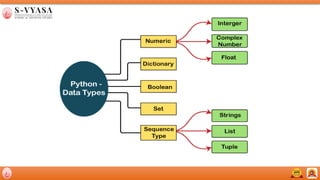
Data Types
• x = 10 # int
• y = 3.14 # float
• name = "Alice" # str
• is_valid = True # bool
Python Data Types Overview
List
• Ordered: Elements have a specific order.
• Mutable: Can be changed (add, remove, modify elements).
• Duplicates Allowed: Lists can contain duplicate elements.
Example:
my_list = [1, 2, 3, "apple", 3]
Python Data Types Overview
Set
• Unordered: Elements do not have a specific order.
• Mutable: Can add, remove, or modify elements.
• No Duplicates: Sets do not allow duplicate elements.
Example:
my_set = {1, 2, 3, "apple", 3}
Python Data Types Overview
Tuple
• Ordered: Elements have a specific order.
• Immutable: Cannot be changed once created (no adding, removing, or
modifying elements).
• Duplicates Allowed: Tuples can contain duplicate elements.
Example:
my_tuple = (1, 2, 3, “apple”, 3)
Working with Strings
String Operations
• Concatenation: "Hello " + "World!“ #Output :"Hello World!"
• Repetition: "Hello" * 3 #Output:"HelloHelloHello"
String Methods
• upper(), lower(), len()
Example:
greeting = "Hello"
print(greeting.upper())
# Output: HELLO
Numbers in Python
Integers and Floats
• Integer: 5, -10
• Float: 3.14, -0.001
Basic Arithmetic
• Addition: 5 + 2
• Subtraction: 5 - 2
• Multiplication: 5 * 2
• Division: 5 / 2
Boolean Data Type
Booleans
• Represents True or False
Boolean Expressions
• Comparison operators: ==, !=, >, <
Converting Data Types
• int(), float(), str()
Example:
num_str = "123“
num_int = int(num_str)
print(type(num_int))
# Output: <class 'int'>
Type Conversion
Basic Operators
• Arithmetic Operators: +, -, *, /, // (floor division), % (modulus),
** (exponentiation).
• Assignment Operators: =, +=, -=, *=, /=
• Comparison Operators: ==, !=, >, <, >=, <=
• Logical Operators: and, or, not
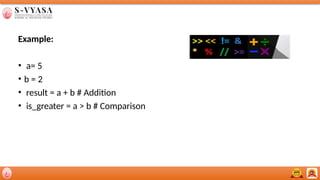
Example:
• a= 5
• b = 2
• result = a + b # Addition
• is_greater = a > b # Comparison
Arithmetic Operators
Example:
a = 10
b = 3
print(a % b)
# Output: 1
print(a ** b)
# Output: 1000
Thank you

python_module_........................................

  • 1.
    Introduction to Python Faculty: Moushreeta Debroy Programme : Python Department : BCA Semester : 1 Module : 1
  • 2.
    Python as anInterpreter, Not a Compiler Interpreter vs Compiler: • Interpreter: Executes code line by line, translating each line into machine code and running it immediately. • Compiler: Translates the entire code into machine code at once, creating an executable file before running.
  • 4.
    Data Types • x= 10 # int • y = 3.14 # float • name = "Alice" # str • is_valid = True # bool
  • 5.
    Python Data TypesOverview List • Ordered: Elements have a specific order. • Mutable: Can be changed (add, remove, modify elements). • Duplicates Allowed: Lists can contain duplicate elements. Example: my_list = [1, 2, 3, "apple", 3]
  • 6.
    Python Data TypesOverview Set • Unordered: Elements do not have a specific order. • Mutable: Can add, remove, or modify elements. • No Duplicates: Sets do not allow duplicate elements. Example: my_set = {1, 2, 3, "apple", 3}
  • 7.
    Python Data TypesOverview Tuple • Ordered: Elements have a specific order. • Immutable: Cannot be changed once created (no adding, removing, or modifying elements). • Duplicates Allowed: Tuples can contain duplicate elements. Example: my_tuple = (1, 2, 3, “apple”, 3)
  • 8.
    Working with Strings StringOperations • Concatenation: "Hello " + "World!“ #Output :"Hello World!" • Repetition: "Hello" * 3 #Output:"HelloHelloHello" String Methods • upper(), lower(), len() Example: greeting = "Hello" print(greeting.upper()) # Output: HELLO
  • 9.
    Numbers in Python Integersand Floats • Integer: 5, -10 • Float: 3.14, -0.001 Basic Arithmetic • Addition: 5 + 2 • Subtraction: 5 - 2 • Multiplication: 5 * 2 • Division: 5 / 2
  • 10.
    Boolean Data Type Booleans •Represents True or False Boolean Expressions • Comparison operators: ==, !=, >, <
  • 11.
    Converting Data Types •int(), float(), str() Example: num_str = "123“ num_int = int(num_str) print(type(num_int)) # Output: <class 'int'> Type Conversion
  • 12.
    Basic Operators • ArithmeticOperators: +, -, *, /, // (floor division), % (modulus), ** (exponentiation). • Assignment Operators: =, +=, -=, *=, /= • Comparison Operators: ==, !=, >, <, >=, <= • Logical Operators: and, or, not
  • 13.
    Example: • a= 5 •b = 2 • result = a + b # Addition • is_greater = a > b # Comparison
  • 14.
    Arithmetic Operators Example: a =10 b = 3 print(a % b) # Output: 1 print(a ** b) # Output: 1000
  • 15.