Faculty of Engineering and Technology
Parul Institute of Technology
Department of Computer Science & Engineering
Course: B.Tech – CSE
Subject: Database Management System
Unit 1
Introduction to DBMS
:Overview:
• What is data and Information?
• What is Database?
• What is Database Management System?
• Applications of Database Management System
• Database System Architecture
• Data Abstraction
• Data Independence
What is Data?
• A data is collection of facts and figures to be used for
specific purposes such as survey or analysis.
• It is unstructured information such as text, observation,
images, symbols.
• It has no meaning of its own.
What is Information?
• When data is arranged in an organized form it becomes
information.
• It refers to processed, organized and structured data.
• It has some meaning of its own.
What is Database?
• A database is an organized collection of structured
information, or data, typically stored electronically in a
computer system.
What is Database Management System?
• A Database Management System (DBMS) is a software system that is
designed to manage and organize data in a structured manner. It
allows users to create and modify a data in the database, as well as
manage the security and access controls for that database.
Features of Database Management System:
1. Data Retrieval: DBMS provides a way to retrieve data quickly and easily using search queries.
2. Data Manipulation: DBMS provides tools to manipulate data, such as sorting, filtering, and aggregating
data.
3. Security: DBMS provides security features to ensure that only authorized users have access to the data.
4. Data Backup and Recovery: DBMS provides tools to back up data and recover it in case of system failures or
data loss.
5. Multi-User Access: DBMS allows multiple users to access and modify data simultaneously.
6. Reporting & Analysis: DBMS provides tools to generate reports and analyze data to gain insights and make
informed decisions.
Applications of Database Management System:
1. Healthcare
2. Railway Reservation System
3. Library Management System
4. Banking
5. Education Sector
6. Manufacturing
7. Social Media Sites
8. Accounting and Finance
9. E-Commerce Websites
10. Telecommunication
File Processing System:
• A computer file is a resource which uniquely records data, in a storage device in a
computer. There are various formats in which data can be stored. e.g. Text files
can be stored in .txt format while pictures can be stored in .png format etc.
• File Processing System (FPS) is a way of storing, retrieving and manipulating data
which is present in various files.
• Files are used to store various documents. All files are grouped based on their
categories.
• In file processing system, if one needs to insert, delete, modify, store or update
data, one must know the entire hierarchy of the files.
Advantages of File Processing System:
1. Cost Friendly: There is a very minimal to no set up and usage fee for
File Processing System. (In most cases, free tools are inbuilt in
computers.)
2. Easy to use: File systems require very basic learning and
understanding, hence, can be easily used.
3. High scalability: One can very easily switch from smaller to larger
files as per his needs.
Disadvantages of File Processing System:
1. Slow access time: Direct access of files is very difficult and one needs to know the entire
hierarchy of folders to get to a specific file. This involves a lot of time.
2. Presence of redundant data: File systems require very basic learning and
understanding, hence, can be easily used.
3. Inconsistent Data: Due to data redundancy, same data stored at different places might
not match to each other.
4. Difficulty in recovery of corrupt data: Recovery or backup of lost and corrupt data is
nearly impossible in case of File Processing System.
5. Problem in Concurrent Access: When a number of users operates on a common data
in database at the same time then anomalies arise, due to lack of concurrency control.
6. Unauthorized Access: Anyone who gets access to the file can read or modify the data.
Database Management System 2-tier
Architecture:
Database Management System 3-tier
Architecture(ANSI-SPARC Model):
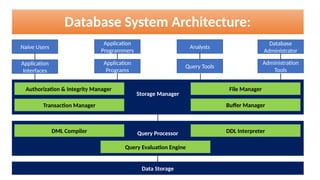
Database System Architecture:
Naive Users
Database
Administrator
Application
Programmers
Analysts
Application
Interfaces
Application
Programs
Query Tools
Administration
Tools
Storage Manager
Query Processor
Data Storage
Authorization & Integrity Manager
Transaction Manager
File Manager
Buffer Manager
DML Compiler DDL Interpreter
Query Evaluation Engine
• The database system architecture consists four main components:
1. Users
2. Storage Manager
3. Query Processor
4. Data Storage
:Database System Architecture:
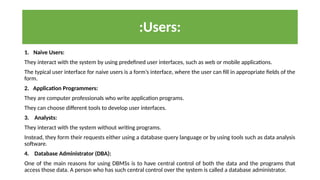
:Users:
1. Naive Users:
They interact with the system by using predefined user interfaces, such as web or mobile applications.
The typical user interface for naive users is a form’s interface, where the user can fill in appropriate fields of the
form.
2. Application Programmers:
They are computer professionals who write application programs.
They can choose different tools to develop user interfaces.
3. Analysts:
They interact with the system without writing programs.
Instead, they form their requests either using a database query language or by using tools such as data analysis
software.
4. Database Administrator (DBA):
One of the main reasons for using DBMSs is to have central control of both the data and the programs that
access those data. A person who has such central control over the system is called a database administrator.
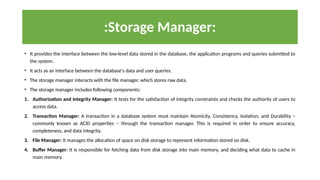
:Storage Manager:
• It provides the interface between the low-level data stored in the database, the application programs and queries submitted to
the system.
• It acts as an interface between the database's data and user queries.
• The storage manager interacts with the file manager, which stores raw data.
• The storage manager includes following components:
1. Authorization and Integrity Manager: It tests for the satisfaction of integrity constraints and checks the authority of users to
access data.
2. Transaction Manager: A transaction in a database system must maintain Atomicity, Consistency, Isolation, and Durability −
commonly known as ACID properties − through the transaction manager. This is required in order to ensure accuracy,
completeness, and data integrity.
3. File Manager: It manages the allocation of space on disk storage to represent information stored on disk.
4. Buffer Manager: It is responsible for fetching data from disk storage into main memory, and deciding what data to cache in
main memory.
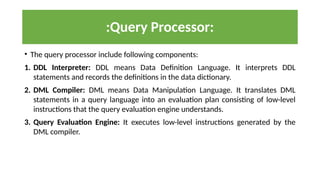
:Query Processor:
• The query processor include following components:
1. DDL Interpreter: DDL means Data Definition Language. It interprets DDL
statements and records the definitions in the data dictionary.
2. DML Compiler: DML means Data Manipulation Language. It translates DML
statements in a query language into an evaluation plan consisting of low-level
instructions that the query evaluation engine understands.
3. Query Evaluation Engine: It executes low-level instructions generated by the
DML compiler.
:Data Abstraction:
• Data Abstraction is a process of hiding unwanted or irrelevant details from the
end user.
• For the system to be usable, it must be retrieve data efficiently. It is required to
use complex data structures for database system developers to achieve this
goal. Since many database-system users are not computer trained, developers
hide the complexity from users. This hiding is known as “Data Abstraction”.
• This concept can also be considered as ANSI/SPARC (American National
Standards Institute/Standards Planning And Requirements Committee)
Model.
:Data Abstraction:
Physical Level
Logical Level
View 1 View 2 View 3 View n
- - - - -
• There are three level of Data Abstraction:
1. Physical Level: The lowest level of abstraction describes how the data are actually
stored.
2. Logical Level: The next-higher level of abstraction describes what data are stored in the
database, and what relationships exist among those data.
3. View Level: Many users of the database system do not need all the information; instead,
they need to access only a part of the database. The view level of abstraction exists to
simplify their interaction with the system. The system may provide many views for the
same database according to the requirement of a user.
:Data Abstraction:
• The main purpose of the three levels of data abstraction is to achieve data
independence.
• If the database changes and expands over time, it is very important that the
changes in one level should not affect the data at other levels of the database.
This would save time and cost required when changing the database.
• In Data Independence, data is separated from the programs, so that the changes
made to the data will not affect the program execution and the application.
• There are two levels of Data Independence:
1. Physical Data Independence:
2. Logical Data Independence:
:Data Independence:
:Physical Data Independence:
• Physical Data Independence means changing the physical level
(storage devices of the database) without affecting the logical level
(logical schema).
• The changes in the physical level may include:
• A new storage device like magnetic tape, hard disk, etc.
• A new data structure for storage.
• Changing the location of the database.
:Logical Data Independence:
• Logical Data Independence means changing the logical level (logical
schema) without affecting the physical level (storage devices of
database).
• The changes in the logical level may include:
• Change the data definition.
• Adding, deleting, or updating any new attribute, entity or relationship in the
database.
:Short Questions:
1. What is Database?
2. What is Database Management System?
3. Enlist the main components of Database System Architecture.
4. How many different types of users are there? Enlist them.
5. What are the components of Storage Manager? Mention their role briefly.
6. What are the components of Query Processor? Mention their role briefly.
7. What do you mean by Data Abstraction? What are the levels of data Abstraction?
8. What is ANSI/SPARC Model? What does it describe?
9. What do you mean by Data Independence? What are the levels of data Independence?
:Long Questions:
1. Define Database Management System. Enlist applications of
Database Management System.
2. Explain Database System Architecture with a suitable diagram.
3. Explain Data Abstraction with a suitable diagram.
4. What is the purpose of Data Abstraction? Explain levels of Data
Independence.
1. DBA means _______
A. Database Administration
B. Database Administrator
C. Database Authentication
D. None of these
2. Which of the following level of abstraction describes how the data are actually stored?
A. Physical Level
B. View Level
C. Logical Level
D. All of the above
3. Which of the following level of abstraction describes what the data are actually stored?
A. Physical Level
B. View Level
C. Logical Level
D. All of the above
:Multiple Choice Questions:
4. _______ writes application programs.
A. Naïve User
B. Database Administrator
C. Application Programmer
D. Analyst
5. Which of the following is one of the components of query processor?
A. Query Evaluation Engine
B. DML Compiler
C. DDL Interpreter
D. All of the above
6. _______ hiding unwanted or irrelevant details from the end user.
A. Data Independence
B. Data Abstraction
C. Both A and B
D. None of these.
:Multiple Choice Questions:
7. _______ has central control of both the data and the programs that access those data.
A. Naïve User
B. Database Administrator
C. Application Programmer
D. Analyst
8. Which of the following is one of the levels of Data Independence?
A. Physical Level
B. Logical Level
C. View Level
D. Both A and B
9. Which of the following is one of the levels of Data Abstraction?
A. Physical Level
B. Logical Level
C. View Level
D. All of the above
:Multiple Choice Questions:
9. What is DDL?
A. Data Defined Language
B. Data Definition Language
C. Data Define Language
D. None of these
10. What is DML?
A. Data Mining Language
B. Data Manipulation Language
C. Data Manipulated Language
D. None of these
11. Which of the following is not one of the levels of Data Abstraction?
A. Physical Level
B. Logical Level
C. View Level
D. None of these
:Multiple Choice Questions:

advanced database management system by uni

  • 1.
    Faculty of Engineeringand Technology Parul Institute of Technology Department of Computer Science & Engineering Course: B.Tech – CSE Subject: Database Management System
  • 2.
  • 3.
    :Overview: • What isdata and Information? • What is Database? • What is Database Management System? • Applications of Database Management System • Database System Architecture • Data Abstraction • Data Independence
  • 4.
    What is Data? •A data is collection of facts and figures to be used for specific purposes such as survey or analysis. • It is unstructured information such as text, observation, images, symbols. • It has no meaning of its own.
  • 5.
    What is Information? •When data is arranged in an organized form it becomes information. • It refers to processed, organized and structured data. • It has some meaning of its own.
  • 6.
    What is Database? •A database is an organized collection of structured information, or data, typically stored electronically in a computer system.
  • 7.
    What is DatabaseManagement System? • A Database Management System (DBMS) is a software system that is designed to manage and organize data in a structured manner. It allows users to create and modify a data in the database, as well as manage the security and access controls for that database.
  • 8.
    Features of DatabaseManagement System: 1. Data Retrieval: DBMS provides a way to retrieve data quickly and easily using search queries. 2. Data Manipulation: DBMS provides tools to manipulate data, such as sorting, filtering, and aggregating data. 3. Security: DBMS provides security features to ensure that only authorized users have access to the data. 4. Data Backup and Recovery: DBMS provides tools to back up data and recover it in case of system failures or data loss. 5. Multi-User Access: DBMS allows multiple users to access and modify data simultaneously. 6. Reporting & Analysis: DBMS provides tools to generate reports and analyze data to gain insights and make informed decisions.
  • 9.
    Applications of DatabaseManagement System: 1. Healthcare 2. Railway Reservation System 3. Library Management System 4. Banking 5. Education Sector 6. Manufacturing 7. Social Media Sites 8. Accounting and Finance 9. E-Commerce Websites 10. Telecommunication
  • 10.
    File Processing System: •A computer file is a resource which uniquely records data, in a storage device in a computer. There are various formats in which data can be stored. e.g. Text files can be stored in .txt format while pictures can be stored in .png format etc. • File Processing System (FPS) is a way of storing, retrieving and manipulating data which is present in various files. • Files are used to store various documents. All files are grouped based on their categories. • In file processing system, if one needs to insert, delete, modify, store or update data, one must know the entire hierarchy of the files.
  • 11.
    Advantages of FileProcessing System: 1. Cost Friendly: There is a very minimal to no set up and usage fee for File Processing System. (In most cases, free tools are inbuilt in computers.) 2. Easy to use: File systems require very basic learning and understanding, hence, can be easily used. 3. High scalability: One can very easily switch from smaller to larger files as per his needs.
  • 12.
    Disadvantages of FileProcessing System: 1. Slow access time: Direct access of files is very difficult and one needs to know the entire hierarchy of folders to get to a specific file. This involves a lot of time. 2. Presence of redundant data: File systems require very basic learning and understanding, hence, can be easily used. 3. Inconsistent Data: Due to data redundancy, same data stored at different places might not match to each other. 4. Difficulty in recovery of corrupt data: Recovery or backup of lost and corrupt data is nearly impossible in case of File Processing System. 5. Problem in Concurrent Access: When a number of users operates on a common data in database at the same time then anomalies arise, due to lack of concurrency control. 6. Unauthorized Access: Anyone who gets access to the file can read or modify the data.
  • 13.
    Database Management System2-tier Architecture:
  • 14.
    Database Management System3-tier Architecture(ANSI-SPARC Model):
  • 15.
    Database System Architecture: NaiveUsers Database Administrator Application Programmers Analysts Application Interfaces Application Programs Query Tools Administration Tools Storage Manager Query Processor Data Storage Authorization & Integrity Manager Transaction Manager File Manager Buffer Manager DML Compiler DDL Interpreter Query Evaluation Engine
  • 16.
    • The databasesystem architecture consists four main components: 1. Users 2. Storage Manager 3. Query Processor 4. Data Storage :Database System Architecture:
  • 17.
    :Users: 1. Naive Users: Theyinteract with the system by using predefined user interfaces, such as web or mobile applications. The typical user interface for naive users is a form’s interface, where the user can fill in appropriate fields of the form. 2. Application Programmers: They are computer professionals who write application programs. They can choose different tools to develop user interfaces. 3. Analysts: They interact with the system without writing programs. Instead, they form their requests either using a database query language or by using tools such as data analysis software. 4. Database Administrator (DBA): One of the main reasons for using DBMSs is to have central control of both the data and the programs that access those data. A person who has such central control over the system is called a database administrator.
  • 18.
    :Storage Manager: • Itprovides the interface between the low-level data stored in the database, the application programs and queries submitted to the system. • It acts as an interface between the database's data and user queries. • The storage manager interacts with the file manager, which stores raw data. • The storage manager includes following components: 1. Authorization and Integrity Manager: It tests for the satisfaction of integrity constraints and checks the authority of users to access data. 2. Transaction Manager: A transaction in a database system must maintain Atomicity, Consistency, Isolation, and Durability − commonly known as ACID properties − through the transaction manager. This is required in order to ensure accuracy, completeness, and data integrity. 3. File Manager: It manages the allocation of space on disk storage to represent information stored on disk. 4. Buffer Manager: It is responsible for fetching data from disk storage into main memory, and deciding what data to cache in main memory.
  • 19.
    :Query Processor: • Thequery processor include following components: 1. DDL Interpreter: DDL means Data Definition Language. It interprets DDL statements and records the definitions in the data dictionary. 2. DML Compiler: DML means Data Manipulation Language. It translates DML statements in a query language into an evaluation plan consisting of low-level instructions that the query evaluation engine understands. 3. Query Evaluation Engine: It executes low-level instructions generated by the DML compiler.
  • 20.
    :Data Abstraction: • DataAbstraction is a process of hiding unwanted or irrelevant details from the end user. • For the system to be usable, it must be retrieve data efficiently. It is required to use complex data structures for database system developers to achieve this goal. Since many database-system users are not computer trained, developers hide the complexity from users. This hiding is known as “Data Abstraction”. • This concept can also be considered as ANSI/SPARC (American National Standards Institute/Standards Planning And Requirements Committee) Model.
  • 21.
    :Data Abstraction: Physical Level LogicalLevel View 1 View 2 View 3 View n - - - - -
  • 22.
    • There arethree level of Data Abstraction: 1. Physical Level: The lowest level of abstraction describes how the data are actually stored. 2. Logical Level: The next-higher level of abstraction describes what data are stored in the database, and what relationships exist among those data. 3. View Level: Many users of the database system do not need all the information; instead, they need to access only a part of the database. The view level of abstraction exists to simplify their interaction with the system. The system may provide many views for the same database according to the requirement of a user. :Data Abstraction:
  • 23.
    • The mainpurpose of the three levels of data abstraction is to achieve data independence. • If the database changes and expands over time, it is very important that the changes in one level should not affect the data at other levels of the database. This would save time and cost required when changing the database. • In Data Independence, data is separated from the programs, so that the changes made to the data will not affect the program execution and the application. • There are two levels of Data Independence: 1. Physical Data Independence: 2. Logical Data Independence: :Data Independence:
  • 24.
    :Physical Data Independence: •Physical Data Independence means changing the physical level (storage devices of the database) without affecting the logical level (logical schema). • The changes in the physical level may include: • A new storage device like magnetic tape, hard disk, etc. • A new data structure for storage. • Changing the location of the database.
  • 25.
    :Logical Data Independence: •Logical Data Independence means changing the logical level (logical schema) without affecting the physical level (storage devices of database). • The changes in the logical level may include: • Change the data definition. • Adding, deleting, or updating any new attribute, entity or relationship in the database.
  • 26.
    :Short Questions: 1. Whatis Database? 2. What is Database Management System? 3. Enlist the main components of Database System Architecture. 4. How many different types of users are there? Enlist them. 5. What are the components of Storage Manager? Mention their role briefly. 6. What are the components of Query Processor? Mention their role briefly. 7. What do you mean by Data Abstraction? What are the levels of data Abstraction? 8. What is ANSI/SPARC Model? What does it describe? 9. What do you mean by Data Independence? What are the levels of data Independence?
  • 27.
    :Long Questions: 1. DefineDatabase Management System. Enlist applications of Database Management System. 2. Explain Database System Architecture with a suitable diagram. 3. Explain Data Abstraction with a suitable diagram. 4. What is the purpose of Data Abstraction? Explain levels of Data Independence.
  • 28.
    1. DBA means_______ A. Database Administration B. Database Administrator C. Database Authentication D. None of these 2. Which of the following level of abstraction describes how the data are actually stored? A. Physical Level B. View Level C. Logical Level D. All of the above 3. Which of the following level of abstraction describes what the data are actually stored? A. Physical Level B. View Level C. Logical Level D. All of the above :Multiple Choice Questions:
  • 29.
    4. _______ writesapplication programs. A. Naïve User B. Database Administrator C. Application Programmer D. Analyst 5. Which of the following is one of the components of query processor? A. Query Evaluation Engine B. DML Compiler C. DDL Interpreter D. All of the above 6. _______ hiding unwanted or irrelevant details from the end user. A. Data Independence B. Data Abstraction C. Both A and B D. None of these. :Multiple Choice Questions:
  • 30.
    7. _______ hascentral control of both the data and the programs that access those data. A. Naïve User B. Database Administrator C. Application Programmer D. Analyst 8. Which of the following is one of the levels of Data Independence? A. Physical Level B. Logical Level C. View Level D. Both A and B 9. Which of the following is one of the levels of Data Abstraction? A. Physical Level B. Logical Level C. View Level D. All of the above :Multiple Choice Questions:
  • 31.
    9. What isDDL? A. Data Defined Language B. Data Definition Language C. Data Define Language D. None of these 10. What is DML? A. Data Mining Language B. Data Manipulation Language C. Data Manipulated Language D. None of these 11. Which of the following is not one of the levels of Data Abstraction? A. Physical Level B. Logical Level C. View Level D. None of these :Multiple Choice Questions: