Performing a CFD Simulation Using
Ansa and LS-DYNA ICFD
Erik Svenning, PhD
DYNAmore Nordic
erik.svenning@dynamore.se
Purpose
■ Introduction to the ICFD solver in LS-DYNA
■ Setting up an ICFD simulation in Ansa
■ Final keyword setup using LS-PrePost
■ Summary
■ Set up an LS-DYNA ICFD simulation using Ansa and LS-PrePost
Outline
Solver introduction
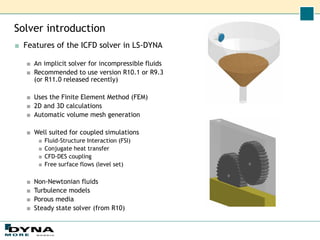
■ Features of the ICFD solver in LS-DYNA
■ An implicit solver for incompressible fluids
■ Recommended to use version R10.1 or R9.3
(or R11.0 released recently)
■ Uses the Finite Element Method (FEM)
■ 2D and 3D calculations
■ Automatic volume mesh generation
■ Well suited for coupled simulations
■ Fluid-Structure Interaction (FSI)
■ Conjugate heat transfer
■ CFD-DES coupling
■ Free surface flows (level set)
■ Non-Newtonian fluids
■ Turbulence models
■ Porous media
■ Steady state solver (from R10)
Typical workflow for simulation setup
■ Ansa
■ Import and clean up geometry
■ Set PIDs for different BCs
■ Create surface mesh
■ Volume mesh created automatically by the ICFD
solver
■ Export mesh
■ In standard LS-DYNA format up to Ansa version 18
■ Minor modifications of mesh keywords manually or
with script
■ Change *ELEMENT_SHELL to
*MESH_SURFACE_ELEMENT.
■ Change *ELEMENT_BEAM to
*MESH_SURFACE_ELEMENT.
■ Change *NODE to *MESH_SURFACE_NODE.
■ Change *PART to *ICFD_PART_TITLE.
■ Export in ICFD format from Ansa version 19
■ Supported from version 19, but some unresolved
issues in 19.0.0
■ LS-PrePost
■ Final keyword setup
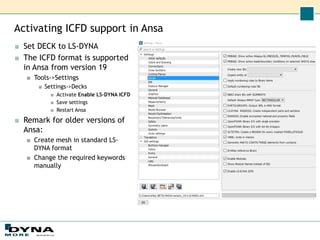
Activating ICFD support in Ansa
■ Set DECK to LS-DYNA
■ The ICFD format is supported
in Ansa from version 19
■ Tools->Settings
■ Settings->Decks
■ Activate Enable LS-DYNA ICFD
■ Save settings
■ Restart Ansa
■ Remark for older versions of
Ansa:
■ Create mesh in standard LS-
DYNA format
■ Change the required keywords
manually
Setting ICFD boundary conditions
■ DECKS->BOUNDARY->ICFD_BOUNDARY
■ CONJ_HEAT
■ FREESLIP
■ FSI
■ NONSLIP
■ PRESCRIBED_VEL
■ PRESCRIBED_PRE
■ PRESCRIBED_TEMP
■ PRESCRIBED_TURBULENCE
■ Some are not yet available in 19.0.0
■ FLUX_TEMP
■ FSWAVE
■ …
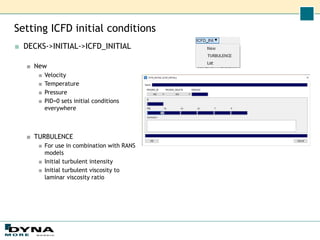
Setting ICFD initial conditions
■ DECKS->INITIAL->ICFD_INITIAL
■ New
■ Velocity
■ Temperature
■ Pressure
■ PID=0 sets initial conditions
everywhere
■ TURBULENCE
■ For use in combination with RANS
models
■ Initial turbulent intensity
■ Initial turbulent viscosity to
laminar viscosity ratio
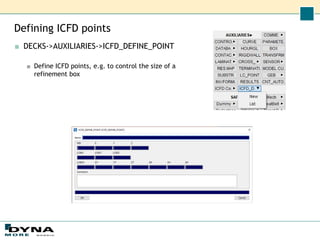
Defining ICFD points
■ DECKS->AUXILIARIES->ICFD_DEFINE_POINT
■ Define ICFD points, e.g. to control the size of a
refinement box
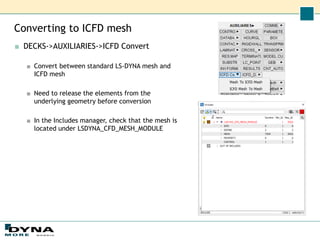
Converting to ICFD mesh
■ DECKS->AUXILIARIES->ICFD Convert
■ Convert between standard LS-DYNA mesh and
ICFD mesh
■ Need to release the elements from the
underlying geometry before conversion
■ In the Includes manager, check that the mesh is
located under LSDYNA_CFD_MESH_MODULE
Example problem
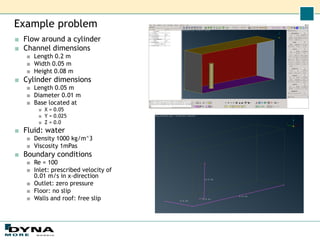
■ Flow around a cylinder
■ Channel dimensions
■ Length 0.2 m
■ Width 0.05 m
■ Height 0.08 m
■ Cylinder dimensions
■ Length 0.05 m
■ Diameter 0.01 m
■ Base located at
■ X = 0.05
■ Y = 0.025
■ Z = 0.0
■ Fluid: water
■ Density 1000 kg/m^3
■ Viscosity 1mPas
■ Boundary conditions
■ Re = 100
■ Inlet: prescribed velocity of
0.01 m/s in x-direction
■ Outlet: zero pressure
■ Floor: no slip
■ Walls and roof: free slip
Simulation setup
■ Ansa
■ Import or create and clean up geometry
■ Create surface mesh
■ Export in LS-DYNA ICFD format
■ LS-PrePost
■ Keyword setup
■ Post-processing
Geometry creation
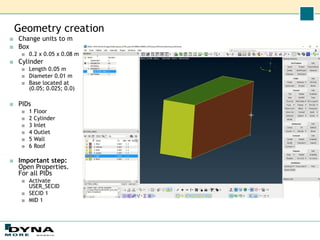
■ Change units to m
■ Box
■ 0.2 x 0.05 x 0.08 m
■ Cylinder
■ Length 0.05 m
■ Diameter 0.01 m
■ Base located at
(0.05; 0.025; 0.0)
■ PIDs
■ 1 Floor
■ 2 Cylinder
■ 3 Inlet
■ 4 Outlet
■ 5 Wall
■ 6 Roof
■ Important step:
Open Properties.
For all PIDs
■ Activate
USER_SECID
■ SECID 1
■ MID 1
Mesh generation
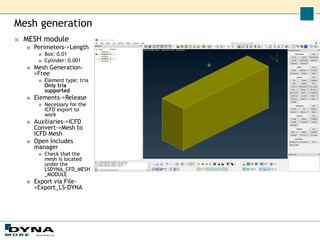
■ MESH module
■ Perimeters->Length
■ Box: 0.01
■ Cylinder: 0.001
■ Mesh Generation-
>Free
■ Element type: tria
Only tria
supported
■ Elements->Release
■ Necessary for the
ICFD export to
work
■ Auxiliaries->ICFD
Convert->Mesh to
ICFD Mesh
■ Open Includes
manager
■ Check that the
mesh is located
under the
LSDYNA_CFD_MESH
_MODULE
■ Export via File-
>Export_LS-DYNA
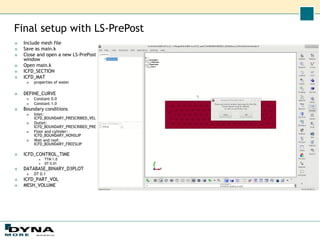
Final setup with LS-PrePost
■ Include mesh file
■ Save as main.k
■ Close and open a new LS-PrePost
window
■ Open main.k
■ ICFD_SECTION
■ ICFD_MAT
■ properties of water
■ DEFINE_CURVE
■ Constant 0.0
■ Constant 1.0
■ Boundary conditions
■ Inlet:
ICFD_BOUNDARY_PRESCRIBED_VEL
■ Outlet:
ICFD_BOUNDARY_PRESCRIBED_PRE
■ Floor and cylinder:
ICFD_BOUNDARY_NONSLIP
■ Wall and roof:
ICFD_BOUNDARY_FREESLIP
■ ICFD_CONTROL_TIME
■ TTM 1.0
■ DT 0.01
■ DATABASE_BINARY_D3PLOT
■ DT 0.1
■ ICFD_PART_VOL
■ MESH_VOLUME
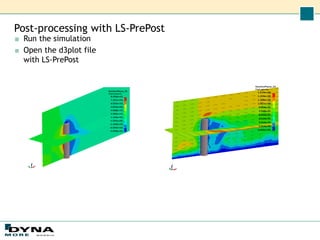
Post-processing with LS-PrePost
■ Run the simulation
■ Open the d3plot file
with LS-PrePost
Summary
■ In this webinar, we have set up an ICFD
simulation using Ansa and LS-PrePost
■ Mesh generation with Ansa
■ Up to version 18: Change *NODE to
*MESH_SURFACE_NODE, …
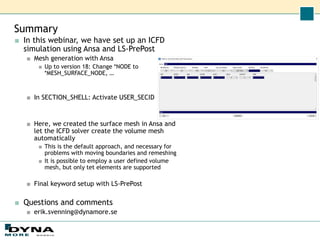
■ In SECTION_SHELL: Activate USER_SECID
■ Here, we created the surface mesh in Ansa and
let the ICFD solver create the volume mesh
automatically
■ This is the default approach, and necessary for
problems with moving boundaries and remeshing
■ It is possible to employ a user defined volume
mesh, but only tet elements are supported
■ Final keyword setup with LS-PrePost
■ Questions and comments
■ erik.svenning@dynamore.se
Thank you!
Your LS-DYNA distributor and
more

CFD Simulation using LS-Dyna ICFD Method.pdf

  • 1.
    Performing a CFDSimulation Using Ansa and LS-DYNA ICFD Erik Svenning, PhD DYNAmore Nordic erik.svenning@dynamore.se
  • 2.
    Purpose ■ Introduction tothe ICFD solver in LS-DYNA ■ Setting up an ICFD simulation in Ansa ■ Final keyword setup using LS-PrePost ■ Summary ■ Set up an LS-DYNA ICFD simulation using Ansa and LS-PrePost Outline
  • 3.
    Solver introduction ■ Featuresof the ICFD solver in LS-DYNA ■ An implicit solver for incompressible fluids ■ Recommended to use version R10.1 or R9.3 (or R11.0 released recently) ■ Uses the Finite Element Method (FEM) ■ 2D and 3D calculations ■ Automatic volume mesh generation ■ Well suited for coupled simulations ■ Fluid-Structure Interaction (FSI) ■ Conjugate heat transfer ■ CFD-DES coupling ■ Free surface flows (level set) ■ Non-Newtonian fluids ■ Turbulence models ■ Porous media ■ Steady state solver (from R10)
  • 4.
    Typical workflow forsimulation setup ■ Ansa ■ Import and clean up geometry ■ Set PIDs for different BCs ■ Create surface mesh ■ Volume mesh created automatically by the ICFD solver ■ Export mesh ■ In standard LS-DYNA format up to Ansa version 18 ■ Minor modifications of mesh keywords manually or with script ■ Change *ELEMENT_SHELL to *MESH_SURFACE_ELEMENT. ■ Change *ELEMENT_BEAM to *MESH_SURFACE_ELEMENT. ■ Change *NODE to *MESH_SURFACE_NODE. ■ Change *PART to *ICFD_PART_TITLE. ■ Export in ICFD format from Ansa version 19 ■ Supported from version 19, but some unresolved issues in 19.0.0 ■ LS-PrePost ■ Final keyword setup
  • 5.
    Activating ICFD supportin Ansa ■ Set DECK to LS-DYNA ■ The ICFD format is supported in Ansa from version 19 ■ Tools->Settings ■ Settings->Decks ■ Activate Enable LS-DYNA ICFD ■ Save settings ■ Restart Ansa ■ Remark for older versions of Ansa: ■ Create mesh in standard LS- DYNA format ■ Change the required keywords manually
  • 6.
    Setting ICFD boundaryconditions ■ DECKS->BOUNDARY->ICFD_BOUNDARY ■ CONJ_HEAT ■ FREESLIP ■ FSI ■ NONSLIP ■ PRESCRIBED_VEL ■ PRESCRIBED_PRE ■ PRESCRIBED_TEMP ■ PRESCRIBED_TURBULENCE ■ Some are not yet available in 19.0.0 ■ FLUX_TEMP ■ FSWAVE ■ …
  • 7.
    Setting ICFD initialconditions ■ DECKS->INITIAL->ICFD_INITIAL ■ New ■ Velocity ■ Temperature ■ Pressure ■ PID=0 sets initial conditions everywhere ■ TURBULENCE ■ For use in combination with RANS models ■ Initial turbulent intensity ■ Initial turbulent viscosity to laminar viscosity ratio
  • 8.
    Defining ICFD points ■DECKS->AUXILIARIES->ICFD_DEFINE_POINT ■ Define ICFD points, e.g. to control the size of a refinement box
  • 9.
    Converting to ICFDmesh ■ DECKS->AUXILIARIES->ICFD Convert ■ Convert between standard LS-DYNA mesh and ICFD mesh ■ Need to release the elements from the underlying geometry before conversion ■ In the Includes manager, check that the mesh is located under LSDYNA_CFD_MESH_MODULE
  • 10.
    Example problem ■ Flowaround a cylinder ■ Channel dimensions ■ Length 0.2 m ■ Width 0.05 m ■ Height 0.08 m ■ Cylinder dimensions ■ Length 0.05 m ■ Diameter 0.01 m ■ Base located at ■ X = 0.05 ■ Y = 0.025 ■ Z = 0.0 ■ Fluid: water ■ Density 1000 kg/m^3 ■ Viscosity 1mPas ■ Boundary conditions ■ Re = 100 ■ Inlet: prescribed velocity of 0.01 m/s in x-direction ■ Outlet: zero pressure ■ Floor: no slip ■ Walls and roof: free slip
  • 11.
    Simulation setup ■ Ansa ■Import or create and clean up geometry ■ Create surface mesh ■ Export in LS-DYNA ICFD format ■ LS-PrePost ■ Keyword setup ■ Post-processing
  • 12.
    Geometry creation ■ Changeunits to m ■ Box ■ 0.2 x 0.05 x 0.08 m ■ Cylinder ■ Length 0.05 m ■ Diameter 0.01 m ■ Base located at (0.05; 0.025; 0.0) ■ PIDs ■ 1 Floor ■ 2 Cylinder ■ 3 Inlet ■ 4 Outlet ■ 5 Wall ■ 6 Roof ■ Important step: Open Properties. For all PIDs ■ Activate USER_SECID ■ SECID 1 ■ MID 1
  • 13.
    Mesh generation ■ MESHmodule ■ Perimeters->Length ■ Box: 0.01 ■ Cylinder: 0.001 ■ Mesh Generation- >Free ■ Element type: tria Only tria supported ■ Elements->Release ■ Necessary for the ICFD export to work ■ Auxiliaries->ICFD Convert->Mesh to ICFD Mesh ■ Open Includes manager ■ Check that the mesh is located under the LSDYNA_CFD_MESH _MODULE ■ Export via File- >Export_LS-DYNA
  • 14.
    Final setup withLS-PrePost ■ Include mesh file ■ Save as main.k ■ Close and open a new LS-PrePost window ■ Open main.k ■ ICFD_SECTION ■ ICFD_MAT ■ properties of water ■ DEFINE_CURVE ■ Constant 0.0 ■ Constant 1.0 ■ Boundary conditions ■ Inlet: ICFD_BOUNDARY_PRESCRIBED_VEL ■ Outlet: ICFD_BOUNDARY_PRESCRIBED_PRE ■ Floor and cylinder: ICFD_BOUNDARY_NONSLIP ■ Wall and roof: ICFD_BOUNDARY_FREESLIP ■ ICFD_CONTROL_TIME ■ TTM 1.0 ■ DT 0.01 ■ DATABASE_BINARY_D3PLOT ■ DT 0.1 ■ ICFD_PART_VOL ■ MESH_VOLUME
  • 15.
    Post-processing with LS-PrePost ■Run the simulation ■ Open the d3plot file with LS-PrePost
  • 16.
    Summary ■ In thiswebinar, we have set up an ICFD simulation using Ansa and LS-PrePost ■ Mesh generation with Ansa ■ Up to version 18: Change *NODE to *MESH_SURFACE_NODE, … ■ In SECTION_SHELL: Activate USER_SECID ■ Here, we created the surface mesh in Ansa and let the ICFD solver create the volume mesh automatically ■ This is the default approach, and necessary for problems with moving boundaries and remeshing ■ It is possible to employ a user defined volume mesh, but only tet elements are supported ■ Final keyword setup with LS-PrePost ■ Questions and comments ■ erik.svenning@dynamore.se
  • 17.
    Thank you! Your LS-DYNAdistributor and more