

A F I N I T E E L E M E N T M E T H O D P R I M E R 
FOR MECHANICAL DESIGN 
Charles E. Knight, Jr. 
Department of Mechanical Engineering 
Virginia Polytechnic Institute 
and State University
Copyright © 1994-2000 by Charles Knight 
All rights reserved. No part of this book may be reproduced, stored in a retrieval 
system, or transcribed in any form or by any means--electronic, mechanical, 
photocopying, recording, or otherwise--without the prior written permission of 
Charles Knight. 
Library of Congress Cataloging-in-Publication Data 
Knight, Charles E. 
A finite element method primer for mechanical design / Charles E. 
Knight, Jr. 
p. cm. 
Includes bibliographical references and index. 
ISBN 0-534-93978-3 
1. Finite element method. 2. Engineering design--Data processing. 
3. Computer-aided design. I. Title. 
TA347.F5K66 1993 
620r.0042r0151535--dc20 
93-27512 
CIP 
Printed and bound in the United States of America. 
93 94 95 96 97 98 -- 10 9 8 7 6 5 4 3 2 1
This book is dedicated to my son and daughter, Michael and Laura
iv 
P R E F A C E 
AFinite Element Method Primer for Mechanical Design was written to be 
a supplementary text for the junior mechanical design course in a 
traditional mechanical engineering curriculum. The intent is to introduce 
the finite element method in the context of mechanical design. Emphasis 
is on the practical aspects of proper modeling, checking, and interpretation 
of results. Theoretical aspects are introduced as they are needed to help 
understand the operation. The text covers truss, beam/frame, and two 
dimensional solid engineering structures. This text is basically an excerpt 
from The Finite Element Method in Mechanical Design. 
The finite element method has rapidly become a vital tool for analysis of 
mechanical designs. It has reached the point where practically every 
design engineer has access to a finite element program through their 
company's mainframe computer or on a micro-computer. This method is 
extremely powerful in terms of the many different types of problems it can 
solve. The method applies to many engineering fields, however this book 
concentrates on the application to mechanical design. 
Use of this tool does not guarantee correct results. It is a numerical 
procedure involving approximations of theoretical behavior. In order to 
produce correct results the model must be designed correctly, and be able 
to reach numerical convergence (assuming the computer program is 
without error). Correct results then depend primarily on the user's ability 
to utilize the tool. It in no way supplants the engineer's responsibility to 
do approximate engineering calculations, use good design practice, and 
apply engineering judgment to the problem. Instead, it should supplement 
these skills to ensure that the best design is obtained. 
With the ready access of finite element analysis comes the need to 
provide the understanding required to accurately and effectively use the 
method. Most design engineers are not going to have the time nor the 
inclination to study all the theoretical formulations and computer 
algorithms much less write their own program. Therefore, most engineers 
take the role of users of an in-house or commercial program.
Preface v 
Information About Accompanying Software 
PC computer software is provided with this book that contains a finite 
element program called FEPC. The program runs on an IBM PC or 
compatible computer. It will solve two-dimensional problems using truss, 
beam, plane stress, plane strain or axisymmetric solid elements. Dimen-sional 
limits of the program are described in an abbreviated user's guide in 
the Appendix. Also, you should review the README file on the disk for 
start-up instructions. The complete user's guide is in a file with the 
software. The program is provided as shareware. 
Although technical support can not be provided, we will replace any 
defective files. Also, you may contact the author regarding any program 
errors or availability of program updates. 
Acknowledgments 
I would like to thank my former students in the course for their suggestions 
in refining the material for this text. Thanks to my colleagues and 
department head in the Department of Mechanical Engineering for their 
encouragement and support. My appreciation goes to Jonathan Plant, 
Monique Calello and the staff at PWS Publishing Company for their work, 
understanding and patience throughout this project. Finally, thanks to the 
following individuals who reviewed this text and provided many useful 
comments and suggestions that helped to improve the final product: A. 
Henry Hagerdoorn, University of Central Florida; H. Kazerooni, University 
of California - Berkeley; Julius Wong, University of Louisville; and Larry 
Stauffer, University of Idaho. 
Charles E. Knight, Jr.
vi 
C O N T E N T S 
C H A P T E R 1 
THE FINITE ELEMENT METHOD 1 
1.1 General Overview . . . . . . . . . . . . . . . . . . . . . . . . . . . . . . . . 1 
1.2 One-Dimensional Spring System . . . . . . . . . . . . . . . . . . . . 3 
1.3 Using a Computer Program . . . . . . . . . . . . . . . . . . . . . . . . 7 
References . . . . . . . . . . . . . . . . . . . . . . . . . . . . . . . . . . . . . . 9 
C H A P T E R 2 
TRUSSES 11 
2.1 Direct Element Formulation . . . . . . . . . . . . . . . . . . . . . . . 11 
2.2 The Finite Element Model . . . . . . . . . . . . . . . . . . . . . . . . 17 
2.3 The Analysis Step . . . . . . . . . . . . . . . . . . . . . . . . . . . . . . . 18 
2.4 Output Processing and Evaluation . . . . . . . . . . . . . . . . . 20 
2.5 Case Study . . . . . . . . . . . . . . . . . . . . . . . . . . . . . . . . . . . . . 21 
2.6 Closure . . . . . . . . . . . . . . . . . . . . . . . . . . . . . . . . . . . . . . . . 25 
Problems . . . . . . . . . . . . . . . . . . . . . . . . . . . . . . . . . . . . . . 25 
References . . . . . . . . . . . . . . . . . . . . . . . . . . . . . . . . . . . . . 27 
C H A P T E R 3 
BEAMS AND FRAMES 28 
3.1 Element Formulation . . . . . . . . . . . . . . . . . . . . . . . . . . . . 28 
3.2 The Finite Element Model . . . . . . . . . . . . . . . . . . . . . . . . 33 
3.3 Output Processing and Evaluation . . . . . . . . . . . . . . . . . 34 
3.4 Case Study . . . . . . . . . . . . . . . . . . . . . . . . . . . . . . . . . . . . . 34 
3.5 Closure . . . . . . . . . . . . . . . . . . . . . . . . . . . . . . . . . . . . . . . . 38 
Problems . . . . . . . . . . . . . . . . . . . . . . . . . . . . . . . . . . . . . . 38 
References . . . . . . . . . . . . . . . . . . . . . . . . . . . . . . . . . . . . . 39
Contents vii 
C H A P T E R 4 
TWO-DIMENSIONAL SOLIDS 40 
4.1 Element Formulation . . . . . . . . . . . . . . . . . . . . . . . . . . . . 40 
4.2 The Finite Element Model . . . . . . . . . . . . . . . . . . . . . . . . 44 
4.3 Computer Input Assistance . . . . . . . . . . . . . . . . . . . . . . . 47 
4.4 The Analysis Step . . . . . . . . . . . . . . . . . . . . . . . . . . . . . . . 48 
4.5 Output Processing and Evaluation . . . . . . . . . . . . . . . . . 50 
4.6 Case Study . . . . . . . . . . . . . . . . . . . . . . . . . . . . . . . . . . . . . 52 
4.7 Closure . . . . . . . . . . . . . . . . . . . . . . . . . . . . . . . . . . . . . . . . 55 
Problems . . . . . . . . . . . . . . . . . . . . . . . . . . . . . . . . . . . . . . 55 
References . . . . . . . . . . . . . . . . . . . . . . . . . . . . . . . . . . . . . 57 
APPENDIX 58 
Using FEPC, FEPCIP, and FEPCOP . . . . . . . . . . . . . . . . . . . 59 
Entering the Model in FEPCIP . . . . . . . . . . . . . . . . . . . . . . . . 59 
The Analysis by FEPC . . . . . . . . . . . . . . . . . . . . . . . . . . . . . . . 69 
Graphic Results Using FEPCOP . . . . . . . . . . . . . . . . . . . . . . . 71
C H A P T E R 1 
THE FINITE ELEMENT METHOD 
1.1 General Overview 
The finite element method is enjoying widespread use in many engineering 
applications. Although first developed for structural analysis, it now solves 
problems in heat transfer, fluid mechanics, acoustics, electromagnetics, and 
other specialized disciplines. In conduction heat transfer, we solve for the 
temperature distribution throughout the body with known boundary 
conditions and material properties whether steady state or time dependent. 
Application to fluid mechanics begins with steady inviscid incompressible 
flow and progresses to very complex viscous compressible flow. The whole 
area of computational fluid dynamics has made rapid progress in recent 
years. Acoustics is another area where great strides are being made based 
on finite element and boundary element numerical methods. Electromag-netic 
solutions for magnetic field strength provide insight for design of 
electromagnetic devices. Many of these capabilities are now being coupled 
to yield solutions to fluid-structure interactions, convective heat transfer, 
and other coupled problems. 
The finite element method is a numerical method for solving a system of 
governing equations over the domain of a continuous physical system. The 
method applies to many fields of science and engineering, but this text 
focuses on its application to structural analysis. The field of continuum 
mechanics and theory of elasticity provide the governing equations. 
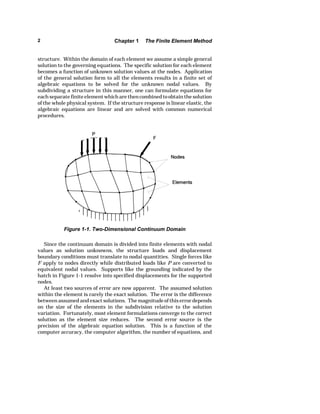
The basis of the finite element method for analysis of solid structures is 
summarized in the following steps. Small parts called elements subdivide 
the domain of the solid structure illustrated in Figure 1-1. These elements 
assemble through interconnection at a finite number of points on each 
element called nodes. This assembly provides a model of the solid 
1
2 Chapter 1 The Finite Element Method 
structure. Within the domain of each element we assume a simple general 
solution to the governing equations. The specific solution for each element 
becomes a function of unknown solution values at the nodes. Application 
of the general solution form to all the elements results in a finite set of 
algebraic equations to be solved for the unknown nodal values. By 
subdividing a structure in this manner, one can formulate equations for 
each separate finite element which are then combined to obtain the solution 
of the whole physical system. If the structure response is linear elastic, the 
algebraic equations are linear and are solved with common numerical 
procedures. 
Figure 1-1. Two-Dimensional Continuum Domain 
Since the continuum domain is divided into finite elements with nodal 
values as solution unknowns, the structure loads and displacement 
boundary conditions must translate to nodal quantities. Single forces like 
F apply to nodes directly while distributed loads like P are converted to 
equivalent nodal values. Supports like the grounding indicated by the 
hatch in Figure 1-1 resolve into specified displacements for the supported 
nodes. 
At least two sources of error are now apparent. The assumed solution 
within the element is rarely the exact solution. The error is the difference 
between assumed and exact solutions. The magnitude of this error depends 
on the size of the elements in the subdivision relative to the solution 
variation. Fortunately, most element formulations converge to the correct 
solution as the element size reduces. The second error source is the 
precision of the algebraic equation solution. This is a function of the 
computer accuracy, the computer algorithm, the number of equations, and
Section 1.2 One-Dimensional Spring System 3 
the element subdivision. Both error sources are reduced with good 
modeling practices. 
In theory all solid structures could be modeled with three-dimensional 
solid continuum elements. However, this is impractical since many 
structures are simplified with correct assumptions without any loss of 
accuracy, and to do so greatly reduces the effort required to reach a 
solution. Different types of elements are formulated to address each class 
of structure. Elements are broadly grouped into two categories, structural 
elements and continuum elements. 
Structural elements are trusses, beams, plates, and shells. Their 
formulation uses the same general assumptions about behavior as in their 
respective structural theories. Finite element solutions using structural 
elements are then no more accurate than a valid solution using convention-al 
beam or plate theory, for example. However, it is usually far easier to 
get a finite element solution for a beam, plate, or shell problem than it is 
using conventional theory. 
Continuum elements are the two- and three-dimensional solid elements. 
Their formulation basis comes from the theory of elasticity. The theory of 
elasticity provides the governing equations for the deformation and stress 
response of a linear elastic continuum subjected to external loads. Few 
closed form or numerical solutions exist for two-dimensional continuum 
problems, and almost none exist for three-dimensional problems; this 
makes the finite element method invaluable. 
An extensive literature has developed since the 1960s when the term 
"finite element" originated. The first textbook appeared in 1967 [see 
Reference 1.1]. The number of books and conference proceedings published 
since then is near two hundred and the number of journal papers and other 
publications is in the thousands. The engineer beginning study of the finite 
element method may consult references [1.2], [1.3], [1.4], [1.5], [1.6], [1.7], 
or [1.8] for formulation [1.9], [1.10], [1.11], [1.12], [1.13], or [1.14] for 
structural and solid mechanics applications, and [1.15], [1.16], or [1.17] for 
computer algorithms and implementation. 
1.2 One-Dimensional Spring System 
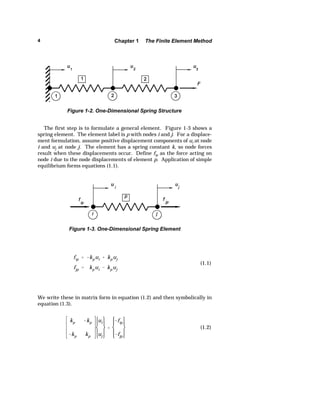
The fundamental operation of the finite element method is illustrated by 
analysis of a one-dimensional spring system. A two-spring structure is 
sketched in Figure 1-2. Each spring is an element identified by the number 
in the box. The spring elements have a node at each end and they connect 
at a common node. The number in the circle labels each node. The number 
in the box labels each element. The subscripted u values are the node 
displacements, i.e., degrees-of-freedom. There is an applied force F at node 
3. We wish to solve for the node displacements and spring forces.
4 Chapter 1 The Finite Element Method 
Figure 1-2. One-Dimensional Spring Structure 
The first step is to formulate a general element. Figure 1-3 shows a 
spring element. The element label is p with nodes i and j. For a displace-ment 
formulation, assume positive displacement components of ui at node 
i and uj at node j. The element has a spring constant k, so node forces 
result when these displacements occur. Define fip as the force acting on 
node i due to the node displacements of element p. Application of simple 
equilibrium forms equations (1.1). 
fip  kpui  kpuj 
fjp  kpui  kpuj 
(1.1) 
Figure 1-3. One-Dimensional Spring Element 
We write these in matrix form in equation (1.2) and then symbolically in 
equation (1.3). 
kp kp 
kp kp 
ui 
uj 
 
fip 
fjp 
(1.2)
Section 1.2 One-Dimensional Spring System 5 
[k]{d}  {f } (1.3) 
Here, [k] is the element stiffness matrix, {d} is the element node displace-ment 
vector, and {f} is the element node internal force vector. These steps 
k1 k1 
k1 k1 
u1 
u2 
 
f11 
f21 
(1.4) 
k2 k2 
k2 k2 
u2 
u3 
 
f22 
f32 
(1.5) 
at node 1 ˆ forces  0 v  f11  F1 
at node 2 ˆ forces  0 v  f21  f22  F2 
at node 3 ˆ forces  0 v  f32  F3 
(1.6) 
k1u1  k1u2  F1 
k1u1  k1u2  k2u2  k2u3  F2 
 k2u2  k2u3  F3 
(1.7) 
complete the element formulation. 
Now apply the general formulation to each element: 
for element 1 
and for element 2 
The force components in the element equations are internal forces on the 
nodes produced by the elements when the nodes displace. Equilibrium 
requires that the sum of the internal forces equals the external force at 
each node. Representing the external force by Fi, where i represents each 
node, the equilibrium equations become: 
Substitute the element equations for the internal force terms in the 
equilibrium equations (1.6), and that, in effect, performs the structure 
assembly and yields the structure equations (1.7).
6 Chapter 1 The Finite Element Method 
These are written in matrix form in equation (1.8) and symbolically in 
equation (1.9) where [K] is the structure stiffness matrix, {D} is the 
structure node displacement vector, and {F} is the structure external force 
vector. 
k1 k1 0 
k1 k1k2 k2 
0 k2 k2 
u1 
u2 
u3 
 
F1 
F2 
F3 
(1.8) 
[K]{D}  {F} (1.9) 
The set of structure or system equations must now be solved. The spring 
constants of the springs are known, so all terms in the structure stiffness 
matrix are known. The applied forces are known and the node displace-ments 
become the unknowns in this set of three simultaneous equations. 
We get the solution by premultiplying both sides of equation (1.9) by the 
inverse of [K]. However, in this case the inverse of [K] is singular, meaning 
that we cannot get a unique solution. Physically, this means that the 
structure can be in equilibrium at any location in the x space, and it is free 
to occupy any of those positions. This allows rigid body motion. To have a 
unique solution we must locate the structure; that is, apply boundary 
conditions such as a fixed displacement on one of the nodes which is enough 
to prevent rigid body motion. 
If an external force F applies to node 3, and the spring attaches to the 
wall at node 1, then it is natural to set the displacement of node 1 to zero. 
This action zeroes the first column of terms in the structure stiffness 
matrix, and that leaves three equations with two unknowns. If the value 
of the reaction force at node 1 is unknown, then we may skip the first 
equation and choose the second and third equations to solve for the 
unknown displacements. If the external force on node 2 is zero then 
k1k2 k2 
k2 k2 
u2 
u3 
 
0 
F 
(1.10) 
Now we may get the solution of the resulting equations (1.10) by 
premultiplying both sides of the equation by the inverse of this reduced 
structure stiffness matrix. Using the solved displacements, we calculate 
each element internal force by use of the individual element equations. In
Section 1.3 Using a Computer Program 7 
this example the force calculation is trivial, but in more complex elements 
this step determines stresses in elements of the structure. 
Also, in this example the calculation of the reaction force at node 1 is 
easily done from elementary equilibrium equations. However, in general 
cases, the structure under analysis may be statically indeterminant and the 
reaction forces at locations of support or fixed displacement may not be 
known. In that situation, the equations involving these reaction forces are 
stored and solved after the displacements are found to calculate any desired 
reaction forces. 
This detailed example illustrates most of the fundamental steps in the 
finite element method. The finite element method obviously overpowers 
the example case. However, a complex spring arrangement could use the 
procedure for analysis, or if a computer program were written, solution for 
a complex spring arrangement would come quickly with input of the spring 
constants and connectivity. The major differences between this example 
and actual practice are that (1) nodes usually have more than one 
displacement component or degree-of-freedom, (2) the element formulation 
is chosen to match the class of structure being analyzed, and (3) a large 
number of equations must be solved. 
1.3 Using a Computer Program 
There are three stages that describe the use of any existing finite element 
program. The preprocessing stage creates the model of the structure from 
inputs provided by the analyst. A preprocessor then assembles the data 
into a format suitable for execution by the processor in the next stage. The 
processor is the computer code that generates and solves the system 
equations. The third stage is postprocessing. The solution in numeric form 
is very difficult to evaluate except in the most simple cases. The 
postprocessor accepts the numeric solution, presents selected data, and 
produces graphic displays of the data that are easier to understand and 
evaluate. 
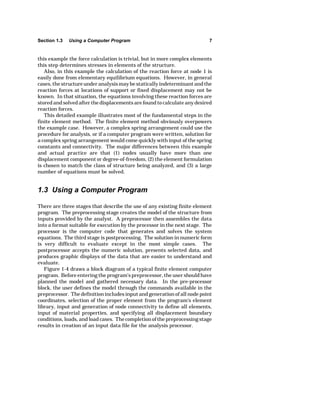
Figure 1-4 draws a block diagram of a typical finite element computer 
program. Before entering the program's preprocessor, the user should have 
planned the model and gathered necessary data. In the pre-processor 
block, the user defines the model through the commands available in the 
preprocessor. The definition includes input and generation of all node point 
coordinates, selection of the proper element from the program's element 
library, input and generation of node connectivity to define all elements, 
input of material properties, and specifying all displacement boundary 
conditions, loads, and load cases. The completion of the preprocessing stage 
results in creation of an input data file for the analysis processor.
8 Chapter 1 The Finite Element Method 
PREPROCESSOR 
INPUT DATA 
Control Data, Materials, Node and Element 
Definition, Boundary Conditions, Loads 
FORM ELEMENT [k ] 
Read Element Data, Calculate Element 
Stiffness Matrix, [k ] 
FORM SYSTEM [K ] 
Assemble Element [k ]s to Form the 
System Stiffness Matrix, [K ] 
Element File 
APPLY DISPLACEMENT BOUNDARY CONDITIONS 
POSTPROCESSOR 
Load File 
Element File 
COMPUTE DISPLACEMENTS 
Solve the System Equations 
[K ]{D } = {F } 
for the Displacements 
{D } = [K ] - 1{F } 
COMPUTE STRESSES 
Calculate Stresses and Output 
Files for Postprocessor Plotting 
Load File 
Displacement, 
Stress Files 
Figure 1-4. Finite Element Computer Program Block Diagram 
The processor reads from the input data file each element definition, 
calculates terms of the element stiffness matrix, and stores them in a data 
array or on a disk file. The element type selection determines the form of 
the element stiffness matrix. The next step is to assemble the structure 
stiffness matrix by matrix addition of all element stiffness matrices. The 
application of enough displacement boundary conditions to prevent rigid
References 9 
body motion reduces the structure stiffness matrix to a nonsingular form. 
Then the equation solution may be done with several different computer 
algorithms, but most use some variation of Gaussian elimination. For a 
large set of equations this is the most computationally intensive step in the 
process. The solution here yields values for all node point displacement 
components in the model. The node displacements associated with each 
element combined with the element formulation matrix yield the element 
strains. The element strains with the material properties yield the stresses 
in each element. The processor then produces an output listing file with 
data files for postprocessing. 
Postprocessing takes the results files and allows the user to create 
graphic displays of the structural deformation and stress components. The 
node displacements are usually very small for most engineering structures 
so they are magnified to show an exaggerated shape. Node displacements 
are single-valued, but node values of stress are multi-valued if more than 
one element is attached to a given node. Node stress values are usually 
reached by extrapolation from internal element values and then averaged 
for all elements attached to the node. Contour plots or other stress plots 
desired by the user are created from the node values. In some post-processing 
programs criterion plots of the factor of safety, stress ratio to 
yield, or stress ratio to allowable values are also generated and displayed. 
The engineer is then responsible for interpreting the results and taking 
whatever action is proper. The user must estimate the validity of the 
results first. This is very important because the tendency is to accept the 
results without question. Experience, thorough checking of the modeling 
assumptions and resulting predicted behavior, and correlation with other 
engineering calculations or experimental results all contribute to estimat-ing 
the validity of the results. 
References 
1.1 Zienkiewicz, O. C. and Cheung, Y. K., The Finite Element Method in 
Structural and Continuum Mechanics, McGraw-Hill, London, 1967. 
1.2 Akin, J. E., Finite Element Analysis for Undergraduates, Academic Press, 
London, 1986. 
1.3 Gallagher, R. H., Finite Element Analysis — Fundamentals, Prentice-Hall, 
Englewood Cliffs, New Jersey, 1975. 
1.4 Huebner, K. H. and Thornton, E. A., The Finite Element Method for 
Engineers, John Wiley and Sons, New York, 1982. 
1.5 Irons, B. and Ahmad, S., Techniques of Finite Elements, John Wiley and 
Sons, New York, 1980. 
1.6 Irons, B. and Shrive, N., Finite Element Primer, John Wiley and Sons, New 
York, 1983. 
1.7 Reddy, J. N., An Introduction to the Finite Element Method, McGraw-Hill, 
New York, 1984.
10 Chapter 1 The Finite Element Method 
1.8 Zienkiewicz, O. C. and Taylor, R. L., The Finite Element Method, Volume 
1 — Basic Formulation and Linear Problems, Fourth Edition, McGraw-Hill, 
New York, 1989. 
1.9 Cook, R. D., Malkus, D. S., and Plesha, M. E., Concepts and Applications 
of Finite Element Analysis, Third Edition, John Wiley and Sons, New York, 
1989. 
1.10 Fenner, D. N., Engineering Stress Analysis: A Finite Element Approach 
with Fortran 77 Software, John Wiley and Sons, New York, 1987. 
1.11 Potts, J. F. and Oler, J. W., Finite Element Applications with Microcomput-ers, 
Prentice-Hall, Englewood Cliffs, New Jersey, 1989. 
1.12 Ross, C. T. F., Finite Element Methods in Structural Mechanics, John Wiley 
and Sons, New York, 1985. 
1.13 Stasa, F. L., Applied Finite Element Analysis for Engineers, Holt, Rinehart 
and Winston, New York, 1985. 
1.14 Weaver, W. and Johnston, P. R., Finite Elements for Structural Analysis, 
Prentice-Hall, Englewood Cliffs, New Jersey, 1984. 
1.15 Akin, J. E., Application and Implementation of Finite Element Methods, 
Academic Press, London, 1982. 
1.16 Bathe, K. J. and Wilson, E. L., Numerical Methods in Finite Element 
Analysis, Prentice-Hall, Englewood Cliffs, New Jersey, 1976. 
1.17 Bathe, K. J., Finite Element Procedures in Engineering Analysis, Prentice- 
Hall, Englewood Cliffs, New Jersey, 1981.
11 
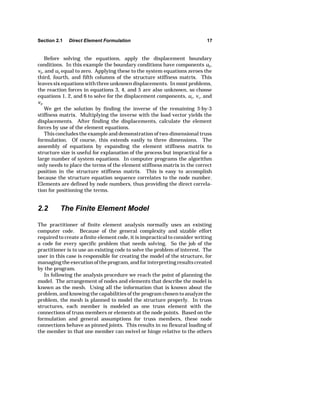
k  
AE 
L 
(2.1) 
C H A P T E R 2 
TRUSSES 
The primary focus of this text is on the aspects of finite element analysis 
that are more important to the user than the formulator or programmer. 
However, for the user to employ the method effectively he or she must have 
some understanding of the element formulations as well as some of the 
computational aspects of the programming. Therefore, the next chapters 
begin by looking at the element formulation for a given structural behavior 
class before proceeding to model development and the proper modeling 
approach. Most finite elements develop from use of an assumed displace-ment 
approximation; therefore, the elements presented will all deal with 
assumed displacement formulations. 
2.1 Direct Element Formulation 
This section presents the direct physical formulation of a truss element and 
its spatial orientation to solve two-dimensional frameworks. A member of 
a truss structure is like a one-dimensional spring. The member has a 
length substantially larger than its transverse dimensions, and it has a 
pinned connection to other members that eliminates all loads other than 
axial load along the member length. It usually has a constant cross-section 
area and modulus of elasticity along its length. The stiffness is then 
where A is the cross-section area, E is the modulus of elasticity, and L is 
the member length.
12 Chapter 2 Trusses 
A one-dimensional truss element then has an element formulation 
identical to the one-dimensional spring given in equation (1.2). This is its 
element stiffness matrix for one-dimensional displacement and loading 
along the axis of the member. For member positioning in a two-dimen-sional 
space as illustrated in Figure 2-1, each node has two components of 
displacement u and v and two components of force p and q. This leads to 
a set of element equations with an element stiffness matrix of size 4 by 4. 
Figure 2-1. Two-Dimensional Truss Element 
Derivation of the two-dimensional element stiffness matrix comes 
through coordinate transformations [2.1], but first we expand the one-dimensional 
stiffness matrix to two dimensions with the member lying 
along the x axis. Assuming an order of components and equations of u and 
v at node i followed by u and v at node j, the element equations are written 
in equation (2.2). 
k 0 k 0 
0 0 0 0 
k 0 k 0 
0 0 0 0 
ui 
vi 
uj 
vj 
 
pi 
qi 
pj 
qj 
(2.2) 
Notice that the terms relating displacement and force in the x direction
Section 2.1 Direct Element Formulation 13 
are the spring constant of the member and the terms relating displacement 
and force in the y direction are zero. A linear analysis always assumes that 
the displacements are much smaller than the overall geometry of the 
structure; therefore, the stiffness is based on the undeformed configuration. 
In this case, because it is a motion perpendicular to the line of the member, 
if we consider a vertical displacement component at one of the nodes, no 
vertical force results because there is no axial stretch relative to the 
undeformed configuration. 
This formulation represents the element stiffness matrix in a local 
element coordinate system that is aligned with the element axis. To 
position the element at an arbitrary angle, O, from the x coordinate axis, we 
perform a transformation of coordinate systems to derive the element 
stiffness matrix in the x,y global coordinate system. In the system of 
equations, the displacements and forces are both vectors, so they transform 
through standard vector transformations. The displacement components 
in global coordinates relate to local components through equation (2.3). 
{d}  [T]{dk } (2.3) 
Here, {d'} are the global displacement components, [T] is the transforma-tion 
matrix, and {d} are the local element coordinate displacement 
[T]  
c s 0 0 
s c 0 0 
0 0 c s 
0 0 s c 
(2.4) 
{f }  [T]{f k} . (2.5) 
[k]{d}  {f } . (2.6) 
components. 
The transformation matrix is given by equation (2.4). 
Here, s is the sin O, and c is the cos O. Similarly, the force components in 
the global coordinate system are given by 
The element stiffness matrix in the local coordinate system is defined in 
matrix notation from equation (2.2) by
14 Chapter 2 Trusses 
Making the substitutions for {d} and {f} given above yields 
[k][T]{dk }  [T]{f k} . (2.7) 
The transformation matrix is an orthogonal matrix, meaning that 
[T]1 
 [T]— . (2.8) 
Therefore, multiplying equation (2.7) by [T]— produces 
[T]— [k][T]{dk}  {f k } (2.9) 
which makes 
[kk ]  [T]—[k][T]  k 
c 2 cs c 2 cs 
cs s 2 
cs s 2 
c 2 cs c 2 cs 
cs s 2 cs s 2 
(2.10) 
The use of this element formulation and equation assembly is shown 
through the example truss structure pictured in (2.11). The elements and 
nodes are numbered, and load and boundary conditions are shown. The 
structure equations are 
[K]{D}  {F} (2.11) 
where, [K] is the structure stiffness matrix, {D} is the node displacement 
vector, and {F} is the applied load vector. 
These equations come from applying the conditions of equilibrium to all 
the nodes by setting the summation of internal forces equal to the applied 
forces. The internal forces are given by the product of each element 
stiffness matrix with its node displacements. This yields equation (2.12), 
where the subscripts refer to the numbered elements. If the displacement 
vector in each term of the equation above was identical, then we could 
[k]{d}|1  [k]{d}|2  [k]{d}|3  {F} (2.12)
Section 2.1 Direct Element Formulation 15 
Figure 2-2. Example Truss Structure 
factor it out and add the stiffness matrices term-by-term to produce the 
structure stiffness matrix. 
all the structure degrees-of-freedom, not just the ones associated with a 
given element. In order for the matrix equation to be correct, a corre-sponding 
expansion of the displacement vector. It expands to the size of the 
structure stiffness matrix which in this example becomes a 6-by-6 matrix. 
The expansion simply adds rows and columns of zeroes to each element 
stiffness matrix corresponding to the additional structure degrees-of-freedom 
 
The displacement vector for each element must then expand to include 
expansion of the element stiffness matrix must accompany the 
0 0 0 0 
0 k1 0 k1 
0 0 0 0 
0 k1 0 k1 
 
0 0 0 0 0 
0 0 0 0 0 
0 0 0 0 0 
0 0 0 k1 0 
0 0 0 0 0 
0 0 0 k1 0 
(2.13) 
unused in the given element [2.1]. 
Applying this approach, the stiffness matrix for element 1 in the example 
results from using equation (2.10) with a O value of 90 degrees. Rows and 
columns of zeroes fill in equations and positions involving u1 and v1 as 
shown in equation (2.13). 
Similarly, the matrix for element 2 with O equal to 135 degrees and rows
16 Chapter 2 Trusses 
and columns filled in equations and positions involving u2 and v2 results in 
equation (2.14). 
[k]2  
.5k2 .5k2 0 0 .5k2 .5k2 
0 0 0 0 0 0 
0 0 0 0 0 0 
.5k2 .5k2 0 0 .5k2 .5k2 
(2.14) 
Finally for element 3, O is 0 degrees and u3 and v3 are the additional 
[k]3  
k3 0 k3 0 0 0 
0 0 0 0 0 0 
k3 0 k3 0 0 0 
0 0 0 0 0 0 
0 0 0 0 0 0 
0 0 0 0 0 0 
(2.15) 
[K]  
.5k2k3 .5k2 k3 0 .5k2 .5 
.5k2 .5k2 0 0 .5k2 . 
k3 0 k3 0 0 
0 0 0 k1 0  
.5k2 .5k2 0 0 .5k2 . 
.5k2 .5k2 0 k1 .5k2 .5k 
(2.16) 
degrees-of-freedom in equation (2.15). 
The summations of equation (2.12) are now carried out by adding the 
expanded element stiffness matrices term-by-term. The resulting structure 
stiffness matrix is in equation (2.16).
Section 2.1 Direct Element Formulation 17 
Before solving the equations, apply the displacement boundary 
conditions. In this example the boundary conditions have components u2, 
v2, and u3 equal to zero. Applying these to the system equations zeroes the 
third, fourth, and fifth columns of the structure stiffness matrix. This 
leaves six equations with three unknown displacements. In most problems, 
the reaction forces in equations 3, 4, and 5 are also unknown, so choose 
equations 1, 2, and 6 to solve for the displacement components, u1, v1, and 
v3. 
We get the solution by finding the inverse of the remaining 3-by-3 
stiffness matrix. Multiplying the inverse with the load vector yields the 
displacements. After finding the displacements, calculate the element 
forces by use of the element equations. 
This concludes the example and demonstration of two-dimensional truss 
formulation. Of course, this extends easily to three dimensions. The 
assembly of equations by expanding the element stiffness matrix to 
structure size is useful for explanation of the process but impractical for a 
large number of system equations. In computer programs the algorithm 
only needs to place the terms of the element stiffness matrix in the correct 
position in the structure stiffness matrix. This is easy to accomplish 
because the structure equation sequence correlates to the node number. 
Elements are defined by node numbers, thus providing the direct correla-tion 
for positioning the terms. 
2.2 The Finite Element Model 
The practitioner of finite element analysis normally uses an existing 
computer code. Because of the general complexity and sizable effort 
required to create a finite element code, it is impractical to consider writing 
a code for every specific problem that needs solving. So the job of the 
practitioner is to use an existing code to solve the problem of interest. The 
user in this case is responsible for creating the model of the structure, for 
managing the execution of the program, and for interpreting results created 
by the program. 
In following the analysis procedure we reach the point of planning the 
model. The arrangement of nodes and elements that describe the model is 
known as the mesh. Using all the information that is known about the 
problem, and knowing the capabilities of the program chosen to analyze the 
problem, the mesh is planned to model the structure properly. In truss 
structures, each member is modeled as one truss element with the 
connections of truss members or elements at the node points. Based on the 
formulation and general assumptions for truss members, these node 
connections behave as pinned joints. This results in no flexural loading of 
the member in that one member can swivel or hinge relative to the others
18 Chapter 2 Trusses 
connected at any given node, yet will transmit axial load. 
Since a truss element behaves exactly in agreement with the assump-tions 
of a truss member, there is no need to divide a member into more 
than one element. In fact, such a subdivision will cause the execution stage 
of the program to fail. The failure is due to the zero stiffness against any 
lateral force applied at a node connection where two members are in perfect 
axial alignment. So just as a physical truss structure constructed in this 
manner would collapse, the numerical solution of the problem defined in 
this manner also should collapse. 
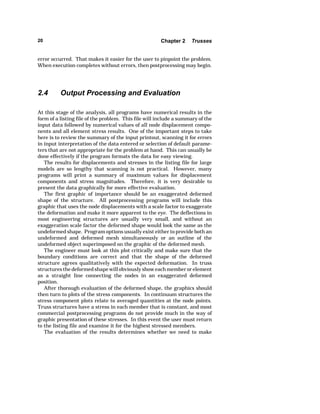
A simple bridge structure is in Figure 2-3 and a corresponding finite 
element mesh with elements and nodes numbered is in Figure 2-4. 
Figure 2-3. Simple Bridge Structure 
Figure 2-4. Simple Bridge Structure Finite Element Mesh 
2.3 The Analysis Step 
Operation of the analysis step is mostly transparent to the user. However, 
there are some factors that the user must be familiar with to assure good
Section 2.3 The Analysis Step 19 
results. Some of them are inherent in the computer hardware and 
software, but some of them are under user control. For small truss 
structure models, most programs have enough numerical accuracy and 
performance to provide an accurate solution without much user concern. 
Large models cause the most concern [2.1]. 
A large model is one in which there are many elements and nodes used 
to represent the structure. (The structure itself is not necessarily large.) 
With many system equations it becomes difficult to find a numerical 
solution if the equation matrix is full. Even the inverse of a 10-by-10 
matrix may be inaccurate if done by Gauss elimination with only a few 
significant figures carried along in the mathematical operations. The 
accuracy will improve, however, if the matrix has its nonzero terms 
clustered near the diagonal. This reduces the number of operations and 
reduces the roundoff error carried along in each operation. This kind of 
matrix, with its nonzero terms near the diagonal, is a banded matrix. 
If the truss structure model consists of thousands of nodes and elements, 
then the bandwidth of the structure equations needs to be small. Keeping 
it small reduces error and computing time. If the mesh plan does not have 
a small bandwidth for the system of equations, then bandwidth minimizers 
available in many programs should reduce it. There are several algorithms 
available which will usually, but not always, find a better node or element 
numbering pattern. Most programs keep the original numbering in the 
model for documentation and presentation purposes by storing the 
renumbered nodes and elements in translation tables. In some programs 
the user has the option to keep the original numbering or change to the 
new numbering plan. 
The approximation error for the truss element is zero since the element 
formulation is in exact agreement with the assumptions used to define a 
truss member. During processor execution there are usually some prompts 
of progress made displayed on the computer, and if errors occur, messages 
appear. Sometimes these messages have meaning only to the computer 
program developer, but some of them can be very helpful in determining 
the model error. 
The most common runtime errors involve incorrect definition of elements 
or incorrect application of displacement boundary conditions. For example, 
both conditions can produce an error message that the structure stiffness 
matrix is not positive-definite or that a negative pivot or diagonal term in 
the stiffness matrix appeared during equation reduction. For truss models 
this can occur whenever there are not enough boundary conditions to 
prevent rigid body motion. It can also occur when two elements connect in-line 
resulting in zero lateral stiffness. It can also mean that the truss 
structure itself is not kinematically stable associated with a kinematic 
linkage of the members. 
The error messages from the computer program should provide an 
associated element number, node number, or equation number where the
20 Chapter 2 Trusses 
error occurred. That makes it easier for the user to pinpoint the problem. 
When execution completes without errors, then postprocessing may begin. 
2.4 Output Processing and Evaluation 
At this stage of the analysis, all programs have numerical results in the 
form of a listing file of the problem. This file will include a summary of the 
input data followed by numerical values of all node displacement compo-nents 
and all element stress results. One of the important steps to take 
here is to review the summary of the input printout, scanning it for errors 
in input interpretation of the data entered or selection of default parame-ters 
that are not appropriate for the problem at hand. This can usually be 
done effectively if the program formats the data for easy viewing. 
The results for displacements and stresses in the listing file for large 
models are so lengthy that scanning is not practical. However, many 
programs will print a summary of maximum values for displacement 
components and stress magnitudes. Therefore, it is very desirable to 
present the data graphically for more effective evaluation. 
The first graphic of importance should be an exaggerated deformed 
shape of the structure. All postprocessing programs will include this 
graphic that uses the node displacements with a scale factor to exaggerate 
the deformation and make it more apparent to the eye. The deflections in 
most engineering structures are usually very small, and without an 
exaggeration scale factor the deformed shape would look the same as the 
undeformed shape. Program options usually exist either to provide both an 
undeformed and deformed mesh simultaneously or an outline of the 
undeformed object superimposed on the graphic of the deformed mesh. 
The engineer must look at this plot critically and make sure that the 
boundary conditions are correct and that the shape of the deformed 
structure agrees qualitatively with the expected deformation. In truss 
structures the deformed shape will obviously show each member or element 
as a straight line connecting the nodes in an exaggerated deformed 
position. 
After thorough evaluation of the deformed shape, the graphics should 
then turn to plots of the stress components. In continuum structures the 
stress component plots relate to averaged quantities at the node points. 
Truss structures have a stress in each member that is constant, and most 
commercial postprocessing programs do not provide much in the way of 
graphic presentation of these stresses. In this event the user must return 
to the listing file and examine it for the highest stressed members. 
The evaluation of the results determines whether we need to make
Section 2.5 Case Study 21 
additional model refinements and whether the results have converged to 
enough accuracy. For truss structures we know that the element formula-tion 
is exact; therefore, in a correctly defined and processed model the 
output results will be exact. So there is no need for refined modeling to 
produce converged results in this case, but the modeling of loads and 
boundary conditions may not be fully appropriate. 
It is important to remember that this is a linear elastic analysis. One of 
the potential failure modes is overstressing while another is elastic 
buckling. The stresses compare to yield strength for the material to 
determine if overstress failure occurs. To determine whether there is 
potential for elastic buckling, the user must identify the members with a 
significant compression load, and then use Euler buckling equations from 
mechanics of materials to evaluate the potential for each member to buckle 
[2.2]. This is not done in a linear elastic analysis computer program. If any 
member has an inadequate safety factor against buckling, then the entire 
structure should have a stability analysis conducted using a solution 
algorithm available in some nonlinear computer codes. 
2.5 Case Study 
We show a typical truss structure in Figure 2-5. This structure has 
members of two different cross-section areas and two different materials. 
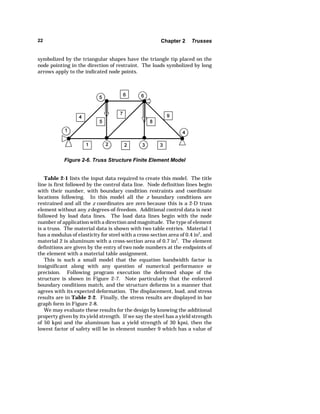
The mesh plan for this structure is illustrated in Figure 2-6 with a chosen 
pattern for node and element numbers. The enforced boundary conditions 
Figure 2-5. Two-Dimensional Truss Structure
22 Chapter 2 Trusses 
symbolized by the triangular shapes have the triangle tip placed on the 
node pointing in the direction of restraint. The loads symbolized by long 
arrows apply to the indicated node points. 
Figure 2-6. Truss Structure Finite Element Model 
Table 2-1 lists the input data required to create this model. The title 
line is first followed by the control data line. Node definition lines begin 
with their number, with boundary condition restraints and coordinate 
locations following. In this model all the z boundary conditions are 
restrained and all the z coordinates are zero because this is a 2-D truss 
element without any z degrees-of-freedom. Additional control data is next 
followed by load data lines. The load data lines begin with the node 
number of application with a direction and magnitude. The type of element 
is a truss. The material data is shown with two table entries. Material 1 
has a modulus of elasticity for steel with a cross-section area of 0.4 in2, and 
material 2 is aluminum with a cross-section area of 0.7 in2. The element 
definitions are given by the entry of two node numbers at the endpoints of 
the element with a material table assignment. 
This is such a small model that the equation bandwidth factor is 
insignificant along with any question of numerical performance or 
precision. Following program execution the deformed shape of the 
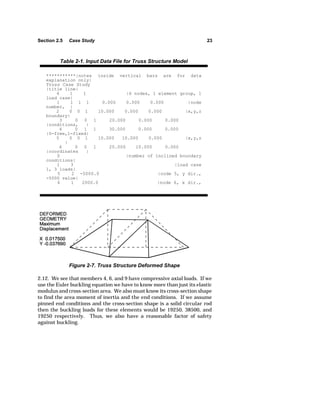
structure is shown in Figure 2-7. Note particularly that the enforced 
boundary conditions match, and the structure deforms in a manner that 
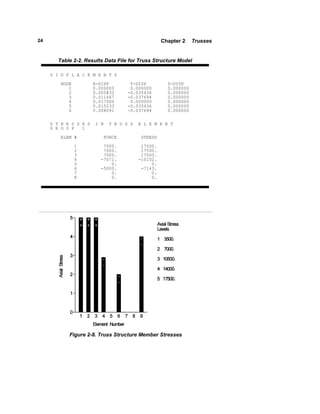
agrees with its expected deformation. The displacement, load, and stress 
results are in Table 2-2. Finally, the stress results are displayed in bar 
graph form in Figure 2-8. 
We may evaluate these results for the design by knowing the additional 
property given by its yield strength. If we say the steel has a yield strength 
of 50 kpsi and the aluminum has a yield strength of 30 kpsi, then the 
lowest factor of safety will be in element number 9 which has a value of
Section 2.5 Case Study 23 
Table 2-1. Input Data File for Truss Structure Model 
***********|notes inside vertical bars are for data 
explanation only| 
Truss Case Study 
|title line| 
6 1 1 |6 nodes, 1 element group, 1 
load case| 
1 1 1 1 0.000 0.000 0.000 |node 
number, | 
2 0 0 1 10.000 0.000 0.000 |x,y,z 
boundary| 
3 0 0 1 20.000 0.000 0.000 
|conditions, | 
4 0 1 1 30.000 0.000 0.000 
|0-free,1-fixed| 
5 0 0 1 10.000 10.000 0.000 |x,y,z 
Figure 2-7. Truss Structure Deformed Shape 
| 
6 0 0 1 20.000 10.000 0.000 
|coordinates | 
0 |number of inclined boundary 
conditions| 
1 3 |load case 
1, 3 loads| 
5 2 -5000.0 |node 5, y dir., 
-5000 value| 
6 1 2000.0 |node 6, x dir., 
2.12. We see that members 4, 6, and 9 have compressive axial loads. If we 
use the Euler buckling equation we have to know more than just its elastic 
modulus and cross-section area. We also must know its cross-section shape 
to find the area moment of inertia and the end conditions. If we assume 
pinned end conditions and the cross-section shape is a solid circular rod 
then the buckling loads for these elements would be 19250, 38500, and 
19250 respectively. Thus, we also have a reasonable factor of safety 
against buckling.
24 Chapter 2 Trusses 
Table 2-2. Results Data File for Truss Structure Model 
D I S P L A C E M E N T S 
NODE X-DISP Y-DISP Z-DISP 
1 0.000000 0.000000 0.000000 
2 0.005833 -0.035436 0.000000 
3 0.011667 -0.037694 0.000000 
4 0.017500 0.000000 0.000000 
5 0.015233 -0.035436 0.000000 
6 0.008091 -0.037694 0.000000 
S T R E S S E S I N T R U S S E L E M E N T 
G R O U P 1 
ELEM # FORCE STRESS 
1 7000. 17500. 
2 7000. 17500. 
3 7000. 17500. 
4 -7071. -10102. 
5 0. 0. 
6 -5000. -7143. 
7 0. 0. 
8 0. 0. 
Figure 2-8. Truss Structure Member Stresses
Section 2.6 Closure 25 
2.6 Closure 
There are few situations in mechanical design where a truss element is the 
right element for modeling the behavior. It is a simple element with which 
to discuss and learn finite element concepts. It may make an important 
contribution to the analysis by use as a boundary supporting spring or a 
gap element that connects two or more separate parts of a machine that 
must interact in the analysis. Therefore, the engineer must understand its 
nature well to interpret its effect on the overall response of any analysis 
that includes truss or truss-based elements. 
Problems 
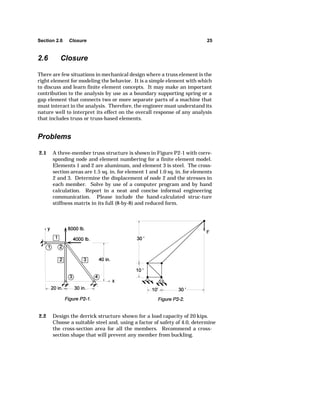
2.1 A three-member truss structure is shown in Figure P2-1 with corre-sponding 
node and element numbering for a finite element model. 
Elements 1 and 2 are aluminum, and element 3 is steel. The cross-section 
areas are 1.5 sq. in. for element 1 and 1.0 sq. in. for elements 
2 and 3. Determine the displacement of node 2 and the stresses in 
each member. Solve by use of a computer program and by hand 
calculation. Report in a neat and concise informal engineering 
communication. Please include the hand-calculated struc-ture 
stiffness matrix in its full (8-by-8) and reduced form. 
2.2 Design the derrick structure shown for a load capacity of 20 kips. 
Choose a suitable steel and, using a factor of safety of 4.0, determine 
the cross-section area for all the members. Recommend a cross-section 
shape that will prevent any member from buckling.
26 Chapter 2 Trusses 
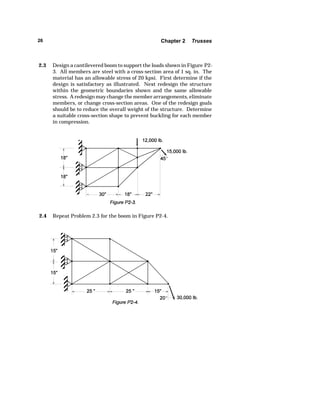
2.3 Design a cantilevered boom to support the loads shown in Figure P2- 
3. All members are steel with a cross-section area of 1 sq. in. The 
material has an allowable stress of 20 kpsi. First determine if the 
design is satisfactory as illustrated. Next redesign the structure 
within the geometric boundaries shown and the same allowable 
stress. A redesign may change the member arrangements, eliminate 
members, or change cross-section areas. One of the redesign goals 
should be to reduce the overall weight of the structure. Determine 
a suitable cross-section shape to prevent buckling for each member 
in compression. 
2.4 Repeat Problem 2.3 for the boom in Figure P2-4.
References 27 
References 
2.1 Cook, R. D., Malkus, D. S., and Plesha, M. E., Concepts and Applications 
of Finite Element Analysis, Third Edition, John Wiley and Sons, New York, 
1989. 
2.2 Popov, E. P., Introduction to Mechanics of Solids, Prentice-Hall, Inc., 
Englewood Cliffs, New Jersey, 1968.
C H A P T E R 3 
BEAMS AND FRAMES 
Application of straight beam theory readily solves simple beam problems 
especially if the problem is statically determinant. If the beam is not 
particularly simple, in that it may have cross-section changes, multiple 
supports, or complex loading distributions, then we can use beam theory, 
but it is very tedious to develop the solution by hand. Also, many 2-D or 3- 
D framework structures may require solutions in which the truss member 
assumption is inadequate and therefore needs the beam flexure formula-tion. 
Further applications may include beam members as re-inforcement 
members in combination beam, plate, and shell structures. These 
applications are readily attacked with the finite element formulation. 
3.1 Element Formulation 
Here we follow the direct approach for formulating the element stiffness 
matrix [3.1]. The element equations relating general displacement and 
force components are given by 
[k]{d}  {f } (3.1) 
where [k] is the element stiffness matrix, {d} is the node displacement 
component column matrix, and {f} is the internal force component column 
matrix. The stiffness matrix terms derive from superposition of simple 
beam solutions. Apply a unit displacement of one component with the other 
components held to zero and evaluate the magnitude of resulting force 
components. For example, taking the element shown in Figure 3-1 and 
28
Section 3.1 Element Formulation 29 
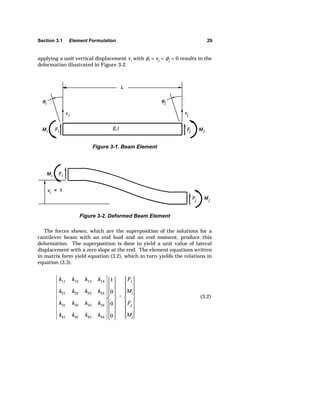
applying a unit vertical displacement vi with ki = vj = kj = 0 results in the 
deformation illustrated in Figure 3-2. 
Figure 3-1. Beam Element 
Figure 3-2. Deformed Beam Element 
The forces shown, which are the superposition of the solutions for a 
cantilever beam with an end load and an end moment, produce this 
deformation. The superposition is done to yield a unit value of lateral 
displacement with a zero slope at the end. The element equations written 
in matrix form yield equation (3.2), which in turn yields the relations in 
equation (3.3). 
k11 k12 k13 k14 
k21 k22 k23 k24 
k31 k32 k33 k34 
k41 k42 k43 k44 
1 
0 
0 
0 
 
Fi 
Mi 
Fj 
Mj 
(3.2)
30 Chapter 3 Beams and Frames 
k11  Fi , k21  Mi , k31  Fj , and k41  M (3.3) 
Using superposition of beam deflection equations available in any 
mechanics of materials text, we write equations (3.4). Solve these 
equations for the values of Fi and Mi in equations (3.5). 
vi  1  
FiL3 
3EI 
 
MiL2 
2EI 
ki  0  
FiL2 
2EI 
 
MiL 
EI 
(3.4) 
Fi  
12EI 
L3 
Mi  
6EI 
L2 
(3.5) 
Use static equilibrium equations to get the values of Fj and Mj in equation 
(3.6). 
Fj   
12EI 
L3 
Mj  
6EI 
L2 (3.6) 
We now have all the terms of column 1 of the 4x4 element stiffness 
[k]  
12EI 
L3 
... ... ... 
6EI 
L2 
... ... ... 
 
12EI 
L3 
... ... ... 
6EI 
L2 
... ... ... 
(3.7) 
matrix as shown in equation (3.7).
Section 3.1 Element Formulation 31 
Similarly applying a unit value of rotation for ki and fixing all other 
components to zero, we derive the force and moment values in Figure 3-3. 
These come from superposition of the same solutions for end load and 
moment to satisfy the displacement conditions. 
Figure 3-3. Deformed Beam Element 
Notice that the sign convention employed here is common in the finite 
element formulation such that the component's sign always agrees with the 
positive direction of a right-handed coordinate system. This does not agree 
with most beam sign conventions employed in mechanics of material texts. 
Therefore, the user should be aware that the output components will 
normally be expressed using this finite element sign convention. This 
means, for example, that a positive value of moment at the first node of the 
element will produce a tensile stress at the top surface of the beam. In 
contrast, a positive moment on the second node will produce a compressive 
stress at the top surface of the beam. 
Obtain the remaining terms in the stiffness matrix by application of the 
same procedures to the second node. The final element stiffness is then 
given in equation (3.8). 
[k]  
12EI 
L3 
6EI 
L2 
 
12EI 
L3 
6EI 
L2 
6EI 
L2 
4EI 
L 
 
6EI 
L2 
2EI 
L 
 
12EI 
L3 
 
6EI 
L2 
12EI 
L3 
 
6EI 
L2 
6EI 
L2 
2EI 
L 
 
6EI 
L2 
4EI 
L 
(3.8)
32 Chapter 3 Beams and Frames 
This formulation provides an exact representation of a beam span within 
the assumptions involved in straight beam theory, provided there are no 
loads applied along the span. Therefore, in modeling considerations, place 
a node at all locations where concentrated forces, or moments, act in 
creating the element assembly. In spans where there is a distributed load, 
the assumed displacement field does not completely satisfy the governing 
differential equation; therefore, the solution is not exact but approximate. 
One approach to modeling in this area is to make enough subdivisions of 
the span with distributed load to lessen the error. If a work equivalent load 
set acting on the nodes replaces the distributed load, then the influence of 
any error in this element will not propagate to other elements. In other 
words, the displacement components at the nodes will be correct if we use 
the equivalent load set. The equivalent load components for a distributed 
load on the element span are the negative of the end reaction force and 
moment found in the solution of a fixed end beam with the same distrib-uted 
load as shown by Logan [3.2]. 
This formulation provides the ability to analyze simple beams, but does 
not account for the axial load that may exist in beam members connected 
in a framework. By adding the truss element formulation by superposition 
with the previous formulation, we have an element that can support both 
lateral and axial loads. The axial stiffness terms at each node are added 
to the element stiffness matrix formulation to create the frame element 
stiffness matrix in equation (3.9). 
[k]  
AE 
L 
0 0  
AE 
L 
0 
0 12EI 
L3 
6EI 
L2 
0  
12EI 
L3 
0 6EI 
L2 
4EI 
L 
0  
6EI 
L2 
 
AE 
L 
0 0 AE 
L 
0 
0  
12EI 
L3 
 
6EI 
L2 
0 12EI 
L3 
0 6EI 
L2 
2EI 
L 
0  
6EI 
L2 
(3.9) 
This assumes that superposition is valid for this case. If displacements 
are small it will be accurate; however, there is an interaction that occurs
Section 3.2 The Finite Element Model 33 
between axial and lateral loading on beams. If the axial load is tensile it 
reduces the effect of lateral loads, and when the axial load is compressive 
it amplifies the effect of lateral loads. To gain further information on this 
interaction, consult an advanced mechanics of materials text [3.3] for the 
equations that apply to members called beam-columns or struts. The 
equations for these members are a nonlinear function of the size of lateral 
displacement. Therefore, a linear analysis cannot account for the effect. 
The user should be aware of this consideration. Remember that if the 
axial load is tensile, the results from beam elements will be higher than 
they actually are; thus results are conservative. Also, if the axial load is 
compressive, the results will be less than actual and may be in serious 
error. The size of error associated with the compressive loading is normally 
quite small until the axial load exceeds roughly 25 percent of the Euler 
column buckling load. In most cases a design should have a factor of safety 
against buckling greater than four anyway. 
Now the formulation includes the u and v displacement components and 
the section rotation at the nodes in the element local coordinate system. 
Using the coordinate transformations developed for truss members, we may 
orient this two-dimensional beam element in 2-D space. Through this 
transformation, then, the element formulation applies to any 2-D frame-work. 
3.2 The Finite Element Model 
In planning the mesh for a structure to be modeled with beam elements, 
the factors just revealed in element formulation provide guidance about the 
proper element subdivision and connections. Since the element formulation 
is exact for a beam span with no intermediate loads, then we need only one 
element to model any member of the structure that has constant cross-section 
properties and no intermediate loads. Where a span has a 
distributed load, we may subdivide it with several elements to lessen the 
error depending on the solution accuracy desired. 
There should be a node placed at every location in the structure where 
a point load is applied. Also, where frame members connect such that the 
line element changes direction or cross-section properties change, we should 
place a node and end an element at that point. Remember that the 
connection of two or more elements at a node guarantees that each element 
connecting at that node will have the same value of linear and rotation 
displacement components at that node. Physically, think of this as a solid, 
continuous, or welded configuration.
34 Chapter 3 Beams and Frames 
3.3 Output Processing and Evaluation 
A complete printout, or listing file, lists a reflection of model input data, the 
displacement results including rotations, and output of stresses resulting 
from moment, axial, and shear forces. The graphical presentation of the 
deformed shape ideally would use the rotations at the nodes with the 
assumed displacement shape function for the element to plot the actual 
curved shape the elements take when loaded. However, most programs 
only plot the deformed shape using the node translation displacements and 
straight line connections to represent the elements. In this case it is 
difficult to determine from the graphic if we applied the rotational 
boundary conditions. In order to check boundary conditions and get a 
smooth visualization of the deformation curvatures, the user may resort to 
remodeling with several element subdivisions within each span. 
The stresses in 2-D beam elements consist of a normal stress acting 
normal to the beam cross section and a transverse shear stress acting on 
the face of the cross section. The normal stress comes from superposition 
of the axial stress that is uniform across the section with the bending stress 
due to the moment on the section. This combination will result in the 
maximum normal stress occurring either at the top or bottom surface. The 
transverse shear stress is usually an average across the cross section 
calculated by the transverse load divided by the area. This obviously does 
not account for the shear stress variation that occurs across the section 
from top to bottom [3.3]. The transverse shear stress must be zero at the 
top and bottom surfaces and has some nonuniform distribution in between 
that is a function of the cross-section geometry. This variation is usually 
of minor importance, but the analyst may calculate it if desired. 
Most of the available finite programs do not make graphical presentation 
of the beam stress results. So it reverts to the engineer to evaluate the 
stress output usually based on values from the printout listing. The 
engineer also must check for Euler buckling in members that have an axial 
compressive stress. If the factor of safety against buckling in these mem-bers 
is less than about 4, then the stresses may need correction for the 
interaction between the axial and flexural stress in that member. 
3.4 Case Study 
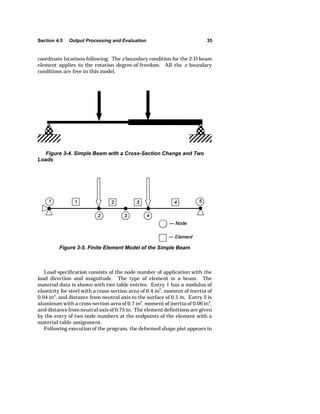
We show a simple beam structure in Figure 3-4 with two different cross 
sections and two loads. It has simple supports, and we develop a mesh plan 
in Figure 3-5 with five nodes and four elements. The model input data list 
is in Table 3-1. The title line is first with the control data line next. Node 
definition begins with its number, then boundary condition restraints and
Section 4.5 Output Processing and Evaluation 35 
coordinate locations following. The z boundary condition for the 2-D beam 
element applies to the rotation degree-of-freedom. All the z boundary 
conditions are free in this model. 
Figure 3-4. Simple Beam with a Cross-Section Change and Two 
Loads 
Figure 3-5. Finite Element Model of the Simple Beam 
Load specification consists of the node number of application with the 
load direction and magnitude. The type of element is a beam. The 
material data is shown with two table entries. Entry 1 has a modulus of 
elasticity for steel with a cross-section area of 0.4 in2, moment of inertia of 
0.04 in4, and distance from neutral axis to the surface of 0.5 in. Entry 2 is 
aluminum with a cross-section area of 0.7 in2, moment of inertia of 0.06 in4, 
and distance from neutral axis of 0.75 in. The element definitions are given 
by the entry of two node numbers at the endpoints of the element with a 
material table assignment. 
Following execution of the program, the deformed shape plot appears in
36 Chapter 3 Beams and Frames 
***********|notes inside vertical bars are for data explana-tion 
only| 
Beam Case Study 
|title line| 
5 1 1 |5 nodes, 1 element group, 1 
load case| 
1 1 1 0 0.000 0.000 0.000 |node 
number, | 
2 0 0 0 5.000 0.000 0.000 |x,y,z 
boundary | 
3 0 0 0 8.000 0.000 0.000 |condi-tions 
| 
4 0 0 0 10.000 0.000 0.000 |0-free, 
1-fixed| 
5 0 1 0 15.000 0.000 0.000 |x,y,z 
coord. | 
0 |number of inclined boundary 
conditions| 
1 2 |load case 1, 
2 loads| 
Table 3-1. Input Data File for Beam Model 
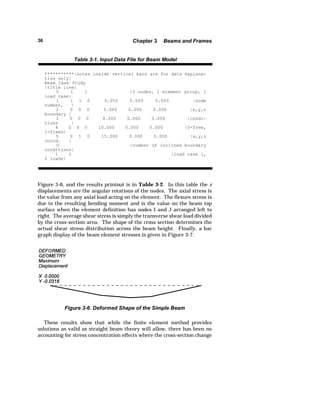
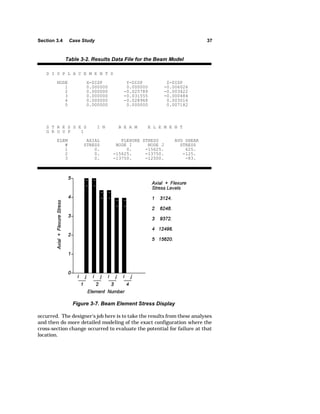
Figure 3-6, and the results printout is in Table 3-2. In this table the z 
displacements are the angular rotations of the nodes. The axial stress is 
the value from any axial load acting on the element. The flexure stress is 
due to the resulting bending moment and is the value on the beam top 
surface when the element definition has nodes I and J arranged left to 
right. The average shear stress is simply the transverse shear load divided 
by the cross-section area. The shape of the cross section determines the 
actual shear stress distribution across the beam height. Finally, a bar 
graph display of the beam element stresses is given in Figure 3-7. 
Figure 3-6. Deformed Shape of the Simple Beam 
These results show that while the finite element method provides 
solutions as valid as straight beam theory will allow, there has been no 
accounting for stress concentration effects where the cross-section change
Section 3.4 Case Study 37 
Table 3-2. Results Data File for the Beam Model 
D I S P L A C E M E N T S 
NODE X-DISP Y-DISP Z-DISP 
1 0.000000 0.000000 -0.006026 
2 0.000000 -0.025789 -0.003422 
3 0.000000 -0.031555 -0.000484 
4 0.000000 -0.028968 0.003016 
5 0.000000 0.000000 0.007182 
S T R E S S E S I N B E A M E L E M E N T 
G R O U P 1 
ELEM AXIAL FLEXURE STRESS AVG SHEAR 
# STRESS NODE I NODE J STRESS 
1 0. 0. -15625. 625. 
2 0. -15625. -13750. -125. 
3 0. -13750. -12500. -83. 
Figure 3-7. Beam Element Stress Display 
occurred. The designer's job here is to take the results from these analyses 
and then do more detailed modeling of the exact configuration where the 
cross-section change occurred to evaluate the potential for failure at that 
location.
38 Chapter 3 Beams and Frames 
3.5 Closure 
The use of beam elements in models provides the engineer with the 
opportunity to solve rather complex beam structures or frameworks that 
could not easily be done with conventional approaches. It also can include 
the effects of the stiffness of supporting structures through connection with 
truss elements or beam elements selected to approximate the support 
stiffness. In the case of statically indeterminant structures where the 
supports might have different stiffnesses, the finite element model will 
provide much better solutions than we can get by conventional approaches. 
It also can provide the loading that exists at localized areas where cross-section 
changes or member connections occur. Then we can use the loading 
in much more detailed models of those regions. 
Problems 
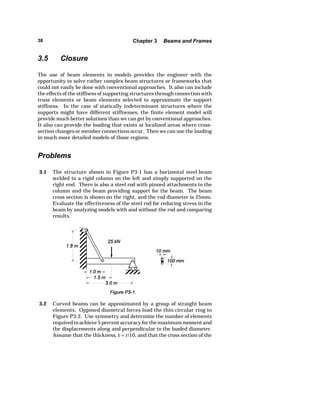
3.1 The structure shown in Figure P3-1 has a horizontal steel beam 
welded to a rigid column on the left and simply supported on the 
right end. There is also a steel rod with pinned attachments to the 
column and the beam providing support for the beam. The beam 
cross section is shown on the right, and the rod diameter is 25mm. 
Evaluate the effectiveness of the steel rod for reducing stress in the 
beam by analyzing models with and without the rod and comparing 
results. 
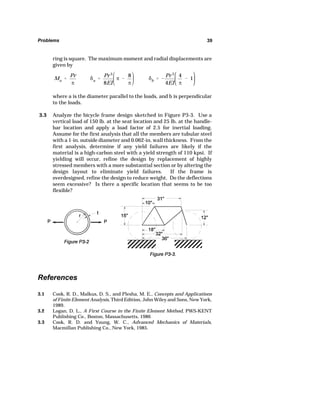
3.2 Curved beams can be approximated by a group of straight beam 
elements. Opposed diametral forces load the thin circular ring in 
Figure P3-2. Use symmetry and determine the number of elements 
required to achieve 5 percent accuracy for the maximum moment and 
the displacements along and perpendicular to the loaded diameter. 
Assume that the thickness, t = r/10, and that the cross section of the
Problems 39 
ring is square. The maximum moment and radial displacements are 
given by 
Ma  
Pr 
_ 
G 
a  
Pr 3 
8EI 
_  
8 
_ 
3.1 Cook, R. D., Malkus, D. S., and Plesha, M. E., Concepts and Applications 
of Finite Element Analysis, Third Edition, John Wiley and Sons, New York, 
1989. 
3.2 Logan, D. L., A First Course in the Finite Element Method, PWS-KENT 
Publishing Co., Boston, Massachusetts, 1986 
3.3 Cook, R. D. and Young, W. C., Advanced Mechanics of Materials, 
Macmillan Publishing Co., New York, 1985. 
G 
b   
Pr 3 
4EI 
4 
_ 
 1 
where a is the diameter parallel to the loads, and b is perpendicular 
to the loads. 
3.3 Analyze the bicycle frame design sketched in Figure P3-3. Use a 
vertical load of 150 lb. at the seat location and 25 lb. at the handle-bar 
location and apply a load factor of 2.5 for inertial loading. 
Assume for the first analysis that all the members are tubular steel 
with a 1-in. outside diameter and 0.062-in. wall thickness. From the 
first analysis, determine if any yield failures are likely if the 
material is a high-carbon steel with a yield strength of 110 kpsi. If 
yielding will occur, refine the design by replacement of highly 
stressed members with a more substantial section or by altering the 
design layout to eliminate yield failures. If the frame is 
overdesigned, refine the design to reduce weight. Do the deflections 
seem excessive? Is there a specific location that seems to be too 
flexible? 
References
C H A P T E R 4 
TWO-DIMENSIONAL SOLIDS 
While the finite element method is very helpful for the solution of truss, 
beam, and frame problems, the real power of the method shows in 
application to two- and three-dimensional solid analysis. There are very 
few closed form solutions to two-dimensional problems, and they are only 
available for simple geometries and loading conditions. The finite element 
method, on the other hand, if correctly applied, can provide the solution to 
most any two-dimensional problem. The correct application is of prime 
importance, and the analyst makes decisions involving the layout and 
planning of the model to represent the member under analysis. The correct 
application must be done to limit solution errors. 
Equations derived in theory of elasticity govern the solution to problems 
in two dimensions. The finite element formulation must satisfy, at least 
approximately, the relations among displacements, strains, and stresses to 
find a solution for general two-dimensional problems. 
4.1 Element Formulation 
There are two shapes of elements used in two-dimensional analysis: the 
triangle and the quadrilateral. The two basic element shapes may be 
linear elements or quadratic elements, where linear and quadratic refer to 
the order of the assumed polynomial displacement interpolation function 
used within the element area. The linear triangle is the simplest and was 
the first two-dimensional element developed. Analysts do not use it much 
now because it requires many more elements to produce a converged and 
accurate solution compared with the quadrilateral. However, we still 
examine its formulation both for academic purposes and for its occasional 
40
Section 4.1 Element Formulation 41 
u  a1  a2x  a3y 
v  a4  a5x  a6y 
(4.1) 
Figure 4-1. Triangular Two-Dimensional Finite Element 
Ix  
ju 
jx 
 a2 
Iy  
jv 
jy 
 a6 
Exy  
ju 
jy 
 
jv 
jx 
 a3  a5 
(4.2) 
use in coarse to fine mesh transitions for refining models. 
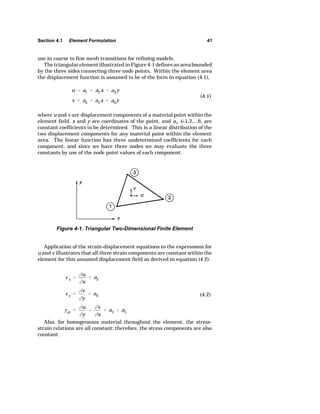
The triangular element illustrated in Figure 4-1 defines an area bounded 
by the three sides connecting three node points. Within the element area 
the displacement function is assumed to be of the form in equation (4.1), 
where u and v are displacement components of a material point within the 
element field, x and y are coordinates of the point, and ai, i=1,2,...6, are 
constant coefficients to be determined. This is a linear distribution of the 
two displacement components for any material point within the element 
area. The linear function has three undetermined coefficients for each 
component, and since we have three nodes we may evaluate the three 
constants by use of the node point values of each component. 
Application of the strain-displacement equations to the expressions for 
u and v illustrates that all three strain components are constant within the 
element for this assumed displacement field as derived in equation (4.2). 
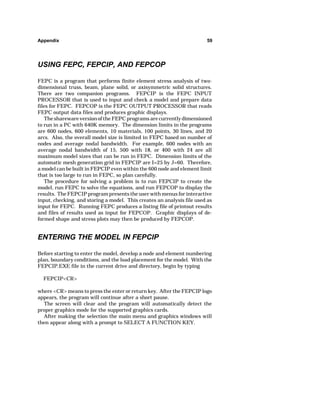
Also, for homogeneous material throughout the element, the stress-strain 
relations are all constant; therefore, the stress components are also 
constant.
42 Chapter 4 Two-Dimensional Solids 
This displacement formulation also satisfies the compatibility require-ments 
in the theory of elasticity [4.1] for the continuum. The compatibility 
requirements are that no gaps or overlaps of material may occur during the 
process of deformation under load. From these equations, we can see that 
the continuous nature of the function enforces compatibility within the 
element. On a triangular element, since the interpolation is linear, any 
edge formed by connecting two nodes that is a straight line before 
deformation will remain a straight line after deformation. Therefore, any 
connecting element using the same two nodes for its shared edge satisfies 
compatibility. 
Some of the early finite element programs [4.2] used the triangle 
element to create a quadrilateral element by subdividing a quadrilateral 
shape into four triangles using the centroid of the quadrilateral as their 
apex. After finding the stiffness matrix for each triangle element, assembly 
of the triangles and condensation of the internal node resulted in the 
stiffness matrix of the quadrilateral element. This was an effective way to 
use the triangular element formulation and employ many more elements 
without tedious input. However, the element of choice now is an 
isoparametric quadrilateral formulation. 
Next we examine the displacement basis for formulation of the isopara-metric 
quadrilateral element. Taig [4.3] developed the element, and Irons 
[4.4] published its formulation. The quadrilateral element formulation 
derives from the formulation of a square element. It uses a co-ordinate 
system transformation to convert the square to a quadrilateral. Begin with 
the square element shown in Figure 4-2 with corner nodes. 
Figure 4-2. Square Two-Dimensional Finite Element 
Recognizing that four constants can be evaluated with four nodes, a 
logical expression for the displacement function components becomes
Section 4.1 Element Formulation 43 
u  a1  a2x  a3y  a4xy 
v  a5  a6x  a7y  a8xy . 
(4.3) 
Use of the strain-displacement relations here shows that 
Ix  a2  a4y 
Iy  a7  a8x 
Exy  a3  a4x  a6  a8y . 
(4.4) 
These equations show that the strain approximation within the element 
allows Ix to be a linear function of y and Iy to be a linear function of x, while 
Exy is a linear function in x and y. So by the addition of one node we have 
gained a much better approximate solution within the element field for the 
general case where the strains vary with both x and y throughout the 
structure domain. Since the stress-strain relations are constant, the stress 
components may vary similarly within the element field. 
Also, in this case the function satisfies compatibility within the element 
because the function is continuous. Along the element edges for x = 
constant or y = constant the displacement takes a linear form, and thus 
remains a straight line between any two of the corner nodes. Therefore 
element connections to other elements satisfy compatibility as long as 
corner nodes of one element connect to the corner nodes of the adjacent 
element. Connection of two adjacent elements to a third element such that 
the edge of the third element spans two of the adjacent elements' edges, as 
shown in Figure 4-3, violates compatibility. 
Figure 4-3. Two-Dimensional Element Compatibility Violation
44 Chapter 4 Two-Dimensional Solids 
Before continuing the discussion of the square element, make a change 
of coordinate systems to transform the square into a quadrilateral shape. 
Square elements can geometrically model very few structures. A co-ordinate 
transformation from x,y to [,M produces the quadrilateral element sketched 
in Figure 4-4. We call the element an isoparametric quadrilateral because 
the same interpolation functions (parameters) used to define the displace-ment 
field define the geometric transformation. 
Figure 4-4. Two-Dimensional Quadrilateral Element 
4.2 The Finite Element Model 
The model plan should begin by choosing the type of element for use. The 
linear triangle element can easily develop into a mesh inside almost any 
arbitrary geometry. However, to produce accurate results there must be 
many of these elements in the model. 
In the line element models we have covered thus far, there was little 
reason for element subdivision other than to define the geometry of the 
structure. However, two-dimensional cases require element subdivision to 
achieve an accurate solution. Since element subdivision is required and the 
exact solution is unknown, a sequence of models with successive mesh 
refinement is proper. Mesh refinement by further and further subdivision 
using compatible elements converges to the exact solution. This procedure 
is known as h-convergence because h is a common symbol for step size in 
numerical operations, and its reduction leads to convergence. 
Reaching a refined solution by increasing the order of polynomial 
approximation within the element is another way to achieve convergence. 
This has become known as p-convergence. A direct conversion of a linear 
element mesh to quadratic elements will yield a more accurate solution.
Section 4.2 The Finite Element Model 45 
This is the first step in the p-convergence method for numerical convergence 
on the correct solution. The user may easily use h-convergence by successive 
model building in all finite element programs. However, there are usually 
only linear and quadratic order elements in the element library of most 
programs that limit the pursuit of p-convergence. There are several new 
commercial codes becoming available now, and a recent text by Szabo and 
Babuska [4.5] provides good coverage of the p-convergence method theory 
and application. 
In planning the mesh, try to use symmetry whenever possible. The 
advantages include a reduction of labor of model input, reduction of 
computer time and cost, and a decrease in computer round-off error in the 
equation solution because fewer equations exist in the model. There are 
some drawbacks. Sometimes it becomes more difficult to picture the model. 
Also, peak stresses may occur along symmetry lines and make it difficult to 
locate elements properly to show the peak. 
Recognize symmetry in two-dimensional objects by observation of 
geometric patterns that may occur. These may develop by incrementing 
plane sections, rotating sections about an axis, periodically rotating sections 
about an axis, or by reflecting a section about a plane. For the symmetric 
model to provide a solution, the load distribution must also be symmetric on 
the object. In some cases, we can find solutions for anti-symmetric loading 
conditions on symmetric objects by proper imposition of displacement 
boundary conditions. 
Displacement boundary conditions enforce symmetry by restricting node 
points that lie on lines of symmetry to motion along the line of symmetry. 
For example, look at the simply supported beam with central load in Figure 
4-5. It has a vertical plane of symmetry at coordinate x = 0. 
Figure 4-5. Simple Beam with Central Load 
When the load applies, the beam will deflect downward and the displace-ment 
of every material particle in the right half will be a mirror image of the 
corresponding particle in the left half. So if the body is symmetric before
46 Chapter 4 Two-Dimensional Solids 
loading, it is also symmetric after loading. Then we only need to model one 
half of this beam. If we take the right half, then the outline of the model is 
in Figure 4-6. The model load reduces by one half because each half of the 
beam carries its share. The node points that lie on the plane where x = 0 are 
restrained against x-direction motion, but left free to move in the y direction. 
Figure 4-6. One-half Simple Beam Model with Central Load 
In a 2-D model, rigid body motion could occur by x translation, y 
translation, or rotation about the z axis. Examine the displacement 
restraints applied for symmetry and support conditions, and determine if 
these restraints will automatically prevent these three rigid body motions. 
If not, then we need to apply additional boundary conditions to assure that 
rigid body motion does not occur. If there is a possible rigid body motion and 
a net external force acting on the body in that direction, then we have not 
recognized all the support restraints because the body is not in static 
equilibrium. If there is no net external force, then we may select any single 
node location for restraint to prevent that motion. 
For example, in the simply supported beam in Figure 4-5, assume we 
model the whole beam and the only restraints are vertical fixed displace-ment 
at the two support points. Then the body would be free to move in the 
x direction with a rigid body translation. To prevent this motion, select any 
node and apply one x-direction restraint. This one restraint is adequate to 
prevent rigid body motion. In fact, applying more than one restraint 
artificially prevents the structure from displacing normally and therefore 
falsifies the solution. Application of displacement restraints to prevent rigid 
body motion should not induce any stress conditions in the body. 
4.3 Computer Input Assistance
Section 4.3 Computer Input Assistance 47 
At this point, the analyst should have roughly defined the model. In two-dimensional 
analyses, we want to develop an adequate subdivision within 
the area defined by the geometrical boundary. For simple geometries and 
loadings, typically a regular array of elements will be suitable and are not 
very difficult to create with simple replication schemes. However, for more 
complex geometry involving hundreds or thousands of elements, we need the 
aid of an area or two-dimensional mesh generator. Most programs provide 
a mesh generation capability in their preprocessor. 
One approach for irregular areas is to perform a coordinate transforma-tion 
mapping from an approximate fit of squares in an integer geometry to 
the actual physical geometry. This mapping may be done by laying out a 
rough equivalent of the actual geometry in an integer space where each 
square in the integer space corresponds to an element. This procedure is 
illustrated in Figure 4-7. 
Figure 4-7. Two-Dimensional Mapping Mesh Generation 
Sides in the integer geometry correspond to sides in the actual geometry. 
Sides in the integer geometry must be horizontal or vertical, while sides in 
the actual geometry can be either straight or curved line segments at any 
orientation. Correspondence of the closed boundary of the actual geometry 
with the closed boundary of the integer geometry sets up the mapping. Use 
of the difference equations, that result from a finite difference approximation 
of the Laplace equation, determines the interior node locations. 
The interior locations result from an iterative solution beginning with a 
linear interpolation between boundary nodes. Sometimes, in areas of 
sharply concave boundaries of the actual geometry, linear interpolation of
48 Chapter 4 Two-Dimensional Solids 
nodes may fall outside the boundary and may not pull back inside the 
boundary with the iterations. Therefore, the user must examine the 
generated mesh carefully before proceeding to make sure the mapping was 
successful. Additional examples of this type of mesh generation are shown 
in Figure 4-8. In this approach, the user usually has some control over the 
resulting bandwidth and wavefront by selection of starting location and 
direction for node and element generation. 
Figure 4-8. Other Mapping Mesh Generation Examples 
4.4 The Analysis Step 
In most two-dimensional analyses, there are many more nodes and elements 
used than with truss, beam, and frame models. Therefore, there is more 
potential for error in both the analysis execution errors and overall 
numerical precision errors. If we checked the model thoroughly in the 
preprocessor, then we should have caught most execution errors. Execution 
errors arise by not preventing rigid body motion in the model, improperly 
defining any element, entering incorrect material and physical properties, 
and many other factors. The error messages presented by the program 
usually identify these errors rather easily when they occur. 
Numerical precision errors may come about through element distortion,
Section 4.4 The Analysis Step 49 
Figure 4-8. (Continued) 
element compatibility violations, and stiffness matrix ill-conditioning caused 
by large differences in stiffness values of elements [4.6]. Examples of severe 
element distortion of quadrilateral elements are shown in Figure 4-9. 
Ideally the elements would remain close to square shape. High aspect 
ratios, large differences in side length, and very small or large inside angles 
all contribute to numerical precision errors. In fact, inside angles greater 
than 180 degrees may cause negative stiffnesses. Most commercial 
programs will check the element distortion and issue warning messages or 
cancel execution if the distortion is too high. 
Even though most two-dimensional element formulations guarantee 
satisfaction of the compatibility requirements in theory of elasticity, 
modeling errors may still violate compatibility. Some of these are illustrated 
in Figure 4-10. 
To satisfy compatibility in corner-noded elements, each element side may 
only join to a side of one other element. For elements with midside nodes, 
each must connect to another element at the corners, and all three nodes on 
a side must connect by use of common nodes. 
The solution accuracy in two-dimensional analyses is very dependent on 
the user's ability to evaluate the results and produce a numerically 
converged solution. In the truss and beam elements, the element formula-tion 
was exact, and therefore there was no concern about interpolation 
accuracy. However, these two-dimensional elements require numerical
50 Chapter 4 Two-Dimensional Solids 
Figure 4-9. Severe Element Distortion 
Figure 4-10. Model Compatibility Errors 
convergence. We accomplish this convergence through careful evaluation of 
the output and refinement of the model. 
4.5 Output Processing and Evaluation 
Completion of the analysis run will produce a listing file and data files for 
graphic postprocessing. As mentioned before, scan the printout file for 
errors in interpretation of input data. The data that represent element 
selection and options, analysis conditions, material and physical properties, 
and these types of data are relatively easy to scan. Obviously, we cannot
Section 4.5 Output Processing and Evaluation 51 
easily check the lists of node point and element definitions. 
Graphic display of two-dimensional data results is necessary to have any 
chance at making a complete evaluation. Display graphics will be useful for 
overall checking of model response as well as location of critical areas. This 
allows examination of the detailed listing file for specific and accurate values 
in these critical areas. The deformed shape plots have an exaggeration 
factor adequate to see the deformation. Check boundary condition 
enforcement, and make a visual judgment as to whether the deformation 
agrees with the expected response. In some cases, the exaggeration factor 
may need to be very high to understand fully how the structure is respond-ing. 
It may help to visualize the shape you would expect if the material of 
the actual structure were very soft and easily deformed. 
Postprocessors normally present stress results in a contour plot form with 
a range of stress levels. In examining the plots we can make some simple 
checks. The boundary conditions of the problem require that any stress 
component perpendicular to a free surface must be zero. Any stress 
component perpendicular to a pressure-loaded surface must equal the 
pressure value. Where a plane of symmetry exists, the stress contour lines 
should become normal to the symmetry boundary. There should not be any 
abrupt changes in contour line direction and it should be continuous. The 
plot should have expected or understandable shape and location of peak 
values. These plots result from stress component values at the node points. 
However, in general, the values at a node common to several elements will 
not be equal. So there must be some manipulation of the computed stresses 
to produce these contour plots. 
Upon examination of the stress contours, the user must make some 
judgment about the validity of the solution. With only results from one 
model, we can never be sure that we have a converged or accurate solution. 
The plan is then to produce multiple models using more refined meshes until 
the solution has converged. The two-dimensional elements presented in this 
chapter have mathematically guaranteed convergence to the exact solution 
as the element size approaches zero. It is then appropriate to run multiple 
solutions with refined meshes to estimate when the convergence has 
occurred. 
Although the individual stress components may be of interest, the failure 
criterion should not be the maximum normal stress theory for ductile 
materials. Its use can result in serious error when the minimum normal 
stress is of the opposite sign. The maximum shear stress failure criterion is 
accurate, but be sure to use the true maximum shear stress and not just the 
maximum in-plane value. The Von Mises equivalent stress based on the 
distortion energy theory is considered to be the most accurate for ductile 
materials. If the material is brittle or a composite or some other class of 
material, then the user must determine what failure criterion is proper to 
use for the given material.
52 Chapter 4 Two-Dimensional Solids 
4.6 Case Study 
The case study analyzes a flat bar in tension with a central hole as a typical 
stress concentration problem. We will analyze this case with the finite 
element method and compare the results with the theoretical stress 
concentration factor. The geometry is shown in Figure 4-11. By taking 
advantage of symmetry, a one-quarter shaded section of the bar defines the 
model geometry. 
Figure 4-11. Flat Bar with a Central Hole in Tension 
The plan for the first finite element model shown in Figure 4-12 has a 
more refined mesh near the hole because the stress is naturally higher in 
that area with steeper slopes of change. Displacement restraints apply to 
the vertical symmetry edge to prevent displacement in the horizontal 
direction and to the horizontal symmetry edge to prevent displacement in 
the vertical direction. Node forces calculated and distributed on the right 
edge provide a uniform stress there of 1 kpsi. 
Figure 4-12. First Finite Element Model
Section 4.6 Case Study 53 
After running the analysis, a contour plot of the x-direction stress 
component appears as shown in Figure 4-13. The contour lines labels 
correspond to the legend on the left. The element outlines are also shown. 
The maximum level occurs at the edge of the hole as expected. A clearer 
view of this region is shown in the enlargement of Figure 4-14. As 
mentioned before, the finite element method gives an approximate, not an 
exact, solution. An estimate of the error in the analysis is the range of stress 
change relative to the average element value across an element. In this case 
the corner element includes contour levels from 6 to 9 with a total range of 
about 1500 psi, or about 750 psi from the average. The estimated error is 
23 percent. 
Figure 4-13. Contour Plot of the X Stress Component 
Figure 4-14. Zoom View of the X Stress Contour Plot
54 Chapter 4 Two-Dimensional Solids 
This error margin is large, so we should refine the model. A second model 
produced was still not sufficiently accurate, so we created a third model. 
This model is shown in Figure 4-15, and it is much more refined around the 
hole. The zoom view of the x stress component is given in Figure 4-16. We 
now have a stress range in the corner element of about 700 psi, or about 350 
psi from the average, for a 9 percent estimated error. The maximum value 
at the edge of the hole is 4300 psi. The nominal or average stress on the 
reduced area section at the hole is 2000 psi which gives a stress concentra-tion 
factor of 2.15. The theoretical stress concentration factor is 2.18, so the 
actual error is only -1.4 percent. 
Figure 4-15. Third Finite Element Model 
Figure 4-16. Zoom View of the X Stress Contour Plot (Third Model)
Section 4.6 Case Study 55 
c 
x  
3qL 2 
4bc 2 
G  
5qL 4 
16Ebc 3 
 
3qL 2(1Y) 
5Ebc 
4.7 Closure 
The application of the finite element method to two- and three-dimensional 
problems is where its power is really useful. There are very few closed form 
solutions to these problems, especially for any but the simplest of geome-tries. 
As shown by this case study, the engineer can reach a very accurate 
solution by application of proper techniques and modeling procedures. The 
accuracy is usually only limited by our willingness to model all the 
significant features of the problem and pursue the analysis until we reach 
convergence. 
Problems 
4.1 Show the convergence of finite element models of a simply supported 
beam with a uniformly distributed load. Refine meshes to determine 
the maximum displacement and maximum stress within about 5 
percent accuracy. Use a beam length of eight times its height and a 
unit thickness. Perform the study using each of the following element 
types if available in the computer program: 
(a) linear triangle, 
(b) linear quadrilateral, 
(c) parabolic triangle, and 
(d) parabolic quadrilateral. 
Referring to Figure P4-1, the flexural stress and the center 
deflection including shear deformation are listed in the following 
equations. 
4.2 A machine member illustrated in Figure P4-2 carries an end load. 
Simple beam equations furnish the nominal flexure stresses in this 
member but do not account for stress concentration effects. Deter-mine 
the stress concentration factors for the two underside radius 
locations. How do these compare with the values found for similar 
geometries in many mechanics of materials or machine design books?
56 Chapter 4 Two-Dimensional Solids 
4.3 Analyze the two tensile bar configurations shown in Figure P4-3. 
Compare your results with published stress concentration factors. Is 
there a significant interaction effect between the two geometrical 
discontinuities for the bar in (b)? 
4.4 Analyze the tensile loaded bar with an off-center hole shown in Figure 
P4-4. Compare results with the closest published results available. 
Make successive models with the hole moving closer to the side and 
see if any pattern develops.
References 57 
4.5 Determine the stress concentration factor(s) for the notched bar with 
a center hole in Figure P4-5. Compare with published results for the 
individual geometries and evaluate any interaction caused by their 
proximity. You may wish to evaluate additional values of notch 
radius or varying depths of a constant notch radius. 
References 
4.1 Timoshenko, S. and Goodier, J. N., Theory of Elasticity, McGraw-Hill, New 
York, 1951. 
4.2 Wilson, E. L. and Jones, R. M., Finite Element Stress Analysis of Axisym-metric 
Solids, Aerospace Corporation, San Bernardino, CA, 1967, Air Force 
Report No. BSD-TR-67-228, (AD-820991, N.T.I.S.). 
4.3 Irons, B. and Ahmad, S., Techniques of Finite Elements, Ellis Horwood 
Limited Publishers, West Sussex, England, 1980. 
4.4 Irons, B. M., Engineering Applications of Numerical Integration in 
Stiffness Methods, AIAA J., Vol. 4, No. 11, 1966, pp. 2035-2037. 
4.5 Szabo, B. and Babuska, I., Finite Element Analysis, John Wiley and Sons, 
New York, 1991. 
4.6 Cook, R. D., Malkus, D. S., and Plesha, M. E., Concepts and Applications 
of Finite Element Analysis, Third Edition, John Wiley and Sons, New York, 
1989.
58 
A P P E N D I X 
This user's guide is written to describe the operation of the FEPCIP, 
FEPC, and FEPCOP programs. It assumes the user has been instructed 
in use of the finite element method to solve stress analysis problems. The 
programs will be described with their capabilities and general sequence of 
use for solving a problem. The first-time user should refer to the README 
file on the program disk for initial setup. In some parts of this guide the 
user is referred to more complete documentation in the file on the program 
disk. 
These FEPC programs are provided as shareware for educational 
purposes. They are copyrighted programs and you are not authorized to 
sell or distribute them for COMMERCIAL purposes. You are free to use, 
copy, and distribute them for NONCOMMERCIAL uses only if no fee is 
charged for use, copying, or distribution. Specifically, the programs were 
designed for use by students in university courses. 
If you are an instructor and use the programs in a university course, I 
would appreciate a simple registration (no fee) of your university, course 
name or description, and approximate number of students taking the 
course. 
If you use the programs for COMMERCIAL purposes, i.e., employed 
engineering, consulting, sponsored research, etc., a partial registration fee 
to continue the software development would be appreciated. For a full 
registration fee, you will receive the latest version, fully dimensioned, to 
run on an IBM-PC or compatible with 640K RAM. Please state the current 
version number of the software you are using. Send inquiries to: 
Dr. C. E. Knight 
Professor of Mechanical Engineering 
914 Ballard Ct. 
Blacksburg, VA 24060 
The programs are continually under development and your comments 
concerning present features or future enhancements would be appreciated.
Appendix 59 
USING FEPC, FEPCIP, AND FEPCOP 
FEPC is a program that performs finite element stress analysis of two-dimensional 
truss, beam, plane solid, or axisymmetric solid structures. 
There are two companion programs. FEPCIP is the FEPC INPUT 
PROCESSOR that is used to input and check a model and prepare data 
files for FEPC. FEPCOP is the FEPC OUTPUT PROCESSOR that reads 
FEPC output data files and produces graphic displays. 
The shareware version of the FEPC programs are currently dimensioned 
to run in a PC with 640K memory. The dimension limits in the programs 
are 600 nodes, 600 elements, 10 materials, 100 points, 30 lines, and 20 
arcs. Also, the overall model size is limited in FEPC based on number of 
nodes and average nodal bandwidth. For example, 600 nodes with an 
average nodal bandwidth of 15, 500 with 18, or 400 with 24 are all 
maximum model sizes that can be run in FEPC. Dimension limits of the 
automatic mesh generation grid in FEPCIP are I=25 by J=60. Therefore, 
a model can be built in FEPCIP even within the 600 node and element limit 
that is too large to run in FEPC, so plan carefully. 
The procedure for solving a problem is to run FEPCIP to create the 
model, run FEPC to solve the equations, and run FEPCOP to display the 
results. The FEPCIP program presents the user with menus for interactive 
input, checking, and storing a model. This creates an analysis file used as 
input for FEPC. Running FEPC produces a listing file of printout results 
and files of results used as input for FEPCOP. Graphic displays of de-formed 
shape and stress plots may then be produced by FEPCOP. 
ENTERING THE MODEL IN FEPCIP 
Before starting to enter the model, develop a node and element numbering 
plan, boundary conditions, and the load placement for the model. With the 
FEPCIP.EXE file in the current drive and directory, begin by typing 
FEPCIPCR 
where CR means to press the enter or return key. After the FEPCIP logo 
appears, the program will continue after a short pause. 
The screen will clear and the program will automatically detect the 
proper graphics mode for the supported graphics cards. 
After making the selection the main menu and graphics windows will 
then appear along with a prompt to SELECT A FUNCTION KEY.
60 Appendix 
INPUT PROCESSOR FINITE ELEMENT PERSONAL COMPUTER DATE TIME 
TITLE: 
F1 FILES MODEL 
F2 MODEL DATA SUMMARY 
F3 2D AUTOMSH WINDOW 
F4 TITLE 
MODEL 
F6 CLEAR MEM GRAPHICS 
F7 EXIT WINDOW 
F8 VIEW OPTS 
F9 DSPLY OPTS 
SELECT A 
FUNCTION KEY 
Selection of a menu item by its function key brings up a branch menu for 
many of the selections. 
Key F1 branches to a menu for recalling a previously stored model, 
storing a new model, or adding a title. 
Key F2 branches to a menu for entering or editing all data required for 
the model. 
Key F3 branches to a menu for two-dimensional area mesh generation. 
Key F4 prompts the user to input a title for the current model. 
Key F6 will clear all the current model data from memory in order to 
start entering a new model. 
Key F7 exits the program. 
Key F8 branches to a menu to change the current view of the model. 
Key F9 branches to a menu to change the visibility of entities (nodes, 
elements, loads, etc.) or labels (node numbers, element numbers) 
on the next redraw of the model. 
Every branch menu has a function key selection to return to the previous 
menu. Many of the selections on the branch menus will branch to 
additional menus. In each case, following completion of tasks on the 
current menu, use the previous menu selection to step back through the 
menus until the modeling is complete. 
The general procedure for entering a model is to use the MODEL DATA 
function key to access the menu for selecting the element type, defining the 
material properties, defining nodes and elements, setting node displace-ment 
restraints, and applying loads. For truss and beam element models, 
all the model data are entered from this menu and its branch menus. 
Two-dimensional solid models using plane stress, plane strain, or 
axisymmetric elements may first use the 2D AUTOMSH selection to 
generate the model mesh of nodes and elements. Once the nodes and
Appendix 61 
elements are defined, return to the model data menu to complete the model 
by material definition, setting node restraints and loads. 
The model must be stored on a disk file before exiting the 
program. The model data may be saved to disk at any time in the 
progress of building the model. Two files are stored for all complete models 
under a user-specified filename with file extensions of .MOD and .ANA. If 
the model is incomplete only the .MOD file is stored and messages denoting 
the data yet to be defined for the .ANA file are displayed. All the current 
model data is saved in the .MOD file. 
The program operates by using the function keys to select the operation 
from the menu. When data is required, a prompt appears on the data entry 
line just below the TITLE: header. The user types in the requested data 
separated by commas or spaces, followed by the carriage return or enter 
key. 
When the prompt to detect an entity appears on the data entry 
line, a cursor will appear. If a mouse exists and its driver is loaded, 
then use the mouse to position the cursor and press the left button 
to detect or the right button to abort. 
FILES 
F1 RCL FN.MOD 
F2 STO FN.MOD 
 FN.ANA 
F10 PREV MENU 
SELECT A 
FUNCTION KEY 
Selecting FILES from the main menu branches to the 
submenu on the left. A previously formed and stored 
model may be recalled from disk by selecting F1 RCL 
FN.MOD. The user is prompted to enter the filename, 
FN, without its .MOD extension. The filename may 
include the drive designation and path, but it may be a 
maximum of 20 characters long including the drive 
designator characters. DO NOT enter any leading 
blank spaces in the input of the filename. If the file 
cannot be found, an error message is displayed. 
The current model may be stored on disk by selecting 
F2 STO FN.MOD  FN.ANA. The model currently in memory will be 
stored in FN.MOD assuming no errors. Also, if the model is complete and 
ready for analysis, the input file for the FEPC program will be stored in 
FN.ANA. If the model is incomplete, the user is given messages indicating 
which data are missing. The store operation may be done at any time 
during the progressive construction of the model in order to have a place to 
restart in case of destruction of the current model data in memory. If the 
files FN.MOD and FN.ANA already exist on the disk, they may be 
overwritten with the user's consent by the current data in memory each 
time the store function is executed. 
After completing use of this branch menu, select F10 PREV MENU to 
return to the main menu.
62 Appendix 
MODEL DATA 
Begin entering a new model by selecting F2 MODEL DATA on the FEPCIP 
F1 ELEM TYPE 
F2 MATL PROP 
F3 NODE DEF 
F4 ELEM DEF 
F5 RESTRAINTS 
F6 LOADS 
F8 VIEW OPTS 
F9 DSPLY OPTS 
F10 PREV MENU 
SELECT A 
FUNCTION KEY 
main menu. This produces the branch menu shown 
below. 
If a truss or beam element model is to be entered, then 
all the model data will be entered from this menu. If a 
two-dimensional solid is to be entered, then all the data 
may be entered from this menu, or the 2D AUTOMSH 
selection may be used to generate the nodes and elements 
for the mesh. Once these are generated they may be 
edited from this menu. If 2D AUTOMSH is to be used it 
should be done first, or after the element type is selected 
and material property sets are defined; it will overwrite 
any existing node and element definitions. 
ELEMENT TYPE 
The F1 ELEM TYPE selection displays the list of available elements. 
Use the indicated function key to select the element for the model. Only 
one element type may be used in a model. After selection the program 
returns to the previous menu. See the documentation file on the program 
disk for more detailed instructions. 
MATERIAL PROPERTIES 
The F2 MATL PROP selection branches to a menu for input and query 
of material set definition. Up to 10 material property sets may be defined 
and should be defined in numerical order. Material property sets may 
include some physical properties depending on the element type. Each 
element in the model has a material set number associated with it that 
defines its material properties. If different material or physical properties 
exist in different parts of the structure, then multiple material sets should 
be defined before elements are defined so correct assignments may be made 
at the time of element definition. See the documentation file on the 
program disk for more detailed instructions. 
NODE DEFINITION 
The F3 NODE DEF selection branches to a menu to perform node 
operations. Nodes for truss and beam element models all will be defined 
in this section. If the 2D automesh option is used for the 2D plane and 
axisymmetric models, then that should be done first and any additional 
node operations will be done in this section. Node operations include 
definition, generating a row of nodes between two defined nodes, moving,
Appendix 63 
deleting, and querying nodes. 
A node is defined by its number and coordinate position. A prompt will 
appear on the data entry line to input a node. Simply enter the node 
number and its X and Y coordinates. The data must be separated by 
commas or spaces. All leading blanks are ignored, but do not enter any 
trailing blanks. If the node is generated properly, it will be displayed on 
the graphics screen if it lies inside the current window. The starting 
window is 10 units by 10 units, but it will change automatically if any of 
the view options are exercised. Autoscale will resize the window so that all 
currently defined nodes fit inside. The prompt recycles so that the next 
node may be input. Terminate input by tapping the return or enter key. 
See the documentation file on the program disk for more detailed instruc-tions. 
ELEMENT DEFINITION 
The F4 ELEM DEF selection branches to a menu to perform element 
operations. Elements for truss and beam element models all will be defined 
in this section. If the 2D automesh option is used for the 2D plane and 
axisymmetric models, then that should be done first and any addi-tional 
element operations will be done in this section. Element operations include 
selecting material, definition, generating a row of elements from a starting 
element, modifying, deleting, and querying elements. 
Single elements are defined by user selection of nodes for each element. 
The user is prompted to detect each node needed for the element definition. 
The order of node selection on two node elements is of no consequence. The 
nodes for four node elements must be picked in a counterclockwise 
order surrounding the element area. Elements are numbered in 
numerical order as they are defined. Their material set assigned is the 
current material set. Each element is drawn on the graphics screen as it 
is defined. The node prompts recycle to define the next element, and will 
continue until the right mouse button is pressed or the return or enter key 
is pressed at the node detect prompt to terminate element definition. See 
the documentation file on the program disk for more detailed instructions. 
RESTRAINTS 
The F5 RESTRAINTS selection is for applying node displacement 
boundary conditions. By default all nodes displacement components are 
free to take on nonzero values appropriate to the structure response under 
load. The components that must be zero for the model to behave properly 
are specified to be fixed. The menus that appear allow the user to set 
values for the restraints and then pick the nodes to which the set values 
apply. See the documentation file on the program disk for more detailed 
instructions.
64 Appendix 
LOADS 
The F6 LOADS selection is for applying loads to the model. Loads may 
be node forces or element edge pressures (for 2-D solid elements). The 
menus that appear for node forces allow the user to set component values 
for the loads and then pick the nodes to which the set values apply. Edge 
pressure is applied by input of the pressure value and then selection of the 
elements to which the set pressure applies. Menu selections also allow 
deletion or query of forces and pressures. See the documentation file on the 
program disk for more detailed instructions. 
2-D AUTOMESH GENERATION 
This section of the program is used for area mesh generation of two-dimensional 
plane stress, plane strain, or axisymmetric models. The 
principle of the approach is a mapping of an integer area grid into the 
geometrical area of the model. The geometrical area is defined using point 
locations, lines, and arcs. The perimeter of the geometrical area is defined 
by the complete set of lines and arcs that enclose the area. 
The integer area grid will have lines that correspond to the lines and 
arcs of the geometrical area. Plan the correspondence by imagining or 
physically sketching on square grid paper the perimeter in the integer area. 
Use integer coordinates I and J with a range of 1 to IMAX and 1 to JMAX, 
respectively. IMAX and JMAX values are listed in the first section of this 
guide. A 1-by-1 square in the integer area grid will map to an element in 
the geometrical area. Grid points in the integer area grid will map to node 
points in the geometrical area model. 
Lines in the integer area can only be lines of constant I or lines of 
constant J. The perimeter must be defined by a head-to-tail connection of 
lines in a counterclockwise(ccw) direction around the area. The length of 
line in the integer area is equal to the number of elements desired along 
the corresponding line or arc in the geometrical area. 
The process involves defining the geometrical points needed to describe 
the model area, then defining lines or arcs using those points that complete 
the model perimeter. Next, plan the corresponding integer area grid to be 
mapped into the geometry of the model. 
After all the geometric points, lines, and arcs have been entered, area 
mesh generation can begin. The genmesh function presents a prompt to 
pick the starting point of the area. This point on the geometry will 
correspond to the 1,1 I,J coordinate location on the integer area. A series 
of prompts then proceeds for the detection of a line or arc, the number of 
elements on that line or arc, and the direction of the corresponding line in 
the integer I,J area. 
The first line or arc detected must have the selected starting point as one 
of its endpoints. The next line or arc picked must have the other endpoint
Appendix 65 
of the first line or arc as one of its endpoints. Each successive line or arc 
picked must then connect to the other endpoint of the previous line or arc. 
This continues until the perimeter of the geometry is closed and the 
endpoint of the last line in the integer area must be back at the starting 
point; i.e., the perimeter in the geometry area and the perimeter in the 
integer area must close simultaneously. Both of these perimeters must 
progress ccw around the area. 
When a line or arc is picked, the entry of number of elements determines 
the length of the line in the integer area. The direction entry chooses one 
of four allowable line directions in the integer area. The directions are 
labeled 1, 2, 3, and 4, which correspond to right(+I), up(+J), left(-I), and 
down(-J), respectively, in the I,J coordinates. 
The integer area of the model must lie in the positive quadrant of I,J 
coordinates. Since the starting point in the integer area is at 1,1, and the 
perimeter must be ccw, the direction for the first line or arc must be 1. The 
direction for the second line or arc picked may be 1 or 2. Successive lines 
may have any direction values as long as some lines with directions 1 and 
2 are used before any with directions 3 or 4, so that the I and J coordinate 
values always remain positive. The total number of elements on all lines 
in the 1 direction must match the total number in the 3 direction, and the 
total number in the 2 direction must match the number in the 4 direction. 
The bandwidth of the structure stiffness matrix is minimized by making 
the number of elements in the I direction smaller than in the J direction. 
The limits are IMAX-1 elements in the I direction and JMAX-1 elements in 
the J direction. However, no model may have more than the maximum 
number of nodes or elements listed in the first section of this guide. 
Mapping is an iterative process of distorting the integer area to fit in the 
geometry area. After a few iterations a mesh will be drawn on the screen. 
If it appears to be suitable then it can be accepted, or more iterations may 
F1 POINT 
F2 LINE 
F3 ARC 
F4 GENMESH 
F8 VIEW OPTS 
F9 DSPLY OPTS 
F10 PREV MENU 
SELECT A 
FUNCTION KEY 
be requested to make it smoother. If it is unacceptable 
then a different integer area may be tried. 
The menu of functions for mesh generation is 
POINT 
Points are used to define lines and arcs that make up 
the model's geometric perimeter. Two points are needed 
to define a line, and three points along the arc are needed 
to define an arc. Points are input by their coordinate 
location. Selection of key F1 POINT brings up a submenu 
for creating, modifying, or deleting points. See the 
documentation file on the program disk for more detailed 
instructions. 
LINE
66 Appendix 
A straight line may be used to represent all or part of any straight edge 
on the model. More than one line on an edge might be used to produce 
different element spacings along the edge. If two or more lines are used on 
any single edge, they should be connected in series with no overlap. 
Selection of key F2 LINE produces a submenu for creating, modifying, or 
deleting lines. A line is defined by picking two points at the ends of the 
line. 
ARC 
An arc may be used to represent all or part of any circular arc on the 
model up to 180 degrees included angle. If more than one arc is used on a 
circular arc of the model, then they should be connected in series. Three 
points along the arc are needed for the definition. They are the two 
endpoints and an intermediate point. Another point is created during 
definition of the arc at the arc's center of curvature. This may cause the 
autoscale function to reduce the model scale substantially if the arc radius 
is very large, in order to fit all the points on the graphics screen. Selection 
of key F3 ARC produces a submenu for creating, modifying, and deleting 
arcs. 
GENERATE MESH 
Selection of the F4 GENMESH function begins a series of prompts and 
inputs to define the meshing area. If the element type has not been 
selected, the element menu will be presented for a choice. If more than one 
material set has been defined, then the prompt to enter material set 
number will appear. Enter the set number to be assigned to all the 
elements defined using the mesh generator. 
Following these conditional entries the prompt to detect the start point 
appears. This is a geometric point on the model that corresponds to the 1,1 
point in the I,J integer area. Next, the prompt to detect a line or arc begins 
the sequence of perimeter definition. Detect the line or arc that connects 
to the starting point and starts on the ccw path around the perimeter by 
positioning the cursor on the line or arc center and pressing the spacebar 
or the right mouse button. Following detection, enter the number of 
elements along the line or arc. Then enter the direction number of the line 
in the integer area (1, 2, 3, or 4). The set of prompts to detect line or arc, 
enter number of elements, and enter direction all cycle until the user 
terminates input by entry of the return key. 
The user should be sure the geometry perimeter is closed before 
terminating. The program checks that the integer area is closed, and if so 
begins iterating on the mapping. This may take a few minutes. If the 
integer area is not closed, a program message reports this condition and the 
geometry is redrawn. Another trial to input the perimeter may begin with
Appendix 67 
selection of the automesh function. 
If the integer area did close, after a few iterations the mesh is drawn on 
the screen with the prompt for more mesh iteration (Y or N). If it needs 
additional smoothing, enter Y. More iterations will then be done and the 
prompt will reappear. If it looks acceptable or is to be redone differently, 
then enter N. 
The next question asks if it's OK to keep (Y OR N). Enter Y to keep the 
mesh, or enter N to discard this mesh and redo the GENMESH function 
with another plan. 
Once an acceptable mesh of nodes and elements is kept, return to the 
MODEL DATA menu to apply the displacement boundary conditions and 
loads, and perhaps define a material property set. 
When the model data is complete, go to the files menu and store the 
model and analysis files to disk. This also should be done periodically 
during building of the model in case of unexpected termination of the 
session or a different path chosen to complete the model. 
VIEW OPTIONS 
This selection appears on many of the branch menus to allow exercising 
the view options without retracing the menus to reach them. The fol-lowing 
F1 AUTOSCALE 
F2 ZOOM 
F3 MAGNIFY 
F4 CENTER 
F10 PREV MENU 
SELECT A 
FUNCTION KEY 
menu appears on selection of view opts. 
AUTOSCALE 
Selection of autoscale automatically scales the graphics 
window to include all currently defined points and nodes. 
ZOOM 
This function allows the user to select a portion of the 
graphics window which is then scaled to fit the full 
window. The user is prompted to detect the two corners 
of the zoom area. 
MAGNIFY 
This option changes the size of the model displayed. The user is 
prompted to enter the magnification factor. A positive value must be 
entered; values larger than one will increase the size of the drawing and 
values smaller than one will decrease the size. 
Subsequent use of the magnify command will enlarge (or decrease) the 
model display with respect to its current size. For example, magnifying 
your model by two and then by three produces an image six times larger 
than the original.
68 Appendix 
CENTER 
The model may be moved by selecting a new center of the graphics 
window. The user is prompted to locate the new center. 
DISPLAY OPTIONS 
Display options control which entities and labels are visible when a 
graphics plot is done. A branch menu appears. 
F1 ENTITY SW 
F2 LABEL SW 
F4 MONO/COLOR 
F10 PREV MENU 
SELECT A 
FUNCTION KEY 
ENTITY SWITCH 
An entity switch setting is off or on to control the 
individual entity's visibility. Selection of this function 
brings up a submenu listing all the entities and prompt-ing 
the user to select one. 
Selection of a function key will produce a prompt to 
change its current setting by default. A Y or return key 
entry will accept the prompt question. 
LABEL SWITCH 
This function controls the display of labels (numerals) for nodes and 
elements on the graphic model. A submenu allows selection of a function 
key producing a prompt to change its current setting by default. A Y or 
return key entry will accept the default. 
MONO/COLOR 
This function switches the display between black and white or color 
when the computer has a color graphics board. Switching the color to black 
and white allows the screen graphics to be dumped to a black-and-white 
printer without the loss of character intensity that sometimes happens in 
such screen dumping. Since only the drawing color palette is changed with 
this switch, the change occurs when the next drawing is done after the 
switch. Execute the function key again to return to a color display. 
THE ANALYSIS BY FEPC 
When a model has been developed and saved, it is complete and ready to
Appendix 69 
be processed by the finite element processor, FEPC. After exit from 
FEPCIP, and before starting FEPC, be sure that the filename.ANA file can 
be accessed by FEPC. Copy it to the FEPC diskette in the same directory 
where FEPC.EXE resides, or use the drive and path designation in the 
filename. 
RUNNING FEPC 
With the FEPC.EXE file in the current drive and directory, begin by 
typing 
FEPCCR 
After the FEPC logo appears, a prompt will appear to enter the model 
filename (20 characters max), with drive and/or path designation but 
without the .ANA extension. 
As the computations proceed, messages will appear on the screen 
reporting the computation step in progress. If errors occur, error messages 
will also appear on the screen. FEPC creates some other files as it runs. 
There is a listing file of all the printed output labeled filename.LST. This 
file should be studied by the user after an analysis to check the input data 
interpreted by FEPC and all the numerical output. A file labeled file-name. 
MSH stores the node and element data for FEPCOP. A file labeled 
filename.NVL stores the node displacement and element stress data for 
FEPCOP. 
Some other files are also created during the FEPC run; these are deleted 
upon normal termination of the program so the disk that stores the .ANA 
file must have some excess space for these files during runtime. If the run 
terminates abnormally some of these files may still be on the disk with 
extensions of .ELM and .LOD. These and other output files will be 
overwritten when running a model with the same filename. 
If the FEPC run was successful, then FEPCOP may be used to display 
the results in graphic form. If the run was not successful, then examine the 
filename.LST file for data errors or error messages that may help to correct 
the model. 
The output from a FEPC run is stored in a listing file called file-name. 
LST, where the filename is the same as the model file name entered 
when beginning the FEPC analysis. This file includes a listing of all the 
input data as well as all the numerical results. 
FEPC ERROR MESSAGES 
1 - OUT OF SPACE, MODEL IS TOO LARGE (I) 
The model is too large to run in FEPC. Reduce the model size in FEPCIP 
and try again. Consult the program limits given before.
70 Appendix 
2 - NODE 'n' HAS BEEN PLACED ON AN INCLINED BOUNDARY, BUT IT IS 
ALREADY CONSTRAINED AGAINST X OR Y DISP. OR BOTH 
An inclined boundary angle is specified for node n, but an x or y restraint was 
also specified which is incompatible. Edit the model in FEPCIP. 
3 - FEPC.EXE file not found 
The FEPC.EXE file must reside in the current drive and directory to execute. 
4 - 5 No longer used. 
6 - 'm' ELEM IS HIGHER THAN NO. OF ELEMENTS IN THE GROUP 
The filename.ANA file has been corrupted because element number m is 
higher than the total number of elements. The *.ANA file is an ASCII file so 
it may be printed or edited. Examine its contents in comparison with the 
data printout in the filename.LST file. 
7 - ELEMENT NO 1 IS NOT DEFINED FIRST 
The filename.ANA file has been corrupted because element number 1 is not 
defined first in the list of element definitions. The *.ANA file is an ASCII file 
so it may be printed or edited. Examine its contents in com-parison with the 
data printout in the filename.LST file. 
8 - YOU HAVE A ZERO LENGTH ELEMENT #'m' 
A beam or truss element is defined using the same node for both ends or the 
two nodes defining the element have coincident coordinate locations. 
9 - BAD ELEMENT #'m' 
A quadrilateral element is improperly defined or is too distorted. Check for 
cw node order definition around the element ( it should be ccw), inside 
angles between sides greater than 180 degrees, butterfly-shaped element, 
or a triangle formed by using one node for two corners (this is legal if the last 
two nodes in the element definition are the same). 
10 - STIFFNESS MATRIX NOT POSITIVE DEFINITE, NEGATIVE STIFFNESS 
DIAGONAL TERM FOR EQUATION 'n', VALUE = '#' 
During solution of the system equations, a negative diagonal term is found 
which means that the equations cannot be solved. The equation number 
corresponds to the free node degree-of-freedom in the system ordered 
consecutively with node numbers. These are listed in the filename.LST file 
produced in the FEPC run. Find the node number from this list, then 
examine the elements defined using this node number for errors. If the 
equation number is 1 or the last equation number, then the error is probably 
due to lack of sufficient displacement restraints to prevent rigid body motion. 
11 - INCLINED BOUNDARY ANGLE MUST BE BETWEEN -89.99 AND +89.99 DEGR 
The inclined boundary angle input is outside the allowable range. 
GRAPHIC RESULTS USING FEPCOP 
After a successful run by FEPC, results files, filename.MSH and file-name. 
NVL, will have been created on the disk. These are the input files for 
output processing by FEPCOP. 
With the FEPCOP.EXE file in the current drive and directory, begin by 
typing 
FEPCOPCR
Appendix 71 
where CR means to press the enter or return key. After the FEPCOP 
logo appears, the program continues after a short pause. 
The screen will clear and a prompt will appear to 
ENTER MODEL FILE NAME (NO EXT) - 
Enter the filename (20 characters max), with drive and/or path designation, 
but without the .MSH or .NVL extension. Some messages will appear 
noting the progress of calculations, and then the screen will clear and the 
FEPCOP MAIN MENU is displayed along with a prompt to SELECT A 
F1 DEFORMED 
F2 X-STRESS 
F3 Y-STRESS 
F4 XY-STRESS 
F5 T-STRESS 
F6 VON MISES 
F7 TRUSS STRS 
F8 BEAM STRS 
F9 OPTIONS 
F10 EXIT 
SELECT A 
FUNCTION KEY 
FUNCTION KEY. 
Selection of F1 DEFORMED brings up a branch menu. 
Selection of F1 PLOT in this branch produces a deformed 
shape plot of the element mesh superimposed over the 
undeformed model. This plot shows the finite element 
mesh when the node displacements are scaled and added 
to the node coordinates so that the deformed shape is 
exaggerated. In truss and beam models the deformed 
mesh is superimposed over the undeformed mesh plot. 
In 2-D solid models the deformed mesh is superimposed 
over the outer boundary of the undeformed shape. The 
displacement scale factor may be changed in the OP-TIONS 
menu to increase or decrease the plotted 
deformation. An additional submenu appears for view 
options of the plot. 
Selection of F2 ANIMATE in the branch menu produces a sequential 
mesh plot of truss and beam models or a boundary outline plot of 2-D 
models, showing the progressive deformation as the load is applied cyclicly. 
Press any key to terminate the animation. 
The next five function key selections on the main menu show the stress 
contour plots developed in 2-D solid models for the indicated components 
of stress. Each function is accompanied by a legend of the contour values 
and the view options menu. The T-stress component is nonzero only for the 
axisymmetric element models and represents the hoop stress in the 
axisymmetric structure. The Von Mises equivalent stress is calculated 
based on the distortion energy failure theorem using all the stress 
components calculated in the loaded model. 
TRUSS STRS 
This function is used to display the results in truss element models. The 
user may select a plot of the axial force or stress in all truss elements. The 
plot is in a bar chart format with the heights scaled to the maximum value 
in any element. Plus or minus signs are drawn on the bar near the top to 
indicate whether the member is in tension or compression.
72 Appendix 
BEAM STRS 
This function is used to display the results in beam element models. The 
user may select to plot the axial, flexure, average transverse shear, or the 
maximum combined axial plus flexure stress. These are also in bar chart 
format with signs indicated near the top of each bar. The axial and 
transverse shear stresses are constant along an element length, so one bar 
per element is sufficient. The flexure stress component varies linearly 
along the element length, so a bar is plotted for the value at each end. Two 
bars are also plotted for the combined axial plus flexure stress. The sign 
of the combined stress is the same as the sign of the axial stress which is 
the combination producing the largest magnitude. 
OPTIONS 
F1 NODE SW 
F2 ELEM SW 
F3 DISP SCALE 
F10 PREV MENU 
SELECT A 
FUNCTION KEY 
Function key F9 OPTIONS produces a submenu. 
Selecting F1 adds node symbols to the 2-D stress plots, 
and F2 adds element outlines inside the 2-D boundary 
for stress plots. Both of these selections produce a 
prompt to switch the current setting. Answering Y or by 
default a return key entry will make the change. 
Selection F3 allows the scale factor for the deformed 
shape plots to be changed by prompting for a new scale 
factor, with the current scale factor shown as the default 
value. Enter a larger value to increase the exaggeration 
or a smaller value to decrease it.
73 
I N D E X 
Banded matrix 19 
Bandwidth 19, 48 
Boundary condition 
beam 34 
Boundary conditions 
displacement 16 
Compatibility 42, 43 
violation 43, 49 
Computer program 
diagram 7 
Coordinate transformations 12 
Deformed shape 20, 22, 34, 
35, 51 
Elasticity 
theory of 42 
Element 
distortion 48 
frame 32 
isoparametric quadrilateral 
42 
linear triangle 40 
matrix 4 
truss 12, 14 
Elements 
continuum 3 
spring 3 
structural 3 
two-dimensional 40 
Equations 
equilibrium 5, 14 
system 5 
Error 
beam 33 
beam element 32 
estimate 53 
estimated 54 
execution 48 
of approximation 19 
precision 48 
reduction 19 
roundoff 19 
runtime 19 
sources of 2 
Euler buckling 21, 34 
Force 
external 6 
node 5 
reaction 6 
Gauss elimination 19 
Gaussian elimination 9 
H-convergence 44 
Ill-conditioning 49 
Interpolation functions 44 
Mesh 
refinement 44 
Mesh generation 
mapping 47 
P-convergence 44 
Postprocessor 7, 50 
Preprocessor 7 
Results 
evaluation 21 
Rigid body motion 8, 46 
Sign convention 
beam 31 
Stiffness 
matrix 5, 13, 15, 31, 32 
Stress 
contour 51 
node 9 
transverse shear 34 
Structure 
beam 34 
stiffness matrix 16 
truss 21 
Superposition 29, 32
74 Index 
Symmetry 45 
Vector transformation 13 
Wavefront 48

Cek fe primer

  • 1.
    A F IN I T E E L E M E N T M E T H O D P R I M E R FOR MECHANICAL DESIGN Charles E. Knight, Jr. Department of Mechanical Engineering Virginia Polytechnic Institute and State University
  • 2.
    Copyright © 1994-2000by Charles Knight All rights reserved. No part of this book may be reproduced, stored in a retrieval system, or transcribed in any form or by any means--electronic, mechanical, photocopying, recording, or otherwise--without the prior written permission of Charles Knight. Library of Congress Cataloging-in-Publication Data Knight, Charles E. A finite element method primer for mechanical design / Charles E. Knight, Jr. p. cm. Includes bibliographical references and index. ISBN 0-534-93978-3 1. Finite element method. 2. Engineering design--Data processing. 3. Computer-aided design. I. Title. TA347.F5K66 1993 620r.0042r0151535--dc20 93-27512 CIP Printed and bound in the United States of America. 93 94 95 96 97 98 -- 10 9 8 7 6 5 4 3 2 1
  • 3.
    This book isdedicated to my son and daughter, Michael and Laura
  • 4.
    iv P RE F A C E AFinite Element Method Primer for Mechanical Design was written to be a supplementary text for the junior mechanical design course in a traditional mechanical engineering curriculum. The intent is to introduce the finite element method in the context of mechanical design. Emphasis is on the practical aspects of proper modeling, checking, and interpretation of results. Theoretical aspects are introduced as they are needed to help understand the operation. The text covers truss, beam/frame, and two dimensional solid engineering structures. This text is basically an excerpt from The Finite Element Method in Mechanical Design. The finite element method has rapidly become a vital tool for analysis of mechanical designs. It has reached the point where practically every design engineer has access to a finite element program through their company's mainframe computer or on a micro-computer. This method is extremely powerful in terms of the many different types of problems it can solve. The method applies to many engineering fields, however this book concentrates on the application to mechanical design. Use of this tool does not guarantee correct results. It is a numerical procedure involving approximations of theoretical behavior. In order to produce correct results the model must be designed correctly, and be able to reach numerical convergence (assuming the computer program is without error). Correct results then depend primarily on the user's ability to utilize the tool. It in no way supplants the engineer's responsibility to do approximate engineering calculations, use good design practice, and apply engineering judgment to the problem. Instead, it should supplement these skills to ensure that the best design is obtained. With the ready access of finite element analysis comes the need to provide the understanding required to accurately and effectively use the method. Most design engineers are not going to have the time nor the inclination to study all the theoretical formulations and computer algorithms much less write their own program. Therefore, most engineers take the role of users of an in-house or commercial program.
  • 5.
    Preface v InformationAbout Accompanying Software PC computer software is provided with this book that contains a finite element program called FEPC. The program runs on an IBM PC or compatible computer. It will solve two-dimensional problems using truss, beam, plane stress, plane strain or axisymmetric solid elements. Dimen-sional limits of the program are described in an abbreviated user's guide in the Appendix. Also, you should review the README file on the disk for start-up instructions. The complete user's guide is in a file with the software. The program is provided as shareware. Although technical support can not be provided, we will replace any defective files. Also, you may contact the author regarding any program errors or availability of program updates. Acknowledgments I would like to thank my former students in the course for their suggestions in refining the material for this text. Thanks to my colleagues and department head in the Department of Mechanical Engineering for their encouragement and support. My appreciation goes to Jonathan Plant, Monique Calello and the staff at PWS Publishing Company for their work, understanding and patience throughout this project. Finally, thanks to the following individuals who reviewed this text and provided many useful comments and suggestions that helped to improve the final product: A. Henry Hagerdoorn, University of Central Florida; H. Kazerooni, University of California - Berkeley; Julius Wong, University of Louisville; and Larry Stauffer, University of Idaho. Charles E. Knight, Jr.
  • 6.
    vi C ON T E N T S C H A P T E R 1 THE FINITE ELEMENT METHOD 1 1.1 General Overview . . . . . . . . . . . . . . . . . . . . . . . . . . . . . . . . 1 1.2 One-Dimensional Spring System . . . . . . . . . . . . . . . . . . . . 3 1.3 Using a Computer Program . . . . . . . . . . . . . . . . . . . . . . . . 7 References . . . . . . . . . . . . . . . . . . . . . . . . . . . . . . . . . . . . . . 9 C H A P T E R 2 TRUSSES 11 2.1 Direct Element Formulation . . . . . . . . . . . . . . . . . . . . . . . 11 2.2 The Finite Element Model . . . . . . . . . . . . . . . . . . . . . . . . 17 2.3 The Analysis Step . . . . . . . . . . . . . . . . . . . . . . . . . . . . . . . 18 2.4 Output Processing and Evaluation . . . . . . . . . . . . . . . . . 20 2.5 Case Study . . . . . . . . . . . . . . . . . . . . . . . . . . . . . . . . . . . . . 21 2.6 Closure . . . . . . . . . . . . . . . . . . . . . . . . . . . . . . . . . . . . . . . . 25 Problems . . . . . . . . . . . . . . . . . . . . . . . . . . . . . . . . . . . . . . 25 References . . . . . . . . . . . . . . . . . . . . . . . . . . . . . . . . . . . . . 27 C H A P T E R 3 BEAMS AND FRAMES 28 3.1 Element Formulation . . . . . . . . . . . . . . . . . . . . . . . . . . . . 28 3.2 The Finite Element Model . . . . . . . . . . . . . . . . . . . . . . . . 33 3.3 Output Processing and Evaluation . . . . . . . . . . . . . . . . . 34 3.4 Case Study . . . . . . . . . . . . . . . . . . . . . . . . . . . . . . . . . . . . . 34 3.5 Closure . . . . . . . . . . . . . . . . . . . . . . . . . . . . . . . . . . . . . . . . 38 Problems . . . . . . . . . . . . . . . . . . . . . . . . . . . . . . . . . . . . . . 38 References . . . . . . . . . . . . . . . . . . . . . . . . . . . . . . . . . . . . . 39
  • 7.
    Contents vii CH A P T E R 4 TWO-DIMENSIONAL SOLIDS 40 4.1 Element Formulation . . . . . . . . . . . . . . . . . . . . . . . . . . . . 40 4.2 The Finite Element Model . . . . . . . . . . . . . . . . . . . . . . . . 44 4.3 Computer Input Assistance . . . . . . . . . . . . . . . . . . . . . . . 47 4.4 The Analysis Step . . . . . . . . . . . . . . . . . . . . . . . . . . . . . . . 48 4.5 Output Processing and Evaluation . . . . . . . . . . . . . . . . . 50 4.6 Case Study . . . . . . . . . . . . . . . . . . . . . . . . . . . . . . . . . . . . . 52 4.7 Closure . . . . . . . . . . . . . . . . . . . . . . . . . . . . . . . . . . . . . . . . 55 Problems . . . . . . . . . . . . . . . . . . . . . . . . . . . . . . . . . . . . . . 55 References . . . . . . . . . . . . . . . . . . . . . . . . . . . . . . . . . . . . . 57 APPENDIX 58 Using FEPC, FEPCIP, and FEPCOP . . . . . . . . . . . . . . . . . . . 59 Entering the Model in FEPCIP . . . . . . . . . . . . . . . . . . . . . . . . 59 The Analysis by FEPC . . . . . . . . . . . . . . . . . . . . . . . . . . . . . . . 69 Graphic Results Using FEPCOP . . . . . . . . . . . . . . . . . . . . . . . 71
  • 8.
    C H AP T E R 1 THE FINITE ELEMENT METHOD 1.1 General Overview The finite element method is enjoying widespread use in many engineering applications. Although first developed for structural analysis, it now solves problems in heat transfer, fluid mechanics, acoustics, electromagnetics, and other specialized disciplines. In conduction heat transfer, we solve for the temperature distribution throughout the body with known boundary conditions and material properties whether steady state or time dependent. Application to fluid mechanics begins with steady inviscid incompressible flow and progresses to very complex viscous compressible flow. The whole area of computational fluid dynamics has made rapid progress in recent years. Acoustics is another area where great strides are being made based on finite element and boundary element numerical methods. Electromag-netic solutions for magnetic field strength provide insight for design of electromagnetic devices. Many of these capabilities are now being coupled to yield solutions to fluid-structure interactions, convective heat transfer, and other coupled problems. The finite element method is a numerical method for solving a system of governing equations over the domain of a continuous physical system. The method applies to many fields of science and engineering, but this text focuses on its application to structural analysis. The field of continuum mechanics and theory of elasticity provide the governing equations. The basis of the finite element method for analysis of solid structures is summarized in the following steps. Small parts called elements subdivide the domain of the solid structure illustrated in Figure 1-1. These elements assemble through interconnection at a finite number of points on each element called nodes. This assembly provides a model of the solid 1
  • 9.
    2 Chapter 1The Finite Element Method structure. Within the domain of each element we assume a simple general solution to the governing equations. The specific solution for each element becomes a function of unknown solution values at the nodes. Application of the general solution form to all the elements results in a finite set of algebraic equations to be solved for the unknown nodal values. By subdividing a structure in this manner, one can formulate equations for each separate finite element which are then combined to obtain the solution of the whole physical system. If the structure response is linear elastic, the algebraic equations are linear and are solved with common numerical procedures. Figure 1-1. Two-Dimensional Continuum Domain Since the continuum domain is divided into finite elements with nodal values as solution unknowns, the structure loads and displacement boundary conditions must translate to nodal quantities. Single forces like F apply to nodes directly while distributed loads like P are converted to equivalent nodal values. Supports like the grounding indicated by the hatch in Figure 1-1 resolve into specified displacements for the supported nodes. At least two sources of error are now apparent. The assumed solution within the element is rarely the exact solution. The error is the difference between assumed and exact solutions. The magnitude of this error depends on the size of the elements in the subdivision relative to the solution variation. Fortunately, most element formulations converge to the correct solution as the element size reduces. The second error source is the precision of the algebraic equation solution. This is a function of the computer accuracy, the computer algorithm, the number of equations, and
  • 10.
    Section 1.2 One-DimensionalSpring System 3 the element subdivision. Both error sources are reduced with good modeling practices. In theory all solid structures could be modeled with three-dimensional solid continuum elements. However, this is impractical since many structures are simplified with correct assumptions without any loss of accuracy, and to do so greatly reduces the effort required to reach a solution. Different types of elements are formulated to address each class of structure. Elements are broadly grouped into two categories, structural elements and continuum elements. Structural elements are trusses, beams, plates, and shells. Their formulation uses the same general assumptions about behavior as in their respective structural theories. Finite element solutions using structural elements are then no more accurate than a valid solution using convention-al beam or plate theory, for example. However, it is usually far easier to get a finite element solution for a beam, plate, or shell problem than it is using conventional theory. Continuum elements are the two- and three-dimensional solid elements. Their formulation basis comes from the theory of elasticity. The theory of elasticity provides the governing equations for the deformation and stress response of a linear elastic continuum subjected to external loads. Few closed form or numerical solutions exist for two-dimensional continuum problems, and almost none exist for three-dimensional problems; this makes the finite element method invaluable. An extensive literature has developed since the 1960s when the term "finite element" originated. The first textbook appeared in 1967 [see Reference 1.1]. The number of books and conference proceedings published since then is near two hundred and the number of journal papers and other publications is in the thousands. The engineer beginning study of the finite element method may consult references [1.2], [1.3], [1.4], [1.5], [1.6], [1.7], or [1.8] for formulation [1.9], [1.10], [1.11], [1.12], [1.13], or [1.14] for structural and solid mechanics applications, and [1.15], [1.16], or [1.17] for computer algorithms and implementation. 1.2 One-Dimensional Spring System The fundamental operation of the finite element method is illustrated by analysis of a one-dimensional spring system. A two-spring structure is sketched in Figure 1-2. Each spring is an element identified by the number in the box. The spring elements have a node at each end and they connect at a common node. The number in the circle labels each node. The number in the box labels each element. The subscripted u values are the node displacements, i.e., degrees-of-freedom. There is an applied force F at node 3. We wish to solve for the node displacements and spring forces.
  • 11.
    4 Chapter 1The Finite Element Method Figure 1-2. One-Dimensional Spring Structure The first step is to formulate a general element. Figure 1-3 shows a spring element. The element label is p with nodes i and j. For a displace-ment formulation, assume positive displacement components of ui at node i and uj at node j. The element has a spring constant k, so node forces result when these displacements occur. Define fip as the force acting on node i due to the node displacements of element p. Application of simple equilibrium forms equations (1.1). fip kpui kpuj fjp kpui kpuj (1.1) Figure 1-3. One-Dimensional Spring Element We write these in matrix form in equation (1.2) and then symbolically in equation (1.3). kp kp kp kp ui uj fip fjp (1.2)
  • 12.
    Section 1.2 One-DimensionalSpring System 5 [k]{d} {f } (1.3) Here, [k] is the element stiffness matrix, {d} is the element node displace-ment vector, and {f} is the element node internal force vector. These steps k1 k1 k1 k1 u1 u2 f11 f21 (1.4) k2 k2 k2 k2 u2 u3 f22 f32 (1.5) at node 1 ˆ forces 0 v f11 F1 at node 2 ˆ forces 0 v f21 f22 F2 at node 3 ˆ forces 0 v f32 F3 (1.6) k1u1 k1u2 F1 k1u1 k1u2 k2u2 k2u3 F2 k2u2 k2u3 F3 (1.7) complete the element formulation. Now apply the general formulation to each element: for element 1 and for element 2 The force components in the element equations are internal forces on the nodes produced by the elements when the nodes displace. Equilibrium requires that the sum of the internal forces equals the external force at each node. Representing the external force by Fi, where i represents each node, the equilibrium equations become: Substitute the element equations for the internal force terms in the equilibrium equations (1.6), and that, in effect, performs the structure assembly and yields the structure equations (1.7).
  • 13.
    6 Chapter 1The Finite Element Method These are written in matrix form in equation (1.8) and symbolically in equation (1.9) where [K] is the structure stiffness matrix, {D} is the structure node displacement vector, and {F} is the structure external force vector. k1 k1 0 k1 k1k2 k2 0 k2 k2 u1 u2 u3 F1 F2 F3 (1.8) [K]{D} {F} (1.9) The set of structure or system equations must now be solved. The spring constants of the springs are known, so all terms in the structure stiffness matrix are known. The applied forces are known and the node displace-ments become the unknowns in this set of three simultaneous equations. We get the solution by premultiplying both sides of equation (1.9) by the inverse of [K]. However, in this case the inverse of [K] is singular, meaning that we cannot get a unique solution. Physically, this means that the structure can be in equilibrium at any location in the x space, and it is free to occupy any of those positions. This allows rigid body motion. To have a unique solution we must locate the structure; that is, apply boundary conditions such as a fixed displacement on one of the nodes which is enough to prevent rigid body motion. If an external force F applies to node 3, and the spring attaches to the wall at node 1, then it is natural to set the displacement of node 1 to zero. This action zeroes the first column of terms in the structure stiffness matrix, and that leaves three equations with two unknowns. If the value of the reaction force at node 1 is unknown, then we may skip the first equation and choose the second and third equations to solve for the unknown displacements. If the external force on node 2 is zero then k1k2 k2 k2 k2 u2 u3 0 F (1.10) Now we may get the solution of the resulting equations (1.10) by premultiplying both sides of the equation by the inverse of this reduced structure stiffness matrix. Using the solved displacements, we calculate each element internal force by use of the individual element equations. In
  • 14.
    Section 1.3 Usinga Computer Program 7 this example the force calculation is trivial, but in more complex elements this step determines stresses in elements of the structure. Also, in this example the calculation of the reaction force at node 1 is easily done from elementary equilibrium equations. However, in general cases, the structure under analysis may be statically indeterminant and the reaction forces at locations of support or fixed displacement may not be known. In that situation, the equations involving these reaction forces are stored and solved after the displacements are found to calculate any desired reaction forces. This detailed example illustrates most of the fundamental steps in the finite element method. The finite element method obviously overpowers the example case. However, a complex spring arrangement could use the procedure for analysis, or if a computer program were written, solution for a complex spring arrangement would come quickly with input of the spring constants and connectivity. The major differences between this example and actual practice are that (1) nodes usually have more than one displacement component or degree-of-freedom, (2) the element formulation is chosen to match the class of structure being analyzed, and (3) a large number of equations must be solved. 1.3 Using a Computer Program There are three stages that describe the use of any existing finite element program. The preprocessing stage creates the model of the structure from inputs provided by the analyst. A preprocessor then assembles the data into a format suitable for execution by the processor in the next stage. The processor is the computer code that generates and solves the system equations. The third stage is postprocessing. The solution in numeric form is very difficult to evaluate except in the most simple cases. The postprocessor accepts the numeric solution, presents selected data, and produces graphic displays of the data that are easier to understand and evaluate. Figure 1-4 draws a block diagram of a typical finite element computer program. Before entering the program's preprocessor, the user should have planned the model and gathered necessary data. In the pre-processor block, the user defines the model through the commands available in the preprocessor. The definition includes input and generation of all node point coordinates, selection of the proper element from the program's element library, input and generation of node connectivity to define all elements, input of material properties, and specifying all displacement boundary conditions, loads, and load cases. The completion of the preprocessing stage results in creation of an input data file for the analysis processor.
  • 15.
    8 Chapter 1The Finite Element Method PREPROCESSOR INPUT DATA Control Data, Materials, Node and Element Definition, Boundary Conditions, Loads FORM ELEMENT [k ] Read Element Data, Calculate Element Stiffness Matrix, [k ] FORM SYSTEM [K ] Assemble Element [k ]s to Form the System Stiffness Matrix, [K ] Element File APPLY DISPLACEMENT BOUNDARY CONDITIONS POSTPROCESSOR Load File Element File COMPUTE DISPLACEMENTS Solve the System Equations [K ]{D } = {F } for the Displacements {D } = [K ] - 1{F } COMPUTE STRESSES Calculate Stresses and Output Files for Postprocessor Plotting Load File Displacement, Stress Files Figure 1-4. Finite Element Computer Program Block Diagram The processor reads from the input data file each element definition, calculates terms of the element stiffness matrix, and stores them in a data array or on a disk file. The element type selection determines the form of the element stiffness matrix. The next step is to assemble the structure stiffness matrix by matrix addition of all element stiffness matrices. The application of enough displacement boundary conditions to prevent rigid
  • 16.
    References 9 bodymotion reduces the structure stiffness matrix to a nonsingular form. Then the equation solution may be done with several different computer algorithms, but most use some variation of Gaussian elimination. For a large set of equations this is the most computationally intensive step in the process. The solution here yields values for all node point displacement components in the model. The node displacements associated with each element combined with the element formulation matrix yield the element strains. The element strains with the material properties yield the stresses in each element. The processor then produces an output listing file with data files for postprocessing. Postprocessing takes the results files and allows the user to create graphic displays of the structural deformation and stress components. The node displacements are usually very small for most engineering structures so they are magnified to show an exaggerated shape. Node displacements are single-valued, but node values of stress are multi-valued if more than one element is attached to a given node. Node stress values are usually reached by extrapolation from internal element values and then averaged for all elements attached to the node. Contour plots or other stress plots desired by the user are created from the node values. In some post-processing programs criterion plots of the factor of safety, stress ratio to yield, or stress ratio to allowable values are also generated and displayed. The engineer is then responsible for interpreting the results and taking whatever action is proper. The user must estimate the validity of the results first. This is very important because the tendency is to accept the results without question. Experience, thorough checking of the modeling assumptions and resulting predicted behavior, and correlation with other engineering calculations or experimental results all contribute to estimat-ing the validity of the results. References 1.1 Zienkiewicz, O. C. and Cheung, Y. K., The Finite Element Method in Structural and Continuum Mechanics, McGraw-Hill, London, 1967. 1.2 Akin, J. E., Finite Element Analysis for Undergraduates, Academic Press, London, 1986. 1.3 Gallagher, R. H., Finite Element Analysis — Fundamentals, Prentice-Hall, Englewood Cliffs, New Jersey, 1975. 1.4 Huebner, K. H. and Thornton, E. A., The Finite Element Method for Engineers, John Wiley and Sons, New York, 1982. 1.5 Irons, B. and Ahmad, S., Techniques of Finite Elements, John Wiley and Sons, New York, 1980. 1.6 Irons, B. and Shrive, N., Finite Element Primer, John Wiley and Sons, New York, 1983. 1.7 Reddy, J. N., An Introduction to the Finite Element Method, McGraw-Hill, New York, 1984.
  • 17.
    10 Chapter 1The Finite Element Method 1.8 Zienkiewicz, O. C. and Taylor, R. L., The Finite Element Method, Volume 1 — Basic Formulation and Linear Problems, Fourth Edition, McGraw-Hill, New York, 1989. 1.9 Cook, R. D., Malkus, D. S., and Plesha, M. E., Concepts and Applications of Finite Element Analysis, Third Edition, John Wiley and Sons, New York, 1989. 1.10 Fenner, D. N., Engineering Stress Analysis: A Finite Element Approach with Fortran 77 Software, John Wiley and Sons, New York, 1987. 1.11 Potts, J. F. and Oler, J. W., Finite Element Applications with Microcomput-ers, Prentice-Hall, Englewood Cliffs, New Jersey, 1989. 1.12 Ross, C. T. F., Finite Element Methods in Structural Mechanics, John Wiley and Sons, New York, 1985. 1.13 Stasa, F. L., Applied Finite Element Analysis for Engineers, Holt, Rinehart and Winston, New York, 1985. 1.14 Weaver, W. and Johnston, P. R., Finite Elements for Structural Analysis, Prentice-Hall, Englewood Cliffs, New Jersey, 1984. 1.15 Akin, J. E., Application and Implementation of Finite Element Methods, Academic Press, London, 1982. 1.16 Bathe, K. J. and Wilson, E. L., Numerical Methods in Finite Element Analysis, Prentice-Hall, Englewood Cliffs, New Jersey, 1976. 1.17 Bathe, K. J., Finite Element Procedures in Engineering Analysis, Prentice- Hall, Englewood Cliffs, New Jersey, 1981.
  • 18.
    11 k AE L (2.1) C H A P T E R 2 TRUSSES The primary focus of this text is on the aspects of finite element analysis that are more important to the user than the formulator or programmer. However, for the user to employ the method effectively he or she must have some understanding of the element formulations as well as some of the computational aspects of the programming. Therefore, the next chapters begin by looking at the element formulation for a given structural behavior class before proceeding to model development and the proper modeling approach. Most finite elements develop from use of an assumed displace-ment approximation; therefore, the elements presented will all deal with assumed displacement formulations. 2.1 Direct Element Formulation This section presents the direct physical formulation of a truss element and its spatial orientation to solve two-dimensional frameworks. A member of a truss structure is like a one-dimensional spring. The member has a length substantially larger than its transverse dimensions, and it has a pinned connection to other members that eliminates all loads other than axial load along the member length. It usually has a constant cross-section area and modulus of elasticity along its length. The stiffness is then where A is the cross-section area, E is the modulus of elasticity, and L is the member length.
  • 19.
    12 Chapter 2Trusses A one-dimensional truss element then has an element formulation identical to the one-dimensional spring given in equation (1.2). This is its element stiffness matrix for one-dimensional displacement and loading along the axis of the member. For member positioning in a two-dimen-sional space as illustrated in Figure 2-1, each node has two components of displacement u and v and two components of force p and q. This leads to a set of element equations with an element stiffness matrix of size 4 by 4. Figure 2-1. Two-Dimensional Truss Element Derivation of the two-dimensional element stiffness matrix comes through coordinate transformations [2.1], but first we expand the one-dimensional stiffness matrix to two dimensions with the member lying along the x axis. Assuming an order of components and equations of u and v at node i followed by u and v at node j, the element equations are written in equation (2.2). k 0 k 0 0 0 0 0 k 0 k 0 0 0 0 0 ui vi uj vj pi qi pj qj (2.2) Notice that the terms relating displacement and force in the x direction
  • 20.
    Section 2.1 DirectElement Formulation 13 are the spring constant of the member and the terms relating displacement and force in the y direction are zero. A linear analysis always assumes that the displacements are much smaller than the overall geometry of the structure; therefore, the stiffness is based on the undeformed configuration. In this case, because it is a motion perpendicular to the line of the member, if we consider a vertical displacement component at one of the nodes, no vertical force results because there is no axial stretch relative to the undeformed configuration. This formulation represents the element stiffness matrix in a local element coordinate system that is aligned with the element axis. To position the element at an arbitrary angle, O, from the x coordinate axis, we perform a transformation of coordinate systems to derive the element stiffness matrix in the x,y global coordinate system. In the system of equations, the displacements and forces are both vectors, so they transform through standard vector transformations. The displacement components in global coordinates relate to local components through equation (2.3). {d} [T]{dk } (2.3) Here, {d'} are the global displacement components, [T] is the transforma-tion matrix, and {d} are the local element coordinate displacement [T] c s 0 0 s c 0 0 0 0 c s 0 0 s c (2.4) {f } [T]{f k} . (2.5) [k]{d} {f } . (2.6) components. The transformation matrix is given by equation (2.4). Here, s is the sin O, and c is the cos O. Similarly, the force components in the global coordinate system are given by The element stiffness matrix in the local coordinate system is defined in matrix notation from equation (2.2) by
  • 21.
    14 Chapter 2Trusses Making the substitutions for {d} and {f} given above yields [k][T]{dk } [T]{f k} . (2.7) The transformation matrix is an orthogonal matrix, meaning that [T]1 [T]— . (2.8) Therefore, multiplying equation (2.7) by [T]— produces [T]— [k][T]{dk} {f k } (2.9) which makes [kk ] [T]—[k][T] k c 2 cs c 2 cs cs s 2 cs s 2 c 2 cs c 2 cs cs s 2 cs s 2 (2.10) The use of this element formulation and equation assembly is shown through the example truss structure pictured in (2.11). The elements and nodes are numbered, and load and boundary conditions are shown. The structure equations are [K]{D} {F} (2.11) where, [K] is the structure stiffness matrix, {D} is the node displacement vector, and {F} is the applied load vector. These equations come from applying the conditions of equilibrium to all the nodes by setting the summation of internal forces equal to the applied forces. The internal forces are given by the product of each element stiffness matrix with its node displacements. This yields equation (2.12), where the subscripts refer to the numbered elements. If the displacement vector in each term of the equation above was identical, then we could [k]{d}|1 [k]{d}|2 [k]{d}|3 {F} (2.12)
  • 22.
    Section 2.1 DirectElement Formulation 15 Figure 2-2. Example Truss Structure factor it out and add the stiffness matrices term-by-term to produce the structure stiffness matrix. all the structure degrees-of-freedom, not just the ones associated with a given element. In order for the matrix equation to be correct, a corre-sponding expansion of the displacement vector. It expands to the size of the structure stiffness matrix which in this example becomes a 6-by-6 matrix. The expansion simply adds rows and columns of zeroes to each element stiffness matrix corresponding to the additional structure degrees-of-freedom The displacement vector for each element must then expand to include expansion of the element stiffness matrix must accompany the 0 0 0 0 0 k1 0 k1 0 0 0 0 0 k1 0 k1 0 0 0 0 0 0 0 0 0 0 0 0 0 0 0 0 0 0 k1 0 0 0 0 0 0 0 0 0 k1 0 (2.13) unused in the given element [2.1]. Applying this approach, the stiffness matrix for element 1 in the example results from using equation (2.10) with a O value of 90 degrees. Rows and columns of zeroes fill in equations and positions involving u1 and v1 as shown in equation (2.13). Similarly, the matrix for element 2 with O equal to 135 degrees and rows
  • 23.
    16 Chapter 2Trusses and columns filled in equations and positions involving u2 and v2 results in equation (2.14). [k]2 .5k2 .5k2 0 0 .5k2 .5k2 .5k2 .5k2 0 0 .5k2 .5k2 0 0 0 0 0 0 0 0 0 0 0 0 .5k2 .5k2 0 0 .5k2 .5k2 .5k2 .5k2 0 0 .5k2 .5k2 (2.14) Finally for element 3, O is 0 degrees and u3 and v3 are the additional [k]3 k3 0 k3 0 0 0 0 0 0 0 0 0 k3 0 k3 0 0 0 0 0 0 0 0 0 0 0 0 0 0 0 0 0 0 0 0 0 (2.15) [K] .5k2k3 .5k2 k3 0 .5k2 .5 .5k2 .5k2 0 0 .5k2 . k3 0 k3 0 0 0 0 0 k1 0 .5k2 .5k2 0 0 .5k2 . .5k2 .5k2 0 k1 .5k2 .5k (2.16) degrees-of-freedom in equation (2.15). The summations of equation (2.12) are now carried out by adding the expanded element stiffness matrices term-by-term. The resulting structure stiffness matrix is in equation (2.16).
  • 24.
    Section 2.1 DirectElement Formulation 17 Before solving the equations, apply the displacement boundary conditions. In this example the boundary conditions have components u2, v2, and u3 equal to zero. Applying these to the system equations zeroes the third, fourth, and fifth columns of the structure stiffness matrix. This leaves six equations with three unknown displacements. In most problems, the reaction forces in equations 3, 4, and 5 are also unknown, so choose equations 1, 2, and 6 to solve for the displacement components, u1, v1, and v3. We get the solution by finding the inverse of the remaining 3-by-3 stiffness matrix. Multiplying the inverse with the load vector yields the displacements. After finding the displacements, calculate the element forces by use of the element equations. This concludes the example and demonstration of two-dimensional truss formulation. Of course, this extends easily to three dimensions. The assembly of equations by expanding the element stiffness matrix to structure size is useful for explanation of the process but impractical for a large number of system equations. In computer programs the algorithm only needs to place the terms of the element stiffness matrix in the correct position in the structure stiffness matrix. This is easy to accomplish because the structure equation sequence correlates to the node number. Elements are defined by node numbers, thus providing the direct correla-tion for positioning the terms. 2.2 The Finite Element Model The practitioner of finite element analysis normally uses an existing computer code. Because of the general complexity and sizable effort required to create a finite element code, it is impractical to consider writing a code for every specific problem that needs solving. So the job of the practitioner is to use an existing code to solve the problem of interest. The user in this case is responsible for creating the model of the structure, for managing the execution of the program, and for interpreting results created by the program. In following the analysis procedure we reach the point of planning the model. The arrangement of nodes and elements that describe the model is known as the mesh. Using all the information that is known about the problem, and knowing the capabilities of the program chosen to analyze the problem, the mesh is planned to model the structure properly. In truss structures, each member is modeled as one truss element with the connections of truss members or elements at the node points. Based on the formulation and general assumptions for truss members, these node connections behave as pinned joints. This results in no flexural loading of the member in that one member can swivel or hinge relative to the others
  • 25.
    18 Chapter 2Trusses connected at any given node, yet will transmit axial load. Since a truss element behaves exactly in agreement with the assump-tions of a truss member, there is no need to divide a member into more than one element. In fact, such a subdivision will cause the execution stage of the program to fail. The failure is due to the zero stiffness against any lateral force applied at a node connection where two members are in perfect axial alignment. So just as a physical truss structure constructed in this manner would collapse, the numerical solution of the problem defined in this manner also should collapse. A simple bridge structure is in Figure 2-3 and a corresponding finite element mesh with elements and nodes numbered is in Figure 2-4. Figure 2-3. Simple Bridge Structure Figure 2-4. Simple Bridge Structure Finite Element Mesh 2.3 The Analysis Step Operation of the analysis step is mostly transparent to the user. However, there are some factors that the user must be familiar with to assure good
  • 26.
    Section 2.3 TheAnalysis Step 19 results. Some of them are inherent in the computer hardware and software, but some of them are under user control. For small truss structure models, most programs have enough numerical accuracy and performance to provide an accurate solution without much user concern. Large models cause the most concern [2.1]. A large model is one in which there are many elements and nodes used to represent the structure. (The structure itself is not necessarily large.) With many system equations it becomes difficult to find a numerical solution if the equation matrix is full. Even the inverse of a 10-by-10 matrix may be inaccurate if done by Gauss elimination with only a few significant figures carried along in the mathematical operations. The accuracy will improve, however, if the matrix has its nonzero terms clustered near the diagonal. This reduces the number of operations and reduces the roundoff error carried along in each operation. This kind of matrix, with its nonzero terms near the diagonal, is a banded matrix. If the truss structure model consists of thousands of nodes and elements, then the bandwidth of the structure equations needs to be small. Keeping it small reduces error and computing time. If the mesh plan does not have a small bandwidth for the system of equations, then bandwidth minimizers available in many programs should reduce it. There are several algorithms available which will usually, but not always, find a better node or element numbering pattern. Most programs keep the original numbering in the model for documentation and presentation purposes by storing the renumbered nodes and elements in translation tables. In some programs the user has the option to keep the original numbering or change to the new numbering plan. The approximation error for the truss element is zero since the element formulation is in exact agreement with the assumptions used to define a truss member. During processor execution there are usually some prompts of progress made displayed on the computer, and if errors occur, messages appear. Sometimes these messages have meaning only to the computer program developer, but some of them can be very helpful in determining the model error. The most common runtime errors involve incorrect definition of elements or incorrect application of displacement boundary conditions. For example, both conditions can produce an error message that the structure stiffness matrix is not positive-definite or that a negative pivot or diagonal term in the stiffness matrix appeared during equation reduction. For truss models this can occur whenever there are not enough boundary conditions to prevent rigid body motion. It can also occur when two elements connect in-line resulting in zero lateral stiffness. It can also mean that the truss structure itself is not kinematically stable associated with a kinematic linkage of the members. The error messages from the computer program should provide an associated element number, node number, or equation number where the
  • 27.
    20 Chapter 2Trusses error occurred. That makes it easier for the user to pinpoint the problem. When execution completes without errors, then postprocessing may begin. 2.4 Output Processing and Evaluation At this stage of the analysis, all programs have numerical results in the form of a listing file of the problem. This file will include a summary of the input data followed by numerical values of all node displacement compo-nents and all element stress results. One of the important steps to take here is to review the summary of the input printout, scanning it for errors in input interpretation of the data entered or selection of default parame-ters that are not appropriate for the problem at hand. This can usually be done effectively if the program formats the data for easy viewing. The results for displacements and stresses in the listing file for large models are so lengthy that scanning is not practical. However, many programs will print a summary of maximum values for displacement components and stress magnitudes. Therefore, it is very desirable to present the data graphically for more effective evaluation. The first graphic of importance should be an exaggerated deformed shape of the structure. All postprocessing programs will include this graphic that uses the node displacements with a scale factor to exaggerate the deformation and make it more apparent to the eye. The deflections in most engineering structures are usually very small, and without an exaggeration scale factor the deformed shape would look the same as the undeformed shape. Program options usually exist either to provide both an undeformed and deformed mesh simultaneously or an outline of the undeformed object superimposed on the graphic of the deformed mesh. The engineer must look at this plot critically and make sure that the boundary conditions are correct and that the shape of the deformed structure agrees qualitatively with the expected deformation. In truss structures the deformed shape will obviously show each member or element as a straight line connecting the nodes in an exaggerated deformed position. After thorough evaluation of the deformed shape, the graphics should then turn to plots of the stress components. In continuum structures the stress component plots relate to averaged quantities at the node points. Truss structures have a stress in each member that is constant, and most commercial postprocessing programs do not provide much in the way of graphic presentation of these stresses. In this event the user must return to the listing file and examine it for the highest stressed members. The evaluation of the results determines whether we need to make
  • 28.
    Section 2.5 CaseStudy 21 additional model refinements and whether the results have converged to enough accuracy. For truss structures we know that the element formula-tion is exact; therefore, in a correctly defined and processed model the output results will be exact. So there is no need for refined modeling to produce converged results in this case, but the modeling of loads and boundary conditions may not be fully appropriate. It is important to remember that this is a linear elastic analysis. One of the potential failure modes is overstressing while another is elastic buckling. The stresses compare to yield strength for the material to determine if overstress failure occurs. To determine whether there is potential for elastic buckling, the user must identify the members with a significant compression load, and then use Euler buckling equations from mechanics of materials to evaluate the potential for each member to buckle [2.2]. This is not done in a linear elastic analysis computer program. If any member has an inadequate safety factor against buckling, then the entire structure should have a stability analysis conducted using a solution algorithm available in some nonlinear computer codes. 2.5 Case Study We show a typical truss structure in Figure 2-5. This structure has members of two different cross-section areas and two different materials. The mesh plan for this structure is illustrated in Figure 2-6 with a chosen pattern for node and element numbers. The enforced boundary conditions Figure 2-5. Two-Dimensional Truss Structure
  • 29.
    22 Chapter 2Trusses symbolized by the triangular shapes have the triangle tip placed on the node pointing in the direction of restraint. The loads symbolized by long arrows apply to the indicated node points. Figure 2-6. Truss Structure Finite Element Model Table 2-1 lists the input data required to create this model. The title line is first followed by the control data line. Node definition lines begin with their number, with boundary condition restraints and coordinate locations following. In this model all the z boundary conditions are restrained and all the z coordinates are zero because this is a 2-D truss element without any z degrees-of-freedom. Additional control data is next followed by load data lines. The load data lines begin with the node number of application with a direction and magnitude. The type of element is a truss. The material data is shown with two table entries. Material 1 has a modulus of elasticity for steel with a cross-section area of 0.4 in2, and material 2 is aluminum with a cross-section area of 0.7 in2. The element definitions are given by the entry of two node numbers at the endpoints of the element with a material table assignment. This is such a small model that the equation bandwidth factor is insignificant along with any question of numerical performance or precision. Following program execution the deformed shape of the structure is shown in Figure 2-7. Note particularly that the enforced boundary conditions match, and the structure deforms in a manner that agrees with its expected deformation. The displacement, load, and stress results are in Table 2-2. Finally, the stress results are displayed in bar graph form in Figure 2-8. We may evaluate these results for the design by knowing the additional property given by its yield strength. If we say the steel has a yield strength of 50 kpsi and the aluminum has a yield strength of 30 kpsi, then the lowest factor of safety will be in element number 9 which has a value of
  • 30.
    Section 2.5 CaseStudy 23 Table 2-1. Input Data File for Truss Structure Model ***********|notes inside vertical bars are for data explanation only| Truss Case Study |title line| 6 1 1 |6 nodes, 1 element group, 1 load case| 1 1 1 1 0.000 0.000 0.000 |node number, | 2 0 0 1 10.000 0.000 0.000 |x,y,z boundary| 3 0 0 1 20.000 0.000 0.000 |conditions, | 4 0 1 1 30.000 0.000 0.000 |0-free,1-fixed| 5 0 0 1 10.000 10.000 0.000 |x,y,z Figure 2-7. Truss Structure Deformed Shape | 6 0 0 1 20.000 10.000 0.000 |coordinates | 0 |number of inclined boundary conditions| 1 3 |load case 1, 3 loads| 5 2 -5000.0 |node 5, y dir., -5000 value| 6 1 2000.0 |node 6, x dir., 2.12. We see that members 4, 6, and 9 have compressive axial loads. If we use the Euler buckling equation we have to know more than just its elastic modulus and cross-section area. We also must know its cross-section shape to find the area moment of inertia and the end conditions. If we assume pinned end conditions and the cross-section shape is a solid circular rod then the buckling loads for these elements would be 19250, 38500, and 19250 respectively. Thus, we also have a reasonable factor of safety against buckling.
  • 31.
    24 Chapter 2Trusses Table 2-2. Results Data File for Truss Structure Model D I S P L A C E M E N T S NODE X-DISP Y-DISP Z-DISP 1 0.000000 0.000000 0.000000 2 0.005833 -0.035436 0.000000 3 0.011667 -0.037694 0.000000 4 0.017500 0.000000 0.000000 5 0.015233 -0.035436 0.000000 6 0.008091 -0.037694 0.000000 S T R E S S E S I N T R U S S E L E M E N T G R O U P 1 ELEM # FORCE STRESS 1 7000. 17500. 2 7000. 17500. 3 7000. 17500. 4 -7071. -10102. 5 0. 0. 6 -5000. -7143. 7 0. 0. 8 0. 0. Figure 2-8. Truss Structure Member Stresses
  • 32.
    Section 2.6 Closure25 2.6 Closure There are few situations in mechanical design where a truss element is the right element for modeling the behavior. It is a simple element with which to discuss and learn finite element concepts. It may make an important contribution to the analysis by use as a boundary supporting spring or a gap element that connects two or more separate parts of a machine that must interact in the analysis. Therefore, the engineer must understand its nature well to interpret its effect on the overall response of any analysis that includes truss or truss-based elements. Problems 2.1 A three-member truss structure is shown in Figure P2-1 with corre-sponding node and element numbering for a finite element model. Elements 1 and 2 are aluminum, and element 3 is steel. The cross-section areas are 1.5 sq. in. for element 1 and 1.0 sq. in. for elements 2 and 3. Determine the displacement of node 2 and the stresses in each member. Solve by use of a computer program and by hand calculation. Report in a neat and concise informal engineering communication. Please include the hand-calculated struc-ture stiffness matrix in its full (8-by-8) and reduced form. 2.2 Design the derrick structure shown for a load capacity of 20 kips. Choose a suitable steel and, using a factor of safety of 4.0, determine the cross-section area for all the members. Recommend a cross-section shape that will prevent any member from buckling.
  • 33.
    26 Chapter 2Trusses 2.3 Design a cantilevered boom to support the loads shown in Figure P2- 3. All members are steel with a cross-section area of 1 sq. in. The material has an allowable stress of 20 kpsi. First determine if the design is satisfactory as illustrated. Next redesign the structure within the geometric boundaries shown and the same allowable stress. A redesign may change the member arrangements, eliminate members, or change cross-section areas. One of the redesign goals should be to reduce the overall weight of the structure. Determine a suitable cross-section shape to prevent buckling for each member in compression. 2.4 Repeat Problem 2.3 for the boom in Figure P2-4.
  • 34.
    References 27 References 2.1 Cook, R. D., Malkus, D. S., and Plesha, M. E., Concepts and Applications of Finite Element Analysis, Third Edition, John Wiley and Sons, New York, 1989. 2.2 Popov, E. P., Introduction to Mechanics of Solids, Prentice-Hall, Inc., Englewood Cliffs, New Jersey, 1968.
  • 35.
    C H AP T E R 3 BEAMS AND FRAMES Application of straight beam theory readily solves simple beam problems especially if the problem is statically determinant. If the beam is not particularly simple, in that it may have cross-section changes, multiple supports, or complex loading distributions, then we can use beam theory, but it is very tedious to develop the solution by hand. Also, many 2-D or 3- D framework structures may require solutions in which the truss member assumption is inadequate and therefore needs the beam flexure formula-tion. Further applications may include beam members as re-inforcement members in combination beam, plate, and shell structures. These applications are readily attacked with the finite element formulation. 3.1 Element Formulation Here we follow the direct approach for formulating the element stiffness matrix [3.1]. The element equations relating general displacement and force components are given by [k]{d} {f } (3.1) where [k] is the element stiffness matrix, {d} is the node displacement component column matrix, and {f} is the internal force component column matrix. The stiffness matrix terms derive from superposition of simple beam solutions. Apply a unit displacement of one component with the other components held to zero and evaluate the magnitude of resulting force components. For example, taking the element shown in Figure 3-1 and 28
  • 36.
    Section 3.1 ElementFormulation 29 applying a unit vertical displacement vi with ki = vj = kj = 0 results in the deformation illustrated in Figure 3-2. Figure 3-1. Beam Element Figure 3-2. Deformed Beam Element The forces shown, which are the superposition of the solutions for a cantilever beam with an end load and an end moment, produce this deformation. The superposition is done to yield a unit value of lateral displacement with a zero slope at the end. The element equations written in matrix form yield equation (3.2), which in turn yields the relations in equation (3.3). k11 k12 k13 k14 k21 k22 k23 k24 k31 k32 k33 k34 k41 k42 k43 k44 1 0 0 0 Fi Mi Fj Mj (3.2)
  • 37.
    30 Chapter 3Beams and Frames k11 Fi , k21 Mi , k31 Fj , and k41 M (3.3) Using superposition of beam deflection equations available in any mechanics of materials text, we write equations (3.4). Solve these equations for the values of Fi and Mi in equations (3.5). vi 1 FiL3 3EI MiL2 2EI ki 0 FiL2 2EI MiL EI (3.4) Fi 12EI L3 Mi 6EI L2 (3.5) Use static equilibrium equations to get the values of Fj and Mj in equation (3.6). Fj 12EI L3 Mj 6EI L2 (3.6) We now have all the terms of column 1 of the 4x4 element stiffness [k] 12EI L3 ... ... ... 6EI L2 ... ... ... 12EI L3 ... ... ... 6EI L2 ... ... ... (3.7) matrix as shown in equation (3.7).
  • 38.
    Section 3.1 ElementFormulation 31 Similarly applying a unit value of rotation for ki and fixing all other components to zero, we derive the force and moment values in Figure 3-3. These come from superposition of the same solutions for end load and moment to satisfy the displacement conditions. Figure 3-3. Deformed Beam Element Notice that the sign convention employed here is common in the finite element formulation such that the component's sign always agrees with the positive direction of a right-handed coordinate system. This does not agree with most beam sign conventions employed in mechanics of material texts. Therefore, the user should be aware that the output components will normally be expressed using this finite element sign convention. This means, for example, that a positive value of moment at the first node of the element will produce a tensile stress at the top surface of the beam. In contrast, a positive moment on the second node will produce a compressive stress at the top surface of the beam. Obtain the remaining terms in the stiffness matrix by application of the same procedures to the second node. The final element stiffness is then given in equation (3.8). [k] 12EI L3 6EI L2 12EI L3 6EI L2 6EI L2 4EI L 6EI L2 2EI L 12EI L3 6EI L2 12EI L3 6EI L2 6EI L2 2EI L 6EI L2 4EI L (3.8)
  • 39.
    32 Chapter 3Beams and Frames This formulation provides an exact representation of a beam span within the assumptions involved in straight beam theory, provided there are no loads applied along the span. Therefore, in modeling considerations, place a node at all locations where concentrated forces, or moments, act in creating the element assembly. In spans where there is a distributed load, the assumed displacement field does not completely satisfy the governing differential equation; therefore, the solution is not exact but approximate. One approach to modeling in this area is to make enough subdivisions of the span with distributed load to lessen the error. If a work equivalent load set acting on the nodes replaces the distributed load, then the influence of any error in this element will not propagate to other elements. In other words, the displacement components at the nodes will be correct if we use the equivalent load set. The equivalent load components for a distributed load on the element span are the negative of the end reaction force and moment found in the solution of a fixed end beam with the same distrib-uted load as shown by Logan [3.2]. This formulation provides the ability to analyze simple beams, but does not account for the axial load that may exist in beam members connected in a framework. By adding the truss element formulation by superposition with the previous formulation, we have an element that can support both lateral and axial loads. The axial stiffness terms at each node are added to the element stiffness matrix formulation to create the frame element stiffness matrix in equation (3.9). [k] AE L 0 0 AE L 0 0 12EI L3 6EI L2 0 12EI L3 0 6EI L2 4EI L 0 6EI L2 AE L 0 0 AE L 0 0 12EI L3 6EI L2 0 12EI L3 0 6EI L2 2EI L 0 6EI L2 (3.9) This assumes that superposition is valid for this case. If displacements are small it will be accurate; however, there is an interaction that occurs
  • 40.
    Section 3.2 TheFinite Element Model 33 between axial and lateral loading on beams. If the axial load is tensile it reduces the effect of lateral loads, and when the axial load is compressive it amplifies the effect of lateral loads. To gain further information on this interaction, consult an advanced mechanics of materials text [3.3] for the equations that apply to members called beam-columns or struts. The equations for these members are a nonlinear function of the size of lateral displacement. Therefore, a linear analysis cannot account for the effect. The user should be aware of this consideration. Remember that if the axial load is tensile, the results from beam elements will be higher than they actually are; thus results are conservative. Also, if the axial load is compressive, the results will be less than actual and may be in serious error. The size of error associated with the compressive loading is normally quite small until the axial load exceeds roughly 25 percent of the Euler column buckling load. In most cases a design should have a factor of safety against buckling greater than four anyway. Now the formulation includes the u and v displacement components and the section rotation at the nodes in the element local coordinate system. Using the coordinate transformations developed for truss members, we may orient this two-dimensional beam element in 2-D space. Through this transformation, then, the element formulation applies to any 2-D frame-work. 3.2 The Finite Element Model In planning the mesh for a structure to be modeled with beam elements, the factors just revealed in element formulation provide guidance about the proper element subdivision and connections. Since the element formulation is exact for a beam span with no intermediate loads, then we need only one element to model any member of the structure that has constant cross-section properties and no intermediate loads. Where a span has a distributed load, we may subdivide it with several elements to lessen the error depending on the solution accuracy desired. There should be a node placed at every location in the structure where a point load is applied. Also, where frame members connect such that the line element changes direction or cross-section properties change, we should place a node and end an element at that point. Remember that the connection of two or more elements at a node guarantees that each element connecting at that node will have the same value of linear and rotation displacement components at that node. Physically, think of this as a solid, continuous, or welded configuration.
  • 41.
    34 Chapter 3Beams and Frames 3.3 Output Processing and Evaluation A complete printout, or listing file, lists a reflection of model input data, the displacement results including rotations, and output of stresses resulting from moment, axial, and shear forces. The graphical presentation of the deformed shape ideally would use the rotations at the nodes with the assumed displacement shape function for the element to plot the actual curved shape the elements take when loaded. However, most programs only plot the deformed shape using the node translation displacements and straight line connections to represent the elements. In this case it is difficult to determine from the graphic if we applied the rotational boundary conditions. In order to check boundary conditions and get a smooth visualization of the deformation curvatures, the user may resort to remodeling with several element subdivisions within each span. The stresses in 2-D beam elements consist of a normal stress acting normal to the beam cross section and a transverse shear stress acting on the face of the cross section. The normal stress comes from superposition of the axial stress that is uniform across the section with the bending stress due to the moment on the section. This combination will result in the maximum normal stress occurring either at the top or bottom surface. The transverse shear stress is usually an average across the cross section calculated by the transverse load divided by the area. This obviously does not account for the shear stress variation that occurs across the section from top to bottom [3.3]. The transverse shear stress must be zero at the top and bottom surfaces and has some nonuniform distribution in between that is a function of the cross-section geometry. This variation is usually of minor importance, but the analyst may calculate it if desired. Most of the available finite programs do not make graphical presentation of the beam stress results. So it reverts to the engineer to evaluate the stress output usually based on values from the printout listing. The engineer also must check for Euler buckling in members that have an axial compressive stress. If the factor of safety against buckling in these mem-bers is less than about 4, then the stresses may need correction for the interaction between the axial and flexural stress in that member. 3.4 Case Study We show a simple beam structure in Figure 3-4 with two different cross sections and two loads. It has simple supports, and we develop a mesh plan in Figure 3-5 with five nodes and four elements. The model input data list is in Table 3-1. The title line is first with the control data line next. Node definition begins with its number, then boundary condition restraints and
  • 42.
    Section 4.5 OutputProcessing and Evaluation 35 coordinate locations following. The z boundary condition for the 2-D beam element applies to the rotation degree-of-freedom. All the z boundary conditions are free in this model. Figure 3-4. Simple Beam with a Cross-Section Change and Two Loads Figure 3-5. Finite Element Model of the Simple Beam Load specification consists of the node number of application with the load direction and magnitude. The type of element is a beam. The material data is shown with two table entries. Entry 1 has a modulus of elasticity for steel with a cross-section area of 0.4 in2, moment of inertia of 0.04 in4, and distance from neutral axis to the surface of 0.5 in. Entry 2 is aluminum with a cross-section area of 0.7 in2, moment of inertia of 0.06 in4, and distance from neutral axis of 0.75 in. The element definitions are given by the entry of two node numbers at the endpoints of the element with a material table assignment. Following execution of the program, the deformed shape plot appears in
  • 43.
    36 Chapter 3Beams and Frames ***********|notes inside vertical bars are for data explana-tion only| Beam Case Study |title line| 5 1 1 |5 nodes, 1 element group, 1 load case| 1 1 1 0 0.000 0.000 0.000 |node number, | 2 0 0 0 5.000 0.000 0.000 |x,y,z boundary | 3 0 0 0 8.000 0.000 0.000 |condi-tions | 4 0 0 0 10.000 0.000 0.000 |0-free, 1-fixed| 5 0 1 0 15.000 0.000 0.000 |x,y,z coord. | 0 |number of inclined boundary conditions| 1 2 |load case 1, 2 loads| Table 3-1. Input Data File for Beam Model Figure 3-6, and the results printout is in Table 3-2. In this table the z displacements are the angular rotations of the nodes. The axial stress is the value from any axial load acting on the element. The flexure stress is due to the resulting bending moment and is the value on the beam top surface when the element definition has nodes I and J arranged left to right. The average shear stress is simply the transverse shear load divided by the cross-section area. The shape of the cross section determines the actual shear stress distribution across the beam height. Finally, a bar graph display of the beam element stresses is given in Figure 3-7. Figure 3-6. Deformed Shape of the Simple Beam These results show that while the finite element method provides solutions as valid as straight beam theory will allow, there has been no accounting for stress concentration effects where the cross-section change
  • 44.
    Section 3.4 CaseStudy 37 Table 3-2. Results Data File for the Beam Model D I S P L A C E M E N T S NODE X-DISP Y-DISP Z-DISP 1 0.000000 0.000000 -0.006026 2 0.000000 -0.025789 -0.003422 3 0.000000 -0.031555 -0.000484 4 0.000000 -0.028968 0.003016 5 0.000000 0.000000 0.007182 S T R E S S E S I N B E A M E L E M E N T G R O U P 1 ELEM AXIAL FLEXURE STRESS AVG SHEAR # STRESS NODE I NODE J STRESS 1 0. 0. -15625. 625. 2 0. -15625. -13750. -125. 3 0. -13750. -12500. -83. Figure 3-7. Beam Element Stress Display occurred. The designer's job here is to take the results from these analyses and then do more detailed modeling of the exact configuration where the cross-section change occurred to evaluate the potential for failure at that location.
  • 45.
    38 Chapter 3Beams and Frames 3.5 Closure The use of beam elements in models provides the engineer with the opportunity to solve rather complex beam structures or frameworks that could not easily be done with conventional approaches. It also can include the effects of the stiffness of supporting structures through connection with truss elements or beam elements selected to approximate the support stiffness. In the case of statically indeterminant structures where the supports might have different stiffnesses, the finite element model will provide much better solutions than we can get by conventional approaches. It also can provide the loading that exists at localized areas where cross-section changes or member connections occur. Then we can use the loading in much more detailed models of those regions. Problems 3.1 The structure shown in Figure P3-1 has a horizontal steel beam welded to a rigid column on the left and simply supported on the right end. There is also a steel rod with pinned attachments to the column and the beam providing support for the beam. The beam cross section is shown on the right, and the rod diameter is 25mm. Evaluate the effectiveness of the steel rod for reducing stress in the beam by analyzing models with and without the rod and comparing results. 3.2 Curved beams can be approximated by a group of straight beam elements. Opposed diametral forces load the thin circular ring in Figure P3-2. Use symmetry and determine the number of elements required to achieve 5 percent accuracy for the maximum moment and the displacements along and perpendicular to the loaded diameter. Assume that the thickness, t = r/10, and that the cross section of the
  • 46.
    Problems 39 ringis square. The maximum moment and radial displacements are given by Ma Pr _ G a Pr 3 8EI _ 8 _ 3.1 Cook, R. D., Malkus, D. S., and Plesha, M. E., Concepts and Applications of Finite Element Analysis, Third Edition, John Wiley and Sons, New York, 1989. 3.2 Logan, D. L., A First Course in the Finite Element Method, PWS-KENT Publishing Co., Boston, Massachusetts, 1986 3.3 Cook, R. D. and Young, W. C., Advanced Mechanics of Materials, Macmillan Publishing Co., New York, 1985. G b Pr 3 4EI 4 _ 1 where a is the diameter parallel to the loads, and b is perpendicular to the loads. 3.3 Analyze the bicycle frame design sketched in Figure P3-3. Use a vertical load of 150 lb. at the seat location and 25 lb. at the handle-bar location and apply a load factor of 2.5 for inertial loading. Assume for the first analysis that all the members are tubular steel with a 1-in. outside diameter and 0.062-in. wall thickness. From the first analysis, determine if any yield failures are likely if the material is a high-carbon steel with a yield strength of 110 kpsi. If yielding will occur, refine the design by replacement of highly stressed members with a more substantial section or by altering the design layout to eliminate yield failures. If the frame is overdesigned, refine the design to reduce weight. Do the deflections seem excessive? Is there a specific location that seems to be too flexible? References
  • 47.
    C H AP T E R 4 TWO-DIMENSIONAL SOLIDS While the finite element method is very helpful for the solution of truss, beam, and frame problems, the real power of the method shows in application to two- and three-dimensional solid analysis. There are very few closed form solutions to two-dimensional problems, and they are only available for simple geometries and loading conditions. The finite element method, on the other hand, if correctly applied, can provide the solution to most any two-dimensional problem. The correct application is of prime importance, and the analyst makes decisions involving the layout and planning of the model to represent the member under analysis. The correct application must be done to limit solution errors. Equations derived in theory of elasticity govern the solution to problems in two dimensions. The finite element formulation must satisfy, at least approximately, the relations among displacements, strains, and stresses to find a solution for general two-dimensional problems. 4.1 Element Formulation There are two shapes of elements used in two-dimensional analysis: the triangle and the quadrilateral. The two basic element shapes may be linear elements or quadratic elements, where linear and quadratic refer to the order of the assumed polynomial displacement interpolation function used within the element area. The linear triangle is the simplest and was the first two-dimensional element developed. Analysts do not use it much now because it requires many more elements to produce a converged and accurate solution compared with the quadrilateral. However, we still examine its formulation both for academic purposes and for its occasional 40
  • 48.
    Section 4.1 ElementFormulation 41 u a1 a2x a3y v a4 a5x a6y (4.1) Figure 4-1. Triangular Two-Dimensional Finite Element Ix ju jx a2 Iy jv jy a6 Exy ju jy jv jx a3 a5 (4.2) use in coarse to fine mesh transitions for refining models. The triangular element illustrated in Figure 4-1 defines an area bounded by the three sides connecting three node points. Within the element area the displacement function is assumed to be of the form in equation (4.1), where u and v are displacement components of a material point within the element field, x and y are coordinates of the point, and ai, i=1,2,...6, are constant coefficients to be determined. This is a linear distribution of the two displacement components for any material point within the element area. The linear function has three undetermined coefficients for each component, and since we have three nodes we may evaluate the three constants by use of the node point values of each component. Application of the strain-displacement equations to the expressions for u and v illustrates that all three strain components are constant within the element for this assumed displacement field as derived in equation (4.2). Also, for homogeneous material throughout the element, the stress-strain relations are all constant; therefore, the stress components are also constant.
  • 49.
    42 Chapter 4Two-Dimensional Solids This displacement formulation also satisfies the compatibility require-ments in the theory of elasticity [4.1] for the continuum. The compatibility requirements are that no gaps or overlaps of material may occur during the process of deformation under load. From these equations, we can see that the continuous nature of the function enforces compatibility within the element. On a triangular element, since the interpolation is linear, any edge formed by connecting two nodes that is a straight line before deformation will remain a straight line after deformation. Therefore, any connecting element using the same two nodes for its shared edge satisfies compatibility. Some of the early finite element programs [4.2] used the triangle element to create a quadrilateral element by subdividing a quadrilateral shape into four triangles using the centroid of the quadrilateral as their apex. After finding the stiffness matrix for each triangle element, assembly of the triangles and condensation of the internal node resulted in the stiffness matrix of the quadrilateral element. This was an effective way to use the triangular element formulation and employ many more elements without tedious input. However, the element of choice now is an isoparametric quadrilateral formulation. Next we examine the displacement basis for formulation of the isopara-metric quadrilateral element. Taig [4.3] developed the element, and Irons [4.4] published its formulation. The quadrilateral element formulation derives from the formulation of a square element. It uses a co-ordinate system transformation to convert the square to a quadrilateral. Begin with the square element shown in Figure 4-2 with corner nodes. Figure 4-2. Square Two-Dimensional Finite Element Recognizing that four constants can be evaluated with four nodes, a logical expression for the displacement function components becomes
  • 50.
    Section 4.1 ElementFormulation 43 u a1 a2x a3y a4xy v a5 a6x a7y a8xy . (4.3) Use of the strain-displacement relations here shows that Ix a2 a4y Iy a7 a8x Exy a3 a4x a6 a8y . (4.4) These equations show that the strain approximation within the element allows Ix to be a linear function of y and Iy to be a linear function of x, while Exy is a linear function in x and y. So by the addition of one node we have gained a much better approximate solution within the element field for the general case where the strains vary with both x and y throughout the structure domain. Since the stress-strain relations are constant, the stress components may vary similarly within the element field. Also, in this case the function satisfies compatibility within the element because the function is continuous. Along the element edges for x = constant or y = constant the displacement takes a linear form, and thus remains a straight line between any two of the corner nodes. Therefore element connections to other elements satisfy compatibility as long as corner nodes of one element connect to the corner nodes of the adjacent element. Connection of two adjacent elements to a third element such that the edge of the third element spans two of the adjacent elements' edges, as shown in Figure 4-3, violates compatibility. Figure 4-3. Two-Dimensional Element Compatibility Violation
  • 51.
    44 Chapter 4Two-Dimensional Solids Before continuing the discussion of the square element, make a change of coordinate systems to transform the square into a quadrilateral shape. Square elements can geometrically model very few structures. A co-ordinate transformation from x,y to [,M produces the quadrilateral element sketched in Figure 4-4. We call the element an isoparametric quadrilateral because the same interpolation functions (parameters) used to define the displace-ment field define the geometric transformation. Figure 4-4. Two-Dimensional Quadrilateral Element 4.2 The Finite Element Model The model plan should begin by choosing the type of element for use. The linear triangle element can easily develop into a mesh inside almost any arbitrary geometry. However, to produce accurate results there must be many of these elements in the model. In the line element models we have covered thus far, there was little reason for element subdivision other than to define the geometry of the structure. However, two-dimensional cases require element subdivision to achieve an accurate solution. Since element subdivision is required and the exact solution is unknown, a sequence of models with successive mesh refinement is proper. Mesh refinement by further and further subdivision using compatible elements converges to the exact solution. This procedure is known as h-convergence because h is a common symbol for step size in numerical operations, and its reduction leads to convergence. Reaching a refined solution by increasing the order of polynomial approximation within the element is another way to achieve convergence. This has become known as p-convergence. A direct conversion of a linear element mesh to quadratic elements will yield a more accurate solution.
  • 52.
    Section 4.2 TheFinite Element Model 45 This is the first step in the p-convergence method for numerical convergence on the correct solution. The user may easily use h-convergence by successive model building in all finite element programs. However, there are usually only linear and quadratic order elements in the element library of most programs that limit the pursuit of p-convergence. There are several new commercial codes becoming available now, and a recent text by Szabo and Babuska [4.5] provides good coverage of the p-convergence method theory and application. In planning the mesh, try to use symmetry whenever possible. The advantages include a reduction of labor of model input, reduction of computer time and cost, and a decrease in computer round-off error in the equation solution because fewer equations exist in the model. There are some drawbacks. Sometimes it becomes more difficult to picture the model. Also, peak stresses may occur along symmetry lines and make it difficult to locate elements properly to show the peak. Recognize symmetry in two-dimensional objects by observation of geometric patterns that may occur. These may develop by incrementing plane sections, rotating sections about an axis, periodically rotating sections about an axis, or by reflecting a section about a plane. For the symmetric model to provide a solution, the load distribution must also be symmetric on the object. In some cases, we can find solutions for anti-symmetric loading conditions on symmetric objects by proper imposition of displacement boundary conditions. Displacement boundary conditions enforce symmetry by restricting node points that lie on lines of symmetry to motion along the line of symmetry. For example, look at the simply supported beam with central load in Figure 4-5. It has a vertical plane of symmetry at coordinate x = 0. Figure 4-5. Simple Beam with Central Load When the load applies, the beam will deflect downward and the displace-ment of every material particle in the right half will be a mirror image of the corresponding particle in the left half. So if the body is symmetric before
  • 53.
    46 Chapter 4Two-Dimensional Solids loading, it is also symmetric after loading. Then we only need to model one half of this beam. If we take the right half, then the outline of the model is in Figure 4-6. The model load reduces by one half because each half of the beam carries its share. The node points that lie on the plane where x = 0 are restrained against x-direction motion, but left free to move in the y direction. Figure 4-6. One-half Simple Beam Model with Central Load In a 2-D model, rigid body motion could occur by x translation, y translation, or rotation about the z axis. Examine the displacement restraints applied for symmetry and support conditions, and determine if these restraints will automatically prevent these three rigid body motions. If not, then we need to apply additional boundary conditions to assure that rigid body motion does not occur. If there is a possible rigid body motion and a net external force acting on the body in that direction, then we have not recognized all the support restraints because the body is not in static equilibrium. If there is no net external force, then we may select any single node location for restraint to prevent that motion. For example, in the simply supported beam in Figure 4-5, assume we model the whole beam and the only restraints are vertical fixed displace-ment at the two support points. Then the body would be free to move in the x direction with a rigid body translation. To prevent this motion, select any node and apply one x-direction restraint. This one restraint is adequate to prevent rigid body motion. In fact, applying more than one restraint artificially prevents the structure from displacing normally and therefore falsifies the solution. Application of displacement restraints to prevent rigid body motion should not induce any stress conditions in the body. 4.3 Computer Input Assistance
  • 54.
    Section 4.3 ComputerInput Assistance 47 At this point, the analyst should have roughly defined the model. In two-dimensional analyses, we want to develop an adequate subdivision within the area defined by the geometrical boundary. For simple geometries and loadings, typically a regular array of elements will be suitable and are not very difficult to create with simple replication schemes. However, for more complex geometry involving hundreds or thousands of elements, we need the aid of an area or two-dimensional mesh generator. Most programs provide a mesh generation capability in their preprocessor. One approach for irregular areas is to perform a coordinate transforma-tion mapping from an approximate fit of squares in an integer geometry to the actual physical geometry. This mapping may be done by laying out a rough equivalent of the actual geometry in an integer space where each square in the integer space corresponds to an element. This procedure is illustrated in Figure 4-7. Figure 4-7. Two-Dimensional Mapping Mesh Generation Sides in the integer geometry correspond to sides in the actual geometry. Sides in the integer geometry must be horizontal or vertical, while sides in the actual geometry can be either straight or curved line segments at any orientation. Correspondence of the closed boundary of the actual geometry with the closed boundary of the integer geometry sets up the mapping. Use of the difference equations, that result from a finite difference approximation of the Laplace equation, determines the interior node locations. The interior locations result from an iterative solution beginning with a linear interpolation between boundary nodes. Sometimes, in areas of sharply concave boundaries of the actual geometry, linear interpolation of
  • 55.
    48 Chapter 4Two-Dimensional Solids nodes may fall outside the boundary and may not pull back inside the boundary with the iterations. Therefore, the user must examine the generated mesh carefully before proceeding to make sure the mapping was successful. Additional examples of this type of mesh generation are shown in Figure 4-8. In this approach, the user usually has some control over the resulting bandwidth and wavefront by selection of starting location and direction for node and element generation. Figure 4-8. Other Mapping Mesh Generation Examples 4.4 The Analysis Step In most two-dimensional analyses, there are many more nodes and elements used than with truss, beam, and frame models. Therefore, there is more potential for error in both the analysis execution errors and overall numerical precision errors. If we checked the model thoroughly in the preprocessor, then we should have caught most execution errors. Execution errors arise by not preventing rigid body motion in the model, improperly defining any element, entering incorrect material and physical properties, and many other factors. The error messages presented by the program usually identify these errors rather easily when they occur. Numerical precision errors may come about through element distortion,
  • 56.
    Section 4.4 TheAnalysis Step 49 Figure 4-8. (Continued) element compatibility violations, and stiffness matrix ill-conditioning caused by large differences in stiffness values of elements [4.6]. Examples of severe element distortion of quadrilateral elements are shown in Figure 4-9. Ideally the elements would remain close to square shape. High aspect ratios, large differences in side length, and very small or large inside angles all contribute to numerical precision errors. In fact, inside angles greater than 180 degrees may cause negative stiffnesses. Most commercial programs will check the element distortion and issue warning messages or cancel execution if the distortion is too high. Even though most two-dimensional element formulations guarantee satisfaction of the compatibility requirements in theory of elasticity, modeling errors may still violate compatibility. Some of these are illustrated in Figure 4-10. To satisfy compatibility in corner-noded elements, each element side may only join to a side of one other element. For elements with midside nodes, each must connect to another element at the corners, and all three nodes on a side must connect by use of common nodes. The solution accuracy in two-dimensional analyses is very dependent on the user's ability to evaluate the results and produce a numerically converged solution. In the truss and beam elements, the element formula-tion was exact, and therefore there was no concern about interpolation accuracy. However, these two-dimensional elements require numerical
  • 57.
    50 Chapter 4Two-Dimensional Solids Figure 4-9. Severe Element Distortion Figure 4-10. Model Compatibility Errors convergence. We accomplish this convergence through careful evaluation of the output and refinement of the model. 4.5 Output Processing and Evaluation Completion of the analysis run will produce a listing file and data files for graphic postprocessing. As mentioned before, scan the printout file for errors in interpretation of input data. The data that represent element selection and options, analysis conditions, material and physical properties, and these types of data are relatively easy to scan. Obviously, we cannot
  • 58.
    Section 4.5 OutputProcessing and Evaluation 51 easily check the lists of node point and element definitions. Graphic display of two-dimensional data results is necessary to have any chance at making a complete evaluation. Display graphics will be useful for overall checking of model response as well as location of critical areas. This allows examination of the detailed listing file for specific and accurate values in these critical areas. The deformed shape plots have an exaggeration factor adequate to see the deformation. Check boundary condition enforcement, and make a visual judgment as to whether the deformation agrees with the expected response. In some cases, the exaggeration factor may need to be very high to understand fully how the structure is respond-ing. It may help to visualize the shape you would expect if the material of the actual structure were very soft and easily deformed. Postprocessors normally present stress results in a contour plot form with a range of stress levels. In examining the plots we can make some simple checks. The boundary conditions of the problem require that any stress component perpendicular to a free surface must be zero. Any stress component perpendicular to a pressure-loaded surface must equal the pressure value. Where a plane of symmetry exists, the stress contour lines should become normal to the symmetry boundary. There should not be any abrupt changes in contour line direction and it should be continuous. The plot should have expected or understandable shape and location of peak values. These plots result from stress component values at the node points. However, in general, the values at a node common to several elements will not be equal. So there must be some manipulation of the computed stresses to produce these contour plots. Upon examination of the stress contours, the user must make some judgment about the validity of the solution. With only results from one model, we can never be sure that we have a converged or accurate solution. The plan is then to produce multiple models using more refined meshes until the solution has converged. The two-dimensional elements presented in this chapter have mathematically guaranteed convergence to the exact solution as the element size approaches zero. It is then appropriate to run multiple solutions with refined meshes to estimate when the convergence has occurred. Although the individual stress components may be of interest, the failure criterion should not be the maximum normal stress theory for ductile materials. Its use can result in serious error when the minimum normal stress is of the opposite sign. The maximum shear stress failure criterion is accurate, but be sure to use the true maximum shear stress and not just the maximum in-plane value. The Von Mises equivalent stress based on the distortion energy theory is considered to be the most accurate for ductile materials. If the material is brittle or a composite or some other class of material, then the user must determine what failure criterion is proper to use for the given material.
  • 59.
    52 Chapter 4Two-Dimensional Solids 4.6 Case Study The case study analyzes a flat bar in tension with a central hole as a typical stress concentration problem. We will analyze this case with the finite element method and compare the results with the theoretical stress concentration factor. The geometry is shown in Figure 4-11. By taking advantage of symmetry, a one-quarter shaded section of the bar defines the model geometry. Figure 4-11. Flat Bar with a Central Hole in Tension The plan for the first finite element model shown in Figure 4-12 has a more refined mesh near the hole because the stress is naturally higher in that area with steeper slopes of change. Displacement restraints apply to the vertical symmetry edge to prevent displacement in the horizontal direction and to the horizontal symmetry edge to prevent displacement in the vertical direction. Node forces calculated and distributed on the right edge provide a uniform stress there of 1 kpsi. Figure 4-12. First Finite Element Model
  • 60.
    Section 4.6 CaseStudy 53 After running the analysis, a contour plot of the x-direction stress component appears as shown in Figure 4-13. The contour lines labels correspond to the legend on the left. The element outlines are also shown. The maximum level occurs at the edge of the hole as expected. A clearer view of this region is shown in the enlargement of Figure 4-14. As mentioned before, the finite element method gives an approximate, not an exact, solution. An estimate of the error in the analysis is the range of stress change relative to the average element value across an element. In this case the corner element includes contour levels from 6 to 9 with a total range of about 1500 psi, or about 750 psi from the average. The estimated error is 23 percent. Figure 4-13. Contour Plot of the X Stress Component Figure 4-14. Zoom View of the X Stress Contour Plot
  • 61.
    54 Chapter 4Two-Dimensional Solids This error margin is large, so we should refine the model. A second model produced was still not sufficiently accurate, so we created a third model. This model is shown in Figure 4-15, and it is much more refined around the hole. The zoom view of the x stress component is given in Figure 4-16. We now have a stress range in the corner element of about 700 psi, or about 350 psi from the average, for a 9 percent estimated error. The maximum value at the edge of the hole is 4300 psi. The nominal or average stress on the reduced area section at the hole is 2000 psi which gives a stress concentra-tion factor of 2.15. The theoretical stress concentration factor is 2.18, so the actual error is only -1.4 percent. Figure 4-15. Third Finite Element Model Figure 4-16. Zoom View of the X Stress Contour Plot (Third Model)
  • 62.
    Section 4.6 CaseStudy 55 c x 3qL 2 4bc 2 G 5qL 4 16Ebc 3 3qL 2(1Y) 5Ebc 4.7 Closure The application of the finite element method to two- and three-dimensional problems is where its power is really useful. There are very few closed form solutions to these problems, especially for any but the simplest of geome-tries. As shown by this case study, the engineer can reach a very accurate solution by application of proper techniques and modeling procedures. The accuracy is usually only limited by our willingness to model all the significant features of the problem and pursue the analysis until we reach convergence. Problems 4.1 Show the convergence of finite element models of a simply supported beam with a uniformly distributed load. Refine meshes to determine the maximum displacement and maximum stress within about 5 percent accuracy. Use a beam length of eight times its height and a unit thickness. Perform the study using each of the following element types if available in the computer program: (a) linear triangle, (b) linear quadrilateral, (c) parabolic triangle, and (d) parabolic quadrilateral. Referring to Figure P4-1, the flexural stress and the center deflection including shear deformation are listed in the following equations. 4.2 A machine member illustrated in Figure P4-2 carries an end load. Simple beam equations furnish the nominal flexure stresses in this member but do not account for stress concentration effects. Deter-mine the stress concentration factors for the two underside radius locations. How do these compare with the values found for similar geometries in many mechanics of materials or machine design books?
  • 63.
    56 Chapter 4Two-Dimensional Solids 4.3 Analyze the two tensile bar configurations shown in Figure P4-3. Compare your results with published stress concentration factors. Is there a significant interaction effect between the two geometrical discontinuities for the bar in (b)? 4.4 Analyze the tensile loaded bar with an off-center hole shown in Figure P4-4. Compare results with the closest published results available. Make successive models with the hole moving closer to the side and see if any pattern develops.
  • 64.
    References 57 4.5Determine the stress concentration factor(s) for the notched bar with a center hole in Figure P4-5. Compare with published results for the individual geometries and evaluate any interaction caused by their proximity. You may wish to evaluate additional values of notch radius or varying depths of a constant notch radius. References 4.1 Timoshenko, S. and Goodier, J. N., Theory of Elasticity, McGraw-Hill, New York, 1951. 4.2 Wilson, E. L. and Jones, R. M., Finite Element Stress Analysis of Axisym-metric Solids, Aerospace Corporation, San Bernardino, CA, 1967, Air Force Report No. BSD-TR-67-228, (AD-820991, N.T.I.S.). 4.3 Irons, B. and Ahmad, S., Techniques of Finite Elements, Ellis Horwood Limited Publishers, West Sussex, England, 1980. 4.4 Irons, B. M., Engineering Applications of Numerical Integration in Stiffness Methods, AIAA J., Vol. 4, No. 11, 1966, pp. 2035-2037. 4.5 Szabo, B. and Babuska, I., Finite Element Analysis, John Wiley and Sons, New York, 1991. 4.6 Cook, R. D., Malkus, D. S., and Plesha, M. E., Concepts and Applications of Finite Element Analysis, Third Edition, John Wiley and Sons, New York, 1989.
  • 65.
    58 A PP E N D I X This user's guide is written to describe the operation of the FEPCIP, FEPC, and FEPCOP programs. It assumes the user has been instructed in use of the finite element method to solve stress analysis problems. The programs will be described with their capabilities and general sequence of use for solving a problem. The first-time user should refer to the README file on the program disk for initial setup. In some parts of this guide the user is referred to more complete documentation in the file on the program disk. These FEPC programs are provided as shareware for educational purposes. They are copyrighted programs and you are not authorized to sell or distribute them for COMMERCIAL purposes. You are free to use, copy, and distribute them for NONCOMMERCIAL uses only if no fee is charged for use, copying, or distribution. Specifically, the programs were designed for use by students in university courses. If you are an instructor and use the programs in a university course, I would appreciate a simple registration (no fee) of your university, course name or description, and approximate number of students taking the course. If you use the programs for COMMERCIAL purposes, i.e., employed engineering, consulting, sponsored research, etc., a partial registration fee to continue the software development would be appreciated. For a full registration fee, you will receive the latest version, fully dimensioned, to run on an IBM-PC or compatible with 640K RAM. Please state the current version number of the software you are using. Send inquiries to: Dr. C. E. Knight Professor of Mechanical Engineering 914 Ballard Ct. Blacksburg, VA 24060 The programs are continually under development and your comments concerning present features or future enhancements would be appreciated.
  • 66.
    Appendix 59 USINGFEPC, FEPCIP, AND FEPCOP FEPC is a program that performs finite element stress analysis of two-dimensional truss, beam, plane solid, or axisymmetric solid structures. There are two companion programs. FEPCIP is the FEPC INPUT PROCESSOR that is used to input and check a model and prepare data files for FEPC. FEPCOP is the FEPC OUTPUT PROCESSOR that reads FEPC output data files and produces graphic displays. The shareware version of the FEPC programs are currently dimensioned to run in a PC with 640K memory. The dimension limits in the programs are 600 nodes, 600 elements, 10 materials, 100 points, 30 lines, and 20 arcs. Also, the overall model size is limited in FEPC based on number of nodes and average nodal bandwidth. For example, 600 nodes with an average nodal bandwidth of 15, 500 with 18, or 400 with 24 are all maximum model sizes that can be run in FEPC. Dimension limits of the automatic mesh generation grid in FEPCIP are I=25 by J=60. Therefore, a model can be built in FEPCIP even within the 600 node and element limit that is too large to run in FEPC, so plan carefully. The procedure for solving a problem is to run FEPCIP to create the model, run FEPC to solve the equations, and run FEPCOP to display the results. The FEPCIP program presents the user with menus for interactive input, checking, and storing a model. This creates an analysis file used as input for FEPC. Running FEPC produces a listing file of printout results and files of results used as input for FEPCOP. Graphic displays of de-formed shape and stress plots may then be produced by FEPCOP. ENTERING THE MODEL IN FEPCIP Before starting to enter the model, develop a node and element numbering plan, boundary conditions, and the load placement for the model. With the FEPCIP.EXE file in the current drive and directory, begin by typing FEPCIPCR where CR means to press the enter or return key. After the FEPCIP logo appears, the program will continue after a short pause. The screen will clear and the program will automatically detect the proper graphics mode for the supported graphics cards. After making the selection the main menu and graphics windows will then appear along with a prompt to SELECT A FUNCTION KEY.
  • 67.
    60 Appendix INPUTPROCESSOR FINITE ELEMENT PERSONAL COMPUTER DATE TIME TITLE: F1 FILES MODEL F2 MODEL DATA SUMMARY F3 2D AUTOMSH WINDOW F4 TITLE MODEL F6 CLEAR MEM GRAPHICS F7 EXIT WINDOW F8 VIEW OPTS F9 DSPLY OPTS SELECT A FUNCTION KEY Selection of a menu item by its function key brings up a branch menu for many of the selections. Key F1 branches to a menu for recalling a previously stored model, storing a new model, or adding a title. Key F2 branches to a menu for entering or editing all data required for the model. Key F3 branches to a menu for two-dimensional area mesh generation. Key F4 prompts the user to input a title for the current model. Key F6 will clear all the current model data from memory in order to start entering a new model. Key F7 exits the program. Key F8 branches to a menu to change the current view of the model. Key F9 branches to a menu to change the visibility of entities (nodes, elements, loads, etc.) or labels (node numbers, element numbers) on the next redraw of the model. Every branch menu has a function key selection to return to the previous menu. Many of the selections on the branch menus will branch to additional menus. In each case, following completion of tasks on the current menu, use the previous menu selection to step back through the menus until the modeling is complete. The general procedure for entering a model is to use the MODEL DATA function key to access the menu for selecting the element type, defining the material properties, defining nodes and elements, setting node displace-ment restraints, and applying loads. For truss and beam element models, all the model data are entered from this menu and its branch menus. Two-dimensional solid models using plane stress, plane strain, or axisymmetric elements may first use the 2D AUTOMSH selection to generate the model mesh of nodes and elements. Once the nodes and
  • 68.
    Appendix 61 elementsare defined, return to the model data menu to complete the model by material definition, setting node restraints and loads. The model must be stored on a disk file before exiting the program. The model data may be saved to disk at any time in the progress of building the model. Two files are stored for all complete models under a user-specified filename with file extensions of .MOD and .ANA. If the model is incomplete only the .MOD file is stored and messages denoting the data yet to be defined for the .ANA file are displayed. All the current model data is saved in the .MOD file. The program operates by using the function keys to select the operation from the menu. When data is required, a prompt appears on the data entry line just below the TITLE: header. The user types in the requested data separated by commas or spaces, followed by the carriage return or enter key. When the prompt to detect an entity appears on the data entry line, a cursor will appear. If a mouse exists and its driver is loaded, then use the mouse to position the cursor and press the left button to detect or the right button to abort. FILES F1 RCL FN.MOD F2 STO FN.MOD FN.ANA F10 PREV MENU SELECT A FUNCTION KEY Selecting FILES from the main menu branches to the submenu on the left. A previously formed and stored model may be recalled from disk by selecting F1 RCL FN.MOD. The user is prompted to enter the filename, FN, without its .MOD extension. The filename may include the drive designation and path, but it may be a maximum of 20 characters long including the drive designator characters. DO NOT enter any leading blank spaces in the input of the filename. If the file cannot be found, an error message is displayed. The current model may be stored on disk by selecting F2 STO FN.MOD FN.ANA. The model currently in memory will be stored in FN.MOD assuming no errors. Also, if the model is complete and ready for analysis, the input file for the FEPC program will be stored in FN.ANA. If the model is incomplete, the user is given messages indicating which data are missing. The store operation may be done at any time during the progressive construction of the model in order to have a place to restart in case of destruction of the current model data in memory. If the files FN.MOD and FN.ANA already exist on the disk, they may be overwritten with the user's consent by the current data in memory each time the store function is executed. After completing use of this branch menu, select F10 PREV MENU to return to the main menu.
  • 69.
    62 Appendix MODELDATA Begin entering a new model by selecting F2 MODEL DATA on the FEPCIP F1 ELEM TYPE F2 MATL PROP F3 NODE DEF F4 ELEM DEF F5 RESTRAINTS F6 LOADS F8 VIEW OPTS F9 DSPLY OPTS F10 PREV MENU SELECT A FUNCTION KEY main menu. This produces the branch menu shown below. If a truss or beam element model is to be entered, then all the model data will be entered from this menu. If a two-dimensional solid is to be entered, then all the data may be entered from this menu, or the 2D AUTOMSH selection may be used to generate the nodes and elements for the mesh. Once these are generated they may be edited from this menu. If 2D AUTOMSH is to be used it should be done first, or after the element type is selected and material property sets are defined; it will overwrite any existing node and element definitions. ELEMENT TYPE The F1 ELEM TYPE selection displays the list of available elements. Use the indicated function key to select the element for the model. Only one element type may be used in a model. After selection the program returns to the previous menu. See the documentation file on the program disk for more detailed instructions. MATERIAL PROPERTIES The F2 MATL PROP selection branches to a menu for input and query of material set definition. Up to 10 material property sets may be defined and should be defined in numerical order. Material property sets may include some physical properties depending on the element type. Each element in the model has a material set number associated with it that defines its material properties. If different material or physical properties exist in different parts of the structure, then multiple material sets should be defined before elements are defined so correct assignments may be made at the time of element definition. See the documentation file on the program disk for more detailed instructions. NODE DEFINITION The F3 NODE DEF selection branches to a menu to perform node operations. Nodes for truss and beam element models all will be defined in this section. If the 2D automesh option is used for the 2D plane and axisymmetric models, then that should be done first and any additional node operations will be done in this section. Node operations include definition, generating a row of nodes between two defined nodes, moving,
  • 70.
    Appendix 63 deleting,and querying nodes. A node is defined by its number and coordinate position. A prompt will appear on the data entry line to input a node. Simply enter the node number and its X and Y coordinates. The data must be separated by commas or spaces. All leading blanks are ignored, but do not enter any trailing blanks. If the node is generated properly, it will be displayed on the graphics screen if it lies inside the current window. The starting window is 10 units by 10 units, but it will change automatically if any of the view options are exercised. Autoscale will resize the window so that all currently defined nodes fit inside. The prompt recycles so that the next node may be input. Terminate input by tapping the return or enter key. See the documentation file on the program disk for more detailed instruc-tions. ELEMENT DEFINITION The F4 ELEM DEF selection branches to a menu to perform element operations. Elements for truss and beam element models all will be defined in this section. If the 2D automesh option is used for the 2D plane and axisymmetric models, then that should be done first and any addi-tional element operations will be done in this section. Element operations include selecting material, definition, generating a row of elements from a starting element, modifying, deleting, and querying elements. Single elements are defined by user selection of nodes for each element. The user is prompted to detect each node needed for the element definition. The order of node selection on two node elements is of no consequence. The nodes for four node elements must be picked in a counterclockwise order surrounding the element area. Elements are numbered in numerical order as they are defined. Their material set assigned is the current material set. Each element is drawn on the graphics screen as it is defined. The node prompts recycle to define the next element, and will continue until the right mouse button is pressed or the return or enter key is pressed at the node detect prompt to terminate element definition. See the documentation file on the program disk for more detailed instructions. RESTRAINTS The F5 RESTRAINTS selection is for applying node displacement boundary conditions. By default all nodes displacement components are free to take on nonzero values appropriate to the structure response under load. The components that must be zero for the model to behave properly are specified to be fixed. The menus that appear allow the user to set values for the restraints and then pick the nodes to which the set values apply. See the documentation file on the program disk for more detailed instructions.
  • 71.
    64 Appendix LOADS The F6 LOADS selection is for applying loads to the model. Loads may be node forces or element edge pressures (for 2-D solid elements). The menus that appear for node forces allow the user to set component values for the loads and then pick the nodes to which the set values apply. Edge pressure is applied by input of the pressure value and then selection of the elements to which the set pressure applies. Menu selections also allow deletion or query of forces and pressures. See the documentation file on the program disk for more detailed instructions. 2-D AUTOMESH GENERATION This section of the program is used for area mesh generation of two-dimensional plane stress, plane strain, or axisymmetric models. The principle of the approach is a mapping of an integer area grid into the geometrical area of the model. The geometrical area is defined using point locations, lines, and arcs. The perimeter of the geometrical area is defined by the complete set of lines and arcs that enclose the area. The integer area grid will have lines that correspond to the lines and arcs of the geometrical area. Plan the correspondence by imagining or physically sketching on square grid paper the perimeter in the integer area. Use integer coordinates I and J with a range of 1 to IMAX and 1 to JMAX, respectively. IMAX and JMAX values are listed in the first section of this guide. A 1-by-1 square in the integer area grid will map to an element in the geometrical area. Grid points in the integer area grid will map to node points in the geometrical area model. Lines in the integer area can only be lines of constant I or lines of constant J. The perimeter must be defined by a head-to-tail connection of lines in a counterclockwise(ccw) direction around the area. The length of line in the integer area is equal to the number of elements desired along the corresponding line or arc in the geometrical area. The process involves defining the geometrical points needed to describe the model area, then defining lines or arcs using those points that complete the model perimeter. Next, plan the corresponding integer area grid to be mapped into the geometry of the model. After all the geometric points, lines, and arcs have been entered, area mesh generation can begin. The genmesh function presents a prompt to pick the starting point of the area. This point on the geometry will correspond to the 1,1 I,J coordinate location on the integer area. A series of prompts then proceeds for the detection of a line or arc, the number of elements on that line or arc, and the direction of the corresponding line in the integer I,J area. The first line or arc detected must have the selected starting point as one of its endpoints. The next line or arc picked must have the other endpoint
  • 72.
    Appendix 65 ofthe first line or arc as one of its endpoints. Each successive line or arc picked must then connect to the other endpoint of the previous line or arc. This continues until the perimeter of the geometry is closed and the endpoint of the last line in the integer area must be back at the starting point; i.e., the perimeter in the geometry area and the perimeter in the integer area must close simultaneously. Both of these perimeters must progress ccw around the area. When a line or arc is picked, the entry of number of elements determines the length of the line in the integer area. The direction entry chooses one of four allowable line directions in the integer area. The directions are labeled 1, 2, 3, and 4, which correspond to right(+I), up(+J), left(-I), and down(-J), respectively, in the I,J coordinates. The integer area of the model must lie in the positive quadrant of I,J coordinates. Since the starting point in the integer area is at 1,1, and the perimeter must be ccw, the direction for the first line or arc must be 1. The direction for the second line or arc picked may be 1 or 2. Successive lines may have any direction values as long as some lines with directions 1 and 2 are used before any with directions 3 or 4, so that the I and J coordinate values always remain positive. The total number of elements on all lines in the 1 direction must match the total number in the 3 direction, and the total number in the 2 direction must match the number in the 4 direction. The bandwidth of the structure stiffness matrix is minimized by making the number of elements in the I direction smaller than in the J direction. The limits are IMAX-1 elements in the I direction and JMAX-1 elements in the J direction. However, no model may have more than the maximum number of nodes or elements listed in the first section of this guide. Mapping is an iterative process of distorting the integer area to fit in the geometry area. After a few iterations a mesh will be drawn on the screen. If it appears to be suitable then it can be accepted, or more iterations may F1 POINT F2 LINE F3 ARC F4 GENMESH F8 VIEW OPTS F9 DSPLY OPTS F10 PREV MENU SELECT A FUNCTION KEY be requested to make it smoother. If it is unacceptable then a different integer area may be tried. The menu of functions for mesh generation is POINT Points are used to define lines and arcs that make up the model's geometric perimeter. Two points are needed to define a line, and three points along the arc are needed to define an arc. Points are input by their coordinate location. Selection of key F1 POINT brings up a submenu for creating, modifying, or deleting points. See the documentation file on the program disk for more detailed instructions. LINE
  • 73.
    66 Appendix Astraight line may be used to represent all or part of any straight edge on the model. More than one line on an edge might be used to produce different element spacings along the edge. If two or more lines are used on any single edge, they should be connected in series with no overlap. Selection of key F2 LINE produces a submenu for creating, modifying, or deleting lines. A line is defined by picking two points at the ends of the line. ARC An arc may be used to represent all or part of any circular arc on the model up to 180 degrees included angle. If more than one arc is used on a circular arc of the model, then they should be connected in series. Three points along the arc are needed for the definition. They are the two endpoints and an intermediate point. Another point is created during definition of the arc at the arc's center of curvature. This may cause the autoscale function to reduce the model scale substantially if the arc radius is very large, in order to fit all the points on the graphics screen. Selection of key F3 ARC produces a submenu for creating, modifying, and deleting arcs. GENERATE MESH Selection of the F4 GENMESH function begins a series of prompts and inputs to define the meshing area. If the element type has not been selected, the element menu will be presented for a choice. If more than one material set has been defined, then the prompt to enter material set number will appear. Enter the set number to be assigned to all the elements defined using the mesh generator. Following these conditional entries the prompt to detect the start point appears. This is a geometric point on the model that corresponds to the 1,1 point in the I,J integer area. Next, the prompt to detect a line or arc begins the sequence of perimeter definition. Detect the line or arc that connects to the starting point and starts on the ccw path around the perimeter by positioning the cursor on the line or arc center and pressing the spacebar or the right mouse button. Following detection, enter the number of elements along the line or arc. Then enter the direction number of the line in the integer area (1, 2, 3, or 4). The set of prompts to detect line or arc, enter number of elements, and enter direction all cycle until the user terminates input by entry of the return key. The user should be sure the geometry perimeter is closed before terminating. The program checks that the integer area is closed, and if so begins iterating on the mapping. This may take a few minutes. If the integer area is not closed, a program message reports this condition and the geometry is redrawn. Another trial to input the perimeter may begin with
  • 74.
    Appendix 67 selectionof the automesh function. If the integer area did close, after a few iterations the mesh is drawn on the screen with the prompt for more mesh iteration (Y or N). If it needs additional smoothing, enter Y. More iterations will then be done and the prompt will reappear. If it looks acceptable or is to be redone differently, then enter N. The next question asks if it's OK to keep (Y OR N). Enter Y to keep the mesh, or enter N to discard this mesh and redo the GENMESH function with another plan. Once an acceptable mesh of nodes and elements is kept, return to the MODEL DATA menu to apply the displacement boundary conditions and loads, and perhaps define a material property set. When the model data is complete, go to the files menu and store the model and analysis files to disk. This also should be done periodically during building of the model in case of unexpected termination of the session or a different path chosen to complete the model. VIEW OPTIONS This selection appears on many of the branch menus to allow exercising the view options without retracing the menus to reach them. The fol-lowing F1 AUTOSCALE F2 ZOOM F3 MAGNIFY F4 CENTER F10 PREV MENU SELECT A FUNCTION KEY menu appears on selection of view opts. AUTOSCALE Selection of autoscale automatically scales the graphics window to include all currently defined points and nodes. ZOOM This function allows the user to select a portion of the graphics window which is then scaled to fit the full window. The user is prompted to detect the two corners of the zoom area. MAGNIFY This option changes the size of the model displayed. The user is prompted to enter the magnification factor. A positive value must be entered; values larger than one will increase the size of the drawing and values smaller than one will decrease the size. Subsequent use of the magnify command will enlarge (or decrease) the model display with respect to its current size. For example, magnifying your model by two and then by three produces an image six times larger than the original.
  • 75.
    68 Appendix CENTER The model may be moved by selecting a new center of the graphics window. The user is prompted to locate the new center. DISPLAY OPTIONS Display options control which entities and labels are visible when a graphics plot is done. A branch menu appears. F1 ENTITY SW F2 LABEL SW F4 MONO/COLOR F10 PREV MENU SELECT A FUNCTION KEY ENTITY SWITCH An entity switch setting is off or on to control the individual entity's visibility. Selection of this function brings up a submenu listing all the entities and prompt-ing the user to select one. Selection of a function key will produce a prompt to change its current setting by default. A Y or return key entry will accept the prompt question. LABEL SWITCH This function controls the display of labels (numerals) for nodes and elements on the graphic model. A submenu allows selection of a function key producing a prompt to change its current setting by default. A Y or return key entry will accept the default. MONO/COLOR This function switches the display between black and white or color when the computer has a color graphics board. Switching the color to black and white allows the screen graphics to be dumped to a black-and-white printer without the loss of character intensity that sometimes happens in such screen dumping. Since only the drawing color palette is changed with this switch, the change occurs when the next drawing is done after the switch. Execute the function key again to return to a color display. THE ANALYSIS BY FEPC When a model has been developed and saved, it is complete and ready to
  • 76.
    Appendix 69 beprocessed by the finite element processor, FEPC. After exit from FEPCIP, and before starting FEPC, be sure that the filename.ANA file can be accessed by FEPC. Copy it to the FEPC diskette in the same directory where FEPC.EXE resides, or use the drive and path designation in the filename. RUNNING FEPC With the FEPC.EXE file in the current drive and directory, begin by typing FEPCCR After the FEPC logo appears, a prompt will appear to enter the model filename (20 characters max), with drive and/or path designation but without the .ANA extension. As the computations proceed, messages will appear on the screen reporting the computation step in progress. If errors occur, error messages will also appear on the screen. FEPC creates some other files as it runs. There is a listing file of all the printed output labeled filename.LST. This file should be studied by the user after an analysis to check the input data interpreted by FEPC and all the numerical output. A file labeled file-name. MSH stores the node and element data for FEPCOP. A file labeled filename.NVL stores the node displacement and element stress data for FEPCOP. Some other files are also created during the FEPC run; these are deleted upon normal termination of the program so the disk that stores the .ANA file must have some excess space for these files during runtime. If the run terminates abnormally some of these files may still be on the disk with extensions of .ELM and .LOD. These and other output files will be overwritten when running a model with the same filename. If the FEPC run was successful, then FEPCOP may be used to display the results in graphic form. If the run was not successful, then examine the filename.LST file for data errors or error messages that may help to correct the model. The output from a FEPC run is stored in a listing file called file-name. LST, where the filename is the same as the model file name entered when beginning the FEPC analysis. This file includes a listing of all the input data as well as all the numerical results. FEPC ERROR MESSAGES 1 - OUT OF SPACE, MODEL IS TOO LARGE (I) The model is too large to run in FEPC. Reduce the model size in FEPCIP and try again. Consult the program limits given before.
  • 77.
    70 Appendix 2- NODE 'n' HAS BEEN PLACED ON AN INCLINED BOUNDARY, BUT IT IS ALREADY CONSTRAINED AGAINST X OR Y DISP. OR BOTH An inclined boundary angle is specified for node n, but an x or y restraint was also specified which is incompatible. Edit the model in FEPCIP. 3 - FEPC.EXE file not found The FEPC.EXE file must reside in the current drive and directory to execute. 4 - 5 No longer used. 6 - 'm' ELEM IS HIGHER THAN NO. OF ELEMENTS IN THE GROUP The filename.ANA file has been corrupted because element number m is higher than the total number of elements. The *.ANA file is an ASCII file so it may be printed or edited. Examine its contents in comparison with the data printout in the filename.LST file. 7 - ELEMENT NO 1 IS NOT DEFINED FIRST The filename.ANA file has been corrupted because element number 1 is not defined first in the list of element definitions. The *.ANA file is an ASCII file so it may be printed or edited. Examine its contents in com-parison with the data printout in the filename.LST file. 8 - YOU HAVE A ZERO LENGTH ELEMENT #'m' A beam or truss element is defined using the same node for both ends or the two nodes defining the element have coincident coordinate locations. 9 - BAD ELEMENT #'m' A quadrilateral element is improperly defined or is too distorted. Check for cw node order definition around the element ( it should be ccw), inside angles between sides greater than 180 degrees, butterfly-shaped element, or a triangle formed by using one node for two corners (this is legal if the last two nodes in the element definition are the same). 10 - STIFFNESS MATRIX NOT POSITIVE DEFINITE, NEGATIVE STIFFNESS DIAGONAL TERM FOR EQUATION 'n', VALUE = '#' During solution of the system equations, a negative diagonal term is found which means that the equations cannot be solved. The equation number corresponds to the free node degree-of-freedom in the system ordered consecutively with node numbers. These are listed in the filename.LST file produced in the FEPC run. Find the node number from this list, then examine the elements defined using this node number for errors. If the equation number is 1 or the last equation number, then the error is probably due to lack of sufficient displacement restraints to prevent rigid body motion. 11 - INCLINED BOUNDARY ANGLE MUST BE BETWEEN -89.99 AND +89.99 DEGR The inclined boundary angle input is outside the allowable range. GRAPHIC RESULTS USING FEPCOP After a successful run by FEPC, results files, filename.MSH and file-name. NVL, will have been created on the disk. These are the input files for output processing by FEPCOP. With the FEPCOP.EXE file in the current drive and directory, begin by typing FEPCOPCR
  • 78.
    Appendix 71 whereCR means to press the enter or return key. After the FEPCOP logo appears, the program continues after a short pause. The screen will clear and a prompt will appear to ENTER MODEL FILE NAME (NO EXT) - Enter the filename (20 characters max), with drive and/or path designation, but without the .MSH or .NVL extension. Some messages will appear noting the progress of calculations, and then the screen will clear and the FEPCOP MAIN MENU is displayed along with a prompt to SELECT A F1 DEFORMED F2 X-STRESS F3 Y-STRESS F4 XY-STRESS F5 T-STRESS F6 VON MISES F7 TRUSS STRS F8 BEAM STRS F9 OPTIONS F10 EXIT SELECT A FUNCTION KEY FUNCTION KEY. Selection of F1 DEFORMED brings up a branch menu. Selection of F1 PLOT in this branch produces a deformed shape plot of the element mesh superimposed over the undeformed model. This plot shows the finite element mesh when the node displacements are scaled and added to the node coordinates so that the deformed shape is exaggerated. In truss and beam models the deformed mesh is superimposed over the undeformed mesh plot. In 2-D solid models the deformed mesh is superimposed over the outer boundary of the undeformed shape. The displacement scale factor may be changed in the OP-TIONS menu to increase or decrease the plotted deformation. An additional submenu appears for view options of the plot. Selection of F2 ANIMATE in the branch menu produces a sequential mesh plot of truss and beam models or a boundary outline plot of 2-D models, showing the progressive deformation as the load is applied cyclicly. Press any key to terminate the animation. The next five function key selections on the main menu show the stress contour plots developed in 2-D solid models for the indicated components of stress. Each function is accompanied by a legend of the contour values and the view options menu. The T-stress component is nonzero only for the axisymmetric element models and represents the hoop stress in the axisymmetric structure. The Von Mises equivalent stress is calculated based on the distortion energy failure theorem using all the stress components calculated in the loaded model. TRUSS STRS This function is used to display the results in truss element models. The user may select a plot of the axial force or stress in all truss elements. The plot is in a bar chart format with the heights scaled to the maximum value in any element. Plus or minus signs are drawn on the bar near the top to indicate whether the member is in tension or compression.
  • 79.
    72 Appendix BEAMSTRS This function is used to display the results in beam element models. The user may select to plot the axial, flexure, average transverse shear, or the maximum combined axial plus flexure stress. These are also in bar chart format with signs indicated near the top of each bar. The axial and transverse shear stresses are constant along an element length, so one bar per element is sufficient. The flexure stress component varies linearly along the element length, so a bar is plotted for the value at each end. Two bars are also plotted for the combined axial plus flexure stress. The sign of the combined stress is the same as the sign of the axial stress which is the combination producing the largest magnitude. OPTIONS F1 NODE SW F2 ELEM SW F3 DISP SCALE F10 PREV MENU SELECT A FUNCTION KEY Function key F9 OPTIONS produces a submenu. Selecting F1 adds node symbols to the 2-D stress plots, and F2 adds element outlines inside the 2-D boundary for stress plots. Both of these selections produce a prompt to switch the current setting. Answering Y or by default a return key entry will make the change. Selection F3 allows the scale factor for the deformed shape plots to be changed by prompting for a new scale factor, with the current scale factor shown as the default value. Enter a larger value to increase the exaggeration or a smaller value to decrease it.
  • 80.
    73 I ND E X Banded matrix 19 Bandwidth 19, 48 Boundary condition beam 34 Boundary conditions displacement 16 Compatibility 42, 43 violation 43, 49 Computer program diagram 7 Coordinate transformations 12 Deformed shape 20, 22, 34, 35, 51 Elasticity theory of 42 Element distortion 48 frame 32 isoparametric quadrilateral 42 linear triangle 40 matrix 4 truss 12, 14 Elements continuum 3 spring 3 structural 3 two-dimensional 40 Equations equilibrium 5, 14 system 5 Error beam 33 beam element 32 estimate 53 estimated 54 execution 48 of approximation 19 precision 48 reduction 19 roundoff 19 runtime 19 sources of 2 Euler buckling 21, 34 Force external 6 node 5 reaction 6 Gauss elimination 19 Gaussian elimination 9 H-convergence 44 Ill-conditioning 49 Interpolation functions 44 Mesh refinement 44 Mesh generation mapping 47 P-convergence 44 Postprocessor 7, 50 Preprocessor 7 Results evaluation 21 Rigid body motion 8, 46 Sign convention beam 31 Stiffness matrix 5, 13, 15, 31, 32 Stress contour 51 node 9 transverse shear 34 Structure beam 34 stiffness matrix 16 truss 21 Superposition 29, 32
  • 81.
    74 Index Symmetry45 Vector transformation 13 Wavefront 48