



How Table “Shape” Affects
Cassandra Performance
Dan Foody & Mike Theroux
What is Cloze?
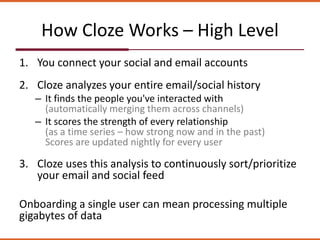
How Cloze Works – High Level
1. You connect your social and email accounts
2. Cloze analyzes your entire email/social history
– It finds the people you've interacted with
(automatically merging them across channels)
– It scores the strength of every relationship
(as a time series – how strong now and in the past)
Scores are updated nightly for every user
3. Cloze uses this analysis to continuously sort/prioritize
your email and social feed
Onboarding a single user can mean processing multiple
gigabytes of data
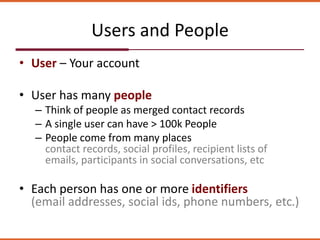
Users and People
• User – Your account
• User has many people
– Think of people as merged contact records
– A single user can have > 100k People
– People come from many places
contact records, social profiles, recipient lists of
emails, participants in social conversations, etc
• Each person has one or more identifiers
(email addresses, social ids, phone numbers, etc.)
How People Fit Into Cloze
Person Details Feed Summary Message Details
Identifiers for
the person
Summary of
Analytics
Feed organized
by person
across channels
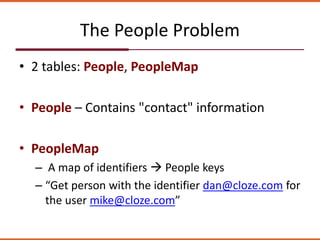
The People Problem
• 2 tables: People, PeopleMap
• People – Contains "contact" information
• PeopleMap
– A map of identifiers  People keys
– “Get person with the identifier dan@cloze.com for
the user mike@cloze.com”
The People Problem
• PeopleMap is one of our …
– largest tables
– fastest growing tables
– most heavily read tables
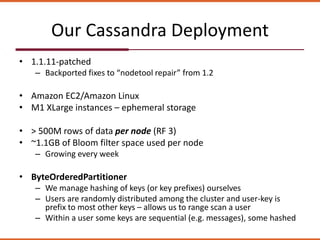
Our Cassandra Deployment
• 1.1.11-patched
– Backported fixes to “nodetool repair” from 1.2
• Amazon EC2/Amazon Linux
• M1 XLarge instances – ephemeral storage
• > 500M rows of data per node (RF 3)
• ~1.1GB of Bloom filter space used per node
– Growing every week
• ByteOrderedPartitioner
– We manage hashing of keys (or key prefixes) ourselves
– Users are randomly distributed among the cluster and user-key is
prefix to most other keys – allows us to range scan a user
– Within a user some keys are sequential (e.g. messages), some hashed
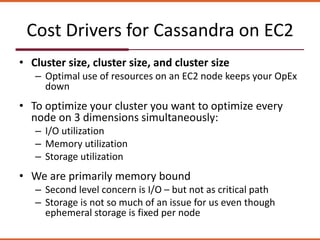
Cost Drivers for Cassandra on EC2
• Cluster size, cluster size, and cluster size
– Optimal use of resources on an EC2 node keeps your OpEx
down
• To optimize your cluster you want to optimize every
node on 3 dimensions simultaneously:
– I/O utilization
– Memory utilization
– Storage utilization
• We are primarily memory bound
– Second level concern is I/O – but not as critical path
– Storage is not so much of an issue for us even though
ephemeral storage is fixed per node
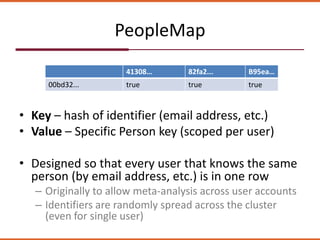
PeopleMap
• Key – hash of identifier (email address, etc.)
• Value – Specific Person key (scoped per user)
• Designed so that every user that knows the same
person (by email address, etc.) is in one row
– Originally to allow meta-analysis across user accounts
– Identifiers are randomly spread across the cluster
(even for single user)
41308… 82fa2... B95ea…
00bd32... true true true
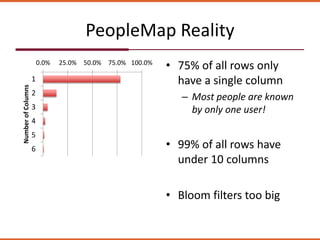
PeopleMap Reality
• 75% of all rows only
have a single column
– Most people are known
by only one user!
• 99% of all rows have
under 10 columns
• Bloom filters too big
0.0% 25.0% 50.0% 75.0% 100.0%
1
2
3
4
5
6
NumberofColumns
Bloom Filters/Key Sample Index
• More rows = Larger Bloom Filter and Keys sample indicies
• Stored on-heap in 1.1.X, moved off-heap in 1.2.X
– Makes 1.2 very attractive for Cloze
– But, they are still in-memory
• Bloom filters
– Tells Cassandra when keys are definitely NOT in a table.
– Can have false positives
• Key sample index
– Tells Cassandra where in an SSTable data lives
– Larger sample index = more data read
– Default is one sample every 128 keys
PeopleHash
• Replace PeopleMap with PeopleHash
• PeopleHash:
– Key: <user-key> <hash-bytes>
– Values: <id-hash> <person-key>
• Hash-bytes length = 1
– 256 rows per user
• Similar to a hashtable, except you can have multiple values
per id-hash
• All identifiers for a single user are on one cluster node
(and it's replicas)
Performance + Scale = Critical
• One of our most heavily read tables
• One of the largest memory footprints
• Looking to:
– Dramatically reduce memory footprint
– Maintain I/O overhead
Comparing performance – Take 1
• Approach:
– Bring up a single node
– Convert PeopleMap data to PeopleHash
– Compare random reads of PeopleMap to
PeopleHash
• Surprise!
– Initial tests showed PeopleMap 20x faster than
PeopleHash!
Comparing performance
• PeopleMap  PeopleHash – different key distribution
– Don’t compare bloomfilter "misses" to "hits"
• Test with keys falling on the same node
• Beware of Caching!
– Turn off key caching
• Key cache/mmap can give false results
– Turn off mmap
• “disk_access_mode” standard
– Clear OS-level disk cache
• sync; sudo –c ‘echo 3 > /proc/sys/vm/drop_caches’
– Don’t do these in production …
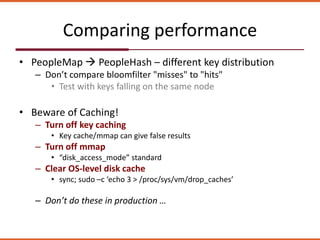
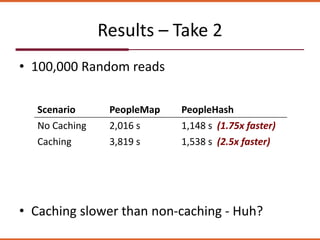
Results – Take 2
• 100,000 Random reads
Scenario PeopleMap PeopleHash
No Caching 2,016 s 1,148 s (1.75x faster)
Caching 3,819 s 1,538 s (2.5x faster)
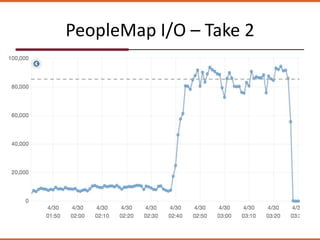
• Caching slower than non-caching - Huh?
PeopleMap I/O – Take 2
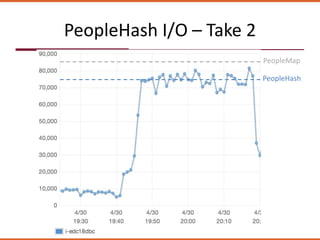
PeopleHash I/O – Take 2
PeopleMap
PeopleHash
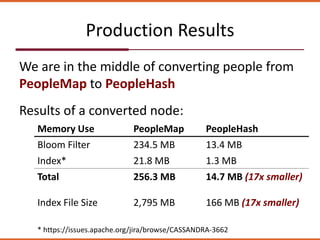
Production Results
We are in the middle of converting people from
PeopleMap to PeopleHash
Results of a converted node:
Memory Use PeopleMap PeopleHash
Bloom Filter 234.5 MB 13.4 MB
Index* 21.8 MB 1.3 MB
Total 256.3 MB 14.7 MB (17x smaller)
Index File Size 2,795 MB 166 MB (17x smaller)
* https://issues.apache.org/jira/browse/CASSANDRA-3662
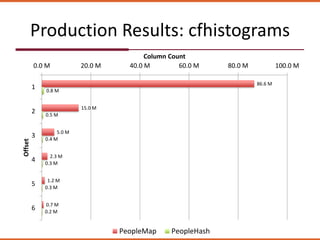
Production Results: cfhistograms
86.6 M
15.0 M
5.0 M
2.3 M
1.2 M
0.7 M
0.8 M
0.5 M
0.4 M
0.3 M
0.3 M
0.2 M
0.0 M 20.0 M 40.0 M 60.0 M 80.0 M 100.0 M
1
2
3
4
5
6
Column Count
Offset
PeopleMap PeopleHash
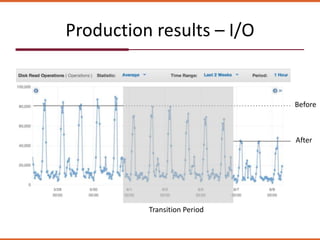
Production results – I/O
After
Before
Transition Period
Questions?

Cassandra Meetup Boston - How Table "Shape" Affects Performance

  • 1.
    How Table “Shape”Affects Cassandra Performance Dan Foody & Mike Theroux
  • 2.
  • 3.
    How Cloze Works– High Level 1. You connect your social and email accounts 2. Cloze analyzes your entire email/social history – It finds the people you've interacted with (automatically merging them across channels) – It scores the strength of every relationship (as a time series – how strong now and in the past) Scores are updated nightly for every user 3. Cloze uses this analysis to continuously sort/prioritize your email and social feed Onboarding a single user can mean processing multiple gigabytes of data
  • 4.
    Users and People •User – Your account • User has many people – Think of people as merged contact records – A single user can have > 100k People – People come from many places contact records, social profiles, recipient lists of emails, participants in social conversations, etc • Each person has one or more identifiers (email addresses, social ids, phone numbers, etc.)
  • 5.
    How People FitInto Cloze Person Details Feed Summary Message Details Identifiers for the person Summary of Analytics Feed organized by person across channels
  • 6.
    The People Problem •2 tables: People, PeopleMap • People – Contains "contact" information • PeopleMap – A map of identifiers  People keys – “Get person with the identifier dan@cloze.com for the user mike@cloze.com”
  • 7.
    The People Problem •PeopleMap is one of our … – largest tables – fastest growing tables – most heavily read tables
  • 8.
    Our Cassandra Deployment •1.1.11-patched – Backported fixes to “nodetool repair” from 1.2 • Amazon EC2/Amazon Linux • M1 XLarge instances – ephemeral storage • > 500M rows of data per node (RF 3) • ~1.1GB of Bloom filter space used per node – Growing every week • ByteOrderedPartitioner – We manage hashing of keys (or key prefixes) ourselves – Users are randomly distributed among the cluster and user-key is prefix to most other keys – allows us to range scan a user – Within a user some keys are sequential (e.g. messages), some hashed
  • 9.
    Cost Drivers forCassandra on EC2 • Cluster size, cluster size, and cluster size – Optimal use of resources on an EC2 node keeps your OpEx down • To optimize your cluster you want to optimize every node on 3 dimensions simultaneously: – I/O utilization – Memory utilization – Storage utilization • We are primarily memory bound – Second level concern is I/O – but not as critical path – Storage is not so much of an issue for us even though ephemeral storage is fixed per node
  • 10.
    PeopleMap • Key –hash of identifier (email address, etc.) • Value – Specific Person key (scoped per user) • Designed so that every user that knows the same person (by email address, etc.) is in one row – Originally to allow meta-analysis across user accounts – Identifiers are randomly spread across the cluster (even for single user) 41308… 82fa2... B95ea… 00bd32... true true true
  • 11.
    PeopleMap Reality • 75%of all rows only have a single column – Most people are known by only one user! • 99% of all rows have under 10 columns • Bloom filters too big 0.0% 25.0% 50.0% 75.0% 100.0% 1 2 3 4 5 6 NumberofColumns
  • 12.
    Bloom Filters/Key SampleIndex • More rows = Larger Bloom Filter and Keys sample indicies • Stored on-heap in 1.1.X, moved off-heap in 1.2.X – Makes 1.2 very attractive for Cloze – But, they are still in-memory • Bloom filters – Tells Cassandra when keys are definitely NOT in a table. – Can have false positives • Key sample index – Tells Cassandra where in an SSTable data lives – Larger sample index = more data read – Default is one sample every 128 keys
  • 13.
    PeopleHash • Replace PeopleMapwith PeopleHash • PeopleHash: – Key: <user-key> <hash-bytes> – Values: <id-hash> <person-key> • Hash-bytes length = 1 – 256 rows per user • Similar to a hashtable, except you can have multiple values per id-hash • All identifiers for a single user are on one cluster node (and it's replicas)
  • 14.
    Performance + Scale= Critical • One of our most heavily read tables • One of the largest memory footprints • Looking to: – Dramatically reduce memory footprint – Maintain I/O overhead
  • 15.
    Comparing performance –Take 1 • Approach: – Bring up a single node – Convert PeopleMap data to PeopleHash – Compare random reads of PeopleMap to PeopleHash • Surprise! – Initial tests showed PeopleMap 20x faster than PeopleHash!
  • 16.
    Comparing performance • PeopleMap PeopleHash – different key distribution – Don’t compare bloomfilter "misses" to "hits" • Test with keys falling on the same node • Beware of Caching! – Turn off key caching • Key cache/mmap can give false results – Turn off mmap • “disk_access_mode” standard – Clear OS-level disk cache • sync; sudo –c ‘echo 3 > /proc/sys/vm/drop_caches’ – Don’t do these in production …
  • 17.
    Results – Take2 • 100,000 Random reads Scenario PeopleMap PeopleHash No Caching 2,016 s 1,148 s (1.75x faster) Caching 3,819 s 1,538 s (2.5x faster) • Caching slower than non-caching - Huh?
  • 18.
  • 19.
    PeopleHash I/O –Take 2 PeopleMap PeopleHash
  • 20.
    Production Results We arein the middle of converting people from PeopleMap to PeopleHash Results of a converted node: Memory Use PeopleMap PeopleHash Bloom Filter 234.5 MB 13.4 MB Index* 21.8 MB 1.3 MB Total 256.3 MB 14.7 MB (17x smaller) Index File Size 2,795 MB 166 MB (17x smaller) * https://issues.apache.org/jira/browse/CASSANDRA-3662
  • 21.
    Production Results: cfhistograms 86.6M 15.0 M 5.0 M 2.3 M 1.2 M 0.7 M 0.8 M 0.5 M 0.4 M 0.3 M 0.3 M 0.2 M 0.0 M 20.0 M 40.0 M 60.0 M 80.0 M 100.0 M 1 2 3 4 5 6 Column Count Offset PeopleMap PeopleHash
  • 22.
    Production results –I/O After Before Transition Period
  • 23.