HTML BOOTCAMP


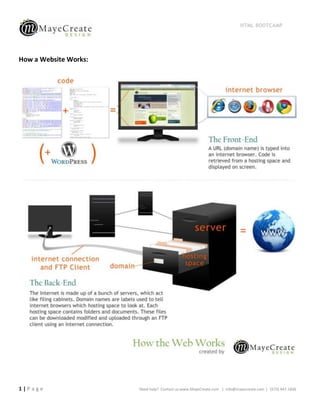
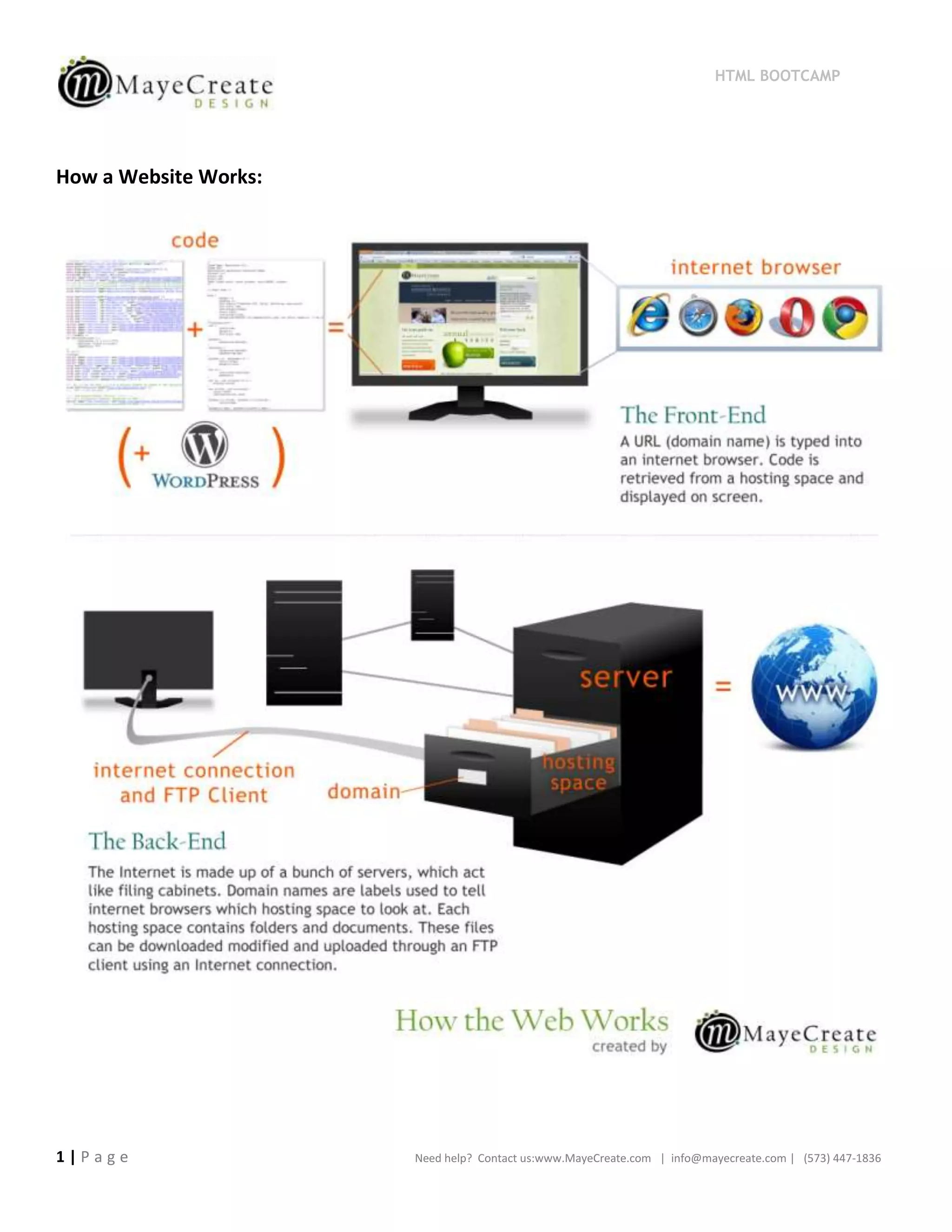
How a Website Works:


1|Page                 Need help? Contact us:www.MayeCreate.com | info@mayecreate.com | (573) 447-1836
HTML BOOTCAMP


HTML Tags          In Theory:    <tag>visible stuff</tag>

                            a      (anchor) used for links &anchors

                      address      Wraps an address

                  blockquote       Wraps quotes or long citations

                         body      The visible information

                           br      Soft line break

                           div     Division, like a box

                          em       Makes text italics

         h1, h2, h3, h4, h5&h6     Headings

                         head      Contains invisible info

                         html      Starts & ends web page

                          img      Image [src, height, width]

                            li     List item
                                                                                           New in HTML 5*:
                          link     Links stylesheets inside head
                                                                                           nav – for navigation
                            ol     Ordered list (1, 2, 3…)
                                                                                           article – post or content
                            p      paragraph
                                                                                           figure – one or more
                                                                                               images
                         span      used for inline styling (mostly CSS)
                                                                                           section – section of page,
                       strong      makes text bold
                                                                                               or chapter of an article
                         style     starts CSS, inside head
                                                                                           aside – un-necessary info
                                                                                               like sidebars,
                         title     words in tab thingy, in head
                                                                                               comments and
                                                                                               footnotes
                            ul     un-ordered (bulleted) list


2|Page                                         Need help? Contact us:www.MayeCreate.com | info@mayecreate.com | (573) 447-1836
HTML BOOTCAMP


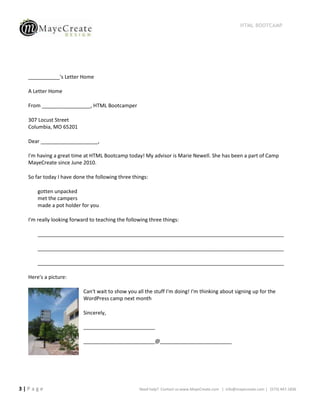
  ___________'s Letter Home

  A Letter Home

  From _________________, HTML Bootcamper

  307 Locust Street
  Columbia, MO 65201

  Dear ____________________,

  I'm having a great time at HTML Bootcamp today! My advisor is Marie Newell. She has been a part of Camp
  MayeCreate since June 2010.

  So far today I have done the following three things:

      gotten unpacked
      met the campers
      made a pot holder for you

  I'm really looking forward to teaching the following three things:

      ______________________________________________________________________________________

      ______________________________________________________________________________________

      ______________________________________________________________________________________

  Here's a picture:

                          Can't wait to show you all the stuff I'm doing! I'm thinking about signing up for the
                          WordPress camp next month

                          Sincerely,

                          _________________________

                          _________________________@_________________________


3|Page                                            Need help? Contact us:www.MayeCreate.com | info@mayecreate.com | (573) 447-1836
HTML BOOTCAMP


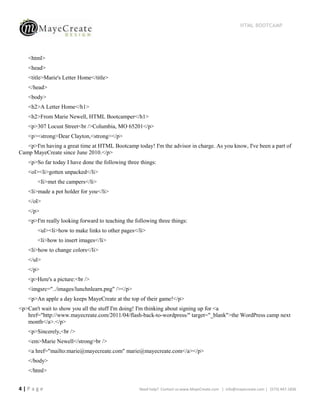
   <html>
   <head>
   <title>Marie's Letter Home</title>
   </head>
   <body>
   <h2>A Letter Home</h1>
   <h2>From Marie Newell, HTML Bootcamper</h1>
   <p>307 Locust Street<br />Columbia, MO 65201</p>
   <p><strong>Dear Clayton,<strong></p>
   <p>I'm having a great time at HTML Bootcamp today! I'm the advisor in charge. As you know, I've been a part of
Camp MayeCreate since June 2010.</p>
   <p>So far today I have done the following three things:
   <ol><li>gotten unpacked</li>
       <Ii>met the campers</li>
   <li>made a pot holder for you</li>
   </ol>
   </p>
   <p>I'm really looking forward to teaching the following three things:
       <ul><li>how to make links to other pages</li>
       <li>how to insert images</li>
   <li>how to change colors</li>
   </ul>
   </p>
   <p>Here's a picture:<br />
   <imgsrc="../images/lunchnlearn.png" /></p>
   <p>An apple a day keeps MayeCreate at the top of their game!</p>
<p>Can't wait to show you all the stuff I'm doing! I'm thinking about signing up for <a
   href="http://www.mayecreate.com/2011/04/flash-back-to-wordpress/" target="_blank">the WordPress camp next
   month</a>.</p>
   <p>Sincerely,<br />
   <em>Marie Newell</strong>br />
   <a href="mailto:marie@mayecreate.com" marie@mayecreate.com</a></p>
   </body>
   </html>


4|Page                                             Need help? Contact us:www.MayeCreate.com | info@mayecreate.com | (573) 447-1836
HTML BOOTCAMP


  Links
  <a href=“destination/action”>What people click on</a>

  Composed of 3 parts:
        Anchor tag: <a>
        href attribute: href=“” (inside the starting anchor tag – defines destination/action)
        Content that people click on (must be in between anchor starting and closing tags)

  Types of Links:

     To a website/webpage:

          <a href=“http://www.mayecreate.com/”>Our Website</a>

     To an email address:

          <a href=“mailto:info@mayecreate.com”>Email Us!</a>

     For a phone number:

          <a href=“tel:5734471836”>Call Us!</a>

  Open a link in a new window: add target=“_blank” inside the starting anchor tag


  Images
     <imgsrc=“url for image to be used” height=“# in pixels” width=“# in pixels” />
     Composed of 4 parts:
          1. img tag
          2. src attribute = url for the image to be used
          3. height in pixels (optional)
          4. width in pixels (optional)

  CSS - Inline Styles

  Inside the tag you are talking to, insert style=“styles go here”

  Find more information about styles in an external stylesheet online:http://www.w3schools.com/css/


5|Page                                             Need help? Contact us:www.MayeCreate.com | info@mayecreate.com | (573) 447-1836
HTML BOOTCAMP


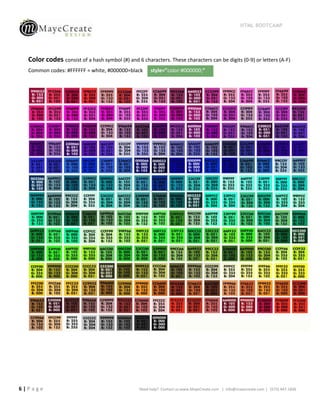
  Color codes consist of a hash symbol (#) and 6 characters. These characters can be digits (0-9) or letters (A-F)
  Common codes: #FFFFFF = white, #000000=black        style=”color:#000000;”


6|Page                                           Need help? Contact us:www.MayeCreate.com | info@mayecreate.com | (573) 447-1836
HTML BOOTCAMP


  Universal Font Families:
       Verdana, Geneva, sans-serif
       Georgia, Times New Roman, Times, serif                            style=”font-family:Tahoma, sans-serif;”
       Courier New, Courier, monospace
       Arial, Helvetica, sans-serif
       Tahoma, Geneva, sans-serif
       Trebuchet MS, Arial, Helvetica, sans-serif
       Palatino Linotype, Book Antiqua, Palatino, serif
       Lucida Sans Unicode, Lucida Grand, sans-serif

  span
  Can be used anywhere within another tag to talk to specific text or elements

  div
  They can be nested
  The end tag closes the open div immediately before it
  Example:
  <div>
        <div class=“column1”>Contents in column 1</div>
        <div class=“column2”>
                 Contents of column 2
        </div>
  </div>


  Float    You can float left, right, or none


      style=”float:left;”                                                                              style=”float:right;”


      style=”float:none;”


7|Page                                               Need help? Contact us:www.MayeCreate.com | info@mayecreate.com | (573) 447-1836
HTML BOOTCAMP


  Additional Resources:
  HTML Dog - http://htmldog.com/
  Don’t Fear the Internet - http://www.dontfeartheinternet.com/
  HTML5:
         W3 Schools: http://www.w3schools.com/html5/default.asp
         WDL – Essentials & Good Practices:
         http://webdesignledger.com/tips/html5-essentials-and-good-practices
         Validator: http://html5.validator.nu/

  Text Editors:
         Text Wrangler (MAC):
         http://www.barebones.com/products/TextWrangler/download.html
         Komodo Edit (PC): http://www.activestate.com/komodo-edit
         Adobe Dreamweaver: http://www.adobe.com/products/dreamweaver.html

  CSS - http://www.w3schools.com/css/


8|Page                                Need help? Contact us:www.MayeCreate.com | info@mayecreate.com | (573) 447-1836

Campers Packet

  • 1.
    HTML BOOTCAMP How aWebsite Works: 1|Page Need help? Contact us:www.MayeCreate.com | info@mayecreate.com | (573) 447-1836
  • 2.
    HTML BOOTCAMP HTML Tags In Theory: <tag>visible stuff</tag> a (anchor) used for links &anchors address Wraps an address blockquote Wraps quotes or long citations body The visible information br Soft line break div Division, like a box em Makes text italics h1, h2, h3, h4, h5&h6 Headings head Contains invisible info html Starts & ends web page img Image [src, height, width] li List item New in HTML 5*: link Links stylesheets inside head nav – for navigation ol Ordered list (1, 2, 3…) article – post or content p paragraph figure – one or more images span used for inline styling (mostly CSS) section – section of page, strong makes text bold or chapter of an article style starts CSS, inside head aside – un-necessary info like sidebars, title words in tab thingy, in head comments and footnotes ul un-ordered (bulleted) list 2|Page Need help? Contact us:www.MayeCreate.com | info@mayecreate.com | (573) 447-1836
  • 3.
    HTML BOOTCAMP ___________'s Letter Home A Letter Home From _________________, HTML Bootcamper 307 Locust Street Columbia, MO 65201 Dear ____________________, I'm having a great time at HTML Bootcamp today! My advisor is Marie Newell. She has been a part of Camp MayeCreate since June 2010. So far today I have done the following three things: gotten unpacked met the campers made a pot holder for you I'm really looking forward to teaching the following three things: ______________________________________________________________________________________ ______________________________________________________________________________________ ______________________________________________________________________________________ Here's a picture: Can't wait to show you all the stuff I'm doing! I'm thinking about signing up for the WordPress camp next month Sincerely, _________________________ _________________________@_________________________ 3|Page Need help? Contact us:www.MayeCreate.com | info@mayecreate.com | (573) 447-1836
  • 4.
    HTML BOOTCAMP <html> <head> <title>Marie's Letter Home</title> </head> <body> <h2>A Letter Home</h1> <h2>From Marie Newell, HTML Bootcamper</h1> <p>307 Locust Street<br />Columbia, MO 65201</p> <p><strong>Dear Clayton,<strong></p> <p>I'm having a great time at HTML Bootcamp today! I'm the advisor in charge. As you know, I've been a part of Camp MayeCreate since June 2010.</p> <p>So far today I have done the following three things: <ol><li>gotten unpacked</li> <Ii>met the campers</li> <li>made a pot holder for you</li> </ol> </p> <p>I'm really looking forward to teaching the following three things: <ul><li>how to make links to other pages</li> <li>how to insert images</li> <li>how to change colors</li> </ul> </p> <p>Here's a picture:<br /> <imgsrc="../images/lunchnlearn.png" /></p> <p>An apple a day keeps MayeCreate at the top of their game!</p> <p>Can't wait to show you all the stuff I'm doing! I'm thinking about signing up for <a href="http://www.mayecreate.com/2011/04/flash-back-to-wordpress/" target="_blank">the WordPress camp next month</a>.</p> <p>Sincerely,<br /> <em>Marie Newell</strong>br /> <a href="mailto:marie@mayecreate.com" marie@mayecreate.com</a></p> </body> </html> 4|Page Need help? Contact us:www.MayeCreate.com | info@mayecreate.com | (573) 447-1836
  • 5.
    HTML BOOTCAMP Links <a href=“destination/action”>What people click on</a> Composed of 3 parts: Anchor tag: <a> href attribute: href=“” (inside the starting anchor tag – defines destination/action) Content that people click on (must be in between anchor starting and closing tags) Types of Links:  To a website/webpage: <a href=“http://www.mayecreate.com/”>Our Website</a>  To an email address: <a href=“mailto:info@mayecreate.com”>Email Us!</a>  For a phone number: <a href=“tel:5734471836”>Call Us!</a> Open a link in a new window: add target=“_blank” inside the starting anchor tag Images  <imgsrc=“url for image to be used” height=“# in pixels” width=“# in pixels” />  Composed of 4 parts: 1. img tag 2. src attribute = url for the image to be used 3. height in pixels (optional) 4. width in pixels (optional) CSS - Inline Styles Inside the tag you are talking to, insert style=“styles go here” Find more information about styles in an external stylesheet online:http://www.w3schools.com/css/ 5|Page Need help? Contact us:www.MayeCreate.com | info@mayecreate.com | (573) 447-1836
  • 6.
    HTML BOOTCAMP Color codes consist of a hash symbol (#) and 6 characters. These characters can be digits (0-9) or letters (A-F) Common codes: #FFFFFF = white, #000000=black style=”color:#000000;” 6|Page Need help? Contact us:www.MayeCreate.com | info@mayecreate.com | (573) 447-1836
  • 7.
    HTML BOOTCAMP Universal Font Families:  Verdana, Geneva, sans-serif  Georgia, Times New Roman, Times, serif style=”font-family:Tahoma, sans-serif;”  Courier New, Courier, monospace  Arial, Helvetica, sans-serif  Tahoma, Geneva, sans-serif  Trebuchet MS, Arial, Helvetica, sans-serif  Palatino Linotype, Book Antiqua, Palatino, serif  Lucida Sans Unicode, Lucida Grand, sans-serif span Can be used anywhere within another tag to talk to specific text or elements div They can be nested The end tag closes the open div immediately before it Example: <div> <div class=“column1”>Contents in column 1</div> <div class=“column2”> Contents of column 2 </div> </div> Float You can float left, right, or none style=”float:left;” style=”float:right;” style=”float:none;” 7|Page Need help? Contact us:www.MayeCreate.com | info@mayecreate.com | (573) 447-1836
  • 8.
    HTML BOOTCAMP Additional Resources: HTML Dog - http://htmldog.com/ Don’t Fear the Internet - http://www.dontfeartheinternet.com/ HTML5: W3 Schools: http://www.w3schools.com/html5/default.asp WDL – Essentials & Good Practices: http://webdesignledger.com/tips/html5-essentials-and-good-practices Validator: http://html5.validator.nu/ Text Editors: Text Wrangler (MAC): http://www.barebones.com/products/TextWrangler/download.html Komodo Edit (PC): http://www.activestate.com/komodo-edit Adobe Dreamweaver: http://www.adobe.com/products/dreamweaver.html CSS - http://www.w3schools.com/css/ 8|Page Need help? Contact us:www.MayeCreate.com | info@mayecreate.com | (573) 447-1836