Developing Database Applications Using ADO.NET and XML
Objectives


                In this session, you will learn to:
                   Read and write XML data using DOM API


     Ver. 1.0                      Session 13              Slide 1 of 10
Developing Database Applications Using ADO.NET and XML
Processing XML Data Using DOM


               Many applications need the ability to:
                  Read an entire XML document into memory
                  Access XML content in any order
                  Modify the XML content in memory
               The XML Document Object Model (DOM) is an Application
               Programming Interface (API) that provides full read-write
               random-access capabilities for reading and writing XML
               data.


    Ver. 1.0                    Session 13                        Slide 2 of 10
Developing Database Applications Using ADO.NET and XML
Reading XML Data into DOM


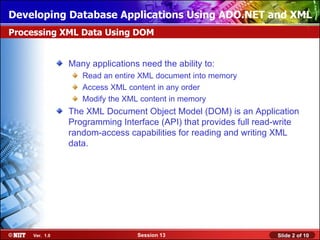
               •   You can load an XML document into a DOM tree using the
                   XmlDocument class.
               •   The XmlDocument class provides the following two methods
                   to load an XML document into memory:
                    Load(): This method loads XML data from a stream, a string, an
                     XmlReader, or a TextReader.
                       XmlDocument doc = new XmlDocument();
                       XmlTextReader reader = new
                       XmlTextReader("C:books.xml");
                       reader.Read();
                       doc.Load(reader);
                    LoadXml(): This method is used load an XML file from a string.
                       XmlDocument doc = new XmlDocument();
                       doc.LoadXml(("<BOOKDETAILS><BOOK><BOOKNAME>The
                       DaVinci Code</BOOKNAME><AUTHOR>Dan
                       Brown</AUTHOR></BOOK></BOOKDETAILS>"));

    Ver. 1.0                        Session 13                            Slide 3 of 10
Developing Database Applications Using ADO.NET and XML
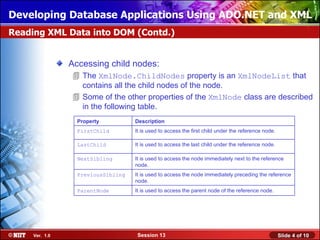
Reading XML Data into DOM (Contd.)


                Accessing child nodes:
                 The XmlNode.ChildNodes property is an XmlNodeList that
                  contains all the child nodes of the node.
                 Some of the other properties of the XmlNode class are described
                  in the following table.
                  Property          Description
                  FirstChild        It is used to access the first child under the reference node.

                  LastChild         It is used to access the last child under the reference node.

                  NextSibling       It is used to access the node immediately next to the reference
                                    node.
                  PreviousSibling   It is used to access the node immediately preceding the reference
                                    node.
                  ParentNode        It is used to access the parent node of the reference node.


     Ver. 1.0                        Session 13                                                      Slide 4 of 10
Developing Database Applications Using ADO.NET and XML
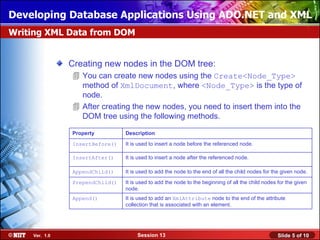
Writing XML Data from DOM


               Creating new nodes in the DOM tree:
                You can create new nodes using the Create<Node_Type>
                 method of XmlDocument, where <Node_Type> is the type of
                 node.
                After creating the new nodes, you need to insert them into the
                 DOM tree using the following methods.

               Property         Description

               InsertBefore()   It is used to insert a node before the referenced node.

               InsertAfter()    It is used to insert a node after the referenced node.

               AppendChild()    It is used to add the node to the end of all the child nodes for the given node.

               PrependChild()   It is used to add the node to the beginning of all the child nodes for the given
                                node.
               Append()         It is used to add an XmlAttribute node to the end of the attribute
                                collection that is associated with an element.


    Ver. 1.0                         Session 13                                                    Slide 5 of 10
Developing Database Applications Using ADO.NET and XML
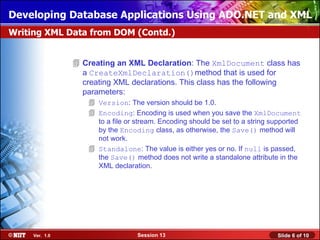
Writing XML Data from DOM (Contd.)


                 Creating an XML Declaration: The XmlDocument class has
                  a CreateXmlDeclaration()method that is used for
                  creating XML declarations. This class has the following
                  parameters:
                     Version: The version should be 1.0.
                     Encoding: Encoding is used when you save the XmlDocument
                      to a file or stream. Encoding should be set to a string supported
                      by the Encoding class, as otherwise, the Save() method will
                      not work.
                     Standalone: The value is either yes or no. If null is passed,
                      the Save() method does not write a standalone attribute in the
                      XML declaration.


     Ver. 1.0                      Session 13                                  Slide 6 of 10
Developing Database Applications Using ADO.NET and XML
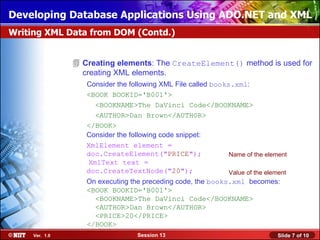
Writing XML Data from DOM (Contd.)


                 Creating elements: The CreateElement() method is used for
                  creating XML elements.
                   Consider the following XML File called books.xml:
                   <BOOK BOOKID='B001'>
                     <BOOKNAME>The DaVinci Code</BOOKNAME>
                     <AUTHOR>Dan Brown</AUTHOR>
                   </BOOK>
                   Consider the following code snippet:
                   XmlElement element =
                   doc.CreateElement("PRICE");                 Name of the element
                   XmlText text =
                   doc.CreateTextNode("20");                   Value of the element
                   On executing the preceding code, the books.xml becomes:
                   <BOOK BOOKID='B001'>
                     <BOOKNAME>The DaVinci Code</BOOKNAME>
                     <AUTHOR>Dan Brown</AUTHOR>
                     <PRICE>20</PRICE>
                   </BOOK>
     Ver. 1.0                      Session 13                                   Slide 7 of 10
Developing Database Applications Using ADO.NET and XML
Writing XML Data from DOM (Contd.)


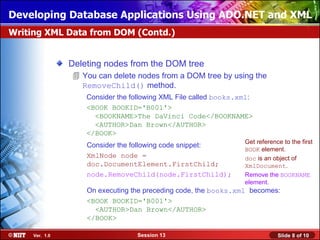
                Deleting nodes from the DOM tree
                 You can delete nodes from a DOM tree by using the
                  RemoveChild() method.
                    Consider the following XML File called books.xml:
                    <BOOK BOOKID='B001'>
                      <BOOKNAME>The DaVinci Code</BOOKNAME>
                      <AUTHOR>Dan Brown</AUTHOR>
                    </BOOK>
                                                                  Get reference to the first
                    Consider the following code snippet:
                                                                  BOOK element.
                    XmlNode node =                                doc is an object of
                    doc.DocumentElement.FirstChild;               XmlDocument.
                    node.RemoveChild(node.FirstChild);            Remove the BOOKNAME
                                                                  element.
                    On executing the preceding code, the books.xml becomes:
                    <BOOK BOOKID='B001'>
                      <AUTHOR>Dan Brown</AUTHOR>
                    </BOOK>

     Ver. 1.0                     Session 13                                  Slide 8 of 10
Developing Database Applications Using ADO.NET and XML
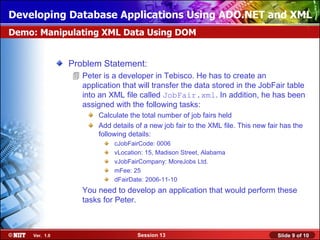
Demo: Manipulating XML Data Using DOM


               Problem Statement:
                Peter is a developer in Tebisco. He has to create an
                 application that will transfer the data stored in the JobFair table
                 into an XML file called JobFair.xml. In addition, he has been
                 assigned with the following tasks:
                      Calculate the total number of job fairs held
                      Add details of a new job fair to the XML file. This new fair has the
                      following details:
                           cJobFairCode: 0006
                           vLocation: 15, Madison Street, Alabama
                           vJobFairCompany: MoreJobs Ltd.
                           mFee: 25
                           dFairDate: 2006-11-10
                  You need to develop an application that would perform these
                  tasks for Peter.


    Ver. 1.0                      Session 13                                     Slide 9 of 10
Developing Database Applications Using ADO.NET and XML
Summary


               In this session, you will learn to:
                 While the XmlReader and XmlWriter classes give you serial
                  access to an XML document, the DOM API gives you random
                  access to any element or attribute in the XML document.
                 In the .NET Framework, NamedNodeMap is implemented by
                  the XmlNamedNodeMap class, and NodeList is implemented
                  by the XmlNodeList class.
                 An XML document can be created by using the XmlDocument
                  class.


    Ver. 1.0                      Session 13                       Slide 10 of 10

Ado.net session13

  • 1.
    Developing Database ApplicationsUsing ADO.NET and XML Objectives In this session, you will learn to: Read and write XML data using DOM API Ver. 1.0 Session 13 Slide 1 of 10
  • 2.
    Developing Database ApplicationsUsing ADO.NET and XML Processing XML Data Using DOM Many applications need the ability to: Read an entire XML document into memory Access XML content in any order Modify the XML content in memory The XML Document Object Model (DOM) is an Application Programming Interface (API) that provides full read-write random-access capabilities for reading and writing XML data. Ver. 1.0 Session 13 Slide 2 of 10
  • 3.
    Developing Database ApplicationsUsing ADO.NET and XML Reading XML Data into DOM • You can load an XML document into a DOM tree using the XmlDocument class. • The XmlDocument class provides the following two methods to load an XML document into memory:  Load(): This method loads XML data from a stream, a string, an XmlReader, or a TextReader. XmlDocument doc = new XmlDocument(); XmlTextReader reader = new XmlTextReader("C:books.xml"); reader.Read(); doc.Load(reader);  LoadXml(): This method is used load an XML file from a string. XmlDocument doc = new XmlDocument(); doc.LoadXml(("<BOOKDETAILS><BOOK><BOOKNAME>The DaVinci Code</BOOKNAME><AUTHOR>Dan Brown</AUTHOR></BOOK></BOOKDETAILS>")); Ver. 1.0 Session 13 Slide 3 of 10
  • 4.
    Developing Database ApplicationsUsing ADO.NET and XML Reading XML Data into DOM (Contd.) Accessing child nodes:  The XmlNode.ChildNodes property is an XmlNodeList that contains all the child nodes of the node.  Some of the other properties of the XmlNode class are described in the following table. Property Description FirstChild It is used to access the first child under the reference node. LastChild It is used to access the last child under the reference node. NextSibling It is used to access the node immediately next to the reference node. PreviousSibling It is used to access the node immediately preceding the reference node. ParentNode It is used to access the parent node of the reference node. Ver. 1.0 Session 13 Slide 4 of 10
  • 5.
    Developing Database ApplicationsUsing ADO.NET and XML Writing XML Data from DOM Creating new nodes in the DOM tree:  You can create new nodes using the Create<Node_Type> method of XmlDocument, where <Node_Type> is the type of node.  After creating the new nodes, you need to insert them into the DOM tree using the following methods. Property Description InsertBefore() It is used to insert a node before the referenced node. InsertAfter() It is used to insert a node after the referenced node. AppendChild() It is used to add the node to the end of all the child nodes for the given node. PrependChild() It is used to add the node to the beginning of all the child nodes for the given node. Append() It is used to add an XmlAttribute node to the end of the attribute collection that is associated with an element. Ver. 1.0 Session 13 Slide 5 of 10
  • 6.
    Developing Database ApplicationsUsing ADO.NET and XML Writing XML Data from DOM (Contd.)  Creating an XML Declaration: The XmlDocument class has a CreateXmlDeclaration()method that is used for creating XML declarations. This class has the following parameters:  Version: The version should be 1.0.  Encoding: Encoding is used when you save the XmlDocument to a file or stream. Encoding should be set to a string supported by the Encoding class, as otherwise, the Save() method will not work.  Standalone: The value is either yes or no. If null is passed, the Save() method does not write a standalone attribute in the XML declaration. Ver. 1.0 Session 13 Slide 6 of 10
  • 7.
    Developing Database ApplicationsUsing ADO.NET and XML Writing XML Data from DOM (Contd.)  Creating elements: The CreateElement() method is used for creating XML elements. Consider the following XML File called books.xml: <BOOK BOOKID='B001'> <BOOKNAME>The DaVinci Code</BOOKNAME> <AUTHOR>Dan Brown</AUTHOR> </BOOK> Consider the following code snippet: XmlElement element = doc.CreateElement("PRICE"); Name of the element XmlText text = doc.CreateTextNode("20"); Value of the element On executing the preceding code, the books.xml becomes: <BOOK BOOKID='B001'> <BOOKNAME>The DaVinci Code</BOOKNAME> <AUTHOR>Dan Brown</AUTHOR> <PRICE>20</PRICE> </BOOK> Ver. 1.0 Session 13 Slide 7 of 10
  • 8.
    Developing Database ApplicationsUsing ADO.NET and XML Writing XML Data from DOM (Contd.) Deleting nodes from the DOM tree  You can delete nodes from a DOM tree by using the RemoveChild() method. Consider the following XML File called books.xml: <BOOK BOOKID='B001'> <BOOKNAME>The DaVinci Code</BOOKNAME> <AUTHOR>Dan Brown</AUTHOR> </BOOK> Get reference to the first Consider the following code snippet: BOOK element. XmlNode node = doc is an object of doc.DocumentElement.FirstChild; XmlDocument. node.RemoveChild(node.FirstChild); Remove the BOOKNAME element. On executing the preceding code, the books.xml becomes: <BOOK BOOKID='B001'> <AUTHOR>Dan Brown</AUTHOR> </BOOK> Ver. 1.0 Session 13 Slide 8 of 10
  • 9.
    Developing Database ApplicationsUsing ADO.NET and XML Demo: Manipulating XML Data Using DOM Problem Statement:  Peter is a developer in Tebisco. He has to create an application that will transfer the data stored in the JobFair table into an XML file called JobFair.xml. In addition, he has been assigned with the following tasks: Calculate the total number of job fairs held Add details of a new job fair to the XML file. This new fair has the following details: cJobFairCode: 0006 vLocation: 15, Madison Street, Alabama vJobFairCompany: MoreJobs Ltd. mFee: 25 dFairDate: 2006-11-10 You need to develop an application that would perform these tasks for Peter. Ver. 1.0 Session 13 Slide 9 of 10
  • 10.
    Developing Database ApplicationsUsing ADO.NET and XML Summary In this session, you will learn to:  While the XmlReader and XmlWriter classes give you serial access to an XML document, the DOM API gives you random access to any element or attribute in the XML document.  In the .NET Framework, NamedNodeMap is implemented by the XmlNamedNodeMap class, and NodeList is implemented by the XmlNodeList class.  An XML document can be created by using the XmlDocument class. Ver. 1.0 Session 13 Slide 10 of 10

Editor's Notes

  • #2 Introduce the students to the course by asking them what they know about forensics. Next, ask the students what they know about system forensics and why is it required in organizations dependent on IT. This could be a brief discussion of about 5 minutes. Lead the discussion to the objectives of this chapter.
  • #3 Introduce the students to the course by asking them what they know about forensics. Next, ask the students what they know about system forensics and why is it required in organizations dependent on IT. This could be a brief discussion of about 5 minutes. Lead the discussion to the objectives of this chapter.
  • #4 Introduce the students to the course by asking them what they know about forensics. Next, ask the students what they know about system forensics and why is it required in organizations dependent on IT. This could be a brief discussion of about 5 minutes. Lead the discussion to the objectives of this chapter.
  • #5 Introduce the students to the course by asking them what they know about forensics. Next, ask the students what they know about system forensics and why is it required in organizations dependent on IT. This could be a brief discussion of about 5 minutes. Lead the discussion to the objectives of this chapter.
  • #6 Introduce the students to the course by asking them what they know about forensics. Next, ask the students what they know about system forensics and why is it required in organizations dependent on IT. This could be a brief discussion of about 5 minutes. Lead the discussion to the objectives of this chapter.
  • #7 Introduce the students to the course by asking them what they know about forensics. Next, ask the students what they know about system forensics and why is it required in organizations dependent on IT. This could be a brief discussion of about 5 minutes. Lead the discussion to the objectives of this chapter.
  • #8 Introduce the students to the course by asking them what they know about forensics. Next, ask the students what they know about system forensics and why is it required in organizations dependent on IT. This could be a brief discussion of about 5 minutes. Lead the discussion to the objectives of this chapter.
  • #9 Introduce the students to the course by asking them what they know about forensics. Next, ask the students what they know about system forensics and why is it required in organizations dependent on IT. This could be a brief discussion of about 5 minutes. Lead the discussion to the objectives of this chapter.
  • #10 Introduce the students to the course by asking them what they know about forensics. Next, ask the students what they know about system forensics and why is it required in organizations dependent on IT. This could be a brief discussion of about 5 minutes. Lead the discussion to the objectives of this chapter.
  • #11 Introduce the students to the course by asking them what they know about forensics. Next, ask the students what they know about system forensics and why is it required in organizations dependent on IT. This could be a brief discussion of about 5 minutes. Lead the discussion to the objectives of this chapter.