IF
STATEMENTS
& RELATIONAL
OPERATORS
Decision
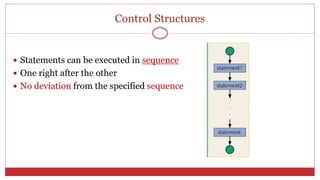
Control Structures
 Statements can be executed in sequence
 One right after the other
 No deviation from the specified sequence
Decision
A mechanism for deciding whether an action should be taken
Conditional Statements
 A conditional statement allows us to control whether a program
segment is executed or not.
 Two constructs
 if statement
 if
 if-else
 if-else-if
 switch statement
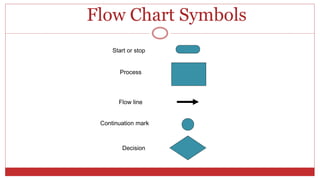
Flow Chart Symbols
Start or stop
Process
Continuation mark
Decision
Flow line
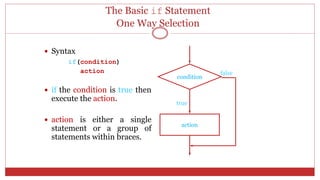
The Basic if Statement
One Way Selection
 Syntax
if(condition)
action
 if the condition is true then
execute the action.
 action is either a single
statement or a group of
statements within braces.
condition
action
true
false
If Statement
One Way Selection
If condition is true
statements
If Ali’s height is greater then 6 feet
Then
Ali can become a member of the Basket
Ball team
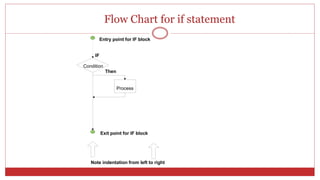
Flow Chart for if statement
Condition
Process
IF
Then
Entry point for IF block
Exit point for IF block
Note indentation from left to right
If Statement in C ++
If (condition)
statement ;
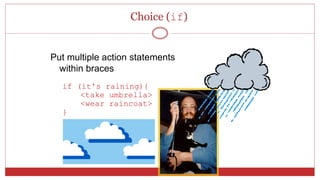
Choice (if)
Put multiple action statements
within braces
if (it's raining){
<take umbrella>
<wear raincoat>
}
If Statement in C++
If ( condition )
{
statement1 ;
statement2 ;
:
}
12
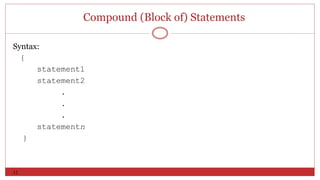
Compound (Block of) Statements
Syntax:
{
statement1
statement2
.
.
.
statementn
}
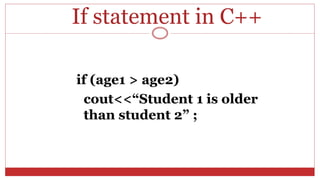
If statement in C++
if (age1 > age2)
cout<<“Student 1 is older
than student 2” ;
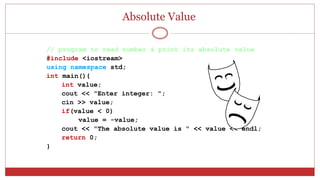
Absolute Value
// program to read number & print its absolute value
#include <iostream>
using namespace std;
int main(){
int value;
cout << "Enter integer: ";
cin >> value;
if(value < 0)
value = -value;
cout << "The absolute value is " << value << endl;
return 0;
}
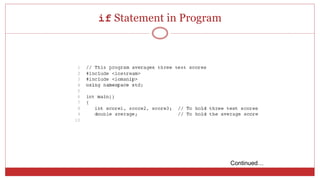
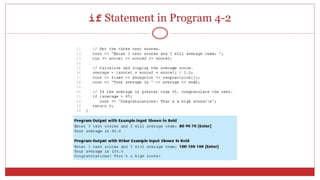
if Statement in Program
Continued…
if Statement in Program 4-2
Relational Operators
Relational operators are used to compare two values to
form a condition.
Math C++ Plain English
= == equals [example: if(a==b) ]
[ (a=b) means put the value of b into a ]
< < less than
 <= less than or equal to
> > greater than
 >= greater than or equal to
 != not equal to
Relational Operators
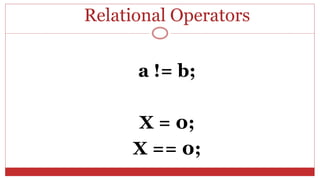
a != b;
X = 0;
X == 0;
Conditions
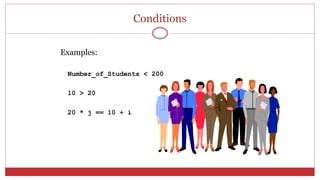
Examples:
Number_of_Students < 200
10 > 20
20 * j == 10 + i
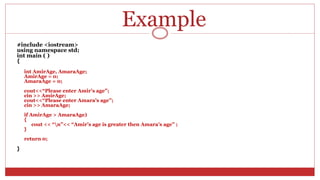
Example
#include <iostream>
using namespace std;
int main ( )
{
int AmirAge, AmaraAge;
AmirAge = 0;
AmaraAge = 0;
cout<<“Please enter Amir’s age”;
cin >> AmirAge;
cout<<“Please enter Amara’s age”;
cin >> AmaraAge;
if AmirAge > AmaraAge)
{
cout << “n”<< “Amir’s age is greater then Amara’s age” ;
}
return 0;
}
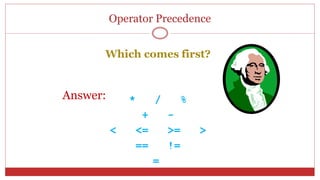
Operator Precedence
Which comes first?
* / %
+ -
< <= >= >
== !=
=
Answer:
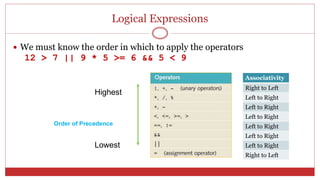
Logical Expressions
 We must know the order in which to apply the operators
12 > 7 || 9 * 5 >= 6 && 5 < 9
Highest
Lowest
Order of Precedence
Associativity
Right to Left
Left to Right
Left to Right
Left to Right
Left to Right
Left to Right
Left to Right
Right to Left
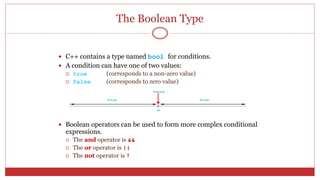
The Boolean Type
 C++ contains a type named bool for conditions.
 A condition can have one of two values:
 true (corresponds to a non-zero value)
 false (corresponds to zero value)
 Boolean operators can be used to form more complex conditional
expressions.
 The and operator is &&
 The or operator is ||
 The not operator is !
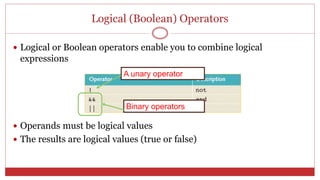
Logical (Boolean) Operators
 Logical or Boolean operators enable you to combine logical
expressions
 Operands must be logical values
 The results are logical values (true or false)
A unary operator
Binary operators
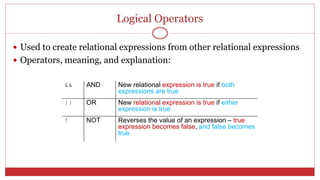
Logical Operators
 Used to create relational expressions from other relational expressions
 Operators, meaning, and explanation:
&& AND New relational expression is true if both
expressions are true
|| OR New relational expression is true if either
expression is true
! NOT Reverses the value of an expression – true
expression becomes false, and false becomes
true
Logical Operators
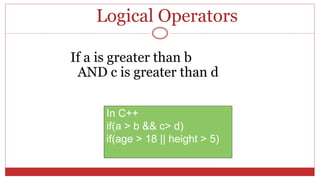
If a is greater than b
AND c is greater than d
In C++
if(a > b && c> d)
if(age > 18 || height > 5)
The Boolean Type
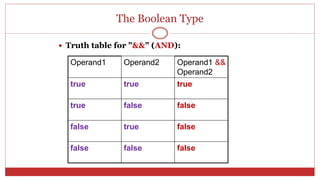
 Truth table for "&&" (AND):
Operand1 Operand2 Operand1 &&
Operand2
true true true
true false false
false true false
false false false
The Boolean Type
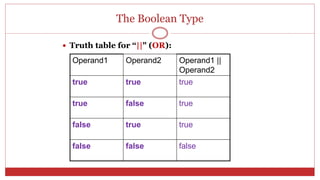
 Truth table for “||" (OR):
Operand1 Operand2 Operand1 ||
Operand2
true true true
true false true
false true true
false false false
The Boolean Type
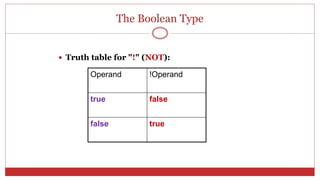
 Truth table for "!" (NOT):
Operand !Operand
true false
false true
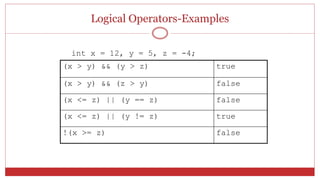
Logical Operators-Examples
int x = 12, y = 5, z = -4;
(x > y) && (y > z) true
(x > y) && (z > y) false
(x <= z) || (y == z) false
(x <= z) || (y != z) true
!(x >= z) false
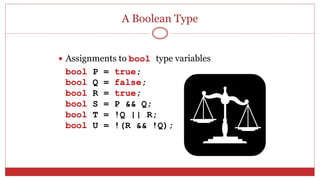
A Boolean Type
 Assignments to bool type variables
bool P = true;
bool Q = false;
bool R = true;
bool S = P && Q;
bool T = !Q || R;
bool U = !(R && !Q);
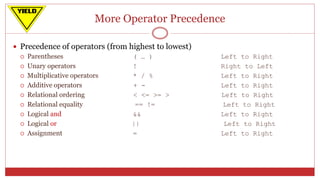
More Operator Precedence
 Precedence of operators (from highest to lowest)
 Parentheses ( … ) Left to Right
 Unary operators ! Right to Left
 Multiplicative operators * / % Left to Right
 Additive operators + - Left to Right
 Relational ordering < <= >= > Left to Right
 Relational equality == != Left to Right
 Logical and && Left to Right
 Logical or || Left to Right
 Assignment = Left to Right
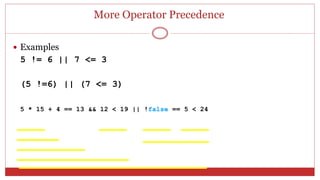
More Operator Precedence
 Examples
5 != 6 || 7 <= 3
(5 !=6) || (7 <= 3)
5 * 15 + 4 == 13 && 12 < 19 || !false == 5 < 24
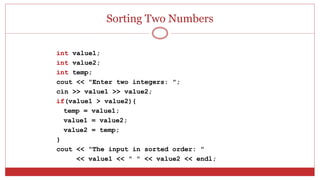
Sorting Two Numbers
int value1;
int value2;
int temp;
cout << "Enter two integers: ";
cin >> value1 >> value2;
if(value1 > value2){
temp = value1;
value1 = value2;
value2 = temp;
}
cout << "The input in sorted order: "
<< value1 << " " << value2 << endl;
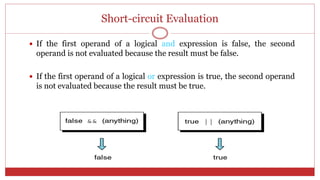
Short-circuit Evaluation
 If the first operand of a logical and expression is false, the second
operand is not evaluated because the result must be false.
 If the first operand of a logical or expression is true, the second operand
is not evaluated because the result must be true.
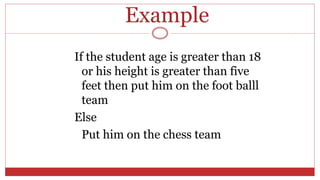
Example
If the student age is greater than 18
or his height is greater than five
feet then put him on the foot balll
team
Else
Put him on the chess team
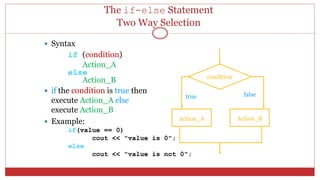
The if-else Statement
Two Way Selection
 Syntax
if (condition)
Action_A
else
Action_B
 if the condition is true then
execute Action_A else
execute Action_B
 Example:
if(value == 0)
cout << "value is 0";
else
cout << "value is not 0";
condition
Action_A Action_B
true false
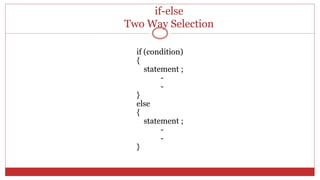
if-else
Two Way Selection
if (condition)
{
statement ;
-
-
}
else
{
statement ;
-
-
}
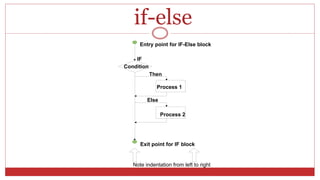
if-else
Condition
Process 1
IF
Then
Entry point for IF-Else block
Exit point for IF block
Process 2
Else
Note indentation from left to right
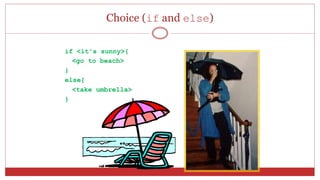
Choice (if and else)
if <it's sunny>{
<go to beach>
}
else{
<take umbrella>
}
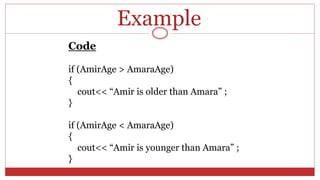
Code
if (AmirAge > AmaraAge)
{
cout<< “Amir is older than Amara” ;
}
if (AmirAge < AmaraAge)
{
cout<< “Amir is younger than Amara” ;
}
Example
Example
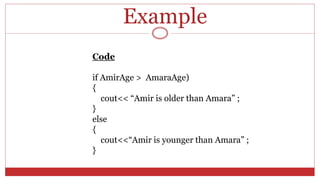
Code
if AmirAge > AmaraAge)
{
cout<< “Amir is older than Amara” ;
}
else
{
cout<<“Amir is younger than Amara” ;
}
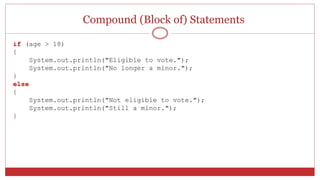
Compound (Block of) Statements
if (age > 18)
{
System.out.println("Eligible to vote.");
System.out.println("No longer a minor.");
}
else
{
System.out.println("Not eligible to vote.");
System.out.println("Still a minor.");
}
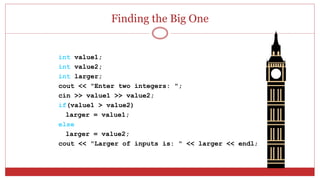
Finding the Big One
int value1;
int value2;
int larger;
cout << "Enter two integers: ";
cin >> value1 >> value2;
if(value1 > value2)
larger = value1;
else
larger = value2;
cout << "Larger of inputs is: " << larger << endl;
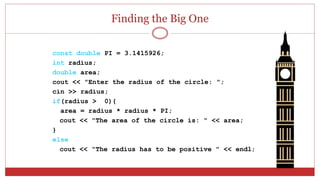
Finding the Big One
const double PI = 3.1415926;
int radius;
double area;
cout << "Enter the radius of the circle: ";
cin >> radius;
if(radius > 0){
area = radius * radius * PI;
cout << "The area of the circle is: " << area;
}
else
cout << "The radius has to be positive " << endl;
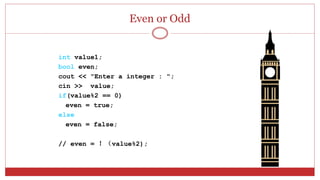
Even or Odd
int value1;
bool even;
cout << "Enter a integer : ";
cin >> value;
if(value%2 == 0)
even = true;
else
even = false;
// even = !(value%2);
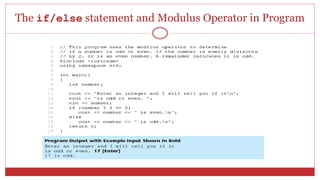
The if/else statement and Modulus Operator in Program
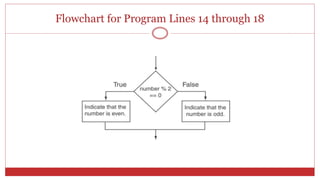
Flowchart for Program Lines 14 through 18
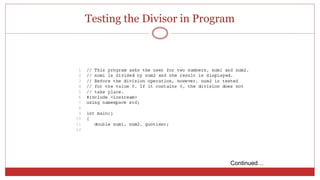
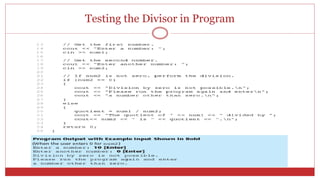
Testing the Divisor in Program
Continued…
Testing the Divisor in Program
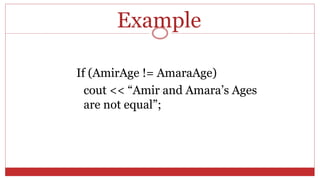
Example
If (AmirAge != AmaraAge)
cout << “Amir and Amara’s Ages
are not equal”;
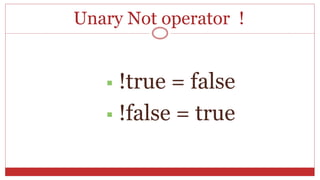
Unary Not operator !
 !true = false
 !false = true
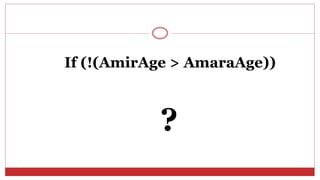
If (!(AmirAge > AmaraAge))
?
Example
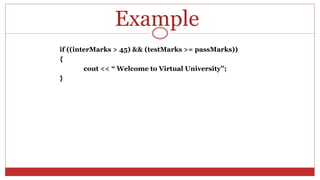
if ((interMarks > 45) && (testMarks >= passMarks))
{
cout << “ Welcome to Virtual University”;
}
Example
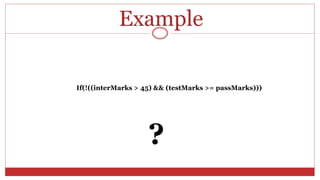
If(!((interMarks > 45) && (testMarks >= passMarks)))
?
The if/else if Statement
 Tests a series of conditions until one is found to be true
 Often simpler than using nested if/else statements
 Can be used to model thought processes such as:
"If it is raining, take an umbrella,
else, if it is windy, take a hat,
else, take sunglasses”
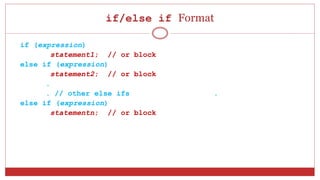
if/else if Format
if (expression)
statement1; // or block
else if (expression)
statement2; // or block
.
. // other else ifs .
else if (expression)
statementn; // or block
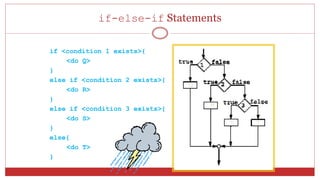
if-else-if Statements
if <condition 1 exists>{
<do Q>
}
else if <condition 2 exists>{
<do R>
}
else if <condition 3 exists>{
<do S>
}
else{
<do T>
}
Q
R
TS
if-else-if Statements
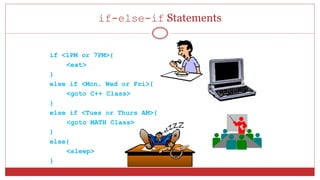
if <1PM or 7PM>{
<eat>
}
else if <Mon, Wed or Fri>{
<goto C++ Class>
}
else if <Tues or Thurs AM>{
<goto MATH Class>
}
else{
<sleep>
}
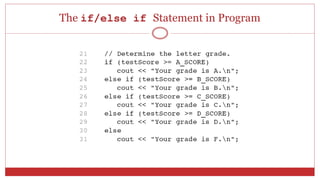
The if/else if Statement in Program
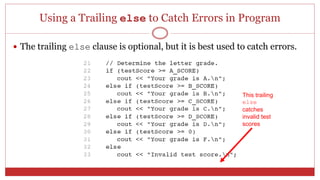
Using a Trailing else to Catch Errors in Program
 The trailing else clause is optional, but it is best used to catch errors.
This trailing
else
catches
invalid test
scores
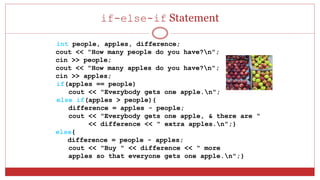
if-else-if Statement
int people, apples, difference;
cout << "How many people do you have?n";
cin >> people;
cout << "How many apples do you have?n";
cin >> apples;
if(apples == people)
cout << "Everybody gets one apple.n";
else if(apples > people){
difference = apples - people;
cout << "Everybody gets one apple, & there are "
<< difference << " extra apples.n";}
else{
difference = people - apples;
cout << "Buy " << difference << " more
apples so that everyone gets one apple.n";}
if-else-if Example
int score;
cout << "Please enter a score: ";
cin >> score;
if (score >= 90)
cout << "Grade = A" << endl;
else if (score >= 80)
cout << "Grade = B" << endl;
else if (score >= 70)
cout << "Grade = C" << endl;
else if (score >= 60)
cout << "Grade = D" << endl;
else // totalscore < 59
cout << "Grade = F" << endl;
Nested if Statements
Multiple selections (nested if)
 An if statement that is nested inside another if statement
 Nested if statements can be used to test more than one condition
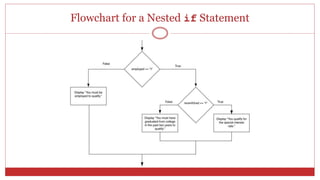
Flowchart for a Nested if Statement
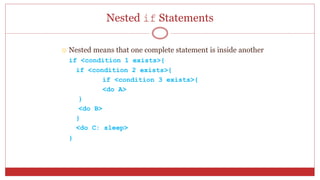
Nested if Statements
 Nested means that one complete statement is inside another
if <condition 1 exists>{
if <condition 2 exists>{
if <condition 3 exists>{
<do A>
}
<do B>
}
<do C: sleep>
}
Nested if Statements
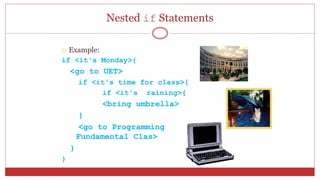
 Example:
if <it's Monday>{
<go to UET>
if <it's time for class>{
if <it's raining>{
<bring umbrella>
}
<go to Programming
Fundamental Clas>
}
}
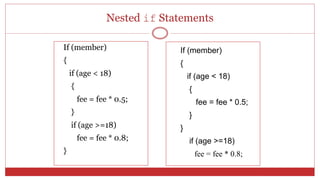
Nested if Statements
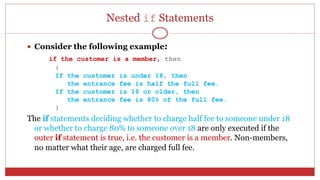
 Consider the following example:
if the customer is a member, then
{
If the customer is under 18, then
the entrance fee is half the full fee.
If the customer is 18 or older, then
the entrance fee is 80% of the full fee.
}
The if statements deciding whether to charge half fee to someone under 18
or whether to charge 80% to someone over 18 are only executed if the
outer if statement is true, i.e. the customer is a member. Non-members,
no matter what their age, are charged full fee.
Nested if Statements
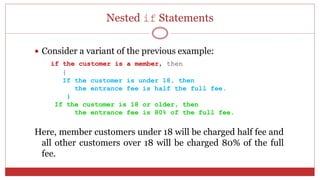
 Consider a variant of the previous example:
if the customer is a member, then
{
If the customer is under 18, then
the entrance fee is half the full fee.
}
If the customer is 18 or older, then
the entrance fee is 80% of the full fee.
Here, member customers under 18 will be charged half fee and
all other customers over 18 will be charged 80% of the full
fee.
Nested if Statements
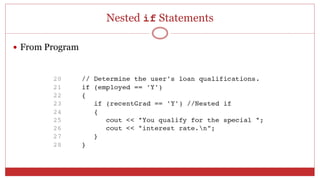
 From Program
Nested if Statements
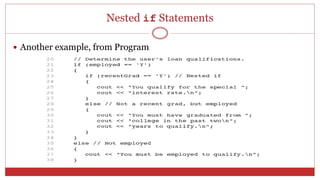
 Another example, from Program
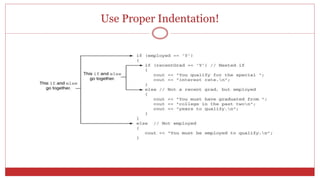
Use Proper Indentation!
Nested if Statements
If (member)
{
if (age < 18)
{
fee = fee * 0.5;
}
if (age >=18)
fee = fee * 0.8;
}
If (member)
{
if (age < 18)
{
fee = fee * 0.5;
}
}
if (age >=18)
fee = fee * 0.8;
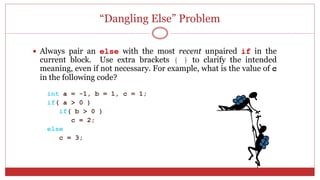
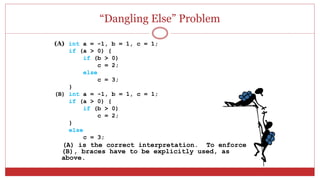
“Dangling Else” Problem
 Always pair an else with the most recent unpaired if in the
current block. Use extra brackets { } to clarify the intended
meaning, even if not necessary. For example, what is the value of c
in the following code?
int a = -1, b = 1, c = 1;
if( a > 0 )
if( b > 0 )
c = 2;
else
c = 3;
“Dangling Else” Problem
(A) int a = -1, b = 1, c = 1;
if (a > 0) {
if (b > 0)
c = 2;
else
c = 3;
}
(B) int a = -1, b = 1, c = 1;
if (a > 0) {
if (b > 0)
c = 2;
}
else
c = 3;
(A) is the correct interpretation. To enforce
(B), braces have to be explicitly used, as
above.
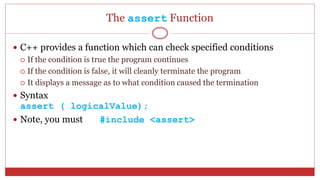
The assert Function
 C++ provides a function which can check specified conditions
 If the condition is true the program continues
 If the condition is false, it will cleanly terminate the program
 It displays a message as to what condition caused the termination
 Syntax
assert ( logicalValue);
 Note, you must #include <assert>
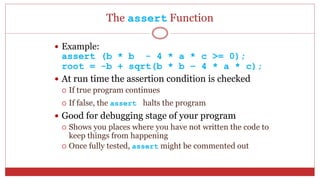
The assert Function
 Example:
assert (b * b - 4 * a * c >= 0);
root = -b + sqrt(b * b – 4 * a * c);
 At run time the assertion condition is checked
 If true program continues
 If false, the assert halts the program
 Good for debugging stage of your program
 Shows you places where you have not written the code to
keep things from happening
 Once fully tested, assert might be commented out
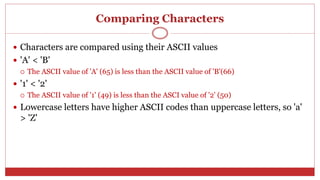
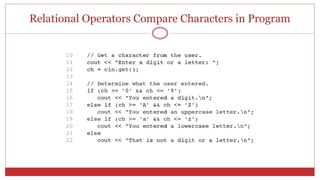
Comparing Characters
 Characters are compared using their ASCII values
 'A' < 'B'
 The ASCII value of 'A' (65) is less than the ASCII value of 'B'(66)
 '1' < '2'
 The ASCII value of '1' (49) is less than the ASCI value of '2' (50)
 Lowercase letters have higher ASCII codes than uppercase letters, so 'a'
> 'Z'
Relational Operators Compare Characters in Program
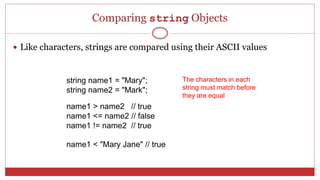
Comparing string Objects
 Like characters, strings are compared using their ASCII values
string name1 = "Mary";
string name2 = "Mark";
name1 > name2 // true
name1 <= name2 // false
name1 != name2 // true
name1 < "Mary Jane" // true
The characters in each
string must match before
they are equal
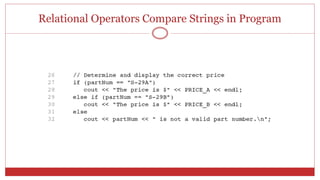
Relational Operators Compare Strings in Program
82
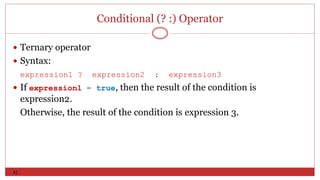
Conditional (? :) Operator
 Ternary operator
 Syntax:
expression1 ? expression2 : expression3
 If expression1 = true, then the result of the condition is
expression2.
Otherwise, the result of the condition is expression 3.
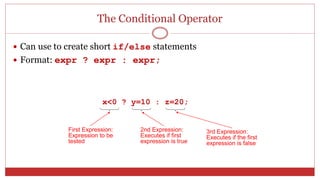
The Conditional Operator
 Can use to create short if/else statements
 Format: expr ? expr : expr;
x<0 ? y=10 : z=20;
First Expression:
Expression to be
tested
2nd Expression:
Executes if first
expression is true
3rd Expression:
Executes if the first
expression is false
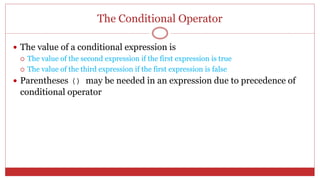
The Conditional Operator
 The value of a conditional expression is
 The value of the second expression if the first expression is true
 The value of the third expression if the first expression is false
 Parentheses () may be needed in an expression due to precedence of
conditional operator
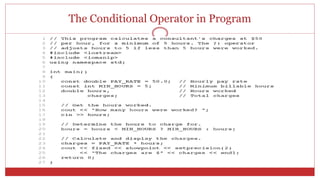
The Conditional Operator in Program
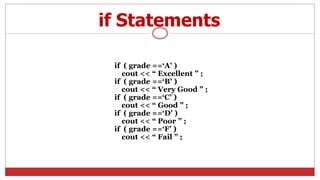
Multi-way decision
if ( grade ==‘A’ )
cout << “ Excellent ” ;
if ( grade ==‘B’ )
cout << “ Very Good ” ;
if ( grade ==‘C’ )
cout << “ Good ” ;
if ( grade ==‘D’ )
cout << “ Poor ” ;
if ( grade ==‘F’ )
cout << “ Fail ” ;
if Statements
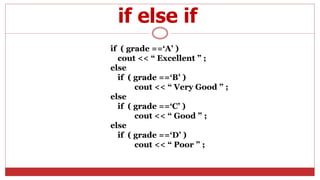
if ( grade ==‘A’ )
cout << “ Excellent ” ;
else
if ( grade ==‘B’ )
cout << “ Very Good ” ;
else
if ( grade ==‘C’ )
cout << “ Good ” ;
else
if ( grade ==‘D’ )
cout << “ Poor ” ;
if else if
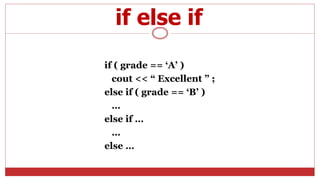
if ( grade == ‘A’ )
cout << “ Excellent ” ;
else if ( grade == ‘B’ )
…
else if …
…
else …
if else if
switch statement
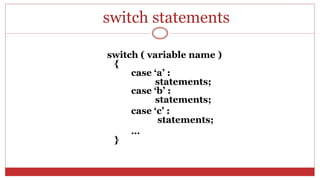
switch statements
switch ( variable name )
{
case ‘a’ :
statements;
case ‘b’ :
statements;
case ‘c’ :
statements;
…
}
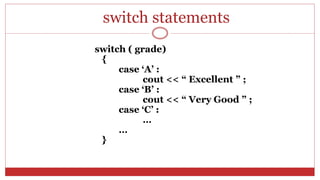
switch ( grade)
{
case ‘A’ :
cout << “ Excellent ” ;
case ‘B’ :
cout << “ Very Good ” ;
case ‘C’ :
…
…
}
switch statements
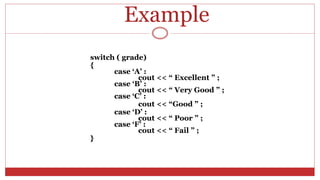
Example
switch ( grade)
{
case ‘A’ :
cout << “ Excellent ” ;
case ‘B’ :
cout << “ Very Good ” ;
case ‘C’ :
cout << “Good ” ;
case ‘D’ :
cout << “ Poor ” ;
case ‘F’ :
cout << “ Fail ” ;
}
The switch Statement
 Used to select among statements from several alternatives
 In some cases, can be used instead of if/else if statements
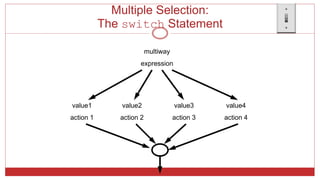
Multiple Selection:
The switch Statement
value1
action 1
value2
action 2
value3
action 3
value4
action 4
multiway
expression
Multiple Selection:
The switch Statement
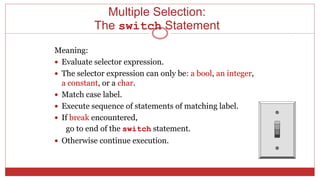
Meaning:
 Evaluate selector expression.
 The selector expression can only be: a bool, an integer,
a constant, or a char.
 Match case label.
 Execute sequence of statements of matching label.
 If break encountered,
go to end of the switch statement.
 Otherwise continue execution.
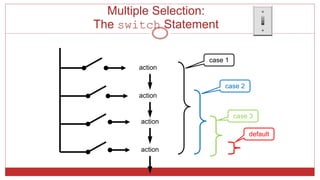
Multiple Selection:
The switch Statement
action
action
action
action
case 1
case 2
case 3
default
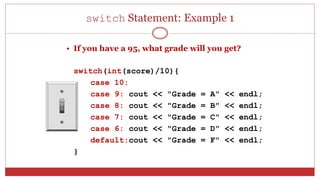
switch Statement: Example 1
• If you have a 95, what grade will you get?
switch(int(score)/10){
case 10:
case 9: cout << "Grade = A" << endl;
case 8: cout << "Grade = B" << endl;
case 7: cout << "Grade = C" << endl;
case 6: cout << "Grade = D" << endl;
default:cout << "Grade = F" << endl;
}
switch Statement: Example 2
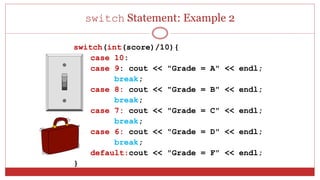
switch(int(score)/10){
case 10:
case 9: cout << "Grade = A" << endl;
break;
case 8: cout << "Grade = B" << endl;
break;
case 7: cout << "Grade = C" << endl;
break;
case 6: cout << "Grade = D" << endl;
break;
default:cout << "Grade = F" << endl;
}
switch Statement: Example 2
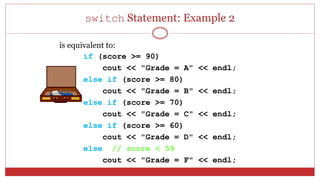
is equivalent to:
if (score >= 90)
cout << "Grade = A" << endl;
else if (score >= 80)
cout << "Grade = B" << endl;
else if (score >= 70)
cout << "Grade = C" << endl;
else if (score >= 60)
cout << "Grade = D" << endl;
else // score < 59
cout << "Grade = F" << endl;
switch Statement: Example 2
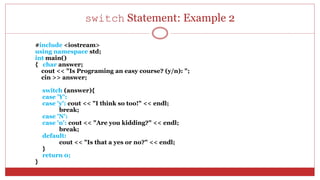
#include <iostream>
using namespace std;
int main()
{ char answer;
cout << "Is Programing an easy course? (y/n): ";
cin >> answer;
switch (answer){
case 'Y':
case 'y': cout << "I think so too!" << endl;
break;
case 'N':
case 'n': cout << "Are you kidding?" << endl;
break;
default:
cout << "Is that a yes or no?" << endl;
}
return 0;
}
Points to Remember
 The expression followed by each case label must
be a constant expression.
 No two case labels may have the same value.
 Two case labels may be associated with the same
statements.
 The default label is not required.
 There can be only one default label, and it is
usually last.
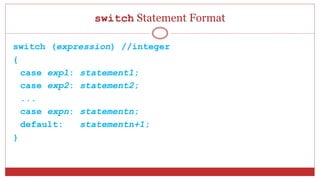
switch Statement Format
switch (expression) //integer
{
case exp1: statement1;
case exp2: statement2;
...
case expn: statementn;
default: statementn+1;
}
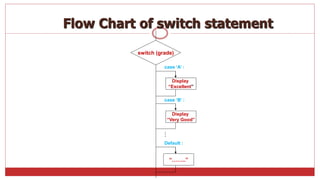
switch (grade)
Display
“Excellent”
case ‘B’ :
case ‘A’ :
Display
“Very Good”
Default :
“……..”
Flow Chart of switch statement
…
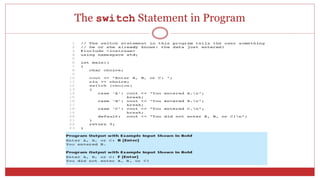
The switch Statement in Program
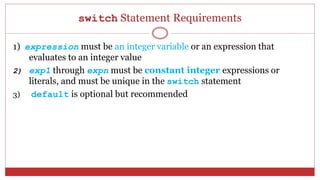
switch Statement Requirements
1) expression must be an integer variable or an expression that
evaluates to an integer value
2) exp1 through expn must be constant integer expressions or
literals, and must be unique in the switch statement
3) default is optional but recommended
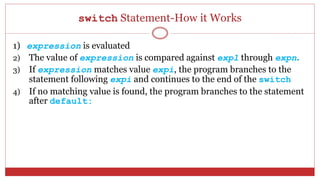
switch Statement-How it Works
1) expression is evaluated
2) The value of expression is compared against exp1 through expn.
3) If expression matches value expi, the program branches to the
statement following expi and continues to the end of the switch
4) If no matching value is found, the program branches to the statement
after default:
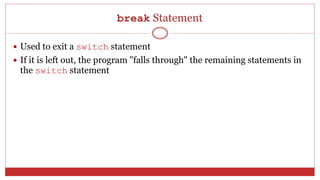
break Statement
 Used to exit a switch statement
 If it is left out, the program "falls through" the remaining statements in
the switch statement
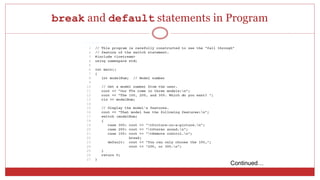
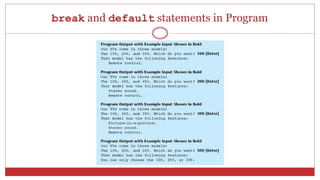
break and default statements in Program
Continued…
break and default statements in Program
Using switch in Menu Systems
 switch statement is a natural choice for menu-driven program:
 display the menu
 then, get the user's menu selection
 use user input as expression in switch statement
 use menu choices as expr in case statements
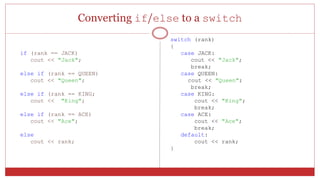
Converting if/else to a switch
if (rank == JACK)
cout << "Jack";
else if (rank == QUEEN)
cout << "Queen";
else if (rank == KING;
cout << "King";
else if (rank == ACE)
cout << "Ace";
else
cout << rank;
switch (rank)
{
case JACK:
cout << "Jack";
break;
case QUEEN:
cout << "Queen";
break;
case KING:
cout << "King";
break;
case ACE:
cout << "Ace";
break;
default:
cout << rank;
}
More About Blocks and Scope
 Scope of a variable is the block in which it is defined, from the point of
definition to the end of the block
 Usually defined at beginning of function
 May be defined close to first use
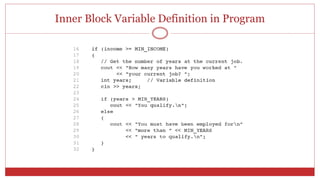
Inner Block Variable Definition in Program
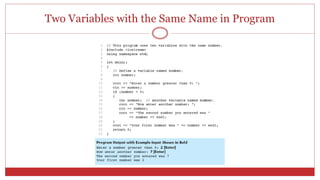
Variables with the Same Name
 Variables defined inside { } have local or block scope
 When inside a block within another block, can define variables with the
same name as in the outer block.
 When in inner block, outer definition is not available
 Not a good idea
Two Variables with the Same Name in Program

C++ IF STATMENT AND ITS TYPE

  • 1.
  • 2.
    Control Structures  Statementscan be executed in sequence  One right after the other  No deviation from the specified sequence
  • 3.
    Decision A mechanism fordeciding whether an action should be taken
  • 4.
    Conditional Statements  Aconditional statement allows us to control whether a program segment is executed or not.  Two constructs  if statement  if  if-else  if-else-if  switch statement
  • 5.
    Flow Chart Symbols Startor stop Process Continuation mark Decision Flow line
  • 6.
    The Basic ifStatement One Way Selection  Syntax if(condition) action  if the condition is true then execute the action.  action is either a single statement or a group of statements within braces. condition action true false
  • 7.
    If Statement One WaySelection If condition is true statements If Ali’s height is greater then 6 feet Then Ali can become a member of the Basket Ball team
  • 8.
    Flow Chart forif statement Condition Process IF Then Entry point for IF block Exit point for IF block Note indentation from left to right
  • 9.
    If Statement inC ++ If (condition) statement ;
  • 10.
    Choice (if) Put multipleaction statements within braces if (it's raining){ <take umbrella> <wear raincoat> }
  • 11.
    If Statement inC++ If ( condition ) { statement1 ; statement2 ; : }
  • 12.
    12 Compound (Block of)Statements Syntax: { statement1 statement2 . . . statementn }
  • 13.
    If statement inC++ if (age1 > age2) cout<<“Student 1 is older than student 2” ;
  • 14.
    Absolute Value // programto read number & print its absolute value #include <iostream> using namespace std; int main(){ int value; cout << "Enter integer: "; cin >> value; if(value < 0) value = -value; cout << "The absolute value is " << value << endl; return 0; }
  • 15.
    if Statement inProgram Continued…
  • 16.
    if Statement inProgram 4-2
  • 17.
    Relational Operators Relational operatorsare used to compare two values to form a condition. Math C++ Plain English = == equals [example: if(a==b) ] [ (a=b) means put the value of b into a ] < < less than  <= less than or equal to > > greater than  >= greater than or equal to  != not equal to
  • 18.
    Relational Operators a !=b; X = 0; X == 0;
  • 19.
  • 20.
    Example #include <iostream> using namespacestd; int main ( ) { int AmirAge, AmaraAge; AmirAge = 0; AmaraAge = 0; cout<<“Please enter Amir’s age”; cin >> AmirAge; cout<<“Please enter Amara’s age”; cin >> AmaraAge; if AmirAge > AmaraAge) { cout << “n”<< “Amir’s age is greater then Amara’s age” ; } return 0; }
  • 21.
    Operator Precedence Which comesfirst? * / % + - < <= >= > == != = Answer:
  • 22.
    Logical Expressions  Wemust know the order in which to apply the operators 12 > 7 || 9 * 5 >= 6 && 5 < 9 Highest Lowest Order of Precedence Associativity Right to Left Left to Right Left to Right Left to Right Left to Right Left to Right Left to Right Right to Left
  • 23.
    The Boolean Type C++ contains a type named bool for conditions.  A condition can have one of two values:  true (corresponds to a non-zero value)  false (corresponds to zero value)  Boolean operators can be used to form more complex conditional expressions.  The and operator is &&  The or operator is ||  The not operator is !
  • 24.
    Logical (Boolean) Operators Logical or Boolean operators enable you to combine logical expressions  Operands must be logical values  The results are logical values (true or false) A unary operator Binary operators
  • 25.
    Logical Operators  Usedto create relational expressions from other relational expressions  Operators, meaning, and explanation: && AND New relational expression is true if both expressions are true || OR New relational expression is true if either expression is true ! NOT Reverses the value of an expression – true expression becomes false, and false becomes true
  • 26.
    Logical Operators If ais greater than b AND c is greater than d In C++ if(a > b && c> d) if(age > 18 || height > 5)
  • 27.
    The Boolean Type Truth table for "&&" (AND): Operand1 Operand2 Operand1 && Operand2 true true true true false false false true false false false false
  • 28.
    The Boolean Type Truth table for “||" (OR): Operand1 Operand2 Operand1 || Operand2 true true true true false true false true true false false false
  • 29.
    The Boolean Type Truth table for "!" (NOT): Operand !Operand true false false true
  • 30.
    Logical Operators-Examples int x= 12, y = 5, z = -4; (x > y) && (y > z) true (x > y) && (z > y) false (x <= z) || (y == z) false (x <= z) || (y != z) true !(x >= z) false
  • 31.
    A Boolean Type Assignments to bool type variables bool P = true; bool Q = false; bool R = true; bool S = P && Q; bool T = !Q || R; bool U = !(R && !Q);
  • 32.
    More Operator Precedence Precedence of operators (from highest to lowest)  Parentheses ( … ) Left to Right  Unary operators ! Right to Left  Multiplicative operators * / % Left to Right  Additive operators + - Left to Right  Relational ordering < <= >= > Left to Right  Relational equality == != Left to Right  Logical and && Left to Right  Logical or || Left to Right  Assignment = Left to Right
  • 33.
    More Operator Precedence Examples 5 != 6 || 7 <= 3 (5 !=6) || (7 <= 3) 5 * 15 + 4 == 13 && 12 < 19 || !false == 5 < 24
  • 34.
    Sorting Two Numbers intvalue1; int value2; int temp; cout << "Enter two integers: "; cin >> value1 >> value2; if(value1 > value2){ temp = value1; value1 = value2; value2 = temp; } cout << "The input in sorted order: " << value1 << " " << value2 << endl;
  • 35.
    Short-circuit Evaluation  Ifthe first operand of a logical and expression is false, the second operand is not evaluated because the result must be false.  If the first operand of a logical or expression is true, the second operand is not evaluated because the result must be true.
  • 36.
    Example If the studentage is greater than 18 or his height is greater than five feet then put him on the foot balll team Else Put him on the chess team
  • 37.
    The if-else Statement TwoWay Selection  Syntax if (condition) Action_A else Action_B  if the condition is true then execute Action_A else execute Action_B  Example: if(value == 0) cout << "value is 0"; else cout << "value is not 0"; condition Action_A Action_B true false
  • 38.
    if-else Two Way Selection if(condition) { statement ; - - } else { statement ; - - }
  • 39.
    if-else Condition Process 1 IF Then Entry pointfor IF-Else block Exit point for IF block Process 2 Else Note indentation from left to right
  • 40.
    Choice (if andelse) if <it's sunny>{ <go to beach> } else{ <take umbrella> }
  • 41.
    Code if (AmirAge >AmaraAge) { cout<< “Amir is older than Amara” ; } if (AmirAge < AmaraAge) { cout<< “Amir is younger than Amara” ; } Example
  • 42.
    Example Code if AmirAge >AmaraAge) { cout<< “Amir is older than Amara” ; } else { cout<<“Amir is younger than Amara” ; }
  • 43.
    Compound (Block of)Statements if (age > 18) { System.out.println("Eligible to vote."); System.out.println("No longer a minor."); } else { System.out.println("Not eligible to vote."); System.out.println("Still a minor."); }
  • 44.
    Finding the BigOne int value1; int value2; int larger; cout << "Enter two integers: "; cin >> value1 >> value2; if(value1 > value2) larger = value1; else larger = value2; cout << "Larger of inputs is: " << larger << endl;
  • 45.
    Finding the BigOne const double PI = 3.1415926; int radius; double area; cout << "Enter the radius of the circle: "; cin >> radius; if(radius > 0){ area = radius * radius * PI; cout << "The area of the circle is: " << area; } else cout << "The radius has to be positive " << endl;
  • 46.
    Even or Odd intvalue1; bool even; cout << "Enter a integer : "; cin >> value; if(value%2 == 0) even = true; else even = false; // even = !(value%2);
  • 47.
    The if/else statementand Modulus Operator in Program
  • 48.
    Flowchart for ProgramLines 14 through 18
  • 49.
    Testing the Divisorin Program Continued…
  • 50.
  • 51.
    Example If (AmirAge !=AmaraAge) cout << “Amir and Amara’s Ages are not equal”;
  • 52.
    Unary Not operator!  !true = false  !false = true
  • 53.
    If (!(AmirAge >AmaraAge)) ?
  • 54.
    Example if ((interMarks >45) && (testMarks >= passMarks)) { cout << “ Welcome to Virtual University”; }
  • 55.
    Example If(!((interMarks > 45)&& (testMarks >= passMarks))) ?
  • 56.
    The if/else ifStatement  Tests a series of conditions until one is found to be true  Often simpler than using nested if/else statements  Can be used to model thought processes such as: "If it is raining, take an umbrella, else, if it is windy, take a hat, else, take sunglasses”
  • 57.
    if/else if Format if(expression) statement1; // or block else if (expression) statement2; // or block . . // other else ifs . else if (expression) statementn; // or block
  • 58.
    if-else-if Statements if <condition1 exists>{ <do Q> } else if <condition 2 exists>{ <do R> } else if <condition 3 exists>{ <do S> } else{ <do T> } Q R TS
  • 59.
    if-else-if Statements if <1PMor 7PM>{ <eat> } else if <Mon, Wed or Fri>{ <goto C++ Class> } else if <Tues or Thurs AM>{ <goto MATH Class> } else{ <sleep> }
  • 60.
    The if/else ifStatement in Program
  • 61.
    Using a Trailingelse to Catch Errors in Program  The trailing else clause is optional, but it is best used to catch errors. This trailing else catches invalid test scores
  • 62.
    if-else-if Statement int people,apples, difference; cout << "How many people do you have?n"; cin >> people; cout << "How many apples do you have?n"; cin >> apples; if(apples == people) cout << "Everybody gets one apple.n"; else if(apples > people){ difference = apples - people; cout << "Everybody gets one apple, & there are " << difference << " extra apples.n";} else{ difference = people - apples; cout << "Buy " << difference << " more apples so that everyone gets one apple.n";}
  • 63.
    if-else-if Example int score; cout<< "Please enter a score: "; cin >> score; if (score >= 90) cout << "Grade = A" << endl; else if (score >= 80) cout << "Grade = B" << endl; else if (score >= 70) cout << "Grade = C" << endl; else if (score >= 60) cout << "Grade = D" << endl; else // totalscore < 59 cout << "Grade = F" << endl;
  • 64.
    Nested if Statements Multipleselections (nested if)  An if statement that is nested inside another if statement  Nested if statements can be used to test more than one condition
  • 65.
    Flowchart for aNested if Statement
  • 66.
    Nested if Statements Nested means that one complete statement is inside another if <condition 1 exists>{ if <condition 2 exists>{ if <condition 3 exists>{ <do A> } <do B> } <do C: sleep> }
  • 67.
    Nested if Statements Example: if <it's Monday>{ <go to UET> if <it's time for class>{ if <it's raining>{ <bring umbrella> } <go to Programming Fundamental Clas> } }
  • 68.
    Nested if Statements Consider the following example: if the customer is a member, then { If the customer is under 18, then the entrance fee is half the full fee. If the customer is 18 or older, then the entrance fee is 80% of the full fee. } The if statements deciding whether to charge half fee to someone under 18 or whether to charge 80% to someone over 18 are only executed if the outer if statement is true, i.e. the customer is a member. Non-members, no matter what their age, are charged full fee.
  • 69.
    Nested if Statements Consider a variant of the previous example: if the customer is a member, then { If the customer is under 18, then the entrance fee is half the full fee. } If the customer is 18 or older, then the entrance fee is 80% of the full fee. Here, member customers under 18 will be charged half fee and all other customers over 18 will be charged 80% of the full fee.
  • 70.
  • 71.
    Nested if Statements Another example, from Program
  • 72.
  • 73.
    Nested if Statements If(member) { if (age < 18) { fee = fee * 0.5; } if (age >=18) fee = fee * 0.8; } If (member) { if (age < 18) { fee = fee * 0.5; } } if (age >=18) fee = fee * 0.8;
  • 74.
    “Dangling Else” Problem Always pair an else with the most recent unpaired if in the current block. Use extra brackets { } to clarify the intended meaning, even if not necessary. For example, what is the value of c in the following code? int a = -1, b = 1, c = 1; if( a > 0 ) if( b > 0 ) c = 2; else c = 3;
  • 75.
    “Dangling Else” Problem (A)int a = -1, b = 1, c = 1; if (a > 0) { if (b > 0) c = 2; else c = 3; } (B) int a = -1, b = 1, c = 1; if (a > 0) { if (b > 0) c = 2; } else c = 3; (A) is the correct interpretation. To enforce (B), braces have to be explicitly used, as above.
  • 76.
    The assert Function C++ provides a function which can check specified conditions  If the condition is true the program continues  If the condition is false, it will cleanly terminate the program  It displays a message as to what condition caused the termination  Syntax assert ( logicalValue);  Note, you must #include <assert>
  • 77.
    The assert Function Example: assert (b * b - 4 * a * c >= 0); root = -b + sqrt(b * b – 4 * a * c);  At run time the assertion condition is checked  If true program continues  If false, the assert halts the program  Good for debugging stage of your program  Shows you places where you have not written the code to keep things from happening  Once fully tested, assert might be commented out
  • 78.
    Comparing Characters  Charactersare compared using their ASCII values  'A' < 'B'  The ASCII value of 'A' (65) is less than the ASCII value of 'B'(66)  '1' < '2'  The ASCII value of '1' (49) is less than the ASCI value of '2' (50)  Lowercase letters have higher ASCII codes than uppercase letters, so 'a' > 'Z'
  • 79.
    Relational Operators CompareCharacters in Program
  • 80.
    Comparing string Objects Like characters, strings are compared using their ASCII values string name1 = "Mary"; string name2 = "Mark"; name1 > name2 // true name1 <= name2 // false name1 != name2 // true name1 < "Mary Jane" // true The characters in each string must match before they are equal
  • 81.
    Relational Operators CompareStrings in Program
  • 82.
    82 Conditional (? :)Operator  Ternary operator  Syntax: expression1 ? expression2 : expression3  If expression1 = true, then the result of the condition is expression2. Otherwise, the result of the condition is expression 3.
  • 83.
    The Conditional Operator Can use to create short if/else statements  Format: expr ? expr : expr; x<0 ? y=10 : z=20; First Expression: Expression to be tested 2nd Expression: Executes if first expression is true 3rd Expression: Executes if the first expression is false
  • 84.
    The Conditional Operator The value of a conditional expression is  The value of the second expression if the first expression is true  The value of the third expression if the first expression is false  Parentheses () may be needed in an expression due to precedence of conditional operator
  • 85.
  • 86.
  • 87.
    if ( grade==‘A’ ) cout << “ Excellent ” ; if ( grade ==‘B’ ) cout << “ Very Good ” ; if ( grade ==‘C’ ) cout << “ Good ” ; if ( grade ==‘D’ ) cout << “ Poor ” ; if ( grade ==‘F’ ) cout << “ Fail ” ; if Statements
  • 88.
    if ( grade==‘A’ ) cout << “ Excellent ” ; else if ( grade ==‘B’ ) cout << “ Very Good ” ; else if ( grade ==‘C’ ) cout << “ Good ” ; else if ( grade ==‘D’ ) cout << “ Poor ” ; if else if
  • 89.
    if ( grade== ‘A’ ) cout << “ Excellent ” ; else if ( grade == ‘B’ ) … else if … … else … if else if
  • 90.
  • 91.
    switch statements switch (variable name ) { case ‘a’ : statements; case ‘b’ : statements; case ‘c’ : statements; … }
  • 92.
    switch ( grade) { case‘A’ : cout << “ Excellent ” ; case ‘B’ : cout << “ Very Good ” ; case ‘C’ : … … } switch statements
  • 93.
    Example switch ( grade) { case‘A’ : cout << “ Excellent ” ; case ‘B’ : cout << “ Very Good ” ; case ‘C’ : cout << “Good ” ; case ‘D’ : cout << “ Poor ” ; case ‘F’ : cout << “ Fail ” ; }
  • 94.
    The switch Statement Used to select among statements from several alternatives  In some cases, can be used instead of if/else if statements
  • 95.
    Multiple Selection: The switchStatement value1 action 1 value2 action 2 value3 action 3 value4 action 4 multiway expression
  • 96.
    Multiple Selection: The switchStatement Meaning:  Evaluate selector expression.  The selector expression can only be: a bool, an integer, a constant, or a char.  Match case label.  Execute sequence of statements of matching label.  If break encountered, go to end of the switch statement.  Otherwise continue execution.
  • 97.
    Multiple Selection: The switchStatement action action action action case 1 case 2 case 3 default
  • 98.
    switch Statement: Example1 • If you have a 95, what grade will you get? switch(int(score)/10){ case 10: case 9: cout << "Grade = A" << endl; case 8: cout << "Grade = B" << endl; case 7: cout << "Grade = C" << endl; case 6: cout << "Grade = D" << endl; default:cout << "Grade = F" << endl; }
  • 99.
    switch Statement: Example2 switch(int(score)/10){ case 10: case 9: cout << "Grade = A" << endl; break; case 8: cout << "Grade = B" << endl; break; case 7: cout << "Grade = C" << endl; break; case 6: cout << "Grade = D" << endl; break; default:cout << "Grade = F" << endl; }
  • 100.
    switch Statement: Example2 is equivalent to: if (score >= 90) cout << "Grade = A" << endl; else if (score >= 80) cout << "Grade = B" << endl; else if (score >= 70) cout << "Grade = C" << endl; else if (score >= 60) cout << "Grade = D" << endl; else // score < 59 cout << "Grade = F" << endl;
  • 101.
    switch Statement: Example2 #include <iostream> using namespace std; int main() { char answer; cout << "Is Programing an easy course? (y/n): "; cin >> answer; switch (answer){ case 'Y': case 'y': cout << "I think so too!" << endl; break; case 'N': case 'n': cout << "Are you kidding?" << endl; break; default: cout << "Is that a yes or no?" << endl; } return 0; }
  • 102.
    Points to Remember The expression followed by each case label must be a constant expression.  No two case labels may have the same value.  Two case labels may be associated with the same statements.  The default label is not required.  There can be only one default label, and it is usually last.
  • 103.
    switch Statement Format switch(expression) //integer { case exp1: statement1; case exp2: statement2; ... case expn: statementn; default: statementn+1; }
  • 104.
    switch (grade) Display “Excellent” case ‘B’: case ‘A’ : Display “Very Good” Default : “……..” Flow Chart of switch statement …
  • 105.
  • 106.
    switch Statement Requirements 1)expression must be an integer variable or an expression that evaluates to an integer value 2) exp1 through expn must be constant integer expressions or literals, and must be unique in the switch statement 3) default is optional but recommended
  • 107.
    switch Statement-How itWorks 1) expression is evaluated 2) The value of expression is compared against exp1 through expn. 3) If expression matches value expi, the program branches to the statement following expi and continues to the end of the switch 4) If no matching value is found, the program branches to the statement after default:
  • 108.
    break Statement  Usedto exit a switch statement  If it is left out, the program "falls through" the remaining statements in the switch statement
  • 109.
    break and defaultstatements in Program Continued…
  • 110.
    break and defaultstatements in Program
  • 111.
    Using switch inMenu Systems  switch statement is a natural choice for menu-driven program:  display the menu  then, get the user's menu selection  use user input as expression in switch statement  use menu choices as expr in case statements
  • 112.
    Converting if/else toa switch if (rank == JACK) cout << "Jack"; else if (rank == QUEEN) cout << "Queen"; else if (rank == KING; cout << "King"; else if (rank == ACE) cout << "Ace"; else cout << rank; switch (rank) { case JACK: cout << "Jack"; break; case QUEEN: cout << "Queen"; break; case KING: cout << "King"; break; case ACE: cout << "Ace"; break; default: cout << rank; }
  • 113.
    More About Blocksand Scope  Scope of a variable is the block in which it is defined, from the point of definition to the end of the block  Usually defined at beginning of function  May be defined close to first use
  • 114.
    Inner Block VariableDefinition in Program
  • 115.
    Variables with theSame Name  Variables defined inside { } have local or block scope  When inside a block within another block, can define variables with the same name as in the outer block.  When in inner block, outer definition is not available  Not a good idea
  • 116.
    Two Variables withthe Same Name in Program