and .Net
Getting Started in 30 Minutes or Less

        Sam Corder
       @SamCorder
   samus@codeargyle.com
Baseline


• MongoDB?
• .Net?
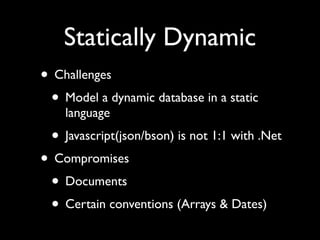
Statically Dynamic
• Challenges
 • Model a dynamic database in a static
    language
 • Javascript(json/bson) is not 1:1 with .Net
• Compromises
 • Documents
 • Certain conventions (Arrays & Dates)
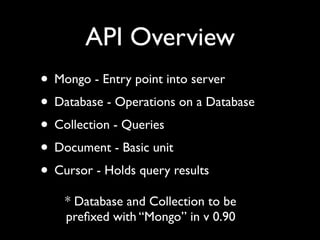
API Overview
• Mongo - Entry point into server
• Database - Operations on a Database
• Collection - Queries
• Document - Basic unit
• Cursor - Holds query results
    * Database and Collection to be
    prefixed with “Mongo” in v 0.90
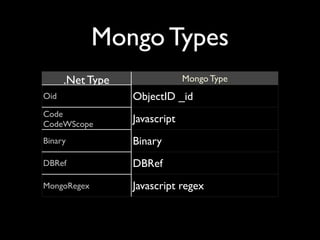
Mongo Types
      .Net Type                Mongo Type
Oid               ObjectID _id
Code
CodeWScope
                  Javascript
Binary            Binary
DBRef             DBRef
MongoRegex        Javascript regex
Diving In
Getting Connected
<?xml version="1.0" encoding="utf-8"?>
<configuration>
  <configSections>
    <section name="Mongo" type="MongoDB.Driver.Configuration.MongoConfigurat
ionSection, MongoDB.Driver" />
  </configSections>
  <Mongo>
    <connections>
      <add key="tests" connectionString="Server=localhost:27017" />
    </connections>
  </Mongo>
</configuration>


string connstr = ConfigurationManager.AppSettings["simple"];
if(String.IsNullOrEmpty(connstr))
    throw new ArgumentNullException("Connection string not found.");          
                                                                              
mongo = new Mongo(connstr);
mongo.Connect();


                                                                               ShowUsing();
                                                                               var mongo = new M
                                                                               mongo.Connect();
Inserts
library = mongo["library"];
albums = library["albums"];
albums.Insert(new Document(){{"Artist", "Seth Walker"},
                             {"Title", "Leap of Faith"},
                             {"Genre", "Blues"}});
albums.Insert(new Document(){{"Artist", "BB King"},
                             {"Title", "Lucille"},
                             {"Genre", "Blues"}}, true);


• Insert a single document at a time
• Insert multiples with IEnumerable
• Safemode for when you need to know it
    got there                                              var albums = db["albums"]
                                                           Describe(albums);


• _id Automatically added to documents
                                                           albums.Insert(new Docum
                                                           "Lucille"}, {"Artist", "BB Ki

                                                           Show in shell
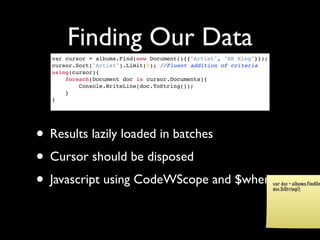
Finding Our Data
  var cursor = albums.Find(new Document(){{"Artist", "BB King"}});
  cursor.Sort("Artist").Limit(5); //Fluent addition of criteria
  using(cursor){
      foreach(Document doc in cursor.Documents){
          Console.WriteLine(doc.ToString());
      }
  }


• Results lazily loaded in batches
• Cursor should be disposed
• Javascript using CodeWScope and $where                             var doc = albums.FindOn
                                                                     doc.ToString();
Updating
Document lucille = albums.FindOne(new Document(){{"Artist", "BB King"}, {"Title",
"Lucille"}});
var id = lucille["_id"]; //Oid
lucille["Released"] = 1968;
lucille["Songs"] = new Document[]{
    new Document(){{"Title","Lucille"},{"length", "10:16"}},
    new Document(){{"Title","You Move Me So"},{"length", "2:03"}},
    new Document(){{"Title","Stop Puttin the Hurt on Me"},{"length", "3:04"}},
    new Document(){{"Title","Watch Yourself"},{"length", "5:47"}}
};
albums.Save(lucille);
albums.Update(lucille, new Document(){{"_id", id}}); //Same as above


        • By default replaces document                                    doc["Genre"] = "Blues";
                                                                          albums.Save(doc);


        • $ ($set) modifiers for partial update
                                                                          var doc = albums.FindOne(new
                                                                          doc.ToString();


        • Use Save() for individual documents
        • UpdateAll with a modifier query and a spec
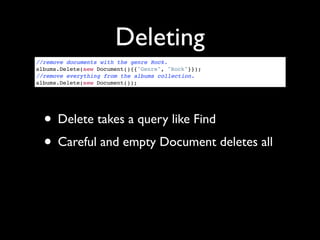
Deleting
//remove documents with the genre Rock.
albums.Delete(new Document(){{"Genre", "Rock"}});
//remove everything from the albums collection.
albums.Delete(new Document());


  • Delete takes a query like Find
  • Careful and empty Document deletes all
Additional Features
• Connection Pooling
• Various extra functions (Count, Hint,
  Explain, FindAndModify, etc.)
• GridFS via Streams
• Map Reduce
• Execute Javascript on server
• Mono
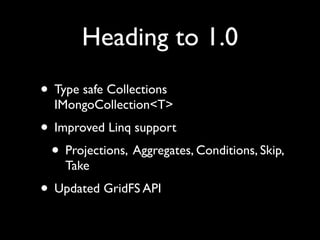
Heading to 1.0
• Type safe Collections
  IMongoCollection<T>
• Improved Linq support
 • Projections, Aggregates, Conditions, Skip,
    Take
• Updated GridFS API
Resources

• Download Mongo at mongodb.org
• C# driver http://github.com/samus/
  mongodb-csharp
• http://groups.google.com/group/mongodb-
  csharp
• 10gen offers commercial support

C# Development (Sam Corder)

  • 1.
    and .Net Getting Startedin 30 Minutes or Less Sam Corder @SamCorder samus@codeargyle.com
  • 2.
  • 3.
    Statically Dynamic • Challenges • Model a dynamic database in a static language • Javascript(json/bson) is not 1:1 with .Net • Compromises • Documents • Certain conventions (Arrays & Dates)
  • 4.
    API Overview • Mongo- Entry point into server • Database - Operations on a Database • Collection - Queries • Document - Basic unit • Cursor - Holds query results * Database and Collection to be prefixed with “Mongo” in v 0.90
  • 5.
    Mongo Types .Net Type Mongo Type Oid ObjectID _id Code CodeWScope Javascript Binary Binary DBRef DBRef MongoRegex Javascript regex
  • 6.
  • 7.
  • 8.
    Inserts library = mongo["library"]; albums= library["albums"]; albums.Insert(new Document(){{"Artist", "Seth Walker"}, {"Title", "Leap of Faith"}, {"Genre", "Blues"}}); albums.Insert(new Document(){{"Artist", "BB King"}, {"Title", "Lucille"}, {"Genre", "Blues"}}, true); • Insert a single document at a time • Insert multiples with IEnumerable • Safemode for when you need to know it got there var albums = db["albums"] Describe(albums); • _id Automatically added to documents albums.Insert(new Docum "Lucille"}, {"Artist", "BB Ki Show in shell
  • 9.
    Finding Our Data var cursor = albums.Find(new Document(){{"Artist", "BB King"}}); cursor.Sort("Artist").Limit(5); //Fluent addition of criteria using(cursor){     foreach(Document doc in cursor.Documents){         Console.WriteLine(doc.ToString());     } } • Results lazily loaded in batches • Cursor should be disposed • Javascript using CodeWScope and $where var doc = albums.FindOn doc.ToString();
  • 10.
    Updating Document lucille =albums.FindOne(new Document(){{"Artist", "BB King"}, {"Title", "Lucille"}}); var id = lucille["_id"]; //Oid lucille["Released"] = 1968; lucille["Songs"] = new Document[]{     new Document(){{"Title","Lucille"},{"length", "10:16"}},     new Document(){{"Title","You Move Me So"},{"length", "2:03"}},     new Document(){{"Title","Stop Puttin the Hurt on Me"},{"length", "3:04"}},     new Document(){{"Title","Watch Yourself"},{"length", "5:47"}} }; albums.Save(lucille); albums.Update(lucille, new Document(){{"_id", id}}); //Same as above • By default replaces document doc["Genre"] = "Blues"; albums.Save(doc); • $ ($set) modifiers for partial update var doc = albums.FindOne(new doc.ToString(); • Use Save() for individual documents • UpdateAll with a modifier query and a spec
  • 11.
    Deleting //remove documents withthe genre Rock. albums.Delete(new Document(){{"Genre", "Rock"}}); //remove everything from the albums collection. albums.Delete(new Document()); • Delete takes a query like Find • Careful and empty Document deletes all
  • 12.
    Additional Features • ConnectionPooling • Various extra functions (Count, Hint, Explain, FindAndModify, etc.) • GridFS via Streams • Map Reduce • Execute Javascript on server • Mono
  • 13.
    Heading to 1.0 •Type safe Collections IMongoCollection<T> • Improved Linq support • Projections, Aggregates, Conditions, Skip, Take • Updated GridFS API
  • 14.
    Resources • Download Mongoat mongodb.org • C# driver http://github.com/samus/ mongodb-csharp • http://groups.google.com/group/mongodb- csharp • 10gen offers commercial support