Ms. Chitra Alavani
HoD Computer Science
Kaveri College of Arts, Science and Commerce
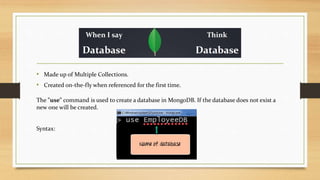
• Made up of Multiple Collections.
• Created on-the-fly when referenced for the first time.
The "use" command is used to create a database in MongoDB. If the database does not exist a
new one will be created.
Syntax:
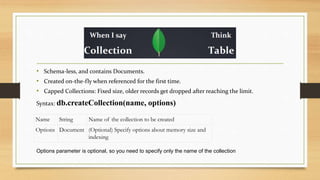
• Schema-less, and contains Documents.
• Created on-the-fly when referenced for the first time.
• Capped Collections: Fixed size, older records get dropped after reaching the limit.
Syntax: db.createCollection(name, options)
Options parameter is optional, so you need to specify only the name of the collection
Name String Name of the collection to be created
Options Document (Optional) Specify options about memory size and
indexing
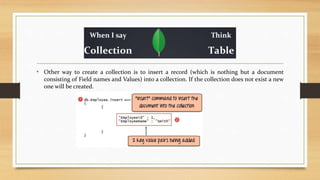
• Other way to create a collection is to insert a record (which is nothing but a document
consisting of Field names and Values) into a collection. If the collection does not exist a new
one will be created.
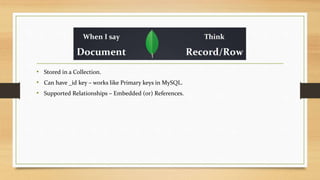
• Stored in a Collection.
• Can have _id key – works like Primary keys in MySQL.
• Supported Relationships – Embedded (or) References.
Creating a Document
• db.collection.insertOne() : Inserts a document into a collection.
• db.collection.insertMany() : Inserts multiple documents into a collection.
• db.collection.insert() : Inserts a document or documents into a collection.
Setting _id field
• MongoDB automatically add an Object id field which acts as a primary key
of the document.
• If you want to ensure that MongoDB does not create the _id Field when the
collection is created and if you want to specify your own id as the _id of the
collection, then you need to explicitly define this while creating the
collection.
db.Employee.insert({_id:10, "EmployeeName" : "Smith"})
Updating a Document
• db.collection.update (query, update, options): Modifies an existing document
or documents in a collection. The method can modify specific fields of an
existing document or documents or replace an existing document entirely,
depending on the update parameter.
db.employee.update({ename:"Kaveri"},{$set:{addr:"Pune"}});
Updating a Document
db.Movies.update({title:"Arrival"},{$set:{"stars": [
{
"name": "Amy Adams",
"birthYear": 1974,
"nationality": "American",
"wonOscar": false
}]}},{upsert:true})
With the upsert option set to true, if no matching documents exist, then the update operation
performs an insert.
Deleting a Document
• The MongoDB shell provides the following methods to delete documents
from a collection:
• To delete multiple documents, use db.collection.deleteMany().
• To delete a single document, use db.collection.deleteOne().
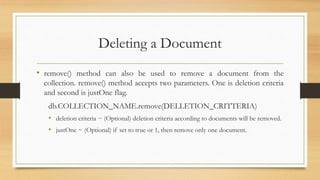
Deleting a Document
• remove() method can also be used to remove a document from the
collection. remove() method accepts two parameters. One is deletion criteria
and second is justOne flag.
db.COLLECTION_NAME.remove(DELLETION_CRITTERIA)
• deletion criteria − (Optional) deletion criteria according to documents will be removed.
• justOne − (Optional) if set to true or 1, then remove only one document.
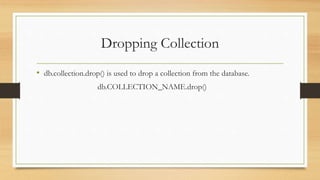
Dropping Collection
• db.collection.drop() is used to drop a collection from the database.
db.COLLECTION_NAME.drop()
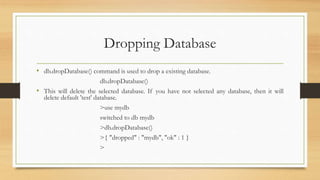
Dropping Database
• db.dropDatabase() command is used to drop a existing database.
db.dropDatabase()
• This will delete the selected database. If you have not selected any database, then it will
delete default 'test' database.
>use mydb
switched to db mydb
>db.dropDatabase()
>{ "dropped" : "mydb", "ok" : 1 }
>
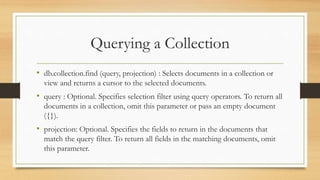
Querying a Collection
• db.collection.find (query, projection) : Selects documents in a collection or
view and returns a cursor to the selected documents.
• query : Optional. Specifies selection filter using query operators. To return all
documents in a collection, omit this parameter or pass an empty document
({}).
• projection: Optional. Specifies the fields to return in the documents that
match the query filter. To return all fields in the matching documents, omit
this parameter.
Querying a Collection
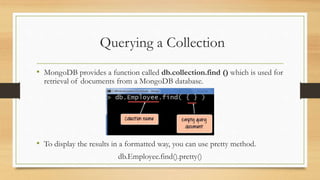
• MongoDB provides a function called db.collection.find () which is used for
retrieval of documents from a MongoDB database.
• To display the results in a formatted way, you can use pretty method.
db.Employee.find().pretty()
Querying a Collection
• Query to select movie having title = Arrival
db.Movies.find({title: “Arrival”}).pretty()
• Query to select movie according to the genre
db.Movies.find({"genre": "Sci-Fi"}).pretty()
Querying a Collection
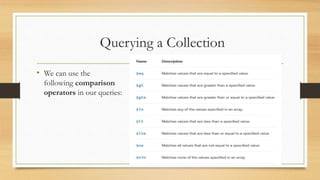
• We can use the
following comparison
operators in our queries:
Querying a Collection
• Query to find movies released after 2000 and only get the title field using
the projection parameter
db.Movies.find({year: {$gt: 2000}}, {title: 1, _id: 0}).pretty()
• The _id field is always displayed by default. So we need to explicitly mention
_id:0
• Query to find movies released in or after 2014
db.Movies.find({"year": { $gte: 2014}}).pretty()
Querying a Collection
• We can also use logical operators in our queries.
Querying a Collection
• Query to find the movies which were released before 2000 and have
a budget greater than 50 million:.
db.Movies.find({$and:[{year: {$lt: 2000}}, {budget: {$gt:
50000000}}]}).pretty()
• Query to find if the movie of genre Sci-Fi and Drama
db.Movies.find({ $and: [{"genre": "Sci-Fi"}, {"genre": "Drama"}]}).pretty()
Querying a Collection
• Query to find the movies which were released after 2015 or were of the
genre Sci-Fi
db.Movies.find({$or:[{year: {$gt: 2015}}, {genre: “Sci-Fi” }]}).pretty()
• Find documents that do not match either of the following conditions. genre
is equal to “Mystery” or “Sci-Fi”
db.Movies.find({ $nor: [{"genre": "Mystery"}, {"genre": "Sci-Fi"}]}).pretty()
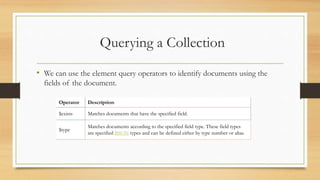
Querying a Collection
• We can use the element query operators to identify documents using the
fields of the document.
Operator Description
$exists Matches documents that have the specified field.
$type
Matches documents according to the specified field type. These field types
are specified BSON types and can be defined either by type number or alias.
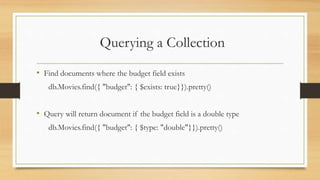
Querying a Collection
• Find documents where the budget field exists
db.Movies.find({ "budget": { $exists: true}}).pretty()
• Query will return document if the budget field is a double type
db.Movies.find({ "budget": { $type: "double"}}).pretty()
How to Limit, Skip and Sort Records
• The limit () Method
• Used to limit the number of documents to be displayed.
• This argument is an optional field inside the ‘limit ()’ method, and when not
specified then by default, it will display all the documents from the collection.
db.COLLECTION_NAME.find().limit(NUMBER)
How to Limit, Skip and Sort Records
• The skip () Method
• Used to skip the number of documents. Like the ‘limit ()’ method, it accepts
only one argument which is of number type. Depending on the value of the
number, we can skip the number of documents to be displayed.
• This argument is an optional field inside the ‘skip ()’ method, and when not
specified, then it will display all documents from the collection as the default
value in ‘skip ()’ method is 0.
db.COLLECTION_NAME.find().limit(NUMBER).skip(NUMBER)
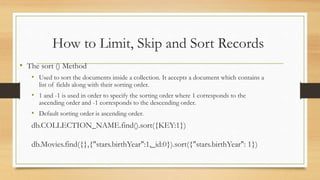
How to Limit, Skip and Sort Records
• The sort () Method
• Used to sort the documents inside a collection. It accepts a document which contains a
list of fields along with their sorting order.
• 1 and -1 is used in order to specify the sorting order where 1 corresponds to the
ascending order and -1 corresponds to the descending order.
• Default sorting order is ascending order.
db.COLLECTION_NAME.find().sort({KEY:1})
db.Movies.find({},{"stars.birthYear":1,_id:0}).sort({"stars.birthYear": 1})
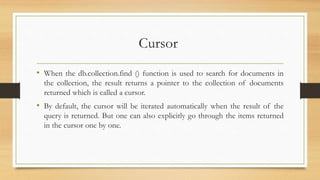
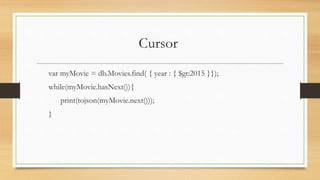
Cursor
• When the db.collection.find () function is used to search for documents in
the collection, the result returns a pointer to the collection of documents
returned which is called a cursor.
• By default, the cursor will be iterated automatically when the result of the
query is returned. But one can also explicitly go through the items returned
in the cursor one by one.
Cursor
var myMovie = db.Movies.find( { year : { $gt:2015 }});
while(myMovie.hasNext()){
print(tojson(myMovie.next()));
}
Aggregation
• Most often queries in mongodb are just to do CRUD(Create Read Update
and Delete) operations.
• But, when an application gets more complex, you may need to perform
several operations on the data before sending it as a response
• Here comes the role of MongoDB Aggregation
MongoDB Aggregation Pipeline
pipeline = [
{ $match : { … },
{ $group : { … },
{ $sort : { … },
... ]
db.collectionName.aggregate(pipeline, options)
MongoDB Aggregation Pipeline
• $match
• match operator is similar to find() operator in mongoDB except that match works with aggregation.
Likewise, match pipeline operator matches all the documents that satisfies the condition.
• Match all the documents which has MA as a state.
db.aggresample.aggregate([ {
$match: {
state: "MA",
}, }, ]).pretty()
MongoDB Aggregation Pipeline
• $group
• As the name suggests, it groups the documents based on the particular field. it can be id or
any other fields.
db.aggresample.aggregate([ {
$match: {
state: "ME",
}, },
{
$group :{
_id:"$state",
population: { $avg: "$pop" }
}, }, ]).pretty()
MongoDB Aggregation Pipeline
db.aggresample.aggregate([
{
$group: {
_id: null,
total: { $sum: "$pop“ },
average_population: { $avg: "$pop“ },
min_population: { $min: "$pop“ },
max_population: { $max: "$pop“ }
}
}
]);
MongoDB Aggregation Pipeline
• $project
• Sometimes, you may not need all the fields in the document. you can only retrieve specific fields in the document
using project operator
db.aggresample.aggregate([ {
$match: {
state: "ME",
},
},
{
$project:{
_id:0, loc:1,
}, }, ]).pretty()
MongoDB Aggregation Pipeline
• $sort
• sort operator basically sorts the document in either ascending or descending order.
db.aggresample.aggregate([
{
$sort:{
pop:1,
},
},
]).pretty()
MongoDB Aggregation Pipeline
• $limit
• limit operator limits the number of documents retrieved from the database.
db.aggresample.aggregate([{
$sort:{
pop:-1,
},
},
{
$limit :5,
}, ]).pretty()
MongoDB Aggregation Pipeline
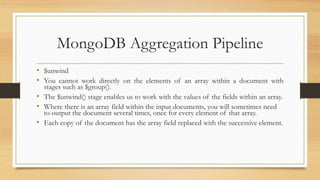
• $unwind
• You cannot work directly on the elements of an array within a document with
stages such as $group().
• The $unwind() stage enables us to work with the values of the fields within an array.
• Where there is an array field within the input documents, you will sometimes need
to output the document several times, once for every element of that array.
• Each copy of the document has the array field replaced with the successive element.
MongoDB Aggregation Pipeline
• $unwind
db.universities.aggregate([
{ $match : { name : 'USAL' } },
{ $unwind : '$students' }
]).pretty()
MongoDB Aggregation Pipeline
• get the total number of students that have ever belonged to each one of the
universities?
db.universities.aggregate([
{ $unwind : '$students' },
{ $group : { _id : '$name', totalalumni : { $sum : '$students.number'
} } }
]).pretty()
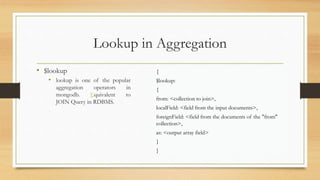
Lookup in Aggregation
• $lookup
• lookup is one of the popular
aggregation operators in
mongodb. Equivalent to
JOIN Query in RDBMS.
{
$lookup:
{
from: <collection to join>,
localField: <field from the input documents>,
foreignField: <field from the documents of the "from"
collection>,
as: <output array field>
}
}
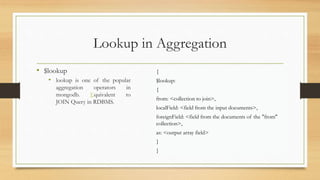
Lookup in Aggregation
• $lookup
• lookup is one of the popular
aggregation operators in
mongodb. Equivalent to
JOIN Query in RDBMS.
{
$lookup:
{
from: <collection to join>,
localField: <field from the input documents>,
foreignField: <field from the documents of the "from"
collection>,
as: <output array field>
}
}
Lookup in Aggregation
db.universities.aggregate([
{ $match : { name : 'USAL' } },
{ $project : { _id : 0, name : 1 } },
{ $lookup : {
from : 'courses',
localField : 'name',
foreignField : 'university',
as : 'courses'
} }
]).pretty()
Slips

Mongo db queries

  • 1.
    Ms. Chitra Alavani HoDComputer Science Kaveri College of Arts, Science and Commerce
  • 2.
    • Made upof Multiple Collections. • Created on-the-fly when referenced for the first time. The "use" command is used to create a database in MongoDB. If the database does not exist a new one will be created. Syntax:
  • 3.
    • Schema-less, andcontains Documents. • Created on-the-fly when referenced for the first time. • Capped Collections: Fixed size, older records get dropped after reaching the limit. Syntax: db.createCollection(name, options) Options parameter is optional, so you need to specify only the name of the collection Name String Name of the collection to be created Options Document (Optional) Specify options about memory size and indexing
  • 4.
    • Other wayto create a collection is to insert a record (which is nothing but a document consisting of Field names and Values) into a collection. If the collection does not exist a new one will be created.
  • 5.
    • Stored ina Collection. • Can have _id key – works like Primary keys in MySQL. • Supported Relationships – Embedded (or) References.
  • 6.
    Creating a Document •db.collection.insertOne() : Inserts a document into a collection. • db.collection.insertMany() : Inserts multiple documents into a collection. • db.collection.insert() : Inserts a document or documents into a collection.
  • 7.
    Setting _id field •MongoDB automatically add an Object id field which acts as a primary key of the document. • If you want to ensure that MongoDB does not create the _id Field when the collection is created and if you want to specify your own id as the _id of the collection, then you need to explicitly define this while creating the collection. db.Employee.insert({_id:10, "EmployeeName" : "Smith"})
  • 8.
    Updating a Document •db.collection.update (query, update, options): Modifies an existing document or documents in a collection. The method can modify specific fields of an existing document or documents or replace an existing document entirely, depending on the update parameter. db.employee.update({ename:"Kaveri"},{$set:{addr:"Pune"}});
  • 9.
    Updating a Document db.Movies.update({title:"Arrival"},{$set:{"stars":[ { "name": "Amy Adams", "birthYear": 1974, "nationality": "American", "wonOscar": false }]}},{upsert:true}) With the upsert option set to true, if no matching documents exist, then the update operation performs an insert.
  • 10.
    Deleting a Document •The MongoDB shell provides the following methods to delete documents from a collection: • To delete multiple documents, use db.collection.deleteMany(). • To delete a single document, use db.collection.deleteOne().
  • 11.
    Deleting a Document •remove() method can also be used to remove a document from the collection. remove() method accepts two parameters. One is deletion criteria and second is justOne flag. db.COLLECTION_NAME.remove(DELLETION_CRITTERIA) • deletion criteria − (Optional) deletion criteria according to documents will be removed. • justOne − (Optional) if set to true or 1, then remove only one document.
  • 12.
    Dropping Collection • db.collection.drop()is used to drop a collection from the database. db.COLLECTION_NAME.drop()
  • 13.
    Dropping Database • db.dropDatabase()command is used to drop a existing database. db.dropDatabase() • This will delete the selected database. If you have not selected any database, then it will delete default 'test' database. >use mydb switched to db mydb >db.dropDatabase() >{ "dropped" : "mydb", "ok" : 1 } >
  • 14.
    Querying a Collection •db.collection.find (query, projection) : Selects documents in a collection or view and returns a cursor to the selected documents. • query : Optional. Specifies selection filter using query operators. To return all documents in a collection, omit this parameter or pass an empty document ({}). • projection: Optional. Specifies the fields to return in the documents that match the query filter. To return all fields in the matching documents, omit this parameter.
  • 15.
    Querying a Collection •MongoDB provides a function called db.collection.find () which is used for retrieval of documents from a MongoDB database. • To display the results in a formatted way, you can use pretty method. db.Employee.find().pretty()
  • 16.
    Querying a Collection •Query to select movie having title = Arrival db.Movies.find({title: “Arrival”}).pretty() • Query to select movie according to the genre db.Movies.find({"genre": "Sci-Fi"}).pretty()
  • 17.
    Querying a Collection •We can use the following comparison operators in our queries:
  • 18.
    Querying a Collection •Query to find movies released after 2000 and only get the title field using the projection parameter db.Movies.find({year: {$gt: 2000}}, {title: 1, _id: 0}).pretty() • The _id field is always displayed by default. So we need to explicitly mention _id:0 • Query to find movies released in or after 2014 db.Movies.find({"year": { $gte: 2014}}).pretty()
  • 19.
    Querying a Collection •We can also use logical operators in our queries.
  • 20.
    Querying a Collection •Query to find the movies which were released before 2000 and have a budget greater than 50 million:. db.Movies.find({$and:[{year: {$lt: 2000}}, {budget: {$gt: 50000000}}]}).pretty() • Query to find if the movie of genre Sci-Fi and Drama db.Movies.find({ $and: [{"genre": "Sci-Fi"}, {"genre": "Drama"}]}).pretty()
  • 21.
    Querying a Collection •Query to find the movies which were released after 2015 or were of the genre Sci-Fi db.Movies.find({$or:[{year: {$gt: 2015}}, {genre: “Sci-Fi” }]}).pretty() • Find documents that do not match either of the following conditions. genre is equal to “Mystery” or “Sci-Fi” db.Movies.find({ $nor: [{"genre": "Mystery"}, {"genre": "Sci-Fi"}]}).pretty()
  • 22.
    Querying a Collection •We can use the element query operators to identify documents using the fields of the document. Operator Description $exists Matches documents that have the specified field. $type Matches documents according to the specified field type. These field types are specified BSON types and can be defined either by type number or alias.
  • 23.
    Querying a Collection •Find documents where the budget field exists db.Movies.find({ "budget": { $exists: true}}).pretty() • Query will return document if the budget field is a double type db.Movies.find({ "budget": { $type: "double"}}).pretty()
  • 24.
    How to Limit,Skip and Sort Records • The limit () Method • Used to limit the number of documents to be displayed. • This argument is an optional field inside the ‘limit ()’ method, and when not specified then by default, it will display all the documents from the collection. db.COLLECTION_NAME.find().limit(NUMBER)
  • 25.
    How to Limit,Skip and Sort Records • The skip () Method • Used to skip the number of documents. Like the ‘limit ()’ method, it accepts only one argument which is of number type. Depending on the value of the number, we can skip the number of documents to be displayed. • This argument is an optional field inside the ‘skip ()’ method, and when not specified, then it will display all documents from the collection as the default value in ‘skip ()’ method is 0. db.COLLECTION_NAME.find().limit(NUMBER).skip(NUMBER)
  • 26.
    How to Limit,Skip and Sort Records • The sort () Method • Used to sort the documents inside a collection. It accepts a document which contains a list of fields along with their sorting order. • 1 and -1 is used in order to specify the sorting order where 1 corresponds to the ascending order and -1 corresponds to the descending order. • Default sorting order is ascending order. db.COLLECTION_NAME.find().sort({KEY:1}) db.Movies.find({},{"stars.birthYear":1,_id:0}).sort({"stars.birthYear": 1})
  • 27.
    Cursor • When thedb.collection.find () function is used to search for documents in the collection, the result returns a pointer to the collection of documents returned which is called a cursor. • By default, the cursor will be iterated automatically when the result of the query is returned. But one can also explicitly go through the items returned in the cursor one by one.
  • 28.
    Cursor var myMovie =db.Movies.find( { year : { $gt:2015 }}); while(myMovie.hasNext()){ print(tojson(myMovie.next())); }
  • 29.
    Aggregation • Most oftenqueries in mongodb are just to do CRUD(Create Read Update and Delete) operations. • But, when an application gets more complex, you may need to perform several operations on the data before sending it as a response • Here comes the role of MongoDB Aggregation
  • 30.
    MongoDB Aggregation Pipeline pipeline= [ { $match : { … }, { $group : { … }, { $sort : { … }, ... ] db.collectionName.aggregate(pipeline, options)
  • 31.
    MongoDB Aggregation Pipeline •$match • match operator is similar to find() operator in mongoDB except that match works with aggregation. Likewise, match pipeline operator matches all the documents that satisfies the condition. • Match all the documents which has MA as a state. db.aggresample.aggregate([ { $match: { state: "MA", }, }, ]).pretty()
  • 32.
    MongoDB Aggregation Pipeline •$group • As the name suggests, it groups the documents based on the particular field. it can be id or any other fields. db.aggresample.aggregate([ { $match: { state: "ME", }, }, { $group :{ _id:"$state", population: { $avg: "$pop" } }, }, ]).pretty()
  • 33.
    MongoDB Aggregation Pipeline db.aggresample.aggregate([ { $group:{ _id: null, total: { $sum: "$pop“ }, average_population: { $avg: "$pop“ }, min_population: { $min: "$pop“ }, max_population: { $max: "$pop“ } } } ]);
  • 34.
    MongoDB Aggregation Pipeline •$project • Sometimes, you may not need all the fields in the document. you can only retrieve specific fields in the document using project operator db.aggresample.aggregate([ { $match: { state: "ME", }, }, { $project:{ _id:0, loc:1, }, }, ]).pretty()
  • 35.
    MongoDB Aggregation Pipeline •$sort • sort operator basically sorts the document in either ascending or descending order. db.aggresample.aggregate([ { $sort:{ pop:1, }, }, ]).pretty()
  • 36.
    MongoDB Aggregation Pipeline •$limit • limit operator limits the number of documents retrieved from the database. db.aggresample.aggregate([{ $sort:{ pop:-1, }, }, { $limit :5, }, ]).pretty()
  • 37.
    MongoDB Aggregation Pipeline •$unwind • You cannot work directly on the elements of an array within a document with stages such as $group(). • The $unwind() stage enables us to work with the values of the fields within an array. • Where there is an array field within the input documents, you will sometimes need to output the document several times, once for every element of that array. • Each copy of the document has the array field replaced with the successive element.
  • 38.
    MongoDB Aggregation Pipeline •$unwind db.universities.aggregate([ { $match : { name : 'USAL' } }, { $unwind : '$students' } ]).pretty()
  • 39.
    MongoDB Aggregation Pipeline •get the total number of students that have ever belonged to each one of the universities? db.universities.aggregate([ { $unwind : '$students' }, { $group : { _id : '$name', totalalumni : { $sum : '$students.number' } } } ]).pretty()
  • 40.
    Lookup in Aggregation •$lookup • lookup is one of the popular aggregation operators in mongodb. Equivalent to JOIN Query in RDBMS. { $lookup: { from: <collection to join>, localField: <field from the input documents>, foreignField: <field from the documents of the "from" collection>, as: <output array field> } }
  • 41.
    Lookup in Aggregation •$lookup • lookup is one of the popular aggregation operators in mongodb. Equivalent to JOIN Query in RDBMS. { $lookup: { from: <collection to join>, localField: <field from the input documents>, foreignField: <field from the documents of the "from" collection>, as: <output array field> } }
  • 42.
    Lookup in Aggregation db.universities.aggregate([ {$match : { name : 'USAL' } }, { $project : { _id : 0, name : 1 } }, { $lookup : { from : 'courses', localField : 'name', foreignField : 'university', as : 'courses' } } ]).pretty()
  • 43.