Enterprise resource
planning
ERP……???
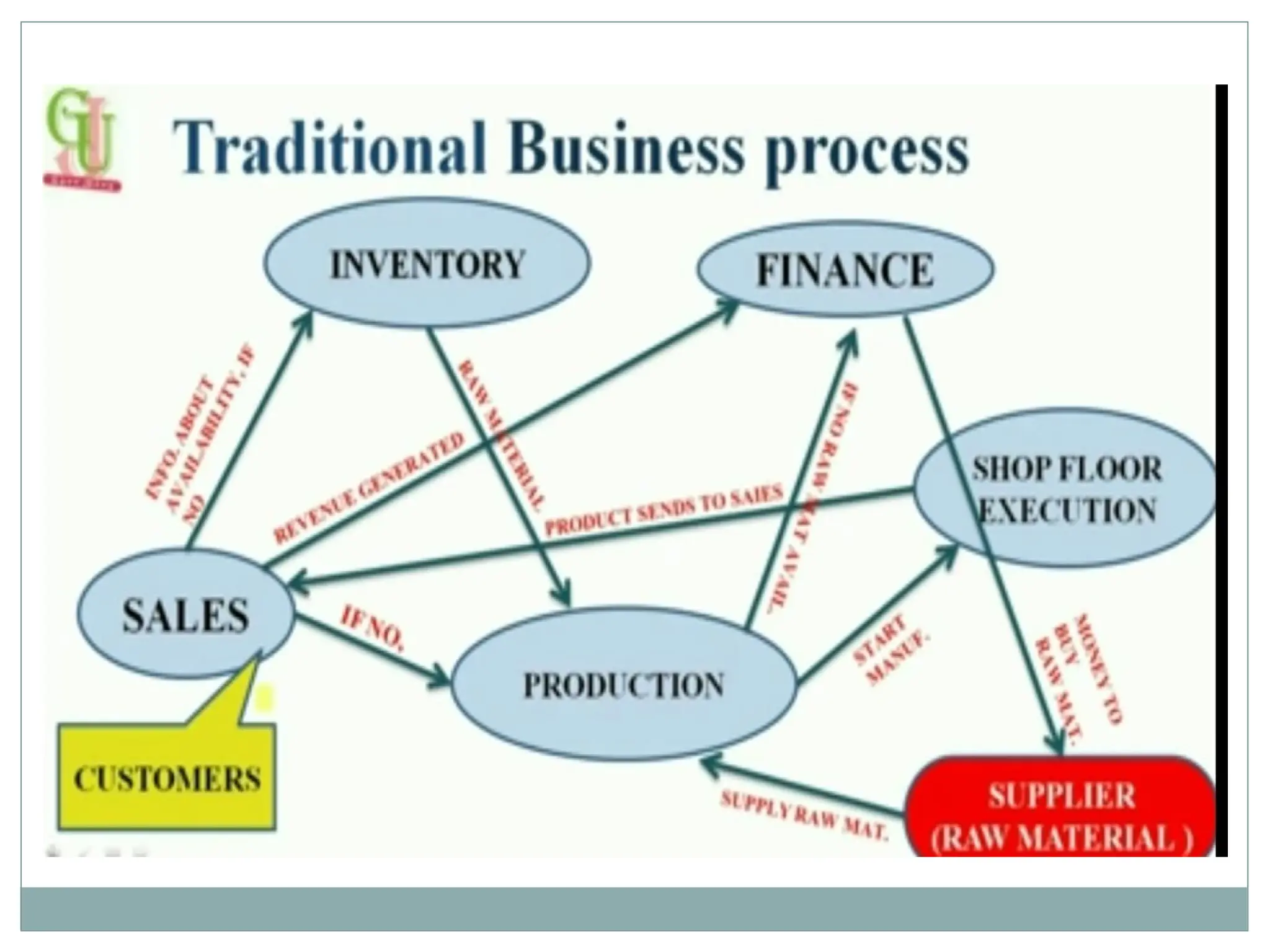
All the business has various departments. And these departments exchange and
share lot of information with each other. This process take so much time
business management
software which is used to
integrate all the business
activities in any
organization
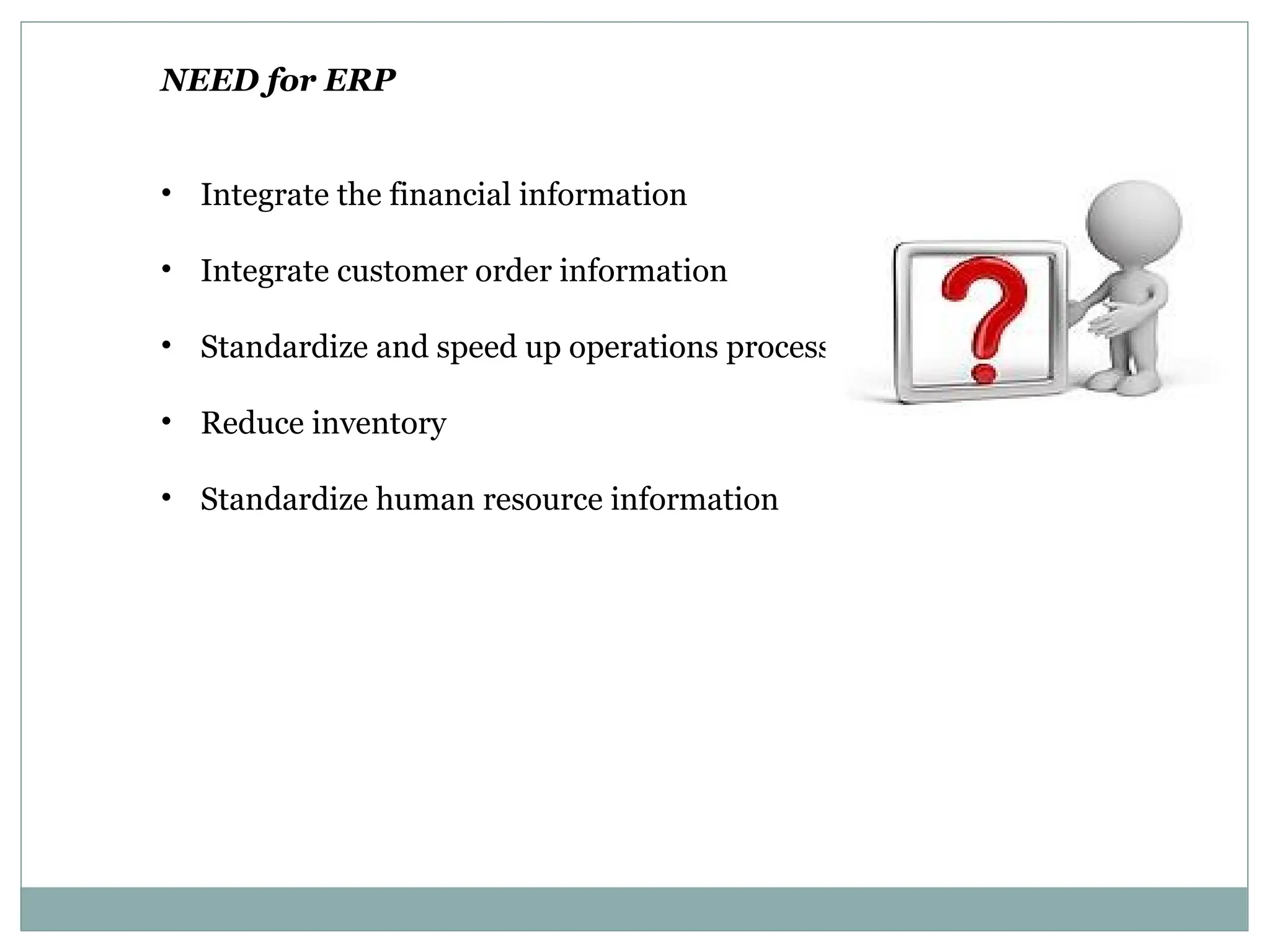
NEED for ERP
• Integrate the financial information
• Integrate customer order information
• Standardize and speed up operations process
• Reduce inventory
• Standardize human resource information
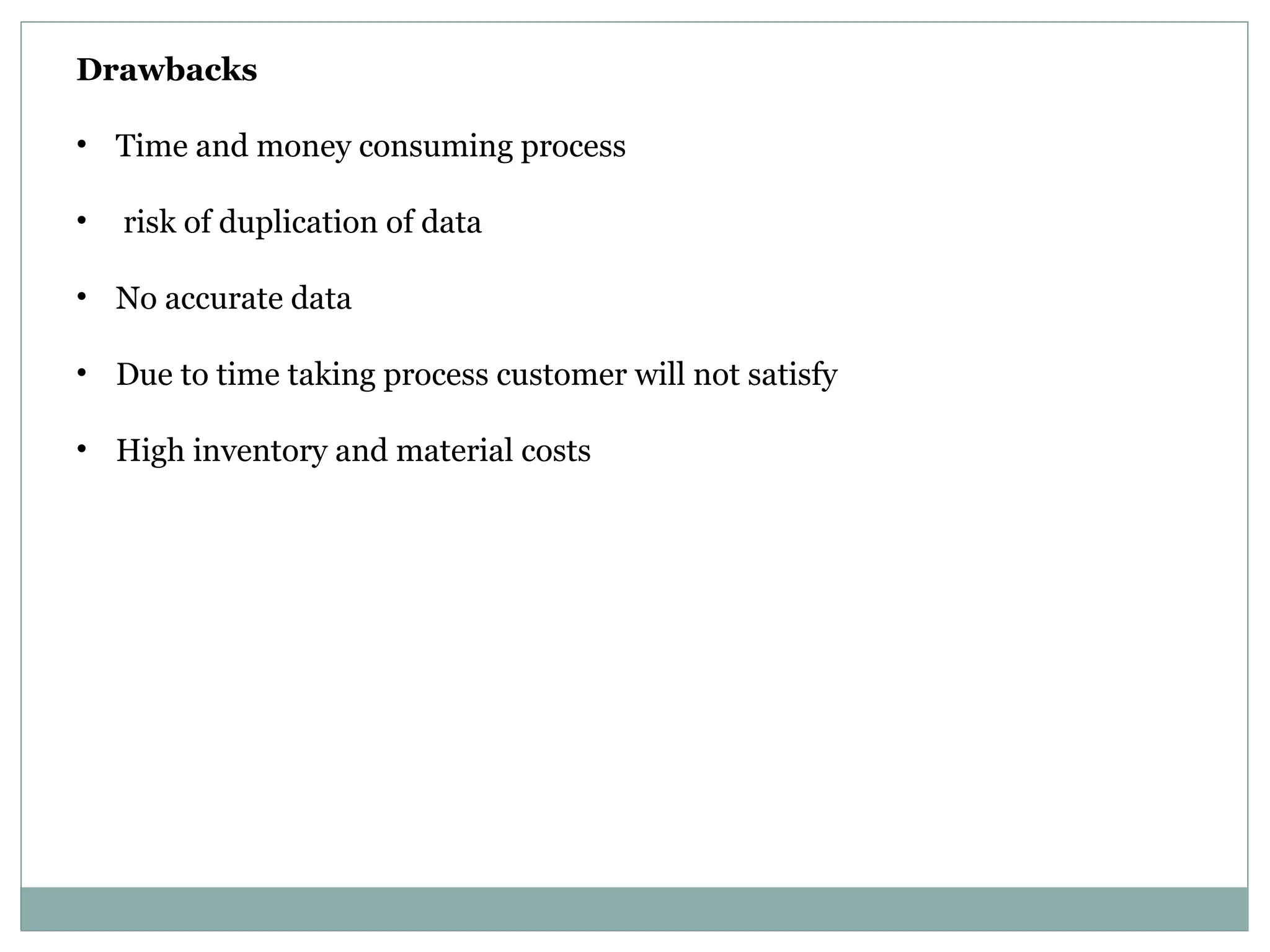
Drawbacks
• Time and money consuming process
• risk of duplication of data
• No accurate data
• Due to time taking process customer will not satisfy
• High inventory and material costs
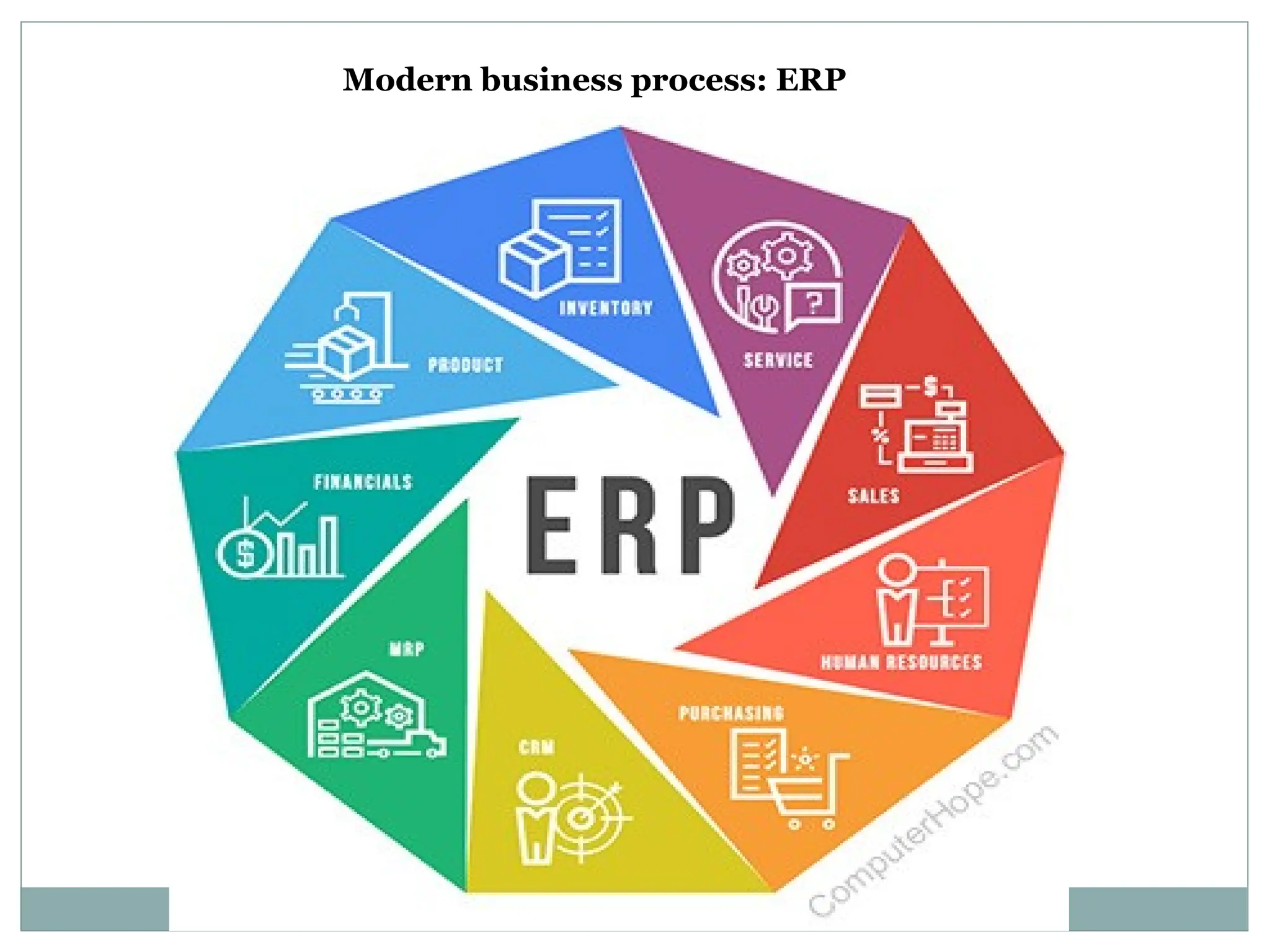
Modern business process: ERP
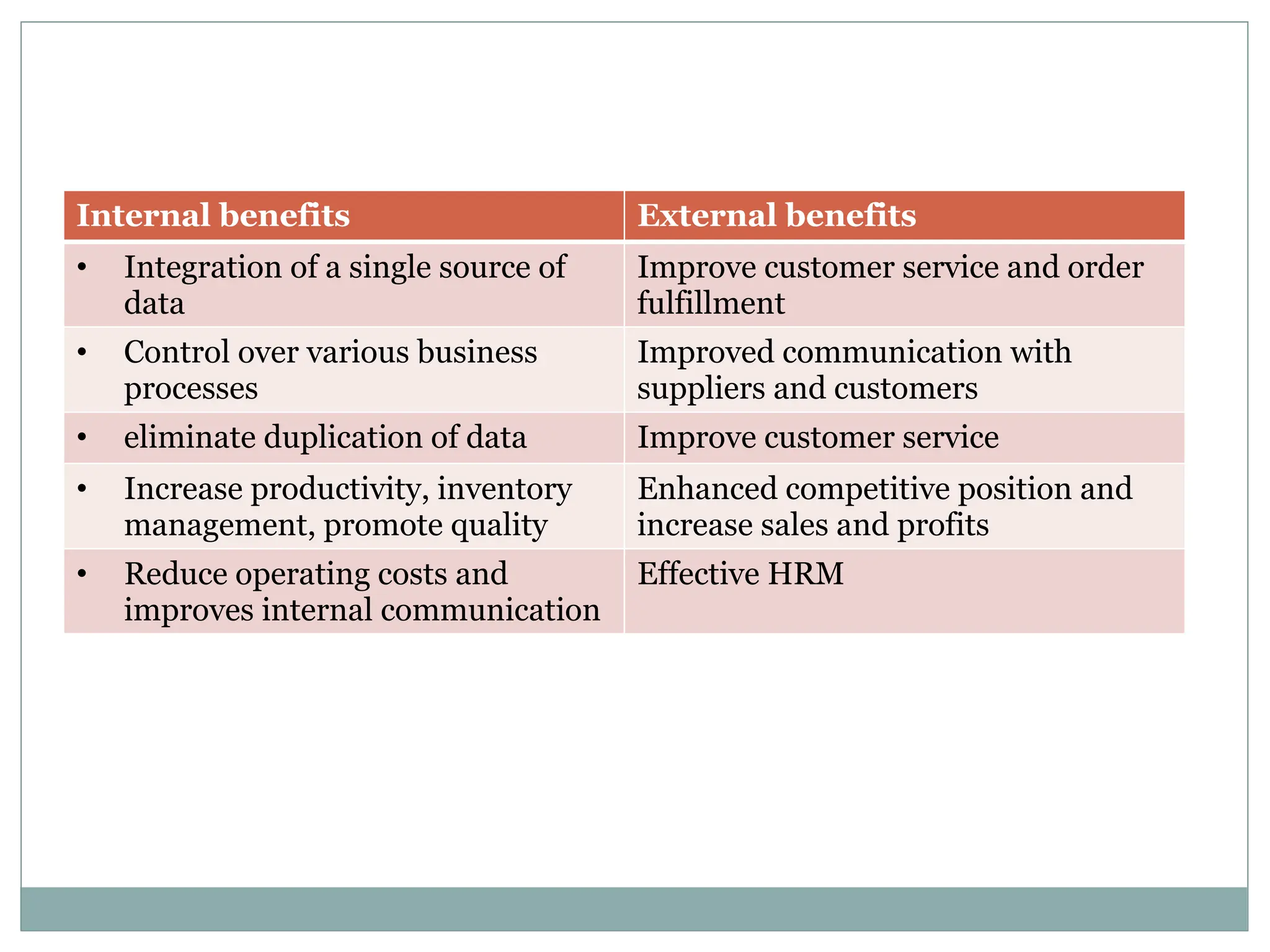
Internal benefits External benefits
• Integration of a single source of
data
Improve customer service and order
fulfillment
• Control over various business
processes
Improved communication with
suppliers and customers
• eliminate duplication of data Improve customer service
• Increase productivity, inventory
management, promote quality
Enhanced competitive position and
increase sales and profits
• Reduce operating costs and
improves internal communication
Effective HRM
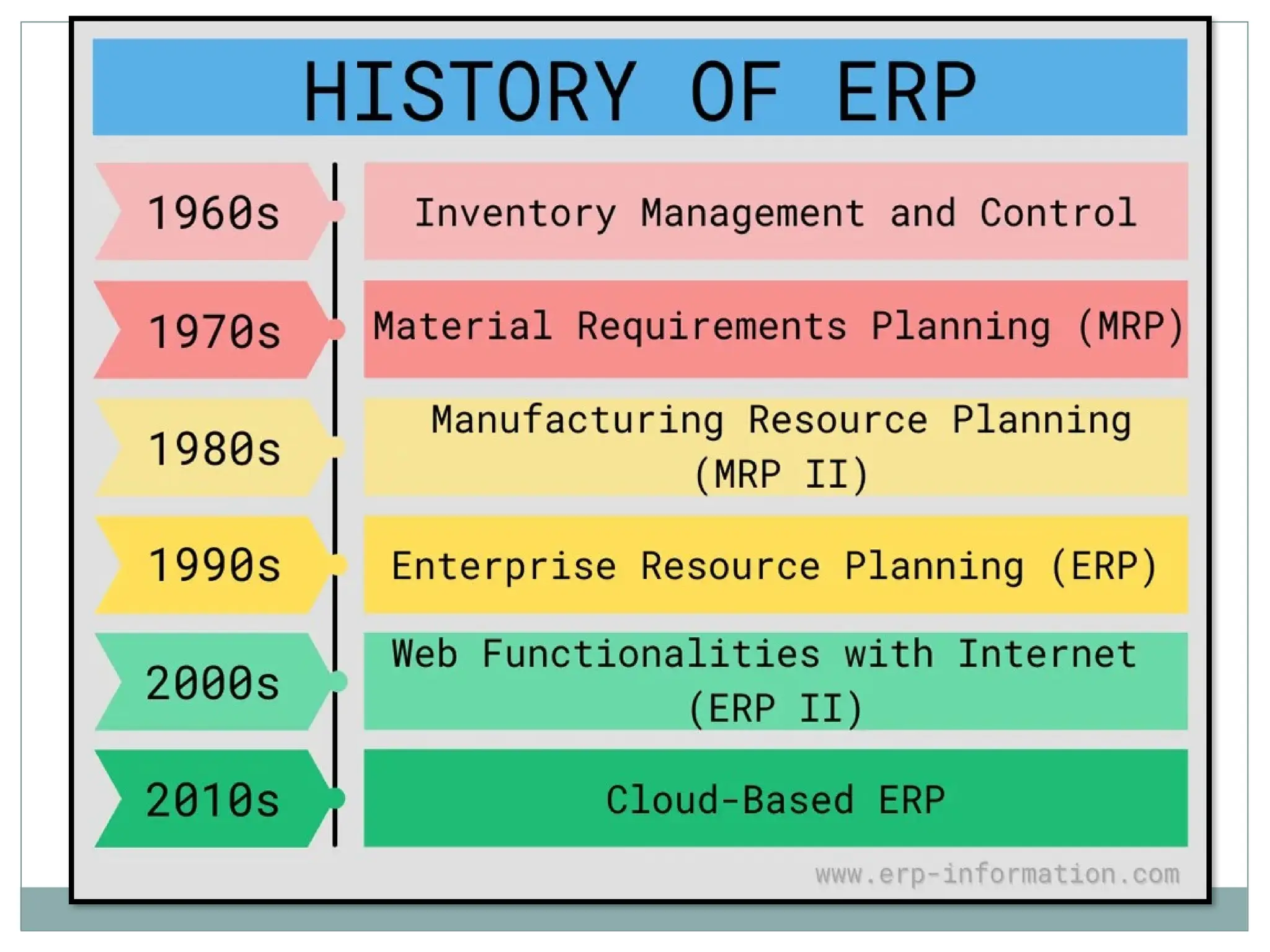
Inventory Management & Control (the 1960s)
• required a system that should manage, monitor, and control their inventory.
 Identifying inventory requirements
 Setting targets
 Providing replenishment techniques and options
 Monitoring item usages
 Reconciling the inventory balances
 Reporting inventory status
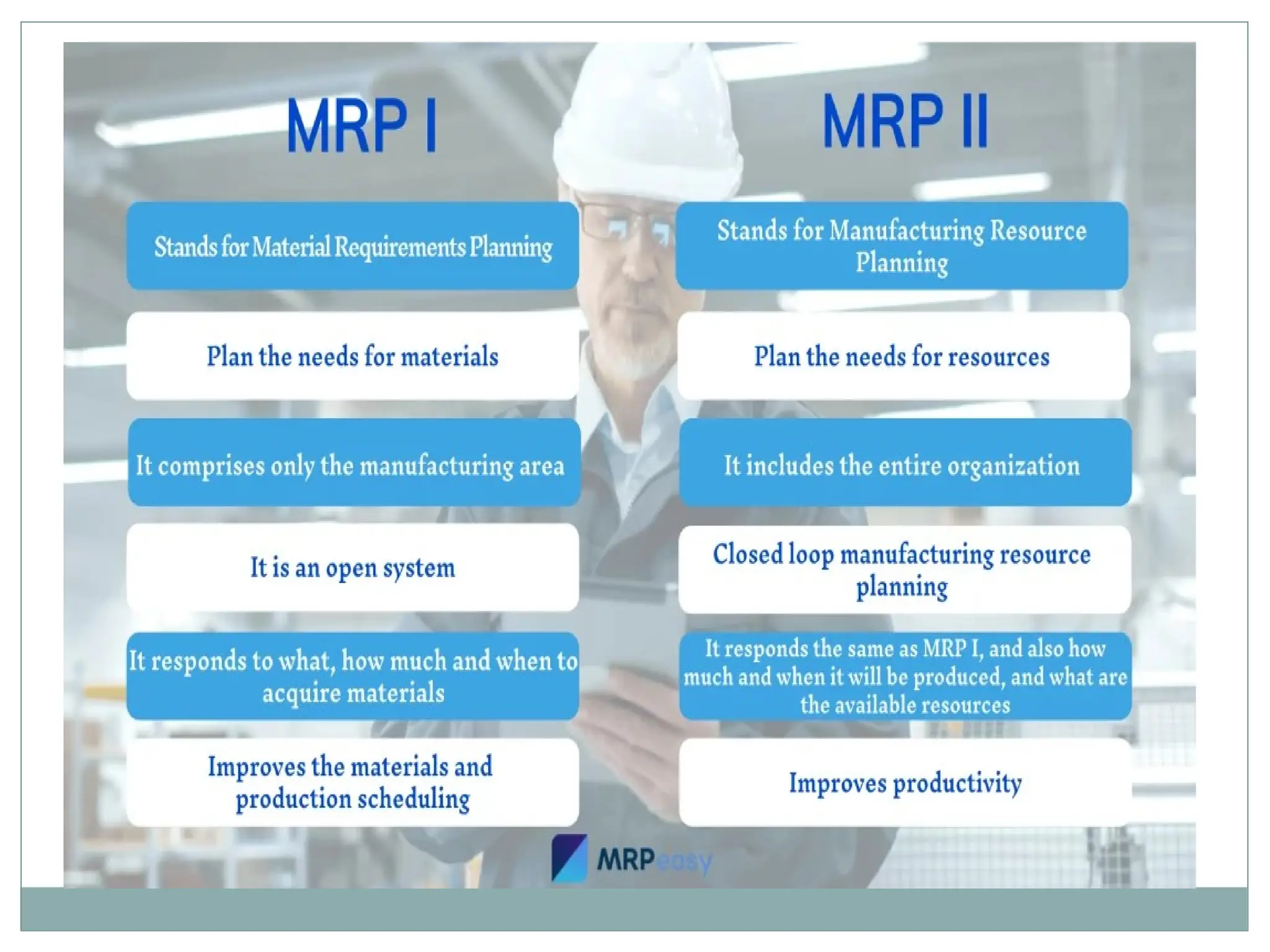
Material Requirements Planning (MRP)(the 1970s)
• With the rise in factory production demand, the need for the management of
products also increased.
• developed by engineer Joseph Orlicky
• So in order to plan and manage the complete manufacturing process to
production & delivery, Materials Requirement Planning (MRP) software was
made.
• ensured that right materials are available for production with right quantity to avoid
shortages.
• reducing waste by maintaining lowest possible materials and product levels in stock.
• plan manufacturing functions, delivery schedules and purchasing.
• generates schedules for operations and raw material purchases.
Manufacturing Resource Planning (MRP II) (the 1980s)
• In the 1980s, vendors added more manufacturing processes to MRP to make the
process easier and more accurate.
• And this new system is named manufacturing resource planning (MRP II).
• utilizes software applications for coordinating manufacturing processes. Processes
from product planning, parts purchasing, and inventory control to product distribution.
• it allows additional data such as employee and financial needs.
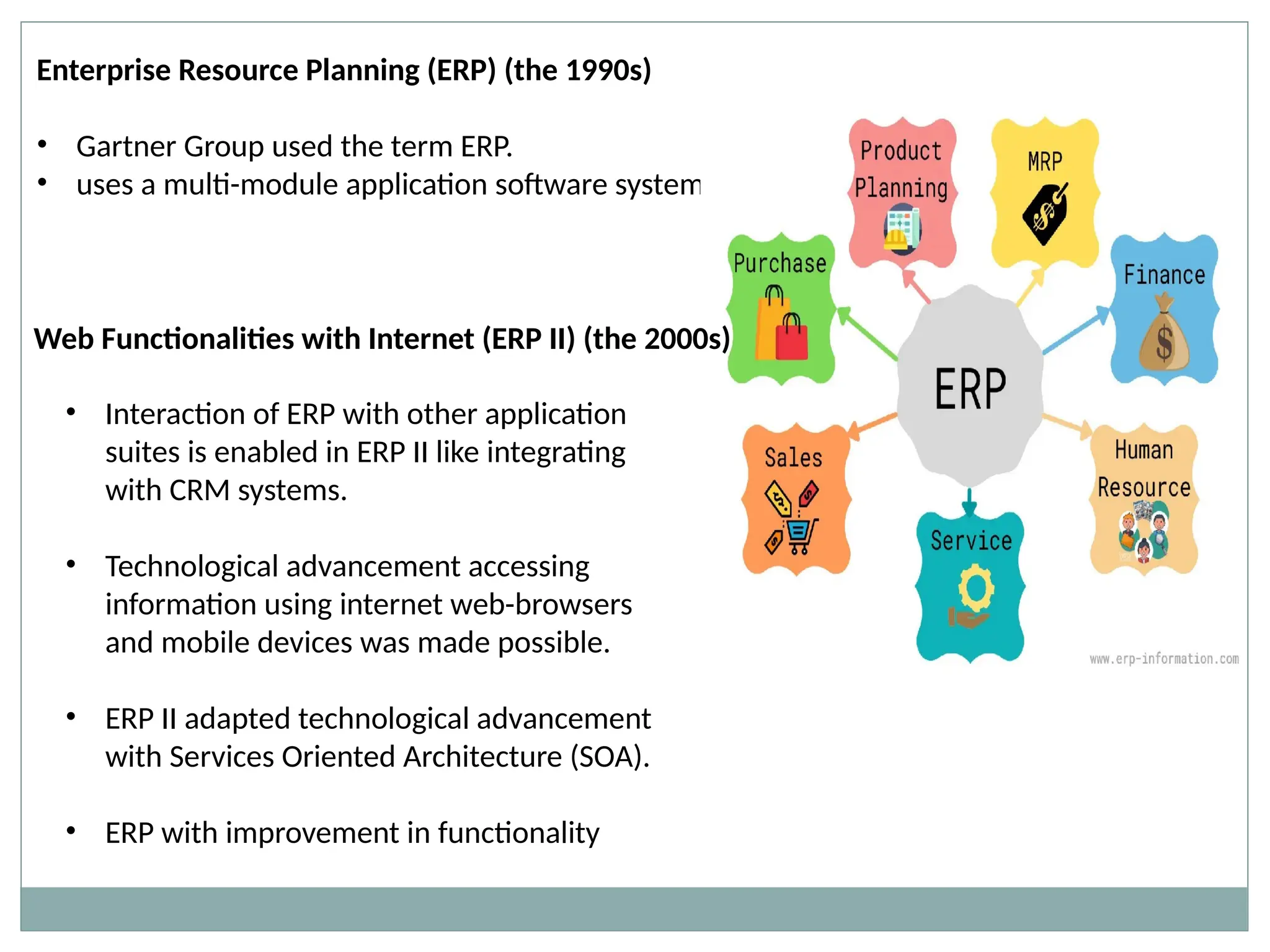
Enterprise Resource Planning (ERP) (the 1990s)
• Gartner Group used the term ERP.
• uses a multi-module application software system
Web Functionalities with Internet (ERP II) (the 2000s)
• Interaction of ERP with other application
suites is enabled in ERP II like integrating
with CRM systems.
• Technological advancement accessing
information using internet web-browsers
and mobile devices was made possible.
• ERP II adapted technological advancement
with Services Oriented Architecture (SOA).
• ERP with improvement in functionality
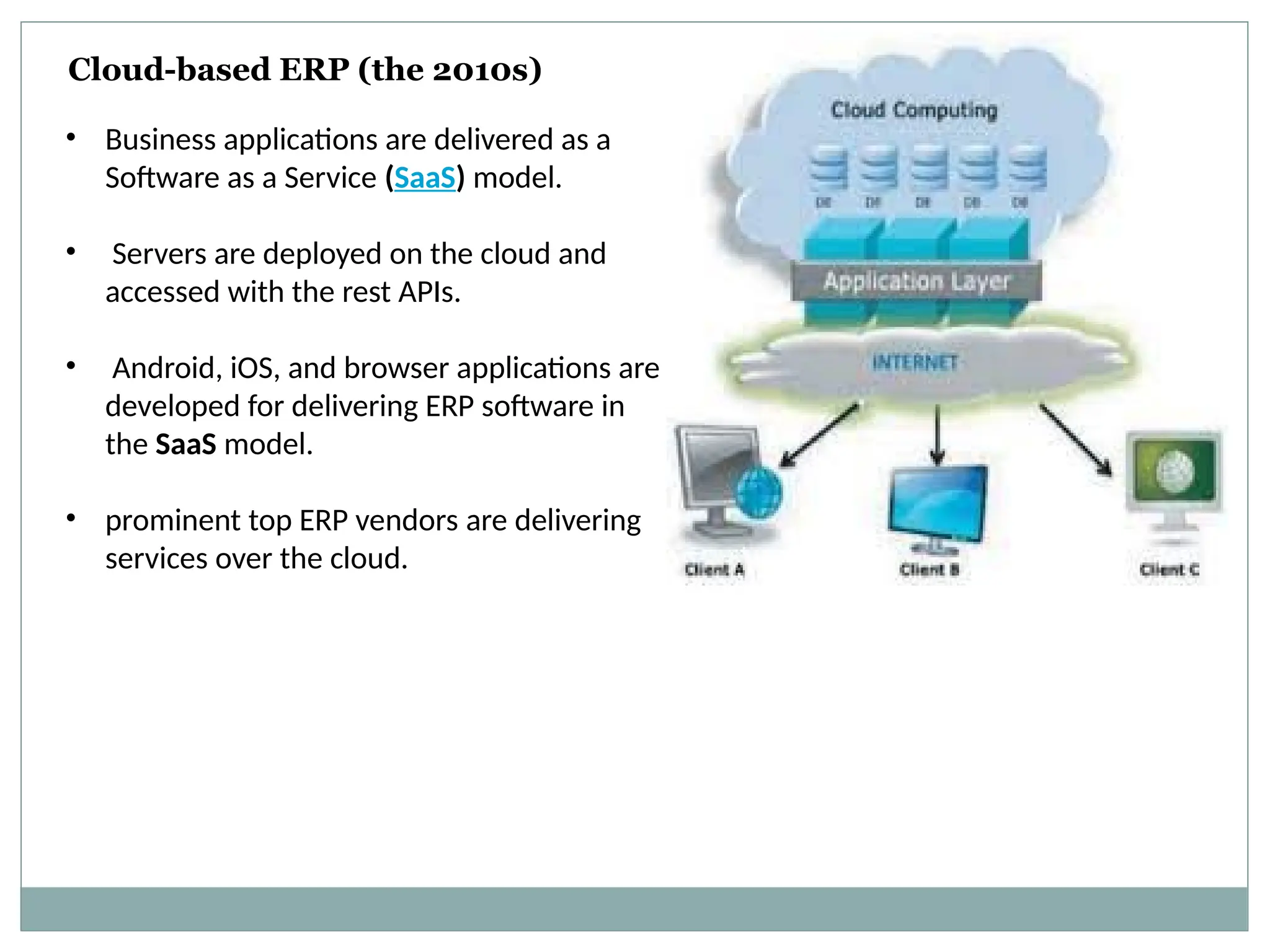
Cloud-based ERP (the 2010s)
• Business applications are delivered as a
Software as a Service (SaaS) model.
• Servers are deployed on the cloud and
accessed with the rest APIs.
• Android, iOS, and browser applications are
developed for delivering ERP software in
the SaaS model.
• prominent top ERP vendors are delivering
services over the cloud.
ADVANTAGES OF ERP
 Better customer service:
 Better access to customer information
 Faster response times
 Improved on-time delivery
 Improved order accuracy
 Improved Inventory Costs:
• Only carry as much inventory as needed, avoid these common issues
• Too much inventory, and higher overhead costs
• Too little inventory, and longer customer fulfillment times
 Boosted Cash Flow:
 Better invoicing and better collections tools to bring cash in faster
 Faster cash means more cash on-hand for the business
 Cost Savings:
 Improved inventory planning
 Better procurement management
 Better customer service
 Improved vendor relationship management
 Better Data & Cloud Security:
 Dedicated security resources
 Avoid installing malicious software
 Data distributed across multiple servers
 Business Process Improvements:
 Automate manual or routine tasks
 Implement smarter workflows
 Gain efficiency
 Supply Chain Management:
 Effective demand forecasting and lean inventory
 Reduce production bottlenecks
 Transparency through the business
DISADVANTAGES OF ERP
 Costs of an ERP Software
 Third-party software add-ins
 Implementation costs
 Maintenance
 Initial and continuous training
 Complex Data Conversion
 Developing a solid data conversion strategy can be difficult
 You have to define, examine and analyze data sources
 Bad data conversion will cause delays and increased costs
 Requires thorough training
 Training needs to cover all of the ERP system’s features.
 ERP training sessions need to be in line with business processes
 IT users need to be trained for the technical aspects of the ERP System
ERPAG Software
• ERPAG is a cloud-based enterprise resource planning (ERP)
solution.
• It is suitable for small and midsize businesses in various industries,
including automobile, retail, education, information technology
and more.
• Primary features include sales management, purchasing,
manufacturing management, accounting and finance, inventory
management, reporting and analytics.
NetSuite Software
With an integrated system that includes ERP, financials,
commerce, inventory management, HR, PSA, supply
chain management, CRM and more..
• CAMs-Exact is a web-based ERP software, which helps businesses in
manufacturing, chemical, pharmaceutical, automobile, engineering, FMCG,
jewelry, oil & lubricants, finance, trading, retailing with POS, e-commerce,
• service industries manage parts purchasing, order tracking, product planning,
and statutory reporting.
• Key features include document attachments, barcode scanning, QR code
printing, audit trail, automated emails, and multi-level document
authorizations.
CAMs-Exact
Align Books Software
• Align Books is a cloud-based accounting software designed to help
chartered accountants and businesses of all sizes.
Sage 300, Microsoft Dynamics NAV, SAP Business One, Epicor 9 (formerly Vantage)
Microsoft Dynamics GP, Sage 100
ERP players-key players in Global Enterprise Resource Planning (ERP) Market:
 SAP AG,
 Oracle Corp.,
 Sage Group plc,
 Infor,
 Microsoft Corp.,
 Concur,
 Cornerstone OnDemand ,
 Kronos ,
 NetSuite,
 Totvs , UNIT4,
 Ventyx,
 Workday Inc.,
 WorkForce Software
Problems in selecting ERP
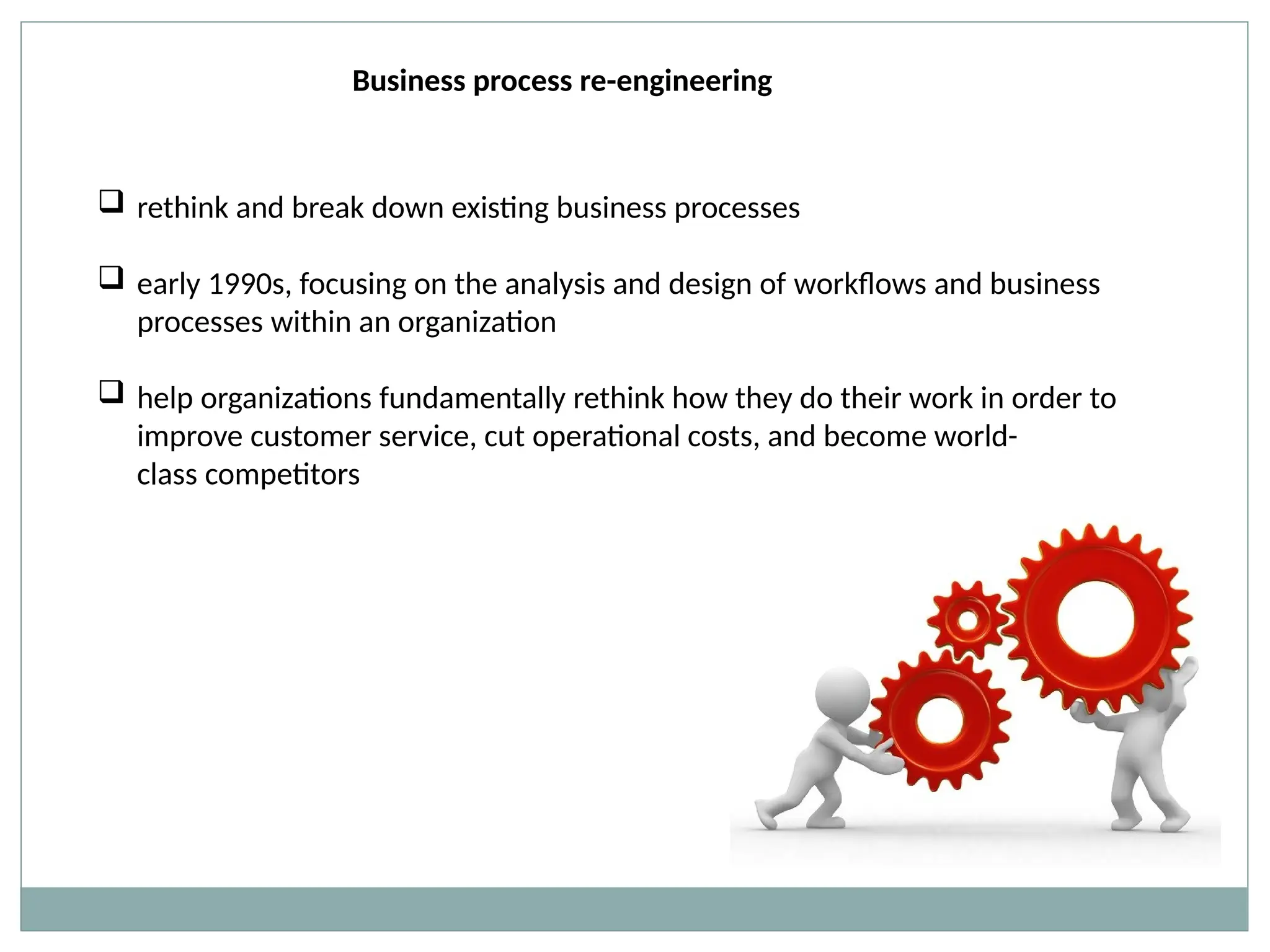
Business process re-engineering
 rethink and break down existing business processes
 early 1990s, focusing on the analysis and design of workflows and business
processes within an organization
 help organizations fundamentally rethink how they do their work in order to
improve customer service, cut operational costs, and become world-
class competitors
History
 In 1990, Michael Hammer, a former professor of computer science at the
Massachusetts Institute of Technology (MIT)
 Hammer’s claim -Most of the work being done does not add any value for
customers, and this work should be removed, not accelerated through
automation.
 Instead, companies should reconsider their processes in order to maximize
customer value, while minimizing the consumption of resources required for
delivering their product or service.
 idea, to unbiase review a company’s business processes
 Peter Drucker and Tom Peters, were accepting and advocating Business Process
Reengineering (BPR) as a new tool for (re)achieving success in a dynamic world.
 During the following years, a fast growing number of publications, books as well as
journal articles, was dedicated to Business Process Reengineering (BPR), and many
consulting firms embarked on this trend and developed BPR methods. Business
Process Reengineering (BPR) was adopted
Concept of BPR
 Business Process Reengineering (BPR) refers to the analysis and redesign of
workflows and processes both within and between organizations.
 Its objective is to obtain quantum gains in the performance of the process in terms
of time, cost, output, quality, and responsiveness to customers.
 redesign effort aims at simplifying and streamlining a process by eliminating all
redundant and non-value adding steps, activities and transactions, reducing
drastically the number of stages or transfer points of work, and speeding up the
work-flow through the use of it systems.
Determining Objectives and Framework: Objectives are the desired end results of the
redesign process which the management and organization attempts to realize. This will
provide the required focus, direction, and motivation for the redesign process. It helps in
building a comprehensive foundation for the reengineering process.
Identify Customers and Determine their needs: The designers have to understand
customers- their profile, their steps in acquiring, using and disposing a product. The
purpose is to redesign business process that clearly provides added value to the
customer.
Study the Existing Process: The existing processes will provide an important base for the
re-designers. The purpose is to gain an understanding of the ‘what’, and ‘why’ of the
targeted process. However, as discussed earlier, some companies go through the
reengineering process with clean perspective without laying emphasis on the past
processes.
.
Formulate a Redesign Process Plan: The information gained through the earlier steps
is translated into an ideal redesign process. Formulation of redesign plan is to real crux
of the reengineering efforts. Customer focused redesign concepts are identified and
formulated. In this step alternative processes are considered and the best is selected.
Implement the Redesign: it is easier to formulate new process than to implement
them. Implementation of the redesigned process and application of other knowledge
gained from the previous steps is key to achieve dramatic improvements. It is the joint
responsibility of the designers and management to operationalized the new process
Challenge in BPR
 Only a limited number of companies are able to have enough courage for having
BPR because of the challenges posed.
 It disturbs established hierarchies and functional structures and creates serious
repercussions and involves resistance among the work-force. .
 Reengineering takes time and expenditure, at least in the short run that many
companies are reluctant to go through the exercise. .
 Even there can be loss in revenue during the transition period.
 Setting of targets is tricky and difficult.
 If the targets are not properly set or the whole transformation not properly carried
out, reengineering efforts may turn-out as a failure.
BPI Vs BPR
 An ERP solution gives all employees access to the information they need to answer
important questions about their department’s current performance and future
planning, as well as target areas for improvement
 ERP can automate many tasks, reducing errors and freeing up employees to focus
on more strategic work
 ERP module is designed for specific business functions, providing the data and
supporting the processes that will help those employees do their jobs.
 Every module plugs into the ERP system, so the system provides a single source of
accurate data, even as the business adds new modules.
 The modular design of ERP allows it to meet the shifting needs of a business and is a
big reason this software has become ubiquitous
 An organization can purchase only the modules relevant to its business model,
operations and key challenges.
 It can then add ERP modules to address new needs or challenges as the organization
evolves
1. Finance
 The finance and accounting module is the most important ERP module because it
allows businesses to understand their current financial state and future outlook.
 Key features of this module include tracking accounts payable (AP) and accounts
receivable (AR) and managing the general ledger.
 It also creates and stores crucial financial documents like balance sheets, payment
receipts and tax statements.
 This module can automate tasks related to billing, vendor payments, cash
management and account reconciliation, helping the accounting department close
the books in a timely manner and comply with current revenue recognition
standards.
2. Procurement
 The procurement module also known as the purchasing module, helps an
organization secure the materials or products it needs to manufacture and/or sell
goods.
 Companies can keep a list of approved vendors in this module and tie those suppliers
to certain items, helping with supplier relationship management. The module can
automate requests for a quote, then track and analyze the quotes that come in.
 Once a company accepts a quote, the procurement module helps the purchasing
department prepare and send out purchase orders. It can then track that purchase
order as the seller turns it into a sales order and ships the goods, automatically
updating inventory levels once the order arrives.
3. Manufacturing
 ERP systems typically have a production management or manufacturing execution
system (MES).
 The manufacturing module helps manufacturers plan production and make sure they
have everything they need for planned production runs, like raw materials and
machinery capacity. During the manufacturing process, it can update the status of
goods-in-progress and help companies track actual output against forecasted
production.
 It also provides a real-time picture of the shop floor, capturing information on items
in progress and finished goods. It can calculate the average time to produce an item
and then compare supply with forecasted demand to plan adequate production
4. Inventory Management
 inventory control by tracking item quantities and location down to individual SKUs
 complete picture of not only current but also incoming inventory, through an
integration with the procurement tool.
5. Order Management
 tracks orders from receipt to delivery
 ERP feeds all orders to the warehouse, distribution center or retail store after
customers place them and tracks their status as they’re prepared, fulfilled and
shipped to the customer
 prevents orders from being lost and boosts on-time delivery rates to keep customers
happy and cut unnecessary expenses for expedited shipping
6. Warehouse Management
 guide warehouse employees through all warehouse processes based on the layout of
the facility, from put away when shipments arrive to picking to packing and shipping.
It can also help companies plan labor based on expected order volume.
 The warehouse management module can support different picking strategies like
batch picking, wave picking and zone picking depending on which is most efficient for
a given business, and some modules can show employees the most efficient pick
path.
 When the warehouse management module is integrated with inventory management
and order management applications, employees can quickly find the right products
and get shipments out the door quickly. Faster delivery ultimately increases customer
satisfaction.
7. Supply Chain Management
 module tracks each step in the movement of supplies and goods throughout the
supply chain, from sub-suppliers to suppliers to manufacturers to distributors to
retailers or consumers.
 It can also manage any materials or products returned for refund or replacement.
8. Customer Relationship Management (CRM)
 stores all customer and prospect information. That includes the company’s
communication history with a person—the date and time of calls and emails, for
example—and their purchase history.
 A CRM improves customer service because staffers can easily access all the
information they need when working with a customer.
 Many businesses also use CRM to manage sales leads and opportunities.
9. Professional Services Automation (Service Resource Management)
 also called a service resource management module, allows an organization to plan
and manage projects.
 This application tracks the status of projects, managing human and capital resources
throughout, and allows managers to approve expenses and timesheets. It facilitates
collaboration between teams by keeping all related documents in a shared place.
 Additionally, the PSA module can automatically prepare and send bills to clients
based on rules around the billing cycle.
10. Workforce Management
 is similar to a human resource management module but is designed for companies
with more hourly than salaried employees. It can monitor workers’ attendance and
hours and measure things like employee productivity and absenteeism.
 Payroll could also fall under the workforce management module. A payroll sub-
module automatically distributes paychecks to employees on a set schedule with the
appropriate taxes deducted and handles expense reimbursement. It can also provide
reports on payroll expenses, total overtime hours and similar KPIs.
11. Human Resources Management
 Also k.a. human capital management module usually encompasses all the features
of a workforce management application and offers additional capabilities.
 HRM could be viewed as CRM for employees. This popular module has detailed
records on all employees and stores documents like performance reviews, job
descriptions and offer letters. It tracks not only hours worked but also paid time off
(PTO)/sick days and benefits information.
 Since the HRM module stores a vast amount of information on every employee
across the organization, it eliminates a lot of duplicate or inaccurate data that many
organizations store in various spreadsheets.
12. Ecommerce
 for businesses that want to sell online.
 This module allows companies to quickly launch a business-to-business (B2B) or
business-to-consumer (B2C) ecommerce website.
 Leading commerce applications include user-friendly tools that allow employees to
easily add new items, update product content (item descriptions, titles, specs, images,
etc.) and change the look and feel of the website.
 When the ecommerce application is integrated with other ERP applications, all
payment, order and inventory information feeds from the ecommerce module into
the shared database. That ensures all transactions are added to the ledger, out-of-
stock items are removed from the site and orders ship on time.
13. Marketing Automation
 A marketing module manages marketing campaigns across digital channels like email,
web, social media and SMS. It can automate email sends based on campaign rules
and has advanced customer segmentation features, so customers only receive
relevant messages.
 Marketing automation software, whether part of the ERP system or a separate solution,
can provide detailed reports on the performance of campaigns to shape future
marketing plans and spend.
 These applications increase leads, customer loyalty and, over time, sales.
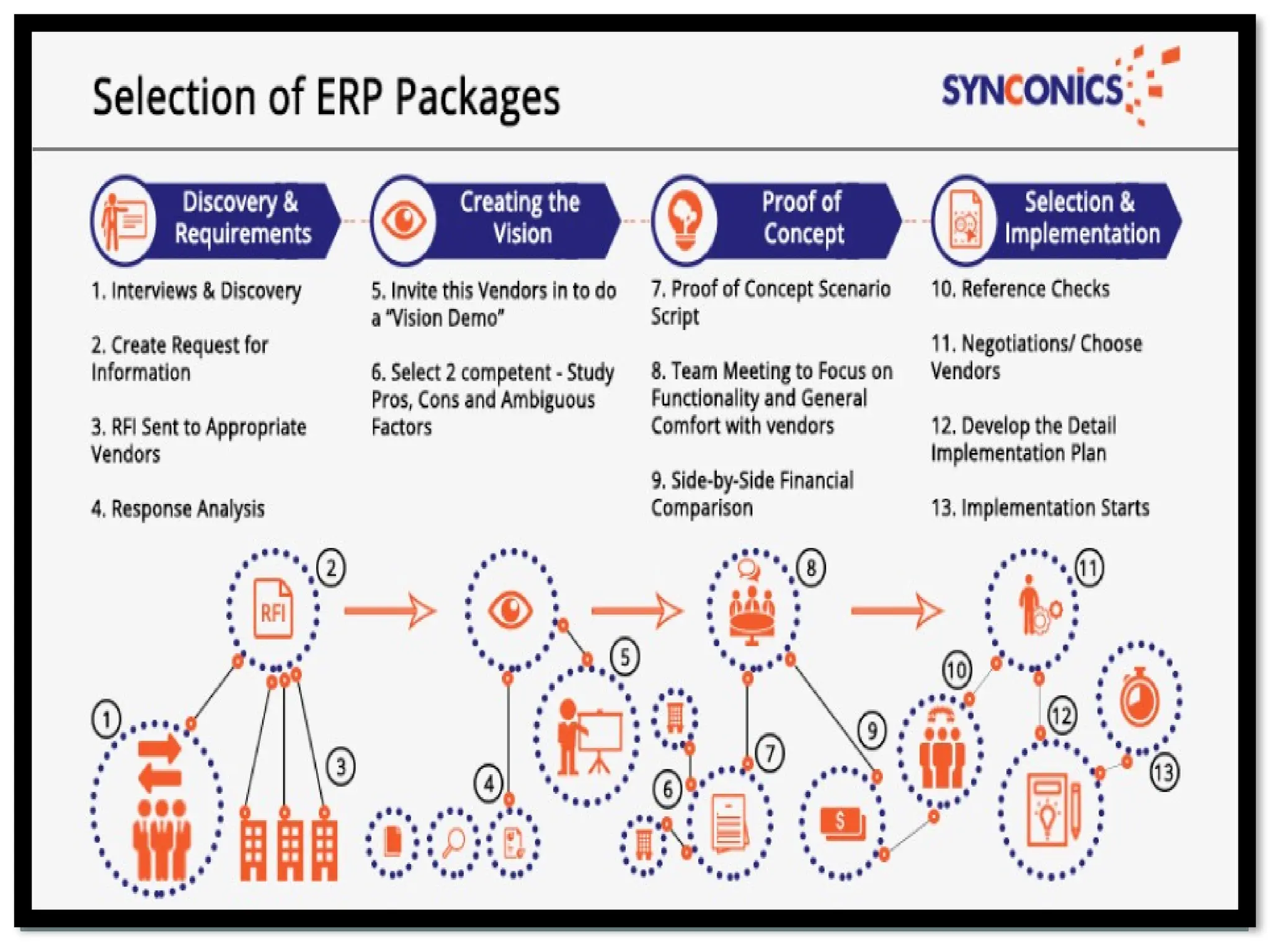
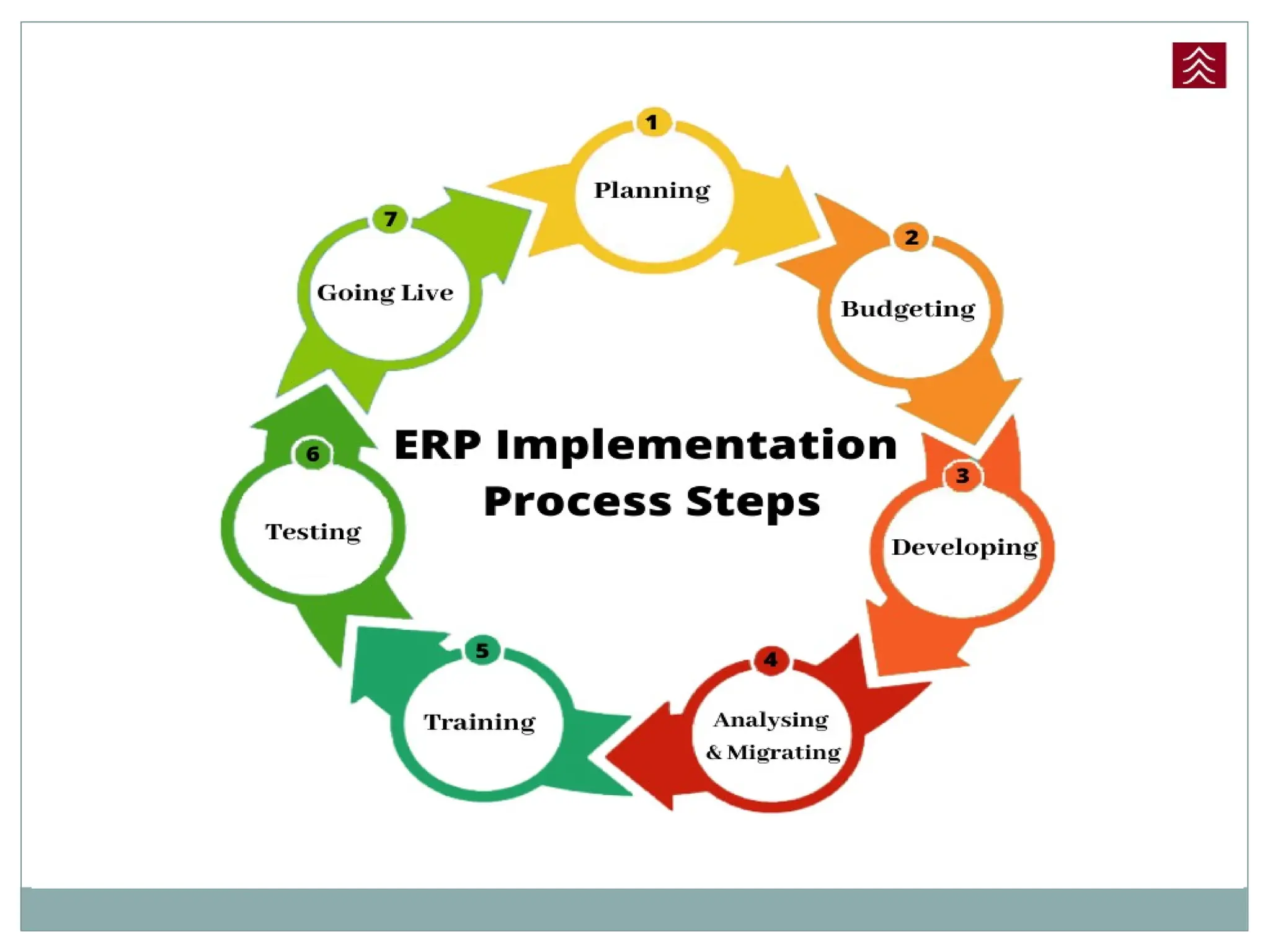
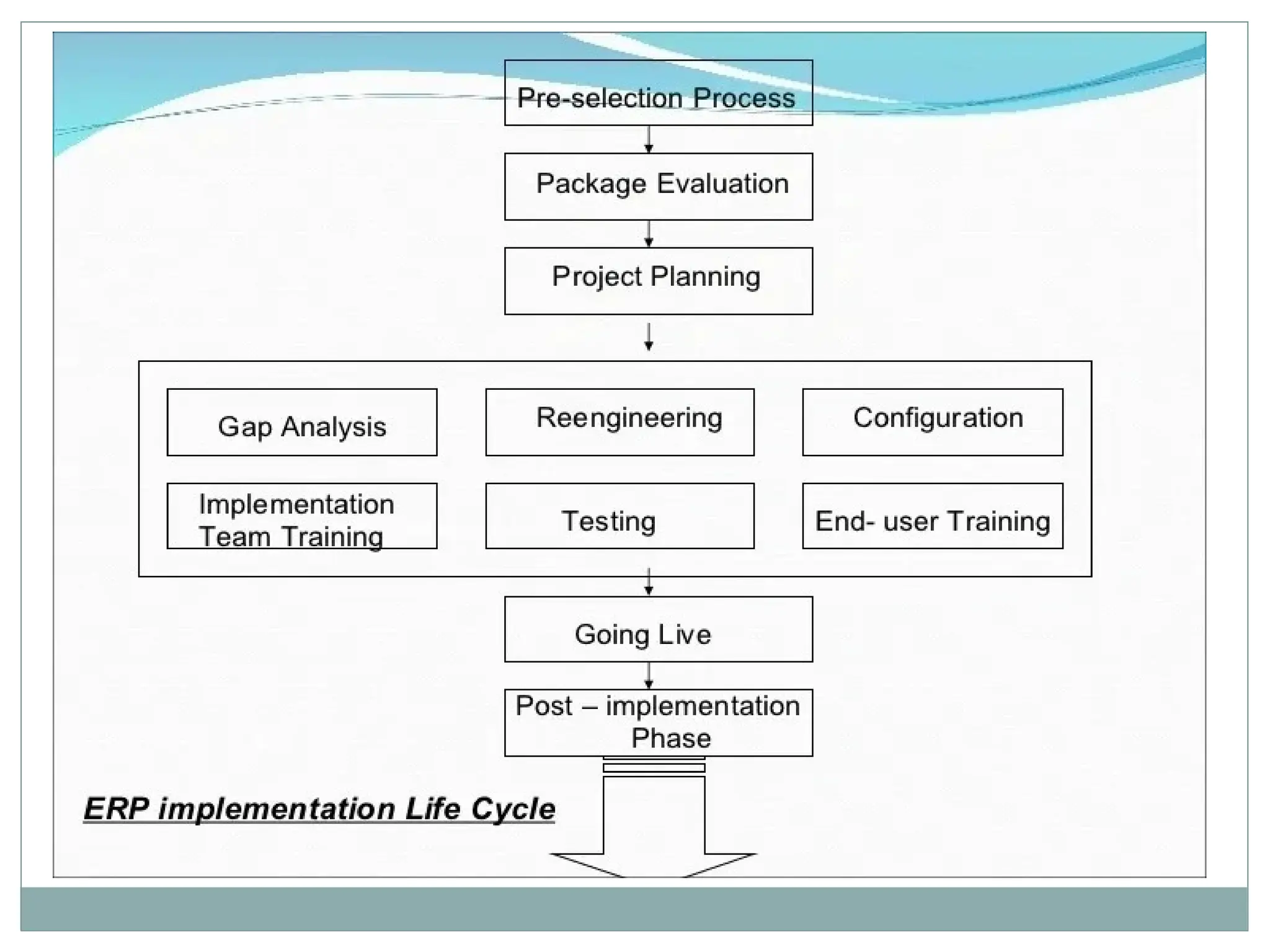
Pre-selection process
• Decision for suitable package
• Number of ERP vendors
• Screening eliminates the package that are not suitable for company’s process
• Selection is done on best few packages available
Package Evaluation
• Package is selected on the basis of different parameter
• Test and certify the package and also check the coordination with different
department
• Selected package will determine the success or failure of the project
• Package must be user friendly
• Regular up gradation should be available
• cost
Project planning
• Design the implementation process
• Resources are identified
• Implementation team is selected and task allocated
• Special arrangement for contingencies
Gap Analysis
• Most crucial phase
• Process through which company can create a model of where they are standing and
where they want to go
• Model help the company to cover the functional gap
Reengineering
• Identify some functional areas of existing system which need to be re-design
• Involve a significant change in the number of employees and their job responsibilities
• Process become more automated and efficient
Team Training
• Company trains its employee through external trainer or team of internal members
• Employees become self sufficient to implement the software after the vendors and
consultant have left.
Testing
This phase is performed to find the weak link so that it can be rectified before its
implementation
Going Live
• Work is complete, data conversion is done, databases are up and running, the
configuration is complete and testing is done
• System is officially proclaimed
• Once the system is live the old system is removed
• End User Training
• Employee who is going to use the system are identified and trained
Post implementation
• Is the maintenance phase
• Employees who are trained enough to handle problems those crops up time to time
• The post implementation will need a different set of roles and skills than those with
less integrated kind of system.
GAP ANALYSIS
A gap analysis is the process of reviewing your current state and determining what you
need to do to move into your future state. In an ERP implementation, this means taking a
close look at the software you're using or plan to use.
In short, it’s the process of evaluating your ERP system to make sure it’s aligned with your
business needs.
Why Gaps occurs
• gaps exist because the software isn’t designed to support certain functions.
• gaps can be traced back to an oversight during the project planning phase.
• Then, there are voids that exist because the feature you need hasn’t yet been
configured
Steps to perform an ERP Gap Analysis
Review your current workflows
To do so, you should identify all the processes within and between each
department. Then, note how each department interfaces with your current ERP
software in the daily tasks they perform.
Define objectives
it’s time to define your top business objectives. These objectives might be sales-
related, service-centric, or growth-based. Often, they relate to data visibility.
Plan your next steps
This is where you will identify the missing pieces and determine your plan of action.
You might choose to optimize your system or supplement it with point solutions.
Gaps need to be address
 Key Features or Functions Missing
Client complaints
Warranty claims
Service issues
 Areas of Redundancy
 Lack of Flexibility
 Lack of Preventive Maintenance
Emerging trends in business process
 Automation
 Digitization
 Better customer experience
 Innovation in service
 Global market
Technical architecture of ERP systems
• The arrangement of software components in a program for managing business assets.
• The architecture can use a central server to provide interactive information for
multiple users in different locations.
• The ERP system is a shared database that controls the operations of the company by
integrating various applications and supporting a wide range of functions
• The architecture of the ERP system plays a major role to determine its success and
durability for the institute.
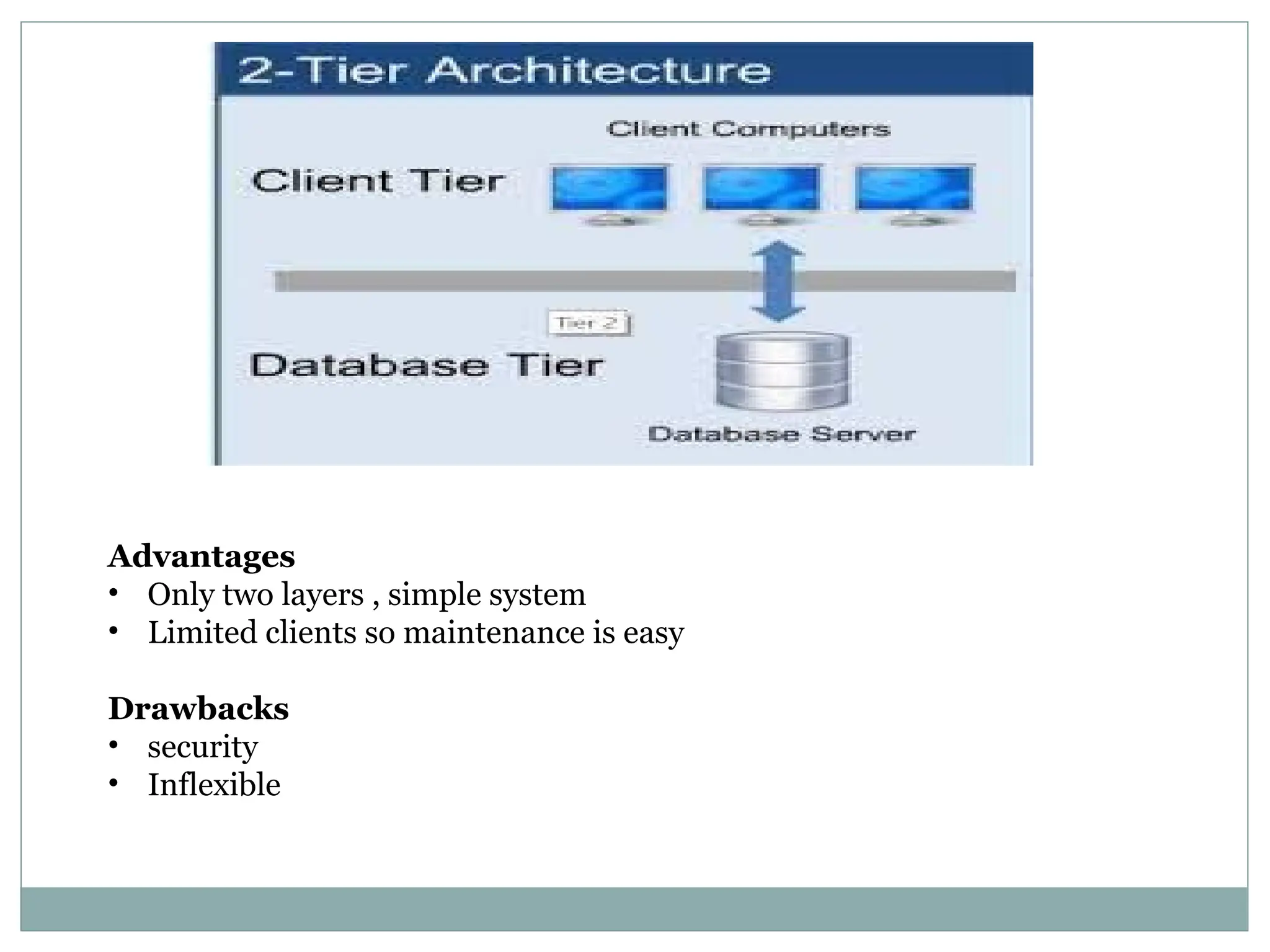
Advantages
• Only two layers , simple system
• Limited clients so maintenance is easy
Drawbacks
• security
• Inflexible
Advantages
• Scalability
• Security
Drawbacks
• expensive
• complex
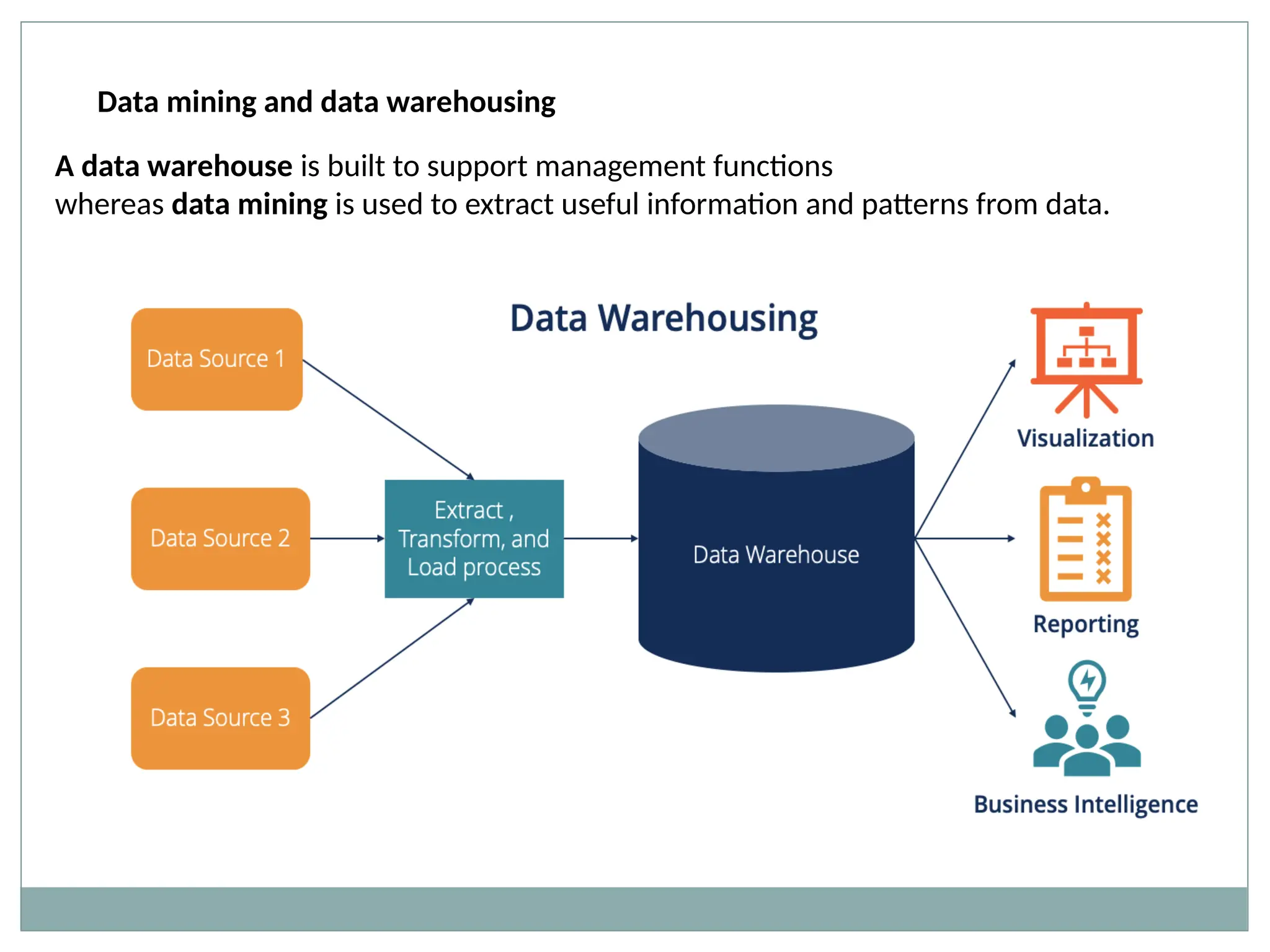
Data mining and data warehousing
A data warehouse is built to support management functions
whereas data mining is used to extract useful information and patterns from data.
Data Warehousing
A data warehouse is designed to support the management decision-making process by
providing a platform for data cleaning, data integration, and data consolidation. A data
warehouse contains subject-oriented, integrated, time-variant, and non-volatile data.
Advantages of Data Warehousing:
 The data warehouse’s job is to make any form of corporate data easier to
understand. The majority of the user’s job will consist of inputting raw data.
 The capacity to update continuously and frequently is the key benefit of this
technology. As a result, data warehouses are perfect for organizations and
entrepreneurs who want to stay current with their target audience and customers.
 It makes data more accessible to businesses and organizations.
 A data warehouse holds a large volume of historical data that users can use to
evaluate different periods and trends in order to create predictions for the future.
Disadvantages of Data Warehousing:
 There is a great risk of accumulating irrelevant and useless data. Data loss and
erasure are other potential issues.
 Data is gathered from various sources in a data warehouse. Cleansing and
transformation of the data are required. This could be a difficult task.
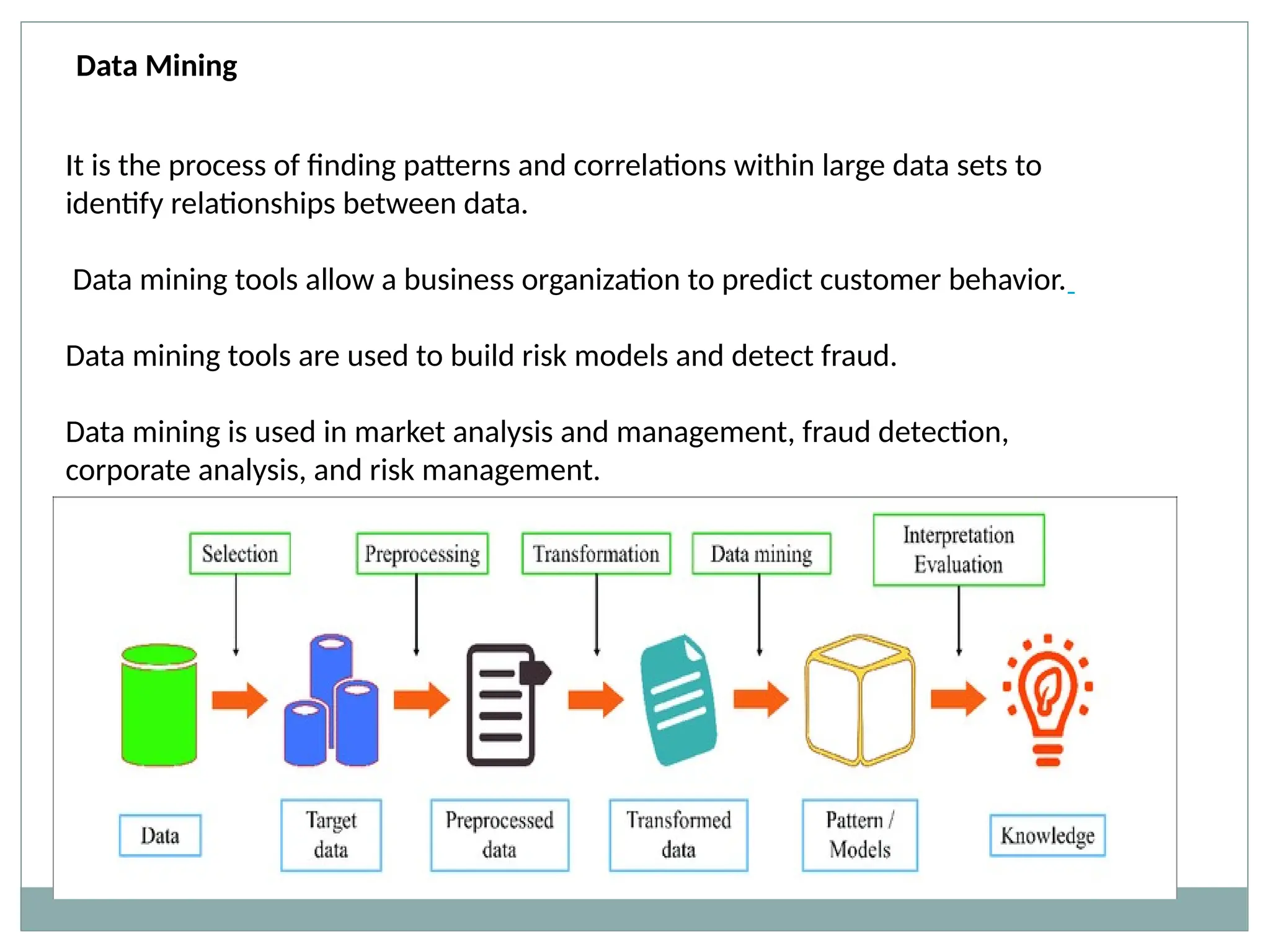
It is the process of finding patterns and correlations within large data sets to
identify relationships between data.
Data mining tools allow a business organization to predict customer behavior.
Data mining tools are used to build risk models and detect fraud.
Data mining is used in market analysis and management, fraud detection,
corporate analysis, and risk management.
Data Mining
Advantages of Data Mining:
 Data mining aids in a variety of data analysis and sorting procedures. The
identification and detection of any undesired fault in a system is one of the best
implementations here. This method permits any dangers to be eliminated sooner.
 In comparison to other statistical data applications, data mining methods are both
cost-effective and efficient.
 Companies can take advantage of this analytical tool by providing appropriate and
easily accessible knowledge-based data.
 The detection and identification of undesirable faults that occur in the system are one
of the most astonishing data mining techniques.
Disadvantages of Data Mining:
 Data mining isn’t always 100 percent accurate, and if done incorrectly, it can
lead to data breaches.
 Organizations must devote a significant amount of resources to training and
implementation. Furthermore, the algorithms used in the creation of data
mining tools cause them to work in different ways.
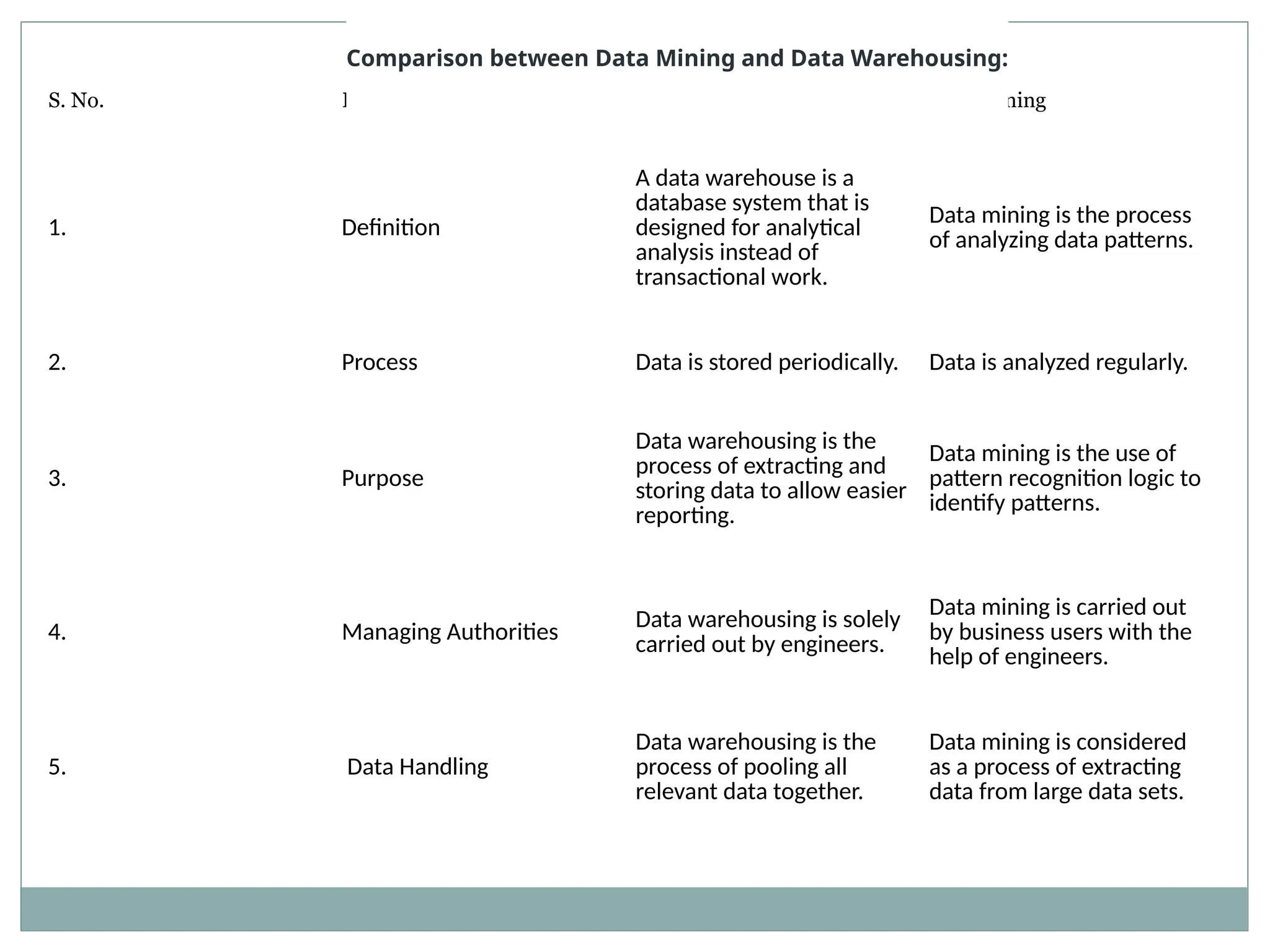
S. No. Basis of Comparison Data Warehousing Data Mining
1. Definition
A data warehouse is a
database system that is
designed for analytical
analysis instead of
transactional work.
Data mining is the process
of analyzing data patterns.
2. Process Data is stored periodically. Data is analyzed regularly.
3. Purpose
Data warehousing is the
process of extracting and
storing data to allow easier
reporting.
Data mining is the use of
pattern recognition logic to
identify patterns.
4. Managing Authorities
Data warehousing is solely
carried out by engineers.
Data mining is carried out
by business users with the
help of engineers.
5. Data Handling
Data warehousing is the
process of pooling all
relevant data together.
Data mining is considered
as a process of extracting
data from large data sets.
Comparison between Data Mining and Data Warehousing:
6. Functionality
Subject-oriented,
integrated, time-varying
and non-volatile constitute
data warehouses.
AI, statistics, databases, and
machine learning systems
are all used in data mining
technologies.
7. Task
Data warehousing is the
process of extracting and
storing data in order to
make reporting more
efficient.
Pattern recognition logic is
used in data mining to find
patterns.
8. Uses
It extracts data and stores it
in an orderly format,
making reporting easier and
faster.
This procedure employs
pattern recognition tools to
aid in the identification of
access patterns.
9. Examples
When a data warehouse is
connected with operational
business systems like CRM
(Customer Relationship
Management) systems, it
adds value.
Data mining aids in the
creation of suggestive
patterns of key parameters.
Customer purchasing
behavior, items, and sales
are examples. As a result,
businesses will be able to
make the required
adjustments to their
operations and production.
EDI (electronic data interchange)
 technology for exchanging documentation from one PC to another
 is the computer-to-computer exchange of business documents in a standard
electronic format between business partners
 businesses enjoy major benefits such as reduced cost, increased processing speed,
reduced errors and improved relationships with business partners.
 ERP systems often use EDI technology to facilitate communication between
businesses
 ERP and EDI work together to make programs more efficient by adding potential
communication facility and supply chain management technologies to businesses.
 EDI replaced traditional methods of business communication, i.e. telephone and fax,
with electronic means of document transmission.
 decreased administrative costs
 ERP systems coordinate supply chain management with EDI communication
exchange across organizations to streamline administrative tasks.
 EDI does not need ERP to perform its roles. However, ERP uses EDI technology to
facilitate the real-time transmission of data.
Internet Technologies
The Internet, sometimes called simply "the Net," is a worldwide system of computer
networks -- a network of networks in which users at any one computer can, if they
have permission, get information from any other computer (and sometimes talk
directly to users at other computers).
Internet related technologies
Video and podcasting- youtube
Presentation tools- create and share presentation
Collaboration and brainstorming tools- another wide range category including
thought organizing tools like mindmap and collaborative tools like web based
interactive whiteboards and google documents
Blogs and blogging- web blog a personal journal on web
Wikis- allow users to collaborate in forming the content of a web site
Social networking- FB ,twitter,linkedin
IM- instant messaging a type of online chat which offers real time text transmission
over internet
Twitter
ERP and Supply Chain Management
ERP software has had a dramatic impact on the way businesses are able to operate,
with a direct correlation to business growth.
Effective ERP and supply chain management are critical ingredients to business
expansion and success.
Manufacturing ERP software can also automate supply chain processes so that
employees can be more productive in other areas.
Benefits of Using ERP in a Supply Chain Management Strategy
Efficient Managing Demand & Procurement
ERP automates demand planning, creating demand upon receiving orders. When an
order is received, the software implements scheduling. Team members are able to see
real-time information about how resources are being used in production and can better
plan production jobs and product delivery. Warehouse resource management,
transportation of materials, and other supply chain tasks can be automated or
optimized to improve efficiency as well.
Reliable Processing & Documentation
An ERP system can also create invoices, which are sent straight to the customer once
products have shipped. Or, create and transmit required import and export documentation
required for cross-border shipments. It automatically collects an archive of shipment and
delivery data as well to reduce errors and ensure on-time delivery and better customer
service.
Enhanced Collaboration
ERP and supply chain management processes are especially helpful in streamlining
coordination between businesses and vendors. When suppliers are connected to your ERP
system, they can work more effectively with you to meet your goals and reduce
bottlenecks, such as recognizing when certain supply inventories are low and ensuring
resource availability.
Increased Visibility
With more visibility and transparency, businesses can create smarter strategies around
how they use their resources, from parts to personnel. ERP software can give your team a
detailed, real-time look into your operations so you can see where things are going well
and where they’re not, allowing you to target specific inefficiencies for better outcomes.
Cloud Capabilities
Though ERP systems are available as on-premise solutions, cloud ERP software has
become popular in recent years. The major benefits of cloud ERP are dedicated data
security and mobility. Using a cloud-hosted ERP solution means that the system can be
accessed anywhere, anytime on mobile devices as long as there’s an internet
connection. This allows for quicker action without the need for team members to be
together, which can be valuable with the fast-moving aspects of supply chains.
Business intelligence (BI) services are offerings to design, develop and deploy
enterprise processes and to integrate, support and manage the related technology
applications and platforms. These include business and infrastructure applications for
BI platforms, analytics needs and data warehousing infrastructure.
SaaS (software as a service) business intelligence, or SaaS BI, is a cloud-based
distribution model in which a third-party provider hosts BI tools in a secure online
environment.
SaaS BI tools deliver analytics services like dashboards and reports with flexible pricing
directly to companies.
the pros and cons of using software as a service delivery methods for business
intelligence tools
Pros
Flexibility and Scalability
One of the biggest advantages of SaaS BI tools is that companies no longer have to do
the hard work of purchasing, installing and maintaining software products in-house.
Enterprises that use SaaS business intelligence can skip all kinds of gatekeeping hurdles,
such as installation processes, and just enjoy on-demand delivery of the services that
they need.
Pricing
Companies that are customers of SaaS business intelligence vendors can also enjoy
different kinds of payment models. Subscription pricing allows companies to just use
what they need, again, with on-demand delivery, and get rid of it when it’s no longer
necessary. That’s not true with in-house structures where companies have invested in a
certain amount of data handling for the long haul. On-premise solutions also come with
the cost of an IT team dedicated to keeping it available, a cost handled by the support
team of a web-based system.
Less Responsibility
Companies using some of these business intelligence tools that are available through
the cloud can keep fewer staff on hand and avoid purchasing additional servers and
hardware. The user also passes the responsibility of providing data security measures on
to the product provider, saving money and stress; most web-based solutions are as
secure as on-premise ones in the modern age.
Attracting Top Talent
There’s also a case to be made that using the most modern SaaS BI tools can also help a
company to develop a good reputation within an industry. In today’s hiring climate with
record lows of unemployment and a dearth of highly educated IT professionals,
companies are playing hardball when it comes to hiring and recruiting. One way
to attract the best people is to advertise to them that they’ll be working with the best
tools — not wasting their abilities trying to tend to garden-variety server systems.
Cons
Security and Regulations
One of the obvious disadvantages with any type of SaaS BI tool is that it requires putting
sensitive data in the hands of a third party. In heavily regulated fields like medicine and
finance, this has the potential to violate central industry commitments to keep data 100%
safe and secure. However, to the extent that the vendor can provide security guarantees,
SaaS business intelligence may be considered just as safe, or nearly as safe, as going with
an in-house system. So this con may be decreasing as web security protocols improve.
Hidden Costs
There’s also the phenomenon of hidden vendor costs. Pricing may not be as transparent
with some SaaS offerings as it should be, and it’s possible for companies to find
themselves overspending as a result. Customization, extra modules, even live support
often come with extra price tags.
By contrast, companies can always know how much it’s going to cost them to build in-
house systems. It’s important to have an in-depth discussion with vendors to avoid pricing
miscommunications and other kinds of similar problems.
bvoc 5th sem.pptx of cslslsllxxcccvlcclss

  • 1.
    Enterprise resource planning ERP……??? All thebusiness has various departments. And these departments exchange and share lot of information with each other. This process take so much time business management software which is used to integrate all the business activities in any organization
  • 2.
    NEED for ERP •Integrate the financial information • Integrate customer order information • Standardize and speed up operations process • Reduce inventory • Standardize human resource information
  • 4.
    Drawbacks • Time andmoney consuming process • risk of duplication of data • No accurate data • Due to time taking process customer will not satisfy • High inventory and material costs
  • 5.
  • 6.
    Internal benefits Externalbenefits • Integration of a single source of data Improve customer service and order fulfillment • Control over various business processes Improved communication with suppliers and customers • eliminate duplication of data Improve customer service • Increase productivity, inventory management, promote quality Enhanced competitive position and increase sales and profits • Reduce operating costs and improves internal communication Effective HRM
  • 8.
    Inventory Management &Control (the 1960s) • required a system that should manage, monitor, and control their inventory.  Identifying inventory requirements  Setting targets  Providing replenishment techniques and options  Monitoring item usages  Reconciling the inventory balances  Reporting inventory status Material Requirements Planning (MRP)(the 1970s) • With the rise in factory production demand, the need for the management of products also increased. • developed by engineer Joseph Orlicky • So in order to plan and manage the complete manufacturing process to production & delivery, Materials Requirement Planning (MRP) software was made.
  • 9.
    • ensured thatright materials are available for production with right quantity to avoid shortages. • reducing waste by maintaining lowest possible materials and product levels in stock. • plan manufacturing functions, delivery schedules and purchasing. • generates schedules for operations and raw material purchases. Manufacturing Resource Planning (MRP II) (the 1980s) • In the 1980s, vendors added more manufacturing processes to MRP to make the process easier and more accurate. • And this new system is named manufacturing resource planning (MRP II). • utilizes software applications for coordinating manufacturing processes. Processes from product planning, parts purchasing, and inventory control to product distribution. • it allows additional data such as employee and financial needs.
  • 10.
    Enterprise Resource Planning(ERP) (the 1990s) • Gartner Group used the term ERP. • uses a multi-module application software system Web Functionalities with Internet (ERP II) (the 2000s) • Interaction of ERP with other application suites is enabled in ERP II like integrating with CRM systems. • Technological advancement accessing information using internet web-browsers and mobile devices was made possible. • ERP II adapted technological advancement with Services Oriented Architecture (SOA). • ERP with improvement in functionality
  • 11.
    Cloud-based ERP (the2010s) • Business applications are delivered as a Software as a Service (SaaS) model. • Servers are deployed on the cloud and accessed with the rest APIs. • Android, iOS, and browser applications are developed for delivering ERP software in the SaaS model. • prominent top ERP vendors are delivering services over the cloud.
  • 13.
    ADVANTAGES OF ERP Better customer service:  Better access to customer information  Faster response times  Improved on-time delivery  Improved order accuracy  Improved Inventory Costs: • Only carry as much inventory as needed, avoid these common issues • Too much inventory, and higher overhead costs • Too little inventory, and longer customer fulfillment times  Boosted Cash Flow:  Better invoicing and better collections tools to bring cash in faster  Faster cash means more cash on-hand for the business
  • 14.
     Cost Savings: Improved inventory planning  Better procurement management  Better customer service  Improved vendor relationship management  Better Data & Cloud Security:  Dedicated security resources  Avoid installing malicious software  Data distributed across multiple servers  Business Process Improvements:  Automate manual or routine tasks  Implement smarter workflows  Gain efficiency  Supply Chain Management:  Effective demand forecasting and lean inventory  Reduce production bottlenecks  Transparency through the business
  • 15.
    DISADVANTAGES OF ERP Costs of an ERP Software  Third-party software add-ins  Implementation costs  Maintenance  Initial and continuous training  Complex Data Conversion  Developing a solid data conversion strategy can be difficult  You have to define, examine and analyze data sources  Bad data conversion will cause delays and increased costs  Requires thorough training  Training needs to cover all of the ERP system’s features.  ERP training sessions need to be in line with business processes  IT users need to be trained for the technical aspects of the ERP System
  • 16.
    ERPAG Software • ERPAGis a cloud-based enterprise resource planning (ERP) solution. • It is suitable for small and midsize businesses in various industries, including automobile, retail, education, information technology and more. • Primary features include sales management, purchasing, manufacturing management, accounting and finance, inventory management, reporting and analytics. NetSuite Software With an integrated system that includes ERP, financials, commerce, inventory management, HR, PSA, supply chain management, CRM and more..
  • 17.
    • CAMs-Exact isa web-based ERP software, which helps businesses in manufacturing, chemical, pharmaceutical, automobile, engineering, FMCG, jewelry, oil & lubricants, finance, trading, retailing with POS, e-commerce, • service industries manage parts purchasing, order tracking, product planning, and statutory reporting. • Key features include document attachments, barcode scanning, QR code printing, audit trail, automated emails, and multi-level document authorizations. CAMs-Exact Align Books Software • Align Books is a cloud-based accounting software designed to help chartered accountants and businesses of all sizes. Sage 300, Microsoft Dynamics NAV, SAP Business One, Epicor 9 (formerly Vantage) Microsoft Dynamics GP, Sage 100
  • 18.
    ERP players-key playersin Global Enterprise Resource Planning (ERP) Market:  SAP AG,  Oracle Corp.,  Sage Group plc,  Infor,  Microsoft Corp.,  Concur,  Cornerstone OnDemand ,  Kronos ,  NetSuite,  Totvs , UNIT4,  Ventyx,  Workday Inc.,  WorkForce Software
  • 21.
  • 22.
    Business process re-engineering rethink and break down existing business processes  early 1990s, focusing on the analysis and design of workflows and business processes within an organization  help organizations fundamentally rethink how they do their work in order to improve customer service, cut operational costs, and become world- class competitors
  • 23.
    History  In 1990,Michael Hammer, a former professor of computer science at the Massachusetts Institute of Technology (MIT)  Hammer’s claim -Most of the work being done does not add any value for customers, and this work should be removed, not accelerated through automation.  Instead, companies should reconsider their processes in order to maximize customer value, while minimizing the consumption of resources required for delivering their product or service.  idea, to unbiase review a company’s business processes  Peter Drucker and Tom Peters, were accepting and advocating Business Process Reengineering (BPR) as a new tool for (re)achieving success in a dynamic world.
  • 24.
     During thefollowing years, a fast growing number of publications, books as well as journal articles, was dedicated to Business Process Reengineering (BPR), and many consulting firms embarked on this trend and developed BPR methods. Business Process Reengineering (BPR) was adopted Concept of BPR  Business Process Reengineering (BPR) refers to the analysis and redesign of workflows and processes both within and between organizations.  Its objective is to obtain quantum gains in the performance of the process in terms of time, cost, output, quality, and responsiveness to customers.  redesign effort aims at simplifying and streamlining a process by eliminating all redundant and non-value adding steps, activities and transactions, reducing drastically the number of stages or transfer points of work, and speeding up the work-flow through the use of it systems.
  • 26.
    Determining Objectives andFramework: Objectives are the desired end results of the redesign process which the management and organization attempts to realize. This will provide the required focus, direction, and motivation for the redesign process. It helps in building a comprehensive foundation for the reengineering process. Identify Customers and Determine their needs: The designers have to understand customers- their profile, their steps in acquiring, using and disposing a product. The purpose is to redesign business process that clearly provides added value to the customer. Study the Existing Process: The existing processes will provide an important base for the re-designers. The purpose is to gain an understanding of the ‘what’, and ‘why’ of the targeted process. However, as discussed earlier, some companies go through the reengineering process with clean perspective without laying emphasis on the past processes. .
  • 27.
    Formulate a RedesignProcess Plan: The information gained through the earlier steps is translated into an ideal redesign process. Formulation of redesign plan is to real crux of the reengineering efforts. Customer focused redesign concepts are identified and formulated. In this step alternative processes are considered and the best is selected. Implement the Redesign: it is easier to formulate new process than to implement them. Implementation of the redesigned process and application of other knowledge gained from the previous steps is key to achieve dramatic improvements. It is the joint responsibility of the designers and management to operationalized the new process
  • 28.
    Challenge in BPR Only a limited number of companies are able to have enough courage for having BPR because of the challenges posed.  It disturbs established hierarchies and functional structures and creates serious repercussions and involves resistance among the work-force. .  Reengineering takes time and expenditure, at least in the short run that many companies are reluctant to go through the exercise. .  Even there can be loss in revenue during the transition period.  Setting of targets is tricky and difficult.  If the targets are not properly set or the whole transformation not properly carried out, reengineering efforts may turn-out as a failure. BPI Vs BPR
  • 29.
     An ERPsolution gives all employees access to the information they need to answer important questions about their department’s current performance and future planning, as well as target areas for improvement  ERP can automate many tasks, reducing errors and freeing up employees to focus on more strategic work  ERP module is designed for specific business functions, providing the data and supporting the processes that will help those employees do their jobs.  Every module plugs into the ERP system, so the system provides a single source of accurate data, even as the business adds new modules.  The modular design of ERP allows it to meet the shifting needs of a business and is a big reason this software has become ubiquitous  An organization can purchase only the modules relevant to its business model, operations and key challenges.  It can then add ERP modules to address new needs or challenges as the organization evolves
  • 31.
    1. Finance  Thefinance and accounting module is the most important ERP module because it allows businesses to understand their current financial state and future outlook.  Key features of this module include tracking accounts payable (AP) and accounts receivable (AR) and managing the general ledger.  It also creates and stores crucial financial documents like balance sheets, payment receipts and tax statements.  This module can automate tasks related to billing, vendor payments, cash management and account reconciliation, helping the accounting department close the books in a timely manner and comply with current revenue recognition standards. 2. Procurement  The procurement module also known as the purchasing module, helps an organization secure the materials or products it needs to manufacture and/or sell goods.
  • 32.
     Companies cankeep a list of approved vendors in this module and tie those suppliers to certain items, helping with supplier relationship management. The module can automate requests for a quote, then track and analyze the quotes that come in.  Once a company accepts a quote, the procurement module helps the purchasing department prepare and send out purchase orders. It can then track that purchase order as the seller turns it into a sales order and ships the goods, automatically updating inventory levels once the order arrives. 3. Manufacturing  ERP systems typically have a production management or manufacturing execution system (MES).  The manufacturing module helps manufacturers plan production and make sure they have everything they need for planned production runs, like raw materials and machinery capacity. During the manufacturing process, it can update the status of goods-in-progress and help companies track actual output against forecasted production.
  • 33.
     It alsoprovides a real-time picture of the shop floor, capturing information on items in progress and finished goods. It can calculate the average time to produce an item and then compare supply with forecasted demand to plan adequate production 4. Inventory Management  inventory control by tracking item quantities and location down to individual SKUs  complete picture of not only current but also incoming inventory, through an integration with the procurement tool. 5. Order Management  tracks orders from receipt to delivery  ERP feeds all orders to the warehouse, distribution center or retail store after customers place them and tracks their status as they’re prepared, fulfilled and shipped to the customer  prevents orders from being lost and boosts on-time delivery rates to keep customers happy and cut unnecessary expenses for expedited shipping
  • 34.
    6. Warehouse Management guide warehouse employees through all warehouse processes based on the layout of the facility, from put away when shipments arrive to picking to packing and shipping. It can also help companies plan labor based on expected order volume.  The warehouse management module can support different picking strategies like batch picking, wave picking and zone picking depending on which is most efficient for a given business, and some modules can show employees the most efficient pick path.  When the warehouse management module is integrated with inventory management and order management applications, employees can quickly find the right products and get shipments out the door quickly. Faster delivery ultimately increases customer satisfaction. 7. Supply Chain Management  module tracks each step in the movement of supplies and goods throughout the supply chain, from sub-suppliers to suppliers to manufacturers to distributors to retailers or consumers.  It can also manage any materials or products returned for refund or replacement.
  • 35.
    8. Customer RelationshipManagement (CRM)  stores all customer and prospect information. That includes the company’s communication history with a person—the date and time of calls and emails, for example—and their purchase history.  A CRM improves customer service because staffers can easily access all the information they need when working with a customer.  Many businesses also use CRM to manage sales leads and opportunities. 9. Professional Services Automation (Service Resource Management)  also called a service resource management module, allows an organization to plan and manage projects.  This application tracks the status of projects, managing human and capital resources throughout, and allows managers to approve expenses and timesheets. It facilitates collaboration between teams by keeping all related documents in a shared place.  Additionally, the PSA module can automatically prepare and send bills to clients based on rules around the billing cycle.
  • 36.
    10. Workforce Management is similar to a human resource management module but is designed for companies with more hourly than salaried employees. It can monitor workers’ attendance and hours and measure things like employee productivity and absenteeism.  Payroll could also fall under the workforce management module. A payroll sub- module automatically distributes paychecks to employees on a set schedule with the appropriate taxes deducted and handles expense reimbursement. It can also provide reports on payroll expenses, total overtime hours and similar KPIs. 11. Human Resources Management  Also k.a. human capital management module usually encompasses all the features of a workforce management application and offers additional capabilities.  HRM could be viewed as CRM for employees. This popular module has detailed records on all employees and stores documents like performance reviews, job descriptions and offer letters. It tracks not only hours worked but also paid time off (PTO)/sick days and benefits information.  Since the HRM module stores a vast amount of information on every employee across the organization, it eliminates a lot of duplicate or inaccurate data that many organizations store in various spreadsheets.
  • 37.
    12. Ecommerce  forbusinesses that want to sell online.  This module allows companies to quickly launch a business-to-business (B2B) or business-to-consumer (B2C) ecommerce website.  Leading commerce applications include user-friendly tools that allow employees to easily add new items, update product content (item descriptions, titles, specs, images, etc.) and change the look and feel of the website.  When the ecommerce application is integrated with other ERP applications, all payment, order and inventory information feeds from the ecommerce module into the shared database. That ensures all transactions are added to the ledger, out-of- stock items are removed from the site and orders ship on time. 13. Marketing Automation  A marketing module manages marketing campaigns across digital channels like email, web, social media and SMS. It can automate email sends based on campaign rules and has advanced customer segmentation features, so customers only receive relevant messages.
  • 38.
     Marketing automationsoftware, whether part of the ERP system or a separate solution, can provide detailed reports on the performance of campaigns to shape future marketing plans and spend.  These applications increase leads, customer loyalty and, over time, sales.
  • 40.
    Pre-selection process • Decisionfor suitable package • Number of ERP vendors • Screening eliminates the package that are not suitable for company’s process • Selection is done on best few packages available Package Evaluation • Package is selected on the basis of different parameter • Test and certify the package and also check the coordination with different department • Selected package will determine the success or failure of the project • Package must be user friendly • Regular up gradation should be available • cost Project planning • Design the implementation process • Resources are identified • Implementation team is selected and task allocated • Special arrangement for contingencies
  • 41.
    Gap Analysis • Mostcrucial phase • Process through which company can create a model of where they are standing and where they want to go • Model help the company to cover the functional gap Reengineering • Identify some functional areas of existing system which need to be re-design • Involve a significant change in the number of employees and their job responsibilities • Process become more automated and efficient Team Training • Company trains its employee through external trainer or team of internal members • Employees become self sufficient to implement the software after the vendors and consultant have left.
  • 42.
    Testing This phase isperformed to find the weak link so that it can be rectified before its implementation Going Live • Work is complete, data conversion is done, databases are up and running, the configuration is complete and testing is done • System is officially proclaimed • Once the system is live the old system is removed • End User Training • Employee who is going to use the system are identified and trained
  • 43.
    Post implementation • Isthe maintenance phase • Employees who are trained enough to handle problems those crops up time to time • The post implementation will need a different set of roles and skills than those with less integrated kind of system.
  • 44.
    GAP ANALYSIS A gapanalysis is the process of reviewing your current state and determining what you need to do to move into your future state. In an ERP implementation, this means taking a close look at the software you're using or plan to use. In short, it’s the process of evaluating your ERP system to make sure it’s aligned with your business needs. Why Gaps occurs • gaps exist because the software isn’t designed to support certain functions. • gaps can be traced back to an oversight during the project planning phase. • Then, there are voids that exist because the feature you need hasn’t yet been configured
  • 45.
    Steps to performan ERP Gap Analysis Review your current workflows To do so, you should identify all the processes within and between each department. Then, note how each department interfaces with your current ERP software in the daily tasks they perform. Define objectives it’s time to define your top business objectives. These objectives might be sales- related, service-centric, or growth-based. Often, they relate to data visibility. Plan your next steps This is where you will identify the missing pieces and determine your plan of action. You might choose to optimize your system or supplement it with point solutions.
  • 46.
    Gaps need tobe address  Key Features or Functions Missing Client complaints Warranty claims Service issues  Areas of Redundancy  Lack of Flexibility  Lack of Preventive Maintenance
  • 47.
    Emerging trends inbusiness process  Automation  Digitization  Better customer experience  Innovation in service  Global market
  • 48.
    Technical architecture ofERP systems • The arrangement of software components in a program for managing business assets. • The architecture can use a central server to provide interactive information for multiple users in different locations. • The ERP system is a shared database that controls the operations of the company by integrating various applications and supporting a wide range of functions • The architecture of the ERP system plays a major role to determine its success and durability for the institute.
  • 49.
    Advantages • Only twolayers , simple system • Limited clients so maintenance is easy Drawbacks • security • Inflexible
  • 50.
  • 51.
    Data mining anddata warehousing A data warehouse is built to support management functions whereas data mining is used to extract useful information and patterns from data.
  • 52.
    Data Warehousing A datawarehouse is designed to support the management decision-making process by providing a platform for data cleaning, data integration, and data consolidation. A data warehouse contains subject-oriented, integrated, time-variant, and non-volatile data. Advantages of Data Warehousing:  The data warehouse’s job is to make any form of corporate data easier to understand. The majority of the user’s job will consist of inputting raw data.  The capacity to update continuously and frequently is the key benefit of this technology. As a result, data warehouses are perfect for organizations and entrepreneurs who want to stay current with their target audience and customers.  It makes data more accessible to businesses and organizations.  A data warehouse holds a large volume of historical data that users can use to evaluate different periods and trends in order to create predictions for the future.
  • 53.
    Disadvantages of DataWarehousing:  There is a great risk of accumulating irrelevant and useless data. Data loss and erasure are other potential issues.  Data is gathered from various sources in a data warehouse. Cleansing and transformation of the data are required. This could be a difficult task.
  • 54.
    It is theprocess of finding patterns and correlations within large data sets to identify relationships between data. Data mining tools allow a business organization to predict customer behavior. Data mining tools are used to build risk models and detect fraud. Data mining is used in market analysis and management, fraud detection, corporate analysis, and risk management. Data Mining
  • 55.
    Advantages of DataMining:  Data mining aids in a variety of data analysis and sorting procedures. The identification and detection of any undesired fault in a system is one of the best implementations here. This method permits any dangers to be eliminated sooner.  In comparison to other statistical data applications, data mining methods are both cost-effective and efficient.  Companies can take advantage of this analytical tool by providing appropriate and easily accessible knowledge-based data.  The detection and identification of undesirable faults that occur in the system are one of the most astonishing data mining techniques.
  • 56.
    Disadvantages of DataMining:  Data mining isn’t always 100 percent accurate, and if done incorrectly, it can lead to data breaches.  Organizations must devote a significant amount of resources to training and implementation. Furthermore, the algorithms used in the creation of data mining tools cause them to work in different ways.
  • 57.
    S. No. Basisof Comparison Data Warehousing Data Mining 1. Definition A data warehouse is a database system that is designed for analytical analysis instead of transactional work. Data mining is the process of analyzing data patterns. 2. Process Data is stored periodically. Data is analyzed regularly. 3. Purpose Data warehousing is the process of extracting and storing data to allow easier reporting. Data mining is the use of pattern recognition logic to identify patterns. 4. Managing Authorities Data warehousing is solely carried out by engineers. Data mining is carried out by business users with the help of engineers. 5. Data Handling Data warehousing is the process of pooling all relevant data together. Data mining is considered as a process of extracting data from large data sets. Comparison between Data Mining and Data Warehousing:
  • 58.
    6. Functionality Subject-oriented, integrated, time-varying andnon-volatile constitute data warehouses. AI, statistics, databases, and machine learning systems are all used in data mining technologies. 7. Task Data warehousing is the process of extracting and storing data in order to make reporting more efficient. Pattern recognition logic is used in data mining to find patterns. 8. Uses It extracts data and stores it in an orderly format, making reporting easier and faster. This procedure employs pattern recognition tools to aid in the identification of access patterns. 9. Examples When a data warehouse is connected with operational business systems like CRM (Customer Relationship Management) systems, it adds value. Data mining aids in the creation of suggestive patterns of key parameters. Customer purchasing behavior, items, and sales are examples. As a result, businesses will be able to make the required adjustments to their operations and production.
  • 59.
    EDI (electronic datainterchange)  technology for exchanging documentation from one PC to another  is the computer-to-computer exchange of business documents in a standard electronic format between business partners  businesses enjoy major benefits such as reduced cost, increased processing speed, reduced errors and improved relationships with business partners.  ERP systems often use EDI technology to facilitate communication between businesses  ERP and EDI work together to make programs more efficient by adding potential communication facility and supply chain management technologies to businesses.  EDI replaced traditional methods of business communication, i.e. telephone and fax, with electronic means of document transmission.  decreased administrative costs
  • 60.
     ERP systemscoordinate supply chain management with EDI communication exchange across organizations to streamline administrative tasks.  EDI does not need ERP to perform its roles. However, ERP uses EDI technology to facilitate the real-time transmission of data.
  • 61.
    Internet Technologies The Internet,sometimes called simply "the Net," is a worldwide system of computer networks -- a network of networks in which users at any one computer can, if they have permission, get information from any other computer (and sometimes talk directly to users at other computers). Internet related technologies Video and podcasting- youtube Presentation tools- create and share presentation Collaboration and brainstorming tools- another wide range category including thought organizing tools like mindmap and collaborative tools like web based interactive whiteboards and google documents
  • 62.
    Blogs and blogging-web blog a personal journal on web Wikis- allow users to collaborate in forming the content of a web site Social networking- FB ,twitter,linkedin IM- instant messaging a type of online chat which offers real time text transmission over internet Twitter
  • 63.
    ERP and SupplyChain Management ERP software has had a dramatic impact on the way businesses are able to operate, with a direct correlation to business growth. Effective ERP and supply chain management are critical ingredients to business expansion and success. Manufacturing ERP software can also automate supply chain processes so that employees can be more productive in other areas. Benefits of Using ERP in a Supply Chain Management Strategy Efficient Managing Demand & Procurement ERP automates demand planning, creating demand upon receiving orders. When an order is received, the software implements scheduling. Team members are able to see real-time information about how resources are being used in production and can better plan production jobs and product delivery. Warehouse resource management, transportation of materials, and other supply chain tasks can be automated or optimized to improve efficiency as well.
  • 64.
    Reliable Processing &Documentation An ERP system can also create invoices, which are sent straight to the customer once products have shipped. Or, create and transmit required import and export documentation required for cross-border shipments. It automatically collects an archive of shipment and delivery data as well to reduce errors and ensure on-time delivery and better customer service. Enhanced Collaboration ERP and supply chain management processes are especially helpful in streamlining coordination between businesses and vendors. When suppliers are connected to your ERP system, they can work more effectively with you to meet your goals and reduce bottlenecks, such as recognizing when certain supply inventories are low and ensuring resource availability. Increased Visibility With more visibility and transparency, businesses can create smarter strategies around how they use their resources, from parts to personnel. ERP software can give your team a detailed, real-time look into your operations so you can see where things are going well and where they’re not, allowing you to target specific inefficiencies for better outcomes.
  • 65.
    Cloud Capabilities Though ERPsystems are available as on-premise solutions, cloud ERP software has become popular in recent years. The major benefits of cloud ERP are dedicated data security and mobility. Using a cloud-hosted ERP solution means that the system can be accessed anywhere, anytime on mobile devices as long as there’s an internet connection. This allows for quicker action without the need for team members to be together, which can be valuable with the fast-moving aspects of supply chains.
  • 66.
    Business intelligence (BI)services are offerings to design, develop and deploy enterprise processes and to integrate, support and manage the related technology applications and platforms. These include business and infrastructure applications for BI platforms, analytics needs and data warehousing infrastructure. SaaS (software as a service) business intelligence, or SaaS BI, is a cloud-based distribution model in which a third-party provider hosts BI tools in a secure online environment. SaaS BI tools deliver analytics services like dashboards and reports with flexible pricing directly to companies.
  • 67.
    the pros andcons of using software as a service delivery methods for business intelligence tools Pros Flexibility and Scalability One of the biggest advantages of SaaS BI tools is that companies no longer have to do the hard work of purchasing, installing and maintaining software products in-house. Enterprises that use SaaS business intelligence can skip all kinds of gatekeeping hurdles, such as installation processes, and just enjoy on-demand delivery of the services that they need. Pricing Companies that are customers of SaaS business intelligence vendors can also enjoy different kinds of payment models. Subscription pricing allows companies to just use what they need, again, with on-demand delivery, and get rid of it when it’s no longer necessary. That’s not true with in-house structures where companies have invested in a certain amount of data handling for the long haul. On-premise solutions also come with the cost of an IT team dedicated to keeping it available, a cost handled by the support team of a web-based system.
  • 68.
    Less Responsibility Companies usingsome of these business intelligence tools that are available through the cloud can keep fewer staff on hand and avoid purchasing additional servers and hardware. The user also passes the responsibility of providing data security measures on to the product provider, saving money and stress; most web-based solutions are as secure as on-premise ones in the modern age. Attracting Top Talent There’s also a case to be made that using the most modern SaaS BI tools can also help a company to develop a good reputation within an industry. In today’s hiring climate with record lows of unemployment and a dearth of highly educated IT professionals, companies are playing hardball when it comes to hiring and recruiting. One way to attract the best people is to advertise to them that they’ll be working with the best tools — not wasting their abilities trying to tend to garden-variety server systems.
  • 69.
    Cons Security and Regulations Oneof the obvious disadvantages with any type of SaaS BI tool is that it requires putting sensitive data in the hands of a third party. In heavily regulated fields like medicine and finance, this has the potential to violate central industry commitments to keep data 100% safe and secure. However, to the extent that the vendor can provide security guarantees, SaaS business intelligence may be considered just as safe, or nearly as safe, as going with an in-house system. So this con may be decreasing as web security protocols improve. Hidden Costs There’s also the phenomenon of hidden vendor costs. Pricing may not be as transparent with some SaaS offerings as it should be, and it’s possible for companies to find themselves overspending as a result. Customization, extra modules, even live support often come with extra price tags. By contrast, companies can always know how much it’s going to cost them to build in- house systems. It’s important to have an in-depth discussion with vendors to avoid pricing miscommunications and other kinds of similar problems.