ITU 07106
COMPUTER SYSTEMS ARCHITECTURE
Lecturer name:
Mr. Deusdedit Oygen Mwalongo
Contact details:
0689923147 (Whatsapp)
0765579741
E-mail: tunovenajb@gmail.com
Number of credits: 10
Where structure meets performance!
Now before we explore the contents of Computer Systems Architecture let’s briefly explain what this
course is all about..
“Computer Systems Architecture is the study of how a computer is designed, organized, and made to
work internally”
“It focuses on what components exist inside a computer, how they interact, and how they are controlled
to perform tasks efficiently”
Think of it as understanding how the “inside” of a computer works, just the way an engineer
understands how all parts of a car work together.
Bird’s-Eye Overview of Computer Systems Architecture
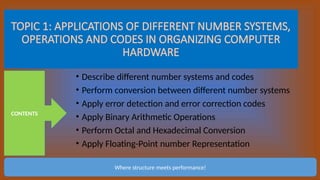
TOPIC 1: APPLICATIONS OF DIFFERENT NUMBER SYSTEMS,
OPERATIONS AND CODES IN ORGANIZING COMPUTER
HARDWARE
• Describe different number systems and codes
• Perform conversion between different number systems
• Apply error detection and error correction codes
• Apply Binary Arithmetic Operations
• Perform Octal and Hexadecimal Conversion
• Apply Floating-Point number Representation
CONTENTS
Where structure meets performance!
COMPUTER NUMBER SYSTEM AND CODES
Introduction:
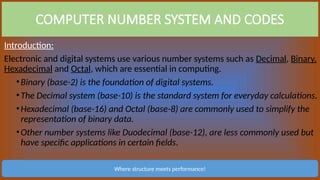
Electronic and digital systems use various number systems such as Decimal, Binary,
Hexadecimal and Octal, which are essential in computing.
•Binary (base-2) is the foundation of digital systems.
•The Decimal system (base-10) is the standard system for everyday calculations.
•Hexadecimal (base-16) and Octal (base-8) are commonly used to simplify the
representation of binary data.
•Other number systems like Duodecimal (base-12), are less commonly used but
have specific applications in certain fields.
Where structure meets performance!
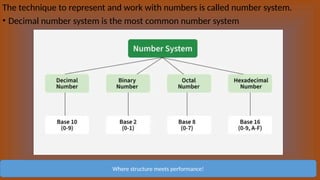
The technique to represent and work with numbers is called number system.
• Decimal number system is the most common number system
Where structure meets performance!
Now here is some more specific description of different types of number systems:
Binary number system
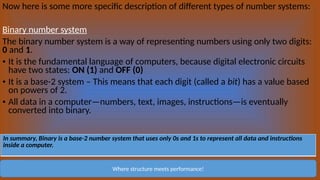
The binary number system is a way of representing numbers using only two digits:
0 and 1.
• It is the fundamental language of computers, because digital electronic circuits
have two states: ON (1) and OFF (0)
• It is a base-2 system – This means that each digit (called a bit) has a value based
on powers of 2.
• All data in a computer—numbers, text, images, instructions—is eventually
converted into binary.
Where structure meets performance!
In summary, Binary is a base-2 number system that uses only 0s and 1s to represent all data and instructions
inside a computer.
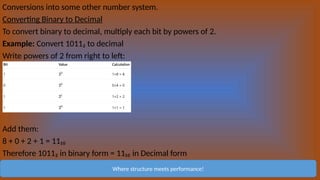
Conversions into some other number system.
Converting Binary to Decimal
To convert binary to decimal, multiply each bit by powers of 2.
Example: Convert 1011₂ to decimal
Write powers of 2 from right to left:
Add them:
8 + 0 + 2 + 1 = 11₁₀
Therefore 1011₂ in binary form = 11₁₀ in Decimal form
Where structure meets performance!
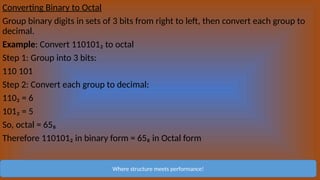
Converting Binary to Octal
Group binary digits in sets of 3 bits from right to left, then convert each group to
decimal.
Example: Convert 110101₂ to octal
Step 1: Group into 3 bits:
110 101
Step 2: Convert each group to decimal:
110₂ = 6
101₂ = 5
So, octal = 65₈
Therefore 110101₂ in binary form = 65₈ in Octal form
Where structure meets performance!
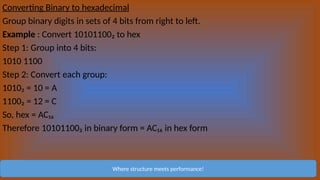
Converting Binary to hexadecimal
Group binary digits in sets of 4 bits from right to left.
Example : Convert 10101100₂ to hex
Step 1: Group into 4 bits:
1010 1100
Step 2: Convert each group:
1010₂ = 10 = A
1100₂ = 12 = C
So, hex = AC₁₆
Therefore 10101100₂ in binary form = AC₁₆ in hex form
Where structure meets performance!
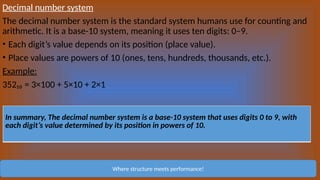
Decimal number system
The decimal number system is the standard system humans use for counting and
arithmetic. It is a base-10 system, meaning it uses ten digits: 0–9.
• Each digit’s value depends on its position (place value).
• Place values are powers of 10 (ones, tens, hundreds, thousands, etc.).
Example:
352₁₀ = 3×100 + 5×10 + 2×1
Where structure meets performance!
In summary, The decimal number system is a base-10 system that uses digits 0 to 9, with
each digit’s value determined by its position in powers of 10.
Conversions into some other number system:
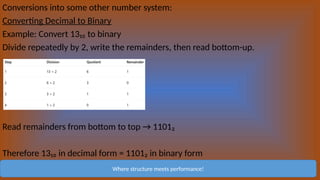
Converting Decimal to Binary
Example: Convert 13₁₀ to binary
Divide repeatedly by 2, write the remainders, then read bottom-up.
Read remainders from bottom to top → 1101₂
Therefore 13₁₀ in decimal form = 1101₂ in binary form
Where structure meets performance!
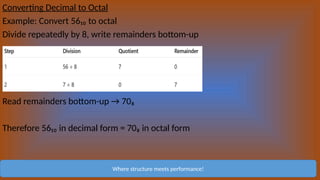
Converting Decimal to Octal
Example: Convert 56₁₀ to octal
Divide repeatedly by 8, write remainders bottom-up
Read remainders bottom-up → 70₈
Therefore 56₁₀ in decimal form = 70₈ in octal form
Where structure meets performance!
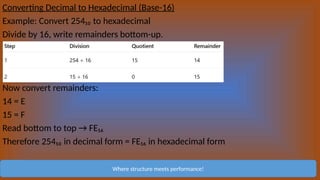
Converting Decimal to Hexadecimal (Base-16)
Example: Convert 254₁₀ to hexadecimal
Divide by 16, write remainders bottom-up.
Now convert remainders:
14 = E
15 = F
Read bottom to top → FE₁₆
Therefore 254₁₀ in decimal form = FE₁₆ in hexadecimal form
Where structure meets performance!
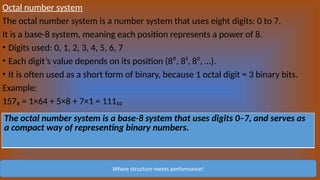
Octal number system
The octal number system is a number system that uses eight digits: 0 to 7.
It is a base-8 system, meaning each position represents a power of 8.
• Digits used: 0, 1, 2, 3, 4, 5, 6, 7
• Each digit’s value depends on its position (8⁰, 8¹, 8², …).
• It is often used as a short form of binary, because 1 octal digit = 3 binary bits.
Example:
157₈ = 1×64 + 5×8 + 7×1 = 111₁₀
Where structure meets performance!
The octal number system is a base-8 system that uses digits 0–7, and serves as
a compact way of representing binary numbers.
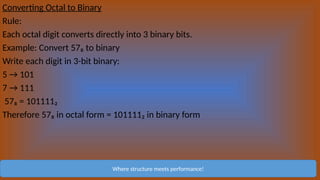
Converting Octal to Binary
Rule:
Each octal digit converts directly into 3 binary bits.
Example: Convert 57₈ to binary
Write each digit in 3-bit binary:
5 → 101
7 → 111
57₈ = 101111₂
Therefore 57₈ in octal form = 101111₂ in binary form
Where structure meets performance!
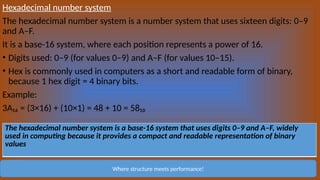
Hexadecimal number system
The hexadecimal number system is a number system that uses sixteen digits: 0–9
and A–F.
It is a base-16 system, where each position represents a power of 16.
• Digits used: 0–9 (for values 0–9) and A–F (for values 10–15).
• Hex is commonly used in computers as a short and readable form of binary,
because 1 hex digit = 4 binary bits.
Example:
3A₁₆ = (3×16) + (10×1) = 48 + 10 = 58₁₀
Where structure meets performance!
The hexadecimal number system is a base-16 system that uses digits 0–9 and A–F, widely
used in computing because it provides a compact and readable representation of binary
values
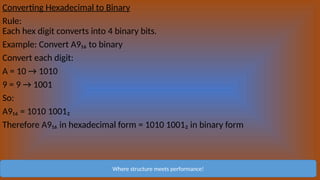
Converting Hexadecimal to Binary
Rule:
Each hex digit converts into 4 binary bits.
Example: Convert A9₁₆ to binary
Convert each digit:
A = 10 → 1010
9 = 9 → 1001
So:
A9₁₆ = 1010 1001₂
Therefore A9₁₆ in hexadecimal form = 1010 1001₂ in binary form
Where structure meets performance!
When IT becames COMPUTER SCIENCE

COMPUTER SYSTEMS AND BINARY NUMBERS ARCH

  • 1.
    ITU 07106 COMPUTER SYSTEMSARCHITECTURE Lecturer name: Mr. Deusdedit Oygen Mwalongo Contact details: 0689923147 (Whatsapp) 0765579741 E-mail: tunovenajb@gmail.com Number of credits: 10
  • 2.
    Where structure meetsperformance! Now before we explore the contents of Computer Systems Architecture let’s briefly explain what this course is all about.. “Computer Systems Architecture is the study of how a computer is designed, organized, and made to work internally” “It focuses on what components exist inside a computer, how they interact, and how they are controlled to perform tasks efficiently” Think of it as understanding how the “inside” of a computer works, just the way an engineer understands how all parts of a car work together. Bird’s-Eye Overview of Computer Systems Architecture
  • 3.
    TOPIC 1: APPLICATIONSOF DIFFERENT NUMBER SYSTEMS, OPERATIONS AND CODES IN ORGANIZING COMPUTER HARDWARE • Describe different number systems and codes • Perform conversion between different number systems • Apply error detection and error correction codes • Apply Binary Arithmetic Operations • Perform Octal and Hexadecimal Conversion • Apply Floating-Point number Representation CONTENTS Where structure meets performance!
  • 4.
    COMPUTER NUMBER SYSTEMAND CODES Introduction: Electronic and digital systems use various number systems such as Decimal, Binary, Hexadecimal and Octal, which are essential in computing. •Binary (base-2) is the foundation of digital systems. •The Decimal system (base-10) is the standard system for everyday calculations. •Hexadecimal (base-16) and Octal (base-8) are commonly used to simplify the representation of binary data. •Other number systems like Duodecimal (base-12), are less commonly used but have specific applications in certain fields. Where structure meets performance!
  • 5.
    The technique torepresent and work with numbers is called number system. • Decimal number system is the most common number system Where structure meets performance!
  • 6.
    Now here issome more specific description of different types of number systems: Binary number system The binary number system is a way of representing numbers using only two digits: 0 and 1. • It is the fundamental language of computers, because digital electronic circuits have two states: ON (1) and OFF (0) • It is a base-2 system – This means that each digit (called a bit) has a value based on powers of 2. • All data in a computer—numbers, text, images, instructions—is eventually converted into binary. Where structure meets performance! In summary, Binary is a base-2 number system that uses only 0s and 1s to represent all data and instructions inside a computer.
  • 7.
    Conversions into someother number system. Converting Binary to Decimal To convert binary to decimal, multiply each bit by powers of 2. Example: Convert 1011₂ to decimal Write powers of 2 from right to left: Add them: 8 + 0 + 2 + 1 = 11₁₀ Therefore 1011₂ in binary form = 11₁₀ in Decimal form Where structure meets performance!
  • 8.
    Converting Binary toOctal Group binary digits in sets of 3 bits from right to left, then convert each group to decimal. Example: Convert 110101₂ to octal Step 1: Group into 3 bits: 110 101 Step 2: Convert each group to decimal: 110₂ = 6 101₂ = 5 So, octal = 65₈ Therefore 110101₂ in binary form = 65₈ in Octal form Where structure meets performance!
  • 9.
    Converting Binary tohexadecimal Group binary digits in sets of 4 bits from right to left. Example : Convert 10101100₂ to hex Step 1: Group into 4 bits: 1010 1100 Step 2: Convert each group: 1010₂ = 10 = A 1100₂ = 12 = C So, hex = AC₁₆ Therefore 10101100₂ in binary form = AC₁₆ in hex form Where structure meets performance!
  • 10.
    Decimal number system Thedecimal number system is the standard system humans use for counting and arithmetic. It is a base-10 system, meaning it uses ten digits: 0–9. • Each digit’s value depends on its position (place value). • Place values are powers of 10 (ones, tens, hundreds, thousands, etc.). Example: 352₁₀ = 3×100 + 5×10 + 2×1 Where structure meets performance! In summary, The decimal number system is a base-10 system that uses digits 0 to 9, with each digit’s value determined by its position in powers of 10.
  • 11.
    Conversions into someother number system: Converting Decimal to Binary Example: Convert 13₁₀ to binary Divide repeatedly by 2, write the remainders, then read bottom-up. Read remainders from bottom to top → 1101₂ Therefore 13₁₀ in decimal form = 1101₂ in binary form Where structure meets performance!
  • 12.
    Converting Decimal toOctal Example: Convert 56₁₀ to octal Divide repeatedly by 8, write remainders bottom-up Read remainders bottom-up → 70₈ Therefore 56₁₀ in decimal form = 70₈ in octal form Where structure meets performance!
  • 13.
    Converting Decimal toHexadecimal (Base-16) Example: Convert 254₁₀ to hexadecimal Divide by 16, write remainders bottom-up. Now convert remainders: 14 = E 15 = F Read bottom to top → FE₁₆ Therefore 254₁₀ in decimal form = FE₁₆ in hexadecimal form Where structure meets performance!
  • 14.
    Octal number system Theoctal number system is a number system that uses eight digits: 0 to 7. It is a base-8 system, meaning each position represents a power of 8. • Digits used: 0, 1, 2, 3, 4, 5, 6, 7 • Each digit’s value depends on its position (8⁰, 8¹, 8², …). • It is often used as a short form of binary, because 1 octal digit = 3 binary bits. Example: 157₈ = 1×64 + 5×8 + 7×1 = 111₁₀ Where structure meets performance! The octal number system is a base-8 system that uses digits 0–7, and serves as a compact way of representing binary numbers.
  • 15.
    Converting Octal toBinary Rule: Each octal digit converts directly into 3 binary bits. Example: Convert 57₈ to binary Write each digit in 3-bit binary: 5 → 101 7 → 111 57₈ = 101111₂ Therefore 57₈ in octal form = 101111₂ in binary form Where structure meets performance!
  • 16.
    Hexadecimal number system Thehexadecimal number system is a number system that uses sixteen digits: 0–9 and A–F. It is a base-16 system, where each position represents a power of 16. • Digits used: 0–9 (for values 0–9) and A–F (for values 10–15). • Hex is commonly used in computers as a short and readable form of binary, because 1 hex digit = 4 binary bits. Example: 3A₁₆ = (3×16) + (10×1) = 48 + 10 = 58₁₀ Where structure meets performance! The hexadecimal number system is a base-16 system that uses digits 0–9 and A–F, widely used in computing because it provides a compact and readable representation of binary values
  • 17.
    Converting Hexadecimal toBinary Rule: Each hex digit converts into 4 binary bits. Example: Convert A9₁₆ to binary Convert each digit: A = 10 → 1010 9 = 9 → 1001 So: A9₁₆ = 1010 1001₂ Therefore A9₁₆ in hexadecimal form = 1010 1001₂ in binary form Where structure meets performance!
  • 18.
  • 19.
    When IT becamesCOMPUTER SCIENCE