Enterprise Resource Planning (ERP)
Systems
X.R STEFI MERIN
What is ERP?
 An ERP system is an attempt to integrate all functions
across a company to a single computer system that can
serve all those functions’ specific needs.
 “Integration” is the key word for ERP implementation.
 Enterprise resource planning (ERP) is business
process management software that allows an
organization to use a system of integrated
applications to manage the business and automate
many back office functions related to technology,
services and human resources.
What is ERP?
 It may also integrate key customers and suppliers as part
of the enterprise’s operation.
 It provides integrated database and custom-designed
report systems.
 It adopts a set of “best practices” for carrying out all
business processes.
Major Reasons for Adopting ERP
 Integrate financial information
 Integrate customer order information
 Standardize and speed up operations processes
 Reduce inventory
 Standardize Human Resources information
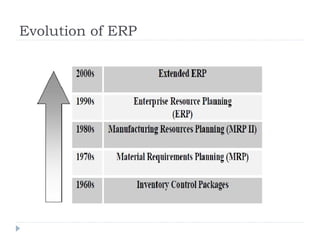
Evolution of ERP
 Inventory Management & Control
 Combination of information technology and business
processes of maintaining the appropriate level of stock in
a warehouse. The activities of inventory management
include identifying inventory requirements, setting
targets, providing replenishment techniques and options,
monitoring item usages, reconciling the inventory
balances, and reporting inventory status.
 Material Requirement Planning (MRP)
 Utilizes software applications for scheduling production
processes. MRP generates schedules for the operations
and raw material purchases based on the production
requirements of finished goods, the structure of the
production system, the current inventories levels and the
lot sizing procedure for each operation.
 Manufacturing Requirements Planning
 (MRP II)Manufacturing Requirements Planning or MRP
utilizes software applications for coordinating
manufacturing processes, from product planning, parts
purchasing, inventory control to product distribution.
 Enterprise Resource Planning or ERP
 Uses multi-module application software for improving the
performance of the internal business processes. ERP
systems often integrates business activities across
functional departments, from product planning, parts
purchasing, inventory control, product distribution,
fulfillment, to order tracking. ERP software systems may
include application modules for supporting marketing,
finance, accounting and human resources.
Potential Benefits of ERP
 Internal Benefits
 Integration of a single source of data
 Common data definition
 A real-time system
 Increased productivity
 Reduced operating costs
 Improved internal communication
 Foundation for future improvement
Potential Benefits of ERP
 External Benefits
 Improved customer service and order fulfillment
 Improved communication with suppliers and
customers
 Enhanced competitive position
 Increased sales and profits
ERP Implementation Approaches
 The big bang – install a single ERP system across the entire
organization
 Franchising – Independent ERP systems are installed in
different units linked by common processes, e.g.,
bookkeeping.
 Slam dunk – install one or several ERP modules for phased
implementation of key business processes.
Major Phases of ERP Implementation (Kent
Sandoe, Enterprise Integration)
 Initiation – develop business case, project scope, and
implementation strategy
 Planning – establish implementation team, determine goals
and objectives, establish metrics
 Analysis and process design – analyze and improve
existing processes, map new processes to be adopted by
the system
Major Phases of ERP Implementation (Kent
Sandoe, Enterprise Integration)
 Realization – install a base system, customization, and test
the system
 Transition – replace the formal system with the new
system, data conversion
 Operation – monitor and improve system performance,
provide continued training and technical support
Major Challenges to ERP Implementation
 Limitations of ERP technical capabilities
 Inconsistency with existing business processes
 Costs - implementation (hardware, software, training,
consulting) and maintenance
 Impact on organizational structure (front office vs. back
office, product lines, etc.)
 Changes in employee responsibilities
Major Challenges to ERP Implementation
 Flexibility of software system upgrades
 Implementation timelines
 Availability of internal technical knowledge and
resources
 Education and training
 Implementation strategy and execution
 Resistance to change
New Developments In ERP
 Availability of web-based and wireless ERP systems
 Adoption of easy-to-install ERP systems
 Linkage to other software systems, e.g., supply chain
management system, e-commerce, customer relationship
management system
Elements of ERP(Architecture of ERP)
 Repository
 GUI Driver
 Logic server
 DB Driver
 RDBMS
 Operating system
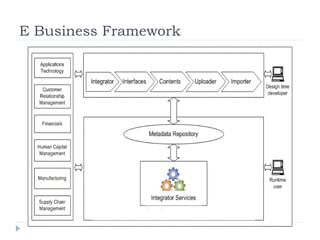
E Business Framework
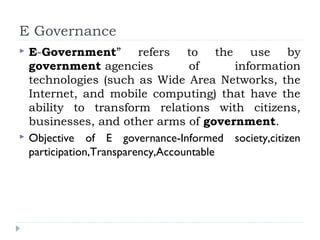
E Governance
 E-Government” refers to the use by
government agencies of information
technologies (such as Wide Area Networks, the
Internet, and mobile computing) that have the
ability to transform relations with citizens,
businesses, and other arms of government.
 Objective of E governance-Informed society,citizen
participation,Transparency,Accountable
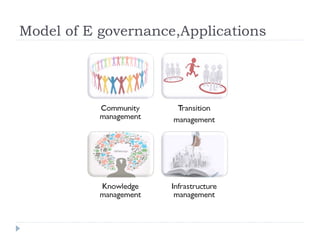
Model of E governance,Applications
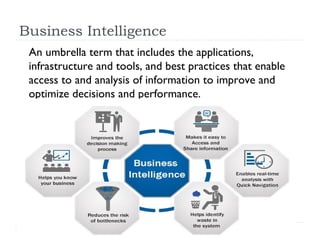
Business Intelligence
An umbrella term that includes the applications,
infrastructure and tools, and best practices that enable
access to and analysis of information to improve and
optimize decisions and performance.
PERVASIVE COMPUTING
 Pervasive computing (also called ubiquitous
computing) is the growing trend towards embedding
microprocessors.
 The words pervasive and ubiquitous mean "existing
everywhere".
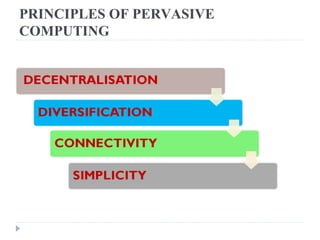
PRINCIPLES OF PERVASIVE
COMPUTING
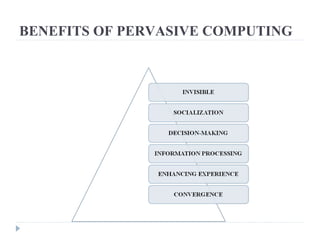
BENEFITS OF PERVASIVE COMPUTING
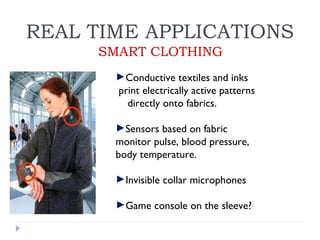
REAL TIME APPLICATIONS
►Conductive textiles and inks
print electrically active patterns
directly onto fabrics.
►Sensors based on fabric
monitor pulse, blood pressure,
body temperature.
►Invisible collar microphones
►Game console on the sleeve?
SMART CLOTHING
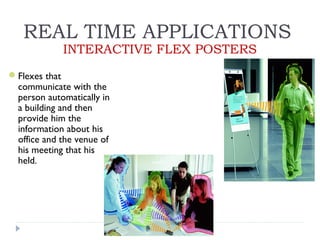
REAL TIME APPLICATIONS
INTERACTIVE FLEX POSTERS
Flexes that
communicate with the
person automatically in
a building and then
provide him the
information about his
office and the venue of
his meeting that his
held.
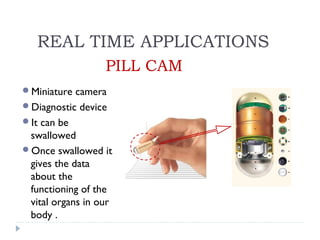
PILL CAM
Miniature camera
Diagnostic device
It can be
swallowed
Once swallowed it
gives the data
about the
functioning of the
vital organs in our
body .
REAL TIME APPLICATIONS
What is Cloud Computing?
Distributed computing on internet Or delivery of
computing service over the internet.
Eg: Yahoo!, GMail, Hotmail
.
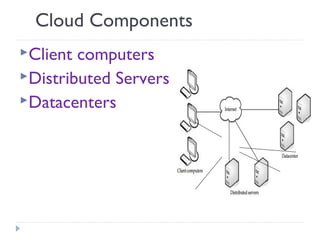
Cloud Components
Client computers
Distributed Servers
Datacenters
Clients
Clients are the device that the end
user interact with cloud.
three types of clients:
1.) Mobile
2.) Thick
3.) Thin (Most Popular)
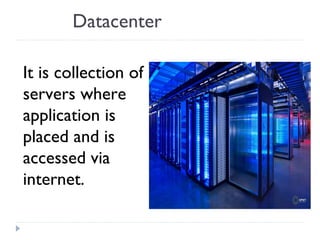
Datacenter
It is collection of
servers where
application is
placed and is
accessed via
internet.
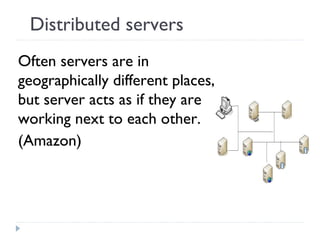
Distributed servers
Often servers are in
geographically different places,
but server acts as if they are
working next to each other.
(Amazon)
Central Server
 It Administers the system such as
monitoring traffic, client demands to
ensure everything runs smoothly.
 It uses a special type of software called
Middleware.
Middleware allow computer to
communicate each other.
Service Models
SaaS(Software as a service): Required
software, Operating system &
network is provided.
PaaS(Platform as service): Operating
system and network is provided.
IaaS(Infrastructure as a service): just
Network is provided.
Deployment of Cloud Service
Public Cloud
Private Cloud
Hybrid Cloud(Combined
Cloud)
Why cloud service is popular?
 Reduce the complexity of networks.
 Do not have to buy software licenses.
 Customization.
 Cloud providers that have specialized in a
particular area (such as e-mail) can bring
advanced services that a single company might
not be able to afford or develop.
 scalability, reliability, and efficiency.
 Info. at cloud are not easily lost.
Application
Social Networking sites.
E-mail sites.
Search Engines.
CMM(CAPABILITY MATURITY MODEL)
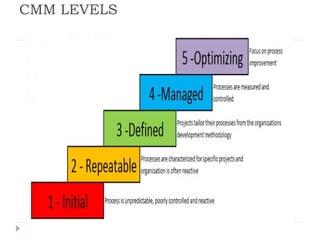
 The Capability Maturity Model (CMM) is a
methodology used to develop and refine an organization's
software development process. The model describes a
five-level evolutionary path of increasingly organized and
systematically more mature processes
CMM LEVELS

Enterprise resource planning (erp) systems

  • 1.
    Enterprise Resource Planning(ERP) Systems X.R STEFI MERIN
  • 2.
    What is ERP? An ERP system is an attempt to integrate all functions across a company to a single computer system that can serve all those functions’ specific needs.  “Integration” is the key word for ERP implementation.
  • 3.
     Enterprise resourceplanning (ERP) is business process management software that allows an organization to use a system of integrated applications to manage the business and automate many back office functions related to technology, services and human resources.
  • 4.
    What is ERP? It may also integrate key customers and suppliers as part of the enterprise’s operation.  It provides integrated database and custom-designed report systems.  It adopts a set of “best practices” for carrying out all business processes.
  • 5.
    Major Reasons forAdopting ERP  Integrate financial information  Integrate customer order information  Standardize and speed up operations processes  Reduce inventory  Standardize Human Resources information
  • 6.
  • 7.
     Inventory Management& Control  Combination of information technology and business processes of maintaining the appropriate level of stock in a warehouse. The activities of inventory management include identifying inventory requirements, setting targets, providing replenishment techniques and options, monitoring item usages, reconciling the inventory balances, and reporting inventory status.
  • 8.
     Material RequirementPlanning (MRP)  Utilizes software applications for scheduling production processes. MRP generates schedules for the operations and raw material purchases based on the production requirements of finished goods, the structure of the production system, the current inventories levels and the lot sizing procedure for each operation.
  • 9.
     Manufacturing RequirementsPlanning  (MRP II)Manufacturing Requirements Planning or MRP utilizes software applications for coordinating manufacturing processes, from product planning, parts purchasing, inventory control to product distribution.
  • 10.
     Enterprise ResourcePlanning or ERP  Uses multi-module application software for improving the performance of the internal business processes. ERP systems often integrates business activities across functional departments, from product planning, parts purchasing, inventory control, product distribution, fulfillment, to order tracking. ERP software systems may include application modules for supporting marketing, finance, accounting and human resources.
  • 11.
    Potential Benefits ofERP  Internal Benefits  Integration of a single source of data  Common data definition  A real-time system  Increased productivity  Reduced operating costs  Improved internal communication  Foundation for future improvement
  • 12.
    Potential Benefits ofERP  External Benefits  Improved customer service and order fulfillment  Improved communication with suppliers and customers  Enhanced competitive position  Increased sales and profits
  • 13.
    ERP Implementation Approaches The big bang – install a single ERP system across the entire organization  Franchising – Independent ERP systems are installed in different units linked by common processes, e.g., bookkeeping.  Slam dunk – install one or several ERP modules for phased implementation of key business processes.
  • 14.
    Major Phases ofERP Implementation (Kent Sandoe, Enterprise Integration)  Initiation – develop business case, project scope, and implementation strategy  Planning – establish implementation team, determine goals and objectives, establish metrics  Analysis and process design – analyze and improve existing processes, map new processes to be adopted by the system
  • 15.
    Major Phases ofERP Implementation (Kent Sandoe, Enterprise Integration)  Realization – install a base system, customization, and test the system  Transition – replace the formal system with the new system, data conversion  Operation – monitor and improve system performance, provide continued training and technical support
  • 16.
    Major Challenges toERP Implementation  Limitations of ERP technical capabilities  Inconsistency with existing business processes  Costs - implementation (hardware, software, training, consulting) and maintenance  Impact on organizational structure (front office vs. back office, product lines, etc.)  Changes in employee responsibilities
  • 17.
    Major Challenges toERP Implementation  Flexibility of software system upgrades  Implementation timelines  Availability of internal technical knowledge and resources  Education and training  Implementation strategy and execution  Resistance to change
  • 18.
    New Developments InERP  Availability of web-based and wireless ERP systems  Adoption of easy-to-install ERP systems  Linkage to other software systems, e.g., supply chain management system, e-commerce, customer relationship management system
  • 19.
    Elements of ERP(Architectureof ERP)  Repository  GUI Driver  Logic server  DB Driver  RDBMS  Operating system
  • 20.
  • 21.
    E Governance  E-Government”refers to the use by government agencies of information technologies (such as Wide Area Networks, the Internet, and mobile computing) that have the ability to transform relations with citizens, businesses, and other arms of government.  Objective of E governance-Informed society,citizen participation,Transparency,Accountable
  • 22.
    Model of Egovernance,Applications
  • 23.
    Business Intelligence An umbrellaterm that includes the applications, infrastructure and tools, and best practices that enable access to and analysis of information to improve and optimize decisions and performance.
  • 24.
    PERVASIVE COMPUTING  Pervasivecomputing (also called ubiquitous computing) is the growing trend towards embedding microprocessors.  The words pervasive and ubiquitous mean "existing everywhere".
  • 25.
  • 26.
  • 27.
    REAL TIME APPLICATIONS ►Conductivetextiles and inks print electrically active patterns directly onto fabrics. ►Sensors based on fabric monitor pulse, blood pressure, body temperature. ►Invisible collar microphones ►Game console on the sleeve? SMART CLOTHING
  • 28.
    REAL TIME APPLICATIONS INTERACTIVEFLEX POSTERS Flexes that communicate with the person automatically in a building and then provide him the information about his office and the venue of his meeting that his held.
  • 29.
    PILL CAM Miniature camera Diagnosticdevice It can be swallowed Once swallowed it gives the data about the functioning of the vital organs in our body . REAL TIME APPLICATIONS
  • 30.
    What is CloudComputing? Distributed computing on internet Or delivery of computing service over the internet. Eg: Yahoo!, GMail, Hotmail .
  • 31.
  • 32.
    Clients Clients are thedevice that the end user interact with cloud. three types of clients: 1.) Mobile 2.) Thick 3.) Thin (Most Popular)
  • 33.
    Datacenter It is collectionof servers where application is placed and is accessed via internet.
  • 34.
    Distributed servers Often serversare in geographically different places, but server acts as if they are working next to each other. (Amazon)
  • 35.
    Central Server  ItAdministers the system such as monitoring traffic, client demands to ensure everything runs smoothly.  It uses a special type of software called Middleware. Middleware allow computer to communicate each other.
  • 36.
    Service Models SaaS(Software asa service): Required software, Operating system & network is provided. PaaS(Platform as service): Operating system and network is provided. IaaS(Infrastructure as a service): just Network is provided.
  • 37.
    Deployment of CloudService Public Cloud Private Cloud Hybrid Cloud(Combined Cloud)
  • 38.
    Why cloud serviceis popular?  Reduce the complexity of networks.  Do not have to buy software licenses.  Customization.  Cloud providers that have specialized in a particular area (such as e-mail) can bring advanced services that a single company might not be able to afford or develop.  scalability, reliability, and efficiency.  Info. at cloud are not easily lost.
  • 39.
  • 40.
    CMM(CAPABILITY MATURITY MODEL) The Capability Maturity Model (CMM) is a methodology used to develop and refine an organization's software development process. The model describes a five-level evolutionary path of increasingly organized and systematically more mature processes
  • 41.

Editor's Notes

  • #31 In computer networking , cloud computing is a phrase used to describe a variety of computing concepts. Distributed computing on internet. Instead of running an e-mail program on your computer, you log in to a Web e-mail account remotely. The software and storage for your account doesn't exist on your computer -- it's on the service's computer cloud
  • #39 Scalability means Unlimited processes and storage capacity.