

ButterKnife 8.2.1
Himanshu Dudhat
Intro
• Field and method binding for Android views which uses annotation processing to generate boilerplate
code for you.
• Eliminate findViewById calls by using @BindView on fields.
• Group multiple views in a list or array. Operate on all of them at once with actions, setters, or properties.
• Eliminate anonymous inner-classes for listeners by annotating methods with @OnClick and others.
• Eliminate resource lookups by using resource annotations on fields.
Configure ButterKnife
• Update Project-level build.gradle
• Apply “android-apt” in module-level build.gradle
buildscript {
repositories {
mavenCentral()
}
dependencies {
classpath 'com.neenbedankt.gradle.plugins:android-apt:1.8'
}
}
apply plugin: 'android-apt'
android {
...
}
dependencies {
compile 'com.jakewharton:butterknife:8.2.1'
apt 'com.jakewharton:butterknife-compiler:8.2.1'
}
Add in library module
• Add Butterknife plugin to project-level build.gradle
• Apply ButterKnife plugin in library module
• Note: If you applied ButterKnife in library project then you neeed to use R2 class instead of R class in
ButterKnife annotations.
buildscript {
repositories {
mavenCentral()
}
dependencies {
classpath 'com.jakewharton:butterknife-gradle-plugin:8.2.1'
}
}
apply plugin: 'com.android.library'
apply plugin: 'com.jakewharton.butterknife'
Features
• VIEW BINDING
• RESOURCE BINDING
• NON-ACTIVITY BINDING
• VIEW LISTS
• LISTENER BINDING
• BINDING RESET
• OPTIONAL BINDINGS
• MULTI-METHOD LISTENERS
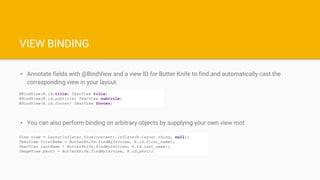
VIEW BINDING
• Annotate fields with @BindView and a view ID for Butter Knife to find and automatically cast the
corresponding view in your layout
• You can also perform binding on arbitrary objects by supplying your own view root
@BindView(R.id.title) TextView title;
@BindView(R.id.subtitle) TextView subtitle;
@BindView(R.id.footer) TextView footer;
View view = LayoutInflater.from(context).inflate(R.layout.thing, null);
TextView firstName = ButterKnife.findById(view, R.id.first_name);
TextView lastName = ButterKnife.findById(view, R.id.last_name);
ImageView photo = ButterKnife.findById(view, R.id.phot);
RESOURCE BINDING
• Bind pre-defined resources with @BindBool, @BindColor, @BindDimen, @BindDrawable, @BindInt,
@BindString, which binds an R.bool ID (or your specified type) to its corresponding field.
@BindString(R.string.title) String title;
@BindDrawable(R.drawable.graphic) Drawable graphic;
@BindColor(R.color.red) int red; // int or ColorStateList field
@BindDimen(R.dimen.spacer) Float spacer; // int (for pixel size) or float (for exact value) field
VIEW LISTS
• You can group multiple views into a List or array
• Then apply method allows you to act on all the views in a list at once
@BindViews({ R.id.first_name, R.id.middle_name, R.id.last_name })
List<EditText> nameViews;
ButterKnife.apply(nameViews, DISABLE);
ButterKnife.apply(nameViews, ENABLED, false);
Continue…
• Action and Setter interfaces allow specifying simple behavior
• An Android Property can also be used with the apply method.
static final ButterKnife.Action<View> DISABLE = new
ButterKnife.Action<View>() {
@Override public void apply(View view, int index) {
view.setEnabled(false);
}
};
static final ButterKnife.Setter<View, Boolean> ENABLED = new
ButterKnife.Setter<View, Boolean>() {
@Override public void set(View view, Boolean value, int index) {
view.setEnabled(value);
}
};
ButterKnife.apply(nameViews, View.ALPHA, 0.0f);
LISTENER BINDING
• Listeners can also automatically be configured onto methods
• Specify multiple IDs in a single binding for common event handling.
@OnClick(R.id.submit)
public void submit(View view) {
// TODO submit data to server...
}
@OnClick({ R.id.door1, R.id.door2, R.id.door3 })
public void pickDoor(DoorView door) {
if (door.hasPrizeBehind()) {
Toast.makeText(this, "You win!", LENGTH_SHORT).show();
} else {
Toast.makeText(this, "Try again", LENGTH_SHORT).show();
}
}
BINDING RESET
• Fragments have a different view lifecycle than activities. Views should set to be null in
onDestroyViews().
public class FancyFragment extends Fragment {
@BindView(R.id.button1) Button button1;
@BindView(R.id.button2) Button button2;
private Unbinder unbinder;
@Override public View onCreateView(LayoutInflater inflater, ViewGroup container, Bundle savedInstanceState) {
View view = inflater.inflate(R.layout.fancy_fragment, container, false);
unbinder = ButterKnife.bind(this, view);
// TODO Use fields...
return view;
}
@Override public void onDestroyView() {
super.onDestroyView();
unbinder.unbind();
}
}
OPTIONAL BINDINGS
• For Views, it is using android defined annotation, @Nullable
• For methods, it is using ButterKnife annotation - @Optional
@Nullable @BindView(R.id.might_not_be_there)
TextView mightNotBeThere;
@Optional @OnClick(R.id.maybe_missing) void onMaybeMissingClicked() {
// TODO ...
}
MULTI-METHOD LISTENERS
• Method annotations whose corresponding listener has multiple callbacks can be used to bind to any
one of them. Each annotation has a default callback that it binds to. Specify an alternate using the
callback parameter.
E.g.
@OnItemSelected(R.id.list_view)
void onItemSelected(int position) {
// TODO ...
}
@OnItemSelected(value = R.id.maybe_missing, callback = NOTHING_SELECTED)
void onNothingSelected() {
// TODO ...
}
References
• http://jakewharton.github.io/butterknife
• https://www.sitepoint.com/tidying-code-with-android-butterknife/
• https://guides.codepath.com/android/Reducing-View-Boilerplate-with-Butterknife
Questions?
Thanks!
+HimanshuDudhat
@HimanshuDudhat
himanshu.dudhat@gmail.com
Team Lead - Android @ Cygnet Infotech Pvt. Ltd.
Sr. Software Engineer @ Cygnet Infotech Pvt. Ltd
Himanshu Dudhat

ButterKnife

  • 1.
  • 2.
    Intro • Field andmethod binding for Android views which uses annotation processing to generate boilerplate code for you. • Eliminate findViewById calls by using @BindView on fields. • Group multiple views in a list or array. Operate on all of them at once with actions, setters, or properties. • Eliminate anonymous inner-classes for listeners by annotating methods with @OnClick and others. • Eliminate resource lookups by using resource annotations on fields.
  • 3.
    Configure ButterKnife • UpdateProject-level build.gradle • Apply “android-apt” in module-level build.gradle buildscript { repositories { mavenCentral() } dependencies { classpath 'com.neenbedankt.gradle.plugins:android-apt:1.8' } } apply plugin: 'android-apt' android { ... } dependencies { compile 'com.jakewharton:butterknife:8.2.1' apt 'com.jakewharton:butterknife-compiler:8.2.1' }
  • 4.
    Add in librarymodule • Add Butterknife plugin to project-level build.gradle • Apply ButterKnife plugin in library module • Note: If you applied ButterKnife in library project then you neeed to use R2 class instead of R class in ButterKnife annotations. buildscript { repositories { mavenCentral() } dependencies { classpath 'com.jakewharton:butterknife-gradle-plugin:8.2.1' } } apply plugin: 'com.android.library' apply plugin: 'com.jakewharton.butterknife'
  • 5.
    Features • VIEW BINDING •RESOURCE BINDING • NON-ACTIVITY BINDING • VIEW LISTS • LISTENER BINDING • BINDING RESET • OPTIONAL BINDINGS • MULTI-METHOD LISTENERS
  • 6.
    VIEW BINDING • Annotatefields with @BindView and a view ID for Butter Knife to find and automatically cast the corresponding view in your layout • You can also perform binding on arbitrary objects by supplying your own view root @BindView(R.id.title) TextView title; @BindView(R.id.subtitle) TextView subtitle; @BindView(R.id.footer) TextView footer; View view = LayoutInflater.from(context).inflate(R.layout.thing, null); TextView firstName = ButterKnife.findById(view, R.id.first_name); TextView lastName = ButterKnife.findById(view, R.id.last_name); ImageView photo = ButterKnife.findById(view, R.id.phot);
  • 7.
    RESOURCE BINDING • Bindpre-defined resources with @BindBool, @BindColor, @BindDimen, @BindDrawable, @BindInt, @BindString, which binds an R.bool ID (or your specified type) to its corresponding field. @BindString(R.string.title) String title; @BindDrawable(R.drawable.graphic) Drawable graphic; @BindColor(R.color.red) int red; // int or ColorStateList field @BindDimen(R.dimen.spacer) Float spacer; // int (for pixel size) or float (for exact value) field
  • 8.
    VIEW LISTS • Youcan group multiple views into a List or array • Then apply method allows you to act on all the views in a list at once @BindViews({ R.id.first_name, R.id.middle_name, R.id.last_name }) List<EditText> nameViews; ButterKnife.apply(nameViews, DISABLE); ButterKnife.apply(nameViews, ENABLED, false);
  • 9.
    Continue… • Action andSetter interfaces allow specifying simple behavior • An Android Property can also be used with the apply method. static final ButterKnife.Action<View> DISABLE = new ButterKnife.Action<View>() { @Override public void apply(View view, int index) { view.setEnabled(false); } }; static final ButterKnife.Setter<View, Boolean> ENABLED = new ButterKnife.Setter<View, Boolean>() { @Override public void set(View view, Boolean value, int index) { view.setEnabled(value); } }; ButterKnife.apply(nameViews, View.ALPHA, 0.0f);
  • 10.
    LISTENER BINDING • Listenerscan also automatically be configured onto methods • Specify multiple IDs in a single binding for common event handling. @OnClick(R.id.submit) public void submit(View view) { // TODO submit data to server... } @OnClick({ R.id.door1, R.id.door2, R.id.door3 }) public void pickDoor(DoorView door) { if (door.hasPrizeBehind()) { Toast.makeText(this, "You win!", LENGTH_SHORT).show(); } else { Toast.makeText(this, "Try again", LENGTH_SHORT).show(); } }
  • 11.
    BINDING RESET • Fragmentshave a different view lifecycle than activities. Views should set to be null in onDestroyViews(). public class FancyFragment extends Fragment { @BindView(R.id.button1) Button button1; @BindView(R.id.button2) Button button2; private Unbinder unbinder; @Override public View onCreateView(LayoutInflater inflater, ViewGroup container, Bundle savedInstanceState) { View view = inflater.inflate(R.layout.fancy_fragment, container, false); unbinder = ButterKnife.bind(this, view); // TODO Use fields... return view; } @Override public void onDestroyView() { super.onDestroyView(); unbinder.unbind(); } }
  • 12.
    OPTIONAL BINDINGS • ForViews, it is using android defined annotation, @Nullable • For methods, it is using ButterKnife annotation - @Optional @Nullable @BindView(R.id.might_not_be_there) TextView mightNotBeThere; @Optional @OnClick(R.id.maybe_missing) void onMaybeMissingClicked() { // TODO ... }
  • 13.
    MULTI-METHOD LISTENERS • Methodannotations whose corresponding listener has multiple callbacks can be used to bind to any one of them. Each annotation has a default callback that it binds to. Specify an alternate using the callback parameter. E.g. @OnItemSelected(R.id.list_view) void onItemSelected(int position) { // TODO ... } @OnItemSelected(value = R.id.maybe_missing, callback = NOTHING_SELECTED) void onNothingSelected() { // TODO ... }
  • 14.
  • 15.
  • 16.
    Thanks! +HimanshuDudhat @HimanshuDudhat himanshu.dudhat@gmail.com Team Lead -Android @ Cygnet Infotech Pvt. Ltd. Sr. Software Engineer @ Cygnet Infotech Pvt. Ltd Himanshu Dudhat