ASCG – personal LinkedIn profiles
LinkedIn
Overview
LinkedIn in numbers:
• 610 million members
• Comments, likes and shares are up more than 60% year-on-year
• 45% of all social media traffic to a company’s homepage comes from LinkedIn
• 61 million LinkedIn users are senior-level influencers
• 40 million are in decision making positions
• 45% of LinkedIn article readers are in upper-level positions (managers, VPs,
Directors, C-level)
• Members engaging with the feed is growing more than 50% year on year
• Views in the LinkedIn feed are up 60% from last year
LinkedIn is here to stay and continues to move on an upward trajectory for both business
and at an individual level.
2
Overview
• Your profile
• A step-by-step guide
• Building your network
• Building your brand
• Tips
• The future of LinkedIn
3
The anatomy of a LinkedIn profile
4
Summary
Recommend-
ations
Skills
Career history
Activity
Interests
Name Headline
Profile pictureBanner image
A step-by-step guide
Banner image and profile picture
5
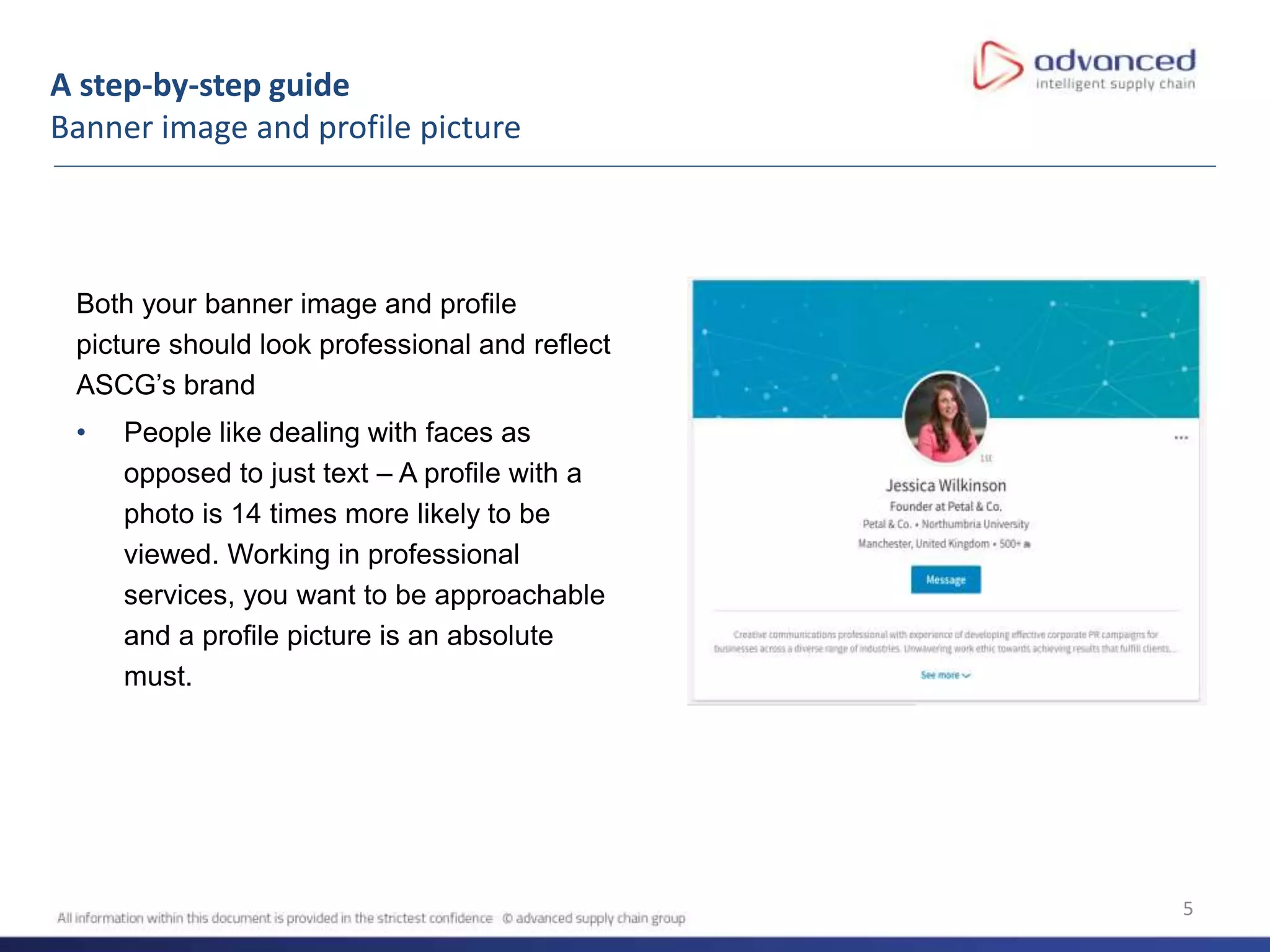
Both your banner image and profile
picture should look professional and reflect
ASCG’s brand
• People like dealing with faces as
opposed to just text – A profile with a
photo is 14 times more likely to be
viewed. Working in professional
services, you want to be approachable
and a profile picture is an absolute
must.
A step-by-step guide
Professional headline & summary
6
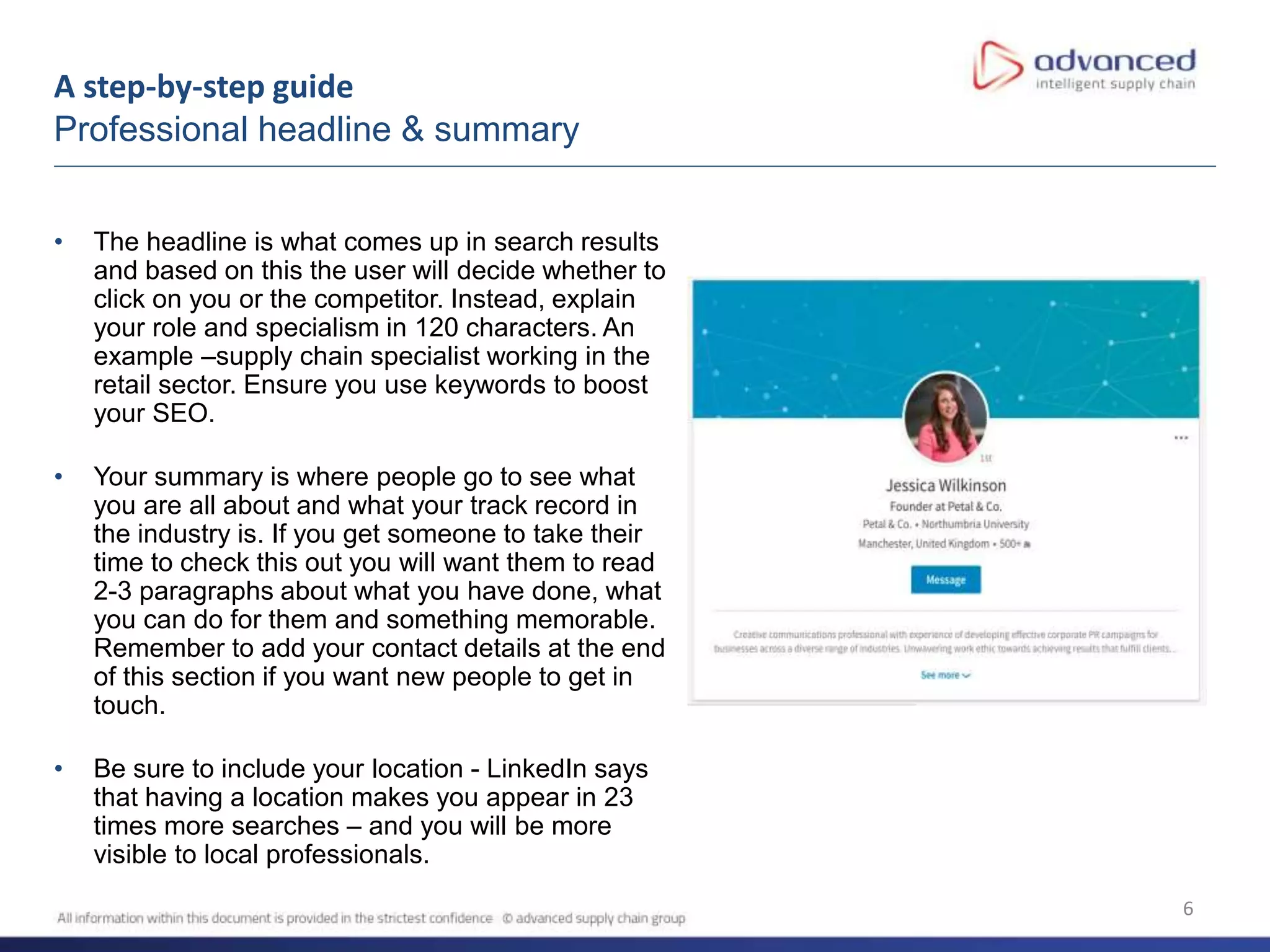
• The headline is what comes up in search results
and based on this the user will decide whether to
click on you or the competitor. Instead, explain
your role and specialism in 120 characters. An
example –supply chain specialist working in the
retail sector. Ensure you use keywords to boost
your SEO.
• Your summary is where people go to see what
you are all about and what your track record in
the industry is. If you get someone to take their
time to check this out you will want them to read
2-3 paragraphs about what you have done, what
you can do for them and something memorable.
Remember to add your contact details at the end
of this section if you want new people to get in
touch.
• Be sure to include your location - LinkedIn says
that having a location makes you appear in 23
times more searches – and you will be more
visible to local professionals.
A step-by-step guide
Activity
7
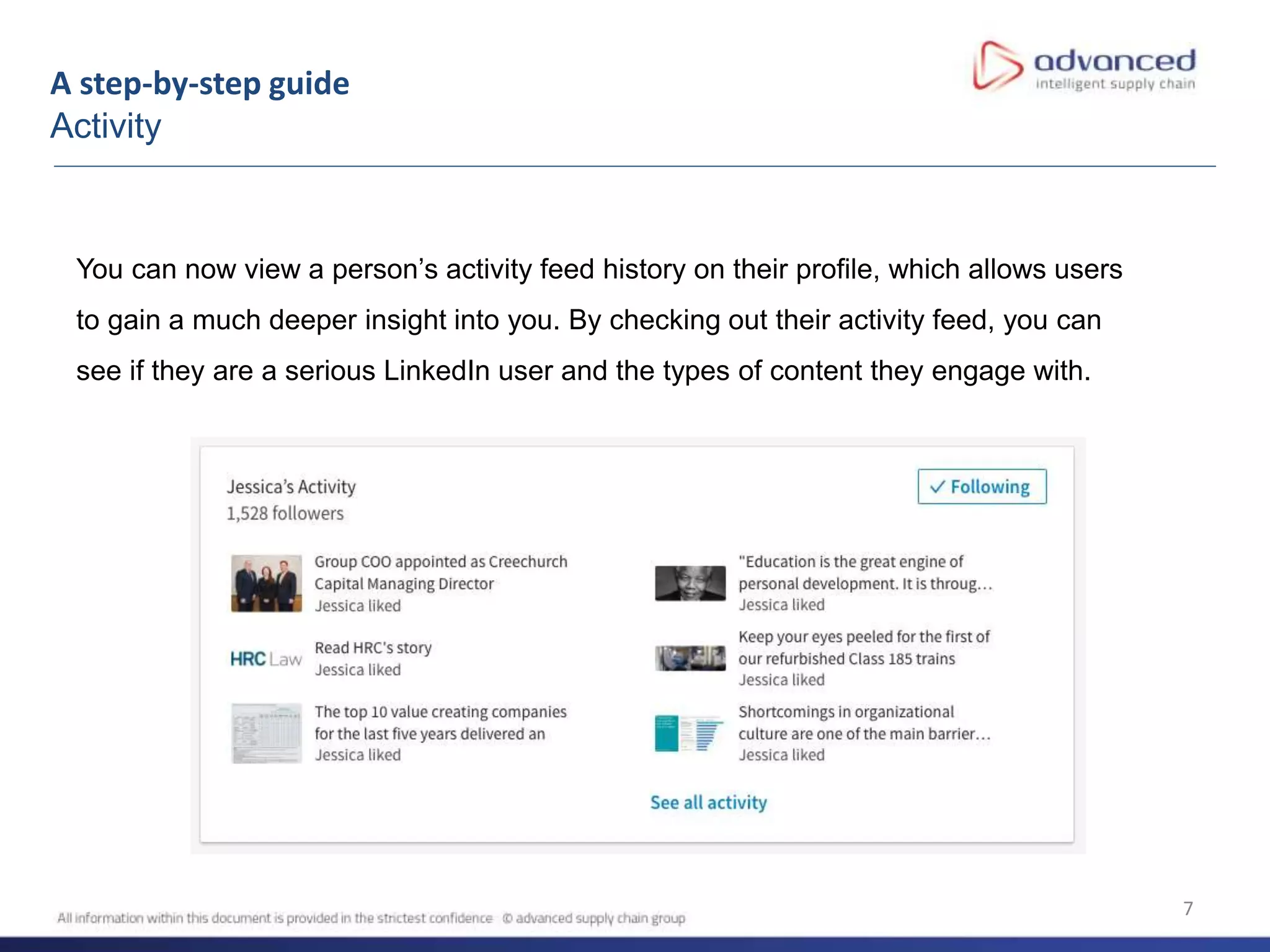
You can now view a person’s activity feed history on their profile, which allows users
to gain a much deeper insight into you. By checking out their activity feed, you can
see if they are a serious LinkedIn user and the types of content they engage with.
A step-by-step guide
Skills & recommendations
8
Ask people who have complimented
your work to recommend you – if
somebody shares a compliment or
testimonial, do ask if they’ll put it into
words on LinkedIn.
A step-by-step guide
Interests
9
• Interests highlight the companies
and organisations you are
interested in.
• LinkedIn have now also started to
show interests in common with
your connections when you view
their profile. Be sure to link to
relevant groups so when people
see your invitation they can see
the your common interests.
• Be sure to follow your clients,
competitors, clients’ competitors to
ensure you stay up-to-date with
their latest news.
Connecting etiquette
Best practice
10
• Personalise your invite where possible, have a look at the profile and try to find
something in common.
• As a matter of course, always add a new contact on LinkedIn immediately after
meeting. As soon as possible ideally, so you’re front of mind. Whether this has been
through a networking event, email correspondence or any other form of
communication; if you’ve connected in any way, solidify this with a LinkedIn connection
request.
11
Key ways to build a personal brand on LinkedIn:
• Post updates, articles and photos/videos
• Comment, share and like interesting content
• Follow companies, influencers, customers, etc.
• Join groups
Building your brand
12
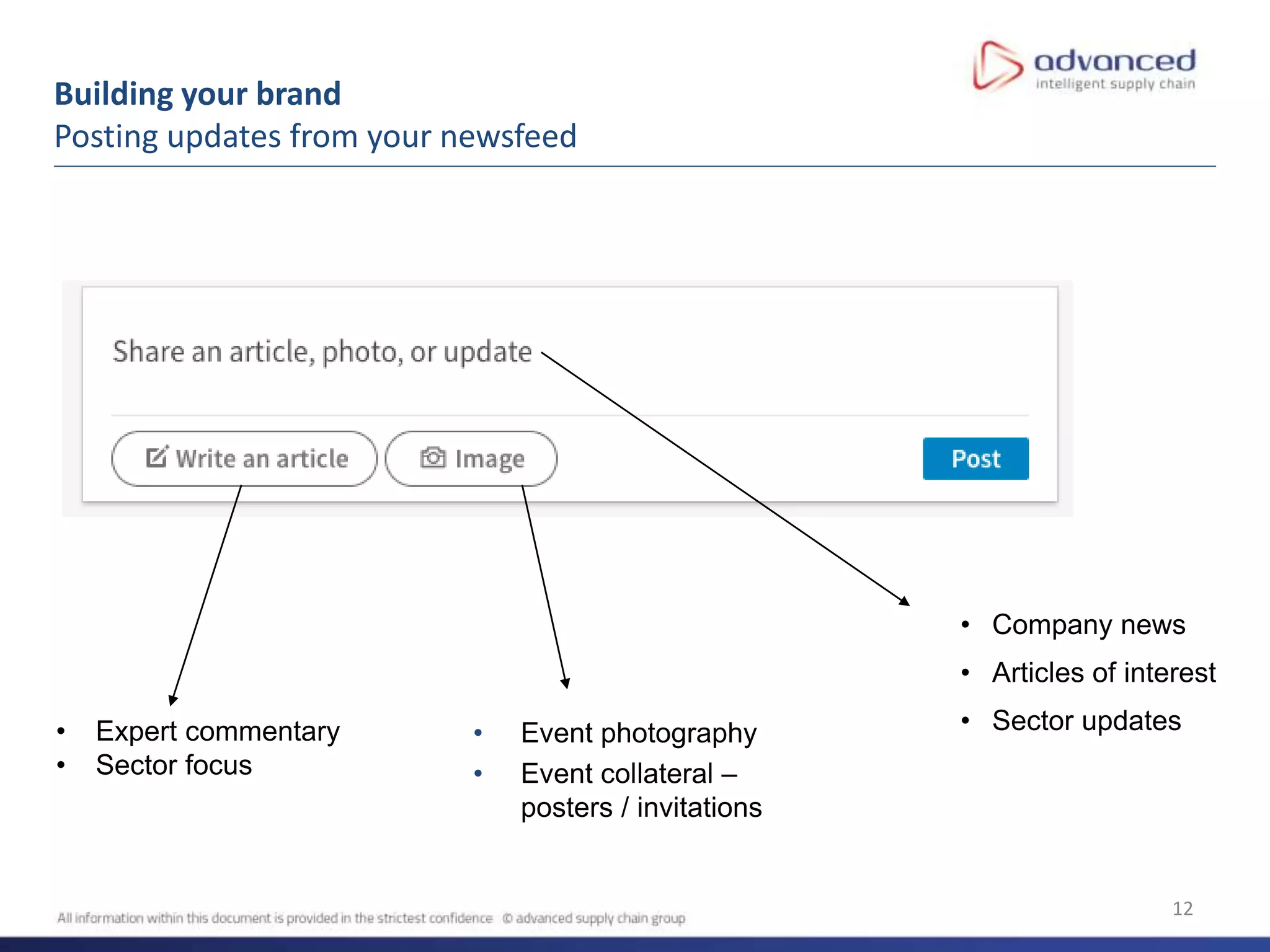
Building your brand
Posting updates from your newsfeed
• Event photography
• Event collateral –
posters / invitations
• Company news
• Articles of interest
• Sector updates• Expert commentary
• Sector focus
13
Building your brand
Share box
When creating a post, share box lets you
decide who can see your content.
• This is a great way to ensure you’re
sharing with the right audience and
messaging can be tailored accordingly.
14
Building your brand
Commenting, liking and sharing
Don’t be put off – you don’t need to create all your own content. Comment, like and share interesting
posts by other users and organisations.
Here are 5 tips to help you engage more on LinkedIn:
• A great way to easily create content is by sharing ASCG posts to your own feed. This ensures your
messaging is on brand and lets someone else do the hard work for you
• Build a routine and set aside 5 minutes each day to engage with other people’s content on LinkedIn
• Set yourself a target of commenting, sharing or liking 5 posts each day
• Download the LinkedIn app so you can get notifications of relevant and interesting posts which you
can quickly and easily engage with
• Connect with colleagues, customers and prospects and follow relevant companies to ensure you are
seeing and engaging with the right content
Not only will this build relationships, but it will also encourage users to like, comment and share the content you
publish, making it visible to a wider audience.
15
• Keep your tone professional but show your personality
• Monitor who’s looking at your and how your profile is performing
• Post a link to your LinkedIn on your email signature to help build connections
• Earmark daily or weekly time slots to manage your profile as part of your routine – one
hour per week
• Share and record successes to monitor effectiveness
• Consider LinkedIn as a channel for promoting other marketing activity – reports,
events. When sharing updates this is a great opportunity to encourage your
connections to sign up to newsletters to stay on top of updates and insights from the
team
• Cross pollinate as much as possible with activity happening elsewhere. Every piece of
content developed, every event attended, every new contact met; ask ‘can this be
utilised / enhanced / backed by LinkedIn? How do we make it more global?
Quick fire tips
16
• LinkedIn is a constantly evolving medium with updates presenting new opportunities to
connect and engage. Some current updates on the horizon:
• The expansion of trending news
• The introduction of LinkedIn Live – currently in beta testing – eventually could be used
to live stream seminars
• The development of the events tool which will work much like Facebook events - users
can see who else is attending, invite other people, and chat with other users in the
event page feed
The future of LinkedIn

Building your presence on LinkedIn

  • 1.
    ASCG – personalLinkedIn profiles LinkedIn
  • 2.
    Overview LinkedIn in numbers: •610 million members • Comments, likes and shares are up more than 60% year-on-year • 45% of all social media traffic to a company’s homepage comes from LinkedIn • 61 million LinkedIn users are senior-level influencers • 40 million are in decision making positions • 45% of LinkedIn article readers are in upper-level positions (managers, VPs, Directors, C-level) • Members engaging with the feed is growing more than 50% year on year • Views in the LinkedIn feed are up 60% from last year LinkedIn is here to stay and continues to move on an upward trajectory for both business and at an individual level. 2
  • 3.
    Overview • Your profile •A step-by-step guide • Building your network • Building your brand • Tips • The future of LinkedIn 3
  • 4.
    The anatomy ofa LinkedIn profile 4 Summary Recommend- ations Skills Career history Activity Interests Name Headline Profile pictureBanner image
  • 5.
    A step-by-step guide Bannerimage and profile picture 5 Both your banner image and profile picture should look professional and reflect ASCG’s brand • People like dealing with faces as opposed to just text – A profile with a photo is 14 times more likely to be viewed. Working in professional services, you want to be approachable and a profile picture is an absolute must.
  • 6.
    A step-by-step guide Professionalheadline & summary 6 • The headline is what comes up in search results and based on this the user will decide whether to click on you or the competitor. Instead, explain your role and specialism in 120 characters. An example –supply chain specialist working in the retail sector. Ensure you use keywords to boost your SEO. • Your summary is where people go to see what you are all about and what your track record in the industry is. If you get someone to take their time to check this out you will want them to read 2-3 paragraphs about what you have done, what you can do for them and something memorable. Remember to add your contact details at the end of this section if you want new people to get in touch. • Be sure to include your location - LinkedIn says that having a location makes you appear in 23 times more searches – and you will be more visible to local professionals.
  • 7.
    A step-by-step guide Activity 7 Youcan now view a person’s activity feed history on their profile, which allows users to gain a much deeper insight into you. By checking out their activity feed, you can see if they are a serious LinkedIn user and the types of content they engage with.
  • 8.
    A step-by-step guide Skills& recommendations 8 Ask people who have complimented your work to recommend you – if somebody shares a compliment or testimonial, do ask if they’ll put it into words on LinkedIn.
  • 9.
    A step-by-step guide Interests 9 •Interests highlight the companies and organisations you are interested in. • LinkedIn have now also started to show interests in common with your connections when you view their profile. Be sure to link to relevant groups so when people see your invitation they can see the your common interests. • Be sure to follow your clients, competitors, clients’ competitors to ensure you stay up-to-date with their latest news.
  • 10.
    Connecting etiquette Best practice 10 •Personalise your invite where possible, have a look at the profile and try to find something in common. • As a matter of course, always add a new contact on LinkedIn immediately after meeting. As soon as possible ideally, so you’re front of mind. Whether this has been through a networking event, email correspondence or any other form of communication; if you’ve connected in any way, solidify this with a LinkedIn connection request.
  • 11.
    11 Key ways tobuild a personal brand on LinkedIn: • Post updates, articles and photos/videos • Comment, share and like interesting content • Follow companies, influencers, customers, etc. • Join groups Building your brand
  • 12.
    12 Building your brand Postingupdates from your newsfeed • Event photography • Event collateral – posters / invitations • Company news • Articles of interest • Sector updates• Expert commentary • Sector focus
  • 13.
    13 Building your brand Sharebox When creating a post, share box lets you decide who can see your content. • This is a great way to ensure you’re sharing with the right audience and messaging can be tailored accordingly.
  • 14.
    14 Building your brand Commenting,liking and sharing Don’t be put off – you don’t need to create all your own content. Comment, like and share interesting posts by other users and organisations. Here are 5 tips to help you engage more on LinkedIn: • A great way to easily create content is by sharing ASCG posts to your own feed. This ensures your messaging is on brand and lets someone else do the hard work for you • Build a routine and set aside 5 minutes each day to engage with other people’s content on LinkedIn • Set yourself a target of commenting, sharing or liking 5 posts each day • Download the LinkedIn app so you can get notifications of relevant and interesting posts which you can quickly and easily engage with • Connect with colleagues, customers and prospects and follow relevant companies to ensure you are seeing and engaging with the right content Not only will this build relationships, but it will also encourage users to like, comment and share the content you publish, making it visible to a wider audience.
  • 15.
    15 • Keep yourtone professional but show your personality • Monitor who’s looking at your and how your profile is performing • Post a link to your LinkedIn on your email signature to help build connections • Earmark daily or weekly time slots to manage your profile as part of your routine – one hour per week • Share and record successes to monitor effectiveness • Consider LinkedIn as a channel for promoting other marketing activity – reports, events. When sharing updates this is a great opportunity to encourage your connections to sign up to newsletters to stay on top of updates and insights from the team • Cross pollinate as much as possible with activity happening elsewhere. Every piece of content developed, every event attended, every new contact met; ask ‘can this be utilised / enhanced / backed by LinkedIn? How do we make it more global? Quick fire tips
  • 16.
    16 • LinkedIn isa constantly evolving medium with updates presenting new opportunities to connect and engage. Some current updates on the horizon: • The expansion of trending news • The introduction of LinkedIn Live – currently in beta testing – eventually could be used to live stream seminars • The development of the events tool which will work much like Facebook events - users can see who else is attending, invite other people, and chat with other users in the event page feed The future of LinkedIn