Outline
● Procedure
● Trouble shooting
Procedure
●
Download the tarball package
●
Under the Linux (RHEL 6/CentOS 6), make sure
needed tools (automake, cmake, rpmbuild...etc.)
are installed
●
Create folder “rpmbuild/SOURCES” and put the
tarball package into the folder
● Extract the tarball package of OVS
●
Enter the extracted folder of OVS
●
Enter the folder “rhel” to build OVS RPM package:
– rpmbuild -bb openvswitch.spec
●
After building the OVS package, start building
kernel module:
– rpmbuild -bb openvswitch-kmod-rhel6.spec
● In the rpmbuild/RPM/x86_64 folder, we'll get bulit
packages
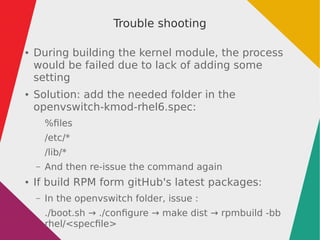
Trouble shooting
● During building the kernel module, the process
would be failed due to lack of adding some
setting
● Solution: add the needed folder in the
openvswitch-kmod-rhel6.spec:
%files
/etc/*
/lib/*
– And then re-issue the command again
● If build RPM form gitHub's latest packages:
– In the openvswitch folder, issue :
./boot.sh → ./configure → make dist → rpmbuild -bb
rhel/<specfile>
Setup OVS bridge under the RHEL/CentOS 6
● Install the OVS packages and start “openvswitch” service
● Disable the service : NetworkManager
●
In the /etc/sysconfig/network-scripts/ :
– If we choose eth0 as the OVS port –
● Change ifcfg-eth0:
# Design for OVS bridge -- physical interface
DEVICE="eth0"
NAME="eth0"
ONBOOT="yes"
NETBOOT="yes"
IPV6INIT="no"
HWADDR="AA:BB:CC:DD:EE:FF"
TYPE="OVSPort"
DEVICETYPE="ovs"
NM_CONTROLLED="no"
OVS_BRIDGE="ovsbr0"
BRIDGE="ovsbr0"
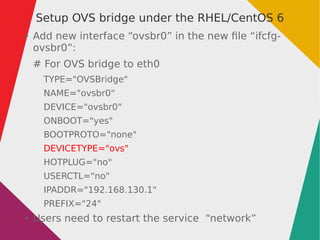
Setup OVS bridge under the RHEL/CentOS 6
● Add new interface “ovsbr0” in the new file “ifcfg-
ovsbr0”:
# For OVS bridge to eth0
TYPE="OVSBridge"
NAME="ovsbr0"
DEVICE="ovsbr0"
ONBOOT="yes"
BOOTPROTO="none"
DEVICETYPE="ovs"
HOTPLUG="no"
USERCTL="no"
IPADDR="192.168.130.1"
PREFIX="24"
● Users need to restart the service “network”
Thanks for your attention

Building ovs

  • 2.
  • 3.
    Procedure ● Download the tarballpackage ● Under the Linux (RHEL 6/CentOS 6), make sure needed tools (automake, cmake, rpmbuild...etc.) are installed ● Create folder “rpmbuild/SOURCES” and put the tarball package into the folder ● Extract the tarball package of OVS ● Enter the extracted folder of OVS ● Enter the folder “rhel” to build OVS RPM package: – rpmbuild -bb openvswitch.spec ● After building the OVS package, start building kernel module: – rpmbuild -bb openvswitch-kmod-rhel6.spec ● In the rpmbuild/RPM/x86_64 folder, we'll get bulit packages
  • 4.
    Trouble shooting ● Duringbuilding the kernel module, the process would be failed due to lack of adding some setting ● Solution: add the needed folder in the openvswitch-kmod-rhel6.spec: %files /etc/* /lib/* – And then re-issue the command again ● If build RPM form gitHub's latest packages: – In the openvswitch folder, issue : ./boot.sh → ./configure → make dist → rpmbuild -bb rhel/<specfile>
  • 5.
    Setup OVS bridgeunder the RHEL/CentOS 6 ● Install the OVS packages and start “openvswitch” service ● Disable the service : NetworkManager ● In the /etc/sysconfig/network-scripts/ : – If we choose eth0 as the OVS port – ● Change ifcfg-eth0: # Design for OVS bridge -- physical interface DEVICE="eth0" NAME="eth0" ONBOOT="yes" NETBOOT="yes" IPV6INIT="no" HWADDR="AA:BB:CC:DD:EE:FF" TYPE="OVSPort" DEVICETYPE="ovs" NM_CONTROLLED="no" OVS_BRIDGE="ovsbr0" BRIDGE="ovsbr0"
  • 6.
    Setup OVS bridgeunder the RHEL/CentOS 6 ● Add new interface “ovsbr0” in the new file “ifcfg- ovsbr0”: # For OVS bridge to eth0 TYPE="OVSBridge" NAME="ovsbr0" DEVICE="ovsbr0" ONBOOT="yes" BOOTPROTO="none" DEVICETYPE="ovs" HOTPLUG="no" USERCTL="no" IPADDR="192.168.130.1" PREFIX="24" ● Users need to restart the service “network”
  • 7.
    Thanks for yourattention