Docker
ao vivo e a cores
Pedro Arthur P. R. Duarte
pedroarthur.jedi@gmail.com
"Na minha máquina
funciona!"
– você?
2
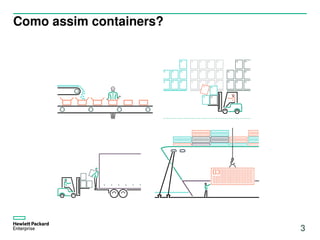
Como assim containers?
3
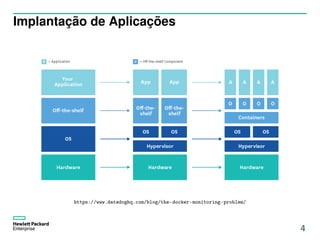
Implantação de Aplicações
https://www.datadoghq.com/blog/the-docker-monitoring-problem/
4
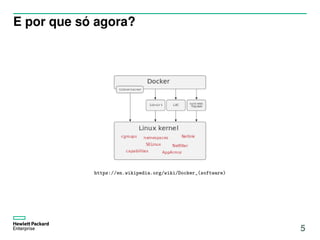
E por que só agora?
https://en.wikipedia.org/wiki/Docker_(software)
5
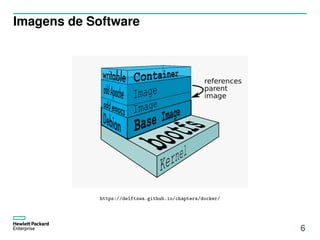
Imagens de Software
https://delftswa.github.io/chapters/docker/
6
Principais engines de tempo de execução
http://docker.com/ http://coreos.com/rkt/
7
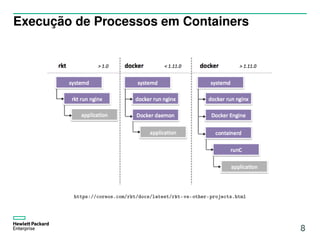
Execução de Processos em Containers
https://coreos.com/rkt/docs/latest/rkt-vs-other-projects.html
8
Ao vivo!
9
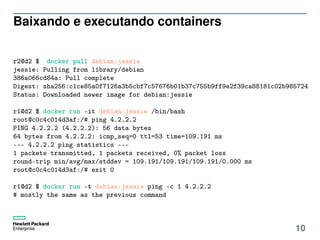
Baixando e executando containers
r2@d2 $ docker pull debian:jessie
jessie: Pulling from library/debian
386a066cd84a: Pull complete
Digest: sha256:c1ce85a0f7126a3b5cbf7c57676b01b37c755b9ff9e2f39ca88181c02b985724
Status: Downloaded newer image for debian:jessie
r1@d2 $ docker run -it debian:jessie /bin/bash
root@c0c4c014d3af:/# ping 4.2.2.2
PING 4.2.2.2 (4.2.2.2): 56 data bytes
64 bytes from 4.2.2.2: icmp_seq=0 ttl=53 time=109.191 ms
--- 4.2.2.2 ping statistics ---
1 packets transmitted, 1 packets received, 0% packet loss
round-trip min/avg/max/stddev = 109.191/109.191/109.191/0.000 ms
root@c0c4c014d3af:/# exit 0
r1@d2 $ docker run -t debian:jessie ping -c 1 4.2.2.2
# mostly the same as the previous command
10
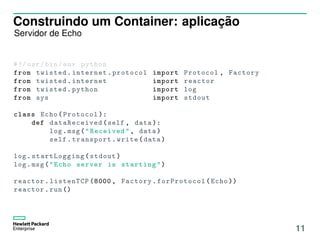
Construindo um Container: aplicação
Servidor de Echo
#!/ usr/bin/env python
from twisted.internet.protocol import Protocol , Factory
from twisted.internet import reactor
from twisted.python import log
from sys import stdout
class Echo(Protocol ):
def dataReceived (self , data ):
log.msg("Received", data)
self.transport.write(data)
log. startLogging (stdout)
log.msg("Echo server is starting")
reactor.listenTCP (8000 , Factory. forProtocol (Echo ))
reactor.run ()
11
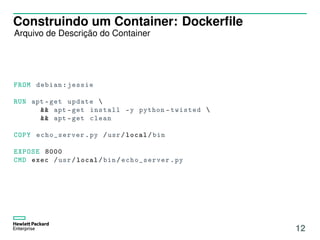
Construindo um Container: Dockerfile
Arquivo de Descrição do Container
FROM debian:jessie
RUN apt -get update 
&& apt -get install -y python -twisted 
&& apt -get clean
COPY echo_server .py /usr/local/bin
EXPOSE 8000
CMD exec /usr/local/bin/ echo_server .py
12
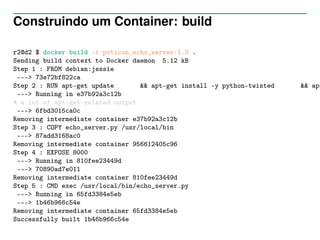
Construindo um Container: build
r2@d2 $ docker build -t poticon_echo_server:1.0 .
Sending build context to Docker daemon 5.12 kB
Step 1 : FROM debian:jessie
---> 73e72bf822ca
Step 2 : RUN apt-get update && apt-get install -y python-twisted && apt
---> Running in e37b92a3c12b
# a lot of apt-get-related output
---> 6fbd3015ca0c
Removing intermediate container e37b92a3c12b
Step 3 : COPY echo_server.py /usr/local/bin
---> 87add3168ac0
Removing intermediate container 956612405c96
Step 4 : EXPOSE 8000
---> Running in 810fee23449d
---> 70890ad7e011
Removing intermediate container 810fee23449d
Step 5 : CMD exec /usr/local/bin/echo_server.py
---> Running in 65fd3384e5eb
---> 1b46b966c54e
Removing intermediate container 65fd3384e5eb
Successfully built 1b46b966c54e
Executando e Testando nosso container
r2@d2 $ docker run -t --net=host poticon_echo_server:1.0
2016-11-24 12:53:19+0000 [-] Log opened.
2016-11-24 12:53:19+0000 [-] Echo server is starting
2016-11-24 12:53:19+0000 [-] Factory starting on 8000
2016-11-24 12:53:19+0000 [-] Starting factory <twisted.internet.protocol.Factory in
2016-11-24 12:53:28+0000 [Echo,0,127.0.0.1] Received Hi, there!
# at another terminal; ts comes from moreutils
r2@d2 $ nc 127.0.0.1 8000 | ts ’%F %T’
Hi, there!
2016-11-24 12:53:28 Hi, there!
14
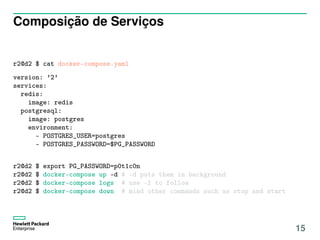
Composição de Serviços
r2@d2 $ cat docker-compose.yaml
version: ’2’
services:
redis:
image: redis
postgresql:
image: postgres
environment:
- POSTGRES_USER=postgres
- POSTGRES_PASSWORD=$PG_PASSWORD
r2@d2 $ export PG_PASSWORD=p0t1c0n
r2@d2 $ docker-compose up -d # -d puts them in background
r2@d2 $ docker-compose logs # use -f to follow
r2@d2 $ docker-compose down # mind other commands such as stop and start
15
Por onde continuar?
16
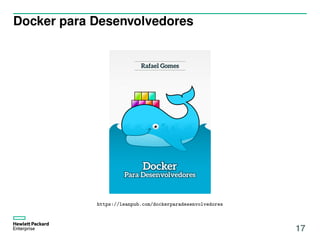
Docker para Desenvolvedores
https://leanpub.com/dockerparadesenvolvedores
17
Links Úteis
Tecnologias de Containers:
– Docker: http://github.com/docker/
– Rkt: http://coreos.com/rkt
Orquestradores de Containers
– CoreOS: http://coreos.com
– Kubernetes: http://github.com/kubernetes
– Swarm: http://docker.com/swarm
18

Docker: ao vivo e a cores

  • 1.
    Docker ao vivo ea cores Pedro Arthur P. R. Duarte pedroarthur.jedi@gmail.com
  • 2.
  • 3.
  • 4.
  • 5.
    E por quesó agora? https://en.wikipedia.org/wiki/Docker_(software) 5
  • 6.
  • 7.
    Principais engines detempo de execução http://docker.com/ http://coreos.com/rkt/ 7
  • 8.
    Execução de Processosem Containers https://coreos.com/rkt/docs/latest/rkt-vs-other-projects.html 8
  • 9.
  • 10.
    Baixando e executandocontainers r2@d2 $ docker pull debian:jessie jessie: Pulling from library/debian 386a066cd84a: Pull complete Digest: sha256:c1ce85a0f7126a3b5cbf7c57676b01b37c755b9ff9e2f39ca88181c02b985724 Status: Downloaded newer image for debian:jessie r1@d2 $ docker run -it debian:jessie /bin/bash root@c0c4c014d3af:/# ping 4.2.2.2 PING 4.2.2.2 (4.2.2.2): 56 data bytes 64 bytes from 4.2.2.2: icmp_seq=0 ttl=53 time=109.191 ms --- 4.2.2.2 ping statistics --- 1 packets transmitted, 1 packets received, 0% packet loss round-trip min/avg/max/stddev = 109.191/109.191/109.191/0.000 ms root@c0c4c014d3af:/# exit 0 r1@d2 $ docker run -t debian:jessie ping -c 1 4.2.2.2 # mostly the same as the previous command 10
  • 11.
    Construindo um Container:aplicação Servidor de Echo #!/ usr/bin/env python from twisted.internet.protocol import Protocol , Factory from twisted.internet import reactor from twisted.python import log from sys import stdout class Echo(Protocol ): def dataReceived (self , data ): log.msg("Received", data) self.transport.write(data) log. startLogging (stdout) log.msg("Echo server is starting") reactor.listenTCP (8000 , Factory. forProtocol (Echo )) reactor.run () 11
  • 12.
    Construindo um Container:Dockerfile Arquivo de Descrição do Container FROM debian:jessie RUN apt -get update && apt -get install -y python -twisted && apt -get clean COPY echo_server .py /usr/local/bin EXPOSE 8000 CMD exec /usr/local/bin/ echo_server .py 12
  • 13.
    Construindo um Container:build r2@d2 $ docker build -t poticon_echo_server:1.0 . Sending build context to Docker daemon 5.12 kB Step 1 : FROM debian:jessie ---> 73e72bf822ca Step 2 : RUN apt-get update && apt-get install -y python-twisted && apt ---> Running in e37b92a3c12b # a lot of apt-get-related output ---> 6fbd3015ca0c Removing intermediate container e37b92a3c12b Step 3 : COPY echo_server.py /usr/local/bin ---> 87add3168ac0 Removing intermediate container 956612405c96 Step 4 : EXPOSE 8000 ---> Running in 810fee23449d ---> 70890ad7e011 Removing intermediate container 810fee23449d Step 5 : CMD exec /usr/local/bin/echo_server.py ---> Running in 65fd3384e5eb ---> 1b46b966c54e Removing intermediate container 65fd3384e5eb Successfully built 1b46b966c54e
  • 14.
    Executando e Testandonosso container r2@d2 $ docker run -t --net=host poticon_echo_server:1.0 2016-11-24 12:53:19+0000 [-] Log opened. 2016-11-24 12:53:19+0000 [-] Echo server is starting 2016-11-24 12:53:19+0000 [-] Factory starting on 8000 2016-11-24 12:53:19+0000 [-] Starting factory <twisted.internet.protocol.Factory in 2016-11-24 12:53:28+0000 [Echo,0,127.0.0.1] Received Hi, there! # at another terminal; ts comes from moreutils r2@d2 $ nc 127.0.0.1 8000 | ts ’%F %T’ Hi, there! 2016-11-24 12:53:28 Hi, there! 14
  • 15.
    Composição de Serviços r2@d2$ cat docker-compose.yaml version: ’2’ services: redis: image: redis postgresql: image: postgres environment: - POSTGRES_USER=postgres - POSTGRES_PASSWORD=$PG_PASSWORD r2@d2 $ export PG_PASSWORD=p0t1c0n r2@d2 $ docker-compose up -d # -d puts them in background r2@d2 $ docker-compose logs # use -f to follow r2@d2 $ docker-compose down # mind other commands such as stop and start 15
  • 16.
  • 17.
  • 18.
    Links Úteis Tecnologias deContainers: – Docker: http://github.com/docker/ – Rkt: http://coreos.com/rkt Orquestradores de Containers – CoreOS: http://coreos.com – Kubernetes: http://github.com/kubernetes – Swarm: http://docker.com/swarm 18