Building Graphical User
Interfaces
5.0
2
Overview
• Constructing GUIs
• Interface components
• GUI layout
• Event handling
Objects First with Java - A Practical Introduction using BlueJ, © David J. Barnes, Michael Kölling
3
GUI Principles
• Components: GUI building blocks.
– Buttons, menus, sliders, etc.
• Layout: arranging components to
form a usable GUI.
– Using layout managers.
• Events: reacting to user input.
– Button presses, menu selections, etc.
Objects First with Java - A Practical Introduction using BlueJ, © David J. Barnes, Michael Kölling
4
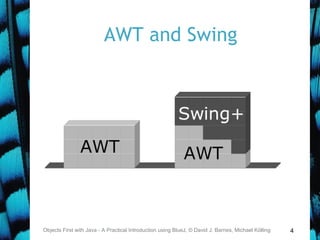
AWT and Swing
Objects First with Java - A Practical Introduction using BlueJ, © David J. Barnes, Michael Kölling
5
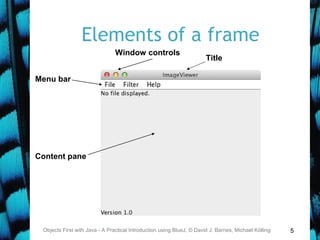
Elements of a frame
Objects First with Java - A Practical Introduction using BlueJ, © David J. Barnes, Michael Kölling
Title
Menu bar
Content pane
Window controls
6
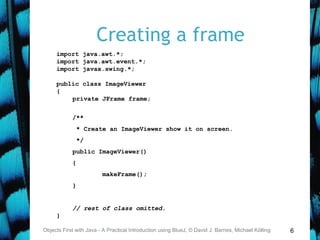
Creating a frame
Objects First with Java - A Practical Introduction using BlueJ, © David J. Barnes, Michael Kölling
import java.awt.*;
import java.awt.event.*;
import javax.swing.*;
public class ImageViewer
{
private JFrame frame;
/**
* Create an ImageViewer show it on screen.
*/
public ImageViewer()
{
makeFrame();
}
// rest of class omitted.
}
7
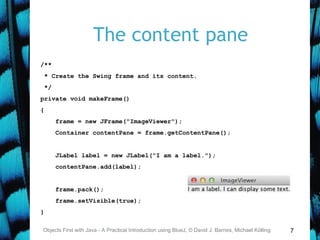
The content pane
Objects First with Java - A Practical Introduction using BlueJ, © David J. Barnes, Michael Kölling
/**
* Create the Swing frame and its content.
*/
private void makeFrame()
{
frame = new JFrame("ImageViewer");
Container contentPane = frame.getContentPane();
JLabel label = new JLabel("I am a label.");
contentPane.add(label);
frame.pack();
frame.setVisible(true);
}
8
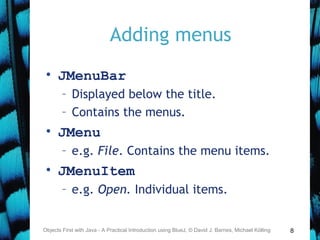
Adding menus
• JMenuBar
– Displayed below the title.
– Contains the menus.
• JMenu
– e.g. File. Contains the menu items.
• JMenuItem
– e.g. Open. Individual items.
Objects First with Java - A Practical Introduction using BlueJ, © David J. Barnes, Michael Kölling
9Objects First with Java - A Practical Introduction using BlueJ, © David J. Barnes, Michael Kölling
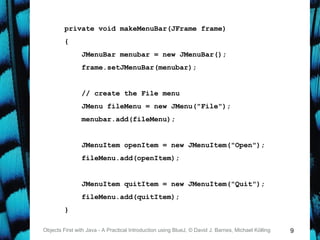
private void makeMenuBar(JFrame frame)
{
JMenuBar menubar = new JMenuBar();
frame.setJMenuBar(menubar);
// create the File menu
JMenu fileMenu = new JMenu("File");
menubar.add(fileMenu);
JMenuItem openItem = new JMenuItem("Open");
fileMenu.add(openItem);
JMenuItem quitItem = new JMenuItem("Quit");
fileMenu.add(quitItem);
}
10
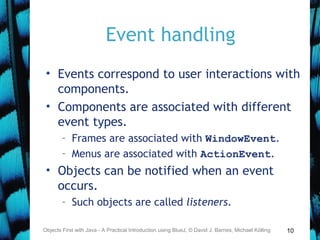
Event handling
• Events correspond to user interactions with
components.
• Components are associated with different
event types.
– Frames are associated with WindowEvent.
– Menus are associated with ActionEvent.
• Objects can be notified when an event
occurs.
– Such objects are called listeners.
Objects First with Java - A Practical Introduction using BlueJ, © David J. Barnes, Michael Kölling
11
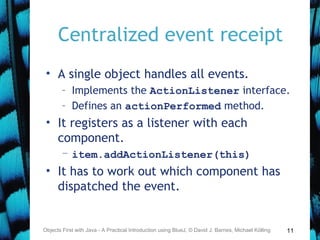
Centralized event receipt
• A single object handles all events.
– Implements the ActionListener interface.
– Defines an actionPerformed method.
• It registers as a listener with each
component.
– item.addActionListener(this)
• It has to work out which component has
dispatched the event.
Objects First with Java - A Practical Introduction using BlueJ, © David J. Barnes, Michael Kölling
12
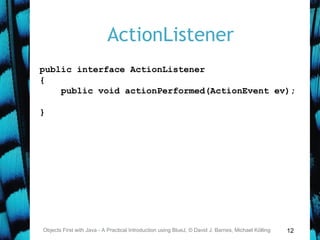
ActionListener
Objects First with Java - A Practical Introduction using BlueJ, © David J. Barnes, Michael Kölling
public interface ActionListener
{
public void actionPerformed(ActionEvent ev);
}
13Objects First with Java - A Practical Introduction using BlueJ, © David J. Barnes, Michael Kölling
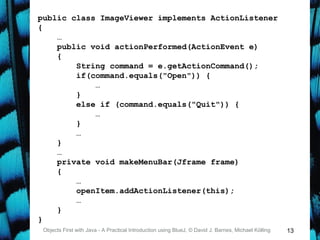
public class ImageViewer implements ActionListener
{
…
public void actionPerformed(ActionEvent e)
{
String command = e.getActionCommand();
if(command.equals("Open")) {
…
}
else if (command.equals("Quit")) {
…
}
…
}
…
private void makeMenuBar(Jframe frame)
{
…
openItem.addActionListener(this);
…
}
}
14
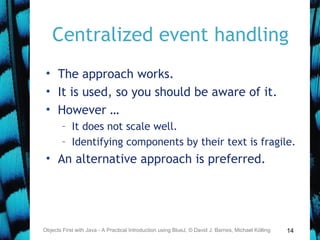
Centralized event handling
• The approach works.
• It is used, so you should be aware of it.
• However …
– It does not scale well.
– Identifying components by their text is fragile.
• An alternative approach is preferred.
Objects First with Java - A Practical Introduction using BlueJ, © David J. Barnes, Michael Kölling
15
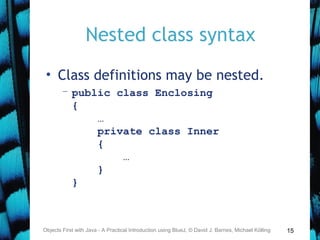
Nested class syntax
• Class definitions may be nested.
– public class Enclosing
{
…
private class Inner
{
…
}
}
Objects First with Java - A Practical Introduction using BlueJ, © David J. Barnes, Michael Kölling
16
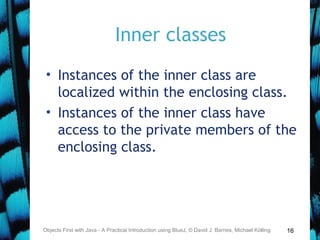
Inner classes
• Instances of the inner class are
localized within the enclosing class.
• Instances of the inner class have
access to the private members of the
enclosing class.
Objects First with Java - A Practical Introduction using BlueJ, © David J. Barnes, Michael Kölling
17
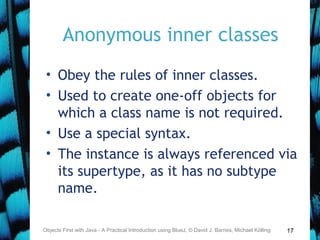
Anonymous inner classes
• Obey the rules of inner classes.
• Used to create one-off objects for
which a class name is not required.
• Use a special syntax.
• The instance is always referenced via
its supertype, as it has no subtype
name.
Objects First with Java - A Practical Introduction using BlueJ, © David J. Barnes, Michael Kölling
18
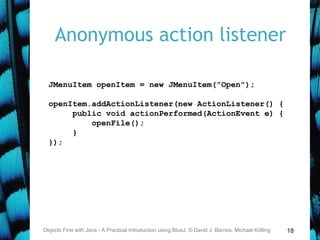
Anonymous action listener
Objects First with Java - A Practical Introduction using BlueJ, © David J. Barnes, Michael Kölling
JMenuItem openItem = new JMenuItem("Open");
openItem.addActionListener(new ActionListener() {
public void actionPerformed(ActionEvent e) {
openFile();
}
});
19
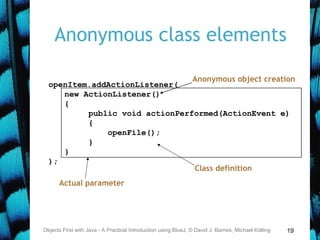
Anonymous class elements
Objects First with Java - A Practical Introduction using BlueJ, © David J. Barnes, Michael Kölling
openItem.addActionListener(
new ActionListener()
{
public void actionPerformed(ActionEvent e)
{
openFile();
}
}
);
Anonymous object creation
Actual parameter
Class definition
20
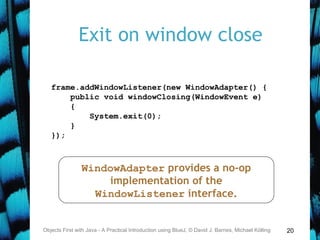
Exit on window close
Objects First with Java - A Practical Introduction using BlueJ, © David J. Barnes, Michael Kölling
frame.addWindowListener(new WindowAdapter() {
public void windowClosing(WindowEvent e)
{
System.exit(0);
}
});
WindowAdapter provides a no-op
implementation of the
WindowListener interface.
21
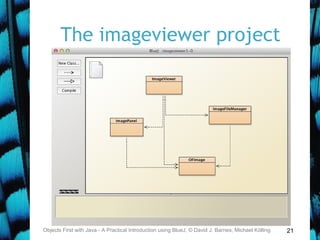
The imageviewer project
Objects First with Java - A Practical Introduction using BlueJ, © David J. Barnes, Michael Kölling
22
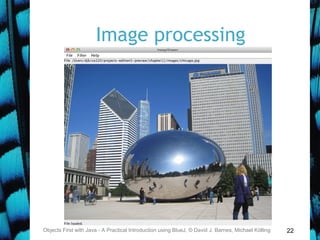
Image processing
Objects First with Java - A Practical Introduction using BlueJ, © David J. Barnes, Michael Kölling
23
Class responsibilities
• ImageViewer
– Sets up the GUI structure.
• ImageFileManager
– Static methods for image file loading and
saving.
• ImagePanel
– Displays the image within the GUI.
• OFImage
– Models a 2D image.
Objects First with Java - A Practical Introduction using BlueJ, © David J. Barnes, Michael Kölling
24
OFImage
• Our subclass of BufferedImage.
• Represents a 2D array of pixels.
• Important methods:
– getPixel, setPixel
– getWidth, getHeight
• Each pixel has a color.
– We use java.awt.Color.
Objects First with Java - A Practical Introduction using BlueJ, © David J. Barnes, Michael Kölling
25
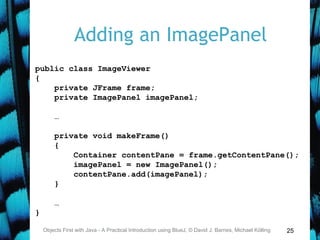
Adding an ImagePanel
Objects First with Java - A Practical Introduction using BlueJ, © David J. Barnes, Michael Kölling
public class ImageViewer
{
private JFrame frame;
private ImagePanel imagePanel;
…
private void makeFrame()
{
Container contentPane = frame.getContentPane();
imagePanel = new ImagePanel();
contentPane.add(imagePanel);
}
…
}
26
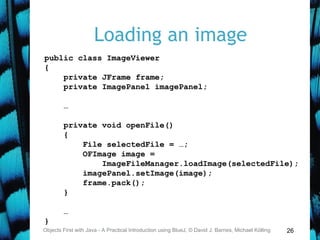
Loading an image
Objects First with Java - A Practical Introduction using BlueJ, © David J. Barnes, Michael Kölling
public class ImageViewer
{
private JFrame frame;
private ImagePanel imagePanel;
…
private void openFile()
{
File selectedFile = …;
OFImage image =
ImageFileManager.loadImage(selectedFile);
imagePanel.setImage(image);
frame.pack();
}
…
}
27
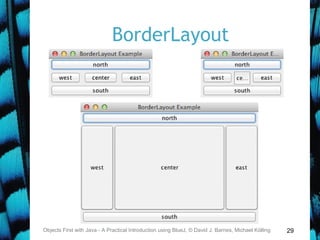
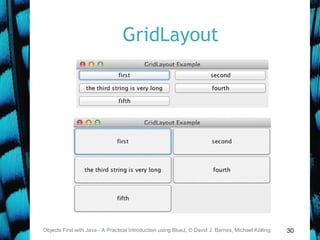
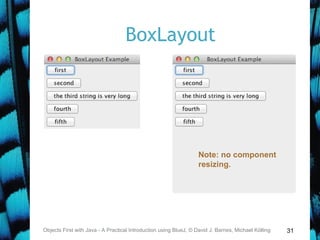
Layout managers
• Manage limited space for competing
components.
– FlowLayout, BorderLayout,
GridLayout, BoxLayout,
GridBagLayout.
• Manage Container objects, e.g. a
content pane.
• Each imposes its own style.
Objects First with Java - A Practical Introduction using BlueJ, © David J. Barnes, Michael Kölling
28
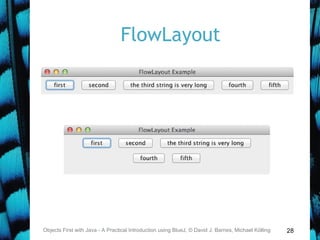
FlowLayout
Objects First with Java - A Practical Introduction using BlueJ, © David J. Barnes, Michael Kölling
29
BorderLayout
Objects First with Java - A Practical Introduction using BlueJ, © David J. Barnes, Michael Kölling
30
GridLayout
Objects First with Java - A Practical Introduction using BlueJ, © David J. Barnes, Michael Kölling
31
BoxLayout
Objects First with Java - A Practical Introduction using BlueJ, © David J. Barnes, Michael Kölling
Note: no component
resizing.
32
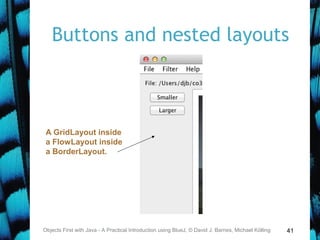
Nested containers
• Sophisticated layouts can be obtained
by nesting containers.
– Use JPanel as a basic container.
• Each container will have its own
layout manager.
• Often preferable to using a
GridBagLayout.
Objects First with Java - A Practical Introduction using BlueJ, © David J. Barnes, Michael Kölling
33
Struts and Glue
• Invisible components used as spacing.
• Available from the Box class.
• Strut: fixed size.
– Component createHorizontalStrut(int width)
– Component createVerticalStrut(int height)
• Glue: fills available space.
– Component createHorizontalGlue()
– Component createVerticalGlue()
http://docs.oracle.com/javase/tutorial/uiswing/layout/bo
x.html
Objects First with Java - A Practical Introduction using BlueJ, © David J. Barnes, Michael Kölling
34
Dialogs
• Modal dialogs block all other
interaction.
– Forces a response from the user.
• Non-modal dialogs allow other
interaction.
– This is sometimes desirable.
– May be difficult to avoid inconsistencies.
Objects First with Java - A Practical Introduction using BlueJ, © David J. Barnes, Michael Kölling
35
JOptionPane standard dialogs
• Message dialog
– Message text plus an OK button.
• Confirm dialog
– Yes, No, Cancel options.
• Input dialog
– Message text and an input field.
• Variations are possible.
Objects First with Java - A Practical Introduction using BlueJ, © David J. Barnes, Michael Kölling
36
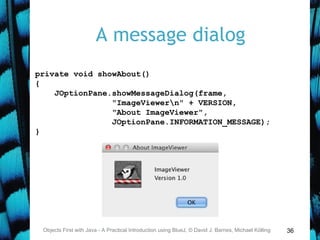
A message dialog
Objects First with Java - A Practical Introduction using BlueJ, © David J. Barnes, Michael Kölling
private void showAbout()
{
JOptionPane.showMessageDialog(frame,
"ImageViewern" + VERSION,
"About ImageViewer",
JOptionPane.INFORMATION_MESSAGE);
}
37
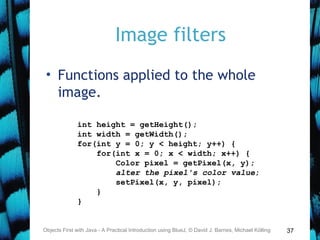
Image filters
• Functions applied to the whole
image.
Objects First with Java - A Practical Introduction using BlueJ, © David J. Barnes, Michael Kölling
int height = getHeight();
int width = getWidth();
for(int y = 0; y < height; y++) {
for(int x = 0; x < width; x++) {
Color pixel = getPixel(x, y);
alter the pixel's color value;
setPixel(x, y, pixel);
}
}
38
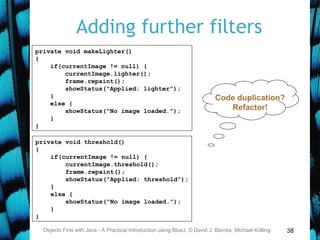
Adding further filters
Objects First with Java - A Practical Introduction using BlueJ, © David J. Barnes, Michael Kölling
private void makeLighter()
{
if(currentImage != null) {
currentImage.lighter();
frame.repaint();
showStatus("Applied: lighter");
}
else {
showStatus("No image loaded.");
}
}
private void threshold()
{
if(currentImage != null) {
currentImage.threshold();
frame.repaint();
showStatus("Applied: threshold");
}
else {
showStatus("No image loaded.");
}
}
Code duplication?
Refactor!
39
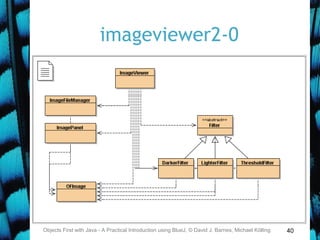
Adding further filters
• Define a Filter superclass
(abstract).
• Create function-specific subclasses.
• Create a collection of subclass
instances in ImageViewer.
• Define a generic applyFilter
method.
• See imageviewer2-0.
Objects First with Java - A Practical Introduction using BlueJ, © David J. Barnes, Michael Kölling
40
imageviewer2-0
Objects First with Java - A Practical Introduction using BlueJ, © David J. Barnes, Michael Kölling
41
Buttons and nested layouts
Objects First with Java - A Practical Introduction using BlueJ, © David J. Barnes, Michael Kölling
A GridLayout inside
a FlowLayout inside
a BorderLayout.
42
Borders
• Used to add decoration around
components.
• Defined in javax.swing.border
– BevelBorder, CompoundBorder,
EmptyBorder, EtchedBorder,
TitledBorder.
Objects First with Java - A Practical Introduction using BlueJ, © David J. Barnes, Michael Kölling
43
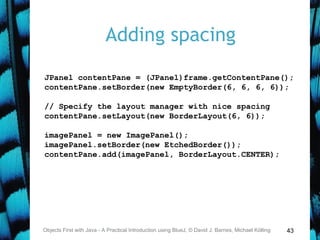
Adding spacing
Objects First with Java - A Practical Introduction using BlueJ, © David J. Barnes, Michael Kölling
JPanel contentPane = (JPanel)frame.getContentPane();
contentPane.setBorder(new EmptyBorder(6, 6, 6, 6));
// Specify the layout manager with nice spacing
contentPane.setLayout(new BorderLayout(6, 6));
imagePanel = new ImagePanel();
imagePanel.setBorder(new EtchedBorder());
contentPane.add(imagePanel, BorderLayout.CENTER);
44
Other components
• Slider
• Spinner
• Tabbed pane
• Scroll pane
Objects First with Java - A Practical Introduction using BlueJ, © David J. Barnes, Michael Kölling
45
Review
• Aim for cohesive application structures.
– Endeavor to keep GUI elements separate from
application functionality.
• Pre-defined components simplify creation
of sophisticated GUIs.
• Layout managers handle component
juxtaposition.
– Nest containers for further control.
Objects First with Java - A Practical Introduction using BlueJ, © David J. Barnes, Michael Kölling
46
Review
• Many components recognize user
interactions with them.
• Reactive components deliver events
to listeners.
• Anonymous inner classes are
commonly used to implement
listeners.
Objects First with Java - A Practical Introduction using BlueJ, © David J. Barnes, Michael Kölling

Building gui

  • 1.
  • 2.
    2 Overview • Constructing GUIs •Interface components • GUI layout • Event handling Objects First with Java - A Practical Introduction using BlueJ, © David J. Barnes, Michael Kölling
  • 3.
    3 GUI Principles • Components:GUI building blocks. – Buttons, menus, sliders, etc. • Layout: arranging components to form a usable GUI. – Using layout managers. • Events: reacting to user input. – Button presses, menu selections, etc. Objects First with Java - A Practical Introduction using BlueJ, © David J. Barnes, Michael Kölling
  • 4.
    4 AWT and Swing ObjectsFirst with Java - A Practical Introduction using BlueJ, © David J. Barnes, Michael Kölling
  • 5.
    5 Elements of aframe Objects First with Java - A Practical Introduction using BlueJ, © David J. Barnes, Michael Kölling Title Menu bar Content pane Window controls
  • 6.
    6 Creating a frame ObjectsFirst with Java - A Practical Introduction using BlueJ, © David J. Barnes, Michael Kölling import java.awt.*; import java.awt.event.*; import javax.swing.*; public class ImageViewer { private JFrame frame; /** * Create an ImageViewer show it on screen. */ public ImageViewer() { makeFrame(); } // rest of class omitted. }
  • 7.
    7 The content pane ObjectsFirst with Java - A Practical Introduction using BlueJ, © David J. Barnes, Michael Kölling /** * Create the Swing frame and its content. */ private void makeFrame() { frame = new JFrame("ImageViewer"); Container contentPane = frame.getContentPane(); JLabel label = new JLabel("I am a label."); contentPane.add(label); frame.pack(); frame.setVisible(true); }
  • 8.
    8 Adding menus • JMenuBar –Displayed below the title. – Contains the menus. • JMenu – e.g. File. Contains the menu items. • JMenuItem – e.g. Open. Individual items. Objects First with Java - A Practical Introduction using BlueJ, © David J. Barnes, Michael Kölling
  • 9.
    9Objects First withJava - A Practical Introduction using BlueJ, © David J. Barnes, Michael Kölling private void makeMenuBar(JFrame frame) { JMenuBar menubar = new JMenuBar(); frame.setJMenuBar(menubar); // create the File menu JMenu fileMenu = new JMenu("File"); menubar.add(fileMenu); JMenuItem openItem = new JMenuItem("Open"); fileMenu.add(openItem); JMenuItem quitItem = new JMenuItem("Quit"); fileMenu.add(quitItem); }
  • 10.
    10 Event handling • Eventscorrespond to user interactions with components. • Components are associated with different event types. – Frames are associated with WindowEvent. – Menus are associated with ActionEvent. • Objects can be notified when an event occurs. – Such objects are called listeners. Objects First with Java - A Practical Introduction using BlueJ, © David J. Barnes, Michael Kölling
  • 11.
    11 Centralized event receipt •A single object handles all events. – Implements the ActionListener interface. – Defines an actionPerformed method. • It registers as a listener with each component. – item.addActionListener(this) • It has to work out which component has dispatched the event. Objects First with Java - A Practical Introduction using BlueJ, © David J. Barnes, Michael Kölling
  • 12.
    12 ActionListener Objects First withJava - A Practical Introduction using BlueJ, © David J. Barnes, Michael Kölling public interface ActionListener { public void actionPerformed(ActionEvent ev); }
  • 13.
    13Objects First withJava - A Practical Introduction using BlueJ, © David J. Barnes, Michael Kölling public class ImageViewer implements ActionListener { … public void actionPerformed(ActionEvent e) { String command = e.getActionCommand(); if(command.equals("Open")) { … } else if (command.equals("Quit")) { … } … } … private void makeMenuBar(Jframe frame) { … openItem.addActionListener(this); … } }
  • 14.
    14 Centralized event handling •The approach works. • It is used, so you should be aware of it. • However … – It does not scale well. – Identifying components by their text is fragile. • An alternative approach is preferred. Objects First with Java - A Practical Introduction using BlueJ, © David J. Barnes, Michael Kölling
  • 15.
    15 Nested class syntax •Class definitions may be nested. – public class Enclosing { … private class Inner { … } } Objects First with Java - A Practical Introduction using BlueJ, © David J. Barnes, Michael Kölling
  • 16.
    16 Inner classes • Instancesof the inner class are localized within the enclosing class. • Instances of the inner class have access to the private members of the enclosing class. Objects First with Java - A Practical Introduction using BlueJ, © David J. Barnes, Michael Kölling
  • 17.
    17 Anonymous inner classes •Obey the rules of inner classes. • Used to create one-off objects for which a class name is not required. • Use a special syntax. • The instance is always referenced via its supertype, as it has no subtype name. Objects First with Java - A Practical Introduction using BlueJ, © David J. Barnes, Michael Kölling
  • 18.
    18 Anonymous action listener ObjectsFirst with Java - A Practical Introduction using BlueJ, © David J. Barnes, Michael Kölling JMenuItem openItem = new JMenuItem("Open"); openItem.addActionListener(new ActionListener() { public void actionPerformed(ActionEvent e) { openFile(); } });
  • 19.
    19 Anonymous class elements ObjectsFirst with Java - A Practical Introduction using BlueJ, © David J. Barnes, Michael Kölling openItem.addActionListener( new ActionListener() { public void actionPerformed(ActionEvent e) { openFile(); } } ); Anonymous object creation Actual parameter Class definition
  • 20.
    20 Exit on windowclose Objects First with Java - A Practical Introduction using BlueJ, © David J. Barnes, Michael Kölling frame.addWindowListener(new WindowAdapter() { public void windowClosing(WindowEvent e) { System.exit(0); } }); WindowAdapter provides a no-op implementation of the WindowListener interface.
  • 21.
    21 The imageviewer project ObjectsFirst with Java - A Practical Introduction using BlueJ, © David J. Barnes, Michael Kölling
  • 22.
    22 Image processing Objects Firstwith Java - A Practical Introduction using BlueJ, © David J. Barnes, Michael Kölling
  • 23.
    23 Class responsibilities • ImageViewer –Sets up the GUI structure. • ImageFileManager – Static methods for image file loading and saving. • ImagePanel – Displays the image within the GUI. • OFImage – Models a 2D image. Objects First with Java - A Practical Introduction using BlueJ, © David J. Barnes, Michael Kölling
  • 24.
    24 OFImage • Our subclassof BufferedImage. • Represents a 2D array of pixels. • Important methods: – getPixel, setPixel – getWidth, getHeight • Each pixel has a color. – We use java.awt.Color. Objects First with Java - A Practical Introduction using BlueJ, © David J. Barnes, Michael Kölling
  • 25.
    25 Adding an ImagePanel ObjectsFirst with Java - A Practical Introduction using BlueJ, © David J. Barnes, Michael Kölling public class ImageViewer { private JFrame frame; private ImagePanel imagePanel; … private void makeFrame() { Container contentPane = frame.getContentPane(); imagePanel = new ImagePanel(); contentPane.add(imagePanel); } … }
  • 26.
    26 Loading an image ObjectsFirst with Java - A Practical Introduction using BlueJ, © David J. Barnes, Michael Kölling public class ImageViewer { private JFrame frame; private ImagePanel imagePanel; … private void openFile() { File selectedFile = …; OFImage image = ImageFileManager.loadImage(selectedFile); imagePanel.setImage(image); frame.pack(); } … }
  • 27.
    27 Layout managers • Managelimited space for competing components. – FlowLayout, BorderLayout, GridLayout, BoxLayout, GridBagLayout. • Manage Container objects, e.g. a content pane. • Each imposes its own style. Objects First with Java - A Practical Introduction using BlueJ, © David J. Barnes, Michael Kölling
  • 28.
    28 FlowLayout Objects First withJava - A Practical Introduction using BlueJ, © David J. Barnes, Michael Kölling
  • 29.
    29 BorderLayout Objects First withJava - A Practical Introduction using BlueJ, © David J. Barnes, Michael Kölling
  • 30.
    30 GridLayout Objects First withJava - A Practical Introduction using BlueJ, © David J. Barnes, Michael Kölling
  • 31.
    31 BoxLayout Objects First withJava - A Practical Introduction using BlueJ, © David J. Barnes, Michael Kölling Note: no component resizing.
  • 32.
    32 Nested containers • Sophisticatedlayouts can be obtained by nesting containers. – Use JPanel as a basic container. • Each container will have its own layout manager. • Often preferable to using a GridBagLayout. Objects First with Java - A Practical Introduction using BlueJ, © David J. Barnes, Michael Kölling
  • 33.
    33 Struts and Glue •Invisible components used as spacing. • Available from the Box class. • Strut: fixed size. – Component createHorizontalStrut(int width) – Component createVerticalStrut(int height) • Glue: fills available space. – Component createHorizontalGlue() – Component createVerticalGlue() http://docs.oracle.com/javase/tutorial/uiswing/layout/bo x.html Objects First with Java - A Practical Introduction using BlueJ, © David J. Barnes, Michael Kölling
  • 34.
    34 Dialogs • Modal dialogsblock all other interaction. – Forces a response from the user. • Non-modal dialogs allow other interaction. – This is sometimes desirable. – May be difficult to avoid inconsistencies. Objects First with Java - A Practical Introduction using BlueJ, © David J. Barnes, Michael Kölling
  • 35.
    35 JOptionPane standard dialogs •Message dialog – Message text plus an OK button. • Confirm dialog – Yes, No, Cancel options. • Input dialog – Message text and an input field. • Variations are possible. Objects First with Java - A Practical Introduction using BlueJ, © David J. Barnes, Michael Kölling
  • 36.
    36 A message dialog ObjectsFirst with Java - A Practical Introduction using BlueJ, © David J. Barnes, Michael Kölling private void showAbout() { JOptionPane.showMessageDialog(frame, "ImageViewern" + VERSION, "About ImageViewer", JOptionPane.INFORMATION_MESSAGE); }
  • 37.
    37 Image filters • Functionsapplied to the whole image. Objects First with Java - A Practical Introduction using BlueJ, © David J. Barnes, Michael Kölling int height = getHeight(); int width = getWidth(); for(int y = 0; y < height; y++) { for(int x = 0; x < width; x++) { Color pixel = getPixel(x, y); alter the pixel's color value; setPixel(x, y, pixel); } }
  • 38.
    38 Adding further filters ObjectsFirst with Java - A Practical Introduction using BlueJ, © David J. Barnes, Michael Kölling private void makeLighter() { if(currentImage != null) { currentImage.lighter(); frame.repaint(); showStatus("Applied: lighter"); } else { showStatus("No image loaded."); } } private void threshold() { if(currentImage != null) { currentImage.threshold(); frame.repaint(); showStatus("Applied: threshold"); } else { showStatus("No image loaded."); } } Code duplication? Refactor!
  • 39.
    39 Adding further filters •Define a Filter superclass (abstract). • Create function-specific subclasses. • Create a collection of subclass instances in ImageViewer. • Define a generic applyFilter method. • See imageviewer2-0. Objects First with Java - A Practical Introduction using BlueJ, © David J. Barnes, Michael Kölling
  • 40.
    40 imageviewer2-0 Objects First withJava - A Practical Introduction using BlueJ, © David J. Barnes, Michael Kölling
  • 41.
    41 Buttons and nestedlayouts Objects First with Java - A Practical Introduction using BlueJ, © David J. Barnes, Michael Kölling A GridLayout inside a FlowLayout inside a BorderLayout.
  • 42.
    42 Borders • Used toadd decoration around components. • Defined in javax.swing.border – BevelBorder, CompoundBorder, EmptyBorder, EtchedBorder, TitledBorder. Objects First with Java - A Practical Introduction using BlueJ, © David J. Barnes, Michael Kölling
  • 43.
    43 Adding spacing Objects Firstwith Java - A Practical Introduction using BlueJ, © David J. Barnes, Michael Kölling JPanel contentPane = (JPanel)frame.getContentPane(); contentPane.setBorder(new EmptyBorder(6, 6, 6, 6)); // Specify the layout manager with nice spacing contentPane.setLayout(new BorderLayout(6, 6)); imagePanel = new ImagePanel(); imagePanel.setBorder(new EtchedBorder()); contentPane.add(imagePanel, BorderLayout.CENTER);
  • 44.
    44 Other components • Slider •Spinner • Tabbed pane • Scroll pane Objects First with Java - A Practical Introduction using BlueJ, © David J. Barnes, Michael Kölling
  • 45.
    45 Review • Aim forcohesive application structures. – Endeavor to keep GUI elements separate from application functionality. • Pre-defined components simplify creation of sophisticated GUIs. • Layout managers handle component juxtaposition. – Nest containers for further control. Objects First with Java - A Practical Introduction using BlueJ, © David J. Barnes, Michael Kölling
  • 46.
    46 Review • Many componentsrecognize user interactions with them. • Reactive components deliver events to listeners. • Anonymous inner classes are commonly used to implement listeners. Objects First with Java - A Practical Introduction using BlueJ, © David J. Barnes, Michael Kölling

Editor's Notes

  • #2 Replace this with your course title and your name/contact details.