Trinity College

                        Java Review


                     An Review
        of the Java Programming Language

                           Timothy Richards

    Trinity College, Hartford CT • Department of Computer Science • CPSC 225
What is Java?
•   Java is an object-oriented PL

•   It is statically typed
    •   Types are checked at compile-time instead of run-time

    •   Eliminates several errors before executing the code

•   It is compiled into bytecode
    •   For execution on the Java Virtual Machine

•   It is popular

•   It has LOTS of libraries

    Trinity College, Hartford CT • Department of Computer Science • CPSC 225
Smallest Java Program

      public class Hello {
        public static void main(String[] args) {
          System.out.println(“Hello, World”);
        }
      }


         Everything in Java is contained
         within a class declaration.


Trinity College, Hartford CT • Department of Computer Science • CPSC 225   3
Smallest Java Program

      public class Hello {
        public static void main(String[] args) {
          System.out.println(“Hello, World”);
        }
      }


         To make a class executable, you
         need a special method called main


Trinity College, Hartford CT • Department of Computer Science • CPSC 225   4
Smallest Java Program

      public class Hello {
        public static void main(String[] args) {
          System.out.println(“Hello, World”);
        }
      }


         The main method is also a static method.
         A static method is associated with a class
         not an instance.


Trinity College, Hartford CT • Department of Computer Science • CPSC 225   5
Smallest Java Program

      public class Hello {
        public static void main(String[] args) {
          System.out.println(“Hello, World”);
        }
      }


         Java has arrays. Java has Strings. In Java,
         you must specify the type of things.

         String[] => an array of String objects


Trinity College, Hartford CT • Department of Computer Science • CPSC 225   6
Smallest Java Program

      public class Hello {
        public static void main(String[] args) {
          System.out.println(“Hello, World”);
        }
      }


         void is also a type. It represents the
         absence of a type. It can only be used to
         indicate that a method returns no value.


Trinity College, Hartford CT • Department of Computer Science • CPSC 225   7
Smallest Java Program

      public class Hello {
        public static void main(String[] args) {
          System.out.println(“Hello, World”);
        }
      }


         So, how do we “run” this program?


Trinity College, Hartford CT • Department of Computer Science • CPSC 225   8
Smallest Java Program

      public class Hello {
        public static void main(String[] args) {
          System.out.println(“Hello, World”);
        }
      }


         So, how do we “run” this program?
         It is a 2-step process:
         1. Compile the program (javac)
         2. Run the program (java)


Trinity College, Hartford CT • Department of Computer Science • CPSC 225   9
Smallest Java Program
                                                      Hello.java
      public class Hello {
        public static void main(String[] args) {
          System.out.println(“Hello, World”);
        }
      }


                                 javac


                               Hello.class             java                output


Trinity College, Hartford CT • Department of Computer Science • CPSC 225            10
Smallest Java Program
                                                      Hello.java
      public class Hello {
        public static void main(String[] args) {
          System.out.println(“Hello, World”);
        }
      }


                                 javac
 Let’s Give it
    A Try!
                               Hello.class             java                output


Trinity College, Hartford CT • Department of Computer Science • CPSC 225            11
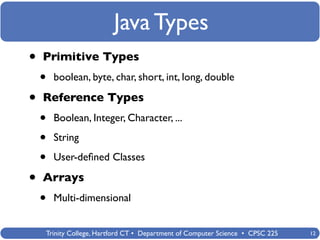
Java Types
•   Primitive Types
    •   boolean, byte, char, short, int, long, double

•   Reference Types
    •   Boolean, Integer, Character, ...

    •   String

    •   User-defined Classes

•   Arrays
    •   Multi-dimensional


    Trinity College, Hartford CT • Department of Computer Science • CPSC 225   12
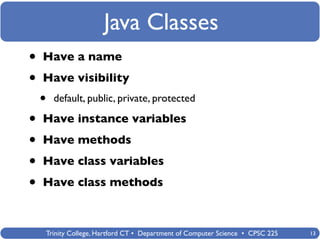
Java Classes
•   Have a name

•   Have visibility
    •   default, public, private, protected

•   Have instance variables

•   Have methods

•   Have class variables

•   Have class methods


    Trinity College, Hartford CT • Department of Computer Science • CPSC 225   13
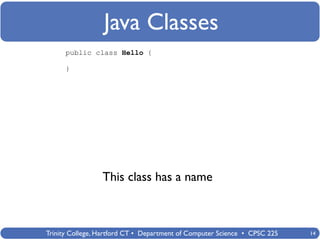
Java Classes
      public class Hello {

      }


                 This class has a name


Trinity College, Hartford CT • Department of Computer Science • CPSC 225   14
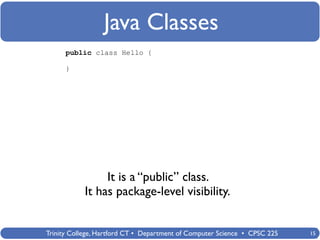
Java Classes
      public class Hello {

      }


                 It is a “public” class.
            It has package-level visibility.


Trinity College, Hartford CT • Department of Computer Science • CPSC 225   15
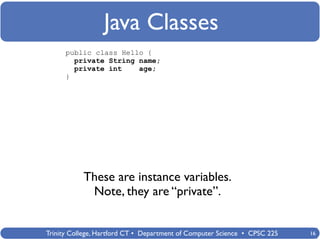
Java Classes
      public class Hello {
        private String name;
        private int    age;
      }


           These are instance variables.
            Note, they are “private”.


Trinity College, Hartford CT • Department of Computer Science • CPSC 225   16
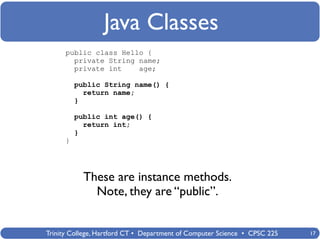
Java Classes
      public class Hello {
        private String name;
        private int    age;

          public String name() {
            return name;
          }

          public int age() {
            return int;
          }
      }


            These are instance methods.
              Note, they are “public”.


Trinity College, Hartford CT • Department of Computer Science • CPSC 225   17
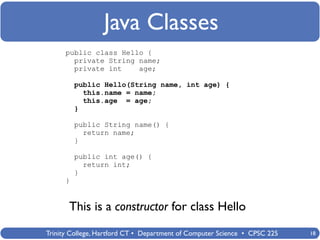
Java Classes
      public class Hello {
        private String name;
        private int    age;

          public Hello(String name, int age) {
            this.name = name;
            this.age = age;
          }

          public String name() {
            return name;
          }

          public int age() {
            return int;
          }
      }


       This is a constructor for class Hello
Trinity College, Hartford CT • Department of Computer Science • CPSC 225   18
Java Classes
public class Hello {                                public class Main {
                                                      public static void main(String[] args)
  private String name;                                {
  private int    age;
                                                        }
    public Hello(String name, int age) {            }
      this.name = name;
      this.age = age;
    }

    public String name() {
      return name;
    }

    public int age() {
      return int;
    }
}


                Let’s create a new class called Main...
           Trinity College, Hartford CT • Department of Computer Science • CPSC 225       19
Java Classes
public class Hello {                                public class Main {
                                                      public static void main(String[] args)
  private String name;                                {
  private int    age;                                   Hello h1 = new Hello(“tim”, 34);
                                                        Hello h2 = new Hello(“sue”, 79);
    public Hello(String name, int age) {              }
                                                    }
      this.name = name;
      this.age = age;
    }

    public String name() {
      return name;
    }

    public int age() {
      return int;
    }
}


              This is how you “create” new objects...
           Trinity College, Hartford CT • Department of Computer Science • CPSC 225       20
Java Classes
public class Hello {                                public class Main {
                                                      public static void main(String[] args)
  private String name;                                {
  private int    age;                                   Hello h1 = new Hello(“tim”, 34);
                                                        Hello h2 = new Hello(“sue”, 79);
    public Hello(String name, int age) {              }
                                                    }
      this.name = name;
      this.age = age;
    }
                                                               h1               h2
    public String name() {
      return name;
    }
                                                       “tim”        34    “sue”       79
    public int age() {
      return int;
    }
}


              This is how you “create” new objects...
           Trinity College, Hartford CT • Department of Computer Science • CPSC 225        21
Java Classes
public class Hello {                                public class Main {
                                                      public static void main(String[] args)
  private String name;                                {
  private int    age;                                   Hello h1 = new Hello(“tim”, 34);
                                                        Hello h2 = new Hello(“sue”, 79);
    public Hello(String name, int age) {
                                                            System.out.println(h1.name());
      this.name = name;                                     System.out.println(h1.age());
      this.age = age;                                       System.out.println(h2.name());
    }                                                       System.out.println(h2.age());
                                                        }
                                                    }
    public String name() {
      return name;
    }

    public int age() {
      return int;
    }
}


               We can print their contents by calling
                      their public methods
           Trinity College, Hartford CT • Department of Computer Science • CPSC 225          22
Java Classes
public class Hello {                                public class Main {
                                                      public static void main(String[] args)
  private String name;                                {
  private int    age;                                   Hello h1 = new Hello(“tim”, 34);
                                                        Hello h2 = new Hello(“sue”, 79);
    public Hello(String name, int age) {
                                                            System.out.println(h1.name());
      this.name = name;                                     System.out.println(h1.age());
      this.age = age;                                       System.out.println(h2.name());
    }                                                       System.out.println(h2.age());
                                                        }
                                                    }
    ...

    public toString() {
      return “Hello(” + name + “ “ +
             age + “)”
    }
}


            Or, we could include a toString method...
           Trinity College, Hartford CT • Department of Computer Science • CPSC 225          23
Java Classes
public class Hello {                                public class Main {
                                                      public static void main(String[] args)
  private String name;                                {
  private int    age;                                   Hello h1 = new Hello(“tim”, 34);
                                                        Hello h2 = new Hello(“sue”, 79);
    public Hello(String name, int age) {
                                                            System.out.println(h1);
      this.name = name;                                     System.out.println(h2);
      this.age = age;                                   }
    }                                               }

    ...

    public toString() {
      return “Hello(” + name + “ “ +
             age + “)”
    }
}


                       And simply print the object
           Trinity College, Hartford CT • Department of Computer Science • CPSC 225       24
Java Classes
public class Hello {                                public class Main {
                                                      public static void main(String[] args)
  private String name;                                {
  private int    age;                                   Hello h1 = new Hello(“tim”, 34);
                                                        Hello h2 = new Hello(“sue”, 79);
    public Hello(String name, int age) {
                                                            System.out.println(h1);
      this.name = name;                                     System.out.println(h2);
      this.age = age;                                   }
    }                                               }

    ...

    public toString() {
      return “Hello(” + name + “ “ +
             age + “)”
    }
}


                                    Let’s Try It!
           Trinity College, Hartford CT • Department of Computer Science • CPSC 225       25
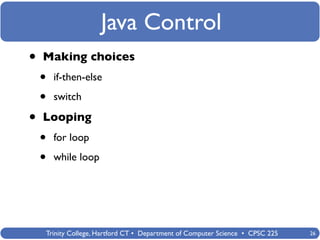
Java Control
•   Making choices
    •   if-then-else

    •   switch

•   Looping
    •   for loop

    •   while loop


    Trinity College, Hartford CT • Department of Computer Science • CPSC 225   26
Java Control - if-else
              public class Main {
                public static void main(String[] args)
                {
                  // Here is a comment
                  /* Here is also a comment
                     on several lines */

                      // declare a variable
                      int val = 5;

                      // check its value
                      if (val == 5)
                        System.out.println(“five”);
                  }
              }


Trinity College, Hartford CT • Department of Computer Science • CPSC 225   27
Java Control - if-else
              public class Main {
                public static void main(String[] args)
                {
                  // Here is a comment
                  /* Here is also a comment
                     on several lines */

                      // declare a variable
                      int val = 5;

                      // check its value
                      if (val == 5)
                        System.out.println(“five”);
                      else
                        System.out.println(“not sure”);
                  }
              }


Trinity College, Hartford CT • Department of Computer Science • CPSC 225   28
Java Control - if-else
              public class Main {
                public static void main(String[] args)
                {
                  // Here is a comment
                  /* Here is also a comment
                     on several lines */

                      // declare a variable
                      int val = 5;

                      // check its value
                      if (val == 5) {
                        System.out.println(“five”);
                      }
                      else {
                        System.out.println(“not sure”);
                      }
                  }
              }


Trinity College, Hartford CT • Department of Computer Science • CPSC 225   29
Java Control - switch
              public class Main {
                public static void main(String[] args)
                {
                  // Here is a comment
                  /* Here is also a comment
                     on several lines */

                      // declare a variable
                      int val = 5;

                      // check its value
                      switch (val) {
                      case 3:
                        System.out.println(“three”);
                        break;
                      case 4:
                        System.out.println(“four”);
                        break;
                      case 5:
                        System.out.println(“five”);
                        break;
                      default:
                        system.out.println(“not sure”);
                      }
                  }
              }


Trinity College, Hartford CT • Department of Computer Science • CPSC 225   30
Java Control - for loop
              public class Main {
                public static void main(String[] args)
                {
                  // Here is a comment
                  /* Here is also a comment
                     on several lines */

                      // declare a variable
                      int val = 5;

                      for (int i = 0; i < val; i++) {
                        System.out.println(i);
                      }
                  }
              }


Trinity College, Hartford CT • Department of Computer Science • CPSC 225   31
Java Control - while loop
              public class Main {
                public static void main(String[] args)
                {
                  // Here is a comment
                  /* Here is also a comment
                     on several lines */

                      // declare a variable
                      int val = 5;

                      while (val != 0) {
                        System.out.println(val);
                        val--;
                                                             Let’s Try It!
                      }
                  }
              }


Trinity College, Hartford CT • Department of Computer Science • CPSC 225     32
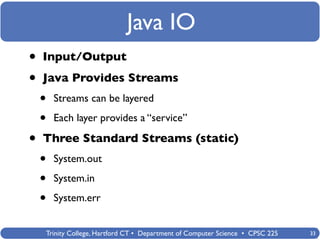
Java IO
•   Input/Output

•   Java Provides Streams
    •   Streams can be layered

    •   Each layer provides a “service”

•   Three Standard Streams (static)
    •   System.out

    •   System.in

    •   System.err


    Trinity College, Hartford CT • Department of Computer Science • CPSC 225   33
Java IO
              public class Main {
                public static void main(String[] args)    System.out is a object of
                {                                         type PrintStream.
                  // We have seen System.out:
                  System.out.println(“hello”);
                }                                         It provides many
              }                                           convenient methods for
                                                          printing data values
                                                          conveniently


Trinity College, Hartford CT • Department of Computer Science • CPSC 225          34
Java IO
                            public class Main {
System.in is an object of     public static void main(String[] args)   System.out is a object of
type InputStream. It          {                                        type PrintStream.
                                // We have seen System.out:
provides methods for            System.out.println(“hello”);
reading bytes.                                                         It provides many
                                    // Reading input:                  convenient methods for
                                    int val = System.in.read();
                                }                                      printing data values
                            }                                          conveniently


            Trinity College, Hartford CT • Department of Computer Science • CPSC 225           35
Java IO
                            public class Main {
System.in is an object of     public static void main(String[] args)   System.out is a object of
type InputStream. It          {                                        type PrintStream.
                                // We have seen System.out:
provides methods for            System.out.println(“hello”);
reading bytes.                                                         It provides many
                                    // Reading input:                  convenient methods for
                                    int val = System.in.read();
How do I read a                 }                                      printing data values
line of input?              }                                          conveniently


            Trinity College, Hartford CT • Department of Computer Science • CPSC 225           36
Java IO
                            public class Main {
System.in is an object of     public static void main(String[] args)      System.out is a object of
type InputStream. It          {                                           type PrintStream.
                                // We have seen System.out:
provides methods for            System.out.println(“hello”);
reading bytes.                                                            It provides many
                                    // Reading input:                     convenient methods for
                                    int val = System.in.read();
How do I read a                                                           printing data values
line of input?                      InputStreamReader is =                conveniently
                                      new InputStreamReader(System.in);
                                    BufferedReader br =
You need to wrap                      new BufferedReader(is);
System.in with an                   String line = br.readLine();
InputStreamReader
                                    System.out.println(line);
and then a                      }
BufferedReader!             }


             Trinity College, Hartford CT • Department of Computer Science • CPSC 225             37
Java IO
                            public class Main {
System.in is an object of     public static void main(String[] args)      System.out is a object of
type InputStream. It          {                                           type PrintStream.
                                // We have seen System.out:
provides methods for            System.out.println(“hello”);
reading bytes.                                                            It provides many
                                    // Reading input:                     convenient methods for
                                    int val = System.in.read();
How do I read a                                                           printing data values
line of input?                      InputStreamReader is =                conveniently
                                      new InputStreamReader(System.in);
                                    BufferedReader br =
You need to wrap                      new BufferedReader(is);
System.in with an                   String line = br.readLine();
InputStreamReader
                                    System.out.println(line);
and then a                      }
BufferedReader!             }


Turns out this is not
quite right...

Let’s give it a try
and see...
             Trinity College, Hartford CT • Department of Computer Science • CPSC 225             38
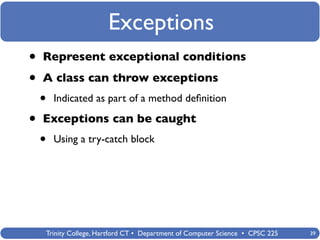
Exceptions
•   Represent exceptional conditions

•   A class can throw exceptions
    •   Indicated as part of a method definition

•   Exceptions can be caught
    •   Using a try-catch block


    Trinity College, Hartford CT • Department of Computer Science • CPSC 225   39
Exceptions
                           import java.io.InputStreamReader;
Easy way:                  import java.io.BufferedReader;
have someone else
                           public class Main {
handle the problem!          public static void main(String[] args) throws IOException
                             {
                               // We have seen System.out:
                               System.out.println(“hello”);

                                   // Reading input:
                                   int val = System.in.read();

                                   InputStreamReader is =
                                     new InputStreamReader(System.in);
                                   BufferedReader br =
                                     new BufferedReader(is);

                                   String line = br.readLine();

                                   System.out.println(line);
                               }
                           }


           Trinity College, Hartford CT • Department of Computer Science • CPSC 225      40
Exceptions
                            import java.io.InputStreamReader;
Easy way:                   import java.io.BufferedReader;
have someone else
                            public class Main {
handle the problem!           public static void main(String[] args)
                              {
Hard way:                       // We have seen System.out:
                                System.out.println(“hello”);
Deal with the problem
using a try-catch block           try {
                                    // Reading input:
                                    int val = System.in.read();

                                   InputStreamReader is =
                                     new InputStreamReader(System.in);
                                   BufferedReader br =
                                     new BufferedReader(is);

                                   String line = br.readLine();

                                   System.out.println(line);
                                  }
                                  catch (IOException e) {
                                    System.out.println(e);
                                  }
                              }


            Trinity College, Hartford CT • Department of Computer Science • CPSC 225   41
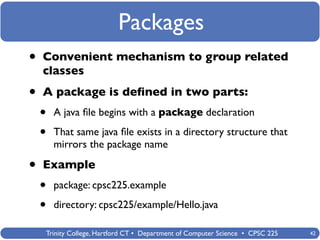
Packages
•   Convenient mechanism to group related
    classes

•   A package is defined in two parts:
    •   A java file begins with a package declaration

    •   That same java file exists in a directory structure that
        mirrors the package name

•   Example
    •   package: cpsc225.example

    •   directory: cpsc225/example/Hello.java

    Trinity College, Hartford CT • Department of Computer Science • CPSC 225   42
Packages
    cpsc225/example                  cpsc225/main                     cpsc225/util


        Foo.java                       Bar.java                         Baz.java


public class Foo {        import cpsc225.example.Foo;               public class Baz {
  ...                     import cpsc225.util.Baz                     ...
}                                                                   }
                          public class Bar {
                            public static void main
                            (String[] args) {
                              Foo f1 = new Foo();
                              Baz b1 = new Baz();


                                  cpsc225.example.Foo f2 =
                                   new cpsc225.example.Foo();

                                  cpsc225.util.Baz b2 =
                                   new cpsc225.util.Baz();
                              }
                          }


          Trinity College, Hartford CT • Department of Computer Science • CPSC 225       43
Packages
    cpsc225/example                   cpsc225/main                    cpsc225/util


        Foo.java                        Bar.java                        Baz.java
package cpsc225.example;   package cpsc225.main;                    package cpsc225.util;

public class Foo {         import cpsc225.example.Foo;              public class Baz {
  ...                      import cpsc225.util.Baz                    ...
}                                                                   }
                           public class Bar {
                             public static void main
                             (String[] args) {
                               Foo f1 = new Foo();
                               Baz b1 = new Baz();
                                                                   Let’s Try It!
                                   cpsc225.example.Foo f2 =
                                    new cpsc225.example.Foo();

                                   cpsc225.util.Baz b2 =
                                    new cpsc225.util.Baz();
                               }
                           }

          Trinity College, Hartford CT • Department of Computer Science • CPSC 225          44
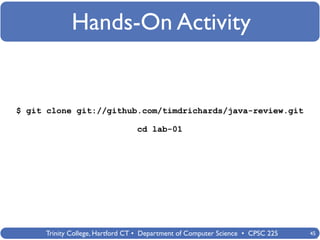
Hands-On Activity


$ git clone git://github.com/timdrichards/java-review.git

                                 cd lab-01


     Trinity College, Hartford CT • Department of Computer Science • CPSC 225   45

java review

  • 1.
    Trinity College Java Review An Review of the Java Programming Language Timothy Richards Trinity College, Hartford CT • Department of Computer Science • CPSC 225
  • 2.
    What is Java? • Java is an object-oriented PL • It is statically typed • Types are checked at compile-time instead of run-time • Eliminates several errors before executing the code • It is compiled into bytecode • For execution on the Java Virtual Machine • It is popular • It has LOTS of libraries Trinity College, Hartford CT • Department of Computer Science • CPSC 225
  • 3.
    Smallest Java Program public class Hello { public static void main(String[] args) { System.out.println(“Hello, World”); } } Everything in Java is contained within a class declaration. Trinity College, Hartford CT • Department of Computer Science • CPSC 225 3
  • 4.
    Smallest Java Program public class Hello { public static void main(String[] args) { System.out.println(“Hello, World”); } } To make a class executable, you need a special method called main Trinity College, Hartford CT • Department of Computer Science • CPSC 225 4
  • 5.
    Smallest Java Program public class Hello { public static void main(String[] args) { System.out.println(“Hello, World”); } } The main method is also a static method. A static method is associated with a class not an instance. Trinity College, Hartford CT • Department of Computer Science • CPSC 225 5
  • 6.
    Smallest Java Program public class Hello { public static void main(String[] args) { System.out.println(“Hello, World”); } } Java has arrays. Java has Strings. In Java, you must specify the type of things. String[] => an array of String objects Trinity College, Hartford CT • Department of Computer Science • CPSC 225 6
  • 7.
    Smallest Java Program public class Hello { public static void main(String[] args) { System.out.println(“Hello, World”); } } void is also a type. It represents the absence of a type. It can only be used to indicate that a method returns no value. Trinity College, Hartford CT • Department of Computer Science • CPSC 225 7
  • 8.
    Smallest Java Program public class Hello { public static void main(String[] args) { System.out.println(“Hello, World”); } } So, how do we “run” this program? Trinity College, Hartford CT • Department of Computer Science • CPSC 225 8
  • 9.
    Smallest Java Program public class Hello { public static void main(String[] args) { System.out.println(“Hello, World”); } } So, how do we “run” this program? It is a 2-step process: 1. Compile the program (javac) 2. Run the program (java) Trinity College, Hartford CT • Department of Computer Science • CPSC 225 9
  • 10.
    Smallest Java Program Hello.java public class Hello { public static void main(String[] args) { System.out.println(“Hello, World”); } } javac Hello.class java output Trinity College, Hartford CT • Department of Computer Science • CPSC 225 10
  • 11.
    Smallest Java Program Hello.java public class Hello { public static void main(String[] args) { System.out.println(“Hello, World”); } } javac Let’s Give it A Try! Hello.class java output Trinity College, Hartford CT • Department of Computer Science • CPSC 225 11
  • 12.
    Java Types • Primitive Types • boolean, byte, char, short, int, long, double • Reference Types • Boolean, Integer, Character, ... • String • User-defined Classes • Arrays • Multi-dimensional Trinity College, Hartford CT • Department of Computer Science • CPSC 225 12
  • 13.
    Java Classes • Have a name • Have visibility • default, public, private, protected • Have instance variables • Have methods • Have class variables • Have class methods Trinity College, Hartford CT • Department of Computer Science • CPSC 225 13
  • 14.
    Java Classes public class Hello { } This class has a name Trinity College, Hartford CT • Department of Computer Science • CPSC 225 14
  • 15.
    Java Classes public class Hello { } It is a “public” class. It has package-level visibility. Trinity College, Hartford CT • Department of Computer Science • CPSC 225 15
  • 16.
    Java Classes public class Hello { private String name; private int age; } These are instance variables. Note, they are “private”. Trinity College, Hartford CT • Department of Computer Science • CPSC 225 16
  • 17.
    Java Classes public class Hello { private String name; private int age; public String name() { return name; } public int age() { return int; } } These are instance methods. Note, they are “public”. Trinity College, Hartford CT • Department of Computer Science • CPSC 225 17
  • 18.
    Java Classes public class Hello { private String name; private int age; public Hello(String name, int age) { this.name = name; this.age = age; } public String name() { return name; } public int age() { return int; } } This is a constructor for class Hello Trinity College, Hartford CT • Department of Computer Science • CPSC 225 18
  • 19.
    Java Classes public classHello { public class Main { public static void main(String[] args) private String name; { private int age; } public Hello(String name, int age) { } this.name = name; this.age = age; } public String name() { return name; } public int age() { return int; } } Let’s create a new class called Main... Trinity College, Hartford CT • Department of Computer Science • CPSC 225 19
  • 20.
    Java Classes public classHello { public class Main { public static void main(String[] args) private String name; { private int age; Hello h1 = new Hello(“tim”, 34); Hello h2 = new Hello(“sue”, 79); public Hello(String name, int age) { } } this.name = name; this.age = age; } public String name() { return name; } public int age() { return int; } } This is how you “create” new objects... Trinity College, Hartford CT • Department of Computer Science • CPSC 225 20
  • 21.
    Java Classes public classHello { public class Main { public static void main(String[] args) private String name; { private int age; Hello h1 = new Hello(“tim”, 34); Hello h2 = new Hello(“sue”, 79); public Hello(String name, int age) { } } this.name = name; this.age = age; } h1 h2 public String name() { return name; } “tim” 34 “sue” 79 public int age() { return int; } } This is how you “create” new objects... Trinity College, Hartford CT • Department of Computer Science • CPSC 225 21
  • 22.
    Java Classes public classHello { public class Main { public static void main(String[] args) private String name; { private int age; Hello h1 = new Hello(“tim”, 34); Hello h2 = new Hello(“sue”, 79); public Hello(String name, int age) { System.out.println(h1.name()); this.name = name; System.out.println(h1.age()); this.age = age; System.out.println(h2.name()); } System.out.println(h2.age()); } } public String name() { return name; } public int age() { return int; } } We can print their contents by calling their public methods Trinity College, Hartford CT • Department of Computer Science • CPSC 225 22
  • 23.
    Java Classes public classHello { public class Main { public static void main(String[] args) private String name; { private int age; Hello h1 = new Hello(“tim”, 34); Hello h2 = new Hello(“sue”, 79); public Hello(String name, int age) { System.out.println(h1.name()); this.name = name; System.out.println(h1.age()); this.age = age; System.out.println(h2.name()); } System.out.println(h2.age()); } } ... public toString() { return “Hello(” + name + “ “ + age + “)” } } Or, we could include a toString method... Trinity College, Hartford CT • Department of Computer Science • CPSC 225 23
  • 24.
    Java Classes public classHello { public class Main { public static void main(String[] args) private String name; { private int age; Hello h1 = new Hello(“tim”, 34); Hello h2 = new Hello(“sue”, 79); public Hello(String name, int age) { System.out.println(h1); this.name = name; System.out.println(h2); this.age = age; } } } ... public toString() { return “Hello(” + name + “ “ + age + “)” } } And simply print the object Trinity College, Hartford CT • Department of Computer Science • CPSC 225 24
  • 25.
    Java Classes public classHello { public class Main { public static void main(String[] args) private String name; { private int age; Hello h1 = new Hello(“tim”, 34); Hello h2 = new Hello(“sue”, 79); public Hello(String name, int age) { System.out.println(h1); this.name = name; System.out.println(h2); this.age = age; } } } ... public toString() { return “Hello(” + name + “ “ + age + “)” } } Let’s Try It! Trinity College, Hartford CT • Department of Computer Science • CPSC 225 25
  • 26.
    Java Control • Making choices • if-then-else • switch • Looping • for loop • while loop Trinity College, Hartford CT • Department of Computer Science • CPSC 225 26
  • 27.
    Java Control -if-else public class Main { public static void main(String[] args) { // Here is a comment /* Here is also a comment on several lines */ // declare a variable int val = 5; // check its value if (val == 5) System.out.println(“five”); } } Trinity College, Hartford CT • Department of Computer Science • CPSC 225 27
  • 28.
    Java Control -if-else public class Main { public static void main(String[] args) { // Here is a comment /* Here is also a comment on several lines */ // declare a variable int val = 5; // check its value if (val == 5) System.out.println(“five”); else System.out.println(“not sure”); } } Trinity College, Hartford CT • Department of Computer Science • CPSC 225 28
  • 29.
    Java Control -if-else public class Main { public static void main(String[] args) { // Here is a comment /* Here is also a comment on several lines */ // declare a variable int val = 5; // check its value if (val == 5) { System.out.println(“five”); } else { System.out.println(“not sure”); } } } Trinity College, Hartford CT • Department of Computer Science • CPSC 225 29
  • 30.
    Java Control -switch public class Main { public static void main(String[] args) { // Here is a comment /* Here is also a comment on several lines */ // declare a variable int val = 5; // check its value switch (val) { case 3: System.out.println(“three”); break; case 4: System.out.println(“four”); break; case 5: System.out.println(“five”); break; default: system.out.println(“not sure”); } } } Trinity College, Hartford CT • Department of Computer Science • CPSC 225 30
  • 31.
    Java Control -for loop public class Main { public static void main(String[] args) { // Here is a comment /* Here is also a comment on several lines */ // declare a variable int val = 5; for (int i = 0; i < val; i++) { System.out.println(i); } } } Trinity College, Hartford CT • Department of Computer Science • CPSC 225 31
  • 32.
    Java Control -while loop public class Main { public static void main(String[] args) { // Here is a comment /* Here is also a comment on several lines */ // declare a variable int val = 5; while (val != 0) { System.out.println(val); val--; Let’s Try It! } } } Trinity College, Hartford CT • Department of Computer Science • CPSC 225 32
  • 33.
    Java IO • Input/Output • Java Provides Streams • Streams can be layered • Each layer provides a “service” • Three Standard Streams (static) • System.out • System.in • System.err Trinity College, Hartford CT • Department of Computer Science • CPSC 225 33
  • 34.
    Java IO public class Main { public static void main(String[] args) System.out is a object of { type PrintStream. // We have seen System.out: System.out.println(“hello”); } It provides many } convenient methods for printing data values conveniently Trinity College, Hartford CT • Department of Computer Science • CPSC 225 34
  • 35.
    Java IO public class Main { System.in is an object of public static void main(String[] args) System.out is a object of type InputStream. It { type PrintStream. // We have seen System.out: provides methods for System.out.println(“hello”); reading bytes. It provides many // Reading input: convenient methods for int val = System.in.read(); } printing data values } conveniently Trinity College, Hartford CT • Department of Computer Science • CPSC 225 35
  • 36.
    Java IO public class Main { System.in is an object of public static void main(String[] args) System.out is a object of type InputStream. It { type PrintStream. // We have seen System.out: provides methods for System.out.println(“hello”); reading bytes. It provides many // Reading input: convenient methods for int val = System.in.read(); How do I read a } printing data values line of input? } conveniently Trinity College, Hartford CT • Department of Computer Science • CPSC 225 36
  • 37.
    Java IO public class Main { System.in is an object of public static void main(String[] args) System.out is a object of type InputStream. It { type PrintStream. // We have seen System.out: provides methods for System.out.println(“hello”); reading bytes. It provides many // Reading input: convenient methods for int val = System.in.read(); How do I read a printing data values line of input? InputStreamReader is = conveniently new InputStreamReader(System.in); BufferedReader br = You need to wrap new BufferedReader(is); System.in with an String line = br.readLine(); InputStreamReader System.out.println(line); and then a } BufferedReader! } Trinity College, Hartford CT • Department of Computer Science • CPSC 225 37
  • 38.
    Java IO public class Main { System.in is an object of public static void main(String[] args) System.out is a object of type InputStream. It { type PrintStream. // We have seen System.out: provides methods for System.out.println(“hello”); reading bytes. It provides many // Reading input: convenient methods for int val = System.in.read(); How do I read a printing data values line of input? InputStreamReader is = conveniently new InputStreamReader(System.in); BufferedReader br = You need to wrap new BufferedReader(is); System.in with an String line = br.readLine(); InputStreamReader System.out.println(line); and then a } BufferedReader! } Turns out this is not quite right... Let’s give it a try and see... Trinity College, Hartford CT • Department of Computer Science • CPSC 225 38
  • 39.
    Exceptions • Represent exceptional conditions • A class can throw exceptions • Indicated as part of a method definition • Exceptions can be caught • Using a try-catch block Trinity College, Hartford CT • Department of Computer Science • CPSC 225 39
  • 40.
    Exceptions import java.io.InputStreamReader; Easy way: import java.io.BufferedReader; have someone else public class Main { handle the problem! public static void main(String[] args) throws IOException { // We have seen System.out: System.out.println(“hello”); // Reading input: int val = System.in.read(); InputStreamReader is = new InputStreamReader(System.in); BufferedReader br = new BufferedReader(is); String line = br.readLine(); System.out.println(line); } } Trinity College, Hartford CT • Department of Computer Science • CPSC 225 40
  • 41.
    Exceptions import java.io.InputStreamReader; Easy way: import java.io.BufferedReader; have someone else public class Main { handle the problem! public static void main(String[] args) { Hard way: // We have seen System.out: System.out.println(“hello”); Deal with the problem using a try-catch block try { // Reading input: int val = System.in.read(); InputStreamReader is = new InputStreamReader(System.in); BufferedReader br = new BufferedReader(is); String line = br.readLine(); System.out.println(line); } catch (IOException e) { System.out.println(e); } } Trinity College, Hartford CT • Department of Computer Science • CPSC 225 41
  • 42.
    Packages • Convenient mechanism to group related classes • A package is defined in two parts: • A java file begins with a package declaration • That same java file exists in a directory structure that mirrors the package name • Example • package: cpsc225.example • directory: cpsc225/example/Hello.java Trinity College, Hartford CT • Department of Computer Science • CPSC 225 42
  • 43.
    Packages cpsc225/example cpsc225/main cpsc225/util Foo.java Bar.java Baz.java public class Foo { import cpsc225.example.Foo; public class Baz { ... import cpsc225.util.Baz ... } } public class Bar { public static void main (String[] args) { Foo f1 = new Foo(); Baz b1 = new Baz(); cpsc225.example.Foo f2 = new cpsc225.example.Foo(); cpsc225.util.Baz b2 = new cpsc225.util.Baz(); } } Trinity College, Hartford CT • Department of Computer Science • CPSC 225 43
  • 44.
    Packages cpsc225/example cpsc225/main cpsc225/util Foo.java Bar.java Baz.java package cpsc225.example; package cpsc225.main; package cpsc225.util; public class Foo { import cpsc225.example.Foo; public class Baz { ... import cpsc225.util.Baz ... } } public class Bar { public static void main (String[] args) { Foo f1 = new Foo(); Baz b1 = new Baz(); Let’s Try It! cpsc225.example.Foo f2 = new cpsc225.example.Foo(); cpsc225.util.Baz b2 = new cpsc225.util.Baz(); } } Trinity College, Hartford CT • Department of Computer Science • CPSC 225 44
  • 45.
    Hands-On Activity $ gitclone git://github.com/timdrichards/java-review.git cd lab-01 Trinity College, Hartford CT • Department of Computer Science • CPSC 225 45