1 Building an Identity Management Business Case
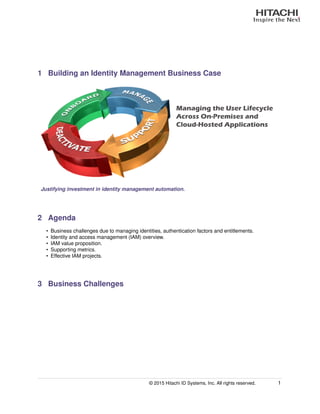
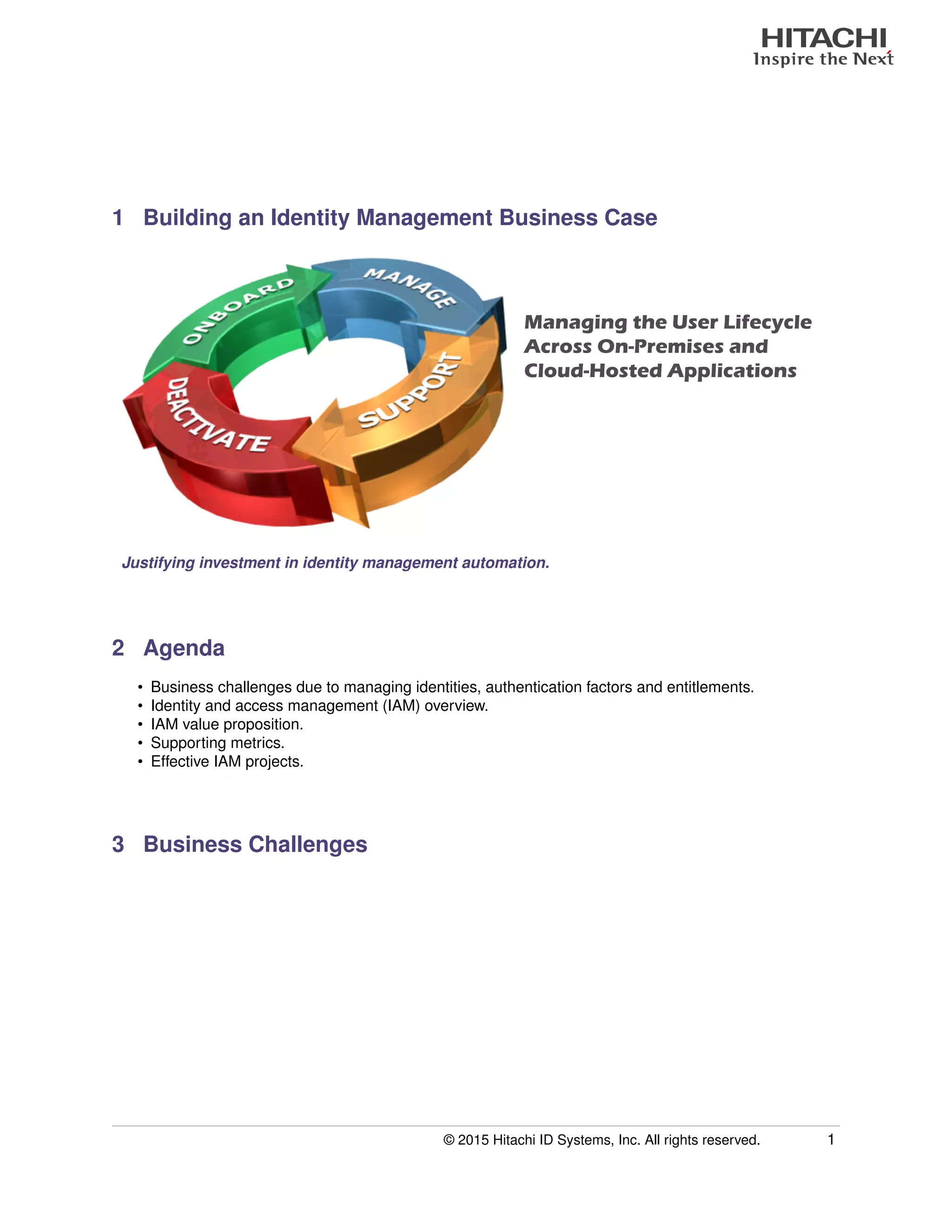
Managing the User Lifecycle
Across On-Premises and
Cloud-Hosted Applications
Justifying investment in identity management automation.
2 Agenda
• Business challenges due to managing identities, authentication factors and entitlements.
• Identity and access management (IAM) overview.
• IAM value proposition.
• Supporting metrics.
• Effective IAM projects.
3 Business Challenges
© 2015 Hitachi ID Systems, Inc. All rights reserved. 1
Slide Presentation
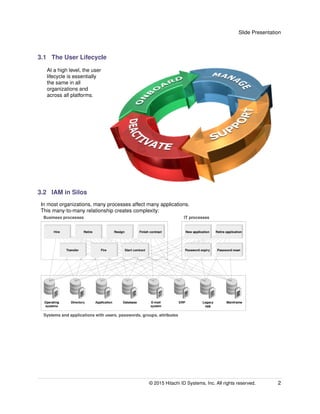
3.1 The User Lifecycle
At a high level, the user
lifecycle is essentially
the same in all
organizations and
across all platforms.
3.2 IAM in Silos
In most organizations, many processes affect many applications.
This many-to-many relationship creates complexity:
© 2015 Hitachi ID Systems, Inc. All rights reserved. 2
Slide Presentation
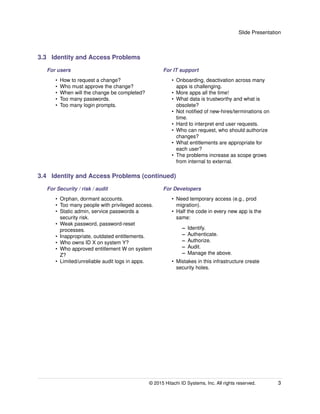
3.3 Identity and Access Problems
For users For IT support
• How to request a change?
• Who must approve the change?
• When will the change be completed?
• Too many passwords.
• Too many login prompts.
• Onboarding, deactivation across many
apps is challenging.
• More apps all the time!
• What data is trustworthy and what is
obsolete?
• Not notified of new-hires/terminations on
time.
• Hard to interpret end user requests.
• Who can request, who should authorize
changes?
• What entitlements are appropriate for
each user?
• The problems increase as scope grows
from internal to external.
3.4 Identity and Access Problems (continued)
For Security / risk / audit For Developers
• Orphan, dormant accounts.
• Too many people with privileged access.
• Static admin, service passwords a
security risk.
• Weak password, password-reset
processes.
• Inappropriate, outdated entitlements.
• Who owns ID X on system Y?
• Who approved entitlement W on system
Z?
• Limited/unreliable audit logs in apps.
• Need temporary access (e.g., prod
migration).
• Half the code in every new app is the
same:
– Identify.
– Authenticate.
– Authorize.
– Audit.
– Manage the above.
• Mistakes in this infrastructure create
security holes.
© 2015 Hitachi ID Systems, Inc. All rights reserved. 3
Slide Presentation
3.5 Business Drivers for IAM
Security / controls. • Reliable deactivation.
• Strong authentication.
• Appropriate security entitlements.
Regulatory
compliance.
• PCI-DSS, SOX, HIPAA, EU Privacy Directive, etc.
• Audit user access rights.
IT support costs. • Help desk call volume.
• Time/effort to manage access rights.
Service / SLA. • Faster onboarding.
• Simpler request / approvals process.
• Reduce burden of too many login prompts and passwords.
3.6 IAM is Linked to Regulations
• Many regulations, in many jurisdictions, call for internal controls:
– This implies effective AAA: Authentication, Authorization and Audit.
• Every system already has AAA.
– The weakness is bad user/access data.
• The missing link is business process:
– Appropriate access rights.
– Timely access termination.
– Effective authentication.
• Identity and access management process and technology are needed to bridge the gap between
business requirements and AAA infrastructure.
4 IAM Overview
© 2015 Hitachi ID Systems, Inc. All rights reserved. 4
Slide Presentation
4.1 Identity and access management
Identity and access management is
software to automate processes
to securely and efficiently manage
identities, entitlements and credentials:
Processes: Policies: Connectors:
• Data synchronization.
• Self-service requests.
• Authorization workflows.
• Manual and automated
fulfillment.
• Login ID assignment.
• Approvals workflow.
• Segregation of duties.
• Visibility, privacy.
• Applications.
• Databases.
• Operating systems.
• Directories.
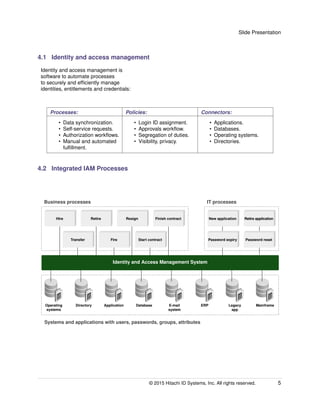
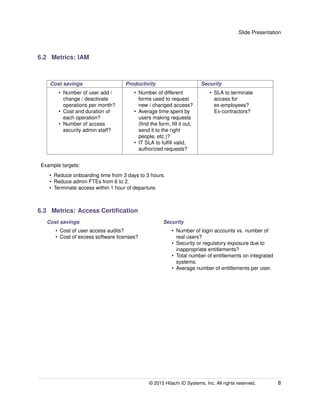
4.2 Integrated IAM Processes
Business processes
Systems and applications with users, passwords, groups, attributes
IT processes
Identity and Access Management System
Hire Retire Resign Finish contract
Transfer Fire Start contract
New application Retire application
Password resetPassword expiry
Operating
systems
Directory Application Database E-mail
system
ERP Legacy
app
Mainframe
© 2015 Hitachi ID Systems, Inc. All rights reserved. 5
Slide Presentation
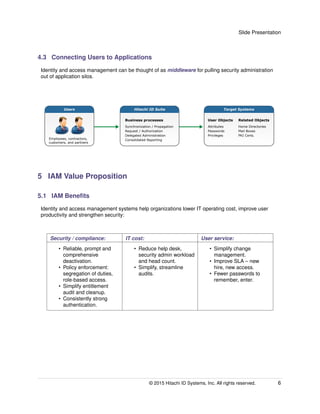
4.3 Connecting Users to Applications
Identity and access management can be thought of as middleware for pulling security administration
out of application silos.
Hitachi ID Suite
Business processes
Synchronization / Propagation
Request / Authorization
Delegated Administration
Consolidated Reporting
Target Systems
User Objects
Attributes
Passwords
Privileges
Related Objects
Home Directories
Mail Boxes
PKI Certs.
Employees, contractors,
customers, and partners
Users
5 IAM Value Proposition
5.1 IAM Benefits
Identity and access management systems help organizations lower IT operating cost, improve user
productivity and strengthen security:
Security / compliance: IT cost: User service:
• Reliable, prompt and
comprehensive
deactivation.
• Policy enforcement:
segregation of duties,
role-based access.
• Simplify entitlement
audit and cleanup.
• Consistently strong
authentication.
• Reduce help desk,
security admin workload
and head count.
• Simplify, streamline
audits.
• Simplify change
management.
• Improve SLA – new
hire, new access.
• Fewer passwords to
remember, enter.
© 2015 Hitachi ID Systems, Inc. All rights reserved. 6
Slide Presentation
5.2 Building a Business Case
An investment in identity and access management processes and infrastructure is normally supported
by cost savings, improved productivity and stronger security:
Cost savings Productivity Security
Reassign staff out of the help
desk or user administration
group.
Help new users start work
sooner and eliminate delays
experienced by users who
have problems or need
changes.
Clean up entitlements,
enforce security policies and
create audit logs. Comply
with SOX, GLB, HIPAA, etc.
Any business case should be supported by metrics:
• Current state.
• Desired outcome.
6 Supporting Metrics
6.1 Metrics: Password Management
Cost savings Productivity Security
• Number of password
problem help desk calls
per month?
• Cost and duration of
each call?
• Peak staffing to support
post-weekend call
volumes?
• Time spent by users
before, during and after
a typical password
problem?
• Value of wasted user
time?
• How does the help desk
authenticate callers?
• Current vs. desired
password policy on
sensitive systems?
• Popularity of password
"sticky notes?"
Example targets:
• Reduce password help desk calls by 75%.
• Reduce total help desk calls by 25%.
• Reduce passwords per user to 2.
© 2015 Hitachi ID Systems, Inc. All rights reserved. 7
Slide Presentation
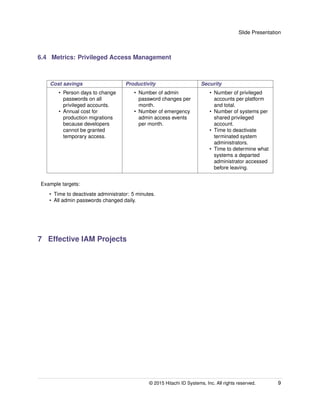
6.2 Metrics: IAM
Cost savings Productivity Security
• Number of user add /
change / deactivate
operations per month?
• Cost and duration of
each operation?
• Number of access
security admin staff?
• Number of different
forms used to request
new / changed access?
• Average time spent by
users making requests
(find the form, fill it out,
send it to the right
people, etc.)?
• IT SLA to fulfill valid,
authorized requests?
• SLA to terminate
access for
ex-employees?
Ex-contractors?
Example targets:
• Reduce onboarding time from 3 days to 3 hours.
• Reduce admin FTEs from 6 to 2.
• Terminate access within 1 hour of departure.
6.3 Metrics: Access Certification
Cost savings Security
• Cost of user access audits?
• Cost of excess software licenses?
• Number of login accounts vs. number of
real users?
• Security or regulatory exposure due to
inappropriate entitlements?
• Total number of entitlements on integrated
systems.
• Average number of entitlements per user.
© 2015 Hitachi ID Systems, Inc. All rights reserved. 8
Slide Presentation
6.4 Metrics: Privileged Access Management
Cost savings Productivity Security
• Person days to change
passwords on all
privileged accounts.
• Annual cost for
production migrations
because developers
cannot be granted
temporary access.
• Number of admin
password changes per
month.
• Number of emergency
admin access events
per month.
• Number of privileged
accounts per platform
and total.
• Number of systems per
shared privileged
account.
• Time to deactivate
terminated system
administrators.
• Time to determine what
systems a departed
administrator accessed
before leaving.
Example targets:
• Time to deactivate administrator: 5 minutes.
• All admin passwords changed daily.
7 Effective IAM Projects
© 2015 Hitachi ID Systems, Inc. All rights reserved. 9
Slide Presentation
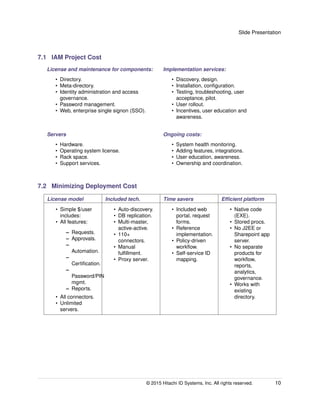
7.1 IAM Project Cost
License and maintenance for components:
• Directory.
• Meta-directory.
• Identity administration and access
governance.
• Password management.
• Web, enterprise single signon (SSO).
Implementation services:
• Discovery, design.
• Installation, configuration.
• Testing, troubleshooting, user
acceptance, pilot.
• User rollout.
• Incentives, user education and
awareness.
Servers
• Hardware.
• Operating system license.
• Rack space.
• Support services.
Ongoing costs:
• System health monitoring.
• Adding features, integrations.
• User education, awareness.
• Ownership and coordination.
7.2 Minimizing Deployment Cost
License model Included tech. Time savers Efficient platform
• Simple $/user
includes:
• All features:
– Requests.
– Approvals.
–
Automation.
–
Certification.
–
Password/PIN
mgmt.
– Reports.
• All connectors.
• Unlimited
servers.
• Auto-discovery.
• DB replication.
• Multi-master,
active-active.
• 110+
connectors.
• Manual
fulfillment.
• Proxy server.
• Included web
portal, request
forms.
• Reference
implementation.
• Policy-driven
workflow.
• Self-service ID
mapping.
• Native code
(EXE).
• Stored procs.
• No J2EE or
Sharepoint app
server.
• No separate
products for
workflow,
reports,
analytics,
governance.
• Works with
existing
directory.
© 2015 Hitachi ID Systems, Inc. All rights reserved. 10
Slide Presentation
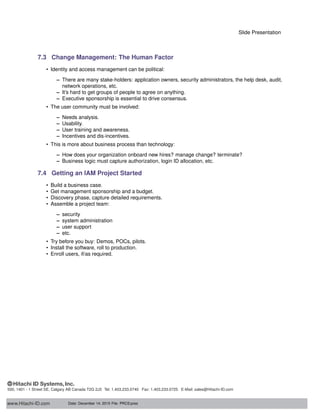
7.3 Change Management: The Human Factor
• Identity and access management can be political:
– There are many stake-holders: application owners, security administrators, the help desk, audit,
network operations, etc.
– It’s hard to get groups of people to agree on anything.
– Executive sponsorship is essential to drive consensus.
• The user community must be involved:
– Needs analysis.
– Usability.
– User training and awareness.
– Incentives and dis-incentives.
• This is more about business process than technology:
– How does your organization onboard new hires? manage change? terminate?
– Business logic must capture authorization, login ID allocation, etc.
7.4 Getting an IAM Project Started
• Build a business case.
• Get management sponsorship and a budget.
• Discovery phase, capture detailed requirements.
• Assemble a project team:
– security
– system administration
– user support
– etc.
• Try before you buy: Demos, POCs, pilots.
• Install the software, roll to production.
• Enroll users, if/as required.
www.Hitachi-ID.com
500, 1401 - 1 Street SE, Calgary AB Canada T2G 2J3 Tel: 1.403.233.0740 Fax: 1.403.233.0725 E-Mail: sales@Hitachi-ID.com
Date: December 14, 2015 File: PRCS:pres

Building an Identity Management Business Case

  • 1.
    1 Building anIdentity Management Business Case Managing the User Lifecycle Across On-Premises and Cloud-Hosted Applications Justifying investment in identity management automation. 2 Agenda • Business challenges due to managing identities, authentication factors and entitlements. • Identity and access management (IAM) overview. • IAM value proposition. • Supporting metrics. • Effective IAM projects. 3 Business Challenges © 2015 Hitachi ID Systems, Inc. All rights reserved. 1
  • 2.
    Slide Presentation 3.1 TheUser Lifecycle At a high level, the user lifecycle is essentially the same in all organizations and across all platforms. 3.2 IAM in Silos In most organizations, many processes affect many applications. This many-to-many relationship creates complexity: © 2015 Hitachi ID Systems, Inc. All rights reserved. 2
  • 3.
    Slide Presentation 3.3 Identityand Access Problems For users For IT support • How to request a change? • Who must approve the change? • When will the change be completed? • Too many passwords. • Too many login prompts. • Onboarding, deactivation across many apps is challenging. • More apps all the time! • What data is trustworthy and what is obsolete? • Not notified of new-hires/terminations on time. • Hard to interpret end user requests. • Who can request, who should authorize changes? • What entitlements are appropriate for each user? • The problems increase as scope grows from internal to external. 3.4 Identity and Access Problems (continued) For Security / risk / audit For Developers • Orphan, dormant accounts. • Too many people with privileged access. • Static admin, service passwords a security risk. • Weak password, password-reset processes. • Inappropriate, outdated entitlements. • Who owns ID X on system Y? • Who approved entitlement W on system Z? • Limited/unreliable audit logs in apps. • Need temporary access (e.g., prod migration). • Half the code in every new app is the same: – Identify. – Authenticate. – Authorize. – Audit. – Manage the above. • Mistakes in this infrastructure create security holes. © 2015 Hitachi ID Systems, Inc. All rights reserved. 3
  • 4.
    Slide Presentation 3.5 BusinessDrivers for IAM Security / controls. • Reliable deactivation. • Strong authentication. • Appropriate security entitlements. Regulatory compliance. • PCI-DSS, SOX, HIPAA, EU Privacy Directive, etc. • Audit user access rights. IT support costs. • Help desk call volume. • Time/effort to manage access rights. Service / SLA. • Faster onboarding. • Simpler request / approvals process. • Reduce burden of too many login prompts and passwords. 3.6 IAM is Linked to Regulations • Many regulations, in many jurisdictions, call for internal controls: – This implies effective AAA: Authentication, Authorization and Audit. • Every system already has AAA. – The weakness is bad user/access data. • The missing link is business process: – Appropriate access rights. – Timely access termination. – Effective authentication. • Identity and access management process and technology are needed to bridge the gap between business requirements and AAA infrastructure. 4 IAM Overview © 2015 Hitachi ID Systems, Inc. All rights reserved. 4
  • 5.
    Slide Presentation 4.1 Identityand access management Identity and access management is software to automate processes to securely and efficiently manage identities, entitlements and credentials: Processes: Policies: Connectors: • Data synchronization. • Self-service requests. • Authorization workflows. • Manual and automated fulfillment. • Login ID assignment. • Approvals workflow. • Segregation of duties. • Visibility, privacy. • Applications. • Databases. • Operating systems. • Directories. 4.2 Integrated IAM Processes Business processes Systems and applications with users, passwords, groups, attributes IT processes Identity and Access Management System Hire Retire Resign Finish contract Transfer Fire Start contract New application Retire application Password resetPassword expiry Operating systems Directory Application Database E-mail system ERP Legacy app Mainframe © 2015 Hitachi ID Systems, Inc. All rights reserved. 5
  • 6.
    Slide Presentation 4.3 ConnectingUsers to Applications Identity and access management can be thought of as middleware for pulling security administration out of application silos. Hitachi ID Suite Business processes Synchronization / Propagation Request / Authorization Delegated Administration Consolidated Reporting Target Systems User Objects Attributes Passwords Privileges Related Objects Home Directories Mail Boxes PKI Certs. Employees, contractors, customers, and partners Users 5 IAM Value Proposition 5.1 IAM Benefits Identity and access management systems help organizations lower IT operating cost, improve user productivity and strengthen security: Security / compliance: IT cost: User service: • Reliable, prompt and comprehensive deactivation. • Policy enforcement: segregation of duties, role-based access. • Simplify entitlement audit and cleanup. • Consistently strong authentication. • Reduce help desk, security admin workload and head count. • Simplify, streamline audits. • Simplify change management. • Improve SLA – new hire, new access. • Fewer passwords to remember, enter. © 2015 Hitachi ID Systems, Inc. All rights reserved. 6
  • 7.
    Slide Presentation 5.2 Buildinga Business Case An investment in identity and access management processes and infrastructure is normally supported by cost savings, improved productivity and stronger security: Cost savings Productivity Security Reassign staff out of the help desk or user administration group. Help new users start work sooner and eliminate delays experienced by users who have problems or need changes. Clean up entitlements, enforce security policies and create audit logs. Comply with SOX, GLB, HIPAA, etc. Any business case should be supported by metrics: • Current state. • Desired outcome. 6 Supporting Metrics 6.1 Metrics: Password Management Cost savings Productivity Security • Number of password problem help desk calls per month? • Cost and duration of each call? • Peak staffing to support post-weekend call volumes? • Time spent by users before, during and after a typical password problem? • Value of wasted user time? • How does the help desk authenticate callers? • Current vs. desired password policy on sensitive systems? • Popularity of password "sticky notes?" Example targets: • Reduce password help desk calls by 75%. • Reduce total help desk calls by 25%. • Reduce passwords per user to 2. © 2015 Hitachi ID Systems, Inc. All rights reserved. 7
  • 8.
    Slide Presentation 6.2 Metrics:IAM Cost savings Productivity Security • Number of user add / change / deactivate operations per month? • Cost and duration of each operation? • Number of access security admin staff? • Number of different forms used to request new / changed access? • Average time spent by users making requests (find the form, fill it out, send it to the right people, etc.)? • IT SLA to fulfill valid, authorized requests? • SLA to terminate access for ex-employees? Ex-contractors? Example targets: • Reduce onboarding time from 3 days to 3 hours. • Reduce admin FTEs from 6 to 2. • Terminate access within 1 hour of departure. 6.3 Metrics: Access Certification Cost savings Security • Cost of user access audits? • Cost of excess software licenses? • Number of login accounts vs. number of real users? • Security or regulatory exposure due to inappropriate entitlements? • Total number of entitlements on integrated systems. • Average number of entitlements per user. © 2015 Hitachi ID Systems, Inc. All rights reserved. 8
  • 9.
    Slide Presentation 6.4 Metrics:Privileged Access Management Cost savings Productivity Security • Person days to change passwords on all privileged accounts. • Annual cost for production migrations because developers cannot be granted temporary access. • Number of admin password changes per month. • Number of emergency admin access events per month. • Number of privileged accounts per platform and total. • Number of systems per shared privileged account. • Time to deactivate terminated system administrators. • Time to determine what systems a departed administrator accessed before leaving. Example targets: • Time to deactivate administrator: 5 minutes. • All admin passwords changed daily. 7 Effective IAM Projects © 2015 Hitachi ID Systems, Inc. All rights reserved. 9
  • 10.
    Slide Presentation 7.1 IAMProject Cost License and maintenance for components: • Directory. • Meta-directory. • Identity administration and access governance. • Password management. • Web, enterprise single signon (SSO). Implementation services: • Discovery, design. • Installation, configuration. • Testing, troubleshooting, user acceptance, pilot. • User rollout. • Incentives, user education and awareness. Servers • Hardware. • Operating system license. • Rack space. • Support services. Ongoing costs: • System health monitoring. • Adding features, integrations. • User education, awareness. • Ownership and coordination. 7.2 Minimizing Deployment Cost License model Included tech. Time savers Efficient platform • Simple $/user includes: • All features: – Requests. – Approvals. – Automation. – Certification. – Password/PIN mgmt. – Reports. • All connectors. • Unlimited servers. • Auto-discovery. • DB replication. • Multi-master, active-active. • 110+ connectors. • Manual fulfillment. • Proxy server. • Included web portal, request forms. • Reference implementation. • Policy-driven workflow. • Self-service ID mapping. • Native code (EXE). • Stored procs. • No J2EE or Sharepoint app server. • No separate products for workflow, reports, analytics, governance. • Works with existing directory. © 2015 Hitachi ID Systems, Inc. All rights reserved. 10
  • 11.
    Slide Presentation 7.3 ChangeManagement: The Human Factor • Identity and access management can be political: – There are many stake-holders: application owners, security administrators, the help desk, audit, network operations, etc. – It’s hard to get groups of people to agree on anything. – Executive sponsorship is essential to drive consensus. • The user community must be involved: – Needs analysis. – Usability. – User training and awareness. – Incentives and dis-incentives. • This is more about business process than technology: – How does your organization onboard new hires? manage change? terminate? – Business logic must capture authorization, login ID allocation, etc. 7.4 Getting an IAM Project Started • Build a business case. • Get management sponsorship and a budget. • Discovery phase, capture detailed requirements. • Assemble a project team: – security – system administration – user support – etc. • Try before you buy: Demos, POCs, pilots. • Install the software, roll to production. • Enroll users, if/as required. www.Hitachi-ID.com 500, 1401 - 1 Street SE, Calgary AB Canada T2G 2J3 Tel: 1.403.233.0740 Fax: 1.403.233.0725 E-Mail: sales@Hitachi-ID.com Date: December 14, 2015 File: PRCS:pres