1 Hitachi ID Suite
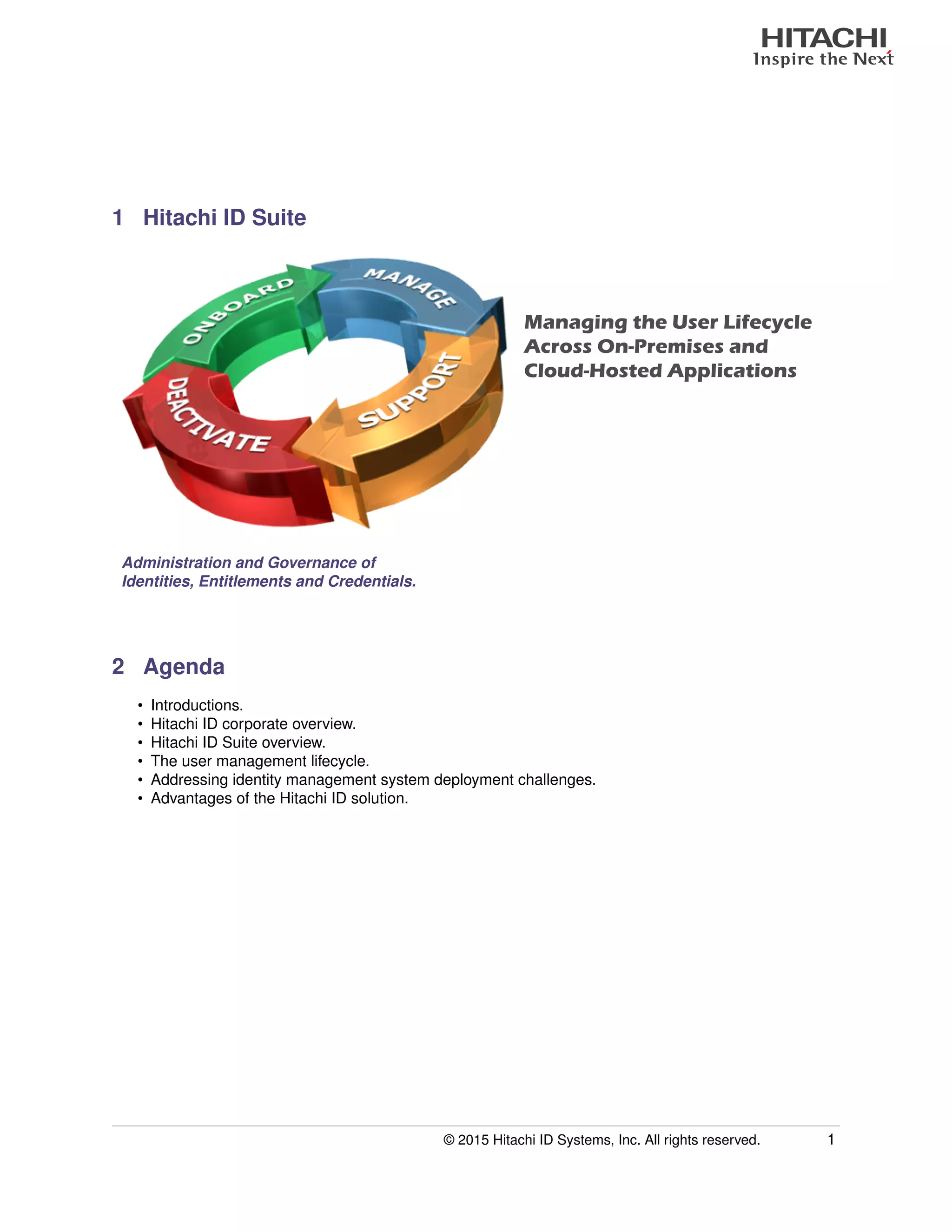
Managing the User Lifecycle
Across On-Premises and
Cloud-Hosted Applications
Administration and Governance of
Identities, Entitlements and Credentials.
2 Agenda
• Introductions.
• Hitachi ID corporate overview.
• Hitachi ID Suite overview.
• The user management lifecycle.
• Addressing identity management system deployment challenges.
• Advantages of the Hitachi ID solution.
© 2015 Hitachi ID Systems, Inc. All rights reserved. 1
Slide Presentation
3 Hitachi ID Corporate Overview
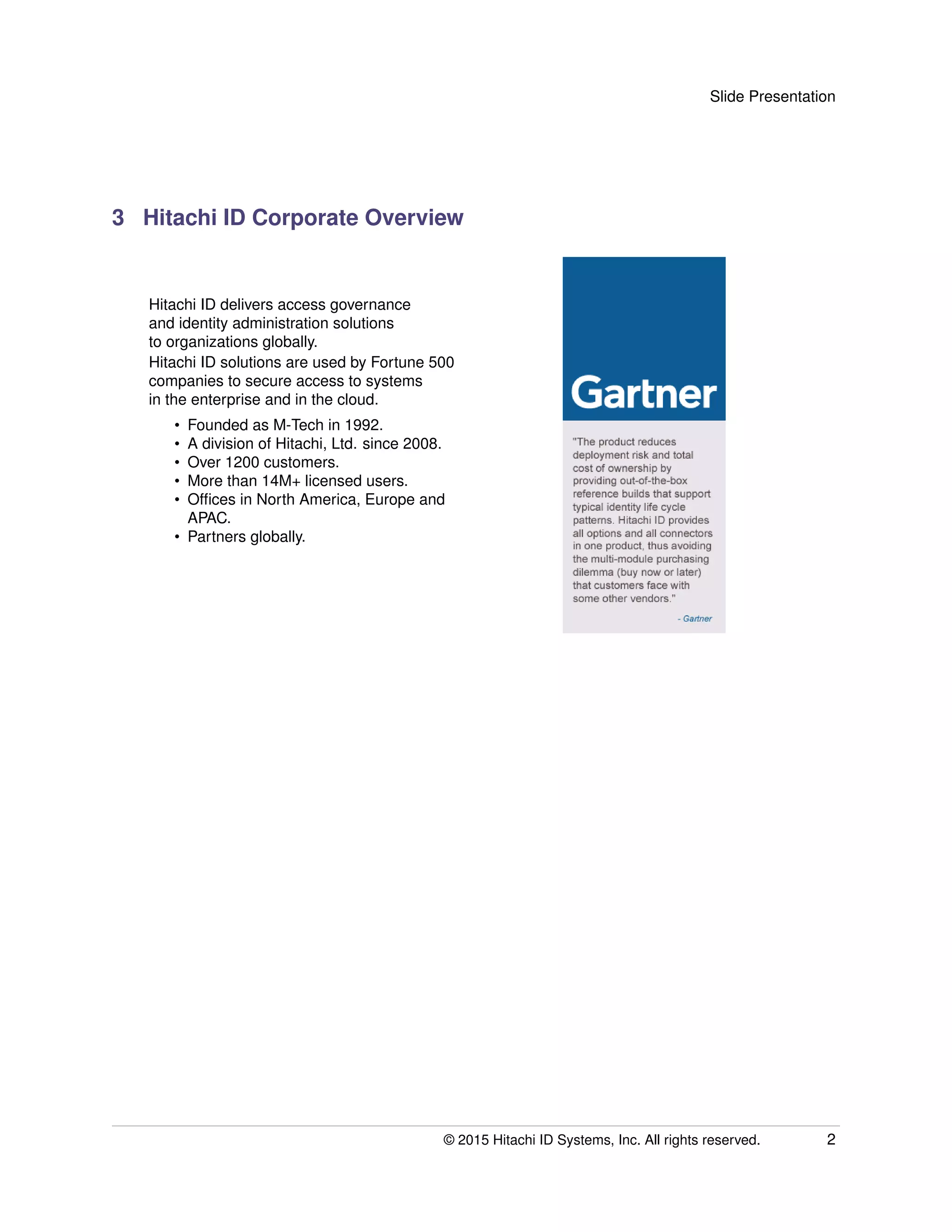
Hitachi ID delivers access governance
and identity administration solutions
to organizations globally.
Hitachi ID solutions are used by Fortune 500
companies to secure access to systems
in the enterprise and in the cloud.
• Founded as M-Tech in 1992.
• A division of Hitachi, Ltd. since 2008.
• Over 1200 customers.
• More than 14M+ licensed users.
• Offices in North America, Europe and
APAC.
• Partners globally.
© 2015 Hitachi ID Systems, Inc. All rights reserved. 2
Slide Presentation
4 Representative Customers
5 The User Lifecycle
At a high level, the user
lifecycle is essentially
the same in all
organizations and
across all platforms.
© 2015 Hitachi ID Systems, Inc. All rights reserved. 3
Slide Presentation
6 Business Challenges
• More IT → more
users to manage.
• There are
challenges
throughout the
user lifecycle.
• Support cost.
• User service.
• Security.
Slow:
too much paper,
too many people.
Expensive:
too many administrators
doing redundant work.
Role changes:
add/remove rights.
Policies:
enforced?
Audit:
are privileges appropriate?
Org. relationships:
track and maintain.
Reliable:
notification of terminations.
Fast:
response by sysadmins.
Complete:
deactivation of all IDs.
Passwords:
too many, too weak,
often forgotten.
Access:
Why can’t I access that
application / folder / etc.
7 IAM in Silos
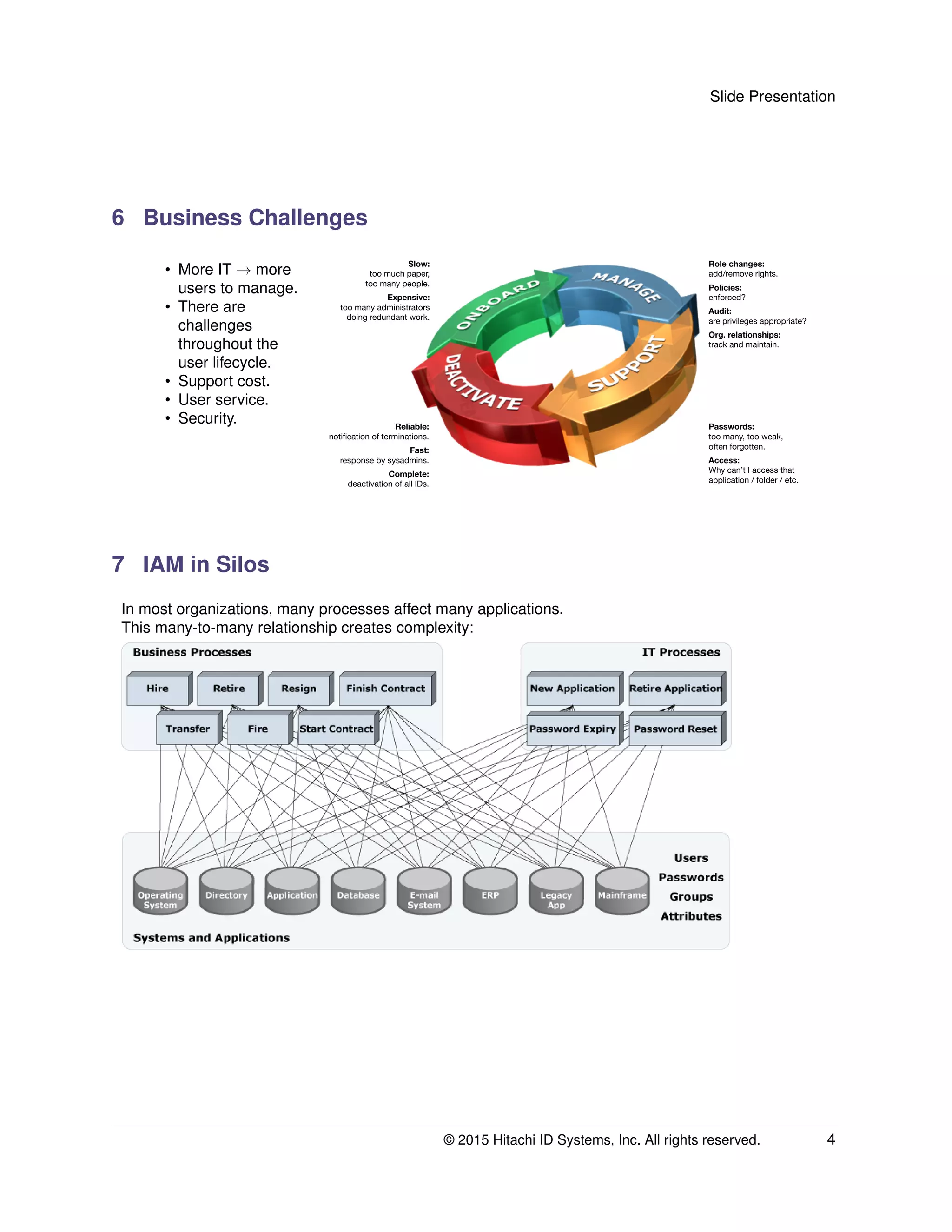
In most organizations, many processes affect many applications.
This many-to-many relationship creates complexity:
© 2015 Hitachi ID Systems, Inc. All rights reserved. 4
Slide Presentation
8 Distributed IAM Is Complex
• Managing each system and application separately is complex.
• Complexity is bad:
– Expensive: redundant updates to every system when hiring, moving or terminating users.
– Unfriendly: users have lots of different IDs and passwords, which they don’t know how to
manage.
– Insecure: mistakes are made and users get or retain excess entitlements.
Orphan and dormant accounts.
Stale privileges.
• Every system and application added makes things worse.
9 Integrated IAM Processes
Business Processes
Systems and Applications
Users
Passwords
Groups
Attributes
IT Processes
Hire Retire New Application Retire ApplicationResign Finish Contract
ApplicationOperating
System
DatabaseDirectory E-mail
System
ERP Legacy
App
Mainframe
Transfer Fire Start Contract Password Expiry Password Reset
Identity and Access Management System
© 2015 Hitachi ID Systems, Inc. All rights reserved. 5
Slide Presentation
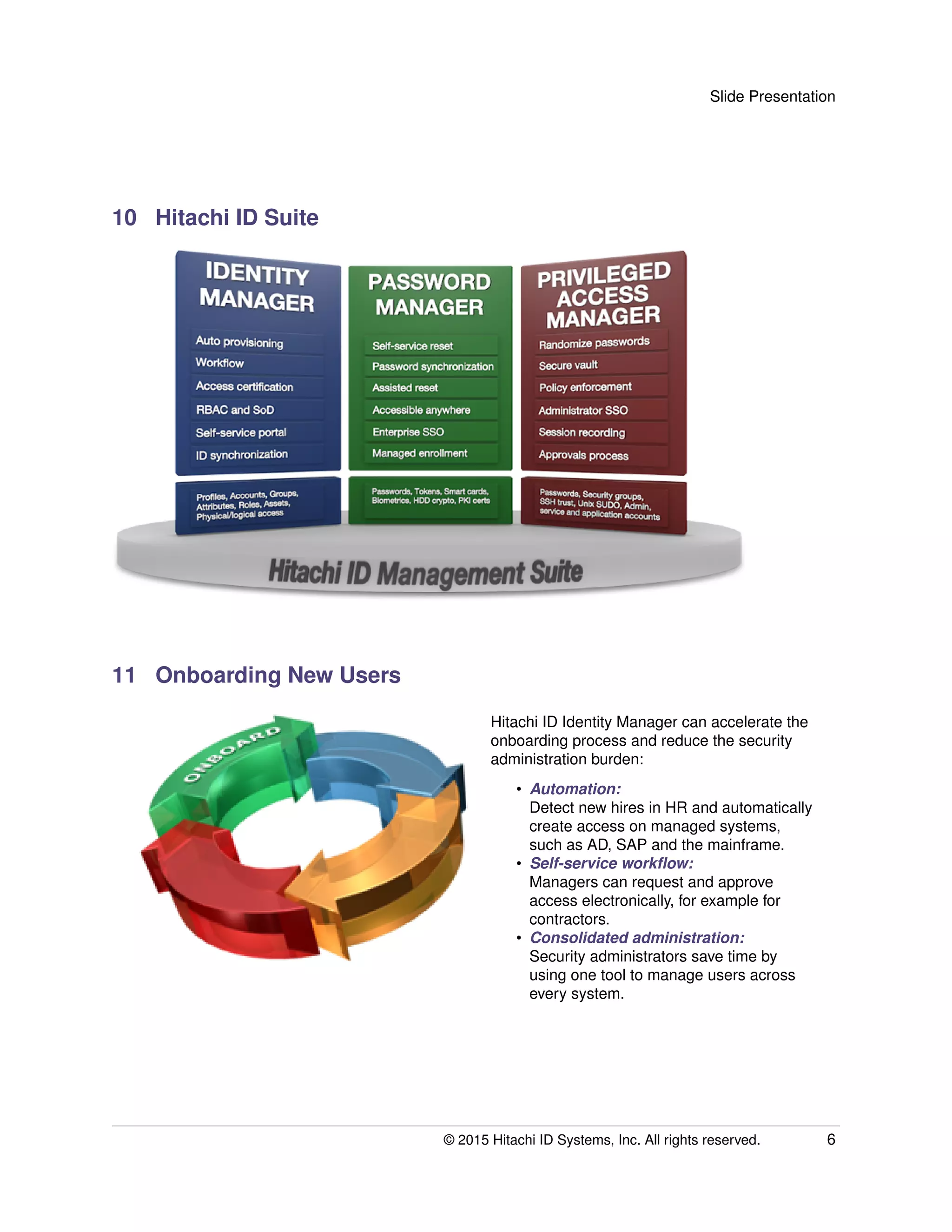
10 Hitachi ID Suite
11 Onboarding New Users
Hitachi ID Identity Manager can accelerate the
onboarding process and reduce the security
administration burden:
• Automation:
Detect new hires in HR and automatically
create access on managed systems,
such as AD, SAP and the mainframe.
• Self-service workflow:
Managers can request and approve
access electronically, for example for
contractors.
• Consolidated administration:
Security administrators save time by
using one tool to manage users across
every system.
© 2015 Hitachi ID Systems, Inc. All rights reserved. 6
Slide Presentation
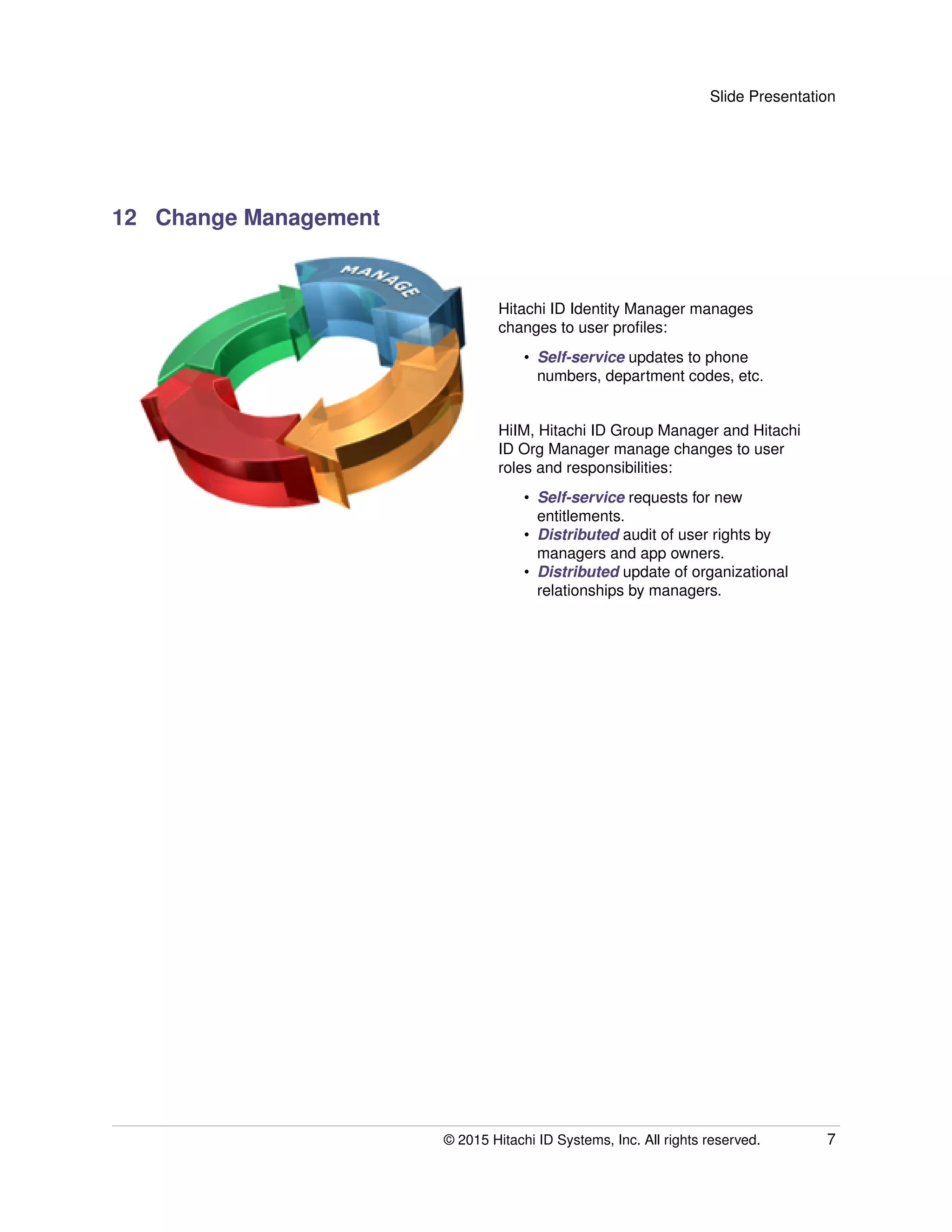
12 Change Management
Hitachi ID Identity Manager manages
changes to user profiles:
• Self-service updates to phone
numbers, department codes, etc.
HiIM, Hitachi ID Group Manager and Hitachi
ID Org Manager manage changes to user
roles and responsibilities:
• Self-service requests for new
entitlements.
• Distributed audit of user rights by
managers and app owners.
• Distributed update of organizational
relationships by managers.
© 2015 Hitachi ID Systems, Inc. All rights reserved. 7
Slide Presentation
13 IT Support
Hitachi ID Password Manager for "I
forgot/locked my password" calls:
• Synchronization: Users with fewer
passwords have fewer problems.
• Reset: Users can resolve their own
problems without calling the help desk.
• Assistance: A help desk interface
reduces the duration and cost of
remaining calls.
Hitachi ID Group Manager for "access
denied" calls:
• Self-service: Users browse for
resources and request access.
• Authorization workflow: Group
owners are asked to review and
approve change requests.
© 2015 Hitachi ID Systems, Inc. All rights reserved. 8
Slide Presentation
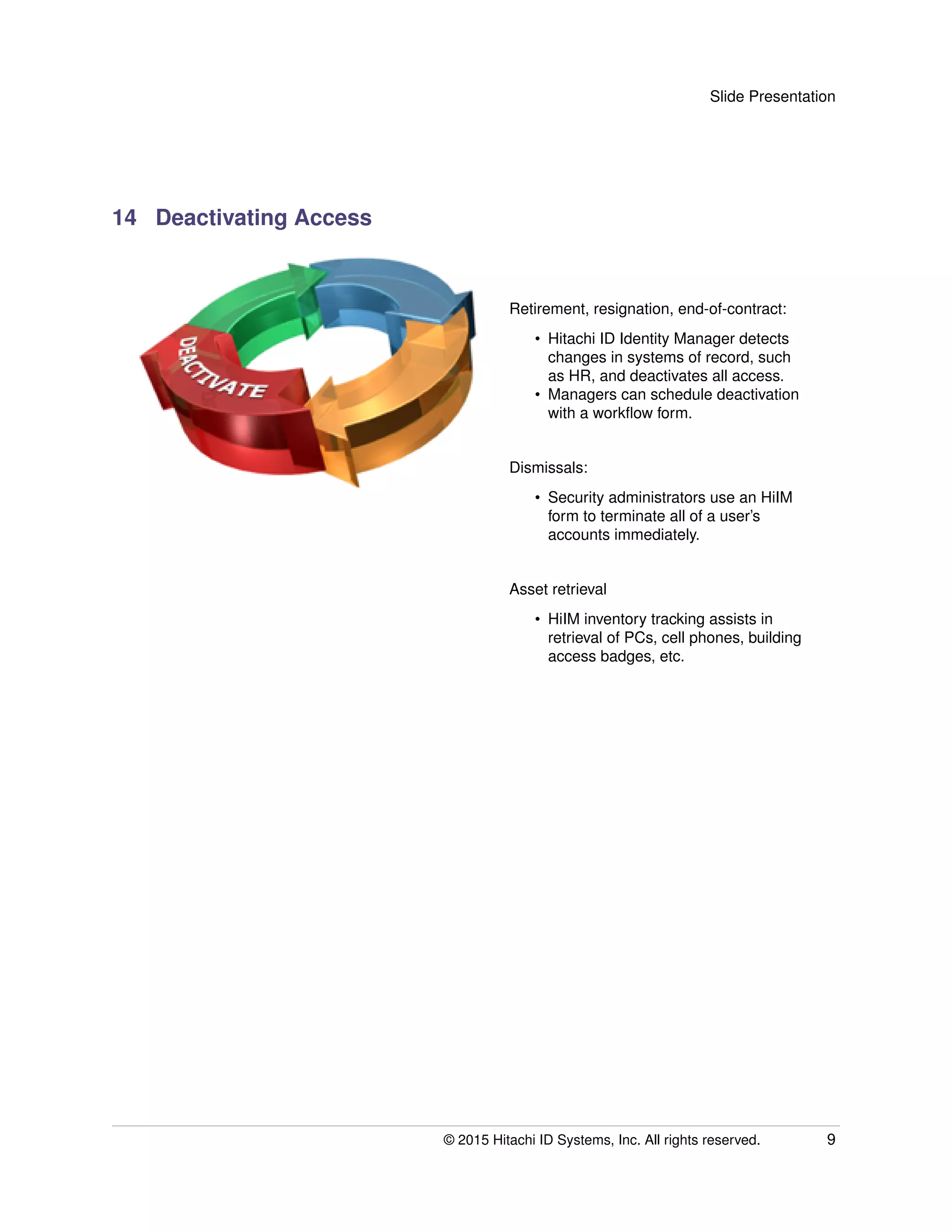
14 Deactivating Access
Retirement, resignation, end-of-contract:
• Hitachi ID Identity Manager detects
changes in systems of record, such
as HR, and deactivates all access.
• Managers can schedule deactivation
with a workflow form.
Dismissals:
• Security administrators use an HiIM
form to terminate all of a user’s
accounts immediately.
Asset retrieval
• HiIM inventory tracking assists in
retrieval of PCs, cell phones, building
access badges, etc.
© 2015 Hitachi ID Systems, Inc. All rights reserved. 9
Slide Presentation
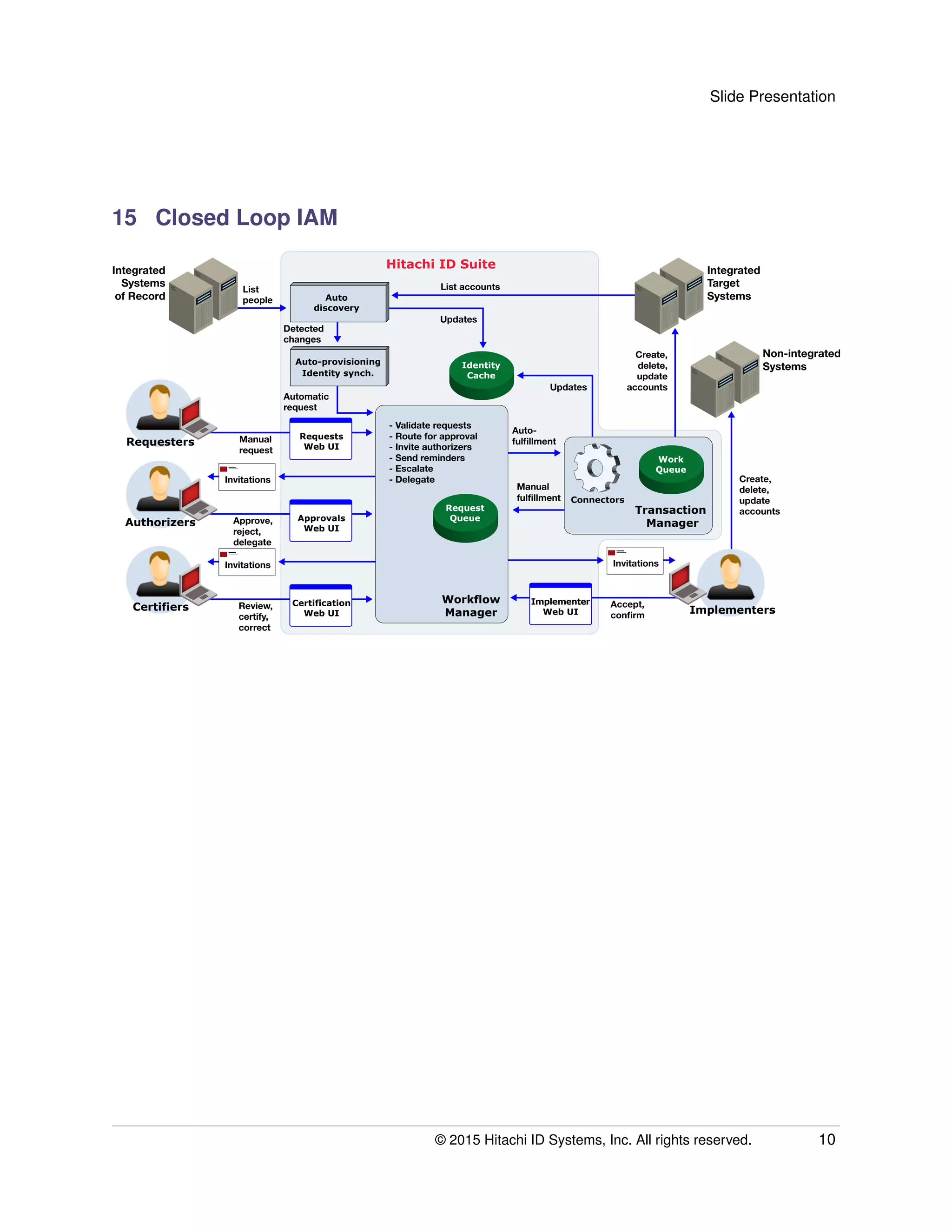
15 Closed Loop IAM
Integrated
Systems
of Record Auto
discovery
Auto-provisioning
Identity synch.
Identity
Cache
Integrated
Target
Systems
Non-integrated
Systems
Transaction
Manager
Connectors
List accounts
Create,
delete,
update
accountsUpdates
Updates
Detected
changes
List
people
Authorizers Approve,
reject,
delegate
Invitations
Approvals
Web UI
Certifiers Review,
certify,
correct
Invitations
Certification
Web UI
Requesters Manual
request
Requests
Web UI
- Validate requests
- Route for approval
- Invite authorizers
- Send reminders
- Escalate
- Delegate
Manual
fulfillment
Auto-
fulfillment
Create,
delete,
update
accounts
Automatic
request
Implementers
Accept,
confirm
Invitations
Implementer
Web UI
Request
Queue
Workflow
Manager
Hitachi ID Suite
Work
Queue
© 2015 Hitachi ID Systems, Inc. All rights reserved. 10
Slide Presentation
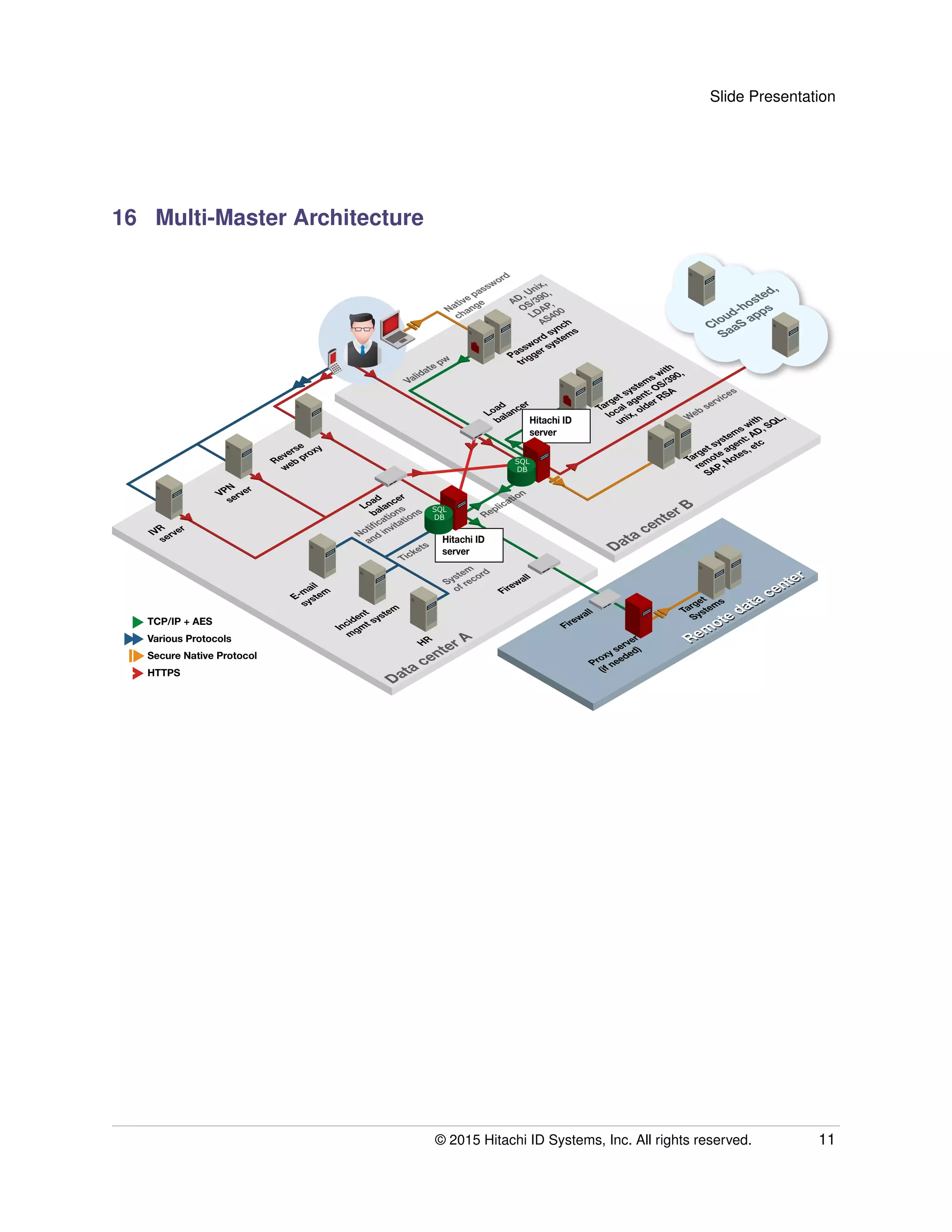
16 Multi-Master Architecture
IVR
server
VPN
server
Reverse
web proxy
Load
balancer
Load
balancer
E-mail
system
Incident
mgmt system
HR
Firewall
Firewall
Password synch
trigger systems
Target systems with
local agent: OS/390,
unix, older RSA
Target systems with
remote agent: AD, SQL,
SAP, Notes, etc
Target
Systems
Proxy server
(if needed)
Remote data center
Remote data center
Data center A
Data center B
TCP/IP + AES
Various Protocols
Secure Native Protocol
HTTPS
Cloud-hosted,
SaaS apps
Notifications
and invitations
Tickets
System
of record
Replication
Web services
Native password
change
Validate pw
AD, Unix,
OS/390,
LDAP,
AS400
Hitachi ID
server
Hitachi ID
server
SQL
DB
SQL
DB
© 2015 Hitachi ID Systems, Inc. All rights reserved. 11
Slide Presentation
17 Included Connectors
Many integrations to target systems included in the base price:
Directories:
Any LDAP, AD, WinNT, NDS,
eDirectory, NIS/NIS+.
Servers:
Windows NT, 2000, 2003,
2008[R2], 2012, Samba,
Novell, SharePoint.
Databases:
Oracle, Sybase, SQL Server,
DB2/UDB, Informix, Progress,
ODBC, Oracle Hyperion EPM
Shared Services, Cache.
Unix:
Linux, Solaris, AIX, HPUX, 24
more variants.
Mainframes, Midrange:
z/OS: RACF, ACF2,
TopSecret. iSeries,
OpenVMS.
HDD Encryption:
McAfee, CheckPoint,
BitLocker, PGP.
ERP:
JDE, Oracle eBiz,
PeopleSoft, PeopleSoft HR,
SAP R/3 and ECC 6, Siebel,
Business Objects.
Collaboration:
Lotus Notes, iNotes,
Exchange, GroupWise,
BlackBerry ES.
Tokens, Smart Cards:
RSA SecurID, SafeWord,
RADIUS, ActivIdentity,
Schlumberger.
WebSSO:
CA Siteminder, IBM TAM,
Oracle AM, RSA Access
Manager.
Help Desk:
ServiceNow, BMC Remedy,
SDE, HP SM, CA Unicenter,
Assyst, HEAT, Altiris, Clarify,
RSA Envision, Track-It!, MS
System Center Service
Manager
Cloud/SaaS:
WebEx, Google Apps, MS
Office 365, Success Factors,
Salesforce.com, SOAP
(generic).
© 2015 Hitachi ID Systems, Inc. All rights reserved. 12
Slide Presentation
18 Rapid Integration with Custom Apps
• Hitachi ID Suite easily integrates with custom, vertical and hosted applications using flexible agents
.
• Each flexible agent connects to a class of applications:
– API bindings (C, C++, Java, COM, ActiveX, MQ Series).
– Telnet / TN3270 / TN5250 / sessions with TLS or SSL.
– SSH sessions.
– HTTP(S) administrative interfaces.
– Web services.
– Win32 and Unix command-line administration programs.
– SQL scripts.
– Custom LDAP attributes.
• Integration takes a few hours to a few days.
• Fixed cost service available from Hitachi ID.
19 IAM Project Risk Management
IAM projects often take too long and cost too
much. Why?
Risk management
• Data quality:
– Nonstandard, disconnected IDs
– Incorrect, old identity data.
• Combine automation and self-service for
clean up.
• Never-ending role engineering:
– Role based access control is a good
objective, but...
– It can be slow and costly to develop
and maintain roles.
– Some users just don’t fit.
• Start deployment with just a few roles.
• Add roles gradually, based on demand.
• Too many workflows:
– Defining too many forms, processes
takes too long.
– One form, one process per change
type? Per system?
• Implement a generic change
management system.
• Custom forms for just the most popular
requests.
© 2015 Hitachi ID Systems, Inc. All rights reserved. 13
Slide Presentation
20 Hitachi ID Technology Advantages
Industry-leading technology at the lowest TCO:
• More features and functionality for less money:
– Lower initial and ongoing investment (License scheme)
– Lower on-going administration costs
• Technology (not services) drives down deployment costs:
– Reference builds.
– All features, connectors included.
– Auto-discovery of systems, accounts, entitlements.
– Automated and self-service ID mapping.
– Policy-driven workflow easier to manage.
– No need to engage in costly role engineering.
21 Hitachi ID Suite Summary
• Three integrated IAM products, used by over 14M users, that can:
– Discover and connect identities across systems and applications.
– Securely and efficiently manage entitlements and credentials.
– Secure and monitor access to privileged accounts.
• Improve security to comply with regulations.
• Reduce IT support cost and improve user productivity.
• Consolidate management of on-premise and SaaS apps.
www.Hitachi-ID.com
500, 1401 - 1 Street SE, Calgary AB Canada T2G 2J3 Tel: 1.403.233.0740 Fax: 1.403.233.0725 E-Mail: sales@Hitachi-ID.com
Date: May 22, 2015 File: PRCS:pres

Identity and Access Lifecycle Automation

  • 1.
    1 Hitachi IDSuite Managing the User Lifecycle Across On-Premises and Cloud-Hosted Applications Administration and Governance of Identities, Entitlements and Credentials. 2 Agenda • Introductions. • Hitachi ID corporate overview. • Hitachi ID Suite overview. • The user management lifecycle. • Addressing identity management system deployment challenges. • Advantages of the Hitachi ID solution. © 2015 Hitachi ID Systems, Inc. All rights reserved. 1
  • 2.
    Slide Presentation 3 HitachiID Corporate Overview Hitachi ID delivers access governance and identity administration solutions to organizations globally. Hitachi ID solutions are used by Fortune 500 companies to secure access to systems in the enterprise and in the cloud. • Founded as M-Tech in 1992. • A division of Hitachi, Ltd. since 2008. • Over 1200 customers. • More than 14M+ licensed users. • Offices in North America, Europe and APAC. • Partners globally. © 2015 Hitachi ID Systems, Inc. All rights reserved. 2
  • 3.
    Slide Presentation 4 RepresentativeCustomers 5 The User Lifecycle At a high level, the user lifecycle is essentially the same in all organizations and across all platforms. © 2015 Hitachi ID Systems, Inc. All rights reserved. 3
  • 4.
    Slide Presentation 6 BusinessChallenges • More IT → more users to manage. • There are challenges throughout the user lifecycle. • Support cost. • User service. • Security. Slow: too much paper, too many people. Expensive: too many administrators doing redundant work. Role changes: add/remove rights. Policies: enforced? Audit: are privileges appropriate? Org. relationships: track and maintain. Reliable: notification of terminations. Fast: response by sysadmins. Complete: deactivation of all IDs. Passwords: too many, too weak, often forgotten. Access: Why can’t I access that application / folder / etc. 7 IAM in Silos In most organizations, many processes affect many applications. This many-to-many relationship creates complexity: © 2015 Hitachi ID Systems, Inc. All rights reserved. 4
  • 5.
    Slide Presentation 8 DistributedIAM Is Complex • Managing each system and application separately is complex. • Complexity is bad: – Expensive: redundant updates to every system when hiring, moving or terminating users. – Unfriendly: users have lots of different IDs and passwords, which they don’t know how to manage. – Insecure: mistakes are made and users get or retain excess entitlements. Orphan and dormant accounts. Stale privileges. • Every system and application added makes things worse. 9 Integrated IAM Processes Business Processes Systems and Applications Users Passwords Groups Attributes IT Processes Hire Retire New Application Retire ApplicationResign Finish Contract ApplicationOperating System DatabaseDirectory E-mail System ERP Legacy App Mainframe Transfer Fire Start Contract Password Expiry Password Reset Identity and Access Management System © 2015 Hitachi ID Systems, Inc. All rights reserved. 5
  • 6.
    Slide Presentation 10 HitachiID Suite 11 Onboarding New Users Hitachi ID Identity Manager can accelerate the onboarding process and reduce the security administration burden: • Automation: Detect new hires in HR and automatically create access on managed systems, such as AD, SAP and the mainframe. • Self-service workflow: Managers can request and approve access electronically, for example for contractors. • Consolidated administration: Security administrators save time by using one tool to manage users across every system. © 2015 Hitachi ID Systems, Inc. All rights reserved. 6
  • 7.
    Slide Presentation 12 ChangeManagement Hitachi ID Identity Manager manages changes to user profiles: • Self-service updates to phone numbers, department codes, etc. HiIM, Hitachi ID Group Manager and Hitachi ID Org Manager manage changes to user roles and responsibilities: • Self-service requests for new entitlements. • Distributed audit of user rights by managers and app owners. • Distributed update of organizational relationships by managers. © 2015 Hitachi ID Systems, Inc. All rights reserved. 7
  • 8.
    Slide Presentation 13 ITSupport Hitachi ID Password Manager for "I forgot/locked my password" calls: • Synchronization: Users with fewer passwords have fewer problems. • Reset: Users can resolve their own problems without calling the help desk. • Assistance: A help desk interface reduces the duration and cost of remaining calls. Hitachi ID Group Manager for "access denied" calls: • Self-service: Users browse for resources and request access. • Authorization workflow: Group owners are asked to review and approve change requests. © 2015 Hitachi ID Systems, Inc. All rights reserved. 8
  • 9.
    Slide Presentation 14 DeactivatingAccess Retirement, resignation, end-of-contract: • Hitachi ID Identity Manager detects changes in systems of record, such as HR, and deactivates all access. • Managers can schedule deactivation with a workflow form. Dismissals: • Security administrators use an HiIM form to terminate all of a user’s accounts immediately. Asset retrieval • HiIM inventory tracking assists in retrieval of PCs, cell phones, building access badges, etc. © 2015 Hitachi ID Systems, Inc. All rights reserved. 9
  • 10.
    Slide Presentation 15 ClosedLoop IAM Integrated Systems of Record Auto discovery Auto-provisioning Identity synch. Identity Cache Integrated Target Systems Non-integrated Systems Transaction Manager Connectors List accounts Create, delete, update accountsUpdates Updates Detected changes List people Authorizers Approve, reject, delegate Invitations Approvals Web UI Certifiers Review, certify, correct Invitations Certification Web UI Requesters Manual request Requests Web UI - Validate requests - Route for approval - Invite authorizers - Send reminders - Escalate - Delegate Manual fulfillment Auto- fulfillment Create, delete, update accounts Automatic request Implementers Accept, confirm Invitations Implementer Web UI Request Queue Workflow Manager Hitachi ID Suite Work Queue © 2015 Hitachi ID Systems, Inc. All rights reserved. 10
  • 11.
    Slide Presentation 16 Multi-MasterArchitecture IVR server VPN server Reverse web proxy Load balancer Load balancer E-mail system Incident mgmt system HR Firewall Firewall Password synch trigger systems Target systems with local agent: OS/390, unix, older RSA Target systems with remote agent: AD, SQL, SAP, Notes, etc Target Systems Proxy server (if needed) Remote data center Remote data center Data center A Data center B TCP/IP + AES Various Protocols Secure Native Protocol HTTPS Cloud-hosted, SaaS apps Notifications and invitations Tickets System of record Replication Web services Native password change Validate pw AD, Unix, OS/390, LDAP, AS400 Hitachi ID server Hitachi ID server SQL DB SQL DB © 2015 Hitachi ID Systems, Inc. All rights reserved. 11
  • 12.
    Slide Presentation 17 IncludedConnectors Many integrations to target systems included in the base price: Directories: Any LDAP, AD, WinNT, NDS, eDirectory, NIS/NIS+. Servers: Windows NT, 2000, 2003, 2008[R2], 2012, Samba, Novell, SharePoint. Databases: Oracle, Sybase, SQL Server, DB2/UDB, Informix, Progress, ODBC, Oracle Hyperion EPM Shared Services, Cache. Unix: Linux, Solaris, AIX, HPUX, 24 more variants. Mainframes, Midrange: z/OS: RACF, ACF2, TopSecret. iSeries, OpenVMS. HDD Encryption: McAfee, CheckPoint, BitLocker, PGP. ERP: JDE, Oracle eBiz, PeopleSoft, PeopleSoft HR, SAP R/3 and ECC 6, Siebel, Business Objects. Collaboration: Lotus Notes, iNotes, Exchange, GroupWise, BlackBerry ES. Tokens, Smart Cards: RSA SecurID, SafeWord, RADIUS, ActivIdentity, Schlumberger. WebSSO: CA Siteminder, IBM TAM, Oracle AM, RSA Access Manager. Help Desk: ServiceNow, BMC Remedy, SDE, HP SM, CA Unicenter, Assyst, HEAT, Altiris, Clarify, RSA Envision, Track-It!, MS System Center Service Manager Cloud/SaaS: WebEx, Google Apps, MS Office 365, Success Factors, Salesforce.com, SOAP (generic). © 2015 Hitachi ID Systems, Inc. All rights reserved. 12
  • 13.
    Slide Presentation 18 RapidIntegration with Custom Apps • Hitachi ID Suite easily integrates with custom, vertical and hosted applications using flexible agents . • Each flexible agent connects to a class of applications: – API bindings (C, C++, Java, COM, ActiveX, MQ Series). – Telnet / TN3270 / TN5250 / sessions with TLS or SSL. – SSH sessions. – HTTP(S) administrative interfaces. – Web services. – Win32 and Unix command-line administration programs. – SQL scripts. – Custom LDAP attributes. • Integration takes a few hours to a few days. • Fixed cost service available from Hitachi ID. 19 IAM Project Risk Management IAM projects often take too long and cost too much. Why? Risk management • Data quality: – Nonstandard, disconnected IDs – Incorrect, old identity data. • Combine automation and self-service for clean up. • Never-ending role engineering: – Role based access control is a good objective, but... – It can be slow and costly to develop and maintain roles. – Some users just don’t fit. • Start deployment with just a few roles. • Add roles gradually, based on demand. • Too many workflows: – Defining too many forms, processes takes too long. – One form, one process per change type? Per system? • Implement a generic change management system. • Custom forms for just the most popular requests. © 2015 Hitachi ID Systems, Inc. All rights reserved. 13
  • 14.
    Slide Presentation 20 HitachiID Technology Advantages Industry-leading technology at the lowest TCO: • More features and functionality for less money: – Lower initial and ongoing investment (License scheme) – Lower on-going administration costs • Technology (not services) drives down deployment costs: – Reference builds. – All features, connectors included. – Auto-discovery of systems, accounts, entitlements. – Automated and self-service ID mapping. – Policy-driven workflow easier to manage. – No need to engage in costly role engineering. 21 Hitachi ID Suite Summary • Three integrated IAM products, used by over 14M users, that can: – Discover and connect identities across systems and applications. – Securely and efficiently manage entitlements and credentials. – Secure and monitor access to privileged accounts. • Improve security to comply with regulations. • Reduce IT support cost and improve user productivity. • Consolidate management of on-premise and SaaS apps. www.Hitachi-ID.com 500, 1401 - 1 Street SE, Calgary AB Canada T2G 2J3 Tel: 1.403.233.0740 Fax: 1.403.233.0725 E-Mail: sales@Hitachi-ID.com Date: May 22, 2015 File: PRCS:pres