Apache CloudStack
Instruction to build a docs
with Sphinx
Japan CloudStack User Group, Go Chiba
@go_chiba
Who am I?
 Go Chiba
– Working as Japanese system integrator
Design cloud servers/networks/storages . . .etc
– Contributing as Translator of Apache CloudStack docs
Translating docs or GUI on my private and share my
expriences.
– Contact
mailto: go.chiba@gmail.com
Twitter: @go_chiba
CHANGE_LOG
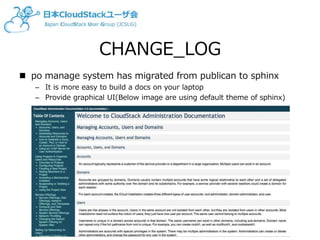
 po manage system has migrated from publican to sphinx
– It is more easy to build a docs on your laptop
– Provide graphical UI(Below image are using default theme of sphinx)
Requirements
 At first, you require install related packages to build a
docs
 This slide only expect OSX environment, but it’s easy to
find installation docs for each package from web
– Sphinx
if you using any Linux distribution or windows, please check
original instruction.
http://sphinx-doc.org/latest/install.html
– gettext
or
# pip install sphinx
# brew install gettext
# port install gettext
Instruction
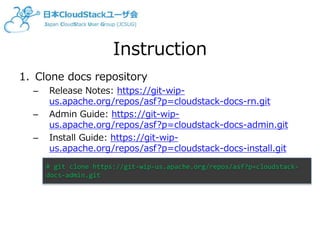
1. Clone docs repository
– Release Notes: https://git-wip-
us.apache.org/repos/asf?p=cloudstack-docs-rn.git
– Admin Guide: https://git-wip-
us.apache.org/repos/asf?p=cloudstack-docs-admin.git
– Install Guide: https://git-wip-
us.apache.org/repos/asf?p=cloudstack-docs-install.git
# git clone https://git-wip-us.apache.org/repos/asf?p=cloudstack-
docs-admin.git
Instruction
2. Add language option to conf.py
3. Create a locale directory under source/
4. Generate pot files
5. Generate po files(require for each pot files)
+locale_dirs = ['locale/']
+language = 'ja’ # choose your prefferred language
# mkdir –p source/locale/ja/LC_MESSAGES
# make gettext
# msginit --locale=ja --input=build/locale/index.pot
--output=source/locale/ja/LC_MESSAGES/index.po
Instruction
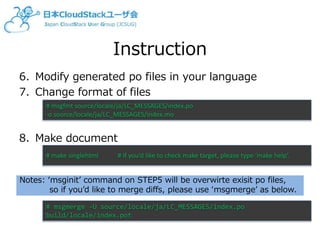
6. Modify generated po files in your language
7. Change format of files
8. Make document
# msgfmt source/locale/ja/LC_MESSAGES/index.po
-o source/locale/ja/LC_MESSAGES/index.mo
# make singlehtml # if you’d like to check make target, please type ‘make help’.
Notes: ‘msginit’ command on STEP5 will be overwirte exisit po files,
so if you’d like to merge diffs, please use ‘msgmerge’ as below.
# msgmerge -U source/locale/ja/LC_MESSAGES/index.po
build/locale/index.pot
Instruction
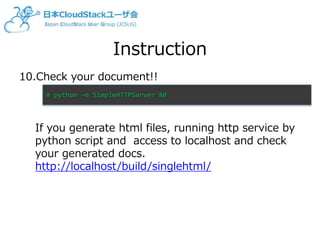
10.Check your document!!
If you generate html files, running http service by
python script and access to localhost and check
your generated docs.
http://localhost/build/singlehtml/
# python –m SimpleHTTPServer 80

Instruction to build Apache CloudStack docs with Sphinx

  • 1.
    Apache CloudStack Instruction tobuild a docs with Sphinx Japan CloudStack User Group, Go Chiba @go_chiba
  • 2.
    Who am I? Go Chiba – Working as Japanese system integrator Design cloud servers/networks/storages . . .etc – Contributing as Translator of Apache CloudStack docs Translating docs or GUI on my private and share my expriences. – Contact mailto: go.chiba@gmail.com Twitter: @go_chiba
  • 3.
    CHANGE_LOG  po managesystem has migrated from publican to sphinx – It is more easy to build a docs on your laptop – Provide graphical UI(Below image are using default theme of sphinx)
  • 4.
    Requirements  At first,you require install related packages to build a docs  This slide only expect OSX environment, but it’s easy to find installation docs for each package from web – Sphinx if you using any Linux distribution or windows, please check original instruction. http://sphinx-doc.org/latest/install.html – gettext or # pip install sphinx # brew install gettext # port install gettext
  • 5.
    Instruction 1. Clone docsrepository – Release Notes: https://git-wip- us.apache.org/repos/asf?p=cloudstack-docs-rn.git – Admin Guide: https://git-wip- us.apache.org/repos/asf?p=cloudstack-docs-admin.git – Install Guide: https://git-wip- us.apache.org/repos/asf?p=cloudstack-docs-install.git # git clone https://git-wip-us.apache.org/repos/asf?p=cloudstack- docs-admin.git
  • 6.
    Instruction 2. Add languageoption to conf.py 3. Create a locale directory under source/ 4. Generate pot files 5. Generate po files(require for each pot files) +locale_dirs = ['locale/'] +language = 'ja’ # choose your prefferred language # mkdir –p source/locale/ja/LC_MESSAGES # make gettext # msginit --locale=ja --input=build/locale/index.pot --output=source/locale/ja/LC_MESSAGES/index.po
  • 7.
    Instruction 6. Modify generatedpo files in your language 7. Change format of files 8. Make document # msgfmt source/locale/ja/LC_MESSAGES/index.po -o source/locale/ja/LC_MESSAGES/index.mo # make singlehtml # if you’d like to check make target, please type ‘make help’. Notes: ‘msginit’ command on STEP5 will be overwirte exisit po files, so if you’d like to merge diffs, please use ‘msgmerge’ as below. # msgmerge -U source/locale/ja/LC_MESSAGES/index.po build/locale/index.pot
  • 8.
    Instruction 10.Check your document!! Ifyou generate html files, running http service by python script and access to localhost and check your generated docs. http://localhost/build/singlehtml/ # python –m SimpleHTTPServer 80