Introducing LLDB for Linux
on Arm and AArch64
Omair Javaid
ENGINEERS
AND DEVICES
WORKING
TOGETHER
Agenda
● Brief introduction and history behind LLDB
● Status of LLDB on Linux and Android
● Linaro’s contributions in LLDB
● An overview of LLDB Architecture
● More detail on working and architecture
● Overview of basic functionality and commands
● Overview of expressions and data formatters.
ENGINEERS AND DEVICES
WORKING TOGETHER
LLDB - Introduction
● Debugger component of LLVM project.
● A modular, high-performance source-level debugger written in C++
● Re-uses LLVM/Clang code JIT/IR for expression parsing, disassembly etc.
● Provides a C++ Debugger API which can be used by various clients
● Very permissive BSD-like license.
ENGINEERS AND DEVICES
WORKING TOGETHER
LLDB - Introduction (cont…)
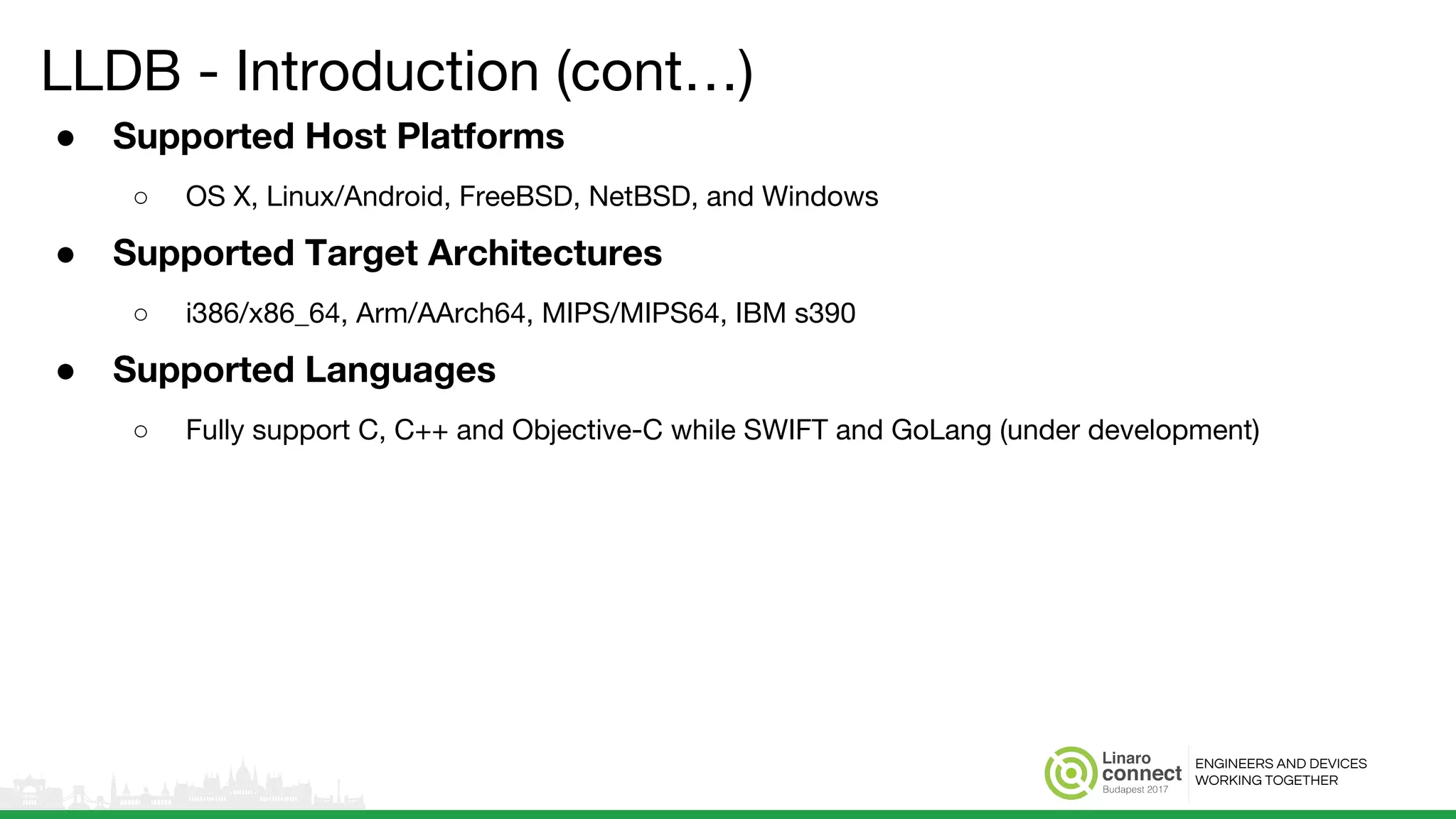
● Supported Host Platforms
○ OS X, Linux/Android, FreeBSD, NetBSD, and Windows
● Supported Target Architectures
○ i386/x86_64, Arm/AArch64, MIPS/MIPS64, IBM s390
● Supported Languages
○ Fully support C, C++ and Objective-C while SWIFT and GoLang (under development)
ENGINEERS AND DEVICES
WORKING TOGETHER
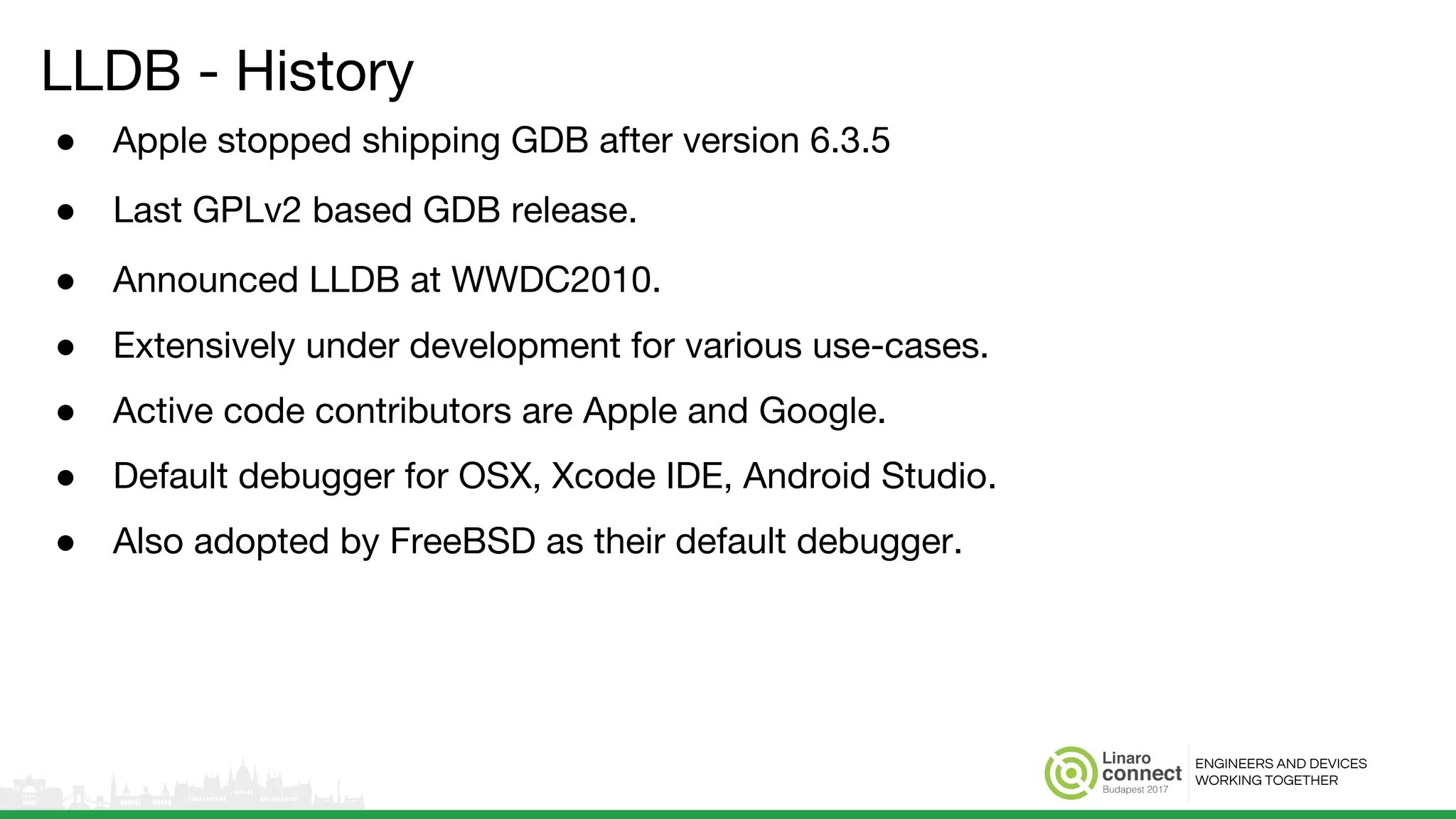
LLDB - History
● Apple stopped shipping GDB after version 6.3.5
● Last GPLv2 based GDB release.
● Announced LLDB at WWDC2010.
● Extensively under development for various use-cases.
● Active code contributors are Apple and Google.
● Default debugger for OSX, Xcode IDE, Android Studio.
● Also adopted by FreeBSD as their default debugger.
ENGINEERS AND DEVICES
WORKING TOGETHER
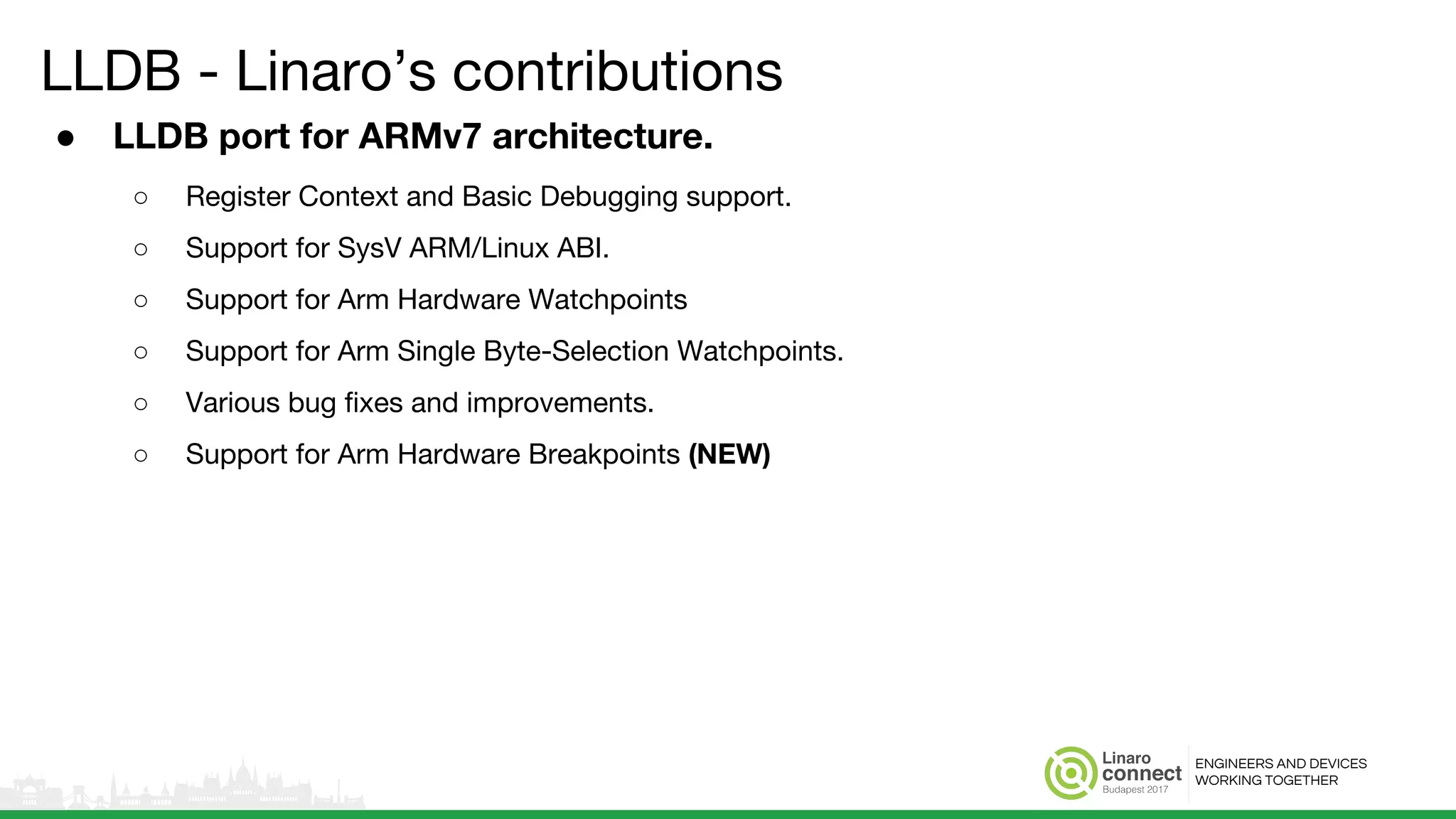
LLDB - Linaro’s contributions
● LLDB port for ARMv7 architecture.
○ Register Context and Basic Debugging support.
○ Support for SysV ARM/Linux ABI.
○ Support for Arm Hardware Watchpoints
○ Support for Arm Single Byte-Selection Watchpoints.
○ Various bug fixes and improvements.
○ Support for Arm Hardware Breakpoints (NEW)
ENGINEERS AND DEVICES
WORKING TOGETHER
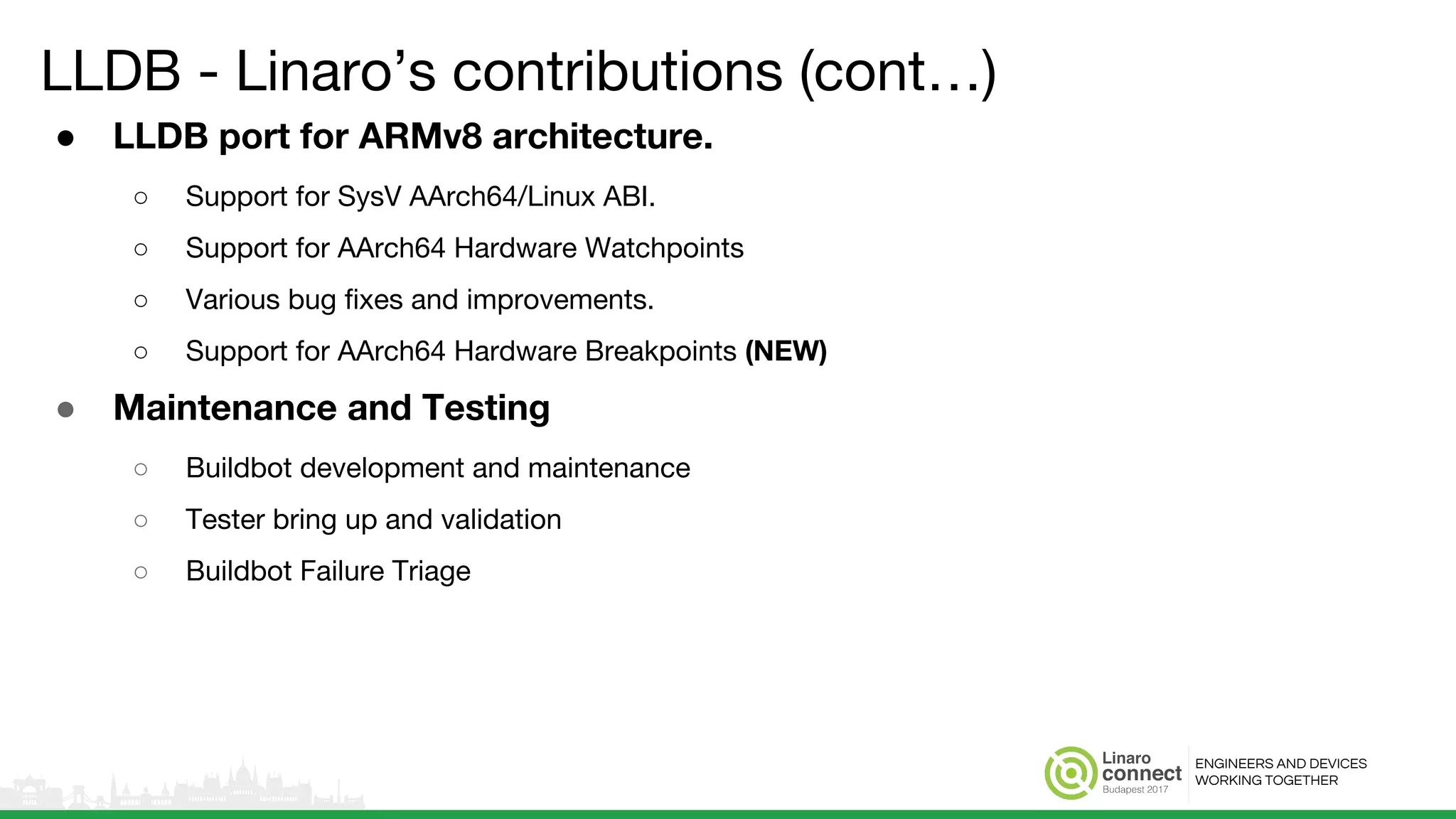
LLDB - Linaro’s contributions (cont…)
● LLDB port for ARMv8 architecture.
○ Support for SysV AArch64/Linux ABI.
○ Support for AArch64 Hardware Watchpoints
○ Various bug fixes and improvements.
○ Support for AArch64 Hardware Breakpoints (NEW)
● Maintenance and Testing
○ Buildbot development and maintenance
○ Tester bring up and validation
○ Buildbot Failure Triage
ENGINEERS AND DEVICES
WORKING TOGETHER
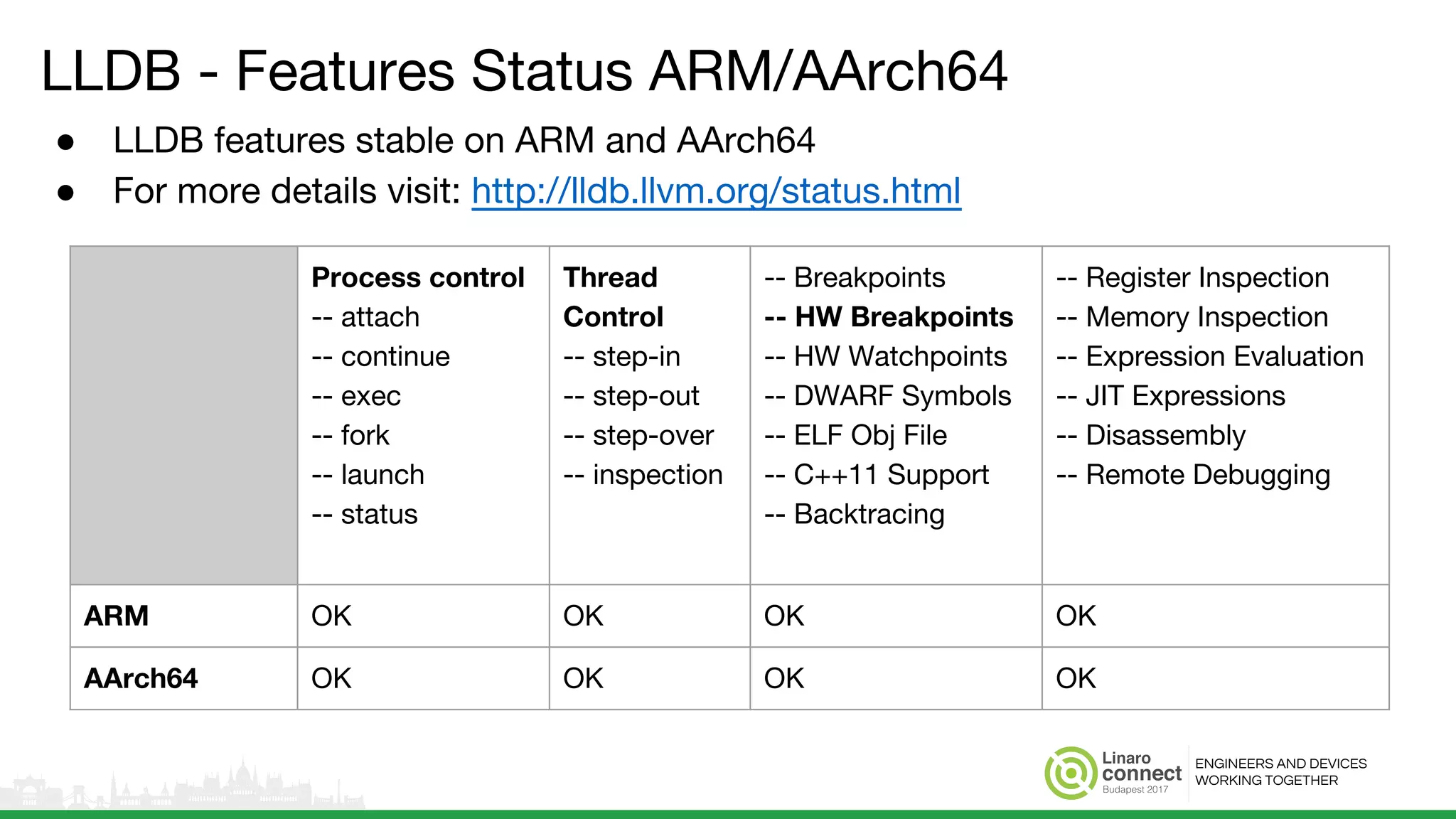
LLDB - Features Status ARM/AArch64
● LLDB features stable on ARM and AArch64
● For more details visit: http://lldb.llvm.org/status.html
Process control
-- attach
-- continue
-- exec
-- fork
-- launch
-- status
Thread
Control
-- step-in
-- step-out
-- step-over
-- inspection
-- Breakpoints
-- HW Breakpoints
-- HW Watchpoints
-- DWARF Symbols
-- ELF Obj File
-- C++11 Support
-- Backtracing
-- Register Inspection
-- Memory Inspection
-- Expression Evaluation
-- JIT Expressions
-- Disassembly
-- Remote Debugging
ARM OK OK OK OK
AArch64 OK OK OK OK
ENGINEERS AND DEVICES
WORKING TOGETHER
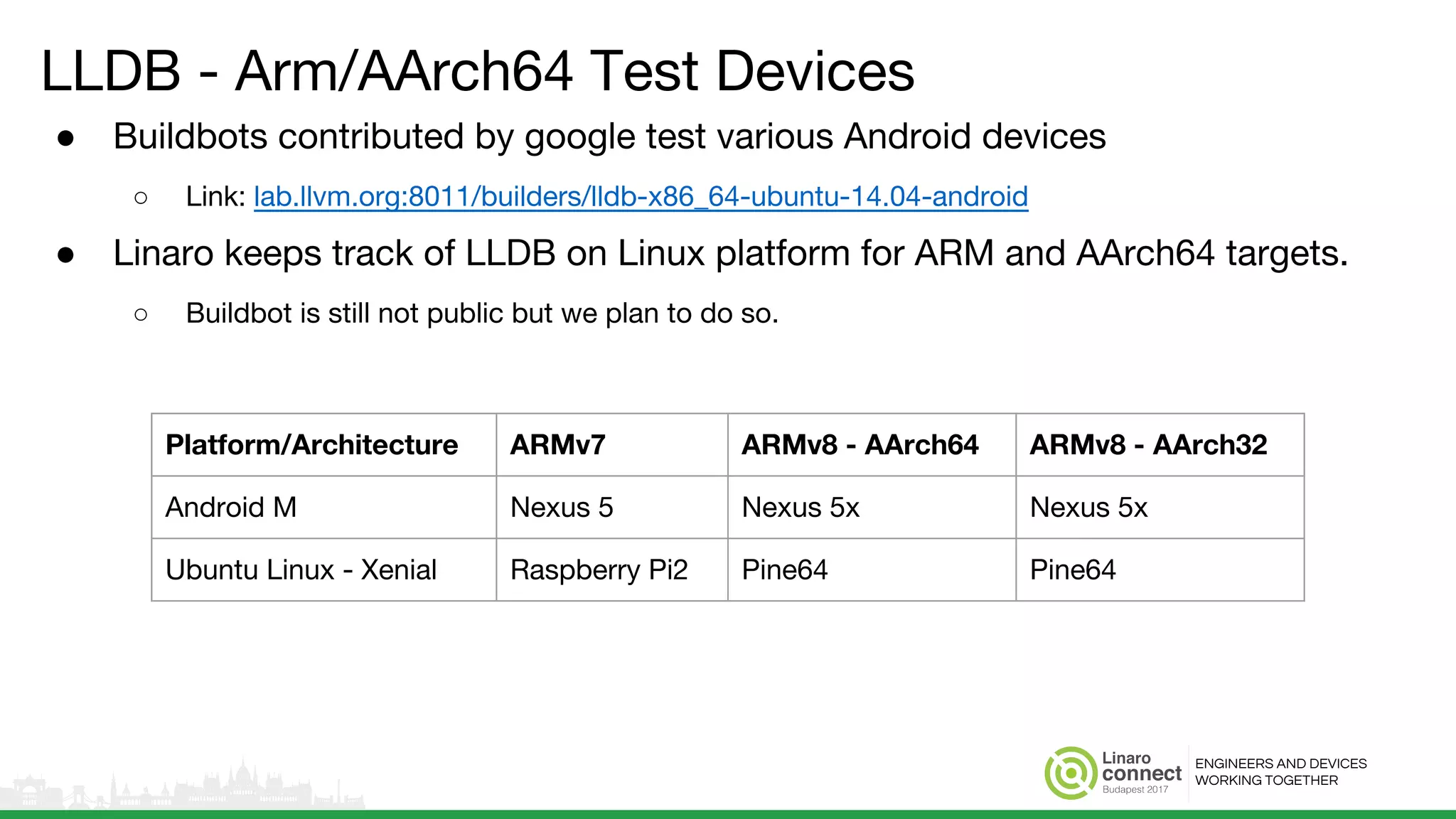
LLDB - Arm/AArch64 Test Devices
● Buildbots contributed by google test various Android devices
○ Link: lab.llvm.org:8011/builders/lldb-x86_64-ubuntu-14.04-android
● Linaro keeps track of LLDB on Linux platform for ARM and AArch64 targets.
○ Buildbot is still not public but we plan to do so.
Platform/Architecture ARMv7 ARMv8 - AArch64 ARMv8 - AArch32
Android M Nexus 5 Nexus 5x Nexus 5x
Ubuntu Linux - Xenial Raspberry Pi2 Pine64 Pine64
ENGINEERS AND DEVICES
WORKING TOGETHER
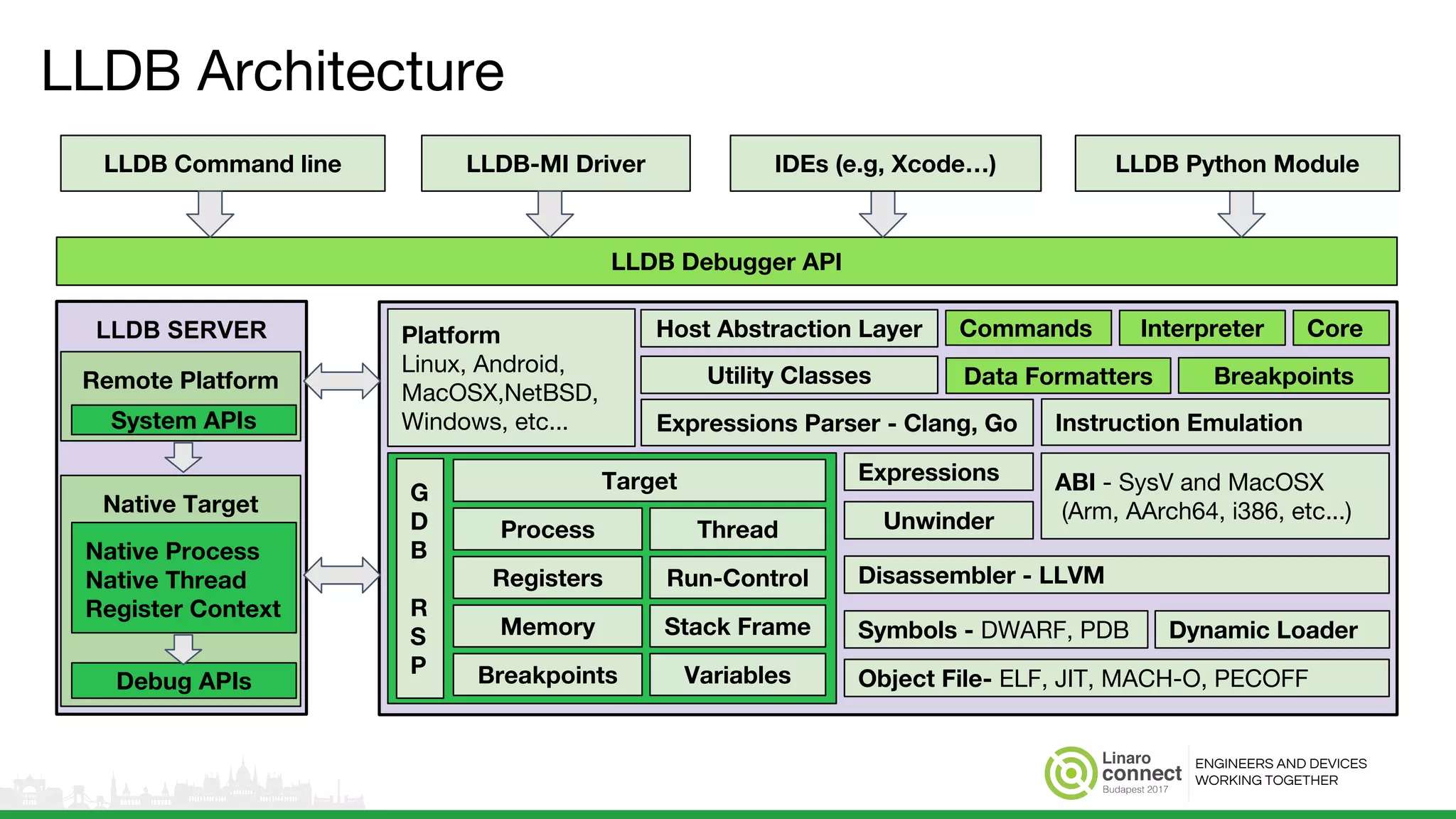
LLDB SERVER
LLDB Architecture
Native Target
Native Process
Native Thread
Register Context
Debug APIs
Platform
Linux, Android,
MacOSX,NetBSD,
Windows, etc...
Target
Unwinder
Instruction Emulation
LLDB Debugger API
LLDB Command line LLDB-MI Driver LLDB Python ModuleIDEs (e.g, Xcode…)
Remote Platform
System APIs
Commands
Data Formatters Breakpoints
Host Abstraction Layer Interpreter Core
Utility Classes
ABI - SysV and MacOSX
(Arm, AArch64, i386, etc...)
Expressions Parser - Clang, Go
Process
Registers
Memory Stack Frame
Run-Control
Thread
Breakpoints Variables
Expressions
Disassembler - LLVM
Object File- ELF, JIT, MACH-O, PECOFF
Symbols - DWARF, PDB Dynamic Loader
G
D
B
R
S
P
ENGINEERS AND DEVICES
WORKING TOGETHER
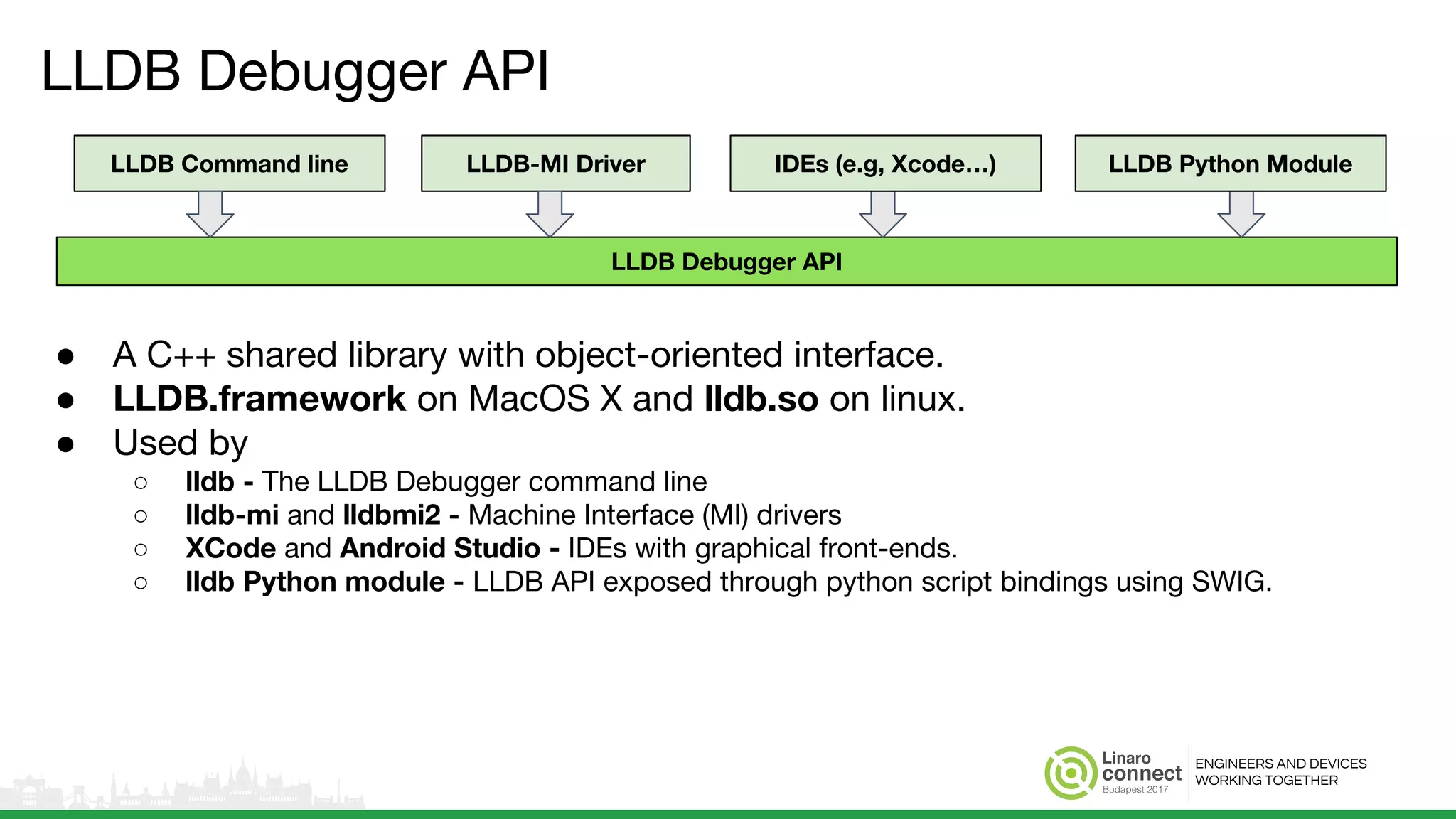
LLDB Debugger API
● A C++ shared library with object-oriented interface.
● LLDB.framework on MacOS X and lldb.so on linux.
● Used by
○ lldb - The LLDB Debugger command line
○ lldb-mi and lldbmi2 - Machine Interface (MI) drivers
○ XCode and Android Studio - IDEs with graphical front-ends.
○ lldb Python module - LLDB API exposed through python script bindings using SWIG.
LLDB Debugger API
LLDB Command line LLDB-MI Driver LLDB Python ModuleIDEs (e.g, Xcode…)
ENGINEERS AND DEVICES
WORKING TOGETHER
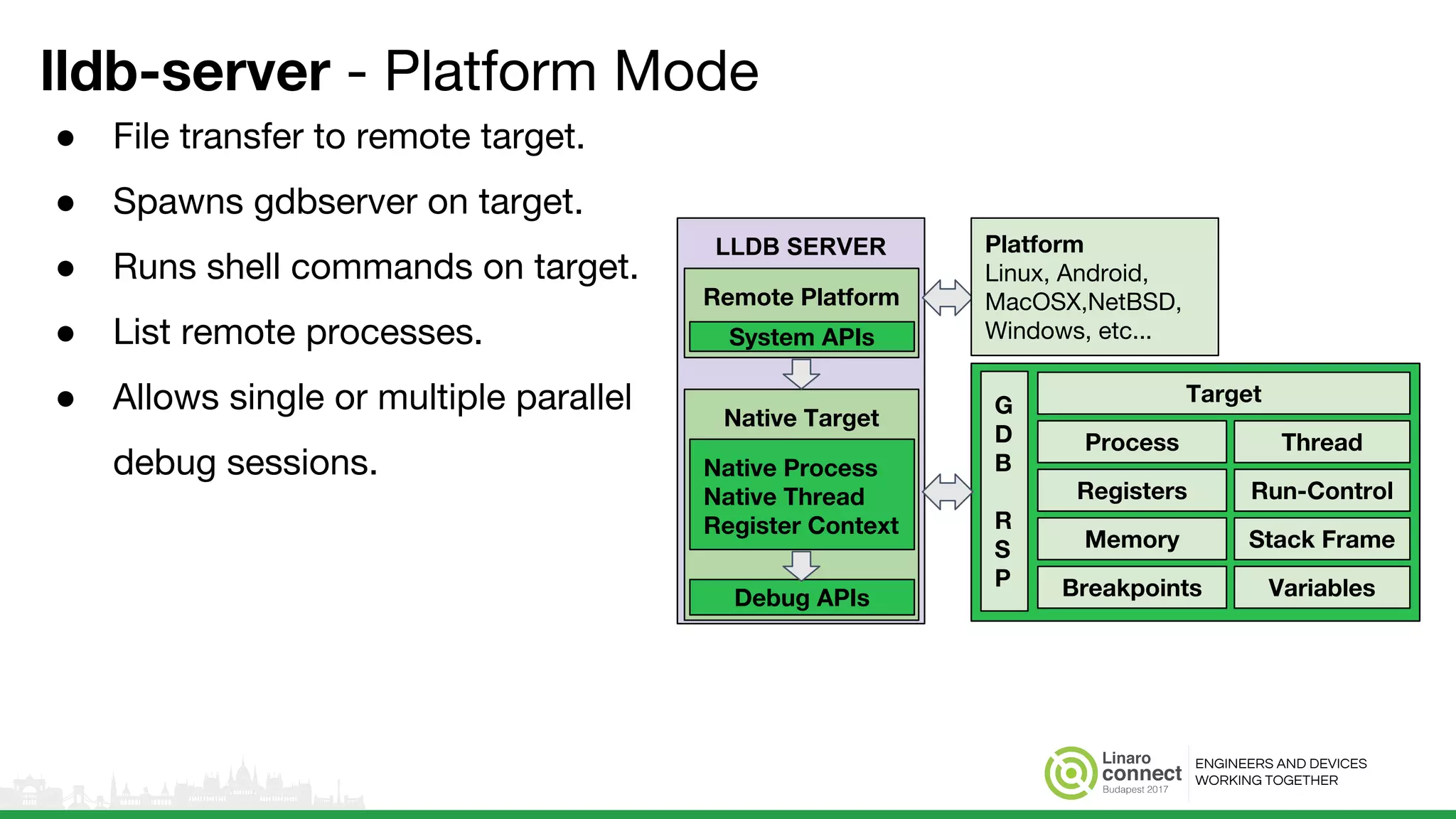
lldb-server - Platform Mode
● File transfer to remote target.
● Spawns gdbserver on target.
● Runs shell commands on target.
● List remote processes.
● Allows single or multiple parallel
debug sessions.
LLDB SERVER
Native Target
Native Process
Native Thread
Register Context
Debug APIs
Remote Platform
System APIs
Target
Process
Registers
Memory Stack Frame
Run-Control
Thread
Breakpoints Variables
G
D
B
R
S
P
Platform
Linux, Android,
MacOSX,NetBSD,
Windows, etc...
ENGINEERS AND DEVICES
WORKING TOGETHER
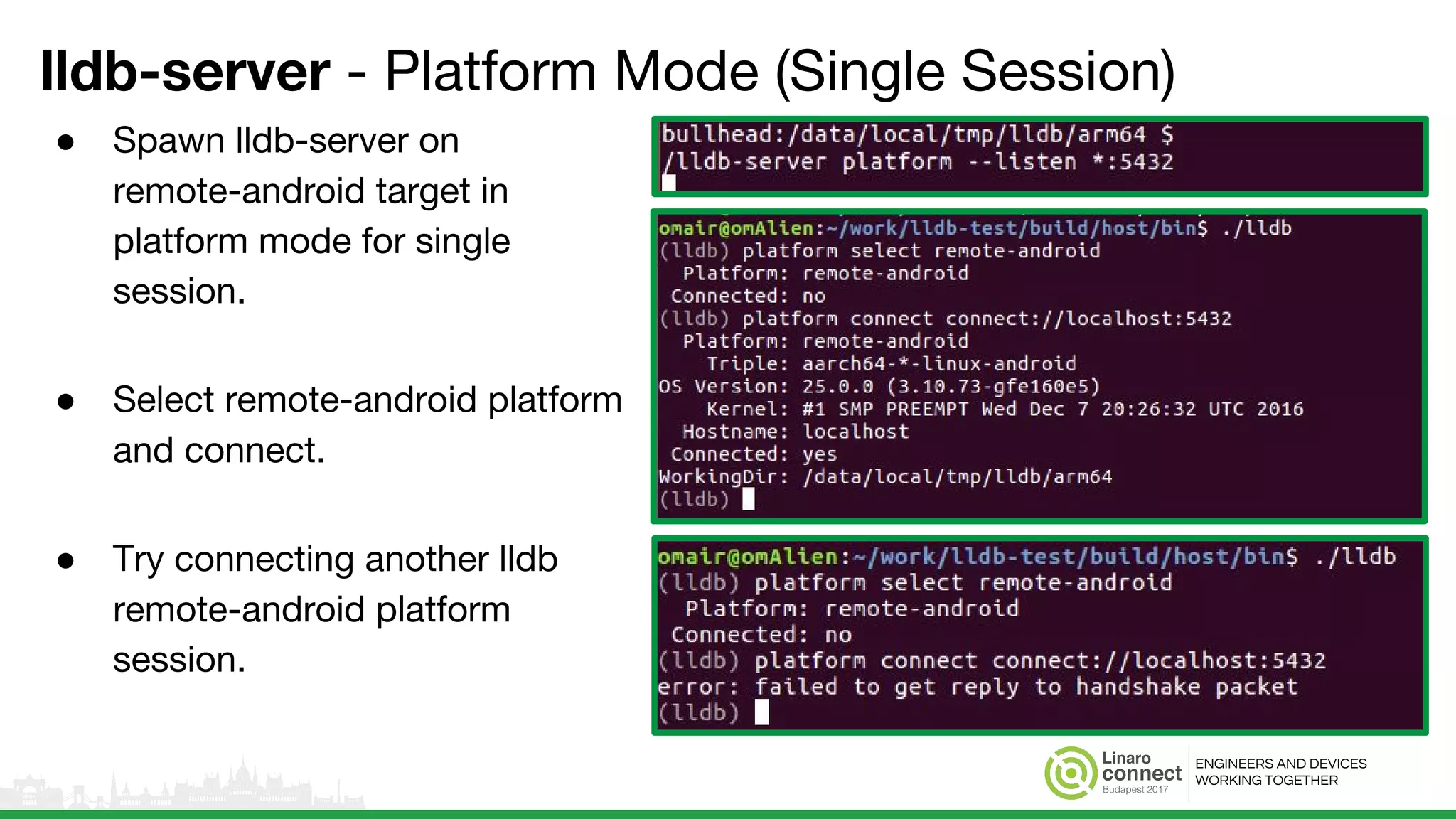
lldb-server - Platform Mode (Single Session)
● Spawn lldb-server on
remote-android target in
platform mode for single
session.
● Select remote-android platform
and connect.
● Try connecting another lldb
remote-android platform
session.
ENGINEERS AND DEVICES
WORKING TOGETHER
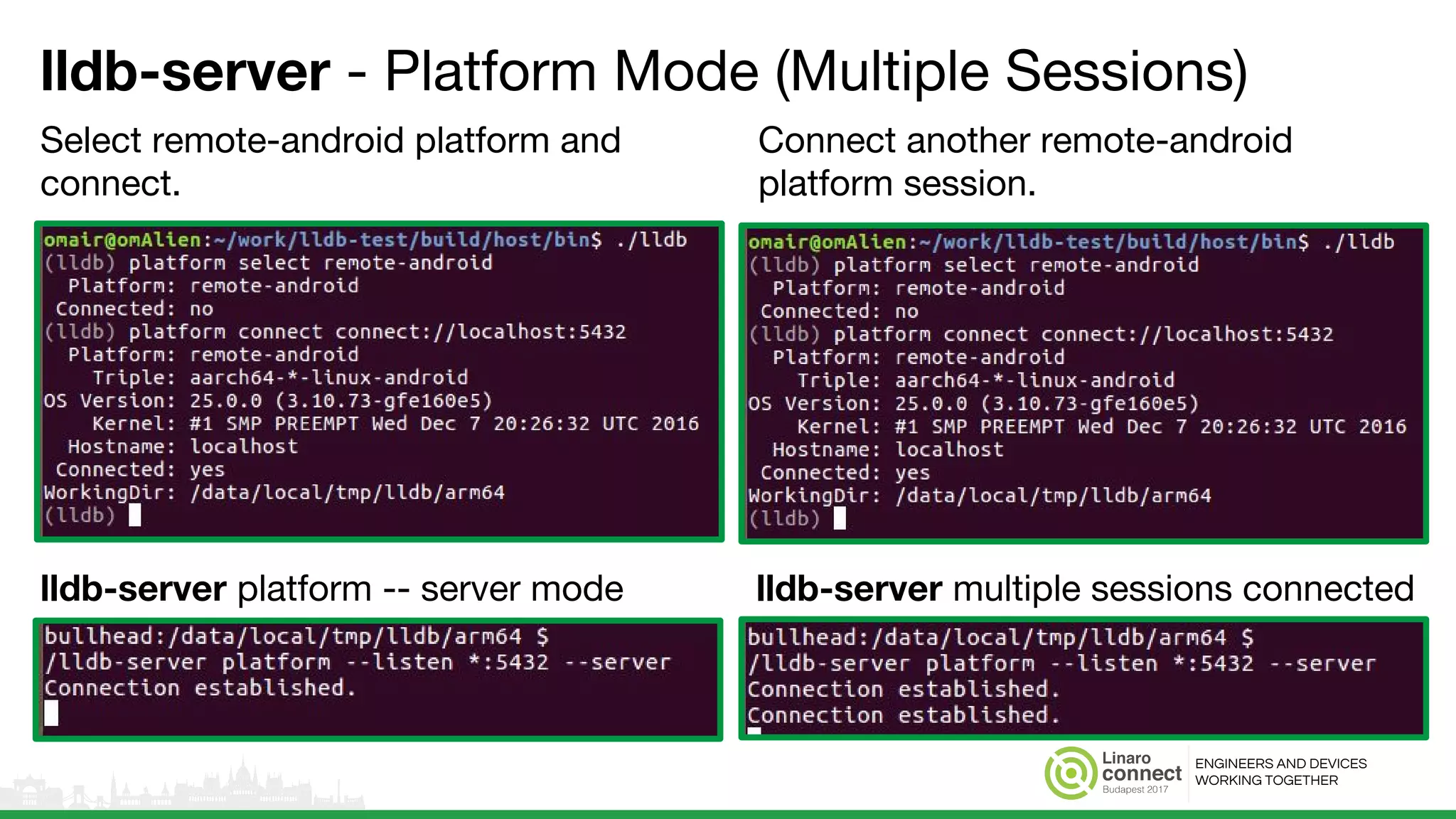
lldb-server - Platform Mode (Multiple Sessions)
Select remote-android platform and
connect.
Connect another remote-android
platform session.
lldb-server platform -- server mode lldb-server multiple sessions connected
ENGINEERS AND DEVICES
WORKING TOGETHER
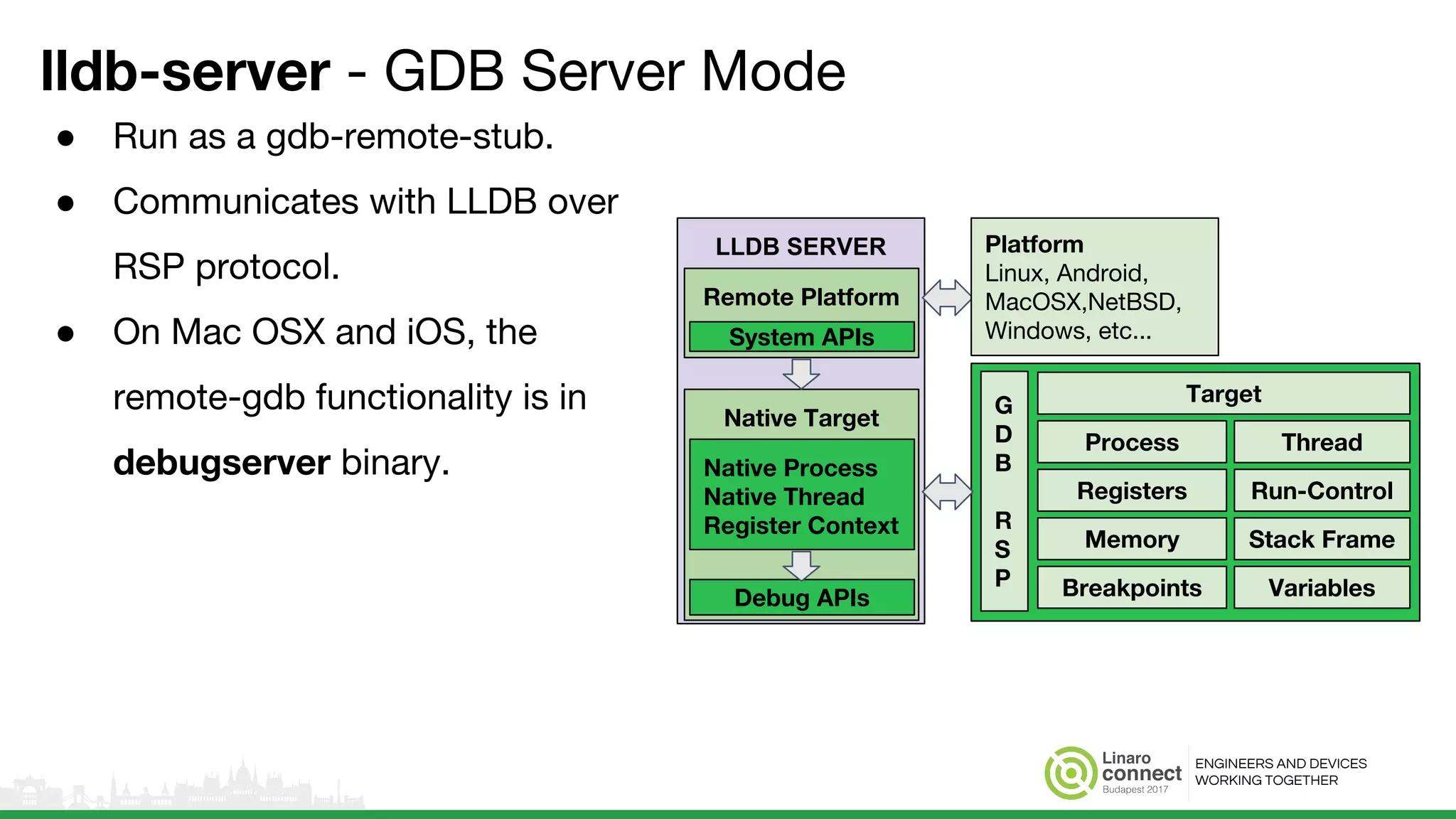
lldb-server - GDB Server Mode
● Run as a gdb-remote-stub.
● Communicates with LLDB over
RSP protocol.
● On Mac OSX and iOS, the
remote-gdb functionality is in
debugserver binary.
LLDB SERVER
Native Target
Native Process
Native Thread
Register Context
Debug APIs
Remote Platform
System APIs
Target
Process
Registers
Memory Stack Frame
Run-Control
Thread
Breakpoints Variables
G
D
B
R
S
P
Platform
Linux, Android,
MacOSX,NetBSD,
Windows, etc...
ENGINEERS AND DEVICES
WORKING TOGETHER
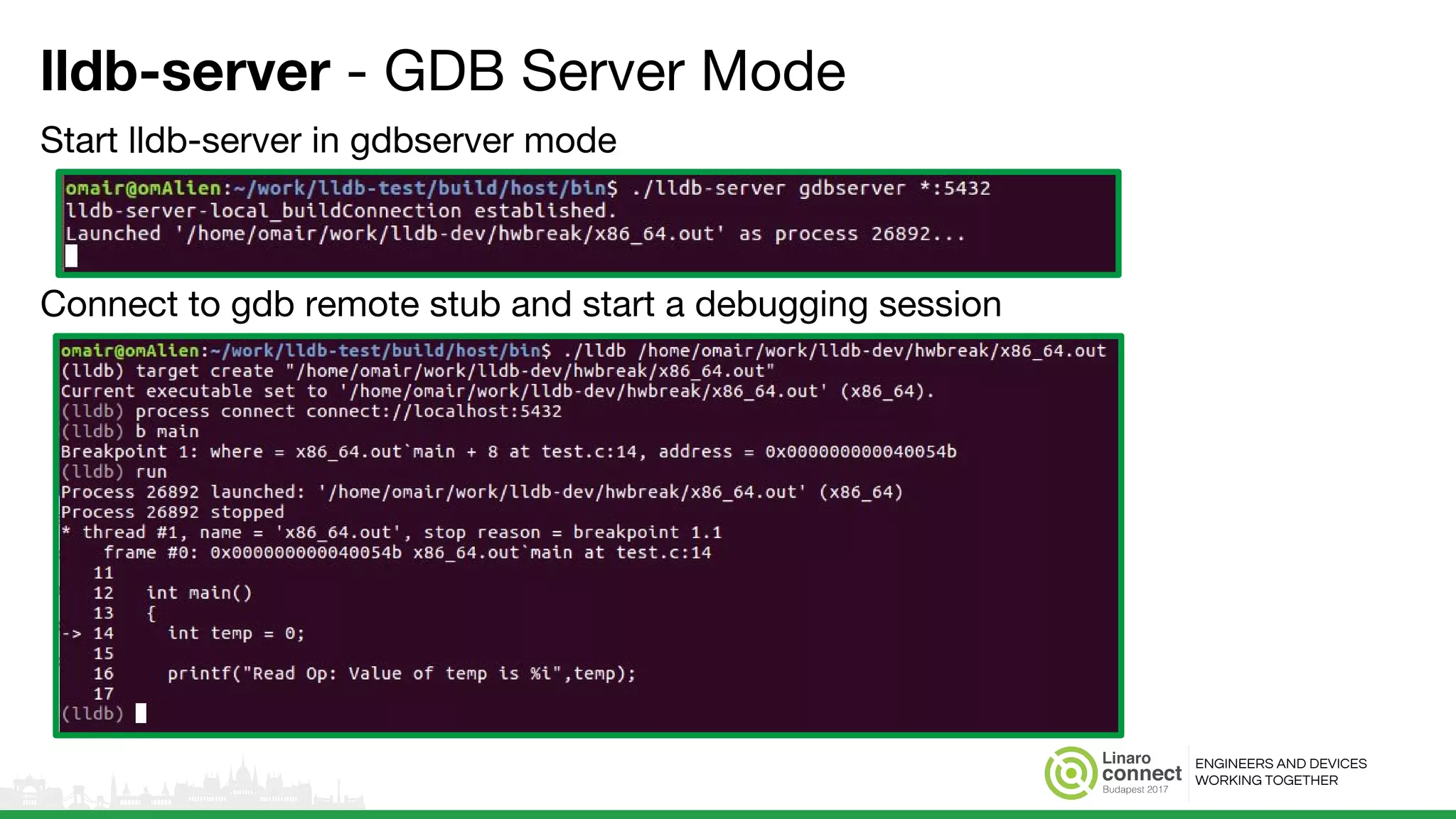
lldb-server - GDB Server Mode
Start lldb-server in gdbserver mode
Connect to gdb remote stub and start a debugging session
ENGINEERS AND DEVICES
WORKING TOGETHER
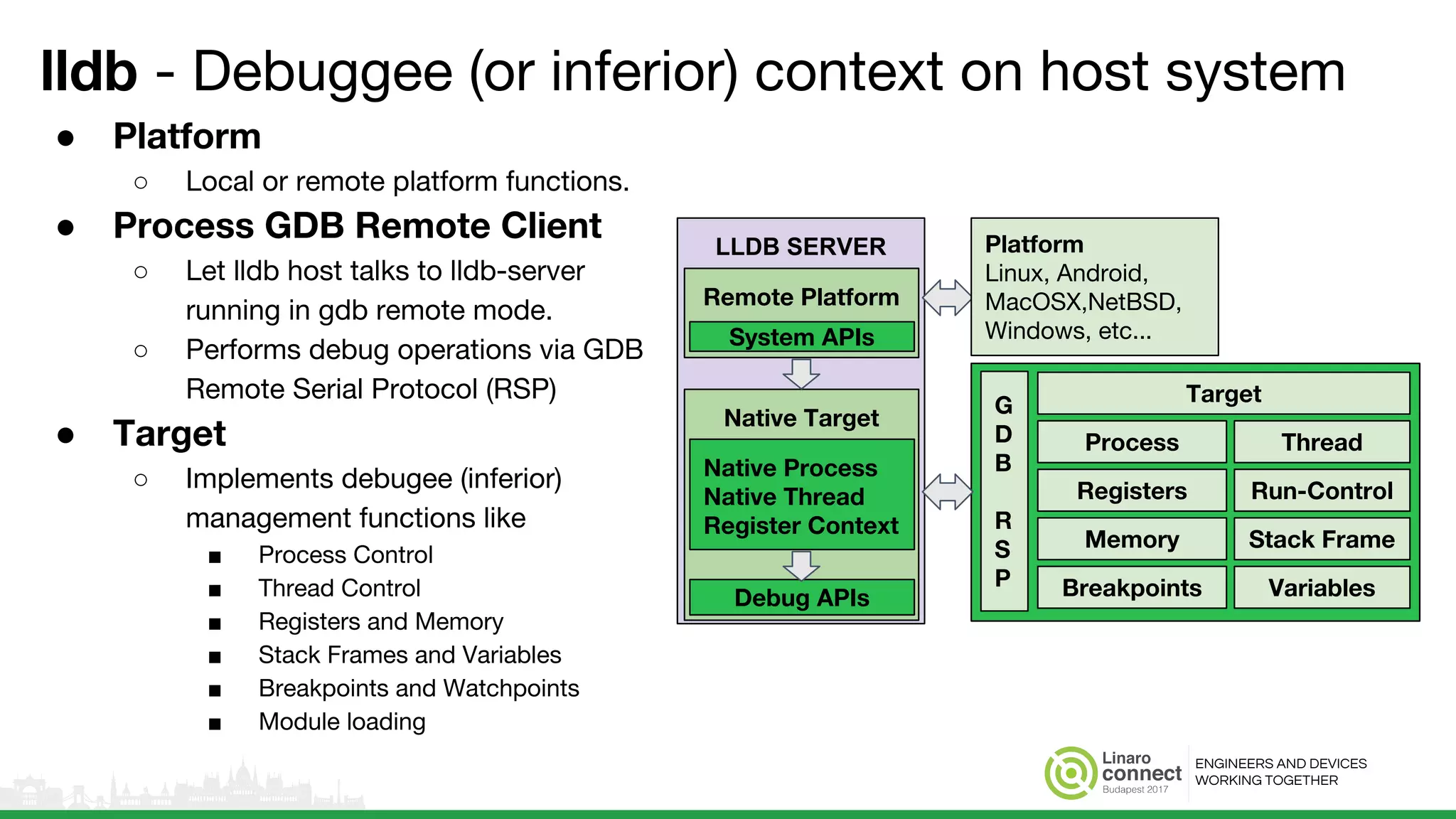
lldb - Debuggee (or inferior) context on host system
● Platform
○ Local or remote platform functions.
● Process GDB Remote Client
○ Let lldb host talks to lldb-server
running in gdb remote mode.
○ Performs debug operations via GDB
Remote Serial Protocol (RSP)
● Target
○ Implements debugee (inferior)
management functions like
■ Process Control
■ Thread Control
■ Registers and Memory
■ Stack Frames and Variables
■ Breakpoints and Watchpoints
■ Module loading
LLDB SERVER
Native Target
Native Process
Native Thread
Register Context
Debug APIs
Remote Platform
System APIs
Target
Process
Registers
Memory Stack Frame
Run-Control
Thread
Breakpoints Variables
G
D
B
R
S
P
Platform
Linux, Android,
MacOSX,NetBSD,
Windows, etc...
ENGINEERS AND DEVICES
WORKING TOGETHER
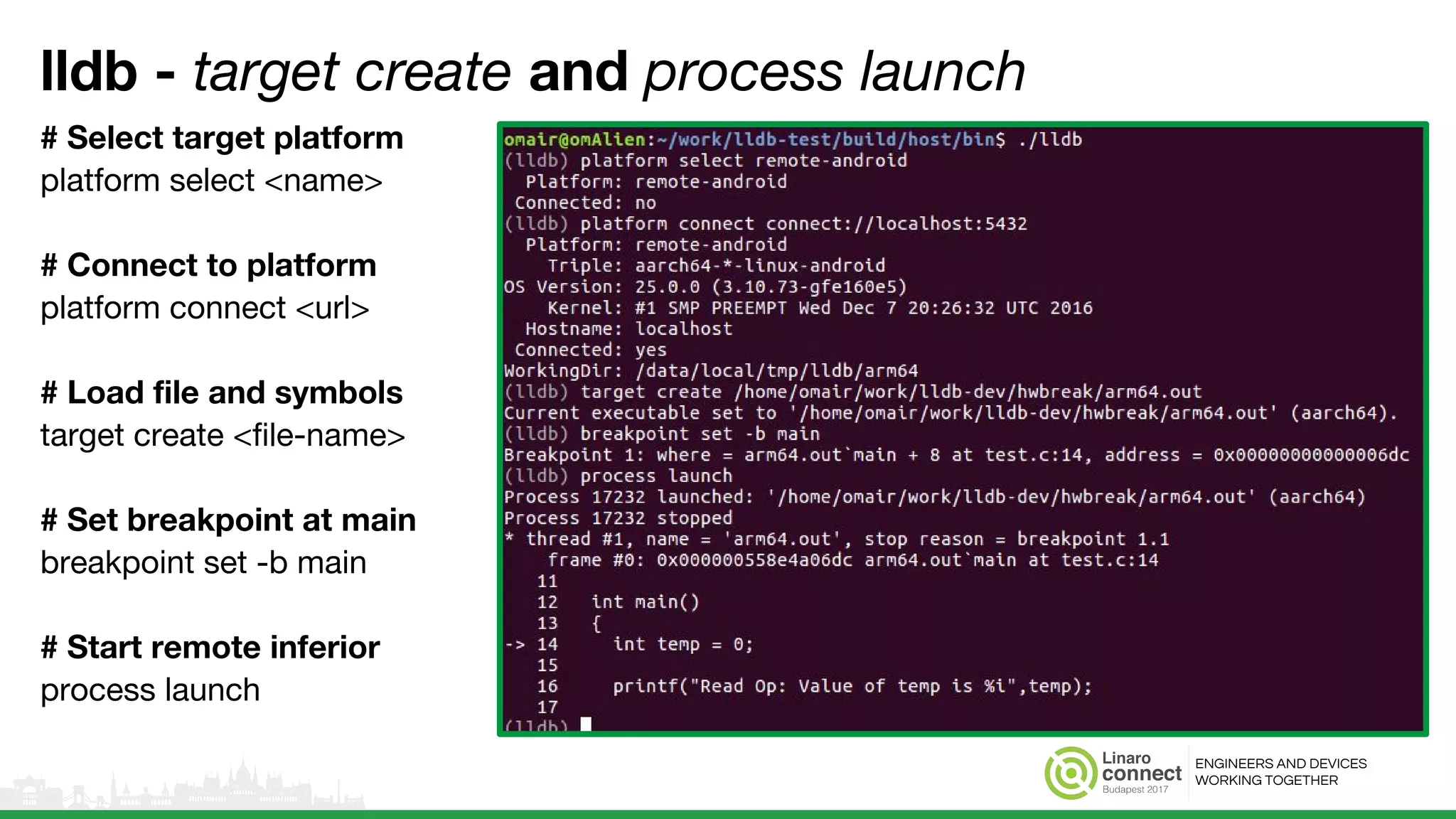
lldb - target create and process launch
# Select target platform
platform select <name>
# Connect to platform
platform connect <url>
# Load file and symbols
target create <file-name>
# Set breakpoint at main
breakpoint set -b main
# Start remote inferior
process launch
ENGINEERS AND DEVICES
WORKING TOGETHER
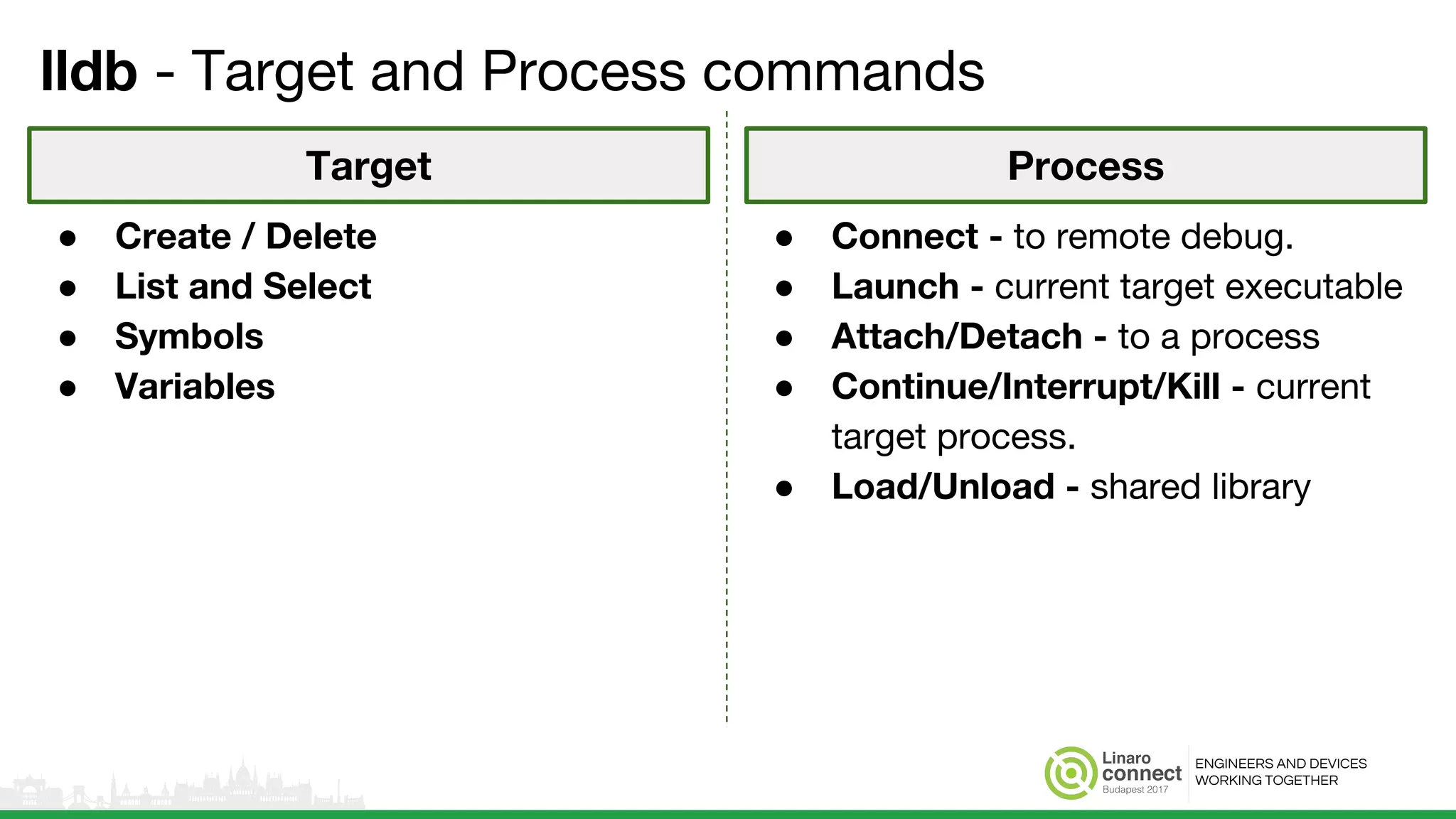
lldb - Target and Process commands
● Create / Delete
● List and Select
● Symbols
● Variables
● Connect - to remote debug.
● Launch - current target executable
● Attach/Detach - to a process
● Continue/Interrupt/Kill - current
target process.
● Load/Unload - shared library
Target Process
ENGINEERS AND DEVICES
WORKING TOGETHER
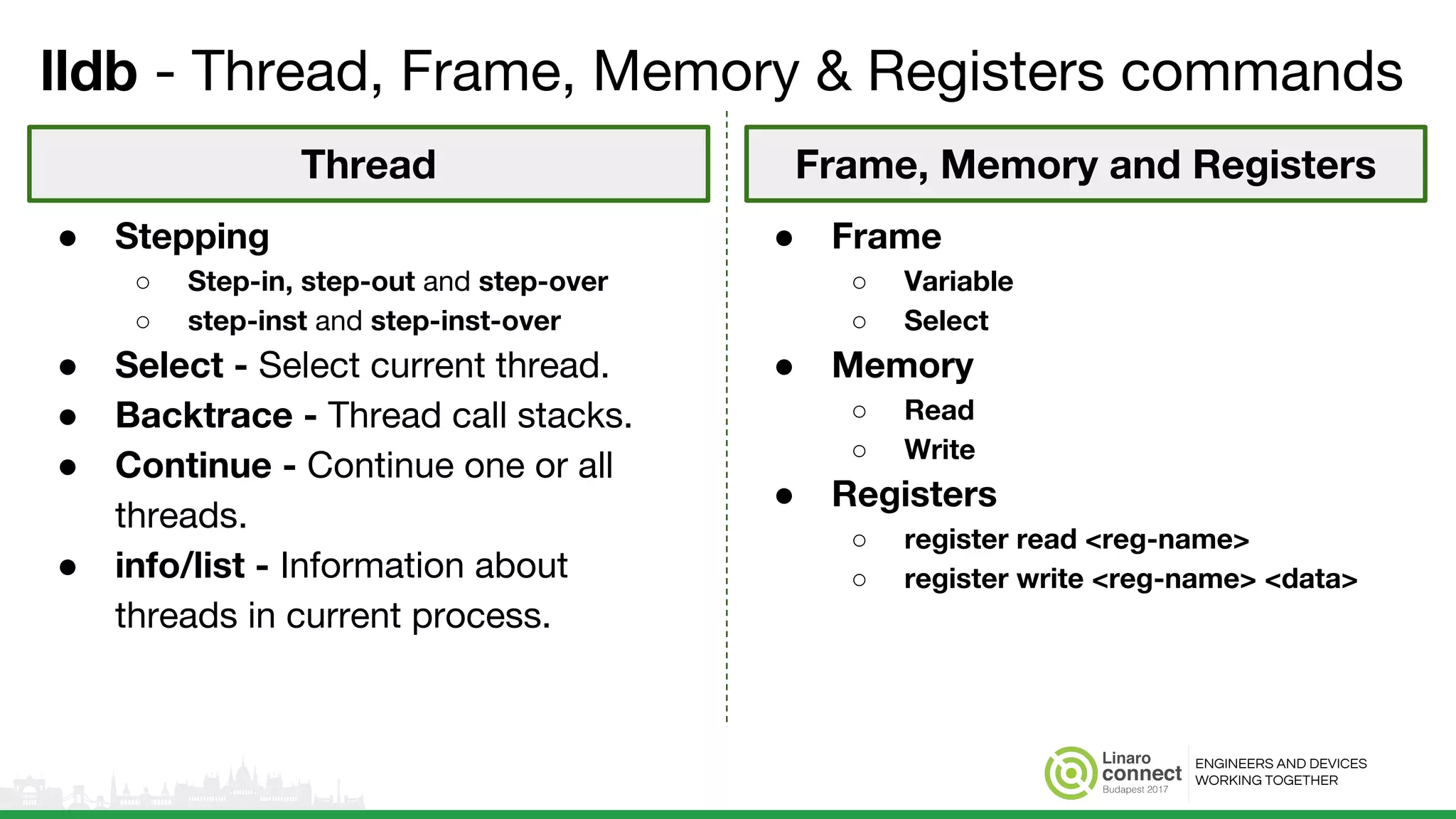
lldb - Thread, Frame, Memory & Registers commands
● Frame
○ Variable
○ Select
● Memory
○ Read
○ Write
● Registers
○ register read <reg-name>
○ register write <reg-name> <data>
● Stepping
○ Step-in, step-out and step-over
○ step-inst and step-inst-over
● Select - Select current thread.
● Backtrace - Thread call stacks.
● Continue - Continue one or all
threads.
● info/list - Information about
threads in current process.
Thread Frame, Memory and Registers
ENGINEERS AND DEVICES
WORKING TOGETHER
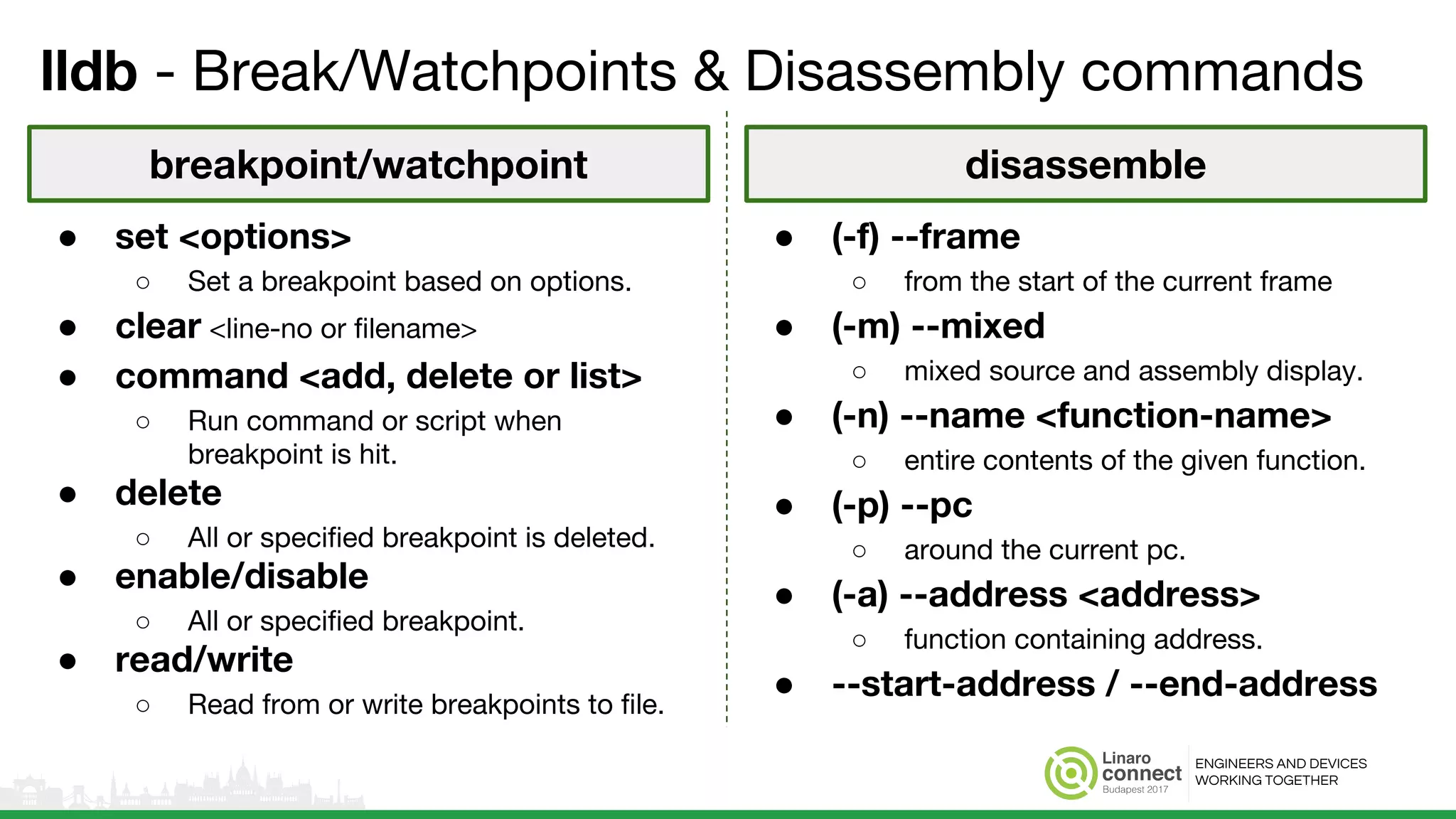
lldb - Break/Watchpoints & Disassembly commands
● (-f) --frame
○ from the start of the current frame
● (-m) --mixed
○ mixed source and assembly display.
● (-n) --name <function-name>
○ entire contents of the given function.
● (-p) --pc
○ around the current pc.
● (-a) --address <address>
○ function containing address.
● --start-address / --end-address
● set <options>
○ Set a breakpoint based on options.
● clear <line-no or filename>
● command <add, delete or list>
○ Run command or script when
breakpoint is hit.
● delete
○ All or specified breakpoint is deleted.
● enable/disable
○ All or specified breakpoint.
● read/write
○ Read from or write breakpoints to file.
breakpoint/watchpoint disassemble
ENGINEERS AND DEVICES
WORKING TOGETHER
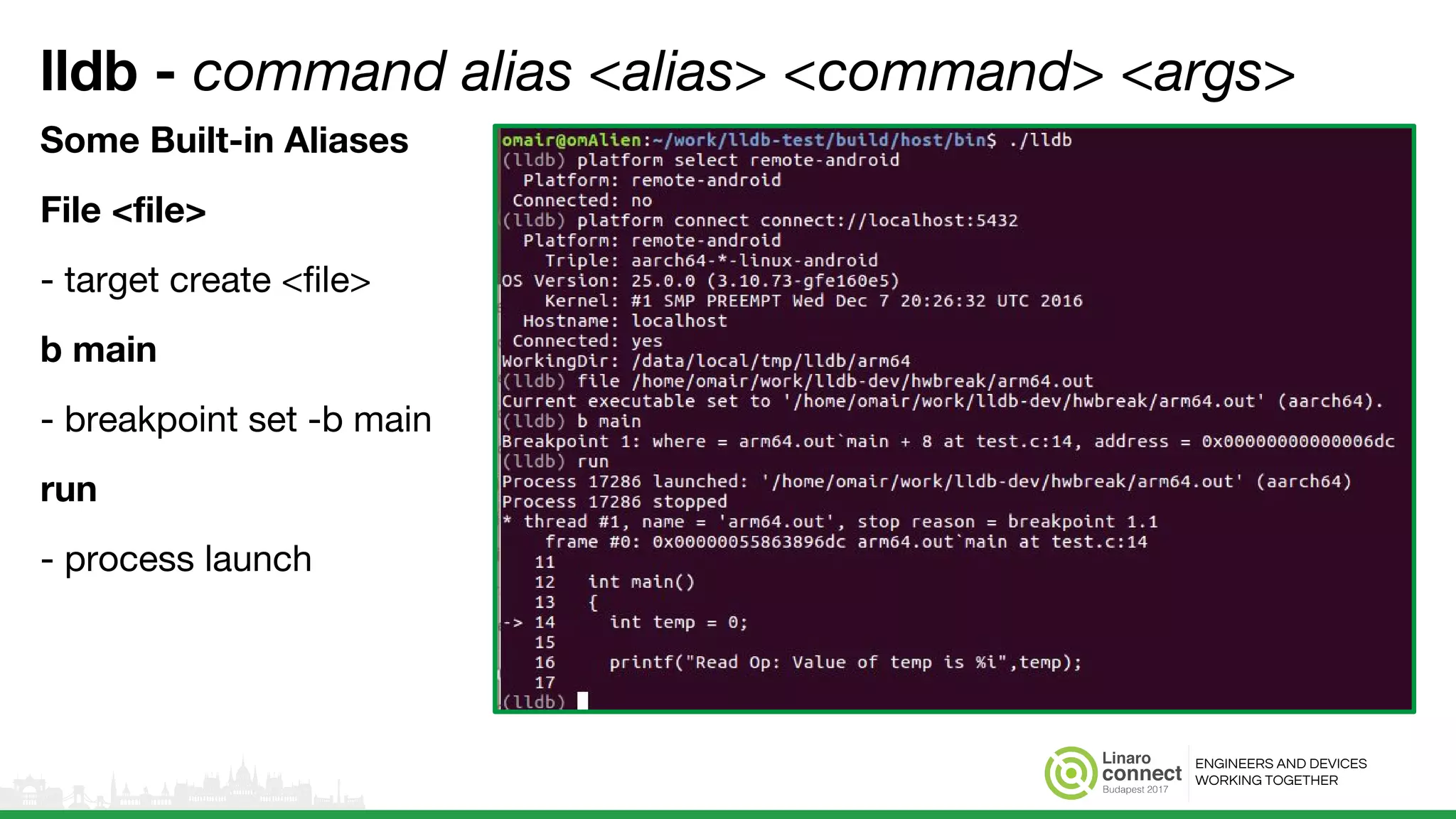
lldb - command alias <alias> <command> <args>
Some Built-in Aliases
File <file>
- target create <file>
b main
- breakpoint set -b main
run
- process launch
ENGINEERS AND DEVICES
WORKING TOGETHER
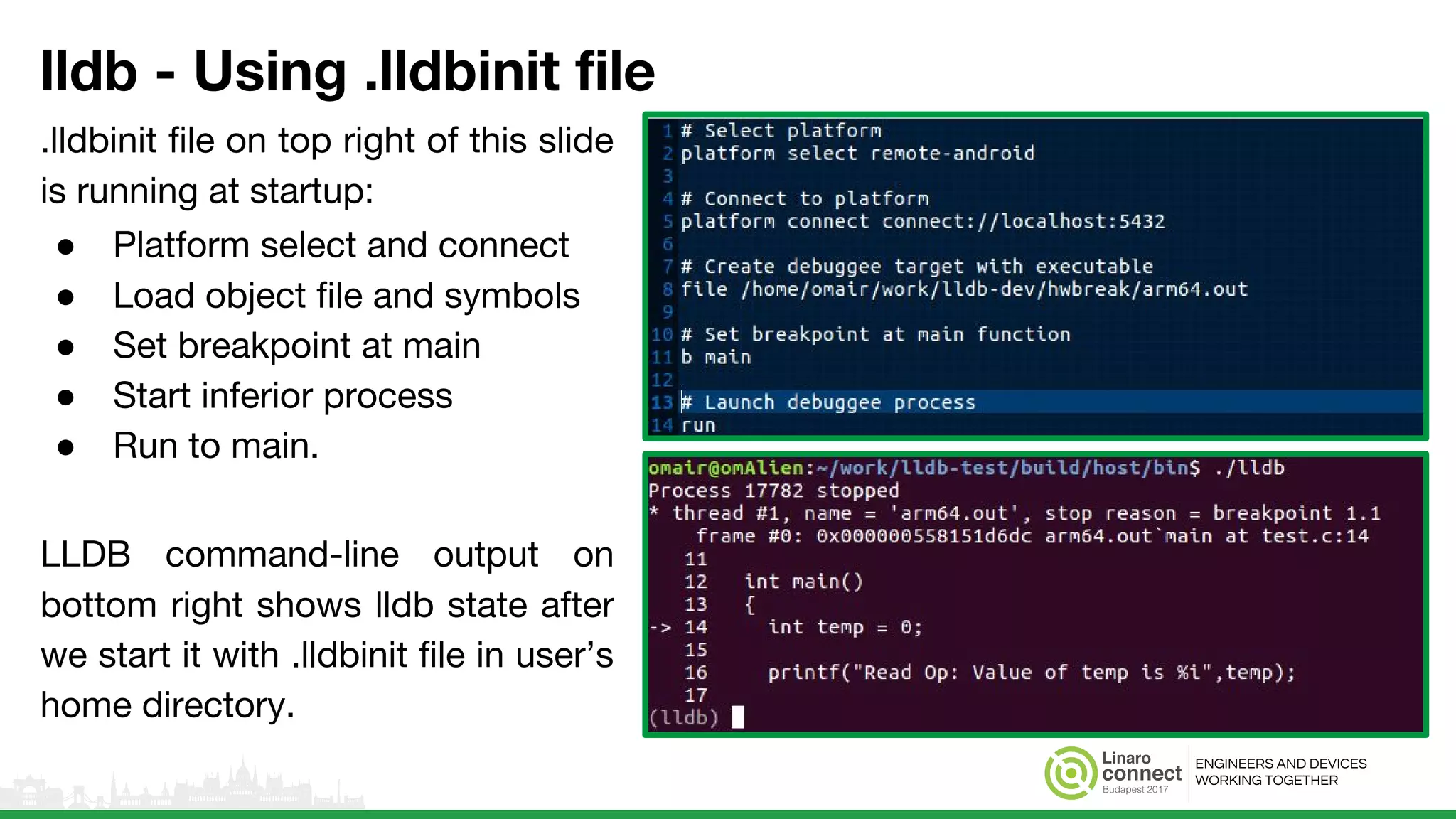
lldb - Using .lldbinit file
.lldbinit file on top right of this slide
is running at startup:
● Platform select and connect
● Load object file and symbols
● Set breakpoint at main
● Start inferior process
● Run to main.
LLDB command-line output on
bottom right shows lldb state after
we start it with .lldbinit file in user’s
home directory.
● Spawn lldb with .lldbinit file in your
home directory.
● Sample output with .lldbinit file on
left.
ENGINEERS AND DEVICES
WORKING TOGETHER
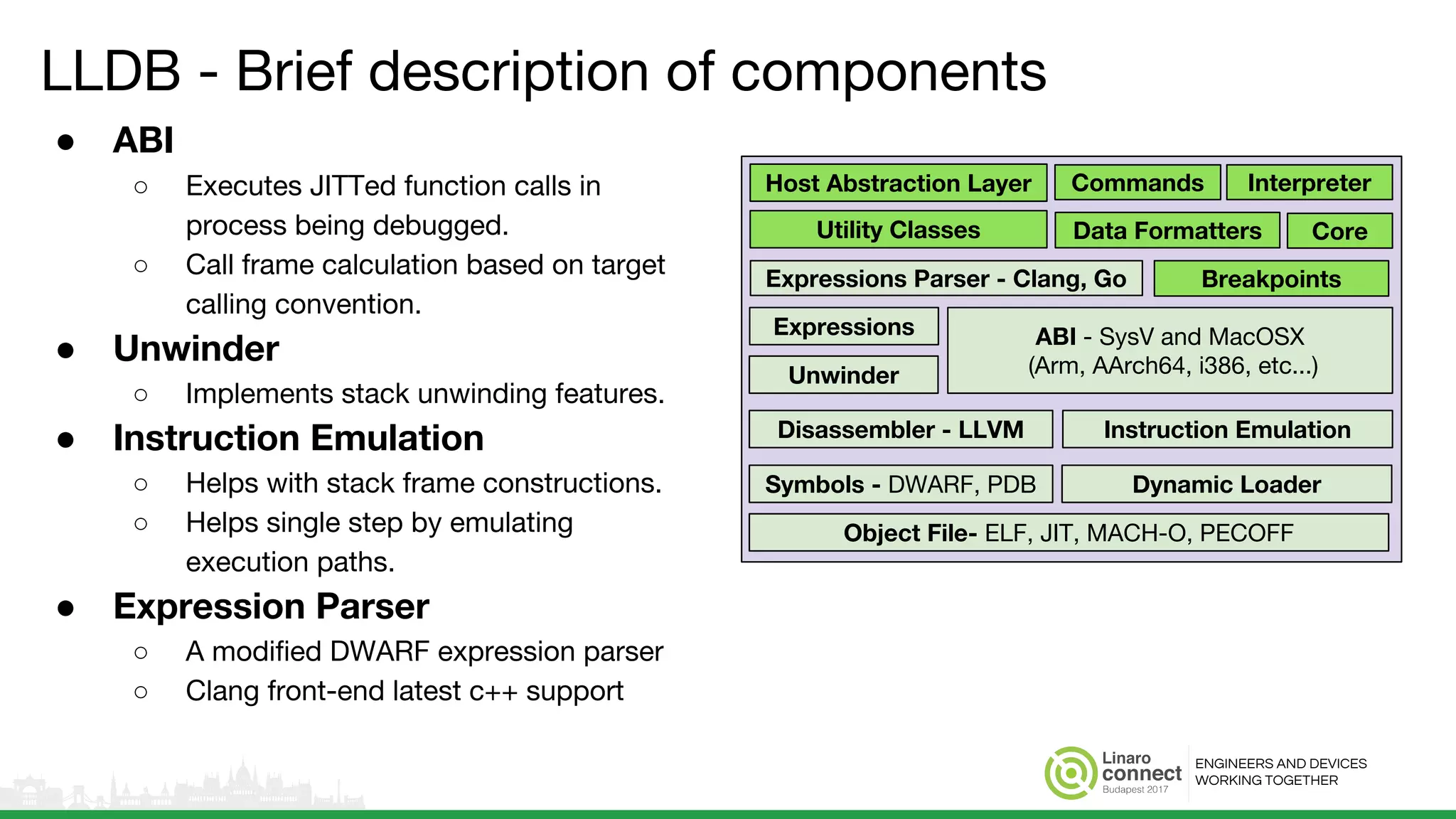
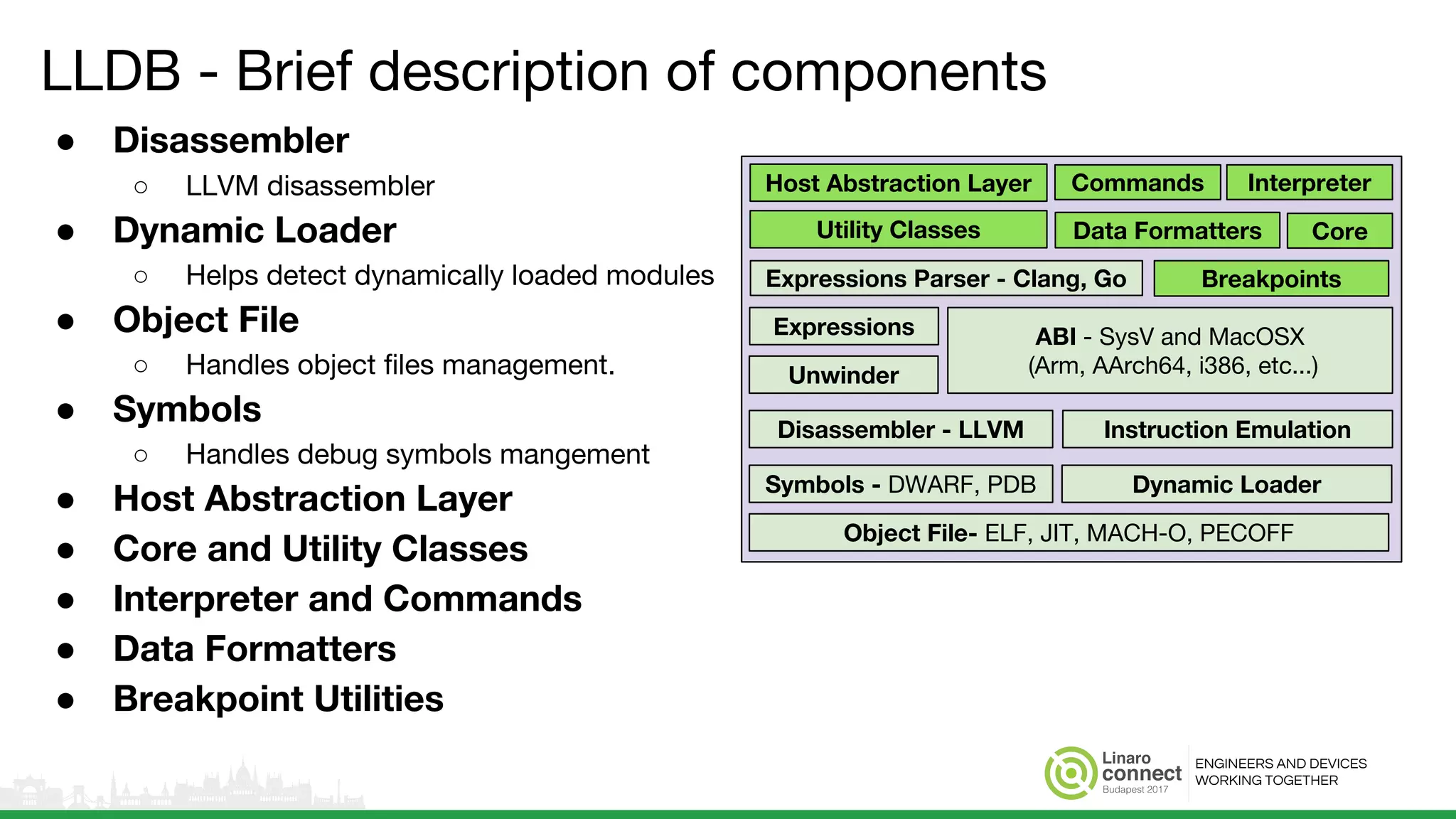
LLDB - Brief description of components
● ABI
○ Executes JITTed function calls in
process being debugged.
○ Call frame calculation based on target
calling convention.
● Unwinder
○ Implements stack unwinding features.
● Instruction Emulation
○ Helps with stack frame constructions.
○ Helps single step by emulating
execution paths.
● Expression Parser
○ A modified DWARF expression parser
○ Clang front-end latest c++ support
Unwinder
Commands
Data Formatters
Breakpoints
Host Abstraction Layer Interpreter
CoreUtility Classes
ABI - SysV and MacOSX
(Arm, AArch64, i386, etc...)
Expressions Parser - Clang, Go
Expressions
Disassembler - LLVM
Object File- ELF, JIT, MACH-O, PECOFF
Symbols - DWARF, PDB Dynamic Loader
Instruction Emulation
ENGINEERS AND DEVICES
WORKING TOGETHER
LLDB - Brief description of components
● Disassembler
○ LLVM disassembler
● Dynamic Loader
○ Helps detect dynamically loaded modules
● Object File
○ Handles object files management.
● Symbols
○ Handles debug symbols mangement
● Host Abstraction Layer
● Core and Utility Classes
● Interpreter and Commands
● Data Formatters
● Breakpoint Utilities
Unwinder
Commands
Data Formatters
Breakpoints
Host Abstraction Layer Interpreter
CoreUtility Classes
ABI - SysV and MacOSX
(Arm, AArch64, i386, etc...)
Expressions Parser - Clang, Go
Expressions
Disassembler - LLVM
Object File- ELF, JIT, MACH-O, PECOFF
Symbols - DWARF, PDB Dynamic Loader
Instruction Emulation
ENGINEERS AND DEVICES
WORKING TOGETHER
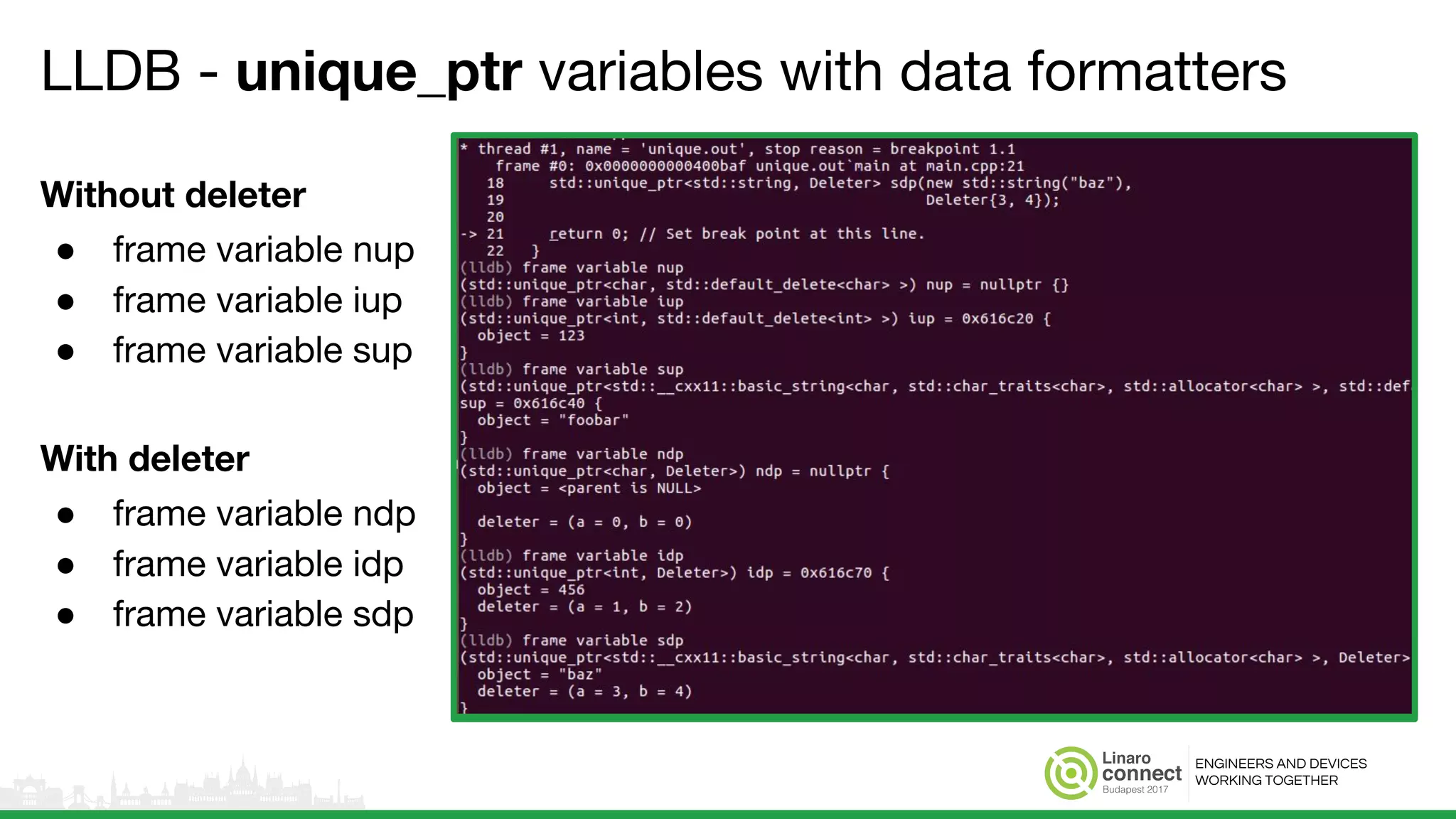
LLDB - unique_ptr variables with data formatters
Without deleter
● frame variable nup
● frame variable iup
● frame variable sup
With deleter
● frame variable ndp
● frame variable idp
● frame variable sdp
ENGINEERS AND DEVICES
WORKING TOGETHER
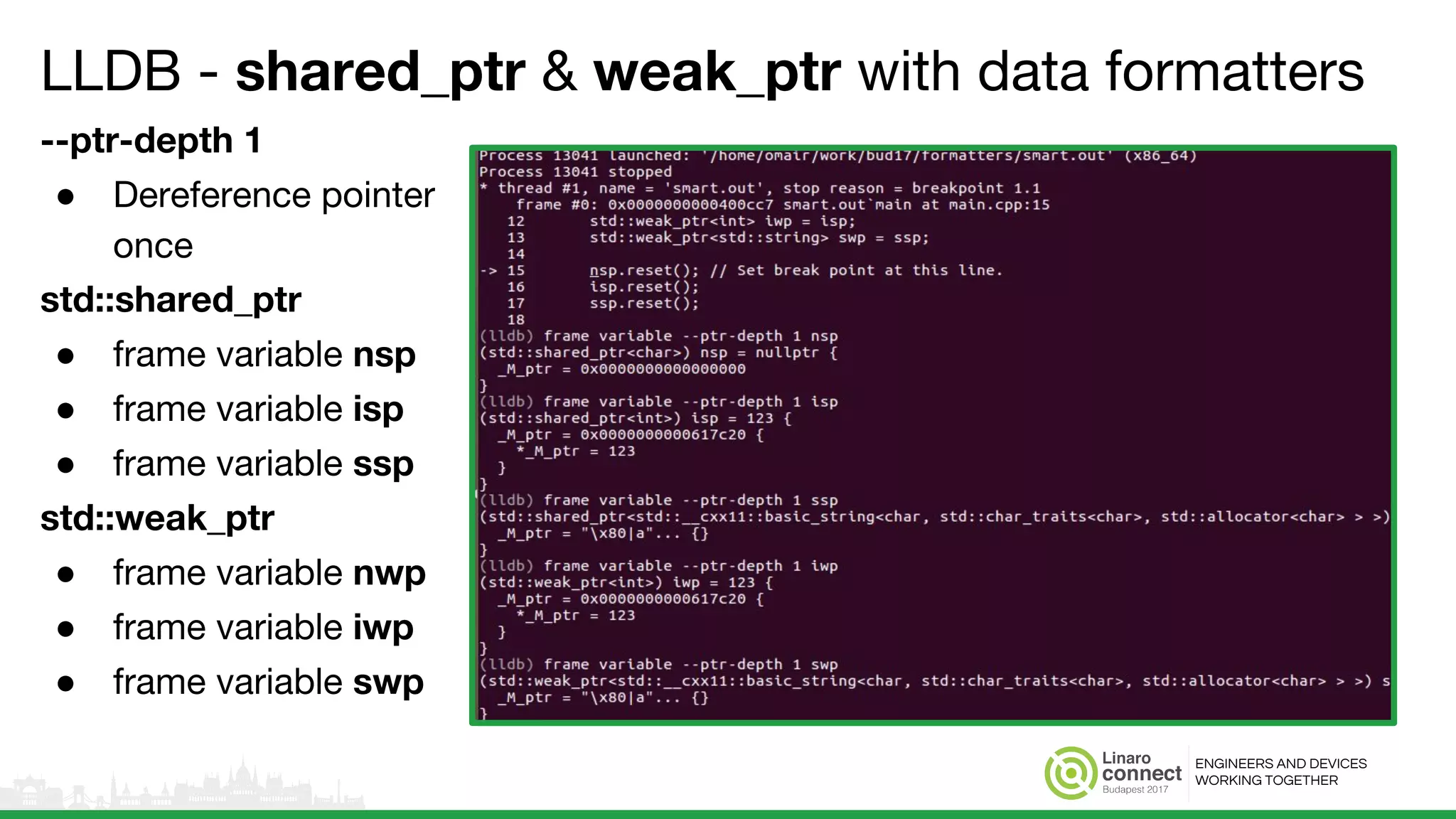
LLDB - shared_ptr & weak_ptr with data formatters
--ptr-depth 1
● Dereference pointer
once
std::shared_ptr
● frame variable nsp
● frame variable isp
● frame variable ssp
std::weak_ptr
● frame variable nwp
● frame variable iwp
● frame variable swp
ENGINEERS AND DEVICES
WORKING TOGETHER
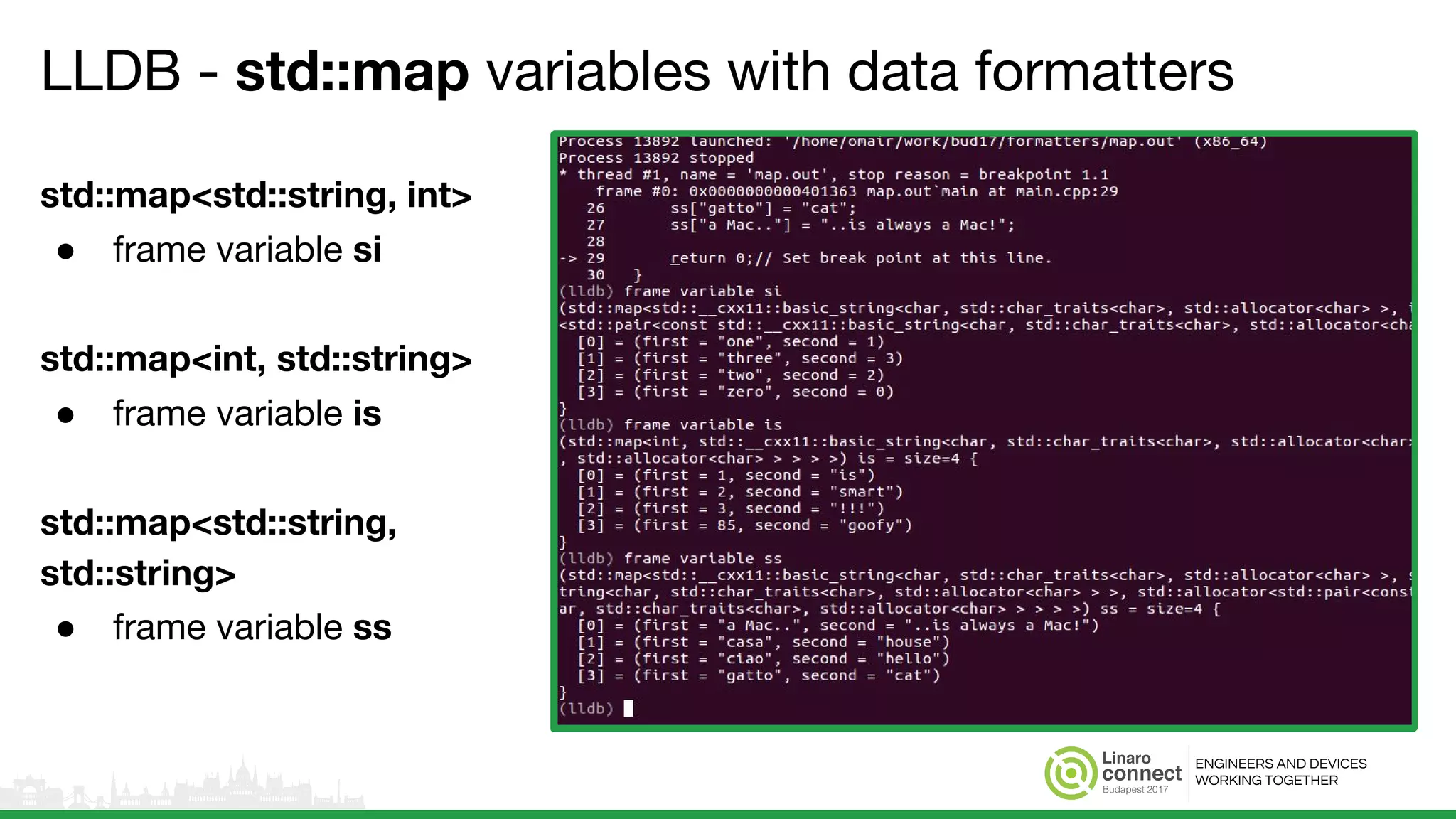
LLDB - std::map variables with data formatters
std::map<std::string, int>
● frame variable si
std::map<int, std::string>
● frame variable is
std::map<std::string,
std::string>
● frame variable ss
ENGINEERS AND DEVICES
WORKING TOGETHER
LLDB - Evaluate expressions using clang parser
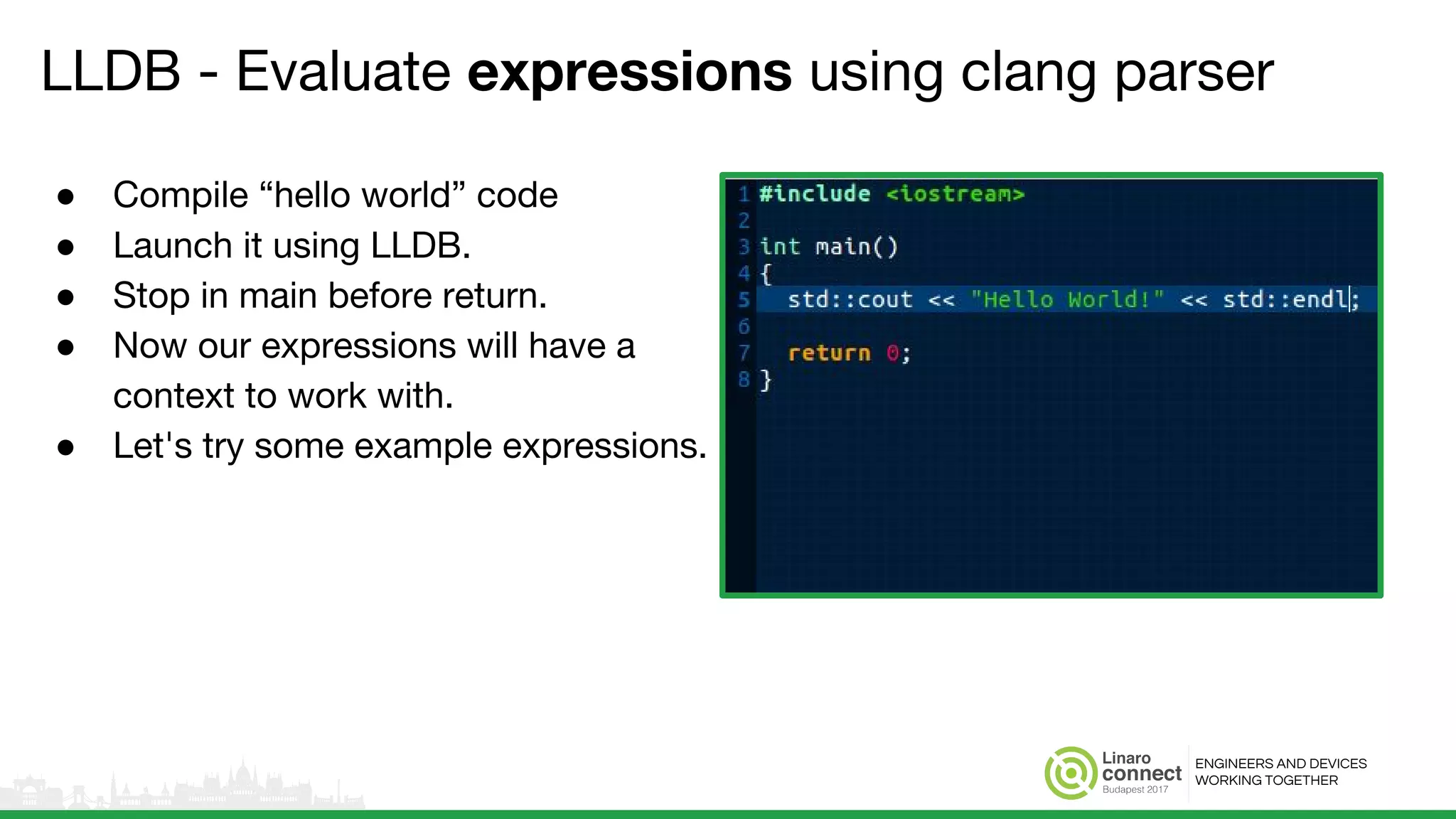
● Compile “hello world” code
● Launch it using LLDB.
● Stop in main before return.
● Now our expressions will have a
context to work with.
● Let's try some example expressions.
ENGINEERS AND DEVICES
WORKING TOGETHER
LLDB - Evaluate expressions using clang parser
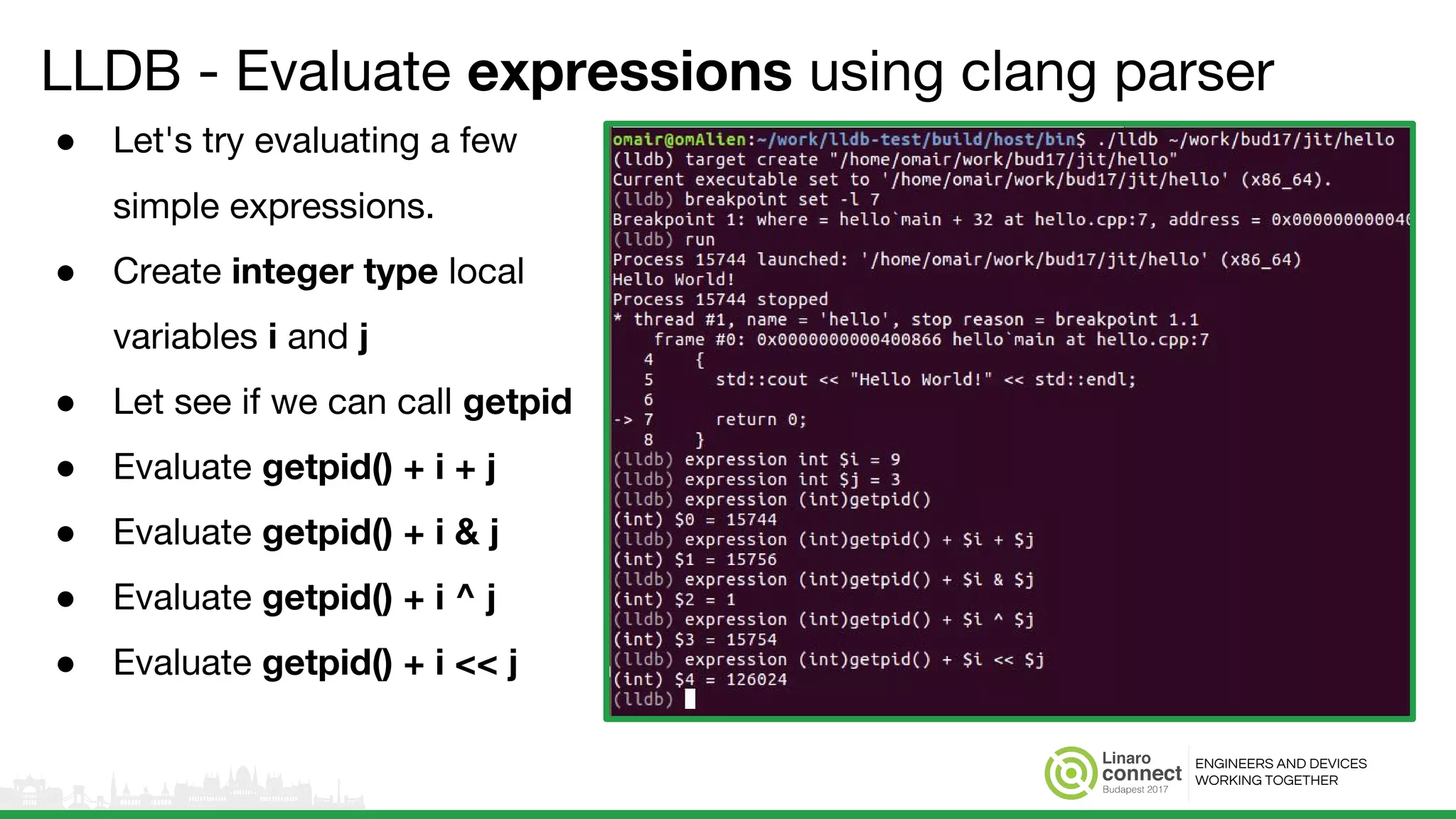
● Let's try evaluating a few
simple expressions.
● Create integer type local
variables i and j
● Let see if we can call getpid
● Evaluate getpid() + i + j
● Evaluate getpid() + i & j
● Evaluate getpid() + i ^ j
● Evaluate getpid() + i << j
ENGINEERS AND DEVICES
WORKING TOGETHER
LLDB - Evaluate expressions using clang parser
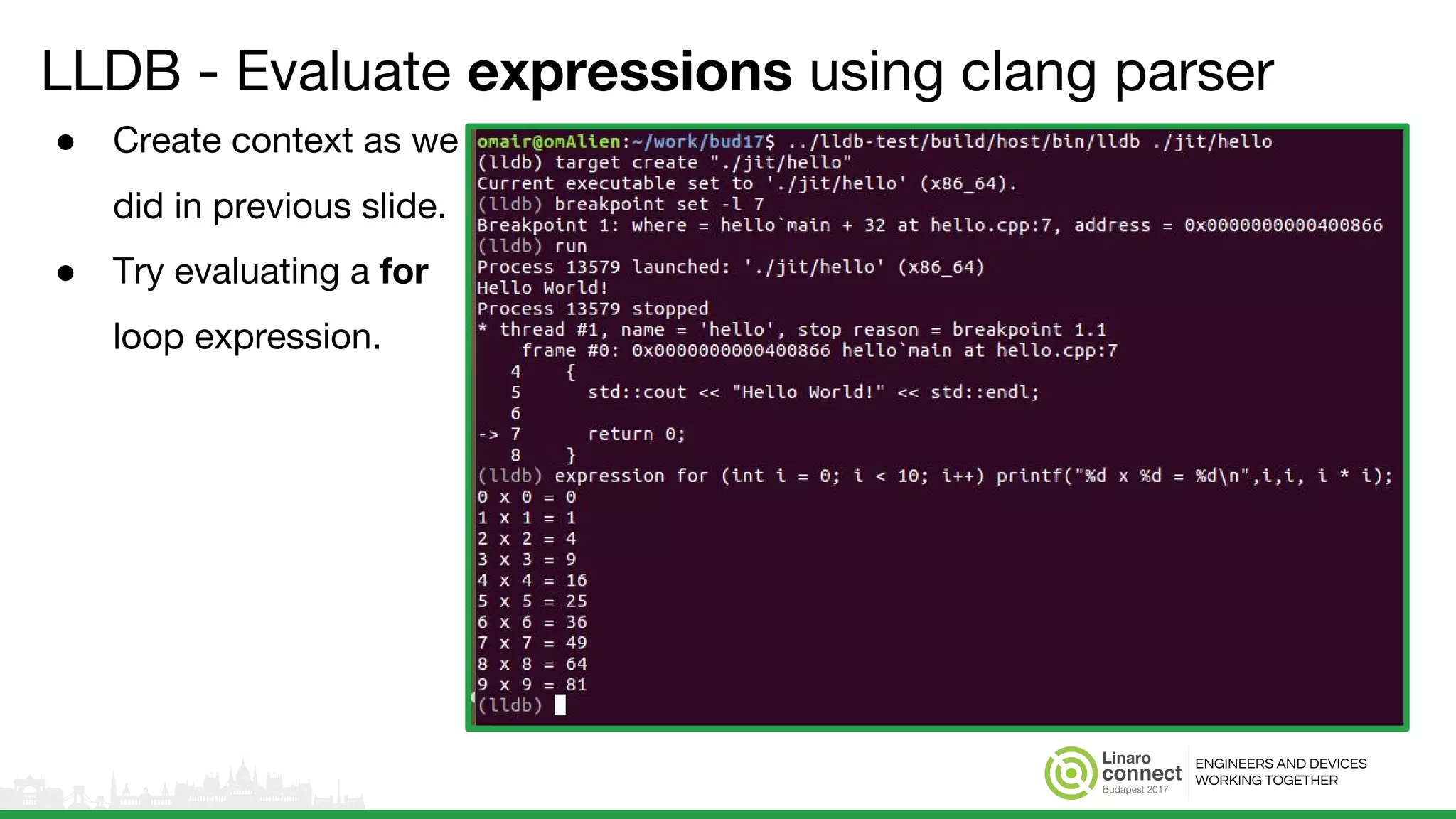
● Create context as we
did in previous slide.
● Try evaluating a for
loop expression.
ENGINEERS AND DEVICES
WORKING TOGETHER
LLDB - Evaluate expressions using clang parser
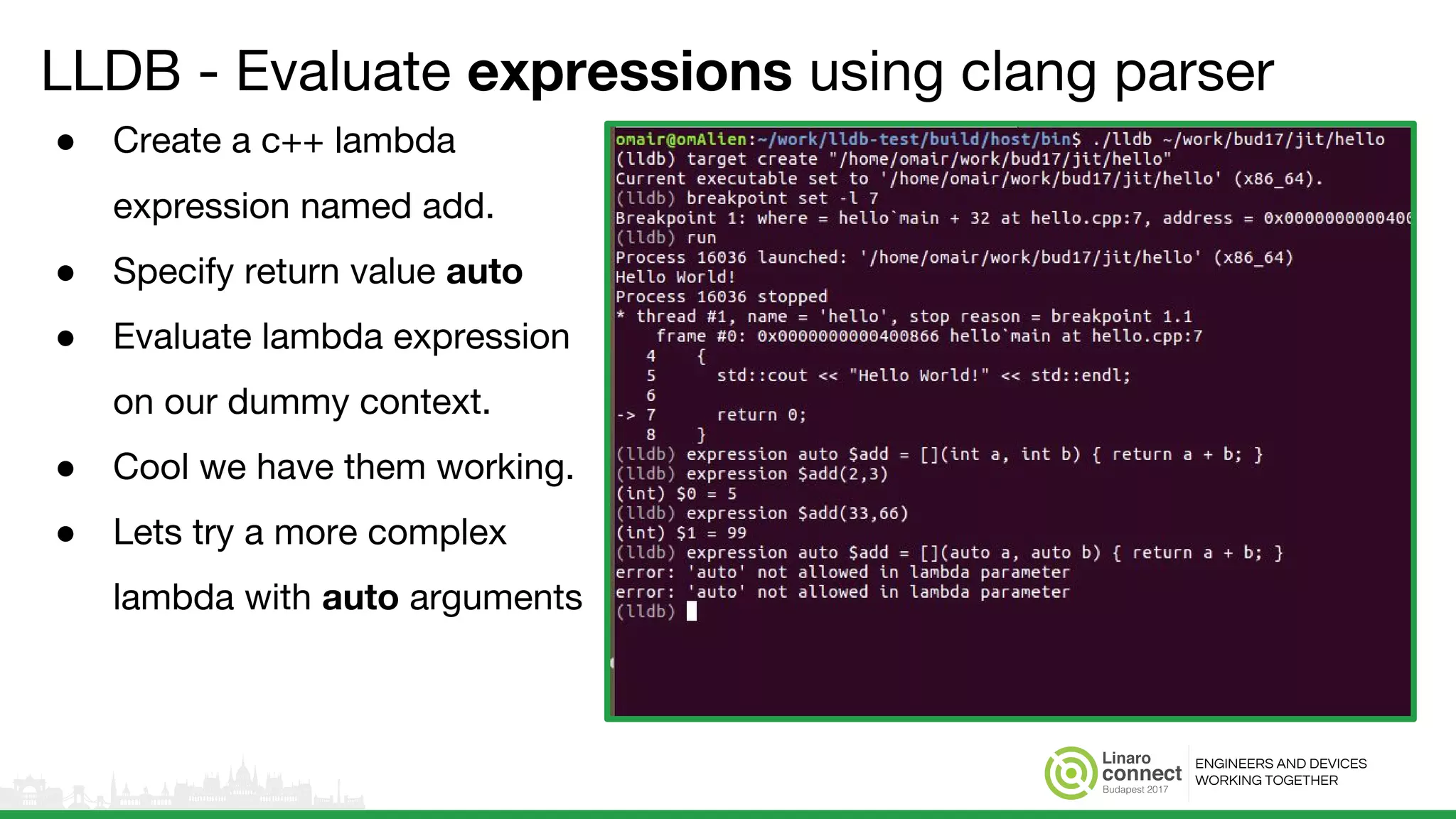
● Create a c++ lambda
expression named add.
● Specify return value auto
● Evaluate lambda expression
on our dummy context.
● Cool we have them working.
● Lets try a more complex
lambda with auto arguments
ENGINEERS
AND DEVICES
WORKING
TOGETHER
Conclusion
● Start using LLDB.
● Its more stable than ever before.
● Wanna go an extra mile? Feel free to contribute.
● Topics for future
○ Using LLDB Python API and built-in Python interpreter
○ How-To on more advanced expressions
○ How to use more advanced and Python based data formatters
ENGINEERS
AND DEVICES
WORKING
TOGETHER
Questions
Email: omair.javaid@linaro.org
IRC: omjavaid @ freenode and oftc
ENGINEERS AND DEVICES
WORKING TOGETHER
References
● LLDB (Architecture, GDB to LLDB commands, Doxygen)
● LLVM LAB - LLDB Android Buildbot
● Linaro LAB - LLDB Linux Buildbot (Under Development)
● LLDB on FreeBSD
Thank You
#BUD17
For further information: www.linaro.org
BUD17 keynotes and videos on: connect.linaro.org

BUD17-310: Introducing LLDB for linux on Arm and AArch64

  • 1.
    Introducing LLDB forLinux on Arm and AArch64 Omair Javaid
  • 2.
    ENGINEERS AND DEVICES WORKING TOGETHER Agenda ● Briefintroduction and history behind LLDB ● Status of LLDB on Linux and Android ● Linaro’s contributions in LLDB ● An overview of LLDB Architecture ● More detail on working and architecture ● Overview of basic functionality and commands ● Overview of expressions and data formatters.
  • 3.
    ENGINEERS AND DEVICES WORKINGTOGETHER LLDB - Introduction ● Debugger component of LLVM project. ● A modular, high-performance source-level debugger written in C++ ● Re-uses LLVM/Clang code JIT/IR for expression parsing, disassembly etc. ● Provides a C++ Debugger API which can be used by various clients ● Very permissive BSD-like license.
  • 4.
    ENGINEERS AND DEVICES WORKINGTOGETHER LLDB - Introduction (cont…) ● Supported Host Platforms ○ OS X, Linux/Android, FreeBSD, NetBSD, and Windows ● Supported Target Architectures ○ i386/x86_64, Arm/AArch64, MIPS/MIPS64, IBM s390 ● Supported Languages ○ Fully support C, C++ and Objective-C while SWIFT and GoLang (under development)
  • 5.
    ENGINEERS AND DEVICES WORKINGTOGETHER LLDB - History ● Apple stopped shipping GDB after version 6.3.5 ● Last GPLv2 based GDB release. ● Announced LLDB at WWDC2010. ● Extensively under development for various use-cases. ● Active code contributors are Apple and Google. ● Default debugger for OSX, Xcode IDE, Android Studio. ● Also adopted by FreeBSD as their default debugger.
  • 6.
    ENGINEERS AND DEVICES WORKINGTOGETHER LLDB - Linaro’s contributions ● LLDB port for ARMv7 architecture. ○ Register Context and Basic Debugging support. ○ Support for SysV ARM/Linux ABI. ○ Support for Arm Hardware Watchpoints ○ Support for Arm Single Byte-Selection Watchpoints. ○ Various bug fixes and improvements. ○ Support for Arm Hardware Breakpoints (NEW)
  • 7.
    ENGINEERS AND DEVICES WORKINGTOGETHER LLDB - Linaro’s contributions (cont…) ● LLDB port for ARMv8 architecture. ○ Support for SysV AArch64/Linux ABI. ○ Support for AArch64 Hardware Watchpoints ○ Various bug fixes and improvements. ○ Support for AArch64 Hardware Breakpoints (NEW) ● Maintenance and Testing ○ Buildbot development and maintenance ○ Tester bring up and validation ○ Buildbot Failure Triage
  • 8.
    ENGINEERS AND DEVICES WORKINGTOGETHER LLDB - Features Status ARM/AArch64 ● LLDB features stable on ARM and AArch64 ● For more details visit: http://lldb.llvm.org/status.html Process control -- attach -- continue -- exec -- fork -- launch -- status Thread Control -- step-in -- step-out -- step-over -- inspection -- Breakpoints -- HW Breakpoints -- HW Watchpoints -- DWARF Symbols -- ELF Obj File -- C++11 Support -- Backtracing -- Register Inspection -- Memory Inspection -- Expression Evaluation -- JIT Expressions -- Disassembly -- Remote Debugging ARM OK OK OK OK AArch64 OK OK OK OK
  • 9.
    ENGINEERS AND DEVICES WORKINGTOGETHER LLDB - Arm/AArch64 Test Devices ● Buildbots contributed by google test various Android devices ○ Link: lab.llvm.org:8011/builders/lldb-x86_64-ubuntu-14.04-android ● Linaro keeps track of LLDB on Linux platform for ARM and AArch64 targets. ○ Buildbot is still not public but we plan to do so. Platform/Architecture ARMv7 ARMv8 - AArch64 ARMv8 - AArch32 Android M Nexus 5 Nexus 5x Nexus 5x Ubuntu Linux - Xenial Raspberry Pi2 Pine64 Pine64
  • 10.
    ENGINEERS AND DEVICES WORKINGTOGETHER LLDB SERVER LLDB Architecture Native Target Native Process Native Thread Register Context Debug APIs Platform Linux, Android, MacOSX,NetBSD, Windows, etc... Target Unwinder Instruction Emulation LLDB Debugger API LLDB Command line LLDB-MI Driver LLDB Python ModuleIDEs (e.g, Xcode…) Remote Platform System APIs Commands Data Formatters Breakpoints Host Abstraction Layer Interpreter Core Utility Classes ABI - SysV and MacOSX (Arm, AArch64, i386, etc...) Expressions Parser - Clang, Go Process Registers Memory Stack Frame Run-Control Thread Breakpoints Variables Expressions Disassembler - LLVM Object File- ELF, JIT, MACH-O, PECOFF Symbols - DWARF, PDB Dynamic Loader G D B R S P
  • 11.
    ENGINEERS AND DEVICES WORKINGTOGETHER LLDB Debugger API ● A C++ shared library with object-oriented interface. ● LLDB.framework on MacOS X and lldb.so on linux. ● Used by ○ lldb - The LLDB Debugger command line ○ lldb-mi and lldbmi2 - Machine Interface (MI) drivers ○ XCode and Android Studio - IDEs with graphical front-ends. ○ lldb Python module - LLDB API exposed through python script bindings using SWIG. LLDB Debugger API LLDB Command line LLDB-MI Driver LLDB Python ModuleIDEs (e.g, Xcode…)
  • 12.
    ENGINEERS AND DEVICES WORKINGTOGETHER lldb-server - Platform Mode ● File transfer to remote target. ● Spawns gdbserver on target. ● Runs shell commands on target. ● List remote processes. ● Allows single or multiple parallel debug sessions. LLDB SERVER Native Target Native Process Native Thread Register Context Debug APIs Remote Platform System APIs Target Process Registers Memory Stack Frame Run-Control Thread Breakpoints Variables G D B R S P Platform Linux, Android, MacOSX,NetBSD, Windows, etc...
  • 13.
    ENGINEERS AND DEVICES WORKINGTOGETHER lldb-server - Platform Mode (Single Session) ● Spawn lldb-server on remote-android target in platform mode for single session. ● Select remote-android platform and connect. ● Try connecting another lldb remote-android platform session.
  • 14.
    ENGINEERS AND DEVICES WORKINGTOGETHER lldb-server - Platform Mode (Multiple Sessions) Select remote-android platform and connect. Connect another remote-android platform session. lldb-server platform -- server mode lldb-server multiple sessions connected
  • 15.
    ENGINEERS AND DEVICES WORKINGTOGETHER lldb-server - GDB Server Mode ● Run as a gdb-remote-stub. ● Communicates with LLDB over RSP protocol. ● On Mac OSX and iOS, the remote-gdb functionality is in debugserver binary. LLDB SERVER Native Target Native Process Native Thread Register Context Debug APIs Remote Platform System APIs Target Process Registers Memory Stack Frame Run-Control Thread Breakpoints Variables G D B R S P Platform Linux, Android, MacOSX,NetBSD, Windows, etc...
  • 16.
    ENGINEERS AND DEVICES WORKINGTOGETHER lldb-server - GDB Server Mode Start lldb-server in gdbserver mode Connect to gdb remote stub and start a debugging session
  • 17.
    ENGINEERS AND DEVICES WORKINGTOGETHER lldb - Debuggee (or inferior) context on host system ● Platform ○ Local or remote platform functions. ● Process GDB Remote Client ○ Let lldb host talks to lldb-server running in gdb remote mode. ○ Performs debug operations via GDB Remote Serial Protocol (RSP) ● Target ○ Implements debugee (inferior) management functions like ■ Process Control ■ Thread Control ■ Registers and Memory ■ Stack Frames and Variables ■ Breakpoints and Watchpoints ■ Module loading LLDB SERVER Native Target Native Process Native Thread Register Context Debug APIs Remote Platform System APIs Target Process Registers Memory Stack Frame Run-Control Thread Breakpoints Variables G D B R S P Platform Linux, Android, MacOSX,NetBSD, Windows, etc...
  • 18.
    ENGINEERS AND DEVICES WORKINGTOGETHER lldb - target create and process launch # Select target platform platform select <name> # Connect to platform platform connect <url> # Load file and symbols target create <file-name> # Set breakpoint at main breakpoint set -b main # Start remote inferior process launch
  • 19.
    ENGINEERS AND DEVICES WORKINGTOGETHER lldb - Target and Process commands ● Create / Delete ● List and Select ● Symbols ● Variables ● Connect - to remote debug. ● Launch - current target executable ● Attach/Detach - to a process ● Continue/Interrupt/Kill - current target process. ● Load/Unload - shared library Target Process
  • 20.
    ENGINEERS AND DEVICES WORKINGTOGETHER lldb - Thread, Frame, Memory & Registers commands ● Frame ○ Variable ○ Select ● Memory ○ Read ○ Write ● Registers ○ register read <reg-name> ○ register write <reg-name> <data> ● Stepping ○ Step-in, step-out and step-over ○ step-inst and step-inst-over ● Select - Select current thread. ● Backtrace - Thread call stacks. ● Continue - Continue one or all threads. ● info/list - Information about threads in current process. Thread Frame, Memory and Registers
  • 21.
    ENGINEERS AND DEVICES WORKINGTOGETHER lldb - Break/Watchpoints & Disassembly commands ● (-f) --frame ○ from the start of the current frame ● (-m) --mixed ○ mixed source and assembly display. ● (-n) --name <function-name> ○ entire contents of the given function. ● (-p) --pc ○ around the current pc. ● (-a) --address <address> ○ function containing address. ● --start-address / --end-address ● set <options> ○ Set a breakpoint based on options. ● clear <line-no or filename> ● command <add, delete or list> ○ Run command or script when breakpoint is hit. ● delete ○ All or specified breakpoint is deleted. ● enable/disable ○ All or specified breakpoint. ● read/write ○ Read from or write breakpoints to file. breakpoint/watchpoint disassemble
  • 22.
    ENGINEERS AND DEVICES WORKINGTOGETHER lldb - command alias <alias> <command> <args> Some Built-in Aliases File <file> - target create <file> b main - breakpoint set -b main run - process launch
  • 23.
    ENGINEERS AND DEVICES WORKINGTOGETHER lldb - Using .lldbinit file .lldbinit file on top right of this slide is running at startup: ● Platform select and connect ● Load object file and symbols ● Set breakpoint at main ● Start inferior process ● Run to main. LLDB command-line output on bottom right shows lldb state after we start it with .lldbinit file in user’s home directory. ● Spawn lldb with .lldbinit file in your home directory. ● Sample output with .lldbinit file on left.
  • 24.
    ENGINEERS AND DEVICES WORKINGTOGETHER LLDB - Brief description of components ● ABI ○ Executes JITTed function calls in process being debugged. ○ Call frame calculation based on target calling convention. ● Unwinder ○ Implements stack unwinding features. ● Instruction Emulation ○ Helps with stack frame constructions. ○ Helps single step by emulating execution paths. ● Expression Parser ○ A modified DWARF expression parser ○ Clang front-end latest c++ support Unwinder Commands Data Formatters Breakpoints Host Abstraction Layer Interpreter CoreUtility Classes ABI - SysV and MacOSX (Arm, AArch64, i386, etc...) Expressions Parser - Clang, Go Expressions Disassembler - LLVM Object File- ELF, JIT, MACH-O, PECOFF Symbols - DWARF, PDB Dynamic Loader Instruction Emulation
  • 25.
    ENGINEERS AND DEVICES WORKINGTOGETHER LLDB - Brief description of components ● Disassembler ○ LLVM disassembler ● Dynamic Loader ○ Helps detect dynamically loaded modules ● Object File ○ Handles object files management. ● Symbols ○ Handles debug symbols mangement ● Host Abstraction Layer ● Core and Utility Classes ● Interpreter and Commands ● Data Formatters ● Breakpoint Utilities Unwinder Commands Data Formatters Breakpoints Host Abstraction Layer Interpreter CoreUtility Classes ABI - SysV and MacOSX (Arm, AArch64, i386, etc...) Expressions Parser - Clang, Go Expressions Disassembler - LLVM Object File- ELF, JIT, MACH-O, PECOFF Symbols - DWARF, PDB Dynamic Loader Instruction Emulation
  • 26.
    ENGINEERS AND DEVICES WORKINGTOGETHER LLDB - unique_ptr variables with data formatters Without deleter ● frame variable nup ● frame variable iup ● frame variable sup With deleter ● frame variable ndp ● frame variable idp ● frame variable sdp
  • 27.
    ENGINEERS AND DEVICES WORKINGTOGETHER LLDB - shared_ptr & weak_ptr with data formatters --ptr-depth 1 ● Dereference pointer once std::shared_ptr ● frame variable nsp ● frame variable isp ● frame variable ssp std::weak_ptr ● frame variable nwp ● frame variable iwp ● frame variable swp
  • 28.
    ENGINEERS AND DEVICES WORKINGTOGETHER LLDB - std::map variables with data formatters std::map<std::string, int> ● frame variable si std::map<int, std::string> ● frame variable is std::map<std::string, std::string> ● frame variable ss
  • 29.
    ENGINEERS AND DEVICES WORKINGTOGETHER LLDB - Evaluate expressions using clang parser ● Compile “hello world” code ● Launch it using LLDB. ● Stop in main before return. ● Now our expressions will have a context to work with. ● Let's try some example expressions.
  • 30.
    ENGINEERS AND DEVICES WORKINGTOGETHER LLDB - Evaluate expressions using clang parser ● Let's try evaluating a few simple expressions. ● Create integer type local variables i and j ● Let see if we can call getpid ● Evaluate getpid() + i + j ● Evaluate getpid() + i & j ● Evaluate getpid() + i ^ j ● Evaluate getpid() + i << j
  • 31.
    ENGINEERS AND DEVICES WORKINGTOGETHER LLDB - Evaluate expressions using clang parser ● Create context as we did in previous slide. ● Try evaluating a for loop expression.
  • 32.
    ENGINEERS AND DEVICES WORKINGTOGETHER LLDB - Evaluate expressions using clang parser ● Create a c++ lambda expression named add. ● Specify return value auto ● Evaluate lambda expression on our dummy context. ● Cool we have them working. ● Lets try a more complex lambda with auto arguments
  • 33.
    ENGINEERS AND DEVICES WORKING TOGETHER Conclusion ● Startusing LLDB. ● Its more stable than ever before. ● Wanna go an extra mile? Feel free to contribute. ● Topics for future ○ Using LLDB Python API and built-in Python interpreter ○ How-To on more advanced expressions ○ How to use more advanced and Python based data formatters
  • 34.
  • 35.
    ENGINEERS AND DEVICES WORKINGTOGETHER References ● LLDB (Architecture, GDB to LLDB commands, Doxygen) ● LLVM LAB - LLDB Android Buildbot ● Linaro LAB - LLDB Linux Buildbot (Under Development) ● LLDB on FreeBSD
  • 36.
    Thank You #BUD17 For furtherinformation: www.linaro.org BUD17 keynotes and videos on: connect.linaro.org