Debugging like a pro
vicente.bolea@gmail.com
Motivation
- Debugging might be the
worst part of coding.
- Late night stress.
- Arm you with tools to
fight your run-times
bugs!
Scope
1. GDB basics.
2. GDB visual mode.
3. GDB frames.
4. GDB watchpoints.
5. GDB reverse walking.
6. GDB plugins & dotfiles.
7. Valgrind and clang sanitizer.
8. Your code.
GDB: Before invoking
GDB
Always use compiling flag for gdb:
$ g++ -g main.cpp
Invoke gdb in the following manner:
$ gdb [-tui] ./a.out
GDB: Basic commands
- gdb> r[un] : execute your code.
- gdb> b[reak] line|file:line|function : set a breakpoint.
- gdb> p[rint] variable : Display the variable name.
- gdb> n[ext] : Goes to next line.
- gdb> s[tep] : Goes inside the function currently in the PC.
- gdb> fin[ish] : Stop when we are returning.
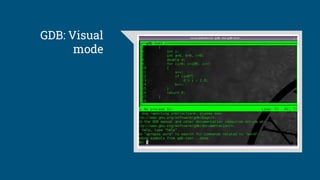
GDB: Visual mode
- Always invoke GDB like : $ gdb -tui ./a.out
- Or in your standard GDB session press: C-x C-a
- Commands:
- gdb> focus src|cmd or C-x o
- Switch to single key mode C-x s
GDB: Visual
mode
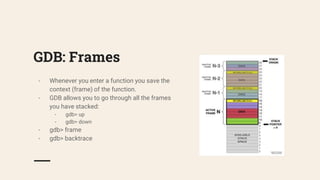
GDB: Frames
- Whenever you enter a function you save the
context (frame) of the function.
- GDB allows you to go through all the frames
you have stacked:
- gdb> up
- gdb> down
- gdb> frame
- gdb> backtrace
GDB: Watchpoints
- Hardware vs. software watchpoints.
- Read, write, and read-write watchpoints (watch, rwatch, awatch)
- Easy to invoke:
- gdb> watch variable
- Also watch for conditions to happen.
- You need to be in the the same frame.
- Not a good feature for interframe code.
GDB: Reverse walking
- GDB let you go back in the time.
- It will record your code so it can go
backwards.
- Slow and resources expensive.
GDB: Reverse walking
- gdb> record [stop]
- gdb> reverse-continue [rc]
- gdb> reverse-step [rs]
- gdb> reverse-next [rn]
- gdb> set exec-direction forward|reverse
GDB: Plugins &
dotfiles
- You can customize and extend your gdb.
- Create your own perl or python functions.
to debug your data structures.
- Have a look to my dotfiles :)
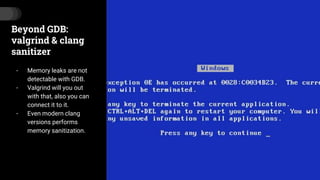
Beyond GDB:
valgrind & clang
sanitizer
- Memory leaks are not
detectable with GDB.
- Valgrind will you out
with that, also you can
connect it to it.
- Even modern clang
versions performs
memory sanitization.
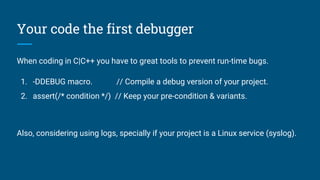
Your code the first debugger
When coding in C|C++ you have to great tools to prevent run-time bugs.
1. -DDEBUG macro. // Compile a debug version of your project.
2. assert(/* condition */) // Keep your pre-condition & variants.
Also, considering using logs, specially if your project is a Linux service (syslog).
Q&A

Debuging like a pro

  • 1.
    Debugging like apro vicente.bolea@gmail.com
  • 2.
    Motivation - Debugging mightbe the worst part of coding. - Late night stress. - Arm you with tools to fight your run-times bugs!
  • 3.
    Scope 1. GDB basics. 2.GDB visual mode. 3. GDB frames. 4. GDB watchpoints. 5. GDB reverse walking. 6. GDB plugins & dotfiles. 7. Valgrind and clang sanitizer. 8. Your code.
  • 4.
    GDB: Before invoking GDB Alwaysuse compiling flag for gdb: $ g++ -g main.cpp Invoke gdb in the following manner: $ gdb [-tui] ./a.out
  • 5.
    GDB: Basic commands -gdb> r[un] : execute your code. - gdb> b[reak] line|file:line|function : set a breakpoint. - gdb> p[rint] variable : Display the variable name. - gdb> n[ext] : Goes to next line. - gdb> s[tep] : Goes inside the function currently in the PC. - gdb> fin[ish] : Stop when we are returning.
  • 6.
    GDB: Visual mode -Always invoke GDB like : $ gdb -tui ./a.out - Or in your standard GDB session press: C-x C-a - Commands: - gdb> focus src|cmd or C-x o - Switch to single key mode C-x s
  • 7.
  • 8.
    GDB: Frames - Wheneveryou enter a function you save the context (frame) of the function. - GDB allows you to go through all the frames you have stacked: - gdb> up - gdb> down - gdb> frame - gdb> backtrace
  • 9.
    GDB: Watchpoints - Hardwarevs. software watchpoints. - Read, write, and read-write watchpoints (watch, rwatch, awatch) - Easy to invoke: - gdb> watch variable - Also watch for conditions to happen. - You need to be in the the same frame. - Not a good feature for interframe code.
  • 10.
    GDB: Reverse walking -GDB let you go back in the time. - It will record your code so it can go backwards. - Slow and resources expensive.
  • 11.
    GDB: Reverse walking -gdb> record [stop] - gdb> reverse-continue [rc] - gdb> reverse-step [rs] - gdb> reverse-next [rn] - gdb> set exec-direction forward|reverse
  • 12.
    GDB: Plugins & dotfiles -You can customize and extend your gdb. - Create your own perl or python functions. to debug your data structures. - Have a look to my dotfiles :)
  • 13.
    Beyond GDB: valgrind &clang sanitizer - Memory leaks are not detectable with GDB. - Valgrind will you out with that, also you can connect it to it. - Even modern clang versions performs memory sanitization.
  • 14.
    Your code thefirst debugger When coding in C|C++ you have to great tools to prevent run-time bugs. 1. -DDEBUG macro. // Compile a debug version of your project. 2. assert(/* condition */) // Keep your pre-condition & variants. Also, considering using logs, specially if your project is a Linux service (syslog).
  • 15.