Supported By:Sponsored By: @SPS_Events
@SPSBangalore
#MicrosoftForSocialGood
Welcome to SharePoint Saturday Bangalore 2019!
Architecting your Intranet with SharePoint Modernization
Jenkins NS – Founder, JPOWER4
-
Jenkins NS
Modern Workplace Solution Architect
International Speaker
Trainer
Independent Consultant
Blogger
@jenkinsns
jenkinsns@gmail.com
http://www.jenkinsblogs.com
Founder, JPOWER4
jenkinsns@jpower4.com
http://www.jpower4.com
SPEAKER
SPFx: https://www.facebook.com/spfxinfo/
MS Teams: https://www.facebook.com/msteamsinfo
Github : https://github.com/jenkinsns
Other References
Supported By:Sponsored By: @SPS_Events
@SPSBangalore
#MicrosoftForSocialGood
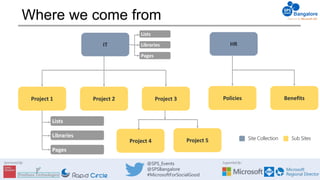
Where we come from
IT
Project 2Project 1 Project 3
HR
Policies Benefits
Lists
Libraries
Pages
Site Collection Sub SitesProject 5Project 4
Lists
Libraries
Pages
Supported By:Sponsored By: @SPS_Events
@SPSBangalore
#MicrosoftForSocialGood
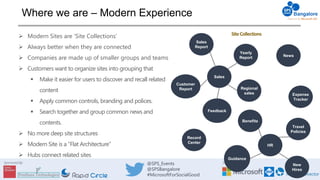
Where we are – Modern Experience
 Modern Sites are ‘Site Collections’
 Always better when they are connected
 Companies are made up of smaller groups and teams
 Customers want to organize sites into grouping that
 Make it easier for users to discover and recall related
content
 Apply common controls, branding and polices.
 Search together and group common news and
contents.
 No more deep site structures
 Modern Site is a “Flat Architecture”
 Hubs connect related sites
Sales
Report
Yearly
Report News
Regional
sales
Customer
Report
Feedback
Sales
Record
Center
Expense
Tracker
Benefits
Travel
Policies
Guidance
New
Hires
HR
SiteCollections
Supported By:Sponsored By: @SPS_Events
@SPSBangalore
#MicrosoftForSocialGood
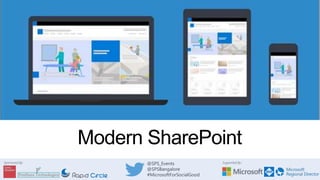
Modern SharePoint
Supported By:Sponsored By: @SPS_Events
@SPSBangalore
#MicrosoftForSocialGood
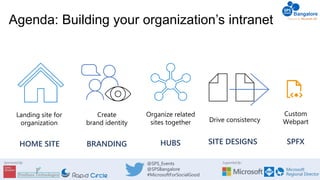
Organize related
sites together Drive consistency
Landing site for
organization
Create
brand identity
Agenda: Building your organization’s intranet
BRANDINGHOME SITE HUBS SITE DESIGNS SPFX
Custom
Webpart
Supported By:Sponsored By: @SPS_Events
@SPSBangalore
#MicrosoftForSocialGood
Home site
Landing site for your organization
Supported By:Sponsored By: @SPS_Events
@SPSBangalore
#MicrosoftForSocialGood
intelligent search
and rich navigation
news and information
audience targeting
personalized, relevant content
• Foster connections across the organization
social conversations
communications with
intelligent video
beautiful, dynamic employee experience
accessible and available across devices
Supported By:Sponsored By: @SPS_Events
@SPSBangalore
#MicrosoftForSocialGood
Make this a home site!
Any communication site can become a home site
Marks the news from that site as authoritative news
Sets search to global scope
Set as the root of your SharePoint intranet
Set a new communication site to the root site location
Update your existing root site to become a communication site
Set the Office 365 bar logo to point to the home site
Leverage recommended experiences
Enable audience targeting for news and navigation
Use the various user personalized web parts: My Feed, Frequent sites
Supported By:Sponsored By: @SPS_Events
@SPSBangalore
#MicrosoftForSocialGood
Designing your intranet architecture
Home site
Human
Resources
Career
Give
Benefits
News Leadership
FacilitiesPlanning
Supported By:Sponsored By: @SPS_Events
@SPSBangalore
#MicrosoftForSocialGood
Designing your intranet architecture
Home site
News Leadership
FacilitiesPlanning
Human
Resources
Career
Give
BenefitsBig Wins
Retail
Ops Events
Social
Web
Sales Marketing
Hubs
Supported By:Sponsored By: @SPS_Events
@SPSBangalore
#MicrosoftForSocialGood
Branding your Home site
Supported By:Sponsored By: @SPS_Events
@SPSBangalore
#MicrosoftForSocialGood
Core elements of brand
in SharePoint
Logos Navigation
Content StructureTheming
Supported By:Sponsored By: @SPS_Events
@SPSBangalore
#MicrosoftForSocialGood
Hubs
Organize related sites together
Supported By:Sponsored By: @SPS_Events
@SPSBangalore
#MicrosoftForSocialGood
Why do we need SharePoint Hub Sites
A dynamic, ever-changing digital workplace
• We want to see things that are relevant
• Navigate consistently and easily
• Search in the context of where we are
• Anyone can post news, comment or like items and read other’s news and comments
Constantly Changing Organisations
• As administrators we need quick ways to restructure our sites
• We need to be able to provision quickly as new requirements arrive
• Customers always looking for a solution immediately.
A dynamic, ever-changing digital workplace
Vendor
agreements
Legal portal
Regional partner
outreach
Policies
Customer
Event planning
HR
Quarterly reports Company-wide
Benefits
Acquired sales
key
Eco
Adventure
Travel
Programs
Customer connections
Travel
innovation
SalesRegional sales
Recognition
& rewards
EMEA sales
Expense tracker
Cultural
Big wins
Benefits
planning
New hires
EMEA
Records center
Supported By:Sponsored By: @SPS_Events
@SPSBangalore
#MicrosoftForSocialGood
SharePoint
hubs
• Brings together related team and communication
sites
• Roll up of news, events and site activity
• Search across related sites
• Cross-site navigation with audience targeting
• Consistent look-and-feel
• Common IA via site designs
• Permissions across related sites
• Hub analytics
• Associated sites creation
• Hub join approvals
• Admins create, site owners adopt
• Associate hubs together
Supported By:Sponsored By: @SPS_Events
@SPSBangalore
#MicrosoftForSocialGood
Cross-site navigation
• Support for audience targeting using AAD
groups
• Ability to hide hub name
Centralize Permissions
• Grant visitor access across associated sites
• Hub owner can enable
• Site owners can opt out/in
Hub-wide usage insights
• Total visitors and views
• Popular news, files, pages and sites
Supported By:Sponsored By: @SPS_Events
@SPSBangalore
#MicrosoftForSocialGood
What should be a hub?
Supported By:Sponsored By: @SPS_Events
@SPSBangalore
#MicrosoftForSocialGood
CSEWeb
CSEWeb (departmental hub)
Communications sites
Team sites
Meetings
& Voice
Collaboration Finding
CSEO
Connection
Localized
CSEWeb Sites
CSE Listens
CSEWeb
Supported By:Sponsored By: @SPS_Events
@SPSBangalore
#MicrosoftForSocialGood
Experience
&
Devices
Fix, Hack,
Learn
Manager
Corner
Monthly
Business
Review
Diversity &
Inclusion
Culture Events
Experiences &
Devices
Supported By:Sponsored By: @SPS_Events
@SPSBangalore
#MicrosoftForSocialGood
There is no requirement to have more than one hub
Add hub sites to maximize finding and surfacing related
information in context
Hub site associations are flexible so they can grow and
change with your organization
Supported By:Sponsored By: @SPS_Events
@SPSBangalore
#MicrosoftForSocialGood
Hub creation is IT-controlled
Prevents proliferation of hubs without centralized approval
Available to IT admins via the modern Admin center
2,000 limit
Hubs can be scoped
Site owners will see only the hubs they’re allowed to join
Hub join supports approval process
Hub don’t sub
Subsite creation can be disabled independently on classic and modern sites
Consider disabling subsite creation on modern to encourage hub site use
Supported By:Sponsored By: @SPS_Events
@SPSBangalore
#MicrosoftForSocialGood
Designing your intranet architecture
Home site
News Leadership
FacilitiesPlanning
Human
Resources
Career
Give
BenefitsBig Wins
Retail
Ops Events
Social
Web
Sales Marketing
Metrics
ROB
Region
Sales
APAC
ROB
MBR
Research
Sales
Europe
Associated
Hubs
Hubs
Hubs
Supported By:Sponsored By: @SPS_Events
@SPSBangalore
#MicrosoftForSocialGood
• Brings together related hubs
• Search across hubs
• Roll up of news and activity
• Easier to curate hub to hub
navigation
• IT-controlled
Market
Retail
Big Wins
Sales
Sales
APAC
Sales
Europe
Metrics
ROB
Region ROB
MBR
Research
Supported By:Sponsored By: @SPS_Events
@SPSBangalore
#MicrosoftForSocialGood
Demo
Supported By:Sponsored By: @SPS_Events
@SPSBangalore
#MicrosoftForSocialGood
Site scripts & site designs
Supported By:Sponsored By: @SPS_Events
@SPSBangalore
#MicrosoftForSocialGood
Site Scripts
A script defining a set of actions to take on a site, such as:
"create list"
"create site column"
Site Designs
A site design can be applied to a site, and can contain one or more site scripts
When to use
To apply consistent site configuration or business logic to sites:
During site creation
As part of hub association
On existing sites
Supported By:Sponsored By: @SPS_Events
@SPSBangalore
#MicrosoftForSocialGood
Site Scripts – Where all the Action is
actions: [
...
{
"verb": "createSPList",
"listName": “Case Studies",
"templateType": 101,
"subactions":
[
{
"verb": "addSPFieldXml",
"schemaXml": "<Field ID="{47b1b86f-9f8a-4dbe-a75e-
ca5d9b0f566c}" Type="URL" Name="_ShortcutUrl" DisplayName="Shortcu
t URL" DisplaceOnUpgrade="TRUE" Indexed="FALSE" Required="FALSE"
Hidden="TRUE" ReadOnlyField="TRUE" ShowInEditForm="FALSE" ………….
},
{
"verb": "addFile",
"source": "Files/Customer Loyalty Program.docx",
"destination": "Customer Loyalty Program.docx"
},
{
"verb": "addSPView",
"name": "All Documents",
"viewFields": ["DocIcon",“LinkFilename”,"Language", "Status“,
"AccountManager”, "Approver", "Industry", _DisplayName", "Editor"],
…………………….
},
{
"verb": "addNavLink",
“url": "/Case Studies/Forms/AllItems.aspx",
“displayName": "Case Studies",
"isWebRelative": true
},...
Site Script: JSON file of
actions to be applied to the
site post-creation
Actions can be concatenated in
single file or multiple files can be
used (and reused)
Include Parent and sub actions
Field Xml supported
Supported By:Sponsored By: @SPS_Events
@SPSBangalore
#MicrosoftForSocialGood
Demo: Creating a site design
Supported By:Sponsored By: @SPS_Events
@SPSBangalore
#MicrosoftForSocialGood
Site scripts – auto-generation
Get-SPOSiteScriptFromList
–ListUrl [listurl]
Get-SPOSiteScriptFromWeb
–WebURL
–IncludeTheming
–IncludeBranding
–IncludeSiteExternalSharingCapability
–IncludeRegionalSettings
–IncludeLists “listurl”
Supported By:Sponsored By: @SPS_Events
@SPSBangalore
#MicrosoftForSocialGood
Site design infrastructure
Site Scripts
• Title
• ID
• Script actions
(Create List, Apply
Theme, Add to
Nav, Trigger
Flow…)
Site Designs
• Title & Desc
• Preview Image
• Web Template
• Site Script Array
• Scope | isDefault
Supported By:Sponsored By: @SPS_Events
@SPSBangalore
#MicrosoftForSocialGood
Site script actions
Branding &
Other Site
Settings
Apps & Solutions
SharePoint
Components
SharePoint Components
• createSPList
• addSPField
• deleteSPField
• addSPFieldXml
• createSiteColumn
• createSiteColumnXml
• Global Taxonomy
• addSiteColumn
• addContentType
• createContentType
• removeContentType
• addSPView
• removeSPView
• setSPFieldCustomFormatter
• addFolder
• addFile
• setDocumentTemplates
• setSiteLogoFromFile
Register Solutions:
• installSolution
• SPFx Extension support
• associateExtension
• associateListViewCommandSet
• associateFieldCustomizer
Settings
• addPrincipalToSPGroup
• addNavLink (QL, Hub, footer)
• removeNavLink (QL, Hub, footer)
• applyTheme
• setSiteLogo
• setSiteBranding
• Header layout
• Header Background
• Navigation Style
• Footer Visibility
• setRegionalSettings
• setSiteExternalSharingCapability
• triggerFlow
• joinHubSite
• activateSPFeature
Supported By:Sponsored By: @SPS_Events
@SPSBangalore
#MicrosoftForSocialGood
SharePoint Framework (SPFx)
Supported By:Sponsored By: @SPS_Events
@SPSBangalore
#MicrosoftForSocialGood
Background
SharePoint Framework is a new development model for building
SharePoint customization. In the last three years, we have seen
many number of releases for SharePoint Framework.
 GA(1.0.0), 1.0.1, 1.0.2, 1.1.0, 1.1.1, 1.1.3, 1.2.0, 1.3.0, 1.3.1, 1.3.2, 1.3.4, 1.4.0, 1.4.1, 1.5.0, 1.5.1, 1.6.0,
1.7.0, 1.7.1, 1.8.0, 1.8.1, 1.8.2, 1.9.0, 1.9.1...
 Drop 1, Drop 2, Drop 3, Drop 4, Drop 5, Drop 6, RC0
Always Microsoft recommend to use latest version, but in reality it is very
difficult to manage with team based development, since we always don't
upgrade to a new version.
Supported By:Sponsored By: @SPS_Events
@SPSBangalore
#MicrosoftForSocialGood
Preparing SPFx development environment
Building SharePoint Framework solutions require developers to use a
certain set of tools.
Node.js
npm
Gulp
Yeoman and SharePoint Framework Yeoman generator
Visual Studio Code
https://docs.microsoft.com/en-us/sharepoint/dev/spfx/set-up-your-
development-environment
Supported By:Sponsored By: @SPS_Events
@SPSBangalore
#MicrosoftForSocialGood
SharePoint Framework - SPFX
 SPFx Webpart
 Extensions
Application Customizers
Field Customizers
Command Sets
 Library
Supported By:Sponsored By: @SPS_Events
@SPSBangalore
#MicrosoftForSocialGood
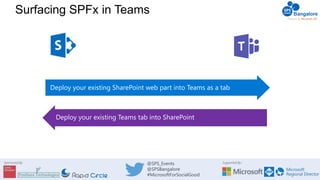
Surfacing SPFx in Teams
Supported By:Sponsored By: @SPS_Events
@SPSBangalore
#MicrosoftForSocialGood
SharePoint
Online
Microsoft Teams
Bring SPFx Solutions into Teams Tab
js
SPFx Teams solutions are deployed
to Office 365 tenants using tenant
app catalog
1
zip
Teams manifest file is created and
deployed in Teams LoB Catalog
2
User selects the SPFx application like
any other tab in MS Teams “Add a
tab” experience
3
Configuration panel is displayed and,
once saved, information are stored
in the SPO site connected to the
group 4
Supported By:Sponsored By: @SPS_Events
@SPSBangalore
#MicrosoftForSocialGood
SharePoint
Online
Microsoft Teams
Bring SPFx Solutions into Teams Tab
SPFx component renders in a
dedicated _layout page which is
iframed in Teams
5
Teams and SharePoint site context
are available to developer
6
Code is loaded from SharePoint
asset library where it was deployed
at time of package upload
7
Alternatively, code can also run in
different CDN location
7
SPFx
Application
js
js
js
js
Supported By:Sponsored By: @SPS_Events
@SPSBangalore
#MicrosoftForSocialGood
Best practices for designing your intranet
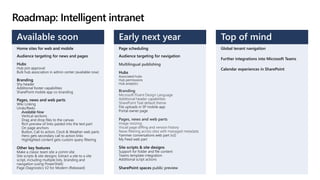
Roadmap: Intelligent intranet
Home sites for web and mobile
Audience targeting for news and pages
Hubs
Hub join approval
Bulk hub association in admin center (available now)
Branding
Shy header
Additional footer capabilities
SharePoint mobile app co-branding
Pages, news and web parts
Wiki Linking
Undo/Redo
Available Now
Vertical sections
Drag and drop files to the canvas
Rich preview of links pasted into the text part
On page anchors
Button, Call to action, Clock & Weather web parts
Hero gets secondary call to action links
Highlighted content gets custom query filtering
Other key features
Make a classic team site a comm site
Site scripts & site designs: Extract a site to a site
script, including multiple lists, branding and
navigation (using PowerShell)
Page Diagnostics V2 for Modern (Released)
Page scheduling
Audience targeting for navigation
Hubs
Associated hubs
Hub permissions
Hub analytics
Additional header capabilities
SharePoint Teal default theme
File uploads in SP mobile app
Portal owner page
Yammer conversations web part (v2)
My Feed web part
Site scripts & site designs
Support for folder and file content
Teams template integration
Additional script actions
SharePoint spaces public preview
Available soon Early next year
Global tenant navigation
Further integrations into Microsoft Teams
Calendar experiences in SharePoint
Top of mind
Supported By:Sponsored By: @SPS_Events
@SPSBangalore
#MicrosoftForSocialGood
Home site
Overview: http://aka.ms/homesites
Branding
SharePoint theming documentation: aka.ms/spsitetheming & aka.ms/spthemegenerator
Designing for accessibility: : aka.ms/fabric-toolkit and aka.ms/fabric-sketch-toolkit
Modern SharePoint PnP starter kit: github.com/SharePoint/sp-starter-kit
Hubs
Overview: http://aka.ms/SPhubsites
Planning guide: http://aka.ms/SPHubSitesGuidance
Site scripts & site designs
Site design and site script overview: http://aka.ms/spsitedesigns
Site script GitHub repo: http://aka.ms/spsitescriptsamples
SPFx
SharePoint Framework: https://docs.microsoft.com/en-us/sharepoint/dev/spfx/roadmap
Additional Resources
Supported By:Sponsored By: @SPS_Events
@SPSBangalore
#MicrosoftForSocialGood
Learn more!
https://bit.ly/32Bbr5A
Supported By:Sponsored By: @SPS_Events
@SPSBangalore
#MicrosoftForSocialGood
Thanks :)
Next up…
Modernize business processes with SharePoint
Online & Power Platform
Yash Agarwal

Architecting your Intranet with SharePoint Modernization

  • 1.
    Supported By:Sponsored By:@SPS_Events @SPSBangalore #MicrosoftForSocialGood Welcome to SharePoint Saturday Bangalore 2019! Architecting your Intranet with SharePoint Modernization Jenkins NS – Founder, JPOWER4 -
  • 2.
    Jenkins NS Modern WorkplaceSolution Architect International Speaker Trainer Independent Consultant Blogger @jenkinsns jenkinsns@gmail.com http://www.jenkinsblogs.com Founder, JPOWER4 jenkinsns@jpower4.com http://www.jpower4.com SPEAKER SPFx: https://www.facebook.com/spfxinfo/ MS Teams: https://www.facebook.com/msteamsinfo Github : https://github.com/jenkinsns Other References
  • 3.
    Supported By:Sponsored By:@SPS_Events @SPSBangalore #MicrosoftForSocialGood Where we come from IT Project 2Project 1 Project 3 HR Policies Benefits Lists Libraries Pages Site Collection Sub SitesProject 5Project 4 Lists Libraries Pages
  • 4.
    Supported By:Sponsored By:@SPS_Events @SPSBangalore #MicrosoftForSocialGood Where we are – Modern Experience  Modern Sites are ‘Site Collections’  Always better when they are connected  Companies are made up of smaller groups and teams  Customers want to organize sites into grouping that  Make it easier for users to discover and recall related content  Apply common controls, branding and polices.  Search together and group common news and contents.  No more deep site structures  Modern Site is a “Flat Architecture”  Hubs connect related sites Sales Report Yearly Report News Regional sales Customer Report Feedback Sales Record Center Expense Tracker Benefits Travel Policies Guidance New Hires HR SiteCollections
  • 5.
    Supported By:Sponsored By:@SPS_Events @SPSBangalore #MicrosoftForSocialGood Modern SharePoint
  • 6.
    Supported By:Sponsored By:@SPS_Events @SPSBangalore #MicrosoftForSocialGood Organize related sites together Drive consistency Landing site for organization Create brand identity Agenda: Building your organization’s intranet BRANDINGHOME SITE HUBS SITE DESIGNS SPFX Custom Webpart
  • 7.
    Supported By:Sponsored By:@SPS_Events @SPSBangalore #MicrosoftForSocialGood Home site Landing site for your organization
  • 8.
    Supported By:Sponsored By:@SPS_Events @SPSBangalore #MicrosoftForSocialGood intelligent search and rich navigation news and information audience targeting personalized, relevant content • Foster connections across the organization social conversations communications with intelligent video beautiful, dynamic employee experience accessible and available across devices
  • 9.
    Supported By:Sponsored By:@SPS_Events @SPSBangalore #MicrosoftForSocialGood Make this a home site! Any communication site can become a home site Marks the news from that site as authoritative news Sets search to global scope Set as the root of your SharePoint intranet Set a new communication site to the root site location Update your existing root site to become a communication site Set the Office 365 bar logo to point to the home site Leverage recommended experiences Enable audience targeting for news and navigation Use the various user personalized web parts: My Feed, Frequent sites
  • 10.
    Supported By:Sponsored By:@SPS_Events @SPSBangalore #MicrosoftForSocialGood Designing your intranet architecture Home site Human Resources Career Give Benefits News Leadership FacilitiesPlanning
  • 11.
    Supported By:Sponsored By:@SPS_Events @SPSBangalore #MicrosoftForSocialGood Designing your intranet architecture Home site News Leadership FacilitiesPlanning Human Resources Career Give BenefitsBig Wins Retail Ops Events Social Web Sales Marketing Hubs
  • 12.
    Supported By:Sponsored By:@SPS_Events @SPSBangalore #MicrosoftForSocialGood Branding your Home site
  • 13.
    Supported By:Sponsored By:@SPS_Events @SPSBangalore #MicrosoftForSocialGood Core elements of brand in SharePoint Logos Navigation Content StructureTheming
  • 14.
    Supported By:Sponsored By:@SPS_Events @SPSBangalore #MicrosoftForSocialGood Hubs Organize related sites together
  • 15.
    Supported By:Sponsored By:@SPS_Events @SPSBangalore #MicrosoftForSocialGood Why do we need SharePoint Hub Sites A dynamic, ever-changing digital workplace • We want to see things that are relevant • Navigate consistently and easily • Search in the context of where we are • Anyone can post news, comment or like items and read other’s news and comments Constantly Changing Organisations • As administrators we need quick ways to restructure our sites • We need to be able to provision quickly as new requirements arrive • Customers always looking for a solution immediately.
  • 16.
    A dynamic, ever-changingdigital workplace Vendor agreements Legal portal Regional partner outreach Policies Customer Event planning HR Quarterly reports Company-wide Benefits Acquired sales key Eco Adventure Travel Programs Customer connections Travel innovation SalesRegional sales Recognition & rewards EMEA sales Expense tracker Cultural Big wins Benefits planning New hires EMEA Records center
  • 17.
    Supported By:Sponsored By:@SPS_Events @SPSBangalore #MicrosoftForSocialGood SharePoint hubs • Brings together related team and communication sites • Roll up of news, events and site activity • Search across related sites • Cross-site navigation with audience targeting • Consistent look-and-feel • Common IA via site designs • Permissions across related sites • Hub analytics • Associated sites creation • Hub join approvals • Admins create, site owners adopt • Associate hubs together
  • 18.
    Supported By:Sponsored By:@SPS_Events @SPSBangalore #MicrosoftForSocialGood Cross-site navigation • Support for audience targeting using AAD groups • Ability to hide hub name Centralize Permissions • Grant visitor access across associated sites • Hub owner can enable • Site owners can opt out/in Hub-wide usage insights • Total visitors and views • Popular news, files, pages and sites
  • 19.
    Supported By:Sponsored By:@SPS_Events @SPSBangalore #MicrosoftForSocialGood What should be a hub?
  • 20.
    Supported By:Sponsored By:@SPS_Events @SPSBangalore #MicrosoftForSocialGood CSEWeb CSEWeb (departmental hub) Communications sites Team sites Meetings & Voice Collaboration Finding CSEO Connection Localized CSEWeb Sites CSE Listens CSEWeb
  • 21.
    Supported By:Sponsored By:@SPS_Events @SPSBangalore #MicrosoftForSocialGood Experience & Devices Fix, Hack, Learn Manager Corner Monthly Business Review Diversity & Inclusion Culture Events Experiences & Devices
  • 22.
    Supported By:Sponsored By:@SPS_Events @SPSBangalore #MicrosoftForSocialGood There is no requirement to have more than one hub Add hub sites to maximize finding and surfacing related information in context Hub site associations are flexible so they can grow and change with your organization
  • 23.
    Supported By:Sponsored By:@SPS_Events @SPSBangalore #MicrosoftForSocialGood Hub creation is IT-controlled Prevents proliferation of hubs without centralized approval Available to IT admins via the modern Admin center 2,000 limit Hubs can be scoped Site owners will see only the hubs they’re allowed to join Hub join supports approval process Hub don’t sub Subsite creation can be disabled independently on classic and modern sites Consider disabling subsite creation on modern to encourage hub site use
  • 24.
    Supported By:Sponsored By:@SPS_Events @SPSBangalore #MicrosoftForSocialGood Designing your intranet architecture Home site News Leadership FacilitiesPlanning Human Resources Career Give BenefitsBig Wins Retail Ops Events Social Web Sales Marketing Metrics ROB Region Sales APAC ROB MBR Research Sales Europe Associated Hubs Hubs Hubs
  • 25.
    Supported By:Sponsored By:@SPS_Events @SPSBangalore #MicrosoftForSocialGood • Brings together related hubs • Search across hubs • Roll up of news and activity • Easier to curate hub to hub navigation • IT-controlled Market Retail Big Wins Sales Sales APAC Sales Europe Metrics ROB Region ROB MBR Research
  • 26.
    Supported By:Sponsored By:@SPS_Events @SPSBangalore #MicrosoftForSocialGood Demo
  • 27.
    Supported By:Sponsored By:@SPS_Events @SPSBangalore #MicrosoftForSocialGood Site scripts & site designs
  • 28.
    Supported By:Sponsored By:@SPS_Events @SPSBangalore #MicrosoftForSocialGood Site Scripts A script defining a set of actions to take on a site, such as: "create list" "create site column" Site Designs A site design can be applied to a site, and can contain one or more site scripts When to use To apply consistent site configuration or business logic to sites: During site creation As part of hub association On existing sites
  • 29.
    Supported By:Sponsored By:@SPS_Events @SPSBangalore #MicrosoftForSocialGood Site Scripts – Where all the Action is actions: [ ... { "verb": "createSPList", "listName": “Case Studies", "templateType": 101, "subactions": [ { "verb": "addSPFieldXml", "schemaXml": "<Field ID="{47b1b86f-9f8a-4dbe-a75e- ca5d9b0f566c}" Type="URL" Name="_ShortcutUrl" DisplayName="Shortcu t URL" DisplaceOnUpgrade="TRUE" Indexed="FALSE" Required="FALSE" Hidden="TRUE" ReadOnlyField="TRUE" ShowInEditForm="FALSE" …………. }, { "verb": "addFile", "source": "Files/Customer Loyalty Program.docx", "destination": "Customer Loyalty Program.docx" }, { "verb": "addSPView", "name": "All Documents", "viewFields": ["DocIcon",“LinkFilename”,"Language", "Status“, "AccountManager”, "Approver", "Industry", _DisplayName", "Editor"], ……………………. }, { "verb": "addNavLink", “url": "/Case Studies/Forms/AllItems.aspx", “displayName": "Case Studies", "isWebRelative": true },... Site Script: JSON file of actions to be applied to the site post-creation Actions can be concatenated in single file or multiple files can be used (and reused) Include Parent and sub actions Field Xml supported
  • 30.
    Supported By:Sponsored By:@SPS_Events @SPSBangalore #MicrosoftForSocialGood Demo: Creating a site design
  • 31.
    Supported By:Sponsored By:@SPS_Events @SPSBangalore #MicrosoftForSocialGood Site scripts – auto-generation Get-SPOSiteScriptFromList –ListUrl [listurl] Get-SPOSiteScriptFromWeb –WebURL –IncludeTheming –IncludeBranding –IncludeSiteExternalSharingCapability –IncludeRegionalSettings –IncludeLists “listurl”
  • 32.
    Supported By:Sponsored By:@SPS_Events @SPSBangalore #MicrosoftForSocialGood Site design infrastructure Site Scripts • Title • ID • Script actions (Create List, Apply Theme, Add to Nav, Trigger Flow…) Site Designs • Title & Desc • Preview Image • Web Template • Site Script Array • Scope | isDefault
  • 33.
    Supported By:Sponsored By:@SPS_Events @SPSBangalore #MicrosoftForSocialGood Site script actions Branding & Other Site Settings Apps & Solutions SharePoint Components SharePoint Components • createSPList • addSPField • deleteSPField • addSPFieldXml • createSiteColumn • createSiteColumnXml • Global Taxonomy • addSiteColumn • addContentType • createContentType • removeContentType • addSPView • removeSPView • setSPFieldCustomFormatter • addFolder • addFile • setDocumentTemplates • setSiteLogoFromFile Register Solutions: • installSolution • SPFx Extension support • associateExtension • associateListViewCommandSet • associateFieldCustomizer Settings • addPrincipalToSPGroup • addNavLink (QL, Hub, footer) • removeNavLink (QL, Hub, footer) • applyTheme • setSiteLogo • setSiteBranding • Header layout • Header Background • Navigation Style • Footer Visibility • setRegionalSettings • setSiteExternalSharingCapability • triggerFlow • joinHubSite • activateSPFeature
  • 34.
    Supported By:Sponsored By:@SPS_Events @SPSBangalore #MicrosoftForSocialGood SharePoint Framework (SPFx)
  • 35.
    Supported By:Sponsored By:@SPS_Events @SPSBangalore #MicrosoftForSocialGood Background SharePoint Framework is a new development model for building SharePoint customization. In the last three years, we have seen many number of releases for SharePoint Framework.  GA(1.0.0), 1.0.1, 1.0.2, 1.1.0, 1.1.1, 1.1.3, 1.2.0, 1.3.0, 1.3.1, 1.3.2, 1.3.4, 1.4.0, 1.4.1, 1.5.0, 1.5.1, 1.6.0, 1.7.0, 1.7.1, 1.8.0, 1.8.1, 1.8.2, 1.9.0, 1.9.1...  Drop 1, Drop 2, Drop 3, Drop 4, Drop 5, Drop 6, RC0 Always Microsoft recommend to use latest version, but in reality it is very difficult to manage with team based development, since we always don't upgrade to a new version.
  • 36.
    Supported By:Sponsored By:@SPS_Events @SPSBangalore #MicrosoftForSocialGood Preparing SPFx development environment Building SharePoint Framework solutions require developers to use a certain set of tools. Node.js npm Gulp Yeoman and SharePoint Framework Yeoman generator Visual Studio Code https://docs.microsoft.com/en-us/sharepoint/dev/spfx/set-up-your- development-environment
  • 37.
    Supported By:Sponsored By:@SPS_Events @SPSBangalore #MicrosoftForSocialGood SharePoint Framework - SPFX  SPFx Webpart  Extensions Application Customizers Field Customizers Command Sets  Library
  • 38.
    Supported By:Sponsored By:@SPS_Events @SPSBangalore #MicrosoftForSocialGood Surfacing SPFx in Teams
  • 39.
    Supported By:Sponsored By:@SPS_Events @SPSBangalore #MicrosoftForSocialGood SharePoint Online Microsoft Teams Bring SPFx Solutions into Teams Tab js SPFx Teams solutions are deployed to Office 365 tenants using tenant app catalog 1 zip Teams manifest file is created and deployed in Teams LoB Catalog 2 User selects the SPFx application like any other tab in MS Teams “Add a tab” experience 3 Configuration panel is displayed and, once saved, information are stored in the SPO site connected to the group 4
  • 40.
    Supported By:Sponsored By:@SPS_Events @SPSBangalore #MicrosoftForSocialGood SharePoint Online Microsoft Teams Bring SPFx Solutions into Teams Tab SPFx component renders in a dedicated _layout page which is iframed in Teams 5 Teams and SharePoint site context are available to developer 6 Code is loaded from SharePoint asset library where it was deployed at time of package upload 7 Alternatively, code can also run in different CDN location 7 SPFx Application js js js js
  • 41.
    Supported By:Sponsored By:@SPS_Events @SPSBangalore #MicrosoftForSocialGood Best practices for designing your intranet
  • 42.
    Roadmap: Intelligent intranet Homesites for web and mobile Audience targeting for news and pages Hubs Hub join approval Bulk hub association in admin center (available now) Branding Shy header Additional footer capabilities SharePoint mobile app co-branding Pages, news and web parts Wiki Linking Undo/Redo Available Now Vertical sections Drag and drop files to the canvas Rich preview of links pasted into the text part On page anchors Button, Call to action, Clock & Weather web parts Hero gets secondary call to action links Highlighted content gets custom query filtering Other key features Make a classic team site a comm site Site scripts & site designs: Extract a site to a site script, including multiple lists, branding and navigation (using PowerShell) Page Diagnostics V2 for Modern (Released) Page scheduling Audience targeting for navigation Hubs Associated hubs Hub permissions Hub analytics Additional header capabilities SharePoint Teal default theme File uploads in SP mobile app Portal owner page Yammer conversations web part (v2) My Feed web part Site scripts & site designs Support for folder and file content Teams template integration Additional script actions SharePoint spaces public preview Available soon Early next year Global tenant navigation Further integrations into Microsoft Teams Calendar experiences in SharePoint Top of mind
  • 43.
    Supported By:Sponsored By:@SPS_Events @SPSBangalore #MicrosoftForSocialGood Home site Overview: http://aka.ms/homesites Branding SharePoint theming documentation: aka.ms/spsitetheming & aka.ms/spthemegenerator Designing for accessibility: : aka.ms/fabric-toolkit and aka.ms/fabric-sketch-toolkit Modern SharePoint PnP starter kit: github.com/SharePoint/sp-starter-kit Hubs Overview: http://aka.ms/SPhubsites Planning guide: http://aka.ms/SPHubSitesGuidance Site scripts & site designs Site design and site script overview: http://aka.ms/spsitedesigns Site script GitHub repo: http://aka.ms/spsitescriptsamples SPFx SharePoint Framework: https://docs.microsoft.com/en-us/sharepoint/dev/spfx/roadmap Additional Resources
  • 44.
    Supported By:Sponsored By:@SPS_Events @SPSBangalore #MicrosoftForSocialGood Learn more! https://bit.ly/32Bbr5A
  • 45.
    Supported By:Sponsored By:@SPS_Events @SPSBangalore #MicrosoftForSocialGood Thanks :) Next up… Modernize business processes with SharePoint Online & Power Platform Yash Agarwal

Editor's Notes