Bootstrap
PPT by - Shafeeq Khan
| What is Bootstrap |
Bootstrap is a free and open-source CSS framework directed at responsive, mobile-first front-
end web development. It contains HTML, CSS and JavaScript-based design templates for
typography, forms, buttons, navigation, and other interface components.
| How to Use |
A basic understanding of HTML is required to start learning Bootstrap. Some familiarity with
how CSS works (CSS Selectors and Visual Rules) would be helpful,
1. Download Bootstrap from getbootstrap.com
2. Include Bootstrap from a CDN
| Bootstrap Grid |
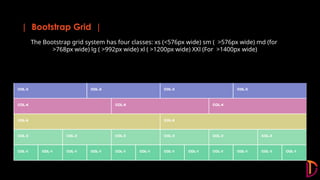
The Bootstrap grid system has four classes: xs (<576px wide) sm ( >576px wide) md (for
>768px wide) lg ( >992px wide) xl ( >1200px wide) XXl (For >1400px wide)
| Viewport |
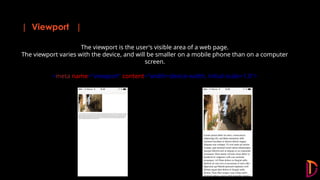
The viewport is the user's visible area of a web page.
The viewport varies with the device, and will be smaller on a mobile phone than on a computer
screen.
<meta name="viewport" content="width=device-width, initial-scale=1.0">
| Components |
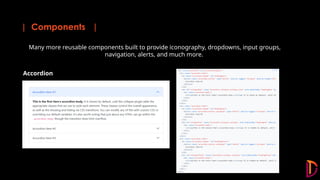
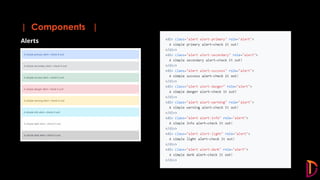
Many more reusable components built to provide iconography, dropdowns, input groups,
navigation, alerts, and much more.
Accordion
| Components |
Alerts
| Components |
• Accordion
• Alerts
• Badge
• Breadcrumb
• Buttons
• Button group
• Card
• Carousel
• Close button
• Collapse
• Dropdowns
• List group
• Modal
• Navs & tabs
• Navbar
• Offcanvas
• Pagination
• Popovers
• Progress
• Scrollspy
• Spinners
• Toasts
• Tooltips
| Advantages of Bootstrap |
1. Fewer Cross browser bugs
2. A consistent framework that supports major of all browsers and CSS compatibility fixes
3. Lightweight and customizable
4. Responsive structures and styles
5. Several JavaScript plugins using the jQuery
6. Good documentation and community support
7. Loads of free and professional templates, WordPress themes and plugins
8. Great grid system
THANK YOU!

Bootstrap5 introduction/bootstrap basic concept

  • 1.
    Bootstrap PPT by -Shafeeq Khan
  • 2.
    | What isBootstrap | Bootstrap is a free and open-source CSS framework directed at responsive, mobile-first front- end web development. It contains HTML, CSS and JavaScript-based design templates for typography, forms, buttons, navigation, and other interface components.
  • 3.
    | How toUse | A basic understanding of HTML is required to start learning Bootstrap. Some familiarity with how CSS works (CSS Selectors and Visual Rules) would be helpful, 1. Download Bootstrap from getbootstrap.com 2. Include Bootstrap from a CDN
  • 4.
    | Bootstrap Grid| The Bootstrap grid system has four classes: xs (<576px wide) sm ( >576px wide) md (for >768px wide) lg ( >992px wide) xl ( >1200px wide) XXl (For >1400px wide)
  • 5.
    | Viewport | Theviewport is the user's visible area of a web page. The viewport varies with the device, and will be smaller on a mobile phone than on a computer screen. <meta name="viewport" content="width=device-width, initial-scale=1.0">
  • 6.
    | Components | Manymore reusable components built to provide iconography, dropdowns, input groups, navigation, alerts, and much more. Accordion
  • 7.
  • 8.
    | Components | •Accordion • Alerts • Badge • Breadcrumb • Buttons • Button group • Card • Carousel • Close button • Collapse • Dropdowns • List group • Modal • Navs & tabs • Navbar • Offcanvas • Pagination • Popovers • Progress • Scrollspy • Spinners • Toasts • Tooltips
  • 9.
    | Advantages ofBootstrap | 1. Fewer Cross browser bugs 2. A consistent framework that supports major of all browsers and CSS compatibility fixes 3. Lightweight and customizable 4. Responsive structures and styles 5. Several JavaScript plugins using the jQuery 6. Good documentation and community support 7. Loads of free and professional templates, WordPress themes and plugins 8. Great grid system
  • 10.