Bootstrap?!
이철호
@W-MARC
@undefine:D
@redribbon
!=Tech. evangelist
Front-end Engineer
Mark Otto
Jacob
Bootstrap is the most popular
HTML, CSS, and JS framework for
developing responsive, mobile
first projects on the web.
http://www.getbootstrap.com
Preprocessors
Bootstrap ships with vanilla CSS, but its source code
utilizes the two most popular CSS preprocessors, Less
and Sass. Quickly get started with precompiled CSS or
build on the source.
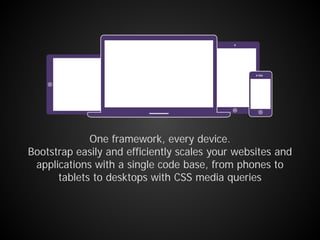
One framework, every device.
Bootstrap easily and efficiently scales your websites and
applications with a single code base, from phones to
tablets to desktops with CSS media queries
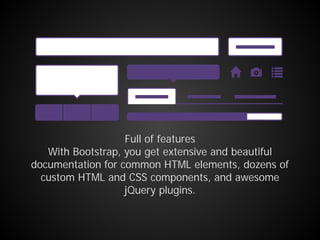
Full of features
With Bootstrap, you get extensive and beautiful
documentation for common HTML elements, dozens of
custom HTML and CSS components, and awesome
jQuery plugins.
Open source
Bootstrap is open source. It's hosted, developed, and
maintained on GitHub.
MIT license
Download
Bootstrap CDN
Install with Bower
Install with npm
Install with Composer
All javascript plugins require jQuery
Getting started
Ctrl+C, Ctrl+V
Just do it
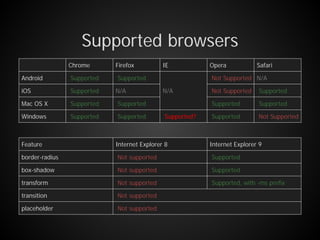
Supported browsers
Chrome Firefox IE Opera Safari
Android Supported Supported
N/A
Not Supported N/A
iOS Supported N/A Not Supported Supported
Mac OS X Supported Supported Supported Supported
Windows Supported Supported Supported? Supported Not Supported
Feature Internet Explorer 8 Internet Explorer 9
border-radius Not supported Supported
box-shadow Not supported Supported
transform Not supported Supported, with -ms prefix
transition Not supported
placeholder Not supported
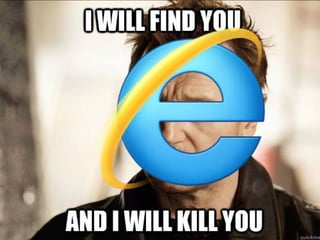
Internet Explorer will kill you
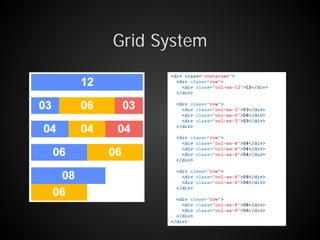
Grid System
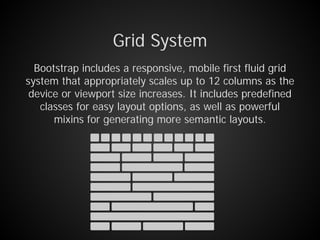
Bootstrap includes a responsive, mobile first fluid grid
system that appropriately scales up to 12 columns as the
device or viewport size increases. It includes predefined
classes for easy layout options, as well as powerful
mixins for generating more semantic layouts.
Grid System
options
Extra small devices
Phones (<768px)
Small devices
Tablets (≥768px)
Medium devices
Desktops (≥992px)
Large devices
Desktops (≥1200px)
Grid behavior Horizontal at all times Collapsed to start, horizontal above breakpoints
Container width None (auto) 750px 970px 1170px
Class prefix .col-xs- .col-sm- .col-md- .col-lg-
# of columns 12
Column width Auto ~62px ~81px ~97px
Grid option class
.col-[device prefix]-[number]
Grid System
<div class="container">
<div class="row">
<div class="col-xs-12">12</div>
</div>
<div class="row">
<div class="col-xs-3">03</div>
<div class="col-xs-6">06</div>
<div class="col-xs-3">03</div>
</div>
<div class="row">
<div class="col-xs-4">04</div>
</div>
<div class="row">
<div class="col-xs-6">06</div>
</div>
<div class="row">
<div class="col-xs-8">08</div>
<div class="col-xs-6">06</div>
</div>
</div>
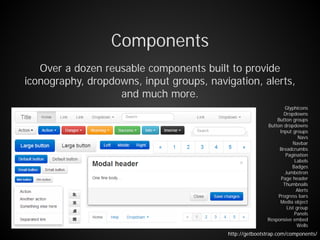
Components
Over a dozen reusable components built to provide
iconography, dropdowns, input groups, navigation, alerts,
and much more.
Glyphicons
Dropdowns
Button groups
Button dropdowns
Input groups
Navs
Navbar
Breadcrumbs
Pagination
Labels
Badges
Jumbotron
Page header
Thumbnails
Alerts
Progress bars
Media object
List group
Panels
Responsive embed
Wells
http://getbootstrap.com/components/
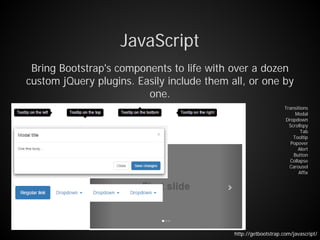
JavaScript
Bring Bootstrap's components to life with over a dozen
custom jQuery plugins. Easily include them all, or one by
one.
Transitions
Modal
Dropdown
Scrollspy
Tab
Tooltip
Popover
Alert
Button
Collapse
Carousel
Affix
http://getbootstrap.com/javascript/
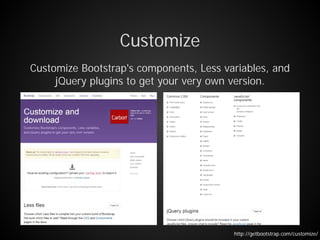
Customize
Customize Bootstrap's components, Less variables, and
jQuery plugins to get your very own version.
http://getbootstrap.com/customize/
Bootstrap components written in pure AngularJS by the
AngularUI Team
UI Bootstrap?!
https://angular-ui.github.io/bootstrap/
Dependencies
This repository contains a set of native AngularJS
directives based on Bootstrap's markup and CSS. As a
result no dependency on jQuery or Bootstrap's JavaScript
is required.
Dependencies
- AngularJS (requires AngularJS 1.3.x, tested with 1.4.7).
0.12.0 is the last version of this library that supports
AngularJS 1.2.x.
- Bootstrap CSS (tested with version 3.1.1). This version
of the library (0.14.3) works only with Bootstrap CSS
in version 3.x. 0.8.0 is the last version of this library
that supports Bootstrap CSS in version 2.3.x.
- AngularJS의 장점을 그대로 흡수
- Bootstrap 경량화
- 간결한 Code
- Cross browsing?
- AngularJS??
- 낮은 version!
- Bootstrap4???
VS
Spring Framework != JAVA
Bootstrap != responsive web

Bootstrap과 UI-Bootstrap

  • 1.
  • 2.
  • 3.
    Bootstrap is themost popular HTML, CSS, and JS framework for developing responsive, mobile first projects on the web. http://www.getbootstrap.com
  • 4.
    Preprocessors Bootstrap ships withvanilla CSS, but its source code utilizes the two most popular CSS preprocessors, Less and Sass. Quickly get started with precompiled CSS or build on the source.
  • 5.
    One framework, everydevice. Bootstrap easily and efficiently scales your websites and applications with a single code base, from phones to tablets to desktops with CSS media queries
  • 6.
    Full of features WithBootstrap, you get extensive and beautiful documentation for common HTML elements, dozens of custom HTML and CSS components, and awesome jQuery plugins.
  • 7.
    Open source Bootstrap isopen source. It's hosted, developed, and maintained on GitHub. MIT license
  • 8.
    Download Bootstrap CDN Install withBower Install with npm Install with Composer All javascript plugins require jQuery Getting started
  • 9.
  • 10.
    Supported browsers Chrome FirefoxIE Opera Safari Android Supported Supported N/A Not Supported N/A iOS Supported N/A Not Supported Supported Mac OS X Supported Supported Supported Supported Windows Supported Supported Supported? Supported Not Supported Feature Internet Explorer 8 Internet Explorer 9 border-radius Not supported Supported box-shadow Not supported Supported transform Not supported Supported, with -ms prefix transition Not supported placeholder Not supported
  • 11.
  • 12.
    Grid System Bootstrap includesa responsive, mobile first fluid grid system that appropriately scales up to 12 columns as the device or viewport size increases. It includes predefined classes for easy layout options, as well as powerful mixins for generating more semantic layouts.
  • 13.
    Grid System options Extra smalldevices Phones (<768px) Small devices Tablets (≥768px) Medium devices Desktops (≥992px) Large devices Desktops (≥1200px) Grid behavior Horizontal at all times Collapsed to start, horizontal above breakpoints Container width None (auto) 750px 970px 1170px Class prefix .col-xs- .col-sm- .col-md- .col-lg- # of columns 12 Column width Auto ~62px ~81px ~97px Grid option class .col-[device prefix]-[number]
  • 14.
    Grid System <div class="container"> <divclass="row"> <div class="col-xs-12">12</div> </div> <div class="row"> <div class="col-xs-3">03</div> <div class="col-xs-6">06</div> <div class="col-xs-3">03</div> </div> <div class="row"> <div class="col-xs-4">04</div> <div class="col-xs-4">04</div> <div class="col-xs-4">04</div> </div> <div class="row"> <div class="col-xs-6">06</div> <div class="col-xs-6">06</div> </div> <div class="row"> <div class="col-xs-8">08</div> <div class="col-xs-6">06</div> </div> </div>
  • 15.
    Components Over a dozenreusable components built to provide iconography, dropdowns, input groups, navigation, alerts, and much more. Glyphicons Dropdowns Button groups Button dropdowns Input groups Navs Navbar Breadcrumbs Pagination Labels Badges Jumbotron Page header Thumbnails Alerts Progress bars Media object List group Panels Responsive embed Wells http://getbootstrap.com/components/
  • 16.
    JavaScript Bring Bootstrap's componentsto life with over a dozen custom jQuery plugins. Easily include them all, or one by one. Transitions Modal Dropdown Scrollspy Tab Tooltip Popover Alert Button Collapse Carousel Affix http://getbootstrap.com/javascript/
  • 17.
    Customize Customize Bootstrap's components,Less variables, and jQuery plugins to get your very own version. http://getbootstrap.com/customize/
  • 18.
    Bootstrap components writtenin pure AngularJS by the AngularUI Team UI Bootstrap?! https://angular-ui.github.io/bootstrap/
  • 19.
    Dependencies This repository containsa set of native AngularJS directives based on Bootstrap's markup and CSS. As a result no dependency on jQuery or Bootstrap's JavaScript is required.
  • 20.
    Dependencies - AngularJS (requiresAngularJS 1.3.x, tested with 1.4.7). 0.12.0 is the last version of this library that supports AngularJS 1.2.x. - Bootstrap CSS (tested with version 3.1.1). This version of the library (0.14.3) works only with Bootstrap CSS in version 3.x. 0.8.0 is the last version of this library that supports Bootstrap CSS in version 2.3.x.
  • 21.
    - AngularJS의 장점을그대로 흡수 - Bootstrap 경량화 - 간결한 Code - Cross browsing? - AngularJS?? - 낮은 version! - Bootstrap4??? VS
  • 22.
    Spring Framework !=JAVA Bootstrap != responsive web