By
Atul Adhikari
Introduction:
What is Twitter Bootstrap?
Bootstrap is a sleek, intuitive, and powerful mobile first front-end framework for
faster and easier web development. It uses HTML, CSS and JavaScript.
History
 Bootstrap was developed by Mark Otto and Jacob Thornton at Twitter. It was
released as an open source product in August 2011 on GitHub.
Why use Bootstrap?
 Mobile first approach: Since Bootstrap 3, the framework consists of Mobile first
styles throughout the entire library instead of in separate files.
 Browser Support: It is supported by all popular browsers
 Easy to get started: With just the knowledge of HTML and CSS anyone can get
started with Bootstrap. Also the Bootstrap official site has a good documentation.
 Responsive design: Bootstrap's responsive CSS adjusts to Desktops, Tablets
and Mobiles.
Overview:
.
Preprocessors
 Bootstrap ships with vanilla CSS, but its source code utilizes the two most popular CSS
preprocessors, Less and Sass. Quickly get started with precompiled CSS or build on the source.
One framework, every device.
 Bootstrap easily and efficiently scales your websites and applications with a single code base, from phones to tablets
to desktops with CSS media queries.
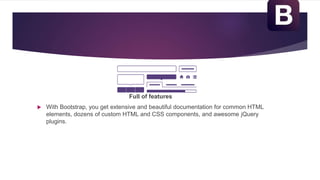
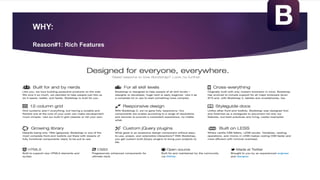
Full of features
 With Bootstrap, you get extensive and beautiful documentation for common HTML
elements, dozens of custom HTML and CSS components, and awesome jQuery
plugins.
WHY:
Reason#1: Rich Features
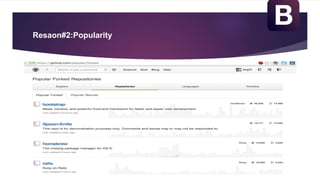
Resaon#2:Popularity
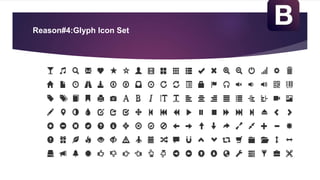
Reason#4:Glyph Icon Set
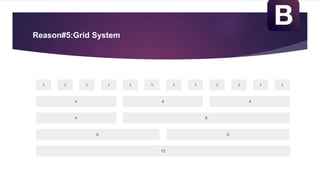
Reason#5:Grid System
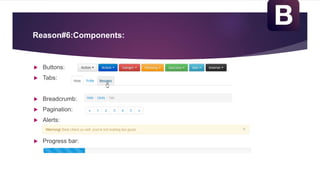
Reason#6:Components:
 Buttons:
 Tabs:
 Breadcrumb:
 Pagination:
 Alerts:
 Progress bar:
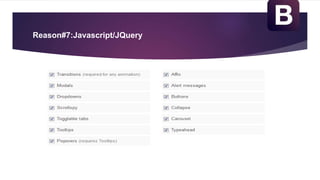
Reason#7:Javascript/JQuery
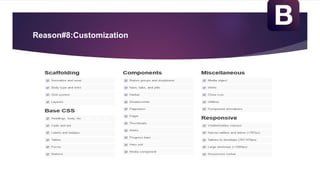
Reason#8:Customization
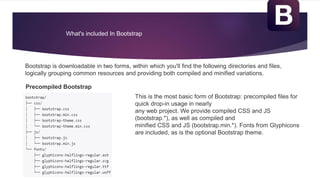
What's included In Bootstrap
Bootstrap is downloadable in two forms, within which you'll find the following directories and files,
logically grouping common resources and providing both compiled and minified variations.
Precompiled Bootstrap
This is the most basic form of Bootstrap: precompiled files for
quick drop-in usage in nearly
any web project. We provide compiled CSS and JS
(bootstrap.*), as well as compiled and
minified CSS and JS (bootstrap.min.*). Fonts from Glyphicons
are included, as is the optional Bootstrap theme.
Bootstrap Source Code
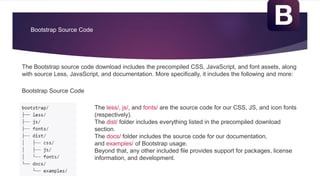
The Bootstrap source code download includes the precompiled CSS, JavaScript, and font assets, along
with source Less, JavaScript, and documentation. More specifically, it includes the following and more:
The less/, js/, and fonts/ are the source code for our CSS, JS, and icon fonts
(respectively).
The dist/ folder includes everything listed in the precompiled download
section.
The docs/ folder includes the source code for our documentation,
and examples/ of Bootstrap usage.
Beyond that, any other included file provides support for packages, license
information, and development.
Bootstrap Source Code
Why Bootstrap is better than others?
• Is free! Saves you time & money. Implementation is easy.
• Simple and powerful grid system
• Gives you free CSS styles such as animated buttons, icons, static navigation
bars, and image thumbnails.
• Inbuilt jQuery Plugins to add interactivity to websites
• Best is you can make a responsive website for all devices
• Being open sourced on GitHub anyone can contribute
• There is plenty of documentation & customization available
Thank You

Bootstrap

  • 1.
  • 2.
    Introduction: What is TwitterBootstrap? Bootstrap is a sleek, intuitive, and powerful mobile first front-end framework for faster and easier web development. It uses HTML, CSS and JavaScript. History  Bootstrap was developed by Mark Otto and Jacob Thornton at Twitter. It was released as an open source product in August 2011 on GitHub. Why use Bootstrap?  Mobile first approach: Since Bootstrap 3, the framework consists of Mobile first styles throughout the entire library instead of in separate files.  Browser Support: It is supported by all popular browsers
  • 3.
     Easy toget started: With just the knowledge of HTML and CSS anyone can get started with Bootstrap. Also the Bootstrap official site has a good documentation.  Responsive design: Bootstrap's responsive CSS adjusts to Desktops, Tablets and Mobiles.
  • 4.
    Overview: . Preprocessors  Bootstrap shipswith vanilla CSS, but its source code utilizes the two most popular CSS preprocessors, Less and Sass. Quickly get started with precompiled CSS or build on the source. One framework, every device.  Bootstrap easily and efficiently scales your websites and applications with a single code base, from phones to tablets to desktops with CSS media queries.
  • 5.
    Full of features With Bootstrap, you get extensive and beautiful documentation for common HTML elements, dozens of custom HTML and CSS components, and awesome jQuery plugins.
  • 6.
  • 7.
  • 8.
  • 9.
  • 10.
    Reason#6:Components:  Buttons:  Tabs: Breadcrumb:  Pagination:  Alerts:  Progress bar:
  • 11.
  • 12.
  • 13.
    What's included InBootstrap Bootstrap is downloadable in two forms, within which you'll find the following directories and files, logically grouping common resources and providing both compiled and minified variations. Precompiled Bootstrap This is the most basic form of Bootstrap: precompiled files for quick drop-in usage in nearly any web project. We provide compiled CSS and JS (bootstrap.*), as well as compiled and minified CSS and JS (bootstrap.min.*). Fonts from Glyphicons are included, as is the optional Bootstrap theme.
  • 14.
    Bootstrap Source Code TheBootstrap source code download includes the precompiled CSS, JavaScript, and font assets, along with source Less, JavaScript, and documentation. More specifically, it includes the following and more: The less/, js/, and fonts/ are the source code for our CSS, JS, and icon fonts (respectively). The dist/ folder includes everything listed in the precompiled download section. The docs/ folder includes the source code for our documentation, and examples/ of Bootstrap usage. Beyond that, any other included file provides support for packages, license information, and development. Bootstrap Source Code
  • 15.
    Why Bootstrap isbetter than others? • Is free! Saves you time & money. Implementation is easy. • Simple and powerful grid system • Gives you free CSS styles such as animated buttons, icons, static navigation bars, and image thumbnails. • Inbuilt jQuery Plugins to add interactivity to websites • Best is you can make a responsive website for all devices • Being open sourced on GitHub anyone can contribute • There is plenty of documentation & customization available
  • 16.

Editor's Notes

  • #11 Here is a list of some of the CSS component available. There are dozens of them available with bootstrap.
  • #12 Bootstrap gives life to its UI by using Jquery plugins.
  • #13 Bootstrap provides a web-based customizer that allow you to generate a CSS file based on your specific needs.