Buliding Object-Oriented Applications in PowerBuilder  Module 9: Methods
Objectives Describe the similarities and differences between events and functions Understand how to override behavior Understand function overloading
Topics Events and Functions as Methods Availability Invocation Execution Overriding Scripts Overloading Timing of Execution Passing Arguments Returning Values Access Accessing Ancestor Functions and Events in the Development Environment Compiler Checking
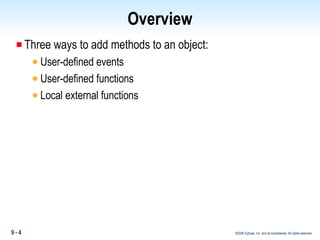
Overview Three ways to add methods to an object: User-defined events User-defined functions Local external functions
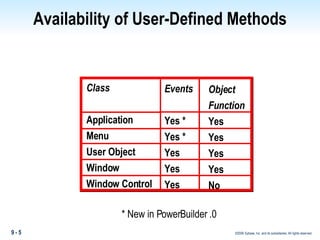
Availability of User-Defined Methods Class Application Menu User Object Window Window Control Object  Function Yes Yes Yes Yes No Events Yes * Yes * Yes Yes Yes * New in PowerBuilder .0
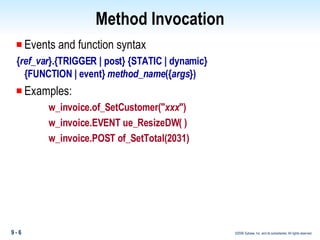
Method Invocation Events and function syntax { ref_var }.{TRIGGER | post} {STATIC | dynamic}   {FUNCTION | event}  method_name ({ args }) Examples: w_invoice.of_SetCustomer(" xxx ") w_invoice.EVENT ue_ResizeDW( ) w_invoice.POST of_SetTotal(2031)
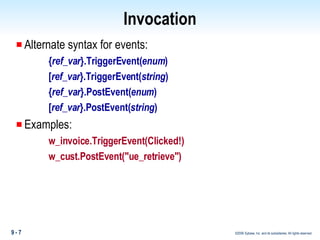
Invocation Alternate syntax for events: { ref_var }.TriggerEvent( enum ) [ ref_var }.TriggerEvent( string ) { ref_var }.PostEvent( enum ) [ ref_var }.PostEvent( string ) Examples: w_invoice.TriggerEvent(Clicked!) w_cust.PostEvent("ue_retrieve")
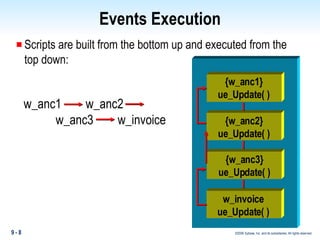
Events Execution Scripts are built from the bottom up and executed from the top down:  w_anc1   w_anc2  w_anc3  w_invoice {w_anc1} ue_Update( ) {w_anc1} ue_Update( ) {w_anc2} ue_Update( ) {w_anc3} ue_Update( ) w_invoice ue_Update( )
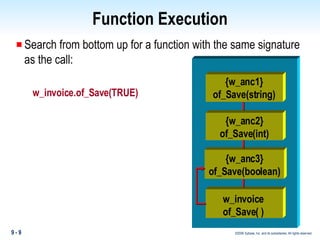
Function Execution Search from bottom up for a function with the same signature as the call: w_invoice.of_Save(TRUE) {w_anc1} ue_Update( ) {w_anc1} of_Save(string) {w_anc2} of_Save(int) {w_anc3} of_Save(boolean) w_invoice of_Save( )
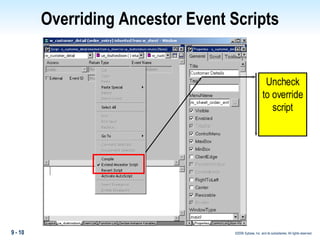
Overriding Ancestor Event Scripts Uncheck to override script
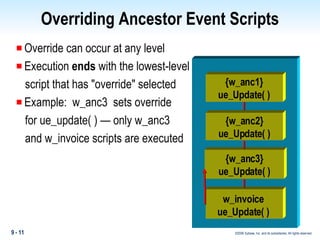
Overriding Ancestor Event Scripts Override can occur at any level Execution  ends  with the lowest-level script that has "override" selected Example:  w_anc3  sets override for ue_update( ) — only w_anc3  and w_invoice scripts are executed {w_anc1} ue_Update( ) {w_anc1} ue_Update( ) {w_anc2} ue_Update( ) {w_anc3} ue_Update( ) w_invoice ue_Update( )
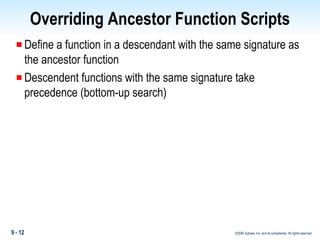
Overriding Ancestor Function Scripts Define a function in a descendant with the same signature as the ancestor function Descendent functions with the same signature take precedence (bottom-up search)
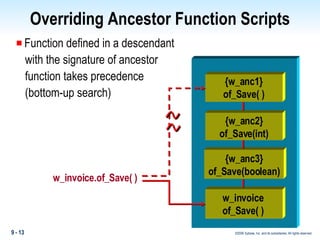
Overriding Ancestor Function Scripts Function defined in a descendant with the signature of ancestor  function takes precedence (bottom-up search) w_invoice.of_Save( ) {w_anc1} ue_Update( ) {w_anc1} of_Save( ) {w_anc2} of_Save(int) {w_anc3} of_Save(boolean) w_invoice of_Save( )
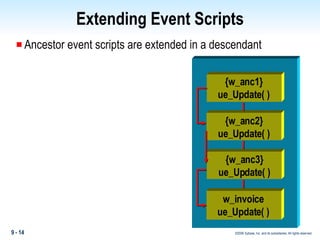
Extending Event Scripts Ancestor event scripts are extended in a descendant {w_anc1} ue_Update( ) {w_anc1} ue_Update( ) {w_anc2} ue_Update( ) {w_anc3} ue_Update( ) w_invoice ue_Update( )
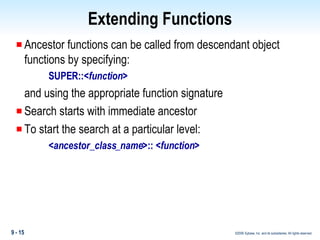
Extending Functions Ancestor functions can be called from descendant object functions by specifying: SUPER::< function > and using the appropriate function signature Search starts with immediate ancestor To start the search at a particular level: < ancestor_class_name >:: < function >
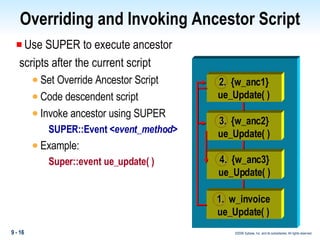
Overriding and Invoking Ancestor Script Use SUPER to execute ancestor scripts after the current script Set Override Ancestor Script Code descendent script Invoke ancestor using SUPER SUPER::Event < event_method > Example: Super::event ue_update( ) {w_anc1} ue_Update( ) 2.  {w_anc1} ue_Update( ) 3.  {w_anc2} ue_Update( ) 4.  {w_anc3} ue_Update( ) 1.  w_invoice ue_Update( )
Function Overloading Use the same function name multiple times with different argument lists At execution, PowerBuilder matches the signature of the function call against the signature of defined functions In hierarchy, search is from the bottom up Examples of PowerBuilder overloaded functions: dw_data.GetItemNumber(li_row,'emp_id') dw_data.GetItemNumber(li_row,1)
Function Overloading Declare two object-level functions: of_save( string as_action ) of_save( boolean ab_action ) In a script, the first function is invoked with: This.of_Save('No Commit') The second function is invoked with: This.of_Save(TRUE) Functions can exist at any level in a hierarchy
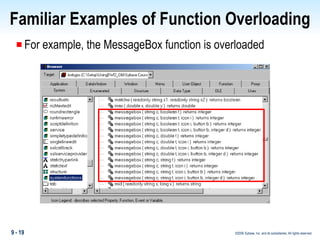
Familiar Examples of Function Overloading For example, the MessageBox function is overloaded
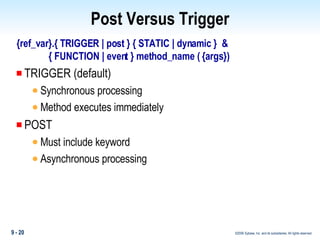
Post Versus Trigger {ref_var}.{ TRIGGER | post } { STATIC | dynamic }  & { FUNCTION | event } method_name ( {args}) TRIGGER (default)  Synchronous processing Method executes immediately POST  Must include keyword  Asynchronous processing
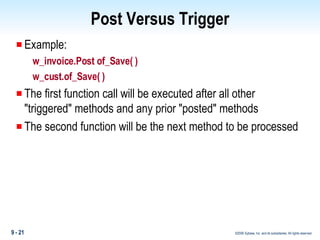
Post Versus Trigger Example: w_invoice.Post of_Save( ) w_cust.of_Save( ) The first function call will be executed after all other &quot;triggered&quot; methods and any prior &quot;posted&quot; methods The second function will be the next method to be processed
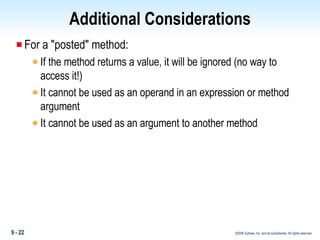
Additional Considerations For a &quot;posted&quot; method: If the method returns a value, it will be ignored (no way to access it!) It cannot be used as an operand in an expression or method argument It cannot be used as an argument to another method
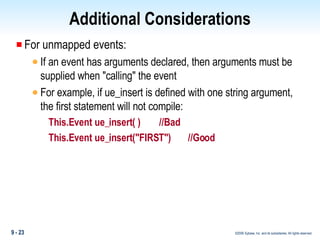
Additional Considerations For unmapped events: If an event has arguments declared, then arguments must be supplied when &quot;calling&quot; the event For example, if ue_insert is defined with one string argument, the first statement will not compile: This.Event ue_insert( )    //Bad This.Event ue_insert(&quot;FIRST&quot;)  //Good
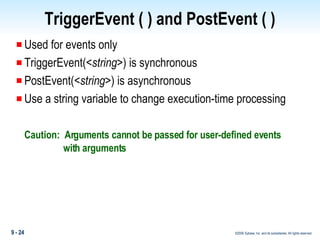
TriggerEvent ( ) and PostEvent ( ) Used for events only TriggerEvent(< string >) is synchronous PostEvent(< string >) is asynchronous Use a string variable to change execution-time processing Caution:  Arguments cannot be passed for user-defined events   with arguments
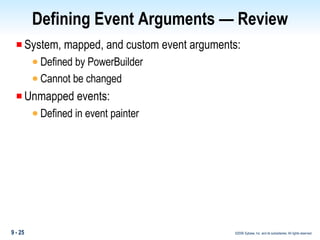
Defining Event Arguments — Review System, mapped, and custom event arguments: Defined by PowerBuilder Cannot be changed Unmapped events: Defined in event painter
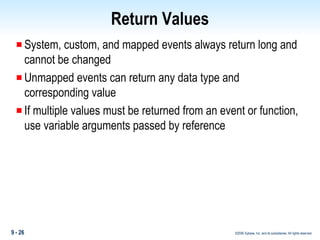
Return Values System, custom, and mapped events always return long and cannot be changed Unmapped events can return any data type and corresponding value If multiple values must be returned from an event or function, use variable arguments passed by reference
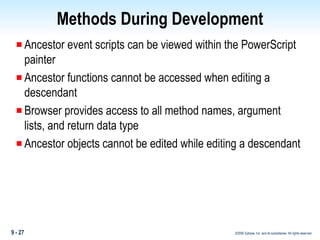
Methods During Development Ancestor event scripts can be viewed within the PowerScript painter Ancestor functions cannot be accessed when editing a descendant Browser provides access to all method names, argument lists, and return data type Ancestor objects cannot be edited while editing a descendant
Bypassing Compiler Validation {ref_var}.{ TRIGGER | post } { STATIC | dynamic }  { FUNCTION | event } name ( {args}) STATIC validates at compile time (and during execution) DYNAMIC bypasses compiler validation
Summary Descendent events extend ancestor scripts by default. Functions can be overloaded. A function's signature is used to invoke the appropriate function. At most, one function is automatically executed — the first one with a matching signature.
Summary Access to functions can be restricted by making them private or protected. Events and functions can execute synchronously or asynchronously.  Events and functions can be invoked statically or dynamically. TriggerEvent( ) and PostEvent( ) provide the ability to pass strings as event names.
Summary Questions
 

Booa8 Slide 09

  • 1.
    Buliding Object-Oriented Applicationsin PowerBuilder Module 9: Methods
  • 2.
    Objectives Describe thesimilarities and differences between events and functions Understand how to override behavior Understand function overloading
  • 3.
    Topics Events andFunctions as Methods Availability Invocation Execution Overriding Scripts Overloading Timing of Execution Passing Arguments Returning Values Access Accessing Ancestor Functions and Events in the Development Environment Compiler Checking
  • 4.
    Overview Three waysto add methods to an object: User-defined events User-defined functions Local external functions
  • 5.
    Availability of User-DefinedMethods Class Application Menu User Object Window Window Control Object Function Yes Yes Yes Yes No Events Yes * Yes * Yes Yes Yes * New in PowerBuilder .0
  • 6.
    Method Invocation Eventsand function syntax { ref_var }.{TRIGGER | post} {STATIC | dynamic} {FUNCTION | event} method_name ({ args }) Examples: w_invoice.of_SetCustomer(&quot; xxx &quot;) w_invoice.EVENT ue_ResizeDW( ) w_invoice.POST of_SetTotal(2031)
  • 7.
    Invocation Alternate syntaxfor events: { ref_var }.TriggerEvent( enum ) [ ref_var }.TriggerEvent( string ) { ref_var }.PostEvent( enum ) [ ref_var }.PostEvent( string ) Examples: w_invoice.TriggerEvent(Clicked!) w_cust.PostEvent(&quot;ue_retrieve&quot;)
  • 8.
    Events Execution Scriptsare built from the bottom up and executed from the top down: w_anc1 w_anc2 w_anc3 w_invoice {w_anc1} ue_Update( ) {w_anc1} ue_Update( ) {w_anc2} ue_Update( ) {w_anc3} ue_Update( ) w_invoice ue_Update( )
  • 9.
    Function Execution Searchfrom bottom up for a function with the same signature as the call: w_invoice.of_Save(TRUE) {w_anc1} ue_Update( ) {w_anc1} of_Save(string) {w_anc2} of_Save(int) {w_anc3} of_Save(boolean) w_invoice of_Save( )
  • 10.
    Overriding Ancestor EventScripts Uncheck to override script
  • 11.
    Overriding Ancestor EventScripts Override can occur at any level Execution ends with the lowest-level script that has &quot;override&quot; selected Example: w_anc3 sets override for ue_update( ) — only w_anc3 and w_invoice scripts are executed {w_anc1} ue_Update( ) {w_anc1} ue_Update( ) {w_anc2} ue_Update( ) {w_anc3} ue_Update( ) w_invoice ue_Update( )
  • 12.
    Overriding Ancestor FunctionScripts Define a function in a descendant with the same signature as the ancestor function Descendent functions with the same signature take precedence (bottom-up search)
  • 13.
    Overriding Ancestor FunctionScripts Function defined in a descendant with the signature of ancestor function takes precedence (bottom-up search) w_invoice.of_Save( ) {w_anc1} ue_Update( ) {w_anc1} of_Save( ) {w_anc2} of_Save(int) {w_anc3} of_Save(boolean) w_invoice of_Save( )
  • 14.
    Extending Event ScriptsAncestor event scripts are extended in a descendant {w_anc1} ue_Update( ) {w_anc1} ue_Update( ) {w_anc2} ue_Update( ) {w_anc3} ue_Update( ) w_invoice ue_Update( )
  • 15.
    Extending Functions Ancestorfunctions can be called from descendant object functions by specifying: SUPER::< function > and using the appropriate function signature Search starts with immediate ancestor To start the search at a particular level: < ancestor_class_name >:: < function >
  • 16.
    Overriding and InvokingAncestor Script Use SUPER to execute ancestor scripts after the current script Set Override Ancestor Script Code descendent script Invoke ancestor using SUPER SUPER::Event < event_method > Example: Super::event ue_update( ) {w_anc1} ue_Update( ) 2. {w_anc1} ue_Update( ) 3. {w_anc2} ue_Update( ) 4. {w_anc3} ue_Update( ) 1. w_invoice ue_Update( )
  • 17.
    Function Overloading Usethe same function name multiple times with different argument lists At execution, PowerBuilder matches the signature of the function call against the signature of defined functions In hierarchy, search is from the bottom up Examples of PowerBuilder overloaded functions: dw_data.GetItemNumber(li_row,'emp_id') dw_data.GetItemNumber(li_row,1)
  • 18.
    Function Overloading Declaretwo object-level functions: of_save( string as_action ) of_save( boolean ab_action ) In a script, the first function is invoked with: This.of_Save('No Commit') The second function is invoked with: This.of_Save(TRUE) Functions can exist at any level in a hierarchy
  • 19.
    Familiar Examples ofFunction Overloading For example, the MessageBox function is overloaded
  • 20.
    Post Versus Trigger{ref_var}.{ TRIGGER | post } { STATIC | dynamic } & { FUNCTION | event } method_name ( {args}) TRIGGER (default) Synchronous processing Method executes immediately POST Must include keyword Asynchronous processing
  • 21.
    Post Versus TriggerExample: w_invoice.Post of_Save( ) w_cust.of_Save( ) The first function call will be executed after all other &quot;triggered&quot; methods and any prior &quot;posted&quot; methods The second function will be the next method to be processed
  • 22.
    Additional Considerations Fora &quot;posted&quot; method: If the method returns a value, it will be ignored (no way to access it!) It cannot be used as an operand in an expression or method argument It cannot be used as an argument to another method
  • 23.
    Additional Considerations Forunmapped events: If an event has arguments declared, then arguments must be supplied when &quot;calling&quot; the event For example, if ue_insert is defined with one string argument, the first statement will not compile: This.Event ue_insert( ) //Bad This.Event ue_insert(&quot;FIRST&quot;) //Good
  • 24.
    TriggerEvent ( )and PostEvent ( ) Used for events only TriggerEvent(< string >) is synchronous PostEvent(< string >) is asynchronous Use a string variable to change execution-time processing Caution: Arguments cannot be passed for user-defined events with arguments
  • 25.
    Defining Event Arguments— Review System, mapped, and custom event arguments: Defined by PowerBuilder Cannot be changed Unmapped events: Defined in event painter
  • 26.
    Return Values System,custom, and mapped events always return long and cannot be changed Unmapped events can return any data type and corresponding value If multiple values must be returned from an event or function, use variable arguments passed by reference
  • 27.
    Methods During DevelopmentAncestor event scripts can be viewed within the PowerScript painter Ancestor functions cannot be accessed when editing a descendant Browser provides access to all method names, argument lists, and return data type Ancestor objects cannot be edited while editing a descendant
  • 28.
    Bypassing Compiler Validation{ref_var}.{ TRIGGER | post } { STATIC | dynamic } { FUNCTION | event } name ( {args}) STATIC validates at compile time (and during execution) DYNAMIC bypasses compiler validation
  • 29.
    Summary Descendent eventsextend ancestor scripts by default. Functions can be overloaded. A function's signature is used to invoke the appropriate function. At most, one function is automatically executed — the first one with a matching signature.
  • 30.
    Summary Access tofunctions can be restricted by making them private or protected. Events and functions can execute synchronously or asynchronously. Events and functions can be invoked statically or dynamically. TriggerEvent( ) and PostEvent( ) provide the ability to pass strings as event names.
  • 31.
  • 32.