Buliding Object-Oriented Applications in PowerBuilder  Module 3: Inheritance
Objectives Describe base, abstract, and concrete classes, and their roles in inheritance Determine if an extension layer is necessary for your application Compare and contrast a single-level hierarchy with a multiple-level hierarchy Describe the two common methods of window inheritance:  by style and by type
Topics Inheritance Basics PowerBuilder  System Classes Inheritance Mechanics Inheriting User-Defined Classes Class Hierarchies Building a Class Hierarchy Frameworks and Class Libraries Extension Layers Hierarchy Levels Style Versus Type Hierarchy
Inheritance Inheritance defines a relationship among classes wherein one class shares the structure or behavior defined in one or more classes. Grady Booch
Inheritance — Terminology In an inheritance relationship: Descendant – A class that inherits from another class, usually to extend or enhance the definition of another class; also called a subclass Ancestor – A class whose definition is extended or enhanced by a descendant; also called a superclass Subclassing – Creating new, descendent classes, forming a class hierarchy
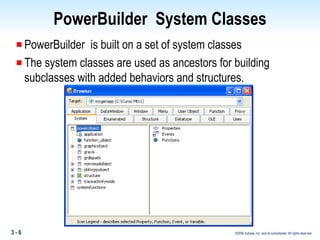
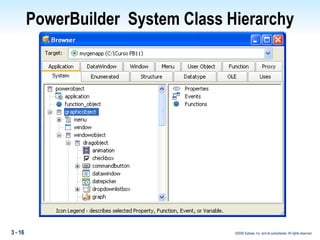
PowerBuilder  System Classes PowerBuilder  is built on a set of system classes The system classes are used as ancestors for building subclasses with added behaviors and structures.
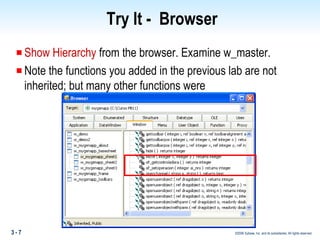
Try It -  Browser Show Hierarchy  from the browser. Examine w_master. Note the functions you added in the previous lab are not inherited; but many other functions were
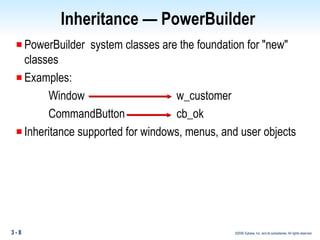
PowerBuilder  system classes are the foundation for "new" classes Examples: Window  w_customer CommandButton cb_ok Inheritance supported for windows, menus, and user objects Inheritance — PowerBuilder
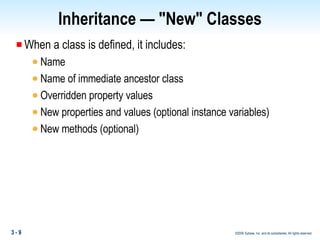
Inheritance — "New" Classes When a class is defined, it includes: Name Name of immediate ancestor class Overridden property values New properties and values (optional instance variables) New methods (optional)
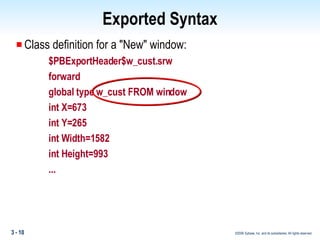
Class definition for a "New" window: $PBExportHeader$w_cust.srw forward global type w_cust FROM window int X=673 int Y=265 int Width=1582 int Height=993 ... Exported Syntax
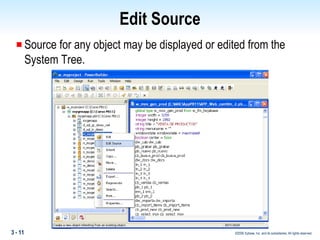
Edit Source Source for any object may be displayed or edited from the System Tree.
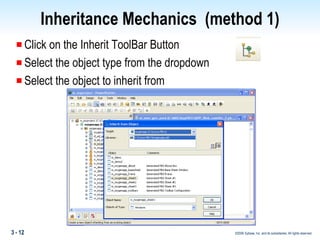
Inheritance Mechanics  (method 1) Click on the Inherit ToolBar Button Select the object type from the dropdown  Select the object to inherit from
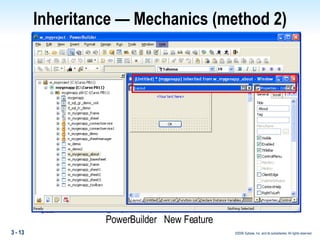
Inheritance — Mechanics (method 2) PowerBuilder  New Feature
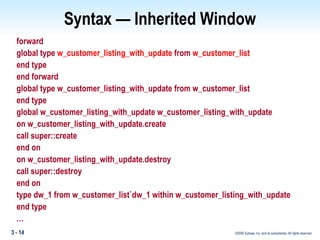
Syntax — Inherited Window forward global type  w_customer_listing_with_update  from  w_customer_list end type end forward global type w_customer_listing_with_update from w_customer_list end type global w_customer_listing_with_update w_customer_listing_with_update on w_customer_listing_with_update.create call super::create end on on w_customer_listing_with_update.destroy call super::destroy end on type dw_1 from w_customer_list`dw_1 within w_customer_listing_with_update end type  …
Inheritance — Class Hierarchy A set of classes related by inheritance Involves two or more levels of classes Ancestor classes are general Each descendent level is increasingly specific PowerBuilder  system classes are in a single-class hierarchy
PowerBuilder  System Class Hierarchy
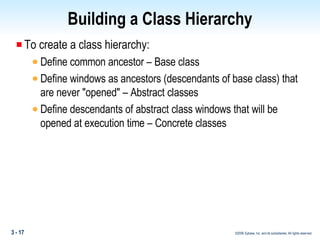
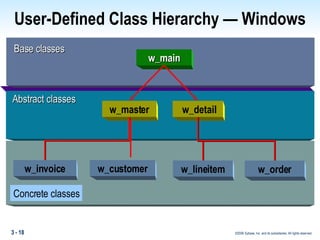
Building a Class Hierarchy To create a class hierarchy: Define common ancestor – Base class Define windows as ancestors (descendants of base class) that are never "opened" – Abstract classes Define descendants of abstract class windows that will be opened at execution time – Concrete classes
User-Defined Class Hierarchy — Windows Abstract classes w_master w_detail Base classes w_main Concrete classes w_invoice w_customer w_lineitem w_order
Building a Class Hierarchy Base class: Direct descendant of a PowerBuilder  system class Never instantiated Contains appearance common to all descendants (for example, company logo)
Building a Class Hierarchy Abstract class: Defined to be used as an ancestor Descendant of a base class Never instantiated Contains: Behavior common to all descendants Data elements common to all descendants Nested objects common to all descendants
Building a Class Hierarchy Abstraction: Focus on the essential aspects of a class Discover similar behaviors in multiple peer classes Code the behavior once in an ancestor class Examine classes in an existing application What is common? What can be abstracted?
Building a Class Hierarchy Abstract classes can have: Default property values  Provide common "look and feel" Examples:  Background color, height, width Event scripts and functions — PowerBuilder  and user-defined Provide common behavior Examples:  Open event and Close event scripts Additional instance variables (properties)
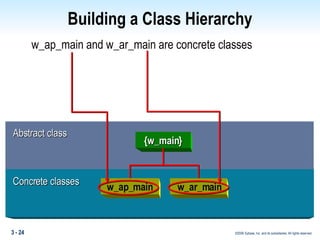
Building a Class Hierarchy Concrete class: Descendant of an abstract class Gets instantiated Contains: Behavior specific to an application Extends behavior of an abstract class Additional controls (sometimes)
w_ap_main and w_ar_main are concrete classes Building a Class Hierarchy Abstract class {w_main} Concrete classes w_ap_main w_ar_main
Building a Class Hierarchy Naming classes Differentiate among base, abstract, and concrete Library comments Naming conventions Placement in PBLs Examples: w_anc_ xxx //Base class w_ xxx //Abstract (extension) class w_aaa_ xxx //Concrete (application-specific) class
Inheritance — Class Hierarchies Frameworks and class libraries: Class hierarchies or portions thereof can be reusable Reusable portions can be called class libraries Class hierarchies can work together  Class hierarchies can have dependencies Dependent classes are called frameworks Can purchase frameworks and class libraries to use as foundation classes
Inheritance — Class Hierarchies Extension layers: Provide an insulating layer between abstract classes and concrete classes Provide a layer for promoting common behavior to a common ancestor of multiple concrete classes without affecting other concrete classes
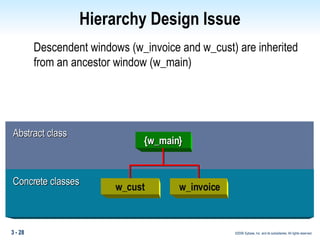
Descendent windows (w_invoice and w_cust) are inherited from an ancestor window (w_main) Hierarchy Design Issue Abstract class {w_main} Concrete classes w_cust w_invoice
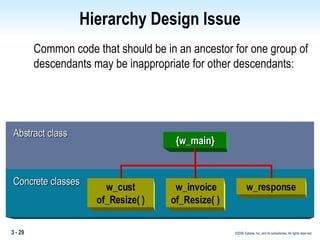
Hierarchy Design Issue Common code that should be in an ancestor for one group of descendants may be inappropriate for other descendants: Abstract class Concrete classes {w_main} w_cust of_Resize( ) w_invoice of_Resize( ) w_response
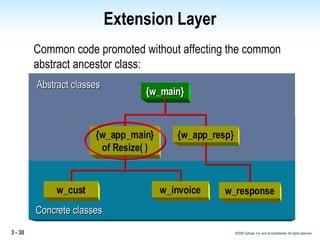
Extension Layer Common code promoted without affecting the common abstract ancestor class: Abstract classes {w_main} Concrete classes {w_app_main} of Resize( ) {w_app_resp} w_cust w_invoice w_response
Extension Layers and Frameworks Crucial when working with frameworks Provide a place to define project-level methods and properties Provide a means to extend base classes without affecting them Unaffected by maintenance releases to base classes Allow multiple projects to share a common framework, components, or base classes
Hierarchy Levels Descriptive terms for hierarchies: Shallow — Few levels of inheritance Deep — Many levels of inheritance Wide or broad — Many classes in a level Narrow — Few classes in a level
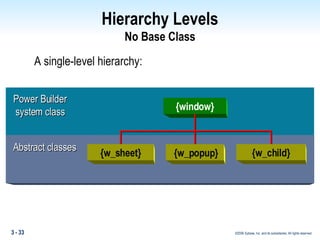
Hierarchy Levels No Base Class A single-level hierarchy: Power Builder system class Abstract classes {window} {w_sheet} {w_popup} {w_child}
Hierarchy Levels No Base Class Advantages: Easy to decide the class from which to inherit  Easy to create an extension layer Disadvantages: Can lead to "over-engineered" classes May provide more functionality than needed Can lead to redundant code  Potential performance implications Ancestor scripts may be overly complex to maintain
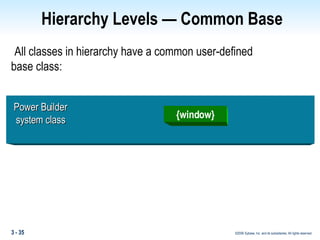
All classes in hierarchy have a common user-defined base class: Hierarchy Levels — Common Base Power Builder system class {window}
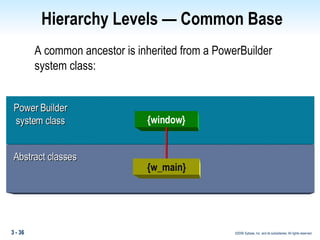
Hierarchy Levels — Common Base A common ancestor is inherited from a PowerBuilder  system class: Abstract classes {w_main} Power Builder system class {window}
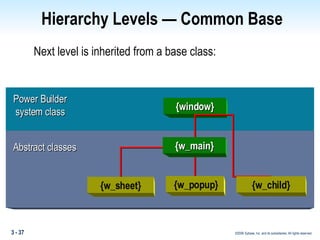
Hierarchy Levels — Common Base Next level is inherited from a base class: Power Builder system class Abstract classes {window} {w_sheet} {w_popup} {w_child} {w_main}
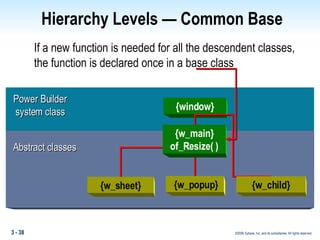
Hierarchy Levels — Common Base If a new function is needed for all the descendent classes, the function is declared once in a base class Power Builder system class Abstract classes {window} {w_sheet} {w_popup} {w_child} {w_main} of_Resize( )
Hierarchy Levels — Common Base Advantages: Provides class to promote all common properties and behaviors Positions hierarchy for polymorphism (covered in later unit) Disadvantages: Difficult to identify appropriate ancestor With extension layer, can double the number of layers
Inheritance — Hierarchy Examples Two main approaches to window class hierarchies: Style-based Type-based
Window Ancestor — By Style Ancestor windows specific to a pattern For example, list / detail, master / detail Controls placed in the ancestor — DataWindows, CommandButtons, and so on Communication between controls and window is "hard wired" Note: InfoMaker is based on this "forms" concept
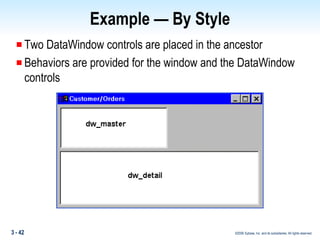
Example — By Style Two DataWindow controls are placed in the ancestor Behaviors are provided for the window and the DataWindow controls
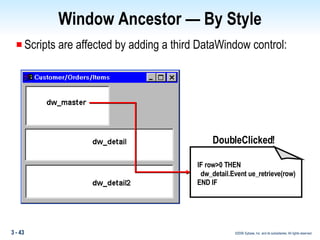
Window Ancestor — By Style Scripts are affected by adding a third DataWindow control: DoubleClicked! IF row>0 THEN dw_detail.Event ue_retrieve(row) END IF
Window Ancestor — By Style Advantages: Ancestor windows are specific to a pattern Easy to use — typically only the DataWindow object and title are changed Good for rapid prototyping
Window Ancestor — By Style Disadvantages: Very specific to the pattern — inflexible to changes Cannot add functions and properties to controls in the descendant Adding controls to the descendant may require substantial overriding and recoding
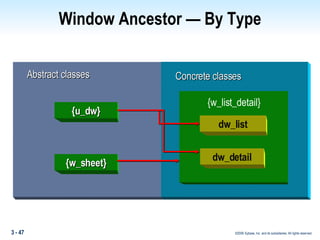
Window Ancestor — By Type An ancestor is created for each type of window  Examples:  w_sheet, w_response, w_popup Controls are not  placed in the ancestor (except command buttons in w_response) Each class has behavior and properties unique to the type of window Components (windows and controls) are assembled in concrete classes
Window Ancestor — By Type {u_dw} {w_sheet} Abstract classes Concrete   classes dw_list dw_detail {w_list_detail}
Window Ancestor — By Type Advantages: Design is flexible Design relies on window and control ancestors being encapsulated and robust Direct extension of PowerBuilder  class metaphor
Window Ancestor — By Type Disadvantages: Controls must be subclassed — more work upfront Coding must be more generic (abstract) — more work upfront Coding can be redundant as patterns show up in the application Are these really disadvantages?  It just requires planning and analysis first!
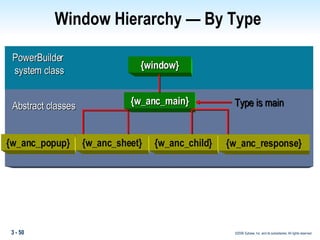
Window Hierarchy — By Type  PowerBuilder  system class Abstract classes {window} {w_anc_main} Type is main {w_anc_popup} {w_anc_sheet} {w_anc_child} {w_anc_response}
Summary Inheritance is a relationship between objects in which the descendant incorporates the definition of the ancestor in its own definition. Developer-defined classes are inherited from PowerBuilder  system classes. Class hierarchies consist of base, abstract, and concrete classes.
Summary Extension layers are layers of inheritance to which common code can be promoted without affecting the ancestor class. A hierarchy with no common base is simple to use but can preclude code promotion (reuse).  A multiple-layer hierarchy with a common base class is more complex to use but allows code reuse.
Summary Style hierarchies preassemble objects into component packages.  Type hierarchies code abstract functionality into classes.  Assembly occurs at the concrete level.
Summary Questions
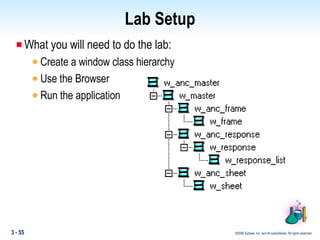
Lab Setup What you will need to do the lab: Create a window class hierarchy Use the Browser Run the application
Lab Debriefing What windows went into the Foundation PBL? What windows went into the Extension PBL? Why do you have these levels? Why not just a Foundation?

Booa8 Slide 03

  • 1.
    Buliding Object-Oriented Applicationsin PowerBuilder Module 3: Inheritance
  • 2.
    Objectives Describe base,abstract, and concrete classes, and their roles in inheritance Determine if an extension layer is necessary for your application Compare and contrast a single-level hierarchy with a multiple-level hierarchy Describe the two common methods of window inheritance: by style and by type
  • 3.
    Topics Inheritance BasicsPowerBuilder System Classes Inheritance Mechanics Inheriting User-Defined Classes Class Hierarchies Building a Class Hierarchy Frameworks and Class Libraries Extension Layers Hierarchy Levels Style Versus Type Hierarchy
  • 4.
    Inheritance Inheritance definesa relationship among classes wherein one class shares the structure or behavior defined in one or more classes. Grady Booch
  • 5.
    Inheritance — TerminologyIn an inheritance relationship: Descendant – A class that inherits from another class, usually to extend or enhance the definition of another class; also called a subclass Ancestor – A class whose definition is extended or enhanced by a descendant; also called a superclass Subclassing – Creating new, descendent classes, forming a class hierarchy
  • 6.
    PowerBuilder SystemClasses PowerBuilder is built on a set of system classes The system classes are used as ancestors for building subclasses with added behaviors and structures.
  • 7.
    Try It - Browser Show Hierarchy from the browser. Examine w_master. Note the functions you added in the previous lab are not inherited; but many other functions were
  • 8.
    PowerBuilder systemclasses are the foundation for "new" classes Examples: Window w_customer CommandButton cb_ok Inheritance supported for windows, menus, and user objects Inheritance — PowerBuilder
  • 9.
    Inheritance — "New"Classes When a class is defined, it includes: Name Name of immediate ancestor class Overridden property values New properties and values (optional instance variables) New methods (optional)
  • 10.
    Class definition fora "New" window: $PBExportHeader$w_cust.srw forward global type w_cust FROM window int X=673 int Y=265 int Width=1582 int Height=993 ... Exported Syntax
  • 11.
    Edit Source Sourcefor any object may be displayed or edited from the System Tree.
  • 12.
    Inheritance Mechanics (method 1) Click on the Inherit ToolBar Button Select the object type from the dropdown Select the object to inherit from
  • 13.
    Inheritance — Mechanics(method 2) PowerBuilder New Feature
  • 14.
    Syntax — InheritedWindow forward global type w_customer_listing_with_update from w_customer_list end type end forward global type w_customer_listing_with_update from w_customer_list end type global w_customer_listing_with_update w_customer_listing_with_update on w_customer_listing_with_update.create call super::create end on on w_customer_listing_with_update.destroy call super::destroy end on type dw_1 from w_customer_list`dw_1 within w_customer_listing_with_update end type …
  • 15.
    Inheritance — ClassHierarchy A set of classes related by inheritance Involves two or more levels of classes Ancestor classes are general Each descendent level is increasingly specific PowerBuilder system classes are in a single-class hierarchy
  • 16.
    PowerBuilder SystemClass Hierarchy
  • 17.
    Building a ClassHierarchy To create a class hierarchy: Define common ancestor – Base class Define windows as ancestors (descendants of base class) that are never "opened" – Abstract classes Define descendants of abstract class windows that will be opened at execution time – Concrete classes
  • 18.
    User-Defined Class Hierarchy— Windows Abstract classes w_master w_detail Base classes w_main Concrete classes w_invoice w_customer w_lineitem w_order
  • 19.
    Building a ClassHierarchy Base class: Direct descendant of a PowerBuilder system class Never instantiated Contains appearance common to all descendants (for example, company logo)
  • 20.
    Building a ClassHierarchy Abstract class: Defined to be used as an ancestor Descendant of a base class Never instantiated Contains: Behavior common to all descendants Data elements common to all descendants Nested objects common to all descendants
  • 21.
    Building a ClassHierarchy Abstraction: Focus on the essential aspects of a class Discover similar behaviors in multiple peer classes Code the behavior once in an ancestor class Examine classes in an existing application What is common? What can be abstracted?
  • 22.
    Building a ClassHierarchy Abstract classes can have: Default property values Provide common "look and feel" Examples: Background color, height, width Event scripts and functions — PowerBuilder and user-defined Provide common behavior Examples: Open event and Close event scripts Additional instance variables (properties)
  • 23.
    Building a ClassHierarchy Concrete class: Descendant of an abstract class Gets instantiated Contains: Behavior specific to an application Extends behavior of an abstract class Additional controls (sometimes)
  • 24.
    w_ap_main and w_ar_mainare concrete classes Building a Class Hierarchy Abstract class {w_main} Concrete classes w_ap_main w_ar_main
  • 25.
    Building a ClassHierarchy Naming classes Differentiate among base, abstract, and concrete Library comments Naming conventions Placement in PBLs Examples: w_anc_ xxx //Base class w_ xxx //Abstract (extension) class w_aaa_ xxx //Concrete (application-specific) class
  • 26.
    Inheritance — ClassHierarchies Frameworks and class libraries: Class hierarchies or portions thereof can be reusable Reusable portions can be called class libraries Class hierarchies can work together Class hierarchies can have dependencies Dependent classes are called frameworks Can purchase frameworks and class libraries to use as foundation classes
  • 27.
    Inheritance — ClassHierarchies Extension layers: Provide an insulating layer between abstract classes and concrete classes Provide a layer for promoting common behavior to a common ancestor of multiple concrete classes without affecting other concrete classes
  • 28.
    Descendent windows (w_invoiceand w_cust) are inherited from an ancestor window (w_main) Hierarchy Design Issue Abstract class {w_main} Concrete classes w_cust w_invoice
  • 29.
    Hierarchy Design IssueCommon code that should be in an ancestor for one group of descendants may be inappropriate for other descendants: Abstract class Concrete classes {w_main} w_cust of_Resize( ) w_invoice of_Resize( ) w_response
  • 30.
    Extension Layer Commoncode promoted without affecting the common abstract ancestor class: Abstract classes {w_main} Concrete classes {w_app_main} of Resize( ) {w_app_resp} w_cust w_invoice w_response
  • 31.
    Extension Layers andFrameworks Crucial when working with frameworks Provide a place to define project-level methods and properties Provide a means to extend base classes without affecting them Unaffected by maintenance releases to base classes Allow multiple projects to share a common framework, components, or base classes
  • 32.
    Hierarchy Levels Descriptiveterms for hierarchies: Shallow — Few levels of inheritance Deep — Many levels of inheritance Wide or broad — Many classes in a level Narrow — Few classes in a level
  • 33.
    Hierarchy Levels NoBase Class A single-level hierarchy: Power Builder system class Abstract classes {window} {w_sheet} {w_popup} {w_child}
  • 34.
    Hierarchy Levels NoBase Class Advantages: Easy to decide the class from which to inherit Easy to create an extension layer Disadvantages: Can lead to "over-engineered" classes May provide more functionality than needed Can lead to redundant code Potential performance implications Ancestor scripts may be overly complex to maintain
  • 35.
    All classes inhierarchy have a common user-defined base class: Hierarchy Levels — Common Base Power Builder system class {window}
  • 36.
    Hierarchy Levels —Common Base A common ancestor is inherited from a PowerBuilder system class: Abstract classes {w_main} Power Builder system class {window}
  • 37.
    Hierarchy Levels —Common Base Next level is inherited from a base class: Power Builder system class Abstract classes {window} {w_sheet} {w_popup} {w_child} {w_main}
  • 38.
    Hierarchy Levels —Common Base If a new function is needed for all the descendent classes, the function is declared once in a base class Power Builder system class Abstract classes {window} {w_sheet} {w_popup} {w_child} {w_main} of_Resize( )
  • 39.
    Hierarchy Levels —Common Base Advantages: Provides class to promote all common properties and behaviors Positions hierarchy for polymorphism (covered in later unit) Disadvantages: Difficult to identify appropriate ancestor With extension layer, can double the number of layers
  • 40.
    Inheritance — HierarchyExamples Two main approaches to window class hierarchies: Style-based Type-based
  • 41.
    Window Ancestor —By Style Ancestor windows specific to a pattern For example, list / detail, master / detail Controls placed in the ancestor — DataWindows, CommandButtons, and so on Communication between controls and window is "hard wired" Note: InfoMaker is based on this "forms" concept
  • 42.
    Example — ByStyle Two DataWindow controls are placed in the ancestor Behaviors are provided for the window and the DataWindow controls
  • 43.
    Window Ancestor —By Style Scripts are affected by adding a third DataWindow control: DoubleClicked! IF row>0 THEN dw_detail.Event ue_retrieve(row) END IF
  • 44.
    Window Ancestor —By Style Advantages: Ancestor windows are specific to a pattern Easy to use — typically only the DataWindow object and title are changed Good for rapid prototyping
  • 45.
    Window Ancestor —By Style Disadvantages: Very specific to the pattern — inflexible to changes Cannot add functions and properties to controls in the descendant Adding controls to the descendant may require substantial overriding and recoding
  • 46.
    Window Ancestor —By Type An ancestor is created for each type of window Examples: w_sheet, w_response, w_popup Controls are not placed in the ancestor (except command buttons in w_response) Each class has behavior and properties unique to the type of window Components (windows and controls) are assembled in concrete classes
  • 47.
    Window Ancestor —By Type {u_dw} {w_sheet} Abstract classes Concrete classes dw_list dw_detail {w_list_detail}
  • 48.
    Window Ancestor —By Type Advantages: Design is flexible Design relies on window and control ancestors being encapsulated and robust Direct extension of PowerBuilder class metaphor
  • 49.
    Window Ancestor —By Type Disadvantages: Controls must be subclassed — more work upfront Coding must be more generic (abstract) — more work upfront Coding can be redundant as patterns show up in the application Are these really disadvantages? It just requires planning and analysis first!
  • 50.
    Window Hierarchy —By Type PowerBuilder system class Abstract classes {window} {w_anc_main} Type is main {w_anc_popup} {w_anc_sheet} {w_anc_child} {w_anc_response}
  • 51.
    Summary Inheritance isa relationship between objects in which the descendant incorporates the definition of the ancestor in its own definition. Developer-defined classes are inherited from PowerBuilder system classes. Class hierarchies consist of base, abstract, and concrete classes.
  • 52.
    Summary Extension layersare layers of inheritance to which common code can be promoted without affecting the ancestor class. A hierarchy with no common base is simple to use but can preclude code promotion (reuse). A multiple-layer hierarchy with a common base class is more complex to use but allows code reuse.
  • 53.
    Summary Style hierarchiespreassemble objects into component packages. Type hierarchies code abstract functionality into classes. Assembly occurs at the concrete level.
  • 54.
  • 55.
    Lab Setup Whatyou will need to do the lab: Create a window class hierarchy Use the Browser Run the application
  • 56.
    Lab Debriefing Whatwindows went into the Foundation PBL? What windows went into the Extension PBL? Why do you have these levels? Why not just a Foundation?