Buliding Object-Oriented Applications in PowerBuilder  Module 7: Encapsulation
Objectives Define encapsulation Describe the techniques associated with encapsulation Encapsulate properties, methods, functions, and window controls
Topics In troduction Information Hiding Encapsulating Properties Encapsulating Methods Window Controls and User Object Controls Encapsulation Read / Write Access
Encapsulation  Encapsulation is the process of defining a class of  objects that: Perform behavior upon request using input data Provide the results of that behavior as output data Require no external knowledge of the internal methods
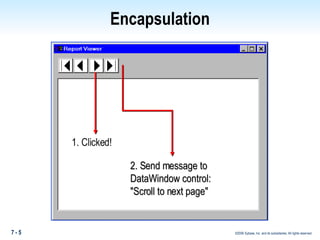
Encapsulation 1. Clicked! 2. Send message to DataWindow control: "Scroll to next page"
Encapsulation — Information Hiding No direct access to manipulate properties (data) Properties accessed only via methods Object controls access to its data "Published" functional interface to make use of the object's behavior
Encapsulation in PowerBuilder Instance variables declared private for the object Data can be manipulated outside the object only through user-defined functions Communication with the object occurs via user-defined events or user-defined functions
Encapsulation — Benefits Prevents unexpected and undesirable changes from external sources No external impact from internal implementation changes
Encapsulating Properties — Implementation Encapsulate instance variables by defining their access as private or protected Declare "Get" and "Set" functions for access To make a property read-only, declare "Get" functions only
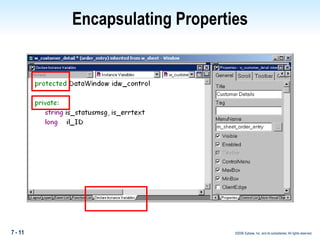
Encapsulating Properties Define access rights for instance variables: Public – Any scripts in the application (default) Private – Scripts for the object for which the variable was declared Protected – Scripts for the object and descendants of the object
Encapsulating Properties
Encapsulating Properties — Access and Scope Instance variables default to public — can make private or protected Global variables are always public Shared variables are always private PowerBuilder-defined properties are always public (for example, Window.X)
Encapsulating Properties  Access to PowerBuilder-defined properties cannot be modified; they are always public For example: x and y are properties of a window Using Move(300, 200) sets their values and does not require knowledge of property names But, x and y values can be directly set for a window: x = 300 y = 200
Encapsulating Methods Some user-defined methods should not be open to public access Events are always public Object functions can be made private or protected Specify access rights in the object Function painter definition window
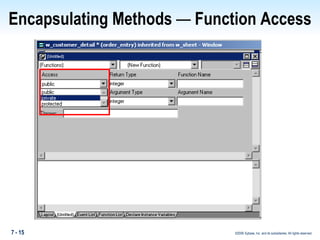
Encapsulating Methods  —  Function Access
Encapsulating Methods — Function Access Menu, window, and user-object functions can be private, protected, or public (default) All PowerBuilder functions are public — no access modifiers Globally defined user functions are always public — no access modifiers Private functions are meaningful only to the internal behavior of objects; protected functions may need to be called from descendants
Encapsulating Methods Benefits Implementation of behavior can be changed or enhanced without affecting "clients" Platform-dependent behavior is implemented through "plug and play" Using encapsulated behavior does not require external knowledge of implementation
Encapsulation — Controls Window controls or user object controls are secondary classes Secondary classes can: Be accessed only through the primary class, for example:  w_cust.cb_ok.Hide( ) Access private and protected  instance  variables of the primary class Access private and protected  functions  of the primary class
Read / Write Access Keyword restricting ability of scripts to read / write a variable's value — called operational access Fine-tunes access rights Declared with the instance variable declaration Used for variables only,  not functions
Read Access ProtectedRead  Only scripts in object and descendants can read Only valid if access right is public public ProtectedRead integer ii_count PrivateRead  Only scripts in object can read Only valid if access right is public or protected protected PrivateRead integer ii_maxcount
Write Access ProtectedWrite  Only scripts in object and descendants can write Only valid if access right is public public ProtectedWrite int ii_count PrivateWrite  Only scripts in object can write Only valid if access right is public or protected protected PrivateWrite int ii_maxcount
Read / Write Access Can be combined in declaration public PrivateRead PrivateWrite int ii_count Net effect:  Compiler generates warning if there is an attempt to redefine access in the descendant
Summary Encapsulation is the process of incorporating properties and methods together in an object. Information hiding limits access to an object's properties and implementation of its behavior. PowerBuilder allows encapsulation, but it does not enforce it. Access rights can be assigned to user functions and instance variables.
Summary Events are always public.  Operational access rights are used to fine-tune access to instance variables (for example, make instance variables public, but read-only).
Summary Questions
Lab Setup What you will need to do the lab: · Define a custom visual user class · Encapsulate methods and properties in a custom visual user class · Restrict access to properties
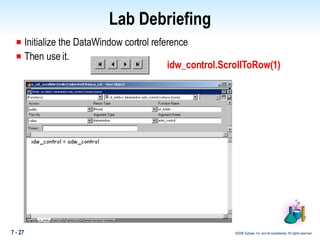
Lab Debriefing Initialize the DataWindow control reference Then use it. idw_control.ScrollToRow(1)
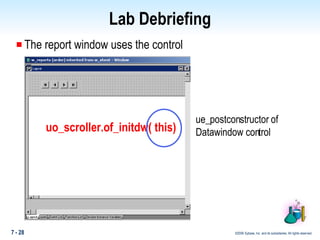
Lab Debriefing The report window uses the control uo_scroller.of_initdw( this) ue_postconstructor of  Datawindow control
Lab Debriefing Discuss – what kinds of additional things could you have done in the of_initDW( )  Could you have been assured that these were done if the variable idw_control had not been declared private?
Lab Debriefing Some Examples: Debugging – you can put a breakpoint on the of_initDW() Logging – you could add code to log to a file Validation – you could add code to validate  In Version 2 of your application, you could add an array of DataWindow controls If you had not declared your variable private, you could not be assured that some client was using the of_initDW() to initialize the reference.

Booa8 Slide 07

  • 1.
    Buliding Object-Oriented Applicationsin PowerBuilder Module 7: Encapsulation
  • 2.
    Objectives Define encapsulationDescribe the techniques associated with encapsulation Encapsulate properties, methods, functions, and window controls
  • 3.
    Topics In troductionInformation Hiding Encapsulating Properties Encapsulating Methods Window Controls and User Object Controls Encapsulation Read / Write Access
  • 4.
    Encapsulation Encapsulationis the process of defining a class of objects that: Perform behavior upon request using input data Provide the results of that behavior as output data Require no external knowledge of the internal methods
  • 5.
    Encapsulation 1. Clicked!2. Send message to DataWindow control: "Scroll to next page"
  • 6.
    Encapsulation — InformationHiding No direct access to manipulate properties (data) Properties accessed only via methods Object controls access to its data "Published" functional interface to make use of the object's behavior
  • 7.
    Encapsulation in PowerBuilderInstance variables declared private for the object Data can be manipulated outside the object only through user-defined functions Communication with the object occurs via user-defined events or user-defined functions
  • 8.
    Encapsulation — BenefitsPrevents unexpected and undesirable changes from external sources No external impact from internal implementation changes
  • 9.
    Encapsulating Properties —Implementation Encapsulate instance variables by defining their access as private or protected Declare "Get" and "Set" functions for access To make a property read-only, declare "Get" functions only
  • 10.
    Encapsulating Properties Defineaccess rights for instance variables: Public – Any scripts in the application (default) Private – Scripts for the object for which the variable was declared Protected – Scripts for the object and descendants of the object
  • 11.
  • 12.
    Encapsulating Properties —Access and Scope Instance variables default to public — can make private or protected Global variables are always public Shared variables are always private PowerBuilder-defined properties are always public (for example, Window.X)
  • 13.
    Encapsulating Properties Access to PowerBuilder-defined properties cannot be modified; they are always public For example: x and y are properties of a window Using Move(300, 200) sets their values and does not require knowledge of property names But, x and y values can be directly set for a window: x = 300 y = 200
  • 14.
    Encapsulating Methods Someuser-defined methods should not be open to public access Events are always public Object functions can be made private or protected Specify access rights in the object Function painter definition window
  • 15.
    Encapsulating Methods — Function Access
  • 16.
    Encapsulating Methods —Function Access Menu, window, and user-object functions can be private, protected, or public (default) All PowerBuilder functions are public — no access modifiers Globally defined user functions are always public — no access modifiers Private functions are meaningful only to the internal behavior of objects; protected functions may need to be called from descendants
  • 17.
    Encapsulating Methods BenefitsImplementation of behavior can be changed or enhanced without affecting "clients" Platform-dependent behavior is implemented through "plug and play" Using encapsulated behavior does not require external knowledge of implementation
  • 18.
    Encapsulation — ControlsWindow controls or user object controls are secondary classes Secondary classes can: Be accessed only through the primary class, for example: w_cust.cb_ok.Hide( ) Access private and protected instance variables of the primary class Access private and protected functions of the primary class
  • 19.
    Read / WriteAccess Keyword restricting ability of scripts to read / write a variable's value — called operational access Fine-tunes access rights Declared with the instance variable declaration Used for variables only, not functions
  • 20.
    Read Access ProtectedRead Only scripts in object and descendants can read Only valid if access right is public public ProtectedRead integer ii_count PrivateRead Only scripts in object can read Only valid if access right is public or protected protected PrivateRead integer ii_maxcount
  • 21.
    Write Access ProtectedWrite Only scripts in object and descendants can write Only valid if access right is public public ProtectedWrite int ii_count PrivateWrite Only scripts in object can write Only valid if access right is public or protected protected PrivateWrite int ii_maxcount
  • 22.
    Read / WriteAccess Can be combined in declaration public PrivateRead PrivateWrite int ii_count Net effect: Compiler generates warning if there is an attempt to redefine access in the descendant
  • 23.
    Summary Encapsulation isthe process of incorporating properties and methods together in an object. Information hiding limits access to an object's properties and implementation of its behavior. PowerBuilder allows encapsulation, but it does not enforce it. Access rights can be assigned to user functions and instance variables.
  • 24.
    Summary Events arealways public. Operational access rights are used to fine-tune access to instance variables (for example, make instance variables public, but read-only).
  • 25.
  • 26.
    Lab Setup Whatyou will need to do the lab: · Define a custom visual user class · Encapsulate methods and properties in a custom visual user class · Restrict access to properties
  • 27.
    Lab Debriefing Initializethe DataWindow control reference Then use it. idw_control.ScrollToRow(1)
  • 28.
    Lab Debriefing Thereport window uses the control uo_scroller.of_initdw( this) ue_postconstructor of Datawindow control
  • 29.
    Lab Debriefing Discuss– what kinds of additional things could you have done in the of_initDW( ) Could you have been assured that these were done if the variable idw_control had not been declared private?
  • 30.
    Lab Debriefing SomeExamples: Debugging – you can put a breakpoint on the of_initDW() Logging – you could add code to log to a file Validation – you could add code to validate In Version 2 of your application, you could add an array of DataWindow controls If you had not declared your variable private, you could not be assured that some client was using the of_initDW() to initialize the reference.