TECHNICAL WHITE PAPER


Scalability and BMC Remedy Action
Request System
Table of contents


              INTRODUCTION .............................................................................................................................. 1


              BMC REMEDY AR SYSTEM ARCHITECTURE ................................................................................ 2


              BMC REMEDY AR SYSTEM TIER DEFINITIONS ........................................................................... 2
                     > Client Tier ............................................................................................................................... 2
                     > Mid-Tier .................................................................................................................................. 2
                     > Server Tier.............................................................................................................................. 3
                     > Data Tier................................................................................................................................. 3


              SCALABILITY APPROACHES                              ......................................................................................................... 4

                     > Scenario 1 .............................................................................................................................. 4
                     > Scenario 2 .............................................................................................................................. 4
                     > Scenario 3 .............................................................................................................................. 5
                     > Scenario 4 .............................................................................................................................. 5


              SCALING THE MID-TIER ................................................................................................................ 6
                     > Scenario 5 .............................................................................................................................. 6


              BMC REMEDY AR SYSTEM SERVERS AND LOAD BALANCING ................................................. 7
                     > Scenario 6 .............................................................................................................................. 7


              BMC REMEDY DISTRIBUTED SERVER OPTION ........................................................................... 8
                     > Scenario 7 .............................................................................................................................. 8


              CONCLUSION .......................................................................................................................................................... 9
Introduction
This paper will discuss how BMC Remedy Action Request System (AR System ) can scale
                                ®         ®                       ®            ®


within an enterprise environment and how, by combining additional hardware resources
with some of the scaling features of BMC Remedy AR System, you can create a truly world-
wide enterprise application.

BMC Remedy AR System has been designed to scale to the limits of its central processing unit
(CPU), memory, and disk sub-system configurations. This paper focuses on those features that
can help make BMC Remedy AR System scale as application demand, or breadth of applica-
tions, increases in an organization. It presents adjustments that can be made from a hardware
perspective to help make the system scale, as well as features built into BMC Remedy AR
System to allow it to scale with system hardware.


                                              PA G E > 1
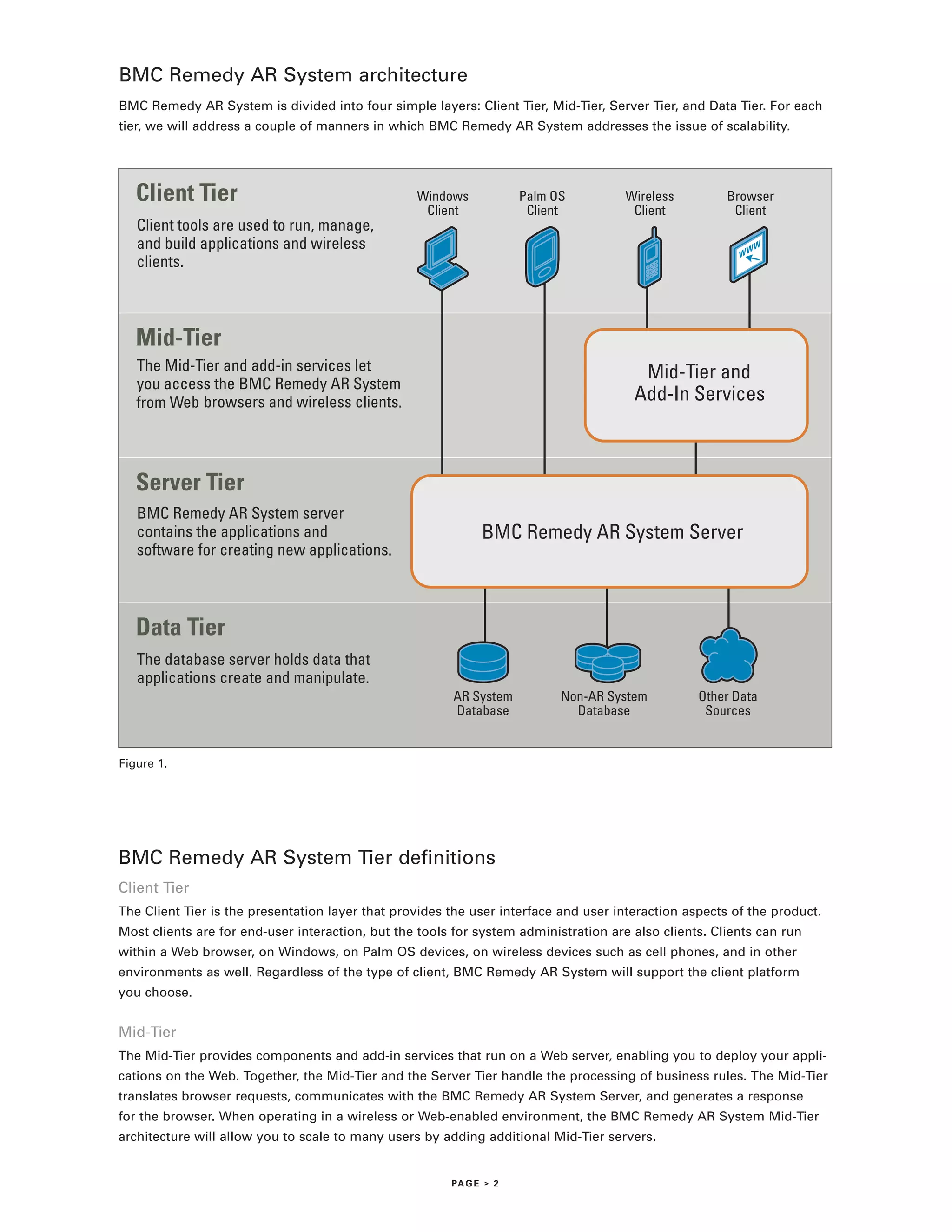
BMC Remedy AR System architecture
BMC Remedy AR System is divided into four simple layers: Client Tier, Mid-Tier, Server Tier, and Data Tier. For each
tier, we will address a couple of manners in which BMC Remedy AR System addresses the issue of scalability.


   Client Tier                                    Windows            Palm OS          Wireless         Browser
                                                   Client             Client           Client           Client
   Client tools are used to run, manage,
   and build applications and wireless
   clients.


   Mid-Tier
   The Mid-Tier and add-in services let                                                 Mid-Tier and
   you access the BMC Remedy AR System
   from Web browsers and wireless clients.                                             Add-In Services


   Server Tier
   BMC Remedy AR System server
   contains the applications and                              BMC Remedy AR System Server
   software for creating new applications.


   Data Tier
   The database server holds data that
   applications create and manipulate.
                                                        AR System          Non-AR System          Other Data
                                                        Database             Database              Sources


Figure 1.


BMC Remedy AR System Tier definitions
Client Tier
The Client Tier is the presentation layer that provides the user interface and user interaction aspects of the product.
Most clients are for end-user interaction, but the tools for system administration are also clients. Clients can run
within a Web browser, on Windows, on Palm OS devices, on wireless devices such as cell phones, and in other
environments as well. Regardless of the type of client, BMC Remedy AR System will support the client platform
you choose.


Mid-Tier
The Mid-Tier provides components and add-in services that run on a Web server, enabling you to deploy your appli-
cations on the Web. Together, the Mid-Tier and the Server Tier handle the processing of business rules. The Mid-Tier
translates browser requests, communicates with the BMC Remedy AR System Server, and generates a response
for the browser. When operating in a wireless or Web-enabled environment, the BMC Remedy AR System Mid-Tier
architecture will allow you to scale to many users by adding additional Mid-Tier servers.


                                                        PA G E > 2
Server Tier
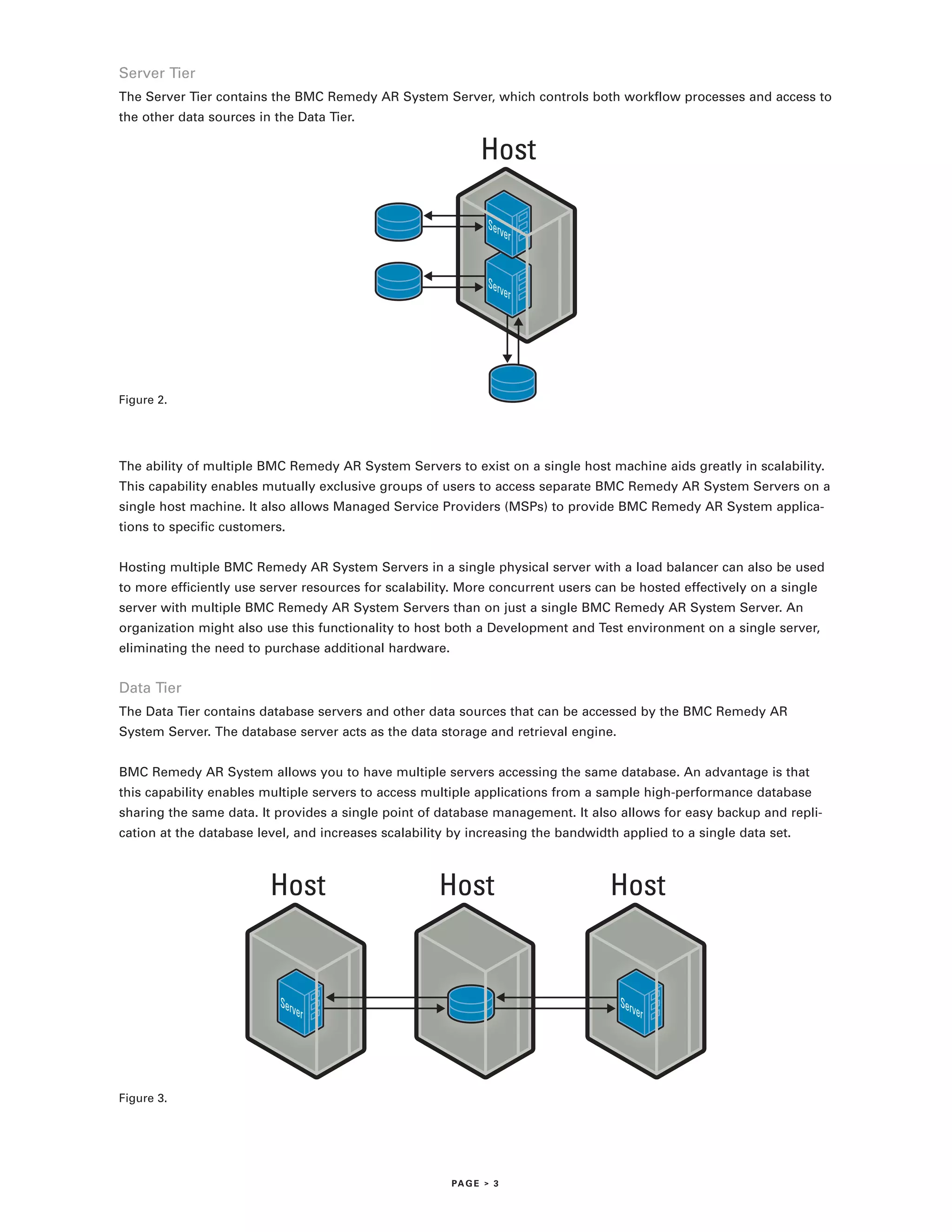
The Server Tier contains the BMC Remedy AR System Server, which controls both workflow processes and access to
the other data sources in the Data Tier.

                                                              Host


Figure 2.


The ability of multiple BMC Remedy AR System Servers to exist on a single host machine aids greatly in scalability.
This capability enables mutually exclusive groups of users to access separate BMC Remedy AR System Servers on a
single host machine. It also allows Managed Service Providers (MSPs) to provide BMC Remedy AR System applica-
tions to specific customers.


Hosting multiple BMC Remedy AR System Servers in a single physical server with a load balancer can also be used
to more efficiently use server resources for scalability. More concurrent users can be hosted effectively on a single
server with multiple BMC Remedy AR System Servers than on just a single BMC Remedy AR System Server. An
organization might also use this functionality to host both a Development and Test environment on a single server,
eliminating the need to purchase additional hardware.


Data Tier
The Data Tier contains database servers and other data sources that can be accessed by the BMC Remedy AR
System Server. The database server acts as the data storage and retrieval engine.


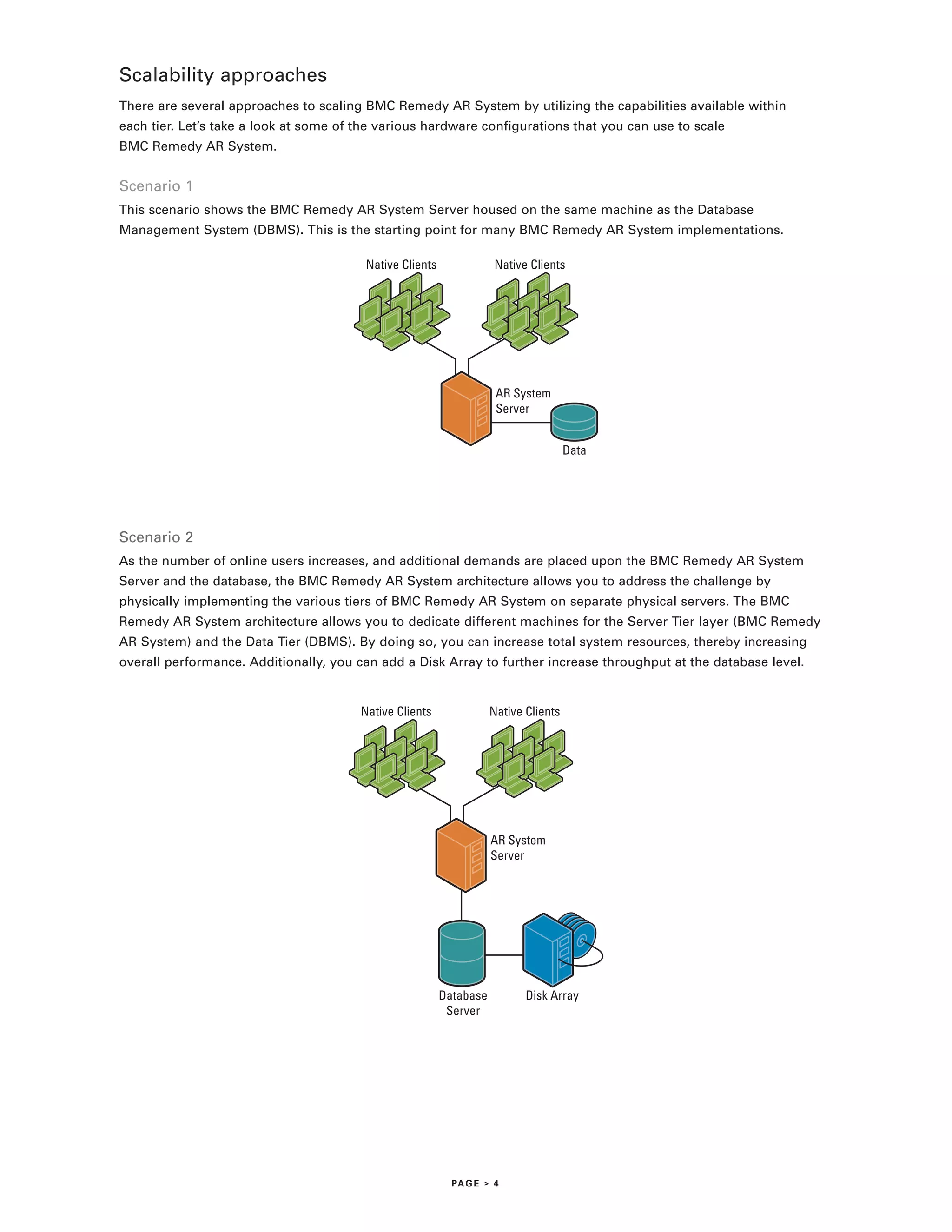
BMC Remedy AR System allows you to have multiple servers accessing the same database. An advantage is that
this capability enables multiple servers to access multiple applications from a sample high-performance database
sharing the same data. It provides a single point of database management. It also allows for easy backup and repli-
cation at the database level, and increases scalability by increasing the bandwidth applied to a single data set.


                         Host                        Host                         Host


Figure 3.


                                                        PA G E > 3
Scalability approaches
There are several approaches to scaling BMC Remedy AR System by utilizing the capabilities available within
each tier. Let’s take a look at some of the various hardware configurations that you can use to scale
BMC Remedy AR System.


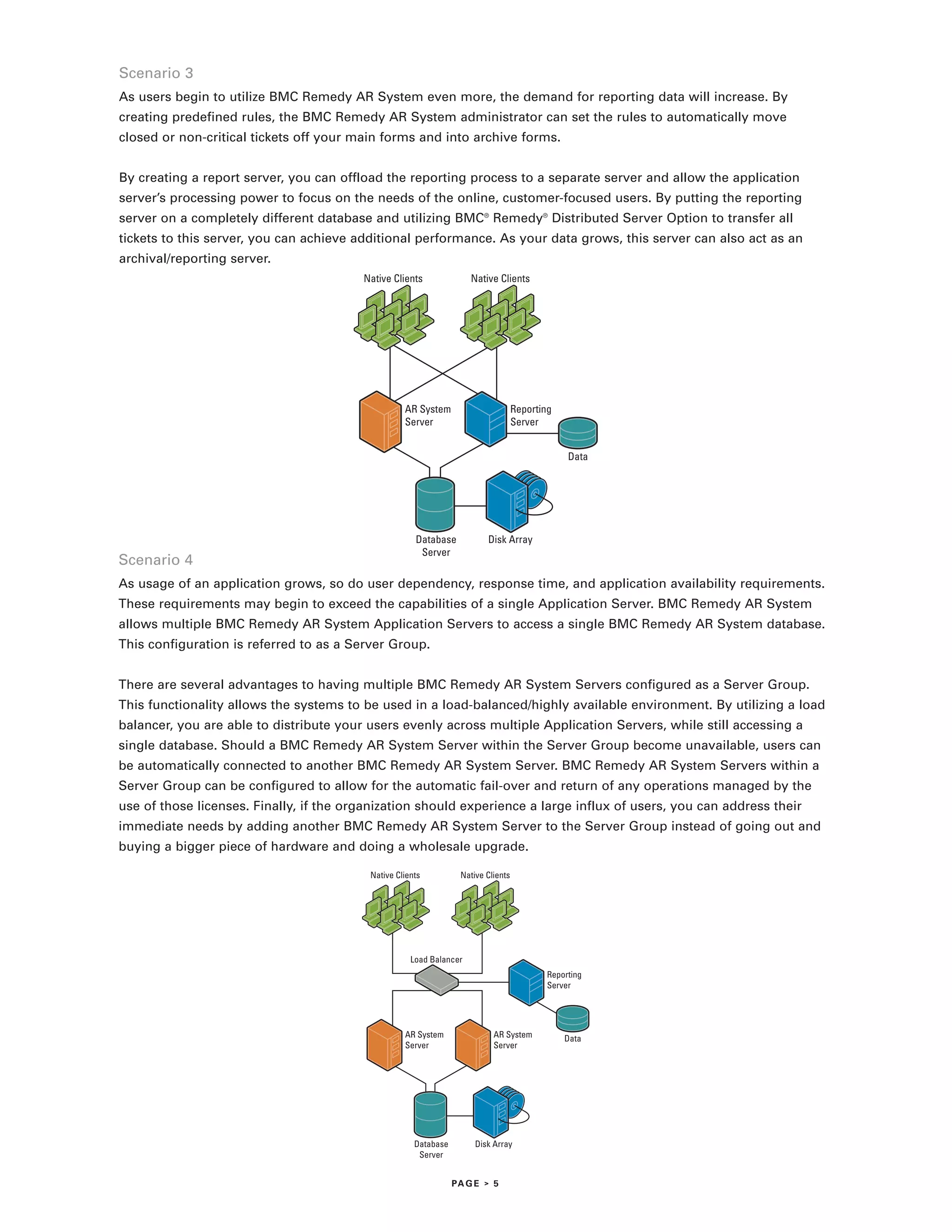
Scenario 1
This scenario shows the BMC Remedy AR System Server housed on the same machine as the Database
Management System (DBMS). This is the starting point for many BMC Remedy AR System implementations.

                                         Native Clients               Native Clients


                                                                      AR System
                                                                      Server


                                                                                      Data


Scenario 2
As the number of online users increases, and additional demands are placed upon the BMC Remedy AR System
Server and the database, the BMC Remedy AR System architecture allows you to address the challenge by
physically implementing the various tiers of BMC Remedy AR System on separate physical servers. The BMC
Remedy AR System architecture allows you to dedicate different machines for the Server Tier layer (BMC Remedy
AR System) and the Data Tier (DBMS). By doing so, you can increase total system resources, thereby increasing
overall performance. Additionally, you can add a Disk Array to further increase throughput at the database level.


                                        Native Clients               Native Clients


                                                                     AR System
                                                                     Server


                                                          Database          Disk Array
                                                           Server


                                                            PA G E > 4
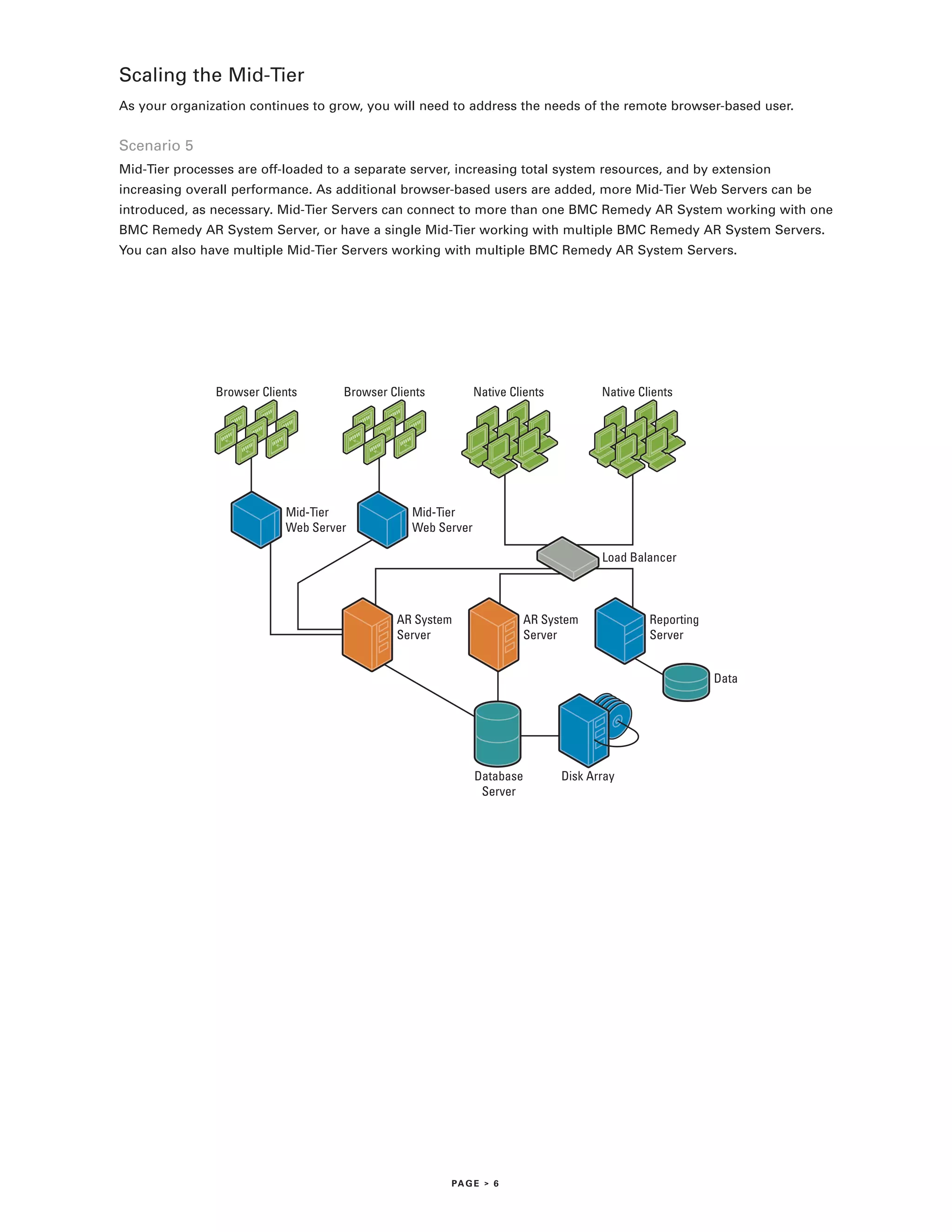
Scenario 3
As users begin to utilize BMC Remedy AR System even more, the demand for reporting data will increase. By
creating predefined rules, the BMC Remedy AR System administrator can set the rules to automatically move
closed or non-critical tickets off your main forms and into archive forms.


By creating a report server, you can offload the reporting process to a separate server and allow the application
server’s processing power to focus on the needs of the online, customer-focused users. By putting the reporting
server on a completely different database and utilizing BMC® Remedy® Distributed Server Option to transfer all
tickets to this server, you can achieve additional performance. As your data grows, this server can also act as an
archival/reporting server.
                                         Native Clients              Native Clients


                                                   AR System                       Reporting
                                                   Server                          Server


                                                                                               Data


                                                      Database           Disk Array
                                                       Server
Scenario 4
As usage of an application grows, so do user dependency, response time, and application availability requirements.
These requirements may begin to exceed the capabilities of a single Application Server. BMC Remedy AR System
allows multiple BMC Remedy AR System Application Servers to access a single BMC Remedy AR System database.
This configuration is referred to as a Server Group.


There are several advantages to having multiple BMC Remedy AR System Servers configured as a Server Group.
This functionality allows the systems to be used in a load-balanced/highly available environment. By utilizing a load
balancer, you are able to distribute your users evenly across multiple Application Servers, while still accessing a
single database. Should a BMC Remedy AR System Server within the Server Group become unavailable, users can
be automatically connected to another BMC Remedy AR System Server. BMC Remedy AR System Servers within a
Server Group can be configured to allow for the automatic fail-over and return of any operations managed by the
use of those licenses. Finally, if the organization should experience a large influx of users, you can address their
immediate needs by adding another BMC Remedy AR System Server to the Server Group instead of going out and
buying a bigger piece of hardware and doing a wholesale upgrade.

                                          Native Clients          Native Clients


                                                     Load Balancer
                                                                                          Reporting
                                                                                          Server


                                                   AR System               AR System           Data
                                                   Server                  Server


                                                      Database        Disk Array
                                                       Server


                                                                 PA G E > 5
Scaling the Mid-Tier
As your organization continues to grow, you will need to address the needs of the remote browser-based user.


Scenario 5
Mid-Tier processes are off-loaded to a separate server, increasing total system resources, and by extension
increasing overall performance. As additional browser-based users are added, more Mid-Tier Web Servers can be
introduced, as necessary. Mid-Tier Servers can connect to more than one BMC Remedy AR System working with one
BMC Remedy AR System Server, or have a single Mid-Tier working with multiple BMC Remedy AR System Servers.
You can also have multiple Mid-Tier Servers working with multiple BMC Remedy AR System Servers.


               Browser Clients      Browser Clients          Native Clients          Native Clients


                           Mid-Tier             Mid-Tier
                           Web Server           Web Server

                                                                                     Load Balancer


                                             AR System                AR System               Reporting
                                             Server                   Server                  Server


                                                                                                          Data


                                                             Database         Disk Array
                                                              Server


                                                      PA G E > 6
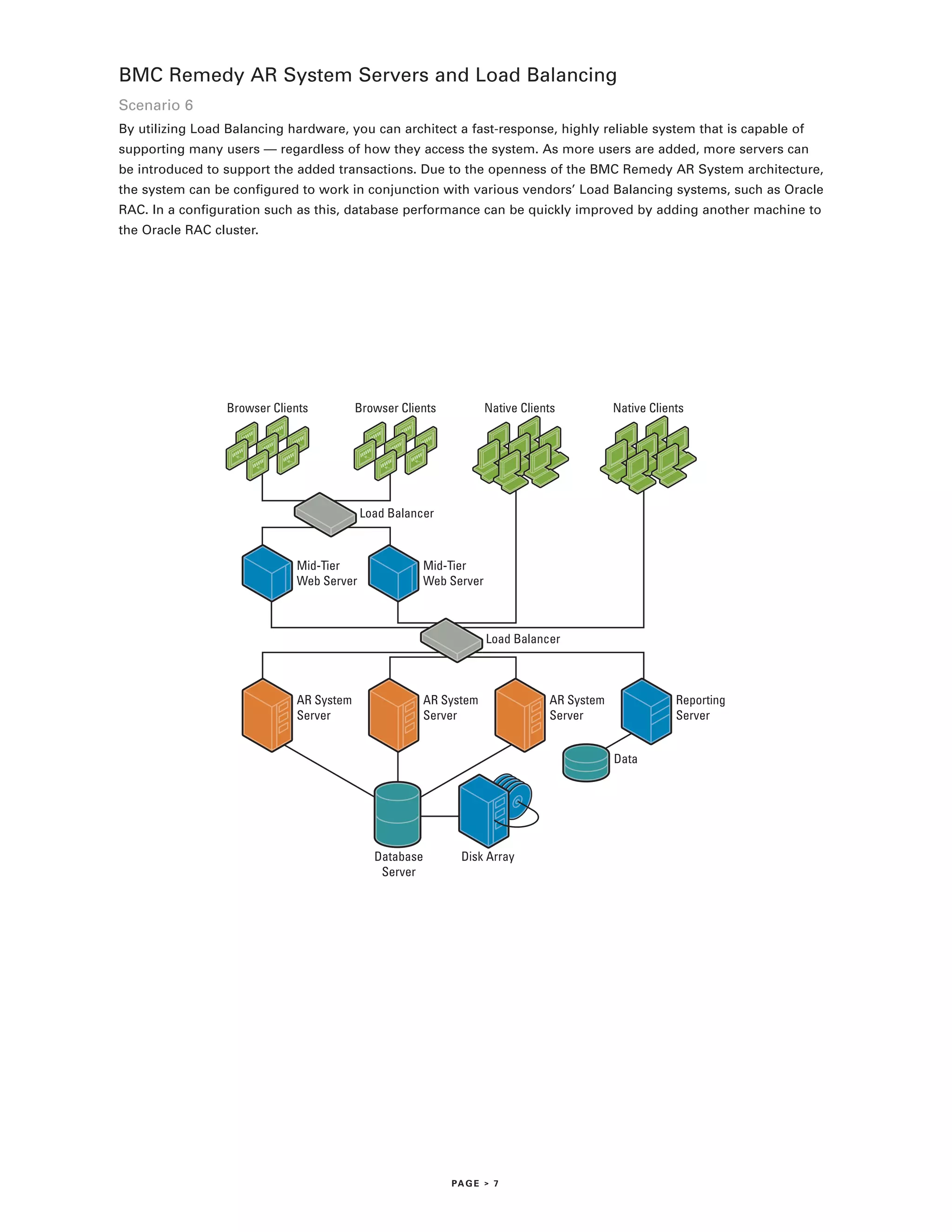
BMC Remedy AR System Servers and Load Balancing
Scenario 6
By utilizing Load Balancing hardware, you can architect a fast-response, highly reliable system that is capable of
supporting many users — regardless of how they access the system. As more users are added, more servers can
be introduced to support the added transactions. Due to the openness of the BMC Remedy AR System architecture,
the system can be configured to work in conjunction with various vendors’ Load Balancing systems, such as Oracle
RAC. In a configuration such as this, database performance can be quickly improved by adding another machine to
the Oracle RAC cluster.


                 Browser Clients         Browser Clients          Native Clients          Native Clients


                                          Load Balancer


                             Mid-Tier                Mid-Tier
                             Web Server              Web Server


                                                                  Load Balancer


                             AR System               AR System                AR System               Reporting
                             Server                  Server                   Server                  Server


                                                                                          Data


                                            Database         Disk Array
                                             Server


                                                           PA G E > 7
BMC Remedy Distributed Server Option
Changes in an organization can come through growth or functionality. The BMC Remedy Distributed Server
Option allows BMC Remedy AR System to scale across a worldwide organization by synchronizing requests across
multiple, geographically dispersed servers. Some of the applications for BMC Remedy Distributed Server Option
include functionality that:

> Transfers requests over a WAN to a location where they can be processed, or to the person who could process

 them, even in a global environment
> Transfers requests between regions in a 24x7 customer support environment

> Creates a distributed knowledge base, so that solutions to common problems are available at all locations

 worldwide


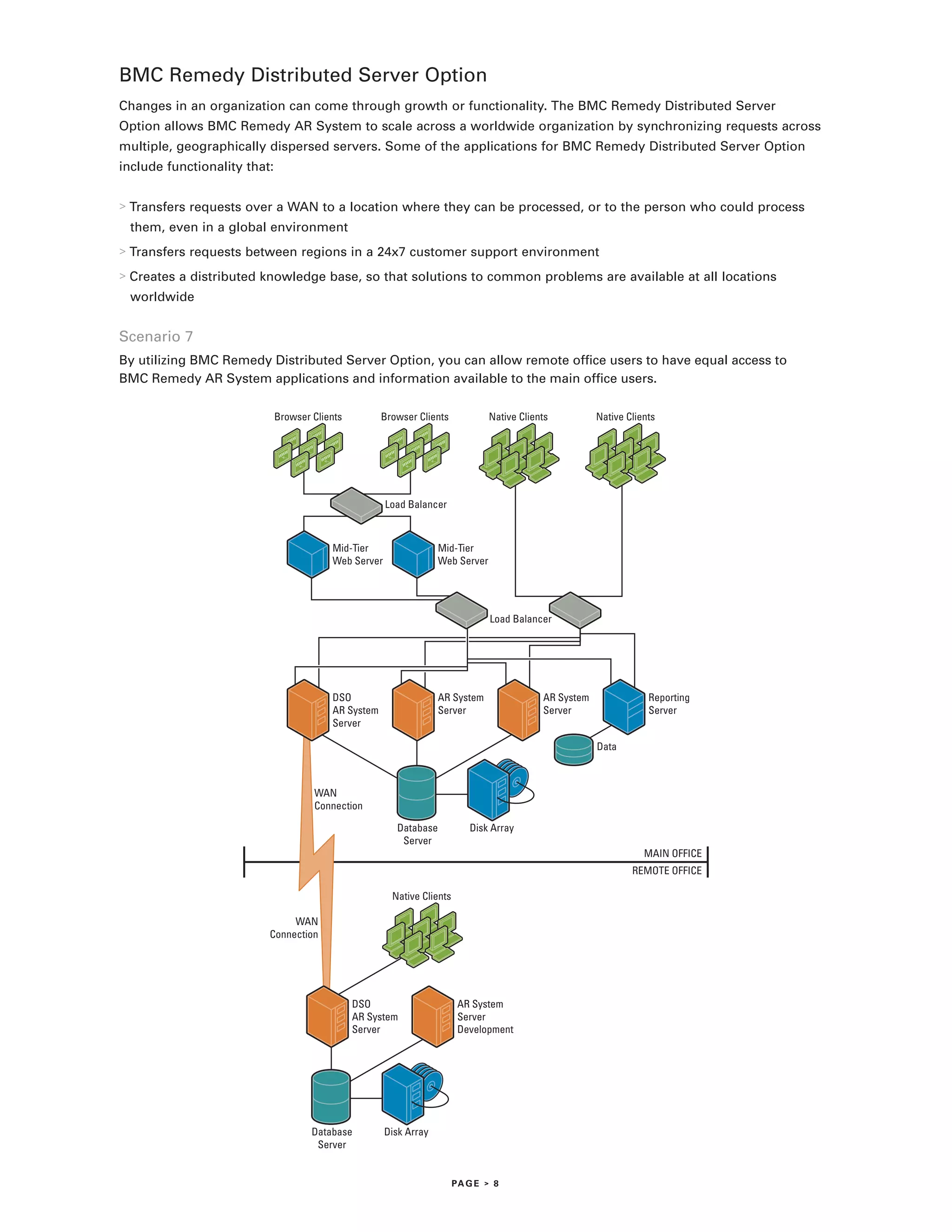
Scenario 7
By utilizing BMC Remedy Distributed Server Option, you can allow remote office users to have equal access to
BMC Remedy AR System applications and information available to the main office users.

                              Browser Clients         Browser Clients            Native Clients          Native Clients


                                                       Load Balancer


                                          Mid-Tier                  Mid-Tier
                                          Web Server                Web Server


                                                                                 Load Balancer


                                          DSO                       AR System                AR System               Reporting
                                          AR System                 Server                   Server                  Server
                                          Server

                                                                                                         Data


                                      WAN
                                      Connection

                                                         Database           Disk Array
                                                          Server
                                                                                                                    MAIN OFFICE
                                                                                                                 REMOTE OFFICE

                                                        Native Clients

                               WAN
                          Connection


                                                DSO                       AR System
                                                AR System                 Server
                                                Server                    Development


                                      Database         Disk Array
                                       Server


                                                                         PA G E > 8
Conclusion
BMC Remedy AR System has been designed to make it easy to adapt and scale to the limits
of hardware resources. With features such as Server Groups, Load Balancing, BMC Remedy
Distributed Server Option, and multiple database support, BMC Remedy AR System is able to
scale with your worldwide system resources. As a result, it will never be considered the cause
of a system degradation.

No matter how many resources are given to a particular implementation, if the system is not
tuned to allow the software and hardware to best utilize each other’s resources, it will never
be able to perform at its highest levels. BMC Remedy AR System will adjust to any hardware
configuration and best utilize the resources to which it has been assigned.

For more information about BMC Remedy AR System, please visit www.bmc.com.


                                              PA G E > 9
About BMC Software
BMC Software helps IT organizations drive greater business value through better management of technology. Our industry-leading Business
Service Management solutions ensure that everything IT does is prioritized according to business impact, so IT can proactively address busi-
ness requirements to lower costs, drive revenue, and mitigate risk. BMC solutions share BMC® Atrium™ technologies to enable IT to manage
across the complexity of diverse systems and processes — from mainframe to distributed, databases to applications, service to security.
Founded in 1980, BMC has offices worldwide and fiscal 2005 revenues of more than $1.46 billion. BMC Software. Activate your business
with the power of IT. For more information, visit www.bmc.com.


BMC Software, the BMC Software logos, and all other BMC Software product or service names are registered trademarks or trademarks of BMC Software, Inc.
All other registered trademarks or trademarks belong to their respective companies. ©2006 BMC Software, Inc. All rights reserved. 61207
                                                                                                                                                          *61207*

Bmc remedy ars_scalability

  • 1.
    TECHNICAL WHITE PAPER Scalabilityand BMC Remedy Action Request System
  • 2.
    Table of contents INTRODUCTION .............................................................................................................................. 1 BMC REMEDY AR SYSTEM ARCHITECTURE ................................................................................ 2 BMC REMEDY AR SYSTEM TIER DEFINITIONS ........................................................................... 2 > Client Tier ............................................................................................................................... 2 > Mid-Tier .................................................................................................................................. 2 > Server Tier.............................................................................................................................. 3 > Data Tier................................................................................................................................. 3 SCALABILITY APPROACHES ......................................................................................................... 4 > Scenario 1 .............................................................................................................................. 4 > Scenario 2 .............................................................................................................................. 4 > Scenario 3 .............................................................................................................................. 5 > Scenario 4 .............................................................................................................................. 5 SCALING THE MID-TIER ................................................................................................................ 6 > Scenario 5 .............................................................................................................................. 6 BMC REMEDY AR SYSTEM SERVERS AND LOAD BALANCING ................................................. 7 > Scenario 6 .............................................................................................................................. 7 BMC REMEDY DISTRIBUTED SERVER OPTION ........................................................................... 8 > Scenario 7 .............................................................................................................................. 8 CONCLUSION .......................................................................................................................................................... 9
  • 3.
    Introduction This paper willdiscuss how BMC Remedy Action Request System (AR System ) can scale ® ® ® ® within an enterprise environment and how, by combining additional hardware resources with some of the scaling features of BMC Remedy AR System, you can create a truly world- wide enterprise application. BMC Remedy AR System has been designed to scale to the limits of its central processing unit (CPU), memory, and disk sub-system configurations. This paper focuses on those features that can help make BMC Remedy AR System scale as application demand, or breadth of applica- tions, increases in an organization. It presents adjustments that can be made from a hardware perspective to help make the system scale, as well as features built into BMC Remedy AR System to allow it to scale with system hardware. PA G E > 1
  • 4.
    BMC Remedy ARSystem architecture BMC Remedy AR System is divided into four simple layers: Client Tier, Mid-Tier, Server Tier, and Data Tier. For each tier, we will address a couple of manners in which BMC Remedy AR System addresses the issue of scalability. Client Tier Windows Palm OS Wireless Browser Client Client Client Client Client tools are used to run, manage, and build applications and wireless clients. Mid-Tier The Mid-Tier and add-in services let Mid-Tier and you access the BMC Remedy AR System from Web browsers and wireless clients. Add-In Services Server Tier BMC Remedy AR System server contains the applications and BMC Remedy AR System Server software for creating new applications. Data Tier The database server holds data that applications create and manipulate. AR System Non-AR System Other Data Database Database Sources Figure 1. BMC Remedy AR System Tier definitions Client Tier The Client Tier is the presentation layer that provides the user interface and user interaction aspects of the product. Most clients are for end-user interaction, but the tools for system administration are also clients. Clients can run within a Web browser, on Windows, on Palm OS devices, on wireless devices such as cell phones, and in other environments as well. Regardless of the type of client, BMC Remedy AR System will support the client platform you choose. Mid-Tier The Mid-Tier provides components and add-in services that run on a Web server, enabling you to deploy your appli- cations on the Web. Together, the Mid-Tier and the Server Tier handle the processing of business rules. The Mid-Tier translates browser requests, communicates with the BMC Remedy AR System Server, and generates a response for the browser. When operating in a wireless or Web-enabled environment, the BMC Remedy AR System Mid-Tier architecture will allow you to scale to many users by adding additional Mid-Tier servers. PA G E > 2
  • 5.
    Server Tier The ServerTier contains the BMC Remedy AR System Server, which controls both workflow processes and access to the other data sources in the Data Tier. Host Figure 2. The ability of multiple BMC Remedy AR System Servers to exist on a single host machine aids greatly in scalability. This capability enables mutually exclusive groups of users to access separate BMC Remedy AR System Servers on a single host machine. It also allows Managed Service Providers (MSPs) to provide BMC Remedy AR System applica- tions to specific customers. Hosting multiple BMC Remedy AR System Servers in a single physical server with a load balancer can also be used to more efficiently use server resources for scalability. More concurrent users can be hosted effectively on a single server with multiple BMC Remedy AR System Servers than on just a single BMC Remedy AR System Server. An organization might also use this functionality to host both a Development and Test environment on a single server, eliminating the need to purchase additional hardware. Data Tier The Data Tier contains database servers and other data sources that can be accessed by the BMC Remedy AR System Server. The database server acts as the data storage and retrieval engine. BMC Remedy AR System allows you to have multiple servers accessing the same database. An advantage is that this capability enables multiple servers to access multiple applications from a sample high-performance database sharing the same data. It provides a single point of database management. It also allows for easy backup and repli- cation at the database level, and increases scalability by increasing the bandwidth applied to a single data set. Host Host Host Figure 3. PA G E > 3
  • 6.
    Scalability approaches There areseveral approaches to scaling BMC Remedy AR System by utilizing the capabilities available within each tier. Let’s take a look at some of the various hardware configurations that you can use to scale BMC Remedy AR System. Scenario 1 This scenario shows the BMC Remedy AR System Server housed on the same machine as the Database Management System (DBMS). This is the starting point for many BMC Remedy AR System implementations. Native Clients Native Clients AR System Server Data Scenario 2 As the number of online users increases, and additional demands are placed upon the BMC Remedy AR System Server and the database, the BMC Remedy AR System architecture allows you to address the challenge by physically implementing the various tiers of BMC Remedy AR System on separate physical servers. The BMC Remedy AR System architecture allows you to dedicate different machines for the Server Tier layer (BMC Remedy AR System) and the Data Tier (DBMS). By doing so, you can increase total system resources, thereby increasing overall performance. Additionally, you can add a Disk Array to further increase throughput at the database level. Native Clients Native Clients AR System Server Database Disk Array Server PA G E > 4
  • 7.
    Scenario 3 As usersbegin to utilize BMC Remedy AR System even more, the demand for reporting data will increase. By creating predefined rules, the BMC Remedy AR System administrator can set the rules to automatically move closed or non-critical tickets off your main forms and into archive forms. By creating a report server, you can offload the reporting process to a separate server and allow the application server’s processing power to focus on the needs of the online, customer-focused users. By putting the reporting server on a completely different database and utilizing BMC® Remedy® Distributed Server Option to transfer all tickets to this server, you can achieve additional performance. As your data grows, this server can also act as an archival/reporting server. Native Clients Native Clients AR System Reporting Server Server Data Database Disk Array Server Scenario 4 As usage of an application grows, so do user dependency, response time, and application availability requirements. These requirements may begin to exceed the capabilities of a single Application Server. BMC Remedy AR System allows multiple BMC Remedy AR System Application Servers to access a single BMC Remedy AR System database. This configuration is referred to as a Server Group. There are several advantages to having multiple BMC Remedy AR System Servers configured as a Server Group. This functionality allows the systems to be used in a load-balanced/highly available environment. By utilizing a load balancer, you are able to distribute your users evenly across multiple Application Servers, while still accessing a single database. Should a BMC Remedy AR System Server within the Server Group become unavailable, users can be automatically connected to another BMC Remedy AR System Server. BMC Remedy AR System Servers within a Server Group can be configured to allow for the automatic fail-over and return of any operations managed by the use of those licenses. Finally, if the organization should experience a large influx of users, you can address their immediate needs by adding another BMC Remedy AR System Server to the Server Group instead of going out and buying a bigger piece of hardware and doing a wholesale upgrade. Native Clients Native Clients Load Balancer Reporting Server AR System AR System Data Server Server Database Disk Array Server PA G E > 5
  • 8.
    Scaling the Mid-Tier Asyour organization continues to grow, you will need to address the needs of the remote browser-based user. Scenario 5 Mid-Tier processes are off-loaded to a separate server, increasing total system resources, and by extension increasing overall performance. As additional browser-based users are added, more Mid-Tier Web Servers can be introduced, as necessary. Mid-Tier Servers can connect to more than one BMC Remedy AR System working with one BMC Remedy AR System Server, or have a single Mid-Tier working with multiple BMC Remedy AR System Servers. You can also have multiple Mid-Tier Servers working with multiple BMC Remedy AR System Servers. Browser Clients Browser Clients Native Clients Native Clients Mid-Tier Mid-Tier Web Server Web Server Load Balancer AR System AR System Reporting Server Server Server Data Database Disk Array Server PA G E > 6
  • 9.
    BMC Remedy ARSystem Servers and Load Balancing Scenario 6 By utilizing Load Balancing hardware, you can architect a fast-response, highly reliable system that is capable of supporting many users — regardless of how they access the system. As more users are added, more servers can be introduced to support the added transactions. Due to the openness of the BMC Remedy AR System architecture, the system can be configured to work in conjunction with various vendors’ Load Balancing systems, such as Oracle RAC. In a configuration such as this, database performance can be quickly improved by adding another machine to the Oracle RAC cluster. Browser Clients Browser Clients Native Clients Native Clients Load Balancer Mid-Tier Mid-Tier Web Server Web Server Load Balancer AR System AR System AR System Reporting Server Server Server Server Data Database Disk Array Server PA G E > 7
  • 10.
    BMC Remedy DistributedServer Option Changes in an organization can come through growth or functionality. The BMC Remedy Distributed Server Option allows BMC Remedy AR System to scale across a worldwide organization by synchronizing requests across multiple, geographically dispersed servers. Some of the applications for BMC Remedy Distributed Server Option include functionality that: > Transfers requests over a WAN to a location where they can be processed, or to the person who could process them, even in a global environment > Transfers requests between regions in a 24x7 customer support environment > Creates a distributed knowledge base, so that solutions to common problems are available at all locations worldwide Scenario 7 By utilizing BMC Remedy Distributed Server Option, you can allow remote office users to have equal access to BMC Remedy AR System applications and information available to the main office users. Browser Clients Browser Clients Native Clients Native Clients Load Balancer Mid-Tier Mid-Tier Web Server Web Server Load Balancer DSO AR System AR System Reporting AR System Server Server Server Server Data WAN Connection Database Disk Array Server MAIN OFFICE REMOTE OFFICE Native Clients WAN Connection DSO AR System AR System Server Server Development Database Disk Array Server PA G E > 8
  • 11.
    Conclusion BMC Remedy ARSystem has been designed to make it easy to adapt and scale to the limits of hardware resources. With features such as Server Groups, Load Balancing, BMC Remedy Distributed Server Option, and multiple database support, BMC Remedy AR System is able to scale with your worldwide system resources. As a result, it will never be considered the cause of a system degradation. No matter how many resources are given to a particular implementation, if the system is not tuned to allow the software and hardware to best utilize each other’s resources, it will never be able to perform at its highest levels. BMC Remedy AR System will adjust to any hardware configuration and best utilize the resources to which it has been assigned. For more information about BMC Remedy AR System, please visit www.bmc.com. PA G E > 9
  • 12.
    About BMC Software BMCSoftware helps IT organizations drive greater business value through better management of technology. Our industry-leading Business Service Management solutions ensure that everything IT does is prioritized according to business impact, so IT can proactively address busi- ness requirements to lower costs, drive revenue, and mitigate risk. BMC solutions share BMC® Atrium™ technologies to enable IT to manage across the complexity of diverse systems and processes — from mainframe to distributed, databases to applications, service to security. Founded in 1980, BMC has offices worldwide and fiscal 2005 revenues of more than $1.46 billion. BMC Software. Activate your business with the power of IT. For more information, visit www.bmc.com. BMC Software, the BMC Software logos, and all other BMC Software product or service names are registered trademarks or trademarks of BMC Software, Inc. All other registered trademarks or trademarks belong to their respective companies. ©2006 BMC Software, Inc. All rights reserved. 61207 *61207*